RCSI-16A - Ice machine Royal Catering - Free user manual and instructions
Find the device manual for free RCSI-16A Royal Catering in PDF.


| Product Type | Soft Ice Cream Machine |
| Model | RCSI-16A |
| Brand | Royal Catering |
| Dimensions (L x W x H) | 75 x 24 x 71.5 cm |
| Weight | 47.5 kg |
| Power Supply | 230 V ~ / 50 Hz, 800 W |
| Refrigerant | R290, 120 g |
| Tank Capacity | 5.5 L (upper tank) / 7.1 L (total) |
| Production Speed | 13 L/h |
| Climate Class | SN/N |
| Protection Class | I (grounded) |
| Main Functions | AUTO mode (production), CLEAN mode, SLEEP mode, ice hardness adjustment (1-10), portion counter, temperature display |
| Maintenance and Cleaning | Daily cleaning of tank and cylinder with disinfectant solution; condenser cleaning every 6 months; lubrication of seals with food-grade lubricant; do not use metal objects |
| Safety | Overload protection, automatic shutdown in case of malfunction, mixer rotation detection, alarms for slow speed and distributor active too long, use of flammable refrigerant R290 |
| Spare Parts and Repairability | Parts list included in manual (motor, compressor, solenoid valves, seals, etc.); repair by qualified personnel only; original parts recommended |
| Operating Ambient Temperature | 10 °C to 40 °C, relative humidity ≤ 90% |
| Included Accessories | Drip tray, lid, dispensing lever, etc. (see manual) |
Frequently Asked Questions - RCSI-16A Royal Catering
User questions about RCSI-16A Royal Catering
0 question about this device. Answer the ones you know or ask your own.
Ask a new question about this device
Download the instructions for your Ice machine in PDF format for free! Find your manual RCSI-16A - Royal Catering and take your electronic device back in hand. On this page are published all the documents necessary for the use of your device. RCSI-16A by Royal Catering.
USER MANUAL RCSI-16A Royal Catering
SOFT ICE CREAM MACHINE

| DE | Produktname | Softeismaschine |
| EN | Product name | Soft ice cream machine |
| PL | Nazwa produktu | Maszyna do lodów włoskich |
| CZ | Název vyrobku | Stroj na jemnou zmrzlinu |
| FR | Nom du produit | Machine a glace molle |
| IT | Nome del prodotto | Macchina per gelato soft |
| ES | Nombre del producto | Máquina de helado suave |
| HU | Termék neve | Puha fagylaltgép |
| DA | Produktnavn | Soft is maskine |
| FI | Tuotteen nimi | Pehmeän jäätelön kone |
| NL | Productnaam | Softijsmachine |
| NO | Produktnavn | Myk iskremmaskin |
| SE | Produktnamn | Mjukglassmaskin |
| PT | Nome do produto | Máquina de sorvete macio |
| SK | Názov Produktu | Stroj na mäkkú zmrzlinu |
| DE | Modell | RCSI-16A |
| EN | Product model | |
| PL | Model produktu | |
| CZ | Model výrobku | |
| FR | Modèle | |
| IT | Modello | |
| ES | Modelo | |
| HU | Modell | |
| DA | Model | |
| FI | Tuotteen malli | |
| NL | Productmodel | |
| NO | Produktmodell | |
| SE | Produktmodell | |
| PT | Modelo do produto | |
| SK | Model | |
| DE | Hersteller | expondo Polska sp. z o.o. sp. k. |
| EN | Manufacturerer | |
| PL | Producent | |
| CZ | Výrobce | |
| FR | Fabricant | |
| IT | Produttore | |
| ES | Fabricante | |
| HU | Termelő | |
| DA | Producent | |
| FI | Valmistaja | |
| NL | Producent | |
| NO | Produsent | |
| SE | Tillverkare | |
| PT | Fabricante | |
| SK | Výrobca | |
| DE | Anschrift des Herstellers | ul. Nowy Kisielin - Innowacyjna 7, 66-002 Zielona Góra | Poland, EU |
| EN | Manufacturerer Address | |
| PL | Adres producenta | |
| CZ | Adresa výrobce | |
| FR | Adresse du fabricant | |
| IT | Indirizzo del produttore | |
| ES | Dirección del fabricante | |
| HU | A gyártó címe | |
| DA | Producentens adresse | |
| FI | Valmistajan osoite | |
| NL | Adres producent | |
| NO | Produsentens adresse | |
| SE | Tillverkarens adress | |
| PT | Endereço do fabricante | |
| SK | Adresa výrobcu |

This User Manual has been translated for your convenience using machine translation. Reasonable efforts have been made to provide an accurate translation; however, no automated translation is perfect nor is it intended to replace human translators. The official User Manual is the English version. Any discrepancies or differences created in the translation are not binding and have no legal effect for compliance or enforcement purposes. If any questions arise related to the accuracy of the information contained in the User Manual, please refer to the English version of those contents which is the official version.
Technical data
| Parameter description | Parameter value |
| Product name | Soft ice cream machine |
| Model | RCSI-16A |
| Supply voltage [V~] / frequency [Hz] | 230/50 |
| Rated power [W] | 800 |
| Refrigerant | R290 |
| Refrigerant quantity [g] | 120 |
| Tank capacity [l] | 5.5 |
| Total capacity [l] | 7.1 |
| Ice cream production speed [l/h] | 13 |
| Protection class | AND |
| Climate class | SN/N |
| Dimensions [width x depth x height; mm] | 75 x 24 x 71.5 |
| Weight [kg] | 47.5 |
1. General description
The user manual is designed to assist in the safe and trouble-free use of the device. The product is designed and manufactured in accordance with strict technical guidelines, using state-of-the-art technologies and components. Additionally, it is produced in compliance with the most stringent quality standards.
DO NOT USE THE DEVICE UNLESS YOU HAVE THOROUGHLY READ AND UNDERSTOOD THIS USER MANUAL.
To increase the product life of the device and to ensure trouble-free operation, use it in accordance with this user manual and regularly perform maintenance tasks. The technical data and specifications in this user manual are up to date. The manufacturer reserves the right to make changes associated with quality improvement. The device is designed to reduce noise emission risks to a minimum, taking into account technological progress and noise reduction opportunities.
Legend

The product satisfies the relevant safety standards.

Read instructions before use.
The product must be recycled.
WARNING! or CAUTION! or REMEMBER! Applicable to the given situation. (general warning sign)
ATTENTION! Electric shock warning!
ATTENTION! Rotating parts, entanglement hazard!
ATTENTION! Fire hazard - flammable materials!
ATTENTION! Hot surface, risk of burns!
Only use indoors.
PLEASE NOTE! Drawings in this manual are for illustration purposes only and in some details may differ from the actual product.
2. Usage safety
ATTENTION! Read all safety warnings and all instructions. Failure to follow the warnings and instructions may result in electric shock, fire and/or serious injury or even death.
The terms "device" or "product" are used in the warnings and instructions to refer to:
Soft ice cream machine
2.1. Electrical safety
a) The plug must fit the socket. Do not modify the plug in any way. Using original plugs and matching sockets reduces the risk of electric shock. b) Avoid touching earthed elements such as pipes, heaters, boilers and refrigerators. There is an increased risk of electric shock if the earthed device is exposed to rain, comes into direct contact with a wet surface or is operating in a damp environment. Water getting into the device increases the risk of damage to the device and of electric shock. c) Use the cable only for its designated use. Never use it to carry the device or to pull the plug out of a socket. Keep the cable away from heat sources, oil, sharp edges or moving parts. Damaged or tangled cables increase the risk of electric shock. d) Do not use the device if the power cord is damaged or shows obvious signs of wear. A damaged power cord should be replaced by a qualified electrician or the manufacturer's service centre. e) To avoid electric shock, do not immerse the cord, plug or device in water or other liquids. Do not use the device on wet surfaces.
f) ATTENTION! DANGER TO LIFE! While cleaning, never immerse the device in water or other liquids. g) Do not use in very humid environments or in the direct vicinity of water tanks. h) Before the first use, please check whether the main voltage type and current comply with the indicated data on the type plate. i) The device must be connected to an outlet that has a grounding wire.
2.2. Safety in the workplace
a) Make sure the workplace is clean and well lit. A messy or poorly lit workplace may lead to accidents. Try to think ahead, observe what is going on and use common sense when working with the device. b) If you discover damage or irregular operation, immediately switch the device off and report it to a supervisor without delay. c) In case of fire, use a powder or carbon dioxide (CO2) fire extinguisher (one intended for use on live electrical devices) to put it out. d) Use the device in a well-ventilated space. e) Regularly inspect the condition of the safety labels. If the labels are illegible, they must be replaced. f) Please keep this manual available for future reference. If this device is passed on to a third party, the manual must be passed on with it. g) Keep packaging elements and small assembly parts in a place not available to children. h) Keep the device away from children and animals. i) If this device is used together with another equipment, the remaining instructions for use shall also be followed.

Remember! When using the device, protect children and other bystanders.
2.3. Personal safety
a) Do not use the device when tired, ill or under the influence of alcohol, narcotics or medication which can significantly impair the ability to operate the device. b) The machine may be operated by physically fit persons who are able to handle the machine, are properly trained, who have reviewed this operating manual and have received training in occupational health and safety. c) When working with the device, use common sense and stay alert. Temporary loss of concentration while using the device may lead to serious injuries. d) Do not overestimate your abilities. When using the device, keep your balance and remain stable at all times. This will ensure better control over the device in unexpected situations. e) Do not wear loose clothing or jewellery. Keep hair, clothes and gloves away from moving parts. Loose clothing, jewellery or long hair may get caught in moving parts. f) The device is not a toy. Children must be supervised to ensure that they do not play with the device. g) Do not put your hands or other items inside the device while it is in use!
2.4. Safe device use
a) Do not overload the device. Use the appropriate tools for the given task. A correctly-selected device will perform the task for which it was designed better and in a safer manner.
b) Disconnect the device from the power supply before commencement of adjustment, cleaning and maintenance. Such a preventive measure reduces the risk of accidental activation.
c) When not in use, store in a safe place, away from children and people not familiar with the device who have not read the user manual. The device may pose a hazard in the hands of inexperienced users.
d) Keep the device in perfect technical condition. Before each use, check for general damage, especially check moving components for cracked parts or elements, and for any other conditions which may impact the safe operation of the device. If damage is discovered, hand over the device for repair before use.
e) Keep the device out of the reach of children.
f) Device repair or maintenance should be carried out by qualified persons, only using original spare parts. This will ensure safe use.
g) To ensure the operational integrity of the device, do not remove factory-fitted guards and do not loosen any screws.
h) When transporting and handling the device between the warehouse and the destination, observe the occupational health and safety principles for manual transport operations which apply in the country where the device will be used.
i) Avoid situations where the device stops working during use due to excessive loading. This may result in overheating of the drive elements and damage to the device.
j) Do not touch articulated parts or accessories unless the device has been disconnected from the power source.
k) Do not move, adjust or rotate the device in the course of work.
l) Clean the device regularly to prevent stubborn grime from accumulating.
m) The specified vibrations emission was measured using standard measurement methods. Vibrations emissions may change if the device is used in different surroundings.
n) The device is not a toy. Cleaning and maintenance may not be carried out by children without supervision by an adult person.
o) Do not run the device when empty.
p) It is forbidden to interfere with the structure of the device in order to change its parameters or construction.
q) Keep the device away from sources of fire and heat. Do not expose the device to direct sunlight.
r) Do not cover the ventilation openings!
s) NOTE: During operation, some elements of the device become very hot - scalding hazard!
t) Do not place the device upside down or tilt it at an angle greater than 45 degrees.
u) Keep a free space around the device (at least 50 cm on each side).
v) Do not damage the refrigerant circulation system.
w) Prevent water and other liquids from entering the device.
x) If there is no mixture or water in the freezing cylinder, the machine cannot operate. Failure to follow this recommendation may result in damage to the mixer.
y) Do not insert any objects into the ventilation grill or dispenser outlet while the machine is running.
z) The device contains flammable materials. After completely ceasing to use the device, it should be transferred to a facility dealing with the safe disposal of electronic and hazardous equipment.

ATTENTION! Despite the safe design of the device and its protective features, and despite the use of additional elements protecting the operator, there is still a slight risk of accident or injury when using the device. Stay alert and use common sense when using the device.
3. Use guidelines
The device is intended for producing soft ice cream.
The device cannot be used for:
- preparing ice cream from substances that may pose a threat to health or life
- freezing drinks and food
The user is liable for any damage resulting from unintended use of the device.
3.1. Description of the device
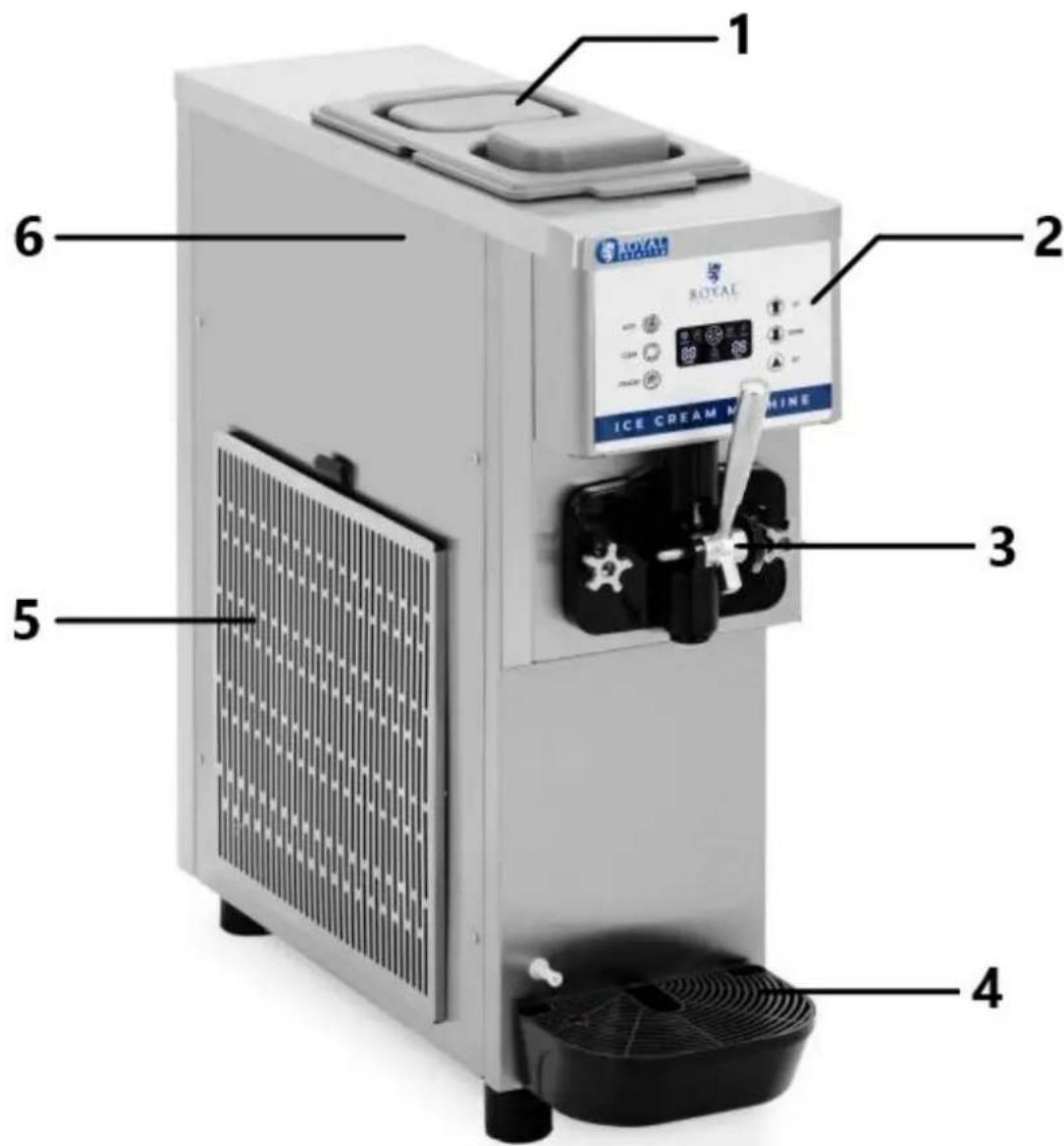
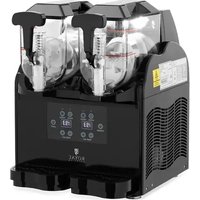
1 - Top tank cover 2 - Control panel 3 - Dispenser lever 4 - Drip tank 5 - Vent 6 - Upper tank (visible after removing the top cover)
Control panel
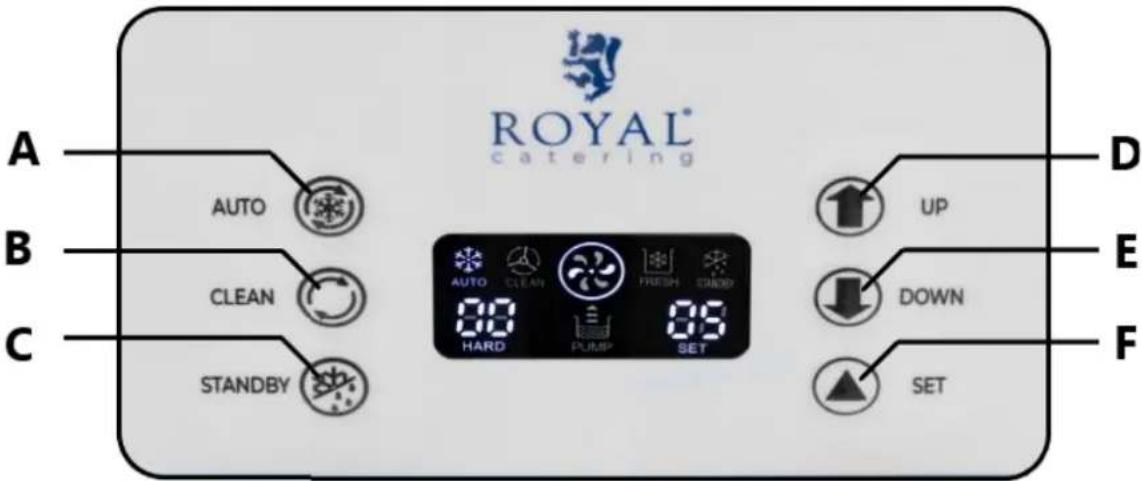
A - "AUTO" mode button B- "CLEAN" mode button C- "STANDBY" mode button D - "UP" button - increasing the value E - "DOWN" button - decreases the value F - "SET" button - setting operating parameters
3.2. Preparation to work
Device location
The ambient temperature should be in the range of 10 - 40°C and the relative humidity should not exceed 90%. The device should be placed in a way that ensures good air circulation. - Maintain a minimum distance of 50 cm from each wall of the device. - There must be enough space for the operator to perform his work correctly and safely.
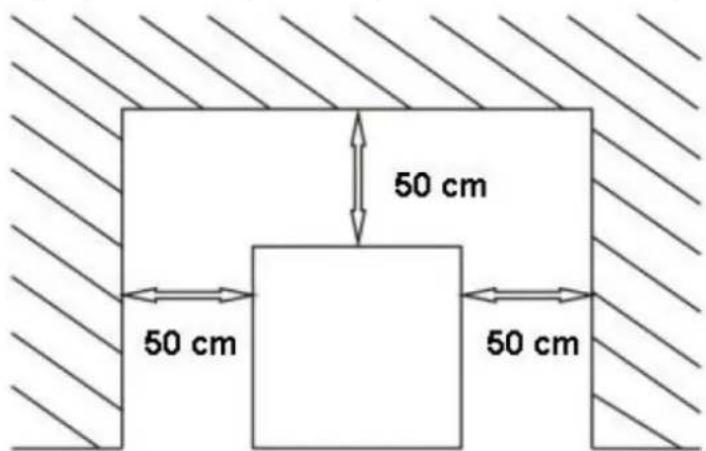
- Keep the device away from all hot surfaces.
- The device should always be used on an even, stable, clean, fireproof and dry surface and out of the reach of children and people with limited physical, sensory and mental functions.
- The device must be located in such a way that the power plug can be reached at any time.
- Please ensure that the power supply to the device corresponds to the data given on the nameplate! The use of extension cords is not recommended;
- Do not change the original plug;
- Do not use a plug adapter;
- The device should be connected to an outlet that has a grounding wire.
- Before first use, dismantle all components and wash them, as well as wash the entire device.
Test run
1) Connect the machine to the power supply. 2) Press the "CLEAN" button, the mixer will start rotating. 3) Press the "AUTO" button, the mixer will rotate and a few minutes later the compressor will start freezing. 4) Press the "STANDBY" button, wait 2-3 minutes and then check whether the tank has stopped freezing.
NOTE: Do not allow the device to run dry for a long time (without ice mixture), as this may damage the device.
Cleaning before first use
Before first use, please clean and disinfect the machine thoroughly by following these steps:
1) Prepare 3 liters of a solution consisting of a mixture of cold water and cleaning detergent intended for use on surfaces in contact with food. Pour the solution into the machine's tank and clean the tank thoroughly using a sponge or soft cloth. 2) Turn on the power, press the "CLEAN" button and let the machine run for 2 minutes. 3) Place a bucket under the dispenser opening, pull the handle down to pour out the solution. 4) Once all the cleaning solution has drained, press the "CLEAN" button to exit the cleaning mode. 5) Rinse the tank and dosing system by repeating all washing steps 2-3 times, using only clean water.
ATTENTION
The temperature of the solutions should be below 60°C, otherwise it will damage the parts. - After cleaning, make sure there is no water in the cylinder, otherwise the frozen ice will damage the agitator when the machine freezes.
3.3. Parameter settings
1) Serving counter check and reset function: To check how many servings have been dispensed, press the "UP" and "DOWN" buttons simultaneously. The function only works in automatic mode and counts when the microswitch is active. The counter will return to its previous display if you do not perform any action for 5 seconds. You can reset the counter by pressing the "UP" and "DOWN" buttons simultaneously for 5 seconds. 2) Ice hardness setting: In standby status, press the "UP" button for 1 second to activate the hardness setting mode (the "HARD/SET" window will flash). Then, use the "UP" or "DOWN" buttons to select the ice hardness level from 1 to 10. The setting will be saved automatically after 5 seconds of inactivity. 3) Checking the temperature: To check the temperature inside the device, press and hold the "UP" button for 3 seconds. This will allow you to read the temperature of the upper tank and cylinder. 4) Setting System Parameters: To adjust system settings, hold "SET" button for 3 seconds. Then, scrolling through options P0 to P5 with short presses on "SET", select the parameter to
change. When the appropriate parameter appears on the display, use the "UP" and "DOWN" buttons to adjust it. Below is a list of parameters that can be changed:
| Number | Parameter description | Code | The range of values | Default value | Unit |
| 1 | Tank pre-cooling temperature | P1 | 2-10 | 8 | °C |
| 2 | Washing time | P2 | 1-30 | 10 | minute |
| 3 | Hysteresis of the tank pre-cooling temperature | P3 | 1-10 | 2 | °C |
| 4 | Compressor restart time in standby mode | P4 | 5-30 | 15 | minute |
| 5 | Auto restart time | Q5 | 1-15 | 5 | minute |
| 6 | Engine downtime delay | P6 | 1-60 | thirty | second |
| 7 | Temperature compensation value | P7 | -9~+9 | 0 | °C |
| 8 | Alarm about lack of ice mass | P8 | 30-50 | 43 | / |
NOTE: It is not recommended to adjust the P1 parameter.
3.4. Functions description
Cleaning
- Activate Cleaning Mode: In standby status, press "CLEAN" button to start Cleaning Mode. The drive motor will be turned on. Press "CLEAN" again to turn off the cleaning mode.
- Engine Speed Measurement: Hold the "CLEAN" button for 10 seconds to activate the no-load engine speed measurement function.
Standby mode
- Activate standby mode: Press the "STANDBY" button to activate this mode. The compressor will run to freeze the cylinder until it is 70% frozen. The freezing solenoid valve will be turned off and the pre-cooling solenoid valve will be turned on. When the temperature of the upper tank reaches the set temperature (P0), both solenoid valves and the compressor will stop. The compressor will resume operation when the P3 parameter value is reached.
Automatic mode
- Activation of automatic mode: Press the "Auto" button to enter automatic mode. The compressor will run to freeze the cylinder 100% and then continue to run to freeze the top tank until the set temperature (P0) is reached.
Alarm messages
1) No rotation detection: If the limit switch does not detect the mixer rotation (RPM), "--" will appear on the screen and the machine will beep and stop working. 2) Drive motor speed too slow: If the motor speed is too slow, "NL" will appear on the screen, the machine will beep and stop working. 3) Limit switch behind the dispenser opening active for more than 1 minute: If the dispenser is active for more than 1 minute, "Cb" will appear on the screen and the machine will beep and stop working. 4) Too much mixture in the upper tank: If the mixture in the upper tank is not at the appropriate level, "QL" will appear on the screen.
3.5. Ice cream production
ATTENTION:
- The product does not have a night mode. After daily use of the machine, empty the tank and clean the machine to ensure proper hygiene.
- It is recommended to use powdered ingredients. For example, mixing powdered ice cream with milk. Avoid using ice cream mix (or cake mix) as it may damage the machine or result in poorly formed ice cream.
- Tip: Prepare 60 - 80 g of ice cream each time and wait 10 seconds before preparing the second portion.
1) Rinsing before starting:
- Prepare 3 liters of disinfectant solution in a bucket of cold water, pour it into the hopper and thoroughly clean all its parts.
- Turn on the main power, press the "CLEAN" button and let the machine run for 3 minutes.
- Place a bucket under the dispenser door to drain the solution. After the solution flows out, press the "CLEAN" button to turn off the washing mode.
- Remove the two dispenser door screws, remove the entire assembly, clean it, then reassemble and install it in the machine.
- Pour a moderate amount of clean water into the funnel, drain it, and repeat until the water is as clear as possible.
- Dry the dispenser opening with a clean, dry cloth.
2) Preparation of the mixture :
- Follow the instructions for preparing the ice cream mixture, avoiding any contamination.
- Let the mixture stand for about 5 minutes or use a ready-made ice cream mixture.
- It is recommended to cool and store the mixture in the refrigerator at 4°C to obtain better ice cream.
3) Adding the mixture to the hopper :
- Pour half of the prepared mixture into the hopper.
- Press the "CLEAN" button to mix the mixture thoroughly until the bubbles disappear, then press again to stop mixing.
- Pour the rest of the mixture, close the lid and press the "AUTO" button to switch to ice cream production mode. When the display shows over 99% , the ice cream is ready.
- To serve ice cream, pull the handle and place a cup or other container under the dispenser opening.
4) Using the hopper cooling function:
- Press the "STANDBY" button to turn on the hopper cooling, which will prevent the mixture from spoiling at high temperatures and speed up the preparation of ice cream.
5) Be sure to empty any remaining mixture before cleaning the machine by following the cleaning steps previously described.
3.6. Cleaning and maintenance
The cleaning and maintenance of this machine is not tied to a set schedule, but depends on the conditions of use and operation. Each machine requires an individual approach depending on its current condition.
Cleaning
1) Cleaning the upper tank and cylinder
- Press the "CLEAN" button to remove any remaining mix from the hopper and barrel, then press again to stop the process. Prepare 3 liters of disinfectant solution in cold water, pour into the hopper.
- Run the machine in "CLEAN" mode for 3 minutes and then drain all the solution. Repeat the operation 2-3 times with clean water for thorough cleaning.
- Unplug the machine, disassemble and clean all parts.
- Unscrew the four screws of the dispenser door, remove it.
- Disassemble the dispenser door components: latch, handle, piston, sealing rings.
- Remove the screw from the cylinder and then remove the screw seal. Clean all parts, replace worn parts.
- Reassemble all parts by applying lubricant (e.g., Vaseline) to the piston, O-rings, and gasket.
2) Cleaning the outside of the machine
- Keep the exterior of the machine clean using a wet cloth. Do not pour water directly into the machine.
3) Cleaning the condenser
- If necessary (every six months), clean the condenser, which may be dirty with dust, affecting heat dissipation and cooling.
a) Disconnect the main power. b) Remove the back and side panels. c) Use a vacuum cleaner, compressed air, or a soft brush to remove dust. Be careful not to damage the condenser components.
Maintenance tips
- Empty the product daily and clean and disinfect the device thoroughly. Proper maintenance ensures better product consistency, increases machine reliability and performance, and prevents costly repairs.
- Before each cleaning (unless the user manual states otherwise), adjustment, replacement of accessories, and when the device is not in use, remove the mains plug. Wait until the rotating elements stop.
- Do not run the machine empty to avoid damaging internal parts.
- Familiarize yourself with all machine operating modes for safe and reliable operation.
- Only agents that do not contain corrosive substances should be used to clean the surfaces.
- Only mild cleaning agents intended for cleaning surfaces in contact with food may be used to clean the device.
- Do not run the machine with water in automatic mode to avoid the water turning into ice, which may damage the machine's components.
- Lubricate the seals and sealing rings with a food-grade lubricant
- Do not pour water or any other liquid into the tank when the tamper is removed from the freezing cylinder. This will cause fluid to flow from the discharge pipe located under the machine.
- Do not add any foreign objects to the hopper, which may block the flow to the freezing cylinder and damage the device.
- Do not operate the machine with the stainless steel panels removed to avoid accidents due to moving parts. Loose clothing and long hair can become caught in moving parts, causing serious injury. After each cleaning, all components should be dried thoroughly before the device is used again.
- The device should be stored in a dry and cool place protected from moisture and direct sunlight. It is prohibited to spray the device with a jet of water or immerse the device in water.
- Please make sure that no water gets in through the ventilation holes in the housing.
- Ventilation holes should be cleaned with a brush and compressed air.
- Use a soft cloth for cleaning.
- Do not use sharp and/or metal objects (e.g. a wire brush or a metal spatula) for cleaning, as they may damage the surface of the material from which the device is made.
Disposal of used devices:
At the end of its useful life, this product must not be disposed of with normal municipal waste, but should be taken to a collection point for the recycling of electrical and electronic equipment. This is indicated by the symbol placed on the product, user manual or packaging. The materials used in the device are reusable according to their marking. By reusing, reusing materials or otherwise using used equipment, you make an important contribution to protecting our environment.
Your local administration will provide you with information about the appropriate disposal point for used devices.
Troubleshooting
If you encounter problems with your device, refer to the table below for a solution. If the problem persists, do not solve it yourself and contact the manufacturer's technical service for assistance.
| Problem | Probable causes | Solutions |
| The machine is not working | The machine is not connected. | Check and connect correctly. |
| The main switch is not turned on. | Turn on the master switch. | |
| The main switch is damaged. | Replace the main switch with a new one. | |
| The protection circuit is operational. | Change the fuse. | |
| Cleaning mode does not work | The wiring for this function is loose. | Check the cabling and connect it. |
| The drive motor does not work. | Repair or replace the engine. | |
| Automatic mode does not work | The wiring for this function is loose. | Check the cabling and connect it. |
| The control board is not active | Replace the control board. | |
| The compressor does not work | The tension is low. | Try to get high and stable voltage. |
| The relay is bad. | Replace the control board. | |
| There is something wrong with the control board. | Replace the control board. | |
| Overload protection works. | Find the cause and restart. | |
| The compressor is damaged. | Replace the compressor. | |
| The compressor capacitor is not working. | Replace the capacitor. | |
| The machine does not freeze | Refrigerant leakage. | Find the leak location and repair it, refill the refrigerant after vacuuming the refrigeration system. |
| The solenoid valve does not work. | Replace the solenoid valve. | |
| Fan motor not working. | Repair or replace the fan motor. | |
| The compressor is not working. | Check the compressor and replace it if necessary. | |
| The machine does not stop | The hardness is set too high. | Reduce the hardness setting. |
| There is something wrong with the control board. | Replace the control board. | |
| Bad cooling system. | Check the refrigeration system. | |
| The relay is turned off | The tension is low. | Try to get high and stable voltage. |
| There is something wrong with the control board. | Replace the control board. | |
| The contactor is burnt. | Replace contactor. | |
| Ice cream does not flow from the dispenser | Improper mixture caused the cylinder to freeze. | Prepare the appropriate mixture. |
| No mixture in the cylinder. | Add the mixture to the hopper. | |
| The limit switch does not work or the limit switch wiring is loose. | Replace limit switch or change wiring. | |
| The clutch or mixer is damaged. | Replace the clutch or mixer. | |
| The ice cream is too soft | The dispenser opening is leaking. | Check the piston O-ring and replace it if necessary. |
| The dispenser door is leaking. | Check the dispenser door O-ring and replace it if necessary. | |
| The drain pipe is leaking. | Check the screw seal and replace it if necessary. | |
| The buzzer keeps beeping | Low voltage protection. | Turn off the device first, then turn it on after 5 minutes. |
| Shutdown protection. | Turn off the device first, then turn it on after 5 minutes. | |
| Limit switch does not reset in time. | Pull the handle up to reset the limit switch. | |
| CODE "NL". | The speed of the drive motor decreases rapidly. | The hardness is set too high or check if it is a motor problem. |
| "--"CODE | The proximity switch is not in the correct position or is damaged. | Adjust the position of the proximity switch or replace it. |
Assembly drawing
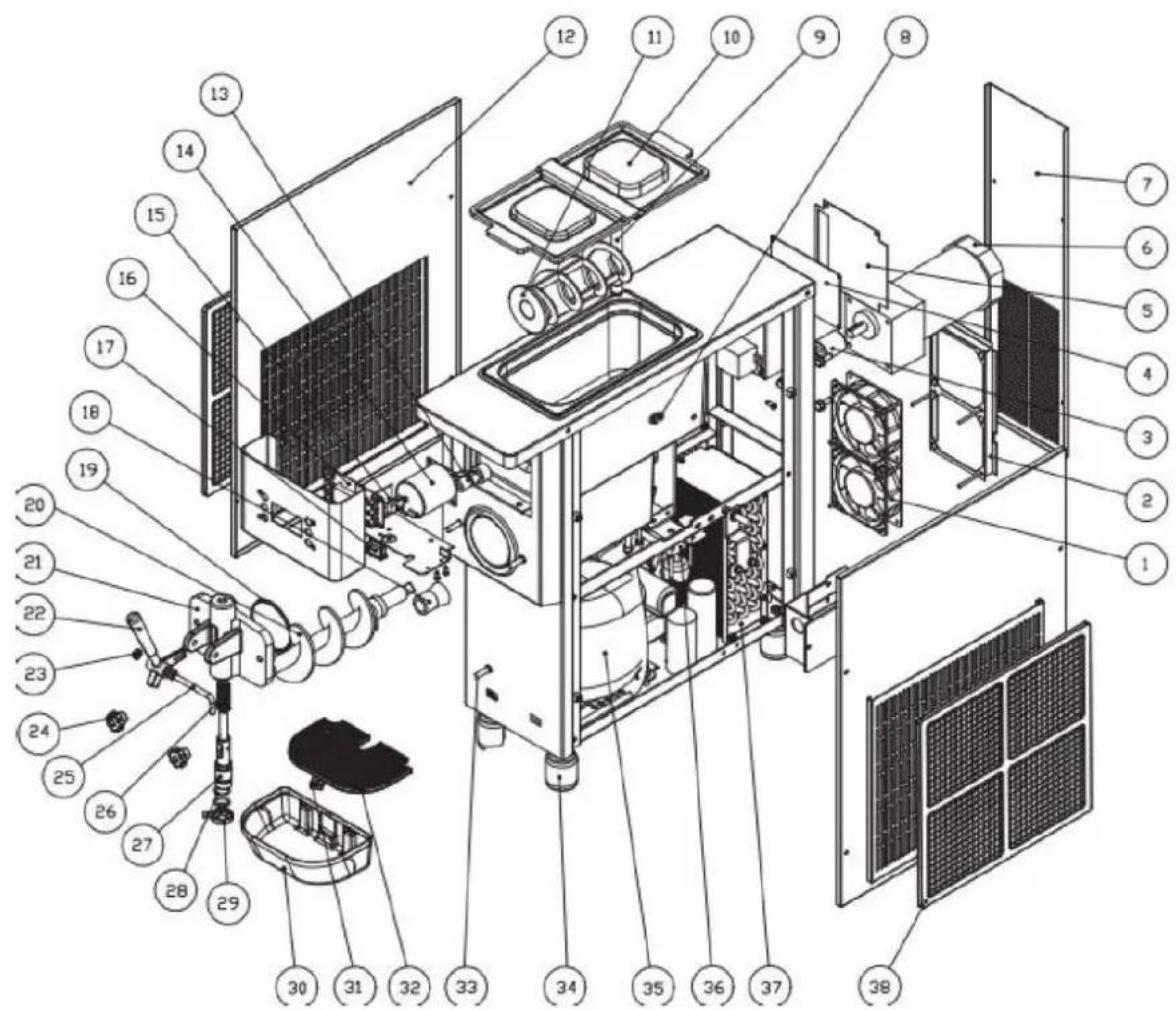
List of parts
| No | Part name | Quantity | No | Part name | Quantity |
| 1 | Fan motor | 2 | 20 | Worm shaft | 1 |
| 2 | Aerodynamic tunnel | 1 | 21 | Dispenser opening | 1 |
| 3 | Adapter | 1 | 22 | Handle | 1 |
| 4 | Control board | 1 | 23 | Pillow | 2 |
| 5 | Electric box cover | 1 | 24 | Screw | 2 |
| 6 | Tamper motor | 1 | 25 | Pin for handle | 1 |
| 7 | Back panel | 1 | 26 | Pad | 1 |
| 12 | Mixture level sensor | 1 | 27 | Piston | 1 |
| 11 | Feed tube | 1 | 28 | Piston O-ring | 4 |
| 10 | Tank cover | 1 | 29 | Nut | 1 |
| 9 | Stirrer | 1 | thirty | Drip tray | 1 |
| 8 | Plate | 2 | 31 | Float | 1 |
| 7 | Magnetic steel | 1 | 32 | Drip tray cover | 1 |
| 6 | Worm shaft motor | 1 | 33 | Pipe fittings | 1 |
| 5 | Limit switch | 1 | 34 | Feet | 4 |
| 4 | PCB board | 1 | 35 | Compressor | 1 |
| 3 | Switch | 1 | 36 | Electromagnetic valve | 2 |
| 2 | Seal | 2 | 37 | Condenser | 1 |
| 1 | O-ring | 2 | 38 | Filter A | 1 |

WARNING! Hot surface, risk of burns!
WARNING! Fire risk - flammable materials!

For the disposal of the device please consider and act according to the national and local rules and regulations.
CONTACT
expondo Polska sp. z o.o. sp. k.
- GENERAL DESCRIPTION
- DO NOT USE THE DEVICE UNLESS YOU HAVE THOROUGHLY READ AND UNDERSTOOD THIS USER MANUAL
- LEGEND
- USAGE SAFETY
- ELECTRICAL SAFETY
- SAFETY IN THE WORKPLACE
- PERSONAL SAFETY
- SAFE DEVICE USE
- USE GUIDELINES
- DESCRIPTION OF THE DEVICE
- CONTROL PANEL
- PREPARATION TO WORK
- DEVICE LOCATION
- TEST RUN
- CLEANING BEFORE FIRST USE
- ATTENTION
- PARAMETER SETTINGS
- FUNCTIONS DESCRIPTION
- CLEANING
- STANDBY MODE
- AUTOMATIC MODE
- ALARM MESSAGES
- ICE CREAM PRODUCTION
- CLEANING AND MAINTENANCE
- MAINTENANCE TIPS
- DISPOSAL OF USED DEVICES
- TROUBLESHOOTING
- ASSEMBLY DRAWING
- CONTACT
Brand : Royal Catering
Model : RCSI-16A
Category : Ice machine