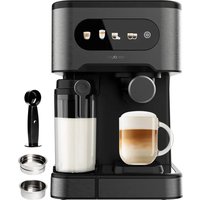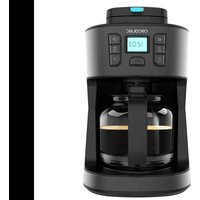
Coffee 66 Grind & Drop - Coffee machine CECOTEC - Free user manual and instructions
Find the device manual for free Coffee 66 Grind & Drop CECOTEC in PDF.


User questions about Coffee 66 Grind & Drop CECOTEC
0 question about this device. Answer the ones you know or ask your own.
Ask a new question about this device
Download the instructions for your Coffee machine in PDF format for free! Find your manual Coffee 66 Grind & Drop - CECOTEC and take your electronic device back in hand. On this page are published all the documents necessary for the use of your device. Coffee 66 Grind & Drop by CECOTEC.
USER MANUAL Coffee 66 Grind & Drop CECOTEC
Bezpcnosin pokyny 29
Guentik salmatian 32
INDICE
-
Garantia Bay SAT
-
Copyright
INHALT
Read these instructions thoroughly before using the appliance. Keep this instruction manual for future reference or new users.
- This appliance can be used by children aged 8 years old and above if they have been given supervision or instruction concerning the use of the appliance in a safe way and understand the hazards involved. Cleaning and user maintenance should not be carried out by children unless they are over 8 years old and are under supervision. Keep this appliance and its power cord out of reach of children under the age of 8.
- This appliance can be used by people with reduced physical, sensory, or mental capabilities or lack of experience and knowledge if they have been given supervision or appropriate instruction concerning the use of the appliance in a safe way and understand the hazards involved.
- Children must not play with the appliance.
This symbol means "Caution: hot surface". The accessible surfaces of the appliance may reach high temperatures during operation. Be careful not to burn yourself. - WARNING: do not remove the cover while the water is boiling.
- This appliance must be exclusively used with the provided base.
- This appliance is designed for domestic use only and is not intended for bars, restaurants, farmhouses, hotels, motels, and offices.
- Avoid touching the hot surfaces when in operation, and let it cool down for a few minutes after use. Grab it by the handle.
-
To prevent possible injury caused by steam, do not face the spout when operating the kettle.
-
Make sure that the mains voltage matches the voltage stated on the rating label of the appliance and that the wall outlet is earthed.
- Do not immerse the cable, plug, or any other non-removable part of the appliance in water or any other liquid. Do not expose the electrical connections to water. Make sure your hands are dry before handling the plug or switching on the device.
- The device must not be submerged.
- Never immerse the appliance in water. Do not touch the water!
- Check the power cable regularly for visible damage. If the cable is damaged, it must be repaired by the official Cecotec Technical Support Service in order to avoid any type of danger.
- Do not carry or pull the appliance from the power cable. Do not use the power cable as handle. Do not push the cable against corners or sharp edges. Do not crush the power cable with the full weight of the appliance. Keep the cable away from hot surfaces.
- Do not operate the appliance if its cable, plug, or body show visible damage, do not operate properly, or have been dropped.
- Cleaning and maintenance tasks should not be carried out by unsupervised children.
- Always disconnect the appliance from the power supply if it is left unattended and before assembly, disassembly, or cleaning.
- Do not leave the appliance unattended while in use.
- Unplug it from the power supply when you finish using it and before leaving the room.
- Do not try to repair the appliance by yourself. Contact the
official Cecotec Technical Support Service.
- Always turn off and unplug the appliance when not in use, before moving it to a new location, and before assembling or disassembling it. To avoid tripping hazards, wind the cable safely.
- To ensure the correct operation of the appliance, cleaning and maintenance tasks must be carried out according to this instruction manual. Always turn off and unplug the appliance before cleaning.
- Use the appliance only for its intended purpose.
- Switch off and unplug the appliance before changing accessories or nearby parts that move during use.
- The water level must be between the MAX. and MIN. marks.
- Always ensure that the cover is tightly closed.
- Remove and refit the cover carefully when hot.
- Avoid spillage on the conductor cable.
- The surface of the heating element is subject to residual heat after use.
- Strictly follow the instructions in this manual to avoid injury or damage to the appliance.
- Do not operate the drip coffee machine if the water tank is empty.
- The appliance is not intended to be used by children. Keep the appliance and its power cable out of the reach of children.
- Do not use the base unit for other purposes.
- To avoid scalding, do not open the cover during the brewing process or immediately after.
INSTRUCTIONS DE SECURITE
- Filter
2.Portafilter basket - Jug cover
- lug handle
5.Jug - Cover opening button
- Top cover
- Control panel
9.Water tank - Water level indicator
- Heating base
- Blades
NOTE:
The graphics in this manual are schematic representations and may not exactly match the device.
2. BEFORE USE
This appliance is packaged in a way as to protect it during transport. Take the appliance out of its box and remove all packaging materials. You can keep the original box and other packaging elements in a safe place. This will help you prevent damage to the appliance when transporting it in the future. In case the original packaging is disposed of, make sure all packaging materials are recycled accordingly.
Make sure all parts and components are included and in good conditions. If there is any piece missing or in bad conditions, contact the official Cecotec Technical Support Service immediately.
Box content
Drip coffee machine
Instruction manual
3.OPERATION
Control panel
Fig. 2
- Hours setting button (HOUR) and minutes setting button (MIN): these buttons are used to set the system current time (hours and minutes). Press and hold any of the two buttons to change the digits on the display continuously.
- Programming button: this button is used to set the time at which you want the appliance to automatically brew coffee.
- Self-cleaning function button: this button is used to make the appliance start an automatic self-cleaning cycle.
- Grinding level adjustment button: this button is used to set the grinding level of the coffee beans. Each time this button is pressed, the grinding level will be modified: "COARSE" (coarse grind), "FINE" (fine grind) or "BREW ONLY" (ground coffee). Select the latter option if you want to use pre-ground coffee instead of coffee beans. The default setting is "COARSE".
- Keep Warm function button: this button is used to choose for how long coffee will be kept warm. The preset time is 40 minutes. Each time you press this button, the setting will change, and you can select the following values: off - 5 minutes - 10 minutes - 15 minutes - 20 minutes - 25 minutes - 30 minutes - 35 minutes - 40 minutes.
- Power button: this button is used to switch on/off the appliance, as well as to interrupt the coffee brewing.
- Display
Coffee brewing
NOTE: before brewing coffee, check that the appliance and all accessories are in good condition and clean the removable filter and mesh thoroughly with lukewarm water before use.
- Place the appliance on a stable surface and press the cover opening button to open the cover.
- Insert the portafilter basket into the coffee machine compartment and place the filter inside. Then, put the beans or ground coffee (maximum 14-15 tablespoons for 80-86 g) in the filter.
Note: make sure that the coffee beans or ground coffee do not exceed the MAX mark on the filter.
- Add drinking water to the tank without exceeding the MAX mark on the water level indicator. Note: you can adjust the amount of ground coffee and water to your taste. If you use finely ground coffee with little water, the taste will be more intense. On the other hand, if you use
ENGLISHENGLISH
coarsely ground coffee with a lot of water, the taste will be milder.
- Then, close the cover
- Place the jug on the heating base.
Note: to prevent the jug from touching the filter and moving it out of place, place the jug on the base after closing the cover. - Plug the power cable into the mains and the control panel display will turn on. When the display turns on, the time display will flash rapidly and show the preset system time (12:00 AM).
Note: to avoid accidents, make sure that the power supply matches the specifications of the appliance before use: (AC 120 V / 60 Hz).
- Press the power button to interrupt or cancel the current operation, the appliance will switch off immediately.
Warning:
- Do not open the cover during operation to avoid burns or other accidents. If you open the cover unintentionally, the appliance will automatically switch off.
- Do not touch the hot surfaces inside the machine directly.
- If it is necessary to restart the machine, switch off the power supply and check that the portalfilter basket and filter are correctly fitted before closing the cover and restarting the machine.
- If you fill the water tank to its maximum capacity (1750 mL), the brewing process will take about 11 minutes.
- Once the coffee has been prepared, the machine will maintain the temperature for 40 minutes. If the preset shelf life is changed, the machine will save the newly selected setting. Although the extraction process is finished, it is normal for coffee to still remain in the filter, so it is recommended to wait a few minutes for the coffee to finish dripping into the jug before removing it.
Note: although the capacity of the tank is 150 ml per cup, the amount of coffee that will be obtained will be less than the water that has been poured in as some of the water is absorbed by the ground coffee during the extraction process.
- Do not leave empty cups or glasses on the heating base as they may break, if the jug breaks or its handle comes off, do not continue to use it. Glass is a very fragile material, so handle it with care.
-
Do not use the machine with an empty water tank, as this will reduce its lifespan.
-
After each use, allow the machine to cool down for at least 5 minutes before cleaning or starting a new brewing process.
Warning: if the coffee machine does not cool down completely, steam will escape when cold water is added, which may cause scalding or other hazards. - The taste of coffee is best appreciated when it is freshly brewed.
If you are not going to use the machine, be sure to switch it off and unplug it from the mains.
Tips for good coffee
- The key to good coffee is a clean coffee machine. So be sure to clean it regularly using clean water.
- Store coffee beans or ground coffee that are not to be consumed in a cool, dry place. Once opened, seal the coffee packet tightly to keep it fresh.
- To get the best coffee, choose the most suitable variety of coffee beans or ground coffee according to your taste preferences. It is recommended to use a medium roast coffee.
Do not reuse ground coffee, as reheating can cause it to lose its flavour. - A little oil may appear on the surface when the coffee is brewed. This is a normal phenomenon, as coffee contains its own fats.
The darker the roast of the coffee you use, the oilier the surface will be.
Setting the system time (24 hours)
①
- Press the button to set the time in 1 h intervals. Press the button to set the minutes in 1 min intervals. During the setting, the time display will flash quickly. Once set, the system will operate according to the current time.
- Press and hold or to change the digits on the display continuously.
Note: if no button is pressed within 5 seconds, the setting will be cancelled, and the display will return to its initial state. - If you do not set the time when you switch on the machine, the display will continue to flash until you set the time.
Adjusting the duration of the Keep warm function
To set the time you want coffee to be kept warm. press the Keep warm function button, the corresponding indicator light will light up. The time display will also flash, and each time you press this button, the time will increase in 5-minute intervals in the following order: 40 minutes - off - 5 minutes - 10 minutes - 15 minutes - 20 minutes - 25 minutes - 30 minutes - 35 minutes - 40 minutes. Once the setting has been made, the Keep warm function will be automatically confirmed after 5 seconds if no further operation is performed, and the corresponding indicator light will switch off.
- When coffee is ready, the Keep warm function will be automatically activated. If you switch off the appliance, the Keep warm function will not be activated, and the indicator lights will switch off after 2 minutes. If, on the other hand, you do not switch off the machine after brewing, the Keep warm function will be activated and the appliance will switch off after the preset time has elapsed.
Note: during this phase, the automatic measuring and control device of the coffee machine will detect whether it is heating or not.
Automatic bean or ground coffee programming
Note: in order to activate this function, you must first set the time.
ENGLISH ENGLISH
To set the time at which you want the coffee to be prepared automatically, press the button. The BREW LATER indicator light and the time display will start flashing. Then, select the desired time (the display will default to 00:00).
To confirm the time, press the button again or wait 5 seconds. Once set, the indicator light will light up. If you want to deactivate the function, press the button for a third time, the indicator light will switch off.
Automatic coffee bean programming
When the appliance is in standby mode, press the button (the PROGRAm Indicator light will light up flashing), and set the time at which you want to coffee to be brewed automatically. Next, press and select one of the available options: (COARSE for fine) The default setting is "COARSE". Once you have selected the grinding level, wait 5 seconds or press the button again to confirm the previous settings. When the programmed time is reached, the power indicator light will start flashing fast and the programming indicator light will turn off.
When the grinding process is finished, the power indicator light will remain on, and the machine will start brewing coffee. If you press the button during standby mode, the machine will operate with the last saved time setting. It will also work with the last setting if no other operation is performed within 5 seconds.
2. Automatic ground coffee programming
When the appliance is in standby mode, press the button (the indicator light will light up flashing), and set the time at which you want coffee to be brewed automatically. Once programmed, press the button repeatedly until the OPEN ONLY option appears on the display. Then, wait 5 seconds or press the button again to confirm the previous settings.
When the set time is reached, the power indicator light will light up and then, the appliance will start brewing coffee. If you press the button during standby mode, the machine will operate with the last saved time setting. It will also work with the last setting if no other operation is performed within 5 seconds.
3. Checking and modifying the set time
In standby mode, press the button. The display will show the last programmed start time, and the indicator light will light up. If you do not change it within 5 seconds, the machine will automatically start brewing according to the last saved setting.
4 Cancelling the automatic coffee programming
Press the button to cancel or deactivate the coffee programming function. This will cancel the scheduled time.
Preparation with coffee beans or preparation with ground coffee
5.Preparation with coffee beans
Coarse grinding level: press the button until the COARSE option appears on the display (coarse grind). The machine will enter the preparation with coffee beans mode. Press the power button to start the coffee brewing process and the corresponding indicator light will start flashing rapidly. After 30 seconds of operation, the motor will stop and the heating element will continue to heat until the brewing process is completed. When the coffee is ready, the indicator light will go out and the Keep warm function will be automatically activated with the preset time parameters. The machine will keep the coffee hot for the programmed time and then enter standby mode.
Note: The default grind setting is COARSE (coarse grind), so when you switch on the machine it will operate directly at this setting if left unchanged.
Fine grinding level: press the button until the fine option appears on the display (fine grind). The machine will enter the preparation with coffee beans mode. Press the power button to start the coffee brewing process and the corresponding indicator light will start flashing rapidly. After 35 seconds of operation, the motor will stop and the heating element will continue to heat until the brewing process is completed. When the coffee is ready, the Indicator light will go out and the Keep warm function will be automatically activated with the preset time parameters. The machine will keep the coffee hot for the programmed time and then enter standby mode.
5. Preparation with ground coffee
Switch on the coffee machine and press the button until the pre-only option appears on the display (ground coffee). Select this option if you want to use pre-ground coffee instead of coffee beans. In this way, the coffee machine will start the brewing process automatically without the need to grind beans. To confirm the selection, press the power button, the corresponding indicator Light will turn on. Once the brewing process is complete, the indicator light will go out and the appliance will activate the Keep worm function according to the preset time setting. The machine will keep the coffee hot for the programmed time and then enter standby mode.
Note: press the power button to stop the brewing process.
4. CLEANING AND MAINTENANCE
Note: before cleaning the appliance, make sure that it is switched off and disconnected from the mains. Clean the coffee machine filter and the water tank with a soft, damp cloth. To avoid electric shock, do not immerse the cable, plug or appliance in water or any other liquid.
- After each use, dispose of the coffee grounds in the waste bin and clean the removable
ENGLISHENGLISH
parts. Do not pour coffee grounds down the drain to prevent clogging.
- If the machine is not to be used for a long period of time, perform one or two cleaning cycles without ground coffee or coffee beans to disinfect the machine.
- Wipe the surface of the appliance with a soft, damp cloth to remove any coffee residue or accumulated dirt.
Self-cleaning function
To activate the self-cleaning function, fill the water tank, place the bean container, close the cover and press The corresponding indicator light will light up. Then, press the power button, the appliance will automatically start the cleaning cycle. Once the cycle is complete, the indicator will switch off and the appliance will enter standby mode.
Descending
To keep the coffee machine working efficiently, regularly remove limescale deposits left by the water. The amount of limescale build-up will depend on the hardness of the water in your area and the frequency of use of the machine. Use the following descalling method:
- Fill the water tank with four parts water and one part citric acid. Make sure that the maximum water level in the tank is not exceeded.
- Place the jug on the heating base, making sure that the centre line of the jug is aligned with the coffee spout.
- Press the power button, the indicator light will start flashing with a blue light. After a while, the water will start to run out. Next, press the power button again, the appliance will stop.
- Normally, the machine completes three to five descending cycles. Each cycle lasts about 15 minutes, until the tank is completely empty.
-
When the process is finished, rinse the machine at least three times with water.
-
TROUBLESHOOTING
| Problem | Possible cause | Possible solution |
| Weak or tasteless coffee | Coffee beans too coarse. | Choose another available grinding level. |
| Incorrectly fitted or broken filter. | Make sure it is correctly placed in the portafilter basket. |
| Water not hot enough. Flush | the system of limescale or adjust the water temperature according to the manufacturer's instructions. | |
| Slow or intermittent dripping | Water filter clogged. Replace | or clean the water filter to ensure adequate flow of clean water. |
| The grinder does not grind the coffee beans | Coffee bean stuck in the grinder. | Turn off the coffee machine and check whether any coffee beans are stuck. |
| Incorrect adjustment of the grinder. | Adjust the grinder to a finer or coarser setting as desired, referring to the user manual. |
6. TECHNICAL SPECIFICATIONS
Product reference: 01855
Product: Coffee 56 Grind & Drop drip coffee machine
Voltage:220-240V
Frequency: 50/60 Hz
Rated power: 830-1086 W (heating): 200 W (grinder)
Technical specifications may change without prior notification to improve product quality. Made in China | Designed in Spain
7. DISPOSAL OF OLD ELECTRICAL AND ELECTRONIC APPLIANCES

This symbol indicates that, according to the applicable regulations, the product and/or batteries must be disposed of separately from household waste. When this product reaches the end of its shelf life, you should dispose of the cells/batteries/accumulators and take them to a collection point designated by the local authorities.
Consumers must contact their local authorities or retailer for information concerning the correct disposal of old appliances and/or their batteries.
Compliance with the above guidelines will help protecting the environment.
ENGLISH
FRANCAIS
8. TECHNICAL SUPPORT AND WARRANTY
Ceceter shall be liable to the end user or consumer for any lack of conformity that exists at the time of delivery of the product under the terms, conditions, and deadlines established by the applicable regulations.
It is recommended that repairs be carried out by qualified personnel.
If at any moment you detect any problem with your product or have any doubt, do not hesitate to contact the official Cecotec Technical Support Service at +34 963 210 728.
9. Copyright
The intellectual property rights over the texts in this manual belong to CECOTEC INNOVACIONES, S.L. All rights reserved. The contents of this publication may not, in whole or in part, be reproduced, stored in a retrieval system, transmitted or distributed by any means (electronic, mechanical, photocopying, recording or similar) without the prior authorization of CECOTEC INNOVACIONES, S.L.
1. PIECES ET COMPOSANTS
Image 1
Puisssance nominale:830-1086 W (chauffage):200 W (moulin)
Productreference:01855
Product: Druppelend koffiezetapparaat Coffee 66 Grind & Drop
Spanning 220-240V
Frequenlc:50/60 Hz