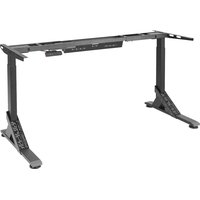
UPPSPEL 305.113.49 - Office IKEA - Free user manual and instructions
Find the device manual for free UPPSPEL 305.113.49 IKEA in PDF.


| Product type | Electric standing desk |
| Brand | IKEA |
| Model | UPPSPEL 305.113.49 |
| Power supply | 220-240 V AC, 50/60 Hz (power unit 24 V DC, 240 W) |
| Standby consumption | < 0.1 W |
| Sound level | < 55 dB(A) |
| Height adjustment range | 72 to 120 cm |
| Maximum load | 70 kg (154 lbs) |
| Operating temperature | +10°C to +40°C |
| Storage temperature | -18°C to +70°C |
| Ambient humidity | 20% to 80% (at 40°C) |
| Intended use | Indoor, dry rooms (office or similar) |
| Main functions | Motorized height adjustment, memory of 4 heights, panel lock/unlock, reset |
| Control panel | LED display, up/down arrow buttons, memory buttons 1-4, S button |
| Safety | Automatic stop at end of travel, child lock, obstacle detection (unplug before maintenance) |
| Maintenance | Check screws after one week of use; cleaning by an adult with a damp cloth |
| Repairability | Do not repair yourself; contact IKEA customer service |
| Manufacturer | IKEA of Sweden AB, Box 702, 343 81 ALMHULT, Sweden |
Frequently Asked Questions - UPPSPEL 305.113.49 IKEA
User questions about UPPSPEL 305.113.49 IKEA
0 question about this device. Answer the ones you know or ask your own.
Ask a new question about this device
Download the instructions for your Office in PDF format for free! Find your manual UPPSPEL 305.113.49 - IKEA and take your electronic device back in hand. On this page are published all the documents necessary for the use of your device. UPPSPEL 305.113.49 by IKEA.
USER MANUAL UPPSPEL 305.113.49 IKEA
An electro-mechanically height adjustable work-surface with control interface to adjust height up and down.
This appliance can be used by children aged from 8 years and above and persons with reduced physical, sensory or mental capabilities or lack of experience and knowledge if they have been given supervision or instruction concerning use of the appliance in a safe way and understand the hazards involved by a person responsible for their safety.
Children shall not play with the appliance.
Cleaning and user maintenance shall not be made by children without supervision.
Electrical sit and stand desk
| Advice and instructions for UPPSPEL |
| Input:220-240VAC, 50/60Hz |
| Standby power consumption:<0.1 W. |
| Sound level:Lower than 55 dB(A). |
| Height setting interval:72-120 cm/28.3-47.2 inch. |
| Maximum load:70kg/154lbs. |
| Temperature interval at usage:+50 up to +104 °F/+10 °C up to + 40 °C. |
| Temperature interval at storage:0 up to 158 °F/-18 °C up to 70 °C. |
| Humidity:20% up to 80% at 104 °F/40 °C. |
| Power supply unit:24.0V DC, 240 W. |
This appliance shall only be used together with the included power supply unit.
Every person who is responsible for this table at installation or employment of the table in daily use or in service and repair work should carefully read these instructions. Keep these instructions close to your sit/stand table.
Installation instructions
The table is assembled according to separate assembly instructions.
- Connect the electrical cable to a power source.
NOTE! The electrical cable must have full mobility.
- The table is now ready for use. The motors stop automatically when the table reaches its lowest and highest position respectively.
Usage
- The table shall only be used as a gaming table with the possibility to continuously adjust the working height between sitting and standing position.
- The table shall only be used indoors and in dry premises (office environment or similar).
The table must not be overloaded - maximum load is 70KG/154lbs. The system may be run continuously for a maximum of 2 minutes. Afterwards, the motors must stand idle for approx. 18 minutes before they can be used again.
QUICK GUIDE
Follow these instructions when adjusting table height:
- Make sure no objects are in the way of the table.
- In order to move the table up/down, press the up and down arrow button respectively.
- The display switches off when not in use for about 10 seconds. Press any button to wake the controller up.
Safety regulations
- When the table is moving up/down, keep the necessary safety distance to avoid the risk of being squeezed between the moving table top and fixed objects in the surrounding area.
- When the table is moving up/down, the user shall make sure that nobody is injured and that no object is damaged. The table top must not bump into a fixed object, causing the table to overturn. Always remove any chair before the table is moved up/down.
- The table tripod must not be altered or reconstructed in any way. In service and repair work of the table, the electrical cable must always be disconnected from the power source.
- Modifications to the legs are absolutely forbidden!
- The table must not be used as a hoisting device for persons.
Maintenance and repair instructions
After approx. 1 week of use, check that the screws are properly tightened.
- If the table cannot be lowered or raised, check that all electrical connections are connected properly.
- If any part of the electrical system is replaced, the electrical cable must first be disconnected from the power source. Replace the electrical part and then connect the electrical cable to the power source. The table is now ready for use.
If the table still does not work, please contact your nearest IKEA store or customer service.
Manufacturer:
IKEAofSwedenAB
Address:
Box 702, SE-343 81 ALMHULT
SAVE THESE INSTRUCTIONS
Product servicing
Do not attempt to repair this product yourself, since opening or removing protective covers may expose you to dangerous voltage points or other risks.
Troubleshooting guide
NOTE!
Always disconnect the cable from the wall socket before maintenance!
| Symptom Check Try | ||
| The desk does not move. | Is the main power supply connected to the legs? | Try to connect a lamp or similar to the main power supply to check that the supply voltage is OK. |
| Are all plugs mounted correctly between the legs and power supply? | See assembly instructions. Check all connections. | |
| Is there visible damage to the cables, controls or the legs? Damaged parts must be exchanged - Contact IKEA Customer Service. | ||
| The desk stops and can only then move in the opposite direction. | Is the desk in its fully raised or lowered position? When the desk has reached its upper position it can only move downwards. | |
| Is there a lot of weight on the desk compared to when the desk functioned normally? | Remove some of the load and try again. | |
| The desk will only move downwards even though the desk is not overloaded. | Perform Basic settings. | |
| The desk does not move up to its fully raised position. It always stops at the same position. | The system has a new end stop position upwards. Perform Basic settings to remove this stop. | |
| The desk only moves a little bit upwards and stops. | Have the correct screws been used when mounting the frame to the legs? | Check if any screw used has the correct length (assembly instruction). If the screw is too long it can damage the leg. |
| Are all connections correct? Check all connections. | ||
| Does the desk have too much weight on it? Reduce the weight | load and try again. A Basic setting might be needed before the desk will move upwards. | |
| The USB doesn't work. Contact your nearest IKEA store or customer service. | ||
Basic Setting:
Push the arrow down button until the legs have reached the lowest position and keep pressure on the button for 6 seconds more. Upon certain errors, this must be done twice in succession. Now the desk is in initial position.
Initialisation instructions:
Step 1. Continuously press the arrow down button for a few seconds until the desk reaches its lowest position.
Step 2. Continuously press the arrow down button a second time until the display shows "RST".
Step 3. Continuously press the arrow down button a third time until the desk moves slightly downwards.
When the desk stops moving and the display shows "72", it is ready to use.
Height Adjustment Controller
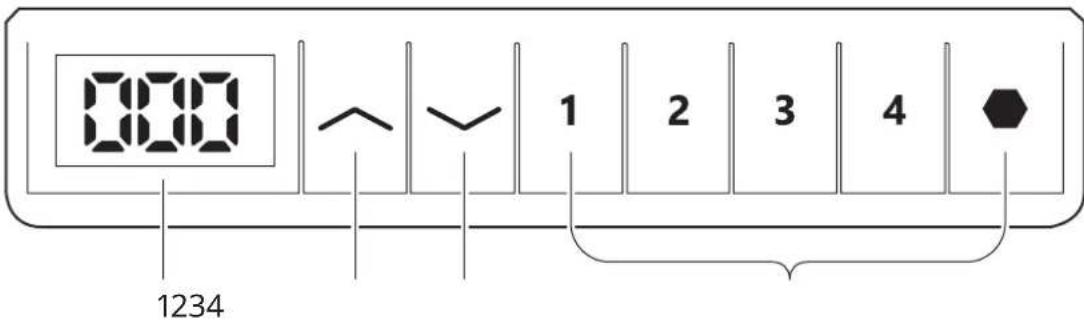
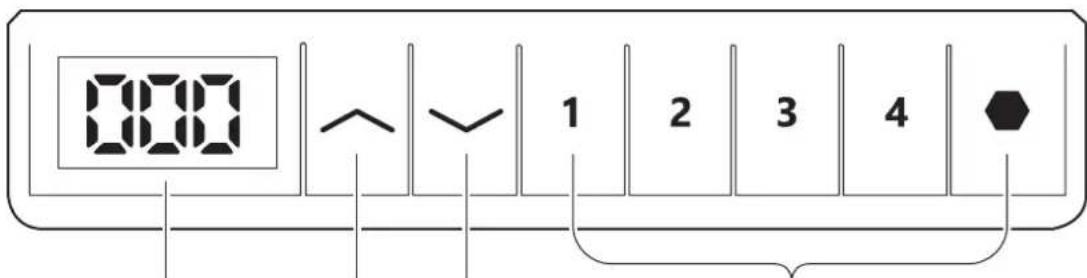
- LED Display: Press any key once to wake up the LED display.
- Up key arrow up: Press and hold to raise the desk.
- Down key (Arrow down): Press and hold to lower the desk.
- Memory setting: 1 2 3 4
To save this current height: Press the button, the display will show "S-," then press preferred memory button 1, 2. This will bind the height to this number.
For Example, if you press 1, the display will show "S-1" etc... Memory button 1, 2, 3 4
Note:
The desk's movement can be stopped at any time by pressing any button. Height settings will remain even if the desk's power is cut.
Reset process:
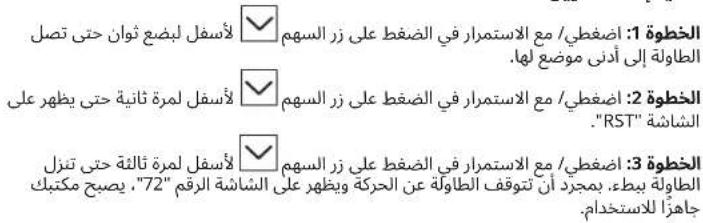
Step 1: Press/hold the down button for a few seconds until the table reaches its lowest position.
Step 2: Press/hold the down button a second time until the display shows "RST".
Step 3: Press/hold the down button a third time until the table slowly lowers. Once the table stops moving and the display shows "72", your desk is ready to use.
Lock/Unlock controller:
Lock the controller: Press and hold the symbol for 10 seconds until the display shows "LOC".
Unlock the controller: Press and hold the symbol for 10 seconds until the display shows the actual height of the table.
Highest /lowest limit setting
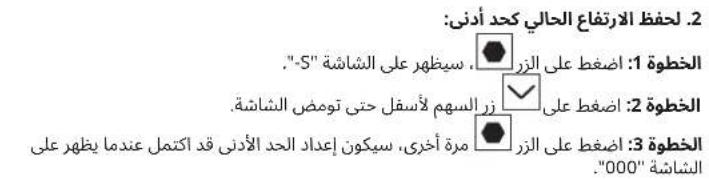
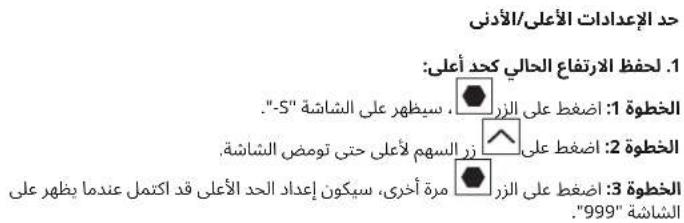
1. To save the current height as the highest limit:
Step 1: Press the button, the display will show "S-".
Step 2: Press arrow up button until the display flashes.
Step 3: Press the button again, the highest limit setting is completed when the display shows "999".
- To save this current height as the lowest limit:
Step 1: Press the button, the display will show "S-"
Step 2: Press arrow down button until the display flashes.
Step 3: Press the button again, the lowest limit setting is completed when the display shows "000".
3. To cancel the limits:
Step 1: Press the button the display will show "S-".
Step 2: Press the button again, the limit setting is canceled/removed when the display shows "55".
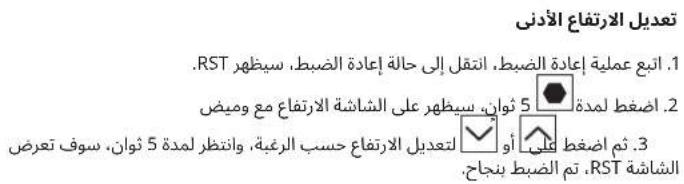
Adjust the Minimum height
- Follow RESET process, go to the reset situation, it shows RST.
- Press for 5 seconds, the screen shows height and flashes
- Then, press or to adjust the height to what you need, and wait for 5 seconds, the screen displays RST, successfully adjust.
Error Code Instructions
| Error Code Reason Solution | ||
| E01 E02 | Overcurrent protection/short circuit | Remove the excess load on the desk first. Then, see instructions for Reset/Initialisation. |
| E07 E08 | Motor line open circuit error Make sure all the cables connect well first. | Then, see instructions for Reset/Initialisation. |
| E13 Overcurrent protection/short Circuit See instructions for Reset/Initialisation. | ||
| H01 Over-heating Unplug from the wall socket and re-plug - or wait 18 minutes to let the motor cool before using them again. | ||
| RST Power failure See instructions for Reset/Initialisation. | ||
| 888/000 Controller error Please contact IKEA Customer Service. | ||
The crossed-out wheeled bin symbol indicates that the item should be disposed of separately from household waste. The item should be handed in for recycling in accordance with local environmental regulations for waste disposal. By separating a marked item from household waste, you will help reduce the volume of waste sent to incinerators or land-fills and minimise any potential negative impact on human health and the environment. For more information, please contact your IKEA store.
Deutsch
USCHOVEJE TYTO POKNY
Servis vyrobku
2.3ana3BaHe Ha HAcToIaTa BnCOUHa KaTOdoJeH JIMMT:
Ctbnka 1: Hatachete 6ytoHa DmncnneT ue nokaxe "S-"
Ctbnka 2:HaTnCHte 6yToHa CbC CTpeIka HADony DOkATO DnCnneT npemrBa.
Ctbnka 2:HaTnchTe 6yToHa OTHOBO,3aadEHNr DOJeH NIMIT ue 6bde 3anaeH, KOrATo DnCnIeR nokae "000".
3. OTMaHa Ha 3aJaDeHnte JIMMTn:
CTbNka 1:HaTnCHete6yToHa DmncnneTJe nokaxe "S-"
CTbnka 2:HaHcHete 6yToHa 3aJaDeHnT JMMNT ue 6bde OTMeHeH/ npemaxHaT, Korato dncnneT nokakee "555".
PerynupaHe Ha MMHImaHaTa BUCOuHa
- CnEaBai Te npoueca Ha pectaptnpaHe, OTndTe Ha nO3uHn pectaptnpaHe, KOrTo NOKa3Ba RST.
- Hatnche n 3aDpBxTe 3a 5cekyHn, dncnneT ue nokaxe BucounHa t u ne npemrHre.
- Toraba Hatachete nnu 3a nppeyunpate Bucouhata cnpmo Baunte Hyknd, n h3yaKaaiTe 5 cekHynd, dncnneTt ne nokkae RST, ycnesha Nahtpoika.
Hnctpykun npn rpeukn
IKEA, IKEA of Sweden AB
Adresa:
Box 702,34381Almhult
SACUVATI OVE UPUTE
Servisiranje protozvoda
Ne pokušavati samostalno popraviti ovaj proizvod jer otvaranje ili uklanjanje zašitnih pamkopaca moze izložiti osobu visokim naponima ili ostalim opasnostima.
| Greška Provjera Rješenje | ||
| Stol se ne miće. | Je li glavni izvor napajanja spojen na noge? | Pokujati spojiti lampu ili slično na glavno napajanje kako bi se provjerilo je li mrežni napon u redu. |
| Jesu li svi utikači pravilno postavljeni izmedu nogu i napajanja? | Pogledati upute za montažu. Provjeriti sue veze. | |
| Postojle li vidljiva oštećenja na kabelima, kontrolama ili nogama? | Oštećeni dijelovi moraju se zamijeniti -kontaktirati IKEA službu za korisnike. | |
| Stol se zaustavlja i tek tada se要考虑 kretati u suprotnom smjeru. | Je li radni stol u potpuno podignutom ili spuštenom položaju? | Kad radni stol dosegne gornji položaj,要考虑 se pomicati samoprema dolje. |
| Ima li puno težine na stolu u usporedbi s onim kad je stol normalno radio? | Ukloniti dio tereta i pokušati ponovo. | |
| Stol PCIe se pomicati samoprema dolje iako radni stol.nije preopterećen. | Izvršiti osnovne postavke. | |
| Stol se ne pomicě u svoj potpuno podignut položaj. Uvijek se zaustavlja na Istom položaju. | Sustav ima novi krajnji položaj prema gore. Izvršiti osnovne postavke kako bi se uklonio ovaj zaustavljač. | |
| Stol se pomicě samo malo premagore i zaustavlja se. | Jesu li korišeni ispravni vijci prilikom postavljanja okvira na noge? | Provjeriti ima li korišeni vijak isprawne duljine (upute za montažu). Ako je vijak predug,要考虑 ošetiti nogu. |
| Jesu li sue veze ispravne? Provjeriti sue veze. | ||
| Ima li stol previše težine na sebi? Smanjiti opterećenje težinom | i pokušati ponovo. Moždaće biti potrebna vraćanje na početne postavke prije nego što se stol pomakne prema gore. | |
| USB ne radi. Kontaktirati najblizu robu nu kuću IKEA ili službu za korisnike. |
Osnovne postavke:
Pritisnuti tipku sa strelicom prema dolge dok noge ne dosegnu najnizi položaj i drzati tipku pritsinutom jo 6 sekundi. Nakon odredenih pogresaka, to se mora učiniti dva puta zaredom. Sada je radni stol u početnom položaju.
Upute za montažu
Korak 1. Neprekidno pritiskati tipku sa strelicom prema dolje nekoliko sekundi dok radni stol ne dosegne najnizi položaj.
Korak 2. Neprekidno pritiskati tipku sa strelicom prema dolje nekoliko sekundi dok se na zasloun ne prikaze „RST".
Korak 3. Neprekidno pritiskati tipku sa strelicom prema dolje nekoliko sekundi treci put dok se radni stol ne pomakne lagano prema dolje. Kad se radni stol prestane pomicati i na zaslonu se prikaze "72", spreman je za upotrebu.
Kpatnate autc tio odnyies
ETLOKeun npoiovtos
Mny etxelnpaete va etiakuteaote yovol aacuto to npoiov, kaocto avolyma n apaipeon npotateutukw kaummuatuv mtoepei va oak ekeoe ertukdvua aneia tancn n daouc kivduvuc.
Osnycavmuetwnpopoanatw
Σημειωη!
MaKcHmAbhBbI/MnHmAbhBbI JIMMT BICOTbl
- Yto6bI coxpaHnTb TeKyuHyo BbICOTy B KaueCTBe MaKcMaJIbHOJ:
War 1: HaxMMTE KhoNky Ha DCnIeep NoaBtCra «S».
War 2: HaxIMaTe KhoNky co CTepeIKoB BBepX, noka DnCnIe He HaHTetMIRATb.
3aBepueHa, KOnky epe pa3, HAcTpoKa MaKcMnAbHOro npeDena 999
OncanHe Koob Own60K
3. 4TO6bI OTMeHHTb JIMMTbI:
War 1: Haxmte KhoKy Ha nCnnee noBnTcR «S-».
War 2: Haxmte KhoKy epe pa3, hactpoKa IIMTu OTMeHeHa, kOrDa Ha dncnlee oTo6paXaetcra «555»
PerynpoBka MNHmAbHoB BbICtbl
- Cnnyte npocccy PEPE3APY3KN, nepeynite K nepe3arpy3ke, oHa oTo6paXaetcR «RST».
- Haxmte uyepeKuBaIe B TeueHne 5ceyHa, kpaH nokkct BBicOt u NaHcHt MIRatb.
- 3aTeHaxmte Hnnu TTO6bHaCTpOHTb Heo6xOaMHy BbCOTy, nnoDoxnTe 5cekynd,Haekpahe OTo6pa3ntcraRST,HaCTpoIka npOua ycneuho.
YkpaHcbKa
Po6oHa noBepxH3 4yHKciEIO
eIekTpomexaHiuHOro peYIIOBaHH
BnCOTn Ta naneJIIO ynpablinHH. Cei
PpIlaAD MoKyTB BnKOpNCTOByBaTn DIITN
BikOM BiD 8 pOKIB, OcO6n 3 06mExKeHMNI
fI3NuHIMN, ceHCOPHMn a6o PO3ymOBUMN
MOXJINBOCTaMn, a TAKOX IIOHN 6e3
BiIDNOiDHorO DoCBiDy Ta 3HaHb, kKIO BOHN
OTpIMaII N Heo6XiHNI IHCTpykTaX IOdo
6e3neuHoro BnKOpNCtAHNr PpIaDy BiD
OCo6n, 10 BoIINoBidaJIbHa 3a iXHIO 6e3NeKy, Ta
po3ymIO TB NO'B'3aHI 3 cIM Pn3IKNl.
He Do3BOJaTe DiTAM rpaTncs 3 cIM
PpIlaDom. DiTAM 3a6OpOHeNo YnCTNTU
PpIlaD Ta BnKOHyBaTIPO6OTN 3 INorO
TexHiUHO o6cIyROyBaHHN 6e3 HaJIaDy
dOpocInx.
EeKtpnHn CTn-tpaHcΦopMep
He Do3B0JraTbc NepeBaHTaxyBaTu cTIN - MaKcMmaJIbHe HabaHTaXKeHHa 70Kr.ДИВуHIMOxyTb npaIIOBaTN 6e3nepePBHO He 6IbIe 2 XB.PICrA CbOrO IX MOxHa BnKOpNCTOByBaTu NOBTOPHo He paHIe HIX npN6Iln3Ho Upe3 18 XB.
KOPOTKIN IOBIDHNIK
PeryIOBAHHBNCOTNCTOJ3JIChHOETbC TaK:
1.ПepekoHaiTeCBATomu,иоHiUO He 3aBaxaepyoxoBi cTOna.
2. Ⅲo6 nIaHnTn aOo onyctnTn cTin, HATNCHTb KHOKNy 3i CTpiKIOHO, RKA BkA3ye HaPRAmOK DOROpn aOo DOHNsY BiNOBiDHO.
3. DnCnneB BmNkAeTbCRA, kIIO NoI ORe H BnKOpncTObyBaTu npN6n3HO 10 ckyHd.HaTNCiHb Byb-Aky KOnkY, 06 yBIMKnHyTp peryJrTop.
HopMn Texhikn 6e3neKn
KoJIi CTiN iDHiMaTeBcA abO nyCKaTeBcA, TpImaIteCn Ha eObXiHni 6Be3eHni BicTaHl dnyuHnKHeHHn Pn3nky NotpanJHnMIX CTIbHnEo Ta HEPYXOMIM npEMeTAMn HABKOHO Hei.
PidacnHimHa a6oOnyckAHcTc0aKOpNCTBaH NOBHeH CTexNTn, 106 HIXTO He OTPMAB TpaMy Ta o6b HUOrO He 6yNo NooKOxHeo. CtIbHnua He Ma HaSTOBxByATnc Ha HepyXomi npEdmTe n iac pyxy, IHakue CTINpeKeHNBeTc.PepeiNDHTAM a6oOnyckAHm CTOna 3abKdBiCyBaIte BiHoro KpICNo.
He 03B0JRAETbCKOJHM CHHOM 3M1HOBOATN KOHCTpyKJIO CTIKN CTOA. Ppeep npoBeHnEM texHHORO 6OcJIyROBaBHAn a0e pMOHTy CTOA Heo6XIIHO 6OB'8KOBO BWIMAtu 3 POSETK BINKy KABeHNK XUINHEH.
-KateropnH03a6opohReTbC3MiHOBaTHiKKN!
3a60pOHaETbCa BnKOpncTOBByBaTcTIN dIe NiHHTTA HDoE.
06cnyrobybaHHa Ta peMOHT
-ПиблзноуретоиннхдьвikopuctaнгпpebipteHaHictb 3atarybaHHBcIXrBHTIB.
- kio cti He nHimaetbca a6o He onyckaetbca, nepebiTe Bci eIektpnHi 3'edHaHH.
IpeE 3aMHO6ydb-RAKX YacTHN eektpnHoi CNTeMn Heo6xIH0 06OB'3KO BO BmMaTn 3 po3eKn BnKy Ka6Enjo XkBLeHn. BCTaBnTe BnKy B po3eK ty nIle NcIaBepweHHn po6Ot n 3 eektpnuHoo CNTeMO. TeneP cti rotobn do BnKOpNCtAHn.
Kkuo ctiyce-taKe He npauoe, 3BepHtbcra Do Haai6nXqoro Mara3nHy a60 LcHTpy niTprmKn kIeHtB IKEA.
Bnpo6HnK:
IKEA of Sweden AB
Aapeca:
A/c 702,SE-343 81 M.EIbMXYJIbT
3EPIAITEIHCPTYKIIINIOADJIbWOTOBNKOPCTAHHA.
06cIyROyBaHHBnpo6y
He HamaarTeca pemOHyBaTH Bnip6 camOtiHNo. BIkKpTTA a6o 3HHTa KPNIO MOKe CTbOpNTu PN3Nk YdApY eNeKTpuHm CTpyMOM a60 Hapa3NTu Bac Ha iHsy He6e3neKy.
OboiHmK i3 BnBLeHH HecnpabHoCTe
NPIMITKA:
3aBxN BiiknouaTe Ka6eNb Bnpo6y BiD po3eKn nepeD npOBeHnM texhiHoro 06cnyrobyBaHH!
Kpok 1. Hauckai Te KhoNky Ctpink BnH3 kInka ckyHa, DOKn CTIN He OYCTINbca DO HAHNKUO NOJXeHHA.
Kpok 2.3HOBy HaTnckaiTe KhoNky CtpiKn BHN3 ,doKN Ha dncnne He 3'ABNTbCRA "RST".
Kpok 3. HatnckaiTe KhoNky cTpiIKu BHN3 BtpetE,doKN CTIN TPOXn He OYVCTNTBCB.
KoH CTINpeCTaHEpyxATnCtTaHaDnCnnei 3'ABNTbCra"72",BIn rotOBn DO BIKOPNCtAH.
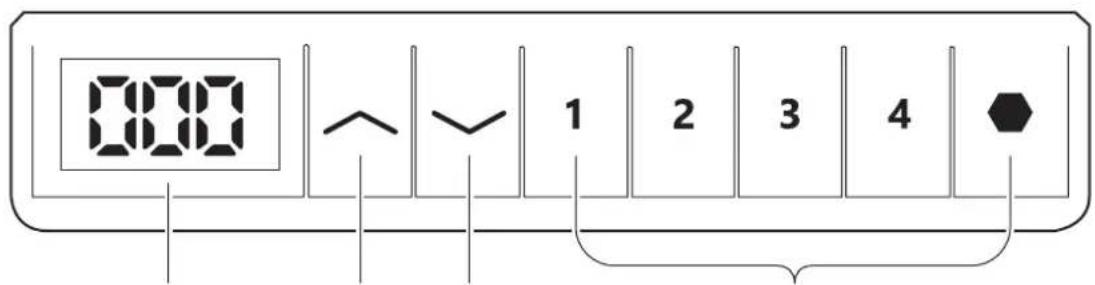
PeryIIOBaHHBNCOTn
1234
1.CBtnoioDHH dncnne:HaTNCHTb 6yNb-ky KhoNky,0o6akTNByBaNTcBtnoioDHH dmCnne.
2.Bropy(Khonka cpiikn Bropy):HaTncHtB Ta ytpmyTe,io6 nHHT
3.BHn3(KHONKa cTpiKKn BHn3) :HaTncHITb Ta yTpmyTe, 06 onyctntn CTIN.
4.HanaWtYBaHHnam'rTI: 1234
- 3'ABUTbca "S"NOTIM HATNCHtB OHy 3 KHOJOK NaM'AtI 4.Bucota 6yde NO'B3aHa 3 BIDNOBIHIM HOMepOM.
HapnKlaJ,RAIO Bn HATncHete 1,Ha dncnJIe3'ABNTbcra"S-1"TOIO... 1234
PnmuTka:
Pyx cTOna MoKHa npinnHnTu 6yDb-akn Yac HATINCKaHHM 6yDb-koI KHONKn. HanauTyBaHHB BucOTn 36epiraHObcr HabITb y pa3i BiKIOueHHN XINJIeHHN cTOnA.
CkuaHnHaanuTaBn:
Kpok 1:HaTncHtB/ytPmmyKe KHOJky CtpiKn Bn3 KInbKa ckyH,doKn CTI He onyCTntbCdo HaimnKcHOrO nIoXeHH.
Kpok 2:3HOBy HATnCHiB/ytPmMyTe KhoNkY cTpiKN BHN3 ,DOKH Ha dncnneI He 3'ABNTcR "RST".
Kpok 3:HaTnCHiB/yTpmyIe KONkY cTpiJIKN BHN3 BtpTe,doKu cTI npXn He onyctntbcra. KOJI CTIN nepeCTaHe pyxATnc Ta Ha duncnei 3'ABNTbcra "72",BH ROTOBNI DO BVKOpNCtAHH.
3a6nokybatn/po36nokybatnperynraTOp:
3a6koByat nperyTApot:HaTncHtTa yTpmyTe cnmbo1 10 cekyhd,doKn Ha dncnpei He 3'ABNTbca "LOC".
Po36IIOkyBaTN peryJrTop:HaTnCHITb TaYtpmUyTe CnMBo1 10 cekyHd,doKn HaDnCnJIeI He 3'ABNTbCg AakTmHa BnCoTa CTOnA.
HaJauWtYaBaHHaHbUioi/HaHnKxOi Meki
1.36epertn noToCHy BucOTy RaHaiBnUy Mexy:
Kpok 1: HATNCHTB KHONKY, HA DNCLNEI'3'ABNTbC S-
Kpok 2:HaTncHitb KhoNk Ky 3i CtrPikkoBropy,doKn DnCnne He noUHe 6bnmatn.
Kpok 3:HaTnchHb KOnkny 1e pa3, HalaTuBaHHa HauBtuOi Meki 3abepeHcno, KOHa DaCnneI 3'ABNTbc4999.
IHCtpyKuii do Koigb NOMnIOK
2.36epertn noToCHy BucOTy k HauHnKuy MeKy:
Kpok 1: Hattichitb kHonky Ha dinnne!3'raibtcbc S-
Kpok 2:HaTncHtB KhoNkY 3i CtrpiIko Bn3,doKn dncnne He nouhe 6JIIMATN.
Kpok 3:HaTnCHtB KONky ue pa3, HanaaHTyBaHnHa HauHnKyoI Meki 3abepeHcEo, KOJI Ha dncnIe 3'ABTbCa 已 0 0 0
3. CkacyBaTu 06MeXeHHa:
Kpok 1:HaTnCHiB KhoNky Ha dncnnei 3'ABuTBcra «S-».
Kpok 2:HaTnCHiB KONky ue pa3, HanaTyBaHHo6MExHH6ydeCKacOBaHO/BuDaneHo, KOJI Ha DCnNei 3'RBtbcra «555
HalaWtYaBaHHaMIhImaIbHoI BNCOTn
- Bukohai Te cKaaHnHa HalaTByaHb, IpeepiB do cKaaHnH, 3'ABtbcR RST.
- HaTnckaIte npoTgrom 5 cekyH, ekpaH BiO6paKaTaMme BnCoTy i 6JIIMATmE
- Ntim HATNCITb a6o huaHTyBaTN noTpi6Hy BncoTy, i 3auekaite 5 cekyni dokn ha ekpaHI bID6paNTbcr SRT,ycnuHNO HanaTuYte.
jll baiall yaiwlg gao jil jil jai jia jaiy jie jia
aill 1. jn nn nnnn nn nnnn nn nnnn nn nnnn nn nnnn nn nnnn nn nnnn nn nnnn nn nnnn nn nnnn nn nnnn nn nnnn nn nnnn nn nnnn nn nnnn nn nnnn nn nnnn nn nnnn nn nnnn nn nnnn nn nnnn nn nnnn nn nnnn nn nnnn nn nnnn nn nannn nn nnnn nn nnnn nn nnnn nn nnnn nn nnnn nn nnnn nn nnnn nn nnnn nn nnnn nn nnnn nn nnnn nn nnnn nn nnnn nn nnnn nn nnnn nn nnnn nn
a. a. g. 21 a. a. a. a.
:diagill lalaei
aal 100
a
"RST" aIaIJIe JgBbIe IaIe 20
Jaw8 11110
pssssssssssssssssssssssssssssssssssssssssssssssssssssssssssssssssssssssssssss
EaJIJIJIUJSEIg
1234
LEDaww baww oosg ojo ciao jcbeol:LEDaww .1
Gall gJ JaoaIg o jaoi:
Jaaaagaaa aae
1 2 3 4
jS"aaallll.
1234
SΔOBC = SΔCOD + SΔBOC - SΔBOC
"5-1"aww. 1
1,2.3,4
:ddg>do
jglde bally cog sfoaall 4s
aaln jyjgsslll lalhail all gnae aagaae alae

:Joojol oJcI JALac

1b5b81jg0jclai
| الله | الله الحرفicit | |
| ,بعبيف/ بعبيف الحرفicit الحرفicit الحرفicit الحرفicit الحرفicit الحرفicit الحرفicit الحرفicit الحرفicit الحرفicit الحرفicit الحرفicit الحرفicit الحرفicit الحرفicit الحرفicit الحرفicit الحرفicit الحyps/الله/الله/الله/الله/الله/الله/الله/الله/الله/الله/الله/الله/الله/الله/الله/الله/الله/الله/الله/الله/الله/الله/الله/الله/الله/الله/الله/الله/الله/الله/الله/الله/الله/الله /الله/الله/الله/الله/الله/الله/الله/الله/الله/الله/الله/الله/الله/الله/الله/الله/الله/الله/الله/الله/الله/الله/الله/الله/الله/الله/الله/الله/الله/الله/الله/الله/الله/AL | ,بعبيف/ بعبيف الحرفicit | E01 E02 |
| ,بعبيف/ بعبيف الحرفicit | E07 E08 | |
| ,بعبيف/ بعبيف الحرفicit | E13 | |
| ,بعبيف/ بعبيف الحرفicit | Aberration | |
| ,بعبيف/ بعبيف الحرفicit | H01 | |
| ,بعبيف/ بعبيف الحرفicit | RST | |
| ,بعبيف/ بعبيف الحرفicit | 888/000 |

Jus Jus Jus Jus Jus Jus Jus Jus Jus Jus Jus Jus Jus Jus Jus Jus Jus Jus Jus Jus Jus Jus Jus Jus Jus Jus Jus Jus Jus Jus Jus Jus Jus Jus Jus Jus Jus Jus Jus Jus Jus Jus Jus Jus Jus Jus Jus Jus Jus Jus Jus
- This appliance shall only be used together with the included power supply unit.
- Installation instructions
- Usage
- QUICK GUIDE
- Follow these instructions when adjusting table height:
- Safety regulations
- Maintenance and repair instructions
- Manufacturer:
- SAVE THESE INSTRUCTIONS
- Product servicing
- Troubleshooting guide
- Basic Setting:
- Initialisation instructions:
- Height Adjustment Controller
- Note:
- Reset process:
- Lock/Unlock controller:
- Highest /lowest limit setting
- To save the current height as the highest limit:
- To cancel the limits:
- Adjust the Minimum height
- Error Code Instructions
- Deutsch
- USCHOVEJE TYTO POKNY
- Servis vyrobku
- 2.3ana3BaHe Ha HAcToIaTa BnCOUHa KaTOdoJeH JIMMT:
- OTMaHa Ha 3aJaDeHnte JIMMTn:
- PerynupaHe Ha MMHImaHaTa BUCOuHa
- Hnctpykun npn rpeukn
- SACUVATI OVE UPUTE
- Servisiranje protozvoda
- Osnovne postavke:
- Upute za montažu
- Kpatnate autc tio odnyies
- ETLOKeun npoiovtos
- Osnycavmuetwnpopoanatw
- Σημειωη!
- MaKcHmAbhBbI/MnHmAbhBbI JIMMT BICOTbl
- OncanHe Koob Own60K
- 4TO6bI OTMeHHTb JIMMTbI:
- PerynpoBka MNHmAbHoB BbICtbl
- YkpaHcbKa
- KOPOTKIN IOBIDHNIK
- PeryIOBAHHBNCOTNCTOJ3JIChHOETbC TaK:
- HopMn Texhikn 6e3neKn
- 06cnyrobybaHHa Ta peMOHT
- Bnpo6HnK:
- 3EPIAITEIHCPTYKIIINIOADJIbWOTOBNKOPCTAHHA.
- 06cIyROyBaHHBnpo6y
- OboiHmK i3 BnBLeHH HecnpabHoCTe
- NPIMITKA:
- PeryIIOBaHHBNCOTn
- 1234
- PnmuTka:
- CkuaHnHaanuTaBn:
- 3a6nokybatn/po36nokybatnperynraTOp:
- HaJauWtYaBaHHaHbUioi/HaHnKxOi Meki
- 1.36epertn noToCHy BucOTy RaHaiBnUy Mexy:
- IHCtpyKuii do Koigb NOMnIOK
- CkacyBaTu 06MeXeHHa:
- HalaWtYaBaHHaMIhImaIbHoI BNCOTn
Brand : IKEA
Model : UPPSPEL 305.113.49
Category : Office