RW33B99C5TF - Wine cellar SAMSUNG - Free user manual and instructions
Find the device manual for free RW33B99C5TF SAMSUNG in PDF.


| Product Type | Wine Cellar |
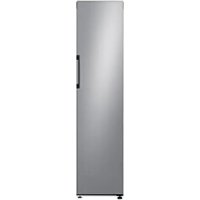
| Brand | Samsung |
| Model | RW33B99C5TF |
| Dimensions (H x W x D) | Approximately 84 x 59 x 57 cm |
| Net Weight | Approximately 45 kg |
| Power Supply | 220-240 V, 50 Hz |
| Climate Class | SN-T (from 10°C to 43°C) |
| Capacity | 33 bottles (estimate) |
| Cooling Type | Compressor |
| Temperature Control | Electronic with digital display |
| Interior Light | LED |
| Defrost | Manual |
| Door Material | Stainless steel / glass (depending on version) |
| Door Reversibility | Yes, possible (requires tools) |
| Spare Parts Available | Handle, gasket, drawer, hinges |
| User Repairability | Limited: handle, gasket, drawer, hinges |
| Tools Required for Repair | Phillips screwdriver, flathead screwdriver, 8/10/12 mm wrenches |
| Warranty | 2 years (Samsung standard) |
| Maintenance and Cleaning | Clean the interior with a soft cloth and warm soapy water |
Frequently Asked Questions - RW33B99C5TF SAMSUNG
User questions about RW33B99C5TF SAMSUNG
0 question about this device. Answer the ones you know or ask your own.
Ask a new question about this device
Download the instructions for your Wine cellar in PDF format for free! Find your manual RW33B99C5TF - SAMSUNG and take your electronic device back in hand. On this page are published all the documents necessary for the use of your device. RW33B99C5TF by SAMSUNG.
USER MANUAL RW33B99C5TF SAMSUNG
User servicing manual
- You can check where to buy replacement parts at http://samsung.com
- Visit the part purchase site and enter the model code of your product to check the parts available for purchase. The model code is labelled on the outer side of your product.
- You can check the model code and version on the barcode label at the bottom left of the product.
- For replacement parts, make sure the part name matches that of the illustration in this manual.
- User-serviceable parts are limited to handles (some models only), gaskets, drawers, and hinges.
NOTE
Following the repair by a non-authorised service provider, self-repair or non-professional repair of the product, Samsung is not liable for any damage to the product, any injury or any other product safety issue caused by any attempt to repair the product which does not carefully follow these repair and maintenance instructions. Any damage to the product caused by an attempt to repair the product by any person other than a Samsung certified service provider will not be covered by the warranty.
CAUTION
- The part name listed on the site may differ from that in this manual. Please make sure you choose the right part name.
- Replacing hinges requires extreme caution because it involves detaching the door.
- Be sure to wear safety gloves while making repairs.
English
The actual image and provided parts of the refrigerator may differ, depending on the model and the country.
RZ38* RR40* RW33*
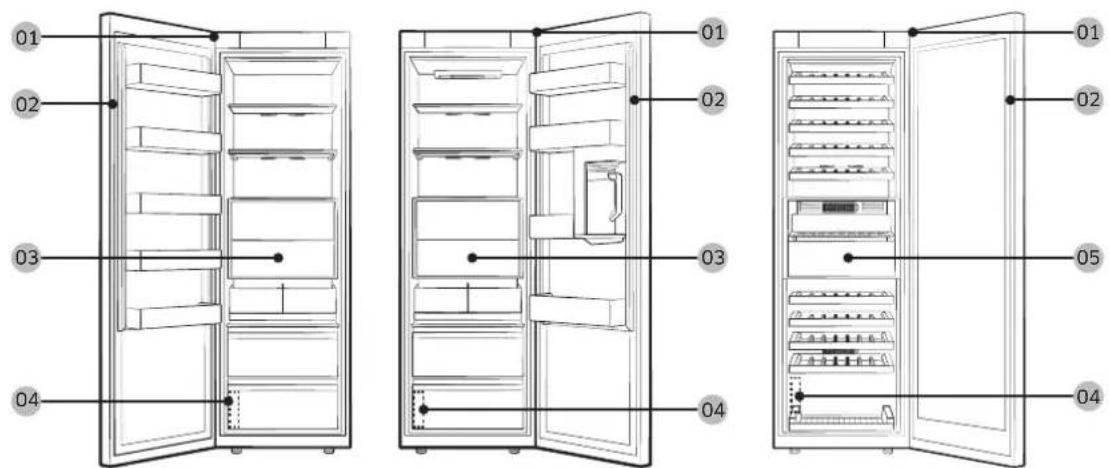
01 Top hinge 02 Gasket
03 Drawer 04 Barcode label
05 Flex Pantry
NOTE
The order of parts disassembly and assembly are the same for the freezer and fridge.
Gasket replacement
CAUTION
Make sure you firmly attach the gasket. Otherwise, cold air from the refrigerator may leak.
To remove the gasket
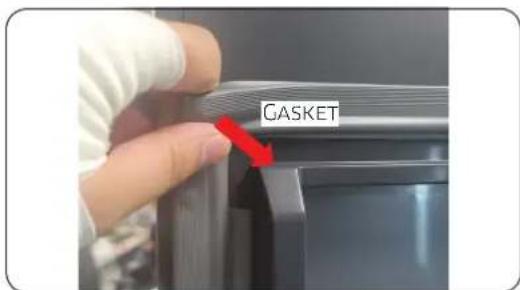
Open the door and remove the gasket from the door.
To replace the gasket
Attach a new gasket to the refrigerator door. Make sure there is no gap between the new gasket and the door.
English
Drawer / Flex Pantry replacement

CAUTION
Check that the drawer is inserted properly into the rail during assembly.
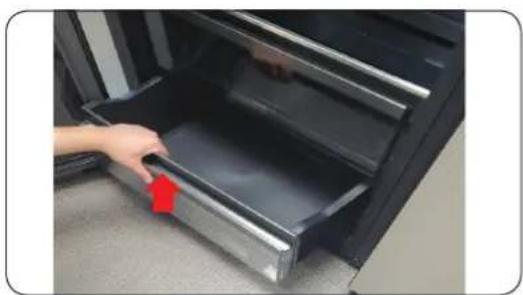
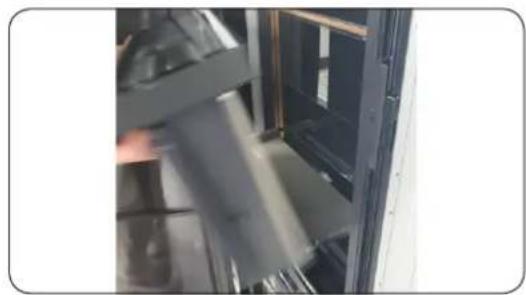
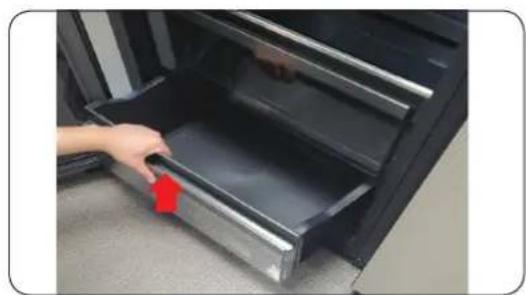
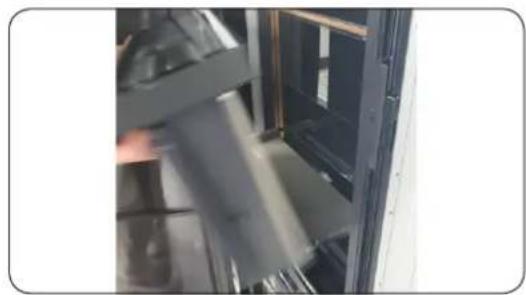
To remove the drawer
natural_image
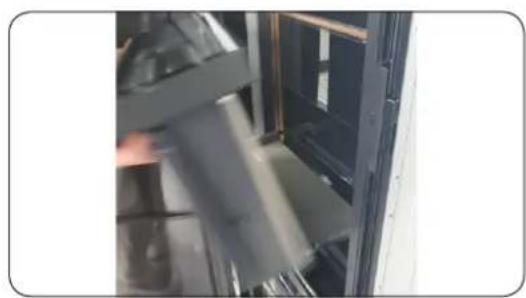
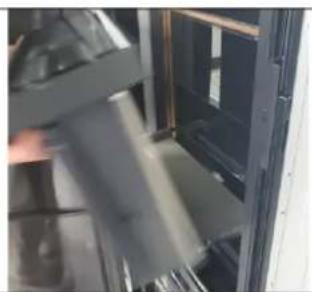
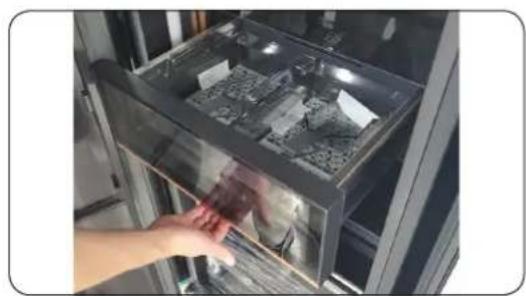
Hand placing a red arrow into a black appliance drawer (no text or symbols visible)- Pull the drawer forward.
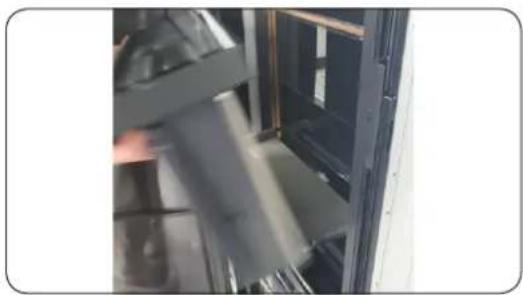
- Remove the drawer by tilting it.
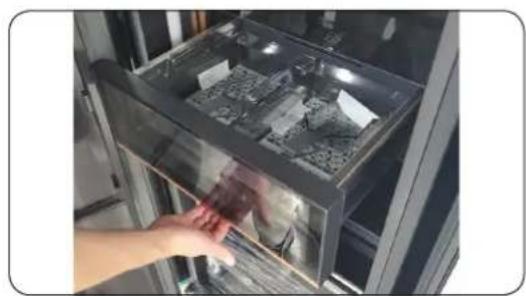
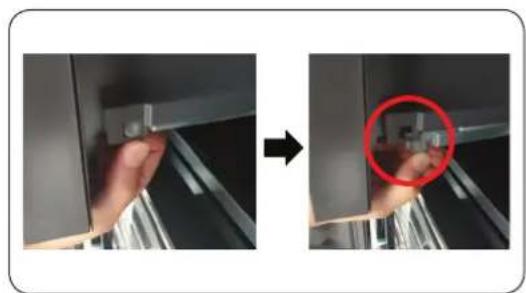
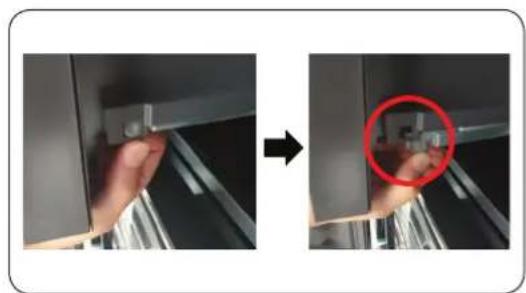
To remove the Flex Pantry
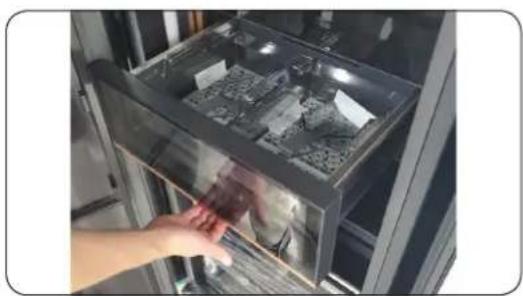
natural_image
Hand placing a small object into a glass appliance rack (no visible text or symbols)-
Pull the drawer forward.
-
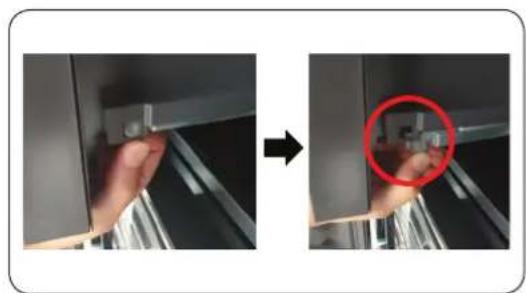
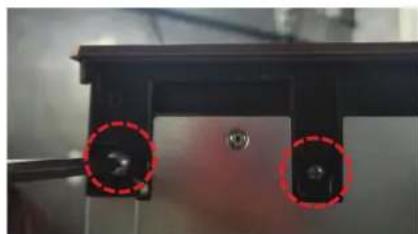
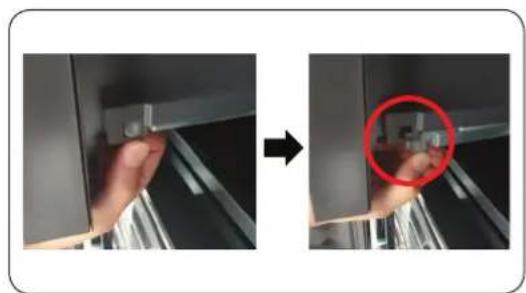
Press the hooks on the lower left/right sides to detach.
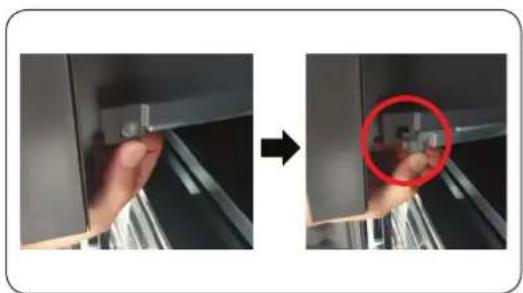
natural_image
Two-step installation of a mechanical bracket with a hand holding a small component, showing a red circle highlighting a detail (no text or symbols present)- Lift it to remove.
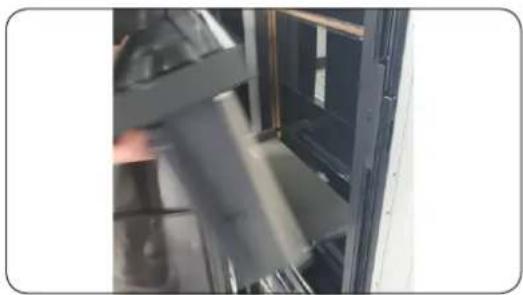
natural_image
Close-up of a mechanical assembly or device with no visible text or symbolsTo reattach the drawers / Flex Pantry
Reattaching the drawers follows the reverse order of their respective removal steps.
English
Hinge replacement
To replace the hinges, you must remove the doors first.

CAUTION
- When removing the doors, take extreme caution because the doors are heavy.
- Before replacing the hinges, put a soft pad such as cardboard on the floor to prevent scratches on the door when you place the doors down.
- As the hinges must be handled carefully and replaced by two or more persons, we recommend you to call for professional technical service.
- If you remove the hinge without holding the door, the door may fall and cause injury.
- Ensure that the shaft is firmly tightened on the hinge.
- Check that the hinge is firmly attached to the cabinet.
• Make sure the wire connectors are connected properly. - Be careful not to damage the wires when fastening the top cover.

WARNING
- Tilting/laying the refrigerator requires a minimum of 2 people.
- Disconnect the power cord before reversing the doors.
Tools required (not provided)
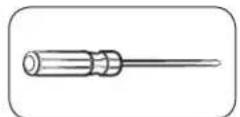
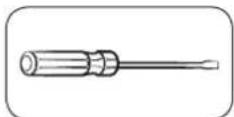
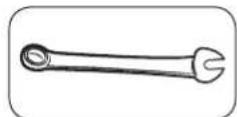
Phillips screwdriver Flat-head screwdriver 10 mm spanner
(for top hinge shaft)
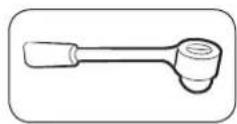
8 mm socket wrench (for bolts)
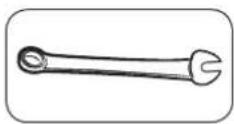
12 mm spanner (for bottom hinge shaft)
English
Remove the door
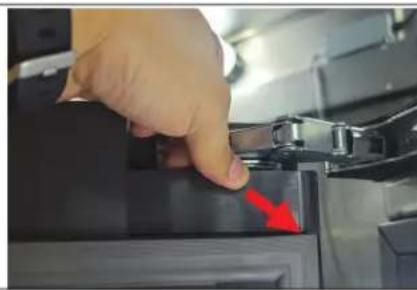
natural_image
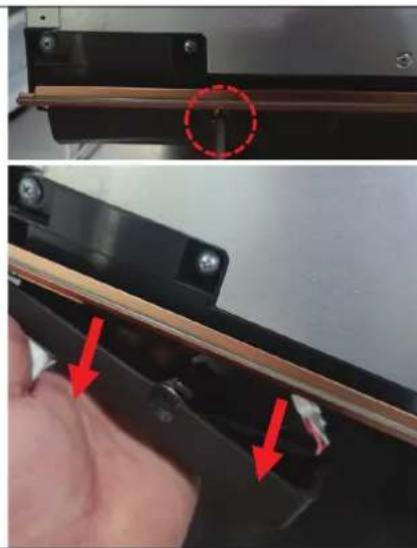
Close-up of a hand pressing down on a black electronic device with a red arrow pointing to the button (no visible text or symbols)- Open the DOOR and disassemble the COVER CAP DOOR.

NOTE
Keep the COVER CAP DOOR in a safe place.
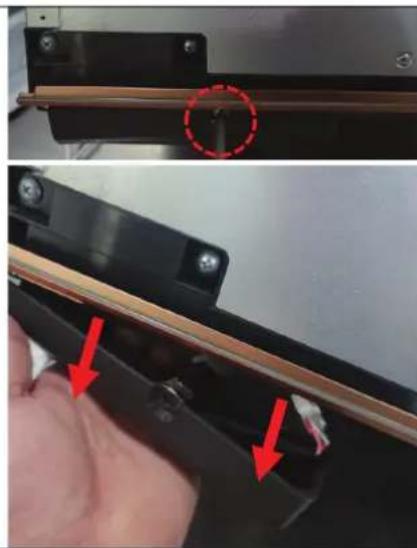
natural_image
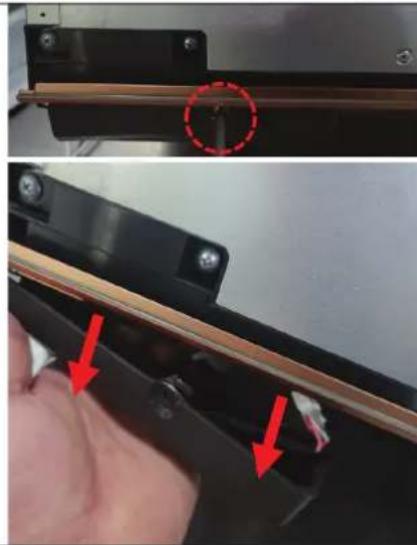
Close-up of a hand holding a black electronic device with red arrows pointing to a component, no visible text or symbols.- Unfasten 1 SCREW at the ASSY COVER HINGE's bottom to remove the hinge downward.
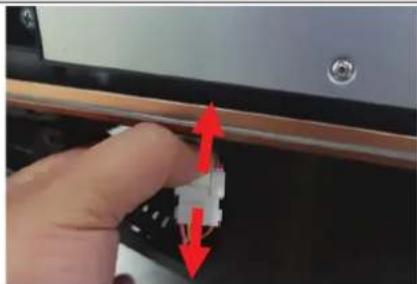
natural_image
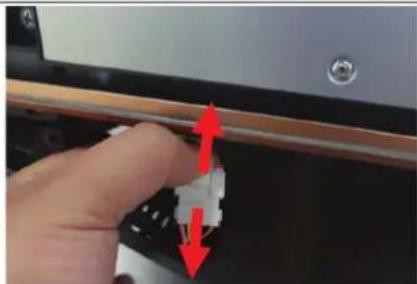
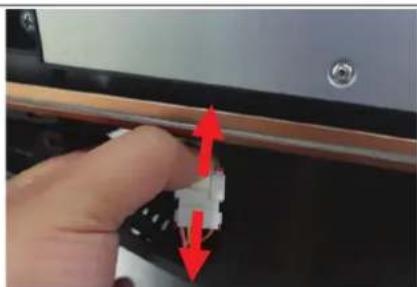
Close-up of a hand adjusting a small electronic component with red arrows indicating direction (no text or symbols visible)- Separate the wire housing.
English
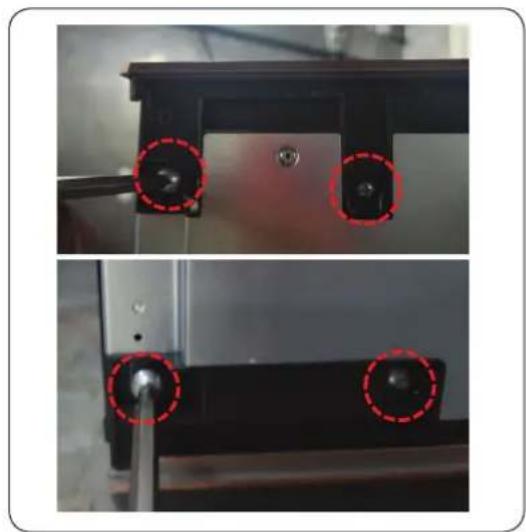
natural_image
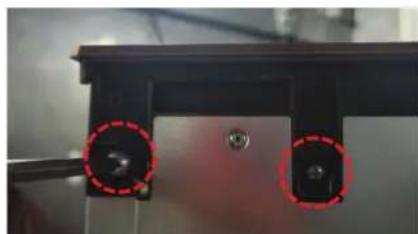
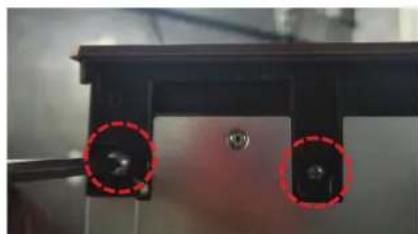
Close-up of two mechanical components with red dashed circles highlighting features (no text or symbols visible)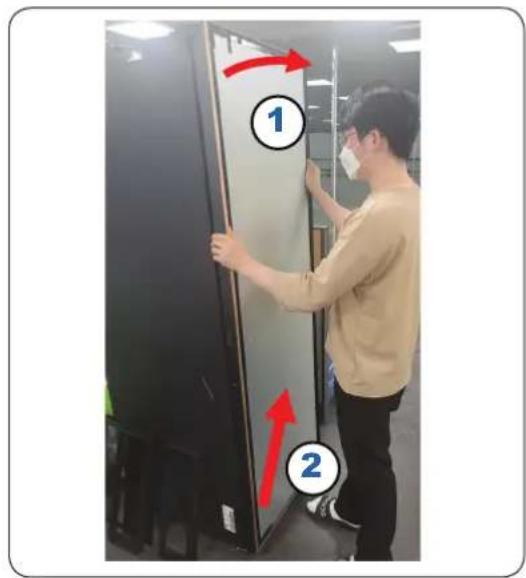
Hinge
natural_image
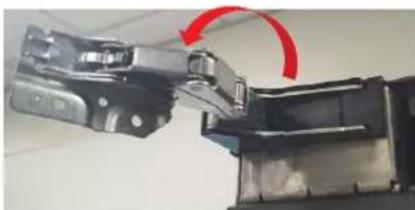
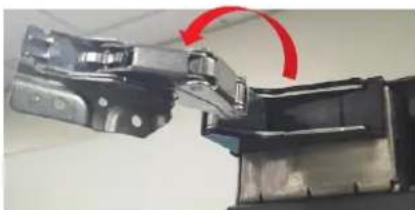
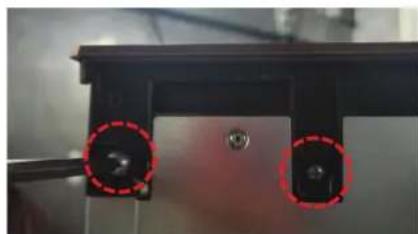
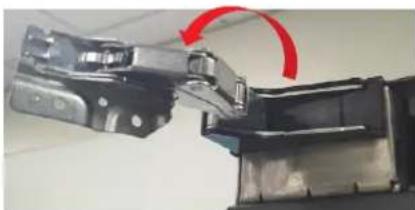
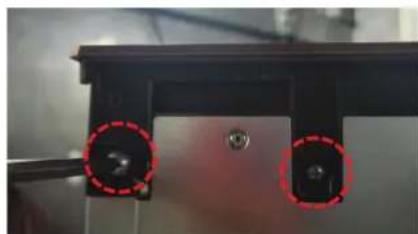
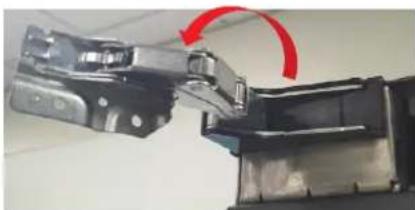
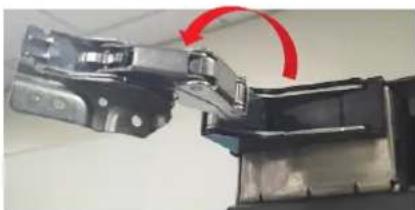
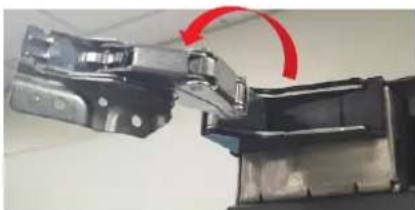
Close-up of a mechanical assembly with a red curved arrow indicating rotation or motion (no visible text or symbols)- Remove 4 SCREWs at the top/bottom.
NOTE
Keep the SCREWs in a safe place.
- Remove the upper part of the DOOR by pulling forward then lift it to remove the DOOR.
CAUTION
Be careful not to drop the DOOR. Hold the door firmly while taking out SCREWs.
The DOORS weigh a lot. Take extra care when removing the DOOR to prevent damage to the DOOR or injury to you.
The identical procedure is used if the DOORS open the opposite way.
(Only the parts' placements are reversed.)
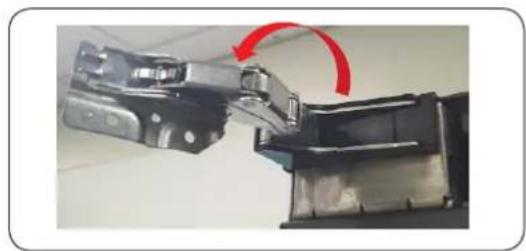
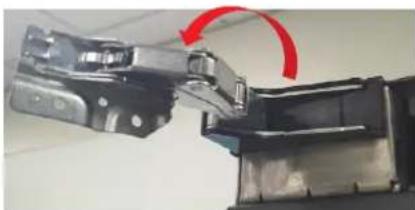
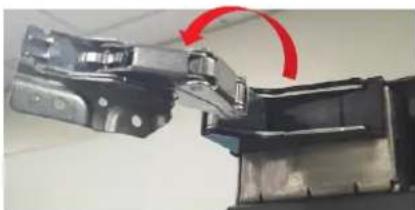
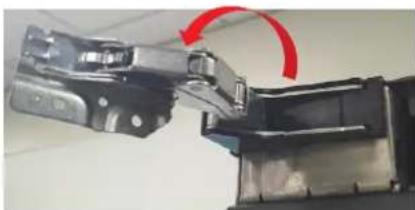
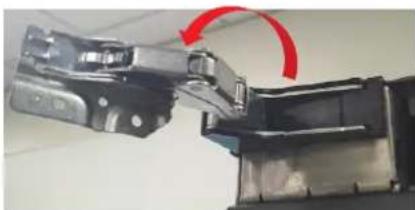
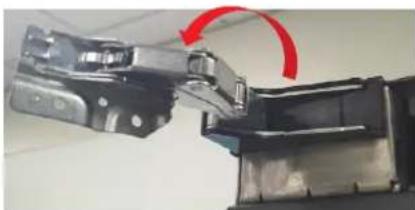
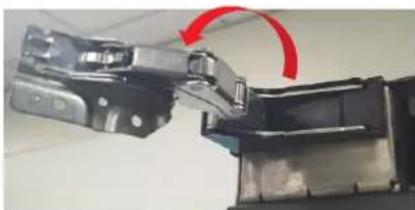
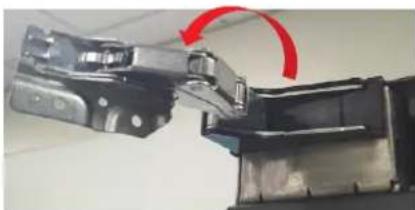
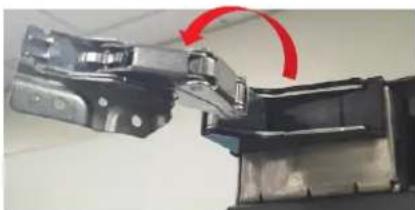
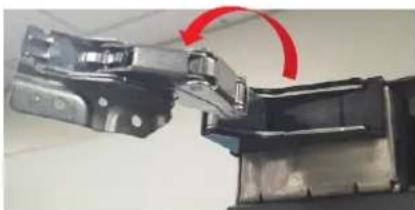
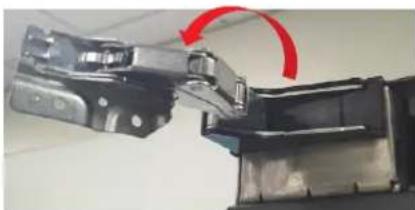
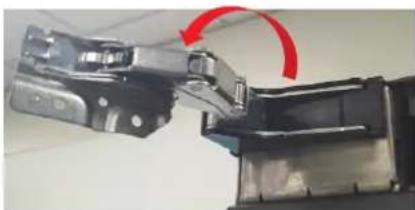
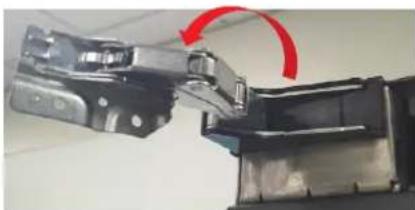
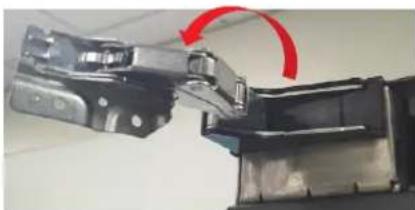
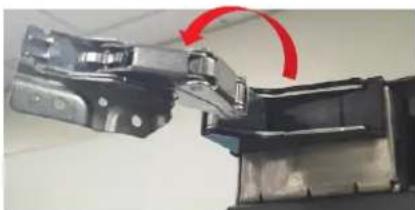
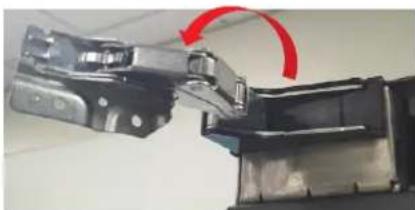
- With the HINGE wide open,
English
natural_image
Close-up of a hand holding a black mechanical component with a red arrow pointing to a section (no text or symbols visible)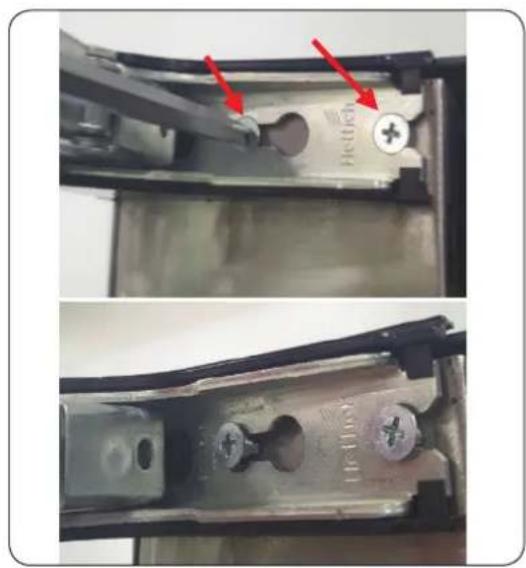
natural_image
Close-up of a mechanical component with red arrows pointing to features, showing internal structure and mounting holes (no text or symbols visible)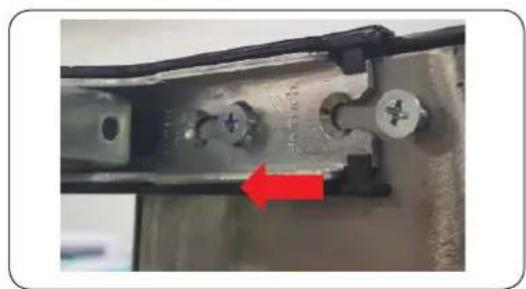
natural_image
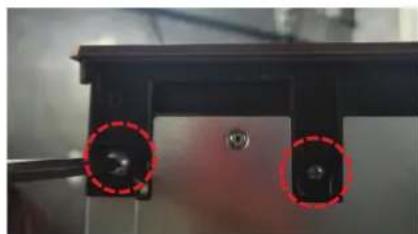
Close-up of a mechanical component with a red arrow pointing to a specific part (no visible text or symbols)-
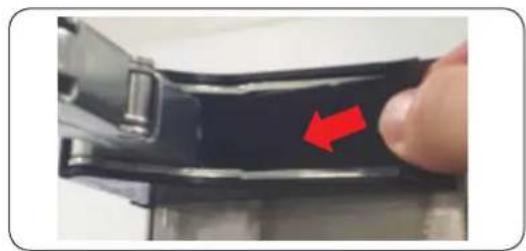
Remove CAP HINGE
-
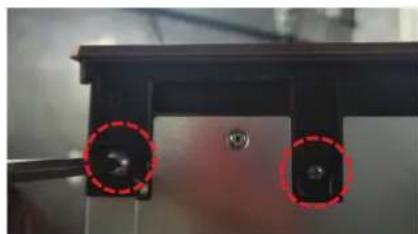
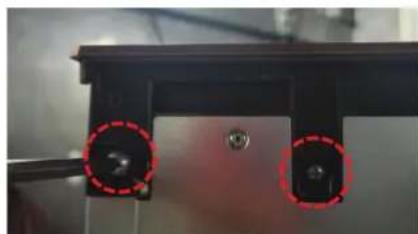
Remove 2 fixed SCREWs for the HINGE
-
Take out HINGE.
NOTE
Due to the auto close function, a unit of HINGE folds quickly and securely owing to the activity of the spring. Avoid getting your fingers stuck inside the multi-joint HINGE.
CAUTION
• After removing the DOOR, disassemble the HINGE.
- The remaining HINGE may become overloaded if you disassemble one of the Top or Bottom HINGES while the DOOR is still attached.
- The identical procedure is used if the DOORS open in the opposite way.
- The same disassembly method is applied to the Top/Bottom HINGEs.
- To assemble, just reverse the same steps for the disassembly.
English
Guide de réparation
natural_image
Hand placing a red arrow into a stainless steel drawer on a kitchen appliance (no text or symbols visible)natural_image
Hand placing a small object into a glass appliance rack (no visible text or symbols)natural_image
Two-step diagram showing a hand holding a metal bracket next to a magnified view of a mechanical component (no text or symbols visible)natural_image
Close-up of a mechanical assembly or device with blurred background (no visible text or symbols)natural_image
Close-up of a hand pressing down on a black electronic device with a red arrow pointing to the button (no visible text or symbols)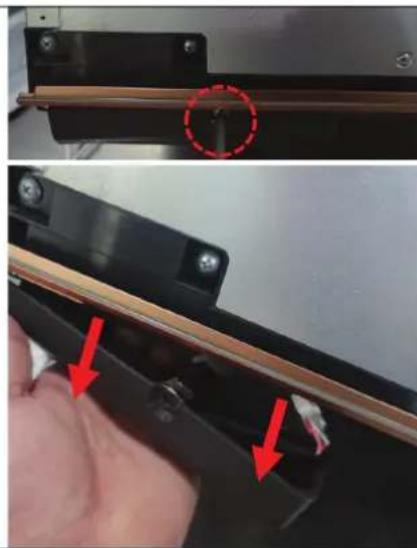
natural_image
Close-up of a hand holding a black electronic device with red arrows pointing to a component, no visible text or symbols.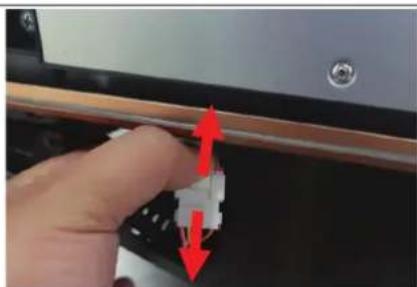
natural_image
Close-up of a hand holding a small electronic component with red arrows indicating direction (no text or symbols visible)natural_image
Close-up of a mechanical component with two red-circled holes (no visible text or symbols)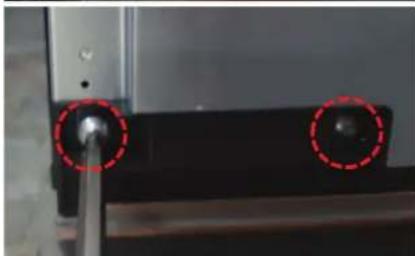
natural_image
Close-up of a mechanical component with two red-circled holes and a central shaft (no visible text or symbols)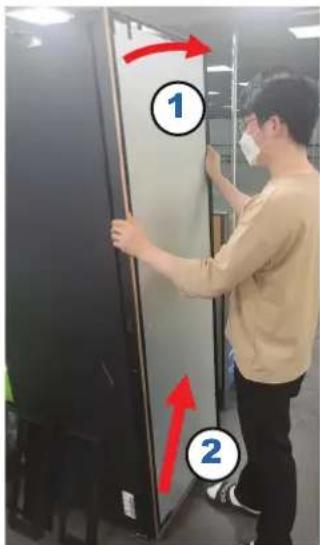
Charnière
natural_image
Close-up of a mechanical component with red arrow indicating rotation (no visible text or symbols)- Retirez 4 VIS en haut/bas.
REMARQUE
natural_image
Hand placing a red arrow into a stainless steel drawer on a kitchen appliance (no text or symbols visible)natural_image
Hand placing a small object into a glass appliance rack (no visible text or symbols)natural_image
Two-step diagram showing a hand holding a metal bracket next to a close-up of a mechanical component, with no visible text or symbols.natural_image
Close-up of a mechanical or electronic component with blurred background and no visible text or symbolsnatural_image
Close-up of a hand pressing down on a black electronic device with a red arrow pointing to the button (no visible text or symbols)natural_image
Close-up of a hand holding a black electronic device with red arrows pointing to a component, no visible text or symbols.natural_image
Close-up of a hand adjusting a small electronic component with red arrows indicating direction (no text or symbols visible)natural_image
Close-up of a mechanical component with two red-circled holes and a central hub (no visible text or symbols)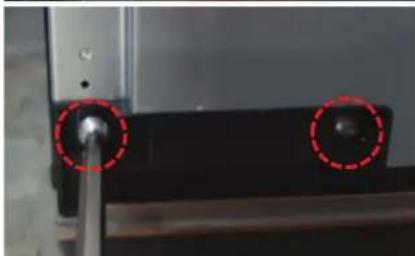
natural_image
Close-up of a mechanical component with two red-circled holes, no visible text or symbols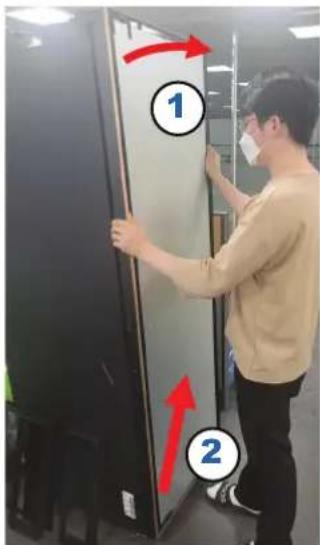
Cerniera
natural_image
Close-up of a mechanical device with a red curved arrow indicating rotation or movement (no visible text or symbols)natural_image
Hand placing a red arrow into a stainless steel drawer on a kitchen appliance (no text or symbols visible)natural_image
Hand placing a small object into a glass appliance rack (no visible text or symbols)natural_image
Two-step diagram showing a hand holding a metal bracket next to a close-up of a mechanical component, with no visible text or symbols.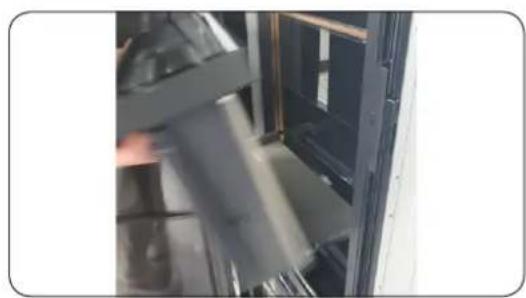
natural_image
Close-up of a mechanical assembly or mounting bracket with visible internal components and no text or symbolsnatural_image
Close-up of a hand pressing down on a black electronic device with a red arrow pointing to the button (no visible text or symbols)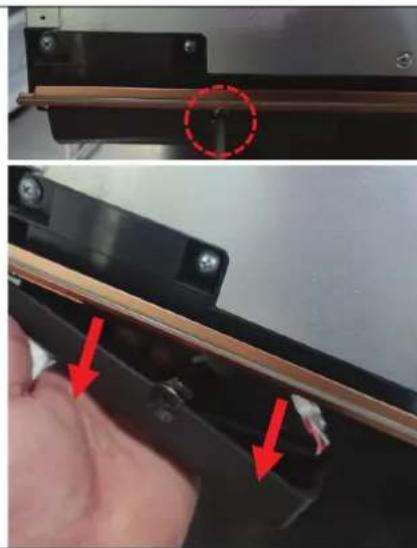
natural_image
Close-up of a hand holding a black electronic device with red arrows pointing to a component, no visible text or symbols.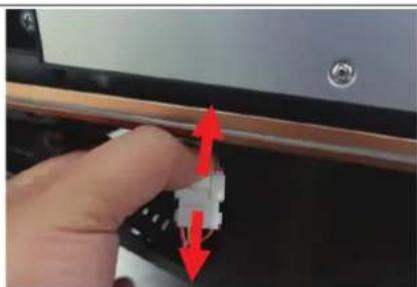
natural_image
Close-up of a hand holding a small electronic component with red arrows indicating direction (no text or symbols visible)natural_image
Close-up of a mechanical component with two red-circled holes (no visible text or symbols)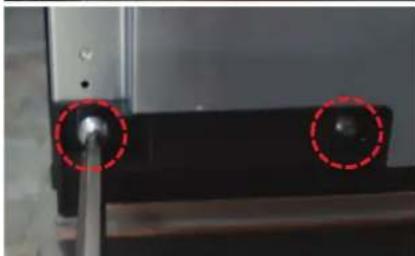
natural_image
Close-up of a mechanical component with two red-circled holes and a central shaft (no visible text or symbols)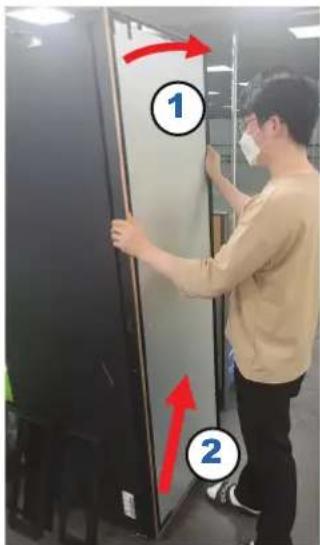
Scharnier
natural_image
Close-up of a mechanical assembly with a red curved arrow indicating rotation or motion (no visible text or symbols)natural_image
Hand placing a red arrow into a stainless steel drawer on a kitchen appliance (no text or symbols visible)natural_image
Hand placing a small object into a glass appliance rack (no visible text or symbols)natural_image
Two-step diagram showing a hand holding a metal bracket next to a close-up of a mechanical component, with no visible text or symbols.natural_image
Close-up of a mechanical assembly or mounting bracket with visible internal components and no text or symbolsnatural_image
Close-up of a hand pressing down on a black battery cover with a red arrow pointing to the next component (no text or symbols visible)natural_image
Close-up of a mechanical component with red arrows indicating features, no visible text or symbolsnatural_image
Close-up of a hand pressing a small electronic component with red arrows indicating motion (no text or symbols visible)- Maak de behuizing van de draden los.
Nederlands
natural_image
Close-up of a mechanical component with two red-circled holes and a central hub (no visible text or symbols)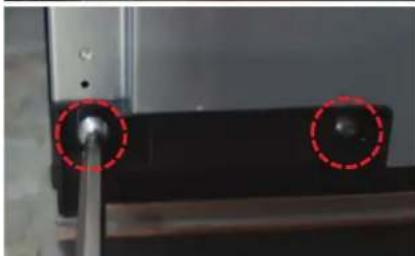
natural_image
Close-up of a mechanical component with two red-circled holes, no visible text or symbols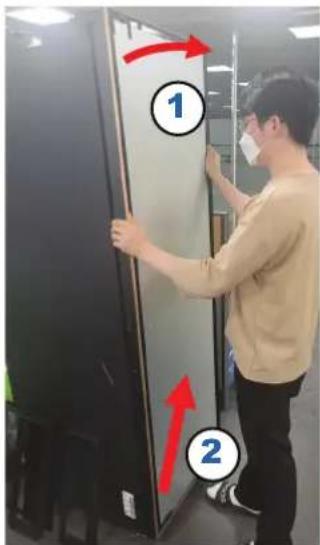
Scharnier
natural_image
Close-up of a mechanical device with a red curved arrow indicating rotation or movement (no visible text or symbols)natural_image
Hand placing a red arrow into a stainless steel drawer on a kitchen appliance (no text or symbols visible)natural_image
Hand placing a small object into a glass appliance rack (no visible text or symbols)natural_image
Two-step diagram showing a hand holding a metal bracket next to a close-up of a mechanical component, with no visible text or symbols.natural_image
Close-up of a mechanical assembly or mounting bracket with no visible text or symbolsnatural_image
Close-up of a hand pressing down on a black electronic device with a red arrow pointing to the button (no visible text or symbols)natural_image
Close-up of a hand holding a black electronic device with red arrows pointing to a component, no visible text or symbols.natural_image
Close-up of a hand adjusting a small electronic component with red arrows indicating direction (no text or symbols visible)- Separe la carcasa de cables.
Español
natural_image
Close-up of a mechanical component with two red-circled holes (no visible text or symbols)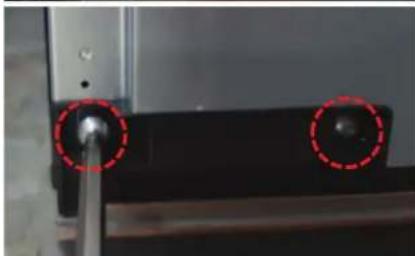
natural_image
Close-up of a mechanical component with two red-circled holes, no visible text or symbols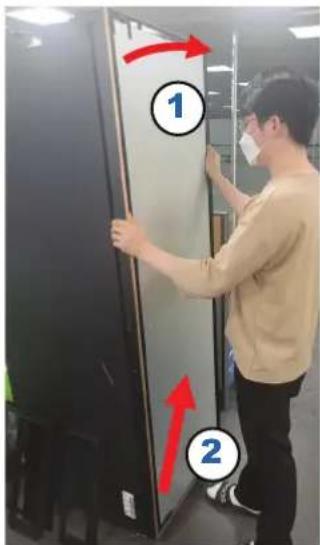
Bisagra
natural_image
Close-up of a mechanical device with a red curved arrow indicating rotation or movement (no visible text or symbols)natural_image
Hand placing a red arrow into a black appliance drawer (no text or symbols visible)natural_image
Hand placing a small object into a glass appliance rack (no visible text or symbols)natural_image
Two-step installation of a mechanical bracket with a hand holding a small component, showing a red circle highlighting a detail (no text or symbols present)natural_image
Interior view of a server room with black equipment and a door, no visible text or symbolsnatural_image
Close-up of a hand pressing down on a black electronic device with a red arrow pointing to the button (no visible text or symbols)- Abra a PORTA e desmonte o ESPAÇADOR DA PORTA.
NOTA
natural_image
Close-up of a hand holding a black electronic device with red arrows pointing to a component, no visible text or symbols.natural_image
Close-up of a hand adjusting a small electronic component with red arrows indicating direction (no text or symbols visible)natural_image
Close-up of a mechanical component with two red-circled holes (no visible text or symbols)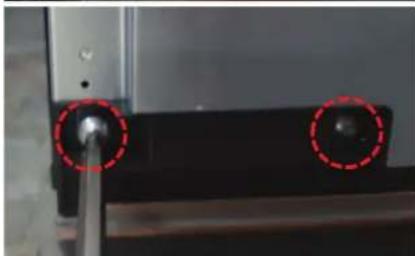
natural_image
Close-up of a mechanical component with two red-circled holes and a central shaft (no visible text or symbols)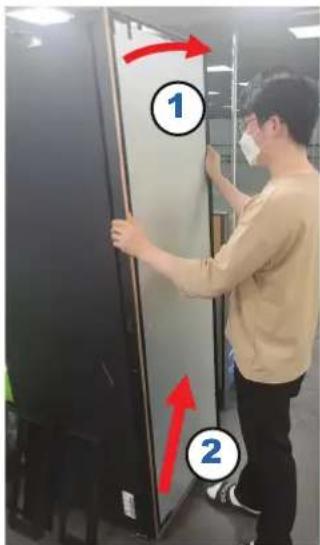
Dobradiça
natural_image
Close-up of a mechanical component with red arrow indicating rotation (no visible text or symbols)- Remova 4 PARAFUSOS na parte superior/inferior.
NOTA
natural_image
Hand placing a red arrow into an open kitchen appliance (no text or symbols visible)natural_image
Hand inserting a red object into a glass appliance (no visible text or symbols)natural_image
Two-panel image showing a hand holding a small metallic bracket, one before and after a change, the other after (no text or symbols visible)natural_image
Close-up of a mechanical assembly or mounting bracket with no visible text or symbolsnatural_image
Close-up of a hand pressing down on a black electronic device with a red arrow pointing to a button (no visible text or symbols)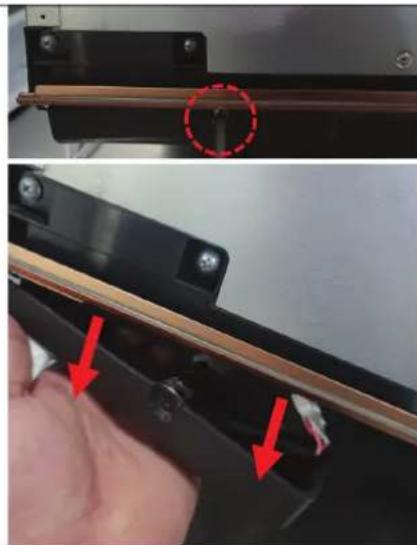
natural_image
Close-up of a mechanical component with red arrows indicating features, no visible text or symbols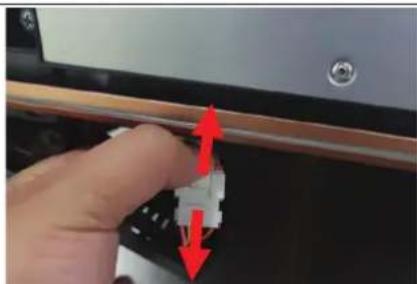
natural_image
Close-up of a hand adjusting a small white connector with red arrows indicating direction (no text or symbols visible)natural_image
Close-up of a mechanical component with two red-circled holes and a central hub (no visible text or symbols)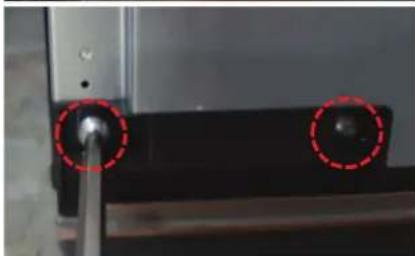
natural_image
Close-up of a mechanical component with two red-circled holes, no visible text or symbols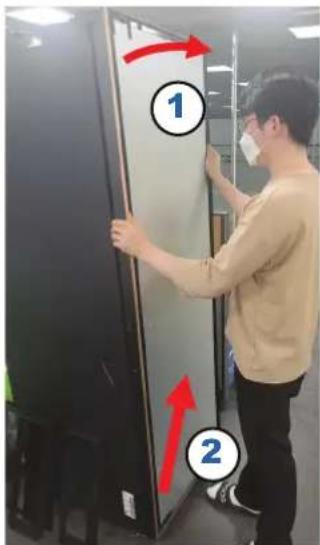
Μεντεσές
natural_image
Close-up of a robotic arm joint with red motion arrows indicating movement (no text or symbols visible)natural_image
Close-up of a hand holding a black mechanical component with a red arrow pointing to a section (no text or symbols visible)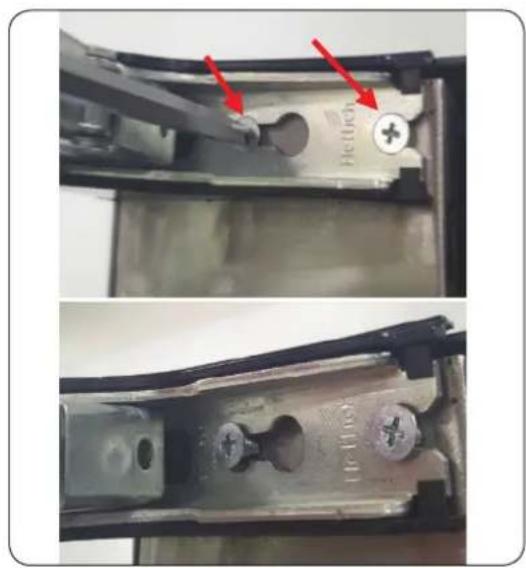
natural_image
Close-up of a mechanical component with red arrows pointing to features, showing internal structure and mounting holes (no text or symbols visible)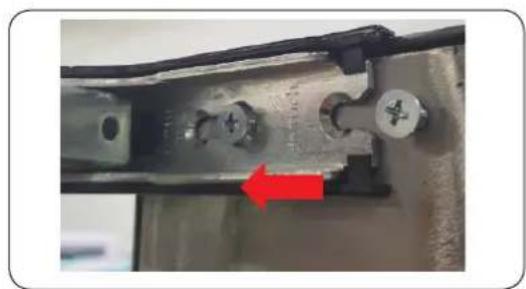
natural_image
Close-up of a mechanical component with a red arrow pointing to a specific part (no visible text or symbols)natural_image
Hand placing a red arrow into a stainless steel drawer on a kitchen appliance (no text or symbols visible)natural_image
Hand placing a small object into a glass appliance rack (no visible text or symbols)natural_image
Two-step diagram showing a hand holding a metal bracket next to a magnified view of a mechanical component (no text or symbols visible)natural_image
Close-up of a mechanical assembly or device with blurred background (no visible text or symbols)natural_image
Close-up of a hand pressing down on a black battery cover with a red arrow pointing to the next component (no text or symbols visible)natural_image
Close-up of a mechanical component with red arrows indicating features, no visible text or symbolsnatural_image
Close-up of a hand pressing a small electronic component with red arrows indicating motion (no text or symbols visible)- Separera kabelhöljet.
Svenska
natural_image
Close-up of a mechanical component with two red-circled holes (no visible text or symbols)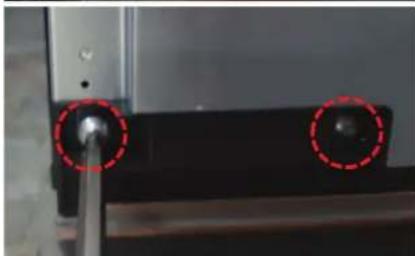
natural_image
Close-up of a mechanical component with two red-circled holes and a central shaft (no visible text or symbols)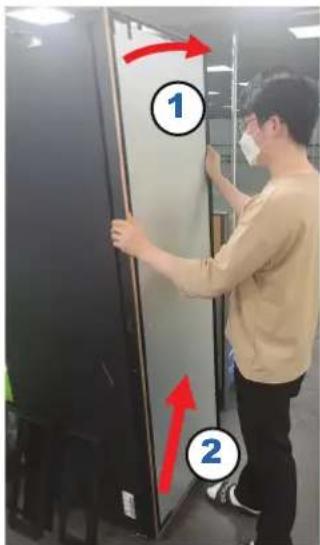
Gångjärn
natural_image
Close-up of a mechanical component with red arrow indicating rotation (no visible text or symbols)natural_image
Hand placing a red arrow into a black appliance drawer (no text or symbols visible)natural_image
Hand placing a small object into a glass appliance rack (no visible text or symbols)natural_image
Two-step installation of a mechanical bracket with a hand holding a small component, showing a red circle highlighting a detail (no text or symbols present)- Løft for at fjerne.
natural_image
Close-up of a mechanical assembly or device with no visible text or symbolsSådan genmonteres skufferne/flex-pantryen
natural_image
Close-up of a hand pressing down on a black battery cover with a red arrow pointing to the glossy surface (no text or symbols visible)- Åbn D∅REN, og adskil DÆKSLET TIL D∅REN.
BEMÆRK
natural_image
Close-up of a mechanical component with a red dashed circle highlighting a specific feature (no visible text or symbols)natural_image
Close-up of a hand holding a black electronic device with red arrows pointing to a component (no visible text or symbols)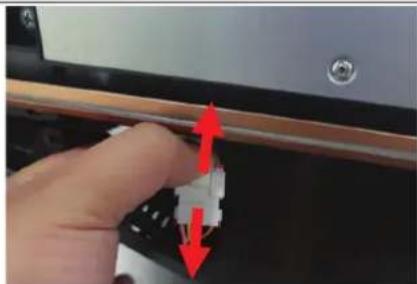
natural_image
Close-up of a hand pressing a small electronic component with red arrows indicating motion (no text or symbols visible)natural_image
Close-up of a mechanical component with two red-circled holes (no visible text or symbols)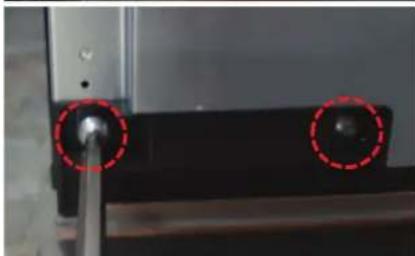
natural_image
Close-up of a mechanical component with two red-circled holes and a central shaft (no visible text or symbols)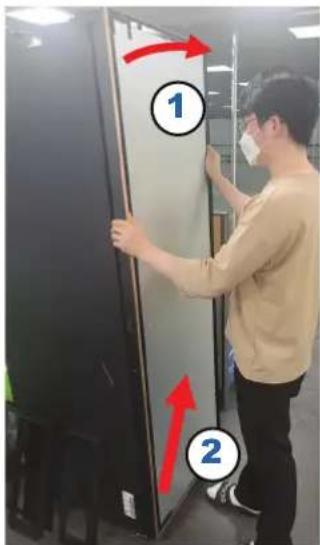
Hængsel
natural_image
Close-up of a mechanical assembly with a red curved arrow indicating rotation or motion (no visible text or symbols)- Fjern 4 SKRUER i toppen/bunden.
BEMÆRK
Opbevar SKRUERNE på et sikkert sted.
natural_image
Hand placing a red arrow into a stainless steel drawer on a kitchen appliance (no text or symbols visible)natural_image
Hand placing a small object into a glass appliance rack (no visible text or symbols)natural_image
Two-step diagram showing a hand holding a metal bracket next to a close-up of a mechanical component, with no visible text or symbols.- Løft for å ta ut.
natural_image
Close-up of a mechanical assembly or mounting bracket with no visible text or symbols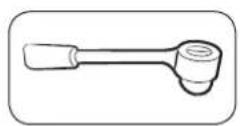
8 mm pipenøkkel (for bolter)
natural_image
Close-up of a hand pressing down on a black battery cover with a red arrow pointing to the next component (no text or symbols visible)natural_image
Close-up of a mechanical component with red arrows indicating features, no visible text or symbolsnatural_image
Close-up of a hand pressing a small electronic component with red arrows indicating motion (no text or symbols visible)natural_image
Close-up of a mechanical component with two red-circled holes (no visible text or symbols)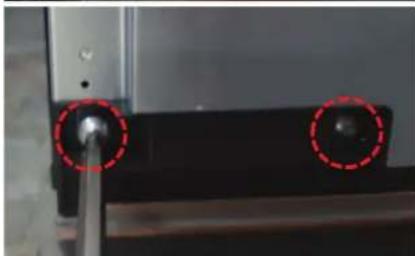
natural_image
Close-up of a mechanical component with two red-circled holes and a central shaft (no visible text or symbols)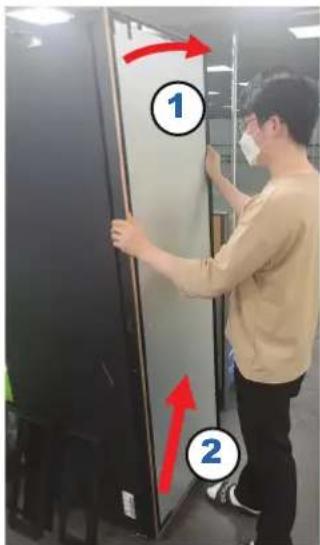
Hengsel
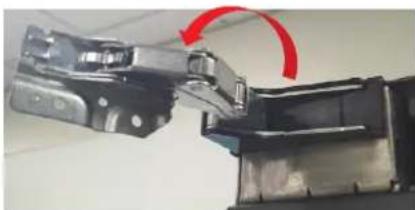
natural_image
Close-up of a mechanical assembly with a red curved arrow indicating rotation or motion (no visible text or symbols)natural_image
Hand placing a red arrow into a black appliance drawer (no text or symbols visible)natural_image
Hand placing a small object into a glass appliance rack (no visible text or symbols)natural_image
Two-step installation of a mechanical bracket with a hand holding a small component, showing a red circle highlighting a detail (no text or symbols present)- Nosta ja poista.
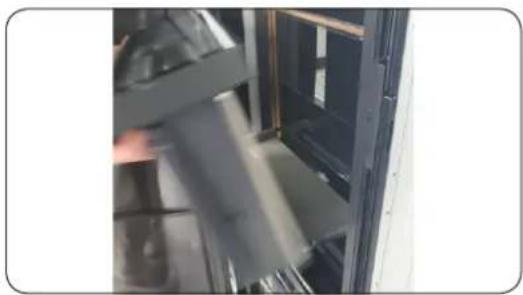
natural_image
Close-up of a mechanical assembly or device with no visible text or symbolsnatural_image
Close-up of a hand pressing down on a black battery cover with a red arrow pointing to the next component (no text or symbols visible)natural_image
Close-up of a mechanical component with red arrows indicating features, no visible text or symbolsnatural_image
Close-up of a hand pressing a small electronic component with red arrows indicating motion (no text or symbols visible)- Irrota johtokotelo.
natural_image
Close-up of a mechanical component with two red-circled holes (no visible text or symbols)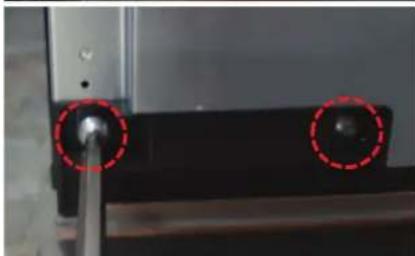
natural_image
Close-up of a mechanical component with two red-circled holes and a central shaft (no visible text or symbols)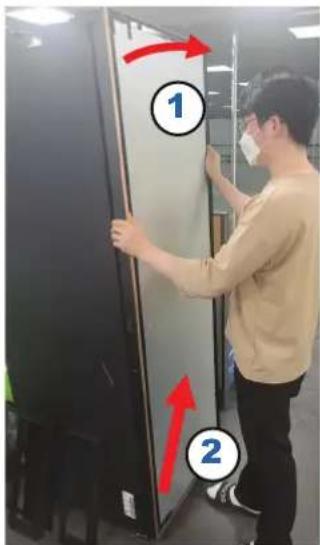
Sarana
natural_image
Close-up of a mechanical component with red arrow indicating rotation (no visible text or symbols)natural_image
Hand placing a red arrow into a stainless steel drawer on a kitchen appliance (no text or symbols visible)natural_image
Hand placing a small object into a glass appliance rack (no visible text or symbols)natural_image
Two-step diagram showing a hand holding a metal bracket next to a close-up of a mechanical component, with no visible text or symbols.natural_image
Close-up of a mechanical assembly or mounting bracket with no visible text or symbolsnatural_image
Close-up of a hand pressing down on a black battery cover with a red arrow pointing to the glossy surface (no text or symbols visible)natural_image
Close-up of a mechanical component with red arrows indicating features, no visible text or symbolsnatural_image
Close-up of a hand pressing a small electronic component with red arrows indicating motion (no text or symbols visible)natural_image
Close-up of a mechanical component with two red-circled holes (no visible text or symbols)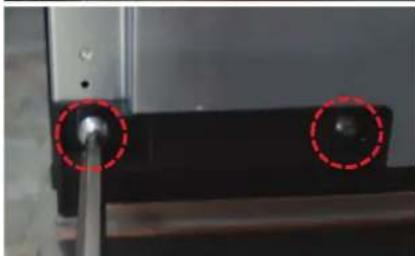
natural_image
Close-up of a mechanical component with two red-circled holes and a central shaft (no visible text or symbols)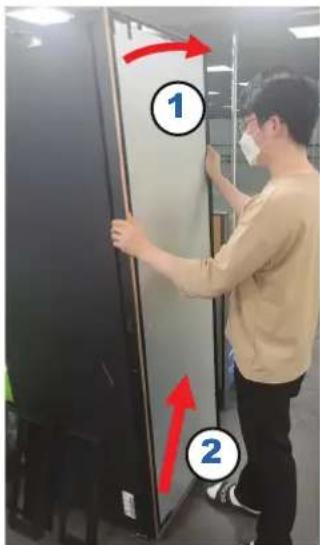
Zawias
natural_image
Close-up of a mechanical component with red arrow indicating rotation (no visible text or symbols)natural_image
Hand placing a red arrow into a stainless steel drawer on a kitchen appliance (no text or symbols visible)natural_image
Hand placing a small object into a glass appliance rack (no visible text or symbols)natural_image
Two-step diagram showing a hand holding a metal bracket next to a close-up of a mechanical component, with no visible text or symbols.natural_image
Close-up of a mechanical assembly or mounting bracket with no visible text or symbolsnatural_image
Close-up of a hand pressing down on a black battery cover with a red arrow pointing to the glossy surface (no text or symbols visible)natural_image
Close-up of a mechanical component with red arrows indicating features, no visible text or symbolsnatural_image
Close-up of a hand pressing a small electronic component with red arrows indicating motion (no text or symbols visible)- Odpojte kabely.
natural_image
Close-up of a mechanical component with two red-circled holes and a central knob (no visible text or symbols)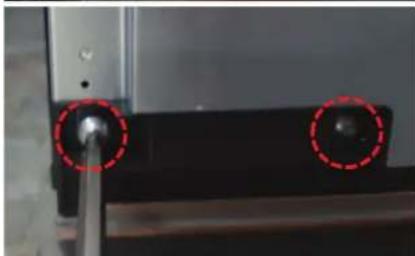
natural_image
Close-up of a mechanical component with two red-circled holes and a central shaft (no visible text or symbols)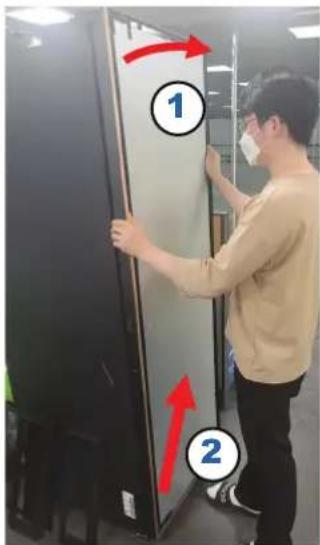
Závěs
natural_image
Close-up of a mechanical component with red arrow indicating rotation (no visible text or symbols)natural_image
Hand placing a red arrow into a black appliance drawer (no text or symbols visible)natural_image
Hand placing a small object into a glass appliance rack (no visible text or symbols)natural_image
Two-step diagram showing a hand holding a metal bracket next to a close-up of a red circle highlighting a small component (no text or symbols present)natural_image
Interior view of a server room with black equipment and a door, no visible text or symbolsnatural_image
Close-up of a hand pressing down on a black battery cover with a red arrow pointing to the next component (no text or symbols visible)- Otvorte DVIERKA a demontujte KRYT DVIEROK.
POZNÁMKA
KRYT DVIEROK si uschovajte na bezpečnom mieste.
natural_image
Close-up of a mechanical component with red arrows indicating features, no visible text or symbolsnatural_image
Close-up of a hand pressing a small electronic component with red arrows indicating motion (no text or symbols visible)natural_image
Close-up of a mechanical component with two red-circled holes (no visible text or symbols)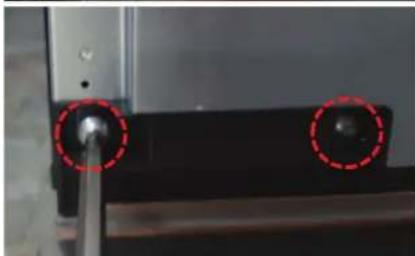
natural_image
Close-up of a mechanical component with two red-circled holes and a central shaft (no visible text or symbols)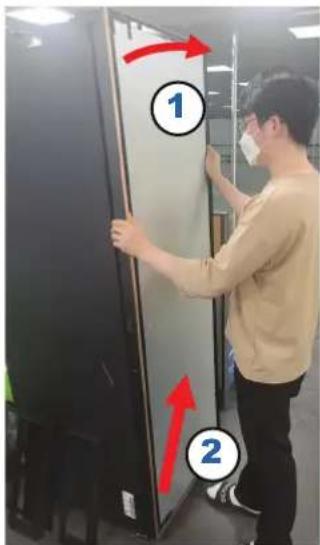
Pánt
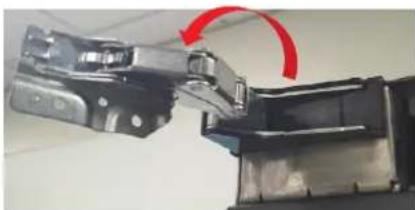
natural_image
Close-up of a mechanical component with red arrow indicating rotation (no visible text or symbols)natural_image
Hand placing a red arrow into a stainless steel drawer on a kitchen appliance (no text or symbols visible)natural_image
Hand placing a small object into a glass appliance rack (no visible text or symbols)natural_image
Two-step diagram showing a hand holding a metal bracket next to a close-up of a mechanical component, with no visible text or symbols.natural_image
Close-up of a mechanical assembly or mounting bracket with no visible text or symbolsnatural_image
Close-up of a hand pressing down on a black electronic device with a red arrow pointing to the button (no visible text or symbols)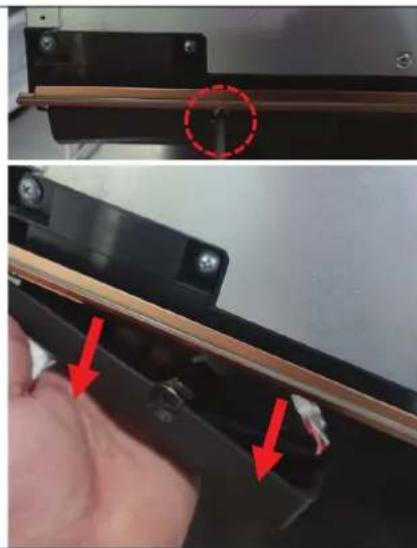
natural_image
Close-up of a hand holding a black electronic device with red arrows pointing to a component, no visible text or symbols.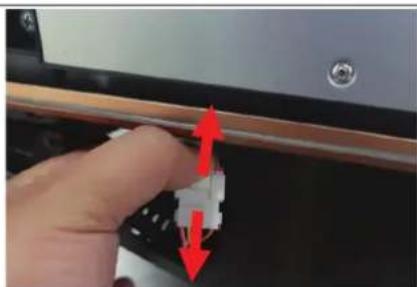
natural_image
Close-up of a hand holding a small electronic component with red arrows indicating direction (no text or symbols visible)natural_image
Close-up of a mechanical component with two red-circled holes (no visible text or symbols)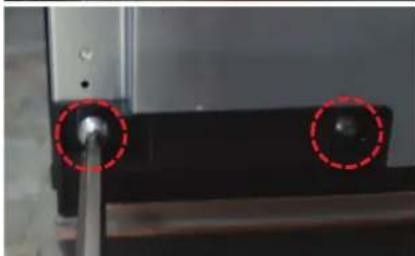
natural_image
Close-up of a mechanical component with two red-circled holes and a central shaft (no visible text or symbols)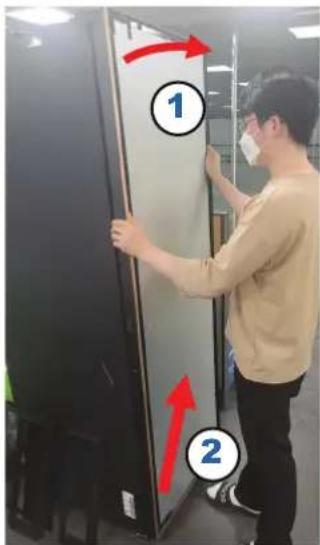
Balama
natural_image
Close-up of a mechanical assembly with a red curved arrow indicating motion or force (no visible text or symbols)natural_image
Hand placing a red arrow into a black appliance drawer (no text or symbols visible)natural_image
Hand placing a component into a rack inside a server cabinet (no visible text or symbols)natural_image
Two-step diagram showing a hand holding a small component next to a wall-mounted device, with a red circle highlighting a component (no text or symbols present)natural_image
Close-up of a mechanical assembly or mounting bracket with visible metal components and internal structure (no text or symbols)natural_image
Close-up of a hand pressing down on a black electronic device with a red arrow pointing to the button (no visible text or symbols)natural_image
Close-up of a mechanical component with red arrows indicating a step, showing a wooden rod and a small attached part (no text or symbols visible)natural_image
Close-up of a hand pressing a small electronic component with red arrows indicating motion (no text or symbols visible)natural_image
Close-up of a mechanical component with two red dashed circles highlighting features (no visible text or symbols)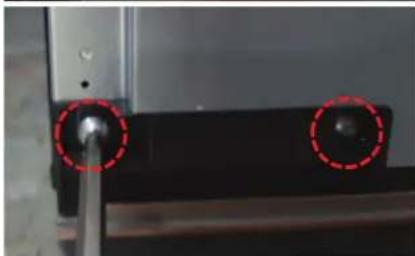
natural_image
Close-up of a mechanical component with two red-circled holes, no visible text or symbols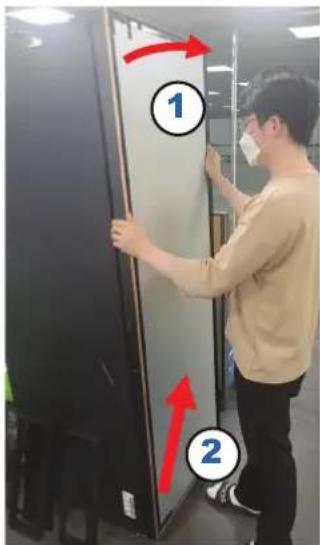
Шарнир
natural_image
Close-up of a mechanical assembly with red arrows indicating motion or force direction (no visible text or symbols)natural_image
Hand placing a red plastic clip into a stainless steel refrigerator (no text or symbols visible)natural_image
Hand placing a dark object into a glass appliance rack (no visible text or symbols)natural_image
Two-panel image showing a hand holding a metal bracket, one before and after a close-up of a red circle highlighting a small component (no text or symbols visible)natural_image
Close-up of a mechanical assembly or device with blurred background (no visible text or symbols)natural_image
Close-up of a hand pressing down on a black electronic device with a red arrow pointing to the button (no visible text or symbols)natural_image
Close-up of a hand holding a black electronic device with red arrows pointing to a component, no visible text or symbols.natural_image
Close-up of a hand adjusting a small electronic component with red arrows indicating direction (no text or symbols visible)natural_image
Close-up of a mechanical component with two red-circled holes (no visible text or symbols)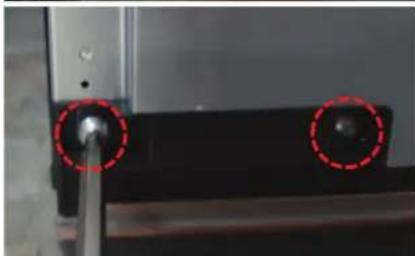
natural_image
Close-up of a mechanical component with two red-circled holes and a central shaft (no visible text or symbols)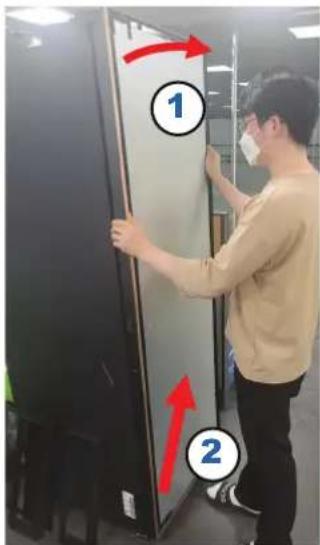
Zsanér
natural_image
Close-up of a mechanical assembly with a red curved arrow indicating motion or force (no visible text or symbols)Otvorite vrata i sa njih skinite zaptivnu gumu.
Da biste zamenili zaptivnu gumu
Postavite novu zaptivnu gumu na vrata frižidera. Uverite se da između nove zaptivne gume i vrata nema razmaka.
Srpski
Zamena fioke / fleksibilne ostave

OPREZ
Tokom postavljanja, proverite da li je fioka pravilno umetnuta u vodice.
Da biste skinuli fioku
natural_image
Hand placing a red arrow into a stainless steel drawer on a kitchen appliance (no text or symbols visible)- Povucite fioku unapred.
- Nakrenite fioku da biste je izvadili.
Da biste uklonili fleksibilnu ostavu
natural_image
Hand placing a small object into a glass appliance rack (no visible text or symbols)-
Povucite fioku unapred.
-
Pritisnite kuke na donjoj levoj/desnoj strani radi odvajanja.
natural_image
Two-step diagram showing a hand holding a metal bracket next to a close-up of a mechanical component, with no visible text or symbols.- Podignite ostavu da biste je uklonili.
natural_image
Close-up of a mechanical assembly or mounting bracket with visible internal components and no text or symbolsDa biste vratili fioke / fleksibilnu ostavu
natural_image
Close-up of a hand pressing down on a black battery cover with a red arrow pointing to the glossy surface (no text or symbols visible)- Otvorite VRATA i skinite VRATA POKLOPCA.
NAPOMENA
natural_image
Close-up of a mechanical component with red arrows indicating features, no visible text or symbols- Odvrnite 1 ZAVRTANJ sa donje strane ŠARKE POKLOPCA SKLOPA da biste skinuli šarku nadole.
natural_image
Close-up of a hand pressing a small electronic component with red arrows indicating motion (no text or symbols visible)- Odvojite kućište žice.
Srpski
natural_image
Close-up of a mechanical component with two red-circled holes (no visible text or symbols)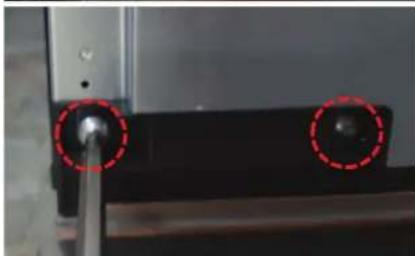
natural_image
Close-up of a mechanical component with two red-circled holes and a central shaft (no visible text or symbols)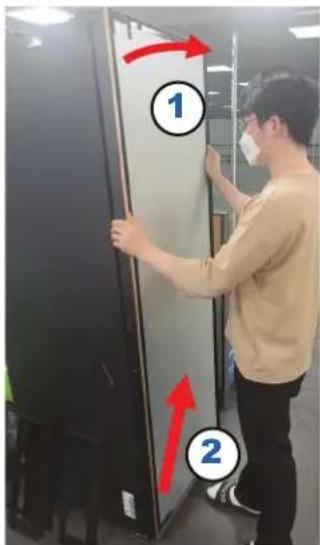
Šarka
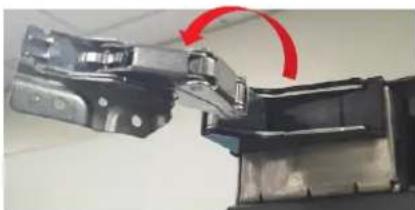
natural_image
Close-up of a mechanical component with red arrow indicating rotation (no visible text or symbols)- Skinite 4 ZAVRTNJA sa gornje/donje strane.
NAPOMENA
natural_image
Hand placing a red arrow into a stainless steel drawer on a kitchen appliance (no text or symbols visible)- Povucite ladicu prema naprijed.
- Uklonite ladicu tako da je nagnete.
Za uklanjanje prilagodljive ostave
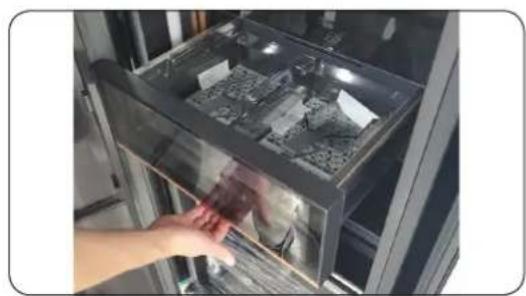
natural_image
Hand placing a small object into a glass appliance rack (no visible text or symbols)- Povucite ladicu prema naprijed.
natural_image
Two-step diagram showing a hand holding a metal bracket next to a close-up of a mechanical component, with no visible text or symbols.natural_image
Close-up of a mechanical or electronic component with blurred background and no visible text or symbols- Podignite je da biste je uklonili.
Za ponovno postavljanje ladica / prilagodljive ostave
natural_image
Close-up of a hand pressing down on a black electronic device with a red arrow pointing to the button (no visible text or symbols)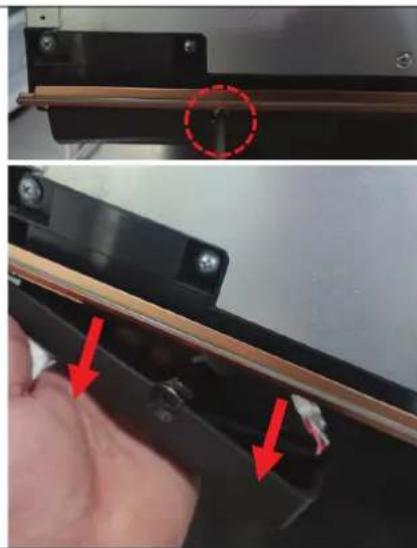
natural_image
Close-up of a mechanical component with red arrows indicating features, no visible text or symbols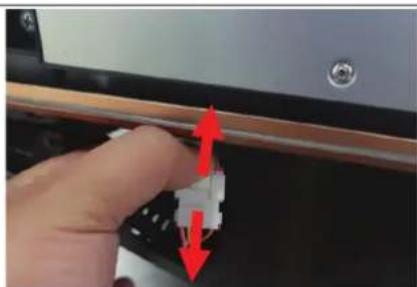
natural_image
Close-up of a hand holding a small electronic component with red arrows indicating direction (no text or symbols visible)- Otvorite VRATA i rastavite VRATA KAPICE POKLOPCA.
NAPOMENA
natural_image
Close-up of a mechanical component with two red-circled holes (no visible text or symbols)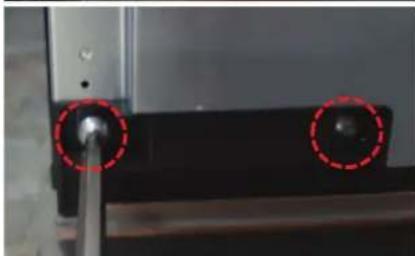
natural_image
Close-up of a mechanical component with two red-circled holes and a central shaft (no visible text or symbols)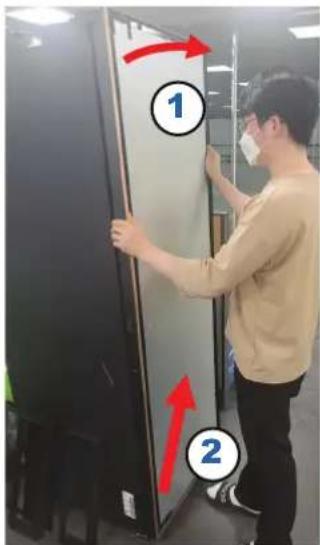
Šarka

natural_image
Close-up of a mechanical component with red arrow indicating rotation (no visible text or symbols)- Uklonite 4 VIJKA na vrhu/dnu.
NAPOMENA
natural_image
Hand placing a red arrow into a stainless steel drawer on a kitchen appliance (no text or symbols visible)natural_image
Hand placing a small object into a glass appliance rack (no visible text or symbols)natural_image
Two-step diagram showing a hand holding a metal bracket next to a close-up of a mechanical component, with no visible text or symbols.natural_image
Close-up of a mechanical assembly or mounting bracket with no visible text or symbolsnatural_image
Close-up of a hand pressing down on a black battery cover with a red arrow pointing to the glossy surface (no text or symbols visible)natural_image
Close-up of a mechanical component with red arrows indicating features, no visible text or symbolsnatural_image
Close-up of a hand pressing a small electronic component with red arrows indicating motion (no text or symbols visible)natural_image
Close-up of a mechanical component with two red-circled holes (no visible text or symbols)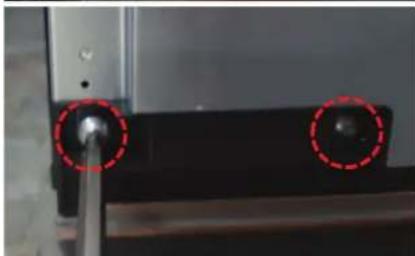
natural_image
Close-up of a mechanical component with two red-circled holes and a central shaft (no visible text or symbols)
Mentesha
natural_image
Close-up of a mechanical assembly with a red curved arrow indicating motion or force (no visible text or symbols)natural_image
Hand placing a red arrow into a stainless steel drawer (no text or symbols visible)natural_image
Hand placing a red object into a glass appliance rack (no visible text or symbols)natural_image
Two-step diagram showing a hand holding a small metallic object, before and after modification (no text or symbols visible)natural_image
Interior view of a server room with a door and monitor, showing mechanical components and wiring (no visible text or symbols)natural_image
Close-up of a hand pressing down on a black electronic device with a red arrow pointing to the button (no visible text or symbols)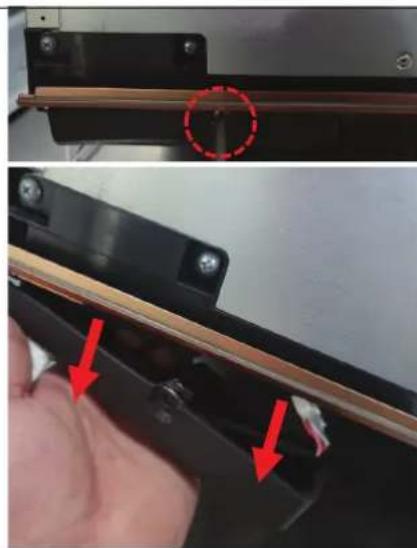
natural_image
Close-up of a mechanical component with red arrows indicating features, no visible text or symbols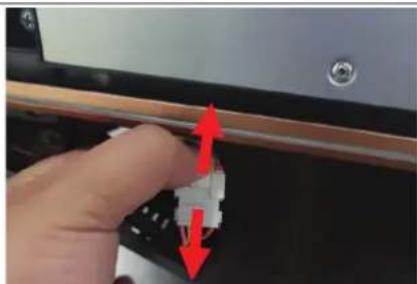
natural_image
Close-up of a hand holding a small white connector with red arrows indicating direction (no text or symbols visible)natural_image
Close-up of a mechanical component with two red-circled holes and a central hub (no visible text or symbols)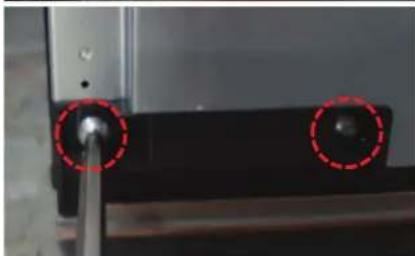
natural_image
Close-up of a mechanical component with two red-circled holes, no visible text or symbols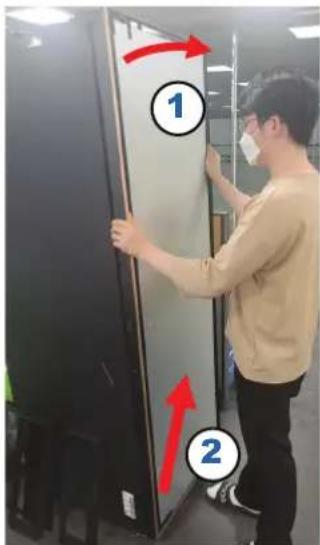
Шарка
natural_image
Close-up of a mechanical assembly with a red curved arrow indicating rotation or movement (no visible text or symbols)natural_image
Hand placing a red arrow into a stainless steel drawer on a kitchen appliance (no text or symbols visible)- Tömmake sahtlit ettepoole.
- Eemaldage sahtel seda kallutades.
natural_image
Hand placing a small object into a glass appliance rack (no visible text or symbols)-
Tömmake sahtlit ettepoole.
-
Suruge all vasakul/paremal küljel olevaid konkse, et see vabastada.
natural_image
Two-step diagram showing a hand holding a metal bracket next to a magnified view of a mechanical component (no text or symbols visible)natural_image
Close-up of a mechanical assembly or mounting bracket with no visible text or symbolsSahtlite / Flex Pantry tagasi panemiseks
natural_image
Close-up of a hand pressing down on a black battery cover with a red arrow pointing to the glossy surface (no text or symbols visible)natural_image
Close-up of a mechanical component with red arrows indicating features, no visible text or symbolsnatural_image
Close-up of a hand pressing a small electronic component with red arrows indicating motion (no text or symbols visible)natural_image
Close-up of a mechanical component with two red-circled holes (no visible text or symbols)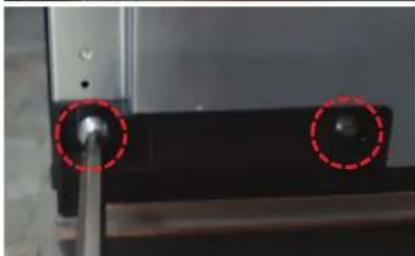
natural_image
Close-up of a mechanical component with two red-circled holes and a central shaft (no visible text or symbols)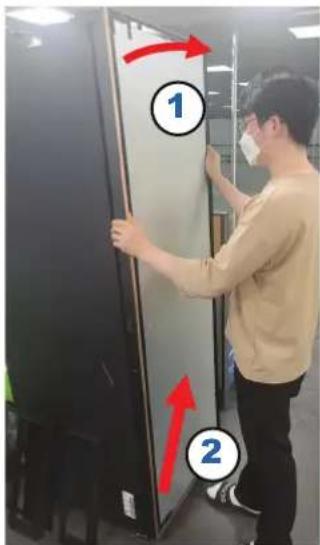
Hing
natural_image
Close-up of a mechanical assembly with a red curved arrow indicating motion or force (no visible text or symbols)natural_image
Hand placing a red plastic clip into a stainless steel refrigerator (no text or symbols visible)natural_image
Hand placing a dark object into a glass appliance rack (no visible text or symbols)natural_image
Two-panel image showing a hand holding a metal bracket, one before and after a close-up of a red circle highlighting a small component (no text or symbols visible)- Keldami išimkite.
natural_image
Interior view of a server room with black equipment and a door (no visible text or symbols)natural_image
Close-up of a hand pressing down on a black electronic device with a red arrow pointing to the button (no visible text or symbols)- Atidarykite DURELES ir nuimkite DURELIŲ GAUBTO DANGTELJ.
PASTABA
natural_image
Close-up of a mechanical component with red arrows indicating features, no visible text or symbolsnatural_image
Close-up of a hand adjusting a small electronic component with red arrows indicating direction (no text or symbols visible)- Atskirkite laido korpusa.
Lietuvių kalba
natural_image
Close-up of a mechanical component with two red-circled holes (no visible text or symbols)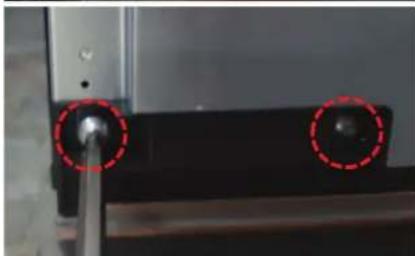
natural_image
Close-up of a mechanical component with two red-circled holes and a central shaft (no visible text or symbols)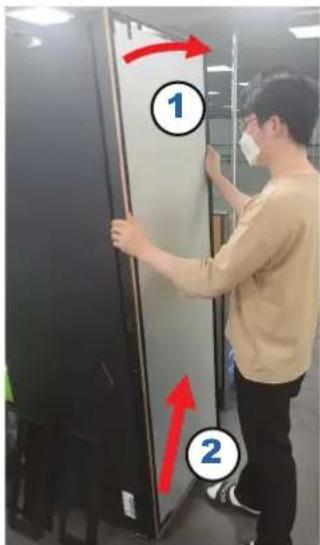
Lankstas
natural_image
Close-up of a mechanical assembly with a red curved arrow indicating motion or force (no visible text or symbols)natural_image
Hand placing a red arrow into a stainless steel drawer on a kitchen appliance (no text or symbols visible)- Pavelciet atvilktni uz priekšu.
- Iznemiet atvilktni, to sasverot.
natural_image
Hand placing a small object into a glass appliance rack (no visible text or symbols)natural_image
Two-step diagram showing a hand holding a metal bracket next to a magnified view of a mechanical component (no text or symbols visible)natural_image
Close-up of a mechanical or electronic component with blurred background and no visible text or symbols- Paceliet to, lai nonemtu.
natural_image
Close-up of a hand pressing down on a black electronic device with a red arrow pointing to the button (no visible text or symbols)- Atveriet DURVIS un izjauciet DURVJU PÄRSEGA VÄCINU.

PIEZIME
natural_image
Close-up of a mechanical component with red arrows indicating features, no visible text or symbolsnatural_image
Close-up of a hand adjusting a small electronic component with red arrows indicating direction (no text or symbols visible)- Atdaliet vadu korpusu.
Latviešu
natural_image
Close-up of a mechanical component with two red-circled holes (no visible text or symbols)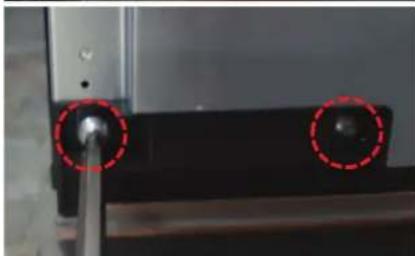
natural_image
Close-up of a mechanical component with two red-circled holes and a central shaft (no visible text or symbols)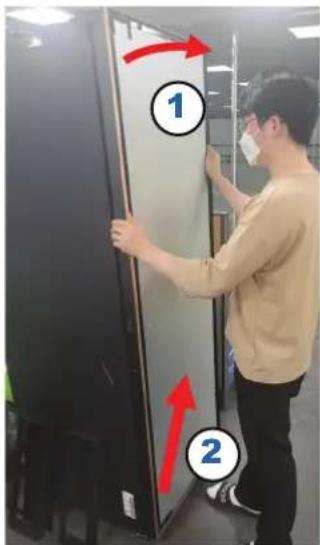
Enge
natural_image
Close-up of a mechanical component with red arrow indicating rotation (no visible text or symbols)natural_image
Hand placing a red arrow into a stainless steel drawer on a kitchen appliance (no text or symbols visible)- Predal povlecite naprej.
- Predal odstranite tako, da ga nagnete.
Odstranjevanje prilagodljive shrambe
natural_image
Hand placing a small object into a glass appliance rack (no visible text or symbols)-
Predal povlecite naprej.
-
Pritisnite kavlje na spodnji levi/desni strani, da predal odstranite.
natural_image
Two-step diagram showing a hand holding a metal bracket next to a close-up of a mechanical component, with no visible text or symbols.- Predal dvignite in odstranite.
natural_image
Close-up of a mechanical assembly or mounting bracket with no visible text or symbolsPonovna namestitev predalov/prilagodljive shrambe
natural_image
Close-up of a hand pressing down on a black battery cover with a red arrow pointing to the glossy surface (no text or symbols visible)- Odprite VRATA in razstavite VRATA S POKROVOM.
OPOMBA
VRATA S POKROVOM shranite na varno mesto.
natural_image
Close-up of a mechanical component with red arrows indicating a step, showing a close-up view and a circular annotation (no text or symbols)- Odvijte 1 VIJAK na dnu TEČAJA POKROVA SKLOPA, da tečaj odstranite navzdol.
natural_image
Close-up of a hand pressing a small electronic component with red arrows indicating direction (no text or symbols visible)natural_image
Close-up of a mechanical component with two red-circled holes (no visible text or symbols)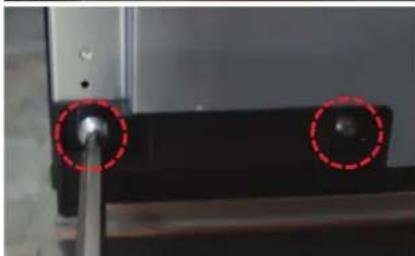
natural_image
Close-up of a mechanical component with two red-circled holes and a central shaft (no visible text or symbols)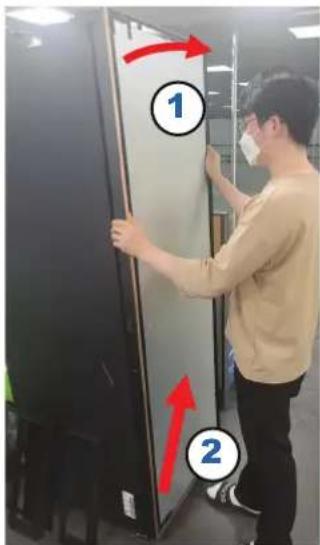
Tečaj
natural_image
Close-up of a mechanical assembly with a red curved arrow indicating motion or force (no visible text or symbols)- Odstranite 4 VIJAKE zgoraj/spodaj.
OPOMBA
VIJAKE shranite na varno mesto.
- Odstranite zgornji del VRAT, tako da ga povlečete naprej in dvignete, da odstranite VRATA.
PREVIDNO

- User servicing manual
- NOTE
- CAUTION
- Gasket replacement
- To remove the gasket
- To replace the gasket
- Drawer / Flex Pantry replacement
- To remove the drawer
- To remove the Flex Pantry
- To reattach the drawers / Flex Pantry
- Hinge replacement
- WARNING
- Tools required (not provided)
- Remove the door
- Guide de réparation
- Charnière
- REMARQUE
- Cerniera
- Scharnier
- Bisagra
- NOTA
- Dobradiça
- Μεντεσές
- Gångjärn
- Sådan genmonteres skufferne/flex-pantryen
- BEMÆRK
- Hængsel
- Hengsel
- Závěs
- POZNÁMKA
- Zsanér
- Da biste zamenili zaptivnu gumu
- Zamena fioke / fleksibilne ostave
- OPREZ
- Da biste skinuli fioku
- Da biste uklonili fleksibilnu ostavu
- Da biste vratili fioke / fleksibilnu ostavu
- NAPOMENA
- Šarka
- Za uklanjanje prilagodljive ostave
- Za ponovno postavljanje ladica / prilagodljive ostave
- Mentesha
- Шарка
- Sahtlite / Flex Pantry tagasi panemiseks
- PASTABA
- Lankstas
- PIEZIME
- Odstranjevanje prilagodljive shrambe
- Ponovna namestitev predalov/prilagodljive shrambe
- OPOMBA
- Tečaj
- PREVIDNO
Brand : SAMSUNG
Model : RW33B99C5TF
Category : Wine cellar