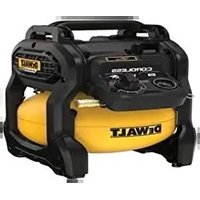
DCC1018 - Compressor DEWALT - Free user manual and instructions
Find the device manual for free DCC1018 DEWALT in PDF.


| Product Type | Cordless Air Compressor |
| Brand | DeWalt |
| Model | DCC1018 |
| Rated Voltage | 18 V DC |
| Battery Type | Li-Ion |
| Tank Capacity | 10 liters |
| Cut-in Pressure | 6.9 bar |
| Cut-out Pressure (18V battery) | 8.6 bar |
| Cut-out Pressure (18V/54V battery) | 9.6 bar |
| Air Displacement | 48 l/min |
| Air Delivery at 7 bar | 31 l/min |
| Motor Speed | 3400 rpm |
| Pump Type | Oil-free |
| Weight (without battery) | 11.3 kg |
| Sound Pressure Level | 79.1 dB(A) |
| Quick Coupler | Universal EU 1/4" |
| Recommended Duty Cycle | 50-75% (30-45 min/h) |
| Safety Valve | Integrated |
| Tank Pressure Gauge | Present |
| Pressure Regulator | One-turn |
| Motor Protection | Against Thermal Overload |
Frequently Asked Questions - DCC1018 DEWALT
User questions about DCC1018 DEWALT
0 question about this device. Answer the ones you know or ask your own.
Ask a new question about this device
Download the instructions for your Compressor in PDF format for free! Find your manual DCC1018 - DEWALT and take your electronic device back in hand. On this page are published all the documents necessary for the use of your device. DCC1018 by DEWALT.
USER MANUAL DCC1018 DEWALT
English (original instructions) 31
65510, Idstein, Germany
06.05.2022

natural_image
Technical line drawing of a mechanical device with no visible text or symbolsVice-President Engineering, PTE-Europe
natural_image
Technical line drawing of a mechanical component with no visible text or symbolsCFM: Cubic feet per minute. [Kubikfuß pro Minute]
You have chosen a DEWALT tool. Years of experience, thorough product development and innovation make DEWALT one of the most reliable partners for professional power tool users.
Technical Data
| DCC1018 | |||
| Voltage V | DC | 18 | |
| Type 1 | |||
| Battery type Li-Ion | |||
| Air tank capacity Liters 10 | |||
| Approximate cut-in pressure BAR 6.9 | |||
| Approximate cut-out pressure | 18V battery pack: | BAR 8.6 | |
| 18V/54V battery pack: | BAR 9.6 | ||
| Air displacement I/min 48 | |||
| Air delivery at 7 BAR I/min 31 | |||
| Fuse type Time delay | |||
| Regulated pressure rating (approximate) | 18V battery pack: | BAR | 0-8.6 |
| 18V/54V battery pack: | BAR | 0-9.6 | |
| Motor revolutions per minute | 3400 | ||
| Quick connect type | Universal EU 1/4" quick coupling | ||
| Pump type | Oil-less | ||
| Weight (without battery pack) | kg | 11.3 | |
| Noise values according to EN1012-1 (EN ISO 2151:2008) | |||
| L_PA (emission sound pressure level) | dB(A) | 79,1 | |
| K(uncertainty for the given sound level) | dB(A) | 0,9 | |
The vibration and/or noise emission level given in this information sheet has been measured in accordance with a standardised test given in EN1012-1 (EN ISO 2151:2008) and may be used to compare one tool with another. It may be used for a preliminary assessment of exposure.
WARNING: The declared vibration and/or noise emission level represents the main applications of the tool. However if the tool is used for different applications, with different accessories or poorly maintained, the vibration and/or noise emission may differ. This may significantly increase the exposure level over the total working period.
An estimation of the level of exposure to vibration and/or noise should also take into account the times when the tool is switched off or when it is running but not actually doing the job. This may significantly reduce the exposure level over the total working period.
Identify additional safety measures to protect the operator from the effects of vibration and/or noise such as: maintain the tool and the accessories, keep the hands warm (relevant for vibration), organisation of work patterns.
EC-Declaration of Conformity
Machinery Directive
18V 10L Cordless Air Compressor DCC1018
Dewalt declares that these products described under "technical data" are in compliance with:
EC Directives 2006/42/EC, EN1012-1:2010, EN 62841-1:2015.
2000/14/EC, Compressors, <15kW, Annex VI
DEKRA Testing and Certification GmbH, Handwerkstraße 15, 70565 Stuttgart.
Location Certification Body, Dinnendahlstr. 9, 44809 Bochum, Germany
Notified Body number: 0158
LWA (measured sound power level) dB 92
LWA (guaranteed sound power level) dB 93
These products also comply with Directive 2014/30/EU and 2011/65/EU.
For more information, please contact Dewalt at the following address or refer to the back of the manual.
The undersigned is responsible for compilation of the technical file and makes this declaration on behalf of DEWALT.
Markus Rompel
Vice-President Engineering, PTE-Europe
65510, Idstein, Germany
06.05.2022
| Batteries Chargers/Charge | Times (Minutes)*** | ||||||||||||
| Cat # V | DC | Ah Weight (kg) | DCB104 | DCB107 | DCB112 | DCB113 | DCB115 | DCB116 | DCB117 | DCB118 | DCB132 | DCB119 | |
| DCB546 | 18/54 | 6.0/2.0 | 1.08 | 60 | 270 | 170 | 140 | 90 | 80 | 40 | 60 | 90 | X |
| DCB547 | 18/54 | 9.0/3.0 | 1.46 | 75* | 420 | 270 | 220 | 135* | 110* | 60 | 75* | 135* | X |
| DCB548 | 18/54 | 12.0/4.0 | 1.46 | 120 | 540 | 350 | 300 | 180 | 150 | 80 | 120 | 180 | X |
| DCB549 | 18/54 | 15.0/5.0 | 2.12 | 125 | 730 | 450 | 380 | 230 | 170 | 90 | 125 | 230 | X |
| DCB181 | 18 | 1.5 | 0.35 | 22 | 70 | 45 | 35 | 22 | 22 | 22 | 22 | 22 | 45 |
| DCB182 | 18 | 4.0 | 0.61 | 60/40** | 185 | 120 | 100 | 60 | 60/45** | 60/40** | 60/40** | 60 | 120 |
| DCB183/B/G | 18 | 2.0 | 0.40 | 30 | 90 | 60 | 50 | 30 | 30 | 30 | 30 | 30 | 60 |
| DCB184/B/G | 18 | 5.0 | 0.62 | 75/50** | 240 | 150 | 120 | 75 | 75/60** | 75/50** | 75/50** | 75 | 150 |
| DCB185 | 18 | 1.3 | 0.35 | 22 | 60 | 40 | 30 | 22 | 22 | 22 | 22 | 22 | 40 |
| DCB187 | 18 | 3.0 | 0.54 | 45 | 140 | 90 | 70 | 45 | 45 | 45 | 45 | 45 | 90 |
| DCB189 | 18 | 4.0 | 0.54 | 60 | 185 | 120 | 100 | 60 | 60 | 60 | 60 | 60 | 120 |
| DCBP034 | 18 | 1.7 | 0.32 | 27 | 82 | 50 | 40 | 27 | 27 | 27 | 27 | 27 | 50 |
*Date code 201811475B or later
**Date code 201536 or later
***Battery charge times matrix provided for guidance only; charge times will vary depending on temperature and condition of batteries.
DECLARATION OF CONFORMITY THE SUPPLY OF MACHINERY (SAFETY) REGULATIONS 2008

18V 10L Cordless Air Compressor DCC1018
Dewalt declares that these products described under "technical data" are in compliance with:
The Supply of Machinery (Safety) Regulations 2008, S.I. 2008/1597 (as amended).
EN1012-1:2010, EN 62841-1:2015
The Noise Emission in the Environment by Equipment for use Outdoors Regulations 2001, S.I. 2001/1701 (as amended), Compressors, <15kW, Schedule 9.
Intertek Testing & Certification Ltd, Academy Place, 1-9 Brook Street, Brentwood, Essex, CM14 5NQ, United Kingdom Approved Body Number: 0359
LWA (measured sound power level) dB 92
LWA (guaranteed sound power level) dB 93
These products conform to the following UK Regulations:
Electromagnetic Compatibility Regulations 2016, S.I.2016/1091 (as amended).
The Restriction of the Use of Certain Hazardous Substances in Electrical and Electronic Equipment Regulations 2012, S.I. 2012/3032 (as amended).
For more information, please contact Dewalt at the following address or refer to the back of the manual.
The undersigned is responsible for compilation of the technical file and makes this declaration on behalf of Dewalt.
Karl Evans
Vice President Professional Power Tools EANZ GTS
270 Bath Road, Slough
SL1 4DX
England
06.05.2022

WARNING: To reduce the risk of injury, read the instruction manual.
Definitions: Safety Guidelines
The definitions below describe the level of severity for each signal word. Please read the manual and pay attention to these symbols.
DANGER: Indicates an imminently hazardous sensation which, if not avoided, will result in death or serious injury.
WARNING: Indicates a potentially hazardous situation which, if not avoided, could result in death or serious injury.
CAUTION: Indicates a potentially hazardous situation when, if not avoided, may result in minor or moderate injury.
NOTICE: Indicates a practice not related to personal injury which, if not avoided, may result in property damage.
Davates risk of electric shock.
Diabetes risk of fire.
GENERAL POWER TOOL SAFETY WARNINGS
WARNING: Read all safety warnings, instructions, indications and specifications provided with this power tool. Failure to follow all instructions listed below may result in electric shock, fire and/or serious injury.
SAVE ALL WARNINGS AND INSTRUCTIONS FOR FUTURE REFERENCE
The term "power tool" in the warnings refers to your mains-operated (corded) power tool or battery-operated (cordless) power tool.
Work Area Safety
a) Keep work area clean and well lit. Cluttered or dark areas invite accidents.
b) Do not operate power tools in explosive atmospheres, such as in the presence of flammable liquids, gases or dust. Power tools create sparks which may ignite the dust or fumes.
c) Keep children and bystanders away while operating a power tool. Distractions can cause you to lose control.
Electrical Safety
a) Power tool plugs must match the outlet. Never modify the plug in any way. Do not use any adapter plugs with earthed (grounded) power tools.
Unmodified plugs and matching outlets will reduce risk of electric shock.
b) Avoid body contact with earthed or grounded surfaces, such as pipes, radiators, ranges and refrigerators. There is an increased risk of electric shock if your body is earthed or grounded.
c) Do not expose power tools to rain or wet conditions.
Water entering a power tool will increase the risk of electric shock.
d) Do not abuse the cord. Never use the cord for carrying, pulling or unplugging the power tool. Keep cord away from heat, oil, sharp edges or moving parts. Damaged or entangled cords increase the risk of electric shock.
e) When operating a power tool outdoors, use an extension cord suitable for outdoor use. Use of a cord suitable for outdoor use reduces the risk of electric shock.
f) If operating a power tool in a damp location is unavoidable, use a residual current device (RCD) protected supply. Use of an RCD reduces the risk of electric shock.
Personal Safety
a) Stay alert, watch what you are doing and use common sense when operating a power tool. Do not use a power tool while you are tired or under the influence of drugs, alcohol or medication. A moment of inattention while operating power tools may result in serious personal injury.
b) Use personal protective equipment. Always wear eye protection. Protective equipment such as a dust mask, non-skid safety shoes, hard hat or hearing protection used for appropriate conditions will reduce personal injuries.
c) Prevent unintentional starting. Ensure the switch is in the off-position before connecting to power source and/or battery pack, picking up or carrying the tool. Carrying power tools with your finger on the switch or energising power tools that have the switch on invites accidents.
d) Remove any adjusting key or wrench before turning the power tool on. A wrench or a key left attached to a rotating part of the power tool may result in personal injury.
e) Do not overreach. Keep proper footing and balance at all times. This enables better control of the power tool in unexpected situations.
f) Dress properly. Do not wear loose clothing or jewellery. Keep your hair and clothing away from moving parts. Loose clothes, jewellery or long hair can be caught in moving parts.
g) If devices are provided for the connection of dust extraction and collection facilities, ensure these are connected and properly used. Use of dust collection can reduce dust-related hazards.
h) Do not let familiarity gained from frequent use of tools allow you to become complacent and ignore tool safety principles. A careless action can cause severe injury within a fraction of a second.
Power Tool Use and Care
a) Do not force the power tool. Use the correct power tool for your application. The correct power tool will do the job better and safer at the rate for which it was designed.
b) Do not use the power tool if the switch does not turn it on and off. Any power tool that cannot be controlled with the switch is dangerous and must be repaired.
c) Disconnect the plug from the power source and/or remove the battery pack, if detachable, from the power tool before making any adjustments, changing accessories, or storing power tools. Such preventive safety measures reduce the risk of starting the power tool accidentally.
d) Store idle power tools out of the reach of children and do not allow persons unfamiliar with the power tool or these instructions to operate the power tool. Power tools are dangerous in the hands of untrained users.
e) Maintain power tools and accessories. Check for misalignment or binding of moving parts, breakage of parts and any other condition that may affect the power tool's operation. If damaged, have the power tool repaired before use. Many accidents are caused by poorly maintained power tools.
f) Keep cutting tools sharp and clean. Properly maintained cutting tools with sharp cutting edges are less likely to bind and are easier to control.
g) Use the power tool, accessories and tool bits etc. in accordance with these instructions, taking into account the working conditions and the work to be performed. Use of the power tool for operations different from those intended could result in a hazardous situation.
h) Keep handles and grasping surfaces dry, clean and free from oil and grease. Slippery handles and grasping surfaces do not allow for safe handling and control of the tool in unexpected situations.
Battery Tool Use and Care
a) Recharge only with the charger specified by the manufacturer. A charger that is suitable for one type of battery pack may create a risk of fire when used with another battery pack.
b) Use power tools only with specifically designated battery packs. Use of any other battery packs may create a risk of injury and fire.
c) When battery pack is not in use, keep it away from other metal objects, like paper clips, coins, keys, nails, screws or other small metal objects, that can make a connection from one terminal to another. Shorting the battery terminals together may cause burns or a fire.
d) Under abusive conditions, liquid may be ejected from the battery; avoid contact. If contact accidentally occurs, flush with water. If liquid contacts eyes, additionally seek medical help. Liquid ejected from the battery may cause irritation or burns.
e) Do not use a battery pack or tool that is damaged or modified. Damaged or modified batteries may exhibit unpredictable behaviour resulting in fire, explosion or risk of injury.
f) Do not expose a battery pack or tool to fire or excessive temperature. Exposure to fire or temperature above 130 °C may cause explosion.
g) Follow all charging instructions and do not charge the battery pack or tool outside the temperature range specified in the instructions. Charging improperly or at temperatures outside the specified range may damage the battery and increase the risk of fire.
Service
a) Have your power tool serviced by a qualified repair person using only identical replacement parts. This will ensure that the safety of the power tool is maintained.
b) Never service damaged battery packs. Service of battery packs should only be performed by the manufacturer or authorized service providers.
SAFETY INSTRUCTIONS
Important Safety Instructions for Use of the Compressor
WARNING: DEATH OR SERIOUS BODILY INJURY GOOD RESULT FROM IMPROPER OR UNSAFE USE OF COMPRESSOR. TO AVOID THESE RISKS, FOLLOW THESE BASIC SAFETY INSTRUCTIONS.
READ ALL INSTRUCTIONS
- NEVER TOUCH MOVING PARTS. Never place your hands, fingers or other body parts near the compressor's moving parts.
-
NEVER OPERATE WITHOUT ALL GUARDS IN PLACE Never operate this compressor without all guards or safety features in place and in proper working order. If maintenance or servicing requires the removal of a guard or safety features, be sure to replace the guards or safety feature before resuming operation of the compressor.
-
ALWAYS WEAR EYE PROTECTION. Always wear safety goggles or equivalent eye protection. Compressed air must never be aimed at anyone or any part of the body.
- PROTECT YOURSELF AGAINST ELECTRIC SHOCK. Prevent body contact with grounded surfaces such as pipes, radiators, ranges and refrigeration enclosures. Never operate the compressor in damp or wet locations. Never leave the compressor exposed to adverse weather conditions.
- DISCONNECT THE COMPRESSOR WHEN NOT IN USE. Always disconnect the compressor from the power source and remove the compressed air from the air tank before servicing, inspecting, maintaining, cleaning, replacing or checking any parts.
- AVOID UNINTENTIONAL STARTING. Do not transport the compressor over long distances, in a vehicle or in potentially dangerous situations, for example, on a ladder or scaffold while it is connected to its power source or when the air tank is filled with compressed air. Be sure the auto ON/OFF switch is in the OFF position before connecting the compressor to its power source.
- STORE COMPRESSOR PROPERLY. When not in use, the compressor should be stored in dry place. Keep out of reach of children. Lock-out the storage area.
- KEEP WORK AREA CLEAN Cluttered areas invite injuries. Clear all work areas of unnecessary tools, debris, furniture etc.
- KEEP CHILDREN AWAY. All visitors should be kept safely away from work area.
- DRESS PROPERLY. Do not wear loose clothing or jewellery. They can be caught in moving parts. Wear protective hair covering to contain long hair.
- STAY ALERT. Watch what you are doing. Use common sense. Do not operate compressor when you are tired. Compressor should never be used by you if you are under the influence of alcohol, drugs or medication that makes you drowsy.
- CHECK FOR DAMAGED PARTS AND AIR LEAKS. Before further use of the compressor, carefully check the guard and other parts for damage to make sure that it will operate properly and perform its intended function. Check for alignment of moving parts, binding of moving parts, breakage of parts, mounting, air leak, and any other conditions that may affect its operation. A guard or other part that is damaged should be properly repaired or replaced by an authorized service centre unless otherwise indicated elsewhere in this Instruction Manual. Have defective pressure switches replaced by authorized service centre. Do not use compressor if switch does not turn it on and off. Never attempt to repair a leaking or damaged air tank. Replace tank immediately at an authorized service centre.
- NEVER USE COMPRESSOR FOR APPLICATIONS OTHER THAN THOSE SPECIFIED. Never use compressor for applications other than those specified in the Instruction Manual. Never use compressed air for breathing or respiration. Never stand on the compressor.
- HANDLE COMPRESSOR CORRECTLY. Operate the compressor according to the instructions provided herein. Never allow the compressor to be operated by
children, individuals unfamiliar with its operation or unauthorised personnel.
-
KEEP ALL SCREWS, BOLTS AND COVERS TIGHTLY IN PLACE. Keep all screws, bolts, and plates tightly mounted. Check their conditions periodically.
-
KEEP MOTOR AIR VENT CLEAN The motor air vent must be kept clean so that air can freely flow at all times. Check for dust build-up frequently.
-
NEVER USE A COMPRESSOR WHICH IS DEFECTIVE OR OPERATING ABNORMALLY. If the compressor appears to be operating unusually, making strange noises, or otherwise appears defective, stop using it immediately and arrange for repairs by an authorized service centre.
-
DO NOT WIPE PLASTIC PARTS WITH SOLVENT. Solvents such as gasoline, thinner, benzine, carbon tetrachloride, and alcohol may damage and crack plastic parts. Do not wipe them with such solvents. Wipe plastic parts with a soft cloth lightly dampened with soapy water and dry thoroughly.
-
USE ONLY GENUINE REPLACEMENT PARTS. Replacement parts not original may void your warranty and can lead to malfunction and resulting injuries. Genuine parts are available from your dealer.
-
DO NOT MODIFY THE COMPRESSOR. Do not modify the compressor. Always contact the authorised service centre any repairs. Unauthorised modification may not only impair the compressor performance but may also result in accident or injury to repair personnel who do not have the required knowledge and technical expertise to perform the repair operations correctly. Unauthorised modifications may increase the risk of injury to the user or the risk of property damage.
-
TURN OFF THE SWITCH WHEN THE COMPRESSOR IS NOT USED. When the compressor is not used, turn the switch OFF, disconnect it from the power source and open the drain cock to discharge the compressed air from the air tank.
-
NEVER TOUCH HOT SURFACE. To reduce the risk of burns, do not touch tubes, heads, cylinder and motors.
-
DO NOT DIRECT AIR STREAM AT BODY. Risk of injury, do not direct air stream at persons or animals.
-
DRAIN TANK DAILY OR AFTER EACH USE. Open the drain valve and tilt compressor to completely empty accumulated water. Failure to properly drain tank may result in excessive corrosion, which may cause sudden air tank rupture or explosion.
-
DO NOT STOP COMPRESSOR BY PULLING OUT THE BATTERY. Use the auto ON/OFF switch.
-
USE ONLY RECOMMENDED AIR HANDLING PARTS ACCEPTABLE FOR PRESSURE NOT LESS THAN 9.6 BAR Risk of bursting. Use only recommended air handling parts acceptable for pressures not less than 9.6 bar.
-
WEAR PROPER HEARING AND HEAD PROTECTION. Suitable protective clothing must be worn when operating the compressor and connected tool or accessory. Consult the tool/ accessory manual and adhere to any safety requirements.
-
MAKE ALLOWANCE FOR ENVIRONMENTAL CONDITIONS. Never leave the compressor in the rain. Never use the compressor in damp or wet conditions. Provide good lighting. Never use the compressor near combustible liquids or gases.
- DO NOT OPERATE IN EXPLOSIVE ATMOSPHERES, SUCH AS IN THE PRESENCE OF FLAMMABLE LIQUIDS, GASES OR DUST. Compressors can create sparks which may ignite the dust or fumes.
- CHECK THE PRESSURE VESSEL FOR SIGNS OF RUST AND DAMAGE EACH TIME BEFORE USING. Do not use the compressor with a damaged or rusty pressure vessel.
Residual Risks
In spite of the application of the relevant safety regulations and the implementation of safety devices, certain residual risks cannot be avoided. These are:
- Impairment of hearing.
- Risk of personal injury due to flying particles.
- Risk of burns due to accessories becoming hot during operation.
- Risk of personal injury due to prolonged use.
SAVE THESE INSTRUCTIONS
Chargers
DEWALT chargers require no adjustment and are designed to be as easy as possible to operate.
Electrical Safety
The electric motor has been designed for one voltage only. Always check that the battery pack voltage corresponds to the voltage on the rating plate. Also make sure that the voltage of your charger corresponds to that of your mains.

Your DEWALTcharger is double insulated in accordance with EN60335; therefore no earth wire is required.
If the supply cord is damaged, it must be replaced only by DEWALT or an authorised service organisation.
Mains Plug Replacement (U.K. & Ireland Only)
If a new mains plug needs to be fitted:
• Safely dispose of the old plug.
- Connect the brown lead to the live terminal in the plug.
- Connect the blue lead to the neutral terminal.
WARNING: No connection is to be made to the earth-terminal.
Follow the fitting instructions supplied with good quality plugs. Recommended fuse: 3 A.
Using an Extension Cable
An extension cord should not be used unless absolutely necessary. Use an approved extension cable suitable for the power input of your charger (see Technical Data). The minimum conductor size is 1 mm ^2 ; the maximum length is 30 m.
When using a cable reel, always unwind the cable completely.
Important Safety Instructions for All Battery Chargers SAVE THESE INSTRUCTIONS: This manual contains important safety and operating instructions for compatible battery chargers (refer to Technical Data).
- Before using charger, read all instructions and cautionary markings on charger, battery pack, and product using battery pack.
WARNING: Shock hazard. Do not allow any liquid to get a charger. Electric shock may result.
WARNING: We recommend the use of a residual current device with a residual current rating of 30mA or less.
CAUTION: Burn hazard. To reduce the risk of injury, damage only DEWALT rechargeable batteries. Other types of batteries may burst causing personal injury and damage.
CAUTION: Children should be supervised to ensure that they do not play with the appliance.
NOTICE: Under certain conditions, with the charger plugged into the power supply, the exposed charging contacts inside the charger can be shorted by foreign material. Foreign materials of a conductive nature such as, but not limited to, steel wool, aluminum foil or any buildup of metallic particles should be kept away from charger cavities. Always unplug the charger from the power supply when there is no battery pack in the cavity. Unplug charger before attempting to clean.
- DO NOT attempt to charge the battery pack with any chargers other than the ones in this manual. The charger and battery pack are specifically designed to work together.
• These chargers are not intended for any uses other than charging DEWALT rechargeable batteries. Any other uses may result in risk of fire, electric shock or electrocution. - Do not expose charger to rain or snow.
- Pull by plug rather than cord when disconnecting charger. This will reduce risk of damage to electric plug and cord.
- Make sure that cord is located so that it will not be stepped on, tripped over, or otherwise subjected to damage or stress.
- Do not use an extension cord unless it is absolutely necessary. Use of improper extension cord could result in risk of fire, electric shock, or electrocution.
- Do not place any object on top of charger or place the charger on a soft surface that might block the ventilation slots and result in excessive internal heat. Place the charger in a position away from any heat source. The charger is ventilated through slots in the top and the bottom of the housing.
- Do not operate charger with damaged cord or plug—have them replaced immediately.
- Do not operate charger if it has received a sharp blow, been dropped, or otherwise damaged in any way. Take it to an authorised service centre.
-
Do not disassemble charger; take it to an authorised service centre when service or repair is required. Incorrect reassembly may result in a risk of electric shock, electrocution or fire.
-
In case of damaged power supply cord, the supply cord must be replaced immediately by the manufacturer, its service agent or similar qualified person to prevent any hazard.
- Disconnect the charger from the outlet before attempting any cleaning. This will reduce the risk of electric shock. Removing the battery pack will not reduce this risk.
- NEVER attempt to connect two chargers together.
- The charger is designed to operate on standard 230V household electrical power. Do not attempt to use it on any other voltage. This does not apply to the vehicular charger.
Charging a Battery (Fig. B)
- Plug the charger into an appropriate outlet before inserting battery pack.
- Insert the battery pack 2 into the charger, making sure the battery pack is fully seated in the charger. The red (charging) light will blink repeatedly indicating that the charging process has started.
- The completion of charge will be indicated by the red light remaining ON continuously. The battery pack is fully charged and may be used at this time or left in the charger. To remove the battery pack from the charger, push the battery release button 3 on the battery pack.
nOTE: To ensure maximum performance and life of lithium-ion battery packs, charge the battery pack fully before first use.
Charger Operation
Refer to the indicators below for the charge status of the battery pack.
Charge Indicators
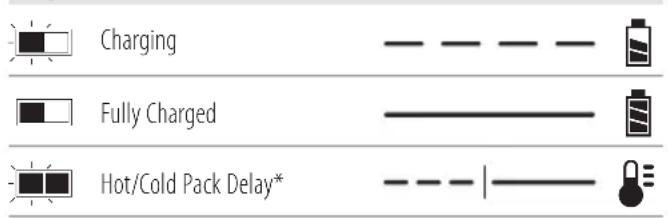
* The red light will continue to blink, but a yellow indicator light will be illuminated during this operation. Once the battery pack has reached an appropriate temperature, the yellow light will turn off and the charger will resume the charging procedure. The compatible charger(s) will not charge a faulty battery pack. The charger will indicate faulty battery by refusing to light.
nOTE: This could also mean a problem with a charger. If the charger indicates a problem, take the charger and battery pack to be tested at an authorised service centre.
Hot/Cold Pack Delay
When the charger detects a battery pack that is too hot or too cold, it automatically starts a Hot/Cold Pack Delay, suspending charging until the battery pack has reached an appropriate temperature. The charger then automatically switches to the pack charging mode. This feature ensures maximum battery pack life.
A cold battery pack will charge at a slower rate than a warm battery pack. The battery pack will charge at that slower rate
throughout the entire charging cycle and will not return to maximum charge rate even if the battery pack warms.
The DCB118 charger is equipped with an internal fan designed to cool the battery pack. The fan will turn on automatically when the battery pack needs to be cooled. Never operate the charger if the fan does not operate properly or if ventilation slots are blocked. Do not permit foreign objects to enter the interior of the charger.
Electronic Protection System
XR Li-Ion tools are designed with an Electronic Protection System that will protect the battery pack against overloading, overheating or deep discharge.
The tool will automatically turn off if the Electronic Protection System engages. If this occurs, place the lithium-ion battery pack on the charger until it is fully charged.
Wall Mounting
These chargers are designed to be wall mountable or to sit upright on a table or work surface. If wall mounting, locate the charger within reach of an electrical outlet, and away from a corner or other obstructions which may impede air flow. Use the back of the charger as a template for the location of the mounting screws on the wall. Mount the charger securely using drywall screws (purchased separately) at least 25.4 mm long with a screw head diameter of 7–9 mm, screwed into wood to an optimal depth leaving approximately 5.5 mm of the screw exposed. Align the slots on the back of the charger with the exposed screws and fully engage them in the slots.
Charger Cleaning Instructions
WARNING: Shock hazard. Disconnect the charger from the AC outlet before cleaning. Dirt and grease may be removed from the exterior of the charger using a cloth or soft non-metallic brush. Do not use water or any cleaning solutions. Never let any liquid get inside the tool; never immerse any part of the tool into a liquid.
Battery Packs
Important Safety Instructions for All Battery Packs
When ordering replacement battery packs, be sure to include catalogue number and voltage.
The battery pack is not fully charged out of the carton. Before using the battery pack and charger, read the safety instructions below. Then follow charging procedures outlined.
READ ALL INSTRUCTIONS
- Do not charge or use battery in explosive atmospheres, such as in the presence of flammable liquids, gases or dust. Inserting or removing the battery from the charger may ignite the dust or fumes.
- Never force battery pack into charger. Do not modify battery pack in any way to fit into a non-compatible charger as battery pack may rupture causing serious personal injury.
-
Charge the battery packs only in DEWALT chargers.
• DO NOT splash or immerse in water or other liquids. -
Do not store or use the tool and battery pack in locations where the temperature may fall below 4 °C (39.2 °F) (such as outside sheds or metal buildings in winter), or reach or exceed 40 °C (104 °F) (such as outside sheds or metal buildings in summer).
- Do not incinerate the battery pack even if it is severely damaged or is completely worn out. The battery pack can explode in a fire. Toxic fumes and materials are created when lithium-ion battery packs are burned.
- If battery contents come into contact with the skin, immediately wash area with mild soap and water. If battery liquid gets into the eye, rinse water over the open eye for 15 minutes or until irritation ceases. If medical attention is needed, the battery electrolyte is composed of a mixture of liquid organic carbonates and lithium salts.
- Contents of opened battery cells may cause respiratory irritation. Provide fresh air. If symptoms persist, seek medical attention.
WARNING: Burn hazard. Battery liquid may be flammable is exposed to spark or flame.
WARNING: Never attempt to open the battery pack for any reason. If battery pack case is cracked or damaged, do not insert into charger. Do not crush, drop or damage battery pack. Do not use a battery pack or charger that has received a sharp blow, been dropped, run over or damaged in any way (i.e., pierced with a nail, hit with a hammer, stepped on). Electric shock or electrocution may result. Damaged battery packs should be returned to service centre for recycling.
WARNING: Fire hazard. Do not store or carry the battery pack so that metal objects can contact exposed battery terminals. For example, do not place the battery pack in aprons, pockets, tool boxes, product kit boxes, drawers, etc., with loose nails, screws, keys, etc.
CAUTION: When not in use, place tool on its side on a soluble surface where it will not cause a tripping or falling hazard. Some tools with large battery packs will stand upright on the battery pack but may be easily knocked over.
Transportation
WARNING: Fire hazard. Transporting batteries can probably cause fire if the battery terminals inadvertently come in contact with conductive materials. When transporting batteries, make sure that the battery terminals are protected and well insulated from materials that could contact them and cause a short circuit. NOTE: Lithium-ion batteries should not be put in checked baggage.
DEWALT batteries comply with all applicable shipping regulations as prescribed by industry and legal standards which include UN Recommendations on the Transport of Dangerous Goods; International Air Transport Association (IATA) Dangerous Goods Regulations, International Maritime Dangerous Goods (IMDG) Regulations, and the European Agreement Concerning The International Carriage of Dangerous Goods by Road
(ADR). Lithium-ion cells and batteries have been tested to section 38.3 of the UN Recommendations on the Transport of Dangerous Goods Manual of Tests and Criteria.
In most instances, shipping a DEWALT battery pack will be excepted from being classified as a fully regulated Class 9 Hazardous Material. In general, only shipments containing a lithium-ion battery with an energy rating greater than 100 Watt Hours (Wh) will require being shipped as fully regulated Class 9. All lithium-ion batteries have the Watt Hour rating marked on the pack. Furthermore, due to regulation complexities, DEWALT does not recommend air shipping lithium-ion battery packs alone regardless of Watt Hour rating. Shipments of tools with batteries (combo kits) can be air shipped as excepted if the Watt Hour rating of the battery pack is no greater than 100 Wh. Regardless of whether a shipment is considered excepted or fully regulated, it is the shipper's responsibility to consult the latest regulations for packaging, labeling/marking and documentation requirements.
The information provided in this section of the manual is provided in good faith and believed to be accurate at the time the document was created. However, no warranty, expressed or implied, is given. It is the buyer's responsibility to ensure that its activities comply with the applicable regulations.
Transporting the FLEXVOLT™ Battery
The DEWALT FLEXVOLT ^™ battery has two modes: Use and Transport.
Use Mode: When the FLEXVOLT ^™ battery stands alone or is in a DEWALT 18V product, it will operate as an 18V battery. When the FLEXVOLT ^™ battery is in a 54V or a 108V (two 54V batteries) product, it will operate as a 54V battery.
Transport Mode: When the cap is attached to the FLEXVOLT™ battery, the battery is in Transport mode. Keep the cap for shipping.
When in Transport mode, strings of cells are electrically disconnected within the pack resulting in 3 batteries with a lower Watt hour (Wh) rating as compared to 1 battery with a higher Watt hour rating. This increased quantity of 3 batteries with the lower Watt hour rating can exempt the pack from certain shipping regulations that are imposed upon the higher Watt hour batteries.
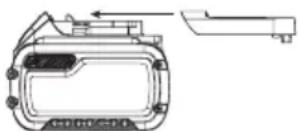
natural_image
Technical line drawing of a mechanical component with no visible text or symbolsFor example, the Transport Wh rating might indicate 3 x 36 Wh, meaning
3 batteries of 36 Wh each. The Use Wh rating might indicate 108 Wh (1 battery implied).
Example of Use and Transport Label Marking

Use: 108 Wh

Transport: 3x36 Wh
Storage Recommendations
-
The best storage place is one that is cool and dry away from direct sunlight and excess heat or cold. For optimum battery performance and life, store battery packs at room temperature when not in use.
-
For long storage, it is recommended to store a fully charged battery pack in a cool, dry place out of the charger for optimal results.
NOTE: Battery packs should not be stored completely depleted of charge. The battery pack will need to be recharged before use.
Labels on Charger and Battery Pack
In addition to the pictographs used in this manual, the labels on the charger and the battery pack may show the following pictographs:

Read instruction manual before use.

See Technical Data for charging time.

Do not probe with conductive objects.

Do not charge damaged battery packs.

Do not expose to water.

Have defective cords replaced immediately

Charge only between 4 °C and 40 °C.

Only for indoor use.

Discard the battery pack with due care for the environment.

Charge battery packs only with designated DEWALT chargers. Charging battery packs other than the designated DEWALT batteries with a DEWALT charger may make them burst or lead to other dangerous situations.

Do not incinerate the battery pack.

USE (without transport cap). Example: Wh rating indicates 108 Wh (1 battery with 108 Wh).

TRANSPORT (with built-in transport cap). Example: Wh rating indicates 3 x 36 Wh (3 batteries of 36 Wh).
Battery Type
The following tools operate on a 18 volt battery pack: DCC1018 These battery packs may be used: DCB181, DCB182, DCB183, DCB183B, DCB183G, DCB184, DCB184B, DCB184G, DCB185, DCB187, DCB189, DCBP034, , DCB546, DCB547, DCB548, DCB549. Refer to Technical Data for more information.
Package Contents
The package contains:
1 Aircompressor
1Charger
1 Li-lon battery pack (C1, D1, L1, M1, P1, S1, T1, X1, Y1 models)
2 Li-lon battery packs (C2, D2, L2, M2, P2, S2, T2, X2, Y2 models)
3 Li-lon battery packs (C3, D3, L3, M3, P3, S3, T3, X3, Y3 models)
1 Instructionmanual
NOTE: Battery packs, chargers and kitboxes are not included with N models. Battery packs and chargers are not included with NT models. B models include Bluetooth® battery packs.
NOTE: The Bluetooth ^® word mark and logos are registered trademarks owned by the Bluetooth ^® , SIG, Inc. and any use of such marks by DEWALT is under license. Other trademarks and trade names are those of their respective owners.
- Check for damage to the tool, parts or accessories which may have occurred during transport.
• Take the time to thoroughly read and understand this manual prior to operation.
Markings on Tool
The following pictograms are shown on the tool:

Read instruction manual before use.

Wear eye and ear protection.

Outdoor noise level

Air displacement.

Set outlet pressure to zero before the air hose is attached or removed.

Air tank capacity.

Oil-less pump.

Approx. cut-out pressure.

Tilt compressor towards drain valve while draining the tank.

Drain tank daily before and after use.

Risk of high temperatures.
CAUTION: The compressor contains some parts which might reach high temperatures.

Risk of accidental start-up. NOTICE: The compressor could start automatically in case of a black-out and subsequent reset. WARNING: Compressor unit may start without warning.
Date Code Position (Fig. A)
The date code 6, which also includes the year of manufacture, is printed into the housing.
Example:
2022 XX XX
Year and Week of Manufacture
Description (Fig. A)
WARNING: Never modify the power tool or any part of it. Change or personal injury could result.
1 Auto On/Off switch
2 Battery
3 Battery release button
4 Safety valve
5 Tank pressure gauge
6 One-turn regulator
7 Drain valve
8 Check valve
9 Quick-connect coupler
10 Carry handle
11 Tank
Intended Use
Your compressor is designed to generate compressed air which can be used for professional finish nailing, stapling and other compressed air applications.
THE USE OF THIS COMPRESSOR IN THE MEDICAL AND FOOD SECTORS, AS WELL AS THE REFILLING OF OXYGEN TANKS, IS NOT PERMITTED.
DO NOT use under wet conditions or in the presence of flammable liquids or gases. DO NOT use or store the compressor at temperatures below 0 °C.
Your compressor is a professional power tool.
DO NOT let children come into contact with the tool. Supervision is required when inexperienced operators use this tool.
- Young children and the infirm. This appliance is not intended for use by young children or infirm persons without supervision.
- This product is not intended for use by persons (including children) suffering from diminished physical, sensory or mental abilities; lack of experience, knowledge or skills unless they are supervised by a person responsible for their safety. Children should never be left alone with this product.
ASSEMBLY AND ADJUSTMENTS
WARNING: To reduce the risk of serious personal injury, turn tool off and disconnect battery pack before making any adjustments or removing/installing attachments or accessories. An accidental start-up can cause injury.
WARNING: Use only DEWALT battery packs and chargers.
Inserting and Removing the Battery Pack from the Tool (Fig. B)
NOTE: Make sure your battery pack 2 is fully charged.
To Install the Battery Pack into the Tool Handle
- Align the battery pack with the rails inside the tool's handle (Fig. B).
- Slide it into the handle until the battery pack is firmly seated in the tool and ensure that you hear the lock snap into place.
To Remove the Battery Pack from the Tool
- Press the battery release button 3 and firmly pull the battery pack out of the tool handle.
- Insert battery pack into the charger as described in the charger section of this manual.
Fuel Gauge Battery Packs (Fig. B)
Some DEWALT battery packs include a fuel gauge which consists of three green LED lights that indicate the level of charge remaining in the battery pack.
To actuate the fuel gauge, press and hold the fuel gauge button 13. A combination of the three green LED lights will illuminate designating the level of charge left. When the level of charge in the battery is below the usable limit, the fuel gauge will not illuminate and the battery will need to be recharged.
NOTE: The fuel gauge is only an indication of the charge left on the battery pack. It does not indicate tool functionality and is subject to variation based on product components, temperature and end-user application.
OPERATION
Instructions for Use
WARNING: Always observe the safety instructions and applicable regulations.
WARNING: To reduce the risk of serious personal injury, turn tool off and disconnect battery pack before making any adjustments or removing/installing attachments or accessories. An accidental start-up can cause injury.
Moving the Compressor (Fig. E)
WARNING: To reduce the risk of serious personal injury, ALWAYS hold securely in anticipation of a sudden reaction.
The air compressor should only be carried by the handle 10 and should not be held during operation.
Know Your Air Compressor
READ THIS OWNER'S MANUAL AND SAFETY RULES BEFORE OPERATING YOUR UNIT. Compare the illustrations with your unit to familiarise yourself with the location of various controls and adjustments. Save this manual for future reference.
Description of Operation (Fig. A)
Become familiar with these controls before operating the unit.
Auto On(I)/Off(O) Switch 1 : Place this switch in the "Auto On" position to provide automatic power to the pressure switch and "Off" to remove power at the end of each use.
Pressure Switch (not shown): The pressure switch automatically starts the motor when the air tank pressure drops below the factory set "cut-in" pressure. It stops the motor when the air tank pressure reaches the factory set "cut-out" pressure.
Safety Valve 4: If the pressure switch does not shut off the air compressor at its "cut-out" pressure setting, the safety valve will protect against high pressure by "popping out" at its factory set pressure (slightly higher than the pressure switch "cut-out" setting).
Tank Pressure Gauge 5: The tank pressure gauge indicates the reserve air pressure in the tank.
One-Turn Regulator 6: Controls the air pressure available at the quick-connect outlet. Turn the One-Turn regulator clockwise to increase pressure or anti-clockwise to decrease pressure. Stop when indicator matches with desired outlet pressure.
Cooling System (not shown): This compressor contains an advanced design cooling system. At the heart of this cooling system is an engineered fan. It is perfectly normal for this fan to blow air through the vent holes in large amounts. You know that the cooling system is working when air is being expelled.
Air Compressor Pump (not shown): Compresses air into the air tank. Working air is not available until the compressor has raised the air tank pressure above that required at the air outlet.
Drain Valve 7: The drain valve is located at the base of the air tank and is used to drain condensation at the end of each use.
Check Valve 8: When the air compressor is operating, the check valve is "open", allowing compressed air to enter the air tank. When the air compressor reaches "cut-out" pressure, the check valve "closes", allowing air pressure to remain inside the air tank. NOTE: The check valve has a small opening to expel excess air from the pump. A small amount of air releasing is normal and does not cause any reduction in tank pressure.
Motor Overload Protector (not shown): The motor has a thermal overload protector. If the motor overheats for any reason, the overload protector will shut off the motor. The motor must be allowed to cool down before restarting. To restart:
- Set the Auto On/Off switch to "Off".
- Remove the battery.
- Allow the motor to cool.
-
Replace the battery.
-
Set the Auto On/Off switch to "Auto On" position.
Quick-Connect Coupler 9 : The Universal EU 1/4" quick coupling body accepts industrial Push-to-Connect plugs.
How to Use Your Unit (Fig. A, C)
How to Stop
WARNING: When loosening the hose coupling from the open-connect coupler 9, the coupling piece of the hose must be held by hand in order to avoid injuries caused by the recoiling hose.
- Set the Auto On/Off switch 1 to "Off".
- Turn the One-Turn regulator ^6 anti-clockwise to set the outlet pressure to zero.
- Remove hose and tool/accessories.
- Remove battery when not in use.
Before Starting
WARNING: Do not operate this unit until you read the instruction manual for safety, operation and maintenance instructions.
Before Each Start-Up
- Set the Auto On/Off switch 1 to "Off".
- Remove battery. (Refer to Installing and Removing the Battery Pack from the Tool
- Turn the One-Turn regulator6 counterclockwise to set the outlet pressure to zero.
- Attach hose and tool/accessories.
WARNING: Risk of unsafe operation. Firmly grasp an hose in hand when installing or disconnecting to prevent hose whip.
WARNING: Risk of unsafe operation. Do not use damaged or worn accessories.
NOTE: The hose or accessory will require a quick connect plug if the air outlet is equipped with a quick connect body 9.
WARNING: Risk of Bursting. Too much air pressure is a hazardous risk of bursting. Check the manufacturer's maximum pressure rating for air tools and accessories. The regulator outlet pressure must never exceed the maximum pressure rating.
NOTICE: Risk of property damage. Compressed air from the unit may contain water condensation and oil mist. Do not spray un fil tered air at an item that could be damaged by moisture. Some air tools and accessories may require filtered air. Read the in struc tions for the air tools and accessories.
How to Start
- Install the battery into the compressor.
- Attach hose and tool/accessories.
- Set the Auto On/Off switch 1 to "Auto On" and allow tank pressure to build. Motor will stop when tank pressure reaches "cut-out" pressure.
- Turn One-Turn regulator 6 clockwise to increase pressure and stop when desired pressure is reached.
NOTE: Make sure that the desired pressure is not more than the maximum pressure of the connected hose or the connected tool.
WARNING: Risk of unsafe operation. If any unusual motor or vibration is noticed, stop the compressor immediately and have it checked by a trained service technician.
WARNING: Ensure the regulator is set to a pressure lower than the maximum operating pressure of the tool.
The compressor is ready for use.
MAINTENANCE
Your power tool has been designed to operate over a long period of time with a minimum of maintenance. Continuous satisfactory operation depends upon proper tool care and regular cleaning.
WARNING: To reduce the risk of serious personal injury, turn tool off and disconnect battery pack before making any adjustments or removing/installing attachments or accessories. An accidental start-up can cause injury.
The charger and battery pack are not serviceable.
Customer Responsibilities
| Before each use | Daily or after each use | |
| Check Safety Valve X | ||
| Drain Tank X | ||
| Check for air leaks X | ||
| Check for unusual noise/vibration X | ||
| Check hose and tool connection X | ||
| Adjustment of pressure control X |
WARNING: Risk of unsafe operation. Unit cycles automatically when power is on. When performing maintenance, you may be exposed to voltage sources, compressed air, or moving parts. Personal injuries can occur. Before performing any maintenance, disconnect power source from the compressor and bleed off all air pressure.
NOTE: Refer to the Operation section for the location of controls.
To Check Safety Valve (Fig. A, C)
WARNING: Risk of Bursting. If the safety valve is not work properly, over-pressurization may occur, causing air tank rupture or an explosion.
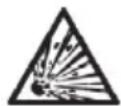
WARNING: Risk from Flying Objects. Always wear closed eye protection with side shields.
The safety valve 4 has been set for the highest permitted pressure of the pressure vessel. It is prohibited to adjust the safety valve. Actuate the safety valve 4 from time to time to ensure that it works when required.
- Loosen the safety valve nut until you can hear the compressed air being released.
- Then fully tighten the safety valve nut.
- Always keep the safety valve 4 and surrounding area clean and free of obstntructions.
NOTE: If the safety valve 4 is stuck or does not operate smoothly, contact a DEWALT service centre.
To Drain Tank (Fig. A, D)
WARNING: Risk of Unsafe Operation. Air tanks contain high pressure air. Keep face and other body parts away from outlet of drain. Always wear certified eye protection with side shields when draining as debris can be kicked up into face.
WARNING: Risk from noise. Always wear proper hearing protection during use. Under some conditions and duration of use, noise from this product may contribute to hearing loss.
NOTE: All compressed air systems generate condensate that accumulates in any drain point (e.g., tanks, filter, aftercoolers, dryers). This condensate contains lubricating oil and/or substances which may be regulated and must be disposed of in accordance with local, state, and federal laws and regulations.
WARNING: Risk of Bursting. Water will condense in the air tank, if not drained, water will corrode and weaken the air tank causing a risk of air tank rupture.
NOTICE: Risk of Property Damage. Drain water from air tank may contain oil and rust which can cause stains.
- Set the On/Off switch 1 to "Off".
- Remove the battery.
- Turn the regulator dial 6 counterclockwise to set the outlet pressure to zero.
- Remove the air tool or accessory.
WARNING: When loosening the hose coupling from the quick connect coupler 9, the coupling piece of the hose must be held by hand in order to avoid injuries caused by the recoiling hose.
- Place a suitable container under the drain valve to catch discharge.
- Loosen the safety valve nut allowing air to bleed from the tank until tank pressure is approximately 1.4 bar (20 PSI). Then fully tighten the safety valve nut.
- Drain water from air tank by opening drain valve 7 on bottom of tank.
- Hold the handle 10 and tilt the compressor towards the drain valve 7 to allow all water to drain out.
- After the water has been drained, close the drain valve 7. The air compressor can now be stored.
NOTE: If drain valve is blocked, release all air pressure by connecting a tool to the airline and operating it until tank pressure is zero BAR and contact the DEWALT service centre.
Storage
Before you store the air compressor, make sure you do the following:
- Review the Maintenance section on the preceding pages and perform scheduled maintenance as necessary.
- Always toggle Auto On/Off Switch to "Off" and remove battery. Drain water from air tank. See To Drain Tank under Maintenance.
WARNING: Water will condense in the air tank. If not caused, water will corrode and weaken the air tank causing a risk of air tank rupture.
- Store the air compressor with the tank pressure at zero psi, in a clean and dry location sheltered away from weather at a temperature between +5°C and +45°C.

Cleaning
WARNING: Blow dirt and dust out of the main housing is dry air as often as dirt is seen collecting in and around the air vents. Wear approved eye protection and approved dust mask when performing this procedure.

Lubrication
Your power tool requires no additional lubrication.
WARNING: Never use solvents or other harsh chemicals for cleaning the non-metallic parts of the tool. These chemicals may weaken the materials used in these parts. Use a cloth dampened only with water and mild soap. Never let any liquid get inside the tool; never immerse any part of the tool into a liquid.
Optional Accessories
WARNING: Since accessories, other than those offered by DEWALT, have not been tested with this product, use of such accessories with this tool could be hazardous. To reduce the risk of injury, only DEWALT recommended accessories should be used with this product.
Consult your dealer for further information on the appropriate accessories.
Repairs
The charger and battery pack are not serviceable. There are no serviceable parts inside the charger or battery pack.
WARNING: To assure product SAFETY and RELIABILITY, repairs, maintenance and adjustment should be performed by a DEWALT factory service centre or a DEWALT authorized service centre. Always use identical replacement parts.
Protecting the Environment
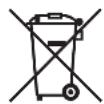
Separate collection. Products and batteries marked with this symbol must not be disposed of with normal household waste.

Products and batteries contain materials that can be used or recycled reducing the demand for raw materials.
Please recycle electrical products and batteries according to local provisions. Further information is available at www.2helpU.com.
Rechargeable Battery Pack
This long life battery pack must be recharged when it fails to produce sufficient power on jobs which were easily done before. At the end of its technical life, discard it with due care for our environment:
- Run the battery pack down completely, then remove it from the tool.
- Li-lon cells are recyclable. Take them to your dealer or a local recycling station. The collected battery packs will be recycled or disposed of properly.
GLOSSARY
CFM: Cubic feet per minute.
SCFM: Standard cubic feet per minute; a unit of measure of air delivery.
LPM or l/min: Liters per minute; a unit of measure of air delivery
BAR: The measurement of a metric unit of pressure.
PSI: Pounds per square inch; a unit of measure of pressure.
kPa (kilopascal): Metric pressure measurement. 1 kilopascal equal 1000 pascals.
Cut-In Pressure: While the motor is off, air tank pressure drops when accessory is used. When the tank pressure drops to a certain low level the motor will restart automatically. The low pressure at which the motor automatically restarts is called cut-in pressure.
Cut-Out Pressure: When an air compressor is turned on and begins to run, air pressure in the air tank begins to build. It builds to a certain high pressure before the motor automatically shuts off, protecting your air tank from pressure higher than its capacity. The high pressure at which the motor shuts off is called cut-out pressure.
Duty Cycle: This air compressor pump is capable of running continuously. However, to prolong the life of your air compressor, it is recommended that a 50%-75% average duty cycle be maintained; that is, the air compressor pump should not run more than 30–45 minutes in any given hour.
Troubleshooting Guide
This section provides a list of the more frequently encountered malfunctions, their causes and corrective actions. The operator or maintenance personnel can perform some corrective actions, and others may require the assistance of a qualified DEWALT technician or your dealer.
| Code Possible Cause Possible Solution | ||
| 1 | Pressure switch does not shut off motor when compressor reaches cut-out pressure | Set the Auto On/Off switch to "Off" and remove the battery, if the unit does not shut off contact a DEWALT service organisation. |
| 2 | Pressure switch cut-out too high | Contact a DEWALT service organisation. |
| 3 | Tube fittings are not tight enough | Tighten fittings where air can be heard escaping. Check fittings with soapy water solution.Do Not Overtighten. |
| 4 | Defective air tank Air tank must be replaced. Do not repair the leak. Contact a D EWALT service organisation.WARNING: Risk of bursting. Do not drill into, weld or otherwise modify air tank or it will be used. The air tank can rupture or explode. | |
| 5 | Leaking seals Contact a D | EWALT service organisation. |
| 6 | Defective safety valve | Operate safety valve manually by loosening and then tightening the safety valve nut. If valve still leaks, it must be replaced. Contact a DEWALT service organisation. |
| 7 | Regulator is not adjusted correctly for accessory being used | It is normal for some pressure drop to occur when an accessory is used, adjust the One-Turn regulator as instructed inOne-Turn Regulator underDescription of Operationsif pressure drop is excessive.NOTE: Adjust the regulated pressure under flow conditions while accessory is being used. |
| 8 Prolonged | excessive use of air Decrease amount of air usage. | |
| 9 | Compressor doesn't provide enough air for accessory | Check the accessory air requirement. If it is higher than the Air Delivery (l/min) or pressure supplied by your air compressor, a more powerful compressor is needed to operate accessory. |
| 11 Check valve restricted Contact a D | EWALT service organisation. | |
| 12 Air leaks | Tighten fittings. | |
| 13 | Regulator is damaged Contact a D | EWALT service organisation. |
| 14 | Motor overload protection switch has tripped | Refer toMotor Overload Protector underDescription of Operations. If motor overload protection trips frequently, contact a DEWALT service organisation. |
| 15 | Tank pressure exceeds pressure switch cut-in pressure | Motor will start automatically when tank pressure drops below cut-in pressure of pressure switch. |
| 16 | Loose electrical connections | Contact a DEWALT service organisation. |
| 17 | Possible defective motor | Contact a DEWALT service organisation. |
| 18 | Paint spray on internal motor parts | Contact a DEWALT service organisation. Do not operate the compressor in the paint spray area. Refer to flammable vapor warning. |
| 19 | Pump does not run because tank pressure is above cut-in pressure. | Drain tank to below cut-in pressure when pump turns on. |
| 20 | Pump does not run due to safety fault. | Cycle Auto On/Off Switch from "Off" to "Auto On." |
Troubleshooting Codes
| Problem | Code |
| Excessive air tank pressure-safety valve pops off | 1, 2 |
| Air leaks | 3 |
| Air leaks in air tank or at air tank welds | 4 |
| Air leaks between head and valve plate | 5 |
| Air leaks from safety valve | 6 |
| Compressor is not supplying enough air to operate accessories | 7, 8, 9, 10, 11, 12 |
| Regulator knob has continuous air leak | 13 |
| Regulator will not shut off air outlet | 13 |
| Motor will not run | 6, 14, 15, 16, 17, 18, 19, 20 |
Compresor de aire sin cable 18 V 10 L DCC1018
¡Enhorabuena!
natural_image
Technical line drawing of a mechanical component with no visible text or symbolsVice-President Engineering, PTE-Europe
natural_image
Technical line drawing of a mechanical component with no visible text or symbolsPression de coupure approximative.

Bloc-batterie rechargeable
natural_image
Technical line drawing of a mechanical component with no visible text or symbolsVice-President Engineering, PTE-Europe
natural_image
Technical line drawing of a mechanical component with no visible text or symbols"UN Recommendations on the Transport of Dangerous Goods Manual of Tests and Criteria".
natural_image
Technical line drawing of a mechanical component with no visible text or symbolsnatural_image
Technical line drawing of a device casing with mounting bracket and internal components (no text or symbols)Vice-President Engineering, PTE-Europe
