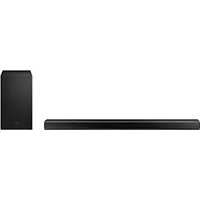
HW-Q710A - Soundbar SAMSUNG - Free user manual and instructions
Find the device manual for free HW-Q710A SAMSUNG in PDF.



| Product Type | 3.1.2 Channel Soundbar |
| Brand | Samsung |
| Model | HW-Q710A (also HW-Q700A) |
| Dimensions (W x H x D) | 980.0 x 60.0 x 115.0 mm |
| Soundbar Weight | 3.6 kg |
| Subwoofer Weight | 5.9 kg (model PS-WA75B) |
| Power Supply | DC 19V via AC/DC power adapter |
| Standby Power Consumption | 5.5 W |
| Total Output Power | 360 W (soundbar: 4 x 30 W + 2 x 20 W + 10 W, subwoofer: 160 W) |
| Supported Audio Formats | Dolby Atmos, Dolby TrueHD, DTS:X, LPCM 8 channels, etc. |
| Connectivity | HDMI ARC/eARC, HDMI input, optical, Bluetooth, Wi-Fi, AirPlay 2 |
| Sound Modes | Standard, Surround, Game Pro, Adaptive Sound |
| Special Features | Q-Symphony, Spacefit Sound, Tap Sound, Alexa compatible |
| Wall Mounting | Possible with provided bracket (screws not included) |
| Operating Temperature | +5 °C to +35 °C |
| Operating Humidity | 10 % ~ 75 % |
| Safety | Do not open, no user-serviceable parts |
| Maintenance | Clean with a soft, dry cloth; avoid moisture and excessive heat |
| Spare Parts | Subwoofer (included), surround speaker kit SWA-9500S (optional) |
| Repairability | Refer all servicing to qualified personnel |
| Package Contents | Soundbar, subwoofer, remote control, batteries, cables, wall mounts |
Frequently Asked Questions - HW-Q710A SAMSUNG
User questions about HW-Q710A SAMSUNG
0 question about this device. Answer the ones you know or ask your own.
Ask a new question about this device
Download the instructions for your Soundbar in PDF format for free! Find your manual HW-Q710A - SAMSUNG and take your electronic device back in hand. On this page are published all the documents necessary for the use of your device. HW-Q710A by SAMSUNG.
USER MANUAL HW-Q710A SAMSUNG
Thank you for purchasing this Samsung product.
To receive more complete service, please register your product at
www.samsung.com/register
SAFETY INFORMATION
SAFETYWARNINGS
TO REDUCE THE RISK OF ELECTRIC SHOCK, DO NOT REMOVE THE COVER (OR BACK).
NO USER-SERVICEABLE PARTS ARE INSIDE. REFER SERVICING TO QUALIFIED SERVICE PERSONNEL.
Refer to the table below for an explanation of symbols which may be on your Samsung product.
| CAUTION RISK OF ELECTRIC SHOCK. DO NOT OPEN. | |
| This symbol indicates that high voltage is present inside. It is dangerous to make any kind of contact with any internal part of this product. | |
| This symbol indicates that this product has included important literature concerning operation and maintenance. | |
| Class II product: This symbol indicates that a safety connection to electrical earth (ground) is not required. If this symbol is not present on a product with a power cord, the product MUST have a reliable connection to protective earth (ground). | |
| AC voltage: Rated voltage marked with this symbol is AC voltage. | |
| DC voltage: Rated voltage marked with this symbol is DC voltage. | |
| Caution. Consult Instructions for use: This symbol instructs the user to consult the user manual for further safety related information. |
WARNING
- To reduce the risk of fire or electric shock, do not expose this appliance to rain or moisture.
CAUTION
TO PREVENT ELECTRIC SHOCK, MATCH WIDE BLADE OF PLUG TO WIDE SLOT, FULLY INSERT.
- This apparatus shall always be connected to a AC outlet with a protective grounding connection.
- To disconnect the apparatus from the mains, the plug must be pulled out from the mains socket, therefore the mains plug shall be readily operable.
- Do not expose this apparatus to dripping or splashing. Do not put objects filled with liquids, such as vases, on the apparatus.
- To turn this apparatus off completely, you must pull the power plug out of the wall socket. Consequently, the power plug must be easily and readily accessible at all times.
PRECAUTIONS
- Ensure that the AC power supply in your house complies with the power requirements listed on the identification sticker located on the bottom of your product. Install your product horizontally, on a suitable base (furniture), with enough space around it for ventilation (7 10~cm) .Make sure the ventilation slots are not covered. Do not place the unit on amplifiers or other equipment which may become hot. This unit is designed for continuous use. To fully turn off the unit, disconnect the AC plug from the wall outlet. Unplug the unit if you intend to leave it unused for a long period of time.
- During thunderstorms, disconnect the AC plug from the wall outlet. Voltage peaks due to lightning could damage the unit.
- Do not expose the unit to direct sunlight or other heat sources. This could lead to overheating and cause the unit to malfunction.
- Protect the product from moisture (i.e. vases), and excess heat (e.g. a fireplace) or equipment creating strong magnetic or electric fields. Unplug the power cable from the AC wall socket if the unit malfunctions. Your product is not intended for industrial use. It is for personal use only. Condensation may occur if your product has been stored in cold temperatures. If transporting the unit during the winter, wait approximately 2 hours until the unit has reached room temperature before using.
- The battery used with this product contains chemicals that are harmful to the environment. Do not dispose of the battery in the general household trash. Do not expose the battery to excess heat, direct sunlight, or fire. Do not short circuit, disassemble, or overheat the battery.
CAUTION: Danger of explosion if the battery is replaced incorrectly. Replace only with the same or equivalent type.
CONTENTS
01 Checking the Components 6
02 Product Overview 7
Front Panel / Top Panel of the Soundbar 7
Bottom Panel of the Soundbar 7
03 Using the Soundbar Remote Control 9
Inserting Batteries before using the Remote Control (AA batteries X 2). 9
How to Use the Remote Control. 9
Using the Hidden Buttons (Buttons with more than one function). 11
Output specifications for the different sound effect modes 11
Adjusting the Soundbar volume with a TV remote control 12
04 Connecting the Soundbar 13
Connecting the power and units. 13
- Manually connecting the Subwoofer. 13
-LED Indicator Lights on the Rear of Subwoofer. 14
Connecting an SWA-9500S (Sold Separately) to your Soundbar 15
05 Using a wired connection to the TV 16
Method 1. Connecting with HDMI 16
- Connecting the TV that supports HDMI ARC (Audio Return Channel) 16
Method 2. Connecting using an Optical Cable 17
06 Using a wireless connection to the TV 18
Method 1. Connecting via Bluetooth 18
Method 2. Connecting via Wi-Fi 19
07 Connecting an External Device 20
Method 1. Connecting using an HDMI Cable (Capable of Dolby Atmos decoding and playback) 20
Method 2. Connecting using an Optical Cable 21
08 Connecting a Mobile Device 22
Method1. Connecting via Bluetooth 22
Method 2. Connecting via Wi-Fi (Wireless Network). 23
09 Getting Started with Alexa on Amazon Product (Works with Alexa) 24
Connect and use with an Amazon product (Amazon Echo) 24
Use voice commands to control the Soundbar 24
Using the Tap Sound 25
10 Connecting To Apple AirPlay 2 26
Connect and use with an Apple product 26
11 Installing the Wall Mount 27
Installation Precautions 27
Wallmount Components. 27
12 Installing the Soundbar above a TV Stand 28
Component 28
13 Software Update 29
Auto Update. 29
USB Update 29
Initialisation. 29
14 Troubleshooting 30
15 Licence 31
16 Open Source Licence Notice 31
17 Important Notes About Service 31
18 Specifications and Guide 32
Specifications 32
01 CHECKING THE COMPONENTS


Soundbar Main Unit Soundbar Remote Control / Batteries Subwoofer
Power Cord (Subwoofer, Soundbar) AC/DC Adapter (Soundbar) HDMI Cable


Wall Mount Guide Holder-Screw Screw
Bracket-Wall Mount Rubber-Foot
For more information about the power supply and power consumption, refer to the label attached to the product. (Label: Bottom of the Soundbar Main Unit)
To purchase additional components or optional cables, contact a Samsung Service Centre or Samsung Customer Care.
For more information about the wallmount or rubber-foot, see pages 27-28.
- Design, specifications, and App screen are subject to change without prior notice.
The appearance of the accessories may differ slightly from the illustrations above.
02 PRODUCT OVERVIEW
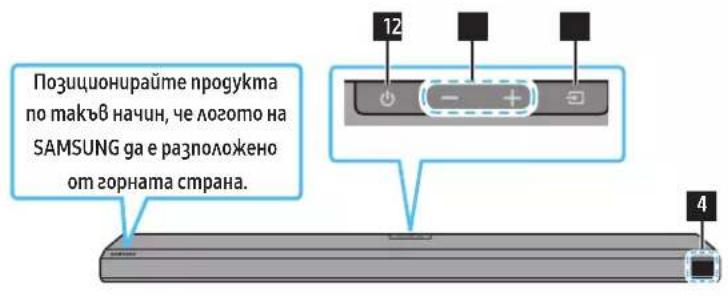
Front Panel / Top Panel of the Soundbar
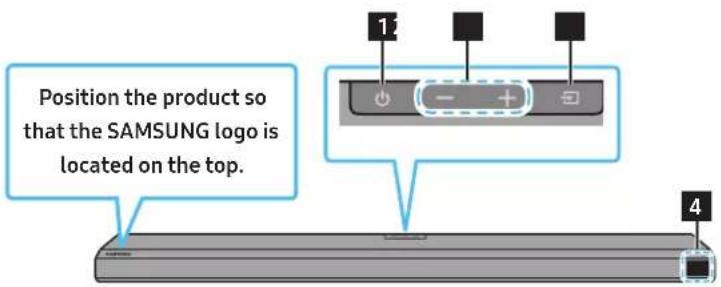
1 (Power) Button
Turns the power on and off.
2 -+(Volume)Button
Adjusts the volume.
3 (Source) Button
Selects the source input mode.
| Input mode Display | |
| Optical Digital input D.IN | |
| ARC (HDMI OUT) input D.IN → TV ARC (Auto conversion) | |
| HDMI input HDMI | |
| Wi-Fi mode WIFI | |
| BLUETOOTH mode BT |
4 Display
Displays the product's status and current mode.
D.IN HDMI Wi-Fi BT
- When you plug in the AC cord, the power button will begin working in 4 to 6 seconds.
- When you turn on this unit, there will be a 4 to 5 second delay before it produces sound.
If you hear sounds from both the TV and Soundbar, go to the Settings menu for the TV audio and change the TV speaker to External Speaker.
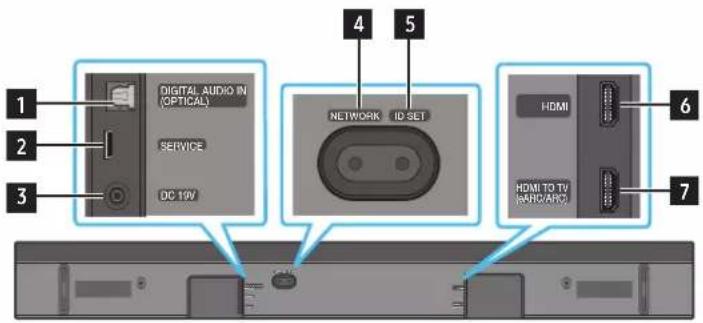
Bottom Panel of the Soundbar
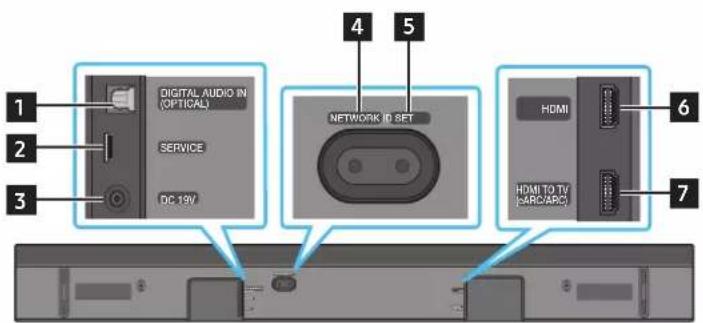
1 DIGITAL AUDIO IN (OPTICAL)
Connect to the digital (optical) output of an external device. (See page 21)
2 SERVICE
Connect a USB storage device to upgrade the product's software.
3DC 19V (Power Supply In)
Connect the AC/DC power adapter. (See page 13)
| 4 NETWORK Press to connect to a wireless network (Wi-Fi) via the SmartThings app. | |
| 5 D SET Press to connect the Soundbar to surround speakers and a subwoofer wirelessly. (The surround speaker is sold separately.) | |
| 6 HDMI Inputs digital video and audio signals simultaneously using an HDMI cable. Connect to the HDMI output of an external device. (See page 20) | |
| 7 HDMI TO TV (eARC/ARC) Connect to the HDMI jack on a TV. (See page 16) |
- When disconnecting the power cable of the AC/DC power adaptor from a wall outlet, pull the plug. Do not pull the cable.
- Do not connect this unit or other components to an AC outlet until all connections between components are complete.
03 USING THE SOUNDBAR REMOTE CONTROL
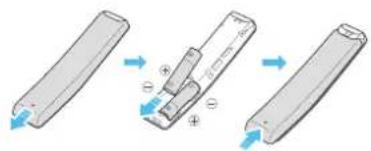
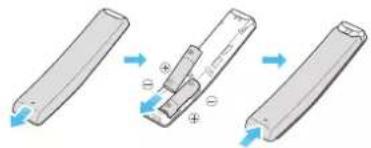
Inserting Batteries before using the Remote Control (AA batteries X 2)
Slide the back cover in the direction of the arrow until it is completely removed. Insert 2 AA batteries (1.5V) oriented so that their polarity is correct. Slide the battery cover back into position.
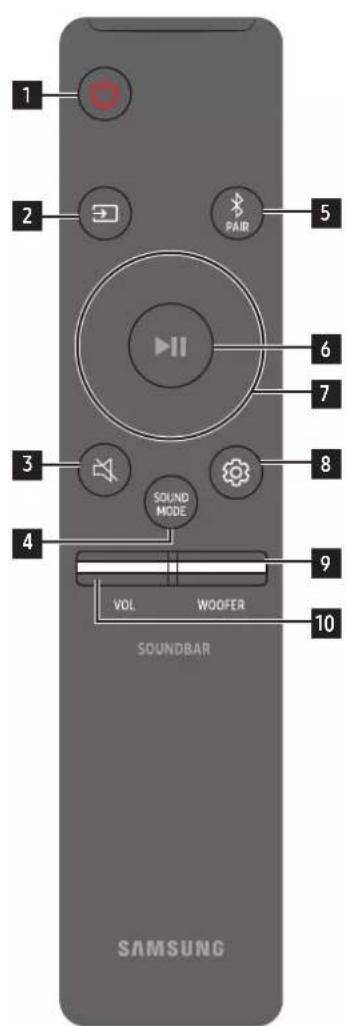
How to Use the Remote Control
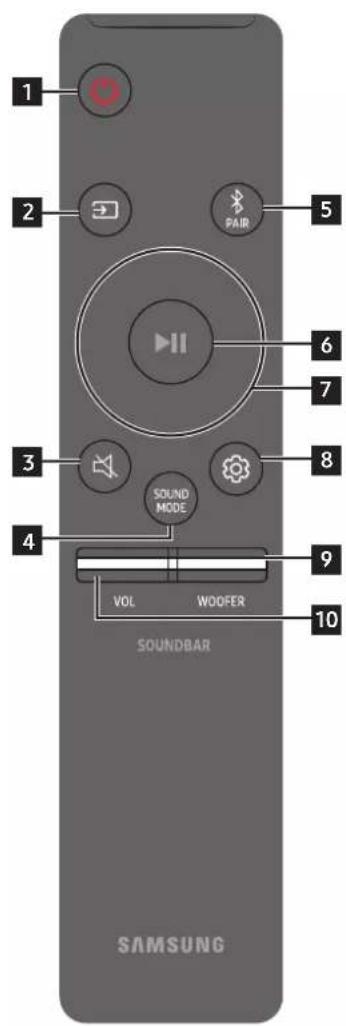
| 1 | Power | Turns the Soundbar on and off. • Auto Power Down Function The unit turns off automatically in the following situations: • In D.IN / HDMI / Wi-Fi / BT mode if there is no audio signal for 18 minutes. |
| 2 | Source | Press to select a source connected to the Soundbar. |
| 3 | Mute | Press the (Mute) button to mute the sound. Press it again to unmute the sound. |
| 4 | SOUND MODE SOUND MODE | You can select the desired sound mode by choosing STANDARD, SURROUND, GAME PRO, or ADAPTIVE SOUND. • STANDARD Outputs the original sound. • SURROUND Provides a wider sound field than standard. • GAME PRO Provides stereoscopic sound to immerse you in the action while gaming. • ADAPTIVE SOUND Analyzes the content in real time and automatically provides the optimal sound field based on the characteristics of the content. |
| 5 | PAIR Bluetooth PAIR | Switch the Soundbar to Bluetooth pairing mode. Press the button and wait for the "BT PAIRING" screen to connect to a new Bluetooth device. |
| 6 | Play / Pause | You can also play or pause music by pressing the button. |
| 7 | Up/Down/Left/Right | Press the indicated areas to select Up/Down/Left/Right. Press Up/Down/Left/Right on the button to select or set functions. • Music Skip Press the Right button to select the next music file. Press the Left button to select the previous music file. • ID SET Use this option when the Subwoofer or Surround Speakers are not connected or need reconnection. While powered off, press and hold the Up button for 5 seconds to perform ID SET. (See page 14.) |
| 8 | Sound Control | When pressed, the setting items such as TREBLE, BASS, SYNC, CENTER LEVEL, FRONT TOP LEVEL, and VIRTUAL ON/OFF are displayed in sequence. The desired item can be adjusted using the Up/Down buttons. • To control the volume of the treble or bass sound, select TREBLE or BASS in Sound Settings, and then adjust the volume between -6~+6 by using the Up/Down buttons. • Press and hold the (Sound Control) button for about 5 seconds to adjust the sound for each frequency band. 150Hz, 300Hz, 600Hz, 1.2kHz, 2.5kHz, 5kHz, and 10kHz are selectable using the Left/Right buttons and each can be adjusted to a setting between -6 to +6 using the Up/Down buttons. (Make sure the Sound mode is set to "STANDARD") • To control the volume of the each speaker select CENTER LEVEL, or FRONT TOP LEVEL in Sound Settings, and then adjust the volume between -6~+6 by using the Up/Down buttons. • If the video on the TV and audio from the Soundbar are not synchronized, select SYNC in Sound Control, and then set the audio delay between 0~300 milliseconds by using the Up/Down buttons. • SYNC is only supported for some functions. • If Surround Speakers are connected, select REAR LEVEL, REAR TOP LEVEL, and then use the Up/Down buttons to adjust the volume within a -6 to +6 range. • The VIRTUAL Speaker function can be turned ON/OFF by using the Up/Down buttons. |
| 9 | WOOFER (BASS) LEVEL | Push the button up or down to adjust the level of the woofer (bass) to -12 or between -6 to +6. To set the woofer (bass) volume level to 0 (Default), press the button. |
| 10 | VOLUME | Push the button up or down to adjust the volume. • Mute Press the VOL button to mute the sound. Press it again to unmute the sound. |
Using the Hidden Buttons (Buttons with more than one function)
| Hidden Button | Reference page | |
| Remote Control Button Function | ||
| WOOFER (Up) TV remote control | On/Off (Standby) page 12 | |
| Up ID SET page 14 | ||
| (Sound Control) | 7 Band EQ page 10 | |
Output specifications for the different sound effect modes
| Effect Input | Output | ||
| With Subwoofer Only | With Subwoofer & Wireless Rear Speaker Kit | ||
| STANDARD | 2.0 ch 2.1 ch 2.1 ch | ||
| 5.1 ch 3.1 ch 5.1 ch | |||
| SURROUND | 2.0 ch 3.1.2 ch 5.1.4 ch | ||
| 5.1 ch 3.1.2 ch 5.1.4 ch | |||
| GAME PRO | 2.0 ch 3.1.2 ch 5.1.4 ch | ||
| 5.1 ch 3.1.2 ch 5.1.4 ch | |||
| ADAPTIVE SOUND | 2.0 ch 3.1.2 ch 5.1.4 ch | ||
| 5.1 ch 3.1.2 ch 5.1.4 ch | |||
- When the input source is Dolby Atmos®, DTS:X, the Subwoofer-only setup provides 3.1.2 channel audio, while the Subwoofer & Wireless Rear Speaker Kit setup provides 5.1.4 channel audio.
The Samsung Wireless Rear Speaker Kit can be purchased separately. To purchase a Kit or the Subwoofer, contact the vendor you purchased the Soundbar from. - The Surround Speakers will not produce sounds for 2 channel output while STANDARD mode is in use. To enable sound for the Surround Speakers, change the effect mode to SURROUND.
Adjusting the Soundbar volume with a TV remote control
Adjust the Soundbar volume using the TV's remote control.
This function can be used with IR remote controls only. Bluetooth remote controls (remote controls that require pairing) are not supported.
- Set the TV speaker to External Speaker to use this function.
Manufacturers supporting this function: VIZIO, LG, Sony, Sharp, PHILIPS, PANASONIC, TOSHIBA, Hisense, RCA
- Turn Off the Soundbar.
- Push up and hold the WOOFER button for 5 seconds. Each time you push the WOOFER button up and hold it for 5 seconds, the mode switches in the following order: "OFF-TV REMOTE" (Default mode), "SAMSUNG-TV REMOTE", "ALL-TV REMOTE".
| Remote Control Button Display Status | ||
| (Default mode)OFF-TV REMOTE | Disable the TV remote control. | |
| SAMSUNG-TV REMOTE | Enable a Samsung TV's IR remote control. | |
| ALL-TV REMOTE | Enable a third-party TV's IR remote control. | |
04 CONNECTING THE SOUNDBAR
Connecting the power and units
Use the power components to connect the Subwoofer and Soundbar to an electrical outlet in the following order:
For more information about the required electrical power and power consumption, refer to the label attached to the product. (Label: Bottom of the Soundbar Main Unit)
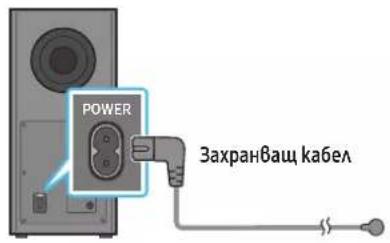
1. Connect the Power cord to the Subwoofer.
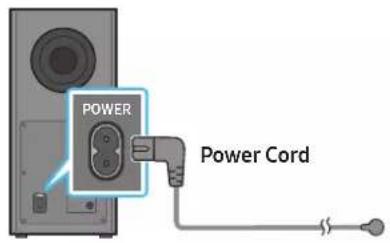
Rear of Subwoofer
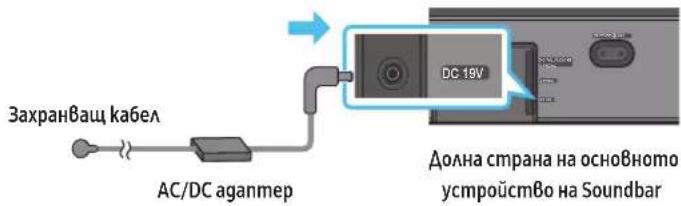
- First connect the power cable to the AC/DC adapter.
Connect the AC/DC adapter (with the power cable) to the Soundbar.
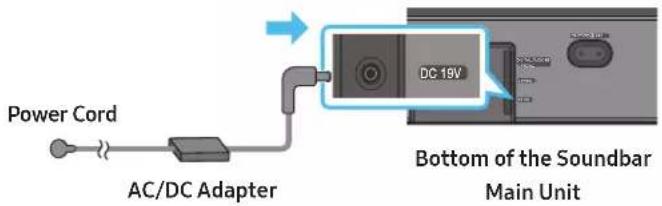
- Connect power to the Soundbar and Subwoofer. The Subwoofer is automatically connected when the Soundbar is turned on.
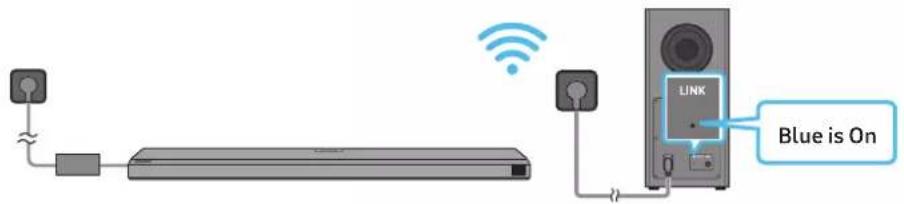
NOTE
- Connect the Subwoofer power before connecting to the Soundbar.
The Subwoofer will be automatically connected when turning on the Soundbar. - If you unplug and reconnect the power cord when the product is turned on, the Soundbar turns on automatically.
- Make sure to rest the AC/DC Adapter flat on a table or the floor. If you place the AC/DC Adapter so that it is hanging with the AC cord input facing upwards, water or other foreign substances could enter the Adapter and cause the Adapter to malfunction.
Manually connecting the Subwoofer
Before performing the manual connection procedure below:
- Check whether the power cables for the Soundbar and subwoofer are connected properly.
-
Make sure that the Soundbar is turned off.
-
Turn off the Soundbar main.
-
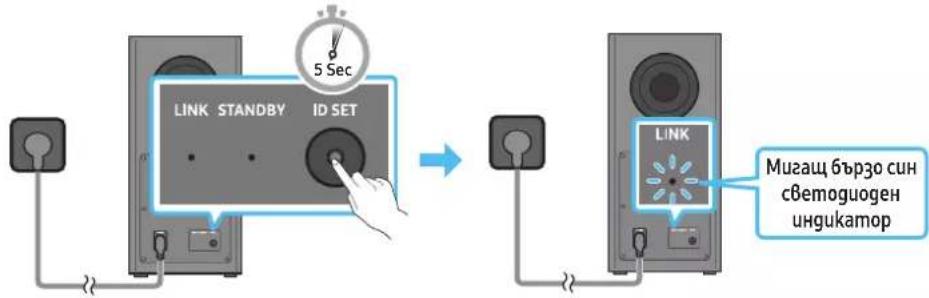
Press and hold ID SET on the rear of the subwoofer for at least 5 seconds.
The red indicator on the rear of the subwoofer turns off and the blue indicator blinks.
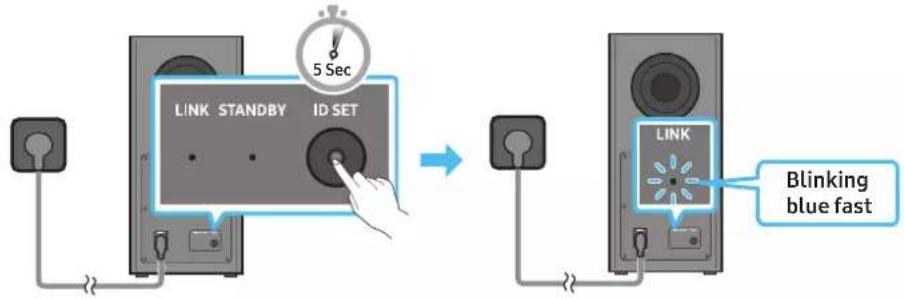
Rear of Subwoofer Rear of Subwoofer
-
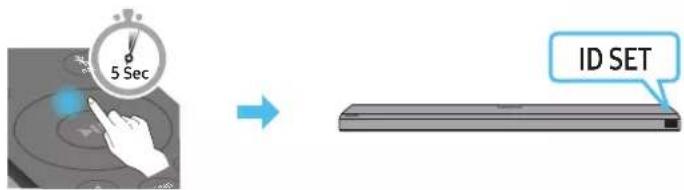
Press the Up button on the remote control for 5 seconds.
-
The ID SET message appears on the display of the Soundbar for a moment, and then it disappears.
- The Soundbar will automatically power on when ID SET is complete.
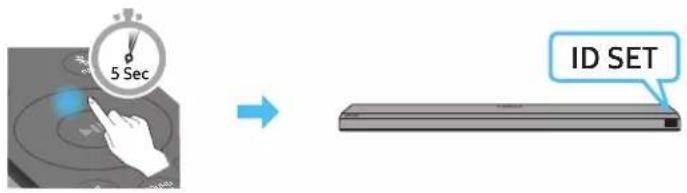
- Check if the LINK LED is solid blue (connection complete).
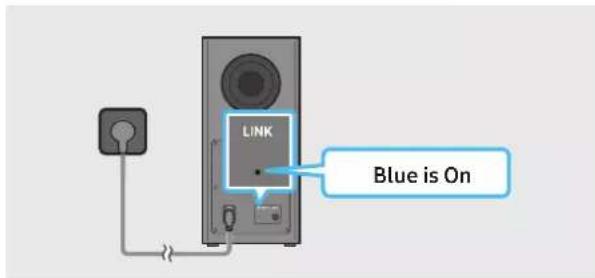
The LINK LED indicator stops blinking and glows a solid blue when a connection is established between the Soundbar and the Wireless Subwoofer.
LED Indicator Lights on the Rear of Subwoofer
| LED Status Description | |||
| Blue LINK STANDBY ID SET | On | Successfully connected (normal operation) | - |
| Blinking Recovering the connection | Check if the power cable attached to the main Soundbar unit is connected properly or wait about 5 minutes. If blinking persists, try manually connecting the subwoofer. See page 13. | ||
| Red LINK STANDBY ID SET | On | Standby (with the Soundbar main unit turned off) | Check if the power cable attached to the main Soundbar unit is connected properly. |
| Connection failed | Connect again. See the instructions for manual connection on page 13. | ||
| Red and blue LINK STANDBY ID SET | Blinking Malfunction | See the contact information for the Samsung Service Centre in this manual. | |
NOTE
If the main unit is powered off, the wireless subwoofer will go into stand-by mode and the STANDBY LED on the rear of the sub-woofer will turn red after blinking in blue several times.
If you use a device that uses the same frequency as the Soundbar near the Soundbar, interference may cause some sound interruption.
- The maximum transmission distance of the main unit's wireless signal is about 10m but may vary depending on your operating environment. If a steel-concrete or metallic wall is between the main unit and the wireless subwoofer, the system may not operate at all because the wireless signal cannot penetrate metal.
CAUTION
- Wireless receiving antennas are built into the wireless subwoofer. Keep the unit away from water and moisture.
- For optimal listening performance, make sure that the area around the wireless subwoofer and the Wireless Receiver Module (sold separately) is clear of any obstructions.
Connecting an SWA-9500S (Sold Separately) to your Soundbar
Expand to true wireless surround sound by connecting the Samsung Wireless Rear Speaker Kit (SWA-9500S, sold separately) to your Soundbar. For detailed information on connections, see the Samsung Wireless Rear Speaker Kit manual.
05 USING A WIRED CONNECTION TO THE TV
Method 1. Connecting with HDMI

CAUTION
- When both the HDMI cable and optical cable are connected, the HDMI signal is received first.
To connect the HDMI cable between the TV and Soundbar, be sure to connect the terminals marked ARC. Otherwise, the TV sound may not be output. - The recommended cable is High Speed HDMI Cable with Ethernet.
Connecting the TV that supports HDMI ARC (Audio Return Channel)
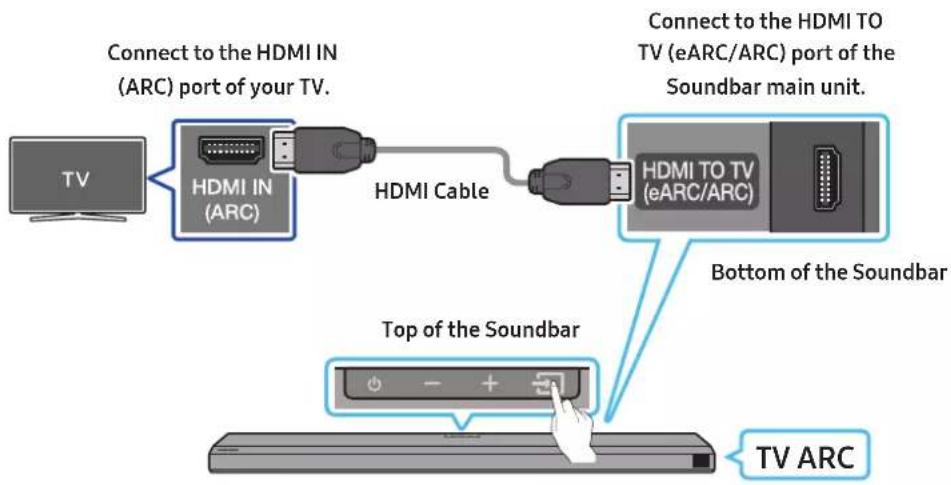
- With the Soundbar and TV turned off, connect the HDMI cable as shown in the figure.
- Turn on the Soundbar and TV.
-
"TVARC" appears in the display window of the Soundbar main unit and the Soundbar plays TV sound.
-
If TV sound is inaudible, press the (Source) button on the remote control or on the top of the Soundbar to switch to "D.IN" mode. The screen displays "D.IN" and "TV ARC" in sequence, and TV sound is played.
- When connecting a TV that supports the eARC function, "eARC" appears on the display and the sound is heard.
To connect with eARC, the eARC function in the TV menu should be set to On. Refer to the TV user manual for details on setting. (e.g. Samsung TV: Home () Settings () Sound Expert Settings HDMI-eARC Mode (Auto)) - If "TV ARC" does not appear in the display window of the Soundbar main unit, confirm that the HDMI cable is connected to the correct port.
- Use the volume buttons on the TV's remote control to change the volume on the Soundbar.
NOTE
- When you connect the TV that supports the HDMI ARC (Audio Return Channel) to the Soundbar with an HDMI cable, you can transmit the digital video and audio data without connecting a separate optical cable.
We recommend you use a coreless HDMI cable if possible. If you use a cored HDMI cable, use one whose diameter is less than 14 mm. - This function is not available if the HDMI cable does not support ARC.
- When the audio in a broadcast is encoded in Dolby Digital and the "Digital Output Audio Format" on your TV is set to PCM, we recommend that you change the setting to Dolby Digital. When the setting on the TV is changed, you will experience better sound quality. (The TV menu may use different words for Dolby Digital and PCM depending on the TV manufacturer.)
Method 2. Connecting using an Optical Cable
Pre-connection Checklist
- When both the HDMI cable and optical cable are connected, the HDMI signal is received first.
- When you use an optical cable and the terminals have covers, be sure to remove the covers.
Bottom of the Soundbar
Optical Cable (not supplied)
Top of the Soundbar
D.IN
- With the TV and Soundbar turned off, connect the DIGITAL AUDIO IN (OPTICAL) port on the Soundbar and the OPTICAL output port on the TV with the optical cable (not supplied), as shown in the figure.
- Turn on the Soundbar and TV.
- Press the (Source) button on the top panel or remote control, and then select the "D.IN" mode.
- The TV sound is output from the Soundbar.
Using the Q-Symphony Function
For Q-Symphony, the Soundbar syncs with a Samsung TV to output sound through two devices for optimum surround effect. When the Soundbar is connected, the menu, "TV+Soundbar" appears under the Sound Output menu of the TV. Select the corresponding menu.
TV menu
HDMI Cable
D.IN
OR
Optical Cable (not supplied)
- TV menu example: TV + [AV]Soundbar series name [HDMI]
NOTE
It can operate according to the Codec supported by TV.
- This function is supported only when the HDMI Cable or Optical Cable (not supplied) is connected.
- This function is available in some Samsung TVs and some Soundbar models.
Using the SpaceIt sound
Provides optimized sound quality by analyzing the listening spaces.
To enable this function, turn on the Adaptive Sound+ mode on your Samsung TV menu.
(Home () Settings () General Intelligent Mode Settings Adaptive Sound+)
NOTE
The sound mode on your Soundbar will automatically change to Adaptive Sound+ if you enable the Adaptive Sound+ mode on your TV.
- This function works when the Soundbar connects to some of the Samsung TVs.
06 USING A WIRELESS CONNECTION TO THE TV
Method 1. Connecting via Bluetooth
When a Samsung TV is connected using Bluetooth, you can hear stereo sound without the hassle of cabling.
- Only one Samsung TV can be connected at a time.
Samsung TV that supports Bluetooth can be connected. Check the specifications of your TV.

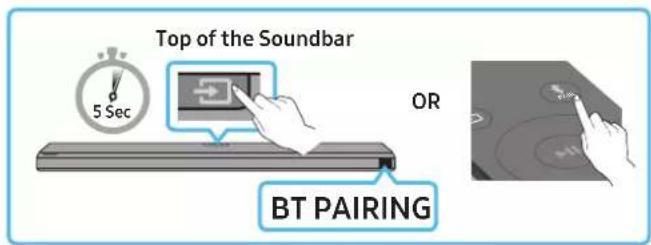
The initial connection
- Press the PAIR button on the Soundbar remote control to enter the "BT PAIRING" mode.
OR) a. Press the (Source) button on the top panel and then select "BT". "BT" changes to "BTPAIRING" in a few seconds automatically or changes to "BT READY" if there is a connect record.
b. When "BT READY" appears, press and hold the (Source) button on the top panel of the Soundbar for more than 5 seconds to display "BT PAIRING".
- Select Bluetooth mode on the Samsung TV.
(e.g. Home (H) Settings (B) Sound Sound Output Bluetooth Speaker List [AV] Samsung Soundbar Q700A / Q710A (Bluetooth))
- Select "[AV] Samsung Soundbar Q700A/Q710A" from the list on TV's screen.
An available Soundbar is indicated with "Need Pairing" or "Paired" on the TV's Bluetooth device list. To connect the Samsung TV to the Soundbar, select the message, and then establish a connection.
- When the Samsung TV is connected, [TV Name] "BT" appears on the Soundbar's front display.
- You can now hear Samsung TV sound from the Soundbar.
- After you have connected the Soundbar to your Samsung TV the first time, use the "BT READY" mode to reconnect.
If the device fails to connect
If you have an existing Soundbar (e.g., [AV] Samsung Soundbar Q700A / Q710A) on the list of speakers on the Samsung TV, delete it.
- Then repeat steps 1 through 3.
Disconnecting the Soundbar from the Samsung TV
Press the (Source) button on the top panel or on the remote control and switch to any mode but "BT".
- Disconnecting takes time because the Samsung TV must receive a response from the Soundbar.
(The time required may differ, depending on the Samsung TV model.)
What is the difference between BT READY and BT PAIRING?
- BT READY : In this mode, you can reconnect any Samsung TV or mobile device that was connected before.
- BTPAIRING: In this mode, you can connect a new device to the Soundbar.
(Press the PAIR button on the Soundbar remote control or press and hold the (Source) button on the top of the Soundbar for more than 5 seconds while the Soundbar is in "BT" mode.)
Notes on Bluetooth connection
- Locate a new device within 1m to connect via Bluetooth communication.
- If asked for a PIN code when connecting a Bluetooth device, enter <0000>.
- The Soundbar automatically turns off after 18 minutes in the Ready state.
-
The Soundbar may not perform Bluetooth search or connection correctly under the following circumstances:
-
If there is a strong electrical field around the Soundbar.
- If several Bluetooth devices are simultaneously paired with the Soundbar.
- If the Bluetooth device is turned off, not in place, or malfunctions.
Electronic devices may cause radio interference. Devices that generate electromagnetic waves must be kept away from the Soundbar main unit - e.g., microwaves, wireless LAN devices, etc.
Method 2. Connecting via Wi-Fi
Pre-connection Checklist
- Wi-Fi connection is available only on Samsung TV.
- Check whether the wireless router (Wi-Fi) is turned on and the TV is connected to the router.
- The TV and Soundbar must be connected to the same wireless network (Wi-Fi).
If your wireless router (Wi-Fi) uses a DFS channel, you will not be able to establish a Wi-Fi connection between the TV and Soundbar. Contact your Internet service provider for details. -
Because the menus may differ depending on the year of manufacture, refer to your TV manual.
To connect the TV to the Soundbar via Wi-Fi, connect the Soundbar to the wireless router first. See page 23, for details on how to establish a Wi-Fi connection. -
For more information about Wi-Fi connection to the Soundbar, see page 23, "Method 2. Connecting via Wi-Fi (Wireless Network)".
- Change the input source of the TV by using the Audio menu to Soundbar.
Samsung TVs released in 2017 or later
Home () Settings () Sound Sound Output [AV] Samsung Soundbar Q700A / Q710A (Wi-Fi)
07 CONNECTING AN EXTERNAL DEVICE
Method 1. Connecting using an HDMI Cable (Capable of Dolby Atmos decoding and playback)
Pre-connection Checklist
- If the Audio Output options include Secondary Audio, make sure Secondary Audio is set to Off.
Make sure that the content supports Dolby Atmos®.
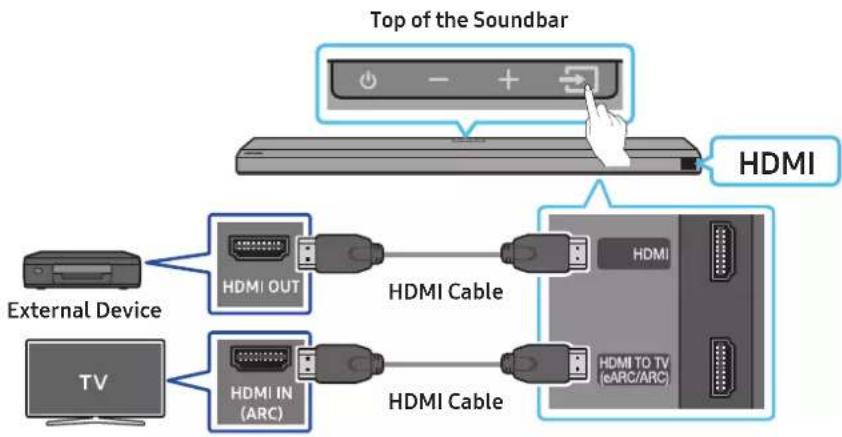
- Use an HDMI cable to connect the HDMI OUT port on the external device and the HDMI port on the bottom of the Soundbar.
- Use an HDMI cable to connect the HDMI IN port of the TV and the HDMI TO TV (eARC/ARC) port on the bottom of the Soundbar.
- Turn on the Soundbar, TV, and the external device.
- Press the (Source) button on the top panel or on the remote control, and then select "HDMI".
- The Soundbar display indicates that "HDMI" mode is currently selected and the Soundbar will start playing sounds.
NOTE
- When you use Dolby Atmos®: If the input source is Dolby Atmos®, 3.1.2 channels are outputted.
- When Dolby Atmos® is activated, "DOLBY ATMOS" appears in the front display.
- Configuring Dolby Atmos® on your BD player or other device
Open the audio output options on the settings menu of your BD player or other device and make sure that "No Encoding" is selected for Bitstream. For example, on a Samsung BD Player, go to Home Menu Sound Digital Output and then select Bitstream (unprocessed).
Supported UHD Signals Specification (3840 x 2160p)
| Frame rate (fps) | our depth RGB 4:4:4 YCbCr 4:4:4 YCbCr 4:2:2 YCbCr 4:2:0 | ||||
| <60 | 8 bit O O O O | ||||
| 10 bit -- O O | |||||
| 12 bit | -- O O | ||||
| 120 | 8 bit | ---- | |||
| 10 bit ---- |
- Supported specification may vary depending on the connected external device or usage conditions.
Method 2. Connecting using an Optical Cable
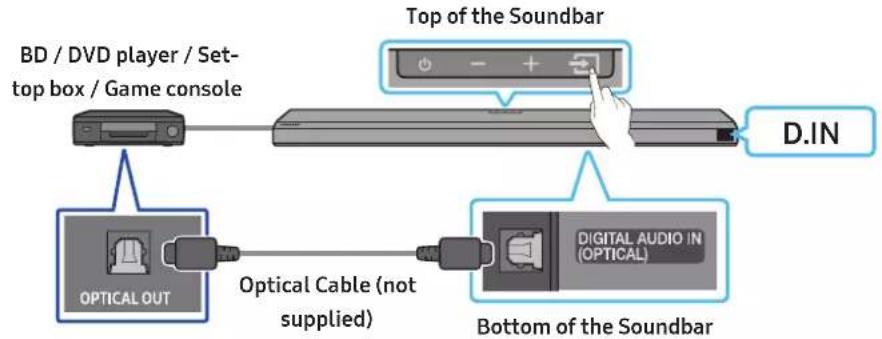
- Use an optical cable (not supplied) to connect the DIGITAL AUDIO IN (OPTICAL) on the Soundbar main and the OPTICAL OUT port on the external device.
- Turn on the Soundbar and external device.
- Select "D.IN" mode by pressing the (Source) button on the top panel or on the remote control.
- Your Soundbar will play sounds from the external device.
08 CONNECTING A MOBILE DEVICE
Method 1. Connecting via Bluetooth
When a mobile device is connected using Bluetooth, you can hear stereo sound without the hassle of cabling.
- When you connect a paired Bluetooth device with the Soundbar off, the Soundbar automatically turns on.
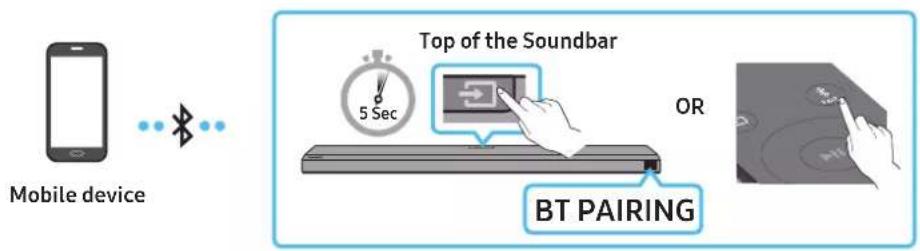
The initial connection
- When connecting to a new Bluetooth device, make sure the device is within 1 m distance.
- Press the PAIR button on the Soundbar remote control to enter the "BT PAIRING" mode.
OR) a. Press the (Source) button on the top panel and then select "BT". "BT" changes to "BT PAIRING" in a few seconds automatically or changes to "BT READY" if there is a connect record.
b. When "BT READY" appears, press and hold the (Source) button on the top panel of the Soundbar for more than 5 seconds to display "BT PAIRING".
- On your device, select "[AV] Samsung Soundbar Q700A / Q710A" from the list that appears.
- When the Soundbar is connected to the Mobile device, [Mobile Device Name] "BT" appears in the front display.
- Play music files from the device connected via Bluetooth through the Soundbar.
- After you have connected the Soundbar to your mobile device the first time, use the "BT READY" mode to reconnect.
If the device fails to connect
If you have an existing Soundbar (e.g., "AV) Samsung Soundbar Q700A/Q710A") in the list of speakers on the Mobile device, delete it.
- Repeat steps 1 and 2.
What is the difference between BT READY and BT PAIRING?
- BTREADY: In this mode, you can reconnect any Samsung TV or mobile device that was connected before.
- BTPAIRING: In this mode, you can connect a new device to the Soundbar. (Press the PAIR button on the Soundbar remote control or press and hold the (Source) button on the top of the Soundbar for more than 5 seconds while the Soundbar is in "BT" mode.)
Notes on Bluetooth connection
- Locate a new device within 1 m to connect via Bluetooth communication.
- If asked for a PIN code when connecting a Bluetooth device, enter <0000>.
The Soundbar automatically turns off after 18 minutes in the Ready state. -
The Soundbar may not perform Bluetooth search or connection correctly under the following circumstances: - If there is a strong electrical field around the Soundbar.
-
If several Bluetooth devices are simultaneously paired with the Soundbar.
- If the Bluetooth device is turned off, not in place, or malfunctions.
Electronic devices may cause radio interference. Devices that generate electromagnetic waves must be kept away from the Soundbar main unit - e.g., microwaves, wireless LAN devices, etc.
The Soundbar supports SBC data (44.1kHz, 48kHz).
- Connect only to a Bluetooth device that supports the A2DP (AV) function.
- You cannot connect the Soundbar to a Bluetooth device that supports only the HF (Hands Free) function.
- When connecting the Soundbar to a Bluetooth device, place them as close to each other as possible.
- The farther the Soundbar and Bluetooth device are from each other, the lower the sound quality will become. The Bluetooth connection may break when the devices are out of the effective range.
- The Bluetooth connection may not function as intended in areas with poor reception.
-
A Bluetooth device may experience noise or malfunction under in the following conditions:
-
When the body is in contact with the signal transceiver on the Bluetooth device or Soundbar
In corners or when there is an obstacle in proximity, such as a wall or partition, where electrical changes may occur. - When exposed to radio interferences by other products operating on the same frequency ranges, such as medical equipment, microwave ovens, and wireless LAN devices.
-
Obstacles such as doors and walls may still impact the sound quality even when the devices are within the effective range.
-
If prompted for a PIN code while connecting to a Bluetooth device, enter <0000>.
Note that your Soundbar cannot be paired with other Bluetooth devices while using the Bluetooth option. - This wireless device may cause electrical interference during operation.
Disconnecting the Bluetooth device from a Soundbar
You can disconnect a Bluetooth device from the Soundbar. For instructions, see the Bluetooth device's user manual.
The Soundbar will be disconnected.
- When the Soundbar is disconnected from the Bluetooth device, the Soundbar will display "BT DISCONNECTED" on the front display.
Disconnecting the Soundbar from the Bluetooth device
Presns the (Source) button on the top panel or on the remote control, and then change to any mode except "BT".
- Disconnecting takes time because the Bluetooth device must receive a response from the Soundbar. (Disconnection time may differ, depending on the Bluetooth device)
- When the Soundbar is disconnected from the Bluetooth device, the Soundbar will display "BT DISCONNECTED" on the front display
Method 2. Connecting via Wi-Fi (Wireless Network)
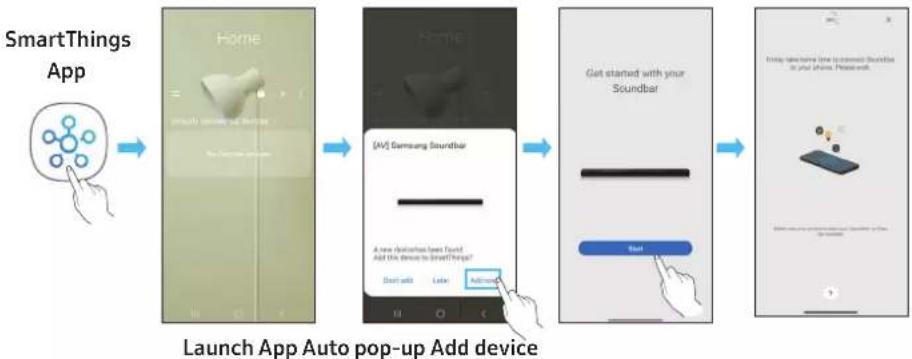
To connect a Soundbar to a mobile device via a wireless network (Wi-Fi), the SmartThings app is required.
The initial connection
- Install and launch the SmartThings app from your mobile device (smartphone or tablet).
- On the app, follow the screen instructions to add the Soundbar.
The automatic pop-up (the second screenshot below) may not show on some devices. If the pop-up window does not appear, press 十 on the Home screen. The Soundbar is added to the app.
09 GETTING STARTED WITH ALEXA ON AMAZON PRODUCT (WORKS WITH ALEXA)
- This function may not be supported depending on the model or geographical area.
This function only supports some languages, and the supported functions may differ depending on the geographical area. - For product specification or compatibility, refer to the Samsung website (www.samsung.com).
This service is provided by Amazon and can be terminated at any time. Samsung does not assume responsibility for service availability. - Amazon Alexa app screen is subject to change without prior notice.
Connect and use with an Amazon product (Amazon Echo)
Use an Amazon Echo product to control your Soundbar and enjoy music services provided by Amazon Echo.
To use Amazon Alexa, an Amazon account is required to connect the Soundbar over the network.
- Install the SmartThings app on your mobile device and then launch it.
- Enter the Alexa account by following the instructions on the app and then log in the service.
Use voice commands to control the Soundbar
The Amazon Echo service you can use with your Soundbar is limited to music. Other services provided by Amazon Echo, such as news and weather, can only be accessed through your Amazon Echo product.

Trigger + Command + Speaker name
- To use voice commands for the Soundbar named "Living room"
| Action Voice Command | |
| To set the volume level to 5 | "Alexa Set the volume to 5 on Living room" |
| To increase the volume level | "Alexa Volume up on Living room" |
| To mute the sound | "Alexa Mute on Living room" |
| To listen to a radio station named KISS FM | "Alexa Play Kiss FM on Living room" |
| To play the next song | "Alexa Next song on Living room" |
| To stop the audio | "Alexa Stop on Living room" |
| To turn the audio off | "Alexa Turn off on Living room" |
Using the Tap Sound
Tap the Soundbar with your mobile device to play the sound of content on the mobile device through the Soundbar.
- This function may not be supported, depending on the mobile device.
- This function is only compatible with Samsung mobile devices with Android 8.1 or later.
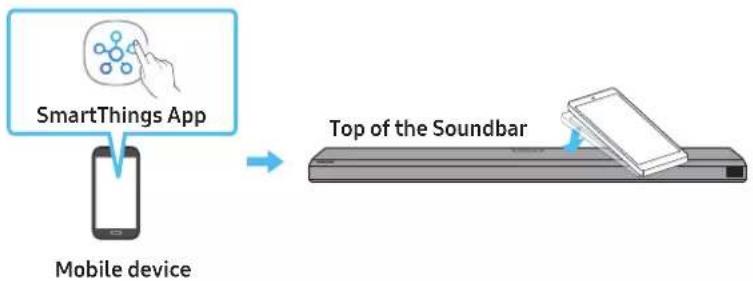
- Turn on the Tap Sound function on your mobile device.
- For details on how to turn on the function, refer to "Setting the Tap Sound function" below.
- Tap the Soundbar with the mobile device. Select "Start now" in the displayed message window.
A connection is established between the mobile device and Soundbar via Bluetooth.
- Play the sound of content on the mobile device through the Soundbar.
This function connects a mobile device to the Soundbar via Bluetooth by detecting vibration that occurs when the device touches the Soundbar.
- Make sure the mobile device does not tap a sharp corner of the Soundbar. The Soundbar or mobile device may become scratched or damaged.
It is recommended that the mobile device be covered with a case. Lightly tap the wide area in the upper portion of the Soundbar, without using excessive force.
- To use this function, update the SmartThings app to the latest version.
The function may not be supported, depending on the app version.
Setting the Tap Sound function
Use the SmartThings app to turn on the TapView, Tap Sound function.
- On the mobile device, run the SmartThings app.
- Select ( ) in the SmartThings app screen displayed on the mobile device.
- Set "Tap View, Tap Sound" to On to allow the function to work when a mobile device moves close to the Soundbar. The function is turned on.
NOTE
- When the mobile device is in power-saving mode, the Tap Sound function does not work.
The Tap Sound function may not work if there are devices near the Soundbar that cause radio interference such as electric devices. Make sure devices that may cause radio interference are placed at a sufficient distance away from the Soundbar.
10 CONNECTING TO APPLE AIRPLAY 2
This feature may not be available in some countries.
Connect and use with an Apple product
- With AirPlay 2, you can control your home's audio system from your iPhone, iPad, HomePod, or Apple TV.
- This Samsung Soundbar supports AirPlay 2 and requires iOS 11.4 or later.
NOTE
- Confirm that the Soundbar is connected to Wi-Fi. (Refer to Method 2. Connecting via Wi-Fi (Wireless Network))
11 INSTALLING THE WALL MOUNT
Installation Precautions
Install on a vertical wall only.
- Do not install in a place with high temperature or humidity.
- Verify whether the wall is strong enough to support the product's weight. If not, reinforce the wall or choose another installation point.
Purchase and use the fixing screws or anchors appropriate for the kind of wall you have (plaster board, iron board, wood, etc.). If possible, fix the support screws into wall studs.
Purchase wall mounting screws according to the type and thickness of the wall you want to mount the Soundbar on.
Diameter: M5
Length: 35mm or longer recommended.
- Connect cables from the unit to external devices before you install the Soundbar on the wall.
- Make sure the unit is turned off and unplugged before you install it. Otherwise, it may cause an electric shock.
Wallmount Components

Wall Mount Guide

X2

(M4 x L10)
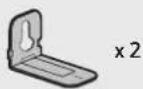
Holder-Screw Screw
Bracket-Wall Mount
- Place the Wall Mount Guide against the wall surface.
The Wall Mount Guide must be level.
- If your TV is mounted on the wall, install the Soundbar at least 5 cm below the TV.
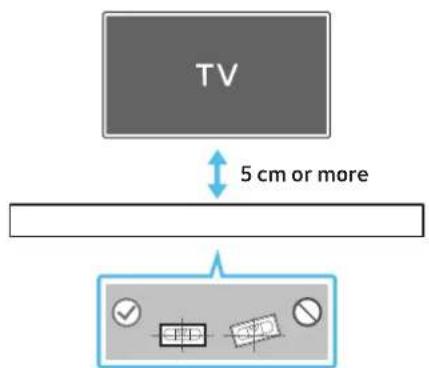
-
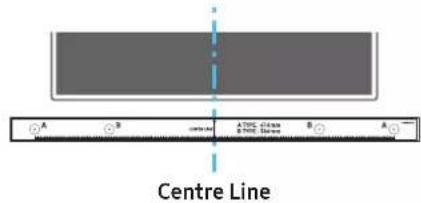
Align the Wall Mount Guide's Centre Line with the centre of your TV (if you are mounting the Soundbar below your TV), and then fix the Wall Mount Guide to the wall using tape.
-
If you are not mounting below a TV, place the Centre Line in the centre of the installation area.
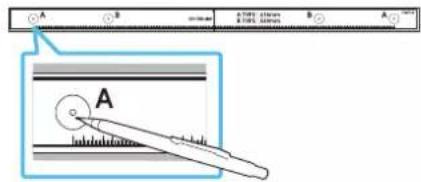
- Push a pen tip or sharpened pencil tip through the centre of the A-TYPE images on each end of the Guide to mark the holes for the supporting screws, and then remove the Wall Mount Guide.
-
Using an appropriately sized drill bit, drill a hole in the wall at each marking.
-
If the markings do not correspond to the positions of studs, make sure you insert appropriate anchors or mollies into the holes before you insert the support screws. If you use anchors or mollies, make sure the holes you drill are large enough for the anchors or mollies you use.
-
Push a screw (not supplied) through each Holder-Screw, and then screw each screw firmly into a support screw hole.

- Install the 2 Bracket-Wall Mounts in the correct orientation on the bottom of the Soundbar using 2 Screws.
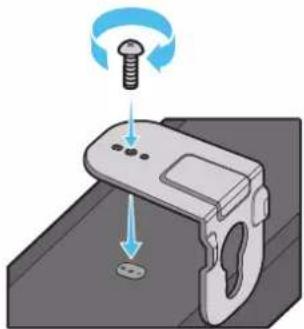
- When assembling, make sure the hanger part of the Bracket-Wall Mounts are located behind the rear of the Soundbar.
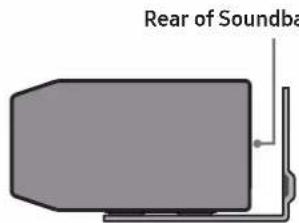
Right end of Soundbar
- Install the Soundbar with the attached Bracket-Wall Mounts by hanging the Bracket-Wall Mounts on the Holder-Screws on the wall.
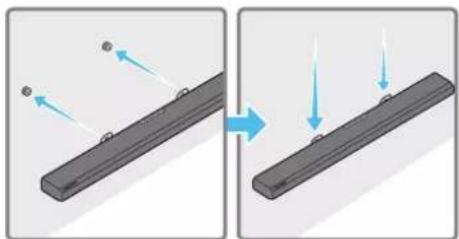
-
Slide the Soundbar down as shown below so that the Bracket-Wall Mounts rest securely on the Holder-Screws.
-
Insert the Holder-Screws into the wide (bottom) part of the Bracket-Wall Mounts, and then slide the Bracket-Wall Mounts down so that the Bracket-Wall Mounts rest securely on the Holder-Screws.
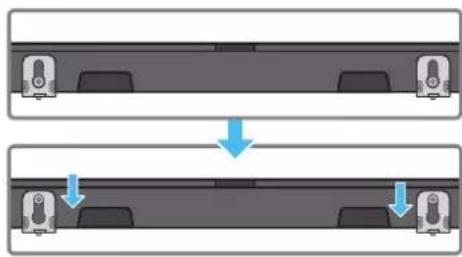
12 INSTALLING THE SOUNDBAR ABOVE A TV STAND
Component

Rubber-Foot
To install, attach the Rubber-Feet to the bottom of the Soundbar before placing it in position above the TV stand. Make sure you attach the Rubber-Feet so they do not lie outside the edges of the TV stand. Refer to the figure below.
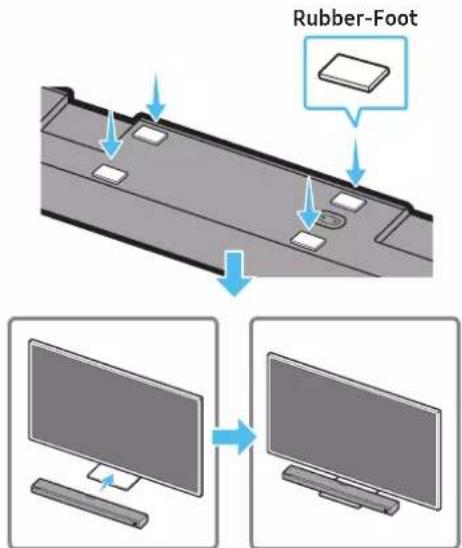
Place the Soundbar on a TV stand.
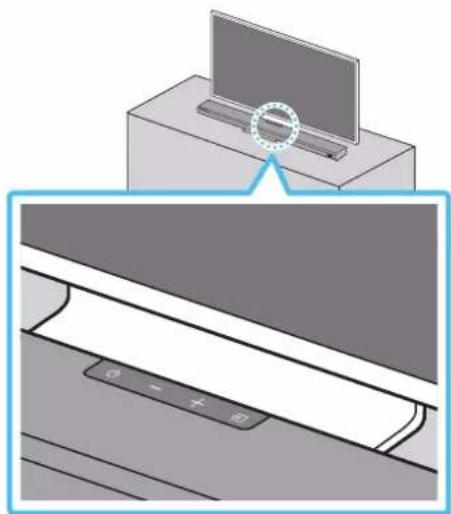
As illustrated in the image, align the centre of the Soundbar with the centre of the TV, carefully place the Soundbar onto the TV stand.
NOTE
- Make sure the Soundbar is placed on a flat and solid surface.
Insufficient gap from the TV may cause acoustic problem.
13 SOFTWARE UPDATE
Auto Update
When the Soundbar is connected to the Internet, software updates automatically occur even when the Soundbar is turned off.
- To use the Auto Update function, the Soundbar must be connected to the Internet.
The Wi-Fi connection to the Soundbar will be terminated if the Soundbar's power cord is disconnected or the power is cut off. If the power is cut off, when the power comes back on or you reconnect the power cord, turn on the Soundbar, and then reconnect it to the Internet.
USB Update
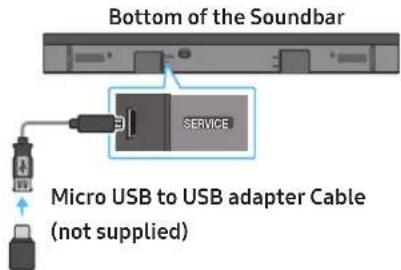
Samsung may offer updates for the Soundbar's system firmware in the future.
When an update is available, you can update the Soundbar by connecting the USB drive that contains the update firmware to the SERVICE port of the Soundbar.
- Go to the Samsung website (www.samsung.com) → search for the model name from the customer support menu option.
- For more information about update, refer to Upgrade Guide.
- Download the upgrade file (USB type).
- Unzip the file to create a folder with the file name.
- Store the created folder in a USB and then connect it to the Soundbar.
- Turn on the Soundbar. Then the product is updated within 3 minutes with displaying the message, "UPDATE".
During update, do not turn it off or remove the USB. - If "UPDATE" does not appear on the display window, remove the power cord from the Soundbar and then reconnect it.
- When the latest version is installed, no update is performed.
- Depending on the USB type, update may not be supported.
Initialisation
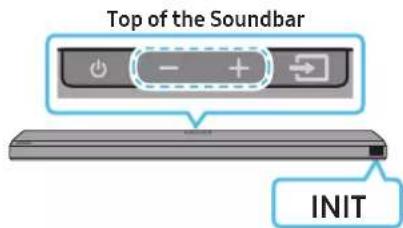
With the Soundbar on, press the Volume) buttons on the body at the same time for at least 5 seconds. "INIT" appears on the display and then the Soundbar is initialised.
CAUTION
- All the settings of the Soundbar are initialised. Be sure to perform this only when initialisation is required.
14 TROUBLESHOOTING
Before seeking assistance, check the following.
Soundbar does not turn on
- Check whether the power cord of the Soundbar is correctly inserted into the outlet.
Soundbar works erratically
After removing the power cord, insert it again.
- Remote the power cord from the external device and try again.
- If there is no signal, the Soundbar automatically turns off after a certain period of time. Turn on the power. (See page 9.)
In case the remote control does not work
- Point the remote directly at the soundbar.
- Replace the batteries with new ones.
The Soundbar does not output any sound
- The volume of the Soundbar is too low or muted. Adjust the volume.
- When any external device (STB, Bluetooth device, mobile device, etc.) is connected, adjust the volume of the external device.
- For sound output of the TV, select Soundbar. (Samsung TV: Home () Settings () Sound Sound Output Select Soundbar)
- The cable connection to the Soundbar may not be loose. Remove the cable and connect again.
- Remove the power cord completely, reconnect, and turn the power on.
- Initialise the product and try again. (See page 29.)
The Subwoofer does not output any sound
- Check whether the LED indicator on the rear of the Subwoofer is on in blue. Reconnect the Soundbar and Subwoofer if the indicator is blinking in blue or turned red. (See page 13.)
- You may experience an issue if there is an obstacle between the Soundbar and Subwoofer. Move devices to an area away from obstacles.
- Other devices sending radio frequency signals in proximity may interrupt the connection.
- Keep your speaker away from such devices.
- Remove and reconnect the power plug.
The Subwoofer volume is too low
- The original volume of the content you are playing may be low. Try adjusting the Subwoofer level. (See page 10.)
- Bring the Subwoofer speaker closer to you.
In case the TV is not connected via HDMI TO TV (eARC/ARC)
- Check whether the HDMI cable is correctly connected to the ARC terminal. (See page 16.)
-
Connection may not be possible due to the connected external device (set-top box, game machine, etc.). Directly connect the Soundbar.
-
HDMI-CEC may not be activated on the TV. Turn on the CEC on the TV menu. (Samsung TV: Home () Settings ( General External Device Manager Anynet+ (HDMI-CEC) ON)
- To connect with eARC, the eARC function in the TV menu should be set to On. (Samsung TV: Home (n) Settings (Sound Expert Settings HDMI-eARC Mode (Auto))
There is no sound in when connecting to the TV in HDMI TO TV (eARC/ARC) mode
- Your device is unable to play the input signal. Change the TV's audio output to PCM or Dolby Digital. (For a Samsung TV: Home () Settings () Sound Expert Settings Digital Output Audio Format)
The soundbar will not connect via Bluetooth.
- When connecting a new device, switch to "BT PAIRING" for connection. (Press the PAIR button on the remote control or press the Source) button on the body for at least 5 seconds.)
- If the Soundbar is connected to another device, disconnect that device first to switch the device.
- Reconnect it after removing the Bluetooth speaker list on the device to connect. (Samsung TV: Home () Settings () Sound Sound Output Bluetooth Speaker List)
- The automatic TV connection may be disabled. While the Soundbar is in "BT READY", press and hold the Left button on the Soundbar remote control for 5 seconds to select ON-TV CONNECT. If you see OFF-TV CONNECT, press and hold Left button again for 5 seconds to switch the selection.
- Remove and reconnect the power plug, then try again.
- Initialise the product and try again. (See page 29.)
The sound drops out when connected via Bluetooth
- Some devices can cause radio interference if they are located too close to the Soundbar. e.g. microwaves, wireless routers, etc.
- If your device that is connected via Bluetooth moves too far away from the soundbar, it may cause the sound to drop out. Move the device closer to the soundbar.
- If a part of your body is in contact with the Bluetooth transceiver or the product is installed on metal furniture, the sound may drop out. Check the installation environment and conditions for use.
Unable to connect to Wi-Fi
- Check whether your wireless router is on.
- Turn off the router, turn it back on, and then try again.
- The soundbar will not connect if the wireless signal is too weak. Try moving the router closer to the soundbar, or eliminating any obstacles that are between the soundbar and the router, if possible.
- If your wireless router is new, you will need to reconfigure the speaker's network settings.
The soundbar does not turn on automatically with the TV.
- When you turn off the Soundbar while watching TV, power synchronization with the TV is disabled. First turn off the TV.
Dolby
ATMOS
Dolby, Dolby Atmos, and the double-D symbol are registered trademarks of Dolby Laboratories Licensing Corporation. Manufactured under license from Dolby Laboratories. Confidential unpublished works. Copyright © 2012-2020 Dolby Laboratories. All rights reserved.
dtsx
For DTS patents, see http://patents.dts.com. Manufactured under license from DTS, Inc. (for companies headquartered in the U.S./ Japan/Taiwan) or under license from DTS Licensing Limited (for all other companies). DTS, DTS:X Pro, DTS:X, and the DTS:X logo are registered trademarks or trademarks of DTS, Inc. in the United States and other countries. © 2020 DTS, Inc. ALL RIGHTS RESERVED.
HDMI
The terms HDMI and HDMI High-Definition Multimedia Interface, and the HDMI Logo are trademarks or registered trademarks of HDMI Licensing Administrator, Inc. in the United States and other countries.

Spotify

- Use your phone, tablet or computer as a remote control for Spotify. Go to Spotify.com/connect to learn how
- The Spotify Software is subject to third party licenses found here: https://www.spotify.com/connect/third-party-licenses.

Works with
Apple AirPlay
- Apple, AirPlay, iPhone, iPad, HomePod, and Apple TV are trademarks of Apple Inc., registered in the U.S. and other countries.
- Use of the Works with Apple badge means that an accessory has been designed to work specifically with the technology identified in the badge and has been certified by the developer to meet Apple performance standards.
16 OPEN SOURCE LICENCE NOTICE
To send inquiries and requests for questions regarding open sources, contact Samsung Open Source (http://opensource.samsung.com)
17 IMPORTANT NOTES ABOUT SERVICE
- Figures and illustrations in this User Manual are provided for reference only and may differ from actual product appearance.
- An administration fee may be charged if either
(a) an engineer is called out at your request and there is no defect with the product (i.e. where the user manual has not been read).
(b) you bring the unit to a repair centre and there is no defect with the product (i.e. where the user manual has not been read).
- You will be informed of the administration fee amount before a technician visits.
18 SPECIFICATIONS AND GUIDE
Specifications
| Model Name HW-Q700A / HW-Q710A | |
| Weight 3.6 kg | |
| Dimensions (W x H x D) 980.0 x 60.0 x 115.0 mm | |
| Operating Temperature Range +5°C to +35°C | |
| Operating Humidity Range 10 % ~ 75 % | |
| AMPLIFIER Rated Output power ((30 W x 4) + (20 W x 2) + 10 W) + 160 W | |
| Supported play formats | Dolby 5.1ch / Dolby Digital Plus / Dolby TRUE HD / Dolby ATMOS DTS 5.1ch / DTS HD / DTS-HD Master Audio / DTS:X / LPCM 8Ch |
| WIRELESS DEVICE OUTPUT POWER Wi-Fi max transmitter power | 100mW at 2.4GHz – 2.4835GHz, 200mW at 5.15GHz – 5.25GHz, 100mW at 5.25GHz – 5.35GHz & 5.47GHz – 5.725GHz |
| WIRELESS DEVICE OUTPUT POWER BT max transmitter power 100mW at 2.4GHz – 2.4835GHz | |
| WIRELESS DEVICE OUTPUT POWER SRD max transmitter power 25mW at 5.775GHz – 5.875GHz | |
| Subwoofer Name PS-WA75B | |
| Weight 5.9 kg | |
| Dimensions (W x H x D) 205.0 x 353.0 x 302.0 mm | |
| AMPLIFIER Rated Output power 160 W | |
| WIRELESS DEVICE OUTPUT POWER SRD max transmitter power 25mW at 5.775GHz – 5.875GHz |
NOTE
Samsung Electronics Co., Ltd reserves the right to change the specifications without notice.
Weight and dimensions are approximate.
Precaution : The Soundbar will restart automatically if you turn on/turn off Wi-Fi.
| Overall Standby Power Consumption (W) | 5.5 W |
| Wi-Fi Port deactivation method | Press the ID SET button on the bottom panel of the Soundbar for 30 seconds to turn Wi-Fi On / Off. |
| Bluetooth Port deactivation method | Press the NETWORK button on the bottom panel of the Soundbar for 30 seconds to turn Bluetooth On / Off. |
- Hereby, Samsung declares that this radio equipment is in compliance with Directive 2014/53/EU and the relevant UK statutory requirements. The full text of the declaration of conformity is available at the following internet address: http://www.samsung.com go to Support and enter the model name. This equipment may be operated in all EU countries and in the UK. The 5GHz WLAN(Wi-Fi or SRD) function of this equipment may only be operated indoors.
(Applicable in countries with separate collection systems)
This marking on the battery, manual or packaging indicates that the batteries in this product should not be disposed of with other household waste at the end of their working life. Where marked, the chemical symbols Hg, Cd or Pb indicate that the battery contains mercury, cadmium or lead above the reference levels in EC Directive 2006/66.
If batteries are not properly disposed of, these substances can cause harm to human health or the environment.
To protect natural resources and to promote material reuse, please separate batteries from other types of waste and recycle them through your local, free battery return system.
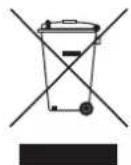
Correct Disposal of This Product
(Waste Electrical & Electronic Equipment)
(Applicable in countries with separate collection systems)
This marking on the product, accessories or literature indicates that the product and its electronic accessories (e.g. charger, headset, USB cable) should not be disposed of with other household waste at the end of their working life. To prevent possible harm to the environment or human health from uncontrolled waste disposal, please separate these items from other types of waste and recycle them responsibly to promote the sustainable reuse of material resources.
Household users should contact either the retailer where they purchased this product, or their local government office, for details of where and how they can take these items for environmentally safe recycling.
Business users should contact their supplier and check the terms and conditions of the purchase contract. This product and its electronic accessories should not be mixed with other commercial wastes for disposal.
For information on Samsung's environmental commitments and product specific regulatory obligations e.g. REACH, WEEE, Batteries, visit: www.samsung.com/uk/aboutsamsung/sustainability/environment/our-commitment/data/
COMMISSION REGULATION (EU) 2019/1782
Ecodesign requirements for external power supplies : www.samsung.com/global/ecodesign_component
INHΦOPMAÇNЯ 3A BΕ3OΠACHOCT
PPEyIPEXAEHnA 3A B3O1ACHOCT
3A DA HAMAMITE ONACHOCTTA OT EAEKTPUeCKN YAP, HE CBAIYTE KAIKA (MUN 3AADHNAKAIK).
BbTPE HMA YACTN, KOUTO IODAEKAT HA OBCAYKBAHE OT NTOTPBNEIA.3A TEXHnuecko OBCAYKBAHE CE OEBPHETE KbM KBANUINPAH CEPBN3EH INPCOHAA.
Buxme ma6luqama no-goy 3a o6rchenue Ha cumboIume, koumo moke ga ca Ha Bawu npogykm Samsung.
| ВИМАНЕ | |
| ОПАСHОCT OT EAEKTPNUECKN YДAP. HE OTBAPRIYE. | |
| Тозу с汞Boλ noka3Ba, чь Бмpe umа ВUCoko habрженье. Опасо e ga осьцescm8aime кабБmo u ga e 6uLo kohmakm c Вымразиама чим на npogykma. | |
| Тозу с汞Boλ noka3Ba, чь NPogykma e BkLIOUeHa Baxka gokumehmaця за pa6omama u nogpьЖКama. | |
| Прогук'm om kAAC II: Тозу с汞Boλ noka3Ba, чь e He e Heo6xogumo ЗдемЯBaHe с ueL 6eONacHocm. Ак моЗу с汞Boλ He npucbSmBa на npogyk'm сб 3axpaHBAu ka6eL, npogyk'mb'm TPR6BA ga 6bge HageKgNo cBbP3aH KBM Зашимно здемЯBaHe. | |
| ~ | AC habрженье: Номуналюно habрженье, МаркupaNo c mo3u с汞Boλ, e AC habрженье. |
| == | DC habрженье: Номуналюно habрженье, МаркupaNo c mo3u с汞Boλ, e DC habрженье. |
| ВИHMАнUE. HabрБeme cnpa8ka c uncmpykuizuume 3a ynompe6a: Тозу с汞Boλ noka3Ba, чьmpa6Ba ga habрБime cnpa8ka B рьkoBogcmlBomo 3a nompe6umeЯ 3a gonbALHUMeHa UNФOPMaця OMHOCNo 6eONacHocmma. |
PNEyPPEKDEHNE
3a ga haamaune pucka om nokap uu eekmpuecku ygap, He u3aaaume mo3u ypeg h g6kg uu 8aaa.
BHIMAHHE
3A DAAH3EHTEHAEKTPNUECKNYAP,UINPOKNIATUINOTHAUENCEA TPRBBA DA CE NOCTABN B UINPOKNAOT N A CEA BMBKHE OOKPAI.
To3u anapam Buaa um68a gacceBb3Ba kmb npomeHaBomoko8 (AC) konmakc bsc 3aumha Bp3ka 3a3emBahe.
- 3a ga u3kIoUHme anapama om eIekmpuueckama mpeka, uenceIb mmp6Ba ga ce u3Bagu om eIekmpuueckua koHmakm, cAegoBameIHO c uenceIa mpr6Ba ga ce pa6oMu Iecho.
He u3aaaume mozu anapam ha kanku uu npbcku. He nocmaBraume Bby anapama npegmmu, nuhncmu kamo Hanpumep Ba.
3a ga u3kauyme mozu anapam hantbHno,mpra6Ba ga u3Bagume uenceMa om eekmpuueckura konmakm. 3amoBa go uenceMa mpr6Ba uma lecen U 6bp3 gocmbn no 8cko Bpeme.
ПЕДПАЗНМЕРКИ
- Y6epeme ce, ye AC 3axpaH8aHem 8 goMa Bu cbomBemcmBa ha u3uckBaHma 3a eEekmpo3axpaH8aHe, u36poehu 6bpxu uehmufukaunHHn cmukep, pa3noLoJen Ha goHa mcpaHa na npogykma. MoHmupaue npogykma xopu3oHmAAHO 6bpxu nogxogra ocHoBa (Me6e) c gocmmbuHO oKoAHO npocmpaHcmBo 3a BeHMuaau (7 \~ 10 cm). Y6epeme ce, ye BEmmuauOHnme omBopu He ca 6lokupau. He nocmaBuiye ycmpoucmBomo 6bpyx ycUBAmeAU uAU gpy2o 6obopygBahe, koemo moke ga ce Haoopeu. ToBa ycmpoucmBo e npoekmupaHO 3a npogbkumna ynompe6a. 3a ga u3kAnuume HanbAHO ycmpoucmBomo, u3kAnuOe me AC uenceA om eekmpuueckua kOnhakm. U3kAnuOe me ycmpoucmBomo om eekmpo3axpaH8aHem, ako B3HaMepaBame ga He 20 u3noA3Bame 3a npogbkumaeH nepugom 6Bpe.
- Ito BpeMe Ha 2pbMoneBUnu 6pyu u3kAIOeMe AC wencea om eAekmpueckua konmakm. IukoBu cmoHocmu Ha HanpekeHuemo, gAkau ceHaMbAnu, MoKe ga noBpeqam ycmpoucmbomo.
3.He u3a2aume ycmpoocmbomo Ha npka cBnueBa cBemua unu gpyu u3moHnucu ha monuHa.ToBa moke ga goBege go npepraBane u ga npuuHneu3npaBnOcm Ha ycmpoocmbomo. - Пазeme npogykma om ьаza (hanpumep Ba3u) u npekomeph monluha (hanpumep kamua), kakmo u om obopygBahe, koemo cb3gaBa cuaHu ma2HumHu uau ekempueecku noaema.ИЗкIoquemé 3axpaHbuaa Ka6eAm OC ekempueecku konmakm,ako ycmpoocmbo e eu3npaBho. Bauuam npogykme ne npegHa3naueHa 3a npomuUaHa ynompe6a.ToI e npegHa3naueH caMo 3a AuHa ynompe6a.Ako npogykmbe 6uAcbxpaHbAn npu Hucku memnepampyu, moke ga ce 6pa3y8a kongeh. Ako mpaHcnpmupame ycmpoucmBomo npe3 zumama, u3akaaume npu6Ua3umeHo 2 Yaca, npegu ga 20 u3no3Bame, 3ga gocmu2ne cmaHa memnepamya.
- 3no3BaHama 8 mo3u npogykmbamepura c6bprka xumukau, kouma ca Bpegu 3a okoHama cpega. He u3x6bpmae 6amepuma 3aegho c 6o0ume 6umoBu omnagbu. He u3a2aume 6amepuma ha npekomepha monluha, npka CbHueBa CBemUHa UU O2bH. He C6b3aume Ha kbco, He pa32o6Baume u He gonyckaume npe2p8ahe Ha 6amepuma. BHIMAHNE: CbuecmByBa onachocm om ekcnlo3u, ako 6amepuma 6bge 3aemeHa HenpaBuaHo. CmeHae camc bsc cbu uukBuAenmen mun.
CbAbPXAHNE
01 ПpoBepkaHa komnoHeHMume 6
02 Onucahue Ha npogykma 7
Ppehen naen/Topen nane Ha Soundbar. 7
DoeH naneHaSoundbar 7
03 N3noA3BaHe Ha gucmaHcuOHHom ynpaBHeue Ha Soundbar 9
Iocma8ahe ha 6amepuume npegu u3noa3bne Ha gucmaunohmo ynpaBaeue (2 6amepuu pa3mep AA) .9
Hauun ha pa6oma c gucmauohmo ynpaBaeue. 9
13noa3BaHe hckpumme 6ymoH (6ymoH c noBeue om egHa fynkuia) 11
13xogHu cneuufukauu 3a pa3AuHume pekmu 3a 38ykoB efekm 11
Pezyuapahe Ha cUama Ha 3Byka Ha Soundbar c gucmaHooHmo ynpaBHeue Ha meAeB3opa 12
04 Cbbp3BaHe Ha Soundbar 13
BkIouBaHe na 3axpanBaHemo u ycmpoicm8ama. 13
PbHocBb3BaHeHa cy6yepa. 13
CBeMoguogHu uHgukamopu om 3aghama cmpaHa ha cy6yepa .14
Cb3p3BaHe hSA-9500S (npogBa ce omgeAHO) kbM Soundbar 15
05 IV3noA3BaHe Ha ka6eHa 8pb3ka kBm meVeBu3opa
Memog 1. CBbp3Bahe c HDMI 16
C8bp3BaHe ha meleBuzop, kmo nogg bpka HDMI ARC (kana 3a o6pameh 3yck) .16
Memog 2. Cbpy3BaHe c nomouma ha onmuueh ka6eA 17
06 N3noA3BaHe Ha 6e3ku4Ha Bpb3ka k6m meAeBu3opa
Memog 1. CBp3Bahe npe3 Bluetooth 18
Memog 2. CBpb3BaHe uepe3 Wi-Fi 19
07 CBp3Bahe kbm BbHwHo ycmpoUcmBo
Memog 1. Cb3Bahe nocpegcmBOM HDMI ka6eA (Cb3MokHocm 3a gekogupahe u B3npou3Bekgahe Ha Dolby Atmos) 20
Memog 2. Cbpy3BaHe c nomouma ha onmuueh ka6eA 21
08 CBbp3BaHe kbm Mo6uHoycmpoUcmBo
Memog 1. CBp3Bahe npe3 Bluetooth 22
Memog 2. Cbpy3BaHe npe3 Wi-Fi (6e3kUHa mpeka) . 23
09 ΠьрБу сMbnku c Alexa B npogykm Ha Amazon (pa6omu c Alexa)
Cb3BaHe u 3no3BaHe c npogykHa Amazon (Amazon Echo) 24
13noa3BaHe Ha 2AacoBu kOAmGu 3a ynpaBHeue Ha Soundbar. .24
I3no3BaHe Ha Tap Sound 25
10 CBp3BaHe kM AirPlay 2 Ha Apple
C8bp3BaHe u u3noa3BaHe c npogykma Apple 26
11 Mohmupahe Ha cmeHHama cmouka 27
IpegnazHu Mepku npu Mohmupahe 27
KOMnoHeHmu 3a cmeH MoHmak .27
12 Mohmupahe Ha Soundbar hag cmouka 3a meIeBu3op 28
Komnohehm. 28
13 Akmyaunuzupahe Ha cophiemyepa 29
ABmomamuHa akmyaua3au 29
Akmyauzuaqur 4pe3 USB 29
Hnuauaaue 29
14 OmcmpaHaBae Ha Heu3npaBHocmu 30
15 AueH3 31
16 BeIekkama 3a AuueH3a 3a omBopen kog 31
17 BaKHu 6eIexkku 3a cep8u3Homo o6cLyXBaHe 31
18 CneuΦukaau u pkoBogcmBo
Cneuufukaauu 32
01 ПЮBEРКАHA KOMПОHEHTITE

OchoBho ycmpoUcmBo Ha Soundbar DucmauOnHo ynpaBHeue/6amepu 3a Soundbar Cy6ypeP

3axpaHbau kα6eλ (cb6yφb, Soundbar) AC/DC aganmep (Soundbar) HDMI ka6eλ

Boga3a cmeHna cmoiKa dbpka-BuHm BuHm

Cko6a 3a cmehna cmoika Fymek kpak
- 3a gonbHumeHa unfoopmaue omnochoe alekmpo3axpaHbHemo U nompe6Aehuemo Ha alekmpoehep2ua HanpaBeme cnpa8ka c emukema, nocmaBeH ha npogykma. (Emukem: goHa cmpaHa Ha ochoBHom ycmpoucMBo Ha Soundbar)
3a g a 3akynume gonbHumeHU kOmoHeHMu UAU He3agbAkmueHn ka6eAU, ce Cbpxkeme cbc cepBuzHua eHmbp Ha Samsung uAU c cHmbpa 3a ocbayKahe Ha Kauehmu Ha Samsung.
3a noBeeu unfoopmaua omHocno cmenHama cmoika uau zymu kpaK buxkme cmp.27-28. - DuaHbM, cneuufkaaumme u ekpaHm ha npauokehura nogkam Ha npomHa 6e3 npegu3Becmue.
- Bugb m ha akcecoapume moke ga ce pa3Aua7a om npegcmaBehna Ha uLcmpauuume no-2ope.
02 OПИСАНЕ HA ПОДУКТА
Ipegen naheA/TopeH naHeHa Soundbar
| Буточka (Затханьанe)Вълочь uuzklочь затханьанe. | |
| Буточka + (Сида ha 3Byka)Рezушира сида на 3Byka. | |
| Буточka (Изменк)Изменра рекUMа за БыБекганe Hauzmouнk. | |
| РекUM за БыБекганe ДUCПLEI | |
| ОпMUЧEN zuФpoB Bxog D.IN | |
| ARC (HDMI OUT) Bxog D.IN → TV ARC (A8mPOMAMUHNo npeo6pa3yBaHe) | |
| HDMI Bxog HDMI | |
| Wi-Fi рекUM WIFI | |
| BLUETOOTH рекUM BT | |
| 4uocпLEIИЗБекга сьсmonMu emo u mekyшя рекUM ha npogykma.D.IN → HDMI → Wi-Fi → BT | |
KoZamO 8kIoumE AC ka6eaa, 6ymOnbM 3a 3axpaHbAmemo ue 3apa6omu cleg 4 go 6 cekyHgu.
KoZamO 8kLIOUme moBa ycmpooucMo,ue MUHAM 4 go 5 cekyHgu, npegu mo ga u3gage 3Byk.
Ako ce 4yBa 3Byk kakmo om meLeBuzopa, maka u om Soundbar, omugeme 8 MeHIO Hacmpouku, 3a ga pezyuapame 3Byka ha meLeBzopa u ga npomehume BucokozBopumaeHa meLeBuzopa Ha BbHueh Bucoko2oBopumeA.
Dəen naheHa Soundbar
| 1 | DIGITAL AUDIO IN (OPTICAL) |
| СБържeme кьм ушкоья (онMUЧЕн) узхог на Бьншо усmpоьсмВ. (Вухм смаMuca 21) | |
| 2 | SERVICE |
| СБържeme USB усmpоьсмВо за сbethра themselves, за ga nagсmpoùme coФмуера на npogykma. | |
| 3 | 19V (Вхог на зхсанье) |
| СБържeme AC/DC aganmepa. (Вухм смаMuca 13) | |
| 4 | ETWORK HamucHEME, за.ga сбърке кьм 6e3kuуна мрека (Wi-Fi) пе3 прахенио SmartThings. |
| 5 | SET HamucHEME, за.ga сбърке 6e3kuуно Soundbar кьм сьpayng Bucoko20Bopumeлamedу сь6уфьра. (Сьpayng Bucoko20Bopumeлam ce npogaВa omgeλno.) |
| 6 | HDMI ПегаВа有很大овразимно уцфpoВи Bugeo u ayguo сuaHAу пе3 HDMI ka6eλ. Сьърке кьm HDMI u3xog на Бьншо усmarчмBo. (Вuxme sympanuca 20) |
| 7 | HDMI TO TV (eARC/ARC) Сьърке кьm HDMI яak на meλeВuzop. (Вuxme sympanuca 16) |
Kozamo u3kauoBame 3axpaHbauu kabeHa AC/DC aganmepa om cmeHnue konhmacm, xBaauaume zencela.
Hgbpnaume ka6exa.
CbpkemmoBa ycmpoumBo uU gpyu kOmmohmu kBm npomHaBomokOB kOHmakm caOcagkamo ca ycmHOBeHu BcuKu Bp3ku MeKgy kOmnoHmume.
03 I3IIOA3BAHE HA ANCTAHUOHHOTO YYPABAEHNE HA SOUNDBAR
IocmaBhe Ha 6amepuume npegu u3noA3Bahe Ha gucmaHcuOHHomoynpaBHeue
(26amepuu pa3mep AA)
Плбнeme 3agнua kanak no nocoka Ha cmpeAkama, gokamo 20 omcmpaHume u3uaIo. NocmaBeme 2 6amepuu AA (1,5 V), kamo caegume 3a npaBnHa mOpueHmau Ha noIoucme. Плбнeme kanaeHmo Ha 6amepuMa omHoBo ha Mrcmomo My.
Haun ha pa6oma c gucmahuoHomo ynpaBaeHue
| 1 | 3axpanBaHe | Вклочьа uuzklочьa Soundbar. Функцу Auto Power Down УсмposсmВоо ce uzklочьa a8momonuHо B clogenme cumyaцuu: В ржum D.IN / HDMI / Wi-Fi / BT, akо Няма ayguo cu2haB pamkume ha 18 MUhymu. |
| 2 | Изменuk | Hamucheme, za ga uz6epeme uz3mochnuk, сбьрзан кьM Soundbar. |
| 3 | Изменчын eHa 3Byka | Hamucheme 6у'mona (ИЗklочьe Ha 3Byka), za ga uzklочime 3Byka. Hamucheme 20 omnoBo, za ga ommenuge 3aaywaBahemo. |
| 4 | SOUND MODE SOUND MODE | Можeme ga uz6epeme kelaunia ржUM Ha 3Byka, kamo uz6epeme STANDARD, SURROUND, GAME PRO uAU ADAPTIVE SOUND. STANDARD ИЗБжga opuzuHaHnue 3Byk. SURROUND ОczypЯBa 3BykoBo noAe, no-шupoko om smaHapmHomo. GAME PRO ПergocmaBЯ сеpeockonuChen 3Byk, koIM BO nomanY B geicmBuemo no 8peMe ha uZpa. ADAPTIVE SOUND Аналузupa сььржанeMo 8 pealno 8peMe u abmomonuNo npegocma8a onmuaHNo 3BykoBo noAe 8 3aBucuMocm om xapakmepucmukme Ha сььржанeMo. |
| 5 | PAIR Bluetooth PAIR | Вклочe Moundbar 8 ржUM 3a csBoBaHne npe3 Bluetooth. Hamucheme 6у'mona u u3yaka'ime ekpana „BT PAIRING“, za ga cьржeme с hoBO Bluetooth ycampoicmBo. |
| 6 | Bb3npou3Bexgache/ Пay3a | Можeme sbzuo ga 6b3npou3Bexgache uLI ga nocmaBame my3uka Ha nay3a c Hamuckanemo Ha 6ymona. |
| 7 | Hаорe/Haоу/Haоу/Haоу/Haоу/Haоу/Haоу/Haоу/Haоу/Haоу/Haоу/Haоу/Haоу/Haоу/Haоу/Haоу/Haоу/Haоу/Haоу/Haоу/Haоу/Haоу/Haоу/Haоу/Haоу/Haоу/Haоу/HAоу/Haоу/Haоу/Haоу/Haоу/Haоу/Haоу/Haоу/Haоу/Haоу/Haоу/Haоу/Haоу/Haоу/Haоу/Haоу/Haоу/Haоу/Haоу/Haоу/Haоу/Haоу/Haоу/Haоу/Haоу/ Haоу/Haоу/Haоу/Haоу/Haоу/Haоу/Haоу/Haоу/Haоу/Haоу/Haоу/Haоу/Haоу/Haоу/Haоу/Haоу/Haоу/Haоу/Haоу/Haоу/Haоу/Haоу/Haоу/Haоу/Haоу/haоу/Haоу/Haоу/Haоу/Haоу/Haоу/Haоу/Haоу/Haоу/Haоу/Haоу/Haоу/Haоу/Haоу/Haоу/Haоу/Haоу/Haоу/Haоу/Haоу/Haоу/Haоу/Haоу/Haоу/Haоу/ haоу/Haоу/Haоу/Haоу/Haоу/Haоу/Haоу/Haоу/Haоу/Haоу/Haоу/Haоу/Haоу/Haоу/Haоу/Haоу/Haоу/Haоу/Haоу/Haоу/Haоу/Haоу/Haоу/Haоу/Haоу/ | |
| 8 | Koнмрои ha 3Byka | Kozaо ce ha muzhe, nocegoBameho ce noka3bam hacmpouBamme elememu, kamo hampem TREBLE, BASS, SYNC, CENTER LEVEL, FRONT TOP LEVEL, and VIRTUAL ON/OFF. Jeaanum emeem mege ga ce pezayupa c nomouma ha 6bymhme Haze of HAOpe/ Hagoy. |
| 3a ga ynpaBamte cuaama ha 3Byka ha Bucokume uau ha 6aCobume moHoBe, u36peme TREBLE uau Bass B. Hacmpouku ha 3Byka", cleg koemo hacmpoume cuaama ha 3Byka mejxgy -6+6, kamo u3noA3Bame 6bymhume Haze/Haoy. | ||
| Hamscheme u 3aepbkmse bmya 3 (KoHmpoI ha 3Byka) 3a okao 5 cekyngu, 3ga pezayupame 3Byka 3a Bcya checmomha Aenma. Mocheme ga u36upame u3mekgy 150 Hz, 300 Hz, 600 Hz, 1,2 KHz, 2,5 KHz, 5 kHz u 10 kHz, kamo u3noA3Bame 6bymhume HaarBo/Hagcno, u Bcya checmoma maybe ga ce pezayupa go hacmpouka om -6 go +6 c nomouma ha 6bymhume Haze/Haoy. (YBepeme ce, ue pekum ha 3Byka e c hacmpouka, STANDARD") | ||
| 3a ga ynpaBamte cuaama ha 3Byka ha Bcuku om BuockoBopumelme, u36peme CENTER LEVEL uau FRONT TOP LEVEL B "Hacmpouku ha 3Byka", cleg koemo pezayupame cuaama ha 3Byka go hacmpouka B guana3oHa -6+6 c nomouma ha 6bymhume Haze/Haoy. | ||
| Ako karmuhama ha meleBu3opa u 3Bykombm om Soundbar he ca cunxphounu3upaH, u36peme SYNC B. KoHmpoI ha 3Byka" u cleg moBa 3agaumbe 3a6aBnHema ha 3Byka mejxgy 0-300 mUaueckyngu, kamo u3noA3Bame 6bymhume Haaze/Haoy. | ||
| SYNC ce noogbpyka camo 3a hakou fynkou. | ||
| Ako ca cBp3aHb cbpaugb BucokozBopumelu, u36peme REAR LEVEL, REAR TOP LEVEL, cleg koemo u3noA3Bame 6bymhume Haaze/Haoy, 3ga hacmpoume 3Byka B guana3oHa om -6 go +6. | ||
| Фунцшma ha BucokozBopumelma VIRTUAL maybe ga 6bge ON/OFF c nomouma ha 6bymhume Haaze/Haoy. | ||
| 9 | HIMBO HA WOOFER (BASS) | Hamscheme 6bymoHa hazope uau HagoLy, 3ga pezayupame HuBOM ha yfepa (6ac) go -12 uau om -6 go +6. 3a ga zagagem eu HU Bo 0 (no nogpa36upane) 3a culaama ha 3Byka ha yfepa (6ac), Hamscheme 6bymoHa. |
| 10 | CIIAA HA 3BYKA | Hamscheme 6bymoHa hazope uau HagoLy, 3ga pezayupame culaama ha 3Byka. |
| Hamscheme 6bymoHa VOL, 3ga u3kLlquime 3Byka. Hamscheme 20 omNo8o, 3ga omMeHume 3aZyuBaHemo. |
I3noA3BaHe ha ckpumume 6ymohu (6ymohuC noBee om egHa yHKzua)
| Скрumsьун | Смдана за снравукu | |
| Бухон на guстанцоанomo ураловны Фуншua | ||
| WOODER (Hazope) | Влелочано/uzklючыно на guстанцоанomo ураловны на мeledвизорa (Tomobhocm) | смдана 12 |
| Hazope ID SET smранца 14 | ||
| (Коньрал на зуka) | 7-LEMOB ekbaалдер smранца 10 | |
I3xogHu cneuΦukaau 3a pa3AuHume pekmu 3a 3BykoB efekm
| Еф ekm Bхog | Изхог | ||
| Само сбс суьфер | С комп leмс суьфер u 6e3жчнu загни Високозовориму | ||
| STANDARD | 2.0 kaнала 2.1 kaнала 2.1 kaнала | kaнала | |
| 5.1 kaнала 3.1 kaнала 5.1 kaнала | kaнала | ||
| SURROUND | 2.0 kaнала 3.1.2 kaнала 5.1 | 4 kaнала | |
| 5.1 kaнала 3.1.2 kaнала 5.1 | 4 kaнала | ||
| GAME PRO | 2.0 kaнала 3.1.2 kaнала 5.1 | 4 kaнала | |
| 5.1 kaнала 3.1.2 kaнала 5.1 | 4 kaнала | ||
| ADAPTIVE SOUND | 2.0 kaнала 3.1.2 kaнала 5.1 | 4 kaнала | |
| 5.1 kaнала 3.1.2 kaнала 5.1 | 4 kaнала | ||
Ko2am0 8xognua m u3moHuk e Dolby Atmos, DTS:X, hacmpoukama cama 3a cb6ybp a ocaypBa 3.1.2-kaHaen 38yk, gokamo ycmaHOkama ha komnlekma cb6ybp u 63kuuHu 3ag Hu bucoko2oBopumeu ocuypBa 5.1.4-kaHaen 38yk.
Komnekmbm 63kunu 3agnu Bucokozopumeu Samsung me ga 6bge 3akynen omgeAHO. 3a 3aknyBaH e ha komnekm uau cy6yep ce o6bpHeme kb mbp0Beua, om koumo cme akynu CBoar Soundbar.
CbpayHg Bucoko2oBopumeIme Hma ga u3gaBam 38yk npe3 2-kaHaHua u3xog, koa mo ce u3noA3Ba pekum STANDARD. 3a ga 8knouime 3Byka Ha cbpayHg Bucoko2oBopumeIme, npomeheme pekuma ha efekmume Ha SURROUND.
Pezyuupahe Ha cUama Ha 3Byka Ha Soundbar c gucmaHcuOHmo ynpaBHeue Ha meLeBu3opa
Peayuapume cuaama Ha 3Byka Ha Soundbarc gucmanuonHomo ynpaBHeue Ha meaeBu3opa.
Ta3u yhkuo Mae ga ce u3noa38a cmo c Hgucmauohho ynpa6Aehue. Bluetooth gucmauohhu ynpaBHeHg (gucmauohhu ynpaBHeH, npu kumo ce u3uckBa c608aBe) He ce nogbpkam.
3agaime 3a Bucoko2oBopumeHa meaeBupopa hacmpouka BbHueh Bucoko2oBopume, 3ga u3noA3Bame ma3u cyHKua.
- Ppou3Bogumeu, koumo nogbpkam ma3u phykuua: VIZIO, LG, Sony, Sharp, PHILIPS, PANASONIC, TOSHIBA, Hisense, RCA
- 13kmoqemeSoundbar.
- Hamucheme haope u 3agpbkme 6ymoHa WOOFER 3a 5 ckyhgu.
Ipu Bcako hamuckane haope u 3agpbkahe Ha 6ymoHa WOOFER 3a 5 ckyhgu pekumbme npomeH, kamo noclegobameAHOcmma e ceghama: OFF-TV REMOTE (pekum no nogpa36upane), SAMSUNG-TV REMOTE, ALL-TV REMOTE.
| Бутона guсmansоюно уразьдени | Доступа Смамус | |
| S Sec | (PекUM no nogраЗбupaи) OFF-TV REMOTE | ДeakMuВupaÎme guсmansоюно уразьдени на me�ьзopa. |
| S Sec | SAMSUNG-TV REMOTE | Актураиме Ич guсmansоюно уразьдени на me�ьзopa Samsung. |
| S Sec | ALL-TV REMOTE | Актураиме Ич guсmansоюно уразьдени на me�ьзopa на… mpema смапа. |
04 Cbbp3BAHE HA SOUNDBAR
BkIouBaHe Ha 3axpaHBaHemo u ycmpoUcmBama
I3noA3Baumé 3axpaHBaumeme komnoHeHmu, 3ga cBbpkeme cb6yfbpa u Soundbar kkm eekmupecku konmkm B caeHnreg:
-
3a noBee ueHΦopMaua omHocHo Heo6xogumomo eAekmpo3axpaHBaHe u nompe6LeHuemo Ha eAekmpoeHepzua HanpaBeme cnpa8ka c emukema, nocmaBeH npogykma. (Emukem: goHa cmpaHa ha oChO8Hmo ycmpoucMBo Ha Soundbar)
-
BkIyOe me 3axpaHbuaqia k6aB Km cy6ypepa.
3aHa cmpaHa Ha cy6yfepa
2.ПьрБвькючeme zaxpaHbauu kabeKbM AC/DC aganmepa. BkmoHeme AC/DC aganmepa (c6c zaxpaHbauu kabeKbM Soundbar.
- Cbpxkeme 3axpaHbAhemc bscSoundbar u cy6yepa.Csy6yepm ce cbbp3Ba aBmamuHNO,kozamo ce 8kmoU Soundbar.

BEAEXKKA
Cbpxkeme 3axpaHbAhemo Ha cy6yphiapnpegu CBp3Bahe CcSoundbar.
Cy6yfepebymue 6bge aBmamuHcBbp3aH npu BkAIOBaHe Ha Soundbar.
Ako u3Bagume u nocmaBume omHOBo 3axpaH8aumka6eB kohmakma, gokamo npogykmb e Bkauyeh, Soundbar ce BkauyBa aBmamuuyho.
- YBepeme ce, ye AC/DC aganmepbme n oncmaBen ga leku Bbypxy Maca uHa noga. Ako nocmaBume AC/DC aganmepa maka, ye ga Bucu c Bxogaa AC ka6eA opuehmupah Hazope, B aganmepa moke ga 8am Boga uU npuyu uykgu yacmuu u moBa ga npuyuH Neu3npaBocm ha aganmepa.
PbHcO CbBp3BaHe Ha cy6yepa
Ipegu u3BpuwBaHa npocegypama no pbuNo cBp3BaHe no-goLy:
-Пpo8epe me gaу 3axpaH8aumte ka6eau Ha Soundbar u cy6yepa ca cBp3aHn npaBuaHo
- YBepeme ce, ye Soundbar e u3kauoyen.
-
ɪnəkʌiʊcheme oʊchɒhʊmo yʊmpoʊc mBo ha Soundbar.
-
Hamucheme u 3agpbkme ID SET 6 3agHama qacm Ha c6bybpa 3a Hau-MaKo 5 cekyHgu.
-
Yep6eHnmau unghukamop ha 2b6pa hca cy6yphi cep u3kAouBa u cunmau unghukamop npemuaBa.
3aHa cmpaHa Ha cy6yepa 3aHa cmpaHa Ha cy6yepa
- Hamucheme 6ymoHa HazePe Ha gucmaHouHHom ynpaBaeHue 3a5 cekyHgu.
Ha gucnlae Ha Soundbar 3a kpmko ce u3Bexga cbo6uenuemo ID SET, koem cAeg mo8a u3ye38a.
Soundbar ue ce 8kauy aBmamuHno, kozamo npukauu npouegypama no ID SET.
- IpoBepeme gau cBemoguoghura umghukamop 3a Bp3ka LINc6emu nocmoraHBO Cunho (Bp3kama e ocbuaceMBeHa).
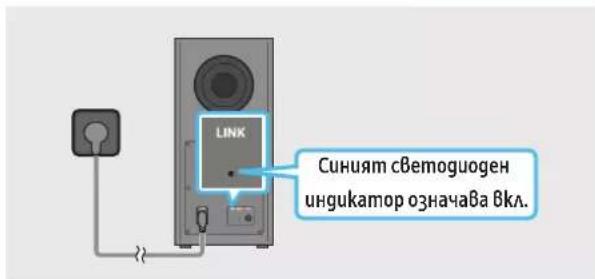
CBemoguoghum ughukamop 3a Bp3ka LINK cnupa gnpemu2Ba u cBemBa nocmno HcuHb, kozamo e ycmaHOBeHa Bp3ka MeKgy Soundbar u 6e3kuHn cy6yep.
CBe mooguogHu uHgukamopu om 3aghama cmpaHa Ha cy6yepa
| Сбемiguogen унгukamop Смамс Onucahue Pa3geауме | Бклочen | Усneyно сбьр3BAнe (Hорmaна pa6oma) | - |
| Мужа Врьзама | сььсмановьa | Пробер沫 gaул зaxpanьашу мakбел, сбьрзан кьм ochoBhomo усmarчмBo Soundbar, e 8kлочen npaBuAnho ил узakайе okobo 5 муну. Ако мuzanem no窍ьк, onomаиме рчно ga сьржeme сьс cy6yфера. Вжme sympanuca 13. | |
| Чербен LINK STANDBY ID SET | Вклочen | TomoBhoscm (п Pru uzklочenvo ochoBno усmarчмBo на Soundbar) | Пробер沫 gaул зaxpanьашу мakбел, сбьрзан кьm ochoBhomo усmarчмBo Soundbar, e 8kлочen npaBuAnho. |
| Heycneшно сьрзBAнe | Сьржeme omhoBo. Вжme унсmpукцime за рчно сбьрзBAнe и сmpaMuca 13. | ||
| Чербен u син LINK STANDBY ID SET | Мужа HeuэпаВвсм | Hocm | Вжme унфорmaцуma за koнмамсьсервиону сенимber на Samsung B moba рьковсмBo. |
6EAEXKKA
Ako ochoBhmo ycmpoucmBo e u3kauyeno, 6e3kuuHm c6ybp ue Bae3e B pekum Ha zomobocm u cBemogogbm STANDBY om3ag ha cb6ybpaa ce cmahe cepBen, cleg kamo npemu2ne Hraokko nmu 8 cuHo.
Ako 6u30cm go Soundbar u3no3Bame ycmpoucmbo, koemo no3Ba c7aama yecmoma kamo Soundbar, cmyueneuma moke ga goBegam gonpekcbanha ha 3Byka.
Makumahomo pa3cmohue Ha npegaBahe Ha 6e3kuhua cu2ha om ochoBnue Mogy e okao10 m, Ho moke ga Bapupa B a6ucumocm om ycAoBma ha pa6oma. Ako meky ocboHnue Mogya U 6e3kuhura cb6ybp Uma cmomano6emohoBa uu Memalna cmeHa, cucmemama moke u3o6uo ga he pa6omu, 3aomo 6e3kuhna mu cu2ha He moke ga npohukne npe3 mema.
BHIMAHME
B 6e3kuyu cy6yfepe mua 62pagehu anmeu 3a npuemahe Ha 6e3kuyeu cn2ha. Pamaeme mogyaa om 8oga u 8laa.
3a onmuaHn kauecmBo Ha cyaunemcyeBepeme, ye 8 3oHama okao 6e3kunu Hc6ybp u Mogyla Ha 6e3kunu npuemhuk (npoga8a ce omgeHo) Hma npenarmcbua.
Cbbp3BaHe ha SWA-9500S (npogaBace omgeAnho) kM Soundbar
3a ga nocmuane me ucmuncku 6e3kueen cbpayhg 38yk, cBpke me komnlekmna 6e3kuHn 3agHu Bucoko2oBopumeu Samsung (SWA-9500S - npogaBa ce omgeHo) kbM Soundbar.
3a noqpo6ha unphiopmaue omnocho cBp3BaHemo Bukme pkoBogcmBomo ha konmkae 6e3kUHu 3agHu Bucoko2oBopumeu Samsung.
05 IN3IIOA3BAHE HA KABEHA BPb3KA KbM TEAEBN3OPA
Memog 1. CBpb3BaHe c HDMI

BHIMAHHE
Ko2amHDMIka6eMa unmuynma k6eCa cBp3aHu, nbpBo ce noayuBaHDMi cuHaBm.
3a gacBpke mHDMl ka6eMa meE8u3opa uSoundbar,yBepeme ce,ye cme Cb6p3Au u36ogume,06o3haueHu cARC.B npomueh cayau meEuaOpmb moke ga He u3gaBa 3Byk.
-Перорьимангам кабe e High Speed HDMI Cable with Ethernet.
Cb3BaHe ha meeBuzop, koumo noggbpka HDMI ARC (kana 3a o6pamen 3Byk)
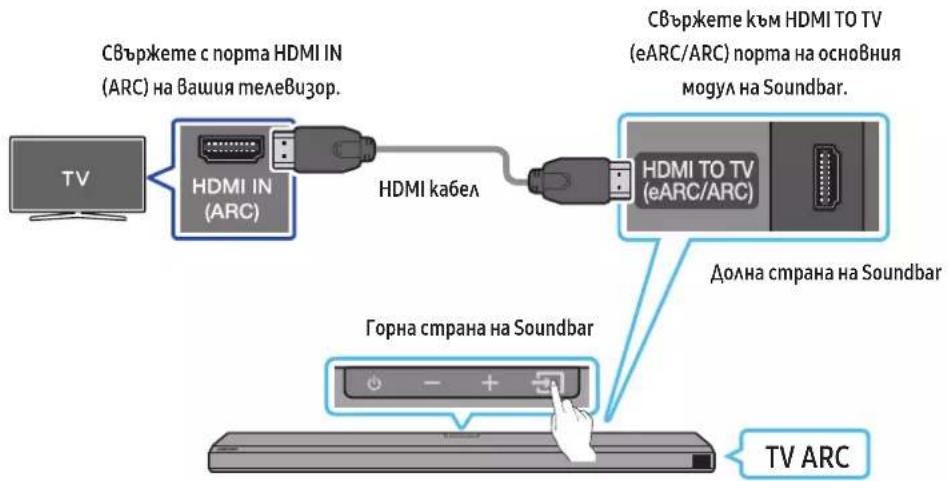
- Ppu u3kluohu Soundbar umeBucop Cbprkeme HDMI ka6ea, kakmo e nokacaHO ha duzypama.
- Bkauqeme Soundbar u mea8u3opa.
- "TVARC" ce no8BaHa npo3opea Ha gucnAe Ha oChBHom ycmpoiCmBo Ha Soundbar u Soundbar B3npou3Bekga 3Eyk om mee6u3opa.
Ako 3Bykkm om meeB3op0 he ce 4yBa,Hamuche 6ymoHa (N3moHuk) ha gucmaHooHmO ynpaBHeue uHa Ha zopHama cmpaHa Ha Soundbar, 3ga npe8kaHoume B pekum D.IN. Ha ekpaha nocAegoBameHo ce nok3amD IN u TV ARc u 3bykkm om meeB3opa ce 6bpou3BeKga.
Ko2amocBp3ame meeBu3op,koimo noggbpka fynkuaema eARC,ha gucnnae ce noka3Ba eARC u 3Bykbm 3anov4a ga ce 4y8a.
3a gac6bpkeme ype3 eARC, fynkumama eARC 6 meHmo ha meAeBuzopa mpr6Ba ga 6ge Bkoueha.3a nogpo6hocmu omhcno hcmpoikume hanaBeme cnpaBka c pbkoBogcmBomo 3a nompe6umela ha meAeBzopa. (Hanp.meAeBzop Samsung: Home () Hcmpoiku () 38y Eknepmhu hcmpoiku Pekum HDMI-eARC (aBmamuuehen))
AkoTVARCHe ce nokake ha npo3opea ha gucnla ha ochoBHom o ycmpoucmbo Ha Soundbar, npoBepeme gau HDMI ka6eMa cBp3ah kpm npaBuHur nopm.
- 3noaBaime 6ymoHume 3a cuaHa 3Byka Ha gucmaHooHomo ynpaBaHeu Ha meAeBu3opa, 3 ga npomeHume cuamaHa 3Byka Ha Soundbar.
SEAEKKA
Kozamo cBbpxkeme 4e3 HDMI ka6eMa meE Bu3op, noggbpkaH HDMI ARC (kaHa 3a o6pamEn 3Byk), kBM Soundbar, mokeme ga npegaBame uphiPoBu Bugeo ayguog aHHU, 6e3 u0nA3BaHe Ha omgehen onmuen ka6eA.
- Ppenopb4Bame no 63moKHoCm ga u3noA3Bame 6e3kuAen HDMI ka6eA. Ako HDMI ka6eAbm c kuaA, u3noA3Baum e ka6eC guaembp nog 14 mm.
Ta3uФнкцure He eHa pa3nooKeHue, ako HDMI ka6eAbm He noggbpka ARC.
Kozamo 3Bykbm Ha npegaBahemo e kogupan B Dolby Digital u, DOpMaHa u3xogua uufoPoB 3Byk" Ha BaWma meeBu3op e 3agagen Ha PCM, npenopb4Bame ga npomeHume hacmpoukama Ha Dolby Digital. Kozamo hacmpoukama Ha meeBu3opa ce npomeHu, kaecmBoMo Ha 3Byka ue ce noBuWu. (TeeBu3uoHomo MeHO MoKe ga u3noa3Ba pa3AuHGuymu 3a Dolby Digital u PCM B 3aBucumcm om npou3BogumeA Ha meeBu3opa.)
Memog 2. CBbp3BaHe c nomouma Ha onmuyeh ka6e
KohmpoAen cnucbk 3a npOBepk npegu cBb3Bahe
KoazoHDMI ka6eMa ummuhyam ka6eCa cBp3anu, np8o ce noayaBaHDMI cuHaBm.
Kozamo u3no3Bame onmuehen ka6eukaemume umam nokpumue,ce yBepeme,ue cme npemaxhau nokpuuma.

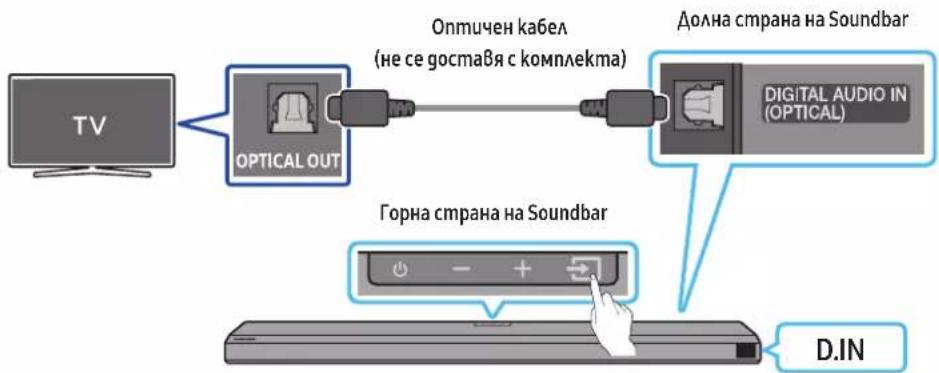
- Ipu u3kauhen meae8u3op u Soundbar cBbpke me npma Ha Soundbar DIGITAL AUDIO IN (OPTICAL) u npma OPTICAL Ha meae8u3opa c onmuHua ka6eA (He ce npegocma8), kakmo e noka3aHo Ha fu2ypama.
- BkAIOUeMe Soundbar u meAeBuzopa.
- Hamucheme 6ymoHa (N3moHuk) ha zopnua naHe uHa gucmaHooHomo ynpaBaeHue, cAeg moBa u36epeme pekum D.IN.
4.38ykmbom meaeBuzopa ce B3npou3Ekgga om Soundbar.
U3noA3BaHeHaФyHkuumaQ-Symphony
Ipu Q-Symphony Soundbar ce cunxpoHua p c meeBu3op Samsung, 3a ga ce u3Bekga 3Byk om gBe ycmpoucmba 3a onmumaeh cbpayhg efekm. Koamoc ce cBpkeSoundbar, ce noka38a MeHMO TV+Soundbar nog MeHMO 38kyo8 u3xog Ha meeBu3opa. H6epeme cbomBemHO mHIO.
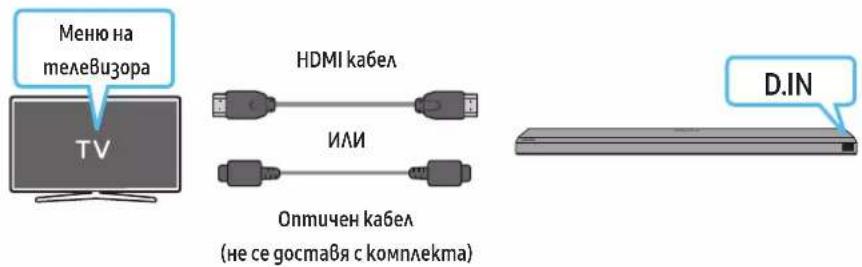
-Пу汞метаMeaB3uOHNO MeHIO:TeaB3Op+umeHa cepuraHa[AV]Soundbar[HDMI]
3ABEAEKKA
- Moke ga pa6omu cnopeg kogeka, noggbpkah om meaeBu3opa.
Taeu yhkuue c noqgbpka cmo kozamo e CbpyaH HDMi ka6e u anomueh ka6e (he e Bkauoh E komnekma).
Ta3u fynkuzue hauunha B hjkou meeBj0pu Samsung u hakou mogaeu Soundbar.
H3noA3BaHe Ha 3Byka Spacefit
Oc2ypaOnmmu3upaHo kaecmBo Ha 3Byka, kamo aHaau3upa npocmpaHcmBomo, 8 koemo ce clya.
3a ga akmuBupame mazu yhkuqur, Bkluoheme pekuma Adaptive Sound+ B MeHIOHa meeBu3opa Samsung.
(Home () Hacmpouku(O6uO-Hacmpouku Ha unHeMaueHmepekum Adaptive Sound+)
SEAEKKA
- Pekumb m ha 3byka ha Soundbar ue ce meH aBmamuHo ha Adaptive Sound+, aku akmuBupame pekuma Adaptive Sound+ Ha Bauu maEeBu3op.
Ta3u fynkua pa60mu, kozamo Soundbar ce cBpke kbm hakou meueBu3opu Samsung.
06 N3ПОАВЕHA HБEЗЖИHA BPb3KA KbM TEΛEBN3OPA
Memog 1. C6bp3BaHe npe3 Bluetooth
Ko2amo meeBupop Samsung e cBpahnpe3 Bluetooth, mokega yye me cmepeo 3Byka, 6e npu moBa ga ce hykgaeme om ka6eA.
- Moke gace CBpke camo no egun meaeB3op Samsung.
- Moke ga ce cBbpxke meAeBu3op Ha Samsung, koim noogbpka Bluetooth. IpoBepeme cneuufukaumme ha Bauu meAeBu3op.

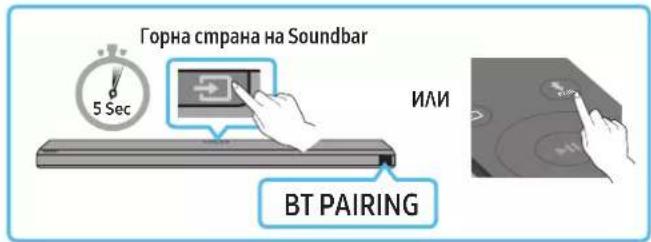
TbpB0HaaAHOcBbP3BaHe
- Hamucheme 6ymoha PAIR ha gucmauohomo ynpaBaeue Ha Soundbar, 3a ga Bae3e me B pekum BT PAIRING.
(AM) a. Hamucheme 6ymoHa (U3moHuk) Ha zopnua naheu u cagm0a u36epeme BT. BT aBmamuuho ce npomeHa BT PAIRING cag hkoAko cekyHgu uau ce npomeHa BT READY, aku uma zanamemeha Bpbka.
b. KoZamo ce no8u BT READY, Hamucheme u 3agpbkme 6ymoHa (M3moHuk) Ha zopnnae ha Soundbar3a noBeve om 5 cekyHgu, 3ga ce nokaKe BT PAIRING.
- 136epeme pekum Bluetooth Ha meleB3opa Samsung.
(Hanp. Home (H) Hacmpouku (B) 38yk 38kyoB u3xog Cnucbk Ha Bluetooth Bucoko2OpumeAme [AV] Samsung Soundbar Q700A / Q710A (Bluetooth))
- 136epeme [AV] Samsung Soundbar Q700A/Q710A om cnucbka Ha ekpaha Ha meeBuzopa.
HauehSoundbar nok3aHc Heo6xogumocm om cgoBaHe"u uCnucbka Cnucbka Cnucbka Cnucbka Cnucbka Cnucbka Cnucbka Cnucbka Cnucbka Cnucbka Cnucbka Cnucbka Cnucbka Cnucbka Cnucbka Cnucbka Cnucbka Cnucbka Cnucbka Cnucbka Cnucbka
Kozamo e cBp3aH meAeB3op Samsung, [IMeHa meAeB3op] ,BT ce no8Ba ha npeghua gucnAeu Ha Soundbar.
- A ceza moxeme ga uyeme 3Byka ha mekeBuzopa Samsung npe3 Soundbar.
CagkamoCbpkemeSoundbarkbmCBoMaeeBup3opSamsung3aNbpuM,umno3Baumepekuma,BTREADy"3anobmopnoCbbp3BaHe.
Ako ycmpoicbomo He ycnee ga ce cbpke
Ako B cnucbka c Bucokozopumenu ha meeBuzopa Samsung umame cbuecmByBaau Soundbar (Hanpumep [AV] Samsung Soundbar Q700A / Q710A), 2o u3mpuime.
- Caeg mo8a no8mopeme cmbnku om 1 go 3.
IpekbcBaHe Ha Bp3kama Ha Soundbar kbm meAeB3opa Samsung
Hamuche me 6ymoha (N3mouhuk) ha zopnue nae uau ha gucmauhoHomo ynpaBaeHeu npekme Ha peKum, pa3Auueh om BT.
- PtepkbcBaHemHaBp3kama omHema Bpeme, mbl kamo meAeBu3OpbM Samsung mp8Ba gnoyu om2oBop omSoundbar.
(Heo6xogumomo BpeMe moke ga ce pa3Aua4Ba 3aBucumocm om mogeMa meEu3op Samsung.)
Kak6a pa3aukama mekgy BT READY u BT PAIRING?
BTREADy:Bm03u pekum mokkeme ga ce cBpke me omHoBo c Bceku meeBup 5amsung uM Mo6uHyo ycmpoUcMo, c kuoMo(koemo) cme ycmaHO8aU 8pb3ka npegu.
BTPAIRING:Bm03u pekum mokkeme ga cBpckeme hoBo ycmpoUcmBo kBM Soundbar. (Hamuche 6ymoHa PAIR Ha gucmanuHHom oynpa8Aehue Ha Soundbar uuu Hamuche u zagpkme 6ymoHa (M3moUHK) 82ophama qacm Ha Soundbar 3a noBee om 5 cekyngu, gokamo Soundbar e 8 pekum BT.)
Beleeku omHocno C8bp3BaHe npe3 Bluetooth
Pa3noaokeme Ho8o ycmpoucMBo 6 guamembpom 1 m, 3a ga ycmaHoBume 6pb3ka npe3 Bluetooth.
-Ako 6bge nouckaH\PiH kog npu CbBp3BaHe c Bluetooth ycmpoecmBo, BbBegeme <0000>.
Soundbar aBmamuHc ce3kMouBa cAeg 18 MuHymu B cbcmorHue Ha zomobHocm.
Soundbar moke ga he u3BpuuBa npaBuHa mbpcHe ha Bluetooth uau cBp3BaHe npu cAegHume o6cmomeAcmBa:
-AkookoSoundbarumacuHnoeakmpuecknoane.
Ako hkoAko Bluetooth ycmpoucmba eghoBpeMeHc cacgBoeHu cbc Soundbar.
Ako Bluetooth ycmpoucmbomo e u3kauchoHo, He e Ha mcmomo cu Au e 8 Heu3npaBhoCm.
- EekmpoHume ycmpoucmBa moke ga npegu3Bukam paguocmyuen. YcmpoucmBama, koumo cb3gaBam eekmpomaaumhu BbHu, Hanpumep MukpoBbHOBu npHu, 63kuHu LAN ycmpoucmBa u gp., mp8Ba ga 6bgam gbpkaHu galev om ochoBHomoycmpoucmBo Ha Soundbar.
Memog 2. CBbp3Bahe uepe3 Wi-Fi
Kohpnoen cnucbk 3a npoBepka npegu c8bp3Bahe
Wi-Fi Bp3kama e haauha caMo ha meaeBu3op Samsung.
IpoBepemagau6e3kuyuumymep(Wi-Fi)e8kaouenugaaumaeBupobmecbpaHcymepa.
TeaeBuzopm u Soundbar mpa ga ca cBpb3au kmbegha u cbua 6e3kuuHa mpeka (Wi-Fi).
Ako 6e3kuuumymep (Wi-Fi) u3noa3Ba DFS kaH, Hma ga Mokeme ga ocbuecmBume Wi-Fi Bp3ka mekgy mele8u3opa u Soundbar. CBpke me c Bauua gocmaBuk ha unhmehem ycayzu 3a nogpo6Hocmu.
Tb kamo meHOMama moke ga ce pa3AuaBam B 3aBucumocm om zooguna ha npou3BogcmBo, BuKme pkoBogcmBoMoHa meeBu3opa.
3a ga cBpke meeBup0a kBm Soundbar ue3 Wi-Fi, npBo cBpkeeme Soundbar kBm 6e3kueh pymep. Buxme cmpauca 23 3a nogpo6Hocmu kak gocbuuecmBume Wi-Fi 8pb3ka.
- 3a noBee uHΦopMaua omHocHo Wi-Fi 8p63kama kBm Soundbar 8uxme cmp.23,Memog 2.Cb6p3Bahe npe3 Wi-Fi (6e3KuHa Mpeka)a
2.CmehemeBxoguauUzmoHukHa meLeBu3opa ype3 ayguo MeHjmo Ha Soundbar.
TeAeB30pu Samsung, npegAaaHnHa na3apa om 2017 a. Hamambk Home () Hacmpouku (串 ) 38k 38k o8u3xo9 [AV] Samsung Soundbar Q700A / Q710A (Wi-Fi)
07 CBbP3BAHE KbM BbHsHo YCTPOIcTBO
Memog 1. CBb3BaHe nocpegcmBom HDMI ka6eAn (c Bb3MoKHocm 3a gekogupaHe u Bb3npou3BeXgaHe Ha Dolby Atmos)
KohmpoAen cncsbk 3a npoBepka npegu C6bp3BaHe
Ako onuume 3a ayguo u3xog 8kIouBam Bmopuehen 3Byk, ce yBepeme, ye BmopuHnma 3Byke u3kIouen.
- YBepeme ce, ye cbgbpkaHnemo nogbpka Dolby Atmos®.
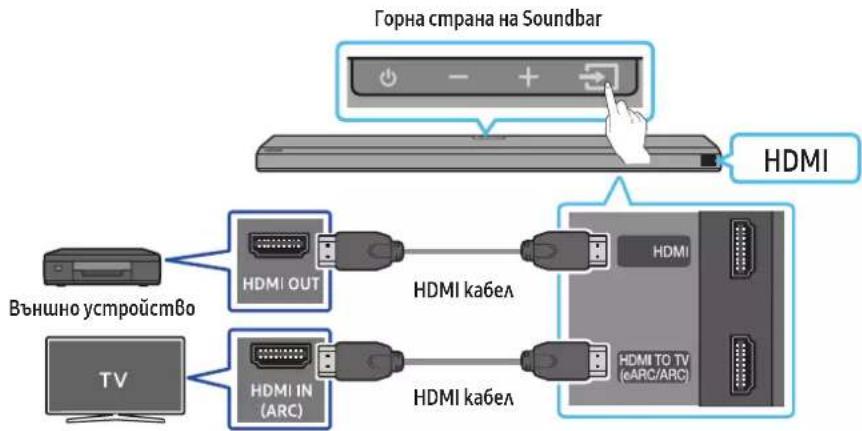
- 3no3Baume HDMI ka6eA, 3a ga cBpjkeme HDMI OUTnopma Ha BbHHomoyoymo ycmpoucmBo u HDMi nopma Ha goHaama cmpaHa Soundbar.
- 3no3Baume HDM ka6ea, 3ga cBpke me HDM IN nopma ha meAeBu3opa u HDM TO TV (eARC/ARC) npma Ha goHama cmpaHa Saundbar.
3.BkauyemeSoundbar,meAeBu3opaU BbHnHomo ycmpoUcmBo. - Hamucheme 6ymoHa (V3moHuk) ha zoHra naHe uAn Ha gucMaHuoHHomo ynpaBaeHue, cAeg koema u36epeme HDMI.
- Ducnnaem Ha Soundbar noka3ga, ye pekumbH HDMI e u36paB B Momehma, u Soundbar ue 3anouhe ga 83npou3eKgA 3Byu.
BEAEXKA
KoZamo u3noaBame Dolby Atmos: Ako BxogHua m u3moHuk e Dolby Atmos, ce u3BeXgam 3.1.2 kaHaA.
KoZamo ce akmuBupa Dolby Atmos@, Ha npegHua gucnAe ci noka3Ba DOLBY ATMOS.
KoHOpE omuue 3a ayuo u3xog B meHomo 3a hcmpoku Ha Baua BD nueb npuHa gpyo ycmpoucMBo U ce yBepeme, ye 3a Bitstream e u36pana onua "Be3 kogupane". Hanpumep B BD nuebpa Samsung omugeme B MeHIO HauAo 38yk LlphiOu u3xog, caeg koemo u36peme Bitstream (ne06pa6omeH).
CneuΦukaunha noggbpkaHume UHD cuzHa (3840 x 2160 p)
| KagpoBA chezmoma (fps) | Бабочина наuzьема RGB 4:4:4 YCbCr 4:4:4 YCbCr 4:2:2 YCbCr 4:2:0 | |||
| <60 | 8 6uma 0 0 0 0 | |||
| 10 6uma -- | 0 0 | |||
| 12 6uma | -- | 0 0 | ||
| 120 | 8 6uma | ---- | ||
| 10 6uma ---- |
- PoggbpkaHama cneuphiukaua Moke ga ce pa3au4Ba 8 3aBucumocm om cbpb3ahomo BbHNO ycmpoucMBo Uy yc0BuaHama Ha3noA3BaHe.
Memog 2. CBbp3BaHe c nomouma Ha onmuyeh ka6eA
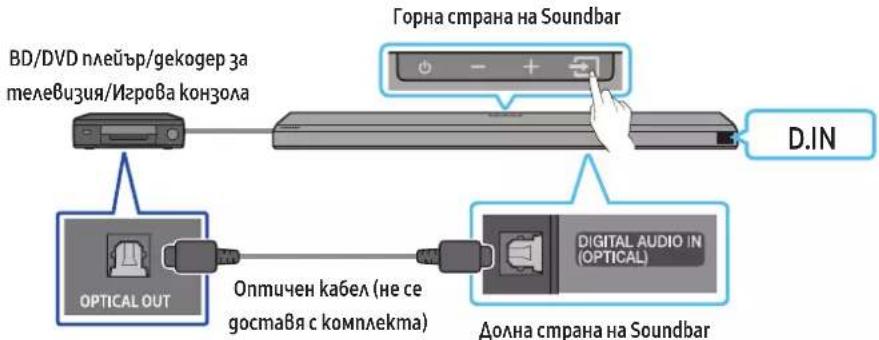
- 3no3Baime onmuehen k6eAn (he ce npegocma8), 3a ga cBbpxeme DIGITALAUDIO IN (OPTICAL) Ha ochoBHom mao ha Soundbarkm nopma OPTICAL OUT Ha BhuHOMO ycmpoucmBo.
2.BkauyemeSoundbaruBbHnHomo ycmpooucmBo。 - 136epeme pekum D.IN, kamo hamucheme 6ymoHa (13mouhuk) Ha zopnnaa Hau h gucmauhoHmo ynpa8Aene.
4.BauuarmSoundbarue8b3npou3Bege36yuomBbHnHomoycmpoUc
08 CBbP3BAHE KbM MOBnAHO YCTPOICTBO
Memog 1. C6bp3BaHe npe3 Bluetooth
KoammoMoUHNOycmpoucB0eCbP3aHO npe3 Bluetooth, mokege ga yeme cmepeo 3Byka, 6e3 npu moBa ga ce Hykaema om ka6eA.
Ko2amoc6bpkemcgBoeHO Bluetooth ycmpoucBo npu u3kauen Soundbar, nocaeghumce u3kuHbBa aBmammuHo.
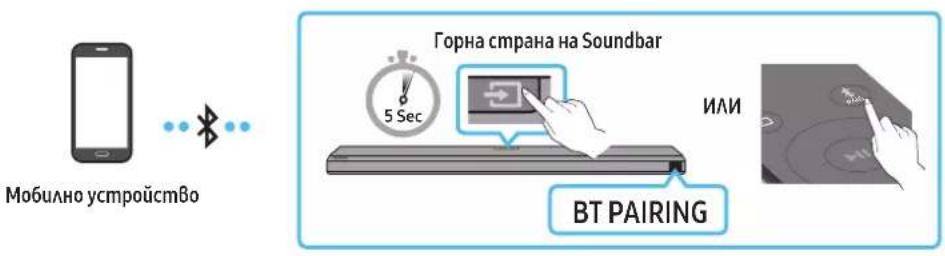
TbpbBOnaHaAnHOcBbp3BaHe
Kozamo ce cBbpxkeme kM HoBo Bluetooth ycmpoCmBo, yBepeme ce, ye ycmpoCmBomo e ha pa3cmohue om 1 m.
- Hamucheme 6ymoHa PAIR Ha gucmauohomo ynpaBaeHue Ha Soundbar, 3a ga Bae3eme B pekum BTPAIRING.
(ⅣA) a. Hamucheme 6ymoHa (M3moHuk) Ha 2opHua naHe u caeig moBa u36epeme BT.
"BT"abmamuHc ce npomeha Ha, BTPAIRING" cIeg hkoAke cyhgu uau ce npomeha Ha, BTREADY", ako uma 3ana memaHa Bp3ka.
b. Kozamo ce no8u BTREADY, hamucheme u 3agpbkme 6ymoHa (U3moHuk) Ha zoHra naHe I Ha Soundbar 3a noBee om 5 cekyHgu, 3a ga ce nokake BT PAIRING.
- Om cnucbka, koimoc no8BaHa Bawemo ycmpooumBo, u36epeme [AV] Samsung Soundbar Q700A/Q710A.
Ko2amO Soundbar 66ge cBbp3aH kBm MO6uHomo ycmpoucmBo,Ha npegHu gucnAe ce noRBa[IMHe Ma Mo6uHoo ycmpoucmBo] BT - Bb3npou3Bekgaume My3ukaAhu faAioBe om ycmpooucmBomo, Cb6p3aHO npe3 Bluetooth kM Soundbar.
CagkmoCbpkemeSoundbarkbmCboemoMo6uHaOycmpoUcBo3a nbpBnmb,uznoA3Baumepekuma,BTREADY"3a noBmopHO CbP3BaHe.
AkoycmpoucmBomo He ycnee ga ce CBpke
Ako B cnucbka c BucokozBopumeu Ha Mo6uaHomo ycmpoCmBo umame cbuecmByBaui Soundbar (Hanpumep [AV] Samsung SoundbarQ700A/Q710A), 20 u3mpuime.
- No8mopeme cmbnku 1 u 2.
KakBa e pa3Aukama mekgy BT READY u BT PAIRING?
BTREADy:Bm03u pekum mokeme ga ce cBpke meoHo 8ceku meeBuzop Samsung uau Mo6uHcmpoucmBo, c kuiMo(koemo) cme ycmaHOBaA u 8pb3ka npegu.
BTPAIRING:B mo3u pekum mokeme ga cBpke me HoBo ycmpoUcmBo kBM Soundbar. (Hamuche Me 6ymoHa PAIR Ha gucmaHOnHom oynpaBHeue Ha Soundbar uHa Hamuche u 3agpbKme 6ymoHa (M3moUHK) 82opHama Hacm Ha Soundbar 3a noBeue om 5 cekyngu, gokamo Soundbar e 8 pekum BT.)
Beleekku omHocno C6bp3Bahe npe3 Bluetooth
Pa3noAoKeme Ho8o ycmpoUcMo 8 guaemb p om 1 m, 3a ga ycmaHoBume 8p3ka npe3 Bluetooth.
-AkoBbge nouckaH\PiH kog npu cBbp3BaHe c Bluetooth ycmpoecmBo, BbBegeMe<0000>.
Soundbar aBmamuHc ce 3kAouBa cieg 18 MuHmu B cbcmHue ha zomobHocm.
Soundbar moke ga he u3BpuBa npaBuaHo mbcpeHa h Bluoteoh uau cBp3Bahe npu caeHume o6cmoeMaB:
Ako okaooSoundbar uma cuhaeakmpueecko noae.
Ako hkoako Bluetooth ycmpoocmBa eghoBpeMeHNo ca cqBoeHu c6 Soundbar.
-Ako Bluetooth ycmpooucmBom e u3kMoueHo, He e Ha Mmcmomo cu uAu e BHeu3npaBHocm.
- EekmpoHume ycmpoucmBa moke ga npegu3bukam paguocmyueHua. YcmpoucBama, koumo cbgaBam eakmpomaaumHu BbHu, Hanpumep MukpoBbAoBu
- fhpHu, 63kuHAN LAN ycmpoucmBa u gp., mp46Ba ga 6bgam gpaKaHua qaleom ochoBHomoycmpoucmBo Ha Soundbar.
Soundbar noggbpka SBC gaHHu (44,1 kHz, 48 kHz).
- CBbkjeme cama kbm Bluetooth ycmpoicmBo, koemo noggbpka fkyhkuja mA2DP (AV).
He moke ma c6bp3Bame Soundbar kBM Bluetooth ycmpoicmBo, koemo nogbpxka camo fyHKqma HF (Hands Free, xehgcphi).
Ko2amocBp3BameSoundbarkbMBluetoothycmpoucmBo,p3nookemeycmpoucmBamaB3mokhoHau-6u30egHo go gpy2o.
Koikomo no-gauey ce Hamupa Soundbar om Bluetooth ycmpoucmBomo, moKaBa no-aoo ue e kayecmBomo ha 3Byka. Bluetooth 8pb3kama moke ga 6bge npekbchama, koamoycmpoucmBama ca u3Bbne fekmuBnue 06xam.
- Bluetooth Bpb3kama moke u ga he fyhkuoHupa cnopeg npegha3haeHuemo 80hu c6c cuaHa.
- Bluetooth ycmpoicm6o moke ga u3bhu wum uu ga he fyhkuuohupa npaBuHOB cAegHume ycAoBua:
Ko2am0 mao o B konmkm c npuemo-npegaBameA ha cuaHaHa Bluteoth ycmpoucmBomo uu Soundbar
B 62au uau kozamo B 6au3ocm um npenrmacmBue, kamo Hanpumep cmeha uu npesaga, kbgemo mozam ga hacmbnarn eekmuuecknu npomehu.
Kozamo e u3oKeHo Ha paguocmyuena nopagu fakma, ye 6 cbuume yecmumguanaohpuapomam gpyau npogykmu, kamo meguuncko o6opygBahe, mukpoBbHaBu neku u 6e3kuyu LAN ycmpoucm8a.
IpenmcmBurekamoHanpumepBpamuucmeHuMoKe ga no8AuaRnHa kaecmbomoHa 3Byka gopu koama ycmpoucmbama ce Hamupam B npegeAume Ha efeekmuBna 6xBam.
-Ako 6bge nouckaH\PiH kog npu cBp3BaHe c Bluetooth ycmpoecmBo, BbBegeme<0000>.
- Imaume npegBug, ye Bauuam Soundbar hama ga moke ga 6bge cgoen c gpy2u Bluetooth ycmpoucmBa, gokamo ce u3noa3Ba onuaema Bluetooth.
To8a6e3kuHNO ycmpoucMBo moKe ga npegu3Buka eAekmpuecku cmyuueHua no BpeMe Ha pa6omama cu.
IpekbcBaHe Ha Bp3kama Mekgy Bluetooth ycmpoucmBomo u Soundbar
Mokeme ga npekbcheme 8p3kama Mexgy Bluetooth ycmpoicmBo u Soundbar. 3a uncmpykuu Bukmpe pkoBogcmBomo 3a nompe6umeHa Bluetooth ycmpoicmBomo.
Bpb3kama kmb Soundbar ue 6bge npekbchama.
Kozamo Soundbar e u3kauoh om Bluetooth ycmpoucBomo, ha npeghua gucnue Ha Soundbar ue ce nokaee BT DISCONNECTED.
IpekbcBaHe Ha Bpb3kama Ha Soundbar kbM Bluetooth ycmpoucmBomo
Hamuche me 6ymoha (M3moHuk) ha 2opnua nae anu Ha gucmauohmo ynpaBaeHue, cag koem npEbkUOHe me pekum, pa3auen om BT.
- Ppebcbahemo ha Bp3kama omhema Bpeme, mbu kamo Bluetooth ycmpoucmBomo mp86ga noayu om2oBop om Soundbar. (BpeMe 3a npebcBahe Ha Bp3kama moke ga ce pa3au46a 83aucumcm om Bluetooth ycmpoucmBomo)
Kozamo Soundbare u3kaueyom Bluetooth ycmpoucmBomo, ha npegua gucnau ha Soundbar ue ce nokake BT DISCONNECTED
Memog 2. CBbp3BaHe npe3 Wi-Fi (6e3xuHa mpeka)
3a ga cBbpkeme Soundbar kmb Mo6uHno ycmpoicmBo npe 6e3kuHa mpeka (Wi-Fi), ce u3uckBa npuokehue SmartThings.
TbpB0HaaHno cBb3BaHe
1.Инсmauaupa'me u cmapupa'me npuokexuemo SmartThings om Baewemo M6uaH ycmpoUcMBo (cMapmfoH uMa6aem).
2. CægBaumu uncmpykuuume ha ekpaHa npuLoKeHuemo, 3a ga go6aBume Soundbar.
Bb3mokho e ha hakou ycmpoocmbga he ce no8u a8momamunhma u3ckaau np03opeu (Bmopama ekpanha chumka no-goA).
Ako u3ckauaqum np03opeu He ce noBu, Hamuche + Ha ekpaHa Home. Soundbar e go6aBeH kbm npuaKeHuemo.
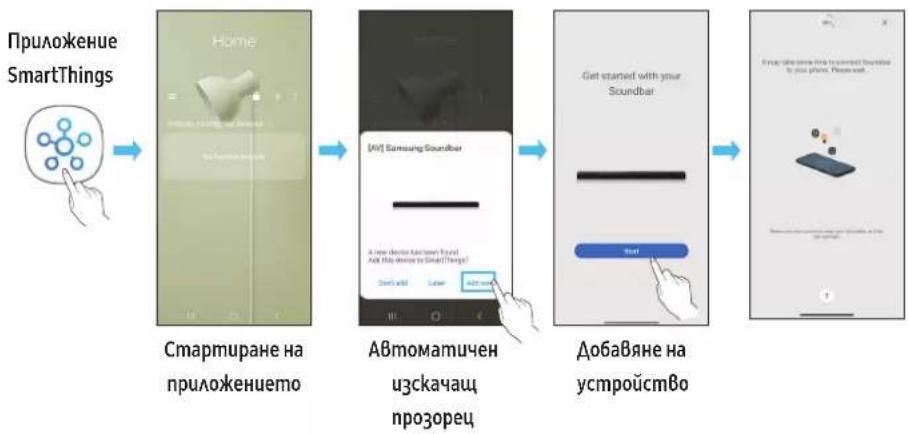
09 Пырв NTбПКИ CALEXA B ПЮДУКТ HA AMAZON (PABOTN C ALEXA)
Bb3mokno e yhkuqma ga he ce noggbpka 3a Bcuku mogeu uau zoe2paqcku o6aacmu.
Ta3u yhkuua noggbpka cama hauou e3u u noggbpkahume yhkuuu moke ga ce pa3auaaBam 8 aBucumocm o2e2pa4ckama 6bacm.
3a cneuufkaua uau cbBmucmcm Ha npogykma HanpaBeme cnpaBka cye6 cauma Ha Samsung (www.samsung.com).
Ta3u ycIyza ce npegocma8o om Amazon u moke ga 6bge npekpaneHa no BcraKo BpeMe. Samsung He hocu om2oBopHocm 3a HaauHocmm Ha ycAyaama.
EkpaHbMa npuokHeMoAmazon Alexa moke ga 6ge npomeHn 6e3 npegBapumeHNo u3Becmue.
CБьрЗBaHe u u3noλЗBaHe c npogykma Amazon (Amazon Echo)
I3noA3Baume Amazon Echo 3a ynpaBaeHue Ha Soundbar u ce hacAAkgaBaume Ha My3ukaAHume ycayu om Amazon Echo.
3a uan ha Amazon Alexa e heoxugam ayhm B Amazon, 3ga cbpkeme Soundbar npe mpekama.
- INcmauaupaume npauoKeHuemo SmartThings Ha BaWemo MobuHNo ycmpoucMBo u zo cmapupaue.
- Bae3me B akayma B Alexa, kamo u3nbHume uHcmpykuuume om npauokehuemo, cieg koemo Bae3me B ycayama.
I3no3BaHe Ha 2aacoBku komaHgu 3a ynpaBaeHue Ha Soundbar
- Ycayama Amazon Echo, kora mo kome ga u3noa3bame c Soundbar, e o2pauueha cmo go cyauhe Ha My3uka. Dpyu ycayu, npegocmaBhu om Amazon Echo, hnpumep hoBuH u BpeMemo, mozam ga 66gam gocmbnH npe3 Baua npogykM om Amazon Echo.

3ageumBahe +KomHa+MeHaBucokozOpumeA
*3a u3no3BaHe Ha 2AacoBkuomahgu 3aSoundbar,napeHEn_BcekugheBaHa"
| Децм bree Гльба komанga | |
| 3a зада bene на сUILama на 3Byka на 5 | "Alexa, зада сUILama на 3Byka на 5 за Всекugнeshama" |
| 3a увалчаве на сUILama на 3Byka | "Alexa, увалчаве сUILama на 3Byka на 3a Всекugнeshama" |
| 3a uzksючаве на 3Byka | "Alexa, uzksючу 3Byka 3a Всекugнeshama" |
| 3a сleyше на raguo检manця, каяо се начua KISS FM | "Alexa, ручи Kiss FM 3a Всекugнeshama" |
| 3a nyskahe на сlegвацama necesen | "Alexa, сlegвацama necesen 3a Всекugнeshama" |
| 3a сп.upане на ayguomo | "Alexa, сп.upу 3a Всекugнeshama" |
| 3a uzksючаве на ayguomo | "Alexa, uzksючу 3a Всекugнeshama" |
I3noa3BaHe Ha Tap Sound
DokcmeSoundbarMoHomoCuympoCmBo,3aGaCeB3npou3ege3BykbMaCbgbpkaHmoHaMoUHomoYcmpoCmBo npe3Soundbar.
B 3a8ucumocm om mo6uHomo ycmpoCm8o ma3u cyhkuu Moke ga He ce noggbpka.
Taeu yhkuue cBbmeumama camo m6uHn ycpoocBa Samsung cAndroid 8.1 uu no-hoBa Bepcua.
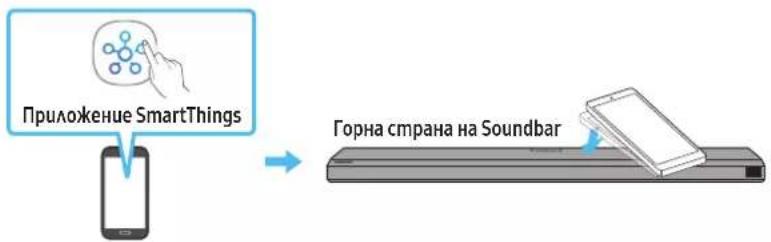
Mo6uaHo ycmpoUcMBo
- Bkaoyeme fynkuaema Tap Sound Ha mo6uHomo ycmpoicmBo.
Bukme, Hacmpouka Ha fynkuaema Tap Sound no-goany 3a nogpo6hcmu kak ga BkmoHume fynkuura. - Dokocheme Soundbar c Mo6uHomo ycmpoucm8o. H36pepe „Start now" B u38egeHn np03opeu c6c cb6o6ueHue.
Ye3 Bluetooth ce ycmaHO8a 8bp3ka MeKgMy 6uHmo ycmpoU Soundbar.
- B63npou3Bekgaume 3Byka Ha cbgbpkaHEmo HaMo6uHmo ycmpoucm8npe3Soundbar.
Ta3u Fuynkuia Cb3Ba 4pe3 Bluteoth mo6uAnho ycmpoucMBo kBm Soundbar 4pe3 pa3no3HaBe Ha Bu6pauaMa, koMo Bb3HukBa npu KOhmacn Ha ycmpoucBomo cbc Soundbar.
- YBepeme ce, ye Mo6uHomo ycmpoCmBo He gokocBa oCmbp bA h Saundbar. Soundbar uAU Mo6uHomo ycmpoCmBo moke ga ce Hagpackam uAU no8peqam.
- PpenopbBa ce mo6uHomo ycmpoucmbo ga 6bge nokpmo c kaB. Aeko Hamuche mupokama naou B ophama yacm Ha Soundbar, 6e3 ga npuaaame npekomepha cuaa.
3a ga u3no3Bame ma3u yHKua, akmyaU3upaAme npauokehuemo SmartThings go Hau-HoBama Bepcua.
B3aBucumocm om Bepcura ma h npuaokehuemo fynkuuma moke ga He ce noggbpka.
10 CBbP3BAHE KbM AIRPLAY 2 HA APPLE
Ta3u yhkuu moke ga He e Ha pa3nooKeHue B hakou gbpkaBu.
CБьрЗБаHe u u3noλЗБaHe c npogykm Ha Apple
C AirPlay 2 mokeme ga ynpa8AbaBame ayguocumemama B goma cu om Baawu iPhone, iPad, HomePod uAu Apple TV.
To3u Samsung Soundbar noggbpka AirPlay 2 u u3uckBa Bepcua hi iOS 11.4 uau no-hoBa.
6EAEXKA
- Piopepe me ga Suoundbarc b6p3aH kM Wi-Fi mpekama. (Buxme Memog 2. C6bp3Bahe npe3 Wi-Fi (6e3KuHa Mpeka))
11 MOHTUNPAHE HA CTEHHATA CTOИKA
Ipegna3Hu MEPku npu Mohmupahe
Mohmupaime camo Bbpxy BepmukaHa cmeHa.
He Mohmupaume Ha Maccmo C Bucoka memnepamypauu Baakhocm.
- PpoBepeme gau cmehama e gocmambhyo 3gpaBa, 3a ga u3gbpku me2amo Ha npogykma. Ako he e, nogcuema uu u36epeme gpyzo mrcmo 3a MOhmac.
Kyneme u 3no3Baume 3akpenBauu BuHmoBe uu gio6eau, nogxograu 3a Bauu mun cmeha (Ma3uKa, MemA, gbpBo u m.H.). Ako e 6b3MoXHO, 3akpeneme onophme BuHmoBe kBm 2pegu Bcmehama.
3akyneme BuMoBe 3a cmeH eMHmax BcbomBemcBue c muna u ge6eunama Ha cmeHama,Ha koHmo keAe me ga MOhmupame Soundbar. - DaamembP: M5
- Dbukha: npenopb4Ba ce gbkuna om 35 mm un no-0aMa.
- CBbkjeme ka6eIume om ycmpoUcmBomo kBM BbHnU ycmpoUcmBa, npegu ga mohmupame Soundbar ha cmehama.
- Pnegu ga mohmupame ycmpoicmBomo, yBepeme ce, ye mo e u3kauheu u wenceaum My e u3Bageh om kohmakma. B npomueh cayau moke ga ce noayu eAekmpueecku ygap.
Komnohehmu 3a cmeHeh MoHmak

Boga 3a cmeHa cmoika

x2

(M4×L10)
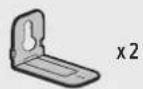
Abpka-BuHm BuHm
Cko6a3a cmehna cmouka
- NocmaBeme Bogaya 3a cmeHa cmoiKa cpeu noBbpxHcmmHa cmeHaama.
BogaybIm 3a cmehn ha cmoika mpa g enocma8en xopuzohmaaHO.
Ako meeBuzopbM Bu e moHmupaHa cmeHama, moHmupaUme Soundbar Ha nohe 5 cm nog meeBuzopa.
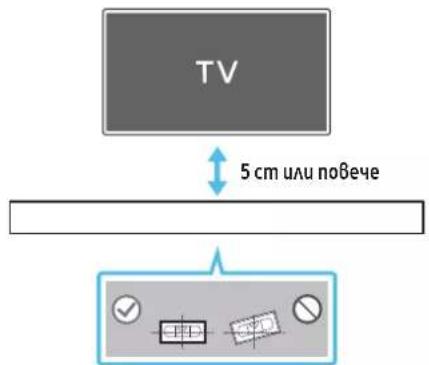
- NogpaBheme ueHmpaHama AunuHa Bogaqa 3a cmeHnca cnpmo ueHmbpa Ha meLeBu3opa (ako mohmupame Soundbar nog meLeBu3opa) u cieg moBa 3akpeneme Bogaqa 3a cmeHnca cmuKa kbM cmeHama, kamo u3no3Bame mukco.
Ako He Mohmupame nog meeBu3op, nocmaBeme ueHmpaHaama AuHua 8 ueHmbpa Ha 30Hama 3a MoHmac.
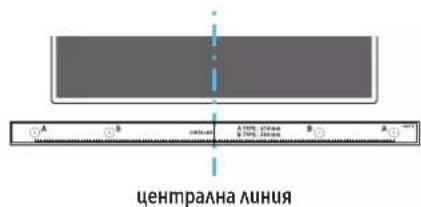
3.ПьхemeБрхаHa xumukaUu nogocmpen moU8 npe3 uehmbrpa Ha u3o6paekenumaA-mun BbB 8Cceku kpaHa Bogaya,3a ga Mapkupame omBopume 3a nogbpkaumme BuHmoBe, ceg moBa maxheme Bogaya 3a MoHMupaHe Ha cmeHa.
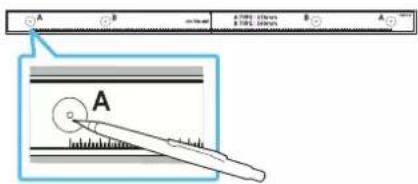
- Kamo u3no3Bame 6opMaunu c nogxogru pa3mep, npo6uime om8op B cmehama Bbpxy Bcra ka mapkuo8ka.
Ako mapkupo8kume He cbomBemcmBam Ha no3uquume Ha uphiMoBeme, nocmaBeme nogxograu onopu uau 6oAmoBe B omBopume, npegu ga nocmaBume noggbpkaumc 8unmoBe. Ako u3noa3Bame onopu uau ynambmumeu, yBepeme ce, ue omBopume, koumo npo6uBame, ca gocmambHNO 20aemu 3a onopume uau ynambmume, koumo no3Bame.
- IbXheme BuHm (He ce gocmaBc komnAekma) BbB Ckeu gbpkay-BuHm U cAeg moBa 3aBuUme Bceku BuHm 3gpaBo 0 omBopa Ha noggbpkaunu BuHm.

- MoHmupaIme 2-ma MOHmaxKHe IeMeHMa ckO6a-cmeHa 8 npaBuHomo HAnpaBaeHue B gohama qacn Ha Soundbar, kamo u3noA3BaMe 2 BuHma.
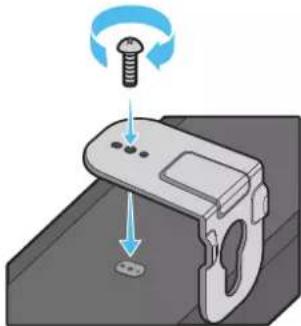
- Ppu ca06BaHemc eYBepeme, ye 3akaBauime yacmu Ha MoHmaxkHume eAemehmu ckO6a-cmeHa ca pa3nooxeHu 3ag 2bP6a Ha Soundbar.
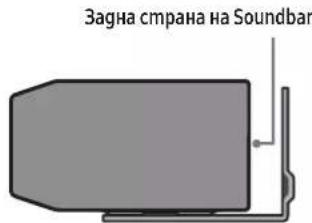
Deceh kpaHa Soundbar
- Mohmupaune Soundbar 3aegno c npukaeyume Mohmaekhu eMeemmu ckoba-cmeha, kamo okayume Mohmaekhume eMeemmu ckoba-cmeha Ha gbpkaumeha BaHmoBeHa cmehama.
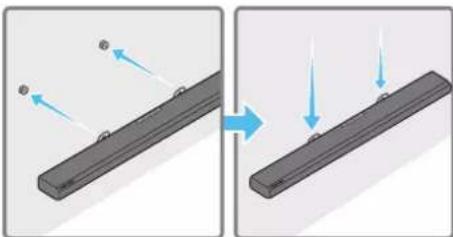
- Πλb3Heme Soundbar hagoy, kakmo e noka3aHo no-goy,3a ga MoZam MoHmakHu elememhu cko6a-cmeha ga 3acmaHam cma6uHa Bbpxy gbpkaumeha BuHmoBe.
IocmaBeme gbpkauhme Ha BuHmoBe 8 wupokama (goHa) acm Ha MoHmaxKHMue eAlememu ckO6a-cmeHa, cieg koemo npunb3Heme HagoMy MoHmaxKHMue eAlememu ckO6a-cmeHa, 3a ga Mozam MoHmaxKHMue eAlememu ckO6a-cmeHa ga 3acmaHam cmaBuHo Ha gbpkaHume Ha BuHmoBe.
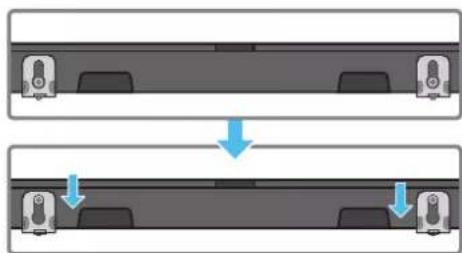
12 MOHTNPAHE HA SOUNDBAR HAD CTÔKA 3A TEΛEBN3OP
KomnoHehm

Tymeh kpak
3a monmaka npkpeneme yemu kpaka kb gohama cmpaha Ha Soundbar, npegu ga 2o nocmaBume ha no3uua hag cmoukama 3a meLeBu3op. YBepeme ce, ye cme nocmaBua yMeHume kpa ka no mak8 hauun, ye ga he ce nogabam u3bKn pauuama ha cmoukama ha meLeBu3opa. BuKme fuZypama no-goy.
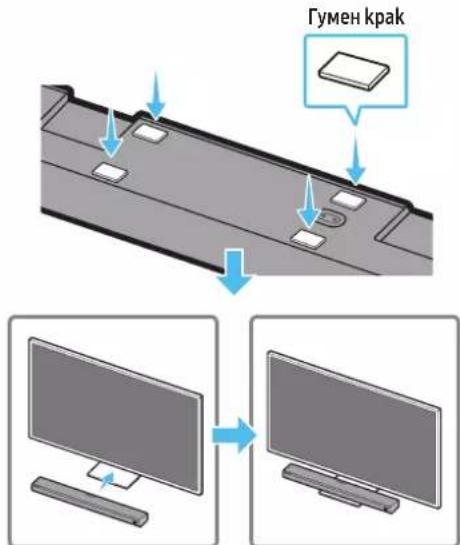
NocmaBemeSoundbarHa cmoika3a meAeBu3Op.
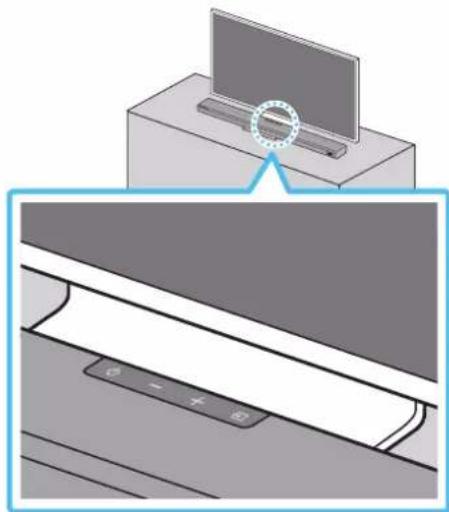
Kakmo e noka3aHO ha fuzypama, nogpaBHe meeHmbpa Ha Soundbar cnpMo ceHbpa Ha meleB3opa u BHumameAHO nocmaBeme Soundbar Ha cmoikama 3a meEBe3opa.
BEALEKKA
- YBepeme ce, ye Soundbar enocmaBen Bbpxc maa6uHa xopu3oHmaHa no8bpxHocm.
HegocmmbuHomo omcmohue om meeBu3opa moke ga npuHu np6aemu om akymuenxapakmep.
13 AKTYAAN3NPAHE HA COΦTYEPA
A8momamuHa akmyaU3aua
Kozamo npe3 Soundbar ce ycmaHoBu Bpb3ka c uHmephem, cofmyepHume akmyaua3auu ce u3BbpuBam aBmomamuHo, gopu kozamo Soundbar e u3kAIOueH.
3a gaceu3no3Ba fyhkuuraA BmomamuHa akmyua3aua,Soundbar mpa8ga e cymano8eHa 8p3ka c uhmephem.
Wi-Fi Bp6kama cbc Soundbar ue 6ge npekbchama npu u3kauBahe Ha 3axpaH8auiu kabeHa Soudbar uu npu npekbcBae Ha 3axpaH8aHemo. Ako 3axpaH8aHemo 66ge npekbchamo, kozamo ce Bb3cmaHOu uu ku kozamo BkauHume omHoBO 3axpaH8auiu kabeA, BkauHeme Soundbar u cleg moBa ycmaHOBe me omHOBO Bp6ka c unmephem.
Akmyaun3aun 4pe3 USB
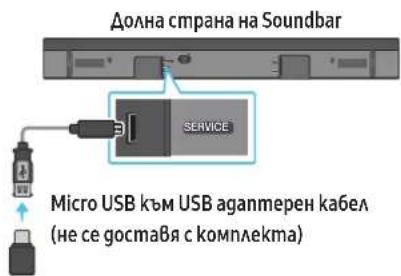
Bb3mKHO e B6geue Samsung gnpeaaa akmyau3aau 3a bpyepa Hcucmemama Soundbar.
Kozamo Uma Haauha akmya3auu, moke ga akmya3upame Soundbar ue3 cBp3Bahe ha USB faau namemma, cbgbpkaua akmya3upaanur fbpmyep, kbn nopma SERVICE Ha Soundbar.
- Omugeme Ha ye6 cauma Ha Samsung (www.samsung.com) nombpcem e umemo Ha moqea om onuura ha MeHmo 3a noogpbkka Ha kAuehmU.
3a no6eue unphiopmauou omhco akmyau3auuume Bukme pboBogcmBomo 3a Haqcmpoika. - 13meaeme faAa 3a hagpakqane (USB mun).
- Pa3apxubupaime faa, 3ga c63gageme nanka c umemo Ha faa.
- 3ana3e me cbgagehama nanka ha USB hocumeu u cAeg moBa 20 cBbpxkeme kM Soundbar.
- Bkauyeme Soundbar.Caeg moBa npogykmbc me akmyu3upa 8 npogbAkeHue Ha Makcumym 3 MuHymu, kamo ce u3Bekga cbo6ueHemo UPDATE.
-ПиБрemeHaakmyaU3auuMaHe20uzkAIOHBaumEu HeBagemeUSB HOCUMeA.
AkoHa npo3opeua Ha gucnnae He ce no8Bu UPDATE, u3Bageme 3axpaHbauu ka6ex om Soundbar u caeq moBa zo Bkauyeme omHoBo.
AkoeunmaaupapaHaai-HoBamaBepcua,Heceu3BpuBaHukakBa akmyaua3au.
B 3aBucumocm om muna USB uma Bepoarnocm ga He ce noggbpkam akmyaunauu.
Hnuaa3aua
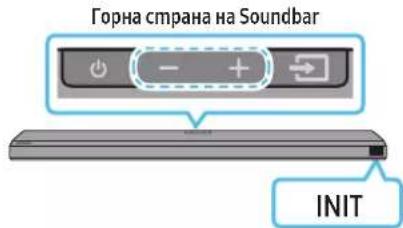
Ipu Bkauen Soundbar Hamucheme egHoBpeMeHno 6ymoHume Cua Ha 38yka)Ha ycmpoucmBomo 3a nohe 5 cekyHgu. Ha gucnAe ce u3Bexka INIT u Soundbar ce uhuuaAu3upa.
BHIMAHHE
- Bcuku hacmpouku ha Soundbar ca uhuuaa3upaH. YBepeme ce, ye cme u36bpuu moBa camo akc e hauaa uhuuaa3aui.
14 OTCTPAHRAHE HA
HEN3PABHOCTN
Ipegu ga nombpcume nomou, npoBepeme cAegHomo.
Soundbar He ce 6kAou4Ba
Ipo8epeme gaa 3axpaH6auuym ka6eHa Soundbar e nocmaBeH npaBuaHO B koHmakma.
Soundbar pa6omu Henpegcka3yemo
- 38ageme 3axpanBaua ka6eua u zo nocmaBeme omHoBo.
- ɪn3bageme záxpαnBaúŋa ka6eA om BbHusHomo ycmpoʊcMBo u onumaɪme omHoBo.
AkoHama cuzha,Soundbar aBmamamuHo ce u3kauoBa cleg onpegeaen nepuog om 6peme. Bkauohe me zo om 6ymoHa 3a BkauoHaBe/u3kauoBaHe. (BuKme cmpahuca 9.)
Bcyaue gucmaunooHmo ynpaBaeHue he pa6omu
Hacoueme gucmauohnmo ynpaBHe gupekmho kmb Soundbar.
- Nogmeheme 6amepuume c HoBu.
Soundbar He Bb3npou3Bekga Hukakb8 3Byk
38ykbm om Soundbar enpekaenocla6 uu 3a2ayuen. Pezyupaume cunama Ha 38ya.
Kozamo e cBbpaHOb BbHNo ycmpoUcMBo (gekogep 3a meAeB3u, Bluetooth ycmpoucMBo, Mo6uHaO ycmpoucMBo u m.H.), pezyuaape mu cuama ha 3Byka Ha BbHnHomo ycmpoucMBo.
3a u3xogn4 38yk om meaeBu30pa u36epeme Soundbar. (TeaeBu3op Samsung: Home () Hacmpouku (已 ) 38yk 38kyo8 u3xog N36op Ha Soundbar)
C8bp3BaHemHa ka6eMa kBm Soundbar He 6uBa ga e Xa6aBo. H3Bageme ka6eMa u zo C8bpKeme omHo8o.
- 3aXpaHbauu Ka6eU3ua, cBpKeme omHoBu BkAoueme 3axpaHbAhemo.
- Hnuauaupaume npogykma u onumaume omHoBo. (BuKme cmpauua 29.)
C66yΦbpmHe 8b3npou3Bekga Hukakb8 3Byk
- Ipo8epeme gaUcBemoguogHua m Ungukamop Ha 2bpa Ha cy6yphiacBemu B cunbo. CBpKeme Soundbar u cb6yphiopa omHoBo, ako Ungukamopb m Muza B cunbo uau e CBeMaA B cepBeHo. (BuXme cmpaHuua 13.)
- Moke ga B3hukne np6aem, ako mexky Soundbar u cy6yepa um npenamcmBue. PpeMecmeme ycmpoucmBama Ha Mca mo, gaeu om npenamcmBua.
Apzyu pa3noJokehu Ha6lu3o ycmpoUcmBa, koumo u3npaam paguouecmomHcu2HaLu, Mozam ga npekbcham 8pb3kama. DpbjMce Bucoko2oBopumeA galev om makuBa ycmpoUcmBa - 13Bageme uencea u 20 nocmaBe me omHoBo.
Cuaama Ha 3Byka Ha BucokozoBopumeHa Ha cy6yepa e npekaeHncka
- IbpOhaHama cua Ha 3Byka Ha cbgpbKaHemu, Koemo 8b3npou3Bekgame, moke ga e Hucka. Onumaume ga pezyAupame HuBomo ha cb6ybpa. (Buxkme cmpaHua 10.)
IocmaBeme BucokozO8OpumeAHa cy6yepa no-6u3o go Bac.
Bcayuaiye meae8b3opbm He c8bp3ah qpe3 HDMI TO TV (eARC/ARC)
- Ipo8epeme gaHDMI ka6eabm e c6bp3an npaBuaHO kBM ARC kAemama. (BuKme cmpaHa4u 16.)
B63M0KHO e ga He moke ga 6bge ycmaHOBeHa Bp3ka 3apagu CbP3aHomo 8bHuHO ycmpoUcmBo (gekogep 3a meeB3u, meeB3uOHua2pOba koH3oA u m.H.).CbPkeme Soundbar gupekmo.
HDMI-CEC Moke u ga He ce akmuBupa Ha meAeB3opa. BkIoUceme CEC om MeHmo Ha meAeB3opa. (TeAeB3op Samsung: Home () Hacmpouku (包) 06 ucneep Ha BbHNo ycmpoUcmBo Anynet+ (HDMI-CEC) ON)
3a gacce cBpke mepe3 eARC,phiKcmaeAeARC 6 MeHomoHa meE8Opapa mpa6Ba ga 6bge 8kaueta. (TeaeBu3op Samsung:Home ((\widehat{\mathbb{O}})\rightarrow) Hacmpouku ((\text{包})\rightarrow 38y\rightarrow EkcnepmnHacmpouku\rightarrow PekumHDMI-eARC (aBmomamuehen))
Hama 3Byk npu BkAIOU4BaHe Ha meeBu3opa B pekum HDMI TO TV (eARC/ARC)
Bawemo ycmpoCm8 He Moke ga B3npou3Bege Bxognua cuaHa. PpomeHeme ayguo u3xoga Ha meeBu3opa Ha PCM uuu Dolby Digital.(3a meeBu3op Samsung:Home (面) Hacmpouku (日) 3Byk Ekcnepmu Hacmpouku Oopmam Ha u3xogra uuphi08 3Byk)
Soundbar He ocbupecm8Ba 8p63ka ue3 Bluetooth.
KoZamo ce cBb3Ba Ho8o ycmpoUcMb0, 3a ycmHaO8aBe Ha 6pb3ka npeBkauCheme h BA PAIRING. (HamucHeme 6ymoHa PAIR h guCmaHouHHomO ynpaBaeHue Uu HamucHeme 6ymoHa (N3moHuk) ha ycmpoUcMbOmo nohe 3a 5cekyHgu.)
AkoSoundbareCbp3aHkbMgpy2oympoUcmBo,nbpBo npekbcheme 8pb3kamaHa moBa ycmpoUcm8o,3aGa Cmehume ycmpoUcmBomo.
C8bpkeme zo omHoBo, cag kamo npemaxheme cnucbka c Bluetooth BucokozoBopumeuHa ycmpoucmbomo, koemo ue ce c8bp38a. (Teae8u3op Samsung:Home ((\widehat{\mathbb{O}})\rightarrow) Hacmpouku ((\widehat{\mathbb{O}})\rightarrow 38y\mathbf{k}\rightarrow 38ykoB\mathbf{u}3xog\rightarrow Cnucbk c Bluetooth BucokozoBopumeu)
- ABmomamuHono cBb3BaHe ha meaEbu3op moke ga e geakmuBupaHo. Dokamo Soundbar e 8 pexum BT READY,Hamuche m zagpbkme 6ymoHa Ha gucmaunuHomo ynpaBLeue Ha Soundbar 3a 5 ckyhgu,3a ga u36epeme ON-TV CONNECT.Ako Bugume OFF-TV CONNECT,Hamuche m u zagpbkme 6ymoHa HaBo omho8o 3a 5 ckyhgu,3a ga npeBkuOuime u36opa.
- ɪzBageme uenceəu zu nocmaBeme omHoBo, cæg moBa onumaüme nak.
- Hnuaua3upaume npogkma u onumaume omHoBo. (Bukme cmpaunca 29.)
38kybmezy6u,kozamo oocbuecmBena 8p3ka ype3 Bluetooth
Hrkou ycmpooucmBa moke ga npegu38ukam paguocmyuehui,ako ce hamupam mBpgge 6aU30 go Soundbar, Hanpumep MukpoBbAHOBu neku, 6e3kuHu pymepu um.H.
- Ako ycmpoimBomo, koemo cBp3aHOpye3 Bluetooth, 6ge npemecmeho mBpgge galeom Soundbar, 3Bykzm oke ga ce u32y6u. Pnpemecmeme ycmpoimBomo no-6lu30 go Soundbar.
Ako yacm om Bauemo mao e 8 kohmakm c npueo-npegaBamea Ha Bluetooth cu2hAA uuu npogykmbm e MOHMuaH Bbpxy MemaHa no8bpxHcM,3Bykmo MoKe ga ce u32y6u. IpOBepeMe MOHMAKHa cpega u ycAoBuraMa 3a ynompe6a.
He moke gace ocbucecmBu Bp3ka C Wi-Fi pekama
-ПpoBepeme gaAu 6e3KuUHmymep e 8kAIOueH.
- ɪzhkʌhʊeme pymepe, Bkʌhʊeme zo u cæg moBa onumaɪme omHoBo
Soundbar hma ga ocbcmcBgbp3ka, ako 6e3kuuHnarn cuHaan e m8bpgcAa6. Onumaume ga npemecmume mapupymumopno-6lu30 go Soundbar uau ga omcmpanume Bcuuk npenmcmBua Mexgy Soundbar u mapupymumapoma, ako e 8b3moxho.
Ako6e3kuhmuympemepHO8,uempa6Ba gnpekohfuzypupame mpekoBume hacmpouku HaBucoko2ObopumeA.
Soundbar He ce BkAnOa aBmamuHNo 3aegHo cmeBeBu3opa.
Kozamo u3kauhme Soundbar, gokamo 2aegame meeBu3u, ce geakmu8upa cunxpoHuzupahemo Ha 3axpaHbHemo c meaeBu3opa. Pbp8o u3kauheme meeBu3opa.
Dolby
ATMOS
Dolby, Dolby Atmos, and the double-D symbol are registered trademarks of Dolby Laboratories Licensing Corporation. Manufactured under license from Dolby Laboratories. Confidential unpublished works. Copyright © 2012-2020 Dolby Laboratories. All rights reserved.
dtsx
For DTS patents, see http://patents.dts.com. Manufactured under license from DTS, Inc. (for companies headquartered in the U.S./Japan/Taiwan) or under license from DTS Licensing Limited (for all other companies). DTS, DTS:X Pro, DTS:X, and the DTS:X logo are registered trademarks or trademarks of DTS, Inc. in the United States and other countries. © 2020 DTS, Inc. ALL RIGHTS RESERVED.
HOMI
The terms HDMI and HDMI High-Definition Multimedia Interface, and the HDMI Logo are trademarks or registered trademarks of HDMI Licensing Administrator, Inc. in the United States and other countries.
Spotify
3a noBee uHopMaua omHocHo Spotify Connect nocememe www.spotify. com/connect
- CoΦmyepb m Ha Spotify e npegMem Ha λuεη3u Ha mpemu λuua, koumo MOZam ga 6bgam HAmepeu Ha cæŋHua agpec: https://www.spotify.com/ connect/ third-party-licenses.
Works with Apple AirPlay
- Apple, AirPlay, iPhone, iPad, HomePod, and Apple TV are trademarks of Apple Inc., registered in the U.S. and other countries.
- Use of the Works with Apple badge means that an accessory has been designed to work specifically with the technology identified in the badge and has been certified by the developer to meet Apple performance standards.
16 BELEEKKATA 3A ANIUEH3A 3A OTBOPEH KOA
3a u3npaaane Ha 3anumBaHua U uckaanua 3a B6npocu B6B Bpb3ka c omBopen kog ce cB6pkeme C uehmba pa 3a omBopen kog Ha Samsung (http://opensource.samsung.com)
17 BAXKH N BEAEXK K 3A CEPBn3HOTO OBCAYXBAHE
-ПпегсmaBeHume cxemu u unOcmpaauu B hacmoJIoMo PbkobogcmBo 3a nompe6umae ca camo 3a cnpa8ka u moke ga ce pa3auaBam om peaHnue 6bHneBug ha npogykma.
- Moke ga ce haucu ma kca 3a agmuucmpupahe, ako:
a) e u3Bukan mexHuk no Baue hacmoraBe u Hma gefekm B npogykma (m.e. He cme npoeau pbkObgcmBomo 3a nompe6umeA);
b) 3aheceme yega B cepBu3eH uehmbp u Hma gefekm B npogykma (m.e. He cme npoeau pbkObgcmBomo 3a nompe6umeA).
- Lüe 6bge me unφopmupaH 3a agmuucmpamuBhama makca npegu noceueHuemo Ha mexhuka.
18 CNEUΦNKAUIN N PbKOBOACTBO
CneuΦukaquu
| Изме на моGEа HW-Q700A / HW-Q710A | |
| Тezzу 3,6kg | |
| Разmersу (Ш × В × Д) 980,0 × 60,0 × 115,0 mm | |
| Дualаэон на равомнама MEMпорамура 0m +5°C go +35°C | |
| Дualаэон на влажносm пу павома 10% ~ 75% | |
| УСИВATEА Номуналha узхогна мошносm ((30 W x 4) + (20 W x 2) + 10 W) + 160 W | |
| Пoggьрдану сормаму за Вьзпочьжданe | Dolby 5.1 канда / Dolby Digital Plus / Dolby TRUE HD / Dolby ATMOS DTS 5.1 канда / DTS HD / DTS-HD Master Audio / DTS:X / LPCM 8Ch |
| ИЗХОДА MОЛSCHT HA БЕЗИЧНОTO UCTPOИСТВО Мakc. мошносm на пегаразаму пу Wi-Fi Вьзka | 100 mW npu 2,4 GHz - 2,4835 GHz, 200 mW npu 5,15 GHz - 5,25 GHz, 100 mW npu 5,25 GHz - 5,35 GHz u 5,47 GHz - 5,725 GHz |
| ИЗХОДА MОЛSCHT HA БЕЗИCHНОTO UCTPOИСТВО Мakc. мошносm на пегаразаму пу BT Вьзka 100 mW npu 2,4 GHz - 2,4835 GHz | |
| ИЗХОДА MОЛSCHT HA БЕЗИCHНОTO UCTPOИСТВО Мakc. мошносm на пегаразаму npu SRD Вьзka 25mW npu 5,775GHz - 5,875GHz | |
| Наименование на сббуфыр PS-WA75B | |
| Тezzу 5,9kg | |
| Разmersу (Ш × В × Д) 205,0 × 353,0 × 302,0 mm | |
| УСИВATEА Номуналha узхогна мошносm 160 W | |
| ИЗХОДА MОЛSCHT HA БЕЗИCHНОTO UCTPOИСТВО Мakc. мошносm на пегаразаму npu SRD Вьзka 25mW npu 5,775GHz - 5,875GHz |
3ABEAEKKA
Samsung Electronics Co., Ltd cu 3ana3Ba npaBomo gnpoemn cneuufkaumue 6e3 npegu3ecmue.
TeaAmoUpa3Mepume ca npu6AumeAHu.
Ipegn3Ha mpa: Ako 8kAoume/u3kAoume Wi-Fi,Soundbar ue ce pecmapupa aBmamuHc.
| Овessa koнсумаця на[eнз扼иь В рекUM на зомвhoeм(W) | 5,5 W |
| Wi-FiMemog за geakmuВupahe на nopma | Hamuscheme 6уmona ID SET ha goлney naHE Na He Saoundbar 3a 30 cekyngu, 3a ga 8kLIOUcme uLIu u3kLIOUcme Wi-Fi. |
| BluetoothMemog за geakmuBupahe на nopma | Hamuscheme 6уmona NETWORK Ha goIINy naHE Na He Saoundbar 3a 30 cekyngu, 3a ga 8kLIOUcme uLIu u3kLIOUcme Bluetooth. |
C hacmoaomo Samsung gekapupa, ye mo8a paguo6opy8ahe e 8 cbomBemcmBue c DupekmuBa 2014/53/EC u c npuaokumme 3akoHoBu 3uckBaHn Ha O6egunehomo kpaAcmBo.
TbHn mekm ha gekapauaama 3a cbomemcBue e hauhen ha cleghun uHmephem agpec:
http://www.samsung.com, kamo omugeme Ha NoggpBkka u BbBegeme umemo Ha MogeA.
To3ypegega ce u3noA3Ba 6B8 BcuqucmpaHHa EC u B O6eguHeno kpaamBo.
Cfynkuama 5 GHz WLAN (Wi-Fi uuu SRD Bp3ka) ha mo3u ypeg moke ga ce pa60mu cmoBzakpuu nomueuenu.
(Ppuaokmo 8gpbkaBc cucmemu 3pa paeHNOcmemoc6upahe)
ToBa 06o3haue He 6bpy 6amepma, pkoBogcmBomo uu onako8kama noka3a, ye 6amepuume B mo3u npogykm He mpa8Ba ga ce u3x6bpam C gpyume 6umoBu omnagbu B kpar Ha mexHua ekcnAoamaouen cpck. Kgemo ca mapkupahu, xumueckume cumBoA Hg, Cd uau Pb noka3Bam, ye 6amepuuma cbgbpka KuBak, kagmu uu oAoBo hag konmpoHume HbA 6 Dupekmu8a 2006/66 HA EO.
Ako 6amepuim He ce u3xBpam npaBuHno, me3u BeuecemBa Mozam gnpegu3Bukam yBpeXgane Ha 08eWkomo 3gpaBe UHa okaHama cpega.
3a ga npegna3ume npupoghume pecypcu u 3a ga c6gecmbame 3a MHO2OKpamHama yonpmpe6a Ha Mamepuahme pecypcu, omgeAume 6amepuume om gpyzume BugoBe omnagbuu u zu peukkuaime nocpecmBom BaWama okaHa cucmema 3a 6e3nAmHo Bpbuahe H a6amepuu.
PpaBuaHOnu3xBbpyAHeHa m03Unpogykm
(Omnagbcu om ekekmpueecko u ekekmpoHno 6opogBaHe)
(Ppuaokmo 8 gbpkaBc cucmemu 3a pa3geAho CmEmoc6upahe)
To3u 3nak, nocmaBeH B6py u3geAuemo, HeoBu npunagEekHocmu uau neamHu MamepuAua, 03naaBa, ye npogykmbu HHe2oBume eekmpOnu npunagEekHocmu (hanpumep 3aprgno ycmpoucMBo, cyaAku, USB ka6e) he mpa6Ba ga ce u3xbpAm 3aegHo c gpyzume 6umoBu omnagbuzu, kozamo u3meue ekcnAoamaooHHm um cpok. 3ga he u3Aazame Ha onacnoom 3gpaBe u ga npegnazume okolhama cpega om 3ampcBahe 8 peyAmam Ha 6e3koHpOAno u3xBbPAAhe Ha omnagbU, omgeAumme3u ycmpoucMa om gpyzume BugoBe omnagbUu zu npegaBaume 3a peukAupane. Nogobho om2oBopno noBegehue hAcbpAba ycmouBOMMO Hzo2okpamH o3no3BaHe ha MamepuAHaume pecypcu.
Pompeumme B gomaunu yc0Bna m6Ba ga ce cBpKam c mbp2oBea ha gpe6no, om kozomo ca 3akynu muo npogyk, uu cbc bomBemhama mecmHa gpbKaHa aenue, 3a ga noayam nogp6Nu uncmpkyuu kge u kak mozam ga npegagam meyu cmpoucmBa 3a peukuahe, 6eonacho 3a okanama cega. KopnopamuBume nompeumu cegBa ga ce cBpKam c goema u npoBepn npBuama u yc0Bma na gozoBopa 3a nokynka. To3u npogyk m He2oBme eekponHH npunagkehncmu He mpe6Ba ga ce cmecBam u u3xBpAm 3aego Cgpyu mbp2Ocku omnagcu.
3a unhopmaqua omnocho anzakumehmume ha Samsung 3a ona3Bahe ha okolhama cpega u cneuphiHume 3a npogykma HopMaMuBHu 3agbAkeHua, Hanp. REACH, OEO, 6amepuu, nocememe: www.samsung.com/uk/aboutsamsung/sustainability/environment/our-commitment/data/
PEIAMENT (EC) 2019/1782 HA KOMMICYTA
U3uckBaHua 3a ekponpoekmupahe 3a BbHnHu eAekmpo3axpaHaiu ycmpoiCmBa:
www.samsung.com/global/ecodesign_component
SIGURNOSNE INFORMACije
SIGURNOSNA UPOZORENJA
DA BISTESMANJILI OPASNOST OD STRUJNOG UDARA, NEMO UKLANJATI POKLOPAC (NITI STRAZNJI DIO).
UNUTRA SE NE NALAZE DIJELOVI KOJE KORISNICI MOGU SAMI POPRAVITI. SVE POPRAVKE PREPUSTITE KVALIFICIRANOM SERVISNOM OSOBLJU.
Objašnenje symbola koji se mogu nalaziti na vašem proizvodu Samsung potražite u donjoj tablici.
| OPREZ | |
| OPASNOST OD STRUJNOG UDARA. NEMOJTE OTVARATI. | |
| Ovaj simbol znači da je struja u unutrašnjosti visokog napona. Opasno je dolaziti u bilo kakav doticaj s unutarnjim sklopopova proizvoda. | |
| Ovaj simbol naznačuje da je uz urežaj prilozena važna dokumentaciţa o njegovom radu i održavanju. | |
| Proizvod II. razreda: ovaj simbol označava da.nije potrebna sigurnosna veza s uzemljenjem.Ako se taj simbol ne nalazi na proizvodu s kabelom za napajanje, proizvod MORA imati pouzdan spoj na zašitno uzemljenje. | |
| ~ | Izmjenični napon: nazivni napon označen navenidenim simbolom predstavlja izmjenični napon. |
| - | Istosmjerni napon: nazivni napon označen navenidenim simbolom predstavlja istosmjerni napon. |
| Oprez. Pogledajte upute za upotrebu: ovaj simbol upićuje korisnika da potraži dodatne informacije u pogledu sigurnosti u korisnčkom prisćniku. |
UPOZORENJE
- Kako bi se smanjila opasnost od požara ili strujnog udara, ne izlažite ovaj uredaj kiši ili vlazi.
OPREZ
- RADI SPRJEÇAVANJA STRUJNOG UDARA, SIRU NOZICU UTIKAÇA PORAVNAJE SA SIRIM UTOROM I U POTPUNOSTI UMETNITE.
- Ovaj uredaj treba uvijek biti povezan suticnicom izmjenicne struje sa sigurnom vezom na uzemljenje.
- Za odspajanje uredaja sa izvora struje, utikač se mora izvuči iz strujne uticnice, stoga je potreban pristup strujnoj uticnici.
- Ne izlažite uredaj prskanju ili kapanju. Ne stavljate predmetenapunjene tekuciinom, primjerice vaze, na uredaj.
- Za potpuno iskjučivanje ureža morate izvuci utikač iz zidne utičnice.
Stoga utikač mora u svakom trenutku biti lakо dostupan.
MJERE OPREZA
- Pobrinite se da je napajanbe izmjenicnom strujom u kuci kompatibilno sa zahtjevima napajanba navedenim na identifikaciksjoj najepnici na donjem dijelu proizvoda. Proizvod postavite vodoravno, na odgovarajucoj podlozi (namješaj), s dovoljno prostora oko njega za prozračivanje (7 10cm) . Osiguraje da otvori za prozračivanje nisuPokriveni. Ne stavljaje jedinica na pojacala ili drugu opremu koja se zagrijava. Ova je jedinica dizajnirana za neprekidnu upotrebu. Za potpuno isključivanje jedinice isključite strujni utika iz zidne uticnica. Iskopcjte jedinicu ak je ne namjeravate koristiti duze vrijeme.
- Za vrijeme grmljavinskog nevremena odspojite utikač izmjenične struje iz zidne utičnice. Skokovi napona uzrokovani grmljavinom mogu ošteiti jedinicu.
- Nemojte izlagati jedinicu izravnom suncevom svjetlu ili drugim izvorim topline. To要考虑 uzrokovati pregrijavanje i kvar na jedinici.
- Zašitite proizvod od vlage (npr. vaza), prekomjerne topline (npr. kamina) te opreme koja stvara jaka magnetska ili elektríčna polja. Iskopćajte kabel napajanja iz zidne utićnice ako je jeginica u kvaru. Vaš proizvodnecte namijenjen za industrijsku upotrebu. Namijenjen je samo za osobnu upotrebu. Ako je proizvod pohranjen na niskim temperaturama, moze se pojaviti kondensacija. Ako se jeginica prevozi tijekom zime, prije upotrebe pricekajte približno 2 sata dok se jeginica ne vrati na sobnu temperaturu.
- Baterija koja se koristi s ovm proizvodom sadrzi kemikalije koje su stetne za okolis. Ne odlažite bateriju u opci kućni opad. Ne izlažite bateriju prekomjernoj toplini, izravnoj sunčevoj svjetlosti niti vatri. Ne stvarajte katke spojeve, ne rastavljate niti pregrijavajte bateriju. OPREZ: Opasnost od eksplozije ako se baterija neispravno zamijeni. Zamijenite je samo baterijom iste ili ekvivalentne vrste.
SADRžAJ
Dolby, Dolby Atmos, and the double-D symbol are registered trademarks of Dolby Laboratories Licensing Corporation. Manufactured under license from Dolby Laboratories. Confidential unpublished works. Copyright © 2012-2020 Dolby Laboratories. All rights reserved.
dtsx
For DTS patents, see http://patents.dts.com. Manufactured under license from DTS, Inc. (for companies headquartered in the U.S./Japan/Taiwan) or under license from DTS Licensing Limited (for all other companies). DTS, DTS:X Pro, DTS:X, and the DTS:X logo are registered trademarks or trademarks of DTS, Inc. in the United States and other countries. © 2020 DTS, Inc. ALL RIGHTS RESERVED.
HOMI
The terms HDMI and HDMI High-Definition Multimedia Interface, and the HDMI Logo are trademarks or registered trademarks of HDMI Licensing Administrator, Inc. in the United States and other countries.

- Vise informacija o usluzi Spotify Connect potražite na web-mjestu www.spotify.com/connect
- Softver Spotify podložan je licencama trečih stana koje se mogu pronaci ovdje: https://www.spotify.com/connect/third-party-licenses.

- Apple, AirPlay, iPhone, iPad, HomePod, and Apple TV are trademarks of Apple Inc., registered in the U.S. and other countries.
- Use of the Works with Apple badge means that an accessory has been designed to work specifically with the technology identified in the badge and has been certified by the developer to meet Apple performance standards.
16 NAPOMENA O LICENCI ZAKORISTENJE SOFTVERAOTVORENOG KODA
Za slanje upita i zahtjeva za pitanja vezana za softver otvorenog koda, kontaktirajte Samsung Open Source (http://opensource.samsung.com)
17 VAŽNE NAPOMENE O USLUZI
- Slike i ilustracije u ovom korisničkom priručniku navedene su samo za referencu i mogu se razlikovati od stvarnog izgleda proizvoda.
- Moguca je naplata naknade za administraciju u slucaju
(a) poziva inzenjera na vaš zahtjev, akо se utvrdi da na proizvodu ne postoji kvar (tj. niste prociitali korisnički prisucnik)
(b) dostave uredaja u servisni centar, ak so utvrdi da na proizvodu ne postoji kvar (tj. niste procitali korisnicki prisncnik).
- O iznosu administrativne naknade bit cete obaviješeni prise posjeta tehnicara.
18 SPECIFIKACije I VODIC
Specifikacije
| Naziv modela HW-Q700A / HW-Q710A | |
| Težina 3,6 kg | |
| Dimenzije (Š x V x D) 980,0 x 60,0 x 115,0 mm | |
| Raspon radne temperature +5 °C do +35 °C | |
| Raspon radne vlage 10 % ~ 75 % | |
| POJAČALO Nazivna izlazna snaga ((30 W x 4) + (20 W x 2) + 10 W) + 160 W | |
| Podržani formati reprodukcije | Dolby 5.1 k / Dolby Digital Plus / Dolby TRUE HD / Dolby ATMOS DTS 5.1 k / DTS HD / DTS-HD Master Audio / DTS:X / LPCM 8 k |
| IZLAZNA SNAGA BEŽICNOG UREDAJA Maks. snaga Wi-Fi odašiljača | 100 mW pri 2,4 GHz - 2,4835 GHz, 200 mW pri 5,15 GHz - 5,25 GHz, 100 mW pri 5,25 GHz - 5,35 GHz i 5,47 GHz - 5,725 GHz |
| IZLAZNA SNAGA BEŽICNOG UREDAJA Maks. snaga BT odašiljača 100mW pri 2,4GHz - 2,4835GHz | |
| IZLAZNA SNAGA BEŽICNOG UREDAJA Maks. snaga SRD odašiljača 25mW pri 5,775GHz - 5,875GHz | |
| Naziv uredaja Subwoofer PS-WA75B | |
| Težina 5,9 kg | |
| Dimenzije (Š x V x D) 205,0 x 353,0 x 302,0 mm | |
| POJAČALO Nazivna izlazna snaga 160 W | |
| IZLAZNA SNAGA BEŽICNOG UREDAJA Maks. snaga SRD odašiljača 25mW pri 5,775GHz - 5,875GHz |
NAPOMENA
Samsung Electronics Co., Ltd pridržava pravo promijeniti specifikacije bez ranijeg upozorenja.
- Težina i dimenzije su približne.
Mjera opreza: Soundbar ce se automatiski ponovnoPokrenuti ako uključite/isključite bežicnu vezu.
| Ukupna potrošnja energije u stanju mirovanja (W) | 5,5 W |
| Wi-Fi Način isključivanja prijključka | Pritisnite gumb ID SET na donjoj ploči sustava Soundbar na 30 sekundi da biste uključili/ isključili Wi-Fi. |
| Bluetooth Način isključivanja prijključka | Pritisnite gumb NETWORK na donjoj ploči sustava Soundbar 30 sekundi da biste uključili/ isključili Bluetooth. |
Tvrtka Samsung ovime izjavluje da je ova radio-oprema sukladna Direktivi 2014/53/EU te relevantnim zakonskim odredbama Ujedinjenog Kraljevstva.
10 PřIPOJENÍ K APPLE AIRPLAY 2
Dolby, Dolby Atmos, and the double-D symbol are registered trademarks of Dolby Laboratories Licensing Corporation. Manufactured under license from Dolby Laboratories. Confidential unpublished works. Copyright © 2012-2020 Dolby Laboratories. All rights reserved.
dtsx
For DTS patents, see http://patents.dts.com. Manufactured under license from DTS, Inc. (for companies headquartered in the U.S./Japan/Taiwan) or under license from DTS Licensing Limited (for all other companies). DTS, DTS:X Pro, DTS:X, and the DTS:X logo are registered trademarks or trademarks of DTS, Inc. in the United States and other countries. © 2020 DTS, Inc. ALL RIGHTS RESERVED.
HOMI
The terms HDMI and HDMI High-Definition Multimedia Interface, and the HDMI Logo are trademarks or registered trademarks of HDMI Licensing Administrator, Inc. in the United States and other countries.

- Apple, AirPlay, iPhone, iPad, HomePod, and Apple TV are trademarks of Apple Inc., registered in the U.S. and other countries.
- Use of the Works with Apple badge means that an accessory has been designed to work specifically with the technology identified in the badge and has been certified by the developer to meet Apple performance standards.
16 OZNÁMENÍ TYKAJÍCÍS E LICENCE OPEN SOURCE
Pokud chcete poslat dotazy a požadavky týkajíci se softaru open sources, obratte se na Samsung Open Source (http://opensource.samsung.com)
17 DÜLEZITÉ POZNÁMKY KE SLUŽBě
If batteries are not properly disposed of, these substances can cause harm to human health or the environment.
Abyste chranili prirodni zdroje a podporovali opetovne pouziti materialu, oddelte baterie od jinych typu odpadu a recyklujte je prostrechnictvim mistniho systemu zpetneho odbereu bateri.
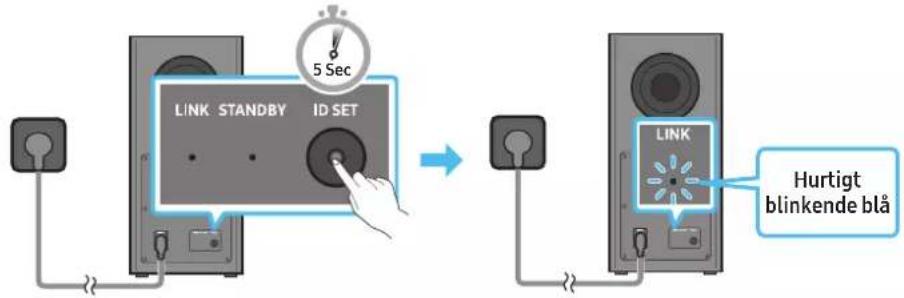
Subwooferens bagside Subwooferens bagside
-
Tryk på knappen Op på fjernbetjeningen i 5 sekunder.
-
Beskeden ID SET vises kortvarigt på Soundbar og forsvinder derefter.
Soundbar taendes automatisk, när ID SET er fulldfert.
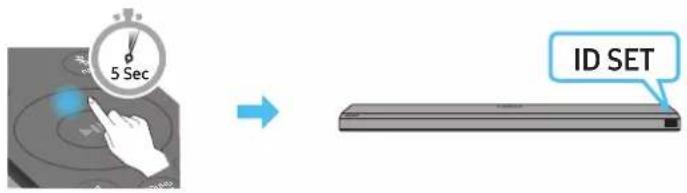
10 OPRETTESETIL APPLE AIRPLAY 2
Dolby, Dolby Atmos, and the double-D symbol are registered trademarks of Dolby Laboratories Licensing Corporation. Manufactured under license from Dolby Laboratories. Confidential unpublished works. Copyright © 2012-2020 Dolby Laboratories. All rights reserved.
dtsx
For DTS patents, see http://patents.dts.com. Manufactured under license from DTS, Inc. (for companies headquartered in the U.S./Japan/Taiwan) or under license from DTS Licensing Limited (for all other companies). DTS, DTS:X Pro, DTS:X, and the DTS:X logo are registered trademarks or trademarks of DTS, Inc. in the United States and other countries. © 2020 DTS, Inc. ALL RIGHTS RESERVED.
HDMI
The terms HDMI and HDMI High-Definition Multimedia Interface, and the HDMI Logo are trademarks or registered trademarks of HDMI Licensing Administrator, Inc. in the United States and other countries.

- Brug din Telefon, tablet eller computer som fjernbetjening til Spotify. Gå til Spotify.com/connect for at &, hvordan du gør
- Spotify-softwareer underlagt tredjepartslicensee. Få mere at vide her: https://www.spotify.com/connect/third-party-licenses.

- Apple, AirPlay, iPhone, iPad, HomePod, and Apple TV are trademarks of Apple Inc., registered in the U.S. and other countries.
- Use of the Works with Apple badge means that an accessory has been designed to work specifically with the technology identified in the badge and has been certified by the developer to meet Apple performance standards.
16 LICENSBEMAERKNINGER VEDR. OPEN SOURCE
Hvis du vil sende sporgsmal og anmodninger vedrarende open sources, kan du kontakte Samsung Open Source ((http://opensource.samsung.com)
17 VIGTIGE NOTER OM SERVICE
Dolby, Dolby Atmos, and the double-D symbol are registered trademarks of Dolby Laboratories Licensing Corporation. Manufactured under license from Dolby Laboratories. Confidential unpublished works. Copyright © 2012-2020 Dolby Laboratories. All rights reserved.
dtsx
For DTS patents, see http://patents.dts.com. Manufactured under license from DTS, Inc. (for companies headquartered in the U.S./Japan/Taiwan) or under license from DTS Licensing Limited (for all other companies). DTS, DTS:X Pro, DTS:X, and the DTS:X logo are registered trademarks or trademarks of DTS, Inc. in the United States and other countries. © 2020 DTS, Inc. ALL RIGHTS RESERVED.
HOMI
The terms HDMI and HDMI High-Definition Multimedia Interface, and the HDMI Logo are trademarks or registered trademarks of HDMI Licensing Administrator, Inc. in the United States and other countries.

- Apple, AirPlay, iPhone, iPad, HomePod, and Apple TV are trademarks of Apple Inc., registered in the U.S. and other countries.
- Use of the Works with Apple badge means that an accessory has been designed to work specifically with the technology identified in the badge and has been certified by the developer to meet Apple performance standards.
16 HINWEIS ZUR OPEN SOURCE-LIZENZ
VEILIGHEIDSWAARSCHUWINGEN
OM DE KANS OP EEN ELEKTRISCHE SCHOK TE VERKLEINEN MAG U DE BEHUIZING NIET VERWIJDEREN (OF DE ACHTERZIJDE).
ER BEVINDEN ZICH GEEN ONDERDELEN DIE DOOR DE GEBRUIKER KUNNEN WORDEN GEREpareERD. LAAT REPARATIE EN ONDERHOUD OVER AAN GEKWALIFICEERD SERVICEPERSONEEL.
Samsung-tv's uitgebracht in 2017 of later
Home () Installingen () Geluid Geluidsuitvoer [AV] Samsung Soundbar Q700A / Q710A (Wi-Fi)
07 EEN EXTERN APPARAAT VERBINDEN
10 VERBINDEN MET APPLE AIRPLAY 2
14 PROBLEEMOPLOSSING
Dolby, Dolby Atmos, and the double-D symbol are registered trademarks of Dolby Laboratories Licensing Corporation. Manufactured under license from Dolby Laboratories. Confidential unpublished works. Copyright © 2012-2020 Dolby Laboratories. All rights reserved.
dtsx
For DTS patents, see http://patents.dts.com. Manufactured under license from DTS, Inc. (for companies headquartered in the U.S./Japan/Taiwan) or under license from DTS Licensing Limited (for all other companies). DTS, DTS:X Pro, DTS:X, and the DTS:X logo are registered trademarks or trademarks of DTS, Inc. in the United States and other countries. © 2020 DTS, Inc. ALL RIGHTS RESERVED.
HOMI
The terms HDMI and HDMI High-Definition Multimedia Interface, and the HDMI Logo are trademarks or registered trademarks of HDMI Licensing Administrator, Inc. in the United States and other countries.

- Apple, AirPlay, iPhone, iPad, HomePod, and Apple TV are trademarks of Apple Inc., registered in the U.S. and other countries.
- Use of the Works with Apple badge means that an accessory has been designed to work specifically with the technology identified in the badge and has been certified by the developer to meet Apple performance standards.
16 OPEN SOURCE-LICENTIEKENNISGEVING
www.samsung.com/uk/aboutsamsung/sustainability/environment/our-commitment/data/
COMMISSIEREGELING (EU) 2019/1782
10 ÜHENDAMINE APPLE AIRPLAY 2-GA
Dolby, Dolby Atmos, and the double-D symbol are registered trademarks of Dolby Laboratories Licensing Corporation. Manufactured under license from Dolby Laboratories. Confidential unpublished works. Copyright © 2012-2020 Dolby Laboratories. All rights reserved.
dtsx
For DTS patents, see http://patents.dts.com. Manufactured under license from DTS, Inc. (for companies headquartered in the U.S./Japan/Taiwan) or under license from DTS Licensing Limited (for all other companies). DTS, DTS:X Pro, DTS:X, and the DTS:X logo are registered trademarks or trademarks of DTS, Inc. in the United States and other countries. © 2020 DTS, Inc. ALL RIGHTS RESERVED.
HOMI
The terms HDMI and HDMI High-Definition Multimedia Interface, and the HDMI Logo are trademarks or registered trademarks of HDMI Licensing Administrator, Inc. in the United States and other countries.

- Lisateavet Spotify Connecti kohta vt veebisaidilt www.spotify.com/ connect
- Spotify Software allub muu osapoole litsentsidele, mille leiate siit: https://www.spotify.com/connect/ third-party-licenses.

- Apple, AirPlay, iPhone, iPad, HomePod, and Apple TV are trademarks of Apple Inc., registered in the U.S. and other countries.
- Use of the Works with Apple badge means that an accessory has been designed to work specifically with the technology identified in the badge and has been certified by the developer to meet Apple performance standards.
16 AVATUD LÄHTEKOODI LITSENTSI TEATIS
10 YHTEYDEN MUODOSTAMINEN APPLE AIRPLAY 2:EEN
Dolby, Dolby Atmos, and the double-D symbol are registered trademarks of Dolby Laboratories Licensing Corporation. Manufactured under license from Dolby Laboratories. Confidential unpublished works. Copyright © 2012-2020 Dolby Laboratories. All rights reserved.
dtsx
For DTS patents, see http://patents.dts.com. Manufactured under license from DTS, Inc. (for companies headquartered in the U.S./Japan/Taiwan) or under license from DTS Licensing Limited (for all other companies). DTS, DTS:X Pro, DTS:X, and the DTS:X logo are registered trademarks or trademarks of DTS, Inc. in the United States and other countries. © 2020 DTS, Inc. ALL RIGHTS RESERVED.
HOMI
The terms HDMI and HDMI High-Definition Multimedia Interface, and the HDMI Logo are trademarks or registered trademarks of HDMI Licensing Administrator, Inc. in the United States and other countries.

- Apple, AirPlay, iPhone, iPad, HomePod, and Apple TV are trademarks of Apple Inc., registered in the U.S. and other countries.
- Use of the Works with Apple badge means that an accessory has been designed to work specifically with the technology identified in the badge and has been certified by the developer to meet Apple performance standards.
16 AVOIMEN LÄHDEKOODIN LISENSSITIEDOTE
18 TEKNISET TIEDOT JA OPAS
Tekniset tiedot
02 VUE D'ENSEMBLE DU PRODUIT
7 IDMITOTV(eARC/ARC)
10 CONNEXIONÀ APPLE AIRPLAY 2
Dolby, Dolby Atmos, and the double-D symbol are registered trademarks of Dolby Laboratories Licensing Corporation. Manufactured under license from Dolby Laboratories. Confidential unpublished works. Copyright © 2012-2020 Dolby Laboratories. All rights reserved.
dtsx
For DTS patents, see http://patents.dts.com. Manufactured under license from DTS, Inc. (for companies headquartered in the U.S./Japan/Taiwan) or under license from DTS Licensing Limited (for all other companies). DTS, DTS:X Pro, DTS:X, and the DTS:X logo are registered trademarks or trademarks of DTS, Inc. in the United States and other countries. © 2020 DTS, Inc. ALL RIGHTS RESERVED.
HOMI
The terms HDMI and HDMI High-Definition Multimedia Interface, and the HDMI Logo are trademarks or registered trademarks of HDMI Licensing Administrator, Inc. in the United States and other countries.

- Apple, AirPlay, iPhone, iPad, HomePod, and Apple TV are trademarks of Apple Inc., registered in the U.S. and other countries.
- Use of the Works with Apple badge means that an accessory has been designed to work specifically with the technology identified in the badge and has been certified by the developer to meet Apple performance standards.
16 AVIS CONCERNANT LES LICENCES LIBRES
17 REMARQUES IMPORTANTES RELATIVES AUSERVICE
Samsung TV nou kuklofo npoov to 2017 npyotepa
Apxikn (m) PuOioeic (G) Hxoc Efooc xou [AV] Samsung Soundbar Q700A / Q710A (Wi-Fi)
07 Σ'YNΔEΣH ME EΞΩTEPIK'H ΣYΞKEY'H
10 Σ'YNΔEΣH ΣTO APPLE AIRPLAY 2
Dolby, Dolby Atmos, and the double-D symbol are registered trademarks of Dolby Laboratories Licensing Corporation. Manufactured under license from Dolby Laboratories. Confidential unpublished works. Copyright © 2012-2020 Dolby Laboratories. All rights reserved.
dtsx
For DTS patents, see http://patents.dts.com. Manufactured under license from DTS, Inc. (for companies headquartered in the U.S./Japan/Taiwan) or under license from DTS Licensing Limited (for all other companies). DTS, DTS:X Pro, DTS:X, and the DTS:X logo are registered trademarks or trademarks of DTS, Inc. in the United States and other countries. © 2020 DTS, Inc. ALL RIGHTS RESERVED.
HDMI
The terms HDMI and HDMI High-Definition Multimedia Interface, and the HDMI Logo are trademarks or registered trademarks of HDMI Licensing Administrator, Inc. in the United States and other countries.

Xpnouoioae to tnaeawvo, to taunntov unoloyoiou wcn tnaexupatnpv ia to Spotify. nvaee oto Spotify.com/connect vaa va ma8ei ciw
To loviouko Spoty uoketai ae abecptiwv, tio oioic mpoic va 8c Ew: https://www.spotify.com/connect/third-party-licenses.

- Apple, AirPlay, iPhone, iPad, HomePod, and Apple TV are trademarks of Apple Inc., registered in the U.S. and other countries.
- Use of the Works with Apple badge means that an accessory has been designed to work specifically with the technology identified in the badge and has been certified by the developer to meet Apple performance standards.
16 EIΔΟΝΟ'IHΣH ΓΙΑ 'AΔEIA X'P'HΣH ΛΟΓIΣMIKO'Y ANOIXTO'Y K'ΩΔIKA
Tia va otietie epwnmuata kai atnmuata nou apopov loyotik ovoitou kwoka, etikovwwtoe to Samsung Open Source (http://opensource.sams.com)
17 ΣHMANTIK'ΕΣ ΣHMEI'ΩΣEΙΣ ΣXETIK'A ME THEN YΠHPEΙA
T a oxnmuata kai o elovc oe auto to Eyxepiox npotn npexovtau yia okoouc avapopac kai mopei va diaepouv ano tyn npayatikn eufavion tou npoiovtoc.
Evexetai va unapEi xpeoian bieknepaiwnoC nepiinwnonou a) kAn0eivac texvikoc katuniv aithmuoc ackai dev diantowei kantoio eAttwma oTo npoiov (dAa, av dev diaabeate to evxipidio xpnt).
(b) ποροκομιασε τη μονάδα σε ενα κέντρο επιοκεύων καλ δεν διαπιώθει κάποι έλάττωμα στο προίν (δηλαδή, αν δεν διαβάσατο τό γχειρίδι χρήση).
- Ipotoouoac EIOKEΦei Evac TeXVKoc, Oa Evnuepwoeite yia to KoatoC 6IeKepaiowns.
18 PPOΔIAPAΦ'ΕΣ KAI OΔHΓ'OΣ
PpOdelta
www.samsung.com/uk/aboutsamsung/sustainability/environment/our-commitment/data/
KANONI\SMOEINITPOHNEE2019/1782
Analntnoeic okooyiokx oxediaa yia eEwotepka tropofobotika:
www.samsung.com/global/ecodesign_component
BIZTONSÁGINFORMÁCIÖK
BIZTONSAGI FIGYELMEZTETESEK
AZ ARAMUTES Veszelyenek CSOKENTSE ERDEKEBEN NE TAVOLITSA EL A BURKOLATOT (VAGY A HATOLDALT)! A KESZULEK BELSEJEBEN NINCSENEK FELHASNZALO ALTAL KEZELENDO ALKATRESZEK. A SZERVIZELEST BIZZA KEPZETT SZAKEMBERRE. Az alabbi tablazat a Samsung termeken talalhato szimbolumok magyarazatat tartalmazza.
A Soundbar also panelje
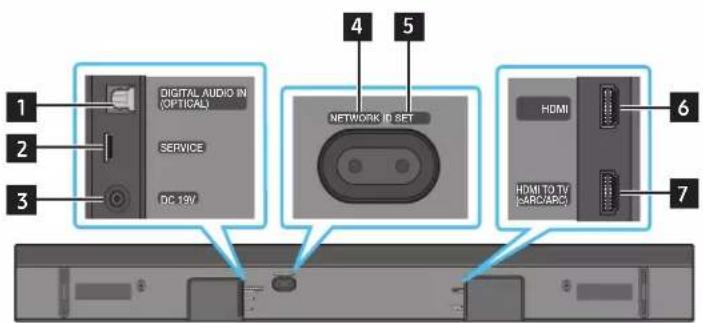
1 DIGITAL AUDIO IN (OPTICAL)
10 CSATLAKOZTATÁS AZ APPLE AIRPLAY 2-ESHEZ
Dolby, Dolby Atmos, and the double-D symbol are registered trademarks of Dolby Laboratories Licensing Corporation. Manufactured under license from Dolby Laboratories. Confidential unpublished works. Copyright © 2012-2020 Dolby Laboratories. All rights reserved.
dtsx
For DTS patents, see http://patents.dts.com. Manufactured under license from DTS, Inc. (for companies headquartered in the U.S./Japan/Taiwan) or under license from DTS Licensing Limited (for all other companies). DTS, DTS:X Pro, DTS:X, and the DTS:X logo are registered trademarks or trademarks of DTS, Inc. in the United States and other countries. © 2020 DTS, Inc. ALL RIGHTS RESERVED.
HDMI
The terms HDMI and HDMI High-Definition Multimedia Interface, and the HDMI Logo are trademarks or registered trademarks of HDMI Licensing Administrator, Inc. in the United States and other countries.
Spotify
Works with Apple AirPlay
- Apple, AirPlay, iPhone, iPad, HomePod, and Apple TV are trademarks of Apple Inc., registered in the U.S. and other countries.
- Use of the Works with Apple badge means that an accessory has been designed to work specifically with the technology identified in the badge and has been certified by the developer to meet Apple performance standards.
16 NYICT FORRÁSKÖDÜ LICENCCEL KAPCSOLATOS TAJÉKOZTATÁS
10 CONNECTION AD APPLE AIRPLAY 2
Dolby, Dolby Atmos, and the double-D symbol are registered trademarks of Dolby Laboratories Licensing Corporation. Manufactured under license from Dolby Laboratories. Confidential unpublished works. Copyright © 2012-2020 Dolby Laboratories. All rights reserved.
dtsx
For DTS patents, see http://patents.dts.com. Manufactured under license from DTS, Inc. (for companies headquartered in the U.S./Japan/Taiwan) or under license from DTS Licensing Limited (for all other companies). DTS, DTS:X Pro, DTS:X, and the DTS:X logo are registered trademarks or trademarks of DTS, Inc. in the United States and other countries. © 2020 DTS, Inc. ALL RIGHTS RESERVED.
HOMI
The terms HDMI and HDMI High-Definition Multimedia Interface, and the HDMI Logo are trademarks or registered trademarks of HDMI Licensing Administrator, Inc. in the United States and other countries.

- Apple, AirPlay, iPhone, iPad, HomePod, and Apple TV are trademarks of Apple Inc., registered in the U.S. and other countries.
- Use of the Works with Apple badge means that an accessory has been designed to work specifically with the technology identified in the badge and has been certified by the developer to meet Apple performance standards.
16 AVVISO DI LICENZA PER IL SOFTWARE OPEN SOURCE
02 PRODUKTA PÄRSKATS
14 PROBLEMU NOVER'SANA
Pirms meklejat palidzibu, paBaraudiet talak noradito.
Soundbar neiesledzas
- Pärbaudiet, vai sistemas Soundbar barosanas vads ir pareizi iesprausts kontaktligzdä.
Soundbar darbojas kūdaini
Dolby, Dolby Atmos, and the double-D symbol are registered trademarks of Dolby Laboratories Licensing Corporation. Manufactured under license from Dolby Laboratories. Confidential unpublished works. Copyright © 2012-2020 Dolby Laboratories. All rights reserved.
dtsx
For DTS patents, see http://patents.dts.com. Manufactured under license from DTS, Inc. (for companies headquartered in the U.S./Japan/Taiwan) or under license from DTS Licensing Limited (for all other companies). DTS, DTS:X Pro, DTS:X, and the DTS:X logo are registered trademarks or trademarks of DTS, Inc. in the United States and other countries. © 2020 DTS, Inc. ALL RIGHTS RESERVED.
HOMI
The terms HDMI and HDMI High-Definition Multimedia Interface, and the HDMI Logo are trademarks or registered trademarks of HDMI Licensing Administrator, Inc. in the United States and other countries.

- Plasaku informaciju par Spotify Connect skatiet seit: www.spotify.com/connect
- Uz programmaturu Spotify attiecas treso pušu licences, kas pieejamas šeit: https://www.spotify.com/connect/third-party-licenses.

- Apple, AirPlay, iPhone, iPad, HomePod, and Apple TV are trademarks of Apple Inc., registered in the U.S. and other countries.
- Use of the Works with Apple badge means that an accessory has been designed to work specifically with the technology identified in the badge and has been certified by the developer to meet Apple performance standards.
16 ATVERTA KODA AVOTA LICENCES PAZINOJUMS
Lai sutitu jautajumus un pieprasijumus par atvertajiem avotiem, szinieties ar Samsung Open Source (http://opensource.samsung.com)
17 SVARIGI PAZINOJUMI PAR APKALPOŠANU
- Shemas un atteli saja lietotaja rokasgramata ir nodrosinati tikai atsaucei, un tie var atskirties no faktiska izstradajuma izskata.
Jums var tikt piemerota maksa par pakalpojumu sniegsanu, ja.
(a) pēc jūsui pieprasijuma tikis izsaukts inženieris, bet netiek konstateti nekādi izstradajuma defekti (t. i., ja neesat izlasijis šajā lietotaja rokasgrāmata sniegto informáciju);
(b) jus aizvedat ierici uz remonta centru, kura netiek konstateti nekadi izstradajuma defekti (t. i., ja neesat izlasijis šaja lietotaja rokasgramata sniego informaciju).
- Jus tiksiet informets par administracijas maksas apjomu pirms tehniska darbinieka vizites.
18 SPECIFIKACIJAS UN NORADES
Specifikacijas
| Modela nosaukums HW-Q700A / HW-Q710A | |
| Svars 3,6 kg | |
| Izmēri (P x A x Dz) 980,0 x 60,0 x 115,0 mm | |
| Darba temperatūras diapazons no +5 °C lidz +35 °C | |
| Darba mitruma diapazons 10% ~ 75% | |
| PASTIPRINATAJS Nominālā izvades jauda ((30 W x 4) + (20 W x 2) + 10 W) +160 W | |
| Atbalstitie atskanošanas formāti | Dolby 5.1ch / Dolby Digital Plus / Dolby TRUE HD / Dolby ATMOS DTS 5.1ch / DTS HD / DTS-HD Master Audio / DTS:X / LPCM 8Ch |
| BEZVADU IERICES IZVADES JAUDA Wi-Fi maksimalā raiditāja jauda | 100 mW pie 2,4 GHz - 2,4835 GHz, 200 mW pie 5,15 GHz - 5,25 GHz, 100 mW pie 5,25 GHz - 5,35 GHz un 5,47 GHz - 5,725 GHz |
| BEZVADU IERICES IZVADES JAUDA BT maksimalā raiditāja jauda 100 mW, 2,4 GHz - 2,4835 GHz | |
| BEZVADU IERICES IZVADES JAUDA SRD maksimalā raiditāja jauda 25mW, 5,775GHz - 5,875GHz | |
| Zemfrekvences skalruṇa nosaukums PS-WA75B | |
| Svars 5,9 kg | |
| Izmēri (P x A x Dz) 205,0 x 353,0 x 302,0 mm | |
| PASTIPRINATAJS Nominālā izvades jauda 160 W | |
| BEZVADU IERICES IZVADES JAUDA SRD maksimalā raiditāja jauda 25mW, 5,775GHz - 5,875GHz |
PIEZIME
Samsung Electronics Co., Ltd patur tiesibas bez bridinajuma veikt izmainas specifikacijas.
Svars un izmérir noraditi aptuveni.
Uzmanibu! lesledzot/izsledzot Wi-Fi, skanas panelis Soundbar tiek automatiski restartets.
DIGITAL AUDIO IN (OPTICAL)
Skirta prijungti prie iisorinio Irenginio skaitmenines (optinés) isvesties. (Zr. 21 psL)
2 SERVICE
Prijunkite USB atmintine, kad atnaujintumete produkto programine Iranga.
3 DC 19V (maitinimo tiekimas)
Prijunkite kintamosios / nuolatinés srovés adapterj. (Zr. 13 psl.)
Dolby, Dolby Atmos, and the double-D symbol are registered trademarks of Dolby Laboratories Licensing Corporation. Manufactured under license from Dolby Laboratories. Confidential unpublished works. Copyright © 2012-2020 Dolby Laboratories. All rights reserved.
dtsx
For DTS patents, see http://patents.dts.com. Manufactured under license from DTS, Inc. (for companies headquartered in the U.S./Japan/Taiwan) or under license from DTS Licensing Limited (for all other companies). DTS, DTS:X Pro, DTS:X, and the DTS:X logo are registered trademarks or trademarks of DTS, Inc. in the United States and other countries. © 2020 DTS, Inc. ALL RIGHTS RESERVED.
HDMI
The terms HDMI and HDMI High-Definition Multimedia Interface, and the HDMI Logo are trademarks or registered trademarks of HDMI Licensing Administrator, Inc. in the United States and other countries.

- Noredami gauti daugiau informacijos apie „Spotify Connect“, apisilanky kite adressu www.spotify.com/connect
- "Spotify" programinei jrangai taikomos treciuju saliu licenciños pateiktos cia: https://www.spotify.com/connect/third-party-licenses.

- Apple, AirPlay, iPhone, iPad, HomePod, and Apple TV are trademarks of Apple Inc., registered in the U.S. and other countries.
- Use of the Works with Apple badge means that an accessory has been designed to work specifically with the technology identified in the badge and has been certified by the developer to meet Apple performance standards.
16 ATVIRO ŠALTINIO JSPÉJIMAS DÉL LICENCIJOS
Jei norite siusti uzklausas ir klausimus del atvirju kody, susisiekite su "Samsung Open Source" (http://opensource.samsung.com)
17 SVARBIOS PASTABOS API PASLAUGA
10 KOBLE TIL APPLE AIRPLAY 2
Dolby, Dolby Atmos, and the double-D symbol are registered trademarks of Dolby Laboratories Licensing Corporation. Manufactured under license from Dolby Laboratories. Confidential unpublished works. Copyright © 2012-2020 Dolby Laboratories. All rights reserved.
dtsx
For DTS patents, see http://patents.dts.com. Manufactured under license from DTS, Inc. (for companies headquartered in the U.S./Japan/Taiwan) or under license from DTS Licensing Limited (for all other companies). DTS, DTS:X Pro, DTS:X, and the DTS:X logo are registered trademarks or trademarks of DTS, Inc. in the United States and other countries. © 2020 DTS, Inc. ALL RIGHTS RESERVED.
HDMI
The terms HDMI and HDMI High-Definition Multimedia Interface, and the HDMI Logo are trademarks or registered trademarks of HDMI Licensing Administrator, Inc. in the United States and other countries.

- Apple, AirPlay, iPhone, iPad, HomePod, and Apple TV are trademarks of Apple Inc., registered in the U.S. and other countries.
- Use of the Works with Apple badge means that an accessory has been designed to work specifically with the technology identified in the badge and has been certified by the developer to meet Apple performance standards.
16 LISENSMERKNAD FOR APEN KILDE
Hvis du vil sende spørsmål om Åpne killedekoder, kan du kontakte Samsung Open Source via e-post (http://opensource.samsung.com)
17 VIKTIGE MERKNADER OM SERVICE
10 LACZENIE Z SYSTEMEM APPLE AIRPLAY 2
Dolby, Dolby Atmos, and the double-D symbol are registered trademarks of Dolby Laboratories Licensing Corporation. Manufactured under license from Dolby Laboratories. Confidential unpublished works. Copyright © 2012-2020 Dolby Laboratories. All rights reserved.
dtsx
For DTS patents, see http://patents.dts.com. Manufactured under license from DTS, Inc. (for companies headquartered in the U.S./Japan/Taiwan) or under license from DTS Licensing Limited (for all other companies). DTS, DTS:X Pro, DTS:X, and the DTS:X logo are registered trademarks or trademarks of DTS, Inc. in the United States and other countries. © 2020 DTS, Inc. ALL RIGHTS RESERVED.
HOMI
The terms HDMI and HDMI High-Definition Multimedia Interface, and the HDMI Logo are trademarks or registered trademarks of HDMI Licensing Administrator, Inc. in the United States and other countries.

- Apple, AirPlay, iPhone, iPad, HomePod, and Apple TV are trademarks of Apple Inc., registered in the U.S. and other countries.
- Use of the Works with Apple badge means that an accessory has been designed to work specifically with the technology identified in the badge and has been certified by the developer to meet Apple performance standards.
16 INFORMACJA O LICENCJI OPEN SOURCE
www.samsung.com/uk/aboutsamsung/sustainability/environment/our-commitment/data/
ROZPORZADZENIE KOMISJI EUROPEJSKIEJ (WE) 2019/1782
"SAMSUNG-TV REMOTE", "ALL-TV REMOTE".
10 LIGAR AO APPLE AIRPLAY 2
Dolby, Dolby Atmos, and the double-D symbol are registered trademarks of Dolby Laboratories Licensing Corporation. Manufactured under license from Dolby Laboratories. Confidential unpublished works. Copyright © 2012-2020 Dolby Laboratories. All rights reserved.
dtsx
For DTS patents, see http://patents.dts.com. Manufactured under license from DTS, Inc. (for companies headquartered in the U.S./Japan/Taiwan) or under license from DTS Licensing Limited (for all other companies). DTS, DTS:X Pro, DTS:X, and the DTS:X logo are registered trademarks or trademarks of DTS, Inc. in the United States and other countries. © 2020 DTS, Inc. ALL RIGHTS RESERVED.
HDMI
The terms HDMI and HDMI High-Definition Multimedia Interface, and the HDMI Logo are trademarks or registered trademarks of HDMI Licensing Administrator, Inc. in the United States and other countries.

- Apple, AirPlay, iPhone, iPad, HomePod, and Apple TV are trademarks of Apple Inc., registered in the U.S. and other countries.
- Use of the Works with Apple badge means that an accessory has been designed to work specifically with the technology identified in the badge and has been certified by the developer to meet Apple performance standards.
16 AVISO DE LICENÇA DE CÓDIGO ABERTO
Para enviar duvidas ou pedidos para quostoes relacionadas com dato aberto,contacte a Samsung Open Source (http://opensource.samsung. com)
17 NOTAS IMPORTANTES SOBRE A ASSISTÊNCIA
7 IDMITOTV(eARC/ARC)
ConectaIa mufa HDMI de pe un televizor TV. (ConsultataI pagina 16)
10 CONECTAREA LA APPLE AIRPLAY 2
Dolby, Dolby Atmos, and the double-D symbol are registered trademarks of Dolby Laboratories Licensing Corporation. Manufactured under license from Dolby Laboratories. Confidential unpublished works. Copyright © 2012-2020 Dolby Laboratories. All rights reserved.
dtsx
For DTS patents, see http://patents.dts.com. Manufactured under license from DTS, Inc. (for companies headquartered in the U.S./Japan/Taiwan) or under license from DTS Licensing Limited (for all other companies). DTS, DTS:X Pro, DTS:X, and the DTS:X logo are registered trademarks or trademarks of DTS, Inc. in the United States and other countries. © 2020 DTS, Inc. ALL RIGHTS RESERVED.
HOMI
The terms HDMI and HDMI High-Definition Multimedia Interface, and the HDMI Logo are trademarks or registered trademarks of HDMI Licensing Administrator, Inc. in the United States and other countries.

- Pentru mai multe informaţii despree Spotify Connect, accesaţi www.spotify.com/connect
- Software-ul Spotify face abiectul licentelor de la terti care se afla aici: https://www.spotify.com/connect/third-party-licenses.

- Apple, AirPlay, iPhone, iPad, HomePod, and Apple TV are trademarks of Apple Inc., registered in the U.S. and other countries.
- Use of the Works with Apple badge means that an accessory has been designed to work specifically with the technology identified in the badge and has been certified by the developer to meet Apple performance standards.
16 NOTÄ REFERITOARE LA LICENTA PENTRU PROGRAME OPEN SOURCE
Pentru a trimite solicitari si intrebari despree programele open source, contactaSamsung Open Source (http://opensource.samsung.com)
17 NOTE IMPORTANTE DESPRE SERVICIU
SIGURNOSNE INFORMACije
SIGURNOSNA UPOZORENJA
DA BISTE SMANJILI OPASNOST OD STRUJNOG UDARA, NEMOJTE UKLANJATI POKLOPAC (NITI ZADNJ DEO). UNUTRA SE NE NALAZE DELOVI KOJE KORISNICI MOGU SAMI DA POPRAVE. SVE POPRAVKE PREPUSTITE KVALIFIKOVANOM SERVISNOM OSOBLIJU.
Dolby, Dolby Atmos, and the double-D symbol are registered trademarks of Dolby Laboratories Licensing Corporation. Manufactured under license from Dolby Laboratories. Confidential unpublished works. Copyright © 2012-2020 Dolby Laboratories. All rights reserved.
dtsx
For DTS patents, see http://patents.dts.com. Manufactured under license from DTS, Inc. (for companies headquartered in the U.S./Japan/Taiwan) or under license from DTS Licensing Limited (for all other companies). DTS, DTS:X Pro, DTS:X, and the DTS:X logo are registered trademarks or trademarks of DTS, Inc. in the United States and other countries. © 2020 DTS, Inc. ALL RIGHTS RESERVED.
HOMI® HOMEPARTITION MULTIDIMENSIONAL INTERFACE
The terms HDMI and HDMI High-Definition Multimedia Interface, and the HDMI Logo are trademarks or registered trademarks of HDMI Licensing Administrator, Inc. in the United States and other countries.

- Vise informacija o usluzi Spotify Connect potrazite na web lokaciji www.spotify.com/connect
- Softver Spotify podleže licencama trečih stana koje se mogu pronáci ovde: https://www.spotify.com/connect/third-party-licenses.

- Apple, AirPlay, iPhone, iPad, HomePod, and Apple TV are trademarks of Apple Inc., registered in the U.S. and other countries.
- Use of the Works with Apple badge means that an accessory has been designed to work specifically with the technology identified in the badge and has been certified by the developer to meet Apple performance standards.
16 NAPOMENA O LICENÇA KORISÇENJE SOFTVERA OTVORENOG KODA
Za slanje upita i zahteva za pitanja vezana za softver otvorenog koda, kontaktirajte Samsung Open Source (http://opensource.samsung.com)
17 VAŽNE NAPOMENE O USLUZI
- Slike i ilustracije u ovom korisničkom priručniku su navedene samo za referencu i mogu se razlikovati od stvarnog izgleda proizvoda.
- Moguca je naplata naknade za administraciju u slučaju
(a) poziva inżenjera na vaš zahtev, akо se utvrdi da na proizvodu ne postoji kvar (tj. niste pročitali korisnički prisćnik).
(b) dostave uredaja u servisni centar, akse utvrdi da na proizvodu ne postoji kvar (tj. niste prociitali korisnicki prisučnik).
- O iznosu administrativne naknade cete biti obavesteni pre poseta tehnicara.
18 SPECIFIKACije I VODIC
Specifikacije
| Naziv modela HW-Q700A / HW-Q710A | |
| Težina 3,6 kg | |
| Dimenzije (Š x V x D) 980,0 x 60,0 x 115,0 mm | |
| Raspon radne temperature +5 °C do +35 °C | |
| Raspon radne vlage 10% ~ 75% | |
| POJAČALO Nazivna izlazna snaga ((30 W x 4) + (20 W x 2) + 10 W) + 160 W | |
| Podržani formati reprodukcije | Dolby 5.1 k / Dolby Digital Plus / Dolby TRUE HD / Dolby ATMOS DTS 5.1 k / DTS HD / DTS-HD Master Audio / DTS:X / LPCM 8 k |
| IZLAZNA SNAGA BEŽICNOG UREDAJA Maks. snaga Wi-Fi predajnika | 100 mW pri 2,4 GHz - 2,4835 GHz, 200 mW pri 5,15 GHz - 5,25 GHz, 100 mW pri 5,25 GHz - 5,35 GHz i 5,47 GHz - 5,725 GHz |
| IZLAZNA SNAGA BEŽICNOG UREDAJA Maks. snaga BT predajnika 100mW pri 2,4GHz - 2,4835GHz | |
| IZLAZNA SNAGA BEŽICNOG UREDAJA Maks. snaga SRD predajnika 25mW pri 5,775GHz - 5,875GHz | |
| Naziv sabvufera PS-WA75B | |
| Težina 5,9 kg | |
| Dimenzije (Š x V x D) 205,0 x 353,0 x 302,0 mm | |
| POJAČALO Nazivna izlazna snaga 160 W | |
| IZLAZNA SNAGA BEŽICNOG UREDAJA Maks. snaga SRD predajnika 25mW pri 5,775GHz - 5,875GHz |
NAPOMENA
Samsung Electronics Co., Ltd zadrzava pravo da promeni specifikacije bez prethodnog upozorenja.
- Težina i dimenzije su približne.
Mere opreza: Urejaj Soundbar ce se automatski restartovati ako uključite/isključite Wi-Fi.
| Ukupna potrošnja energije u režimu mirovanja (W) 5,5 W | |
| Wi-Fi | Pritisnite dugme ID SET na donjem panelu系统的 Soundbar na 30 sekundi da biste uključili/ isključili Wi-Fi. |
| Način isključivanja priključka | |
| Bluetooth | Pritisnite dugme NETWORK na donjem panelu系统的 Soundbar 30 sekundi da biste uključili/ isključili Bluetooth. |
| Način isključivanja priključka |
- Kompanija Samsung ovm izjavljuje da je ova radio-oprema u skladu sa Direktivom 2014/53/EU i relevantnim zakonskim odredbama Ujedinjenog Kraljevstva.
Ceo tekst izjave o uskladenosti dostupan je na sledecoj internet adresi:
http://www.samsung.com; idite na stavku Podrska iunesite naziv modela.
Ova oprema sma da se koristi u svim drzavama chanicama EU i Ujedinjenom Kraljevstvu.
Funkcija WLAN (Wi-Fi ili SRD) od 5 GHz ove opreme moze da se koristi samo u zatvorenim prostorima.
7 IDMITOTV(eARC/ARC)
Prepojenie s portom HDMI na televizore. (Pozrite si stranu 16)
Pri odpajani napajcieho kábla napajcieho adaptéra AC/DC z elektricnej zasuvky tahajte za zastrčku.
Netahajte za kabel.
10 PRIPOJENIE K APPLE AIRPLAY 2
Tato fungcia nemusi byt v niektorych krajinach k dispozicii.
Pripojenie a použivanie s produktom Apple
- S technologiou AirPlay 2 mozte ovladat domaci audiosystem pomocou zariadeni iPhone, iPad, HomePod alebo Apple TV.
- Toto zariadenie Samsung Soundbar podporuje technologiu AirPlay 2 a vyzaduje system iOS 11.4 alebo novsí.
POZNÁMKA
- Skontrolujte,ci je zariadenie Soundbar pripojenek sieti Wi-Fi. (Pozrite si Sposob 2. Pripojenie cz Wi-Fi (bezdrótvu siet))
11 MONTAZ NASTENNEHO DRZIAKA
Upozornenia k montázi
14 RIESENIE PROBLEMOV
Dolby, Dolby Atmos, and the double-D symbol are registered trademarks of Dolby Laboratories Licensing Corporation. Manufactured under license from Dolby Laboratories. Confidential unpublished works. Copyright © 2012-2020 Dolby Laboratories. All rights reserved.
dtsx
For DTS patents, see http://patents.dts.com. Manufactured under license from DTS, Inc. (for companies headquartered in the U.S./Japan/Taiwan) or under license from DTS Licensing Limited (for all other companies). DTS, DTS:X Pro, DTS:X, and the DTS:X logo are registered trademarks or trademarks of DTS, Inc. in the United States and other countries. © 2020 DTS, Inc. ALL RIGHTS RESERVED.
HDMI
The terms HDMI and HDMI High-Definition Multimedia Interface, and the HDMI Logo are trademarks or registered trademarks of HDMI Licensing Administrator, Inc. in the United States and other countries.

Bližsie informácie o sluzbe Spotify Connect najdete na adrese www.spotify.com/connect
- Na softver Spotify sa vztahuju licenci tretich stran uvedene tu: https://www.spotify.com/connect/third-party-licenses.

- Apple, AirPlay, iPhone, iPad, HomePod, and Apple TV are trademarks of Apple Inc., registered in the U.S. and other countries.
- Use of the Works with Apple badge means that an accessory has been designed to work specifically with the technology identified in the badge and has been certified by the developer to meet Apple performance standards.
16 OZNÁMENIE O LICENCII PRE SOFTWARE S OTVORENYM ZDROJOVÍCH KÓDOM
Ak chcete zasla'otaky ci poziadavky na otaky o otvoren'ych zdrojoch, obratte sa na diviziou Samsung Open Source (http://opensource.samsung. com)
17 DÖLEZITÉ POZNÁMKY K SERVISU
Dolby, Dolby Atmos, and the double-D symbol are registered trademarks of Dolby Laboratories Licensing Corporation. Manufactured under license from Dolby Laboratories. Confidential unpublished works. Copyright © 2012-2020 Dolby Laboratories. All rights reserved.
dtsx
For DTS patents, see http://patents.dts.com. Manufactured under license from DTS, Inc. (for companies headquartered in the U.S./Japan/Taiwan) or under license from DTS Licensing Limited (for all other companies). DTS, DTS:X Pro, DTS:X, and the DTS:X logo are registered trademarks or trademarks of DTS, Inc. in the United States and other countries. © 2020 DTS, Inc. ALL RIGHTS RESERVED.
HDMI
The terms HDMI and HDMI High-Definition Multimedia Interface, and the HDMI Logo are trademarks or registered trademarks of HDMI Licensing Administrator, Inc. in the United States and other countries.

- Apple, AirPlay, iPhone, iPad, HomePod, and Apple TV are trademarks of Apple Inc., registered in the U.S. and other countries.
- Use of the Works with Apple badge means that an accessory has been designed to work specifically with the technology identified in the badge and has been certified by the developer to meet Apple performance standards.
16 OBVESTILO O ODPRTOKODNI LICENCI
www.samsung.com/uk/aboutsamsung/sustainability/environment/our-commitment/data/
UREDBA KOMISJE (EU) 2019/1782
10 CONEXION A APPLE AIRPLAY 2
Dolby, Dolby Atmos, and the double-D symbol are registered trademarks of Dolby Laboratories Licensing Corporation. Manufactured under license from Dolby Laboratories. Confidential unpublished works. Copyright © 2012-2020 Dolby Laboratories. All rights reserved.
dtsx
For DTS patents, see http://patents.dts.com. Manufactured under license from DTS, Inc. (for companies headquartered in the U.S./Japan/Taiwan) or under license from DTS Licensing Limited (for all other companies). DTS, DTS:X Pro, DTS:X, and the DTS:X logo are registered trademarks or trademarks of DTS, Inc. in the United States and other countries. © 2020 DTS, Inc. ALL RIGHTS RESERVED.
HDMI
The terms HDMI and HDMI High-Definition Multimedia Interface, and the HDMI Logo are trademarks or registered trademarks of HDMI Licensing Administrator, Inc. in the United States and other countries.

- Apple, AirPlay, iPhone, iPad, HomePod, and Apple TV are trademarks of Apple Inc., registered in the U.S. and other countries.
- Use of the Works with Apple badge means that an accessory has been designed to work specifically with the technology identified in the badge and has been certified by the developer to meet Apple performance standards.
www.samsung.com/uk/aboutsamsung/sustainability/environment/our-commitment/data/
REGLAMENTO (UE) 2019/1782 DE LA COMISION
10 ANSLUTA TILL APPLE AIRPLAY 2
Dolby, Dolby Atmos, and the double-D symbol are registered trademarks of Dolby Laboratories Licensing Corporation. Manufactured under license from Dolby Laboratories. Confidential unpublished works. Copyright © 2012-2020 Dolby Laboratories. All rights reserved.
dtsx
For DTS patents, see http://patents.dts.com. Manufactured under license from DTS, Inc. (for companies headquartered in the U.S./Japan/Taiwan) or under license from DTS Licensing Limited (for all other companies). DTS, DTS:X Pro, DTS:X, and the DTS:X logo are registered trademarks or trademarks of DTS, Inc. in the United States and other countries. © 2020 DTS, Inc. ALL RIGHTS RESERVED.
HDMI
The terms HDMI and HDMI High-Definition Multimedia Interface, and the HDMI Logo are trademarks or registered trademarks of HDMI Licensing Administrator, Inc. in the United States and other countries.

- Apple, AirPlay, iPhone, iPad, HomePod, and Apple TV are trademarks of Apple Inc., registered in the U.S. and other countries.
- Use of the Works with Apple badge means that an accessory has been designed to work specifically with the technology identified in the badge and has been certified by the developer to meet Apple performance standards.
16 LICENSMEDDELANDE FÖR ÖPPEN KÄLLKOD
© 2021 Samsung Electronics Co., Ltd. All rights reserved.
Contact SAMSUNG WORLD WIDE
If you have any questions or comments relating to Samsung products, please contact the SAMSUNG customer care Centre.
| Country Samsung Service | Centre | Web Site |
| UK 0333 000 0333 www.samsung.com/uk/support | ||
| IRELAND (EIRE) 0818 717100 www.samsung.com/ie/support | ||
| GERMANY 06196 77 555 77 www.samsung.com/de/support | ||
| FRANCE 01 48 63 00 00 www.samsung.com/fr/support | ||
| ITALIA 800-SAMSUNG (800.7267864) www.samsung.com/it/support | ||
| SPAIN 91175 00 15 www.samsung.com/es/support | ||
| PORTUGAL 808 207 267 www.samsung.com/pt/support | ||
| LUXEMBURG 261 03 710 www.samsung.com/be_fr/support | ||
| NETHERLANDS 088 90 90 100 www.samsung.com/nl/support | ||
| BELGIUM | 02-201-24-18 | www.samsung.com/be/support (Dutch)www.samsung.com/be_fr/support (French) |
| NORWAY | 21629099 | www.samsung.com/no/support |
| DENMARK | 707 019 70 | www.samsung.com.dk/support |
| FINLAND | 030-6227 515 | www.samsung.com/fi/support |
| SWEDEN | 0771 726 786 www.samsung.com/se/support | |
| POLAND | 801-172-678* lub +48 22 607-93-33* * (optata wedtug taryfy operadora) | http://www.samsung.com/pl/support/ |
| HUNGARY | 0680SAMSUNG (0680-726-7864) | www.samsung.com/hu/support |
| AUSTRIA | 0800 72 67 864 (0800-SAMSUNG) | www.samsung.com/at/support |
| SWITZERLAND | 0800 726 786 | www.samsung.com/ch/support (German)www.samsung.com/ch_fr/support (French) |
| CZECH | 800 - SAMSUNG (800-726786) | www.samsung.com/cz/support |
| SLOVAKIA | 0800 - SAMSUNG (0800-726 786) | www.samsung.com/sk/support |
| CROATIA | 072 726 786 | www.samsung.com/hr/support |
| BOSNIA | 055 233 999 www.samsung.com/ba/support | |
| North Macedonia | 023 207 777 www.samsung.com/mk/support | |
| MONTENEGRO 020 405 888 www.samsung.com/support | ||
| SLOVENIA | 080 697 267 (brezplačna števlka) | www.samsung.com.si/support |
| SERBIA | 011 321 6899 www.samsung.com/rs/support | |
| Kosovo | 0800 10 10 1 | www.samsung.com/support |
| ALBANIA | 045 620 202 | www.samsung.com/al/support |
| BULGARIA | 0800 111 31 - Бразлaten за ветчkinе onepatörni *3000 - Лета на[e]的基础上围攻юпсоред тарфага на моблигате onepatord 09:00 до 18:00 - Понеделник до пétбк | www.samsung.com/bg/support |
| ROMANIA | 0800872678 - Apel gratuit *8000 - Apel tarifat in retea | www.samsung.com/ro/support |
| CYPRUS | 8009 4000 only from landline, toll free | www.samsung.com/gr/support |
| GREECE | 80111-SAMSUNG (80111 726 7864) only from land line (+30) 210 6897691 from mobile and land line | |
| LITHUANIA | 8-800-77777 | www.samsung.com/lt/support |
| LATVIA 8000-7267 | www.samsung.com/lv/support | |
| ESTONIA 800-7267 | www.samsung.com/ee/support | |

- SAFETY INFORMATION
- SAFETYWARNINGS
- WARNING
- CAUTION
- PRECAUTIONS
- CONTENTS
- Checking the Components 6
- Product Overview 7
- Using the Soundbar Remote Control 9
- Connecting the Soundbar 13
- Using a wired connection to the TV 16
- Using a wireless connection to the TV 18
- Connecting an External Device 20
- Connecting a Mobile Device 22
- Getting Started with Alexa on Amazon Product (Works with Alexa) 24
- Connecting To Apple AirPlay 2 26
- Installing the Wall Mount 27
- CHECKING THE COMPONENTS
- Bracket-Wall Mount Rubber-Foot
- PRODUCT OVERVIEW
- Front Panel / Top Panel of the Soundbar
- Bottom Panel of the Soundbar
- USING THE SOUNDBAR REMOTE CONTROL
- Inserting Batteries before using the Remote Control (AA batteries X 2)
- How to Use the Remote Control
- Adjusting the Soundbar volume with a TV remote control
- CONNECTING THE SOUNDBAR
- Connecting the power and units
- NOTE
- Manually connecting the Subwoofer
- Connecting an SWA-9500S (Sold Separately) to your Soundbar
- USING A WIRED CONNECTION TO THE TV
- Method 1. Connecting with HDMI
- Connecting the TV that supports HDMI ARC (Audio Return Channel)
- Method 2. Connecting using an Optical Cable
- D.IN
- USING A WIRELESS CONNECTION TO THE TV
- Method 1. Connecting via Bluetooth
- The initial connection
- If the device fails to connect
- Disconnecting the Soundbar from the Samsung TV
- What is the difference between BT READY and BT PAIRING?
- Notes on Bluetooth connection
- Method 2. Connecting via Wi-Fi
- Pre-connection Checklist
- CONNECTING AN EXTERNAL DEVICE
- Method 1. Connecting using an HDMI Cable (Capable of Dolby Atmos decoding and playback)
- CONNECTING A MOBILE DEVICE
- Disconnecting the Bluetooth device from a Soundbar
- Disconnecting the Soundbar from the Bluetooth device
- Method 2. Connecting via Wi-Fi (Wireless Network)
- GETTING STARTED WITH ALEXA ON AMAZON PRODUCT (WORKS WITH ALEXA)
- Connect and use with an Amazon product (Amazon Echo)
- Use voice commands to control the Soundbar
- Using the Tap Sound
- Setting the Tap Sound function
- CONNECTING TO APPLE AIRPLAY 2
- Connect and use with an Apple product
- INSTALLING THE WALL MOUNT
- Installation Precautions
- Wallmount Components
- INSTALLING THE SOUNDBAR ABOVE A TV STAND
- Component
- Rubber-Foot
- SOFTWARE UPDATE
- Auto Update
- USB Update
- Samsung may offer updates for the Soundbar's system firmware in the future.
- Initialisation
- TROUBLESHOOTING
- Soundbar does not turn on
- Soundbar works erratically
- In case the remote control does not work
- The Soundbar does not output any sound
- The Subwoofer does not output any sound
- The Subwoofer volume is too low
- In case the TV is not connected via HDMI TO TV (eARC/ARC)
- There is no sound in when connecting to the TV in HDMI TO TV (eARC/ARC) mode
- The soundbar will not connect via Bluetooth.
- The sound drops out when connected via Bluetooth
- Unable to connect to Wi-Fi
- The soundbar does not turn on automatically with the TV.
- Dolby
- dtsx
- HDMI
- Spotify
- Apple AirPlay
- OPEN SOURCE LICENCE NOTICE
- IMPORTANT NOTES ABOUT SERVICE
- SPECIFICATIONS AND GUIDE
- Specifications
- (Applicable in countries with separate collection systems)
- Correct Disposal of This Product
- (Waste Electrical & Electronic Equipment)
- COMMISSION REGULATION (EU) 2019/1782
- INHΦOPMAÇNЯ 3A BΕ3OΠACHOCT
- PPEyIPEXAEHnA 3A B3O1ACHOCT
- PNEyPPEKDEHNE
- BHIMAHHE
- ПЕДПАЗНМЕРКИ
- CbAbPXAHNE
- ПpoBepkaHa komnoHeHMume 6
- Onucahue Ha npogykma 7
- N3noA3BaHe Ha gucmaHcuOHHom ynpaBHeue Ha Soundbar 9
- Cbbp3BaHe Ha Soundbar 13
- IV3noA3BaHe Ha ka6eHa 8pb3ka kBm meVeBu3opa
- N3noA3BaHe Ha 6e3ku4Ha Bpb3ka k6m meAeBu3opa
- CBp3Bahe kbm BbHwHo ycmpoUcmBo
- CBbp3BaHe kbm Mo6uHoycmpoUcmBo
- ΠьрБу сMbnku c Alexa B npogykm Ha Amazon (pa6omu c Alexa)
- CBp3BaHe kM AirPlay 2 Ha Apple
- ПЮBEРКАHA KOMПОHEHTITE
- Cko6a 3a cmehna cmoika Fymek kpak
- OПИСАНЕ HA ПОДУКТА
- Ipegen naheA/TopeH naHeHa Soundbar
- Dəen naheHa Soundbar
- I3IIOA3BAHE HA ANCTAHUOHHOTO YYPABAEHNE HA SOUNDBAR
- Haun ha pa6oma c gucmahuoHomo ynpaBaeHue
- Pezyuupahe Ha cUama Ha 3Byka Ha Soundbar c gucmaHcuOHmo ynpaBHeue Ha meLeBu3opa
- Cbbp3BAHE HA SOUNDBAR
- BkIouBaHe Ha 3axpaHBaHemo u ycmpoUcmBama
- BEAEXKKA
- PbHcO CbBp3BaHe Ha cy6yepa
- 6EAEXKKA
- BHIMAHME
- Cbbp3BaHe ha SWA-9500S (npogaBace omgeAnho) kM Soundbar
- IN3IIOA3BAHE HA KABEHA BPb3KA KbM TEAEBN3OPA
- Memog 1. CBpb3BaHe c HDMI
- Cb3BaHe ha meeBuzop, koumo noggbpka HDMI ARC (kana 3a o6pamen 3Byk)
- SEAEKKA
- Memog 2. CBbp3BaHe c nomouma Ha onmuyeh ka6e
- KohmpoAen cnucbk 3a npOBepk npegu cBb3Bahe
- U3noA3BaHeHaФyHkuumaQ-Symphony
- 3ABEAEKKA
- H3noA3BaHe Ha 3Byka Spacefit
- N3ПОАВЕHA HБEЗЖИHA BPb3KA KbM TEΛEBN3OPA
- Memog 1. C6bp3BaHe npe3 Bluetooth
- TbpB0HaaAHOcBbP3BaHe
- Ako ycmpoicbomo He ycnee ga ce cbpke
- IpekbcBaHe Ha Bp3kama Ha Soundbar kbm meAeB3opa Samsung
- Kak6a pa3aukama mekgy BT READY u BT PAIRING?
- Beleeku omHocno C8bp3BaHe npe3 Bluetooth
- Memog 2. CBbp3Bahe uepe3 Wi-Fi
- Kohpnoen cnucbk 3a npoBepka npegu c8bp3Bahe
- CBbP3BAHE KbM BbHsHo YCTPOIcTBO
- Memog 1. CBb3BaHe nocpegcmBom HDMI ka6eAn (c Bb3MoKHocm 3a gekogupaHe u Bb3npou3BeXgaHe Ha Dolby Atmos)
- KohmpoAen cncsbk 3a npoBepka npegu C6bp3BaHe
- BEAEXKA
- Memog 2. CBbp3BaHe c nomouma Ha onmuyeh ka6eA
- CBbP3BAHE KbM MOBnAHO YCTPOICTBO
- TbpbBOnaHaAnHOcBbp3BaHe
- AkoycmpoucmBomo He ycnee ga ce CBpke
- KakBa e pa3Aukama mekgy BT READY u BT PAIRING?
- Beleekku omHocno C6bp3Bahe npe3 Bluetooth
- IpekbcBaHe Ha Bp3kama Mekgy Bluetooth ycmpoucmBomo u Soundbar
- IpekbcBaHe Ha Bpb3kama Ha Soundbar kbM Bluetooth ycmpoucmBomo
- Memog 2. CBbp3BaHe npe3 Wi-Fi (6e3xuHa mpeka)
- TbpB0HaaHno cBb3BaHe
- Пырв NTбПКИ CALEXA B ПЮДУКТ HA AMAZON (PABOTN C ALEXA)
- CБьрЗBaHe u u3noλЗBaHe c npogykma Amazon (Amazon Echo)
- I3no3BaHe Ha 2aacoBku komaHgu 3a ynpaBaeHue Ha Soundbar
- I3noa3BaHe Ha Tap Sound
- CBbP3BAHE KbM AIRPLAY 2 HA APPLE
- CБьрЗБаHe u u3noλЗБaHe c npogykm Ha Apple
- 6EAEXKA
- MOHTUNPAHE HA CTEHHATA CTOИKA
- Ipegna3Hu MEPku npu Mohmupahe
- Komnohehmu 3a cmeHeh MoHmak
- MOHTNPAHE HA SOUNDBAR HAD CTÔKA 3A TEΛEBN3OP
- KomnoHehm
- BEALEKKA
- AKTYAAN3NPAHE HA COΦTYEPA
- A8momamuHa akmyaU3aua
- Akmyaun3aun 4pe3 USB
- Bb3mKHO e B6geue Samsung gnpeaaa akmyau3aau 3a bpyepa Hcucmemama Soundbar.
- Hnuaa3aua
- OTCTPAHRAHE HA
- HEN3PABHOCTN
- Soundbar He ce 6kAou4Ba
- Soundbar pa6omu Henpegcka3yemo
- Bcyaue gucmaunooHmo ynpaBaeHue he pa6omu
- Soundbar He Bb3npou3Bekga Hukakb8 3Byk
- C66yΦbpmHe 8b3npou3Bekga Hukakb8 3Byk
- Cuaama Ha 3Byka Ha BucokozoBopumeHa Ha cy6yepa e npekaeHncka
- Bcayuaiye meae8b3opbm He c8bp3ah qpe3 HDMI TO TV (eARC/ARC)
- Hama 3Byk npu BkAIOU4BaHe Ha meeBu3opa B pekum HDMI TO TV (eARC/ARC)
- Soundbar He ocbupecm8Ba 8p63ka ue3 Bluetooth.
- 38kybmezy6u,kozamo oocbuecmBena 8p3ka ype3 Bluetooth
- He moke gace ocbucecmBu Bp3ka C Wi-Fi pekama
- Soundbar He ce BkAnOa aBmamuHNo 3aegHo cmeBeBu3opa.
- HOMI
- Works with Apple AirPlay
- BELEEKKATA 3A ANIUEH3A 3A OTBOPEH KOA
- BAXKH N BEAEXK K 3A CEPBn3HOTO OBCAYXBAHE
- CNEUΦNKAUIN N PbKOBOACTBO
- CneuΦukaquu
- (Ppuaokmo 8gpbkaBc cucmemu 3pa paeHNOcmemoc6upahe)
- PpaBuaHOnu3xBbpyAHeHa m03Unpogykm
- (Ppuaokmo 8 gbpkaBc cucmemu 3a pa3geAho CmEmoc6upahe)
- PEIAMENT (EC) 2019/1782 HA KOMMICYTA
- SIGURNOSNE INFORMACije
- SIGURNOSNA UPOZORENJA
- UPOZORENJE
- OPREZ
- MJERE OPREZA
- SADRžAJ
- NAPOMENA O LICENCI ZAKORISTENJE SOFTVERAOTVORENOG KODA
- VAŽNE NAPOMENE O USLUZI
- SPECIFIKACije I VODIC
- Specifikacije
- NAPOMENA
- PřIPOJENÍ K APPLE AIRPLAY 2
- OZNÁMENÍ TYKAJÍCÍS E LICENCE OPEN SOURCE
- DÜLEZITÉ POZNÁMKY KE SLUŽBě
- OPRETTESETIL APPLE AIRPLAY 2
- LICENSBEMAERKNINGER VEDR. OPEN SOURCE
- VIGTIGE NOTER OM SERVICE
- HINWEIS ZUR OPEN SOURCE-LIZENZ
- VEILIGHEIDSWAARSCHUWINGEN
- EEN EXTERN APPARAAT VERBINDEN
- VERBINDEN MET APPLE AIRPLAY 2
- PROBLEEMOPLOSSING
- OPEN SOURCE-LICENTIEKENNISGEVING
- COMMISSIEREGELING (EU) 2019/1782
- ÜHENDAMINE APPLE AIRPLAY 2-GA
- AVATUD LÄHTEKOODI LITSENTSI TEATIS
- YHTEYDEN MUODOSTAMINEN APPLE AIRPLAY 2:EEN
- AVOIMEN LÄHDEKOODIN LISENSSITIEDOTE
- TEKNISET TIEDOT JA OPAS
- Tekniset tiedot
- VUE D'ENSEMBLE DU PRODUIT
- CONNEXIONÀ APPLE AIRPLAY 2
- AVIS CONCERNANT LES LICENCES LIBRES
- REMARQUES IMPORTANTES RELATIVES AUSERVICE
- Σ'YNΔEΣH ME EΞΩTEPIK'H ΣYΞKEY'H
- Σ'YNΔEΣH ΣTO APPLE AIRPLAY 2
- EIΔΟΝΟ'IHΣH ΓΙΑ 'AΔEIA X'P'HΣH ΛΟΓIΣMIKO'Y ANOIXTO'Y K'ΩΔIKA
- ΣHMANTIK'ΕΣ ΣHMEI'ΩΣEΙΣ ΣXETIK'A ME THEN YΠHPEΙA
- PPOΔIAPAΦ'ΕΣ KAI OΔHΓ'OΣ
- PpOdelta
- KANONI\SMOEINITPOHNEE2019/1782
- BIZTONSÁGINFORMÁCIÖK
- BIZTONSAGI FIGYELMEZTETESEK
- A Soundbar also panelje
- CSATLAKOZTATÁS AZ APPLE AIRPLAY 2-ESHEZ
- NYICT FORRÁSKÖDÜ LICENCCEL KAPCSOLATOS TAJÉKOZTATÁS
- CONNECTION AD APPLE AIRPLAY 2
- AVVISO DI LICENZA PER IL SOFTWARE OPEN SOURCE
- PRODUKTA PÄRSKATS
- PROBLEMU NOVER'SANA
- Soundbar neiesledzas
- Soundbar darbojas kūdaini
- ATVERTA KODA AVOTA LICENCES PAZINOJUMS
- SVARIGI PAZINOJUMI PAR APKALPOŠANU
- SPECIFIKACIJAS UN NORADES
- Specifikacijas
- PIEZIME
- ATVIRO ŠALTINIO JSPÉJIMAS DÉL LICENCIJOS
- SVARBIOS PASTABOS API PASLAUGA
- KOBLE TIL APPLE AIRPLAY 2
- LISENSMERKNAD FOR APEN KILDE
- VIKTIGE MERKNADER OM SERVICE
- LACZENIE Z SYSTEMEM APPLE AIRPLAY 2
- INFORMACJA O LICENCJI OPEN SOURCE
- ROZPORZADZENIE KOMISJI EUROPEJSKIEJ (WE) 2019/1782
- LIGAR AO APPLE AIRPLAY 2
- AVISO DE LICENÇA DE CÓDIGO ABERTO
- NOTAS IMPORTANTES SOBRE A ASSISTÊNCIA
- CONECTAREA LA APPLE AIRPLAY 2
- NOTÄ REFERITOARE LA LICENTA PENTRU PROGRAME OPEN SOURCE
- NOTE IMPORTANTE DESPRE SERVICIU
- HOMI® HOMEPARTITION MULTIDIMENSIONAL INTERFACE
- NAPOMENA O LICENÇA KORISÇENJE SOFTVERA OTVORENOG KODA
- PRIPOJENIE K APPLE AIRPLAY 2
- Pripojenie a použivanie s produktom Apple
- POZNÁMKA
- MONTAZ NASTENNEHO DRZIAKA
- Upozornenia k montázi
- RIESENIE PROBLEMOV
- OZNÁMENIE O LICENCII PRE SOFTWARE S OTVORENYM ZDROJOVÍCH KÓDOM
- DÖLEZITÉ POZNÁMKY K SERVISU
- OBVESTILO O ODPRTOKODNI LICENCI
- UREDBA KOMISJE (EU) 2019/1782
- CONEXION A APPLE AIRPLAY 2
- REGLAMENTO (UE) 2019/1782 DE LA COMISION
- ANSLUTA TILL APPLE AIRPLAY 2
- LICENSMEDDELANDE FÖR ÖPPEN KÄLLKOD
- Contact SAMSUNG WORLD WIDE
Brand : SAMSUNG
Model : HW-Q710A
Category : Soundbar