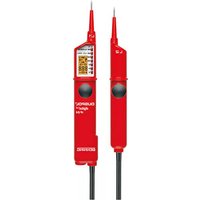
DUSPOL Digital LC - Measuring equipment BENNING - Free user manual and instructions
Find the device manual for free DUSPOL Digital LC BENNING in PDF.


| Product type | Bipolar voltage detector |
| Brand | BENNING |
| Model | DUSPOL Digital LC |
| Category | Measuring equipment |
| Standard | IEC 61243-3 |
| Overvoltage category | CAT IV 500 V, CAT III 690 V |
| Protection class | IP 64 |
| Nominal voltage range | 6 V to AC 690 V / DC 750 V |
| Internal resistance (measuring circuit) | PTC 15 kΩ ≥ 360 kΩ |
| Internal resistance (load circuit) | approx. 3.7 kΩ ... 150 kΩ |
| Current consumption (measurement) | max. < 3.5 mA AC/DC |
| Current consumption (load) | max. 0.2 A (750 V) |
| Display | High-contrast LCD + LED |
| Functions | AC/DC voltage test, continuity test, phase test, phase rotation test, HOLD function, measuring point illumination, vibration motor |
| Power supply | 2 micro batteries LR03/AAA (1.5 V) |
| Automatic power-on | from ≥ 6 V |
| Maximum power-on duration | 30 s (pause 240 s) |
| Weight | approx. 200 g |
| Connection cable length | approx. 900 mm |
| Operating temperature | -10 °C to +55 °C |
| Relative humidity | 20 % to 96 % |
| Maintenance | Clean with a dry cloth, replace batteries if necessary |
| Safety | Do not touch electrodes, use only by the insulated handles |
| Spare parts | Batteries (2 x LR03/AAA), O-ring (O-ring) ref. 772897 |
Frequently Asked Questions - DUSPOL Digital LC BENNING
User questions about DUSPOL Digital LC BENNING
0 question about this device. Answer the ones you know or ask your own.
Ask a new question about this device
Download the instructions for your Measuring equipment in PDF format for free! Find your manual DUSPOL Digital LC - BENNING and take your electronic device back in hand. On this page are published all the documents necessary for the use of your device. DUSPOL Digital LC by BENNING.
USER MANUAL DUSPOL Digital LC BENNING
Before using the voltage tester DUSPOL ^® digital LC: Please read the operating manual carefully and always observe the safety instructions!
List of contents:
- Safety instructions
- Functional description of the voltage tester
2.1 Measuring point illumination
2.2 Hold function - Functional test of the voltage tester
- How to test AC voltages
4.1 How to test the phase at AC voltage - How to test DC voltages
5.1 How to test the polarity at DC voltage - How to test the phase sequence of a three-phase mains
- How to test an electrically conductive connection (continuity check)
- Battery replacement, indicating the battery voltage
- Technical data
- General maintenance
- Environmental notice
1. Safety instructions:
- Hold the voltage tester only by the insulated handles A and B and do not touch the contact electrodes (probe tips) 1!
- Immediately before use: Check the voltage tester for correct operation! (see chapter 3). The voltage tester must not be used if one or several display functions fail or if the voltage tester is not ready to operate (IEC 61243-3)!
- The voltage tester must be used only within the nominal voltage range of 6 V up to AC 690 V/ DC 750 V!
- Do not operate the voltage tester with the battery compartment being open!
- The voltage tester complies with protection class IP 64 and therefore can also be used under wet conditions (designed for outdoor use).
- For testing, firmly grasp the voltage tester by the handles A and B.
- Never connect the voltage tester to voltage for longer than 30 seconds (maximum permissible operating time = 30 s)!
- The voltage tester only operates correctly within the temperature range of - 10 °C up to + 55 °C at relative air humidity of 20 % up to 96 %.
- Do not dismantle the voltage tester!
- Please protect the housing of the voltage tester against contamination and damages!
- Please store the voltage tester under dry conditions.
- To prevent injuries and discharge of the battery, provide the contact electrodes (probe tips) with the enclosed cover after using the voltage tester!
Attention:
After maximum load (i.e. after a measurement of 30 seconds at AC 690 V/ DC 750 V), the voltage tester must not be used for a duration of 240 seconds!
The voltage tester is marked with electric symbols:
| symbol meaning | |
| Device or equipment for working under voltage | |
| Push button | |
| Alternating current (AC) | |
| Direct current (DC) | |
| Direct and alternating current (DC and AC) | |
| Phase-sequence clockwise, phase- sequence indication (on the display) | |
| Phase-sequence counter-clockwise, phase-sequence indication (on the display) | |
| Phase-sequence indication; the phase sequence can only be indicated at 50 or 60 Hz and in a earthed mains | |
| Continuity check | |
| Battery symbol, this symbol appears on the display when the battery is too weak | |
| This symbol shows the correct alignment of the batteries to ensure correct polarity | |
| Symbol for phase indication (on the display) | |
| Voltage value as digital indication, up to approx. 80 V with decimal place (1/ 10 V) | |
| 50V~ | Symbol for exceeding the upper limiting value for low voltages (ELV) at AC voltage (on the display) |
| 120V== | Symbol for exceeding the upper limiting value for low voltages (ELV) at DC voltage (on the display) |
| Positive (+) polarity (on the display) | |
| Negative (-) polarity (on the display) |
2. Functional description
The DUSPOL ^® digital LC is a two-pole voltage tester according to IEC 61243-3 with digital display. As supplementary function, the voltage tester is equipped with a measuring point illumination and display illumination, a phase and phase-sequence indication as well as continuity check. The signalling of the continuity check is done optically and acoustically. For all these functions, the voltage tester requires a built-in battery (2x micro LR03/ AAA). Voltage checking without battery is possible upwards of a voltage of ≥ 50 V. Determining the phase of external conductors and the phase-sequence of a three-phase mains is only possible provided the neutral is earthed.
The voltage tester is designed for DC and AC voltage tests within the voltage range of 6 V up to AC 690 V/ DC 750 V. It can be used to perform polarity tests at DC voltage.
The voltage tester consists of the test probes L1 A and L2 B and a connecting cable 15. The test probe L1 A is equipped with a LC display 4 as well as high-contrast light-emitting didoes (LED). From a voltage of 6 V onwards, the voltage tester switches on automatically. The voltage tester only works properly with the batteries (inside test probe L1A) being intact and inserted correctly. The display 4 indicates voltages within the nominal voltage range of 6 V up to AC 690 V/ DC 750 V. Exceeding the limiting value for low voltages (ELV, AC 50 V, DC 120 V) is additionally indicated on the display. Both test probes are provided with push buttons 14. By pressing both push buttons, the voltage tester switches to a lower internal resistance (suppression of inductive and capacitive voltages). Furthermore, a vibrating motor (motor with a flyweight) is put under voltage. From approximately 200 V this motor is set in rotation. With the voltage increasing, the motor's speed and vibration increases as well so that additionally by means of the handle of test probe L2 B the voltage value can be estimated roughly (e.g. 230 V/ 400 V). The duration of the test with a lower internal resistance of the device (load test)
depends on the value of the voltage to be measured. To prevent excessive warming of the voltage tester, it is equipped with a thermal protection (reverse control). With this reverse control, the speed of the vibrating motor decreases as well.
Display field
The display field ② consist of an LC display ④ as well as high-contrast light-emitting didoes (LED) ③, indicating DC and AC voltages in steps of 12; 24; 50; 120; 230; 400; AC 690 V/ DC 750 V. The indicated voltages are nominal voltages. This LC display indicates the exceeding of the upper limiting value for low voltages (ELV) ⑤, the phase ⑥, the symbol for continuity ⑦, the phase-sequence ⑧ and ⑨, the exact voltage value ⑩, the polarity at DC voltage ⑪ and ⑫ as well as a symbol for weak batteries ⑬. The measuring range for continuous voltage measurement is set automatically. Up to 80 V, the value is indicated with a decimal place. For higher values, the decimal place is not indicated.
2.1 Measuring point illumination
The measuring point illumination can be activated by means of the push button 14 of test probe L1 A with the device being switched on. Depending on the brightness, the LCD background illumination is activated automatically.
Note:
The indication must be 0.0 V for the measuring point illumination, otherwise the voltage tester identify „Hold“ function.
2.2 Hold function
If you press and hold the push button 14 of test probe L1 A 1.5 seconds during a voltage test, the last measuring value is indicated and is flashing. The voltage tester can be separated from the unit under test and the measuring value can be read (DATA-HOLD). The value can be deleted by releasing the push button.
Note:
For load test, press longer than 1.5 seconds, the HOLD function is activated!
3. Functional check
- Check the voltage tester for correct function immediately before use!
- Activation of the testing device (self-test),
- short circuit test probes
- switch the voltage tester on by means of the push button 14 of test probe L1 A and hold the push button 14
- the buzzer sounds, all segments of the LC display as well as background and measuring point lighting must indicate function
• after approx. 1 second, the measuring point and LCD illumination is switched on (test of cable connection and illumination) - Test all functions by means of known voltage sources.
• For DC voltage tests use e.g. a car battery.
• For AC voltage tests use e.g. a 230 V socket.
- Connect both contact electrodes ① to test the continuity check for correct function.
• If necessary, replace the batteries.
Do not use the voltage tester unless all functions are operating correctly!
4. How to test AC voltages
- Place the contact electrodes ① of the test probes L1 A and L2 B against the relevant points of the unit under test.
- If a measuring voltage is present (6 V), the voltage tester switches on automatically and indicates the voltage value on the display 10 (up to approx. 80 V with decimal place!).
- At AC voltage from 6 V onwards, the display indicates the digital voltage value 10 as well as the „plus” and „minus” symbol 11 and 12. Furthermore, all
LEDs light until the step value of the applied voltage is reached.
- When pressing both push buttons 14 and from an applied voltage of approx. 200 V onwards, a vibrating motor is put in rotation inside the test probe L2 B. With the voltage increasing, the speed of this motor is increasing as well.
Please make sure that you touch the voltage tester at the insulated handles of test probes L1A and L2 B only! Do not cover the display and do not touch the contact electrodes!
Note:
The reading of the LC display ② might be impaired due to unfavorable light conditions.
4.1 How to test the phase at AC voltage
- The phase test is possible in the earthed mains from 230 V onwards!
- Firmly grasp the two handles A and B of the test probes L1 and L2 (leakage current for phase test via handle L1 A!).
- Switch the voltage tester on by briefly pressing the push button 14 of test probe L1 A (stays switched on for approx. 10 seconds). When the device is switched on, the display indicates „0.0“!
- Place the contact electrode ① of test probe L1 A against the relevant point of the unit under test.
Never touch the contact electrode of test probe L2 ⑧ during the single-pole test (phase test)! If the "symbol ⑥" appears in the upper part of the LC display ④, the tester is in contact with the live phase of an AC voltage on this point of the unit under test.
Note:
The reading of the LC display 4 might be impaired due to unfavorable light conditions, protective clothing or in insulated locations.
5. How to test DC voltages
- Place the contact electrodes 1 of the test probes L1A and L2 B against the relevant points of the unit under test.
- With an applied voltage of at least 6 V, the voltage tester switches on automatically and the display indicates the voltage value.
- For voltages tests below 6 V, the voltage tester has to be switched on by briefly pressing the push button 14 of test probe L1 A.
- At DC voltage from 6 V onwards, the display indicates the digital voltage value ⑩ as well as the „plus” and „minus” symbol ⑪ and ⑫. Furthermore, all LEDs light until the step value of the applied voltage is reached.
- When pressing both push buttons 14 and from an applied voltage of approx. 200 V onwards, a vibrating motor is put in rotation inside the test probe L2 B. With the voltage increasing, the speed of this motor is increasing as well.
5.1 How to test the polarity at DC voltage
- Place the contact electrodes 1 of the test probes L1 A and L2 B against the relevant points of the unit under test.
- With an applied voltage of at least 6 V, the voltage tester switches on automatically and the display indicates the voltage value.
- For voltages tests below 6 V, the voltage tester has to be switched on by briefly pressing the push button 14 of test probe L1 A.
- The polarity of the applied DC voltage is indicated by means of a + 11 or a - symbol 12. Here, the indicated pole is the pole measures by the indicating handle A.
6. How to test the phase sequence of a three-phase mains
- The phase-sequence test is possible from 230 V AC voltage (phase against phase) onwards in a earthed
three-phase mains.
- Firmly grasp the insulated handles A and B of the test probes L1 and L2 (leakage current for phase test via handle L1 A!)
- Place the contact electrodes 1 of the test probes L1 A and L2 B against the relevant points of the unit under test.
- With an applied voltage of at least 6 V, the voltage tester switches on automatically and the display indicates the voltage value.
- The three-digit display has to indicate the voltage of the external conductor.
- When contacting the two contact electrodes ① with two phases of a three-phase mains connected in clockwise rotation, the LC display ④ indicates the symbol “(phase-sequence clockwise) ⑨. If for two phases the rotation is counter-clockwise, the LC display indicates the symbol “(phase-sequence counter-clockwise) ⑧.
The phase-sequence test always requires a counter-test! For this purpose, the measurement has to be performed again with reversed contact electrodes ①. During the counter-test, the LC display must indicate the opposite phase-sequence. If in both cases, the LC display indicates a clockwise phase-sequence, the earthing is too weak!
Note:
The reading of the LC display 4 might be impaired due to unfavorable light conditions, protective clothing or in insulated locations.
7. How to test an electrically conductive connection (continuity check)
- The continuity check must be performed on the relevant points of a “dead” (not being under voltage) unit under test. If necessary, the capacitors must be discharged.
- The necessary test voltage is supplied by means of the power supply (2 x 1.5 V batteries) integrated in the test probe L1 A.
- The test is possible within the range of 0 - 200 kΩ.
- Place the test probes L1 A and L2 B with the contact electrodes ① against the relevant points of the unit under test.
- In the event of contact between an electrically conducting connection and the contact electrodes 1, a signal is given off and the symbol 7 shown on the LC display 4.
- If voltage is pending at the measuring point, the voltage checker switches automatically to voltage check and displays the voltage (see sections 4. and 5.).
8. Battery replacement
Do not set the voltage tester under voltage with the battery compartment being open!
The energy supply of the DUSPOL ^® digital LC is done by means of two built-in micro batteries (LR03/ AAA). Battery replacement is necessary as soon as the display shows the battery symbol ☐(weak battery) 13. The symbol appears in case the battery voltage is below 2.75 V.
Indicating the battery voltage
Switch the voltage tester on by briefly pressing the push button 14 of test probe L1 A. After approx. 10 seconds, the value of the battery voltage is indicated for 1 second. (Example: 29)
How to replace the batteries:
Take a screw driver and open the battery compartment (next to the cable outlet) by a 14 -turn in direction of the arrow (counter-clockwise). The slot is now vertical and the battery compartment with the batteries can be removed.
Remove the discharged batteries from the battery compartment. Insert the new batteries with correct polarity (see marking) into the battery compartment. Put the battery compartment with the batteries back onto the handle and lock it by 14 -turn in clockwise direction (slot must be horizontal and the marking points are opposite!). Make sure not to damage the O ring (art.-no. 772897). If necessary, it has to be replaced.
Battery disposal:
Do not dispose of batteries with the household garbage. You can return used batteries to public collection facilities in your community area or return them to any retail outlet selling similar batteries.
9. Technical data:
- Guideline: IEC 61243-3
- Over voltage category: CAT IV 500 V, CAT III 690 V
-
Protection class: IP 64, IEC 60529 (DIN 40050) IP 64 means: Protection against access to dangerous parts and protection against solid impurities, dustproof, (6 - first index). Splash proof, (4 - second index). Can also be used in case of precipitation.
-
Nominal voltage range: 6 V up to AC 690 V/ DC 750 V
- Internal resistance, measuring circuit: PTC 15 kΩ ≥ 360 kΩ
- Internal resistance, load circuit – both push buttons actuated!: approx. 3.7 kΩ...(150 kΩ)
- Current consumption, measuring circuit: max. < 3.5 mA AC/ DC
- Current consumption, load circuit - both push buttons actuated!: I_s 0.2 A (750 V)
- Polarity indication: LCD symbol +; -
- Voltage indication, continuous 6 - 750 V
- Voltage range I: up to approx. 80.0 V (88.8)
- Voltage range II from approx. 80 V (888) onwards
- max. indicating errors:
± 2 % of Voltage range 20 - 150 Hz sinusoidal or DC, ELV U _n - 15 %
- Nominal frequency range f: 0 up to 150 Hz
- Phase and phase-sequence indication: ≥ U _n 230 V, 50/60 Hz
- Vibrating motor, starting: ≥ U 230 V
- Test current, continuity check: max. 2 μA
- Testing range, conducting resistance: 0 - 200 kΩ
- Sound level acoustic signal: 55 dB
- max. permissible operating time: ED = 30 s (max. 30 seconds), 240 s pause
- Device switch-on at measuring voltage: ≥ 6 V
- Device switch-on (manual): by means of push button L1 A
- Built-in testing function: activation by push button L1 A and short-circuit of the contact electrodes
- HOLD function, activation press button ≥ 1.5 s
- Battery: 2 x micro, LR03/ AAA (3 V)
- Weight: approx. 200 g
- Connecting cable length: approx. 900 mm
- Operating and storing temperature range: - 10 °C up to + 55 °C (climate category N)
- Relative air humidity: 20 % up to 96 % (climate category N)
- Reverse control times (thermal protection): voltage/ time: 230 V/ 30 s, 400 V/ 9 s, 750 V/ 2 s
Attention!
The voltage tester cannot be operated with the batteries being empty! Voltage checking without battery is possible upwards of a voltage of ≥ 50 V. Remove the batteries from the device at a longer storage!
10. General maintenance:
Clean the exterior of the housing with a clean dry cloth (exception: special cleansing cloths).
Should such electrolyte contamination or white deposits occur near the battery or the battery housing, these must also be removed with a dry cloth.
11. Environmental notice

At the end of the product's useful life, please dispose of it at appropriate collection points provided in your country.