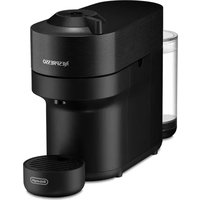
Nespresso Vertuo Pop - Coffee machine DELONGHI - Free user manual and instructions
Find the device manual for free Nespresso Vertuo Pop DELONGHI in PDF.



| Product Type | Nespresso Vertuo Pop Coffee Machine |
| Brand | DeLonghi |
| Model | Nespresso Vertuo Pop |
| Category | Coffee Machine |
| Dimensions (W x D x H) | 13.6 x 42.6 x 25 cm |
| Weight | 3.5 kg |
| Power Supply | 220-240 V, 50-60 Hz, 1300-1500 W (EU models) |
| Water Tank Capacity | 0.6 L |
| Used Capsule Container Capacity | 8 espresso capsules or 5 mug capsules |
| Capsule Compatibility | All Nespresso Vertuo capsules (Ristretto, Espresso, Double Espresso, Gran Lungo, Mug, Alto, Carafe) |
| Connectivity | Bluetooth and Wi-Fi via Nespresso app |
| Preheating Time | 30 seconds |
| Automatic Shut-off | 2 minutes of inactivity |
| Standby Mode | 0.39 W/h |
| Main Functions | Recipe creation mode, coffee volume adjustment, automatic descaling, system emptying |
| Maintenance | Monthly cleaning of tank and containers; descaling when orange light blinks 3 times |
| Safety | Do not immerse the machine, do not use solvents or abrasive products |
| Included Accessories | Nespresso welcome kit, demonstration capsules, quick start guide, safety instructions, warranty |
| Warranty | Manufacturer warranty included (duration not specified) |
Frequently Asked Questions - Nespresso Vertuo Pop DELONGHI
User questions about Nespresso Vertuo Pop DELONGHI
0 question about this device. Answer the ones you know or ask your own.
Ask a new question about this device
Download the instructions for your Coffee machine in PDF format for free! Find your manual Nespresso Vertuo Pop - DELONGHI and take your electronic device back in hand. On this page are published all the documents necessary for the use of your device. Nespresso Vertuo Pop by DELONGHI.
USER MANUAL Nespresso Vertuo Pop DELONGHI
natural_image
Abstract white logo design on black background, resembling a stylized letter 'N' with flowing curves (no text or symbols)VERTUO POP
natural_image
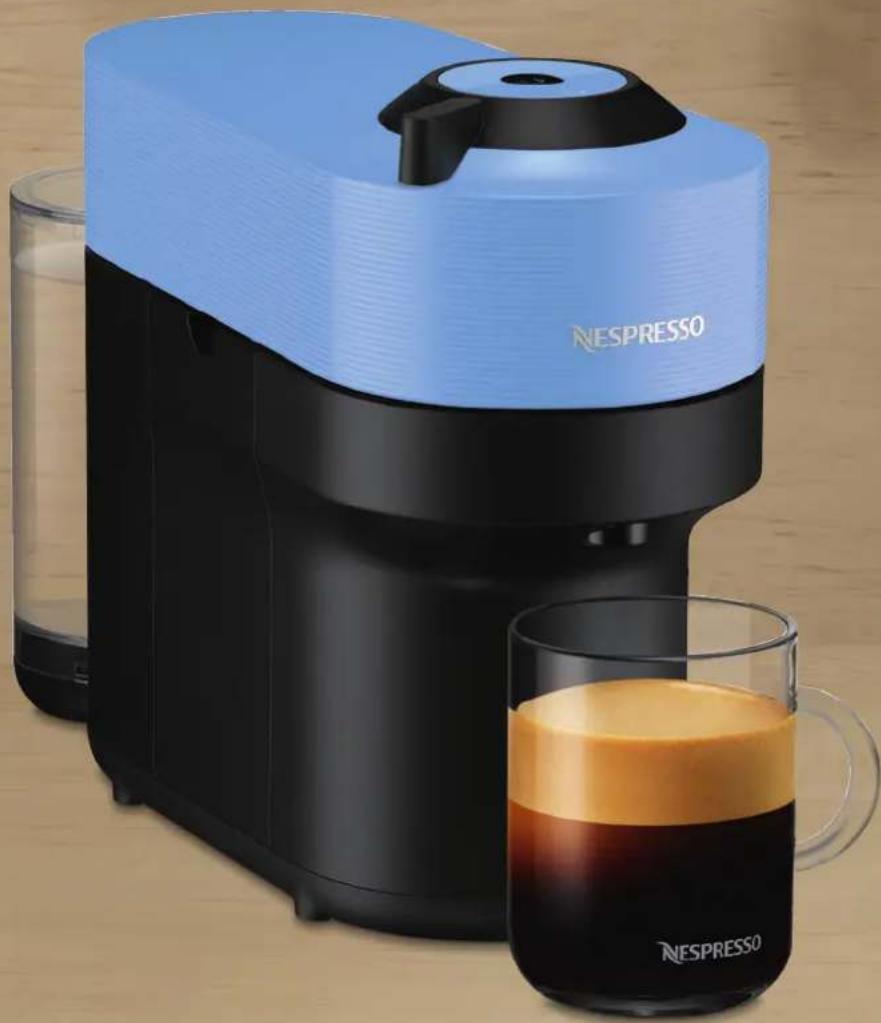
NESPRESSO coffee maker with blue lid and black handle, accompanied by a glass of orange juice and a mug (no text or symbols on main subject)CLICK AND CHOOSE YOUR LANGUAGE
CLICK AND CHOOSE YOUR LANGUAGE
EN

SAFETY
OVERVIEW

CONNECTIVITY

FIRST STEPS

COFFEE PREPARATION

ADAPT YOUR COFFEE VOLUMES

CLEANING

DESCALING

EMPTYING THE SYSTEM

RESET TO FACTORY SETTINGS

BLINKING SUMMARY

TROUBLESHOOTING

SPECIFICATIONS
SAFETY
CAUTION: Before operating your coffee machine, please refer to the safety instructions leaflet to avoid possible harm and damage.
DISPOSAL AND ENVIRONMENTAL PROTECTION
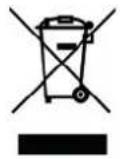
This appliance complies with the EU Directive 2012/19/EC. Packaging materials and appliance contain recyclable materials. Your appliance contains valuable materials that can be recovered or can be recycled. Separation of the remaining waste materials into different types facilitates the recycling of valuable raw materials. Leave the appliance at a collection point. You can obtain information on disposal from your local authorities.
OVERVIEW
MACHINE OVERVIEW
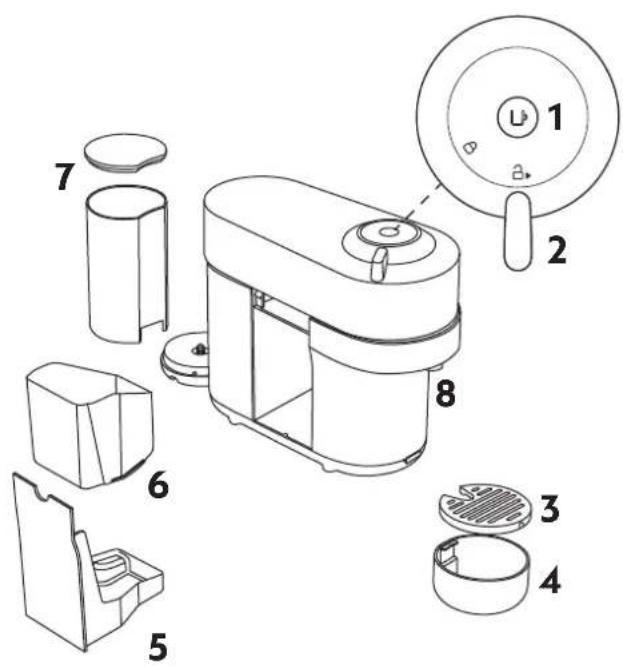
1 ON/OFF and Coffee Button
2 Locking/Unlocking Lever
3 Drip Grid
4 Adjustable Cup Support
5 Drip Tray
6 Container for used Capsules
7 Water Tank and Lid
8 Coffee Outlet
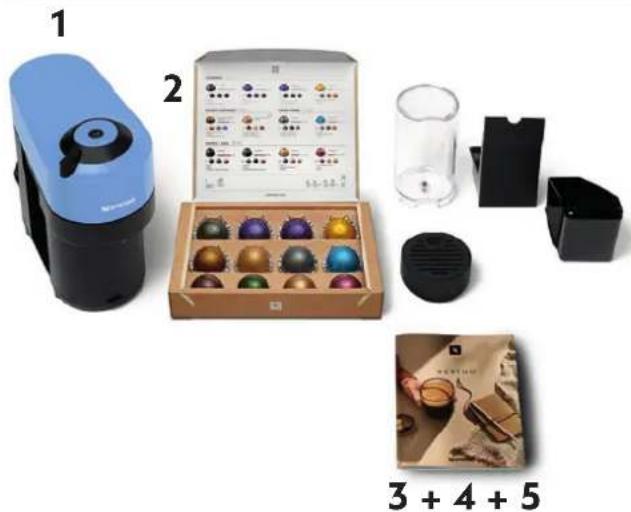
PACKAGING CONTENT
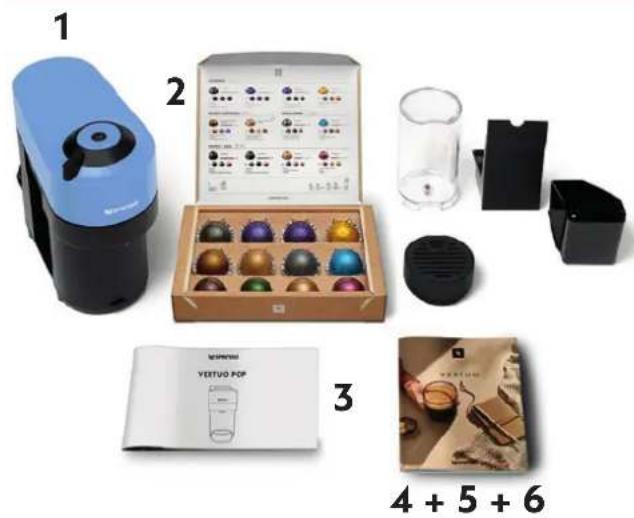
1 Coffee Machine
2 Nespresso Capsules
Box
3 Nespresso Welcome Material
4 Safety Instructions
5 Quick Start Guide
6 Warranty
i Unboxing: When unpacking the machine, remove the plastic film. Some dust may be present due to recycled materials being used within the packaging. This is not dangerous, simply clean with a soft tissue.
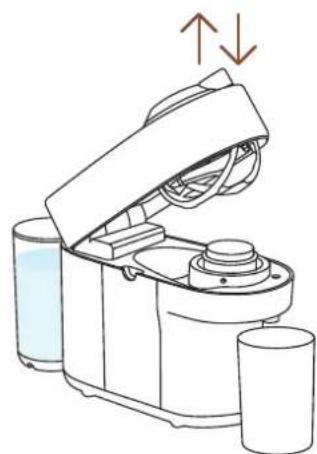
OPEN / CLOSE
OPEN CLOSE
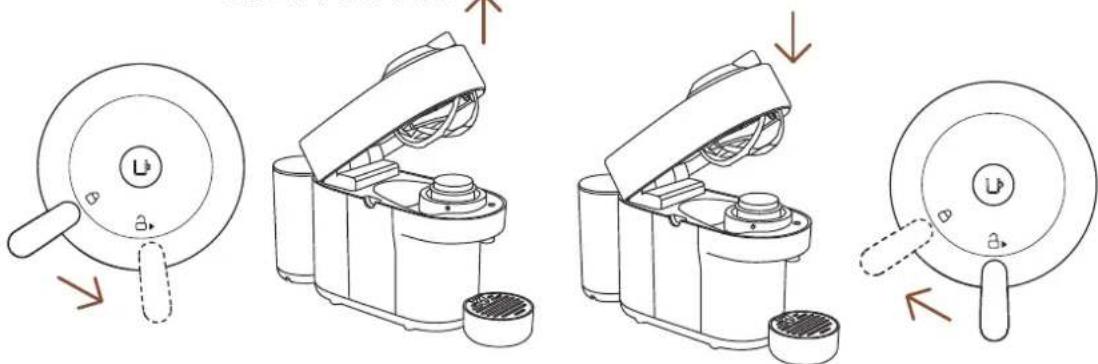
CAUTION: for correct machine use, please do not open the machine head while the coffee is brewing, wait until the machine has stopped and the coffee button is steady and white. If you want to stop the brewing earlier, please press the Coffee Button once and wait until the coffee button goes back to steady white.
THE VERTUO SYSTEM
CAPSULE COMPATIBILITY

S
Ristretto
(25 ml / 0.84 fl oz)
Espresso
(40 ml / 1.35 fl oz)

M
Double Espresso
(80 ml / 2.7 fl oz)
Gran Lungo
(150 ml / 5.07 fl oz)

L
Mug
(230 ml / 7.77 fl oz)

XL
Alto, Cold Brew Style
(355 ml / 12 fl oz)
Carafe
(535 ml / 18.8 fl oz)
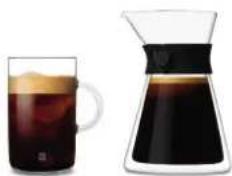
ACCESSORY COMPATIBILITY

Accessory compatibility

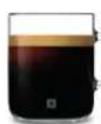
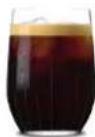
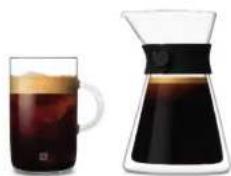
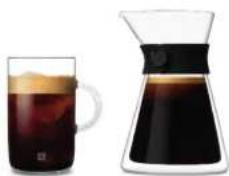
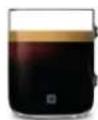
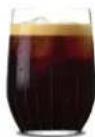
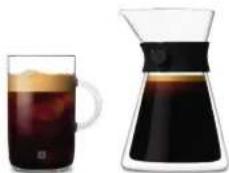
Mug (S) Mug (M) Reveal Glass
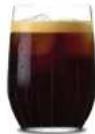

Incompatible accessories
natural_image
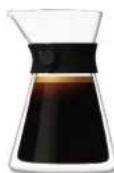
Two glass containers: a mug filled with dark liquid and a conical flask filled with dark liquid, both without any text or symbols.Mug (L) Carafe
Discover our full collection of accessories on www.nespresso.com
ON/OFF
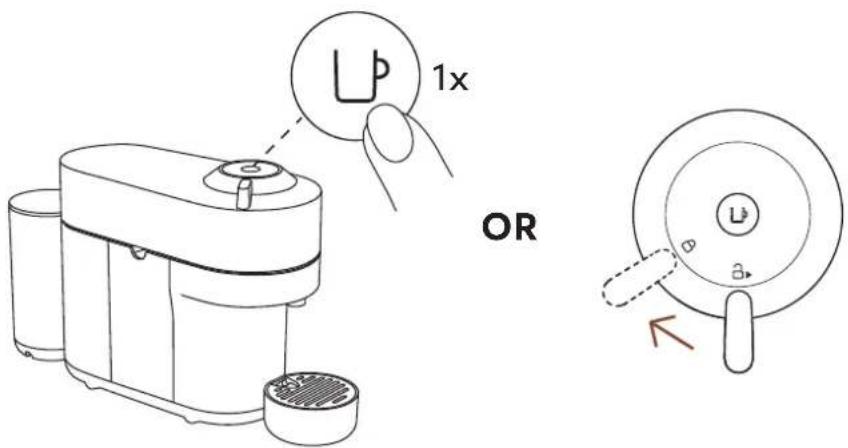
ON
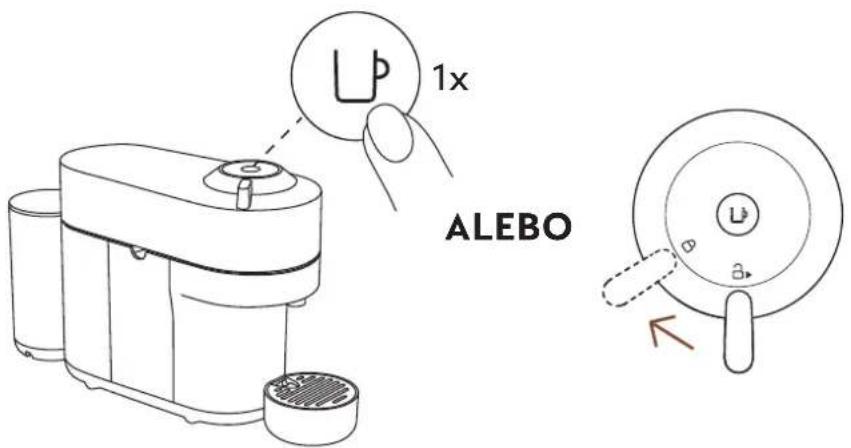
Once the machine is plugged in, turn it on by pressing the Coffee Button once or by closing the lever into the lock position (whilst the head is closed).
The light will blink for approximatively 30 seconds while the machine is heating up. Once the light is steady, the machine is ready to be used.
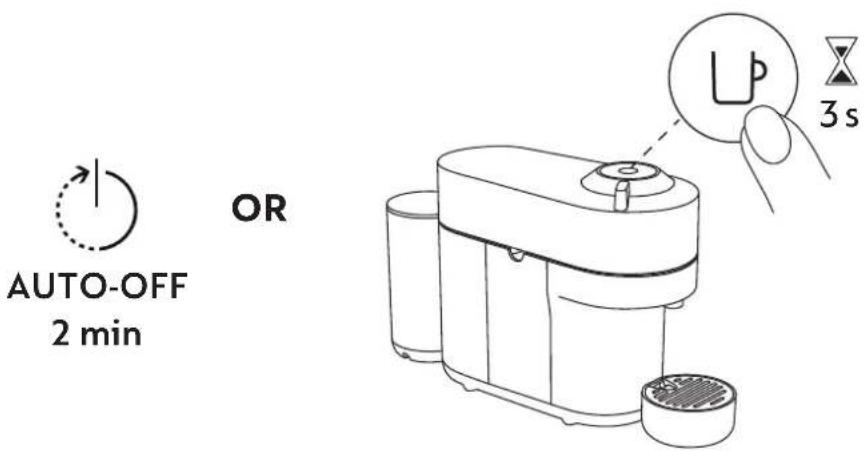
OFF
To save energy, the machine will turn off automatically after 2 minutes of non-use.
The machine can be turned "OFF" manually at any time (when not in use) by pressing and holding the Coffee Button for 3 seconds.
CONNECTIVITY
WHY SHOULD YOU PAIR YOUR VERTUO POP MACHINE?
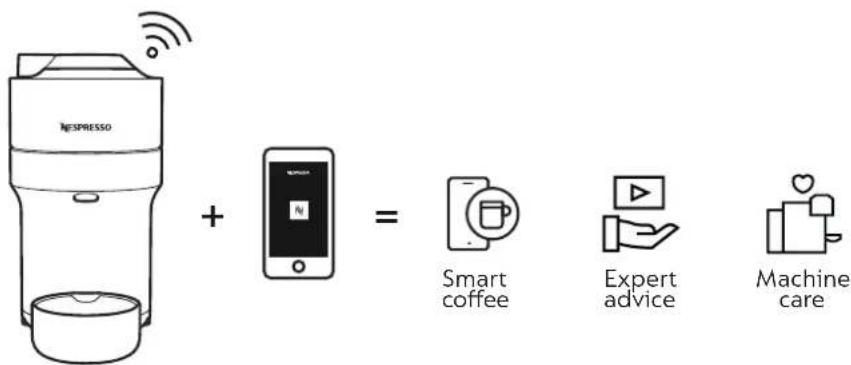
BENEFITS OF CONNECTING YOUR VERTUO POP MACHINE
- Smart coffee: Always stay one step ahead and get the latest coffee innovations from Nespresso by keeping your machine up to date
- Expert advice: Get support and simple tutorial videos to accompany your coffee journey via your smartphone
- Machine care: Receive instant notification on how and when to service your machine with an easy-step guide on descaling, rinsing, cleaning, etc.
HOW TO CONNECT YOUR VERTUO POP MACHINE?
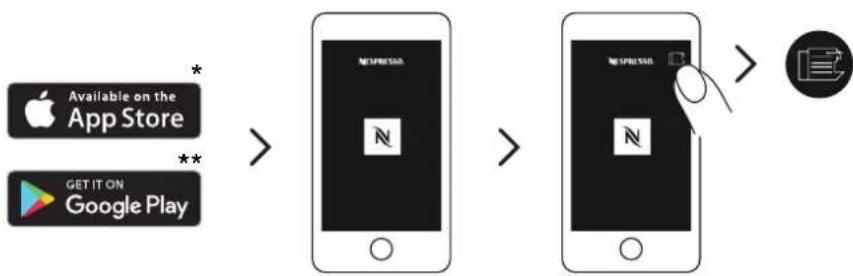
flowchart
graph LR
    A["Apple App Store"] -->|*| B["App Store"]
    C["Google Play"] -->|**| B
    B --> D["Next Press"]
    D --> E["Next Press"]
    E --> F["Next Press"]
    F --> G["Image icon"]
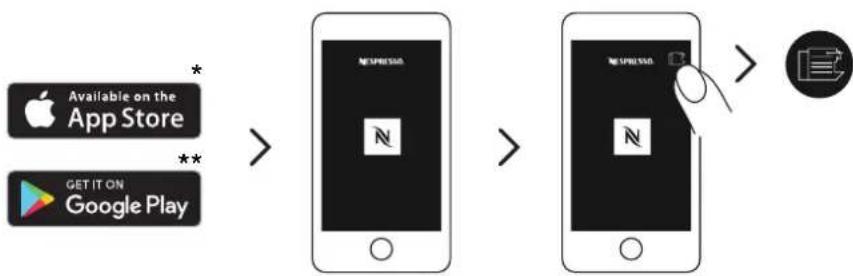
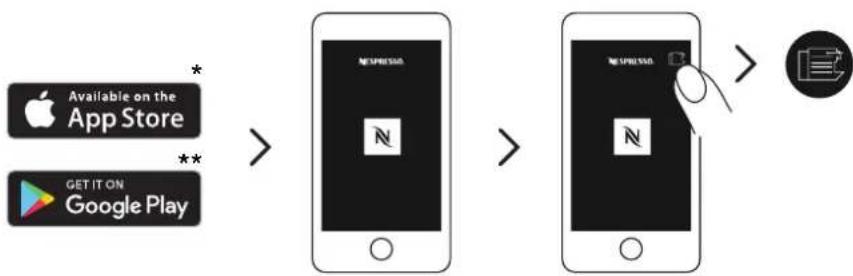
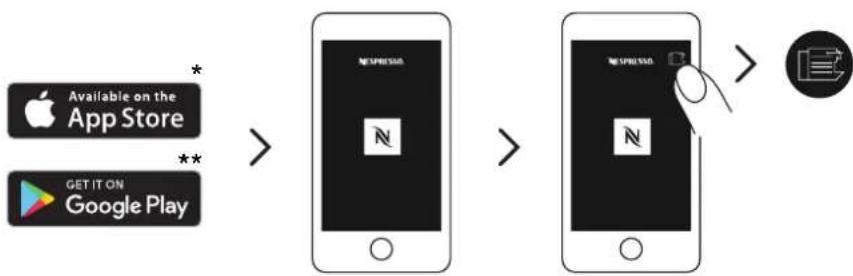
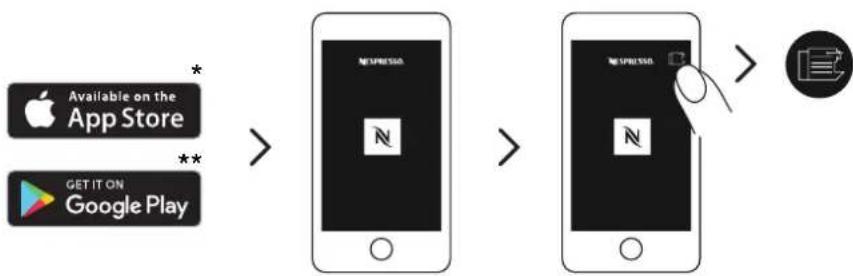
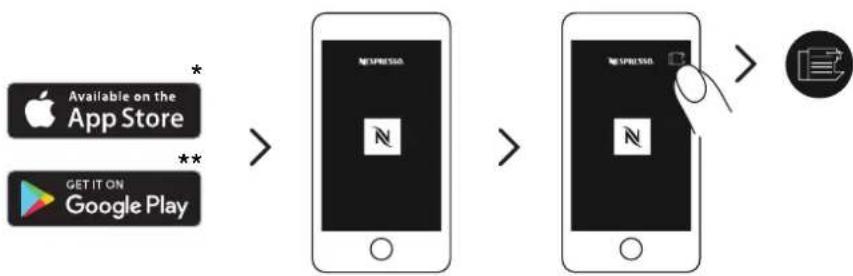
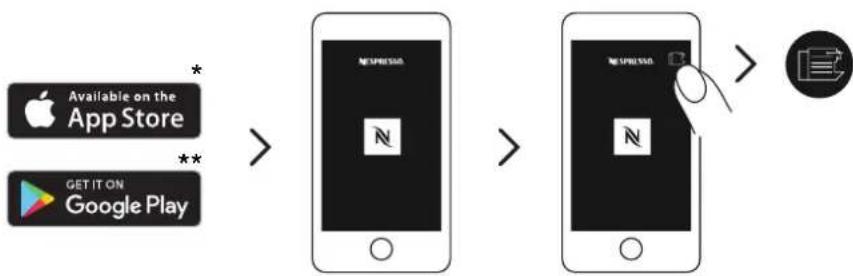
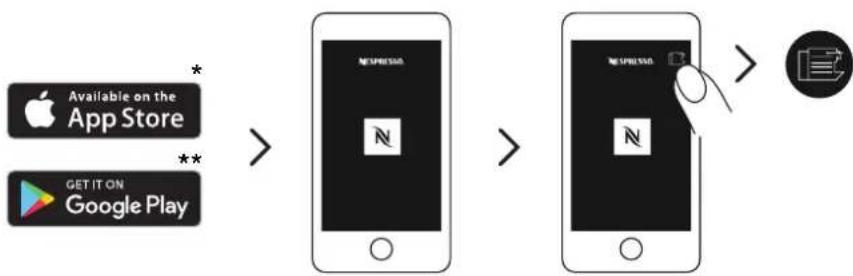
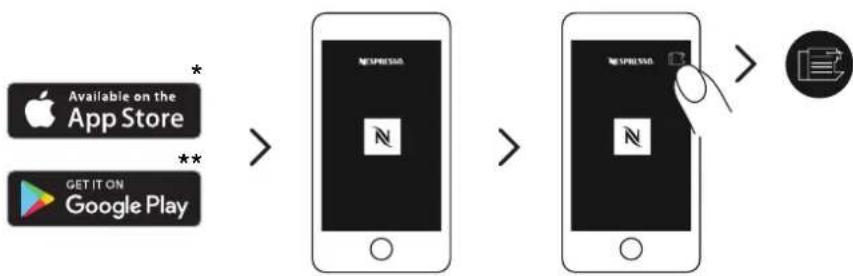
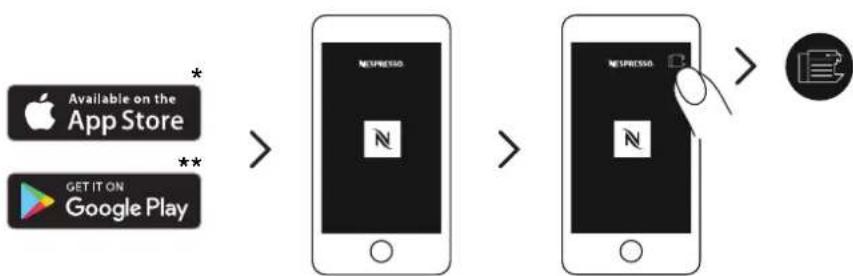
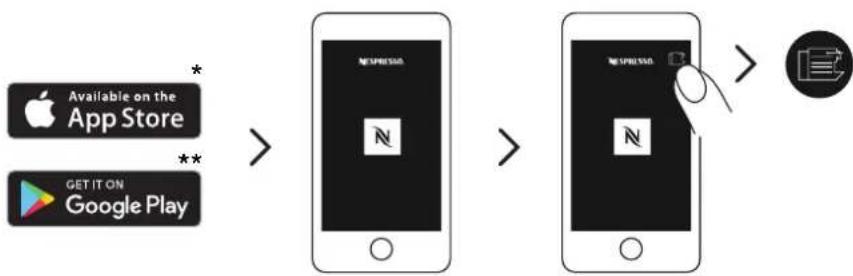
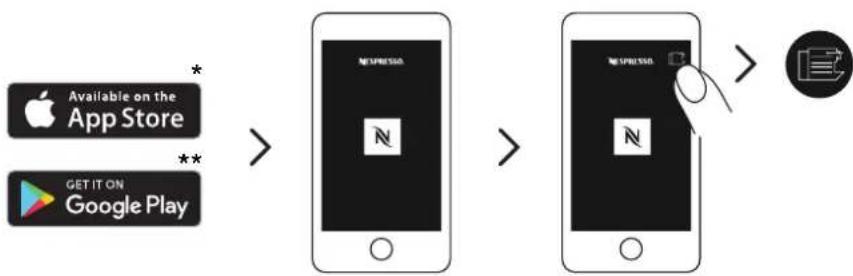
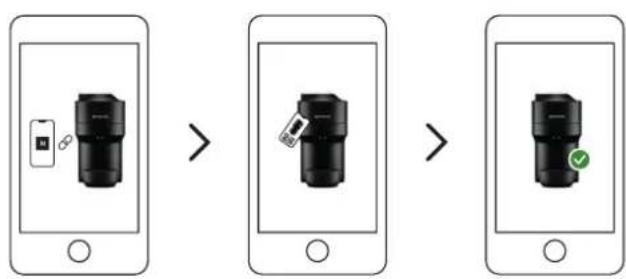
1 Download or update the Nespresso App. Launch the Nespresso App on your smartphone or your tablet. Press the machine icon at the top right of your screen.
NOTE: for optimal performance and a seamless experience, we recommend connecting your machine to a Wi-Fi router rather than using a smartphone hotspot.
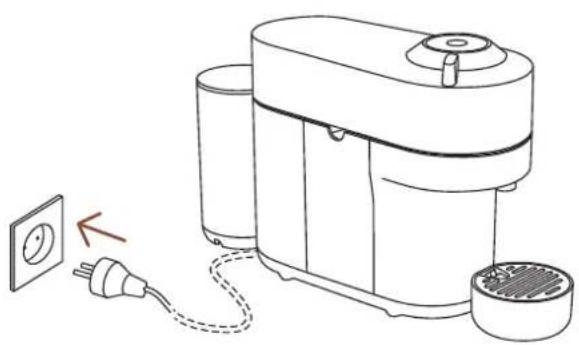
natural_image
Line drawing of a portable electric machine with power outlet and plug, no text or symbols present2 Plug in the power cord and switch on.
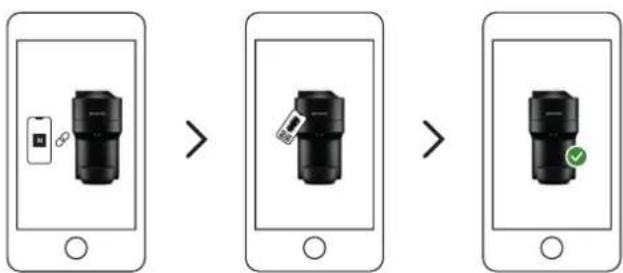
flowchart
graph LR
    A["Smartphone with icon"] --> B["Device selection"]
    B --> C["Device confirmation check"]
    C --> D["Device display with checkmark"]
3 Follow the instructions via the Nespresso App.
CAUTION: First read the safety precautions to avoid risks of fatal electrical shock and fire. Please ensure ground continuity when plugging the machine into the power outlet.
*AppStore ^® is a trademark of Apple Inc., registered in the U.S. and other countries.
** Google Play and the Google Play logo are trademarks of Google LLC.
DISABLING MACHINE BLUETOOTH AND WI-FI
The machine comes with a connectivity module, enabled by default. It gives access to additional features, enhancing your coffee experience. To disable the connectivity module, follow these steps:
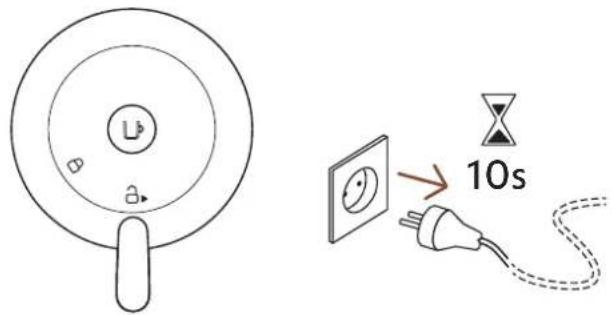
1 With the machine closed and the lever in unlocked position, unplug the machine for at least 10 seconds.
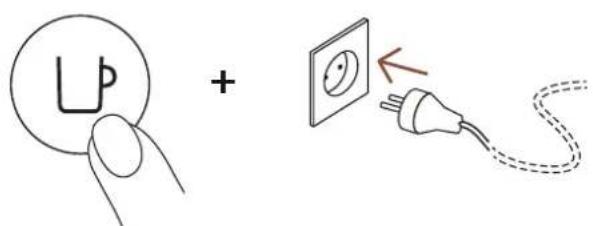
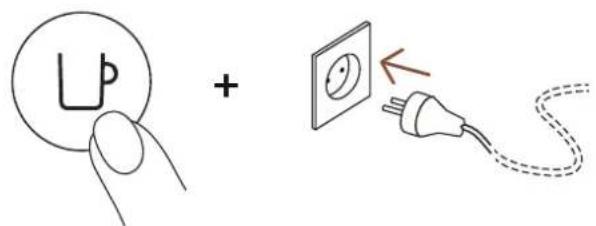
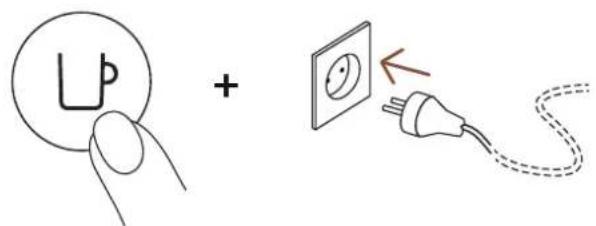
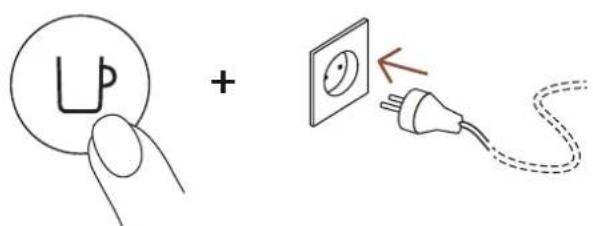
2 Press and hold the button whilst plugging in the machine. The button will blink orange to confirm that the connectivity module has now been disabled.
Follow the same steps to set the connectivity module back on again. The button will blink white to confirm that the module has been reactivated.
FIRST STEPS
FIRST RINSING
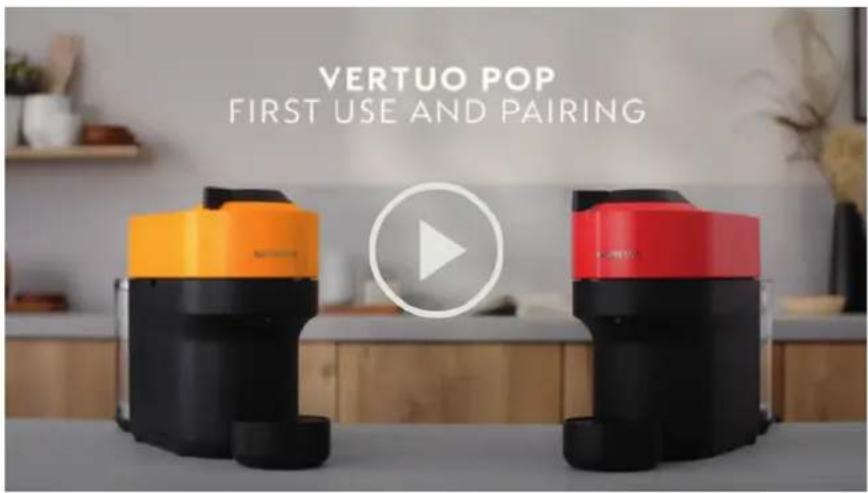
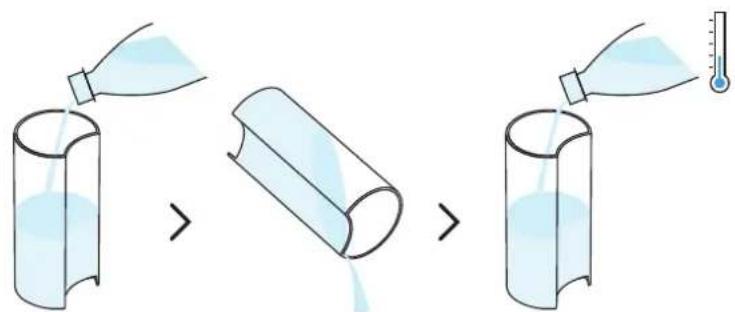
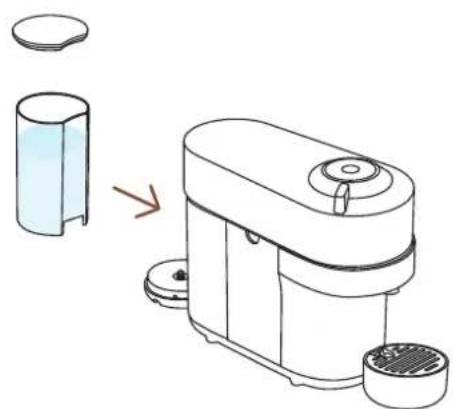
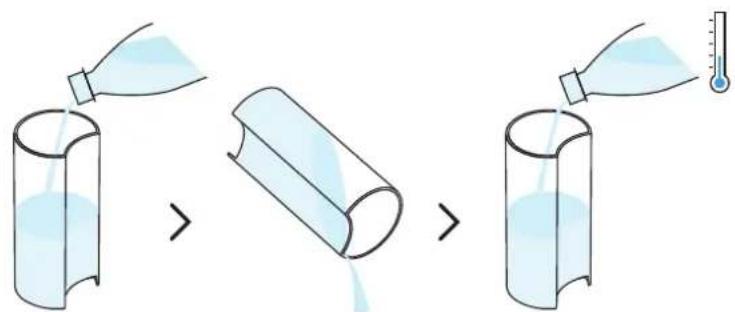
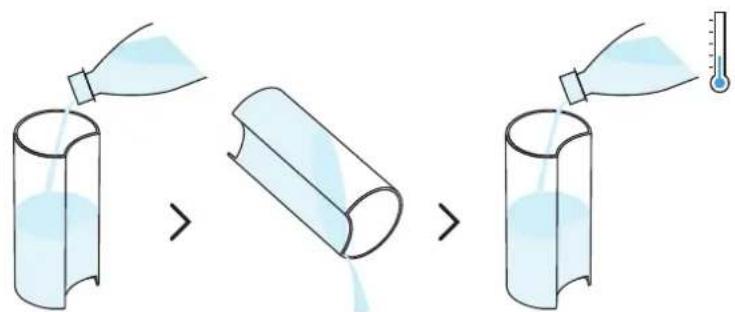
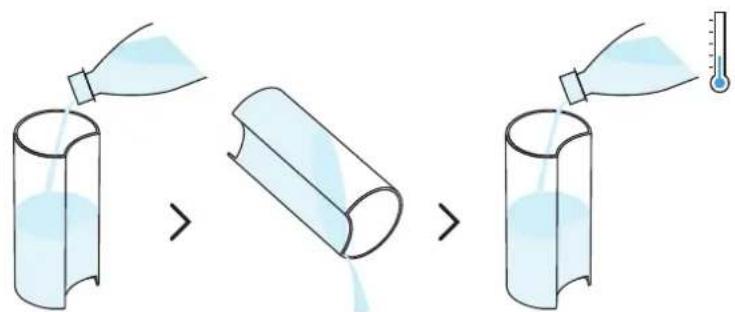
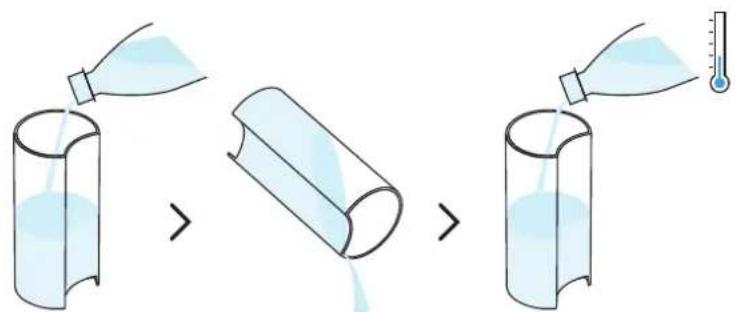
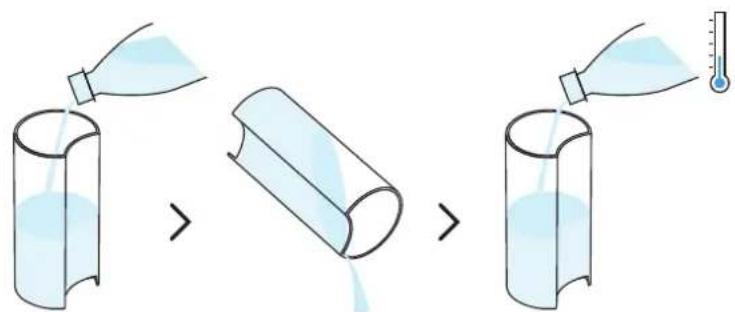
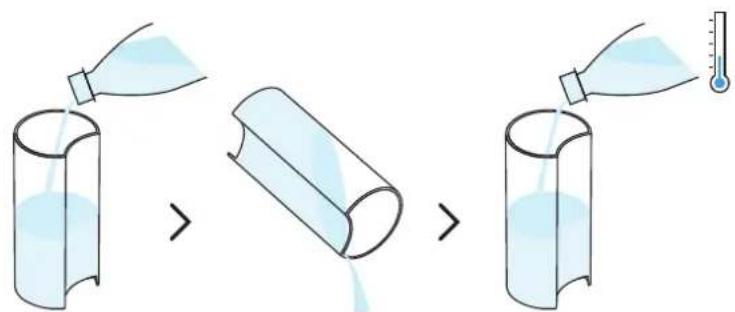
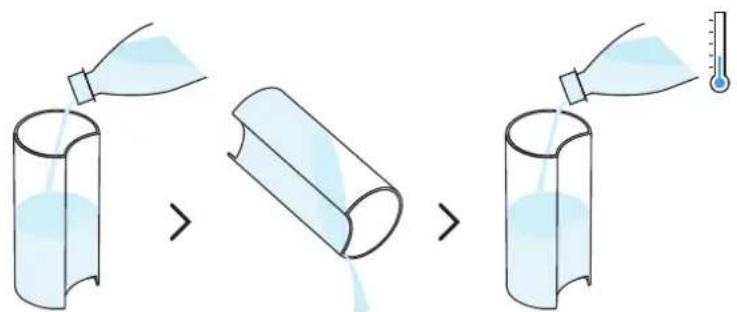
1 Rinse and clean the water tank and lid before filling it with fresh drinking water.
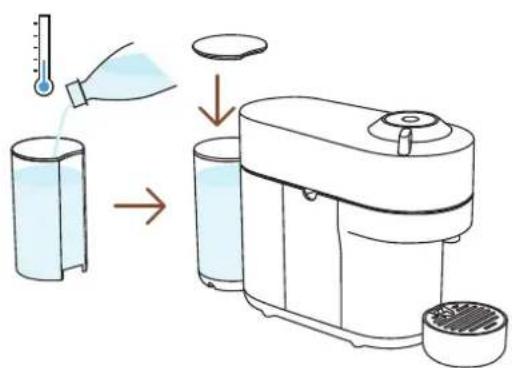
natural_image
Diagram of a small kitchen appliance with a side panel and a separate close-up view showing internal components (no text or symbols)2 Put the lid on the water tank and put the water tank in place. Make sure it is properly attached.
natural_image
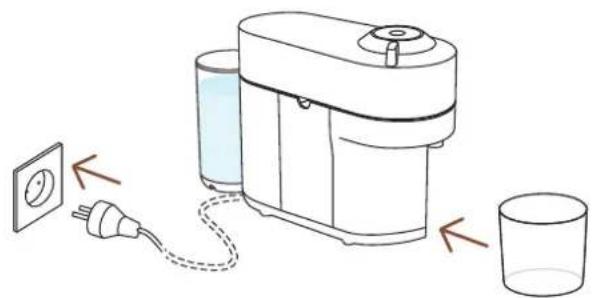
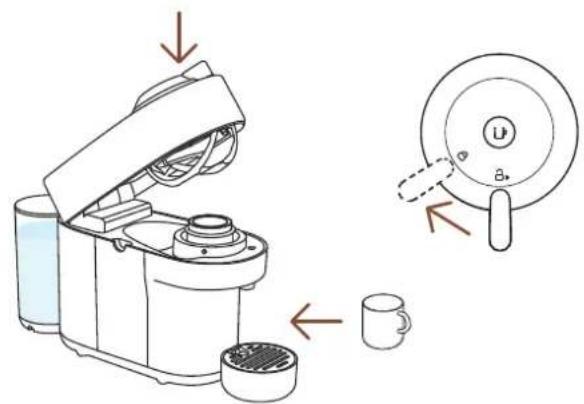
Diagram of a portable coffee maker connected to a cup via a power outlet, with no text or symbols present.3 Plug the power cord in, remove the cup support and place an empty container (of at least 1 L / 34 fl oz) under the coffee outlet.
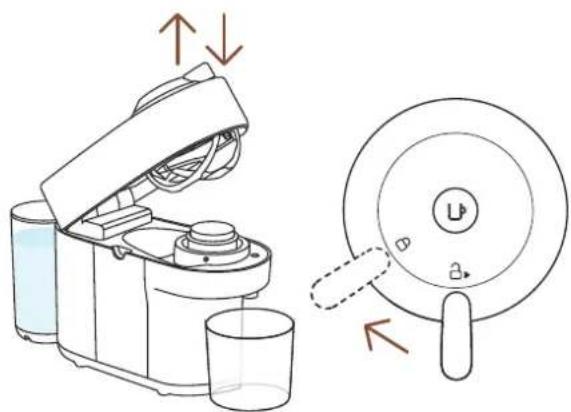
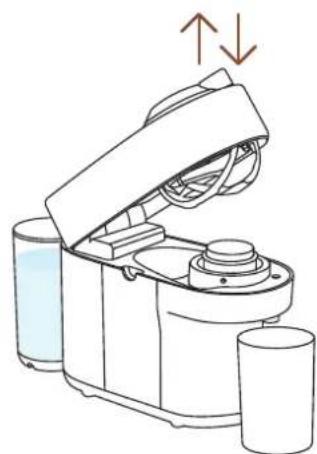
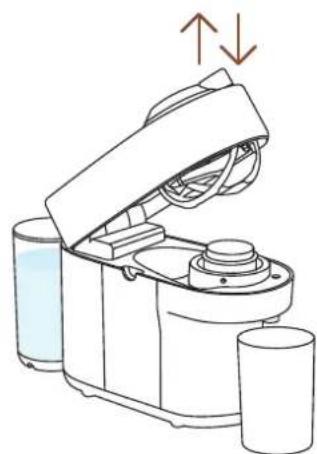
4 Open and close the machine. Ensure the lever is in lock position.
The light will blink while the machine is heating up. It will take approximately 30 seconds. When the light becomes steady the machine is ready. Make sure that no capsule is inserted.
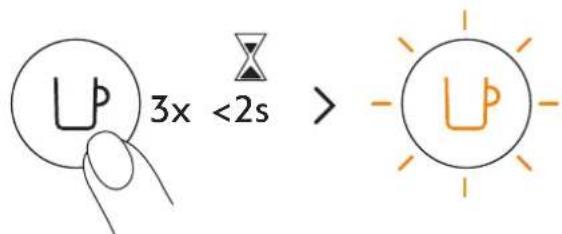
5 Press the button 3 times within 2 seconds to start rinsing. Let the rinsing procedure complete automatically. When the light becomes steady white, the cycle is complete.
It should take less than 2 minutes before the rinsing process begins and water starts to flow. This procedure may take up to 7 minutes.
COFFEE PREPARATION
natural_image
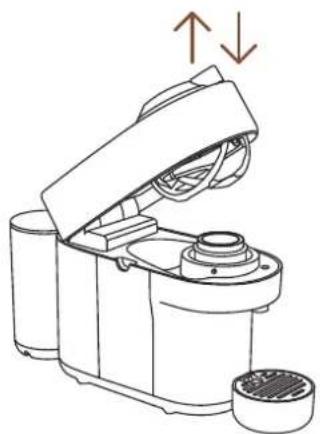
Line drawing of a kitchen appliance with lid and side ports, showing internal components and directional arrows (no text or symbols)1 Open and close the machine.
The coffee button light will blink while the machine is heating up. When the light becomes steady, the machine is ready to use.
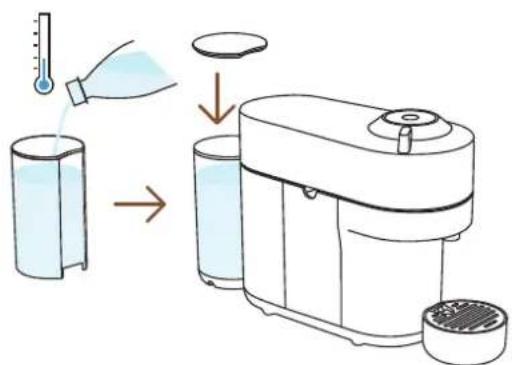
2 Fill the water tank with fresh drinking water and put it back in position.
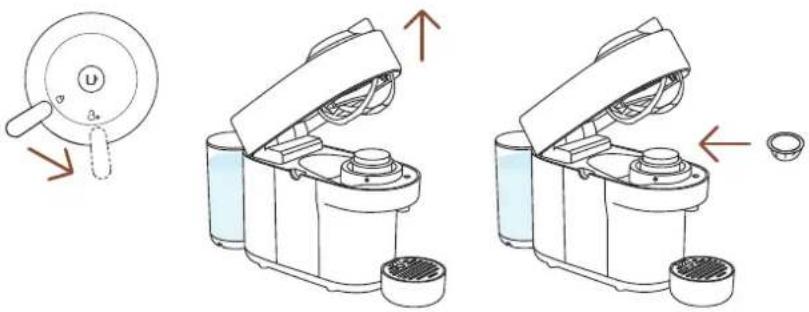
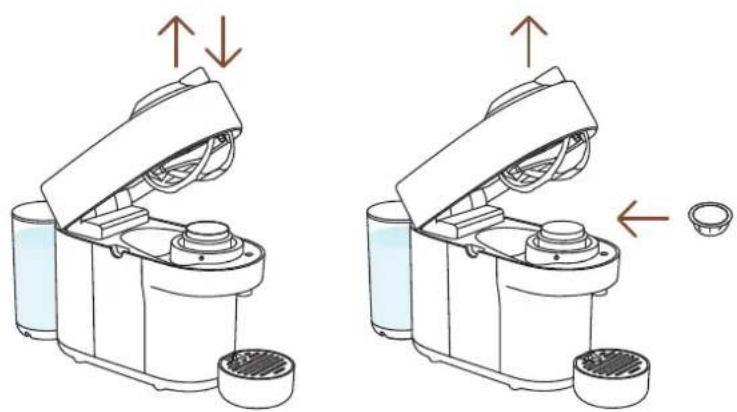
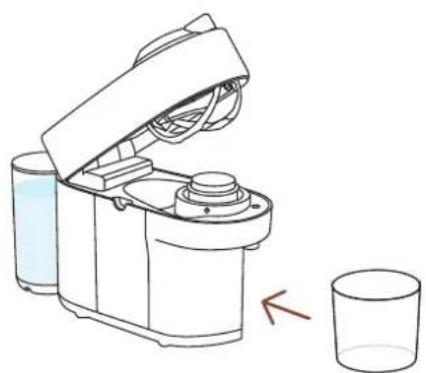
3 Unlock and open the machine head completely and insert a Vertuo capsule with the dome shape facing down.
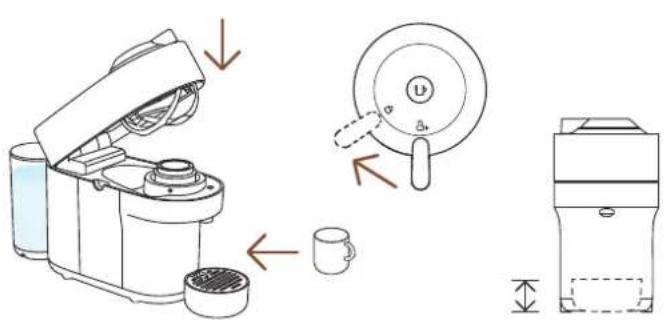
4 Close the machine head and lock by turning the lever left into the lock position and place a cup on the cup support. The cup support can be adjusted to accommodate your cup size.
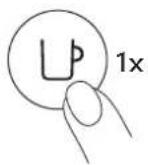
5 Start brewing by pressing the button once.
CAUTION: for correct machine use, please do not open the machine head while the coffee is brewing, wait until the machine has stopped and the coffee button is steady and white. If you want to stop the brewing earlier, please press the Coffee Button once and wait until the coffee button goes back to steady white.
Due to the barcode reading, coffee pre-wetting and infusion time, it will take a moment before the coffee begins to flow. The machine will automatically recognize the inserted capsule and select the coffee preparation parameters and cup length defined by Nespresso coffee experts to extract the coffee blends at it's best.
natural_image
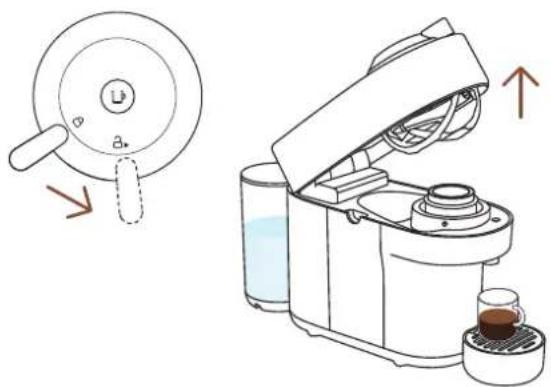
Illustration of a kitchen appliance with a lid and side view showing its open lid and base, with no visible text or symbols.6 When the coffee stops brewing, open the machine head by turning the lever right towards the unlock position to automatically eject the capsule and enjoy your coffee.
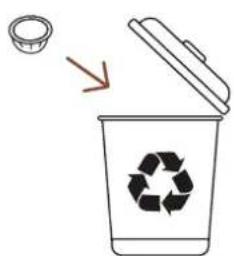
7 Don't forget to recycle your Nespresso capsules.*
*THIS IS NESPRESSO. THIS IS RECYCLABLE. For more information about recycling your Nespresso capsules, visit www.nespresso.com
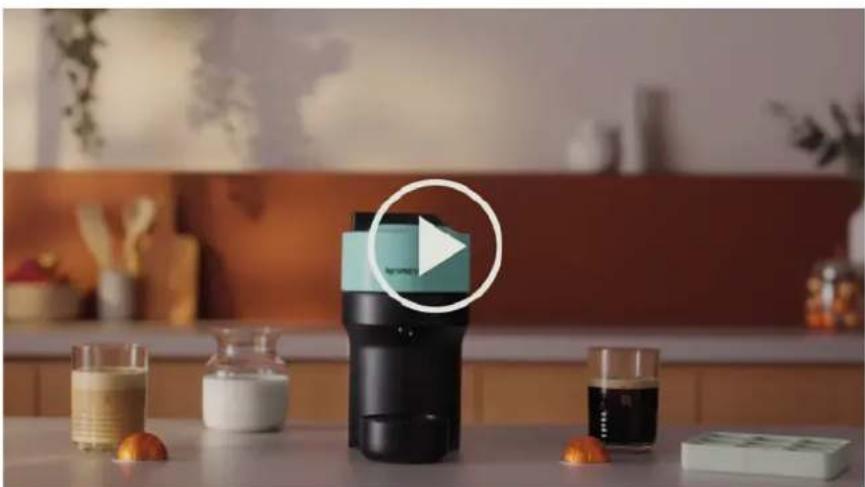
DISCOVER OUR COFFEE CREATIONS MODE
natural_image
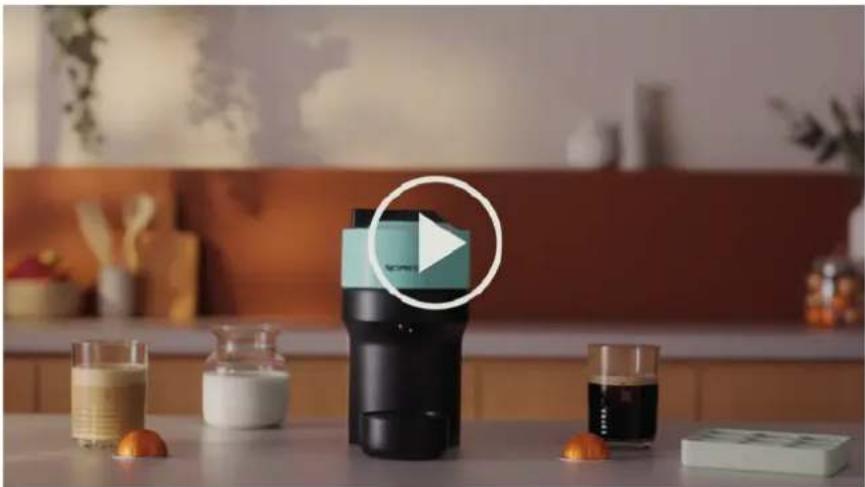
Modern kitchen appliance with a black blender and glassware on a table, featuring a white play button overlay (no visible text or symbols)With this machine, Nespresso offers you a specific function to concentrate your coffee extractions to create your own recipes.
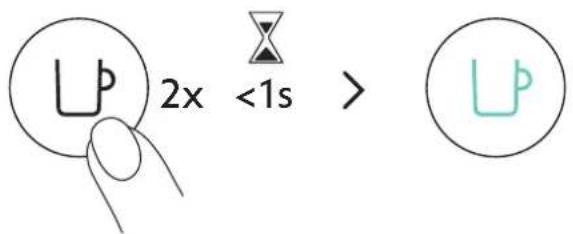
With your machine turned on and a capsule inserted and the head closed and locked, double click the coffee button. It will blink turquoise and your coffee brew will be concentrated, optimizing the coffee taste in recipes with add-ons (milk, cream, over ice...). For Incomparable Coffee Experience.
other
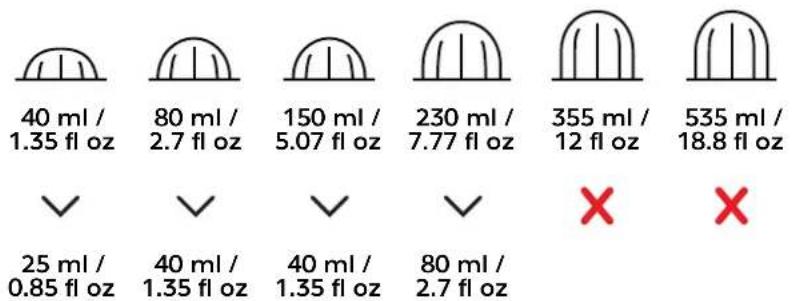
| Value | Category | |---|---| | 40 ml / 1.35 fl oz | ✓ | | 80 ml / 2.7 fl oz | ✓ | | 150 ml / 5.07 fl oz | ✓ | | 230 ml / 7.77 fl oz | ✓ | | 355 ml / 12 fl oz | ✗ | | 535 ml / 18.8 fl oz | ✗ | | 25 ml / 0.85 fl oz | ✓ | | 40 ml / 1.35 fl oz | ✓ | | 40 ml / 1.35 fl oz | ✓ | | 80 ml / 2.7 fl oz | ✓ | ✗To fully enjoy the benefits, we recommend brewing our Coffee+ range using only the official cup sizes. For the best in-cup results, we do not recommend brewing our XL (Alto Ambrato, Alto Onice), Cold Brew Style & Carafe Pour Over Style with this mode.
NOTE: An update of your machine via the Nespresso App may be necessary to enable this mode.
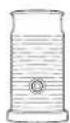
Discover how to upgrade your machine with our Aeroccino range on www.nespresso.com
ADAPT YOUR COFFEE VOLUMES
natural_image
Two identical diagrams of a robotic device with arrows indicating movement or assembly, showing no text or symbols.1 Open the machine and insert the capsule you want to program.
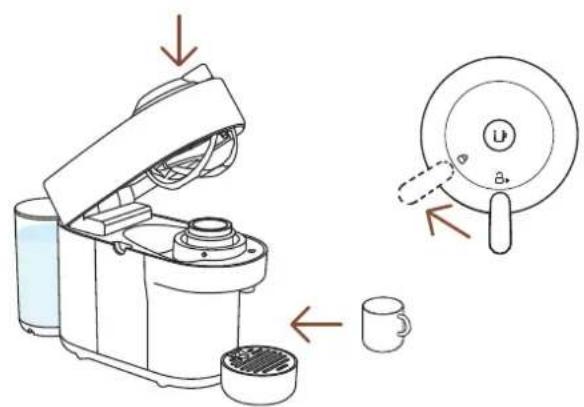
2 Close the machine head, turn the lever left towards the lock position and place a cup on the cup support.
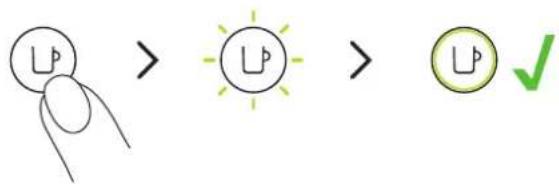
3 Press and hold the button, letting go a few seconds before the desired volume is reached. The new water volume is now programmed for the capsule type used during the setting.
The programming is specific to each capsule type. Cup sizes may be programmed from 20 ml / 0.7 fl oz to 535 ml / 18 fl oz.
CAUTION: for correct machine use, please do not open the machine head while the coffee is brewing, wait until the machine has stopped and the coffee button is steady and white. If you want to stop the brewing earlier, please press the Coffee Button once and wait until the coffee button goes back to steady white.
NOTE: Once a customer-specific volume is programmed by the user, every time that capsule type is inserted in the machine, the preparation will stop at the user-programmed cup size. If you wish to come back to the default parameters see the paragraph "Reset to factory settings".
CLEANING
Clean your machine on a monthly basis, when you start having coffee residue inside the machine head or after a long period of non-use.
natural_image
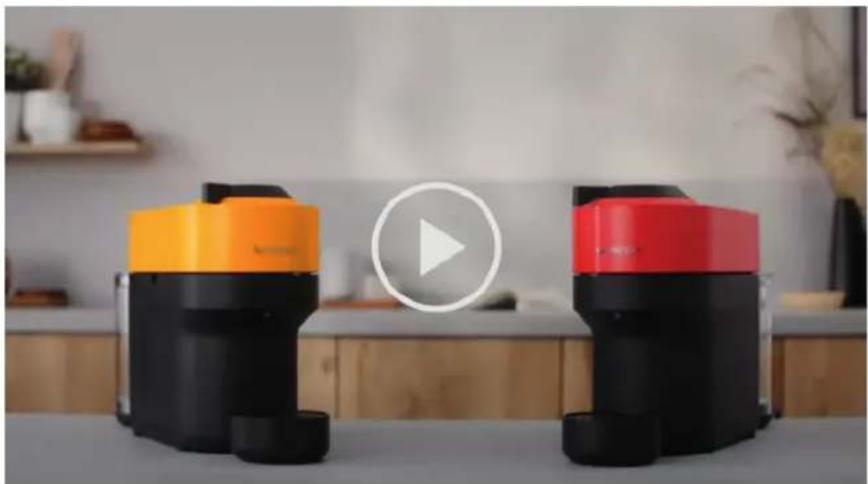
Two modern vacuum cleaner units (black and orange) with a play button overlay, placed on a white surface in a minimalist indoor setting (no text or symbols visible)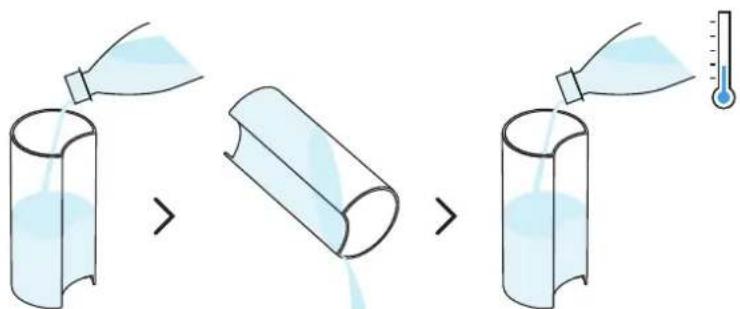
1 Rinse and clean the water tank and the lid before filling it with fresh drinking water.
natural_image
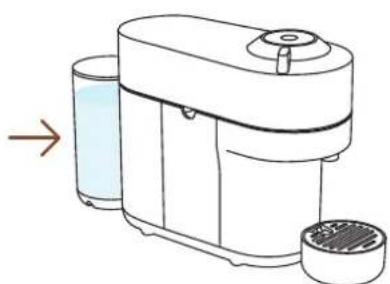
Line drawing of a modern kitchen blender with a side panel and lid, showing no text or symbols.2 Put the water tank back in position on the machine.
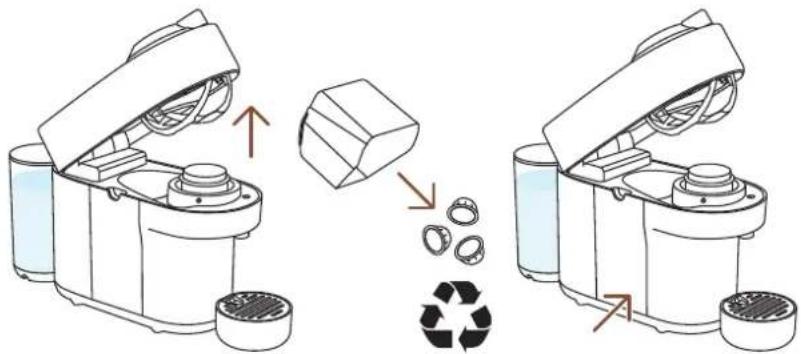
3 Unlock and open the machine and eject your used capsule*. Empty and rinse the capsule container and the drip tray and put them back in place.
natural_image
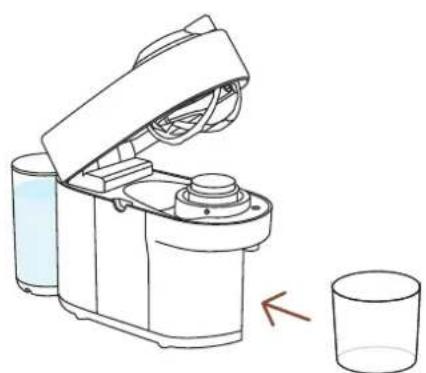
Line drawing of a kitchen appliance with a lid open, next to a glass (no text or symbols)4 Remove the cup support and place an empty container (of at least 1 L / 34 fl oz) under the coffee outlet.
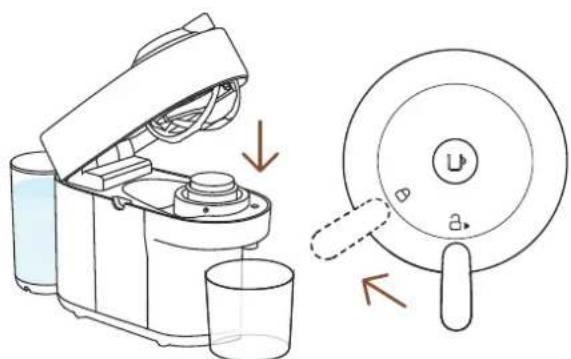
5 Close the machine head and turn the lever left towards lock position. Make sure no capsules are present in the machine before starting the cleaning procedure.
*THIS IS NESPRESSO. THIS IS RECYCLABLE. For more information about recycling your Nespresso capsules, visit www.nespresso.com
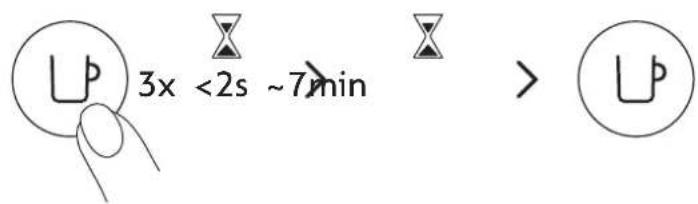
6 Press the button 3 times within 2 seconds to start rinsing. Let the cleaning procedure complete automatically.
It should take less than 2 minutes before the cleaning process begins and water starts to flow. This operation may take up to 7 minutes and will stop automatically when the cycle is complete. The procedure can be stopped at any time by pressing the button.
natural_image
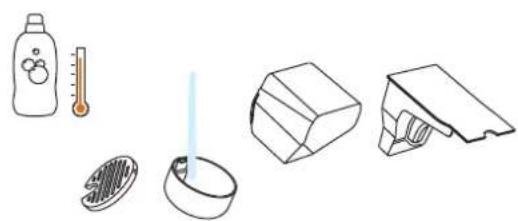
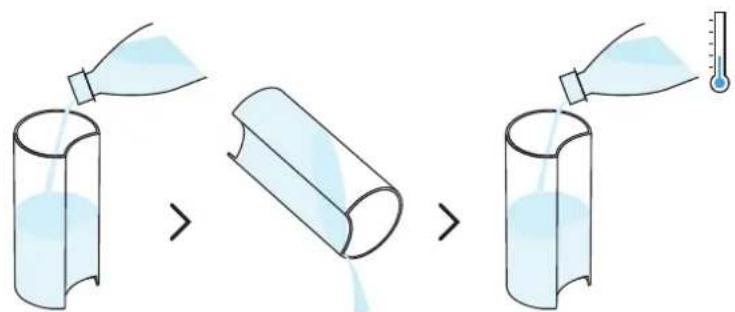
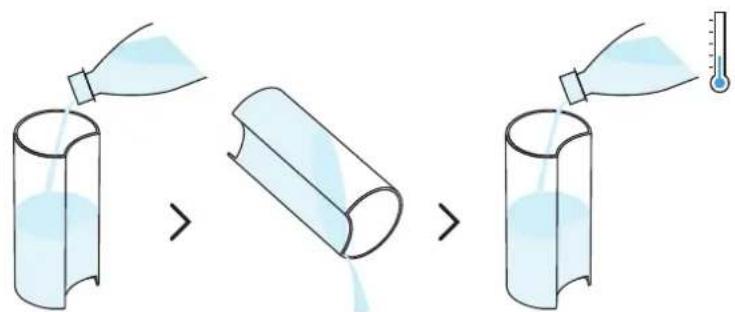
Illustration of household items including a thermometer, showerhead, toilet, and storage unit (no text or symbols)7 Wash the capsule container, the cup support and the drip tray with hot water and mild odourless detergent.
CAUTION: Do not use any strong or abrasive cleaning agent or solvent cleaner. Do not put the machine in a dishwasher. Never immerse the appliance or part of it in water.
natural_image
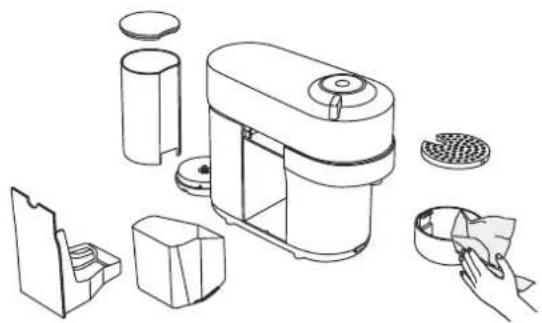
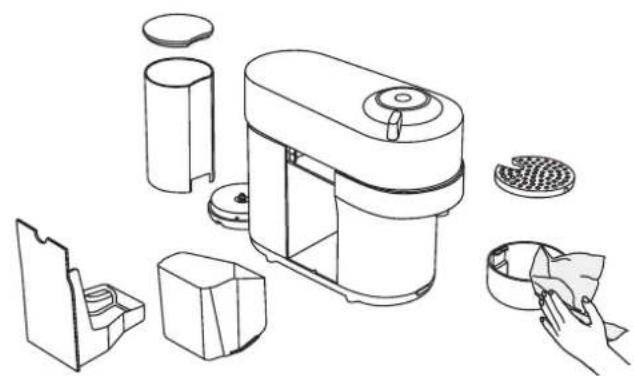
Line drawing of a smart food appliance with exploded view and hand placing it (no text or symbols)8 Dry the machine with a clean and fresh towel.
CAUTION: Clean the coffee outlet regularly with a clean damp cloth. Always use soft cloths to clean the machine.
NOTE: Water may accumulate inside the machine's head during cleaning. If this happens, please dry visible parts with a clean dry cloth.
DESCALING
Descaling your machine will ensure that it functions properly throughout its lifetime and will make your coffee experience as incomparable as it was the first day. Your machine will indicate when descaling is needed by blinking orange 3 times before steady white.
natural_image
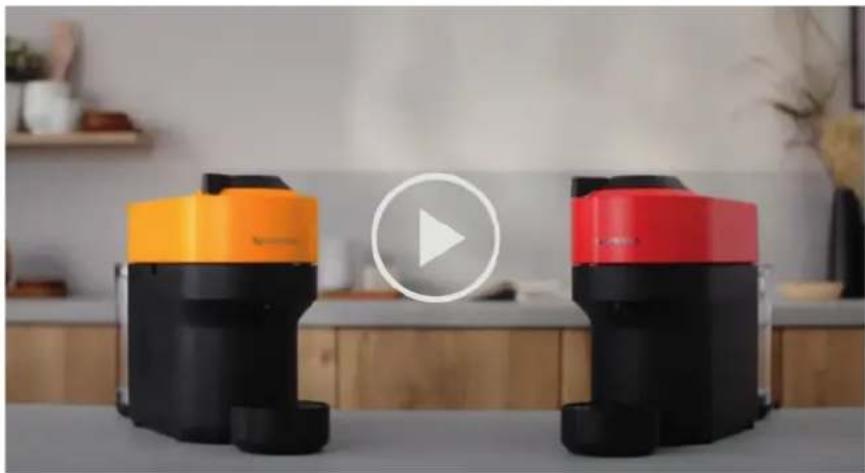
Two modern portable devices with orange and black casing, one blue-and-red, displayed on a white surface with a play button overlay (no text or symbols visible)The descaling procedure takes \~20 minutes and cannot be interrupted.
NOTE: Please carefully read the descaling instructions before starting.
You will need:
• A descaling kit available on www.nespresso.com
• An empty container (of 1 L / 34 fl oz)
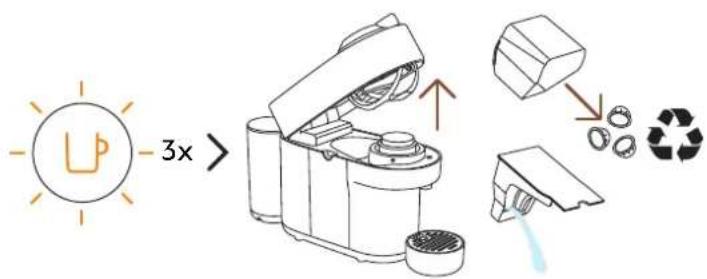
1 With the button blinking orange 3 times: Unlock and open the machine head to eject any used capsule*. Empty the capsule container and drip tray and put them back into position on the machine.
* THIS IS NESPRESSO. THIS IS RECYCLABLE. For more information about recycling your Nespresso capsules, visit www.nespresso.com
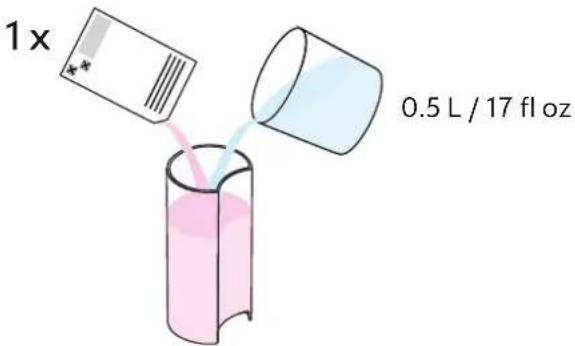
2 Fill the water tank with 0.5 L / 17 fl oz of water and add 1 unit of Nespresso descaling liquid.
CAUTION: Please note that the descaling solution can be harmful. Avoid contact with eyes, skin and surfaces.
natural_image
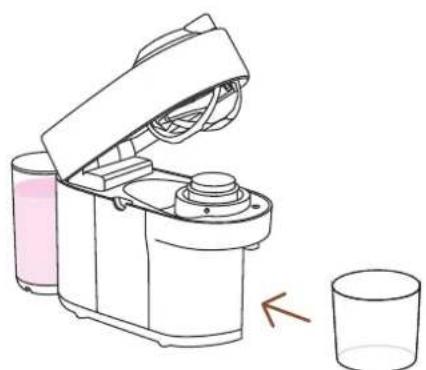
Line drawing of a kitchen mixer with liquid and a glass, showing no text or symbols3 Remove the cup support and place an empty container (of at least 1 L / fl 34 oz) under the coffee outlet.
natural_image
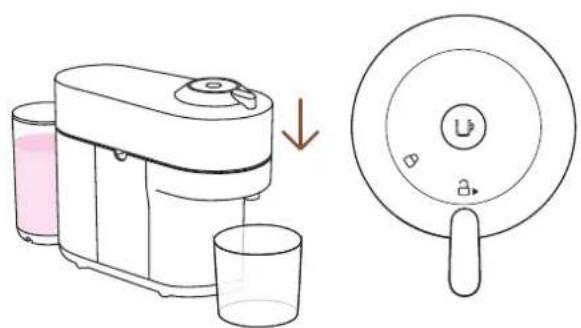
Illustration of a coffee maker and its side mirror device (no text or symbols)4 With the machine on, close the machine head and leave the lever in the unlock position.
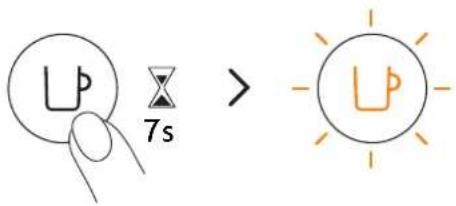
5 Hold the button for at least 7 seconds or until you see the light turn off. The button will start blinking orange rapidly.
CAUTION: You now have 45 seconds to enter the descaling mode, otherwise the machine will return to the brewing mode.
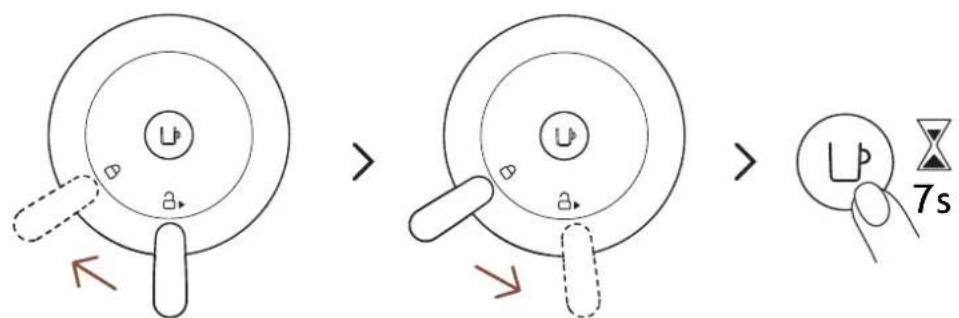
6 Lock the machine head by turning the lever left until the lock symbol and then unlock the lever by turning right to the unlock position. Press and hold the button again for approximately 7 seconds or until the light turns off. The button will start blinking orange rapidly.
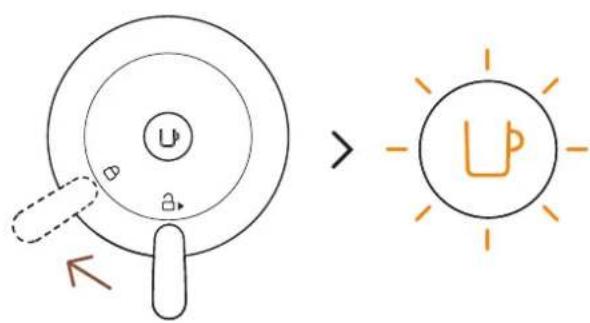
7 To enter the descaling mode, lock the machine by turning the lever left towards the lock position. The light should still be blinking orange quickly. This is an indication that you have entered descaling mode.
8 Press the coffee button once to begin the descaling process. The light will continuously blink orange throughout the process.
The machine will stop automatically when the first phase of descaling is completed.
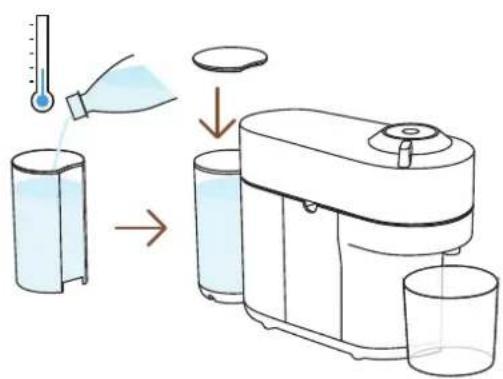
9 At the end of the descaling process, it is time to rinse the machine. Rinse the water tank and drip tray thoroughly. Fill the water tank with fresh drinking water and put it back in place. Empty the container and place it back under the coffee outlet.
10 Press the button to rinse the machine. When the button stops blinking rapidly and becomes steady, the descaling procedure is completed.
The machine will stop automatically when the procedure is completed.
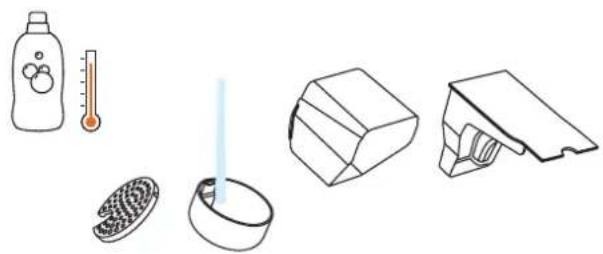
natural_image
Illustration of household items including a bottle, thermometer, plate with iodine, and a box (no text or symbols)11 Wash the capsule container, the cup support and the drip tray with hot water and mild odourless detergent.
CAUTION: Do not use any strong or abrasive cleaning agent or solvent cleaner. Do not put the machine in a dishwasher. Never immerse the appliance or part of it in water.
natural_image
Line drawing of a smart kitchen appliance with cutaway views and accessories (no text or symbols)12 Dry the machine with a clean and fresh towel. Let the machine dry for 10 minutes before using it.
NOTE: Water may accumulate inside the machine's head during cleaning. If this happens, please dry visible parts with a clean dry cloth.
NOTE: the machine can only enter descaling mode after 30 or more coffees have been brewed.
EMPTYING THE SYSTEM
Emptying the system is a process that could be done before a period of non-use, for frost protection or prior to sending the machine for a repair.
natural_image
Two modern portable devices with orange and black casing, one emitting a play button (no text or symbols visible)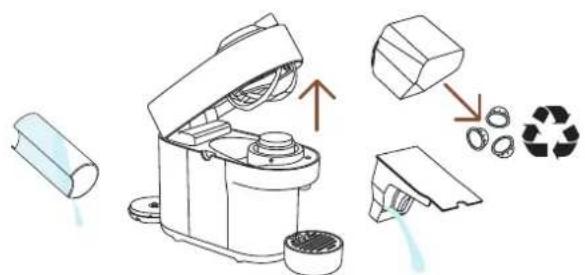
1 Empty the water tank, open the machine head, and let the used capsule be ejected. Empty the capsule container and the drip tray. Don't forget to recycle your Nespresso capsules.*
natural_image
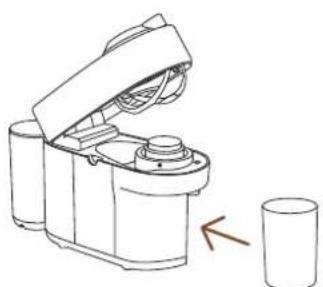
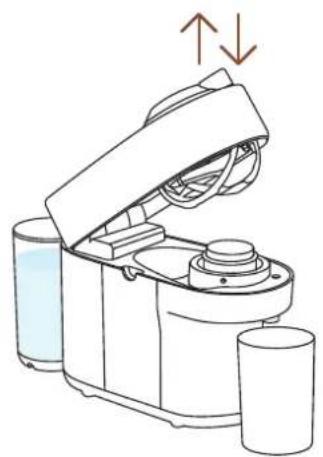
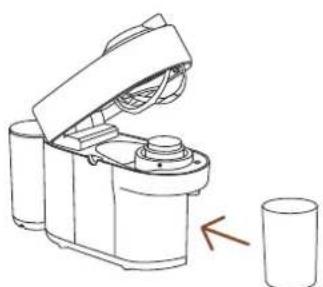
Line drawing of a robotic device with a cylindrical base and open lid, next to a glass (no text or symbols)2 Place them back in position on the machine, remove the cup support and place an empty container (0.5 L / 17 fl oz) under the coffee outlet.
* THIS IS NESPRESSO. THIS IS RECYCLABLE. For more information about recycling your Nespresso capsules, visit www.nespresso.com
natural_image
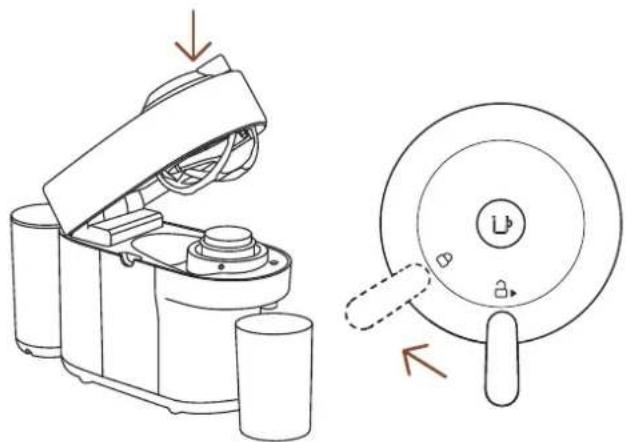
Line drawing of a kitchen appliance with open lid and side view showing internal components (no text or symbols)3 With the machine plugged in, open and close the machine head and turn the lever towards the lock position.
natural_image
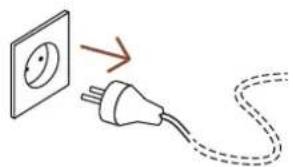
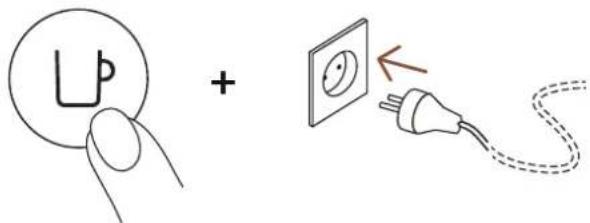
Illustration of an electrical plug connected to a wall socket, with a dashed cord indicating cable (no text or symbols)4 Unplugthemachine.
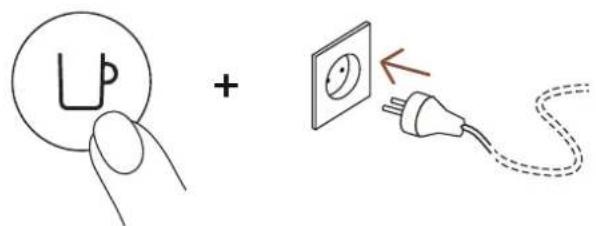
5 Press and hold the button while plugging in the machine.
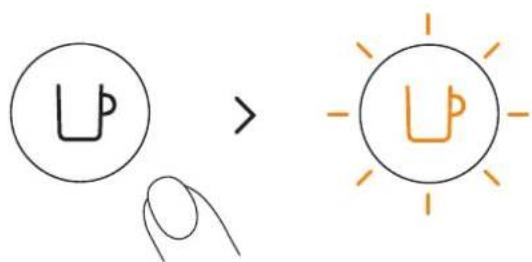
6 Release the button. It will blink orange and the emptying process will start.
It will take approximatively 30 seconds for the machine to complete the emptying process. The machine turns off automatically when it is empty.
RESET TO FACTORY SETTINGS
natural_image
Line drawing of a kitchen appliance with liquid and two cups, showing a lid open and side view (no text or symbols)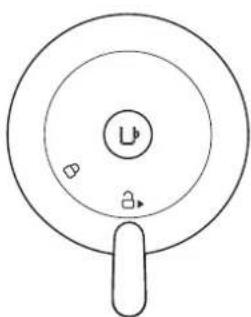
natural_image
Simple line drawing of a circular object with a central label and two small symbols, no text or numbers present.1 With the machine plugged in, open and then close the machine head before leaving the lever in the unlock position.
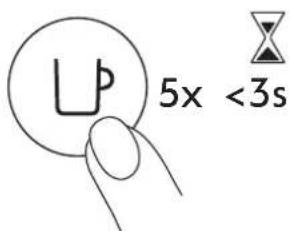
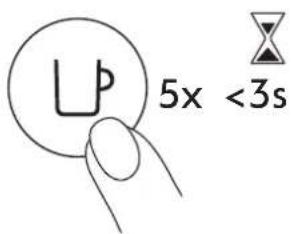
2 Press the button 5 times within 3 seconds. The machine is now programmed with the factory settings.
BLINKING SUMMARY
You want to learn more about the Vertuo Pop blinkings? Please watch the following video:
TROUBLESHOOTING
No light on the button. • The machine has turned OFF automatically; press the button or "UNLOCK" the machine.
- Check the mains, plug, voltage, and fuse.
No coffee, no water. • Check that the water tank is filled.
- Check that a fresh capsule is inserted in the correct position, that the lever is properly locked and press the button to start.
- Descale if necessary.
- Open the machine head and eject any used capsule that is in the machine. Then perform a clean as per the cleaning section.
Coffee is not hot enough.
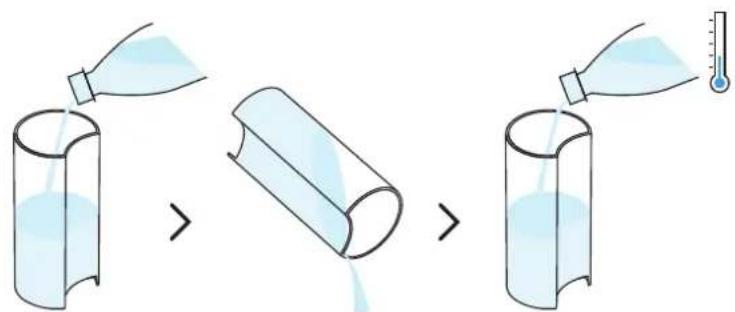
- Preheat the cup with hot drinking water from the tap.
- Descale if necessary.
Leakage or unusual coffee flow.
- Check that the water tank is well positioned.
- Descale if necessary.
Machine turns to "OFF mode".
• To save energy the machine will turn off after 2 minutes of non-use.
- The machine can be turned "OFF" manually at any time (when not in use) by pressing and holding the button for 3 seconds.
Coffee grounds in the cup.
• Perform the cleaning procedure twice.
• See paragraph on "Cleaning".
The machine doesn't start and has light steady on. If blinking, see next points.
- Check that the lever is properly locked.
- If you want to brew a Coffee or Espresso, check that a fresh capsule is inserted in the correct position, that the lever is properly locked and press the button to start.
- If you are cleaning, descaling or emptying the system, check that no capsule is inserted then close, lock the machine and press the button to start one of these operations.
The machine doesn't start and light blinks alternately; 1 blink and 1 pause.
- Fill the water tank and press the button to start.
- Check that the lever is properly locked.
Light blinks while machine is running.
- If the coffee is flowing normally, this indicates the machine is working properly.
- If only water is flowing, the machine is executing a user request for either cleaning, descaling or emptying the system. Refer to the corresponding section in this user manual.
- Turn the machine to "OFF mode" by pressing the button for 3 seconds and then press it again to turn the machine ON. Now wait approximately 20 minutes to allow the machine to cool down after extensive use.
Light blinks and machine is not running.
- It will take some time before the coffee flow comes out (due to code reading and pre-wetting the coffee).
- Check that a fresh capsule is inserted in the correct position, that the lever is properly locked and press the button to start.
- Fill the water tank and press the button to start.
- Turn the machine to "OFF mode" by pressing the button for 3 seconds and then press it again to turn the machine ON. Now, wait approximately 20 minutes to allow the machine to cool down after extensive use.
Light blinks alternately 2 blinks and 1 pause continuously. Machine is not running.
- During regular Coffee/Espresso preparation:
1) Unlock the lever and open the machine head to check that a fresh undamaged capsule is inserted in the correct position.
2) Check that the lever is in "LOCKED" position.
3) Check that the water tank is filled.
• During Descaling, Emptying and Cleaning:
1) Check that the capsule is ejected.
2) Check that the lever is in "LOCKED" position.
• During Programming Volume:
1) Check if a capsule has been well inserted.
2) Please refer to the corresponding chapter "Adapt your coffee volume".
Light alternately blinking 3 times and then steady on.
• If the problem persists:
1) Unlock the lever and open the machine head.
2) Replace the capsule (if needed).
3) Disconnect the power cord from the outlet and plug the machine back into the outlet after 10 seconds.
4) Close the head and press the button to turn ON and press again to start brewing. If the problem persists, call Nespresso.
- Descaling needed: the machine can be used only a few times after the descaling alert appears before it becomes necessary.
SPECIFICATIONS
| Power | ~220-240 V, 50-60 Hz, 1300-1500 WUS, CA: 120 V, 60 Hz, 1500 WMX: 127 V~, 60 Hz, 1380 W |
| Frequency 2.402-2.480 GHz | |
| RF output power (EIRP) | Bluetooth 4 dBm Max. e.i.r.p. and Wi-Fi<20 dMm max. e.i.r.p. |
| Standby 0.39 W/h | |
| Power saving mode Auto-off after 2 min | |
| Heat-up time 30 seconds (head closed and locked) | |
| Movable cup support for large recipes | Removable single position |
| Cable length from device dispatch | 75 cm / 30 in |
| Dimensions (W x D x H) | 13.6 x 42.6 x 25 cm / 5.3 x 16.7 x 9.8 in |
| Weight 3.5 kg / 7.72 lbs | |
| Water tank capacity 600 ml / 20 fl oz | |
| Capsule container capacity | 8 espresso or 5 mug capsules |
MACHINE CODES
| Nespresso | Breville | Delonghi |
| GCV2, GDV2 | BNV120, BNV150 | ENV90 |
| Krups | Magimix | |
| XN9201, XN9204, XN9205, XN9211 | M800 |
CLIQUEZ ET CHOISISSEZ VOTRE LANGUE
FR

CONSIGNES DE SÉCURITÉ
INFORMATIONS GÉNÉRALES

CONNECTIVITÉ

PREMIERS PAS

PRÉPARATION DU CAFÉ

RÉGLAGE DU VOLUME CAFÉ

ENTRETIEN

DÉTARTRAGE

VIDANGE DU SYSTÈME

RESTAUREZ LES RÉGLAGES D'USINE

IDENTIFICATION DES VOYANTS LUMINEUX

PANNES

CARACTÉRISTIQUES TECHNIQUES
CONSIGNES DE SÉCURITÉ
Mug (P) Mug (M) Verre
Reveal

flowchart
graph LR
    A["Apple App Store"] -->|*| B["NEUPRESSA"]
    C["Google Play"] -->|**| B
    B --> D["NEUPRESSA"]
    D --> E["手机图标"]
    E --> F["手机图标"]
    F --> G["手机图标"]
natural_image
Line drawing of a portable electric machine with power plug and socket, showing wiring connection (no text or symbols)flowchart
graph LR
    A["Device with icon"] --> B["User icon"]
    B --> C["Device with icon"]
    C --> D["User icon with checkmark"]
natural_image
Diagram of a small kitchen appliance with a side panel and a separate close-up view showing internal components (no text or symbols)natural_image
Diagram of a portable coffee maker connected to a glass, with a power outlet and plug shown (no text or symbols)natural_image
Illustration of a coffee maker with open lid and cup, alongside its side view showing a circular tray (no text or symbols)natural_image
Line drawing of a kitchen appliance with lid and side panel, showing internal components and directional arrows (no text or symbols)natural_image
Illustration of a kitchen appliance with a lid and side view showing its open lid and base, no text or symbols present.natural_image
Modern kitchen appliance with a black blender and glass of juice, featuring a white play button overlay (no visible text or symbols)natural_image
Two identical line drawings of a kitchen appliance with a lid, showing open and closed states (no text or symbols)ENTRETIEN
natural_image
Two modern vacuum cleaner units (black and orange) with a play button overlay, placed on a white surface in a minimalist indoor setting (no text or symbols visible)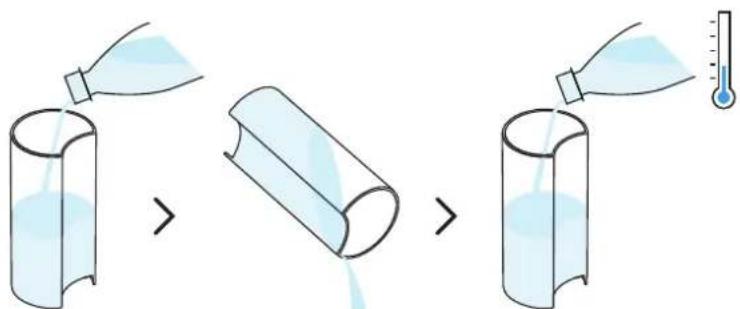
natural_image
Line drawing of a modern kitchen blender with a side panel and lid, showing no text or symbols.natural_image
Line drawing of a kitchen appliance with a lid and side bowl, showing a drop in liquid (no text or symbols)natural_image
Illustration of household items including a thermometer, a plate with a thermometer, and a kitchen appliance (no text or symbols)natural_image
Line drawing of a smart kitchen appliance with cutaway views and accessories (no text or symbols)natural_image
Two modern portable devices with black and orange packaging, one white play button overlay (no text or symbols on device)natural_image
Line drawing of a kitchen mixer with liquid and a glass, showing no text or symbolsnatural_image
Illustration of a coffee maker and its side mirror device (no text or symbols)natural_image
Illustration of household items including a bottle, thermometer, plate with iodine, and a box (no text or symbols)natural_image
Line drawing of a smart kitchen appliance with cutouts and accessories (no text or symbols)natural_image
Two modern vacuum cleaner units (black and red) displayed on a table, with a play button overlay in the center (no visible text or symbols)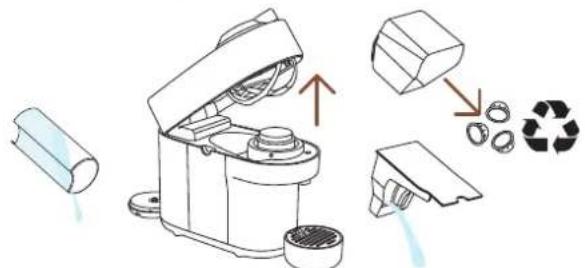
natural_image
Line drawing of a mechanical device with an open lid and two cups beside it (no text or symbols)natural_image
Line drawing of a kitchen appliance with a lid and handle, showing open lid and side view (no text or symbols)natural_image
Simple line drawing of an electrical plug connected to a wall socket, with a dashed cord indicating cable (no text or symbols)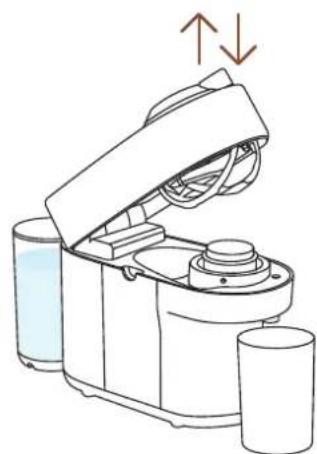
natural_image
Line drawing of a kitchen appliance with liquid and two cups, showing a lid open and side view (no text or symbols)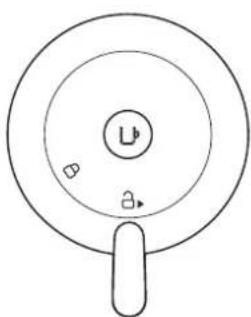
natural_image
Simple line drawing of a circular object with a central label and two small symbols, no text or numbers present.CARACTÉRISTIQUES TECHNIQUES
natural_image
Product display set including a blue coffee maker, a box of colorful candies, and a coffee shop with 4+5+6 packaging (no visible text or symbols on main objects)Mug (S) Mug (M) Reveal G

flowchart
graph LR
    A["Available on the App Store"] --> B["NEUPRSSA"]
    C["GET IT ON Google Play"] --> B
    B --> D["NEUPRSSA"]
    D --> E["手机图标"]
natural_image
Line drawing of a portable electric machine with power plug and socket, showing wiring connection (no text or symbols)flowchart
graph LR
    A["Device with sensor icon"] --> B["User icon with checkmark"]
    B --> C["User icon with lock icon"]
    C --> D["User icon with checkmark"]
natural_image
Diagram of a small appliance with a lid and side-mounted base, showing a transformation from a cylindrical component to a multi-tiered device (no text or symbols present)natural_image
Diagram of a portable coffee maker connected to a glass, with a power outlet and plug shown (no text or symbols)natural_image
Illustration of a kitchen blender with water drop and cup, alongside its open lid showing a button labeled 'U' (no text or symbols on the device itself)natural_image
Line drawing of a kitchen appliance with lid, vent, and side ports (no text or symbols)natural_image
Illustration of a kitchen appliance with a lid and side view showing its open lid and base, with no visible text or symbols.natural_image
Modern kitchen appliance with a black blender and glass of orange juice, featuring a white circular overlay highlighting a blue object (no visible text or symbols)natural_image
Two diagrams showing a robotic device with open lid and internal components, one with downward arrows indicating motion (no text or symbols)natural_image
Two modern vacuum cleaner units (black and orange) with a play button overlay, placed on a white surface in a minimalist indoor setting (no text or symbols visible)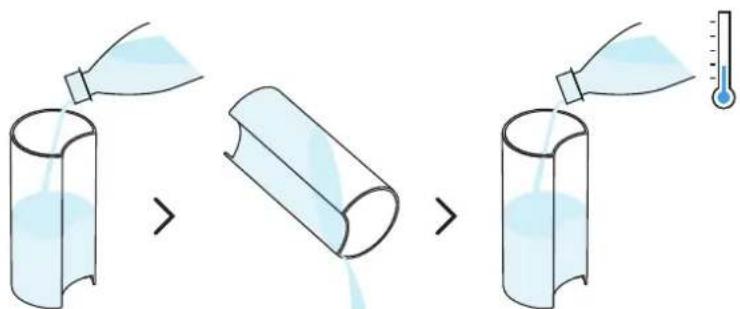
natural_image
Line drawing of a modern kitchen blender with a side panel and lid, showing no text or symbols.natural_image
Line drawing of a kitchen appliance with a lid and side bowl, showing a drop in liquid (no text or symbols)natural_image
Line drawing of a coffee maker with open lid and side view showing lid, cup, and handle (no text or symbols)natural_image
Illustration of household items including a thermometer, a refrigerator, and a wall-mounted device (no text or symbols)natural_image
Line drawing of a smart kitchen appliance with cutouts, storage bins, and a hand cleaning it (no text or symbols)natural_image
Two modern portable devices with orange and black modules, one white play button overlay (no text or symbols on device)natural_image
Line drawing of a kitchen mixer with liquid and a glass cup nearby (no text or symbols)natural_image
Illustration of a water dispenser with liquid and a side view of its lid (no text or symbols)natural_image
Illustration of household items including a bottle, thermometer, plate with iodine, and a box (no text or symbols)natural_image
Line drawing of a smart kitchen appliance with cutaway views and accessories (no text or symbols)natural_image
Two modern portable devices with orange and black casing, one emitting a play button (no visible text or symbols)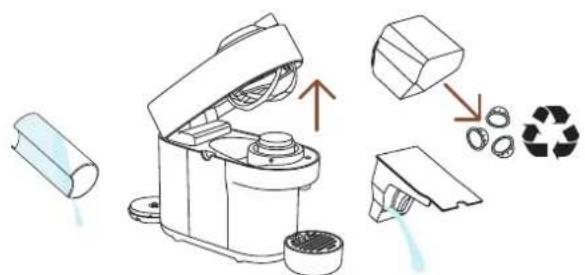
natural_image
Line drawing of a robotic device with a cylindrical base and open lid, next to a glass (no text or symbols)natural_image
Line drawing of a kitchen appliance with a lid and handle, showing open lid and side view (no text or symbols)natural_image
Simple line drawing of an electrical plug connected to a wall socket, with a dashed cord indicating cable (no text or symbols)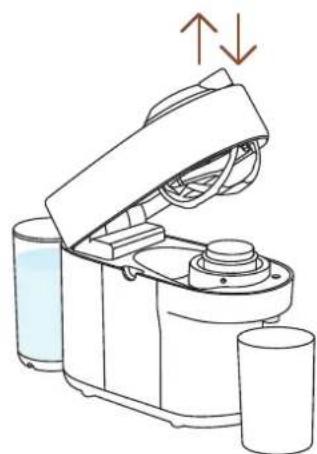
natural_image
Line drawing of a kitchen appliance with liquid and two cups, showing a lid open and side view (no text or symbols)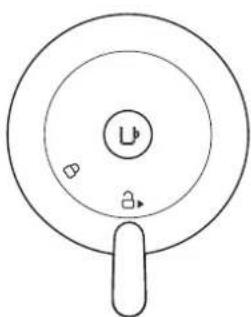
natural_image
Simple line drawing of a circular object with a central label and two small symbols, no text or numbers present.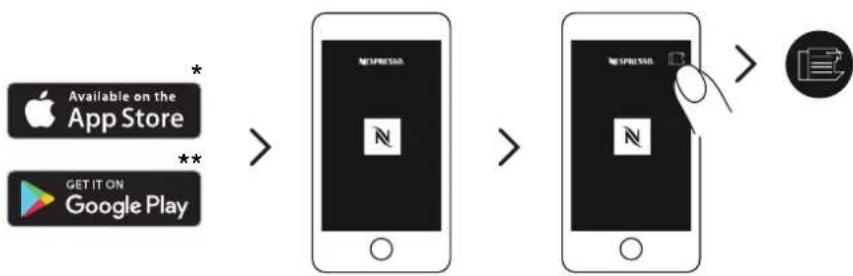
flowchart
graph LR
    A["Apple App Store"] -->|*| B["Downloaded App Store"]
    C["Google Play"] -->|**| B
    B --> D["NewspRESS"]
    D --> E["Downloaded App Store"]
    E --> F["NewspRESS"]
    F --> G["Icon: Google icon"]
natural_image
Line drawing of a portable electric machine with power outlet and plug, no text or symbols presentflowchart
graph LR
    A["Smartphone with icon"] --> B["Device selection"]
    B --> C["Device confirmation check"]
natural_image
Diagram of a small appliance with a lid and side-mounted base, showing a transformation from a cylindrical component to a multi-tiered device (no text or symbols present)natural_image
Diagram of a portable coffee maker connected to a glass, with a power outlet and plug shown (no text or symbols)natural_image
Line drawing of a kitchen appliance with lid, vent, and side outlet (no text or symbols)natural_image
Illustration of a kitchen appliance with a lid and side view showing its open lid and base, no text or symbols present.natural_image
Modern kitchen appliance with a black blender and glassware on a table, featuring a play button overlay (no visible text or symbols)25 ml 40 ml 40 ml 80 ml
natural_image
Two identical line drawings of a kitchen appliance with a lid, showing open and closed states (no text or symbols)natural_image
Two modern vacuum cleaner units (black and orange) displayed on a table, with a play button overlay in the center (no visible text or symbols)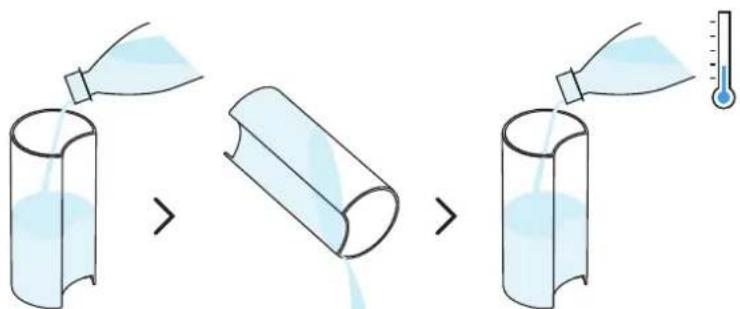
natural_image
Line drawing of a modern kitchen blender with a side panel and lid, showing no text or symbols.natural_image
Line drawing of a kitchen appliance with a lid and side bowl, showing a drop in liquid from the lid to a glass (no text or symbols)natural_image
Line drawing of a kitchen appliance with a lid and cup, showing a close-up view of its lid (no text or symbols present)natural_image
Illustration of kitchen utensils including a thermometer, a plate with a thermometer, and a mechanical device (no text or symbols)natural_image
Line drawing of a smart kitchen appliance with exploded view and hand holding a lid (no text or symbols)natural_image
Two modern vacuum cleaner units, one orange-yellow and one red, displayed on a white surface with a play button overlay (no text or symbols visible)natural_image
Line drawing of a kitchen blender with liquid and a glass, showing no text or symbolsnatural_image
Illustration of a coffee maker and its side mirror device (no text or symbols)natural_image
Illustration of various household items including a bottle, thermometer, plate with liquid, and a box (no text or symbols)natural_image
Line drawing of a smart kitchen appliance with cutaway views and accessories (no text or symbols)natural_image
Two modern vacuum cleaner units (black and orange) displayed on a table, with a white play button overlay in the center (no text or symbols visible)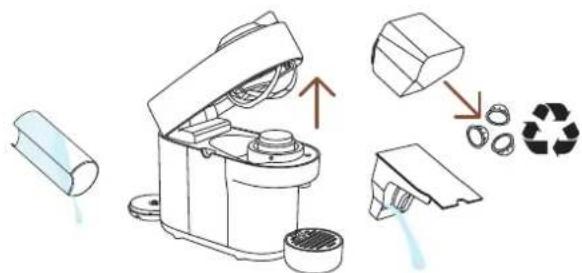
natural_image
Line drawing of a portable blender with a cup, showing the lid and handle (no text or symbols)natural_image
Line drawing of a kitchen appliance with a side view showing the lid and handle (no text or symbols)natural_image
Illustration of an electrical plug connected to a wall socket, with a dashed cord indicating cable (no text or symbols)4 Scollega la macchina.
natural_image
Line drawing of a kitchen appliance with lid, cups, and water inlet (no text or symbols)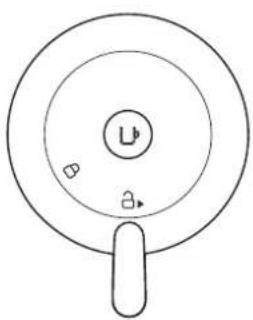
natural_image
Simple line drawing of a circular object with a central label and two small symbols inside, resembling a stylized face or icon (no text or symbols present)natural_image
Product display of coffee maker and coffee shop items including a blue coffee machine, tray with color filter, and packaging (no visible text or symbols)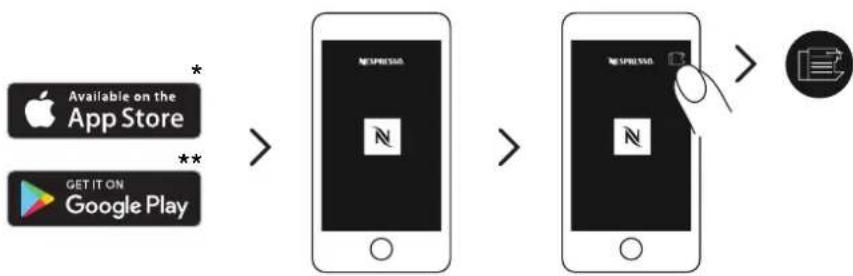
flowchart
graph LR
    A["Apple App Store"] -->|*| B["App Store"]
    C["Google Play"] -->|**| B
    B --> D["Mobile App"]
    D --> E["Mobile App"]
    E --> F["Mobile App"]
    F --> G["Mobile App"]
natural_image
Line drawing of a portable electric machine with power outlet and plug, no text or symbols presentflowchart
graph LR
    A["Smartphone with icon"] --> B["Device selection"]
    B --> C["Device confirmation check"]
    C --> D["Device display with checkmark"]
natural_image
Diagram of a kitchen appliance showing a cylindrical container and a side-mounted device with a lid, with no visible text or symbols.natural_image
Diagram of a portable water heater connected to a cup and a wall socket, with no text or symbols present.natural_image
Line drawing of a kitchen appliance with lid, vent, and side bowl (no text or symbols)natural_image
Illustration of a kitchen appliance with a lid and side view showing its open lid and base, no text or symbols present.natural_image
Modern kitchen appliance with a black blender and glassware on a table, featuring a white circular overlay highlighting a play button (no visible text or symbols)natural_image
Two identical diagrams of a robotic device with arrows indicating movement or assembly, showing no text or symbols.natural_image
Two modern vacuum cleaner units (black and orange) with a play button overlay, placed on a wooden table in a minimalist kitchen setting.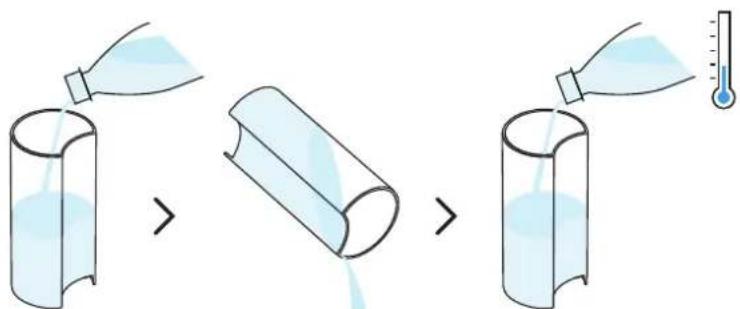
natural_image
Line drawing of a white coffee maker with a side panel and lid, showing liquid level (no text or symbols)natural_image
Line drawing of a kitchen appliance with a side view showing liquid and a glass (no text or symbols)natural_image
Illustration of household items including a thermometer, a plate with a thermometer, and a mechanical device (no text or symbols)natural_image
Line drawing of a smart kitchen appliance with cutouts, storage tanks, and a hand cleaning the interior (no text or symbols)natural_image
Two modern vacuum cleaner units, one orange-yellow and one red, displayed on a white surface with a play button overlay (no text or symbols visible)natural_image
Line drawing of a kitchen mixer with liquid and a glass, showing no text or symbolsnatural_image
Illustration of a coffee maker with liquid and a glass cup, alongside its side view showing its lid (no text or symbols)natural_image
Illustration of various household items including a bottle, thermometer, plate with iodine, and a box (no text or symbols)natural_image
Line drawing of a smart kitchen appliance with exploded view and hands cleaning the interior (no text or symbols)natural_image
Two modern portable devices with orange and black casing, one emitting a white play button (no text or symbols visible)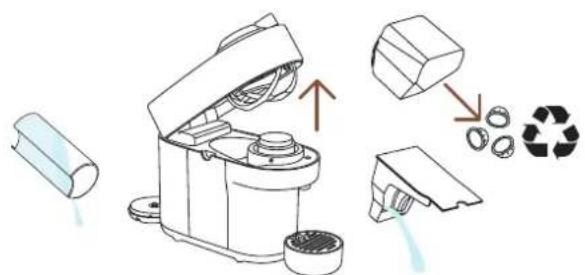
natural_image
Line drawing of a robotic device with a cup and a red arrow pointing to it (no text or symbols)natural_image
Line drawing of a kitchen appliance with open lid and side view showing internal components (no text or symbols)natural_image
Illustration of an electrical plug connected to a wall socket, with a dashed cord indicating cable (no text or symbols)4 Desconecta la máquina
natural_image
Line drawing of a kitchen appliance with liquid and two cups, showing a lid open and side view (no text or symbols)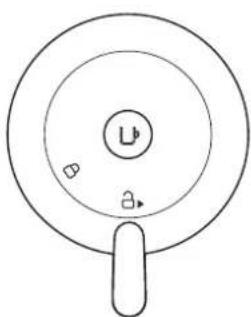
natural_image
Simple line drawing of a circular object with a central label and two small symbols, no text or numbers present.ESPECIFICACIONES
Mug (S) Mug (M) Copo
Reveal

flowchart
graph LR
    A["Apple App Store"] -->|*| B["App Store"]
    C["Google Play"] -->|**| B
    B --> D["Mobile App"]
    D --> E["Mobile App"]
    E --> F["Mobile App"]
    F --> G["Mobile App"]
natural_image
Line drawing of a coffee maker with a power outlet and plug, no text or symbols present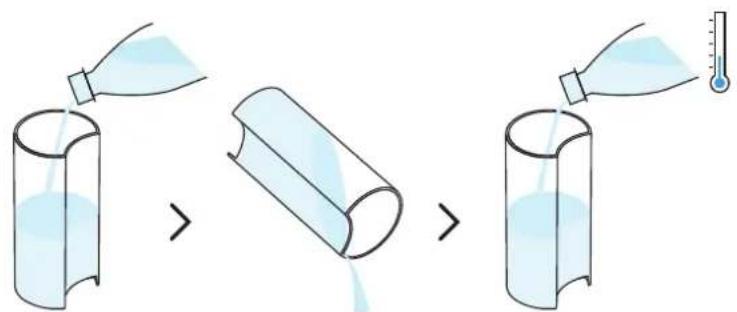
natural_image
Diagram of a small kitchen appliance with a side panel and a separate view showing internal components (no text or symbols)natural_image
Diagram of a portable water heater connected to a cup and a wall socket, with no text or symbols present.natural_image
Line drawing of a kitchen appliance with lid, vent, and side panel (no text or symbols)natural_image
Illustration of a kitchen appliance with a lid and side view showing its open lid and base, no text or symbols present.natural_image
Modern kitchen appliance with a black blender and glassware on a table, featuring a white circular overlay highlighting a green arrow icon (no text or symbols visible)natural_image
Two identical diagrams of a robotic device with arrows indicating movement or assembly, showing no text or symbols.1 Abra e feche a máquina. Com a máquina ligada, abra-a e insira a cápsula que pretende programar.
natural_image
Two modern vacuum cleaner units (black and orange) with a play button overlay, placed on a white surface in a minimalist indoor setting (no text or symbols visible)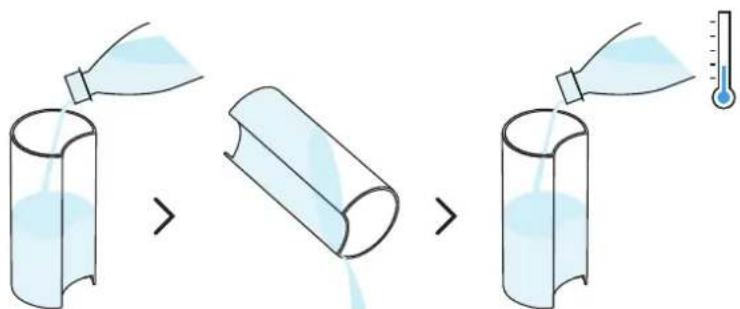
natural_image
Line drawing of a small water dispenser with a side panel and lid, showing liquid level (no text or symbols)natural_image
Line drawing of a kitchen appliance with a lid open, next to a glass (no text or symbols)natural_image
Illustration of household items including a bottle, thermometer, toilet, and storage unit (no text or symbols)natural_image
Line drawing of a smart food blender with exploded view and hand cleaning (no text or symbols)natural_image
Two modern vacuum cleaner units, one orange-yellow and one red, displayed on a table with a play button overlay (no text or symbols visible)natural_image
Line drawing of a kitchen mixer with liquid and a glass, showing no text or symbolsnatural_image
Illustration of a coffee maker and its side mirror device (no text or symbols)natural_image
Illustration of various household items including a bottle, thermometer, plate with liquid, and a box (no text or symbols)natural_image
Line drawing of a smart kitchen appliance with exploded view and hands cleaning the interior (no text or symbols)natural_image
Two modern vacuum cleaner units (black and orange) displayed on a table, with a play button overlay in the center (no text or symbols visible)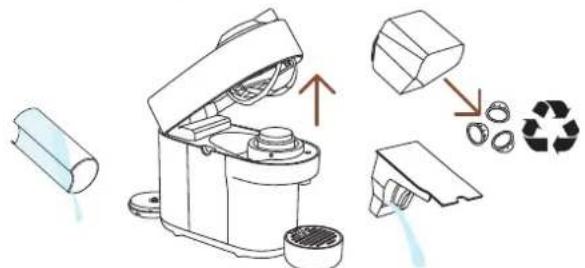
natural_image
Line drawing of a portable device with lid open, next to a cup (no text or symbols)natural_image
Line drawing of a kitchen appliance with a lid and handle, showing open lid and side view (no text or symbols)natural_image
Simple line drawing of an electrical plug connected to a wall socket, with a dashed cord indicating cable (no text or symbols)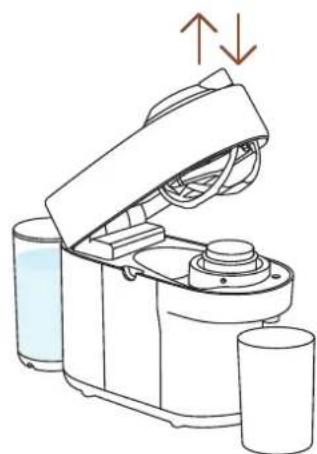
natural_image
Line drawing of a kitchen appliance with liquid and cups, showing open lid and side view (no text or symbols)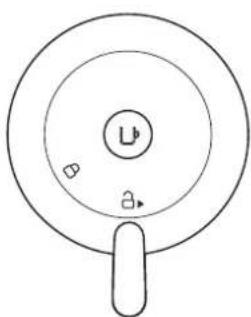
natural_image
Simple line drawing of a circular object with a central label and two small symbols, no text or numbers present.ESPECIFICAÇÕES
KLIKNĚTE A ZVOLTE JAZYK
CS

BEZPEČNOST
PŘEHLED

KONEKTIVITA

ZAČÍNÁME

PŘÍPRAVA KÁVY

PŘIZPŮSOBTE SI OBJEM KÁVY

ČIŠTĚNÍ

ODVÁPNĚNÍ

VYPRÁZDNĚNÍ KÁVOVARU

OBNOVENÍ TOVÁRNÍCH NASTAVENÍ

VÝZNAM SVĚTELNÝCH SIGNÁLŮ

ŘEŠENÍ PROBLÉMŮ

TECHNICKÉ ÚDAJE
BEZPEČNOST
natural_image
Product display of a coffee maker with various accessories and packaging items (no visible text or symbols)Mug (S) Mug (M) Reveal
Glass

Nevhodné doplňky
natural_image
Two glass containers: a mug filled with dark liquid and a conical flask filled with dark liquid, both without any text or symbols.Mug (L) Carafe
flowchart
graph LR
    A["Apple App Store"] -->|*| B["Downloaded App Store"]
    C["Google Play"] -->|**| B
    B --> D["NewspRESS"]
    D --> E["Downloaded App Store"]
    E --> F["NewspRESS"]
    F --> G["Icon: Google icon"]
natural_image
Line drawing of a portable electric machine with power outlet and plug, no text or symbols presentflowchart
graph LR
    A["Device with icon"] --> B["User icon"]
    B --> C["Device with icon"]
    C --> D["User icon with checkmark"]
natural_image
Diagram of a kitchen appliance showing a cylindrical container and a side-mounted device with a lid, with no visible text or symbols.natural_image
Diagram of a portable coffee maker connected to a glass, with a power outlet and plug shown (no text or symbols)natural_image
Line drawing of a kitchen appliance with lid and side ports, showing internal components and directional arrows (no text or symbols)natural_image
Illustration of a kitchen appliance with a lid and side view showing its open lid and base, no text or symbols present.7 Nezapomeňte recyklovat kapsle Nespresso.*
natural_image
Modern kitchen appliance with a black blender and orange juice, set in a kitchen setting (no visible text or symbols)natural_image
Illustration of a kitchen appliance with lid, fan, and evaporator (no text or symbols)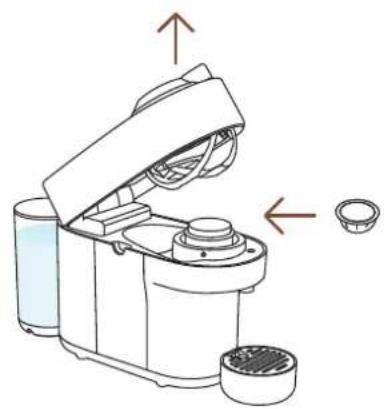
natural_image
Diagram of a coffee maker with open lid and side bowl, showing mechanical components and directional arrows (no text or symbols)natural_image
Two modern vacuum cleaner units (black and orange) with a play button overlay, placed on a white surface in a minimalist indoor setting (no text or symbols visible)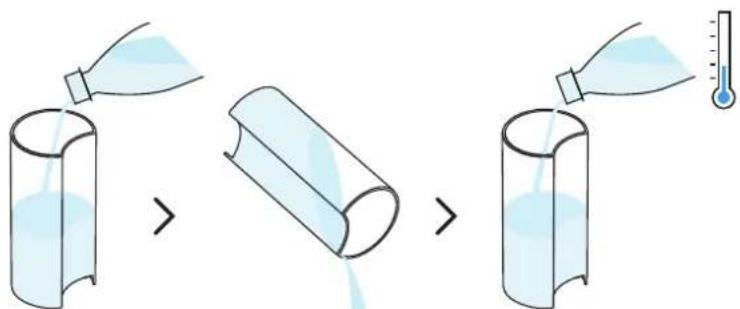
natural_image
Line drawing of a modern kitchen appliance with a side panel and lid, showing no text or symbols.natural_image
Line drawing of a kitchen appliance with a glass cup and a lid, showing no text or symbolsnatural_image
Illustration of kitchen utensils including a thermometer, a lid, and a folded chair (no text or symbols)natural_image
Line drawing of a smart food blender with exploded view and hand placing it (no text or symbols)natural_image
Two modern vacuum cleaner units, one orange-yellow and one red, displayed on a white surface with a play button overlay (no text or symbols visible)natural_image
Line drawing of a kitchen blender with liquid and a glass, showing no text or symbolsnatural_image
Illustration of a coffee maker with liquid and a glass cup, alongside its side view showing its lid (no text or symbols)natural_image
Illustration of household items including a bottle, thermometer, plate with iodine, and a box (no text or symbols)natural_image
Line drawing of a smart kitchen appliance with cutaway views and accessories (no text or symbols)natural_image
Two modern portable devices with orange and black casing, one emitting a play button (no visible text or symbols)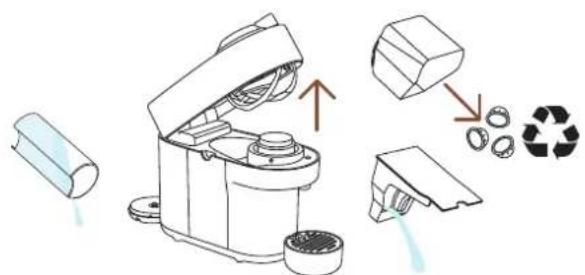
natural_image
Line drawing of a robotic device with a cylindrical base and open lid, next to a cup (no text or symbols)natural_image
Line drawing of a kitchen appliance with a lid and handle, showing open lid and side view (no text or symbols)natural_image
Illustration of an electrical plug connected to a wall socket, with a dashed cord indicating cable (no text or symbols)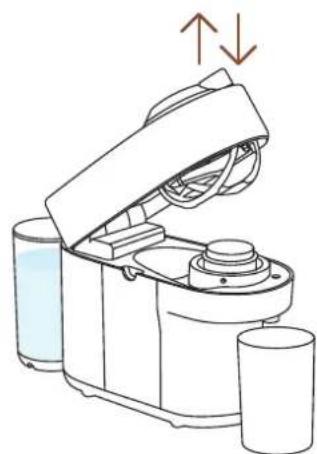
natural_image
Line drawing of a water dispenser with liquid and two cups, showing mechanical components and airflow direction (no text or symbols)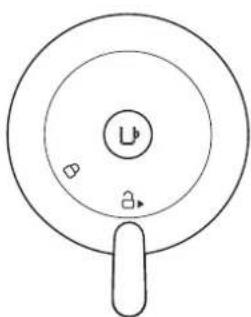
natural_image
Simple line drawing of a circular object with a central label and two small symbols, no text or numbers present.1 Tlačidlo ZAPNÚŤ/
VYPNÚŤ a na prípravu
kávy
2 Páka na zamknutie/odomknutie
3 Odkvapkávacia mriežka
4 Nastavitelný podstavec pod šálku
5 Odkvapkávacia miska
6 Kontajner na použité kapsuly
7 Nádržka na vodu s
vekom
8 Výpust kávy
OBSAH BALENIA
natural_image
Product display of a coffee maker with various accessories and a box of chocolate candies, accompanied by a photo of a coffee maker (no visible text or symbols on main objects)1 Kávovar
2 Degustačná sada
kapsúl Nespresso
3 Bezpečnostné pokyny
4 Návod na rýchly štart
5 Záruka
KOMPATIBILNÉ DOPLNKY

Mug (S) Mug (M) Reveal
Glass

Nevhodné doplnky
natural_image
Two glass containers: a mug filled with dark liquid and a conical flask filled with dark liquid, both without any text or symbols.Mug (L) Carafe
Kompletnú kolekciu doplnkov nájdete na www.nespresso.com.

ZAPNUTIE/VYPNUTIE
ZAPNUTIE
flowchart
graph LR
    A["Apple App Store"] -->|*| B["App Store"]
    C["Google Play"] -->|**| B
    B --> D["手机 screen with 'NEWSPRESS' logo"]
    D --> E["手机 screen with 'NEWSPRESS' logo"]
    E --> F["手机 screen with 'NEWSPRESS' logo"]
    F --> G["手机 screen with 'NEWSPRESS' logo"]
natural_image
Line drawing of a portable electric machine with power outlet and plug, no text or symbols presentflowchart
graph LR
    A["Device with icon"] --> B["User icon"]
    B --> C["Device with icon"]
    C --> D["User icon with checkmark"]
natural_image
Diagram of a small appliance with a lid and side-mounted base, showing a transformation from a cylindrical component to a multi-tiered device (no text or symbols present)natural_image
Diagram of a portable coffee maker connected to a glass, with an outlet and power plug shown (no text or symbols)4 Otvorte a zatvorte kávovar. Skontrolujte, či je páka v uzamknutej pozícií.
natural_image
Line drawing of a kitchen appliance with lid and side ports, showing internal components and directional arrows (no text or symbols)1 Otvorte a zatvorte kávovar.
Počas nahrievania bude blikat kontrolka. Ked kontrolka zostane svietit, kávovar je pripravený na použitie.
natural_image
Illustration of a coffee maker with a lid and side view showing its open lid and base, plus an arrow indicating the process (no text or symbols present)7 Nezabudnite recyklovať kapsuly Nespresso.*
natural_image
Modern kitchen appliance with a digital camera module and glassware on a table, featuring orange fruit and a white play button overlay (no text or symbols visible)25 ml 40 ml 40 ml 80 ml
natural_image
Two identical diagrams of a robotic device with arrows indicating movement or assembly, showing no text or symbols.natural_image
Two modern vacuum cleaner units (black and orange) with a play button overlay, placed on a white surface in a minimalist indoor setting (no text or symbols visible)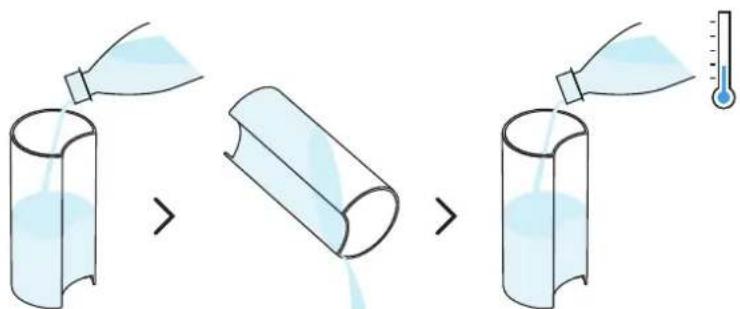
natural_image
Line drawing of a modern kitchen appliance with a side panel and lid, showing no text or symbols.3 Ked'je kávovar zapnutý, odomknite a otvorte hlavu, aby sa použitá kapsula vysunula. Vyprázdnite a vypláchnite kontajner na použité kapsuly a odkvapkávaciu misku, vložte ich spät' na miesto. Nezabudnite recyklovať kapsuly Nespresso.*
natural_image
Line drawing of a kitchen appliance with a lid and side bowl, showing a drop in liquid (no text or symbols)natural_image
Line drawing of a coffee maker with open lid and cup, showing mechanical components and a close-up view of the lid (no text or symbols)5 Zatvorte hlavu kávovaru a otočte páku dol'ava do zamknutej polohy. Pred spustením preplachovania sa uistite, že v kávovare nie je vložená žiadna kapsula.
natural_image
Illustration of kitchen utensils including a thermometer, a lid, and a folded chair (no text or symbols)natural_image
Line drawing of a smart food blender with exploded view and hand placing it (no text or symbols)8 Osušte ho čistou nepoužitou utierkou.
natural_image
Two modern portable devices with orange and black casing, one blue-and-red, displayed on a white surface with a play button overlay (no text or symbols visible)natural_image
Line drawing of a kitchen blender with liquid and a glass, showing no text or symbolsnatural_image
Illustration of a coffee maker with liquid and a glass cup, alongside its side view showing its lid (no text or symbols)4 Nechajte kávovar zapnutý, zatvorte hlavu kávovaru a páku dajte do odomknutej polohy.

natural_image
Illustration of various household items including a bottle, thermometer, plate with iodine, and a box (no text or symbols)natural_image
Line drawing of a smart kitchen appliance with exploded view and hands cleaning the interior (no text or symbols)natural_image
Two modern portable devices with orange and black casing, one emitting a play button (no visible text or symbols)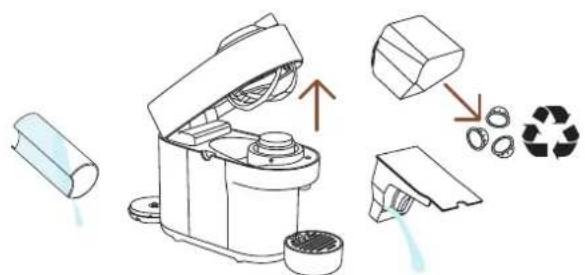
1 Vyprázdnite nádržku na vodu a otvorte hlavu kávovaru, použitá kapsula sa vysunie. Vyprázdnite kontajner na použité kapsuly a odkvapkávaciu misku. Nezabudnite recyklovať kapsuly Nespresso.*
natural_image
Line drawing of a robotic device with a cylindrical base and open lid, next to a small glass (no text or symbols)natural_image
Line drawing of a kitchen appliance with a lid and handle, showing open lid and side view (no text or symbols)natural_image
Illustration of an electrical plug connected to a wall socket, with a dashed cord indicating cable (no text or symbols)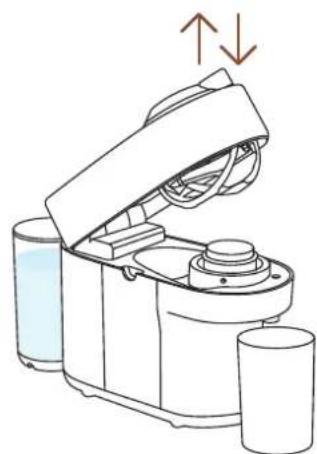
natural_image
Line drawing of a water dispenser with liquid and two cups, showing mechanical components and airflow direction (no text or symbols)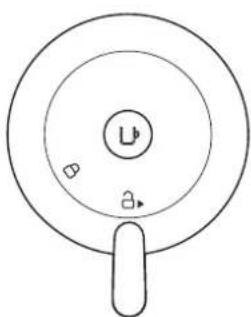
natural_image
Simple line drawing of a circular object with a central label and two small symbols, no text or symbols present.1 Nechajte kávovar zapojený do siete, otvorte a zatvorte kávovar a potom nechajte páku v odomknutej polohe.
US, CA: 120 V, 60 Hz, 1500 W
MX: 127 V\~, 60 Hz, 1380 W
Kmitočet 2.402–2.480 GHz
natural_image
Product display of a coffee machine with various accessories and packaging items (no visible text or symbols)Mug (S) Mug (M) Reveal
pohár

flowchart
graph LR
    A["Available on the App Store"] --> B["NEUPRSSA"]
    C["GET IT ON Google Play"] --> B
    B --> D["NEUPRSSA"]
    D --> E["手机图标"]
    style A fill:#f9f,stroke:#333
    style C fill:#f9f,stroke:#333
    style D fill:#ccf,stroke:#333
    style E fill:#cfc,stroke:#333
natural_image
Line drawing of a coffee maker connected to a wall socket and power outlet (no text or symbols)flowchart
graph LR
    A["Smartphone with sensor icon"] --> B["Device selecting"]
    B --> C["Device with lock icon"]
    C --> D["Device with checkmark"]
natural_image
Illustration of a small kitchen appliance with a side panel and a separate view showing internal components (no text or symbols)natural_image
Diagram of a coffee maker connected to a cup and a wall socket, with no text or symbols present.natural_image
Line drawing of a kitchen appliance with lid, vent, and side ports (no text or symbols)natural_image
Illustration of a kitchen appliance with a lid and side view showing its open lid and base, with no visible text or symbols.natural_image
Modern kitchen appliance with a black blender and glassware on a table, featuring a play button overlay (no visible text or symbols)25 ml 40 ml 40 ml 80 ml
natural_image
Two identical diagrams of a robotic device with arrows indicating movement or assembly, showing no text or symbols.TISZTÍTÁS
natural_image
Two modern portable devices with orange and black casing, one emitting a play button (no visible text or symbols)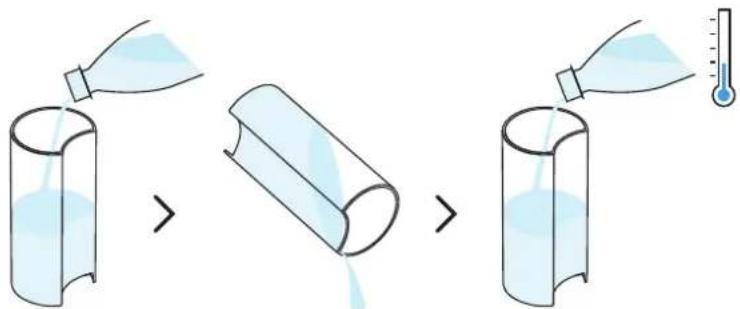
natural_image
Line drawing of a small water dispenser with a side panel and lid, showing liquid level (no text or symbols)natural_image
Line drawing of a kitchen appliance with a lid and side bowl, showing a drop in liquid (no text or symbols)natural_image
Line drawing of a kitchen appliance with a lid and cup, showing a close-up view of its lid (no text or symbols present)natural_image
Illustration of household items including a thermometer, a refrigerator, and a wall-mounted device (no text or symbols)natural_image
Line drawing of a hand cleaning a small kitchen appliance with cutouts and a gridded sink (no text or symbols)natural_image
Two modern portable devices with orange and black modules, one emitting a play button (no text or symbols visible)natural_image
Line drawing of a kitchen mixer with liquid and a glass, showing no text or symbolsnatural_image
Illustration of a coffee maker with liquid and a glass cup, alongside a separate view of its lid (no text or symbols)natural_image
Illustration of household items including a bottle, thermometer, plate with iodine, and a box (no text or symbols)natural_image
Line drawing of a smart kitchen appliance with cutaway views and accessories (no text or symbols)natural_image
Two modern vacuum cleaner units, one orange-yellow and one red, displayed on a table with a play button overlay (no text or symbols visible)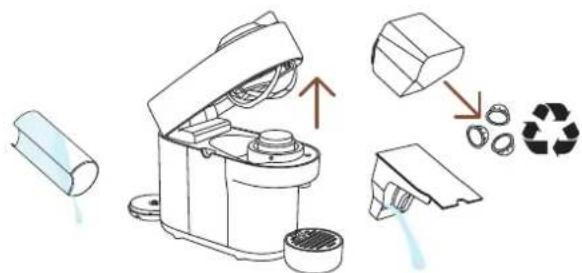
natural_image
Line drawing of a robotic device with a cylindrical base and open lid, next to a blank cylindrical container (no text or symbols)natural_image
Line drawing of a kitchen appliance with a lid and handle, showing open lid and side view (no text or symbols)natural_image
Simple line drawing of an electrical plug connected to a wall socket, with a dashed cord indicating cable (no text or symbols)4 Húzza ki a gépet.
natural_image
Line drawing of a kitchen appliance with liquid and cups, showing open lid and side view (no text or symbols)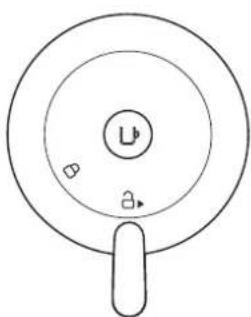
natural_image
Simple line drawing of a circular object with a central label and two small symbols, no text or symbols present.US, CA: 120 V, 60 Hz, 1500 W
MX: 127 V\~, 60 Hz, 1380 W
Frekvencia 2.402-2.480 GHz
natural_image
Product display set including a blue laser brush, a box of colorful candies, and a coffee cup with a 4+5+6 label (no readable text or symbols on main objects)Mug (S) Mug (M) Reveal
Glass

Μη συμβατά αξεσουάρ
Mug (L) Carafe
flowchart
graph LR
    A["Available on the App Store"] --> B["NEUPRSSA"]
    C["GET IT ON Google Play"] --> B
    B --> D["NEUPRSSA"]
    D --> E["手机图标"]
natural_image
Line drawing of a portable electric machine with power outlet, connected to a wall socket and plug (no text or symbols)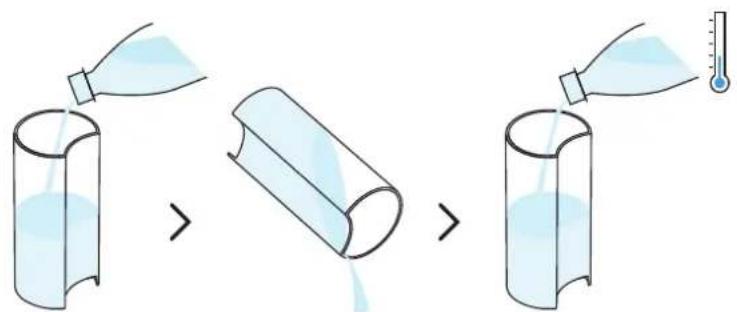
natural_image
Diagram of a handwashing machine with a side panel and handle, showing internal components and a close-up view (no text or labels)natural_image
Diagram of a portable coffee maker connected to a glass, with a power outlet and plug shown (no text or symbols)natural_image
Line drawing of a kitchen appliance with lid, vent, and side panel (no text or symbols)natural_image
Illustration of a kitchen appliance with a lid and side view showing its open lid and base, with no visible text or symbols.natural_image
Modern kitchen appliance with a digital camera module and glassware on a table, no visible text or symbols.25 ml 40 ml 40 ml 80 ml
natural_image
Two identical diagrams of a robotic device with arrows indicating movement or assembly, showing no text or symbols.natural_image
Two modern vacuum cleaner units (black and orange) with a play button overlay, placed on a wooden table in a minimalist kitchen setting.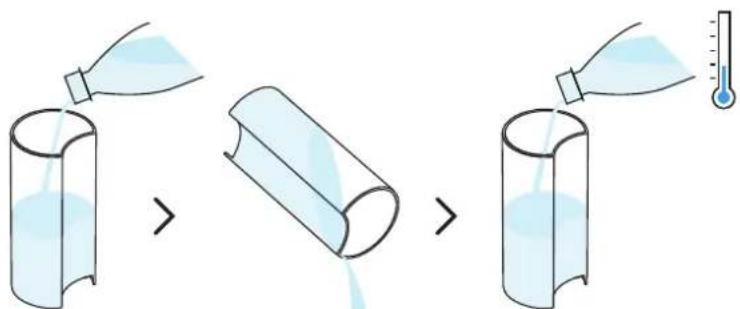
natural_image
Line drawing of a white coffee maker with a side panel and lid, showing no text or symbols.natural_image
Line drawing of a kitchen appliance with a lid and side bowl, next to a glass (no text or symbols)natural_image
Illustration of household items including a thermometer, kitchen utensils, and household appliances (no text or symbols)natural_image
Line drawing of a smart kitchen appliance with exploded view and hand holding a small container (no text or symbols)natural_image
Two modern vacuum cleaner units (black and red) with orange cover, displayed in a minimalist indoor setting with a play button overlay (no text or symbols on devices)natural_image
Line drawing of a kitchen mixer with liquid and a glass cup nearby (no text or symbols)natural_image
Illustration of a water dispenser with liquid and a side view of its lid (no text or symbols)natural_image
Illustration of household items including a bottle, thermometer, plate with liquid, and a 3D box (no text or symbols)natural_image
Line drawing of a smart kitchen appliance with cutaway views and accessories (no text or symbols)natural_image
Two modern robotic devices with orange and black modules, one connected to a play button icon (no text or symbols visible)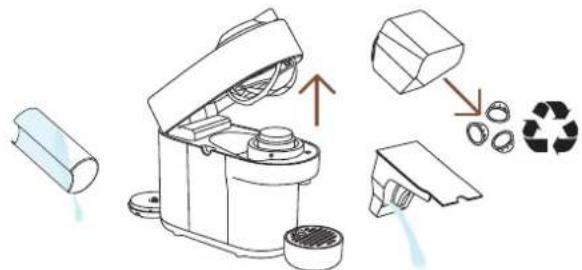
natural_image
Line drawing of a robotic device with an open lid and two cups beside it (no text or symbols)natural_image
Line drawing of a kitchen appliance with open lid and side view showing internal components (no text or symbols)natural_image
Illustration of an electrical plug connected to a wall socket, with a dashed cable indicating wire (no text or symbols)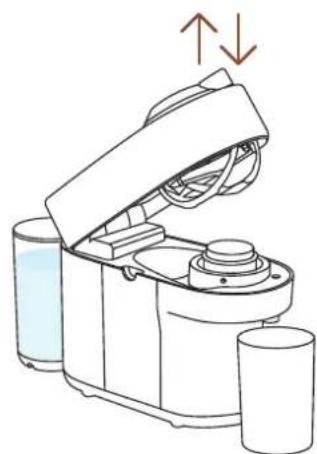
natural_image
Line drawing of a kitchen appliance with liquid and two cups, showing a lid open and side view (no text or symbols)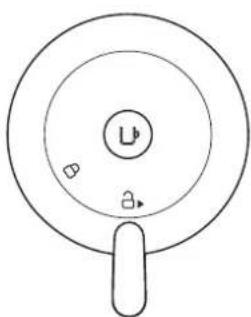
natural_image
Simple line drawing of a circular object with a central label and two small symbols, no text or numbers present.KLIKNIJ I WYBIERZ SWÓJ JĘZYK
PL

ZASADY BEZPIECZEŃSTWA
PRZEGLĄD

ŁĄCZNOŚĆ

PIERWSZE KROKI

PRZYGOTOWYWANIE KAWY

DOSTOSUJ WIELKOŚĆ TWOJEJ KAWY

CZYSZCZENIE

ODKAMIENIANIE

OPRÓŻNIANIE SYSTEMU WODNEGO

PRZYWRÓCENIE USTAWIEN
FABRYCZNYCH

OBJAŚNIENIE PODŚWIETLANIA
PRZYCISKU

ROZWIĄZYWANIE PROBLEMÓW

SPECYFIKACJE
ZASADY BEZPIECZEŃSTWA
natural_image
Product display of a coffee maker with various accessories and packaging items (no visible text or symbols)natural_image
Two glass vessels: a mug filled with dark liquid and a conical flask filled with dark liquid, both without any text or symbols.Mug (L) Karafka
flowchart
graph LR
    A["Apple App Store"] -->|*| B["App Store"]
    C["Google Play"] -->|**| B
    B --> D["Mobile App"]
    D --> E["Mobile App"]
    E --> F["Mobile App"]
    F --> G["Mobile App"]
natural_image
Line drawing of a portable electric mixer with power outlet, showing internal components and wiring (no text or symbols)flowchart
graph LR
    A["Device with icon"] --> B["User icon"]
    B --> C["Device with icon"]
    C --> D["User icon with checkmark"]
natural_image
Diagram of a kitchen appliance showing a cylindrical container and a side-mounted device with a lid, with no visible text or symbols.natural_image
Diagram of a portable coffee maker connected to a glass, with a power outlet and plug shown (no text or symbols)natural_image
Illustration of a kitchen blender with water drop and cup, alongside its open lid showing a button labeled 'U' (no text or symbols on the device itself)natural_image
Line drawing of a kitchen appliance with lid and side panel, showing internal components and directional arrows (no text or symbols)natural_image
Illustration of a kitchen appliance with a lid and side view showing its open lid and base, with no visible text or symbols.natural_image
Modern kitchen appliance with a black blender and glassware on a table, featuring a white play button overlay (no visible text or symbols)natural_image
Illustration of a kitchen appliance with lid, fan, and evaporator (no text or symbols)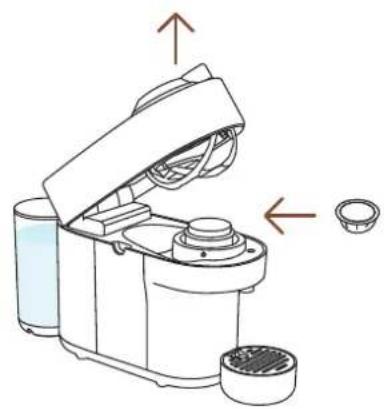
natural_image
Diagram of a kitchen appliance with lid and side bowl, showing internal components and directional arrows (no text or symbols)natural_image
Two modern vacuum cleaner units (black and orange) with a play button overlay, placed on a white surface in a minimalist indoor setting (no text or symbols visible)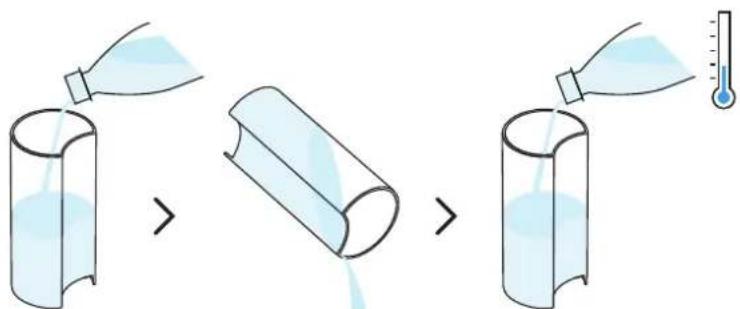
natural_image
Line drawing of a modern kitchen blender with a side panel and lid, showing no text or symbols.natural_image
Line drawing of a kitchen appliance with a lid and side bowl, showing a drop in liquid from the lid to a glass (no text or symbols)natural_image
Line drawing of a kitchen appliance with a lid and cup, showing a close-up view of its lid (no text or symbols present)natural_image
Illustration of household items including a thermometer, a refrigerator, and a wall-mounted device (no text or symbols)natural_image
Line drawing of a smart food appliance with exploded view and hands cleaning it (no text or symbols)natural_image
Two modern vacuum cleaner units, one orange-yellow and one red, displayed on a white surface with a play button overlay (no text or symbols visible)natural_image
Line drawing of a kitchen mixer with liquid and a glass, showing no text or symbolsnatural_image
Illustration of a coffee maker and its side mirror device (no text or symbols)natural_image
Illustration of household items including a thermometer, a bowl with liquid, and a folded shirt (no text or symbols)natural_image
Line drawing of a smart kitchen appliance with exploded view and hand cleaning (no text or symbols)natural_image
Two modern vacuum cleaner units (black and orange) displayed on a table, with a play button overlay in the center (no visible text or symbols)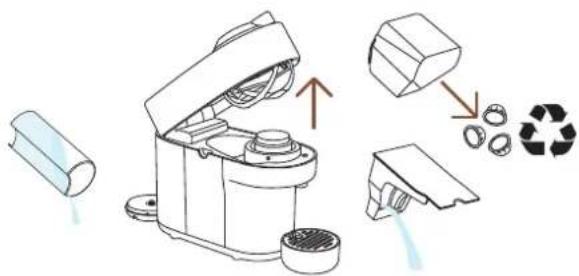
natural_image
Line drawing of a mechanical device with an open lid and two cylindrical containers, one emitting a red arrow to the right (no text or symbols)natural_image
Line drawing of a kitchen appliance with a lid and handle, showing open lid and side view (no text or symbols)natural_image
Illustration of an electrical plug connected to a wall socket, with a dashed cord indicating cable (no text or symbols)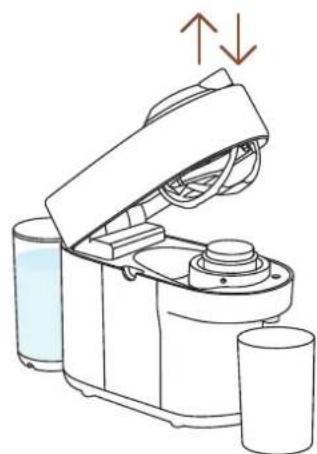
natural_image
Line drawing of a kitchen appliance with liquid and two cups, showing a lid open and side view (no text or symbols)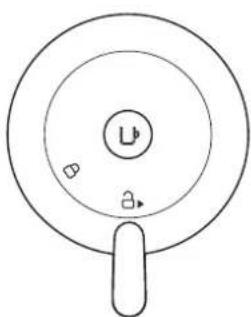
natural_image
Simple line drawing of a circular object with a central label and two small symbols, no text or numbers present.SPECYFIKACJE
Moc
\~220-240 V, 50-60 Hz, 1300-1500 W
US, CA: 120 V, 60 Hz, 1500 W
MX: 127 V\~, 60 Hz, 1380 W
13.6×42.6×25cm/5.3×16.7×9.8in
Waga 3.5 kg / 7.72 lbs
natural_image
Product display set including a blue coffee maker, a box of colorful candies, a glass mug, and a coffee packet (no visible text or symbols)Mug (S) Mug (M) Reveal
Glass
flowchart
graph LR
    A["Available on the App Store"] --> B["NEUPRESSO"]
    C["GET IT ON Google Play"] --> B
    B --> D["NEUPRESSO"]
    D --> E["Document Icon"]
natural_image
Line drawing of a portable electric machine with a power outlet and plug, no text or symbols presentflowchart
graph LR
    A["Smartphone with icon"] --> B["User icon"]
    B --> C["Device with lock icon"]
    C --> D["User icon with checkmark"]
natural_image
Diagram of a small appliance with a lid and side-mounted base, showing a transformation from a cylindrical component to a multi-tiered device (no text or symbols present)natural_image
Diagram of a portable blender connected to a cup and a wall socket, with no text or symbols present.natural_image
Line drawing of a kitchen appliance with lid and side panel, showing internal components and directional arrows (no text or symbols)natural_image
Modern kitchen appliance with a black blender and orange juice on a table, no visible text or symbolsnatural_image
Two identical diagrams of a robotic device with arrows indicating movement or assembly, showing no text or symbols.natural_image
Two modern vacuum cleaner units (black and orange) with a play button overlay, placed on a white surface in a minimalist indoor setting (no text or symbols visible)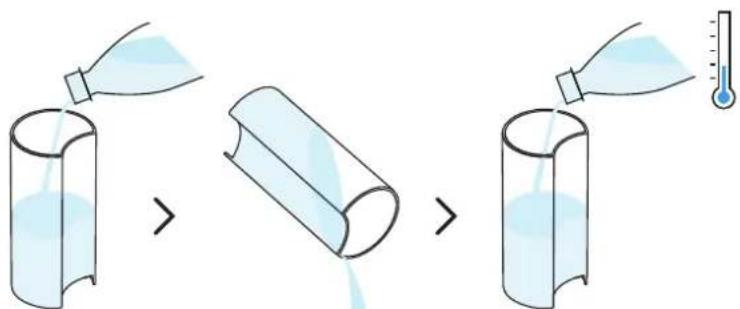
natural_image
Line drawing of a white coffee maker with a side panel and lid, showing liquid level (no text or symbols)natural_image
Line drawing of a kitchen appliance with a glass cup and a lid, showing no text or symbolsnatural_image
Line drawing of a coffee maker with open lid and cup, showing mechanical components and a close-up view of its lid (no text or symbols)natural_image
Illustration of household items including a thermometer, a refrigerator, a tube, and a folded chair (no text or symbols)natural_image
Line drawing of a smart kitchen appliance with exploded view and hand cleaning (no text or symbols)natural_image
Two modern vacuum cleaner units (black and orange) with a play button icon, displayed indoors on a white surface (no text or symbols visible)natural_image
Line drawing of a kitchen mixer with liquid and a glass cup nearby (no text or symbols)natural_image
Illustration of a water dispenser with liquid and a side view of its lid (no text or symbols)natural_image
Illustration of various household items including a bottle, thermometer, plate with iodine, and a box (no text or symbols)natural_image
Line drawing of a smart kitchen appliance with cutouts and accessories (no text or symbols)natural_image
Two smart vacuum cleaner units, one orange and one red, displayed on a table with a play button overlay (no text or symbols visible)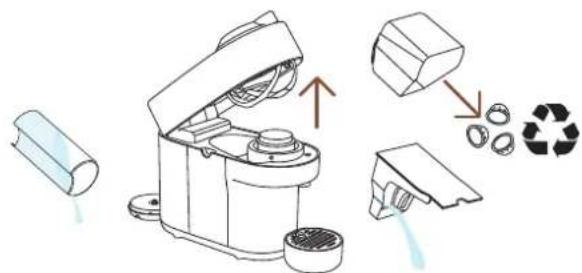
natural_image
Line drawing of a robotic device with a cylindrical base and open lid, next to a small cylindrical object (no text or symbols)natural_image
Line drawing of a kitchen appliance with a lid and handle, showing open lid and side view (no text or symbols)natural_image
Simple line drawing of an electrical plug connected to a wall socket, with an arrow indicating the cable (no text or symbols)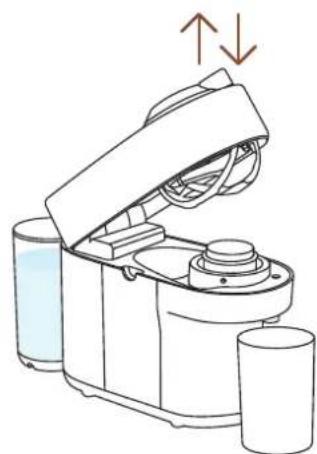
natural_image
Line drawing of a kitchen appliance with liquid and two cups, showing a lid open and side view (no text or symbols)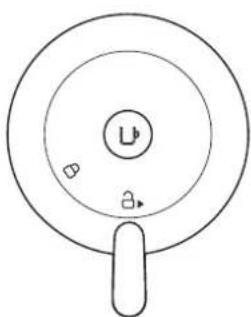
natural_image
Simple line drawing of a circular object with a central label and two small symbols, no text or numbers present.US, CA: 120 V, 60 Hz, 1500 W
MX: 127 V\~, 60 Hz, 1380 W
Mug (S) Mug (M) Reveal glas
glas

Niet geschik- te accessoires
natural_image
Two glass containers: a mug filled with dark liquid and a conical flask filled with dark liquid, both without any text or symbols.Mug (L) Carafe
flowchart
graph LR
    A["Apple App Store"] -->|*| B["App Store"]
    C["Google Play"] -->|**| B
    B --> D["Mobile App"]
    D --> E["Mobile App"]
    E --> F["Mobile App"]
    F --> G["Mobile App"]
natural_image
Line drawing of a portable electric machine with power outlet and plug, no text or symbols present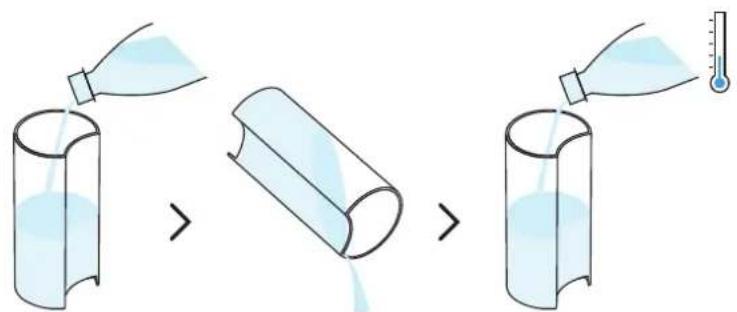
natural_image
Diagram of a kitchen appliance showing a cylindrical container and a side-mounted device with a lid, with no visible text or symbols.natural_image
Diagram of a portable coffee maker connected to a glass, with a power outlet and plug shown (no text or symbols)natural_image
Diagram showing a blender machine with liquid and cup, alongside its open lid and side view with arrows indicating flow (no text or symbols)natural_image
Line drawing of a kitchen appliance with lid, vent, and side panel (no text or symbols)natural_image
Illustration of a kitchen appliance with a lid and side view showing its open lid and base, no text or symbols present.natural_image
Modern kitchen appliance with a black blender and glass of juice, featuring a circular overlay of a play button (no visible text or symbols)natural_image
Two identical line drawings of a kitchen appliance with arrows indicating movement or assembly (no text or symbols)SCHOONMAKEN
natural_image
Two modern portable devices with orange and black casing, one emitting a play button (no visible text or symbols)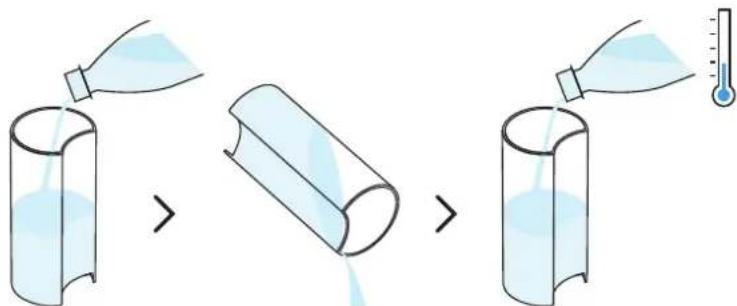
natural_image
Line drawing of a small electric shaver with a side panel and lid, showing internal components (no text or symbols)natural_image
Line drawing of a kitchen appliance with a lid and side bowl, showing no text or symbolsnatural_image
Illustration of household items including a thermometer, a cup, a box, and a shelf (no text or symbols)natural_image
Line drawing of a smart food blender with exploded view and hand placing lid (no text or symbols)natural_image
Two modern vacuum cleaner units (black and orange) with a play button overlay, placed on a white surface in a kitchen setting (no text or symbols visible)natural_image
Line drawing of a kitchen mixer with liquid and a glass, showing no text or symbolsnatural_image
Illustration of a coffee maker and its side mirror device (no text or symbols)natural_image
Illustration of various household items including a bottle, thermometer, plate with liquid, and a box (no text or symbols)natural_image
Line drawing of a smart kitchen appliance with exploded view and hands cleaning the interior (no text or symbols)natural_image
Two modern vacuum cleaner units, one black and one red, displayed on a table with a play button overlay (no text or symbols visible)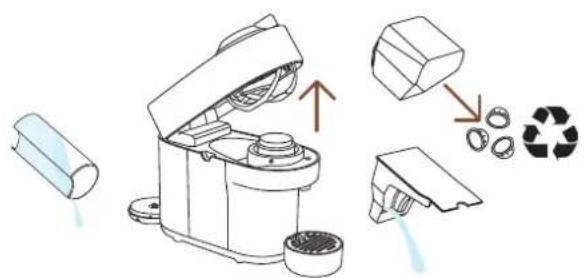
natural_image
Line drawing of a robotic device with a cup and a cylindrical container, no text or symbols presentnatural_image
Line drawing of a kitchen appliance with a side view showing the lid and handle (no text or symbols)natural_image
Simple line drawing of an electrical plug connected to a wall socket, with an arrow indicating the connection (no text or symbols)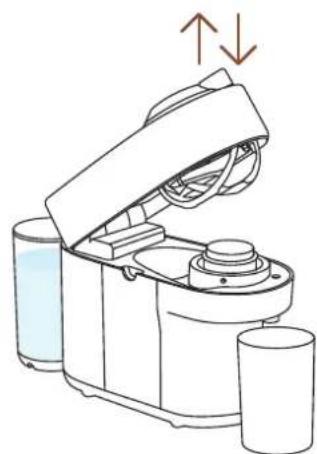
natural_image
Line drawing of a kitchen appliance with liquid and two cups, showing a lid open and side view (no text or symbols)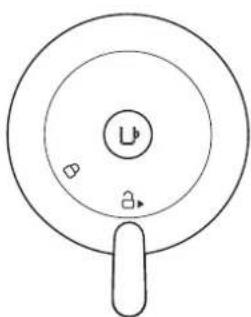
natural_image
Simple line drawing of a circular object with a central label and two small symbols, no text or symbols present.natural_image
Product display and packaging items including a blue coffee machine, a box of colorful coffee cups, a glass cup, and a card with coffee beans (no visible text or symbols)1 Kaffemaskine
2 Nespresso-kapselboks
3 Nespresso-
velkomstmateriale
4 Sikkerhedsanvisninger
5 Hurtigguide
6 Garanti
flowchart
graph LR
    A["Apple App Store"] -->|*| B["App Store"]
    C["Google Play"] -->|**| B
    B --> D["Next Press"]
    D --> E["Next Press"]
    E --> F["Next Press"]
    F --> G["Next Press"]
natural_image
Line drawing of a coffee maker with a power outlet and plug, no text or symbols present2 Sæt ledningen i.
flowchart
graph LR
    A["Device 1"] --> B["User icon with checkmark"]
    C["Device 2"] --> D["User icon with checkmark"]
    E["Device 3"] --> F["User icon with checkmark"]
3 Følginstruktionernevia Nespresso-appen.
FRAKOBLING AF MASKINENS BLUETOOTH OG WI-FI
1 Med maskinen lukket og håndtaget i ulåst position, sørg for at frakoble maskinen i mindst 10 sekunder.
natural_image
Diagram of a small kitchen appliance with a side panel and a separate view showing internal components (no text or symbols)natural_image
Diagram of a portable water heater connected to a cup and a wall socket, with no text or symbols present.natural_image
Line drawing of a kitchen appliance with lid, vent, and side panel (no text or symbols)natural_image
Illustration of a kitchen appliance with a lid and side view showing its open lid and base, with no visible text or symbols.7 Glem ikke at genanvende dine Nespresso-kaffekapsler*.
* DETTE ER NESPRESSO. DETTE ER GENANVENDELIGT. For mere information om genanvendelse af din Nespresso-kaffekapsel, besøg www.nespresso.com
UDFORSK VORES COFFEE CREATIONS-FUNKTION
natural_image
Modern kitchen appliance with a black blender and glassware on a table, featuring a white play button overlay (no visible text or symbols)25 ml 40 ml 40 ml 80 ml
natural_image
Two identical diagrams of a robotic device with arrows indicating movement or assembly, showing no text or symbols.natural_image
Two modern vacuum cleaner units (black and orange) with a play button overlay, placed on a white surface in a minimalist indoor setting (no text or symbols visible)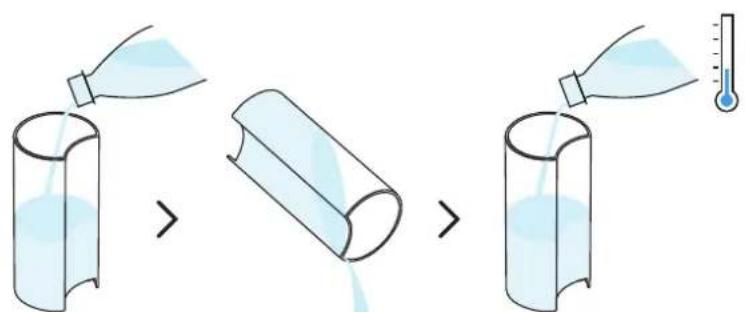
natural_image
Line drawing of a modern kitchen appliance with a side panel and lid, showing no text or symbols.natural_image
Line drawing of a kitchen appliance with a side view showing liquid and a glass (no text or symbols)6 Tryk på knappen 3 gange inden for 2 sekunder for at starte skylningen. Når lyset blinker orange, lad skylleproceduren fuldføres automatisk.
natural_image
Illustration of kitchen utensils including a thermometer, a lid, and a folded chair (no text or symbols)natural_image
Line drawing of a smart coffee maker with exploded view and hand placing it (no text or symbols)natural_image
Two modern portable devices with orange and black modules, one blue-and-white, displayed in a minimalist kitchen setting (no visible text or symbols)natural_image
Line drawing of a kitchen mixer with liquid and a glass, showing no text or symbolsnatural_image
Illustration of a coffee maker and its side mirror device (no text or symbols)natural_image
Illustration of household items including a bottle, thermometer, plate with iodine, and a box (no text or symbols)natural_image
Line drawing of a smart kitchen appliance with cutaway views and accessories (no text or symbols)natural_image
Two modern vacuum cleaner units, one orange-yellow and one red, displayed on a table with a play button overlay (no text or symbols visible)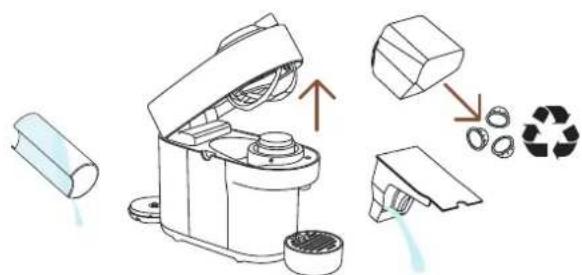
natural_image
Line drawing of a blender with open lid and side cups, showing a red arrow pointing to a cup (no text or symbols)natural_image
Line drawing of a kitchen appliance with a lid and handle, showing open lid and side view (no text or symbols)natural_image
Illustration of an electrical plug connected to a wall socket, with a dashed cord indicating cable (no text or symbols)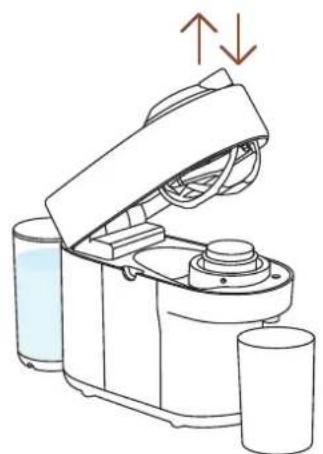
natural_image
Line drawing of a robotic device with open lid and cylindrical base, showing fluid flow direction (no text or symbols)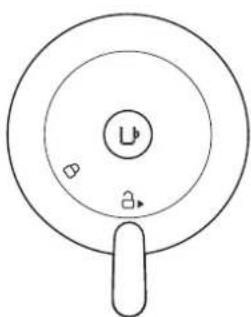
natural_image
Simple line drawing of a circular object with a central label and two small symbols, no text or symbols present.US, CA: 120 V, 60 Hz, 1500 W
MX: 127 V\~, 60 Hz, 1380 W
Frekvens 2.402-2.480 GHz
Mug (S) Mug (M) Reveal
Glass
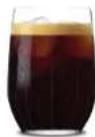

Ikke egnet
tilbehør
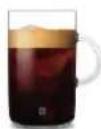
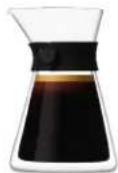
Mug (L) Carafe
kaffe-
kanne
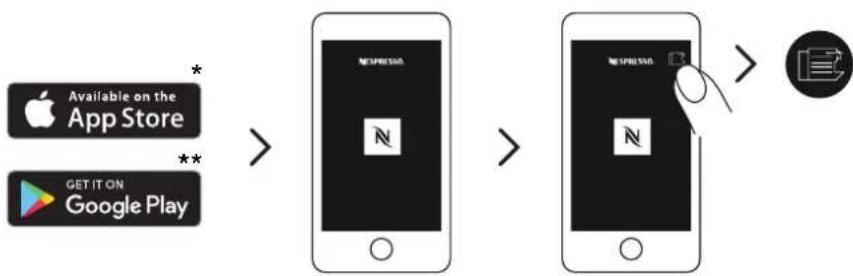
flowchart
graph LR
    A["Apple App Store"] -->|*| B["App Store"]
    C["Google Play"] -->|**| B
    B --> D["Mobile App"]
    D --> E["App On"]
    E --> F["Mobile App"]
    F --> G["Mobile App"]
    G --> H["Download Icon"]
natural_image
Line drawing of a portable electric machine with power outlet and plug, no text or symbols present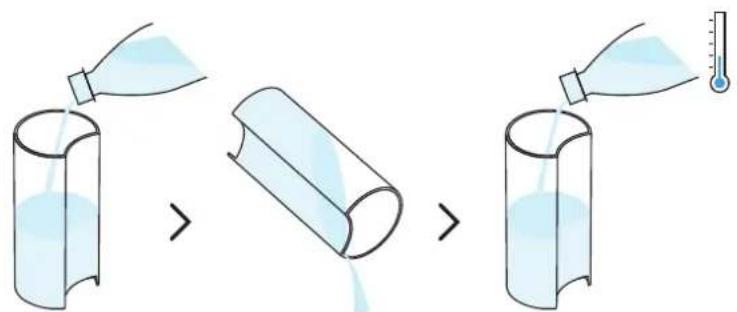
natural_image
Diagram of a kitchen appliance showing a cylindrical container and a side-mounted device with a lid, with no visible text or symbols.natural_image
Diagram of a portable coffee maker connected to a cup and a wall socket, with no text or symbols present.3 Med maskinen tilkoblet, fjern koppholderen og plasser en tom beholder (på minst 1 L) under kaffeuttaket.
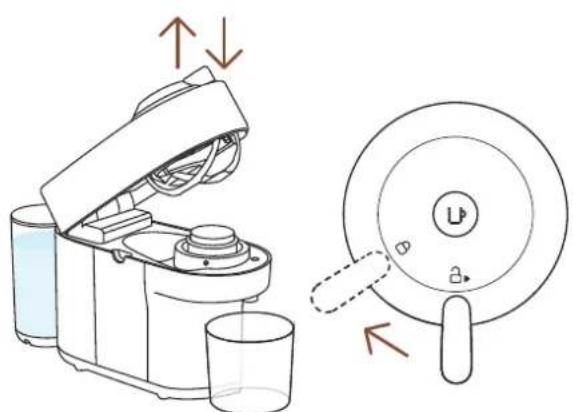
natural_image
Diagram showing a coffee maker with liquid and a lid, alongside its side view with arrows indicating flow or movement (no text or symbols present)natural_image
Line drawing of a kitchen appliance with lid, vent, and side panel (no text or symbols)1 Åpne og lukke maskinen.
i Lampen for kaffeknappen vil blinke mens maskinen varmes opp. Når lyset blir konstant er maskinen klar til bruk.
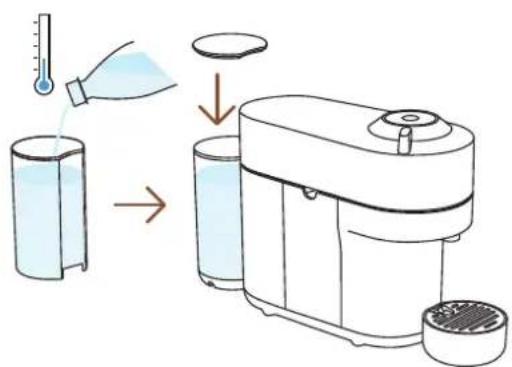
natural_image
Illustration of a kitchen appliance with a lid and side view showing its open lid and base, with no visible text or symbols.natural_image
Modern kitchen appliance with a black blender and glass of juice, featuring a circular overlay highlighting a blue object (no visible text or symbols)natural_image
Two identical diagrams of a robotic device with open lid and base, showing mechanical components and directional arrows (no text or symbols)natural_image
Two modern vacuum cleaner units (black and orange) with a play button overlay, placed on a white surface in a minimalist indoor setting (no text or symbols visible)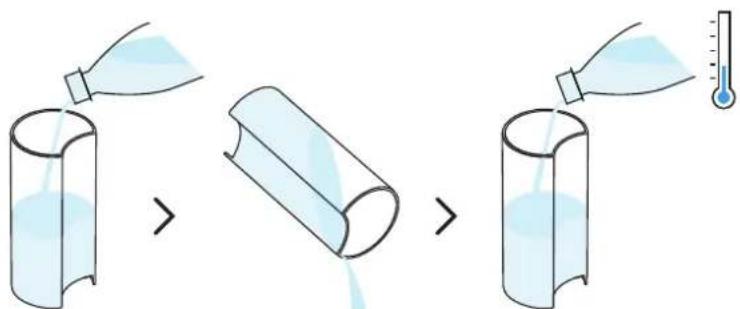
natural_image
Line drawing of a modern kitchen appliance with a side panel and lid, showing no text or symbols.2 Sett vanntanken tilbake på plass på maskinen.
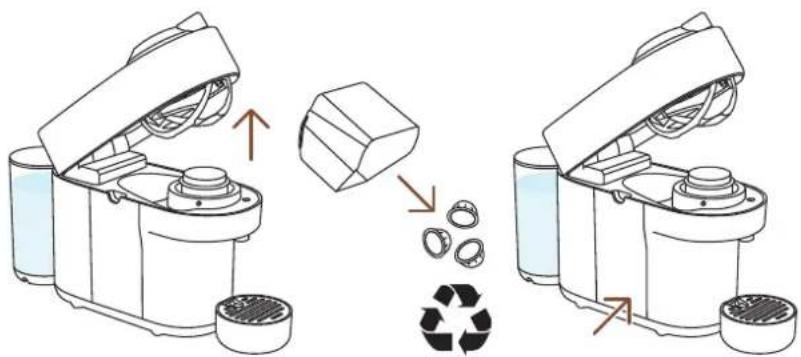
natural_image
Line drawing of a kitchen appliance with a side view showing liquid and a glass (no text or symbols)6 Trykk på knappen 3 ganger innen 2 sekunder for å starte skyllingen. Med lyset blinkende oransje, la skyllingsprosedyren fullføres automatisk.
natural_image
Illustration of household items including a thermometer, a cup, a box, and a shelf (no text or symbols)natural_image
Line drawing of a smart blender with exploded view and hand holding lid (no text or symbols)natural_image
Two modern vacuum cleaner units, one orange-yellow and one red, displayed on a table with a play button overlay (no text or symbols visible)i Avkalkingsprosedyren tar 20 minutter og kan ikke avbrytes.
natural_image
Line drawing of a kitchen mixer with liquid and a glass, showing no text or symbolsnatural_image
Illustration of a coffee maker with liquid and a glass cup, alongside its side view showing its lid (no text or symbols)natural_image
Illustration of household items including a bottle, thermometer, plate with iodine, lamp, and box (no text or symbols)natural_image
Line drawing of a smart kitchen appliance with cutaway views and accessories (no text or symbols)11 Tørk maskinen med en ren, tørr klut. La maskinen tørke i 10 minutter før du bruker den.
natural_image
Two modern vacuum cleaner units, one orange-yellow and one red, displayed on a table with a play button overlay (no text or symbols visible)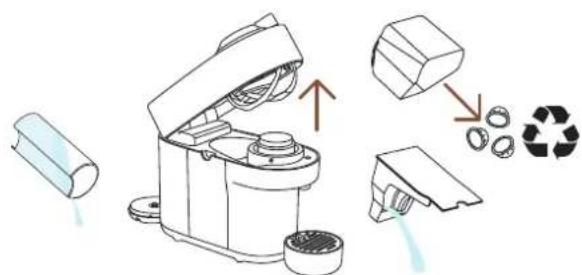
natural_image
Line drawing of a robotic device with a cup and a red arrow pointing to it (no text or symbols)natural_image
Line drawing of a kitchen appliance with a lid and handle, showing open lid and side view (no text or symbols)natural_image
Illustration of an electrical plug connected to a wall socket, with a dashed cord indicating cable (no text or symbols)4 Kobleframaskinen.
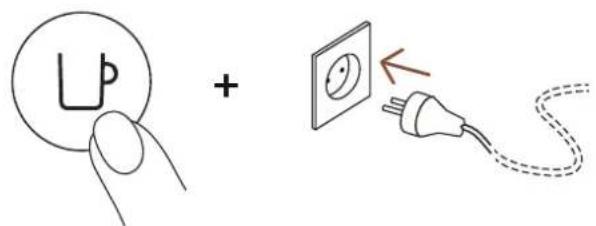
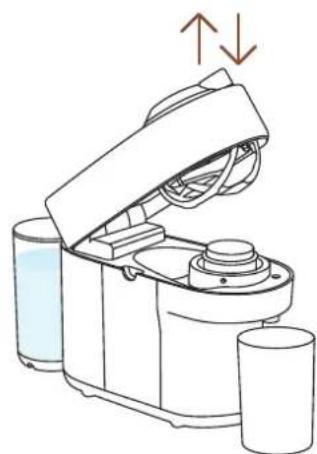
natural_image
Line drawing of a kitchen appliance with liquid and cups, showing open lid and side view (no text or symbols)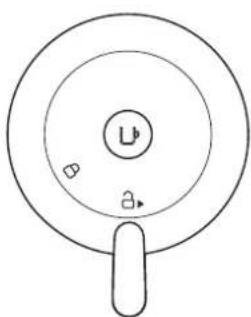
natural_image
Simple line drawing of a circular object with a central label and two small symbols, no text or numbers present.US, CA: 120 V, 60 Hz, 1500 W
MX: 127 V\~, 60 Hz, 1380 W
Frekvens 2.402-2.480 GHz
natural_image
Product display of a coffee maker with various accessories and packaging items (no visible text or symbols)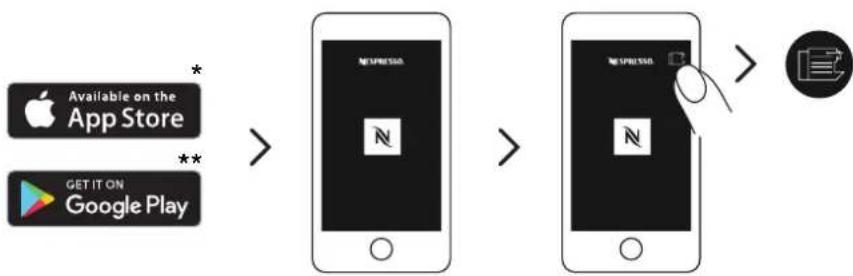
flowchart
graph LR
    A["Apple App Store"] -->|*| B["App Store"]
    C["Google Play"] -->|**| B
    B --> D["Next Press"]
    D --> E["Next Press"]
    E --> F["Next Press"]
    F --> G["Next Press"]
natural_image
Line drawing of a portable electric machine with a power outlet and plug, no text or symbols present2 Kytkevirtajohto.
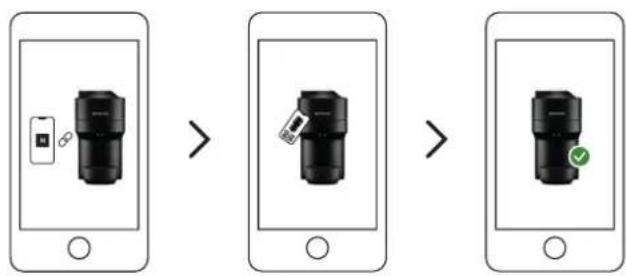
flowchart
graph LR
    A["Smartphone with device icon"] --> B["User icon with checkmark"]
    B --> C["User icon with checkmark"]
    C --> D["User icon with checkmark"]
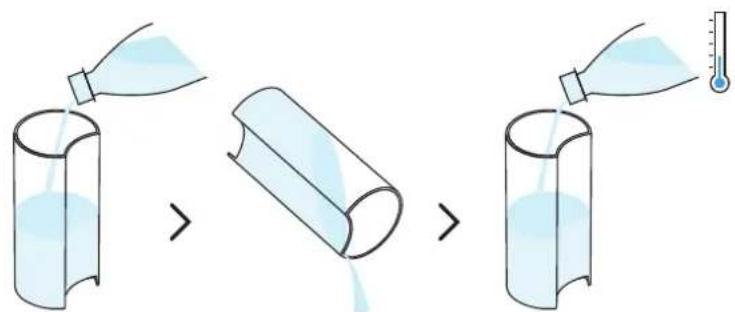
natural_image
Diagram of a small appliance with a lid and side-mounted base, showing a transformation from a cylindrical component to a multi-tiered device (no text or symbols present)natural_image
Diagram of a portable coffee maker connected to a cup and a wall socket, with no text or symbols present.natural_image
Line drawing of a kitchen appliance with lid, vent, and side panel (no text or symbols)natural_image
Illustration of a kitchen appliance with a lid and side view showing its open lid and base, with no visible text or symbols.natural_image
Modern kitchen appliance with a digital brush and glassware on a table, featuring a circular overlay of a play button (no visible text or symbols)25 ml 40 ml 40 ml 80 ml
natural_image
Illustration of a kitchen appliance with lid, fan, and evaporator (no text or symbols)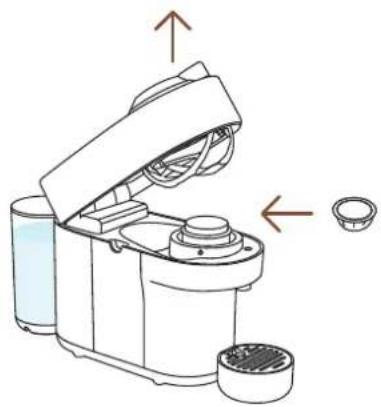
natural_image
Diagram of a kitchen appliance with a lid and side view showing internal components (no text or symbols)natural_image
Two modern vacuum cleaner units (black and orange) with a play button overlay, placed on a white surface in a minimalist kitchen setting (no text or symbols visible)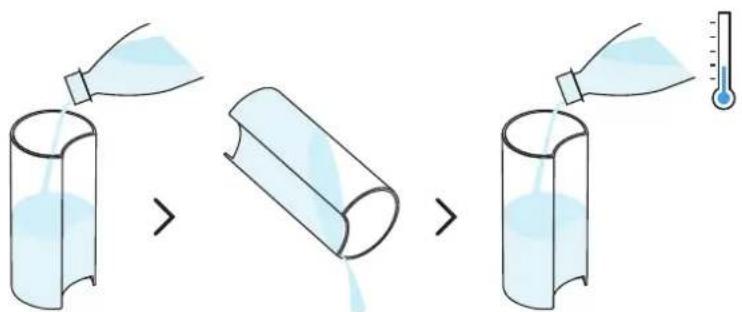
natural_image
Line drawing of a small electric shaver with a side panel and lid, showing internal components (no text or symbols)natural_image
Line drawing of a kitchen appliance with a glass cup and a lid, showing no text or symbolsnatural_image
Illustration of household items including a thermometer, kitchen utensils, and household appliances (no text or symbols)natural_image
Line drawing of a smart kitchen appliance with exploded view and hand holding a food item (no text or symbols)natural_image
Two modern vacuum cleaner units, one orange-yellow and one red, displayed on a table with a play button overlay (no text or symbols visible)natural_image
Line drawing of a kitchen blender with liquid and a glass, showing no text or symbolsnatural_image
Illustration of a coffee maker with liquid and a glass cup, alongside its side view showing its lid (no text or symbols)natural_image
Illustration of household items including a bottle, thermometer, plate with liquid, and a box (no text or symbols)natural_image
Line drawing of a smart kitchen appliance with cutaway views and accessories (no text or symbols)natural_image
Two modern vacuum cleaner units (black and orange) displayed on a table, with a white play button overlay in the center (no text or symbols visible)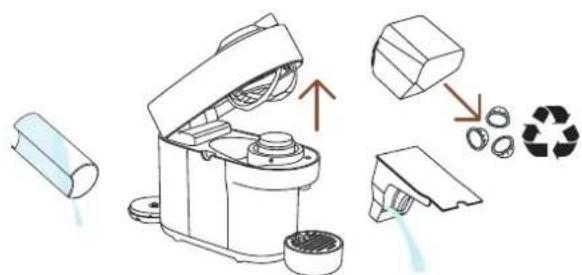
natural_image
Line drawing of a robotic device with a cup and a red arrow pointing to it (no text or symbols)natural_image
Line drawing of a kitchen appliance with a lid and handle, showing internal components and a close-up view (no text or symbols)natural_image
Simple line drawing of an electrical plug connected to a wall socket, with a dashed cord indicating cable (no text or symbols)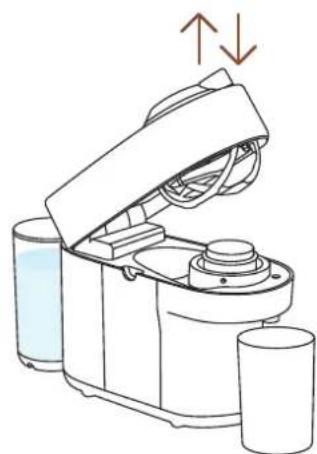
natural_image
Line drawing of a kitchen appliance with liquid and cups, showing open lid and side view (no text or symbols)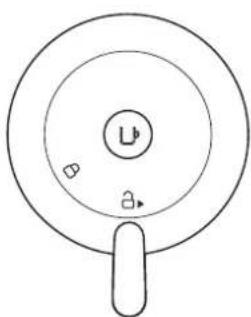
natural_image
Simple line drawing of a circular object with a central label and two small symbols, no text or numbers present.US, CA: 120 V, 60 Hz, 1500 W
MX: 127 V\~, 60 Hz, 1380 W
Taajuus 2.402-2.480 GHz
RF-ulostulon teho (EIRP)
Bluetooth 4 dBm Max. e.i.r.p. ja Wi-Fi
<20 dMm max. e.i.r.p.
Valmiustila 0.39 W/h
natural_image
Product display set including a blue laser brush, a box of colorful candies, and a coffee cup with a 4+5+6 label (no readable text or symbols on main objects)1 Kaffemaskin
2 Nespresso kapselbox
3 Nespresso
välkomstmaterial
4 Säkerhetsinstruktioner
5 Snabbstarts-guide
6 Garanti
natural_image
Two glassware items: a mug filled with dark liquid and a conical flask filled with dark liquid, both without any text or symbols.Mug (L) Carafe
Upptäck hela vår accessoarkollektion på www.nespresso.com

PÅ/AV
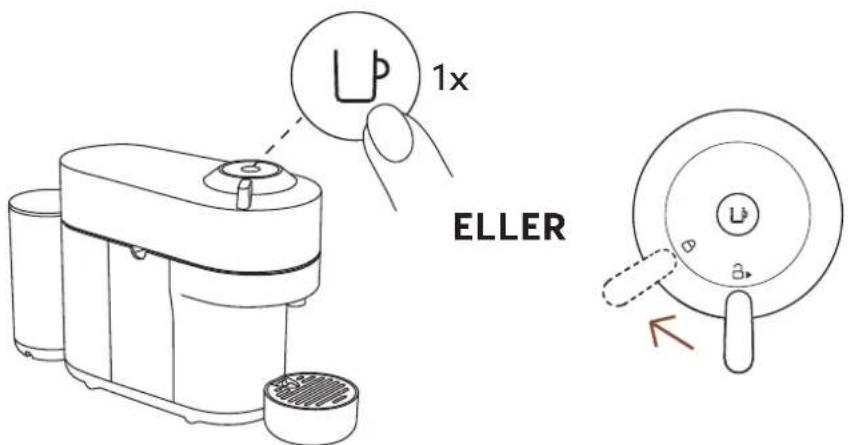
PÅ
FÖRDELAR MED ATT KOPPLA UPP DIN VERTUO POP-MASKIN
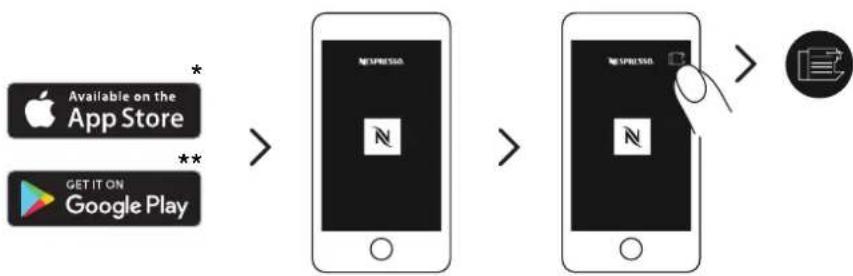
flowchart
graph LR
    A["Apple App Store"] -->|*| B["App Store"]
    C["Google Play"] -->|**| B
    B --> D["手机 screen with 'NEWSPRESS' logo"]
    D --> E["手机 screen with 'NEWSPRESS' logo"]
    E --> F["手机 screen with 'NEWSPRESS' logo"]
    F --> G["手机 screen with 'NEWSPRESS' logo"]
natural_image
Line drawing of a portable electric machine with power outlet and plug, no text or symbols present2 Koppla in strömkabeln.
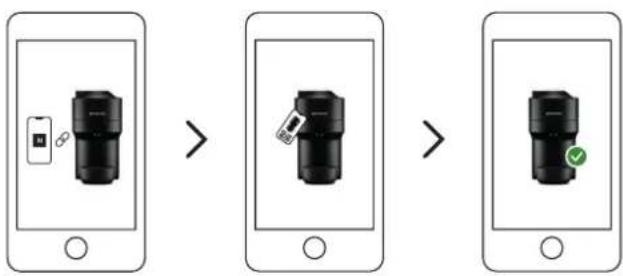
flowchart
graph LR
    A["Device with icon"] --> B["User icon"]
    B --> C["Device with icon"]
    C --> D["User icon with checkmark"]
3 Följinstruktionernavia Nespresso-appen.
INAKTIVERA BLUETOOTH OCH WI-FI PÅ MASKINEN
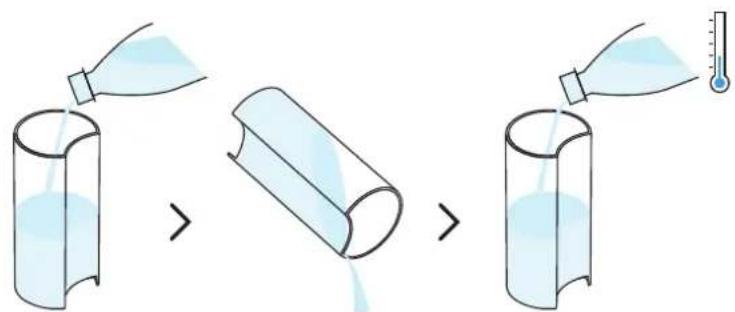
natural_image
Illustration of a small kitchen appliance with a side panel and a separate view showing internal components (no text or symbols)natural_image
Diagram of a coffee maker connected to a cup and a wall socket, with no text or symbols present.natural_image
Line drawing of a kitchen appliance with lid, vent, and side panel (no text or symbols)natural_image
Illustration of a kitchen appliance with a lid and side view showing its open lid and base, no text or symbols present.natural_image
Modern kitchen appliance with a black blender and orange juice, set in a kitchen setting (no visible text or symbols)natural_image
Two identical diagrams of a robotic device with arrows indicating movement or assembly, showing no text or symbols.natural_image
Two modern vacuum cleaner units (black and orange) displayed on a table, with a play button overlay in the center (no visible text or symbols)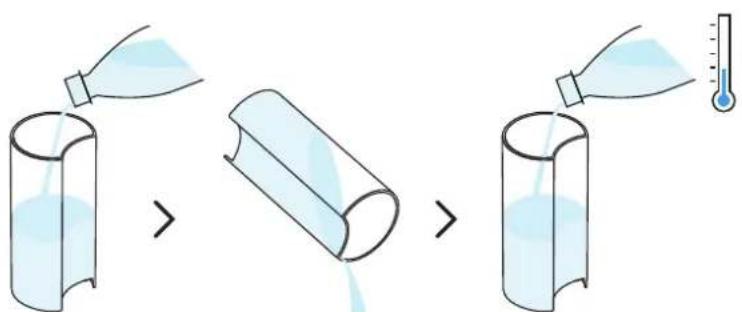
natural_image
Line drawing of a modern kitchen appliance with a side panel and lid, showing no text or symbols.natural_image
Line drawing of a kitchen appliance with a side view showing liquid and a glass (no text or symbols)natural_image
Line drawing of a coffee maker with open lid and cup, showing mechanical components and a close-up view of the lid (no text or symbols)natural_image
Illustration of household items including a thermometer, a bowl with liquid, a cube, and a folded garment (no text or symbols)natural_image
Line drawing of a smart food blender with exploded view and hand placing it (no text or symbols)natural_image
Two modern vacuum cleaner units, one orange-yellow and one red, displayed on a table with a play button overlay (no text or symbols visible)natural_image
Line drawing of a kitchen mixer with liquid and a glass, showing no text or symbolsnatural_image
Illustration of a coffee maker and its side mirror device (no text or symbols)natural_image
Illustration of various household items including a bottle, thermometer, plate with liquid, and a box (no text or symbols)natural_image
Line drawing of a smart kitchen appliance with exploded view and hands cleaning the interior (no text or symbols)natural_image
Two modern portable devices with orange and black casing, one emitting a play button (no visible text or symbols)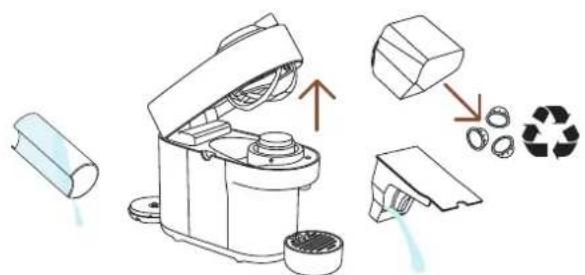
natural_image
Line drawing of a robotic device with a cylindrical base and open lid, next to a smaller cylindrical container (no text or symbols)natural_image
Line drawing of a kitchen appliance with a lid and handle, showing open lid and side view (no text or symbols)natural_image
Illustration of an electrical plug connected to a wall socket, with a dashed cord indicating cable (no text or symbols)4 Koppla ur maskinen
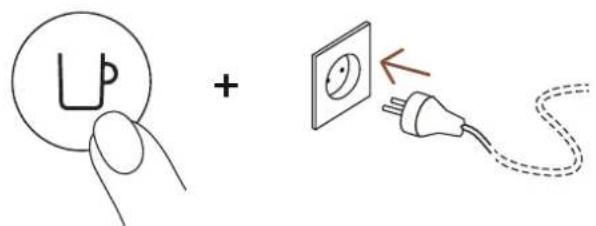
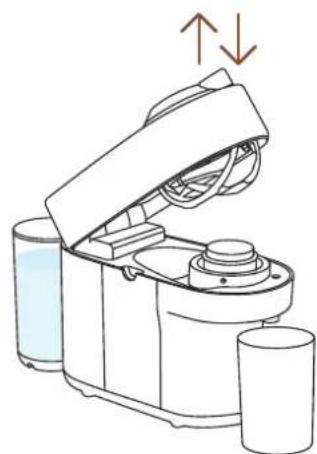
natural_image
Line drawing of a kitchen appliance with liquid and cups, showing open lid and side view (no text or symbols)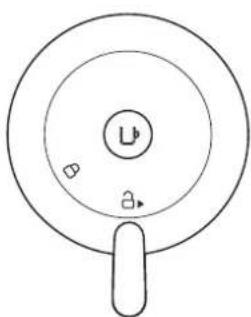
natural_image
Simple line drawing of a circular object with a central label and two small symbols, no text or numbers present.SAMMANFATTNING BLINKNINGAR
US, CA: 120 V, 60 Hz, 1500 W
MX: 127 V\~, 60 Hz, 1380 W
Frekvens 2.402-2.480 GHz
GCV2, GDV2 BNV120, BNV150
ENV90
| Krups | Magimix |
| XN9201, XN9204, XN9205, XN9211 | M800 |

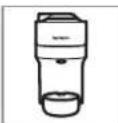
DATI CLICK ŞI ALEGETI LIMBA DVS.
RO

INSTRUCTIUNI DE SIGURANTĂ
PREZENTARE GENERALĂ A APARATULUI

CONECTIVITATE

PRIMII PAŞI

PREGĂTIREA CAFELEI

ADAPTAȚI VOLUMUL CAFELEI CONFORM PREFERINȚELOR

CURĂȚARE

DECALCIFIERE

GOLIREA SISTEMULUI

RESETAREA LA SETĂRILE DIN FABRICĂ

PREZENTAREA ALERTELOR

DEPANARE

SPECIFICATII
INSTRUCTIUNI DE SIGURANTĂ
Mug (S) Mug (M) Pahare
Reveal

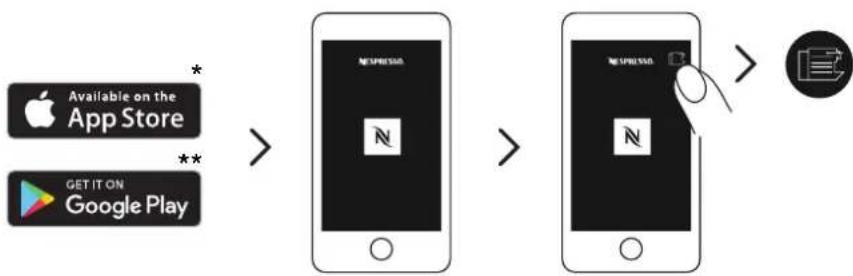
flowchart
graph LR
    A["Apple App Store"] -->|*| B["App Store"]
    C["Google Play"] -->|**| B
    B --> D["Mobile App"]
    D --> E["Mobile App"]
    E --> F["Mobile App"]
    F --> G["Mobile App"]
natural_image
Line drawing of a portable electric machine with power outlet and plug, no text or symbols presentflowchart
graph LR
    A["Device with icon"] --> B["User icon"]
    B --> C["Device with lock icon"]
    C --> D["User icon with checkmark"]
DECONECTAREA BLUETOOTH SAU WI-FI A ESPRESSORULUI
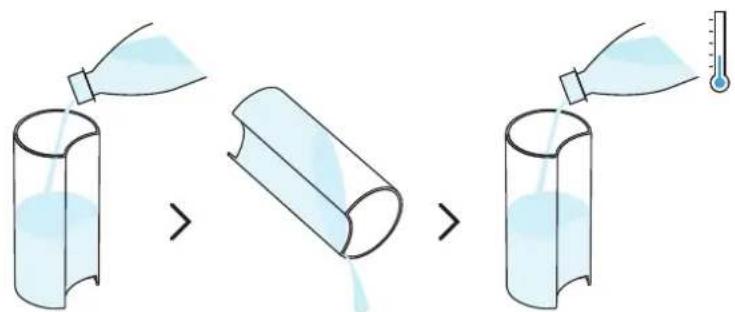
natural_image
Illustration of a kitchen appliance with a side panel and a hand-drawn arrow indicating transformation (no text or symbols)natural_image
Diagram of a portable coffee maker connected to a glass, with a power outlet and plug shown (no text or symbols)natural_image
Illustration of a kitchen blender with open lid and side view showing lid control (no text or symbols)natural_image
Line drawing of a kitchen appliance with lid and side ports, showing internal components and directional arrows (no text or symbols)natural_image
Illustration of a kitchen appliance with a lid and side view showing its open lid and base, no text or symbols present.natural_image
Modern kitchen appliance with a black blender and glassware on a table, featuring a white circular overlay of a play button (no visible text or symbols)natural_image
Two identical diagrams of a robotic device with arrows indicating movement or assembly, showing no text or symbols.natural_image
Two modern vacuum cleaner units (black and orange) with a play button overlay, placed on a white surface in a minimalist indoor setting (no text or symbols visible)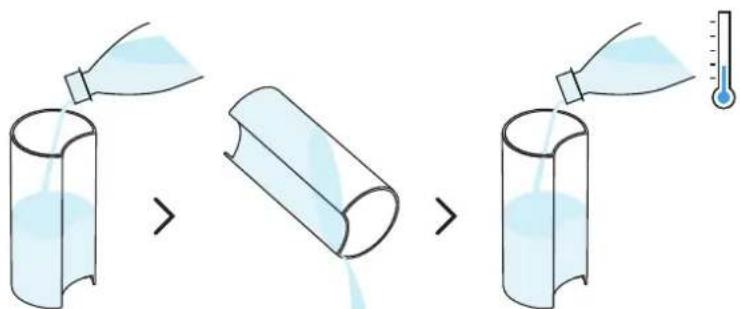
natural_image
Line drawing of a modern kitchen appliance with a side panel and lid, showing no text or symbols.natural_image
Line drawing of a kitchen appliance with a side view showing liquid and a glass (no text or symbols)natural_image
Illustration of household items including a thermometer, a refrigerator, and a wall-mounted device (no text or symbols)natural_image
Line drawing of a smart food appliance with cutouts, storage tanks, and a hand cleaning it (no text or symbols)natural_image
Two modern vacuum cleaner units, one orange-yellow and one red, displayed on a table with a play button overlay (no text or symbols visible)natural_image
Line drawing of a kitchen mixer with liquid and a glass, showing no text or symbolsnatural_image
Illustration of a coffee maker and its side mirror device (no text or symbols)natural_image
Illustration of household items including a bottle, thermometer, plate with liquid, and a 3D box (no text or symbols)natural_image
Line drawing of a smart kitchen appliance with cutouts, lids, and accessories (no text or symbols)natural_image
Two modern portable devices with orange and black casing, one emitting a play button (no visible text or symbols)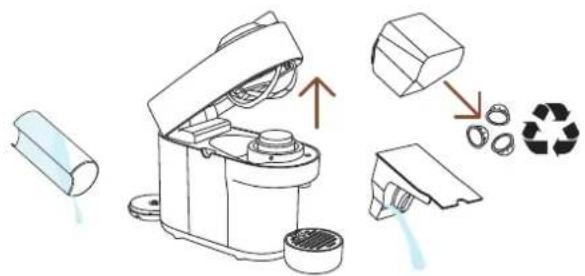
natural_image
Line drawing of a robotic device with a cup and lid, showing mechanical components and a separate cylindrical item (no text or symbols)natural_image
Line drawing of a kitchen appliance with a lid and handle, showing open lid and side view (no text or symbols)natural_image
Illustration of an electrical plug connected to a wall socket, with a dashed cord indicating cable (no text or symbols)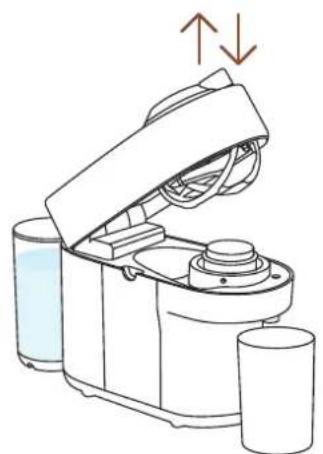
natural_image
Line drawing of a robotic device with open lid and cylindrical base, showing fluid flow direction (no text or symbols)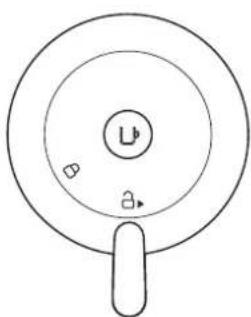
natural_image
Simple line drawing of a circular object with a central label and two small symbols, no text or numbers present.natural_image
Product display set including a blue laser brush, a box of colorful candies, and a coffee cup with a 4+5+6 label (no readable text or symbols on main objects)Mug (S) Mug (M) Reveal Glass
Glass

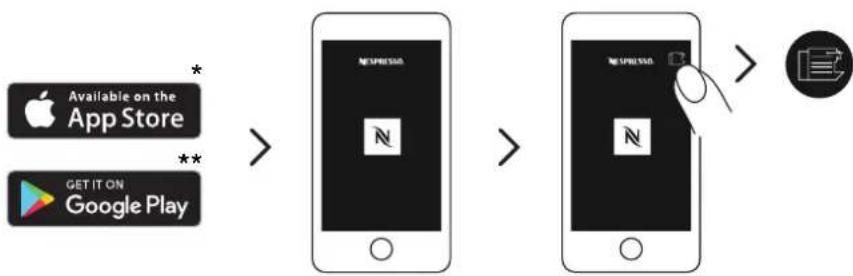
flowchart
graph LR
    A["Apple App Store"] -->|*| B["NEUPRESSA"]
    C["Google Play"] -->|**| B
    B --> D["NEUPRESSA"]
    D --> E["手机图标"]
    E --> F["手机图标"]
    F --> G["手机图标"]
natural_image
Line drawing of a portable electric machine with power outlet and plug, no text or symbols presentflowchart
graph LR
    A["Smartphone with icon"] --> B["Device selection"]
    B --> C["Device confirmation check"]
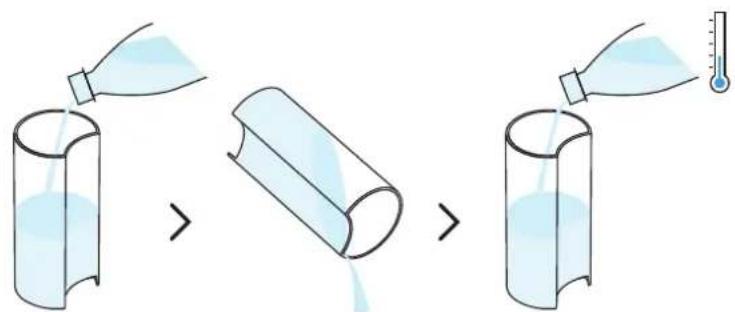
natural_image
Diagram of a kitchen appliance showing a cylindrical container and a side-mounted device with a lid, with no visible text or symbols.natural_image
Diagram of a portable coffee maker connected to a cup and a wall socket, with no text or symbols present.natural_image
Line drawing of a kitchen appliance with lid, vent, and side panel (no text or symbols)natural_image
Illustration of a kitchen appliance with a lid and side view showing its open lid and base, plus a close-up of its contents (no text or symbols present)natural_image
Modern kitchen appliance with digital display showing a green play button and glassware on a table (no visible text or symbols)other
| Category | Value | |---|---| | 40 ml / 1.35 fl oz | ✓ | | 80 ml / 2.7 fl oz | ✓ | | 150 ml / 5.07 fl oz | ✓ | | 230 ml / 7.77 fl oz | ✓ | | 355 ml / 12 fl oz | ✗ | | 535 ml / 18.8 fl oz | ✗ | | 25 ml / 0.85 fl oz | ✓ | | 40 ml / 1.35 fl oz | ✓ | | 40 ml / 1.35 fl oz | ✓ | | 80 ml / 2.7 fl oz | ✓ | The chart displays a series of five semi-circular diagrams with varying fill patterns and numerical labels. The red 'X' symbols appear in the bottom-right corner, possibly indicating statistical significance or error.natural_image
Line drawing of a kitchen appliance with lid, fan, and evaporator (no text or symbols)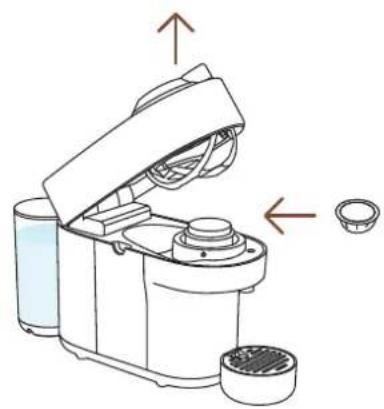
natural_image
Diagram of a kitchen appliance with lid and side bowl, showing internal components and directional arrows (no text or symbols)TEMİZLEME
natural_image
Two modern vacuum cleaner units (black and orange) with a play button overlay, placed on a wooden table in a minimalist kitchen setting.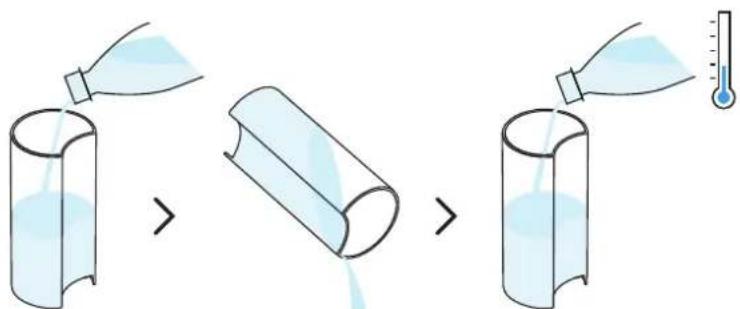
natural_image
Line drawing of a white coffee maker with a side panel and lid, showing no text or symbols.natural_image
Line drawing of a kitchen appliance with a side view showing liquid and a glass (no text or symbols)natural_image
Line drawing of a coffee maker with open lid and cup, showing mechanical components and a close-up view of the lid (no text or symbols)natural_image
Illustration of household items including a thermometer, a refrigerator, and a door handle (no text or symbols)natural_image
Line drawing of a smart kitchen appliance with exploded view and hand placing it (no text or symbols)natural_image
Two modern vacuum cleaner units, one orange-yellow and one red, displayed on a table with a play button overlay (no text or symbols visible)natural_image
Line drawing of a kitchen mixer with liquid and a glass, showing no text or symbolsnatural_image
Illustration of a coffee maker with liquid and a glass cup, alongside a separate circular device with a lid (no text or symbols)natural_image
Illustration of various household items including a bottle, thermometer, plate with iodine, and a box (no text or symbols)natural_image
Line drawing of a smart kitchen appliance with exploded view and hands cleaning the interior (no text or symbols)natural_image
Two modern portable devices with orange and black casing, one white play button overlay (no text or symbols on device)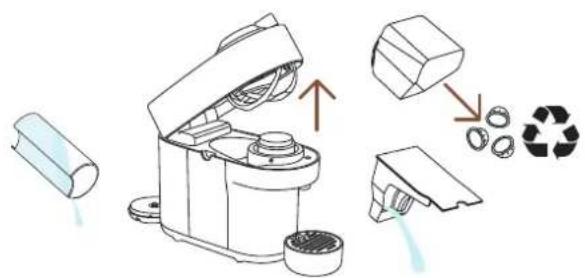
natural_image
Line drawing of a robotic device with a cup and lid, showing mechanical components and a red arrow pointing to a cup (no text or symbols)natural_image
Line drawing of a kitchen appliance with a lid and handle, showing open lid and side view (no text or symbols)natural_image
Illustration of an electrical plug connected to a wall socket, with a dashed cord indicating cable (no text or symbols)4 Makineninfişiniçekin.
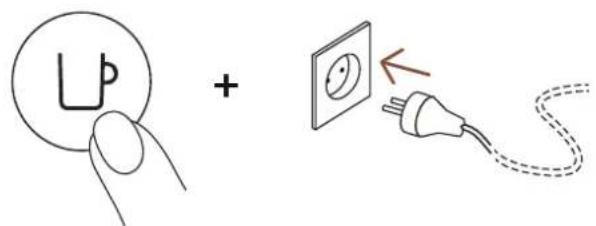
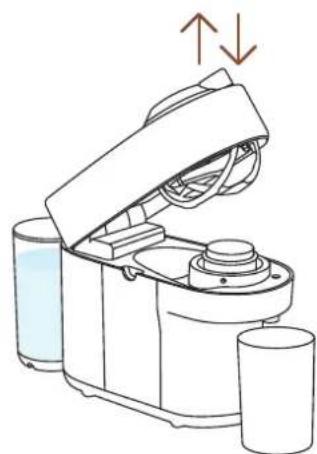
natural_image
Line drawing of a kitchen appliance with liquid and two cups, showing a lid open and side view (no text or symbols)
natural_image
Simple line drawing of a circular object with a central label and two small symbols, no text or numbers present.ÖZELLİKLER
Güç
\~220-240 V, 50-60 Hz, 1300-1500 W
US, CA: 120 V, 60 Hz, 1500 W
MX: 127 V\~, 60 Hz, 1380 W
Frekans 2.402–2.480 GHz
GCV2, GDV2 BNV120, BNV150
ENV90
| Krups | Magimix |
| XN9201, XN9204, XN9205, XN9211 | M800 |

المواصفات
W 10··-1P··,Hz 7··-0··,V Pε.-PP··\~
W 10..,Hz 7.,V 1P.:US,CA
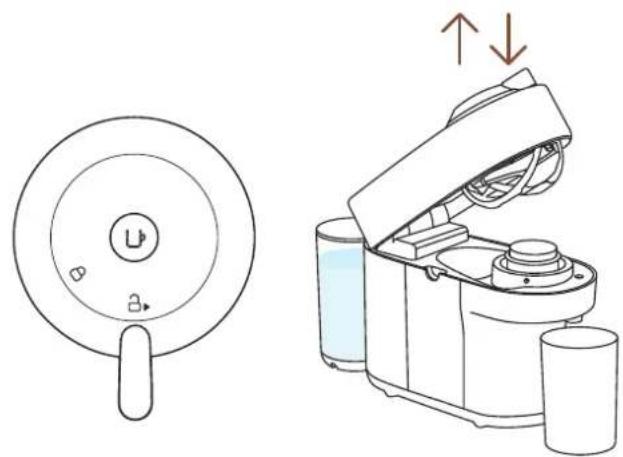
natural_image
Line drawings of a circular device with a handle and a mechanical device with arrows indicating motion (no text or symbols)natural_image
Technical line drawing showing a circular component with internal components and an open device with lid (no text or symbols)natural_image
Simple line drawing of an electrical plug connected to a wall socket, with an arrow indicating direction (no text or symbols)إفصل الماكينة
3
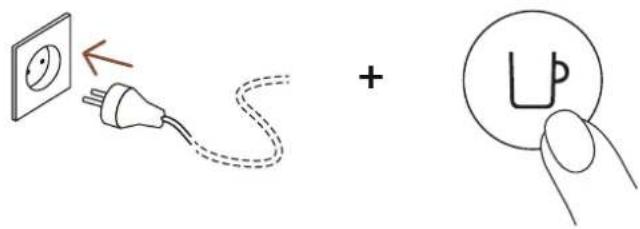
natural_image
Two modern vacuum cleaner units, one orange-yellow and one red, displayed on a table with a play button overlay (no text or symbols visible)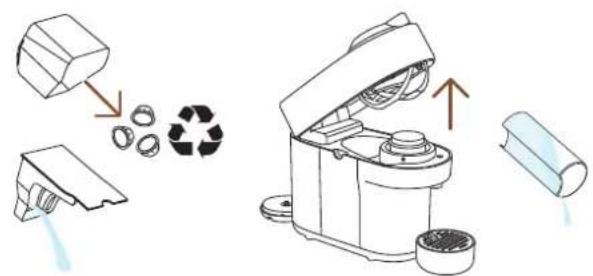
natural_image
Line drawing of a blender with open lid and side cups, showing a drop in volume (no text or symbols)natural_image
Illustration of household items including a bottle, thermometer, plate, bowl, and door (no text or symbols)natural_image
Line drawing of a smart kitchen appliance with cutaway views and accessories (no text or symbols)natural_image
Line drawing of a kitchen blender with liquid and a glass, showing no text or symbolsnatural_image
Illustration of a kitchen appliance and a water dispenser with a downward arrow indicating action (no text or symbols)natural_image
Two modern vacuum cleaner units (black and red) displayed side by side, with a play button overlay in the center (no text or symbols visible)natural_image
Illustration of kitchen utensils including a thermometer, condenser, and storage unit (no text or symbols)natural_image
Line drawing of a smart food blender with exploded view and hand placing it (no text or symbols)نشف بمنشفة نظيفة

natural_image
Line drawing of a kitchen appliance with a lid open, next to a glass (no text or symbols)natural_image
Technical line drawings of a kitchen appliance and its internal components (no text or symbols)natural_image
Two modern vacuum cleaner units (black and orange) with a play button overlay, placed on a white surface in an indoor setting (no text or symbols visible)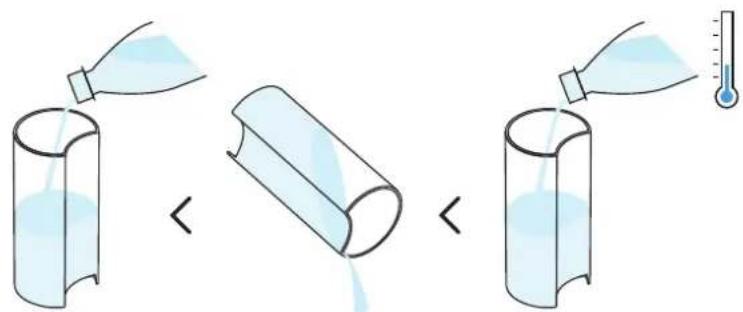
natural_image
Line drawing of a coffee maker with a side panel and lid, showing no text or symbolsnatural_image
Illustration of a kitchen blender with lid and side bowl, showing open lid and side bowl (no text or symbols)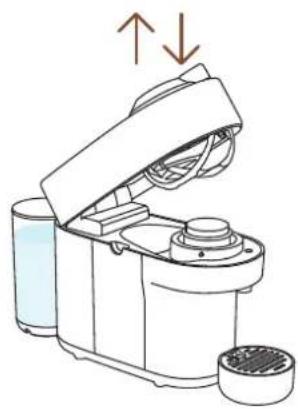
natural_image
Line drawing of a kitchen appliance with lid, fan, and evaporator (no text or symbols)natural_image
Modern kitchen appliance setup with a black blender, glass cups, and orange oranges on a table (no visible text or symbols)natural_image
Illustration of a portable coffee maker with open lid and side bowl, no text or symbols present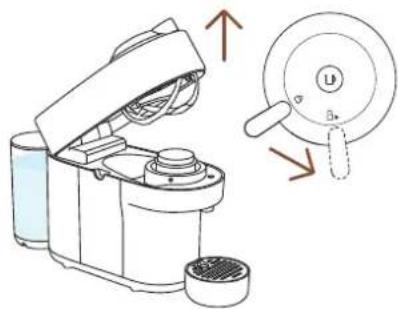
natural_image
Line drawing of a kitchen appliance with lid, vent, and side ports (no text or symbols)natural_image
Diagram of a portable coffee maker connected to a cup and a wall socket, with no text or symbols present.natural_image
Illustration of a kitchen appliance with a lid and side view showing the interior and exterior views (no text or symbols)
natural_image
Illustration of a kitchen appliance with a side panel and a close-up view showing internal components (no text or symbols)natural_image
Line drawing of a portable electric machine with power plug and socket, showing wiring connection (no text or symbols)natural_image
Line drawing of a ESPRESSO-branded device with wireless signal icon above (no text or symbols on body)


تشغيل / إيقاف
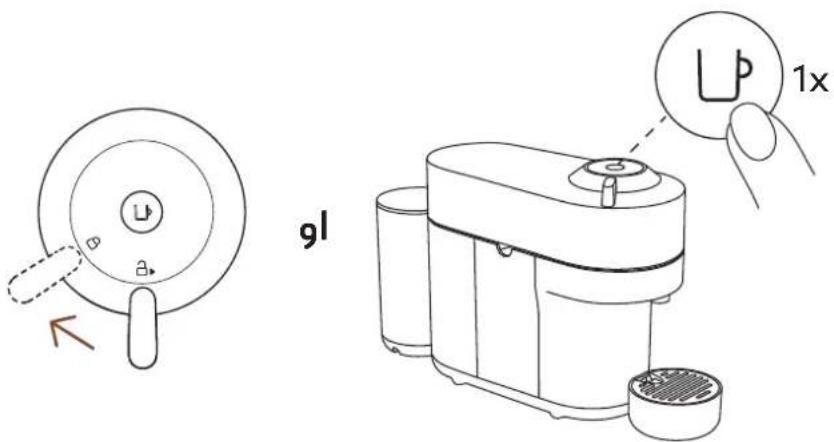
تشغيل
القegoة
لتعديل
محتوى المغلف
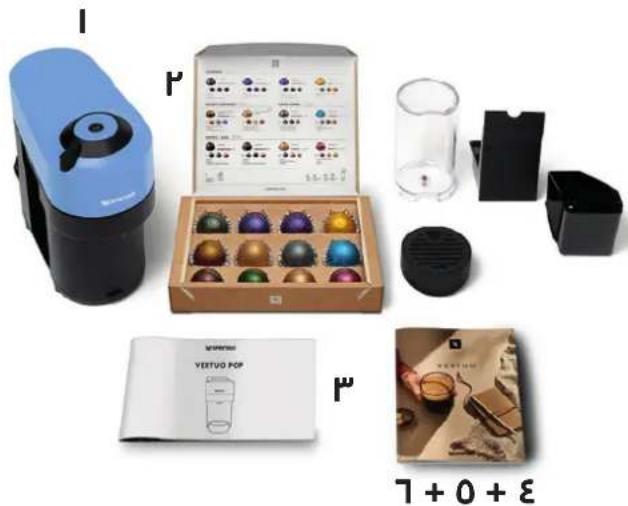
natural_image
Product display set including a blue spray gun, a box of colorful glass beads, and a coffee cup with a logo (no visible text or symbols on main objects)نسبريسو
الSRيع
- VERTUO POP
- CLICK AND CHOOSE YOUR LANGUAGE
- EN
- SAFETY
- DISPOSAL AND ENVIRONMENTAL PROTECTION
- OVERVIEW
- MACHINE OVERVIEW
- PACKAGING CONTENT
- OPEN / CLOSE
- THE VERTUO SYSTEM
- CAPSULE COMPATIBILITY
- ACCESSORY COMPATIBILITY
- ON/OFF
- ON
- OFF
- CONNECTIVITY
- WHY SHOULD YOU PAIR YOUR VERTUO POP MACHINE?
- BENEFITS OF CONNECTING YOUR VERTUO POP MACHINE
- HOW TO CONNECT YOUR VERTUO POP MACHINE?
- DISABLING MACHINE BLUETOOTH AND WI-FI
- FIRST STEPS
- FIRST RINSING
- COFFEE PREPARATION
- ADAPT YOUR COFFEE VOLUMES
- CLEANING
- DESCALING
- You will need:
- EMPTYING THE SYSTEM
- RESET TO FACTORY SETTINGS
- BLINKING SUMMARY
- TROUBLESHOOTING
- Light blinks while machine is running.
- Light blinks and machine is not running.
- Light blinks alternately 2 blinks and 1 pause continuously. Machine is not running.
- SPECIFICATIONS
- CLIQUEZ ET CHOISISSEZ VOTRE LANGUE
- FR
- CONSIGNES DE SÉCURITÉ
- ENTRETIEN
- CARACTÉRISTIQUES TECHNIQUES
- ESPECIFICACIONES
- ESPECIFICAÇÕES
- KLIKNĚTE A ZVOLTE JAZYK
- CS
- BEZPEČNOST
- OBSAH BALENIA
- KOMPATIBILNÉ DOPLNKY
- ZAPNUTIE/VYPNUTIE
- ZAPNUTIE
- TISZTÍTÁS
- KLIKNIJ I WYBIERZ SWÓJ JĘZYK
- PL
- ZASADY BEZPIECZEŃSTWA
- SPECYFIKACJE
- SCHOONMAKEN
- FRAKOBLING AF MASKINENS BLUETOOTH OG WI-FI
- UDFORSK VORES COFFEE CREATIONS-FUNKTION
- PÅ/AV
- PÅ
- FÖRDELAR MED ATT KOPPLA UPP DIN VERTUO POP-MASKIN
- INAKTIVERA BLUETOOTH OCH WI-FI PÅ MASKINEN
- SAMMANFATTNING BLINKNINGAR
- DATI CLICK ŞI ALEGETI LIMBA DVS.
- RO
- INSTRUCTIUNI DE SIGURANTĂ
- DECONECTAREA BLUETOOTH SAU WI-FI A ESPRESSORULUI
- TEMİZLEME
- ÖZELLİKLER
- المواصفات
- تشغيل / إيقاف
- محتوى المغلف
Brand : DELONGHI
Model : Nespresso Vertuo Pop
Category : Coffee machine