COM530M - Coffee machine DELONGHI - Free user manual and instructions
Find the device manual for free COM530M DELONGHI in PDF.


Pick your language and provide your email: we'll send you a specifically translated version.
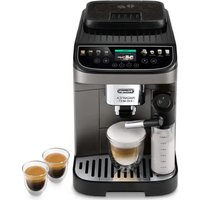
| Product type | Automatic coffee machine with grinder |
| Brand | DeLonghi |
| Model | COM530M |
| Dimensions (W x D x H) | 240 x 340 x 420 mm |
| Weight | 9 kg |
| Power supply | 220-240 V, 50/60 Hz |
| Power | 1450 W |
| Water tank capacity | 1.8 L |
| Bean hopper capacity | 200 g |
| Pump pressure | 15 bars |
| Main functions | Espresso, long coffee, cappuccino, latte macchiato, hot milk, hot water, double coffee |
| Milk frothing system | Integrated milk frother (LatteCrema System or similar) |
| Grinder | Conical steel grinder, adjustable to 13 settings |
| Settings | Coffee dose, aroma intensity, temperature, cup length |
| Maintenance and cleaning | Automatic descaling, removable washable brewing unit, maintenance alert |
| Safety | Automatic shut-off, child safety, overheat protection |
| Spare parts and repairability | Spare parts available, high repairability index |
| General information | Super automatic espresso machine, compatible with whole bean and ground coffee, LCD screen, compact design |
Frequently Asked Questions - COM530M DELONGHI
How to make a cappuccino with the DeLonghi COM530M?
Place a container under the steam wand, immerse the tube in cold milk, select the Cappuccino or Hot milk program. The machine prepares the espresso and milk simultaneously. Adjust the froth with the adjustment knob.
How to descale the machine?
Use a specific DeLonghi descaling solution. Pour it into the water tank, start the automatic descaling program via the menu. Then rinse thoroughly with fresh water. The descaling indicator lights up when needed.
The coffee is too weak or too strong, how to adjust?
You can adjust the grind by turning the grinder knob (13 settings). A finer grind gives a stronger coffee. Also modify the coffee dose and intensity via the menu. For a stronger taste, use more beans.
How to replace the water filter?
The water filter (type DeLonghi DLS or similar) is located in the water tank. Remove the old filter, insert the new one by pushing it all the way in, then activate the filter via the menu: Settings > Water filter > Reset after replacement.
The machine displays 'general alarm', what to do?
This message indicates an internal problem. Turn off the machine, unplug it for 30 seconds, then plug it back in. If the message persists, check the drip tray, water tank, and grounds container. Contact customer service if necessary.
Can I use ground coffee?
Yes, open the lid of the bean compartment and use the hopper intended for ground coffee. Do not put ground coffee in the bean hopper. Select the ground coffee option in the menu.
How to clean the brewing unit?
Remove the brewing unit by pressing the side buttons. Rinse it with warm water (no detergent), brush the filters. Let it dry before reinstalling. Grease the seals if necessary every 3 months.
The milk frothing function does not work well
Make sure the steam wand is clean. For best results, use whole cold milk. If the froth is insufficient, check the texture setting via the menu. Descale the machine because limescale obstructs the passages.
How to set the time and timer?
Press the Menu button, navigate to Settings > Clock. Set the time with the arrows. You can also program delayed start in the Timer menu.
What to do if the coffee is cold?
Check the temperature set in the menu: it should be on High or Very high. If the machine is in energy saving mode, it lowers the temperature. Preheat the cup with hot water. Finally, descale the appliance.
User questions about COM530M DELONGHI
0 question about this device. Answer the ones you know or ask your own.
Ask a new question about this device
No questions yet. Be the first to ask one.
Download the instructions for your Coffee machine in PDF format for free! Find your manual COM530M - DELONGHI and take your electronic device back in hand. On this page are published all the documents necessary for the use of your device. COM530M by DELONGHI.
USER MANUAL COM530M DELONGHI

Manual assistant
Powered by Anthropic
Waiting for your message
Product information
Brand : DELONGHI
Model : COM530M
Category : Coffee machine