LENDOU - Humidifier Air&Me - Free user manual and instructions
Find the device manual for free LENDOU Air&Me in PDF.


| Product Type | Air Purifier |
| Brand | Air&Me |
| Model | LENDOU |
| Dimensions (low version) | 412 x 390 x 198 mm |
| Dimensions (high version) | 542 x 390 x 198 mm |
| Net weight | 4.2 kg |
| Power supply | 220-240 V ~ 50 Hz |
| Maximum power consumption | 35 W |
| Number of speeds | 4 + turbo |
| Recommended maximum area (medical quality) | 20 m² |
| Recommended maximum area (domestic quality) | 35 m² |
| Maximum airflow | 300 m³/h |
| Purification capacity (CADR) | 175 cfm |
| Filtration | Pre-filter, HEPA 13 filter + activated carbon |
| Main functions | Automatic mode, 4 speeds + turbo, WiFi, negative ionization, child lock |
| Air quality indicator | Colored LED bar (green, orange, red) |
| OptiFilter technology | Intelligent filter wear indicator (6 to 12 months) |
| Pre-filter cleaning | Every 15 days, machine washable |
| Sensor cleaning | Every 2 months, vacuuming |
| Warranty | 2 years |
| General information | Manufacturer: Air&Me, 183 av. Georges Clémenceau, 92000 Nanterre, France |
Frequently Asked Questions - LENDOU Air&Me
User questions about LENDOU Air&Me
0 question about this device. Answer the ones you know or ask your own.
Ask a new question about this device
Download the instructions for your Humidifier in PDF format for free! Find your manual LENDOU - Air&Me and take your electronic device back in hand. On this page are published all the documents necessary for the use of your device. LENDOU by Air&Me.
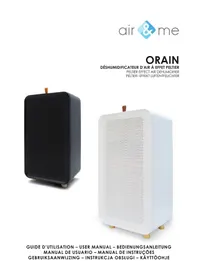
USER MANUAL LENDOU Air&Me
natural_image
White ceramic kitchen appliance with a curved lid and four wooden legs (no text or symbols visible)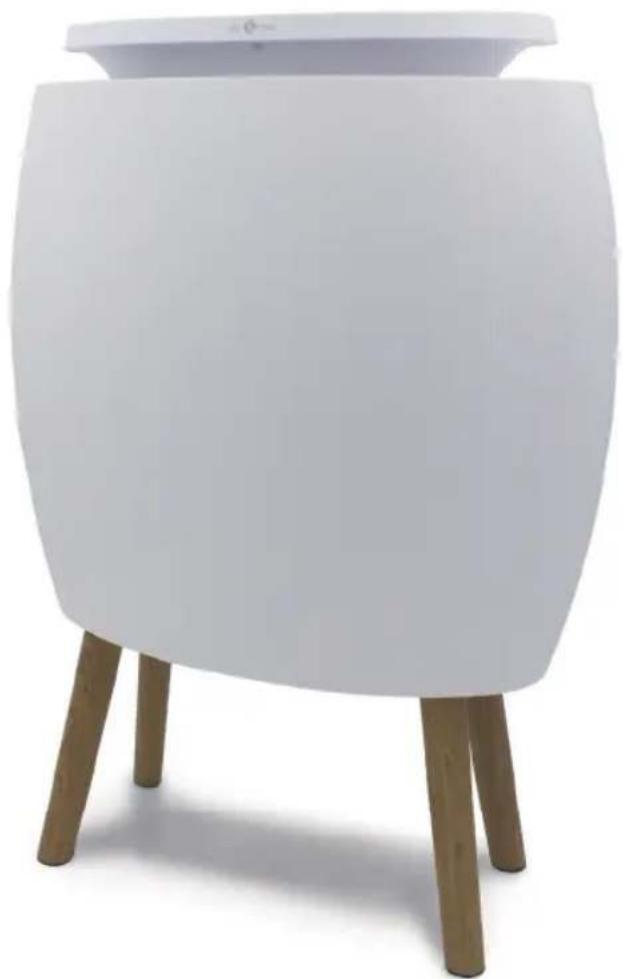
natural_image
White ceramic table with four legs and a matching lid, no text or symbols visibleGUIDE D'UTILISATION - USER MANUAL - BEDIENUNGSANLEITUNG MANUAL DE USUARIO - MANUAL DE INSTRUÇÕES - GEBRUIKSAANWIJZING INSTRUKCJA OBSŁUGI - BRUKERMANUAL - KÄYTTÖOPAS - ANVÄNDARMANUAL
LENDOU
PANNEAU DE CONTRÔLE/CONTROL PANEL/BEDIENFELD/PANEL DE CONTROL/PAINEL DE CONTROLO/BEDIENINGSPANEEL / PANEL CYFROWY / KONTROLPANEL / OHJAUSPANEELI / KONTROLLPANEL
CHANGEMENT DU FILTRE/FILTER REPLACEMENT/FILTERWECHSEL/CAMBIO DEL FILTRO/SUBSTITUIÇÃO DO FILTRO/VERVANGING VAN DE FILTER / WYMIANA FILTRA / FILTERBYTTE / SUODATTIMEN VAIHTO / UTBYTE AV FILTER
natural_image
Line drawing of a portable air heater with grid-patterned casing and three legs (no text or symbols)1
natural_image
Diagram of a portable air conditioner unit with cooling fan and heat exchanger (no text or symbols)②
③
natural_image
Line drawing of a portable air conditioner unit with a side panel showing airflow direction (no text or symbols)④
natural_image
Diagram of a portable heater with internal circuitry and a separate panel showing internal structure (no text or symbols)5
natural_image
Illustration of a stylized ear with Wi-Fi signal waves and a 3-inch meter (no text or symbols)67
FRANÇAIS
REPLACEMENT DU FILTRE
Thank you for having purchased the domestic air purifier LENDOU, an air&me. product. We hope that it will bring you complete satisfaction and improve your indoor air quality.
As with all electrical appliances, it is important to maintain the appliance properly in order to avoid any damage or injury. Please read these instructions carefully before switching the appliance on and keep them for later reference. WAF-direct society accepts no liability for any damage that is caused by noncompliance with this instruction manual. The appliance is only to be used in the household for the intended purposes described in this user manual. Using the appliance for other purposes than the intended ones or performing technical changes to the appliance could be hazardous for health and life.
TECHNICAL DATA
| Voltage | 220-240 V ~ 50 Hz |
| Dimensions (H x W x P) | 412 x 390 x 198 mm (low version) |
| 542 x 390 x 198 mm (high version) | |
| Net weight | 4,2 kg |
| Number of speed | 4 + turbo |
| Maximal power consumption | 35 W |
| Suitable for rooms up to | 20 m^2 (medical quality) |
| 35 m^2 (domestic quality) | |
| Maximum airflow | 300 m^3 /h |
| CADR (Clean Air Delivery Rate) | 175 cfm |
| Diffusion of essential oils | No |
| Negative ionization | Yes |
DOMESTIC INJURY PREVENTION
The safety of this product conforms to the relevant norms and regulations in force in the European Union.
For any further information, please visit our website: www.airandme.fr/en
Our customer service department is available at the following email address: info@airandme.fr

To prevent from any danger or electrical shock, always unplug the product when you are not using it, moving it or cleaning it. In case of repairs, approach the qualified persons.
IMPORTANT SAFETY INSTRUCTIONS
- Please read all the instructions carefully before using LENDOU.
- Any use that is not recommended by the reseller can lead to fire, power can hurt people.
- Remove the packaging and make sure that LENDOU is not damaged. If in doubt, do not use the appliance and contact your reseller.
- Do not let children play with the different pieces of the packaging. Pay special attention when using the appliance near a child.
- Before using LENDOU, make sure that the voltage indicated on the product is in accordance with your electrical installation.
- Make sure that the socket is correctly plugged: otherwise, the socket could overheat.
- Using an extension electric cable can create overheating and fire.
- Do not pull on the power cord to unplug the appliance. Always unplug LENDOU by holding and pulling on the socket.
- Do not cover or put objects that can obstruct the fan air flow: it could cause electrical shocks or damage the appliance. Do not put fingers inside the air outlet on pain of physical damage.
- During operation, leave at least 50cm behind, around and in front of the appliance.
-
To avoid any electrical shock or fire, do not use water, detergent or flammable product to clean the outside or the inside of the appliance.
-
Do not use insecticide spray, perfume or any other flammable spray around the appliance when it is in process.
surge3. Never use LENDOU if it can fall into a liquid. - Make sure the product is on a flat and horizontal surface.
- Do not use LENDOU outdoors.
- Do not use this appliance in a very dusty and/or humid room, or in a fire-risk room.
- This device is designed for domestic use only. It should not be used for an industrial application.
- Always unplug LENDOU before moving or when not in use.
- Keep the product clean and in good condition.
- Use the recommended spare parts (non official parts could be dangerous and invalidate the warranty).
- Store LENDOU in a dry and safe place, away from children.
-
If the power cord is damaged, it can be changed by the reseller. Only qualified persons can make this repair.
-
This product cannot be used by children less than 8 years old. Please read carefully this user manual and use LENDOU with caution.
The air purifier LENDOU has a Wi-Fi function and a built-in air-quality sensor. The air purifier settings can be changed at any time manually, either by using the buttons on the control panel, or remotely, via the dedicated smartphone app.
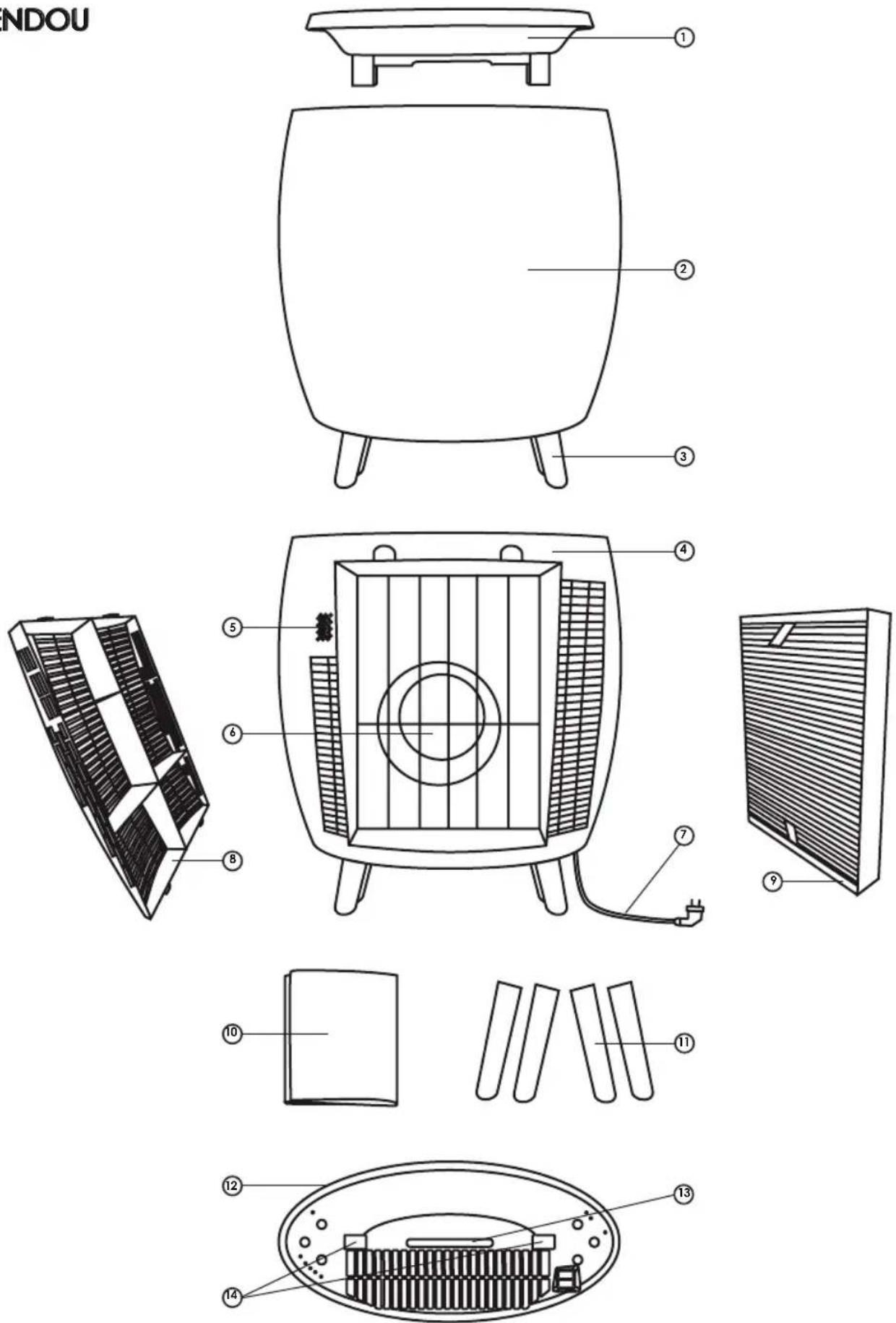
COMPONENTS (SEE PAGE 2)
① Tray
② Front side of the device
③ 4 feet "down"
④ Back of the device
⑤ Air quality sensor
⑥ Fan
⑦ Power cord
⑧ Rear grille (air inlet)
⑨ HEPA 13 + active carbon filter
⑩ Pre-filter
⑪ 4 feet "high"
⑫ Control panel
⑬ LED indicator of air quality
⑭ Tray insertion holes
⑮ Air outlet
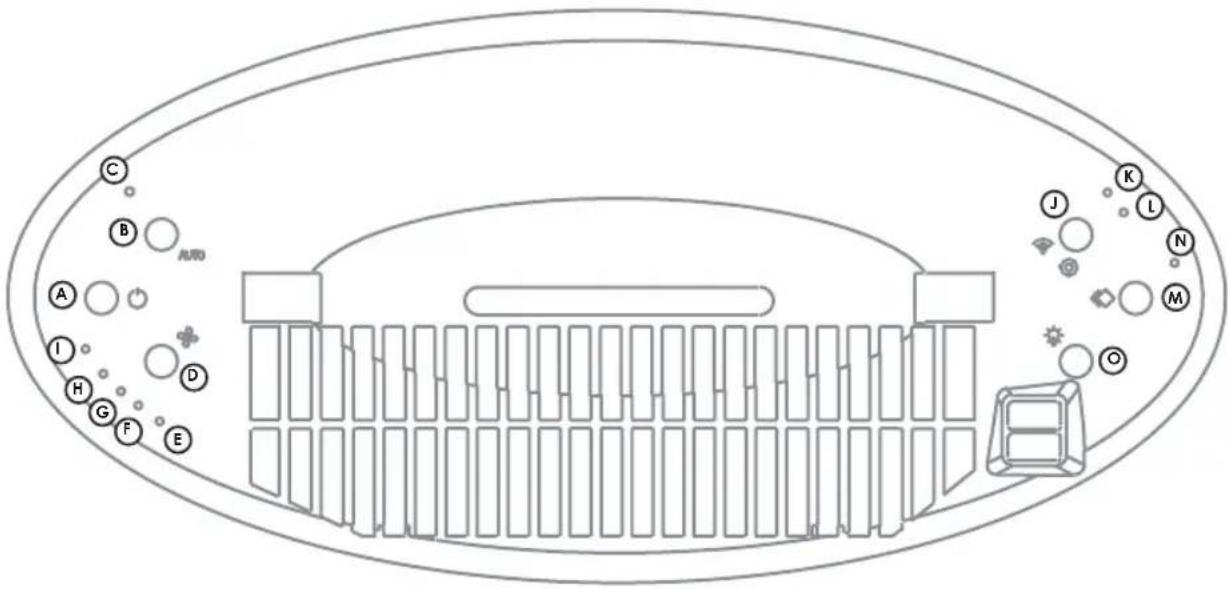
CONTROL PANEL (SEE PAGE 3)
A ON/OFF button
B [Auto] button
© Indicator light [ Auto ]
(D) [Speed] button
E Indicator light [Speed 1]
F Indicator light [ Speed 2 ]
G Indicator light [Speed 3]
H Indicator light [ Speed 4 ]
① Indicator light [ Turbo ]
① [ Wifi ] and [ Negative Ionization ] button
(K) Indicator light [ Wifi ]
L Indicator light [ Negative ionization ]
M [Filter] button
NFilterreplacementindicator
◎ [Light] button
OPERATION PRINCIPLE
The air purifier LENDOU will allow you to breathe clean air in your home and thus protect your health through three levels of filtration:
Level 1: Pre-filter:
Dusts, hair, animal hair
Level 2 : HEPA 13 + activated carbon filter:
Volatile Organic Compounds (VOCs): pollens, mites, allergens from animals, molds, bacteria; fine particles (PM 2.5); bad smells
GOOD AIR AT HOME!
Here are some complementary and simple tips to help you improve the air quality of your home:

Don't smoke inside.

Limit the use of household products, which are rich in volatile organic compounds and formaldehyde.

Ventilate the room at least 15 minutes a day, even in the winter.

Avoid using scented candles, incense sticks, deodorant sprays, home fragrances.

Remember to maintain your ventilation system and to dust off the air vents.

Ventilate the rooms where you have work done or where you tinker.
USE PRECAUTIONS
- Make sure that the product is placed on a dry flat surface.
- Leave at least 50cm behind, around and in front of the appliance.
- Make sure you have removed the plastic packaging from the filter.
- Make sure the filter and the rear grille are correctly positioned and pressed. This unit has a device that turns off automatically if the filter and rear grille are not well placed.
OPERATING INSTRUCTIONS
- Connect the device.
- Press the ON/OFF button (A) to turn on the device.
- Press the ON/OFF button again to turn off the device. The unit keeps the last settings in memory. So, if you set your device to [Speed 4] and [Light = 50%] before turning it off, when you turn it on later, it will automatically be set to [Speed 4] and [Light = 50%].
MAIN FUNCTIONS

[AUTO] BUTTON
By pressing this button (B), the device operates automatically: it adapts the speed of the fan and the rate of the air purification according to the rate of the particles present in the ambient air.
![Air&Me LENDOU - [AUTO] BUTTON - 1](/content/2026/04/633157/images/a644f82ea3c37360bffbd8930eb98583ee86a6e804266e2024022606a7924a06.jpg)
[SPEED] BUTTON
Pressing this button (D) several times, you gradually increase the fan speed. The device has 4 purification speeds and a turbo mode:
• [Speed 1]: Extra quiet mode
• [Speed 2]
• [Speed 3]
• [Speed 4]
• [Turbo]: This is the highest rate of air purification
![Air&Me LENDOU - [SPEED] BUTTON - 1](/content/2026/04/633157/images/ae693a5fd20b44e225501ba1884e80918b0dd727952bbf4dc8bf2ac9f164a41e.jpg)
[WIFI] BUTTON
By pressing this button (①) for 3 seconds, you can connect the device to your wireless network and pair it via the dedicated smartphone app.
Go to www.airandme.fr/connect/ to install the app and connect your device.
![Air&Me LENDOU - [WIFI] BUTTON - 1](/content/2026/04/633157/images/efe6214f1a8f87514938d1b6e4df3ab60e45e9e8fd7956e3682b0c23f553cb71.jpg)
[ NEGATIVE IONIZATION ] BUTTON
By pressing this button (①), you can turn on and off the negative ionization. Thanks to this function, LENDOU emits between 3 and 8 million negative ions per second, which effectively regenerates the air of a room. The diffused negative ions are subject to an electrostatic phenomenon: they are attracted by the particles suspended in the air and are fixed on them, then dropped to the ground. So, the air is purified.
![Air&Me LENDOU - [ NEGATIVE IONIZATION ] BUTTON - 1](/content/2026/04/633157/images/70595bce3ca55b062bede7286ad21ad9fcde4b50e828040975fd30bd06b0de61.jpg)
[ FILTER ] BUTTON
Press and hold this button after replacing the filter, to reset the filter wear measurement system.
![Air&Me LENDOU - [ FILTER ] BUTTON - 1](/content/2026/04/633157/images/23c6a2c7c3fa52060a0dff945f19d92a427bee502616818f18cef4cf0b86229a.jpg)
[LIGHT] BUTTON
The [Light] button allows you to adjust the brightness of the LED bar according to the time of day and your preferences:
• [100%]: The LED bar is on, and the lights are at 100% of their capacity.
• [50%]: The LED bar is on, and the lights are moderate, at 50% of their capacity.
- [Night Mode]: The LED bar is off. Combined with [Speed 1], this option is ideal if you put the air purifier in a room.
ADDITIONAL FUNCTIONS
CHILD SAFETY LOCK
By pressing the [Speed] button (D) and the [Light] button (D) for 5 seconds, you will hear a beep: the child safety lock that locks the control panel is activated. To deactivate, press these two buttons again for 5 seconds.
OPTIFILTER™ : INTELLIGENT WITNESS OF FILTER WEAR
The LENDOU air purifier has a patented filter wear measurement technology called OptiFilter™. To calculate the life of the filter, the device takes into consideration 3 factors:
- The number of operating hours of the device,
• Air quality during the use of the device, - The fan speed during the use of the device.
This way, depending on how you use the device and your direct environment, you will need to replace the filter every 6 to 12 months.
COLORED AIR QUALITY VISUALIZATION
When the unit is operating, the color of the LED bar changes according to the ambient air quality.
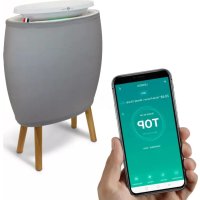
- The LED bar is green when the air quality is good (displayed "TOP" on the application).
- The LED bar is orange when the air quality is average (displayed "OK" on the application).
- The LED bar is red when the air quality is bad (displayed "POOR" on the application).
CHANGING THE FEET OF THE DEVICE
If you want to change the feet of the device:
- Be sure to unplug the unit before returning it gently.
- Follow the instructions on the bottom of the unit.
- Turn the unit over and plug it.
Warning: The feet must be pulled vertically and must not be turned/screwed. Attach 4 feet of identical heights to the unit, so that it does not become unbalanced.
MAINTENANCE AND FILTER REPLACEMENT (SEE PAGE 3)
- Make sure the unit is turned off and unplugged before any manipulation.
- Do not immerse the device in water or any other liquid.
- Do not use corrosive, abrasive or flammable products to clean the unit.
- The particulate filter is not washable and needs to be replaced.
CLEANING THE FABRIC PRE-FILTER
Removable fabric pre-filter captures dusts and animal hair and dander. It is to be washed about every 15 days, in order to guarantee the effectiveness of the purifier. You can wash it with a vacuum cleaner along with a soft brush. You can also put it in the washing machine, on a program for “delicate fabrics”.
Caution: Don't iron the pre-filter. Never place a pre-filter that is still wet on the device. Only the pre-filter is reusable and can be cleaned with water.
AIR INLET AND OUTLET OF THE DEVICE
The air is aspired from the back of the unit and comes out at the top. Use a soft cloth to remove dust from the air inlets and outlets.
FILTER REPLACEMENT
Thanks to OptiFilter™ technology, an indicator light turns on when the filter has to be replaced (every 6 to 12 months). To replace the filter:
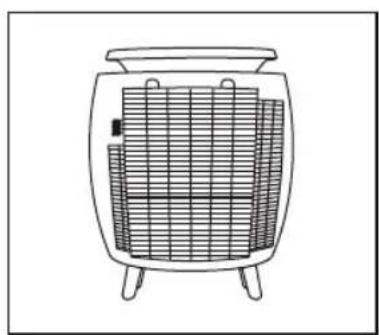
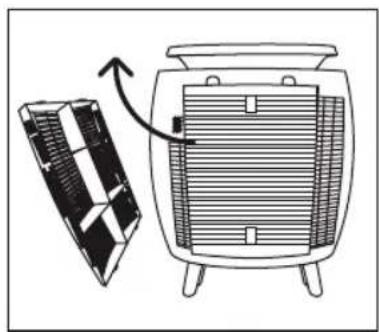
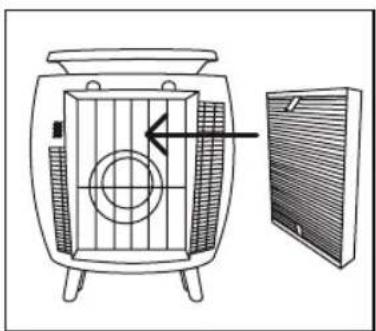
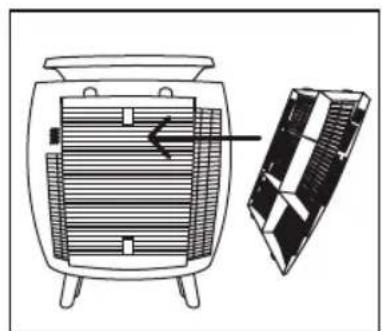
① Make sure the unit is unplugged, then remove the pre-filter from the unit and unclip the rear grille.
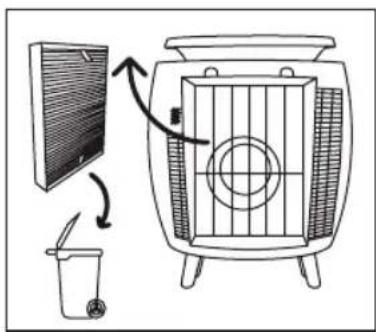
② Gently pull the two tabs on the used filter out of the machine.
③ Place the used filter directly in a bag and throw it quickly to avoid dispersing contaminants.
④ Carefully install the new filter, placing both tabs facing you.
⑤ Replace the rear grille and the pre-filter.
⑥ Reconnect and turn on the device.
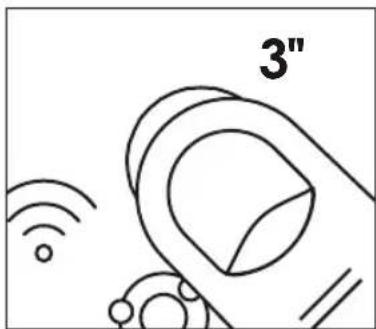
⑦ Press the [Filter] button for 3 seconds to reset the filter wear measurement system.
Avoid used filters being handled by people with asthma or allergies. Remember to wash your hands after handling a used filter.
CLEANING THE AIR QUALITY SENSOR
The particle sensor requires regular dusting: every 2 months, depending on the frequency of use and the environment in which the device is placed. To do this, use a vacuum cleaner to capture any dust.
Caution: Do not use detergents, corrosives or metal objects to clean the sensor. The efficiency of the sensor is susceptible to decrease if it's not cleaned regularly.
STORAGE OF THE DEVICE
If you don't use your air purifier, you can store it in a clean place, away from moisture and heat.
FAQ
| Problem Reason Solution | ||
| The appliance does not work | > The product is not correctly plug or there is an electrical problem. | > Plug the socket correctly and check the voltage and the good functioning of your electrical system. |
| > There is a problem on the electrical system of your house. | ||
| > The filter and/or the rear grille is not properly engaged. | > Push and engage the grille correctly. | |
| Drop in the appliance performance | > The pre-filter is dirty, which hinders the airflow. | > Clean the pre-filter |
| > The air inlet or outlet is blocked by something. | > Leave at least 50 cm space behind, on the sides and in front of the unit. | |
| > The air quality sensor is dirty. | > Please see “Maintenance” paragraph. | |
| Abnormal noise | > Something obstructs the fan. | > Make sure that no object obstructs the air flow. |
| > The device has a functioning problem. | > Contact your reseller for service support. | |
| > The filter is dirty. | > Please see “Maintenance/ Replacement of the filter” paragraph. | |
| The appliance does not produce air | > The air inlet or outlet is obstructed. | > Please see “Maintenance” paragraph and make sure no objects are blocking the airflow. |
| The air coming out of the appliance smells bad | > The filter needs to be cleaned or replaced. | > Please see “Maintenance/ Replacement of the filter” paragraph. |
| The color of the air quality indicator doesn’t change | > The air quality sensor is dirty. | > Please see “Maintenance” paragraph. |
| > You are not in a very polluted environment. | > To change to orange or red, the ambient air must be polluted. | |
| > The filter must be replaced if the light remains red. | > Please see “Maintenance” paragraph. | |
DEUTSCH
OPBERGING VAN HET APPARAAT
- Be sure to unplug the unit before returning it gently.
- Follow the instructions on the bottom of the unit.
- Turn the unit over and plug it.
VEDLIKEHOLD OG UTSKIFTNING AV FILTER (SE SIDE 3)
[ NEGATIIVINEN IONISAATIO ]-PAINIKE
The appliances are under warranty for a 2-year period from the purchase date. The warranty covers all failures resulting from hidden manufacturing or raw material defects. This warranty does not cover failures or damages resulting from an inadequate setup or usage, or from the normal wear and tear of the product. Spare parts are also available for a period of 2 years after the date of purchase.
air&me cannot be held liable in case of an inadequate or dangerous use of the products.
DEEE
Disposal of Electric and Electronic Equipment (Applicable in the countries of the European Union and other European countries with separate collection systems appropriate). This symbol on the product indicates that this product shall not be treated as household waste. It should be handed over to the applicable collection point for the recycling of EEE (Electrical and Electromagnetic Equipment). By ensuring this product is disposed of correctly, you will help prevent potential negative consequences for the environment and human health. The recycling of materials will help to conserve natural resources. For additional information about recycling of this product, please contact the municipality, the waste or the retailer.
Garantie
natural_image
Blue Wi-Fi symbol icon on white circular background, no text or symbols presentWIFI
Learn how to connect this device to your Wifi network, and how to remotely control it with your smartphone

RDV sur - Go on: