EVEL - Humidifier Air&Me - Free user manual and instructions
Find the device manual for free EVEL Air&Me in PDF.


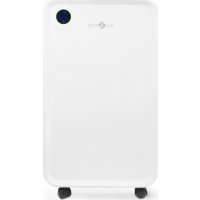
| Product Type | Dehumidifier |
| Dimensions (H x W x D) | 455 x 300 x 200 mm |
| Net weight | 5.7 kg |
| Power supply | 220-240 V, 650 W |
| Dehumidification capacity | 7 L/day (30°C, 80% RH) |
| Maximum recommended area | 90 m² |
| Tank capacity | 2.5 L |
| Operating temperature | 0°C to 35°C |
| Number of speeds | 3 (Low, Med, High) |
| Main functions | HygroSmart® (maintains 40-60% RH), Timer (2/4/8h), Drying, 90° Swing, Wi-Fi connectivity |
| Maintenance and cleaning | Removable filter washable monthly with warm water; tank cleaned with white vinegar |
| Safety | Automatic shut-off when tank full, anti-freeze protection (<0°C), shut-off if tank improperly positioned |
| Spare parts and repairability | Spare parts available for 2 years after purchase; repair by qualified personnel |
| Warranty | 2 years against manufacturing defects (upon presentation of invoice) |
| Connectivity | Wi-Fi IEEE 802.11 b/g/n 2.4 GHz |
Frequently Asked Questions - EVEL Air&Me
User questions about EVEL Air&Me
0 question about this device. Answer the ones you know or ask your own.
Ask a new question about this device
Download the instructions for your Humidifier in PDF format for free! Find your manual EVEL - Air&Me and take your electronic device back in hand. On this page are published all the documents necessary for the use of your device. EVEL by Air&Me.
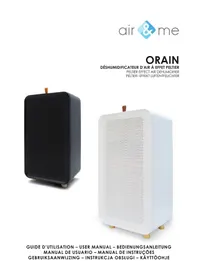
USER MANUAL EVEL Air&Me
natural_image
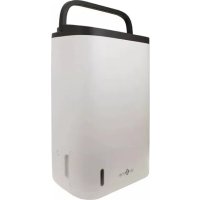
Exterior view of a white and black air conditioner unit (no visible text or symbols on body)GUIDE D'UTILISATION - USER MANUAL - BEDIENUNGSANLEITUNG GEBRUIKSAANWIJZING - INSTRUKCJA OBSŁUGI - KÄYTTÖOHJE
EVEL
PANNEAU DE CONTRÔLE/CONTROL PANEL/BEDIENFELD/BEDIENINGSPANEEL/PANEL CYFROWY/OHJAUSPANEELI
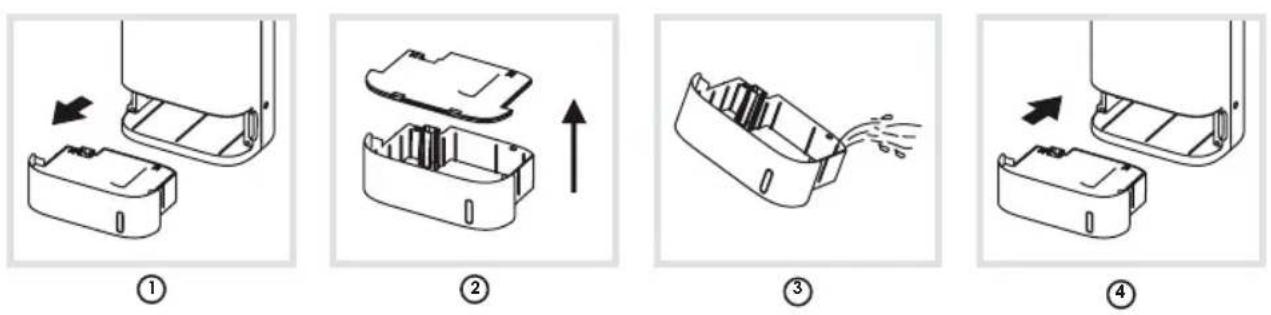
VIDANGE DU RÉSERVOIR / EMPTYING THE TANK / DEN TANK LEEREN / LEGEN VAN HET CONDENSRESERVOIR / OPRÓŻNIANIE ZBIORNIKA / SÄILIÖN TYHJENNYS
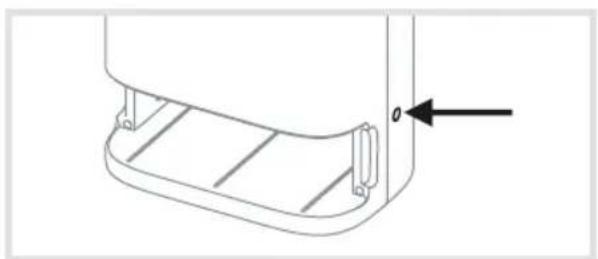
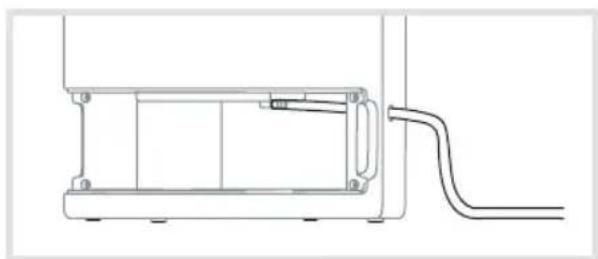
DRAINAGE CONTINU / CONTINUOUS DRAINAGE / KONTINUIERLICHE ENTWÄSSERUNG / CONTINUE AFVOER / TRYB: CIAGŁE OSUSZANIE / JATKUVA TYHJENNYS
natural_image
Technical line drawing of a mechanical component with no visible text or symbols1
natural_image
Technical line drawing of a mechanical assembly with a curved pipe extending from a housing (no text or symbols)②
FRANÇAIS
Thank you for having purchased the Evel domestic air dehumidifier, an air&me. product. We hope that it will bring you complete satisfaction and improve your indoor air quality.
As with all electrical appliances, it is important to maintain the appliance properly in order to avoid any damage or injury. Please read these instructions carefully before switching the appliance on and keep them for later reference. WAF-direct society accepts no liability for any damage that is caused by noncompliance with this instruction manual. The appliance is only to be used in the household for the intended purposes described in this user manual. Using the appliance for other purposes than the intended ones or performing technical changes to the appliance could be hazardous for health and life.
TECHNICAL DATA
| Voltage | 220-240 V |
| Dimensions | 455 x 300 x 200 mm (H x W x D) |
| Net weight | 5,7 kg |
| Number of speed | 3 |
| Maximal power consumption | 650 W |
| Suitable for rooms up to | 90 m ^2 |
| Water tank volume | 2,5 L |
| Ambient temperature range | 0°C - 35°C |
| Dehumidification capacity | 7 L/day (30°C, 80 % RH) |
DOMESTIC INJURY PREVENTION
The safety of this product conforms to the relevant norms and regulations in force in the European Union.
For any further information, please visit our website: www.airandme.fr/en
Our customer service department is available at the following email address: info@airandme.fr

To prevent from any danger or electrical shock, always unplug the product when you are not using it, moving it or cleaning it. In case of repairs, approach the qualified persons.
IMPORTANT SAFETY INSTRUCTIONS
- Please read all the instructions carefully before using Evel.
- Any use that is not recommended by the reseller can lead to fire, power surge or can hurt people.
- Remove the packaging and make sure that Evel is not damaged. If in doubt, do not use the appliance and contact your reseller.
- Do not let children play with the different pieces of the packaging. Pay special attention when using the appliance near a child.
- Before using Evel, make sure that the voltage indicated on the product is in accordance with your electrical installation.
- Make sure that the socket is correctly plugged: otherwise, the socket could overheat.
- Using an extension electric cable can create overheating and fire.
- Do not pull on the power cord to unplug the appliance. Always unplug Evel by holding and pulling on the socket.
- Do not cover or put objects that can obstruct the fan air flow: it could cause electrical shocks or damage the appliance. Do not put fingers inside the air inlet or outlet on pain of physical damage.
- During operation, leave at least 50cm behind, around and in front of the appliance.
-
To avoid any electrical shock or fire, do not use water, detergent or flammable product to clean the outside or the inside of the appliance.
-
Do not use insecticide spray, perfume or any other flammable spray around the appliance when it is in process.
- Never use Evel if it can fall into a liquid.
- Make sure the product is on a flat and horizontal surface.
- To avoid water condensation on the appliance, do not place it near an air-conditioner.
- Do not use Evel outdoors.
- Always unplug Evel when moving it.
- Always unplug Evel when you are not using it.
- Keep the product clean and in good condition.
- Use the recommended spare parts (non official parts could be dangerous and invalidate the warranty).
- Store Evel in a dry and safe place, away from children.
- If the power cord is damaged, it can be changed by the reseller. Only qualified persons can make this repair.
- This product cannot be used by children less than 8 years old. Please read carefully this user manual and use Evel with caution.
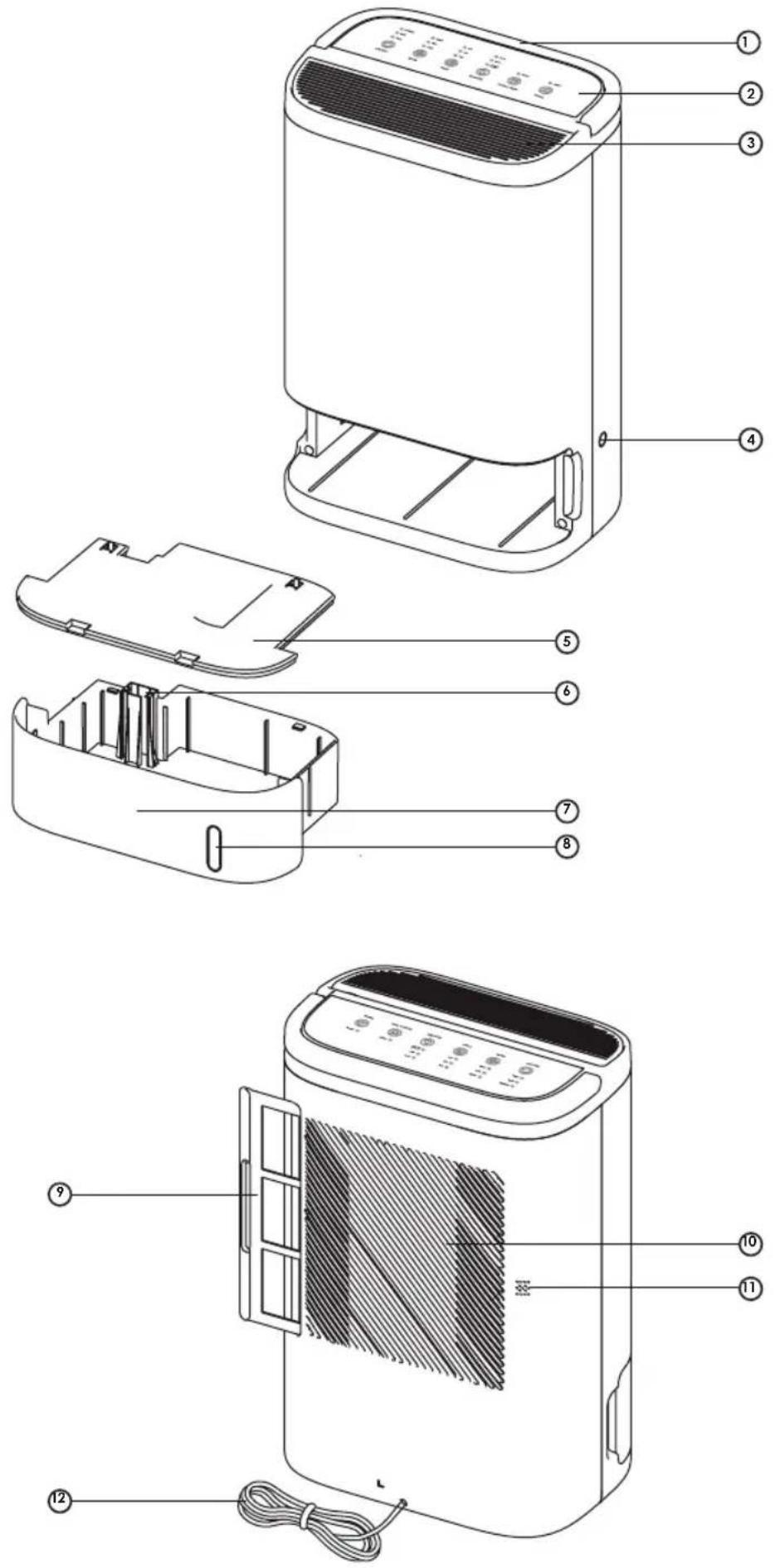
COMPONENTS (SEE PAGE 2)
① Handle
② Digital display
③ Air outlet
④ Continuous drainage hole
⑤ Water tank lid
⑥ Float
⑦ Water tank
⑧ Filling the tank indicator
⑨ Removable filter
⑩ Air inlet
⑪ Built-in hygrometer
⑫ Electric cable
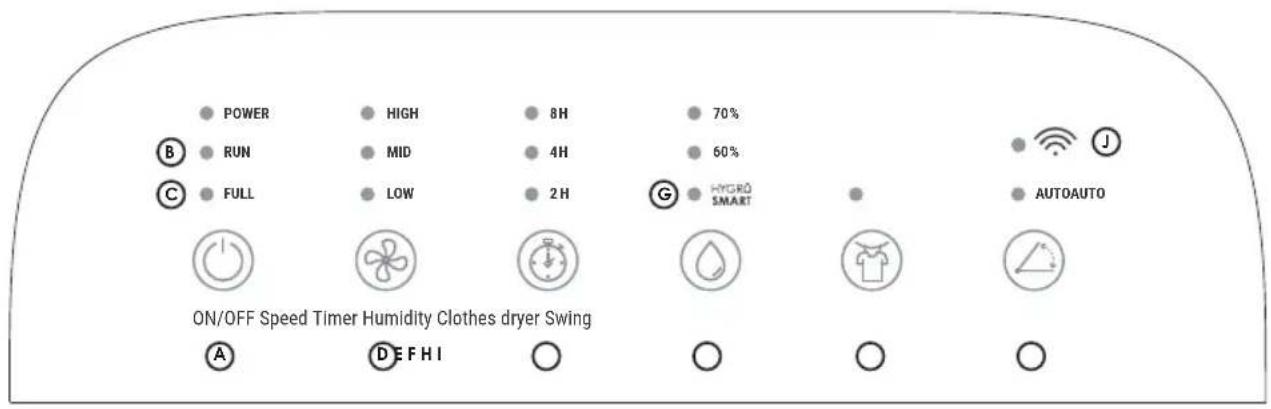
DIGITAL DISPLAY (SEE PAGE 3)
Ⓐ ON/OFF button
⑧ "In process" luminous indicator
© "Full tank" luminous indicator
(D) "Speed" button
E "Timer" button
F "Humidity" button
©"HygroSmart®" luminous indicator
H "Clothes dryer" button
① "Movable flap" button
Wi-Fi connection indicator
USE PRECAUTIONS
- Make sure that the product is placed on a dry flat surface.
- Leave at least 50cm behind, around and in front of the appliance.
- Make sure the removable filter and the tank are properly positioned and pushed in.
- Do not remove the float from the tank because it will prevent the appliance from starting.
OPERATING INSTRUCTIONS
-
Plug the appliance.
-
All luminous indicators of the control panel light for 1 second and then turn off.
- At the same time, the appliance produces 3 sound signals.
-
When the appliance operational, the "Power" luminous indicator turns red.
-
Press the ON/OFF button (A) to turn the appliance on. The movable flap opens.
-
Press the ON/OFF button (A) again to turn the appliance off.
-
The "Power" luminous indicator turns red and the other luminous indicators turn off.
- The appliance continues to ventilate the air during 4 minutes after being turned off, then the movable flap comes back to its initial position and the appliance stops completely.
Useful: the appliance retains the last settings from one use to another.
MAIN FUNCTIONS
⑭ "SPEED" BUTTON: By pressing this button several times, you can adjust the air flow produced by the appliance, selecting one of the three modes: LOW (low air flow), MED (medium air flow) or HIGH (strong air flow).
E "TIMER" BUTTON: By pressing this button several times, you can select the operating time: 2 hours, 4 hours or 8 hours. By pressing it one more time, you can cancel the Timer function and choose to let the appliance work continuously.
F "HUMIDITY" BUTTON: By pressing this button several times, you can choose the humidity rate between three options: HygroSmart®, 60% or 70%.
- The HygroSmart ^ function (©) enables you to maintain an ideal humidity rate in the air (between 40% and 60%). The indicator light flashes if the humidity level in the ambient air is already below 40%.
- Adjust the appliance on 60% if you want to use it in a cellar.
- Adjust the appliance on 70% if you want to use it in a wine cellar.
When the ambient air humidity is lower than the set humidity level, the appliance stops dehumidifying, but its fan continues to operate. If the ambient humidity is higher than the sethumidity level, the appliance automatically restarts dehumidifying.
It is possible to combine these three modes at the same time: choice of speed, choice of dehumidification time and choice of humidity rate.
⑧ "CLOTHES DRYER" BUTTON: By pressing this button, the appliance works at maximum speed. It is possible to adjust the Timer and to define the desired humidity rate but it is not possible to adjust the speed.
If you do not adjust the Timer, the appliance will work for 10 consecutive hours, will stop half an hour to avoid overheating and then will automatically restart.
① "MOVABLE FLAP" BUTTON: Thanks to this button, you can control the switching on and the stop of the movable flap. By pressing this button, the flap opens automatically. You can adjust the opening angle of the flap by pressing it a second time. The movable flap can be opened up to an angle of 90°.
EMPTYING THE TANK (SEE PAGE 3)
The appliance automatically stops working once the tank is full and the "Full" indicator (©) lights. If you had set the Timer, the appliance retains the remaining operating time. After having emptied the tank, the appliance resumes the current program.
① Turn the appliance off and pull the tank.
② Unclip the water tank lid.
③ Empty the condensates.
④ Replace the tank lid and then replace the tank. Then, press the ON/OFF button and choose the desired operating mode.
The dehumidifier is equipped with a tank positioning sensor. As a matter of security, the product turns off if the tank is missing or not properly placed and the "Power" and "Full" indicators light.
CONTINUOUS DRAINAGE (SEE PAGE 3)
Thanks to the continuous drainage hose, the appliance will work independently without having to empty the tank. Make sure the hose is not bent and that it is placed on a downward slope so that water can easily drain away. Do not modify or extend the drainage hose. Make sure that the tank is completely empty.
- Turn the appliance off, remove the tank, and then remove the plastic cap from the hole for the continuous drainage hose (①).
- Pass the hose through the opening provided for this purpose and connect the drainage hose to the water outlet opening (②).
- Reposition the tank.
MAINTENANCE
- Make sure that the appliance is off and unplug before performing any work.
- Do not immerse the appliance in water or in any other liquid.
- Do not use corrosive, abrasive or flammable products to clean the appliance.
CLEANING THE REMOVABLE FILTER: The removable filter captures dust and extends the appliance efficiency. It is recommended to clean it every month. Pull the handle of the removable filter, clean it with warm water and a soft brush then dry it and reposition it.
Be careful not to dry the filter in direct sunlight or near a strong heat source.
CLEANING THE APPLIANCE: Use a soft cloth to remove dust at the air inlets and outlets.
CLEANING THE TANK: Remove the tank and unclip the lid. To avoid calc deposit, clean the tank at least once a month with an appropriate product or with white vinegar.
STORAGE OF THE APPLIANCE: To avoid any bacteria or virus proliferation, never store the appliance with water inside the tank and be sure that the appliance is perfectly dry.
- Empty and clean the tank.
- Clean the air inlets and outlets as well as the removable filter.
- Once the different parts have dried properly, store the product in a place that is protected against dust and that is clean, dry and ventilated.
J WI-FI
By pressing and holding the Movable flat button ^① for 7 seconds, you activate the Wi-Fi pairing between the appliance and your smartphone. Once this pairing is done, you can control the dehumidifier from afar as soon as you have an internet connection.
Wireless connectivity: Wi-Fi IEEE 802.11 b/g/n 2.4GHz
FAQ
| Problem Reason Solution | ||
| The appliance does not work | > The product is not correctly plug or there is an electrical problem. | > Plug the socket correctly and check the voltage and the good functioning of your electrical system.. |
| > There is a problem on the electrical system of your house. | ||
| > The tank is full. > Empty the tank.. | ||
| > The tank is not properly placed.. | > Push and place the tank properly. | |
| Drop in the appliance performance (less water in the tank) | > The removable filter is dirty what obstructs the air flow. | > Clean the removable filter. |
| > The air inlet or outlet is obstructed by something. | > Leave at least 50cm behind, around and in front of the appliance. | |
| > Temperature is too low. | > Below 0°C the product works in Defrost Mode. It cannot therefore dehumidify to a maximum of its capacity. | |
| > Humidity rate is already low. | ||
| Abnormal noise | > Something obstructs the fan. | > Make sure that no object obstructs the air flow. |
| > The product has a functioning problem. | > Contact your reseller for service support. | |
| Leakage | > The appliance is tilted or not properly secured. | > Place the appliance on a flat surface before the switching on. |
| The fan still works when the appliance is turned off | > The appliance continues to ventilate the air during 4 minutes to cool down. | > This is normal and the appliance will automatically stop at the end of the 4 minutes. |
| The air coming out of the appliance is hot and smelly | > When temperature is high between the hot and cold heat exchangers, there may be a slight smell. | > This is normal. The smell is temporary. |
DEUTSCH
CONTINUE AFVOER (ZIE PAGINA 3)
The appliances are under warranty for a 2-year period from the purchase date. The warranty covers all failures resulting from hidden manufacturing or raw material defects. This warranty does not cover failures or damages resulting from an inadequate setup or usage, or from the normal wear and tear of the product. Spare parts are also available for a period of 2 years after the date of purchase.
Air&me cannot be held liable in case of an inadequate or dangerous use of the products.
DEEE
Disposal of Electric and Electronic Equipment (Applicable in the countries of the European Union and other European countries with separate collection systems appropriate). This symbol on the product indicates that this product shall not be treated as household waste. It should be handed over to the applicable collection point for the recycling of EEE (Electrical and Electromagnetic Equipment). By ensuring this product is disposed of correctly, you will help prevent potential negative consequences for the environment and human health. The recycling of materials will help to conserve natural resources. For additional information about recycling of this product, please contact the municipality, the waste or the retailer.
Garantie
I, Waf-direct/air&me, declare that the equipment conforms to the following guidelines:
RED Directive 2014/53/EU
Directive 2014/35/EU Low Voltage
Directive 2014/30/EU Electromagnetic Compatibility
Directive RoHS, restriction of hazardous substances in electrical and electronic equipment 2011/65/UE
Declaration of conformity could be downloaded from our website, via the EVEL product page, in the certificates section.

183 avenue Georges Clémenceau
92000 NANTERRE - FRANCE
info@airandme.fr
+33 9 72 232 232