SECA 834 - Scale

834 - Scale SECA - Free user manual and instructions

Find the device manual for free 834 SECA in PDF.

📄 132 pages English EN Download 💬 AI Question 10 questions ⚙️ Specs
Notice SECA 834 - page 13
Pick your language and provide your email: we'll send you a specifically translated version.
Product type Electronic baby scale
Brand Seca
Model 834
Dimensions (L × W × H) 550 × 330 × 165 mm
Net weight Approx. 2.5 kg
Power supply 6 AA 1.5 V batteries (up to 10,000 weighings)
Weighing range 1 0 – 10 kg, accuracy 10 g
Weighing range 2 0 – 20 kg, accuracy 20 g
Display LC display, digit height 22 mm
Functions Memory (HOLD), tare (TARE), weight difference display (STORE), weighing range conversion, automatic shut-off
Calibration Class III according to directive 2014/31/EU
Medical device Class I according to directive 93/42/EEC
Operating temperature +10 °C to +40 °C
Maintenance Clean with a damp cloth; no abrasive cleaners, alcohol, or benzene
Recalibration Have it carried out by an authorized service provider in accordance with legal requirements
Safety Never leave a baby unattended; use on a stable, flat surface
Warranty 2 years for material and manufacturing defects
Country of manufacture Germany (German brand)
Standards Directives 2014/31/EU, 93/42/EEC; standard DIN EN 45501

Frequently Asked Questions - 834 SECA

How to replace the batteries of the Seca 834 scale?
Remove the weighing pan, carefully turn the scale over and open the battery compartment cover. Insert 6 AA 1.5 V batteries observing polarity. Close the compartment carefully.
What to do if the display shows 'bAtt'?
The message bAtt indicates that the batteries are discharged and can no longer weigh. Replace the batteries immediately.
What does the low battery symbol on the display mean?
The low battery symbol appears when the battery charge decreases. You can still weigh for a few days, but it is advisable to replace the batteries soon.
How to use the HOLD function?
While the scale is loaded, press the HOLD/TARE key. The display flashes then freezes when the weight is stable. The weight remains displayed even after removing the baby. To deactivate, press the key again.
How to tare the scale (TARE function)?
Place the additional load (e.g., cloth) on the scale then press and hold the HOLD/TARE key. The display returns to zero. You can then weigh normally without accounting for this load. The function is deactivated by pressing the key again or turning off the scale.
How to change the weighing range?
Turn on the scale with the Start key. Press the - key to switch between ranges 1 and 2. The active range is indicated by ->|1|<- or ->|2|<-. Note: switching from range 2 to range 1 is only possible when empty.
What does the message 'STOP' on the display mean?
The message STOP indicates that the maximum permissible load has been exceeded. Remove the weight immediately to avoid damaging the scale.
How to clean the Seca 834 scale?
Clean the weighing pan and exterior with a damp cloth. Never use abrasive cleaners, alcohol, benzene or similar products.
What is the warranty of the Seca 834 scale?
Seca offers a 2-year warranty from the delivery date for material and manufacturing defects. Removable parts (batteries, adapters, etc.) are excluded. Keep the purchase receipt.
Where to have the scale recalibrated?
Recalibration must be carried out by authorized personnel, in accordance with national legal regulations. Contact your local service partner or dealer. Recalibration is necessary if the safety marks are damaged.

User questions about 834 SECA

0 question about this device. Answer the ones you know or ask your own.

Ask a new question about this device

The email remains private: it is only used to notify you if someone responds to your question.

No questions yet. Be the first to ask one.

Download the instructions for your Scale in PDF format for free! Find your manual 834 - SECA and take your electronic device back in hand. On this page are published all the documents necessary for the use of your device. 834 by SECA.

USER MANUAL 834 SECA

natural_image Illustration of a medical device with a lid and control panel (no text or symbols)

GB Instruction manual and guarantee 13

natural_image Diagram of a device with an open lid and internal components, showing directional arrows (no text or symbols)
natural_image Diagram of a device with a paper holder and control panel, no visible text or symbols

4. Waage aufstellen

natural_image Illustration of a mechanical component with a lid and internal mechanism (no text or symbols)

SECA 834 - Waage aufstellen - 1

natural_image 3D illustration of a computer case with an open lid and internal components (no text or symbols)

5. Bedienung

Richtiges Wiegen

natural_image Illustration of a baby on a standard scale and a child standing below, both without any text or symbols.

SECA 834 - Richtiges Wiegen - 1

text_image Diagram showing power and current control symbols with bidirectional arrows, alongside a blank input field labeled with directional arrows.

Hinweis:

seca products you are purchasing not only technology matured over a century, but also quality confirmed by authorities, the legal system and by institutes.

seca products comply with European directives, standards and national laws. With seca, you are buying the future.


SECA 834 - Hinweis: - 1

SECA 834 - Hinweis: - 2

SECA 834 - Hinweis: - 3

text_image CE M16 0102 0123

SECA 834 - Hinweis: - 4

text_image ISO 9001 ISO 13485

SECA 834 - Hinweis: - 5

text_image DER GRÜNE PUNKT

The products in these operating instructions comply with German legislation governing medical products and therefore with Directive 93/42/EEC of the Council of the European Community which is embodied in national laws throughout Europe.

Scales carrying this symbol are calibrated in accordance with Precision Class III of EC Directive 2014/31/EU.

Products carrying this symbol comply with the following directives and standards:

  1. Directive 2014/31/EU governing non-automatic weighing instruments
  2. Directive 93/42/EEC governing medical devices
  3. DIN EN 45501 governing metrological aspects of non-automatic scales

seca's professionalism has also been officially recognized. The certificate from TÜV Product Service, the body responsible for medical devices, confirms that as a manufacturer of medical devices, seca rigorously complies with stringent legal requirements. seca's quality assurance system covers the design, development, production, sales and service of medical scales and measuring systems.

seca helps the environment.

We are concerned to save natural resources. We therefore strive to save pakkaging material where meaningful. What is left over can conveniently be disposed of locally via the German Dual System (recycling programme).

1. Congratulations!

In the seca 834/835 electronic baby scale you have acquired a highly-accurate yet simultaneously sturdy piece of equipment. seca has been putting its experience at the service of health for over 150 years now, and as market leader in many countries of the world, is always setting new standards with its innovative developments for weighing and measuring.

2. Safety

  • Follow the instructions in the instructions for use.
  • Keep the operating instructions and the declaration of conformity in a safe place.
  • Never leave a baby lying on the scale unsupervised.
  • Ensure that the scale is standing firmly on a smooth, level surface.

The seca 834/835 electronic baby scale is designed for use in a doctor's surgery or hospital. It serves both to establish birth weight and to check weight gain during the growth process.

The scale has Class III approval.

  • Do not drop the scale or subject it to violent shocks.
  • Use only the type of battery stated (see "Power supply" on page 14).
  • Have scale serviced and re-calibrated on a regular basis (see “Servicing/re-calibration” on page 19).
  • Have repairs carried out only by authorised persons.

3. Before you start...

Power supply

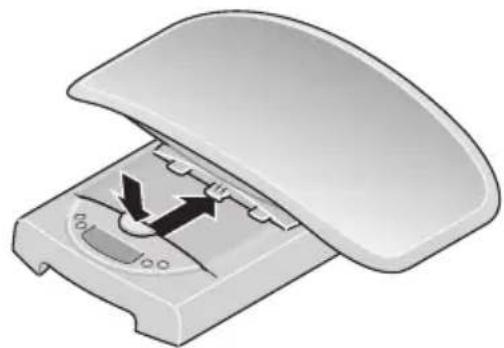
The scale is powered by batteries. The LC display has a low power consumption – 10.000 weighing operations can be performed with one set of batteries. If for battery appear in the display, you should change the batteries. You need 6 1.5 V type AA R6 round-cell batteries.

- Take off the tray and then turn the scale over carefully so that the base is accessible.
SECA 834 - Power supply - 1

natural_image Diagram of a device interior with a lid open, showing internal components and directional arrows (no text or symbols)

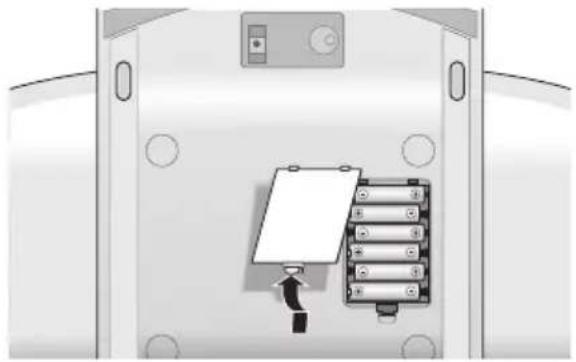
- Open the battery compartment lid and insert the batteries supplied according to the polarity shown on the battery compartment.

Check that polarity is correct!

- Now close the battery compartment cover again carefully.
SECA 834 - Check that polarity is correct! - 1

natural_image Diagram of a device interior with a paper holder and control panel, no visible text or symbols

4. Setting up the scale

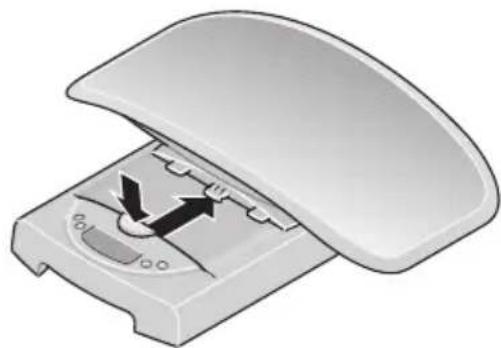
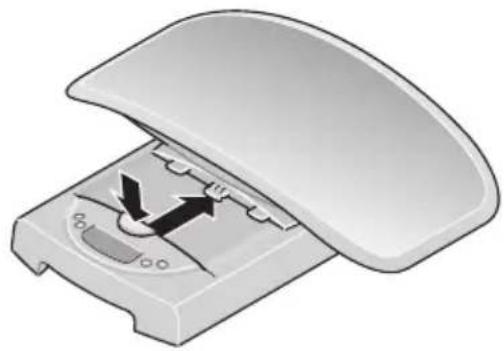
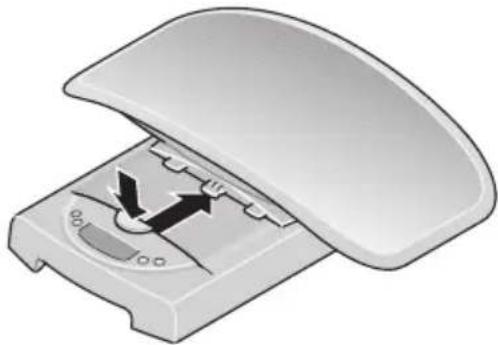
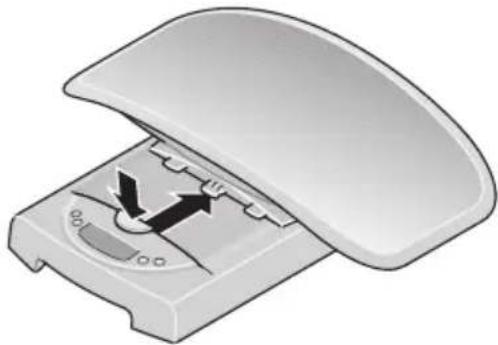
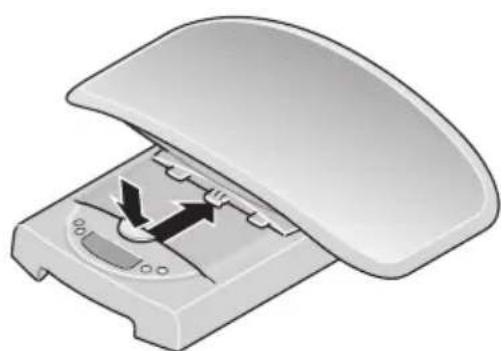
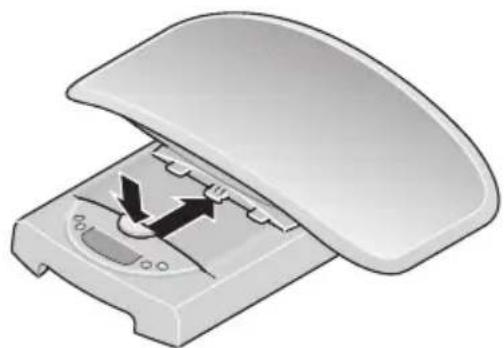
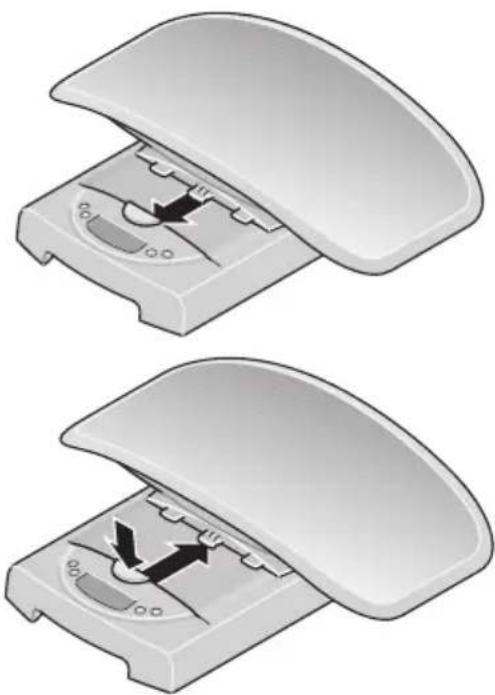
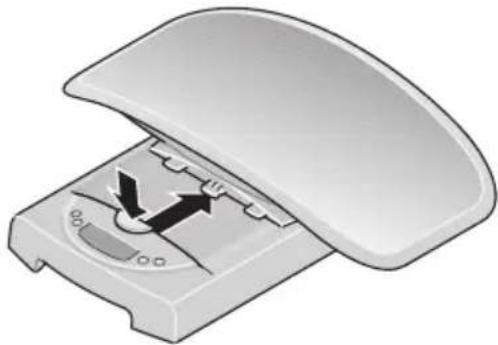
- Place the scale on a level and stable surface. Then position the tray as shown on the base of the scale and pull forward until the tray is heard to snap into place, and the release button is in the top position.

The tray is now securely interlocked with the base.

- To remove the tray just press the release button hard and slide back the tray.
SECA 834 - Setting up the scale - 1

natural_image Two views of a device casing showing internal components and directional arrows (no text or symbols)

5. Operation

Correct weighing

- Press the Start key with no load on the scale.

SECR, 88888 and 0.000 appear consecutively in the display. The scale is then automatically set to zero and ready for use.

SECA 834 - Correct weighing - 1

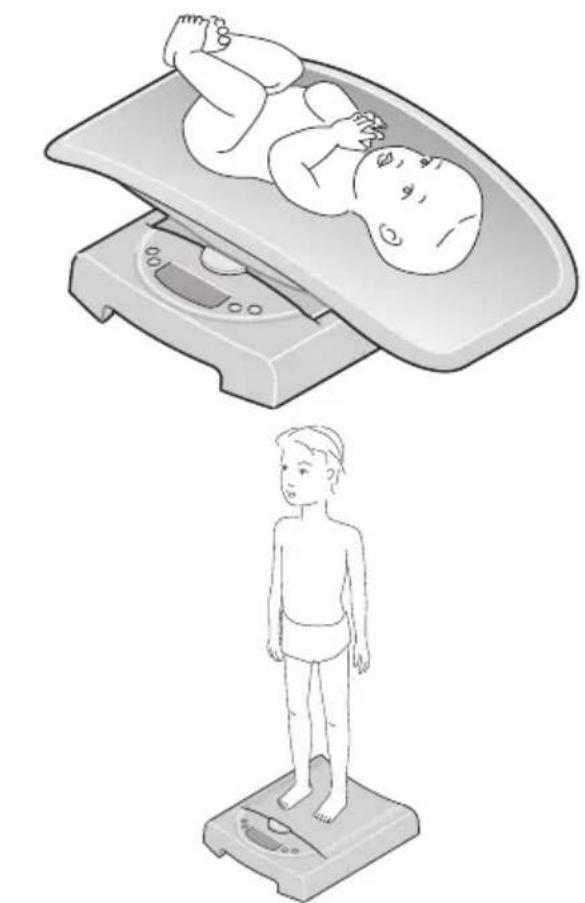
- When weighing infants: Place the infant on the tray, ensuring that the child lies as still as possible.

- When weighing children able to stand up: Remove the tray as described. Check the secure positioning of the base. Place the child on the scale and make sure he/she keeps still.

- Read the weighing result off the digital display. The scale must not be subjected to weights exceeding the maximum load specified!

- To switch off the scale, press the Start key again.
SECA 834 - Correct weighing - 2

natural_image Illustration of a baby on a standard scale and a child standing below, both without any text or symbols.

SECA 834 - Correct weighing - 3

Automatic switch-off/economy mode

The scale remains ready for weighing for approx. 20 seconds after being switched on. Once weighing has been performed, the value is displayed for approx. 2 minutes until the scale switches off automatically.

Taring weight display (TARE)

The tare function is useful if an additional weight (such as cloths or a pad on the weighing surface) are to be ignored in the weighing result. Proceed as follows:

- Place the additional weight on the scale and activate the Tare function by depressing and holding the HOLD/TARE key.

The display of the scale is now reset to "0" and a normal weighing operation can begin.

- You can now perform as many weighing operations as you like with this additional weight.

SECA 834 - Taring weight display (TARE) - 1

- TARA is deactivated by pressing the button HOLD/TARE once again, or by switching the scales off.

SECA 834 - Taring weight display (TARE) - 2

Important!

The maximum additional weight is 10 kg (model 834) / 20 kg (model 835) in weighing range 1 and 20 kg (model 834) / 50 kg (model 835) in weighing range 2. The maximum weight which can be displayed is reduced by the weight of the objects already placed on the scale.

Storing the weight value (HOLD)

You can also continue displaying the weight determined once the load has been removed. This makes it possible to put the baby down safely again before noting the weight:

- Press the HOLD/TARE key whilst the load is on the scale.

The display flashes until a stable weight has been measured. The display is then frozen.

The value remains saved in the display until the scale switches off automatically.

- The HOLD function can be switched off by pressing the HOLD/TARE key again.

0.0 appears in the display if the scale has no load on it, otherwise the current weight. The "HOLD" display vanishes.


SECA 834 - Storing the weight value (HOLD) - 1

SECA 834 - Storing the weight value (HOLD) - 2

Note:

The HOLD and TARE functions can also be used simultaneously.

Use of differential display function

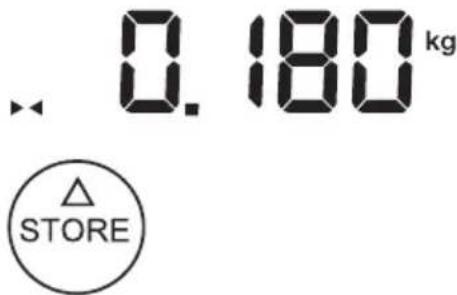
You can use this function for example to measure the intake of milk when breastfeeding or have Baby's increase in weight displayed since being last weighed. This function (which cannot be calibrated) can be used to store an individual weight value and then use that value to form a difference - to detect the amount of milk ingested during breastfeeding, for example, or to see how a particular baby's weight has increased since it was last weighed.

- To store the weight value, press the STORE key for approx. 2 seconds after the weighing operation is complete. The SEO indicator is faded in. The weight value is now saved and will also remain stored once the scale is switched off.

- With a subsequent weighing operation it is then possible to switch the display over to differential display, i.e. display of current value less saved value, by briefly pressing the STORE button.


SECA 834 - Use of differential display function - 1

SECA 834 - Use of differential display function - 2

When the differential display function is activated, ▶ appears in the display.

- Briefly pressing the key again switches the function off again.
SECA 834 - Use of differential display function - 3

text_image . 0.180 kg △ STORE

Note:

If a new weight value is stored, the previous stored value will be overwritten.

If the differential display function is activated with no load on the scale, the stored value is shown in the display as a negative value.

Switching the weighing range

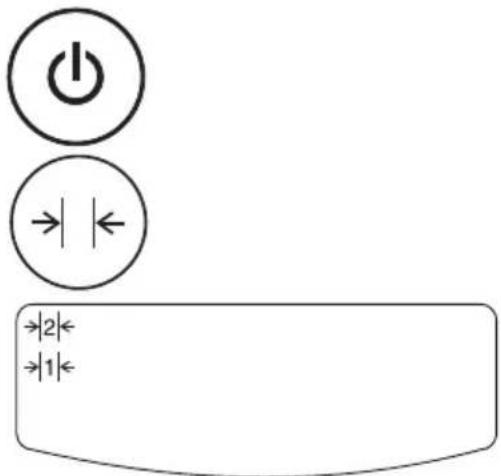
The seca 834/835 has two weighing ranges which can be selected. Weighing range 1 has a reduced maximum capacity but greater display resolution, whilst weighing range 2 allows you to use the maximum load capacity of the scale. Depending on the application in question, you decide whether you would prefer to use the fine display resolution or the high load range.

- Switch on the scale at the Start key. The scale initially operates in the weighing range last selected.

- To change the weighing range, press the key

- The symbol ->|1|<- or ->|2|<- in the display indicates the weight range which is active in each case. This remains active even when the scale is turned off.
SECA 834 - Switching the weighing range - 1

text_image Diagram showing power and current symbols with bidirectional arrows, likely representing a control or logic function.

Note:

It is possible to switch from Range 1 with fine graduations to Range 2 with coarse graduations with a load on the scale unless the scale is switched to a special function (like pre-Tare, for example). For technical reasons, it is only possible to switch from coarse Range 2 to fine Range 1 with no load on the scale. In this case too, no special function may be activated.

6. Cleaning

Clean the tray and the outside of the scale with a damp cloth as required. Under no circumstances use abrasive or acid cleaners, white spirit, benzene or the like for cleaning.

7. What do I do if...

... no weight is displayed with a load on the scale?

- Check that the batteries are inserted correctly.

... the display shows ?

- Battery voltage is dropping. Charge the rechargeable batteries in the next few days.

... bAtt appears in the display?

- The rechargeable battery is so severely discharged that weighing is no longer possible. Recharge the battery.

... STOP appears in the display?

- Maximum load has been exceeded. Remove the weight on the scale as quickly as possible in order to avoid permanent damage to the scale.

8. Servicing/recalibration

Have the scale recalibrated by authorised persons in accordance with national legal requirements. The year of initial calibration can be found behind the CE symbol on the rating plate above the number of the appointed office, 0109 (Hessen Weights & Measures Office). Recalibration is essential if one or more security marks are damaged.

We recommend having your scale serviced by your local service agent before having it recalibrated. seca Customer Service will be pleased to give you further assistance.

9. Technical data

Dimensions

length: 330 mm

width: 550 mm

height: 165 mm

Weight approx. 2.5 kg

Temperature range +10 °C to +40 °C

Calibration as per Directive

2014/31/EU approved for medical use, Class III

Medical product as per Directive

93/42/EEC Class I

Height of figures 22 mm

Power supply Battery

Power consumption approx. 30 mA

seca 834:

Maximum load

Weighing range 1 10 kg

Weighing range 2 20 kg

Graduations

Weighing range 1: 10 g

Weighing range 2: 20 g

Accuracy at first calibration

Weighing range 1:

0 up to 0.5 kg: ±5 g

0.5 kg up to 2 kg: ±10 g

2 kg up to 10 kg: ±15 g

Weighing range 2:

0 up to 1 kg: ±10 g

1 kg up to 4 kg: ±20 g

4 kg up to 20 kg: ±30 g

seca 835:

Maximum load

Weighing range 1 20 kg

Weighing range 2 50 kg

Graduations

Weighing range 1: 20 g

Weighing range 2: 50 g

Accuracy at first calibration

Weighing range 1:

0 up to 1 kg: ±10 g

1 kg up to 4 kg: ±20 g

4 kg up to 20 kg: ±30 g

Weighing range 2:

0 up to 2.5 kg: ±25 g

2.5 kg up to 10 kg: ±50 g

10 kg up to 50 kg: ±75 g

Disposing of the device
SECA 834 - Disposing of the device - 1

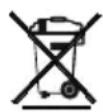
Do not dispose of the device in domestic waste. The device must be disposed of properly as electronic waste. Follow the national regulations which apply in your case. For further information, contact our service department at:

service@seca.com

Batteries

Do not throw used batteries away in domestic waste. Dispose of batteries at collection points in the vicinity. When buying new batteries, select those low in harmful substances and containing no mercury (Hg), cadmium (Cd) or lead (Pb).

11. Warranty

A two-year warranty from date of delivery applies to defects attributable to poor materials or workmanship. All moveable parts - batteries, cables, mains units, rechargeable batteries etc. - are excluded. Defects which come under warranty will be made good for the customer at no charge on production of the receipt. No further claims can be entertained. The costs of transport in both directions will be borne by the customer should the equipment be located anywhere other than the customer's premises. In the event of transport damage, claims under warranty can be honoured only if the complete original packaging was used for any transport and the scale secured and attached in that packaging just as it was when originally packed. All the packaging should therefore be retained.

A claim under warranty will not be honoured if the equipment is opened by persons not expressly authorised by seca to do so.

We would ask our customers abroad to contact their local sales agent in the event of a warranty matter.

12. Declaration of conformity

seca gmbh & co. kg hereby declares that the product meets the terms of the applicable European directives. The unabridged declaration of conformity can be found at: www.seca.com.
natural_image Illustration of a computer mouse with open lid and internal mechanism (no text or symbols)
natural_image Diagram of a device interior with a paper holder and control panel, no visible text or symbols
natural_image 3D illustration of a computer mouse with open lid and internal mechanism (no text or symbols)

SECA 834 - Declaration of conformity - 1

natural_image 3D illustration of a device with an open lid and internal components, no text or symbols present

5. Opération

natural_image Illustration of a baby on a standard scale and a child standing below (no text or symbols)

SECA 834 - Opération - 1

natural_image Circular arrangement of twelve white stars on a gray background (no text or symbols)

SECA 834 - Opération - 2

CE M16 0102 0123

natural_image Illustration of a computer case with an open lid and internal components (no text or symbols)
natural_image Diagram of a device rear panel with a paper holder and control buttons, showing no text or symbols.
natural_image 3D illustration of a computer mouse with open lid and internal mechanism (no text or symbols)

SECA 834 - Opération - 3

natural_image Diagram of a device with an open lid and internal components, showing directional arrows (no text or symbols)

5. Uso

Pesatura corretta

natural_image Illustration of a baby on a standard scale and a child standing on a base, both without any text or symbols.

SECA 834 - Pesatura corretta - 1

text_image Diagram showing power and current symbols with bidirectional arrows, likely representing a control or logic function interface.

Nota:

natural_image Diagram of a device interior with an open lid and internal components, showing directional arrows (no text or symbols)
natural_image Diagram of a device panel with a paper holder and control panel, no text or symbols present

4. Colocar la báscula

natural_image Two views of a computer case cover with internal components and directional arrows indicating movement (no text or symbols)

5. Manejo

natural_image Illustration of a baby on a standard scale and a child standing on a base, both without any text or symbols.

SECA 834 - Manejo - 1

natural_image Illustration of a computer case with an open lid and internal components (no text or symbols)
natural_image Diagram of a device rear panel with a paper holder and control buttons, no text or symbols present
natural_image Two views of a computer mouse case with open lid and internal mechanism (no text or symbols)

5. Betjening

Rigtig vejning

natural_image Illustration of a baby on a standard scale and a child standing below (no text or symbols)

SECA 834 - Rigtig vejning - 1

natural_image Diagram of a device lid with internal components and directional arrows (no text or symbols)
natural_image Diagram of a device interior with a paper holder and control panel, no visible text or symbols
natural_image Two views of a computer case cover with open lid and internal mechanism (no text or symbols)

5. Användning

Riktig vägning

natural_image Illustration of a baby on a standard scale and a child standing on a balance scale (no text or symbols)

SECA 834 - Riktig vägning - 1

natural_image Illustration of a computer case with an open lid and internal components (no text or symbols)
natural_image Diagram of a device panel with a paper holder and control panel, no text or symbols present
natural_image Two views of a device casing showing internal components and directional arrows (no text or symbols)

5. Betjening

Riktig veiing

natural_image Illustration of a baby on a standard balance scale and a child standing on a base, both without any text or symbols.

SECA 834 - Riktig veiing - 1

text_image Diagram showing power and current symbols with directional arrows, likely representing a control or logic component.

Merknad:

natural_image Diagram of a computer mouse with open lid and control panel, showing internal mechanism (no text or symbols)
natural_image Diagram of a device interior with a paper holder and control panel, no visible text or symbols
natural_image 3D illustration of a computer mouse with open lid and internal mechanism (no text or symbols)

SECA 834 - Merknad: - 1

natural_image 3D illustration of a device with an open lid and internal components, no text or symbols present

5. Käyttö

Punnitseminen

natural_image Illustration of a baby on a standard balance scale and a child standing on a base, both without any text or symbols.

SECA 834 - Punnitseminen - 1

text_image Diagram showing power and current symbols with bidirectional arrows, likely representing a control or logic function.

Huom.:

natural_image Diagram of a device with an open lid and internal components, showing directional arrows (no text or symbols)
natural_image Diagram of a device interior with a paper holder and control panel, no visible text or symbols

4. Weegschaal opstellen

natural_image Two views of a computer mouse case with open lid and internal mechanism (no text or symbols)

5. Bediening

Correct wegen

natural_image Illustration of a baby on a standard balance scale and a child standing on a base, both without any text or symbols.

SECA 834 - Correct wegen - 1

text_image Diagram showing power and current symbols with bidirectional arrows, likely representing a control or logic function interface.

Opmerking:

natural_image Diagram of a computer case cover with an open lid and internal components (no text or symbols)
natural_image Diagram of a device interior with a paper holder and control panel, no visible text or symbols
natural_image 3D illustration of a computer mouse with open lid and internal mechanism (no text or symbols)

SECA 834 - Opmerking: - 1

natural_image 3D illustration of a device with an open lid and internal components, no text or symbols present

5. Utilização

natural_image Illustration of a baby on a standard scale and a child standing below, both without any text or symbols.

SECA 834 - Utilização - 1

natural_image Diagram showing a device with an open lid and internal panel, no text or symbols present
natural_image 3D illustration of a computer mouse with open lid and internal mechanism (no text or symbols)

SECA 834 - Utilização - 2

natural_image 3D illustration of a mechanical device with an open lid and internal components (no text or symbols)

5. Χειρισμός

Σωστό ζύγισμα

natural_image Illustration of a baby on a standard infant scale with a power button symbol (no text or labels)

SECA 834 - Σωστό ζύγισμα - 1

natural_image Diagram of a computer case with an open lid and internal components, showing directional arrows (no text or symbols)
natural_image Diagram of a device with a paper holder and control panel, no visible text or symbols

4. Ustawianie wagi

natural_image 3D illustration of a computer case with an open lid and internal components (no text or symbols)

SECA 834 - Ustawianie wagi - 1

natural_image Illustration of a computer case with an open lid and internal components (no text or symbols)

5. Obsługa

natural_image Illustration of a baby on a standard scale and a child standing below (no text or symbols)

SECA 834 - Obsługa - 1

text_image Diagram showing power and current symbols with directional arrows, likely representing a control or logic component.

Wskazówka:

Telephone +49 40 20 00 00 0

Fax +49 40 20 00 00 50

info@seca.com

seca operates worldwide with headquarters

in Germany and branches in:

seca france

seca united kingdom

seca north america

seca schweiz

seca zhong guo

seca nihon

seca mexico

seca austria

seca polska

seca middle east

seca brasil

seca suomi

seca américa latina

and with exclusive partners in

more than 110 countries.

All contact data under www.seca.com
Manual assistant
Powered by Anthropic
Waiting for your message
Product information

Brand : SECA

Model : 834

Category : Scale