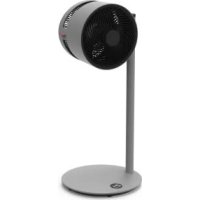
F225 - Fan BONECO - Free user manual and instructions
Find the device manual for free F225 BONECO in PDF.



| Product type | Column fan |
| Brand | Boneco |
| Model | F225 |
| Power supply | 24 V DC (mains adapter) |
| Power consumption | 1.5 – 22 W |
| Noise level | 34 – 64 dB(A) |
| Maximum air flow | 1439 m³/h |
| Maximum air speed | 273 m/min |
| Dimensions (L × W × H) | 375 × 375 × 852 mm (with one column) |
| Net weight | 6.0 kg |
| Number of support columns | 1 (removable) |
| Unit orientation | Manual, tilt 270° |
| Height adjustment | By adding/removing columns (max. 2 columns) |
| Power settings | 32 levels |
| Functions | Shut-off timer (0-9 h), start timer (0-9 h), Baby-Lock, Bluetooth, control via BONECO app |
| Connectivity | Bluetooth (pairing with smartphone) |
| Mobile app | BONECO healthy air (iOS and Android) |
| Cleaning the housing | Dry or slightly damp cloth (water + dish soap) |
| Cleaning the blades | Remove front grille, clean with a damp cloth |
| Maintenance | Low maintenance, store in a dry place |
| Safety instructions | Disconnect before cleaning |
| Package contents | Fan unit, support column, base, instruction manual, safety instructions, power supply |
Frequently Asked Questions - F225 BONECO
User questions about F225 BONECO
0 question about this device. Answer the ones you know or ask your own.
Ask a new question about this device
Download the instructions for your Fan in PDF format for free! Find your manual F225 - BONECO and take your electronic device back in hand. On this page are published all the documents necessary for the use of your device. F225 by BONECO.
USER MANUAL F225 BONECO
Read and save these instructions
Overview and part names 23
Start-up 24
Handling 25
Handling 25
Alignment 25
Height adjustment 25
Timer function 26
Use 26
Setting the OFF timer 26
Setting the ON timer 26
These are the benefits of the BONECO app 27
About the BONECO app 27
Scope of services 27
Bluetooth and factory settings 28
Switching off Bluetooth 28
Factory settings 28
Source of the BONECO app 29
BONECOappforiOS 29
App for Android 29
Connecting the app to the BONECO F225-F235 30
Preparing for first use 30
Connection 30
Positioning tips 31
Notes on output 31
Air-conditioning System (AC) 31
Fresh air 31
Multiple floors 31
Rooms with high ceilings 31
Cleaning 32
Safety instructions 32
Cleaning the housing 32
Disassembly and storage 33
Power supply voltage 24V DC
Power consumption 20 W
Operation noise level 34-64 dB(A)
Air flow 1439 m
3/h (maximum level)
Air-speed 273m / min (maximum level)
Dimensions L×W×H
BONECO F225 375× 375× 852mm (with one connector piece)
BONECO F235 375× 375× 1212 mm (with two connector pieces)
Weight (empty)
BONECO F225 6.0 kg
BONECO F235 7.6 kg
- Subject to change
en
INTRODUCTION
DEAR CUSTOMER,
Congratulations on your purchase of the BONECO Air Shower Fan. These high-performance units seamlessly adapt to your needs. When set to the lower output levels, they provide a pleasant breeze in your home on hot days. On the other hand, if you use an air-conditioning system, the unit's powerful fan distributes the air throughout the room ensuring a uniform temperature.
In developing the BONECO Air Shower Fan, low maintenance and durability were of primary importance. The fan blade's one-of-a-kind shape creates a uniform air flow using minimal energy, which is also good for the environment. The elegant design harmonizes with any decorative style so that you can use your BONECO Air Shower Fan throughout the entire year.
We hope you enjoy your new BONECO Air Shower Fan!
ITEMS INCLUDED
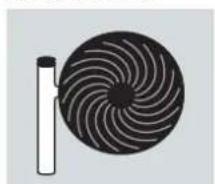
BONECO fan unit
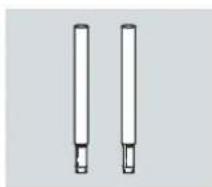
Removable connector piece (F225: 1 × / F235: 2 × )
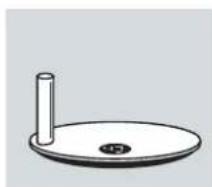
Base
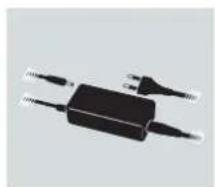
Power supply

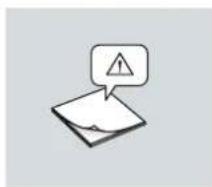
Manual Safety instructions
BONECO F225 and BONECO F235 are only different in that the BONECO F235 includes a second connector piece.
You can use the fan unit with one, with a second or without connector pieces. It can be customized to your needs.
OVERVIEW AND PART NAMES
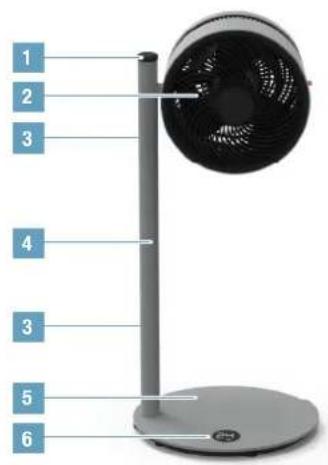
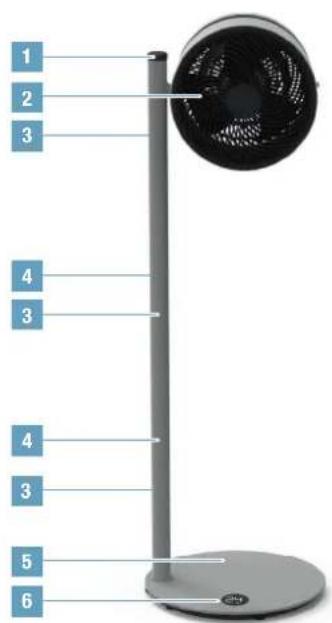
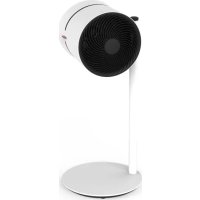
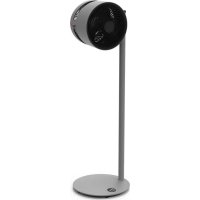
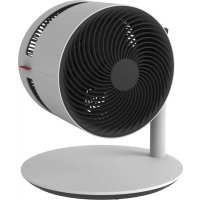
BONECO F225
Air Shower Ventilator
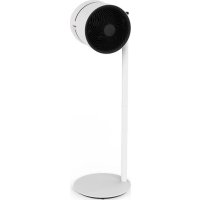
BONECO F235
Air Shower Ventilator
1 ON-OFF/Output regulator
2 Fan head
3 Button for unlocking
4 Split supportive pole
5 Foot stand with power cord
6 Display
en
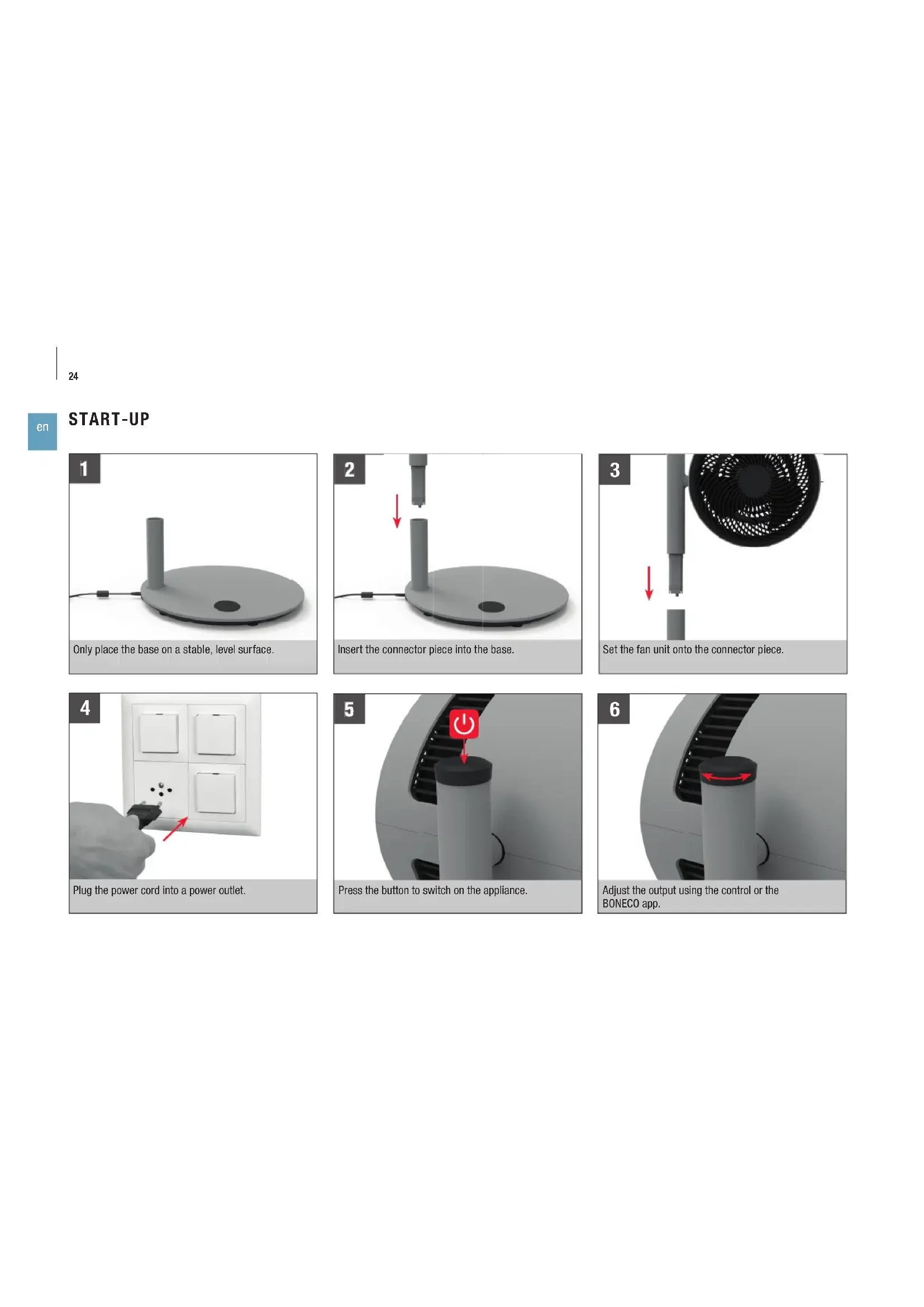
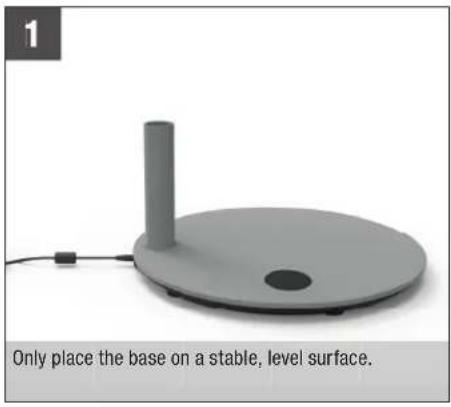
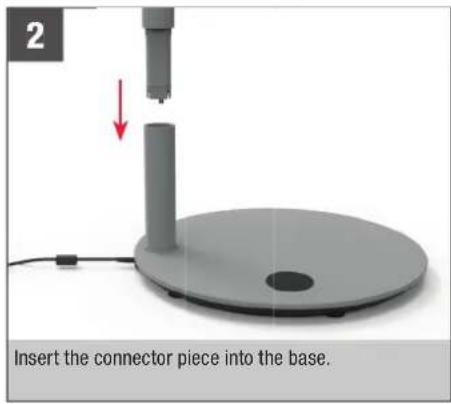
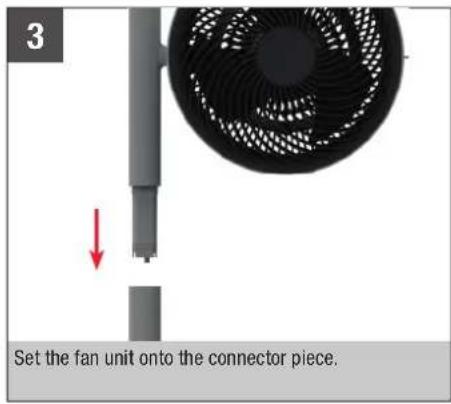
START-UP
HANDLING
HANDLING
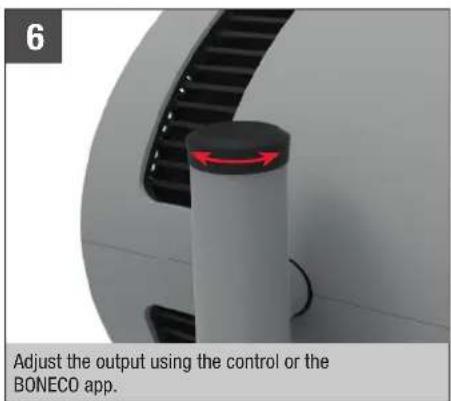
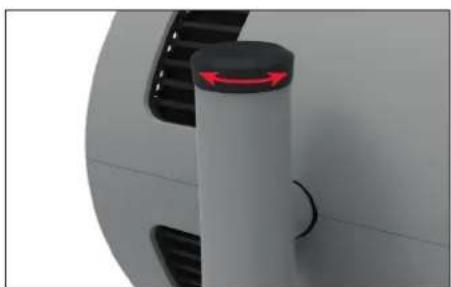
All BONECO Air Shower fans are designed for easy handling. The output is adjusted in 32 levels using a single control.
ALIGNMENT
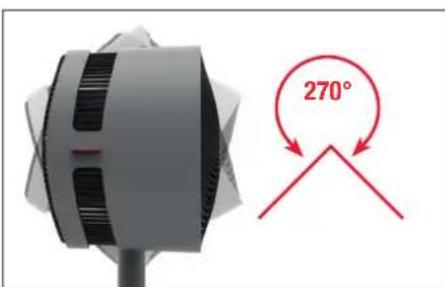
The fan unit can be manually tilted 270 degrees.

The fan unit does not rotate a full 360 degrees.
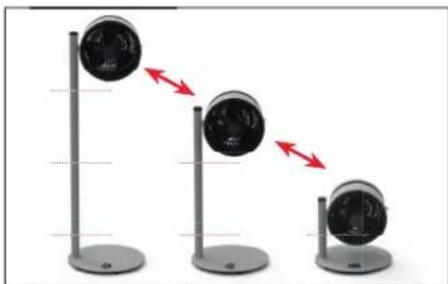
HEIGHT ADJUSTMENT
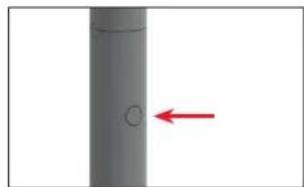
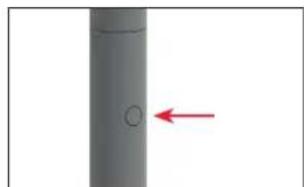
All electrical components are completely integrated in the connector. Therefore, you can adjust the height at any time by adding connector pieces or by pulling them off after pressing down the knob to unlock them.

For safety reasons, a maximum of two connector pieces can be used at once (F235).
TIMER FUNCTION
USE
The timer function lets you determine how long the BONECO F225-F235 should run before it switches off automatically (OFF timer).
Alternatively, you can specify a time period for the appliance to wait before switching on automatically (ON timer). For example, you can use this function to ensure that the BONECO F225-F235 will switch itself on before you return home. When you get back, you'll have the perfect home climate waiting for you.
SETTING THE OFF TIMER
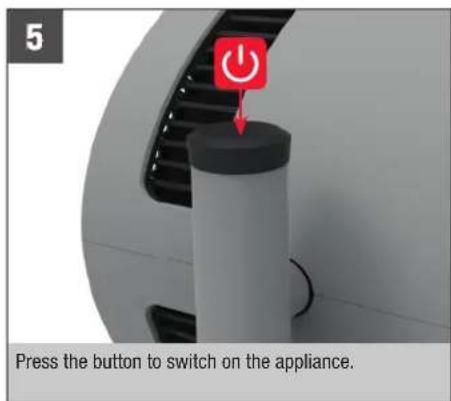
- Switch on the appliance using the button.
- Select the desired fan level.
- Hold the button for 3 seconds until the indicator "Oh" flashes in the display.

- Use the controller to set the hours until switch-off. After approximately 5 seconds without input, the selected value is accepted and the TIMER symbol is shown on the display.

The appliance runs for the specified period before switching off.
- To terminate the timer early, hold the button for 3 seconds and select Oh. Alternatively, you can switch off the appliance using the button.
SETTING THE ON TIMER
- Switch off the appliance using the button.
- Hold the button for 3 seconds until Oh flashes in the display.

- Use the controller to set the hours until switch-on. After approximately 5 seconds without input, the selected value is accepted and the remaining duration in hours is shown on the display.

- Select the desired fan level.
The appliance switches on after the defined time and operates at the selected fan level. - To deactivate the ON timer early, hold the button for 3 seconds and select Oh . Alternatively, you can switch on the appliance using the button.
THESE ARE THE BENEFITS OF THE BONECO APP
ABOUT THE BONECO APP
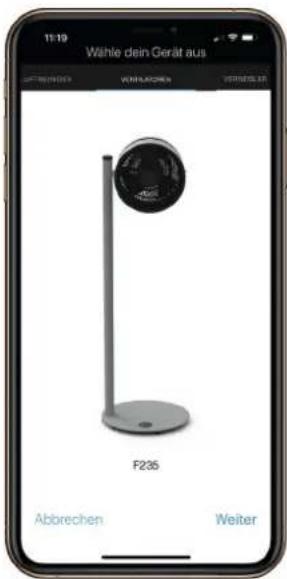
The "BONECO healthy air" app is used to control the BONECO F225 - F235 and lets you take full advantage of its potential. The app includes functions such as a timer or the specification of fan levels.
SCOPE OF SERVICES
ON timer The appliance switches on after a set time
OFF timer The appliance switches off after a set time
Child lock Block function for the control knob
Weather Displays the current weather and outside temperature
BLUETOOTH AND FACTORY SETTINGS
SWITCHING OFF BLUETOOTH
- Hold the button for 5 seconds until the indicator
(Bluetooth) flashes on the display.

- Turn the controller to the left or right until the indicator is shown.

- Press the button to switch off Bluetooth.
- To reactivate Bluetooth, hold the button for 5 seconds again until bt* flashes. Bluetooth has been re-activated.

FACTORY SETTINGS
After a reset, the appliance must be paired with the BONECO app again so that it can be controlled remotely.
1. Hold the button for 10 seconds until the «fd» (Factory default) indicator flashes on the display.

- All settings are deleted and the appliance is reset to factory settings.
SOURCE OF THE BONECO APP
BONECO APP FOR IOS
Search the App Store for "BONECO healthy air" or scan the QR code below. Reading the QR code under iOS 10 or earlier requires installing a corresponding app. Under iOS 11 and later, the QR code is read automatically whenever you direct the camera at it.
APP FOR ANDROID
Search the Google Play Store for "BONECO healthy air" or scan the QR code below. Reading the QR code requires installing a corresponding app on your device.

Download on the App Store



CONNECTING THE APP TO THE BONECO F225 - F235
PREPARING FOR FIRST USE
- Make sure that Bluetooth is activated on your smartphone.
- During connection, make sure that the smartphone is in the same room as the BONECO F225-F235.
Once connected successfully, you can control the BONECO F225 - F235 with your smartphone from the same room or even from an adjacent room. However, the maximum distance between smartphone and BONECO F225 - F235 depends on the specific structural conditions.
CONNECTION
- Make sure that Bluetooth is activated on your smartphone.
- Start the BONECO app.
- Follow the instructions in the app.
POSITIONING TIPS
NOTES ON OUTPUT
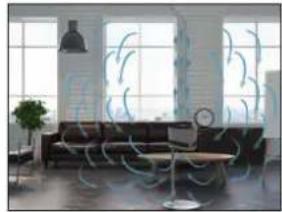
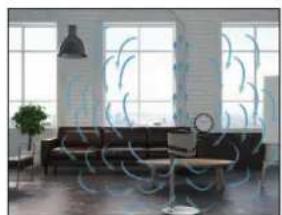
All BONECO Air Shower fans are equipped with a high-performance fan that can move large amounts of air. Making use of this feature: Guide the air in a specific direction to achieve an uniform room climate. The following examples illustrate how to do this.
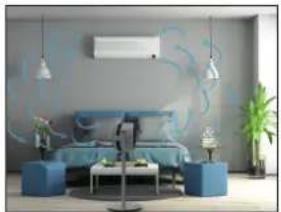
AIR-CONDITIONING SYSTEM (AC)
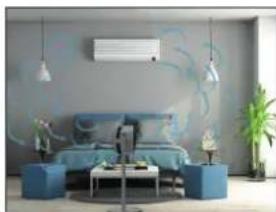
An air conditioner distributes temperature in various ways. Use the BONECO Air Shower Fan to move the warm air towards the air-conditioning system. This can be done directly or indirectly via air circulation, as shown in this image.
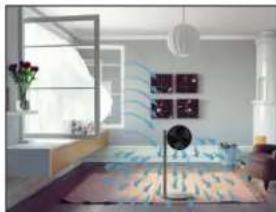
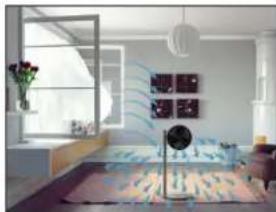
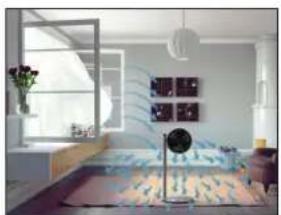
FRESH AIR
The BONECO Air Shower Fan helps you achieve better ventilation indoors. If cross-ventilation is not created, guide fresh air directly from the window into the desired room.
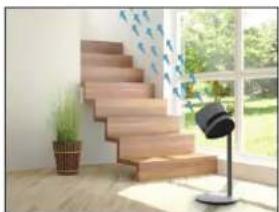
MULTIPLE FLOORS
In the summer, it can become hot and muggy on the upper floors. The powerful BONECO Air Shower Fan directs the cool air from the ground floor to multiple floors achieving a uniform temperature.
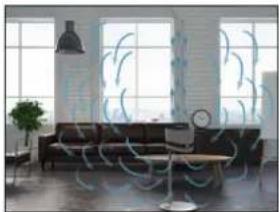
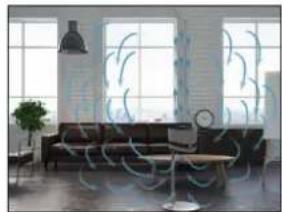
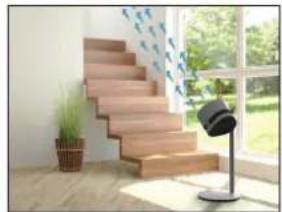
ROOMS WITH HIGH CEILINGS
In air-conditioned rooms with high ceilings, the cold air sinks to the floor while the warm air rises to the ceiling. Turn the BONECO Fan straight up for an air-shower sensation.
CLEANING
SAFETY INSTRUCTIONS
Always unplug the BONECO Air Shower Fan before you begin cleaning! Failure to do so can result in electric shock and fatal injury!
Do not use alcohol or corrosive cleaning agents for cleaning.
CLEANING THE HOUSING
All BONECO Air Shower fans are designed for low-maintenance operation, even after years of use. In most cases, a dry cloth can be used for cleaning.
If stubborn dirt is present, clean the housing using a damp cloth. Add a small amount of dishwashing detergent to the water.
CLEANING THE FAN BLADES
- Tilt the fan unit upwards and loosen the safety screw.
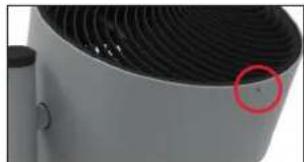
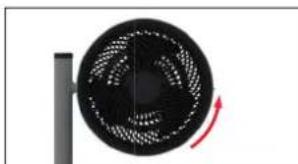
- Remove the front grill by turning it counterclockwise slightly.
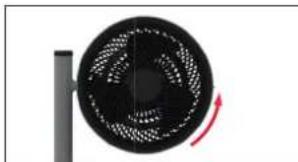
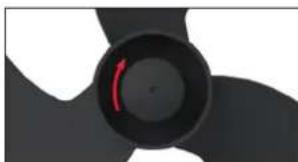
- Loosen the safety screw in the middle clockwise.
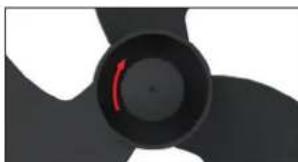
- Remove the fan blades and clean them with a damp cloth.
- Put the unit back together by following the steps in reverse order.
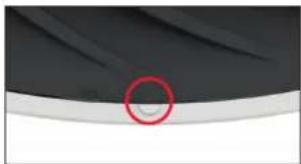
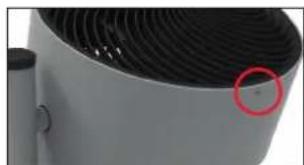
- Attach the front grill with the safety screw. When doing so, pay attention to the position of the screw on the front grill.
DISASSEMBLY AND STORAGE
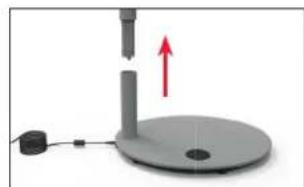
Please note that the removable connector pieces are detachable. When moving the unit to a new location, disassemble the unit into the detachable parts, transport the individual parts to the desired location, and then reassemble.
Storage is easiest and most efficient when you use the original packaging. Store the BONECO Air Shower Fan in a dry place.
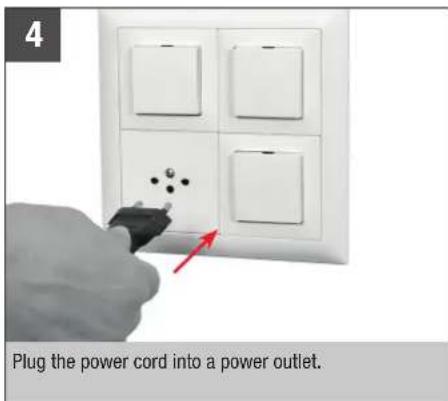
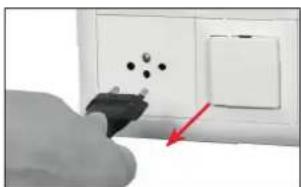
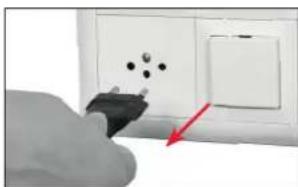
- Unplug the power cord from the power outlet.
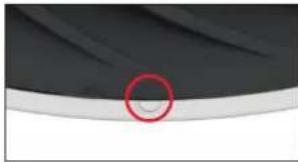
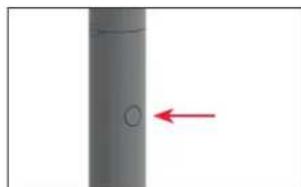
- Press the release knob on the upper connector piece.
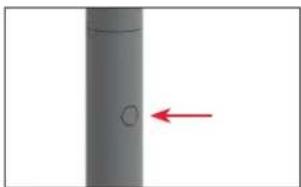
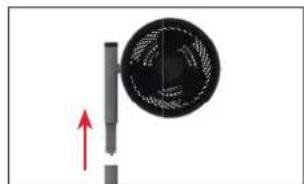
- Remove the fan by pulling firmly upwards.
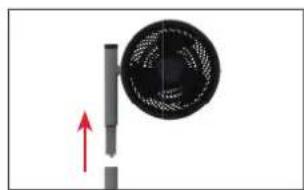
- Press the release knob on the lower connector piece.
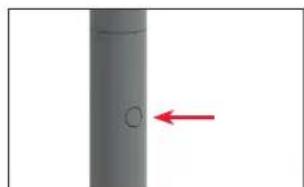
- Remove the connector piece from the base.
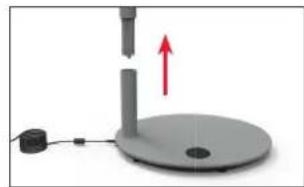

MODED'EMPLOI
BONECO F225-F235

SOMMAIRE
OU SE PROCURER L'APPLI BONECO
APPLI BONECO POUR IOS
Download on the App Store





APP VERBINDEN MET DE BONECO F225 - F235
VOORBEREIDINGEN
Download on the App Store



Download on the App Store



AZ ALKALMAZÁS ÖSSZEKAPCSOLÁSA A BONECO F225 - F235 KÉSZÜLEKKEL
ELOKESZULETEK
TO ZAPEWNIA APLIKACJA BONECO
O APLIKACJI BONECO
ÖVERSIKT OCH DELARNAS NAMN
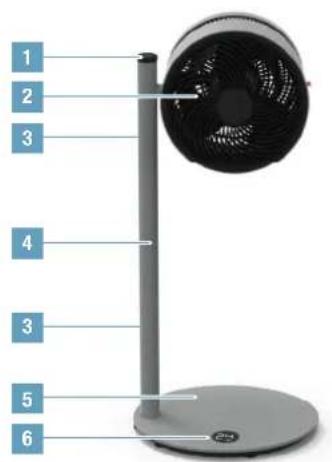
BONECO F225
Air Shower-flakt
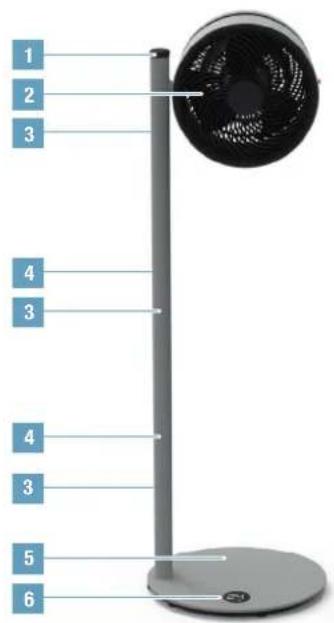
BONECO F235
Air Shower-flakt
Downloaded on the App Store





APP-SOVELLUKSEN YHDISTÄMINEN BONECO F225-F235-LAITTEESEEN
VALMISTELUT
RUM MED H0JT TIL LOFTET
I rum med aircondition og hjt til loftet synker den kolde luft ned til gulvet, mens den varme luft stiger opad. Drej BONECO-ventilatoren opad for at opna luftcirculation.
dk
RENGØRING
SIKKERHEDSANVISNINGER
Tag allid BONECO-ventilatorns stik ud, for der foretages rengoring! Ellers kan det medfere elektrisk stod og ddsfald!
Undgabrugafalkoholelleraetsenderengringsmidler vedrengoring.
RENGORING AF HUSET
Alle BONECO-ventilatorer er designet, sa de er nimme at vedligeholde, selv after flere ars brug. I de flete tilfaelde kan der bruges en tkr klud til renorging.
Stille inn OFF-tidsur 202
Still inn ON-tidsuret 202
Dette tilbyr BONECO-appen 203
Om BONECO-appen 203
Omfangent av funksjoner 203
Bluetooth og fabrikinnstillinger 204
PATALPOS AUKSTOMIS LUBOMIS
Patalpose su aukstomis lubomis, kurioe jrengtas oro kondcionierius, saltas oras nuseda ant grindu, o siltas -pakyla ir laikosi ties lubomis. Pasukite BONECO ventilatoriuyirsu, kad butu sukurtas oro srauto is virsaus polutis.

VALYMAS
SAUGOS INSTRUKCIJOS
Pries pradamilyaltyi, BONECO Air Shower ventilatori visada jj atjunkite! Jei to nepadarysite, galite patirtie elektros smugir mirtinai susizalot!
Valymui nenaudokite alkoholio ar esdinanciu valymo priemoniu.
KORPUSO VALYMAS
Download on the App Store



CZ
PROPOJENI APLIKACE S BONECO F225 - F235
PRIPRAVY
Download on the App Store



sk
SPOJENIE APLIKACIE S PRISTROJOM BONECO F225 - F235
PRIPRAVA
DEMONTAZ A USCHOVANIE
- Vytyihnite sietov kabel zo zasuvky.
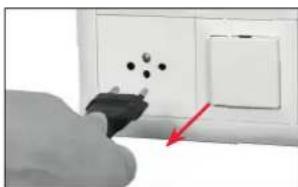
- Stlache odistovacie tlacidlo na hornom spajacom prvku.
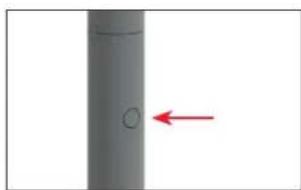
- Odstrante ventilator siln'm yvtiahnutim nahor.
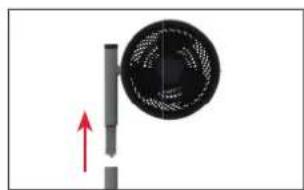
- Stlacte odistovacie tlacdlo na dolnom spajacom prvku.
APLIKACIJA BONECO NUDI VAM OVO
O APLIKACIJI BONECO
Aplikacija "BONECO healthy air" upotrebljava se za upravljanje uredajem BONECO F225 - F235 i omogucije vam da iskoristite sav njegov potencijal. Aplikacija nudi funkcjpe poput timera ili prikaza stapnjeva ventilatoria.
OPSEG DJELOVANJA
Timer za uklujcivanje Uredaj se nakon odredenog vremena ukljucije
Timer zaisključivanje Uredaj se nakon odredenog vremena isključuje
Baby-Lock Funkcija blokade okretrog regulatora
EPROTAIAKEE PYOMISEI
Meta ano tyn enavaopopa, n ouokean npentei va oueuxtheta eva me tny eapuoyn BONECO-App, yaa vai eivai eiktoC o tnaexepiaoc tnc.
- Niote yia 10 deutepeolenta to nAikto (O, expu otyn oov na avaooBnei n evdiEIn «fd» (Factory default).

- OAc oI puBIOeic diaypaovTai Ka n ouokvntaVapepetai otc epyoataiakeC puBIOeic.
NTHTHEAPMORHE BONECO
EAPMORH BONECO TIA IOS
Avaqntne OTo App Store TnV efapuyn BONEC healthy air] n apoote Tov K6iko QR npakatw. H avaywnou Tov k6kou QR oT a iOS 10 n taaiotepn ekdoan npoutothei Tnv Eykaotaon mia caviotoync efapuync. 2ta iOS 11 ka nio ppoopatec ekdooeic, o k6iko QR diajaetai autojata, OTPeovtac Tnv kaepa npoc autov.
EΦAPMθH FIA ANDROID
Avaqntne 0o Google Play Store tnv eapouyni BONECO healthy air' n oapwoteov Ku6ko QR npakatw. H avaywn tou Ku6ko QR npouttoetel nTv Eykaataon piaacavtoxnc eapouync on oukeun oac.

Download on the
AppStore


GETITON
Google Play



SYNDEESH THE ΕΦAPMθHΣ ΣTO BONECO F225 - F235
IPOETOIMAGIAIATIHNPOTXPHSE
HacroKa TaMepa BkIooHen 346
IpeMmyeCTBa npHIOxHnBONECO 347
Ipoipo6he o npinioxeknn BONECO 347
06bEmФyHKm347
Bluetooth n 3abodckne hactpoikn 348
BbikloueHne Bluetooth 348
3aBoDcKne HacTpOoi 348
IodroTOBka K nepbomy nCnoB3OBAHIO 350
Поdkлочен 350
Cobetbno pacnoonoxhen 351
CbeHnO MoHocTn 351
CnCTema KOHdUHOHPOBaHN B03dyxa (AC) 351
CbeKm BO3dyx 351
PomeuHnCHeckoBKMm3TaXaMn 351
PomeueHnC BbICOKMn NOTOKAM 351
OuInCTKa 352
Hnctpykunno TeXnke 6e3oNaChocTn 352
OuInCTKa KOpnyCa 352
Ouictka Ionoacte BENTnIaTopa 352
Pa36opka n xpanenne 353
- NobopaWBAIte peryIaTOp HappBO uHn HaneBO, noka Ha DCNJIe He NoBNTCRA

3.HaXMMTe KHOIky ①,YTO6bblBkIOHOTbl Bluetooth.
4. Yo6bI CHOBA BKNIOHTb Bluetooth, HAKMITE u ydepKmBaIe BTEeHMe 5 cekyHKnONky U, noka He HauHET MMRtB «bt’.ФyHKnIa Bluetooth CHOba AKTUBNPOBaHa.

3ABODCKHEHACTPOIKN
Ia coxpaehn HBO3MOXHOCTN DcTaNHOHOrO ynpabHeHn Nocne c6poca HacTpoek, npbOp Heo6xOIMO CHOBA NOKJIIOHTb K npINOKeHHIO BONECO.
1. HaxMMTE u ydepKmbaTe B TeueHne 10 cekyHKnONKY Ooka Ha DCnIe He HauHET MmTaBnHNkAtop fD (Factory default-3abOcKne Ha-CTpoKN No ymonuHaHIO).

2.Bce HacTPOKn ydaJIeHbI np6Op c6poUeHdo 3aBOcKnx HAcTPOK.
ПЛATФОМьДЯСКАУВAHИ ПРИLOXЕНВONECO
IPNIOXEHNE BONECO DIA IOS
PnIIOXeHHe NBOECHO HeaHy Air 1OcTyHb A Pp
Store nnn no QR-KoNy HnKe. Iyck cKaHIpOBaHnq QR
KoDa nn moJeNe C BepCne iOS 10 nnn boee pan
He TpeSyTeC yCTaHOBka COOTBeTcByUcero npno
KHe Ha moDJIax C BepCne iOS 11 n Bblue QR-KoD
HTaETcA ABtOMaTHeCKn pni HabeEnn KaMepbl.
PINIOXHEHNE ANDROID
PpnoKHe N BONECO Healthy Air Doctyno B Google Play Store n no QR-kOdy Hnke. Dn KaHPOBaHNQ R-KoDa Tpe6yETc yCTaHOBka COOTBeTCTByIOUero npNoKeHH.

Download on the App Store



ПОДКЛЮЕHNE K BONECO F225-F235 YEPE3 ПИЛОЖЕНС
IIOIOTOBKA K IEPBOMY NCIOJIb3OBAHnIO
- Y6eIntecb, yTO Ha CmaptfOhe BkJIIOHeHa FyHKUaBluetooth.
- Bo Bpemn noKJIIOUeHn yIeMntecb, TTo cMaprT-phiH haoDmTCB B ToJ xE KOMHaTe, TTo n BONECO F225-F235.
Nocne ycneHoro noDKJIIOUeHHB bMoKHeTe ynpabT BONECO F225-F235 co CBOero CmapTFOHa, HaxoRcB Toi JKe KOMHate Nn DaKe B COceDHei. Ondako MaKcMmAbHoepacCTOaHMeXMy CmapTFOHOM IN BONECO F225-F235 3aBNCNT OT KOHKpeTHbIX YcNOBNI NOMeueHHA.
IIOKJIIOUOYEHNE
- Y6eIntecb, TTO ha CmaptTphihe BkIoueHa FyHK- 1nBleuTooth.
2.3anyctnte npnloxkeHne BONECO.
3.CneyuTe HNCTpyKUINB pInIOXeHN.
COBETBI NO PACNOJIOXJEHNIO
CBEDEHNEOMOUCHOCTN
Bce yctpoCTBa BONECO Air Shower ochaenbBeHTN JIATOPOM BICOKO IPOIN3BOIDTeNBHOCTN, CNOOCbHM Nepemeeatb OobemHbile NOTOKn BO3dyxa. WcnoJb30BAHNE 3TOn FyHKuM: MOxHO HapPabNTb BO3dyuHbN TOTOK TAKIM O6pazOM, YTObI ObecneYtB ONTMAbHb MNKpOKnIMaT B NOMeUeHHN.CNeDyOuEe PnMEpb NoCKaKyBT Bam, KAK 3ΦΦeKTNBHO PnPMeHtB 3Ty FyHKuHIO.
CNCTEMA KOHINMOHPOBAHNA BO3UXA (AC)
KoHnIuHep Bo3dyxa φOpMpyet HepaBHomepeHyTo Temnepaty B NOMEeHN. McOnb3yTe BeHTNIArTop -BONECO Air Shorer, yTo6bl HanpabTb TEnblBo3dyx K CNTeMe KOHnIuHOHPOBaHN. 3To MoKeT npOxC0dntb HapmyIO nn NocpeCTBOM uRkpyLnn Bo3dyxa, KaK noka3aHO Ha N3o6paKeHN.
CBEXKINB03DuyX
BENTNATOP-BONECOAirShower NOMOeBT BAM 06cneuHTb ONTMaJIbHyU cIpyKJyIaHO B3dyxA B NOME-ueHH. Ecn CKB3HOe npOBETpmbHHe NOMEeHHNEBO3MOxHO, Bbl MOKeTe HApabITb CBekn BO3dyXNOKA B XeHaEMOM HapabJeHH.
NOMEUENH C HECKOJIbKIMM 3TAXAMN
BJeTHee BpEm Ha BepxHnX 3aKaX qAcTo CtaHOBITcK JApKO u dyHo. MouHb BeHTnIaTOp - BONECO Air Shoer HanpaBnt npoxlaHb BO3dyx C HkHerO 3TaKa Ha BepxHn, YTObI ObecneHTb OJHOPoHyIO TEMpepatpy BO BcEM NOMeueHN.
NOMEUENH C BbICOKMNIOTOJIKAMN
BnomeHnX C BbICOKMn NOTOKAMn, rIe HcNObIb3yETcCnCTema KOHNIOHOPOBaHn BO3Dyxa, XoONHb BO3Dy ONyCKaTcR BHN3 K NOy, a TEnbl BO3DyX NOHIMaTcR K NOTOKy. NOpEHPnte BEHTnIATOP BONECO BePTKAnBo BBepx, YTO6b1 Co3dA TbΦeKT BO3DyHOrO Dya.
OYMCTKA
HCTPYKUINI NO TEXHNKE B3ONACHOCTN
Neped ouctkOBceTaOKHouaTeBENTnIATOP BONECOAirShower!HecobnoJeHne3oTpeKoMeHaMQeTnpBeCTuYdApy3JeKTpueCKM TOKOM TpaBMe,HeCObMEcTmOc CxN3b0!
He mncnboayntd nOuCTKn cpeCTBa, coepJaxue ankoorb unr arpeccnbHbe BueectBa.
OYNCTKA KOPNYCA
Bce BENTNIATOpBI BONECO Air Shower pa3pa60TaHbI Dnla MAKCIMAMbHO IpocToTbO 6cNyKUBAHm, DaXe CnYCTaROdbI 3KcNpyatauM. B 6oJIbWnHCTBe cNyuaEB DnI OUnCTKn Pnp60pa MoxHO NcNoJIb30BaTb cyXyHO TKAHb.
Ecni coxpannoTc TpydHOBbIbOIMbIe 3aRpa3HeHHN, OHCTnTE Kopnyc npri NmOuNi BnaKHO TKAHN. TkaHb MOXHO CMoHTb BOIO CdoabJIeHMe He6oJIbUoro KOINueCTBa CpeDCTBa dnnMbITb NOcybl.
OuHCTKA JIOnACTeN BEHTNIJATOPA
- Pa3BepHnTe BEHTNlTOp BepTNkAIBHo BBepx m Ocna6bTe 3aTjKky npEdoxaHnTeJIbHoro BNHTa.
- CHMMITE nepeDHHIO peWetky, cnerKa nobepHyB ee npOTMB YacOBO CTpeKN.
3.Ocna6bTe ueHtpaIbHbI npedeoxpaHHTeNbHbI BnHT, NOBepHyB erO no YacOBi CTpeKe.
- CHMMITE IONACTN BEHTMIAIOTOPA IN OYHCTNTE PPM NOMOUI BNAXHOI TKAHN.
- Copepe np6op, cneyra onucaHHbIM 3tanam B o6paTHOMnpaKe.
6.3akpennte nepeHIO peWETky npn nOmoi npedoxpaHNTbHOro BNHTa.Pn 3TOM oBaPaaIteBHMaHHe Ha NOnOKeHne BNHTa Ha nepeHne peWETke.
PA360PKA IN XPAHEHNE
6paTte BHHMaHHe, Yo CbEMHbIe Moynpa3beHNHOrTC. Pn npepemeeHm np6oHa HOBoe MeTO pa36epHTe MOyIM BEHTNlAToPA HA OTdJIbHbIE DetAH, NpeMeCTHTe DetAMN NO OTdJIbHOCTB HxHHOc MEcTO M, 3ATM, CHOBA CO6epHTe.
Ipoue n 3cffeKTHBHee Bcero xpaHnTb np6OpB opunHaJIbHOyNAKOBE. XpaHnTe BEHTNlAToP - BONECO Air Shower B cyxOM NOMeUeHNH.
DEMOHTAX XPAHEHNE
- BbHbTe Bnky CTeBOrO Ka6eNr N3 po3ETK.
- Haxmte KhoNky pa36nokpOBKn Ha BepxHei onope.
- CHMMITE BEHTUNJATOP, NOTARHYB ERO BBepxC yCNJHEM.
- Haxmte KhoNky pa36nKnpOBKn Ha HxKHeonope.
- CHHMMTe onopy c ochOBaHn.

jp
取掇説明書
BONECO F225-F235

目次
仕樣 357
はしもに 358
七卜内容 358
外觀と各部の名称 359
設置 360
使方361
使方 361
向の調整 361
高さの調整 361
☆一機能362
使方 362
OFF ロイマーネの設定 362
ON メイマーケの設定 362
BONECO 万能的
BONECO 363
機能一覽 363
Bluetooth およこ出荷時の設定
Bluetoothを才にする 364
出荷时期的設定 364
BONECO 365
iOS用BONECOアリ 365
Android用APRI 365
APRI BONECO F225-F235 366
準備 366
接統 366
設置場所のボイnt 367
出力にたて 367
工アコを使用くださいます場合 3
外气取入的场合 36
上層階に送風する場合 367
天井が高い部屋の場合 367
368
安全上のご注意 368
八卍幑のお手入れ 368
羽根のお手入围 368
取外方与保管 369
取外しおよ保管 369
仕樣
BONECO is a registered trademark of BONECO AG, Switzerland
BONECO AG, Espenstrasse 85, 9443 Widnau, Switzerland

- EN
- INTRODUCTION
- DEAR CUSTOMER
- WE HOPE YOU ENJOY YOUR NEW BONECO AIR SHOWER FAN
- OVERVIEW AND PART NAMES
- START-UP
- HANDLING
- ALIGNMENT
- HEIGHT ADJUSTMENT
- TIMER FUNCTION
- USE
- SETTING THE OFF TIMER
- SETTING THE ON TIMER
- THESE ARE THE BENEFITS OF THE BONECO APP
- ABOUT THE BONECO APP
- SCOPE OF SERVICES
- BLUETOOTH AND FACTORY SETTINGS
- SWITCHING OFF BLUETOOTH
- FACTORY SETTINGS
- SOURCE OF THE BONECO APP
- BONECO APP FOR IOS
- APP FOR ANDROID
- CONNECTING THE APP TO THE BONECO F225 - F235
- PREPARING FOR FIRST USE
- CONNECTION
- POSITIONING TIPS
- NOTES ON OUTPUT
- AIR-CONDITIONING SYSTEM (AC)
- FRESH AIR
- MULTIPLE FLOORS
- ROOMS WITH HIGH CEILINGS
- CLEANING
- SAFETY INSTRUCTIONS
- CLEANING THE HOUSING
- CLEANING THE FAN BLADES
- DISASSEMBLY AND STORAGE
- SOMMAIRE
- OU SE PROCURER L'APPLI BONECO
- APPLI BONECO POUR IOS
- APP VERBINDEN MET DE BONECO F225 - F235
- VOORBEREIDINGEN
- AZ ALKALMAZÁS ÖSSZEKAPCSOLÁSA A BONECO F225 - F235 KÉSZÜLEKKEL
- ELOKESZULETEK
- TO ZAPEWNIA APLIKACJA BONECO
- O APLIKACJI BONECO
- ÖVERSIKT OCH DELARNAS NAMN
- APP-SOVELLUKSEN YHDISTÄMINEN BONECO F225-F235-LAITTEESEEN
- VALMISTELUT
- RUM MED H0JT TIL LOFTET
- DK
- RENGØRING
- SIKKERHEDSANVISNINGER
- RENGORING AF HUSET
- PATALPOS AUKSTOMIS LUBOMIS
- VALYMAS
- SAUGOS INSTRUKCIJOS
- KORPUSO VALYMAS
- CZ
- PROPOJENI APLIKACE S BONECO F225 - F235
- PRIPRAVY
- SK
- SPOJENIE APLIKACIE S PRISTROJOM BONECO F225 - F235
- PRIPRAVA
- DEMONTAZ A USCHOVANIE
- APLIKACIJA BONECO NUDI VAM OVO
- O APLIKACIJI BONECO
- OPSEG DJELOVANJA
- EPROTAIAKEE PYOMISEI
- NTHTHEAPMORHE BONECO
- EAPMORH BONECO TIA IOS
- EΦAPMΘH FIA ANDROID
- SYNDEESH THE ΕΦAPMΘHΣ ΣTO BONECO F225 - F235
- IPOETOIMAGIAIATIHNPOTXPHSE
- 3ABODCKHEHACTPOIKN
- ПЛATФОМЬДЯСКАУВAHИ ПРИLOXЕНВONECO
- IPNIOXEHNE BONECO DIA IOS
- PINIOXHEHNE ANDROID
- ПОДКЛЮЕHNE K BONECO F225-F235 YEPE3 ПИЛОЖЕНС
- IIOIOTOBKA K IEPBOMY NCIOJIB3OBAHNIO
- IIOKJIIOUOYEHNE
- COBETBI NO PACNOJIOXJEHNIO
- CBEDEHNEOMOUCHOCTN
- CNCTEMA KOHINMOHPOBAHNA BO3UXA (AC)
- CBEXKINB03DUYX
- NOMEUENH C HECKOJIBKIMM 3TAXAMN
- NOMEUENH C BBICOKMNIOTOJIKAMN
- OYMCTKA
- HCTPYKUINI NO TEXHNKE B3ONACHOCTN
- OYNCTKA KOPNYCA
- OUHCTKA JIONACTEN BEHTNIJATOPA
- PA360PKA IN XPAHEHNE
- DEMOHTAX XPAHEHNE
- 目次
- 仕樣
Brand : BONECO
Model : F225
Category : Fan