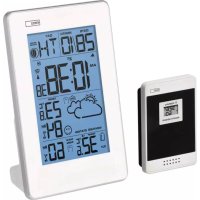
E3003 - Weather Station Emos - Free user manual and instructions
Find the device manual for free E3003 Emos in PDF.


| Product Type | Wireless Weather Station |
| Brand | Emos |
| Model | E3003 |
| Main station dimensions | 50 × 120 × 180 mm |
| Station weight (without batteries) | 230 g |
| Outdoor sensor dimensions | 23 × 60 × 92 mm |
| Sensor weight (without batteries) | 54 g |
| Station power supply | 2 AA 1.5 V batteries (not included) |
| Sensor power supply | 2 AAA 1.5 V batteries (not included) |
| Indoor temperature range | -10 °C to +50 °C |
| Outdoor temperature range | -50 °C to +70 °C |
| Temperature accuracy | ±1.0 °C |
| Indoor humidity range | 20 % to 95 % |
| Outdoor humidity range | 20 % to 95 % RH |
| Humidity accuracy | ±5 % |
| Radio range | up to 30 m in open air |
| Maximum number of sensors | 3 |
| Transmission frequency | 433 MHz |
| Radio-controlled clock | Yes (DCF77) |
| Main functions | Weather forecast, moon phases, alarm with snooze, thermal alarm, comfort indicator, temperature trends, max/min display |
| Maintenance | Clean with a soft, slightly damp cloth. Do not use solvents. |
| Safety | Do not expose to water, flames, extreme temperatures. Repairs by a specialist. |
| General information | Compliant with directive 2014/53/EU. Declaration of conformity at www.emos.eu/download. |
Frequently Asked Questions - E3003 Emos
User questions about E3003 Emos
0 question about this device. Answer the ones you know or ask your own.
Ask a new question about this device
Download the instructions for your Weather Station in PDF format for free! Find your manual E3003 - Emos and take your electronic device back in hand. On this page are published all the documents necessary for the use of your device. E3003 by Emos.
USER MANUAL E3003 Emos
text_image
A B C D E F G 28/10 TH 10:38 38 23°C 84 RH 32.6 MAX MIN 60 RH H CH I J K L M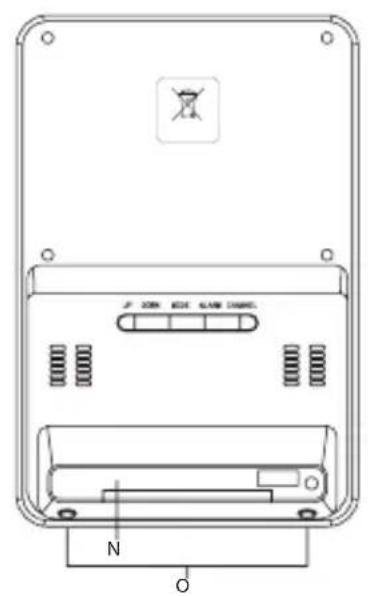
text_image
2 ON 634 648 700 N O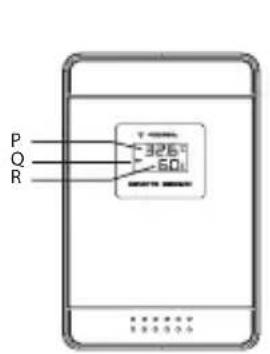
text_image
P Q R -325.7 -60.1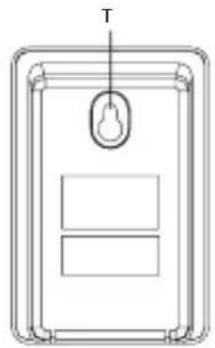
natural_image
Simple line drawing of a device panel with a handle and two rectangular compartments (no text or symbols)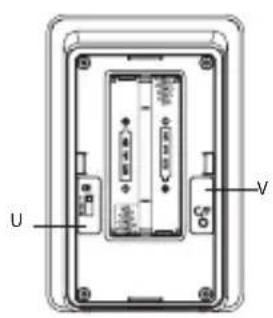
text_image
U VOverview of Calendar Day Display in 7 Languages | Přehled zobrazení dnů v kalendáři v 7 jazycích | Prehľad zobrazenie dní v kalendáři v 7 jazykoch | Przeględ dni tygodnia napisanych w kalendarzu w 7 językach | A naptári napok kijelzése 7 nyelven | Pregled prikaza dni v koledarju v 7-ih jezikih | Pregled prikazanih dana na kalendaru na 7 jezika | Übersicht über die Anzeige der Kalendertage in 7 Sprachen | Список зображених dníв в календаріна 7-ми мовах | Tabelul afišării zilelor din calendar în 7 limbi | Kalendorinės dienos apžvalga ekrane septyniomis kalbomis | Pârskats par kalendāra dienu parādīšanu septiņas valodās | Aperçu de l'affichage des jours du calendrier en 7 langues | Riepilogo della visualizzazione dei giorni nel calendario in 7 lingue | Resumen de días naturales en 7 idiomas | Overzicht van kalenderdagen in 7 talen
| EN ENGLISH | GE GERMAN | FR FRENCH | ES SPANISH | IT ITALIAN | NE NETHERLANDS | DA DENMARK | |
| SUNDAY | SU | SO | DI | DO | DO | ZO | SO |
| MONDAY | MO | MO | LU | LU | LU | MA | MA |
| TUESDAY | TU | DI | MA | MA | MA | DI | TI |
| WEDNESDAY | WE | MI | ME | MI | ME | WO | ON |
| THURSDAY | TH | DO | JE | JU | GI | DO | TO |
| FRIDAY | FR | FR | VE | VE | VE | VR | FR |
| SATURDAY | SA | SA | SA | SA | SA | ZA | LO |
GB | Wireless Weather Station
Weather Station – Display:
A – day and month; B – snooze; C – alarm on/off; D – clock; E – forecast; F – outdoor sensor channel number; G – outdoor temperature; H – day of the week; CH – moon phase; I – DCF signal reception; J – temperature trend; K – indoor temperature and humidity; L – smiley – comfort icon; M – outdoor humidity; N – battery cover; O – LIGHT/SNOOZE sensors for display backlighting – snooze (Activated by pressing on the top of the weather station); DST – icon on the display shows daylight saving time mode
Sensor:
P – outdoor temperature; Q – channel number; R – outdoor humidity; T – opening for hanging; U – switching between channels 1/2/3; V – °C/°F temperature unit switch
Buttons – Settings and Control Options
| Mode Standard mode Time settings mode | Alarm settings mode | Temperature alarm settings mode | ||||||
| Station button | Button press | Button hold | Button press | Button hold | Button press | Button hold | Button press | Button hold |
| UP | Max/Min temperature and humidity | DCF reception on/off | 1 step forward | Move faster | 1 step forward | Move faster | 1 step forward | Move faster |
| DOWN | Change temperature units °C/°F | Set temperature alert values | 1 step back | Move faster 1 step | back Move faster | 1 step back | Move faster | |
| MODE Alarm on/off | Time settings | Confirm settings | Confirm settings | |||||
| ALARM Alarm time | Alarm settings | Confirm settings | ||||||
| CHANNEL | Sensor channel 1-3 | Search RF sensor signals - pairing | ||||||
| LIGHT/SNOOZE | Display backlight/Snooze | |||||||
Specifications
indoor temperature: -10 °C to +50 °C
outdoor temperature: -50 °C to +70 °C
temperature measurement accuracy: ±1.0 °C
indoor humidity: 20 % to 95 %
outdoor humidity: 20 % to 95 % RH
humidity measurement accuracy: ±5 %
radio signal range: up to 30 m in an open area
number of sensors which can be connected: max. 3
radio controlled clock
wireless sensor: transmission frequency 433 MHz, 10 mW e.r.p. max.
power supply:
main unit: 2× 1.5 V AA batteries (not included)
sensor: 2× 1.5 V AAA batteries (not included)
dimensions and weight:
main unit: 50 × 120 × 180 mm; 230 g (without batteries)
sensor: 23 × 60 × 92 mm; 54 g (without batteries)
Operating Instructions
- Insert batteries into the weather station (2× 1.5 V AA) first, and then into the wireless sensor (2× 1.5 V AAA). When inserting the batteries make sure the polarity is correct to avoid damaging the weather station or sensor. Only use alkaline batteries of the same type, do not use rechargeable batteries.
- Place the two units next to each other. The weather station will detect the remote sensor signal within 3 minutes. If the remote sensor signal is not detected, press and hold the CH button to repeat the search for the remote sensor signal.
- If the outdoor temperature value disappears from the display, repeat steps 1 and 2.
- We recommend placing the sensor on the north side of the house. The range of the sensor may decrease substantially in areas with large number of obstacles. The sensor is resistant to dripping water; however, it should not be exposed to sustained rain. Do not place the sensor on metal objects as this reduces transmission range.
Radio Controlled Clock (DCF77)
After registering the wireless sensor, the weather station will automatically begin searching for DCF77 signal for 10 minutes – the ▲ icon will flash. After detecting the DCF signal, the 📂 icon will be displayed.
During the search, no other data on the display will be updated and the buttons will be disabled.
Signal detected – the icon stops flashing and the current time is displayed.
Signal not detected – the icon disappears. Press and hold the UP button to search for DCF77 signal again.
To cancel searching for DCF77 signal, again shortly press the UP button.
DCF signal will be synchronised daily between 2:00 and 3:00 am.
Note: If the weather station detects DCF signal but the current time on the display is incorrect (e.g. shifted ±1 hour), you must always set the correct time zone for the country where you are using the station, see Manual Setting of Time and Date.
In standard conditions (at safe distance from sources of interference, such as TV sets, computer monitors), the reception of time signal takes several minutes. If the weather station does not detect the signal, follow these steps:
- Move the weather station to another location and try to detect DCF signal again.
- Check the distance of the clock from sources of interference (computer monitors or television sets). It should be at least 1.5 to 2 m during the reception of the signal.
- When receiving DCF signal, do not put the weather station in the proximity of metal doors, window frames and other metal structures or objects (washing machines, dryers, refrigerators etc.).
- In reinforced concrete structures (cellars, high-rise buildings etc.), the DCF signal reception is weaker, depending on the conditions. In extreme cases, place the weather station close to a window toward the transmitter.
Reception of the DCF 77 radio signal is affected by the following factors:
- thick walls and insulation, basements and cellars;
- inadequate local geographical conditions (these are difficult to assess in advance);
• atmospheric disturbances, thunderstorms, electrical appliances with no interference elimination, television sets and computers located near the DCF receiver.
Manual Setting of Time and Date
- Press and hold the MODE button.
- Use the UP/DOWN buttons to set: year – month – day – calendar language – time zone – 12/24 h time format – hours – minutes.
- Press MODE to move between the values.
Each press of button to switch or change settings is followed by a beep. This function cannot be turned off.
English calendar abbreviations are as follows:
SUN – Sunday, MON – Monday, TUE – Tuesday, WED – Wednesday, THU – Thursday, FRI – Friday, SAT – Saturday
If during the process of setting no button is pressed for 30 seconds, the screen will return to displaying main time.
- Order of languages for days of the week: EN - GE - IT - FR - NE - ES - DA.
Temperature Trends
The arrow shows the trend of temperature measurement values on the specific sensor or station. The arrow is located in the square next to temperature readings.
| temperature trend indicator |  |  |  |
| rising constant falling |
Nice Environment Icon – Smiley
If humidity is between 40–70 % RH and temperature between 20 and 27 °C, the nice environment icon will be shown.
If humidity is lower than 40 % RH, the dry environment icon 😊 will be shown.
If humidity is higher than 70 % RH, the humid environment icon 😊will be shown.
If temperature is not between 20–27 °C and humidity is not between 40–70 % RH, no icon will be displayed.
Weather Forecast
The station forecasts weather on the basis of changes in atmospheric pressure for the next 12–24 hours for an area within the range of 15–20 km. The accuracy of weather forecast is 70–75%. As the weather forecast may not always be 100% accurate, neither the manufacturer nor the seller can be held responsible for any loss caused by an incorrect forecast. When you first set, or reset the weather station, it takes about 12 hours before the weather station begins forecasting correctly. The weather station displays 4 weather forecast icons.
 |  |  | 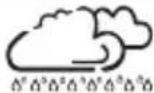 |
| Sunny Partly cloudy | Cloudy Rain |
Note: The currently displayed icon indicates a forecast for the next 12–24 hours. It may not reflect the current state of the weather.
Moon Phases
Icons for the phases of the moon are as follows:
 New moon New moon |  Waxing crescent Waxing crescent |  First quarter First quarter |  Waxing gibbous Waxing gibbous |  Full moon Full moon |  Waning gibbous Waning gibbous |  Last quarter Last quarter |  Waning crescent Waning crescent |
Alarm Settings
The weather station allows the setting of one alarm.
Press the MODE button to choose alarm ▲ on-off. Your choice will be indicated by bell icon.
Long press the ALARM button and use UP/DOWN buttons to set the desired alarm time.
Move between values using the ALARM button.
When displaying or adjusting the alarm time, AL will be displayed on the right next to the minute value.
Alarm beeping modes:
0-8 seconds - one beep per second
9–24 seconds – two beeps per second
25–56 seconds – three beeps per second
After 57 seconds – continuous beeping up to 2 minutes.
Snooze Function
The alarm ringing can be delayed by 5 minutes using the SN00ZE button – slightly pressing the top of the station downwards.
Press the button when the alarm starts ringing. The zZ icon will flash.
To cancel the SNOOZE function, press any button on the back of the station – the zZ will disappear.
The alarm will be re-activated the next day.
The alarm ringing will be active for 2 minutes if no button is pressed.
MAX - MIN Temperature
Repeatedly pressing the UP button will show information about the maximum/minimum temperature measured.
When in the max/min display mode, you can erase the memory by long pressing the UP button.
Temperature Alert
You can set a temperature alert for a maximum of 3 connected sensors.
A different temperature alert value can be set for each sensor.
Select sensor 1/2/3 by repeatedly pressing the CHANNEL button on the weather station.
Long press the DOWN button on the weather station and then activate (ON) or deactivate (OFF) the temperature alert function by repeatedly pressing the button.
Press the MODE button to confirm your choice and set the highest temperature value using the UP/DOWN buttons (con will be displayed), then press the MODE button and set the lowest temperature value (con will be displayed).
The temperature limit can be set between -50 ^ and +70 ^ , in 1 ^ increments.
If the sensor measures the set value, the weather station will start beeping, and a ▲/▼ icon and temperature will be displayed.
The audio signal can be temporarily muted by pressing on the top of the weather station downwards. The temperature alert will deactivate if the temperature drops below the set value or if you deactivate it manually.
Care and Maintenance
The product is designed to provide trouble-free service for many years if used appropriately. Here is some advice for proper operation:
- Read the manual carefully before using this product.
- Do not expose the product to direct sunlight, extreme cold and moisture, and sudden changes in temperature. This would reduce accuracy of detection.
- Do not place the product in locations prone to vibration and shocks – these may cause damage.
- Do not expose the product to excessive force, impacts, dust, high temperatures or humidity – these may cause malfunction, shorter battery life, damage to batteries and deformation of plastic parts.
- Do not expose the product to rain or moisture, if it is not designed for outdoor use.
- Do not place any open flame sources on the product, e.g. a lit candle, etc.
- Do not place the product in places with inadequate air flow.
- Do not insert any objects in the product's vents.
- Do not tamper with the internal electric circuits of the product – doing so may damage the product and will automatically void the warranty. The product should only be repaired by a qualified professional.
- To clean the product, use a slightly moistened soft cloth. Do not use solvents or cleaning agents – they could scratch the plastic parts and cause corrosion of the electric circuits.
- Do not immerse the product in water or other liquids.
- The product must not be exposed to dripping or splashing water.
- In the event of damage or defect on the product, do not perform any repairs by yourself. Have it repaired in the shop where you bought it.
- This device is not intended for use by persons (including children) whose physical, sensory or mental disability or lack of experience and expertise prevents safe use, unless they are supervised or instructed in the use of the appliance by a person responsible for their safety. Children must always be supervised and must never play with the device.

Do not dispose with domestic waste. Use special collection points for sorted waste. Contact local authorities for information about collection points. If the electronic devices would be disposed in landfill, dangerous substances may reach groundwater and subsequently food where it could affect human health.
Disclaimer
- The manufacturer reserves the right to change the specifications of the product.
- The manufacturer and supplier are not responsible for malfunction where interference occurs.
- This product is not intended for medical or commercial purposes.
- No part of the manual may be reproduced without written permission from the manufacturer. Hereby, EMOS spol. s r.o. declares that the radio equipment type E3003 is in compliance with Directive 2014/53/EU. The full text of the EU declaration of conformity is available at the following internet address: http://www.emos.eu/download.
Station principale: 2× pile de 1,5 V de type AA (pas fournies)