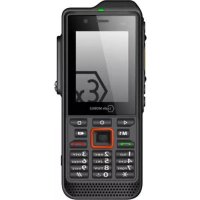
IS330.1 - Mobile Phone i.safe Mobile - Free user manual and instructions
Find the device manual for free IS330.1 i.safe Mobile in PDF.

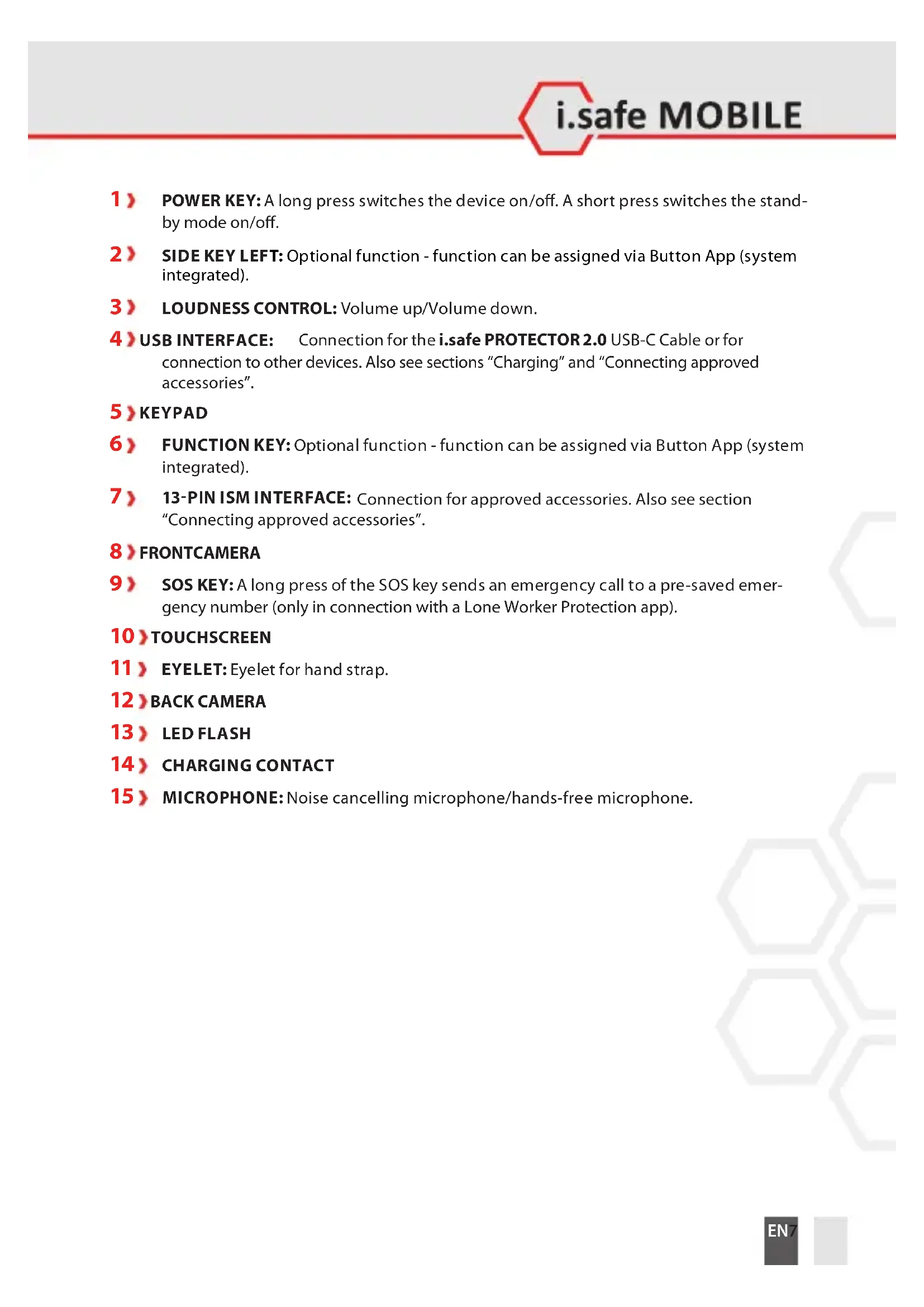


| Brand | i.safe Mobile |
| Model | IS330.1 (M33A01) |
| Product type | Industrial explosion-proof mobile phone |
| ATEX zones | Zone 1/21 and 2/22 (II 2G Ex ib IIC T4 Gb / II 2D Ex ib IIIC T135°C Db IP6X) |
| Certifications | ATEX, IECEx, FCC/IC, EU/UK Declaration |
| Operating system | Android (includes Google Apps) |
| Display | Capacitive touch |
| Keyboard | Physical with function keys |
| Dual SIM | Yes, 2 nano-SIM slots |
| microSD card | Yes, up to 128 GB |
| Camera | Rear with LED flash |
| SOS button | Yes, for emergency call (with dedicated app) |
| Connectivity | USB-C (i.safe PROTECTOR 2.0), 13-pin ISM interface for accessories |
| Battery | Removable, replaceable (approved spare battery) |
| Power supply | Universal power adapter (100-240 V) + USB-C cable |
| Charging temperature | +5 °C to +35 °C |
| Storage temperature | +5 °C to +35 °C, humidity 10-60% |
| Cleaning | Soft antistatic cloth dampened, no chemicals |
| Safety | Read safety instructions, do not open device, use approved accessories |
| Repairability | No user-serviceable parts, contact i.safe MOBILE support |
| Box contents | IS330.1, battery, quick start guide, safety instructions, screen protector, USB-C cable, power adapter, TORX screwdriver, cleaning cloth |
Frequently Asked Questions - IS330.1 i.safe Mobile
User questions about IS330.1 i.safe Mobile
0 question about this device. Answer the ones you know or ask your own.
Ask a new question about this device
Download the instructions for your Mobile Phone in PDF format for free! Find your manual IS330.1 - i.safe Mobile and take your electronic device back in hand. On this page are published all the documents necessary for the use of your device. IS330.1 by i.safe Mobile.
USER MANUAL IS330.1 i.safe Mobile
www.isafe-mobile.com Template:TEMPMM01REV10
CONTENTS
English....4
Deutsch....18
Česky 32
Dansk 46
Español....60
Suomi....74
Français....88
Magyar 102
Italiano 116
Nederlands 130
Norsk 144
Polski 158
This Operating Manual complies with these standards:
IEC 60079, IEC 82079, ANSI Z535.6
IEC 60079, IEC 82079, ANSI Z535.6
ENGLISH
>READ AND UNDERSTAND THE INSTRUCTIONS

PROTECT YOUR LIFE AND READ THE OPERATING MANUAL
This Operating Manual is part of the device IS330.1 (model M33A01). This Operating Manual provides important information for safe use of the device.
» Before using the device, read this Operating Manual carefully and pay particular attention to the "Safety" section and the warnings highlighted with the warning symbol.
» Also read the Safety Instructions before using the device.
You can find these at www.isafe-mobile.com/en/support/downloads
» Make sure you have access to this Operating Manual when you need it. You can find the current Operating Manual at www.isafe-mobile.com/en/support/downloads
» Follow all instructions given on the device and on the packaging.
»Follow local safety regulations.
INTENDED USE
The IS330.1 is an Internet-capable communication device for industrial use in explosion hazardous areas of Zone 1/21 and 2/22, in accordance with Directives 2014/34/EU, SI 2016 No. 1107, 1999/92/EC and the IECEx system, among others.
Only use the device as described in this Operating Manual. Any other use is considered improper and can lead to death, severe injuries and damage to the device.
The manufacturer i.safe MOBILE GmbH does not assume any liability for damage caused by improper use. The warranty expires in the event of improper use.
WARRANTY
You can find the warranty conditions at www.isafe-mobile.com/en/support/service
For any damage caused by computer viruses that you download while using the Internet functions responsibility is at your hand.
There is no right of recourse against i.safe MOBILE GmbH.
EU/UK DECLARATION OF CONFORMITY
You will find the EU/UK declaration of conformity at www.isafe-mobile.com/en/support/downloads
FCC/IC STATEMENT
The FCC/IC declaration can be found at www.isafe-mobile.com/en/support/downloads
EX MARKINGS
> ATEX:
II 2G Ex ib IIC T4 Gb
II 2D Ex ib IIIC T135°C Db IP6X
EU Type Examination Certificate:
EPS 19 ATEX 1 073 X
CE-designation: 2004
>IECEx:
Ex ib IIC T4 Gb
Ex ib IIIC T135°C Db IP6X
IECEx Certificate: IECEx EPS 19.0036X
UKEX:
II 2G Ex ib IIC T4 Gb
II 2D Ex ib IIIC T135°C Db IP6X
CML 21UKEX2492X
UKCA-designation: 2503
> North America:
Class I Div 1 Groups A, B, C, D, T4
Class II Div 1 Groups E, F, G, T135°C
Class III Div 1
CSA20CA70220247
> Temperature range:
-20°C ... +60°C (EN/IEC 60079-0)
-10°C ... +50°C (EN/IEC 62368-1)
> Manufactured by:
i.safe MOBILE GmbH
i_Park Tauberfranken 10
97922 Lauda-Koenigshofen
Germany
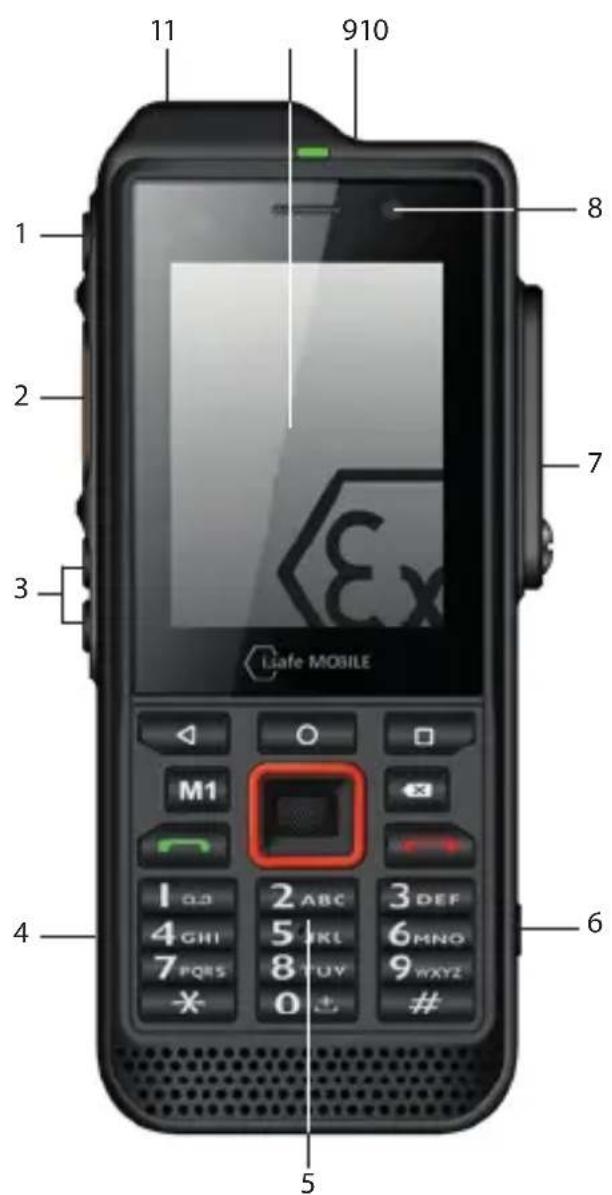
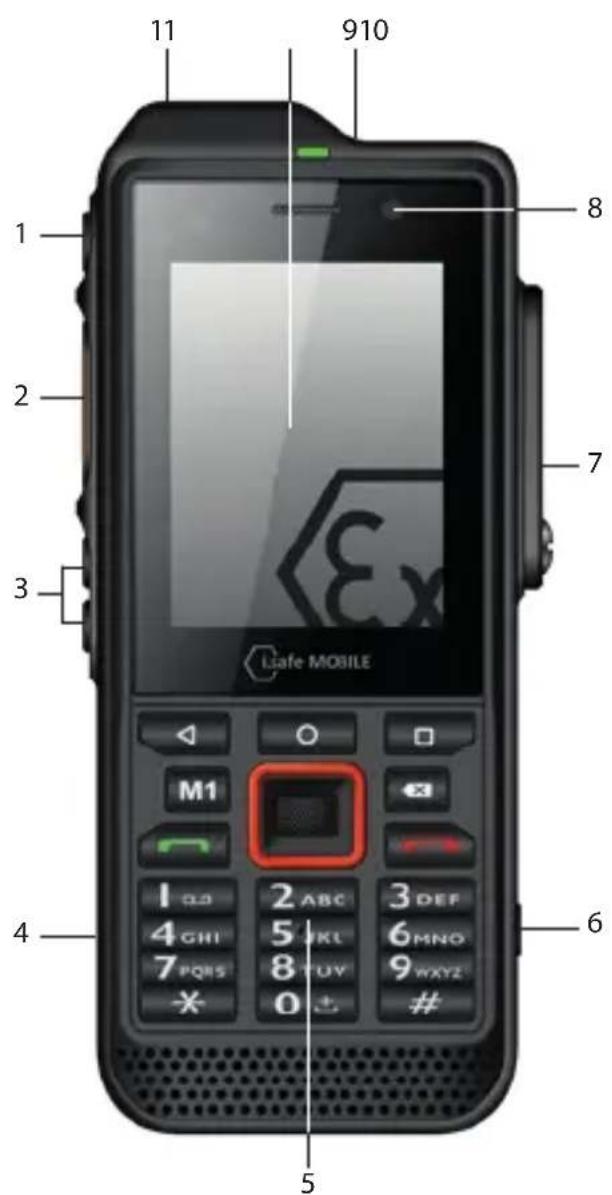
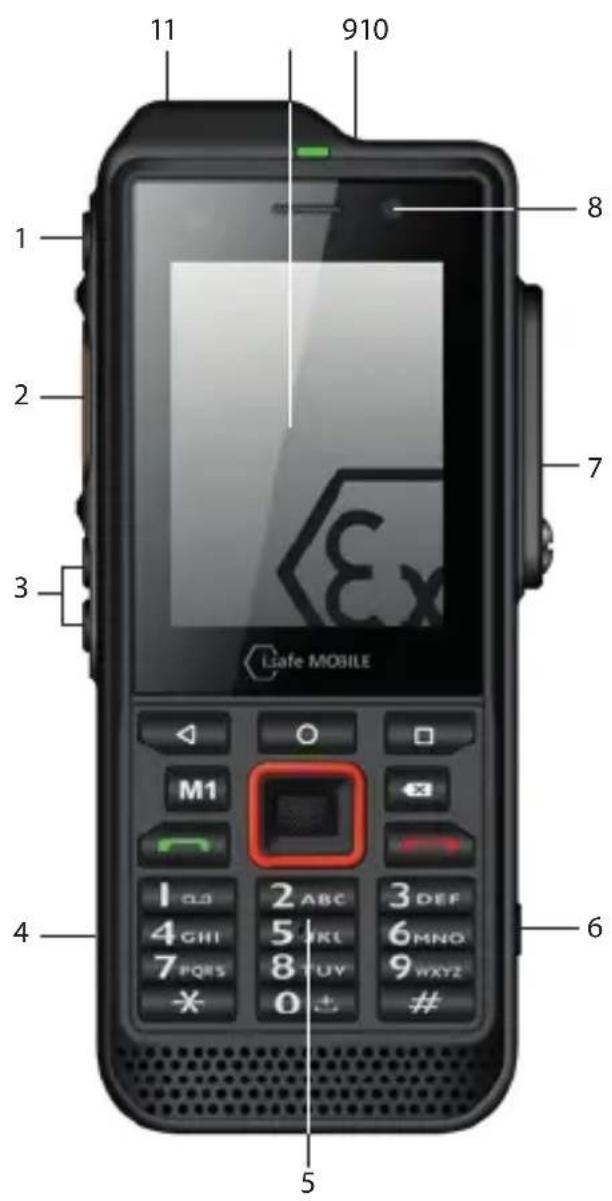
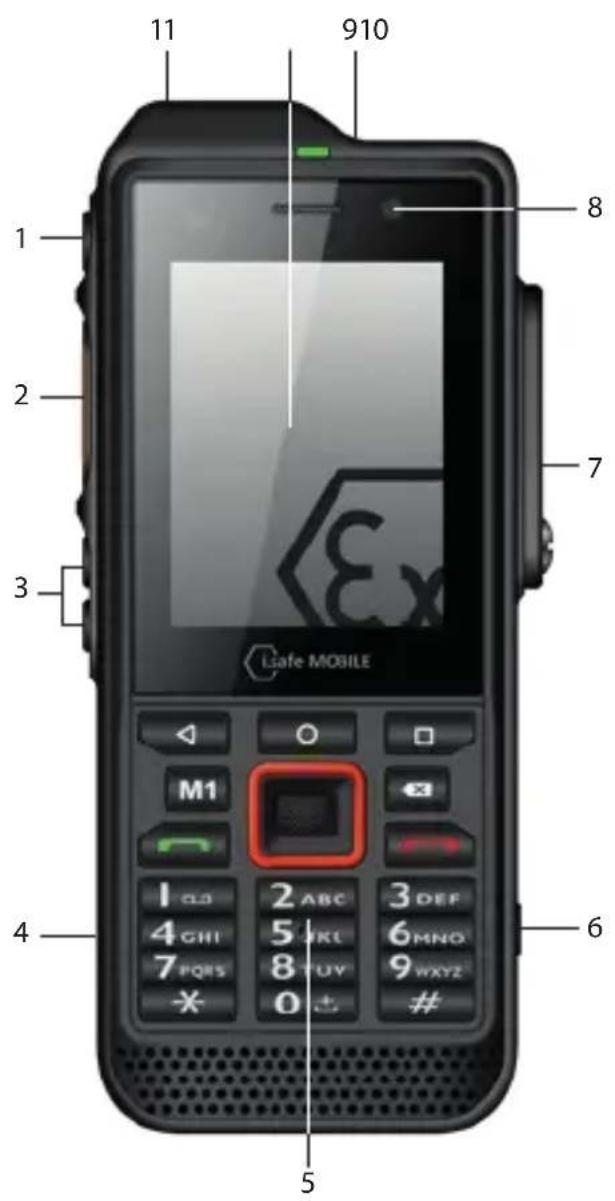
>DEVICE OVERVIEW/FUNCTIONS
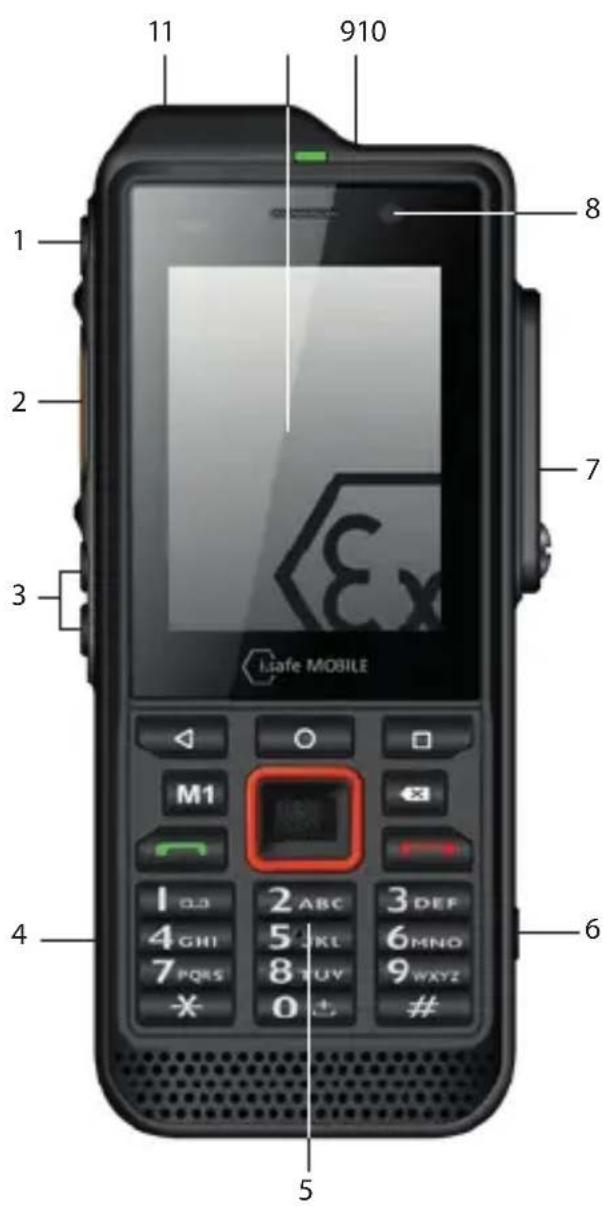

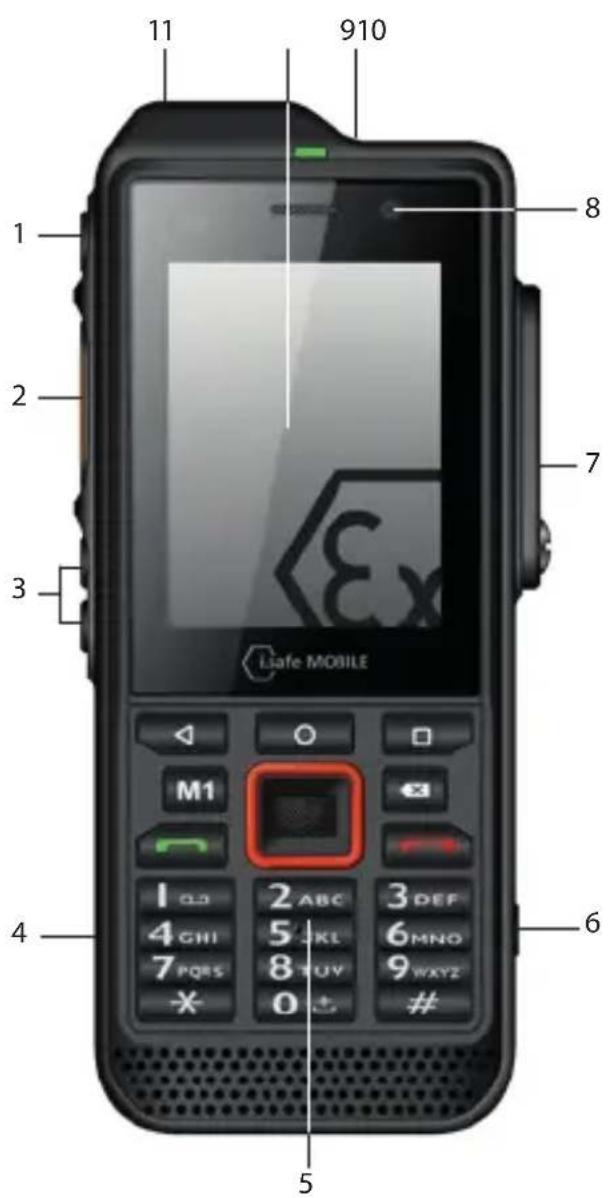
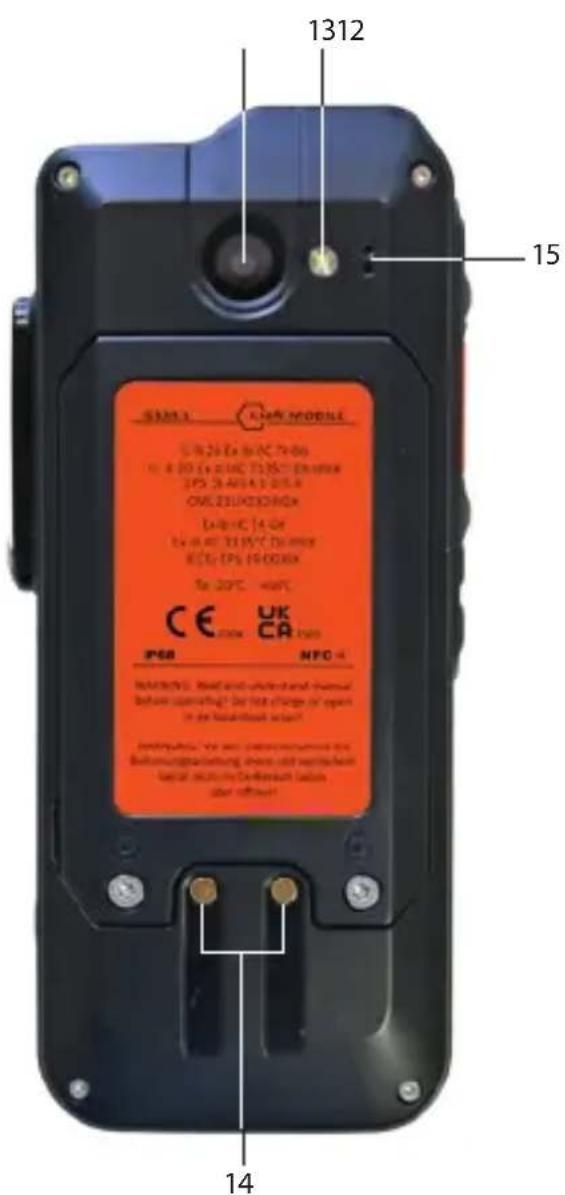
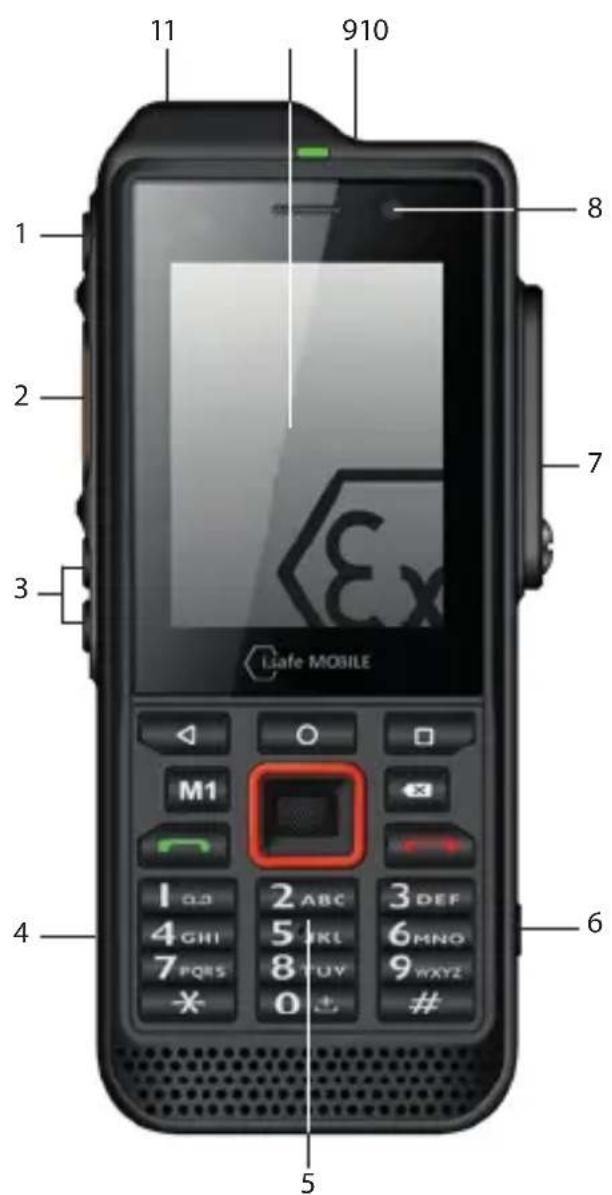
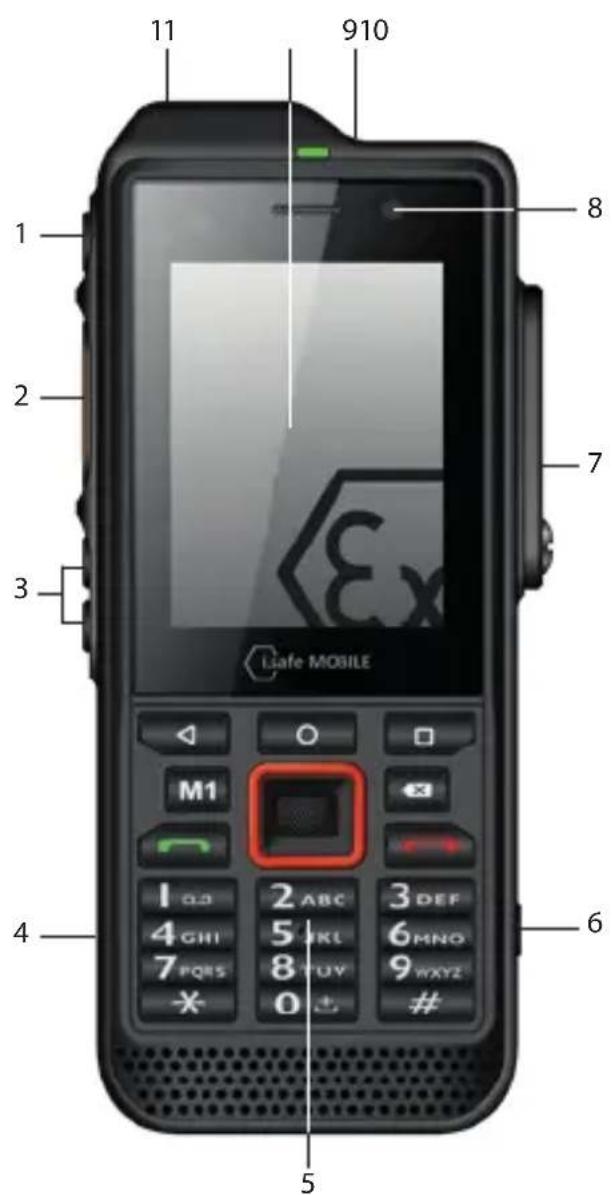
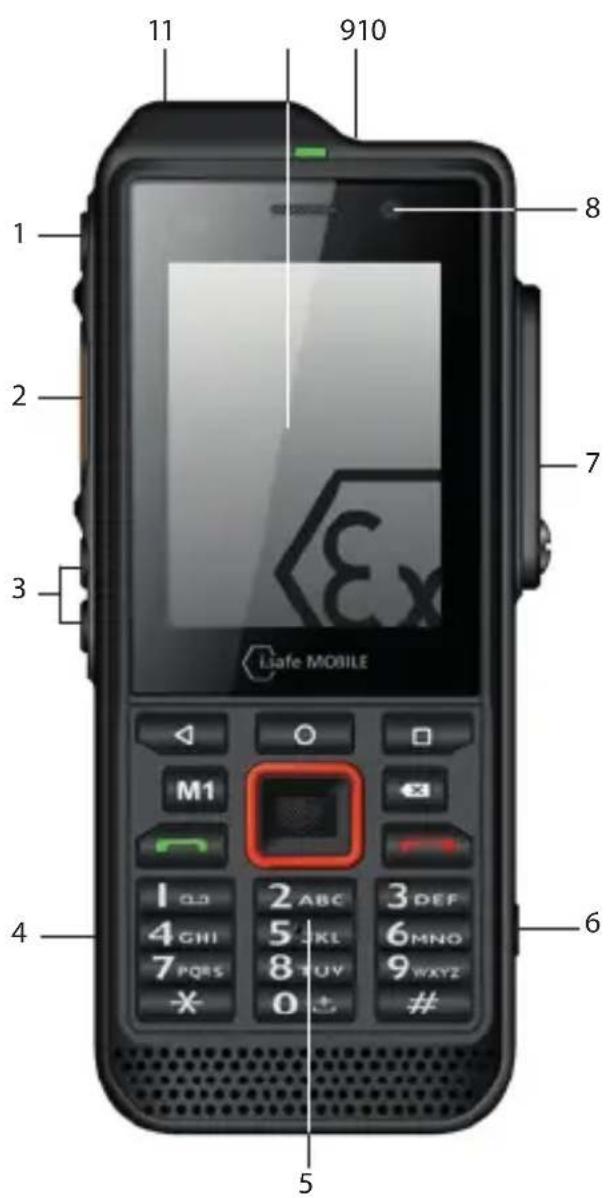
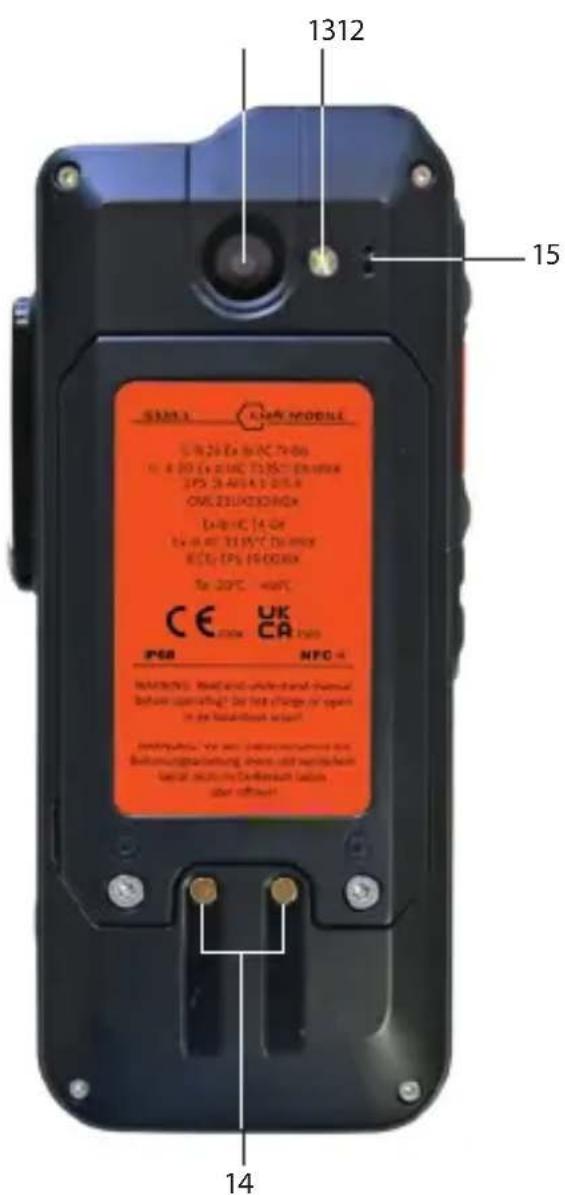
1) POWER KEY: A long press switches the device on/off. A short press switches the standby mode on/off.
2) SIDE KEY LEFT: Optional function - function can be assigned via Button App (system integrated).
3) LOUDNESS CONTROL: Volume up/Volume down.
4) USB INTERFACE: Connection for the i.safe PROTECTOR 2.0 USB-C Cable or for connection to other devices. Also see sections "Charging" and "Connecting approved accessories".
5>KEYPAD
6) FUNCTION KEY: Optional function - function can be assigned via Button App (system integrated).
7) 13-PIN ISM INTERFACE: Connection for approved accessories. Also see section "Connecting approved accessories".
8>FRONTCAMERA
9) SOS KEY: A long press of the SOS key sends an emergency call to a pre-saved emergency number (only in connection with a Lone Worker Protection app).
10> TOUCHSCREEN
11 EYELET: Eyelet for hand strap.
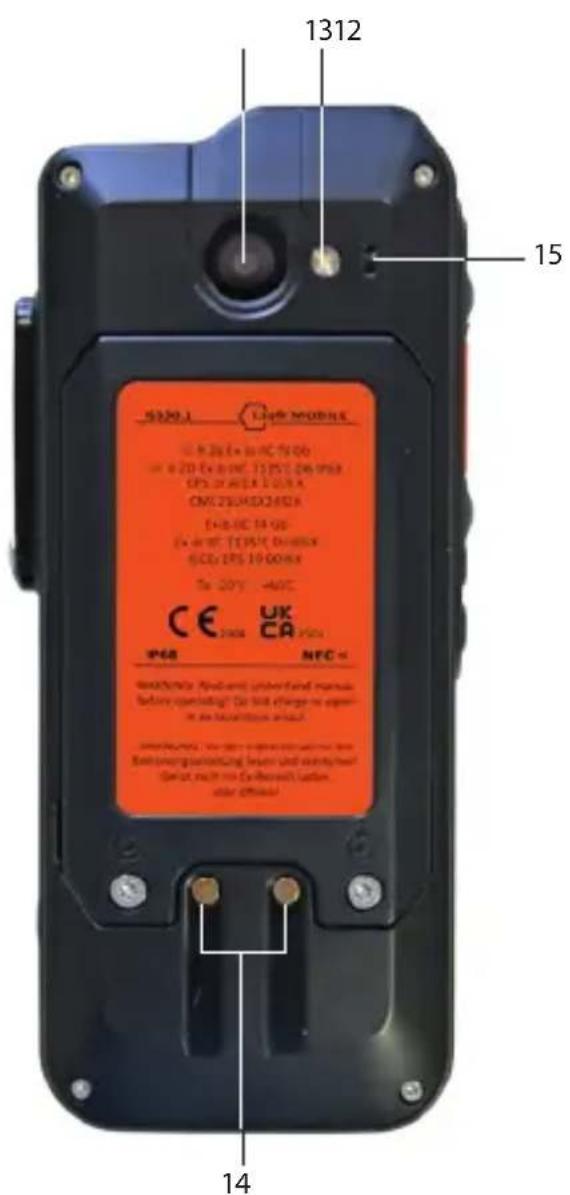
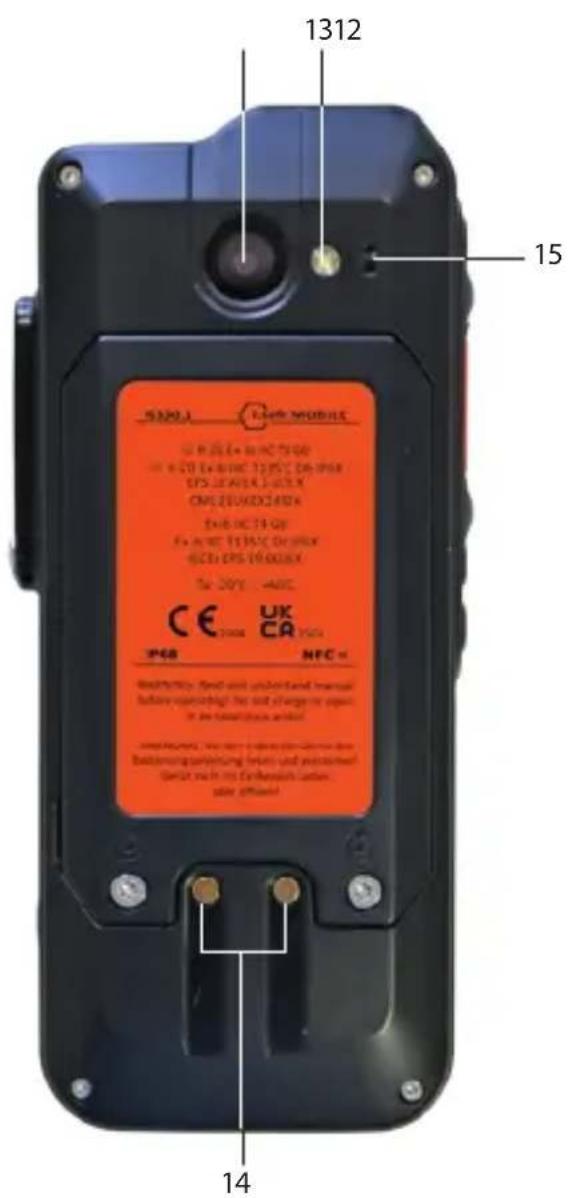
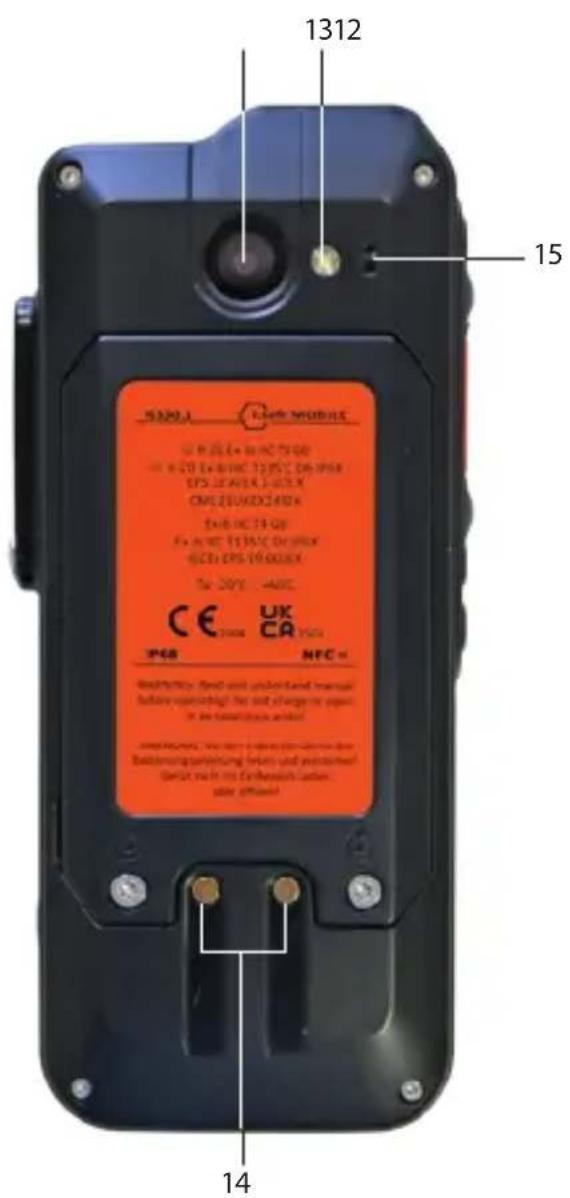
12) BACK CAMERA
13> LED FLASH
14> CHARGING CONTACT
15> MICROPHONE: Noise cancelling microphone/hands-free microphone.
> SAFETY
Read the "Safety" section of this Operating Manual carefully before using the device. If you do not follow these instructions or do not understand them, this could lead to death, severe injuries and damage to the device.
USER
Only trained users who are qualified in the use of Ex devices in explosion hazardous areas and who have read and understood this Operating Manual may use this device.
USE IN EXPLOSION HAZARDOUS AREAS
DANGER
Improper use can result in death or severe injuries!
» Only use the device in explosion hazardous areas of zones 1/21 and 2/22 or outside of explosion hazardous areas.
» Before entering an explosion hazardous area with the device,
- make sure that only approved accessories are connected to the device, see section "Connecting approved accessories",
• make sure that no gap can be seen between the two halves of the device,
• make sure the device is not damaged,
• make sure that all the labels on the device are readable,
• make sure the battery is screwed tight.
»If you use the device in an explosion hazardous area, read and follow the instructions in the "Possible User Errors" section.
» Switch off the device immediately and leave the explosion hazardous area without delay if
- malfunctions occur on the device,
- you have damaged the housing of the device,
- you have exposed the device to excessive loads,
- the labels on the device are no longer readable.
USE OUTSIDE OF EXPLOSION HAZARDOUS AREAS
DANGER
Improper use can result in death or severe injuries!
» Do not use the device in places where its use is prohibited.
» Turn off the device in clinics or other medical facilities.
» Always keep a safety distance of at least 15 cm between the device and a pacemaker or hearing aid. The device can affect the functioning of medical devices such as pacemakers and hearing aids.
» When using the device while driving a motor vehicle, be sure to comply with applicable national laws.
» Make sure you prevent the user errors described in the section entitled "Possible User Errors".
» Only charge the device as described in the "Charging" section.

CAUTION
When using earphones or headsets at the maximum volume setting, you can damage your hearing.
» First set the volume control on the device to 50 % of the maximum volume.
» Gradually adjust the volume.
NOTICE
Incorrect use can damage the device.
» Only use accessories approved by i.safe MOBILE, as described in the section on "Connecting approved accessories".
» Protect the device and the Power Adapter from strong electrical magnetic fields as for example those emitted by induction cookers or microwave ovens, for example.
» Do not touch the display with sharp objects.

POSSIBLE USER ERRORS

DANGER
Improper use can result in death or severe injuries! Follow the instructions below:
» Do not modify the device structurally.
» Do not expose the device to high temperatures.
» Do not expose the device to strong UV radiation.
» Do not expose the device to processes with high electrical charges.
» Do not expose the device to aggressive acids or bases.
When working in explosion hazardous areas, please note:
» Do not loosen the screws on the device.
» Do not connect any accessories to the device.
» Do not open any interface cover.
» Do not charge the device.
» Do not open the device.
» Do not damage the device.
>SCOPE OF DELIVERY
Your device packaging contains the following:
1 × IS330.1
1 x Battery
1 x Quick Start Manual
1 x Safety Instructions
1 x Display Protection Foil
1 x i.safe PROTECTOR 2.0 USB-C Cable
1 x Power Adapter universal (power supply unit and various country-specific adapters)
1 x Torx Screwdriver
1 x Display cleaning cloth
CELL BROADCAST
The device supports cell broadcast. Cell broadcast is a cellular service for sending messages to all recipients within a cell.
>INSTALLING THE BATTERY
DANGER
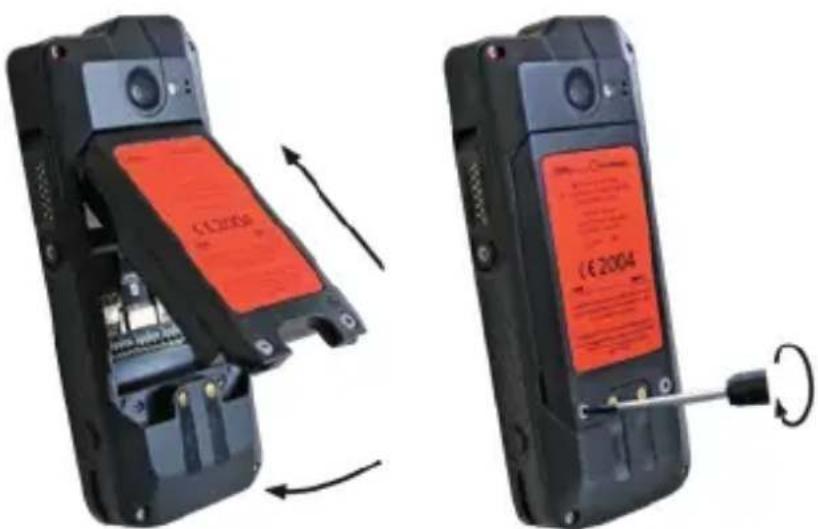
Installing the wrong battery in the device, poses a risk of explosion, which could result in death or serious injuries! Only fit the battery supplied or an approved replacement battery in the device outside of explosion hazardous areas. The approved replacement battery can be found on the website www.isafe-mobile.com/en/products
natural_image
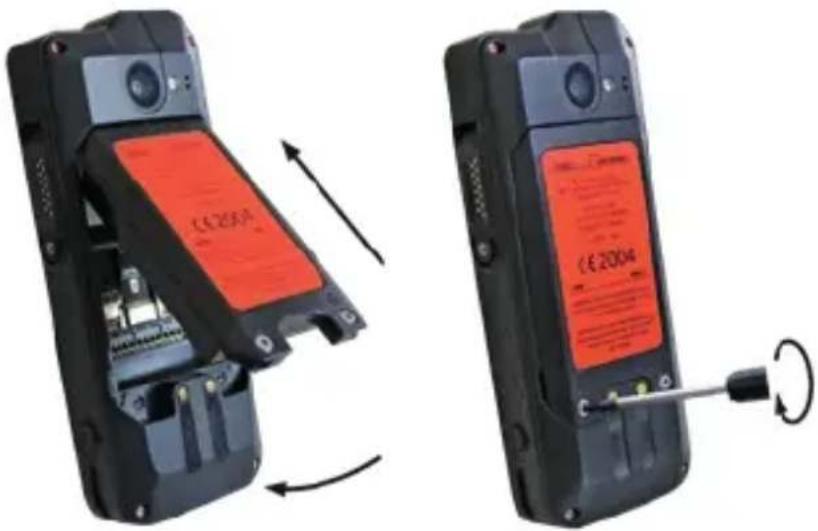
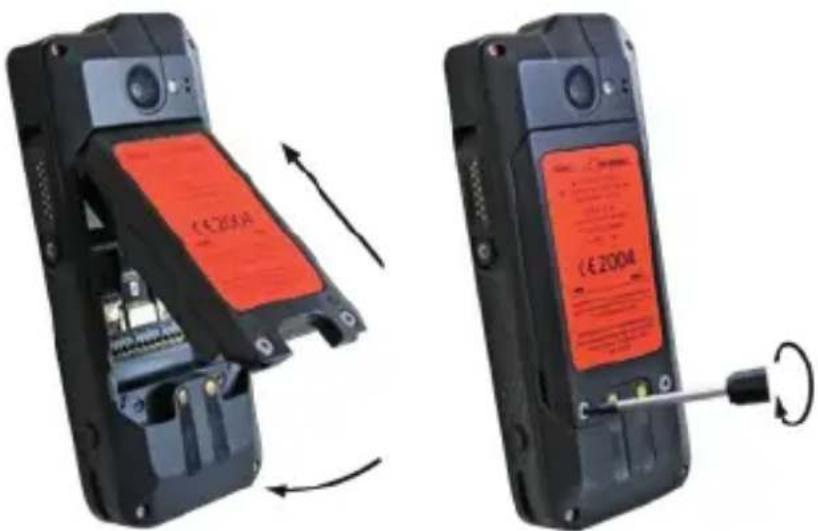
Two views of a mobile phone showing internal components and a close-up of the right panel (no visible text or symbols)» Place the battery in the battery compartment as shown.
» Hand-tighten the screws using the Torx Screwdriver provided.
» Check that the battery is seated correctly and securely.
INSERT/REMOVE SIM CARD
DANGER
An incorrect procedure in explosion hazardous areas poses a risk of death or severe injuries! Only open the device outside of explosion hazardous areas to insert or remove the SIM card.
NOTICE
Proceeding incorrectly when inserting/removing the SIM card can damage the device and the SIM card. Switch off the device before inserting or removing a SIM card. Do not charge the device while inserting or removing a SIM card.
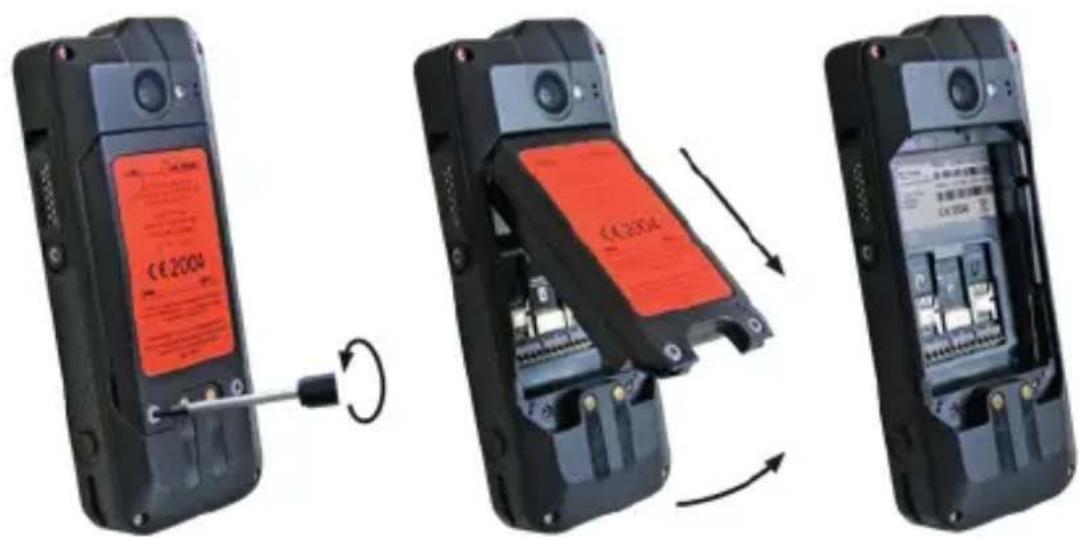
» Loosen the screws on the battery using the Torx Screwdriver provided.
» Remove the battery from the battery compartment.
» Insert the SIM card into the slot. The device has two slots for one SIM card each. The slots are marked "SIM 1" and "SIM 2".
» If you have inserted two SIM cards, select a favorite card. Information on operating the device can be found at www.isafe-mobile.com/en/support/service under the menu item „FAQ”.
»Reinstall the battery. See section "Installing the battery".
> INSERT/REMOVE microSD CARD

DANGER
An incorrect procedure in explosion hazardous areas poses a risk of death or severe injuries! Only open the device outside of explosion hazardous areas to insert or remove the microSD card.
NOTICE
Proceeding incorrectly when inserting/removing the microSD card can damage the device and the microSD card. Switch off the device before inserting or removing a microSD card. Do not charge the device while inserting or removing a microSD card.
natural_image
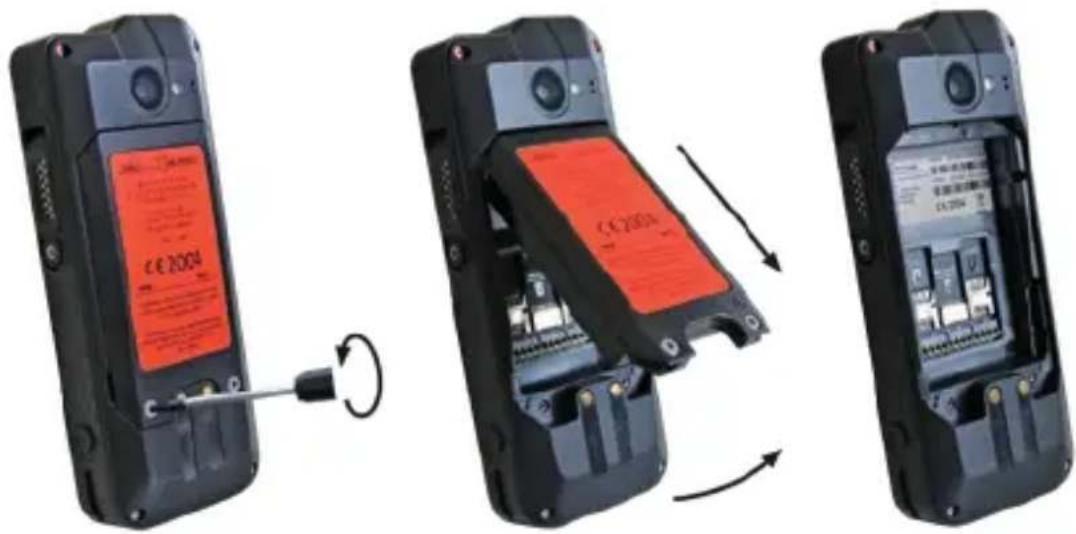
Three-panel image showing a mobile phone with a red LCD screen and cable, connected by a screwdriver to the left panel (no visible text or symbols)» Loosen the screws on the battery using the Torx Screwdriver provided.
» Remove the battery from the battery compartment.
» Insert the microSD card into the slot provided. The device has a slot for a microSD card up to 128 GB. The slot is marked "microSD".
»Reinstall the battery. See section "Installing the battery".
CHARGING
DANGER
An incorrect procedure in explosion hazardous areas poses risk of death or severe injuries! Only charge the device outside of explosion hazardous areas. Do not charge the device in the vicinity of flammable substances.
NOTICE
Incorrect charging can cause damage to the device. Please note the following when charging:
» Only charge the device using the i.safe PROTECTOR 2.0 USB-C Cable supplied.
» Only charge the device at ambient temperatures between +5 °C to +35 °C (+41 °F to +95 °F).
» Charge the device under dry indoor conditions only.
» Do not charge the device in environments dusty or humid.
Your device package contains a power supply unit, various country-specific adapters and an i.safe PROTECTOR 2.0 USB-C Cable.
» Connect the adapter suitable for your country to the power supply unit.
» Connect the i.safe PROTECTOR 2.0 USB-C Cable to the power supply unit.
» Connect the i.safe PROTECTOR 2.0 USB-C Cable to the USB interface of the device.
> SWITCHING ON/OFF
» Press and hold the on/off key for about 3 seconds.
» Enter the device or SIM PIN when the input dialog for the device or SIM PIN appears after switching on.
» Select the
USING THE DEVICE
» When turning on the device for the first time, follow the instructions on the screen.
Further information on operating the device can be found at www.isafe-mobile.com/en/support/service under the menu item "FAQ".
Detailed information on operating the Android operating system can be found at: https://support.google.com/android
CONNECTING APPROVED ACCESSORIES
» Only connect accessories approved by i.safe MOBILE to the device. Accessories approved by i.safe MOBILE can be found at www.isafe-mobile.com/en/products
Approved accessories can be connected to any 13-pin ISM interface and to the USB interface.
DANGER
Improper use can result in death or severe injuries! If you need approved accessories in explosion hazardous areas, please note the following before connecting:
» Connect approved accessories to the 13-pin ISM interface of the device only outside of explosion hazardous areas.
»Operate approved accessories in explosion hazardous areas only on the 13-pin ISM interface of the device. Wired connections via the USB interface are prohibited.
» Connect the plug of the accessory securely to the 13-pin ISM interface on the device.
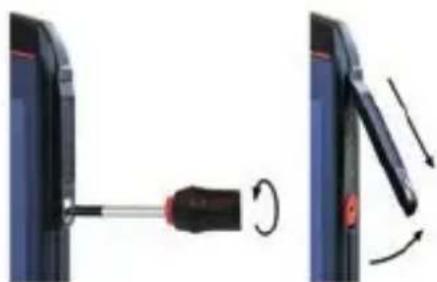
» Close the 13-pin ISM interface with the cover provided when you are not using accessories.
13-PIN ISM INTERFACE
natural_image
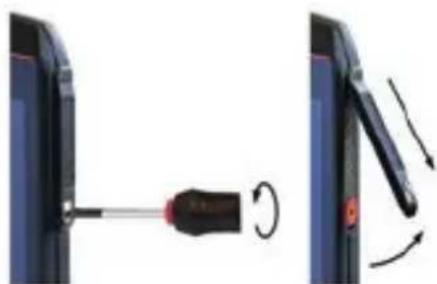
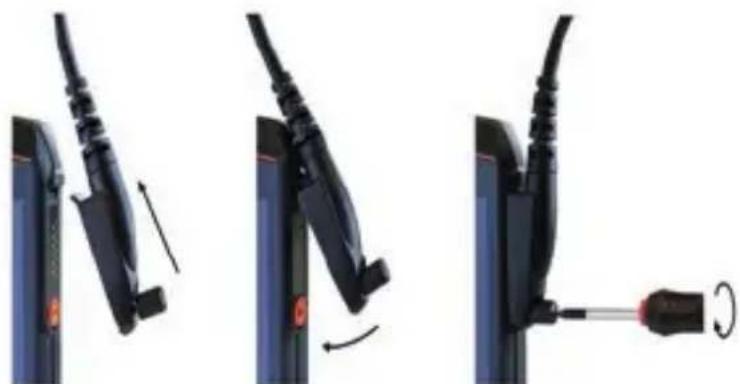
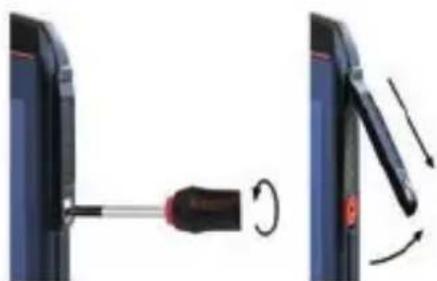
Diagram showing a screwdriver inserted into a device, with rotation arrows indicating motion (no text or symbols)» Loosen the screw on the 13-pin ISM interface cover using the Screwdriver included in the accessory package and remove the cover as shown.
natural_image
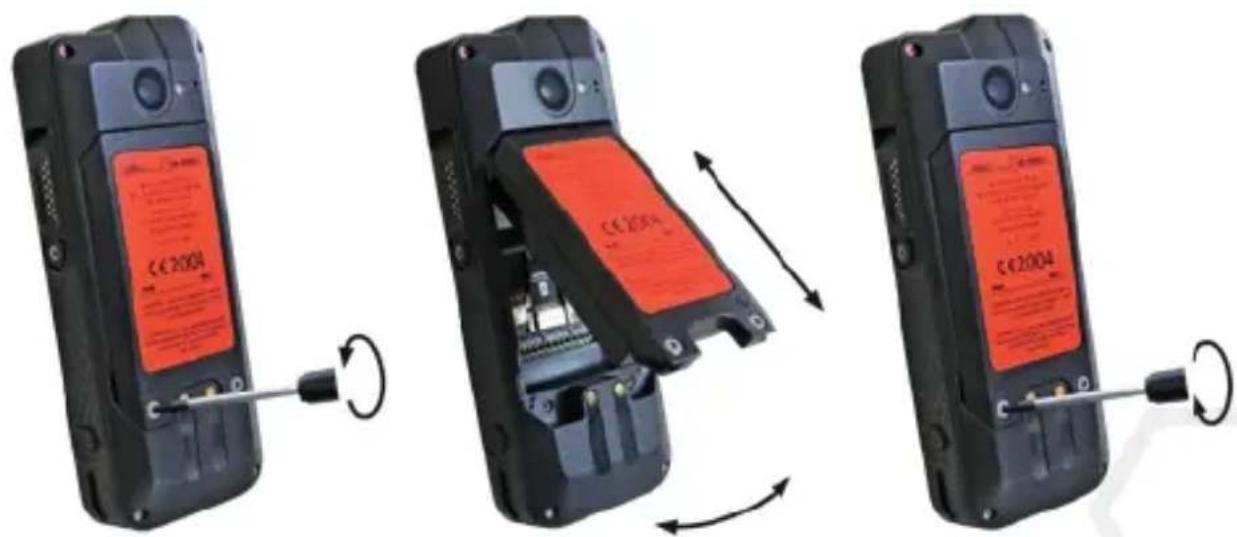
Three-step diagram showing cable fastening and disassembly process (no text or symbols)» Connect the plug of the approved accessory to the 13-pin ISM interface as shown.
» Hand-tighten the screws.
» Check that the plug is seated correctly and securely.
USB INTERFACE

DANGER
Improper use can result in death or severe injuries! Only use USB interface outside of explosion hazardous areas. You should never open the cover of the USB interface in explosion hazardous areas.
The USB interface is used for charging and data transfer.
» Connect approved accessories or other devices to the USB interface only by using the i.safe PROTECTOR 2.0 USB-C Cable.

CHANGING THE BATTERY

WARNING
If you replace the battery with the wrong battery in the device, there is a risk of explosion, which could result in death or serious injuries! Only replace the battery with an approved replacement battery outside of explosion hazardous areas. An approved replacement battery can be found on the website www.isafe-mobile.com/en/products
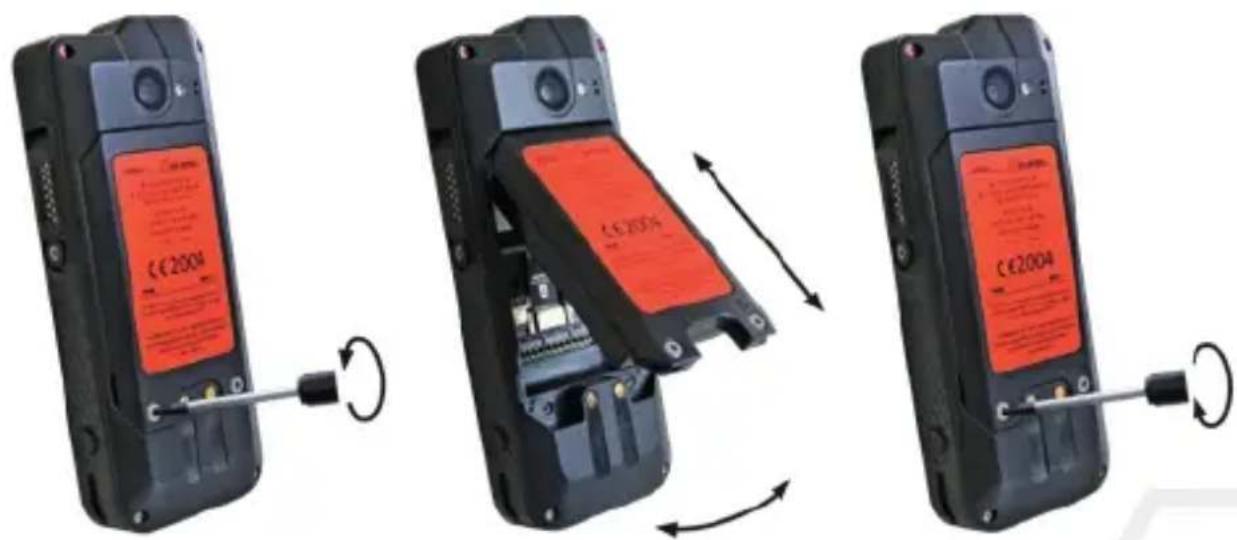
» Loosen the screws on the battery using the Torx Screwdriver provided.
» Remove the battery from the battery compartment as shown.
» Place the approved replacement battery in the battery compartment as shown.
» Hand-tighten the screws using the Torx Screwdriver provided.
» Check that the battery is seated correctly and securely.
POSSIBLE DEVICE PROBLEMS
You can find information on possible device problems and how to rectify them at www.isafe-mobile.com/en/support/service under the menu item "FAQ".
If you have any further questions, please contact the i.safe MOBILE repair service at www.isafe-mobile.com/en/support/service
MAINTENANCE/REPAIR
The device itself has no serviceable parts.
WARNING
Incorrect repairs present a risk of explosion or fire, which can result in death or severe injuries! Do not open the device or carry out any repairs yourself.
» Contact the i.safe MOBILE repair service at www.isafe-mobile.com/en/support/service if the device is not working normally, if the device needs to be repaired or if a replacement part is required.
RETURN SHIPMENT
Contact the i.safe MOBILE repair service at www.isafe-mobile.com/en/support/service
DISTRIBUTION PARTNER
You can find the specialist distribution partner responsible for your country at www.isafe-mobile.com/en/contact
>CLEANING
NOTICE
Incorrect cleaning can cause damage to the device. Please note the following when cleaning:
» Turn off the device before cleaning.
» Do not charge the device while cleaning.
» Do not use chemical agents for cleaning.
» Clean the device and the Power Adapter with a soft, moistened antistatic cloth.
» Clean the display screen regularly with a soft, antistatic cloth.
>STORAGE
NOTICE
Incorrect storage can cause damage to the device. Store the device at ambient temperatures between +5 °C to +35 °C (+41 °F to +95 °F) and a humidity between 10 % to 60 %.
RECYCLING
NOTICE
Incorrect disposal of electronic products, batteries and packaging material puts the environment at risk. Please note the following when disposing of items:
» DO NOT throw away batteries with household waste.
» Always dispose electronic products, batteries and packaging material at the appropriate collection points. This way, you prevent uncontrolled waste disposal and promote the recycling of material resources.
You can obtain further information from regional waste disposal companies, state authorities or the i.safe MOBILE service centre responsible for your country or region at www.isafe-mobile.com/en/support/service
TRADEMARKS
i.safe MOBILE and the i.safe MOBILE logo are registered trademarks of the i.safe MOBILE GmbH.
EEA Version: Comes with the Google™ app and Google Chrome™
Google and Google Play are trademarks of Google LLC.
All other trademarks and copyrights are the properties of their respective owners.
DEUTSCH
Class I Div 1 Groups A, B, C, D, T4
Class II Div 1 Groups E, F, G, T135°C
Class III Div 1
CSA20CA70220247
>Temperaturbereich:
-20°C ... +60°C (EN/IEC 60079-0)
-10°C ... +50°C (EN/IEC 62368-1)
>Hersteller:
i.safe MOBILE GmbH
i_Park Tauberfranken 10
97922 Lauda-Koenigshofen
Germany
GERÄTEÜBERSICHT/FUNKTIONEN
natural_image
Two views of a mobile phone showing internal components and a close-up of the screen (no visible text or symbols)natural_image
Three-panel image showing a mobile phone with a red LCD screen and a black cable being inserted, illustrating the process of battery charging (no text or symbols visible)natural_image
Diagram showing a screwdriver inserted into a device, with motion arrows indicating rotation (no text or symbols)natural_image
Three-step diagram showing cable fastening and screwdriver insertion (no text or symbols)www.isafe-mobile.com/en/support/downloads
PROHLÁŠENÍ FCC/IC
www.isafe-mobile.com/en/support/downloads
ZNAČENÍ SOUVISEJÍCÍ S NEBEZPEČÍM VÝBUCHU
> ATEX:
④ II 2G Ex ib IIC T4 Gb
II 2D Ex ib IIIC T135°C Db IP6X
Class I Div 1 Groups A, B, C, D, T4
Class II Div 1 Groups E, F, G, T135°C
Class III Div 1
CSA20CA70220247
> Teplotní rozsah:
-20°C ... +60°C (EN/IEC 60079-0)
-10°C ... +50°C (EN/IEC 62368-1)
Výrobce:
i.safe MOBILE GmbH
i_Park Tauberfranken 10
97922 Lauda-Koenigshofen
Německo
PŘEHLED O ZAŘÍZENÍ/FUNKCÍCH
![1312 15 S330.1 Light MOLI CE 2016 E+ 10/CC 70/08 = x 20-xx B:HC 35/07C DB/PBX CPS 2016 X 2017 X CML25U4XD24D28 E+0-DC TA 60 [+0-0]T-TE/C DC 00/08X (PCI: EPS 19-00/08X To 20Y - AFC CE 2016 UK CA 2016 PCB NFC # Switching: I.e. I.e. I.e. I.e. I.e. I.e. I.e. I.e. I.e. I.e. I.e. I.e. I.e. I.e. I.e. I.e. I.e. I.e. I.e. I.e. I.e. I.e. I.e. I.e. I.e. I.e. I.e. I.e. I.e. I.e. I.e. I.e. Switching: The power is the current operating system under control Switching: The current operating system is the current operating system under control Switching: The current operating system is the current operating system under control Switching: The current operating system is the current operating system under control](/content/2026/04/616253/images/f01108605aa0528785abe7b76fcd5b42dde4d7fc43c0bad8b9ea5a2ab0632293.jpg)
natural_image
Two views of a mobile phone showing internal components and a close-up of the screen (no visible text or symbols)natural_image
Three-panel image showing a mobile phone with a red CD-ROM and cable, illustrating the internal circuit change (no text or symbols visible)natural_image
Three-panel image showing a mobile phone with a red-labeled card and cable, connected by a screwdriver to the right panel (no visible text or symbols)natural_image
Diagram showing a screwdriver inserted into a device, with rotation arrows indicating motion (no text or symbols)natural_image
Three-step diagram showing cable installation steps: fastening, fastening with a screwdriver, and fastening with a curved arrow (no text or symbols)Class I Div 1 Groups A, B, C, D, T4
Class II Div 1 Groups E, F, G, T135°C
Class III Div 1
CSA20CA70220247
>Temperaturområde:
-20°C ... +60°C (EN/IEC 60079-0)
-10°C ... +50°C (EN/IEC 62368-1)
Procuent:
i.safe MOBILE GmbH
i_Park Tauberfranken 10
97922 Lauda-Koenigshofen
Tyskland
OVERSIGT OVER ENHEDEN/FUNKTIONER
![1312 15 S330.1 Light MOLI CE 2016 E+ 10/CC 70/08 = x 20-xx B:HC 35/07C DB/PBX CPS 2016 X 2017 X CML25U4XD24D28 E+0-DC TA 60 [+0-0]T-TE/C DC 00/08X (PCI: EPS 19-00/08X To 20Y - AFC CE 2016 UK CA 2016 PCB NFC # Switching: I.e. I.e. I.e. I.e. I.e. I.e. I.e. I.e. I.e. I.e. I.e. I.e. I.e. I.e. I.e. I.e. I.e. I.e. I.e. I.e. I.e. I.e. I.e. I.e. I.e. I.e. I.e. I.e. I.e. I.e. I.e. Switching: The power is the current operating system under control Switching: The power is the current operating system under control Switching: The power is the current operating system under control Switching: The power is the current operating system under control](/content/2026/04/616253/images/fb7e318cc9e10c1a49077416923a7445f8599a4cd867d27521bad7bc939b0823.jpg)
natural_image
Two views of a mobile phone showing internal components and a close-up of the right panel (no visible text or symbols)natural_image
Three-panel image showing a mobile phone with a red CD-ROM and cable, illustrating the internal circuit change (no text or symbols visible)natural_image
Three-panel image showing a mobile phone with a red LCD screen and cable, connected by a cable to a device inside (no visible text or symbols)natural_image
Diagram showing a screwdriver being inserted into a device, with rotation arrows indicating motion (no text or symbols)natural_image
Three-step diagram showing cable fastening process: wire insertion, switch press, and end cap (no text or symbols)Class I Div 1 Groups A, B, C, D, T4
Class II Div 1 Groups E, F, G, T135°C
Class III Div 1
CSA20CA70220247
>Rango de temperatura:
-20°C ... +60°C (EN/IEC 60079-0)
-10°C ... +50°C (EN/IEC 62368-1)
>Fabricado por:
i.safe MOBILE GmbH
i_Park Tauberfranken 10
97922 Lauda-Koenigshofen
Alemania
www.isafe-mobile.com/en/products
natural_image
Two views of a mobile phone showing internal components and a close-up of the right panel (no visible text or symbols)natural_image
Three-panel image showing a mobile phone with a red LCD screen and cable, illustrating the internal circuit change (no text or symbols visible)natural_image
Diagram showing a screwdriver being inserted into a device, with motion arrows indicating rotation (no text or symbols present)natural_image
Three-step diagram showing cable fastening and screwdriver insertion (no text or symbols)www.isafe-mobile.com/en/support/downloads
FCC-/IC-LAUSUNTO
www.isafe-mobile.com/en/support/downloads
EX-MERKINNÄT
> ATEX:
Ea II 2G Ex ib IIC T4 Gb
II 2D Ex ib IIIC T135°C Db IP6X
Class I Div 1 Groups A, B, C, D, T4
Class II Div 1 Groups E, F, G, T135°C
Class III Div 1
CSA20CA70220247
Lämpötila-alue:
-20°C ... +60°C (EN/IEC 60079-0)
-10°C ... +50°C (EN/IEC 62368-1)
>Valmistaja:
i.safe MOBILE GmbH
i_Park Tauberfranken 10
97922 Lauda-Koenigshofen
Saksa
LAITTEEN YLEISKUVA JA TOIMINNOT
![1312 15 S330.1 Light MOLI CE 2016 E+ 10/CC 70/08 = x 20-xx B:HC 35/DC DC/PSX CPS 20/PSX K 2/01 X CWL25U4XD24D28 E+0-DC TA 60 [+0-PC T:DC/C DC/PSX +CD] EPS 19.00/Hz Tx 20V - AFC CE UK CA 4020 PCB NFC # Switching: I.e. I.e. I.e. I.e. I.e. I.e. I.e. I.e. I.e. I.e. I.e. I.e. I.e. I.e. I.e. I.e. I.e. I.e. I.e. I.e. I.e. I.e. I.e. I.e. I.e. I.e. I.e. I.e. I.e. I.e. I.e. Switching: I.e. I.e. I.e. I.e. I.e. I.e. I.e. I.e. I.e. I.e. I.e. I.e. I.e. I.e. I.e. I.e. Switching: I.e. I.e. I.e. I.e. I.e. I.e. I.e. I.e. I.e. I.e. I.e. I.e. I.e. Switching: I.e. I.e. I.e. I.e. I.e. I.e. I.e. I.e. I.e. I.e. Switching: I.e. I.e. I.e. I.e. I.e. I.e. I.e. I.e. Switching: I.e. I.e. I.e. I.e. I.e. I.e. Switching: I.e. I.e. I.e. I.e. Switching: I.e. I.e. I.e. Switching: I.e. I.e. Switching: I.e. Switching: I.e. Switching: I.e. Switching: I.e. Switching: I.e. Switching: I.e. Switching: I.e. Switching: I.e. Switching: I.e. Switching: I.e. Switching: I.e. Switching: I.e. Switching: I.e. Switching: I.e. Switching: I.e. Switching: I.e. Switching: I.e. 14 15](/content/2026/04/616253/images/060fb5092d1f4ed335c3a90d329aad09a658879e279f62eeebf5a78811de1073.jpg)
natural_image
Two views of a black flip phone showing internal components and a red LCD screen with '€ 2004' label, no readable text or symbols beyond branding.natural_image
Three-panel image showing a mobile phone with a red CD-ROM and cable, illustrating the internal circuit change (no text or symbols visible)natural_image
Three-panel image showing a mobile phone with a red LCD screen and cable, connected by a wrench to the right panel (no visible text or symbols)natural_image
Diagram showing a screwdriver being inserted into a device, with motion arrows indicating rotation (no text or symbols present)natural_image
Three-step diagram showing cable fastening process: left panel with cable attachment, right panel with screwdriver insertion (no text or symbols)DÉCLARATION DE CONFORMITÉ UE/UK
Certification CE: 2004
>IECEx:
Ex ib IIC T4 Gb
Ex ib IIIC T135°C Db IP6X
Certificat IECEx: IECEx EPS 19.0036X
UKEX:
II 2G Ex ib IIC T4 Gb
① II 2D Ex ib IIIC T135°C Db IP6X
CML 21UKEX2492X
Certification UKCA: 2503
Class I Div 1 Groups A, B, C, D, T4
Class II Div 1 Groups E, F, G, T135°C
Class III Div 1
CSA20CA70220247
> Plage de temperature:
-20°C ... +60°C (EN/IEC 60079-0)
-10°C ... +50°C (EN/IEC 62368-1)
> Fabrique par:
i.safe MOBILE GmbH
i_Park Tauberfranken 10
97922 Lauda-Koenigshofen
Allemagne
SYNOPTIQUE DES APPAREILS/FONCTIONS
8>APPAREILPHOTOFRONTAL
natural_image
Two views of a mobile phone showing internal components and a close-up of the screen (no visible text or symbols)natural_image
Three-panel image showing a smartphone with an open circuit board and a red-labeled card, illustrating the process of battery charging (no text or symbols visible)natural_image
Three-panel image showing a mobile phone with a red LCD screen and cable, connected by a wrench to the right panel (no visible text or symbols)MISE EN MARCHE/ARRÊT
INTERFACE 13-PIN ISM
natural_image
Diagram showing a screwdriver being inserted into a device, with motion arrows indicating rotation (no text or symbols)natural_image
Three-step diagram showing cable fastening process: left panel with cable attachment, right panel with screwdriver insertion (no text or symbols)natural_image
Three-panel illustration of a mobile phone showing internal components and cable routing (no text or symbols)Class I Div 1 Groups A, B, C, D, T4
Class II Div 1 Groups E, F, G, T135°C
Class III Div 1
CSA20CA70220247
Hömerseklet tartomany:
-20°C ... +60°C (EN/IEC 60079-0)
-10°C ... +50°C (EN/IEC 62368-1)
Gyarto:
i.safe MOBILE GmbH
i_Park Tauberfranken 10
97922 Lauda-Koenigshofen
Németország
A ESZKÖZ ÁTTEKINTÉSE/FUNKCIÓK
natural_image
Two views of a mobile phone showing internal components and a close-up of the screen (no visible text or symbols)natural_image
Three-panel image showing a smartphone with a red LCD screen and cable, connected by a wrench to the right panel (no visible text or symbols)natural_image
Three-panel image showing a mobile phone with a red-labeled card and cable, connected by a screwdriver to the side panel (no visible text or symbols)natural_image
Diagram showing a screwdriver inserted into a device, with motion arrows indicating rotation (no text or symbols)natural_image
Three-step diagram showing cable fastening and screwdriver insertion (no text or symbols)www.isafe-mobile.com/en/support/service
www.isafe-mobile.com/en/support/downloads
DICHIARAZIONE FCC/IC
www.isafe-mobile.com/en/support/downloads
Class I Div 1 Groups A, B, C, D, T4
Class II Div 1 Groups E, F, G, T135°C
Class III Div 1
CSA20CA70220247
USO IN AREE A RISCHIO DI ESPLOSIONE
PERICOLO
USO FUORI DALLE AREE A RISCHIO DI ESPLOSIONE
PERICOLO
natural_image
Two views of a mobile phone showing internal components and a close-up of the right panel (no visible text or symbols)natural_image
Three-panel image showing a mobile phone with a red CD-ROM and cable, illustrating the internal circuit change (no text or symbols visible)natural_image
Three-panel image showing a mobile phone with a red LCD screen and cable, connected by a wrench to the right panel (no visible text or symbols)natural_image
Diagram showing a screwdriver being inserted into a device, with motion arrows indicating rotation (no text or symbols present)natural_image
Three-step diagram showing cable fastening process: left panel with cable attachment, right panel with screwdriver insertion (no text or symbols)Class I Div 1 Groups A, B, C, D, T4
Class II Div 1 Groups E, F, G, T135°C
Class III Div 1
CSA20CA70220247
>Temperatuurbereik:
-20°C ... +60°C (EN/IEC 60079-0)
-10°C ... +50°C (EN/IEC 62368-1)
> Vervaardigd door:
i.safe MOBILE GmbH
i_Park Tauberfranken 10
97922 Lauda-Koenigshofen
Duitsland
APPARAATOVERZICHT/-FUNCTIONS
natural_image
Two views of a black flip phone showing internal components and a red LCD screen with '€ 2004' label, no readable text or symbols beyond branding.natural_image
Three-panel image showing a smartphone with an open circuit board and a red-labeled card, illustrating the process of battery disassembly (no text or symbols visible)https://support.google.com/android
GOEDGEKEURDE ACCESSOIRES AANSLUITEN
natural_image
Diagram showing a screwdriver being inserted into a device, with motion arrows indicating rotation (no text or symbols present)natural_image
Three-step diagram showing cable fastening and mounting mechanism (no text or symbols)www.isafe-mobile.com/en/support/downloads
FCC/IC UTTALELSE
FCC/IC-erklæringen finner du på www.isafe-mobile.com/en/support/downloads
EX-MERKING
> ATEX:
II 2G Ex ib IIC T4 Gb
⑥ II 2D Ex ib IIIC T135°C Db IP6X
Class I Div 1 Groups A, B, C, D, T4
Class II Div 1 Groups E, F, G, T135°C
Class III Div 1
CSA20CA70220247
>Temperaturomrade:
-20°C ... +60°C (EN/IEC 60079-0)
-10°C ... +50°C (EN/IEC 62368-1)
>Produsert av:
i.safe MOBILE GmbH
i Park Tauberfranken 10
97922 Lauda-Koenigshofen
Tyskland
ENHETSOVERSIKT/FUNKSJONER
natural_image
Two views of a mobile phone showing internal components and a close-up of the screen (no visible text or symbols)natural_image
Three-panel image showing a mobile phone with a red-labeled card and cable, connected by a screwdriver to the side panel (no visible text or symbols)natural_image
Diagram showing a screwdriver inserted into a device, with rotation arrows indicating motion (no text or symbols)natural_image
Three-step diagram showing cable fastening and disassembly process (no text or symbols)VEDLIKEHOLD/REPARASJON
Class I Div 1 Groups A, B, C, D, T4
Class II Div 1 Groups E, F, G, T135°C
Class III Div 1
CSA20CA70220247
Zakres temperatur:
-20°C ... +60°C (EN/IEC 60079-0)
-10°C ... +50°C (EN/IEC 62368-1)
>Produce:
i.safe MOBILE GmbH
i_Park Tauberfranken 10
97922 Lauda-Koenigshofen
Niemcy
OPIS OGÓLNY/FUNKCJE URZĄDZENIA
natural_image
Two views of a mobile phone showing internal components and a close-up of the right panel (no visible text or symbols)natural_image
Three-panel image showing a mobile phone with a red battery cover and a cable being inserted, illustrating the process of battery disassembly (no text or symbols visible)natural_image
Three-panel image showing a mobile phone with a red LCD screen and cable, connected by a wrench to the right panel (no visible text or symbols)natural_image
Diagram showing a screwdriver being inserted into a device, with motion arrows indicating rotation (no text or symbols present)natural_image
Three-step diagram showing cable installation steps: wire insertion, switch press, and screwdriver insertion (no text or symbols)Class I Div 1 Groups A, B, C, D, T4
Class II Div 1 Groups E, F, G, T135°C
Class III Div 1
CSA20CA70220247
www.isafe-mobile.com/en/products
natural_image
Two views of a mobile phone showing internal components and a close-up of the front panel (no visible text or symbols)» Posicione a bateria no compartimento de bateria conforme exibido.
» Aperte os parafusos usando a chave Torx fornecida.
» Verifique se a bateria está encaixada corretamente e com firmeza.
>INSERIR/REMOVER CARTÃO SIM
PERIGO
natural_image
Three-panel image showing a mobile phone with a red CD-ROM and cable, illustrating the internal circuit change (no text or symbols visible)natural_image
Three-panel image showing a mobile phone with a red-labeled card and cable, connected by a screwdriver to the side panel (no visible text or symbols)INTERFACE 13-PIN ISM
natural_image
Two-step diagram showing a screwdriver inserted into a device, with rotation arrows indicating the process (no text or symbols present)natural_image
Three-step diagram showing cable fastening and screwdriver insertion (no text or symbols)www.isafe-mobile.com/en/products
natural_image
Three-panel diagram showing a device being adjusted for a cable, with no visible text or symbols on the devices themselves.» Solte os parafusos da bateria utilizando a chave Torx fornecida.
»Remova a bateria do compartimento de bateria, conforme exibido.
» Posicione a bateria substituta aprovada no compartimento de bateria, conforme exibido.
» Aperte os parafusos usando a chave Torx fornecida.
» Verifique se a bateria está encaixada corretamente e com firmeza.
POSSÍVEIS PROBLEMAS DO DISPOSITIVO
© II 2D Ex ib IIIC T135°C Db IP6X
EU-typintyg:
EPS 19 ATEX 1 073 X
CE-märkning: 2004
IECEx:
Ex ib IIC T4 Gb
Ex ib IIIC T135°C Db IP6X
IECEx-certifikat: IECEx EPS 19.0036X
UKEX:
④ II 2G Ex ib IIC T4 Gb
II 2D Ex ib IIIC T135°C Db IP6X
CML 21UKEX2492X
UKCA-märkning: 2503
> Nordamerika:
Class I Div 1 Groups A, B, C, D, T4
Class II Div 1 Groups E, F, G, T135°C
Class III Div 1
CSA20CA70220247
>Temperaturintervall:
-20°C ... +60°C (EN/IEC 60079-0)
-10°C ... +50°C (EN/IEC 62368-1)
Tillverkad av:
i.safe MOBILE GmbH
i_Park Tauberfranken 10
97922 Lauda-Koenigshofen
Tyskland
ÖVERSIKT/FUNKTIONER HOS ENHETEN
SÄTTA I/TA UR SIM-KORT
FARA
Ett felaktigt tillvägagångssätt i explosionsfarliga områden skapar en risk för död eller allvarliga personskador! Öppna enbart enheten utanför explosionsfarliga områden för att sätta i eller ta ur SIM-kortet.OBSERVERA
Att göra fel vid isättning/urtagning av SIM-kortet kan skada enheten och SIM-kortet. Stäng av enheten innan du sätter i eller tar ur ett SIM-kort. Ladda inte enheten. när du sätter i eller tar ur ett SIM-kort. natural_image
Three-panel image showing a mobile phone with a red CD-ROM and cable, illustrating the internal circuit change (no text or symbols visible)SÄTTA I/TA UR microSD-KORT
FARA
Ett felaktigt tillvägagångssätt i explosionsfarliga områden skapar en risk för död eller allvarliga personskador! Öppna enbart enheten utanför explosionsfarliga områden för att sätta i eller ta ur microSD-kortet.OBSERVERA
Att göra fel vid isättning/urtagning av microSD-kortet kan skada enheten och microSD-kortet. Stäng av enheten innan du sätter i eller tar ur ett microSD-kort. Ladda inte enheten. när du sätter i eller tar ur ett microSD-kort. natural_image
Three-panel image showing a mobile phone with a red-labeled card and cable, connected by a screwdriver to the right panel (no visible text or symbols)LADDNING
FARA
Ett felaktigt tillvägagångssätt i explosionsfarliga områden skapar risk för död eller allvarliga personskador! Ladda enheten enbart utanför explosionsfarliga områden. Ladda inte enheten i närheten av brandfarliga ämnen.OBSERVERA
Felaktig laddning kan skada enheten. Observera följande när du laddar: » Ladda enheten enbart med den medlevererade i.safe PROTECTOR 2.0 USB-C-kabeln. » Ladda enheten enbart vid omgivningstemperaturer mellan +5 °C och +35 °C (+41 °F och +95 °F). » Ladda endast enheten på torra platser inomhus. » Ladda inte enheten i fuktiga eller dammiga miljöer. Din enhets förpackning innehåller en nätaggregat, olika landspecifika adaptrar och en i.safe PROTECTOR 2.0 USB-C-kabeln. » Anslut adaptern som är lämplig för ditt land till nätaggregat. » Anslut i.safe PROTECTOR 2.0 USB-C-kabeln till nätaggregat. » Anslut i.safe PROTECTOR 2.0 USB-C-kabeln till enhetens USB-gränssnitt.SÄTT PÅ/AV
» Tryck och håll på/av-knappen i ungefär 3 sekunder. » Ange PIN-kod för enhet eller SIM när inmatningsdialogen för enheten eller SIM visas efter att du startat. » Välj menyvaletENHETENS ANVÄNDNING
» När du startar enheten för första gången, följ instruktionerna på skärmen. Ytterligare information hur enheten används kan hittas på www.isafe-mobile.com/en/support/service under menyvalet "FAQ". Detaljerad information om hur man använder Android-operativet kan hittas på https://support.google.com/android> ANSLUTNING GODKÄNDA TILLBEHÖR
» Anslut endast tillbehör som godkänts av i.safe MOBILE till enheten. Tillbehör godkända av i.safe MOBILE återfinns på www.isafe-mobile.com/en/products Godkända tillbehör kan anslutas via ett 13-pin ISM-gränssnitt eller till USB-gränssnittet.FARA
Felaktig användning kan leda till död eller allvarliga personskador! Om du behöver godkända tillbehör i explosionsfarliga område, observera följande innan du ansluter: » Anslut godkända tillbehör till enhetens 13-pin ISM-gränssnitt enbart utanför explosionsfarliga områden. » Använd godkända tillbehör i explosionsfarliga områden enbart på enhetens 13-pin ISM-gränssnitt. Kabel anslutningar till USB-gränssnittet är förbjudna. » Anslut tillbehörets kontakt säkert till enhetens 13-pin ISM-gränssnitt. » Tillslut 13-pin ISM-gränssnittet med det levererade locket när du inte använder tillbehör.13-PIN ISM-GRÄNSSNITT
natural_image
Diagram showing a screwdriver being inserted into a device, with motion arrows indicating rotation (no text or symbols)natural_image
Three-step diagram showing cable fastening process: wire insertion, switch press, and end cap assembly (no text or symbols)USB-GRÄNSSNITT
FARA
Felaktig användning kan leda till död eller allvarliga personskador! Använd USB-gränssnitt enbart utanför explosionsfarliga områden. Under inga omständigheter får du öppna locket till USB-gränssnittet i explosionsfarliga områden. USB-gränssnittet används för laddning och dataöverföring. » Anslut godkända tillbehör eller andra enheter till USB-gränssnittet enbart med i.safe PROTECTOR 2.0 USB-C-kabeln. BYTE AV BATTERI
WARNING
Om du ersätter batteriet med fel batteri i enheten fås en explosionsrisk som kan orsaka död eller allvarliga personskador! Ersätt enbart batteriet med ett godkänt ersättningsbatteri utanför explosionsfarliga områden. Godkända ersättningsbatterier kan hittas på webbplatsen www.isafe-mobile.com/en/products  » Lossa skruvarna på batteriet med den medföljande torxmejseln. » Ta bort batteriet ur batteriutrymmet som på bild. » Placera det godkända batteriet i batteriutrymmet enligt bild. » Dra åt skruvarna för hand med den medföljande torxmejseln. » Kontrollera att batteriet sitter i korrekt och säkert.MÖJLIGA PROBLEM MED ENHETEN
Du hittar information om möjliga problem med enheten och hur du kan åtgärda dem på www.isafe-mobile.com/en/support/service under menyvalet "FAQ". Om du har ytterligare frågor, ta kontakt med reparationstjänsten hos i.safe MOBILE på www.isafe-mobile.com/en/support/serviceUNDERHÅLL/REPARATION
Enheten har inga delar som användaren kan utföra service på.WARNING
Felaktiga reparationer ger en risk för explosion eller brand, vilket kan leda till död eller allvarliga personskador! Öppna inte enheten eller reparera inte själv. » Ta kontakt med reparationstjänsten på i.safe MOBILE på www.isafe-mobile.com/en/support/service om enheten inte fungerar normalt, om enheten behöver repareras eller om en ersättningsdel behövs.RETURLEVERANS
Ta kontakt med reparationstjänsten på i.safe MOBILE på www.isafe-mobile.com/en/support/serviceÅTERFÖRSÄLJARE
Du hittar din specialiserade återförsäljare ansvarig för ditt land på www.isafe-mobile.com/en/contactRENGÖRING
OBSERVERA
Felaktig rengöring kan skada enheten. Observera följande när du gör rent: » Stäng av enheten före rengöring. » Ladda inte enheten när du gör rent den. » Använd inte kemiska medel för rengöring. » Gör ren enheten och power adaptern med en mjuk, fuktad och antistatisk duk. » Rengör skärmen regelbundet med en mjuk och antistatisk duk.>LAGRING
OBSERVERA
Felaktig lagring kan skada enheten. Lagra enheten vid omgivningstemperaturer mellan +5 °C och +35 °C (+41 °F och +95 °F) och fuktighet mellan 10 % och 60 %.ÅTERVINNING
OBSERVERA
Ett felaktigt bortskaffande av elektronik, batterier och förpackningsmaterial medför risker för miljön. Observera följande när du hanterar avfallsartiklar: »Släng INTE batterier tillsammans med hushållsavfall. » Ta alltid elektronik, batterier och förpackningsmaterial till lämpliga insamlingsstationer. På så sätt hjälper du till att undvika felaktig avfallshantering och främjar återvinning av material.  Du kan få ytterligare information från lokala avfallshanteringsföretag, statliga myndigheter eller från det i.safe MOBILE Service Centre som är ansvarigt för ditt land eller region på www.isafe-mobile.com/en/support/serviceVARUMÄRKEN
i.safe MOBILE och i.safe MOBILE-logotypen är varumärken som tillhör i.safeMOBILE GmbH. EEA-version: Google™-appen och Google Chrome™ ingår. Google, Google Play är varumärken som tillhör Google LLC. Alla övriga varumärken och upphovsrätter tillhör respektive ägare.HRVATSKI
>PROČITAJTE I RAZUMIJTE UPUTE
ZAŠTITITE SVOJ ŽIVOT I PROČITAJTE RADNI PRIRUČNIK
Ovaj radni priručnik dio je uređaja IS330.1 (model M33A01). Radni priručnik pruža važne informacije o sigurnoj uporabi uređaja. » Prije uporabe uređaja pažljivo pročitajte ovaj radni priručnik i obratite posebnu pažnju na odlomak „Sigurnost“ i na upozorenja istaknuta simbolom upozorenja. »Također pročitajte sigurnosne upute prije uporabe uređaja. Možete ih pronaći na www.isafe-mobile.com/en/support/downloads » Osigurajte da imate pristup ovom radnom priručniku kada ga zatrebate. Možete pronaći trenutačni radni priručnik na www.isafe-mobile.com/en/support/downloads » Slijedite sve upute navedene na uređaju i na pakiranju. » Slijedite lokalne sigurnosne propise.NAMJENA
IS330.1 je internetski komunikacijski uređaj za industrijsku uporabu u područjima ugroženima eksplozijom zone 1/21 i 2/22 u skladu s direktivama 2014/34/EU, SI 2016 No. 1107, 1999/92/EC i sustavom IECEx, između ostaloga. Upotrebljavajte uređaj samo prema opisu u ovom radnom priručniku. Druga uporaba smatra se neodgovarajućom i može dovesti do smrti, teških ozljeda i oštećenja uređaja. Proizvođač i.safe MOBILE GmbH ne preuzima odgovornost za štetu nastalu neodgovarajućom uporabom. Jamstvo je ništavno u slučaju neodgovarajuće uporabe.JAMSTVO
Možete pronaći uvjete jamstva na na www.isafe-mobile.com/en/support/service Za svako oštećenja nastalo računalnim virusima koje ste preuzeli u okviru internetskih funkcija preuzimate sami odgovornost. Ne postoji pravo potraživanja prema tvrtki i.safe MOBILE GmbH.IZJAVA O SUKLADNOSTI EU/UK-A
Možete pronaći Izjavu o sukladnosti EU/UK-a na www.isafe-mobile.com/en/support/downloadsIZJAVA FCC-A/IC-A
Izjavu FCC-a/IC-a možete pronaći na www.isafe-mobile.com/en/support/downloadsEX OZNAKE
> ATEX:
⑫ II 2G Ex ib IIC T4 Gb E II 2D Ex ib IIIC T135°C Db IP6X Certifikat o ispitivanju EU tipa: EPS 19 ATEX 1 073 X Oznaka CE: 2004IECEx:
Ex ib IIC T4 Gb Ex ib IIIC T135°C Db IP6X IECEx certifikat: IECEx EPS 19.0036XUKEX:
II 2G Ex ib IIC T4 Gb II 2D Ex ib IIIC T135°C Db IP6X CML 21UKEX2492X Oznaka UKCA: 2503Sjeverna Amerika:
Class I Div 1 Groups A, B, C, D, T4 Class II Div 1 Groups E, F, G, T135°C Class III Div 1 CSA20CA70220247>Raspon temperature:
-20°C ... +60°C (EN/IEC 60079-0) -10°C ... +50°C (EN/IEC 62368-1)>Proizvođač:
i.safe MOBILE GmbH i\_Park Tauberfranken 10 97922 Lauda-Koenigshofen Njemačka PREGLED/FUNKCIJE UREĐAJA   1) TIPKA ZA UKLJUČIVANJE I ISKLJUČIVANJE: Dugi pritisak uključuje/isključuje uređaj. Kratki pritisak uključuje/isključuje način rada za pripravnost. 2) BOČNA TIPKA ULIJEVO: Opcija funkcije - funkcija se može dodijeliti putem Button App (integriran sustav). 3) UPRAVLJANJE GLASNOĆOM: Povećanje glasnoće/smanjenje glasnoće. 4) USB SUČELJE: Spajanje za i.safe PROTECTOR 2.0 USB-C kabel ili za spajanje na druge uređaje. Također pogledajte odlomke „Punjenje“ i „Spajanje odobrenog pribora“. 5) TIPKOVNICA 6) FUNKCIJSKA TIPKA: Opcija funkcije - funkcija se može dodijeliti putem Button App (integriran sustav). 7> 13-PIN ISM SUČELJE: Spajanje za odobreni pribor. Također pogledajte odlomak „Spajanje odobrenog pribora“. 8> PREDNJA KAMERA 9) SOSTIPKA: Dugi pritisak na SOS tipku šalje hitni poziv na prethodno pohranjeni broj za hitne slučajeve (samo u kombinaciji s aplikacijom za zaštitu samog radnika). 10) EKRAN NA DODIR 11> UŠICA: ušica za pričvršćenje trake za nošenje 12) STRAŽNJA KAMERA 13 >LEDBLJESKALICA 14) KONTAKT ZA PUNJENJE 15> MIKROFON: Mikrofon za otkazivanje buke/mikrofon bez rukuSIGURNOST
Pažljivo pročitajte odlomak „Sigurnost“ u ovom radnom priručniku prije uporabe uređaja. Ako ne slijedite ove upute ili ako ih ne razumijete, to može dovesti do smrti, teških ozljeda i oštećenja uređaja.KORISNIK
Samo obučene osobe koje su kvalificirane za uporabnu protueksplozivnih uređaja u područjima ugroženima eksplozijom i koje su pročitale i razumjele ovaj radni priručnik smiju upotrebljavati ovaj uređaj.UPORABA U PODRUČJIMA UGROŽENIMA EKSPLOZIJOM
OPASNOST
Neodgovarajuća uporaba može dovesti do smrti ili teških ozljeda! » Upotrebljavajte uređaj samo u područjima ugroženima eksplozijom zona 1/21 i 2/22 ili izvan područja ugroženih eksplozijom. » Prije ulaska u područje ugroženo eksplozijom s uređajem - osigurajte da je samo odobreni pribor spojen na uređaj, pogledajte odlomak „Spajanje odobrenog pribora“ - osigurajte da nema procjepa koji se može vidjeti između dvije polovice uređaja - osigurajte da uređaj nije oštećen - osigurajte da su sve naljepnice na uređaju čitljive - osigurajte da je baterija čvrsto zategnuta. »Ako upotrebljavate uređaj u području ugroženom eksplozijom, pročitajte i slijedite upute u odlomku „Moguće pogreške korisnika“. » Odmah isključite uređaj i napustite područje ugroženo eksplozijom bez odgode ako • se pojave kvarovi na uređaju - ste oštetili kućište uređaja - iste izložili uređaj prekomjernim opterećenjima - naljepnice na uređaju više nisu čitljive.UPORABA IZVAN PODRUČJA UGROŽENIH EKSPLOZIJOM
OPASNOST
Neodgovarajuća uporaba može dovesti do smrti ili teških ozljeda! » Ne upotrebljavajte uređaj na mjestima na kojima je zabranjena njegova uporaba. » Isključite uređaj u klinikama ili drugim medicinskim ustanovama. » Uvijek držite sigurnosnu udaljenost od najmanje 15 cm između uređaja i elektrostimulatora srca ili slušnog aparata. Uređaj može utjecati na rad medicinskih uređaja kao što su elektrostimulatori srca i slušni aparati. » Kada upotrebljavate uređaj za vrijeme vožnje motornog vozila, svakako se pridržavajte važećih lokalnih zakona. » Osigurajte da spriječite pogreške korisnika opisane u odlomku pod naslovom „Moguće pogreške korisnika”. » Punite uređaj samo prema opisu u odlomku „Punjenje“. OPREZ
Ako upotrebljavate slušalice ili komplet slušalica na postavki maksimalne glasnoće, možete oštetiti sluh. »Prvo postavite upravljanje glasnoćom na uređaju na 50 % maksimalne glasnoće. »Postupno namjestite glasnoću. NAPOMENA
Neodgovarajuća uporaba može oštetiti uređaj. » Upotrebljavajte samo pribor koji je odobrila tvrtka i.safe MOBILE prema opisu u odlomku „Spajanje odobrenog pribora“. » Zaštitite uređaj i adapter od snažnih elektromagnetskih polja kao na primjer onih nastalih indukcijskim kuhalima ili mikrovalnim pećnicama. » Ne dodirujte zaslon oštrim predmetima.MOGUĆE POGREŠKE KORISNIKA
OPASNOST
Neodgovarajuća uporaba može dovesti do smrti ili teških ozljeda! Slijedite donje upute: » Ne mijenjajte strukturu uređaja. » Ne izlažite uređaj visokim temperaturama. » Ne izlažite uređaj snažnom ultraljubičastom zračenju. » Ne izlažite uređaj postupcima s visokim električnim nabojima. » Ne izlažite uređaj agresivnim kiselinama ili lužinama.Kada radite u područjima ugroženima eksplozijom, uzmite u obzir sljedeće:
» Ne otpuštajte vijke na uređaju. » Ne spajajte pribor na uređaj. » Ne otvarajte poklopac sučelja. » Ne punite uređaj. » Ne otvarajte uređaj. » Ne oštećujte uređaj.OPSEG ISPORUKE
Vaše pakiranje uređaja sadrži sljedeće: > 1 x IS330.1 1 x baterija > 1 x priručnik za brzopokretanje > 1 x sigurnosne upute 1 x folija za zaštitu zaslona 1 x i.safe PROTECTOR 2.0 USB-C kabel 1 x univerzalni adapter za napajanje (jedinica za napajanje i različiti adapteri specifični za državu) 1 x Torx odvijač 1 x krpa za čišćenje zaslonaĆELIJSKI PRIJENOS
Uređaj podržava ćelijski prijenos. Ćelijski prijenos je mobilna usluga za slanje poruka svim primateljima u okviru ćelije.UGRADNJA BATERIJE
OPASNOST
Ugradnja pogrešne baterije u uređaj predstavlja opasnost od eksplozije, što može dovesti do smrti ili teških ozljeda! Postavljajte samo isporučenu bateriju ili odobrenu zamjensku bateriju u uređaj izvan područja ugroženih eksplozijom. Odobrenu zamjensku bateriju možete pronaci na internetskoj stranici www.isafe-mobile.com/en/products natural_image
Two views of a black flip phone showing internal components and a red LCD screen with '€2004' label, no readable text or symbols beyond branding.UMETANJE/UKLANJANJE SIM KARTICE
OPASNOST
Neodgovarajući postupak u područjima ugroženima eksplozijom predstavlja opasnost od smrti ili teških ozljeda! Otvarajte uređaj samo izvan područja ugroženih eksplozijom da biste umetnuli ili uklonili SIM karticu.NAPOMENA
Neodgovarajući postupak pri umetanju/uklanjanju SIM kartice može oštetiti uređaj i SIM karticu. Isključite uređaj prije umetanja ili uklanjanja SIM kartice. Ne punite uređaj za vrijeme umetanja ili uklanjanja SIM kartice. natural_image
Three-panel image showing a mobile phone with a red CD-ROM and a cable being inserted, illustrating the process of battery charging (no text or symbols visible)UMETANJE/UKLANJANJE microSD KARTICE
OPASNOST
Neodgovarajući postupak u područjima ugroženima eksplozijom predstavlja opasnost od smrti ili teških ozljeda! Otvarajte uređaj samo izvan područja ugroženih eksplozijom da biste umetnuli ili uklonili microSD karticu.NAPOMENA
Neodgovarajući postupak pri umetanju/uklanjanju microSD kartice može oštetiti uređaj i microSD karticu. Isključite uređaj prije umetanja ili uklanjanja microSD kartice. Ne punite uređaj za vrijeme umetanja ili uklanjanja microSD kartice. natural_image
Three-panel image showing a mobile phone with a red-labeled card and cable, connected by a screwdriver to the right panel (no visible text or symbols)PUNJENJE
OPASNOST
Neodgovarajući postupak u područjima ugroženima eksplozijom predstavlja opasnost od smrti ili teških ozljeda! Punite uređaj samo izvan područja ugroženih eksplozijom. Ne punite uređaj u blizini zapaljivih tvari.NAPOMENA
Neodgovarajuće punjenje može oštetiti uređaj. Uzmite u obzir sljedeće za vrijeme punjenja: » Punite uređaj samo uporabom isporučenog i.safe PROTECTOR 2.0 USB-C kabel. » Punite uređaj samo na temperaturi okruženja od +5 °C do +35 °C (od +41 °F do +95 °F). » Punite uređaj samo u suhom unutrašnjem prostoru. » Ne punite uređaj u okruženjima koja su prašnjava ili vlažna. Vaš paket uređaja sadrži jedinica za napajanje, različite adaptere specifične za različite države i i.safe PROTECTOR 2.0 USB-C kabel. » Spojite adapter prikladan za svoju državu u jedinica za napajanje. » Spojite i.safe PROTECTOR 2.0 USB-C kabel u jedinica za napajanje. » Spojite i.safe PROTECTOR 2.0 USB-C kabel na USB sučelje uređaja.UKLJUČIVANJE/ISKLJUČIVANJE
» Pritisnite i držite tipku za uključivanje/isključivanje tri sekunde. » Unesite PIN uređaja ili SIM-a kada se nakon uključivanja pojavi dijalog za unos PIN-a uređaja ili SIM-a. » Odaberite stavku izbornikaUPORABA UREĐAJA
» Kada prvi puta uključujete uređaj, slijedite upute na zaslonu. Dodatne informacije o radu uređaja možete pronaći na www.isafe-mobile.com/en/support/service po stavkom izbornika „FAQ“. Detaljne informacije o radu Android operacijskog sustava možete pronaći na: https://support.google.com/android> SPAJANJE ODOBRENOG PRIBORA
» Spajajte na uređaj samo pribor koji je odobrila tvrtka i.safe MOBILE. Pribor koji je odobrila tvrtka i.safe MOBILE možete pronaći na www.isafe-mobile.com/en/products Odobreni pribor možete spojiti na svako 13-pin ISM sučelje i USB sučelje. OPASNOST
Neodgovarajuća uporaba može dovesti do smrti ili teških ozljeda! Ako trebate odobreni pribor u područjima ugroženima eksplozijom, uzmite u obzir sljedeće prije spajanja: » Spojite odobreni pribor na 13-pin ISM sučelje uređaja samo izvan područja ugroženih eksplozijom. » Upotrebljavajte odobreni pribor u područjima ugroženima eksplozijom samo na 13-pin ISM sučelju uređaja. Žične veze preko USB sučelja su zabranjene. » Spojite utikač čvrsto na 13-pin ISM sučelje uređaja. » Zatvorite 13-pin ISM sučelje poklopcem koji je isporučen kada ne upotrebljavate pribor.13-PIN ISM SUČELJE
natural_image
Diagram showing a screwdriver inserted into a device, with rotation arrows indicating motion (no text or symbols)natural_image
Three-step diagram showing cable fastening and disassembly process (no text or symbols)USB SUČELJE
OPASNOST
Neodgovarajuća uporaba može dovesti do smrti ili teških ozljeda! Upotrebljavajte USB sučelje samo izvan područja ugroženih eksplozijom. Ni u kojim okolnostima ne otvarajte poklopac USB sučelja u područjima ugroženima eksplozijom. USB sučelje upotrebljava se za punjenje i prijenos podataka. » Spojite odobreni pribor ili druge uređaje na USB sučelje samo uz uporabu i.safe PROTECTOR 2.0 USB-C kabela. PUNJENJE BATERIJE
UPOZORENJE
Ako zamijenite bateriju pogrešnom baterijom u uređaju, postoji opasnost od eksplozije, što može dovesti do smrti ili teških ozljeda! Zamijenite bateriju samo odobrenom zamjenskom baterijom izvan područja ugroženih eksplozijom. Odobrenu zamjensku bateriju možete pronaći na internetskoj stranici www.isafe-mobile.com/en/products  » Otpustite vijke na bateriji isporučenim Torx odvijačem. » Uklonite bateriju iz odjeljka za bateriju prema prikazu. » Postavite odobrenu zamjensku bateriju u odjeljak za bateriju prema prikazu. » Ručno zategnite vijke isporučenim Torx odvijačem. » Provjerite da je baterija pravilno učvršćena.MOGUĆI PROBLEMI S UREĐAJEM
Možete pronaći informacije o mogućim problemima s uređajem i kako ih riješiti na www.isafe-mobile.com/en/support/service pod stavkom izbornika „FAQ“. Ako imate dodatnih pitanja, obratite se servisnoj službi tvrtke i.safe MOBILE na www.isafe-mobile.com/en/support/serviceODRŽAVANJE/POPRAVAK
Sam uređaj nema dijelova koji se mogu servisirati.UPOZORENJE
Neodgovarajući popravci predstavljaju opasnost od eksplozije ili požara, što može dovesti do smrti ili teških ozljeda! Ne otvarajte uređaj i ne obavljajte sami popravke. » Obratite se servisnoj službi tvrtke i.safe MOBILE na www.isafe-mobile.com/en/support/service ako uređaj ne radi pravilno, ako treba popraviti uređaj ili ako je potreban zamjenski dio.POVRATNA DOSTAVA
Obratite se servisnoj službi tvrtke i.safe MOBILE na www.isafe-mobile.com/en/support/service> MALOPRODAJNI PARTNER
Možete pronaći stručnog maloprodajnog partnera odgovornog za svoju državu na www.isafe-mobile.com/en/contactČIŠĆENJE
NAPOMENA
Neodgovarajuće čišćenje može oštetiti uređaj. Uzmite u obzir sljedeće za vrijeme čišćenja: » Isključite uređaj prije čišćenja. » Ne punite uređaj za vrijeme čišćenja. » Ne upotrebljavajte kemijske tvari za čišćenje. » Očistite uređaj i adapter za napajanje mekom, navlaženom antistatičkom maramicom. » Redovito čistite zaslon mekom antistatičkom maramicom.ČUVANJE
NAPOMENA
Neodgovarajuće čuvanje može oštetiti uređaj. Čuvajte uređaj na temperaturi okruženja od +5 °C do +35 °C (od +41 °F do +95 °F) i vlažnostiod 10 % do 60 %.RECIKLIRANJE
NAPOMENA
Neodgovarajuće zbrinjavanje elektroničkih proizvoda, baterija i materijala za pakiranje predstavlja opasnost za okoliš. Uzmite u obzir sljedeće za vrijeme zbrinjavanja artikala: » NE bacajte baterije u kućni otpad. »Uvijek zbrinite elektroničke proizvode, baterije i materijal za pakiranje na odgovarajuće točke za prikupljanje takvog otpada. Tako ćete spriječiti nekontrolirano zbrinjavanje otpada i potaknuti recikliranje izvora materijala.  Možete dobiti dodatne informacije od regionalnih tvrtki za zbrinjavanje otpada, državnih institucija ili servisnog centra tvrtke i.safe MOBILE odgovornog za vašu državu ili regiju na www.isafe-mobile.com/en/support/serviceZAŠTITNI ZNACI
i.safe MOBILE i i.safe MOBILE logotip registrirani su zaštitni znaci tvrtke i.safe MOBILE GmbH. Verzija za EGP: Dolazi s Google™ aplikacijom i s Google Chrome™. Google i Google Play zaštitni su znaci tvrtke Google LLC. Svi drugi zaštitni znaci i sva druga autorska prava vlasništvo su njihovih vlasnika.SLOVENSKÁ
>PREČÍTAJTE SI A POCHOPTE POKYNY
CHRÁNTE SVOJ ŽIVOT A PREČÍTAJTE SI NÁVOD NA OBSLUHU
Tento návod na obsluhuje súčastou zariadenia IS330.1 (model M33A01). Návod na obsluhu poskytuje dôležité informácie týkajúce sa bezpečného používania zariadenia. » Pred použitím zariadenia si pozorne prečítajte tento návod na obsluhu a mimoriadnu pozornosť venujte časti „Bezpečnost“ a varovaniam, ktoré sú zdôraznené výstražným symbolom. » Pred použitím zariadenia si prečítajte aj Bezpečnostné pokyny. Nájdete ich na www.isafe-mobile.com/en/support/downloads » Uistite sa, že k tomuto návodu na obsluhu máte prístup vždy, ked' to budete potrebovať. Aktuálny návod na obsluhu nájdete na www.isafe-mobile.com/en/support/downloads » Dodržujte všetky pokyny uvedené na zariadení a na obale. » Dodržujte miestne bezpečnostné predpisy.URČENÉ POUŽITIE
IS330.1 je komunikačné zariadenie s prístupom na internet určené na priemyselné použitie v oblastiach s nebezpečenstvom výbuchu v zónach 1/21 a 2/22, ktoré je okrem iných v súlade so smernicami 2014/34/EÚ, SI 2016 No. 1107, 1999/92/EC a IECEx systémom. Zariadenie používajte iba tak, ako je popísané v tomto návode na obsluhu. Akékol'vek iné použitie sa považuje za nesprávne a môže viest' k smrti, tažkým zraneniam a poškodeniu zariadenia. Výrobca i.safe MOBILE GmbH nepreberá žiadnu zodpovednosť za škody spôsobené nesprávnym používaním. V prípade nesprávneho použitia záruka zaniká.GARANTIE
ZÁRUKA
Záručné podmienky nájdete na www.isafe-mobile.com/en/support/service Za prípadné škody spôsobené počítačovými vírusmi, ktoré si stiahnete počas používania internetových funkcií, nesiete zodpovednosť vy. Nemáte žiadne právo na postih i.safe MOBILE GmbH.EÚ/UK VYHLÁSENIE O ZHODE
EÚ/UK vyhlásenie o zhode nájdete na www.isafe-mobile.com/en/support/downloadsVYHLÁSENIE FCC/IC
Vyhlásenie FCC/IC nájdete na www.isafe-mobile.com/en/support/downloadsOZNAČENIA SÚVISIACE S NEBEZPEČENSTVOM VÝBUCHU
> ATEX:
① II 2G Ex ib IIC T4 Gb II 2D Ex ib IIIC T135°C Db IP6X EÚ osvedčenie o typovej skúške: EPS 19 ATEX 1 073 X Označenie CE: 2004IECEx:
Ex ib IIC T4 Gb Ex ib IIIC T135°C Db IP6X Certifikát IECEx: IECEx EPS 19.0036XUKEX:
II 2G Ex ib IIC T4 Gb ① II 2D Ex ib IIIC T135°C Db IP6X CML 21UKEX2492X Označenie UKCA: 2503Severná Amerika:
Class I Div 1 Groups A, B, C, D, T4 Class II Div 1 Groups E, F, G, T135°C Class III Div 1 CSA20CA70220247Teplotný rozsah:
-20°C ... +60°C (EN/IEC 60079-0) -10°C ... +50°C (EN/IEC 62368-1)Výrobca:
i.safe MOBILE GmbH
i\_Park Tauberfranken 10 97922 Lauda-Koenigshofen Nemecko PREHL'AD/FUNKCIE ZARIADENIA   1) TLAČIDLO NAPÁJANIA: Dlhým stlačením zariadenie zapnete/vypnete. Krátkym stlačením zapnete/vypnete pohotovostný režim. 2) BOČNÉ TLAČIDLO DOĽAVA: Voliteľná funkcia - funkciu možno priradit prostredníctvom aplikácie Button App (integrovanej v systéme). 3) REGULÁCIA HLASITOSTI: Zvýšenie/Zníženie hlasitosti 4) USB ROZHRANIE: Pripojenie pre USB-C kábel i.safe PROTECTOR 2.0 alebo na pri-pojenie k d'alším zariadeniam. Pozrite tiež časti „Nabíjanie“ a „Pripojenie schváleného príslušenstva“. 5) KLÁVESNICA 6) FUNKČNÉ TLAČIDLO: Voliteľná funkcia - funkciu možno priradit prostredníctvom aplikácie Button App (integrovanej v systéme). 7> ROZHRANIE 13-PIN ISM: Pripojenie schváleného príslušenstva. Pozrite tiež čast' „Pripojenie schváleného príslušenstva". 8) PREDNÁ KAMERA 9) TLAČIDLO SOS: Dlhým stlačením tlačidla SOS odošlete tiesňové volanie na vopred uložené tiesňové číslo (iba v spojení s aplikáciou Lone Worker Protection). 10) DOTYKOVÁ OBRAZOVKA 11> OKO: Oko na upnutie remienka na ruku 12 > ZADNÁ KAMERA 13>LEDBLESK 14) NABÍJACIE KONTAKTY 15) MIKROFÓN: Mikrofón s potlačením hluku/mikrofón handsfreeBEZPEČNOST
Pred použitím zariadenia si pozorne prečítajte časť „Bezpečnost“ v tomto návode na obsluhu. Ak nebudete postupovať podľa týchto pokynov alebo im nebudete rozumieť, mohlo by to viest’ k smrti, ťažkým zraneniam a poškodeniu zariadenia.POUŽÍVATEL'
Toto zariadenie môžu používať iba vyškolení používatelia, ktorí sú kvalifikovaní na používanie zariadení Ex v oblastiach s nebezpečenstvom výbuchu a ktorí si prečítali a porozumeli tomuto návodu na obsluhu.POUŽITIE V OBLASTIACH S NEBEZPEČENSTVOM VÝBUCHU
NEBEZPEČENSTVO
Nesprávne použitie môže mať za následok smrt alebo tažké zranenia! » Zariadenie používajte iba v oblastiach s nebezpečenstvom výbuchu zón 1/21 a 2/22 alebo mimo oblastí s nebezpečenstvom výbuchu. » Pred vstupom do oblasti s nebezpečenstvom výbuchu so zariadením sa uistite, že - k zariadeniu je pripojené len schválené príslušenstvo, pozrite časť „Pripojenie schváleného príslušenstva“, - medzi dvomi polovicami zariadenia nevidíte žiadne medzery, - zariadenie nie je poškodené, - všetky štítky na zariadení sú čitatelné, • batéria je pevne zaskrutkovaná. » Ak používate zariadenie v oblasti s nebezpečenstvom výbuchu, prečítajte si a postupujte podľa pokynov v časti „Možné chyby používatel’a“. » Zariadenie okamžite vypnite a bezodkladne opustite oblast's nebezpečenstvom výbuchu, - ak sa na zariadení vyskytnú poruchy, - ak ste poškodili kryt zariadenia, - ak ste vystavili zariadenie nadmernému zaťaženiu, - ak už nie sú štítky na zariadení čitatelné.POUŽITIE MIMO OBLASTÍ S NEBEZPEČENSTVOM VÝBUCHU
NEBEZPEČENSTVO
Nesprávne použitie môže mať za následok smrt alebo tažké zranenia! » Zariadenie nepoužívajte na miestach, kde je jeho použitie zakázané. » Zariadenie vypnite na klinikách alebo v iných zdravotníckych zariadeniach. » Medzi zariadením a kardiostimulátorom alebo načúvacím prístrojom vždy udržiavajte bezpečnú vzdialenost najmenej 15 cm. Zariadenie môže ovplyvnit fungovanie zdravotníckych prístrojov, ako sú kardiostimulátory a načúvacie prístroje. » Pri používaní zariadenia počas vedenia motorového vozidla nezabudnite dodržiavať platné národné zákony. »Dbajte na to, aby ste zabránili chybám používatel'a, ktoré sú popísané v časti s názvom „Možné chyby používatel'a“. » Zariadenie napíjajte iba podľa pokynov v časti „Nabíjanie“. UPOZORNENIE
Ak používate slúchadlá alebo náhlavné súpravy na maximálnej hlasitosti, môže dôjst' poškodeniu vášho sluchu. » Ovládanie hlasitosti na zariadení najskôr nastavte na 50 % maximálnej hlasitosti. » Postupne upravujte hlasitost. POZNÁMKA
Nesprávne použitie môže zariadenie poškodit. » Používajte iba príslušenstvo schválené spoločnostou i.safe MOBILE, ako je uvedené v časti „Pripojenie schváleného príslušenstva“. » Zariadenie a adaptér chráňte pred silnými elektromagnetickými poľami, ako sú napríklad tie, ktoré vyžarujú indukčné sporáky alebo mikrovlnné rúry. » Displeja sa nedotýkajte ostrými predmetmi. MOŽNÉ CHYBY POUŽÍVATEL'A
NEBEZPEČENSTVO
Nesprávne použitie môže mať za následok smrt alebo tažké zranenia! Dodržujte nižšie uvedené pokyny: » Zariadenie konštrukčne neupravujte. » Zariadenie nevystavujte vysokým teplotám. » Zariadenie nevystavujte silnému UV žiareniu. » Zariadenie nevystavujte procesom s vysokými elektrickými nábojmi. » Zariadenie nevystavujte agresívnym kyselinám alebo zásadám.Pri práci v oblastiach s nebezpečenstvom výbuchu pamätajte na nasledovné:
» Na zariadení neuvolňujte skrutky. » K zariadeniu nepripájajte žiadne príslušenstvo. » Neotvárajte žiadny kryt rozhrania. » Zariadenie nenabíjajte. » Zariadenie neotvárajte. » Zariadenie nepoškodzujte.ROZSAH DODANIA
Balenie obsahuje nasledovné: > 1 x IS330.1 > 1 x batéria > 1 x stručná príručka > 1 x bezpečnostné pokyny 1 x ochranná fólia displeja 1 x USB-C kábel i.safe PROTECTOR 2.0 1 x univerzálny napájací adaptér (napájacia jednotka a rôzne adaptéry špecifické pre danú krajinu) 1 x skrutkovač Torx > 1 x handrička na čistenie displejaCELULÁRNE VYSIELANIE
Zariadenie podporuje celulárne vysielanie. Celulárne vysielanie je sietová služba na odosielanie správ všetkým príjemcom v bunke.>INŠTALÁCIA BATÉRIE
NEBEZPEČENSTVO
Inštalácia nesprávnej batérie do zariadenia predstavuje nebezpečenstvo výbuchu, ktorý môže mať za následok smrť alebo vážne poranenia! Dodanú alebo schválenú náhradnú batériu vkladajte do zariadenia iba mimo oblastí s nebezpečenstvom výbuchu. Schválenú náhradnú batériu nájdete na webovej stránke www.isafe-mobile.com/en/products natural_image
Two views of a mobile phone showing internal components and a close-up of the right panel (no visible text or symbols)VKLADANIE/VYBERANIE SIM KARTY
NEBEZPEČENSTVO
Nesprávny postup v oblastiach s nebezpečenstvom výbuchu predstavuje nebezpečenstvo smrti alebo vážnych poranení! Ak chcete vložit alebo vybrať SIM kartu, zariadenie otvárajte iba mimo oblastí s nebezpečenstvom výbuchu.POZNÁMKA
Nesprávny postup pri vkladaní/vyberaní SIM karty môže poškodit zariadenie a SIM kartu. Pred vkladaním alebo vyberaním SIM karty zariadenie vypnite. Počas vkladania alebo vyberania SIM karty zariadenie nenabíjajte. natural_image
Three-panel image showing a mobile phone with a red CD-ROM and cable, illustrating the internal circuit change (no text or symbols visible)VKLADANIE/VYBERANIE microSD KARTY
NEBEZPEČENSTVO
Nesprávny postup v oblastiach s nebezpečenstvom výbuchu predstavuje nebezpečenstvo smrti alebo vážnych poranení! Ak chcete vložit alebo vybrať microSD kartu, zariadenie otvárajte iba mimo oblastí s nebezpečenstvom výbuchu.POZNÁMKA
Nesprávny postup pri vkladaní/vyberaní microSD karty môže poškodit zariadenie a microSD kartu. Pred vkladaním alebo vyberaním microSD karty zariadenie vypnite. Počas vkladania alebo vyberania microSD karty zariadenie nenabíjajte. natural_image
Three-panel image showing a mobile phone with a red-labeled card and a cable being inserted, illustrating the process of battery charging (no text or symbols visible)NABÍJANIE
NEBEZPEČENSTVO
Nesprávny postup v oblastiach s nebezpečenstvom výbuchu predstavuje nebezpečenstvo smrti alebo vážnych poranení! Zariadenie nabíjajte iba mimo oblastí s nebezpečenstvom výbuchu. Zariadenie nenabíjajte v blízkosti horľavých látok.POZNÁMKA
Nesprávne nabíjanie môže poškodit zariadenie. Pri nabíjaní nezabudnite na nasledovné: » Zariadenie nabíjajte iba pomocou dodaného USB-C kábel i.safe PROTECTOR 2.0. » Zariadenie nabíjajte iba pri okolitých teplotách od +5 °C do +35 °C (+41 °F do +95 °F). » Zariadenie nabíjajte iba v suchých interiérových priestoroch. » Zariadenie nenabíjajte v prašnom alebo vlhkom prostredí. Balenie vášho zariadenia obsahuje napájaciu jednotku, rôzne adapté špecifické pre danú krajinu a USB-C kábel i.safe PROTECTOR 2.0. » Pripojte adaptér vhodný pre vašu krajinu k napájacej jednotke. » K napájacej jednotke pripojte USB-C kábel i.safe PROTECTOR 2.0. » USB-C kábel i.safe PROTECTOR 2.0 pripojte k USB rozhraniu zariadenia.ZAPNUTIE/VYPNUTIE
» Stlačte a približne 3 sekundy podržte tlačidlo zapnutia/vypnutia. » Ked'sa po zapnutí zobrazí dialógové okno na zadanie PIN kódu zariadenia alebo SIM karty, zadajte PIN kód zariadenia alebo SIM karty. » Ak sa pri vypínaní zobrazí ponuka vypnutia, vyberte položkuPOUŽÍVANIE ZARIADENIA
» Pri prvom zapnutí zariadenia postupujte podľa pokynov na obrazovke. Ďalšie informácie o prevádzke zariadenia nájdete na www.isafe-mobile.com/en/support/service v položke ponuky „FAQ”. Podrobné informácie o prevádzke operačného systému Android nájdete na: https://support.google.com/androidPRIPOJENIE SCHVÁLENÉHO PRÍSLUŠENSTVA
» K zariadeniu pripájajte iba príslušenstvo schválené spoločnostou i.safe MOBILE. Príslušenstvo schválené spoločnostou i.safe MOBILE nájdete na www.isafe-mobile.com/en/products Schválené príslušenstvo je možné pripojit' k akémukol'vek rozhraniu 13-pin ISM, ako aj USB rozhraniu.NEBEZPEČENSTVO
Nesprávne použitie môže mať za následok smrt alebo tažké zranenia! Ak potrebujete schválené príslušenstvo v oblastiach s nebezpečenstvom výbuchu, pred pripojením nezabudnite na nasledovné: » Schválené príslušenstvo pripájajte k rozhraniu 13-pin ISM zariadenia len mimo oblastí s nebezpečenstvom výbuchu. » Schválené príslušenstvo prevádzkujte v oblastiach s nebezpečenstvom výbuchu len na rozhraní 13-pin ISM zariadenia. Káblové pripojenia cez USB rozhranie sú zakázané. » Konektor príslušenstva pevne pripojte k rozhraniu 13-pin ISM na zariadení. » Ked' príslušenstvo nepoužívate, zatvorte rozhranie 13-pin ISM dodaným krytom.ROZHRANIE 13-PIN ISM
natural_image
Diagram showing a screwdriver inserted into a device, with motion arrows indicating rotation (no text or symbols)natural_image
Three-step diagram showing cable fastening and disassembly process (no text or symbols)ROZHRANIE USB
NEBEZPEČENSTVO
Nesprávne použitie môže mať za následok smrt alebo tažké zranenia! USB rozhranie používajte iba mimo oblastí s nebezpečenstvom výbuchu. Kryt USB rozhrania za žiadnych okolností neot-várajte v oblastiach s nebezpečenstvom výbuchu. USB rozhranie slúži na nabíjanie a prenos údajov. » Schválené príslušenstvo alebo iné zariadenia pripájajte k USB rozhraniu len pomocou USB-C kábla i.safe PROTECTOR 2.0. VÝMENA BATÉRIE
VÝSTRAHA
Ak vymeníte batériu za nesprávnu, hrozí nebezpečenstvo výbuchu, ktorý môže mať za následok smrť alebo vážne poranenia! Batériu meňte len za schválenú náhradnú batériu a vkladajte ju do zariadenia iba mimo oblastí s nebezpečenstvom výbuchu. Schválenú náhradnú batériu nájdete na webovej stránke www.isafe-mobile.com/en/products natural_image
Three-panel illustration of a mobile phone showing internal components and cable routing (no text or symbols)> MOŽNÉ PROBLÉMY SO ZARIADENÍM
Informácie o možných problémoch so zariadením a o tom, ako ich odstránit, nájdete na www.isafe-mobile.com/en/support/service v položke ponuky „FAQ“. Ak máte d'alšie otázky, obrátte sa na opravárenský servis i.safe MOBILE na www.isafe-mobile.com/en/support/serviceÚDRŽBA/OPRAVA
Samotné zariadenie neobsahuje žiadne časti, ktoré by používatel'mohol opravit svojpomocne. VÝSTRAHA
Pri nesprávnej oprave hrozí nebezpečenstvo výbuchu alebo požiaru, ktoré môžu mať za následok smrt alebo tažké poranenia! Zariadenie neotvárajte ani ho svojpomocne neopravujte. » Ak zariadenie nefunguje normálne, ak zariadenie vyžaduje opravu alebo ak potrebujete náhradný diel, kontaktujte opravárenský servis i.safe MOBILE na www.isafe-mobile.com/en/support/serviceVRÁTENIE ZÁSIELKY
Kontaktujte opravárenský servis i.safe MOBILE na www.isafe-mobile.com/en/support/service> MALOOBCHODNÝ PARTNER
Špecializovaného maloobchodného partnera zodpovedného za vašu krajinu nájdete na www.isafe-mobile.com/en/contact ČISTENIE
POZNÁMKA
Nesprávne čistenie môže poškodit zariadenie. Pri čistení nezabudnite na nasledovné: »Pred čistením zariadenie vypnite. » Počas čistenia zariadenie nenabíjajte. » Na čistenie nepoužívajte chemické prostriedky. » Zariadenie a napájací adaptér čistite mäkkou, navlhčenou antistatickou handričkou. » Displej pravidelne čistite mäkkou antistatickou handričkou.SKLADOVANIE
POZNÁMKA
Nesprávne skladovanie môže poškodit zariadenie. Zariadenie skladujte pri okolitých teplotách od +5 °C do +35 °C (+41 °F do +95 °F) a vlhkosti od 10 % do 60 %.RECYKLÁCIA
POZNÁMKA
Nesprávna likvidácia elektronických produktov, batérií a obalového materiálu ohrozuje životné prostredie. Pri likvidácii predmetov nezabudnite na nasledovné: » Batérie NEVYHADZUJTE s domácim odpadom. » Elektronické produkty, batérie a obalový materiál vždy likvidujte na vhodných zberných miestach. Týmto spôsobom zabránite nekontrolovanej likvidácii odpadu a podporíte recyklovanie materiálov.  Đalšie informácie môžete získat od regionálnych spoločností na likvidáciu odpadu, štátnych orgánov alebo servisného strediska spoločnosti i.safe MOBILE Service Centre zodpovedného za vašu krajinu alebo región na www.isafe-mobile.com/en/support/serviceOCHRANNÉ ZNÁMKY
i.safe MOBILE a logo i.safe MOBILE sú registrované ochranné známky spoločnosti i.safe MOBILE GmbH. Verzia EEA: Dodáva sa s aplikáciou Google™ a Google Chrome™ Google a Google Play sú ochranné známky spoločnosti Google LLC. Všetky ostatné ochranné známky a autorské práva sú majetkom ich príslušných vlastníkov.СРПСКИ
ПРОЧИТАЈТЕ И СХВАТИТЕ УПУТСТВО
ЗАШТИТИТЕ СВОЈ ЖИВОТ И ПРОЧИТАЈТЕ УПУТСТВО ЗА РАД
Ово упутство за рад је део уређаја IS330.1 (модел M33A01). Упутство за рад даје важне информације за безбедно коришћење уређаја. » Пре коришћења уређаја, пажљиво прочитајте ово упутство за рад и обратите пажњу нарочито на одељак „Безбедност“ и упозорења која су обележена символом упозорења. » Такође прочитајте Безбедносна упутства пре почетка коришћења уређаја. Можете их пронаћи на www.isafe-mobile.com/en/support/downloads » Осигурајте да вам ово упутство за рад буде доступно када вам затреба. Актуелно упутство за рад можете наћи на www.isafe-mobile.com/en/support/downloads » Придржавајте се свих упутстава која су дата на уређају и амбалажи. » Придржавајте се локалних прописа о безбедности.HAMEHA
IS330.1 је комуникациони уређај са приступом интернету за индустријску употребу у потенцијално експлозивним подручјима зоне 1/21 и 2/22, у складу са директивама 2014/34/EU, SI 2016 No. 1107, 1999/92/EC и IECEx системом, између осталог. Уређај користите само како је описано у овом упутству за рад. Свака друга употреба сматра се неправилном и може довести до смрти, озбиљних повреда и оштећења уређаја. Произвођач i.safe MOBILE GmbH не преузима одговорност за штете настале услед неправилне употребе. Гаранција престаје да важи у случају неправилне употребе.ГАРАНЦИЈА
Гарантне одредбе можете пронаћи на www.isafe-mobile.com/en/support/service За штету насталу услед рачунарских вируса, које сте преузели док сте користили интернет функције, одговорност лежи на вама. Не постоји право на накнаду штете од i.safe MOBILE GmbH.ЕУ/ИК ИЗЛАВА О УСАГЛАШЕНОСТИ
ЕУ/UK изјаву о усаглашености се може наћи на www.isafe-mobile.com/en/support/downloadsFCC/IC ИЗJABA
FCC/IC изјава се може наћи на www.isafe-mobile.com/en/support/downloadsEX O3HAKE
> ATEX:
⑫ II 2G Ex ib IIC T4 Gb E II 2D Ex ib IIIC T135°C Db IP6X ЕУ сертификат о испитивању типа: EPS 19 ATEX 1 073 X СЕ ознака: 2004IECEx:
Ex ib IIC T4 Gb Ex ib IIIC T135°C Db IP6X IECEx сертификат: IECEx EPS 19.0036XUKEX:
II 2G Ex ib IIC T4 Gb II 2D Ex ib IIIC T135°C Db IP6X CML 21UKEX2492X UKCA ознака: 2503> Северна Америка:
Class I Div 1 Groups A, B, C, D, T4 Class II Div 1 Groups E, F, G, T135°C Class III Div 1 CSA20CA70220247>Температурни опсег:
-20°C ... +60°C (EN/IEC 60079-0) -10°C ... +50°C (EN/IEC 62368-1)>Произвођач:
i.safe MOBILE GmbH
i\_Park Tauberfranken 10 97922 Lauda-Koenigshofen Немачка >ПРЕГЛЕД/ФУНКЦИЈЕ УРЕЂАЈА   1) ТАСТЕР ЗА НАПАЈАЊЕ: Дужи притисак укључује/искључује уређај. Краћи притисак укључује/искључује режим приправности. 2) БОЧНИ ТАСТЕР ЛЕВО: Опциона функција - функција се може доделити преко Буттон Апп (интегрисан систем). 3) КОНТРОЛА ЈАЧИНЕ ЗВУКА: Појачај/смањи. 4) USB ИНТЕРФЕJC: Прикључак за i.safe PROTECTOR 2.0 USB-C кабл или за повезивање на друге уређаје. Такође погледајте одељке "Пуњење" и „Прикључивање одобрене додатне опреме". 5) TACTATYPA 6) ФУНКЦИЈСКИ ТАСТЕР: Опциона функција - функција се може доделити преко Буттон Апп (интегрисан систем). 7> 13-PIN ISM ИНТЕРФЕЈС: Прикључивање за одобрену додатну опрему. Такође погледајте одељак „Прикључивање одобрене додатне опреме“. 8>ПРЕДЊАКАМЕРА 9) SOS TACTEP: Дужи притисак на SOS тастер шаље хитан позив на раније сачуван број за хитне позиве (само у комбинацији са Lone Worker Protection апликацијом). 10) ЕКРАН ОСЕТЛЬИВ НА ДОДИР 11> УШИЦА: Ушица за причвршћивање омче за руку 12>ЗАДЊАКАМЕРА 13>LED БЛИЦ 14) КОНТАКТИ ЗА ПУЊЕЊЕ 15) МИКРОФОН: Микрофон са потискивањем шума/микрофон без употребе рукуБЕЗБЕДНОСТ
Пре коришћења уређаја пажљиво прочитајте одељак "Безбедност" овог упутства за рад. Уколико не поштујете ова упутства или их не разумете, то може довести до смрти, озбиљних повреда и оштећења уређаја.КОРИСНИЦИ
Овај уређај могу користити само обучени корисници који су квалификовани за употребу Ех уређаја у потенцијално експлозивним подручјима и који су прочитали и разумели ово упутство за рад.ПРИМЕНА У ПОТЕНЦИЈАЛНО ЕКСПЛОЗИВНИМ ПОДРУЧЈИМА
ОПАСНОСТ
Неправилна употреба може довести до смрти или озбильних повреда! »Користите овај уређај само у потенцијално експлозивним подручјима зоне 1/21 и 2/22 или изван потенцијално експлозивних подручја. »Пре уласка са уређајем у потенцијално експлозивно подручје, - уверите се да су само одобрени додаци приклучени на уређај, погледајте одељак „Приклучивање одобрене додатне опреме“, - уверите се да се између две половине уређаја не може видети размак, - уверите се да уређај није оштећен, - уверите да су све ознаке на уређају читљиве, - уверите се да је батерија чврсто притегнута вијцима. » Уколико уређај користите у потенцијално експлозивном подручју, прочитајте и поштујте упутства из одељка "Могуће грешке корисника". » Одмах искључите уређај и без одлагања напустите потенцијално експлозивно подручје уколико - се на уређају појави неисправност, • сте оштетили кућиште уређаја, - сте уређај изложили претераним оптерећењима, - ознаке на уређају нису више читљиве.ПРИМЕНА ИЗВАН ПОТЕНЦИЈАЛНО ЕКСПЛОЗИВНИХ ПОДРУЧЈА
ОПАСНОСТ
Неправилна употреба може довести до смрти или озбильних повреда! » Не користите уређај на местима где је забрањена његова употреба. »Искључите уређај у болницама и другим медицинским установама. » Увек држите безбедносно одстојање од најмање 15 см између уређаја и пејсмејкера или слушног апарата. Уређај може утицати на рад медицинских уређаја као што су пејсмејкери и слушни апарати. » Приликом коришћења уређаја током вожње морате поштовати меродавне националне законе. »Пазите на то да избегнете корисничке грешке које су описане у одељку "Могуће грешке корисника". » Уређај пуните само како је то описано у одељку "Пуњење". ПАЖЊА
Када користите слушалице или слушалице са микрофоном са максимальном јачином звука, можете оштетити слух. » Најпре подесите јачину звука уређаја на 50 % од максималне јачине. » Постепено подешавајте јачину звука. НАПОМЕНА
Неправилно коришћење може оштетити уређај. »Користите само додатну опрему коју је одобрио i.safe MOBILE, како је описано у одељку „Прикључивање одобрене додатне опреме“. » Заштитите уређај и адаптер од јаких електричних магнетних поља као што су нпр. она која емитују индукциони решои или микроталасне пећнице. » Не додирујте дисплеј оштрим предметима. МОГУТЕ ГРЕШКЕ КОРИСНИКА
ОПАСНОСТ
Неправилна употреба може довести до смрти или озбиљних повреда! Следите упутства наведена у наставку: » Не мењајте уређај структурно. » Не излажите уређај високим температурама. » Не излажите уређај снажној УВ радијацији. » Не излажите уређај процесима са високим електричним набојима. » Не излажите уређај агресивним киселинама или базама. Када радите у потенцијално експлозивним подручјима, имајте у виду следеће: » Не отпуштајте вијке на уређају. » Не прикључујте било какву додатну опрему на уређај. » Не отварајте било који поклопац интерфејса. » Не пуните уређај. » Не отварајте уређај. » Не оштећујте уређај.САДРЖАЈ ИСПОРУКЕ
Ваше паковање уређаја садржи следеће: > 1 × IS330.1 1 x батерија > 1 x приручник за брзи почетак > 1 x безбедносна упутства > 1 x заштитна фолија дисплеја 1 x i.safe PROTECTOR 2.0 USB-C кабл 1 x универсални адаптер за напајање (јединица за напајање и различити адаптери специфични за државу) 1 x Torx одвијач > 1 х крпа за чишћење дисплејаCELL BROADCAST
Уређај подржава cell broadcast. Cell broadcast је мобилна услуга за слање порука свим примаоцима унутар мреже.>ИНСТАЛИРАЊЕ БАТЕРИЈЕ
ОПАСНОСТ
Инсталирање погрешне батерије у уређај ствара ризик од експлозије што може довести до смрти или озбиљних повреда! Инсталирајте само батерију која је приложена или одобрену резервну батерију у уређај изван потенцијално експлозивних подручја. Одобрена резервна батерија може се пронаћи на веб страници www.isafe-mobile.com/en/products natural_image
Two views of a mobile phone showing internal components and a close-up of the right panel (no visible text or symbols)СТАВЉАЊЕ/УКЛАЊАЊЕ SIM КАРТИЦЕ
ОПАСНОСТ
Неправилно поступање у потенцијално експлозивним подручјима ствара ризик који може довести до смрти и озбиљних повреда! Отварајте уређај само изван потенцијално експлозивних подручја како бисте ставили или уклонили SIM картицу.НАПОМЕНА
Неправилно поступање приликом стављања/уклањања SIM картице може оштетити уређај и SIM картицу. Искључите уређај пре стављања или уклањања SIM картице. Немојте пунити уређај приликом стављања или уклањања SIM картице. natural_image
Three-panel image showing a mobile phone with a red CD-ROM and a cable being inserted, illustrating the process of battery charging (no text or symbols visible)СТАВЉАЊЕ/УКЛАЊАЊЕ microSD КАРТИЦЕ
ОПАСНОСТ
Неправилно поступање у потенцијално експлозивним подручјима ствара ризик који може довести до смрти и озбиљних повреда! Отварајте уређај само изван потенцијално експлозивних подручја како бисте ставили или уклонили microSD картицу.НАПОМЕНА
Неправилно поступање приликом стављања/уклањања microSD картице може оштетити уређај и microSD картицу. Искључите уређај пре стављања или уклањања microSD картице. Немојте пунити уређај приликом стављања или уклањања microSD картице. natural_image
Three-panel image showing a mobile phone with a red-labeled card and cable, connected by a screwdriver to the right panel (no visible text or symbols)ПУЊЕЊЕ
ОПАСНОСТ
Неправилно поступање у потенцијално експлозивним подручјима ствара ризик који може довести до смрти и озбиљних повреда! Пуните уређај изван потенцијално експлозивних подручја. Немојте пунити уређај у близини запаљивих материја.НАПОМЕНА
Неправилно пуњење може довести до оштећења уређаја. Приликом пуњења имајте на уму следеће: » Уређај пуните само приложеним i.safe PROTECTOR 2.0 USB-C кабл. » Пуњење уређаја вршите само када је температура околине од +5 °C до +35 °C (+41 °F до +95 °F). » Пуните уређај само у сувим условия у затвореном простору. » Немојте пунити уређај у околини која је прашњава или влажна. Ваше паковање уређаја садржи јединицу за напајање, разне адаптере специфичне за поједине земље и i.safe PROTECTOR 2.0 USB-C кабл. »Повежите адаптер за вашу земљу на извор напајања. » Повежите i.safe PROTECTOR 2.0 USB-C кабл на јединицу за напајање. » Повежите i.safe PROTECTOR 2.0 USB-C кабл на USB интерфејс уређаја.УКЛЬУЧИВАЊЕ/ИСКЛЬУЧИВАЊЕ
» Притисните и држите око 3 секунде on/off тастер. » Након искључивања унесите PIN за уређај или SIM картицу када се појави дијалог за унос PIN-а за уређај или SIM картицу. » Изаберите ставку менија> КОРИШТЕЊЕ УРЕЋАЈА
» Када први пут укључите уређај, пратите упутства на екрану. Додатне информације за рад са уређајем могу се пронаћи на www.isafe-mobile.com/en/support/service под ставком менија „FAQ“. Детаљне информације за рад са Android оперативним системом могу се наћи на: https://support.google.com/androidПРИКЉУЧИВАЊЕ ОДОБРЕНЕ ДОДАТНЕ ОПРЕМЕ.
» На уређај приклъучујте само дадатну опрему коју је одобрио i.safe MOBILE. Додатна опрема коју је одобрио i.safe MOBILE може се наћи на www.isafe-mobile.com/en/products Одобрена опрема може се прикључити на било који 13-pin ISM интерфејс и на USB интерфејс.ОПАСНОСТ
Неправилна употреба може довести до смрти или озбиљних повреда! Уколико вам је потребна одобрена додатна опрема за потенцијално експлозивна подручја, имајте на уму следеће пре прикључивања: » Прикључујте одобрену додатну опрему на 13-pin ISM интерфејс уређаја само изван потенцијално експлозивних подручја. » Радите са одобреном додатном опремом у потенцијално експлозивним зонама само на 13-pin ISM интерфејсу уређаја. Забрањене су жичне везе преко USB интерфејса. »Повежите прикључак додатне опреме безбедно на 13-pin ISM интерфејс уређаја. » Затворите 13-pin ISM интерфејс приложеним поклопцем када не користите додатну опрему.13-PIN ISM ИНТЕРФЕJC
natural_image
Close-up of a screwdriver inserted into a U-shaped device, showing rotational motion (no text or symbols)natural_image
Three-step diagram showing cable fastening and screwdriver insertion (no text or symbols)USB ИНТЕРФЕЈС
ОПАСНОСТ
Неправилна употреба може довести до смрти или озбиљних повреда! USB интерфејс користите само изван потенцијално експлозивних подручја. Ни у ком случају немојте отварати поклопац USB интерфејса у потенцијално експлозивним подручјима. USB интерфејс се користи за пуњење и пренос података. » Прикључујте одобрену додатну опрему или друге уређаје на USB интерфејс само преко the i.safe PROTECTOR 2.0 USB-C кабла. ЗАМЕНА БАТЕРИЈЕ
УПОЗОРЕЊЕ
Ако батерију замените погрешном батеријом у уређају, постоји ризик од експлозије што може довести до смрти или озбиљних повреда! Замените батерију само одобреном резервном батеријом изван потенцијално експлозивних подручја. Одобрена резервна батерија може се пронаћи на веб страници www.isafe-mobile.com/en/products natural_image
Three views of a mobile phone showing internal components and cable routing (no text or symbols visible)МОГУЋИ ПРОБЛЕМИ СА УРЕЋАЈЕМ
Информације о могућим проблемима са уређајем и како да их решите можете наћи на www.isafe-mobile.com/en/support/service под ставком менија „FAQ“. Уколико имате било каква додатна питања, контактирајте i.safe MOBILE сервис за поправке на www.isafe-mobile.com/en/support/service>ОДРЖАВАНЬЕ/ПОПРАВКА
Сам уређај не поседује делове који се могу сервисирати.УПОЗОРЕЊЕ
Неправилне поправке доносе ризик од експлозије или пожара, што може довести до смрти или озбиљних повреда! Немојте отварати уређај или сами изводити поправке. »Контактирајте i.safe MOBILE сервис за поправке на www.isafe-mobile.com/en/support/service уколико уређај не ради нормално, уколико уређај треба поправити или је потребан неки резервни део.ПОВРАТНА ИСПОРУКА
Контактирајте i.safe MOBILE сервис за поправке на www.isafe-mobile.com/en/support/service>МАЛОПРОДАЈНИ ПАРТНЕР
Специјализованог малопродајног партнера надлежног за вашу земљу можете наћи на www.isafe-mobile.com/en/contact>ЧИШТЕЊЕ
НАПОМЕНА
Неправилно чишћење може довести до оштећења уређаја. Приликом чишћења имајте на уму следеће: »Искључите уређај пре чишћења. » Немојте пуните уређај док га чистите. » Немојте користити хемијска средства за чишћење. » Уређај и адаптер за напајање чистите меком, навлаженом антистатичком крпом. » Екран редовно чистите меком антистатичком крпом.>СКЛАДИШТЕЊЕ
НАПОМЕНА
Неправилно складиштење може довести до оштећења уређаја. Уређај треба складиштити на температури околине од +5 °C до +35 °C (+41 °F до +95 °F) и уз влажност од 10 % до 60 %.>РЕЦИКЛАЖА
НАПОМЕНА
Неправилно одлагање електронских производа, батерија или амбалажног материјала угрожава животну средину. Приликом одлагања предмета имајте на уму следеће: » НЕ бацајте батерије са кућним отпадом. » Одлажите електронске производе, батерије и амбалажни материјал увек на одговарајућим сабирним местима. Тако спречавате неконтролисано одлагање отпада и потпомажете рециклажу материјалних ресурса. Додатне информације можете добити од регионалних предузећа за одлагање отпада, државних органа или i.safe MOBILE сервисног центра надлежног за вашу земљу или регион на www.isafe-mobile.com/en/support/service ЖИГОВИ
i.safe MOBILE и i.safe MOBILE логотип су регистровани жигови компаније i.safe MOBILE GmbH. EEA верзија: Испоручује се са Google™ апликацијом и прегледачем Google Chrome™ Google и Google Play су жигови компаније Google LLC. Сви остали жигови и ауторска права су власништво њихових одговарајућих власника.한국어
>설명서를 읽고 이해하십시오.
생명을 보호하기 위해 사용 설명서를 읽어보십시오 이 사용 설명서는 장치 IS330.1(모델 M33A01)의 일부입니다. 사용 설명서는 장치의 안전한 사용을 위한 중요한 정보를 제공합니다. »본 장치를 사용하기 전에, 이 사용 설명서를 잘 읽어보고 “안전” 섹션과 경고 기호가 표시된 경고 내용에 특히 주의를 기울이십시오. »본 장치를 사용하기 전에 안전 지침도 읽어보십시오. 이러한 것들을 www.isafe-mobile.com/en/support/downloads 에서 찾아볼 수 있습니다. »사용 설명서를 필요할 때 참조할 수 있도록 준비해 두십시오. 최신 사용 설명서를 www.isafe-mobile.com/en/support/downloads 에서 찾아볼 수 있습니다. 》본 장치와 포장에 표시된 모든 지침을 따르십시오. 》현지의 안전 규정을 준수하십시오.>용도
IS330.1은 유럽 지침 2014/34/EU, SI 2016 No. 1107, 1999/92/EC 및 IECEx 시스템 등에 따라 구역 1/21 및 2/22의 폭발 위험 구역에서 사용하기 위한 산업용 인터넷 통신 장치입니다. 본 장치를 반드시 사용 설명서에 나온 대로 사용하십시오. 그 외의 사용은 부적절한 것으로 간주되고 사망, 중상 및 장치 파손을 일으킬 수 있습니다. 제조사 i.safe MOBILE GmbH는 부적절한 사용으로 인한 피해에 대해 배상 책임을 지지 않습니다. 부적절하게 사용하는 경우 보증이 무효가 됩니다.보중
보증 조건을 www.isafe-mobile.com/en/support/service 찾아볼 수 있습니다. 인터넷 기능을 사용하는 동안 사용자가 다운로드한 컴퓨터 바이러스로 인한 피해의 경우 그 책임은 사용자에게 있습니다.그 책임을 i.safe MOBILE GmbH에게 돌릴 수 없습니다. EU/UK 적합성 선언 www.isafe-mobile.com/en/support/downloads 에서 EU/UK 적합성 선언을 찾을 수 있습니다. FCC/IC 선언문 FCC/IC 선언문을 www.isafe-mobile.com/en/support/downloads 에서 찾아볼 수 있습니다.EX 마크
> ATEX: II 2G Ex ib IIC T4 Gb II 2D Ex ib IIIC T135°C Db IP6X EU형식 검사 인증서: EPS 19 ATEX 1 073 X CE 마크: ©2004 IECEx: Ex ib IIC T4 Gb Ex ib IIIC T135°C Db IP6X IECEx 인증서:IECEx EPS 19.0036X UKEX: II 2G Ex ib IIC T4 Gb II 2D Ex ib IIIC T135°C Db IP6X CML 21UKEX2492X UKCA 마크: 2503 >북아메리카: Class I Div 1 Groups A, B, C, D, T4 Class II Div 1 Groups E, F, G, T135°C Class III Div 1 CSA20CA70220247 >온도 범위: -20°C ... +60°C (EN/IEC 60079-0) -10°C ... +50°C (EN/IEC 62368-1) 제조업체: i.safe MOBILE GmbH i\_Park Tauberfranken 10 97922 Lauda-Koenigshofen Germany>장치 개요/기능
  1> 전원 키: 길게 누르면 장치가 켜집니다/꺼집니다. 짧게 누르면 대기 모드가 켜집니다/ 꺼집니다. 2) 왼쪽 측면 키: 옵션 기능에 사용합니다 - 버튼 앱(시스템 통합)을 통해 기능을 할당할 수 있습니다. 3> 음량 조절: 볼륨을 높입니다/볼륨을 낮줍니다. 4) USB 인터페이스: I.SAFE PROTECTOR 2.0 USB-C 케이블 또는 기타 장치에 연결하는 데 사용합니다. “충전” 및 “승인된 액세서리 연결” 섹션을 참조하십시오. 5) 건반 6) 기능 키: 옵션 기능에 사용합니다 - 버튼 앱(시스템 통합)을 통해 기능을 할당할 수 있습니다. 7> 13-PIN ISM 인터페이스: 승인된 액세서리를 연결하는 데 사용합니다. “승인된 액세서리 연결” 섹션을 참조하십시오. 8) 전면 카메라 9> SOS 키: SOS 키를 길게 누르면 미리 저장된 응급 번호로 응급 호출이 전송됩니다 (LONE WORKER PROTECTION 앱에 연결된 경우에만 해당). 10》터치 스크린 11》EYE: 핸드 스트랩 부착용 눈 12> 후면 카메라 13> LED 플래시 14) 충전 연결지점 15>마이크로폰: 노이즈 캔슬링 마이크로폰/핸즈프리 마이크>안전
본 장치를 사용하기 전에 이 사용 설명서의 “안전” 섹션을 잘 읽어보십시오. 이 지침을 따르지 않거나 그 내용을 이해하지 못하면 사망, 증상 및 장치 파손이 발생할 수 있습니다. 사용자 폭발 위험 구역에서 Ex 장치를 사용할 자격이 있고 이 사용 설명서를 읽고 그 내용을 이해했고 관련 교육을 받은 사용자만 이 장치를 사용할 수 있습니다. 폭발 위험 구역에서 사용△위험
부적절한 사용은 사망 또는 중상으로 이어질 수 있습니다! »장치를 구역 1/21 및 2/22의 폭발 위험 구역에서 또는 폭발 위험 구역 밖에서 사용하십시오. 》본 장치를 들고 폭발 위험 구역에 들어가기 전에, - 장치에 승인된 액세서리가 연결되었는지 확인하십시오. “승인된 액세서리 연결” 색션을 참조하십시오. -장치의 두 반쪽 사이에 틈새가 없는지 확인하십시오. - 장치가 파손되지 않았는지 확인하십시오. -장치의 모든 라벨이 읽을 수 있는 상태인지 확인하십시오. -배터리가 단단히 고정되었는지 확인하십시오. »폭발 위험 구역에서 장치를 사용하는 경우, “가능한 사용자 오류” 섹션의 지침을 읽고 따르십시오. 》다음과 같은 경우 즉시 장치를 끄고 폭발 위험 구역에서 벗어나십시오. -장치에서 오작동이 발생한 경우, - 장치 하우징이 파손된 경우, -장치가 과도한 하중에 노출된 경우, -장치의 라벨을 더 이상 읽을 수 없는 경우. 폭발 위험 구역 밖에서 사용위험
부적절한 사용은 사망 또는 중상으로 이어질 수 있습니다! 》장치를 그 사용이 금지된 곳에서 사용하지 마십시오. 》병원 또는 기타 의료 시설에서 장치를 끄십시오. 》본 장치와 심장박동기나 보청기 사이에 최소 15 cm의 안전 거리를 항상 유지하십시오. 본 장치는 심장박동기나 보청기 같은 의료 기기의 기능에 영향을 미칠 수 있습니다. »운전 중에 장치를 사용할 때는 해당 국가의 관련 법률을 준수하십시오. »“가능한 사용자 오류” 섹션에 나온 사용자 오류를 예방하십시오. »“충전” 섹션에 나온 대로 장치를 충전하십시오.주의
이어폰 또는 헤드셋을 최대 볼륨으로 사용하면 청력이 손상될 수 있습니다. 》먼저 장치의 볼륨을 최대 볼륨의 50%로 맞추십시오. 》점차 볼륨을 조절하십시오. 알림
잘못된 사용은 장치 파손을 유발할 수 있습니다. »“승인된 액세서리 연결” 섹션에 나온 대로 i.safe MOBILE에서 승인한 액세서리만 사용하십시오. 》장치와 어댑터를 예를 들어 인덕션 쿠크 또는 전자렌지에서 방출되는 전자파와 같이 강력한 전자기장으로부터 보호하십시오. »날카로운 물건으로 디스플레이를 터치하지 마십시오.가능한 사용자 오류
△위험
부적절한 사용은 사망 또는 중상으로 이어질 수 있습니다! 아래의 지침을 따르십시오. 》장치 구조를 변경하지 마십시오. 》장치를 고온에 노출시키지 마십시오. 》장치를 강력한 UV 방사선에 노출시키지 마십시오. 》장치를 전기 고부하 공정에 노출시키지 마십시오. 》장치를 공격적인 산성 또는 염기성 물질에 노출시키지 마십시오. 폭발 위험 구역에서 작업할 때 다음을 유의하십시오. »장치의 나사를 풀지 마십시오. 》장치에 액세서리를 연결하지 마십시오. »인터페이스 커버를 열지 마십시오. »장치를 충전하지 마십시오. 》장치를 열지 마십시오. 》장치를 파손하지 마십시오.>공급 범위
장치 포장은 다음을 포함합니다. 1 x IS330.1 >1×배터리 >1x빠른 시작 설명서 1x안전 지침 >1x디스플레이 보호 호일 1 x i.safe PROTECTOR 2.0 USB-C 케이블 1x 전원 어댑터 범용(전원 공급 장치 및 다양한 국가별 어댑터) >1x Torx 나사 드라이버 1x디스플레이 청소용 천 셀 브로드캐스트 이 장치는 셀 브로드캐스트를 지원합니다. 셀 브로드캐스트는 셀 내의 모든 수신자에게 메시지를 전송하는 셀롤라 서비스입니다.>배터리 설치
위험
본 장치에 잘못된 배터리를 설치하면 폭발 위험이 있고, 사망이나 중상이 발생할 수 있습니다! 폭발 위험 구역 밖에서 제공된 배터리 또는 승인된 교체용 배터리만 장치에 설치하십시오. 승인된 교체용 배터리는 www.isafe-mobile.com/en/products 에서 찾아볼 수 있습니다. natural_image
Two views of a black flip phone showing internal components and a close-up of its red LCD screen with '€2004' label (no readable text beyond branding)>SIM 카드 삽입/제거
위험
폭발 위험 구역에서 잘못된 절차는 사망 또는 중상의 위험을 발생시킵니다! 반드시 폭발 위 험 구역 밖에서 SIM 카드를 삽입하거나 제거하기 위해 장치를 여십시오.알림
SIM 카드를 삽입/제거할 때 잘못된 방법으로 작업하면 장치 및 SIM 카드가 파손될 수 있습니다. SIM 카드를 삽입하거나 제거하기 전에 장치를 끄십시오. SIM 카드를 삽입하거나 제거하는 동안 장치를 충전하지 마십시오. natural_image
Three-panel image showing a mobile phone with a red LCD screen and cable, connected by a screwdriver to the left panel (no visible text or symbols)>microSD 카드 삽입/제거
위험
폭발 위험 구역에서 잘못된 절차는 사망 또는 중상의 위험을 발생시킵니다! 반드시 폭발 위험 구역 밖에서 microSD 카드를 삽입하거나 제거하기 위해 장치를 여십시오.알림
microSD 카드를 삽입/제거할 때 잘못된 방법으로 작업하면 장치 및 microSD 카드가 파손될 수 있습니다. microSD 카드를 삽입하거나 제거하기 전에 장치를 꼬십시오. microSD 카드를 삽입하거나 제거하는 동안 장치를 충전하지 마십시오.  》제공된 Torx 나사 드라이버를 사용해 배터리에서 나사를 푸십시오. »배터리를 배터리 홀더에서 제거하십시오. » microSD 카드를 제공된 슬롯에 삽입하십시오. 장치에는 최대 128 GB의 microSD 카드용 슬롯이 있습니다. 이 슬롯은 „microSD“라고 표시되어 있습니다. »배터리를 다시 설치하십시오.“배터리 설치” 섹션을 참조하십시오.》충전
위험
폭발 위험 구역에서 잘못된 절차는 사망 또는 중상의 위험을 발생시킵니다! 폭발 위험 구역 밖에서만 장치를 충전하십시오. 인화성 물질 근처에서 장치를 충전하지 마십시오.알림
잘못된 충전은 장치 파손을 유발할 수 있습니다.충전할 때 다음을 유의하십시오. »제공된 i.safe PROTECTOR 2.0 USB-C 케이블에서만 장치를 충전하십시오. »주위 온도 +5 °C \~ +35 °C(+41 °F \~ +95 °F)에서만 장치를 충전하십시오. »실내에서만 본 장치를 충전하십시오. 》먼지나 습기가 많은 환경에서 장치를 충전하지 마십시오. 장치 패키지에는 전원 공급 장치, 다양한 국가 별 전원 어댑터, i.safe PROTECTOR 2.0 USB-C 케이블이 포함되어 있습니다. »전원 공급 장치에 해당 국가에 적합한 어댑터를 연결하십시오. »i.safe PROTECTOR 2.0 USB-C 케이블을 전원에 연결합니다. »i.safe PROTECTOR 2.0 USB-C 케이블을 장치의 USB 인터페이스에 연결합니다.>켜기/끄기
»켜기/끄기 키를 약 3초 동안 길게 누르십시오. »켜고 나서 장치 또는 SIM의 PIN 입력창이 열리면 장치 또는 SIM의 PIN을 입력하십시오. 》끝 때 전원 끄기 메뉴가 나타나면>장치사용
》장치를 처음 켜는 경우, 화면에 나오는 지시 사항을 따르십시오. 장치 사용에 대한 추가 정보를 www.isafe-mobile.com/en/support/service „FAQ” 메뉴 항목에서 찾아볼 수 있습니다. 안드로이드 운영 체제에 대한 자세한 내용은 https://support.google.com/android 에서 찾아볼 수 있습니다.>승인된 액세서리 연결
»i.safe MOBILE에서 승인한 액세서리만 장치에 연결하십시오. i.safe MOBILE에서 승인한 액세서리는 www.isafe-mobile.com/en/products 에서 찾아볼 수 있습니다. 승인된 액세서리는 13-pin ISM 인터페이스 및 USB 인터페이스에 연결할 수 있습니다.△위험
부적절한 사용은 사망 또는 종상으로 이어질 수 있습니다! 폭발 위험 구역에서 승인된 액세서리가 필요한 경우, 연결하기 전에 다음을 유의하십시오. »반드시 폭발 위험 구역 밖에서 승인된 액세서리를 장치의 13-pin ISM 인터페이스에 연결 하십시오. »승인된 액세서리를 장치의 13-pin ISM 인터페이스에 연결된 상태에서만 폭발 위험 구역에서 사용하십시오. USB 인터페이스를 통한 유선 연결은 금지됩니다. »액세서리의 플러그를 장치의 13-pin ISM 인터페이스에 단단히 연결하십시오. »액세서리를 사용하지 않을 때는 13-pin ISM 인터페이스를 제공된 커버로 닫으십시오. 13-pin ISM 인터페이스 natural_image
Diagram showing a screwdriver being inserted into a device, with motion arrows indicating rotation (no text or symbols)natural_image
Three-step diagram showing cable installation steps: straight, curved, and flat (no text or symbols)위험
부적절한 사용은 사망 또는 중상으로 이어질 수 있습니다! 폭발 위험 구역 밖에서만 USB 인터페이스를 사용하십시오. 어떤 경우에도 폭발 위험 구역에서 USB 인터페이스 커버를 열지 마십시오. USB 인터페이스는 충전 및 데이터 전송에 사용됩니다. »승인된 액세서리 또는 기타 장치를 USB 인터페이스에 연결할 때 반드시 i.safe PROTECTOR 2.0 USB-C 케이블을 사용하십시오.>배터리 교체
경고
본 장치의 배터리를 잘못된 배터리로 교체하면 폭발 위험이 있고, 사망이나 중상이 발생할 수 있습니다! 폭발 위험 구역 밖에서 승인된 교체용 배터리만 사용해 배터리를 교체하십시오. 승인된 교체용 배터리는 www.isafe-mobile.com/en/products 에서 찾아볼 수 있습니다.  》제공된 Torx 나사 드라이버를 사용해 배터리에서 나사를 푸십시오. 》그림에 나온 것처럼 배터리를 배터리 홀더에서 제거하십시오. 》그림에 나온 것처럼 승인된 교체용 배터리를 배터리 홀더에 넣으십시오. 》제공된 Torx 나사 드라이버를 사용해 나사를 손으로 조이십시오. »배터리가 올바로 잘 장착되었는지 검사하십시오.가능한 장치 문제
가능한 장치 문제 및 해결 방법에 대한 정보를 www.isafe-mobile.com/en/support/service „FAQ” 메뉴 항목에서 찾아볼 수 있습니다. 더 궁금한 점이 있다면 www.isafe-mobile.com/en/support/service 에서 i.safe MOBILE 수리 센터에 연락하시기 바랍니다.>유지보수/수리
본 장치 자체에는 사용자가 수리할 수 있는 부품이 없습니다.경고
수리 작업을 잘못하면 폭발이나 화재 위험이 있고, 사망이나 증상이 발생할 수 있습니다! 장치를 열거나 사용자가 직접 수리 작업을 하지 마십시오. » 장치가 정상적으로 작동하지 않거나 장치가 수리가 필요하거나 교체용 부품이 필요한 경우 www.isafe-mobile.com/en/support/service 에서 i.safe MOBILE 수리 센터에 연락하시기 바랍니다. 반품 www.isafe-mobile.com/en/support/service 에서 i.safe MOBILE 수리 센터에 연락하시기 바랍니다.》소매 대리점
해당 국가의 전문 소매 대리점을 at www.isafe-mobile.com/en/contact 에서 찾아볼 수 있습니다.》청소
알림 잘못된 청소는 장치 파손을 유발할 수 있습니다. 청소할 때 다음을 유의하십시오. 》청소년하기 전에 장치를 끄십시오. 》청소하는 동안 장치를 충전하지 마십시오. 》청소년을 위해 화학 물질을 사용하지 마십시오. »물에 적신 부드러운 정전기 방지 천을 사용해 장치와 어댑터를 청소하십시오. »부드러운 정전기 방지 천으로 디스플레이 화면을 정기적으로 청소하십시오.》보관
알림 잘못된 보관은 장치 파손을 유발할 수 있습니다. 장치를 +5 °C \~ +35 °C(+41 °F \~ +95 °F)의 주위 온도, 10 % \~ 60 %의 습도에서 보관하십시오.>재활용
알림
전자 제품,배터리 및 포장 재료를 잘못 폐기하면 환경 위험이 발생합니다. 폐기할 때 다음을 유의하십시오. »배터리를 가정용 쓰레기와 함께 버리지 마십시오. »항상 전자 제품,배터리 및 포장 재료를 적합한 수거 장소에 버리십시오.이렇게 해서 통제되지 않은 폐기물 처리를 방지하고 자재 재활용을 촉진할 수 있습니다. 지역의 폐기물 처리 회사,관계 당국 또는 www.isafe-mobile.com/en/support/service 나온 해당 국가나 지역을 담당하는 i.safe MOBILE 서비스 센터에서 자세한 정보를 얻을 수 있습니다. >상표
i.safe MOBILE 및 i.safe MOBILE 로고는 i.safe MOBILE GmbH의 등록 상표입니다. EEA 버전: Google ™ 앱 및 Chrome ™과 함께 제공. Google 및 Google Play(은)는 Google LLC의 상표입니다. 기타 모든 상표 및 저작권은 해당 소유자의 자산입니다.日本語
> インストラクションを読んで理解してください
生命を守るために、操作マニュアルをお読みください この操作マニュアルはデバイスIS330.1(モデルM33A01)に付属するものです。操作マニュアルには、デバイスの安全な使用に関する重要な情報が記載されています。 » デバイスを使用する前に、この操作マニュアルを注意深く読んでください。中でも、「安全性」のセクションと、警告記号 が付された警告の部分には、特に注意を払ってください。 》また、デバイスを使用する前に、安全手順をお読みください。安全手順はwww.isafe-mobile.com/en/support/downloadsに記載されています。 》この操作マニュアルは必要なときにいつでも参照できるようにしておいてください。最新の操作マニュアルは、www.isafe-mobile.com/en/support/downloadsから入手できます。 » デバイスとパッケージに記載されているすべての指示を遵守してください。 »地域の安全規制を遵守してください。> 使用目的
IS330.1は、インターネット接続機能を持つ産業用の通信デバイスであり、爆発の危険がある区域(指令2014/34/EU、SI 2016 No. 1107, 1999/92/EC、IECExシステムなどに基づくゾーン1/21および2/22)での使用を目的としています。 このデバイスを使用する際には、必ずこの操作マニュアルの指示に従ってください。それ以外の使用法は不適切とみなされ、死亡、重大な怪我、デバイスの損傷につながる可能性があります。 製造者i.safe MOBILE GmbHは、不適切な使用から生じた損害に対していっさい責任を負いません。不適切な使用が行われた場合、保証は無効になります。保証
保証条件は www.isafe-mobile.com/en/support/service に記載されています。 インターネット機能の使用中にお客様がダウンロードしたコンピューターウイルスによって生じた損害は、お客様の責任となります。i.safe MOBILE GmbHに対する請求権は認められません。EU/UK適合宣言
EU/UK適合宣言は、www.isafe-mobile.com/en/support/downloads に記載されています。FCC/IC宣言
FCC/IC宣言は、www.isafe-mobile.com/en/support/downloads に記載されています。EXマーキング
> ATEX:
II 2G Ex ib IIC T4 Gb II 2D Ex ib IIIC T135°C Db IP6X EUタイプ試験証明書: EPS 19 ATEX 1 073 X CE認定: 2004IECEx:
Ex ib IIC T4 Gb Ex ib IIIC T135°C Db IP6X IECEx認定: IECEx EPS 19.0036XUKEX:
II 2G Ex ib IIC T4 Gb ① II 2D Ex ib IIIC T135°C Db IP6X CML 21UKEX2492X UKCA 認定: 2503> 北アメリカ:
Class I Div 1 Groups A, B, C, D, T4 Class II Div 1 Groups E, F, G, T135°C Class III Div 1 CSA20CA70220247温度範囲:
-20°C ... +60°C (EN/IEC 60079-0) -10°C ... +50°C (EN/IEC 62368-1)製造元:
i.safe MOBILE GmbH i\_Park Tauberfranken 10 97922 Lauda-Koenigshofen Germany   >デバイスの概要と機能   1) 電源キー: 長押しするとデバイスの電源をオン/オフします。短く押すとスタンバイモードをオン/オフします。 2) 左サイドキー:オプション機能用 - 機能はBUTTON APP(システム統合)で割り当て可能です。 3) ラウドネスコントロール:音量を上げます/音量を下げます。 4) USBインターフェース:I.SAFE PROTECTOR 2.0 USB-Cケーブルまたは他のデバイスの接続用。「充電」および「承認済みのアクセサリーの接続」のセクションも参照してください。 5) キーボード 6) 機能キー:オプション機能用 - 機能はBUTTON APP(システム統合)で割り当て可能です。 7) 13-PIN ISMインターフェース:承認済みのアクセサリーの接続用。「承認済みのアクセサリーの接続」のセクションも参照してください。 8> 前面カメラ 9〉 SOSキー: SOSキーを長押しすると、あらかじめ保存されている緊急通報先番号に緊急通報が送信されます(LONE WORKER PROTECTIONアプリとの組み合わせでのみ動作します)。 10》タッチスクリーン 11> 目:ハンドストラップを取り付けるための目 12》背面カメラ 13> LEDフラッシュ 14)充電接点 15》マイク: ノイズキャンセル機能付きマイク/ハンズフリーマイク> 安全性
デバイスを使用する前に、この操作マニュアルの「安全性」のセクションを注意深く読んでください。これらの指示を守らないか理解していない場合、死亡、重大な怪我、デバイスの損傷につながる可能性があります。 ユーザー このデバイスを使用できるのは、爆発の危険がある区域でのExデバイスの使用に関するトレーニングと認定を受け、この操作マニュアルを読んで理解したユーザーだけです。 爆発の危険がある区域での使用危险
不適切な使用は、死亡または重大な怪我につながる可能性があります。 »このデバイスは、ゾーン1/21および2/22の爆発の危険がある区域内、または爆発の危険がある区域の外部のみで使用してください。 »爆発の危険がある区域にデバイスを持って入る前に、以下のことを確認してください。 - デバイスに接続されているのが承認済みのアクセサリーのみであること。「承認済みのアクセサリーの接続」のセクションを参照してください。 - デバイスの両半分の間に隙間がないこと。 - デバイスに損傷がないこと。 - デバイス上のすべてのラベルが読み取り可能であること。 - バッテリーがしっかりと取り付けられていること。 »爆発の危険がある区域でデバイスを使用する場合、「起きる可能性があるユーザーエラー」のセクションの指示を読み、それに従ってください。 》以下の場合、ただちにデバイスの電源をオフにし、すみやかに爆発の危険がある区域の外に出てください。 - デバイスが誤作動した場合。 - デバイスの筐体に損傷が生じた場合。 - デバイスに過大な負荷をかけた場合。 - デバイス上のラベルが読み取り不能になった場合。 爆発の危険がある区域の外部での使用危险
不適切な使用は、死亡または重大な怪我につながる可能性があります。 » 使用が禁止されている場所でデバイスを使用しないでください。 »病院やその他の医療施設内ではデバイスの電源をオフにしてください。 » デバイスとペースメーカーや補聴器の間は、安全のため15 cm以上離してください。デバイスは、ペースメーカーや補聴器などの医療機器の動作に干渉する可能性があります。 »自動車の運転中にデバイスを使用する場合は、適用される法律に従ってください。 »「起きる可能性があるユーザーエラー」のセクションに記載されているユーザーエラーを起こさないようにしてください。 » デバイスの充電は「充電」のセクションに従って行ってください。注意
イヤホンやヘッドセットを最大音量で使用すると、聴覚の障害が起きる可能性があります。  » 最初は、デバイスの音量を最大音量の50%に設定してください。 »その後、少しずつ音量を調整してください。注記
正しくない方法で使用すると、デバイスを損傷する可能性があります。 »「承認済みのアクセサリーの接続」のセクションの記述に従って、isafeMOBILEによって承認されたアクセサリーだけを使用してください。 »デバイスとアダプターを、電磁調理器や電子レンジなどから発生する強い電磁界の中に置かないでください。 »ディスプレイに鋭利なものが当たらないようにしてください。> 起きる可能性があるユーザー
危险
不適切な使用は、死亡または重大な怪我につながる可能性があります。以下の指示を守ってください。 » デバイスの構造を変更しないでください。 » デバイスを高温になる場所に置かないでください。 » デバイスを強い紫外線に当てないでください。 » デバイスを大きい電荷が発生するプロセスに近づけないでください。 » デバイスを強い酸や塩基に触れさせないでください。 爆発の危険がある区域で作業する場合、以下のことに注意してください。 » デバイスのネジを緩めないでください。 » デバイスにアクセサリーを接続しないでください。 » インターフェースカバーを開けないでください。 » デバイスを充電しないでください。 » デバイスのカバーを開けないでください。 » デバイスを損傷しないでください。梱包内容
デバイスのパッケージには以下のものが含まれます。 1 x IS330.1 1 x バッテリー 1×クイックスタートマニュアル 1 x 安全手順書 1 x ディスプレイ保護フィルム 1 x i.safe PROTECTOR 2.0 USB-Cケーブル 1 x 電源アダプタ ユニバーサル(電源ユニット、各種国別アダプタ 1 x Torx ドライバー 1 x ディスプレイクリーニングクロスCELL BROADCAST
デバイスはセルブロードキャストをサポートします。 セルブロードキャストは、セル内の全受信者にメッセージを送信するためのセルラーサービスです。 バッテリーの取り付け危險
正しくないバッテリーをデバイスに取り付けると、爆発による死亡や重大な怪我につながる危険があります。必ず付属のバッテリーまたは承認済みの交換用バッテリーを使用し、デバイスへの取り付けは爆発の危険がある区域の外で行ってください。承認済みの交換用バッテリーは、Webサイト www.isafe-mobile.com/en/products に記載されています。 バッテリーは図のようにバッテリーソケットに取り付けます。 付属のTorxドライバーでねじを締めます。 バッテリーが正しくしっかりと固定されていることを確認します。>SIMカードの挿入/取り出し
危險
爆発の危険がある区域で正しくない手順を実行すると、死亡または重大な怪我の危険が生じます。SIMカードの挿入または取り出しのためにデバイスのカバーを開ける際は、必ず爆発の危険がある区域の外で行ってください。注記
SIMカードの挿入/取り出しの手順を正しく実行しないと、デバイスとSIMカードを損傷する可能性があります。SIMカードの挿入または取り出しの前に、デバイスの電源をオフにします。SIMカードの挿入または取り出しの間は、デバイスを充電しないでください。 natural_image
Three-panel image showing a mobile phone with a red CD-ROM and a black case, illustrating the process of battery charging and discharging (no text or symbols visible)> microSDカードの挿入/取り出し
危險
爆発の危険がある区域で正しくない手順を実行すると、死亡または重大な怪我の危険が生じます。microSDカードの挿入または取り出しのためにデバイスのカバーを開ける際は、必ず爆発の危険がある区域の外で行ってください。注記
microSDカードの挿入/取り外しの手順を正しく実行しないと、デバイスとmicroSDカードを損傷する可能性があります。microSDカードの挿入または取り出しの前に、デバイスの電源をオフにします。microSDカードの挿入または取り出しの間は、デバイスを充電しないでください。  »付属のTorxドライバーで、バッテリーのネジを緩めます。 »バッテリーをバッテリーソケットから取り出します。 » microSDカードをスロットに挿入します。デバイスには、最大128 GBのmicroSDカードに対応するスロットが1つ装備されています。スロットには「microSD」と記されています。 »バッテリーを再び取り付けます。「バッテリーの取り付け」のセクションを参照してください。>充電
危险
爆発の危険がある区域で正しくない手順を実行すると、死亡または重大な怪我の危険が生じます。デバイスの充電は、必ず爆発の危険がある区域の外で行ってください。引火性物質の近くでデバイスを充電しないでください。注記
正しくない方法で充電すると、デバイスを損傷する可能性があります。充電の際は以下のことに注意してください。 »付属の i.safe PROTECTOR 2.0 USB-Cケーブルでのみデバイスを充電してください。 »デバイスの充電は、周囲温度が+5℃~+35℃(+41°F~+95°F)の環境で行ってください。 » デバイスは、屋内でのみ充電してください。 》ほこりや湿気の多い環境ではデバイスを充電しないでください。 デバイスのパッケージには、電源ユニット、さまざまな国固有の電源アダプター、i.safe PROTECTOR 2.0 USB-Cケーブルが含まれています。 »お使いの国に対応する電源アダプターを電源に接続します。 »i.safe PROTECTOR 2.0 USB-Cケーブルを電源に接続します。 »i.safe PROTECTOR 2.0 USB-CケーブルをデバイスのUSBインターフェースに接続します。>電源のオン/オフ
» オン/オフキーを約3秒間押し続けます。 » 電源をオンにした後、デバイスまたはSIMのPINの入力ダイアログが表示されたら、デバイスまたはSIMのPINを入力します。 » 電源をオフにする際に、電源オフメニューが表示されたら、>デバイスの使用
»初めてデバイスの電源をオンにする際には、画面上の指示に従います。 デバイスの操作に関する詳細情報は、www.isafe-mobile.com/en/support/service のメニュー項目「FAQ」の下にあります。 Androidオペレーティングシステムの操作に関する詳細情報は、https://support.google.com/android にあります。承認済みのアクセサリーの接続
» デバイスには、i.safe MOBILEによって承認されたアクセサリーのみを接続してください。i.safe MOBILEによって承認されたアクセサリーは、www.isafe-mobile.com/en/productsに記載されています。 承認済みのアクセサリーは、13-pin ISMインターフェースまたはUSBインターフェースに接続できます。危险
不適切な使用は、死亡または重大な怪我につながる可能性があります。承認済みのアクセサリーを爆発の危険がある区域で使用する必要がある場合、接続の前に以下のことに注意してください。 》必ず爆発の危険がある区域の外で、デバイスの13-pin ISMインターフェースに承認済みのアクセサリーを接続します。 »爆発の危険がある区域で承認済みのアクセサリーを操作する際は、必ずデバイスの13-pin ISM インターフェースを使用します。USBインターフェースによる有線接続は禁止されています。 »アクセサリーのプラグをデバイスの13-pin ISMインターフェースにしっかりと接続します。 »アクセサリーを使用しない場合は、13-pin ISMインターフェースに付属のカバーを装着します。 13-pin ISMインターフェース natural_image
Diagram showing a screwdriver inserted into a device, with rotation arrows indicating motion (no text or symbols)natural_image
Three-step diagram showing cable fastening and disassembly process (no text or symbols)危险
不適切な使用は、死亡または重大な怪我につながる可能性があります。 USBインターフェースは、必ず爆発の危険がある区域の外で使用してください。 爆発の危険がある区域内では、US Bインターフェースのカバーを絶対に開けないでください。 USBインターフェースは、充電とデータ転送に用いられます。 »承認済みのアクセサリやその他のデバイスをUSBインターフェースに接続するには、必ずi.safe PROTECTOR 2.0 USB-Cケーブルを使用してください。バッテリーの交換
警告
デバイスのバッテリーを正しくないバッテリーに交換すると、爆発による死亡や重大な怪我につながる危険があります。交換には必ず承認済みの交換用バッテリーを使用し、交換作業は爆発の危険がある区域の外で行ってください。承認済みの交換用バッテリーは、Webサイト www.isafe-mobile.com/en/products に記載されています。  »付属のTorxドライバーで、バッテリーのネジを緩めます。 »バッテリーを図のようにバッテリーソケットから取り出します。 承認済みの交換用バッテリーを図のようにバッテリーソケットに取り付けます。 »付属のTorxドライバーでねじを締めます。 »バッテリーが正しくしっかりと固定されていることを確認します。デバイスに起きる可能性がある問題
デバイスに起きる可能性がある問題とその修正方法に関する情報は、 www.isafe-mobile.com/en/support/service のメニュー項目「FAQ」の下にあります。 ご質問がある場合は、i.safe MOBILE修理サービス ( www.isafe-mobile.com/en/support/service )までお問い合わせください。メンテナンス/修理
デバイス自体には、ユーザーが修理できる部品はありません。警告
不適切な修理を行うと、爆発や火災による死亡や重大な怪我をもたらす危険があります。ユーザー自身でデバイスのカバーを開けたり、修理を行ったりしないでください。 » デバイスが正常に動作しない場合、デバイスの修理が必要な場合、または交換用部品が必要な場合には、i.safe MOBILE修理サービス(www.isafe-mobile.com/en/support/service)までご連絡ください。製品の返送
i.safe MOBILE修理サービス(www.isafe-mobile.com/en/support/service)までご連絡ください。販売パートナー
お使いの国を担当する専門の販売パートナーについては、www.isafe-mobile.com/en/contactを参照してください。》清掃
注記
正しくない方法で清掃すると、デバイスを損傷する可能性があります。清掃の際は以下のことに注意してください。 »清掃の前に、デバイスの電源をオフにします。 » 清掃中にデバイスを充電しないでください。 »化学洗剤は清掃に使用しないでください。 » デバイスとアダプターの清掃には、湿らせた清潔な静電気防止クロスを使用します。 »ディスプレイ画面は、湿らせた静電気防止クロスで定期的に清掃します。>保管
注記
正しくない方法で保管すると、デバイスを損傷する可能性があります。 デバイスは、温度が+5℃~+35℃(+41°F~+95°F)、湿度が10%~60%の環境で保管してください。リサイクル
注記 電子製品、バッテリー、梱包材料を不適切な方法で廃棄すると、環境に害を与える可能性があります。廃棄の際は以下のことに注意してください。 »バッテリーを家庭ゴミとして廃棄しないでください。 »電子製品、バッテリー、梱包材料は、必ず適切な集積所に廃棄してください。そうすることにより、管理されていない廃棄物処理を防止し、材料資源のリサイクルを促進することができます。  詳細情報については、地域の廃棄物処分会社、自治体窓口、またはお使いの国または地域担当のi.safe MOBILEサービスセンター(www.isafe-mobile.com/en/support/service)にお問い合わせください。商標
i.safe MOBILEおよびi.safe MOBILEの口ゴはi.safe MOBILE GmbHの登録商標です。 EEAバージョン:Google™アプリおよびGoogle Chrome™が付属します Google、Google Play、AndroidはGoogle LLCの商標です。 その他のすべての商標は、該当する所有者の財産です。中国
阅读并理解说明书
保护生命,阅读操作手册 本操作手册是设备 IS330.1(型号 M33A01)的一部分。本操作手册提供了安全使用设备的各种重要信息。 »在使用设备之前,请仔细阅读本操作手册并特别注意“安全性”部分以及带有警告符号的高亮警告内容。 »此外,在使用设备之前,请阅读安全说明。您可以在www.isafe-mobile.com/en/support/downloads找到这些说明。 》请确保您在需要时可随时获取本操作手册。您可在 www.isafe-mobile.com/en/support/downloads 找到当前版本的操作手册。 》请遵循设备和包装随附的所有说明书。 》请遵循当地的安全法规。>预期用途
IS330.1 是可连接网络的通信设备,用于依照 2014/34/EU、SI 2016 No. 1107, 1999/92/EC 指令以及 IECEx 系统等,在 1/21 和 2/22 地带的爆炸危险区域中进行工业使用。 仅可按本操作手册所述使用设备。任何其它用途将被视为不当并会导致死亡、重伤以及对设备的损坏。 制造商 i.safe MOBILE GmbH 对不当使用所造成的损坏不承担任何责任。如果使用不当,保修将终止。保修
您可以在 www.isafe-mobile.com/en/support/service 找到这些保修条款。 对您在使用网络功能而下载的计算机病毒所造成的任何损坏,责任自负。您无权对i.safe MOBILE GmbH进行索赔。 欧盟/英合规性声明 欧盟/英的符合性声明可以在 www.isafe-mobile.com/en/support/downloads FCC/IC声明 您可在 www.isafe-mobile.com/en/support/downloads 找到 FCC/IC 声叨。防爆标志
ATEX: II 2G Ex ib IIC T4 Gb II 2D Ex ib IIIC T135° C Db IP6X 欧盟型式检验证书: EPS 19 ATEX 1 073 X CE-名称: 2004 IECEx: Ex ib IIC T4 Gb Ex ib IIIC T135° C Db IP6X IECEx 证书: IECEx EPS 19.0036X UKEX: II 2G Ex ib IIC T4 Gb II 2D Ex ib IIIC T135° C Db IP6X CML 21UKEX2492X UKCA-名称: 2503 >北美洲: Class I Div 1 Groups A, B, C, D, T4 Class II Div 1 Groups E, F, G, T135°C Class III Div 1 CSA20CA70220247 温度范围: -20^ C ·s +60^ C (EN/IEC 60079-0) -10^·s +50^ (EN/IEC 62368-1) 制造商: i.safe MOBILE GmbH i\_Park Tauberfranken 10 97922 Lauda-Koenigshofen Germany 设备总览/功能   1)电源键:长按以将设备开机/关机。短按以进入/离开待机模式。 2)左侧键:可选功能--可以通过按钮应用程序(系统集成)分配功能。 3)音量+键/音量-键:增大音量/减小音量。 4) USB 接口: i.safe PROTECTOR 2.0 USB-C 线或用于其它设备的连接。请另参阅“充电”和“连接获批附件”部分。 5》键盘 6)功能键:可选功能--可以通过按钮应用程序(系统集成)分配功能。 7> 13-PIN ISM 接口:用于连接获批附件。请另参阅“连接获批附件”部分。 8)前置摄像头。 9) SOS 按键:长按 SOS 键会拨打预存的紧急号码(仅在与 LONE WORKER PROTECTION 应用连接时可用)。 10 触摸式屏幕 11》眼睛:系上手带的眼睛 12》后置摄像头 13> LED 闪光灯 14》联系人 15> 麦克风:降噪麦克风/免提话筒安全性
请在使用设备前仔细阅读本操作手册的“安全性”部分。若您不遵循这些说明或不理解它们,则可能会导致死亡、重伤或对设备的损坏。 用户 仅经培训的、符合在爆炸危险区域中使用 Ex 设备资质的、且已阅读并理解本操作手册的人员可使用本设备。 在爆炸危险区域中使用危险
不当使用会导致死亡或重伤! 仅可在 1/21 和 2/22 地带的爆炸危险区域中,或在爆炸危险区域外使用设备。 »在携带本设备进入爆炸危险区域前, · 请确保仅将获批的附件连接至设备,参阅“连接获批附件”部分、 · 确保设备的两部分间没有间隙、 · 确保设备没有损坏、 · 确保设备上的所有标签都可读、 · 确保电池已被拧紧。 若您在爆炸危险区域中使用设备,请阅读并遵循“可能的用户错误”部分中的说明。 》出现以下情况,请立即将设备关机并立刻离开爆炸危险区域: · 设备出现功能故障、 · 您损坏了设备的外壳、 · 您使设备承受了过多的负载、 · 设备上的标签不再可读。 在爆炸危险区域外使用危险
不当使用会导致死亡或重伤! 》请勿在禁止其使用的地方使用设备。 请在诊所或其它医疗设置中将设备关机。 请始终将设备和起搏器或助听器之间保持至少 15 cm 的距离。设备会影响起搏器或助听器等医疗设备的功能。 »在驾驶机动车辆使用设备时,请确保遵守适用的国家法律。 请确保防止“可能的用户错误”部分所述的用户错误发生。 》仅如“充电”部分所述对设备进行充电。小心
在以最大音量使用耳机或耳麦时,会损伤您的听力。 请首先将设备上的音量设置为最大音量的 50%。 》逐渐调节音量。 注意 不当使用会损坏设备。 》仅可如“连接获批附件”部分所述使用获i.safe MOBILE 批准的附件。 》防止设备和适配器接触到强电磁场,例如电磁炉或微波炉发出的电磁场。 》请勿用尖锐的物体触碰屏幕。可能的用户错误
危险
不当使用会导致死亡或重伤!请遵循以下说明: 》请勿在结构上改造设备。 》请勿将设备暴露在高温下。 》请勿将设备暴露在紫外线辐射下。 》请勿将设备暴露在高电荷环境中。 》请勿将设备暴露在强酸或强碱中。 在爆炸危险区域中作业时,请注意: 》请勿拧松设备上的螺钉。 》请勿将任何附件连接至设备。 》请勿打开任何接口盖。 》请勿给设备充电。 》请勿拆开设备。 》请勿损坏设备。 标准配置
您的设备包装包含以下内容: 1 x IS330.1 1x电池 1x快速入门手册 1x安全说明 1x显示屏保护箔 1 x i.safe PROTECTOR 2.0 USB-C 线 1x通用電源適配器(電源單元和各種國家特定的適配器) 1x 内梅花螺丝刀 1x显示屏清洁布 小区广播 该设备支持小区广播功能 小区广播是一种蜂窝服务,用于向小区内的所有接收者发送消息。>安装电池
危险
安装错误的电池进设备会带来爆炸风险,进而导致死亡或重伤!仅可在爆炸危险区域外,将随附的获批备用电池装进设备。您可在www.isafe-mobile.com/en/products网站中找到获批的备用电池。 natural_image
Two views of a black flip phone showing internal components and a close-up of the screen (no visible text or symbols)插入/移除 SIM 卡
危险
在爆炸危险区域中的不当操作会带来死亡或重伤风险!仅可在爆炸危险区域外拆开设备以插入或移除 SIM 卡。注意
插入/移除 SIM 卡时的不当操作会损坏设备和 SIM 卡。在插入或移除 SIM 卡前,将设备关机。请勿在插入或移除 SIM 卡时给设备充电。 natural_image
Three-panel image showing a mobile phone with a red LCD screen and cable, connected by a wrench to the right panel (no visible text or symbols)插入/移除 microSD 卡
危险
在爆炸危险区域中的不当操作会带来死亡或重伤风险!仅可在爆炸危险区域外拆开设备以插入或移除 microSD 卡。 注意 插入/移除 microSD 卡时的不当操作会损坏设备和 microSD 卡。在插入或移除 microSD 卡前,将设备关机。请勿在插入或移除 microSD 卡时给设备充电。 natural_image
Three-panel image showing a mobile phone with a red LCD screen and cable, illustrating the internal circuit change (no text or symbols visible)充电
危险
在爆炸危险区域中的不当操作会带来死亡或重伤风险!仅可在爆炸危险区域外给设备充电。请勿在易燃物质附近给设备充电。注意
不当充电会损坏设备。请在充电时注意以下: 仅使用随附的 i.safe PROTECTOR 2.0 USB-C 电缆为您的设备充电。 仅可在 +5^ C 至 +35^ C( +41^ F 至 +95^ F)的环境温度下给设备充电。 》仅在室内条件下为设备充电。 》请勿在灰尘量大或潮湿的环境中为设备充电。 您的设备包装内含一个电源、特定国家/地区的适配器,i.safe PROTECTOR 2.0 USB-C 电缆。 》将适合您所在国家/地区的适配器连接到电源装置。 将 i.safe PROTECTOR 2.0 USB-C 电缆连接到电源。 将 i.safe PROTECTOR 2.0 USB-C 电缆连接到设备的 USB 接口。开/关机
»按住开/关机键约3秒。 》开机后,在设备的输入对话框或 SIM PIN 码出现时,输入设备或 SIM PIN 码。 若在关机时出现关机菜单,选择 <关机> (>使用设备
首次对设备开机时,请遵循屏幕上的说明。 您可在 www.isafe-mobile.com/en/support/service 中的 “FAQ” 下找到操作设备的更多说明。 您可在 https://support.google.com/android 找到操作 Android 操作系统的详细信息> 连接获批附件
仅可连接经 i.safe MOBILE GmbH 批准的附件。您可在 www.isafe-mobile.com/en/products 找到 i.safe MOBILE 批准的附件。 可将获批的附件连接至任何 13-pin ISM 接口和 USB 接口。危险
不当使用会导致死亡或重伤!若您在 explosion hazardous areas 找到了所需的获批附件,请在连接前注意以下: 仅可在爆炸危险区域外将获批附件连接至设备的 13-pin ISM 接口。 》在爆炸危险区域中,仅可在设备的 13-pin ISM 接口上操作获批的附件。禁止通过 USB 接口进行有线连接。 》将附件的插头牢固地连接至设备的 13-pin ISM 接口。 »在您不使用附件时,用随附的接口盖盖上13-pin ISM接口 13-PIN ISM 接口 natural_image
Diagram showing a screwdriver inserted into a device, with rotation arrows indicating motion (no text or symbols)natural_image
Three-step diagram showing cable fastening and disassembly process (no text or symbols)USB 接口
危险
不当使用会导致死亡或重伤!仅可在爆炸危险区域外使用 USB 接口。不得在任何条件下在爆炸危险区域中打开 USB 接口盖。 USB 接口用于充电和数据传输。 仅可通过使用 i.safe PROTECTOR 2.0 USB-C 线将获批附件或其它设备连接至 USB 接口。更换电池
警告
若您将错误的电池更换进设备,会有爆炸风险,进而导致死亡或重伤!仅可在爆炸危险区域外,将获批的备用电池进行更换。您可在 www.isafe-mobile.com/en/products 网站中找到获批的备用电池。  》使用随附的梅花螺丝刀拧松电池上的螺钉。 如图所示将电池从电池仓中取出。 如图所示,将获批备用电池放入电池仓中。 使用随附的梅花螺丝刀手动拧紧螺钉。 》检查电池已正确、牢固放置。可能的设备问题
您可在. www.isafe-mobile.com/en/support/service 在 “FAQ” 下找到可能的设备问题及如何解决它们的信息。 若您有任何后续疑问,请在 www.isafe-mobile.com/en/support/service 联系 i.safe MOBILE 维修服务。>维护/修理
该设备本身没有可由用户维修的部件。警告
不当的维修会引发爆炸或起火风险,进而引发死亡或重伤!请勿自行拆开设备或进行任何维修。 若设备未正常工作,需要维修或需要更换部件,请在 www.isafe-mobile.com/en/support/service 联系 i.safe MOBILE 维修服务。 退货运输 请在: www.isafe-mobile.com/en/support/service 联系 i.safe MOBILE 维修服务。>零售合作伙伴
您可在. www.isafe-mobile.com/en/contact 找到负责您所在国家的零售合作伙伴专员。清洁
注意 不当清洁会损坏设备。请在清洁时注意以下: 》在清洁前关机。 》请勿在清洁时给设备充电。 》请勿将化学试剂用于清洁。 》请使用柔软的防潮防静电布清洁设备和适配器。 》请使用柔软的防静电布定期清洁屏幕。>储存
注意 不当储存会损坏设备。请将设备储存在环境温度在 +5^ 至 +35^ ( +41^ 至 +95^) 、湿度在 10% 至 60% 间的环境下。》回收
注意 对电子产品、电池和包装材料的不当废弃处理会给环境带来风险。请在废弃处理时注意以下: 》请勿将电池与家庭垃圾一起丢弃。 请始终在合适的回收点对电子产品、电池和包装材料进行废弃处理。这样有助于防止出现不受控制的废物处理,并促进材料的回收利用。 您可从当地的废物处理公司、政府机构或在 www.isafe-mobile.com/en/support/service 中找到负责您所在国家或地区的 i.safe MOBILE 服务中心来获取更多信息。 商标
i.safe MOBILE 和 i.safe MOBILE 徽标是 i.safe MOBILE GmbH 的注册商标。 EEA 版本:装有 Google ^TM 应用和 Google Chrome ^TM Google,Google Play和Android是Google LLC的商标。 其他所有商标和版权均为其各自所有者的财产。 العربيئة اقراً وافهم التعليمات Cafظ على حياتك واقراً دليل التشفيل دليل تشغيل هذا جزء من جهاز 1 (M33A01 IS330.1, يقدم دليل تشغيل معلومات عامة بخصوصunte الشغيل الأمن للجهاز. - قبل تشغيل الجهاز، اقرأ دليل تشغيل بعتناية واهتم بقسم „السلامة” على وجه الخصوص والتحذيرات المحددة مع رموز الت crudeير. \- اقرأïضّا تعليمات Csلامة قبل استخدام الجهاز. يمكن إيجادها في www.isafe-mobile.com/cn/support/downloads \- اح Subject على أن تكون قادر ً على إيجاد دليل التشغيل كلما احتجته. يمكن إيجاد دليل التسعيل المتوفر حالياً على www.isafe-mobile.com/en/support/downloads \- اtbع جميع التعليمات الموجودة على علبة الجهاز. \- اtbع تعليمات السلامة المحلية. دواعي الاستخدام 2/22 1/21 هو جهاز اتصال بالإنترنت للاستخدام الصناعي في المناطق المعرضة لخطر الانفجرات نطاق IS330.1 وَفْقًا للتوجيهات 1999/92/EC/2014/34 IECEx ونظام EU, SI 2016 No. 1107, 1999/92/EC/2014/34 لا تستخدم الجهاز إلا كما ورد في دليل التشعيل هذا. استخدامه بأي طريقة أخرى سيعتبر غير لانق وقد يؤدي إلى الوفةة، أو الإصابات الجسديةخطيرة، أو تلف الجهاز. لن ت二十五 جهة التصنيع مسؤولية أي تلفيات للجهاز بسب الاستخدام غير اللأّق. سينتهي الضمان i.safe MOBILE GmbH في حالة استخدام الجهاز بشكل غير لانق. الضمان يمكنك إيجاد شروط الضمان على www.isafe-mobile.com/en/support/service في حالة حدوث أي تلف بسبف قيروسات الحاسوب التي قمت بنتزيلها من الإنترت سي Hadح الأمر مسئولیتک الخاصة. ليس هناك .i.safe MOBILE GmbH حق الرجوع ضد UK/远景ان التوافق مع الاتحاد الأوروبي www.isafe-mobile.com/en/support/يمكن العثور على إعلان المطبقة بين الاتحاد الأوروبي والملكة المتحدة على downloads ( FCC/IC ) Bayesian لجنة الاتصالات الفيدリアルة/الصناعة الكندية وي Ike نك أن تجد بيان لجنة الاتصالات الفيدリアル/ الصناعة الكندية (FCC/IC) على www.isafe-mobile.com/en/support/downloads نطاق درجة الحرارة -20°C ... +60°C (EN/IEC 60079-0) -10°C ... +50°C (EN/IEC 62368-1) المُصنّع: i.safe MOBILE GmbH i\_Park Tauberfranken 10 Lauda-Koenigshofen 97922 ألمانيا العلامات المتعلقة بمنع الانفجار ATEX: II 2G Ex ib IIC T4 Gb II 2D Ex ib IIIC T135°C Db IP6X شهادة فحص نوع الخاصة بالاتحاد Auroraوي: EPS 19 ATEX 1 073 X 2004 Ⓔ€: التحديد بأنه معتمد من الاتحاد الأوروبي IECEx: Ex ib IIC T4 Gb Ex ib IIIC T135°C Db IP6X قدامش IECEx: IECEx EPS 19.0036X UKEX: II 2G Ex ib IIC T4 Gb II 2D Ex ib IIIC T135°C Db IP6X CML 21UKEX2492X UKCA: UK 2503 نبذة عامة/عن وظائق الجهاز   1 مفتاح الطاقة: الضغطة المطلولة عليه tcويم بتشغيل الجهاز/ إطفانه. الضغطة القصيرة عليه tcويم بتشغيل/ إطفاء نظام الاستعداد. 2 مفتاح جاني أيسر: وظيفة اختيارية - يمكن تعيين الوظيفة عبر تطبيق (نظام متكامل). Button 3 التحكم في ارتفاع الصوت: زيادة مستوى الصوت / خفض مستوى الصوت. 4: USB : توصيل 2.0 أو التوصيل باجزة أخرى. يمكنك ذلك الاطلاع USB-C على قسم"الشحن" و „توصيل المرفقات المصرح بها”. 5\_لوحة المفاتيح 6 مفتاح الوظيفة: وظيفة اختيارية - يمكن تعيين الوظيفة عبر تطبيق (نظام متكامل) Button 13-pin ISM 7 واجها: توصيل المرفقات المصرح بها. يمكن ذلك الاطلاع على قسم „توصل المرفقات المصرح بها”. 8 كاميرا أمامية 9 زر الطوارئ: عند الضغط طويلاً على زر الطوارئ فائە يجري مكالمة طوارئ مع رقم طوارئ مسجل مسبقاً (فققط في .(Lone Worker Protection) حالة الاتصال مع تطبيق 10 شاشة لمسية 11\_ العينة: عين لتشبيت حزام اليد 12 الكاميرا الخلفية 13 ضوء الإشعار 14 ملامس الشحن 15\_الマイクロوفون: يقوم الميكروfoon باللغاء الضوضاء/ميكروfoon حر اليدين. السلامة اقراً قسم „السلامة” في دليل التشغيل بعناية قبل استخدام الجهاز. إذا لم تتبع هذه التعليمات أو تفهمها، فقد يؤدي ذلك إلى الوفةة، أو الإصابات الجسديةخطيرة، أو تلف الجهاز. المستخدم يجب آلitaï يستخدم هذا但他از أحد سوى المستخدمين المؤهلين لاستخدام أجهزة EX في المناطق المعرضة لخطر الانفجرارات وال DALIN قرأوا وفهموا دليل التشفيل. الاستخدام في المناطق المعرضة لخطر الانفبارات خطر قد يؤدي الاستخدام غير اللائق إلى الوفة أو الإサービス الجسديةخطيرة! \- لا\*tستخدم الجهاز إلا في المناطق المعرضة لخطر الانفجرات في مناطق 1/22 و 2/22 أو خارج المناطق المعرضة لخطر الانفجرات. \- قبل الدخول إلى إحدى المناطق المعرضة لخطر الانف Garات بالجهاز، -- احرص على أن تكون المرفقات المصرح بها فقط متصلة بالجهاز، راجع قسم „توصيل المرفقات المصرح بها،“ -- احرص على إلا تكون هناك فجوة مرئية بين نصفي الجهاز، -- احرص على إلا يكون الجهاز تالقا، -- احرص على أن تكون الم{lصفات الموجودة على الجهاز مicroوءة، -- احرص على أن تكونprobability مثبنا بإحكام. \- إذا استخدامت الجهاز في منطقة معرضة لخطر الانفجرات، اقرأ واتبع التعليمات الموجودة في قسم „ ochطاء المستخدم المحتملة”. \- أطفى الجهاز على الفور وغادر المنظقة المعرضة لخطر الانفجرات في حال: -- أRecipient الجهاز بالعطب، -- قمت إتلاف هيكل الجهاز، -- عرضت الجهاز لجمل كبير، -- لم تعد الم{lصفات الموجودة على الجهاز مicroوعة. الاستخدام خارج المناطق المعرضة لخطر الانفجرات خطر قد يؤدي الاستخدام غير اللانق إلى الوفة أو الإサービス الجسدية الخطيرة! \- لا تستخدم الجهاز في أي منطقة يُمنع استخدامه فيها. \- أطفى الجهاز في العيادات أو أي مؤسسات طبية أخرى. \- حافظ دائمًا على مسافة قدرها 15 سم على الأقل بين الجهاز وأجهزة تنظيم ضربات القلب أو المساعدة على السمع. يОтثر هذا الجهاز على كفاءة الأجنبية الطبية مثل أجهزة تنظيم ضربات القلب والمساعدة على السمع. \- عند استخدام الجهاز أثناء قيادة عربة متحركة، احرص على الالترام بالقوانين المطبقة. \- احرص على تجب أية أخطاء مzkورة في قسم „أخطاء المستخدم المحتملة”. \- لا تقم بشنى الجهاز إلا كما هو موضح في قسم „الشحن”.  تنيه عند استخدام سماعات الأدن أو سماعات الرأس على أعلى صوت فسيؤذي ذلك حاسة السمع لديك. \- في البدابة اضبط إعدادات الصوت على الجهاز على 50%. \- ثم قم بتعديل الصوت بالتدريج بعد ذلك. ملحوظة قد يؤدي الاستخدام falta إلى اتلاف الجهاز. \- لا تستخدم إلا المرفقات المصرح بها من قبل i.safe MOBILE، وكما هو مذكور في قسم „توصل المرفقات المصرح بها”. - احرص على حماية الجهاز والمحول الكهرباني من الحقوق المغناطيسية Linkوية مثل تلك المنبعتة من أجهزة الطهي أو الماϊクロيف على سبيل المثال. \- لا تلمس شاشة الجهاز بأدوات حادة. أخطاء المستخدم المحتملة アプリ قد يؤدي الاستخدام غير اللانق إلى الوفة أو الإサービス الجسديةخطيرة! اtbع التعليمات التالية: - لا تقم بتعديل جصد الجهاز \- لا تعرض الجهاز لدرجات الحرارة المرتفعة. - لا تعرض الجهاز لأشعة فوق بنفسجية قوية. \- لا تعرض الجهاز لعمليات بتيار كهربائي مرتفع. - لا تعرض الجهاز لأحmatic أو قلويات قوية. عند العمل في مناطق معرضة لخطر الانفجرات، الرجاء مerationة ما يلي: - لا تقم بلك براغي الجهاز. \- لا توصل أية مرفقات بالجهاز. - لا تفتح أي غطاء في أي واجهة. \- لا تشحن الجهاز. - لا تفتح الجهاز. \- لا تتلاف الجهاز. المحتويات عند التسليم: ستحتوي علبة جهازك على التالي: IS330.1 - \- البطارية \- دليل التشفيل السريع \- تعليمات السلام \- رفاقة حماية الشاشة i.safe PROTECTOR 2.0 USB-C - كابل \- عالمي محول الطاقة (وحدة إمداد الطاقة ومحولات مختلفة خاصة بالبلد) Torx مفک - \- قطعة تنظيف الشاشة خدمة البث الخلوي يدعم هذا小微企业 خدمة البحث الخلوي. البحث الخلوي هو خدمة خلوية لارسال الرسائل إلى جميع المستلمين داخل الخلية. تركيب البطارية خطر سيشكل تركيب بطارية غير مناسبة في الجهاز إلى خطر انفاره، acoustic أو الإサービス(CHطيرة)! لا تضع إلا البطارية المرفقة بالجهاز أو البديل المصرح به خارج المناطق المعرضة لخطر الانفارات. Yemenually الحصول على بديد------------------------------------------------. www.isafe-mobile.com/en/products المصرح به على موقع natural_image
Two views of a mobile phone showing internal components and a screwdriver inserted (no text or symbols visible)natural_image
Three views of a black mobile phone showing internal components and a red LCD screen with 'CE2004' label, connected by a wrench (no readable text or symbols)natural_image
Three views of a mobile phone showing internal components and a red LCD screen with 'CE2004' label, no readable text or symbols present.natural_image
Close-up of a screwdriver inserted into a black plastic component, with a curved arrow indicating rotation (no text or symbols visible)natural_image
Close-up of a black cable being inserted into a device, with a circular arrow indicating rotation (no text or symbols visible)natural_image
Close-up of a black mechanical device with a curved arrow indicating rotation (no visible text or symbols)natural_image
Close-up of a black mechanical device with a handle and arrow indicator (no visible text or symbols)natural_image
A plain gray background with a single horizontal red line at the bottom (no text or symbols)CONTACT/SERVICE CENTRE
FOR FURTHER QUESTIONS PLEASE CONTACT OUR SERVICE CENTRE: » i.safe MOBILE GmbH, i\_Park Tauberfranken 10, 97922 Lauda-Koenigshofen, Germany » support@isafe-mobile.com » https://support.isafe-mobile.com natural_image
Nighttime exterior view of a large industrial chemical plant with illuminated towers and piping (no visible text or signage)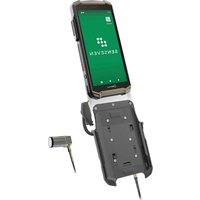
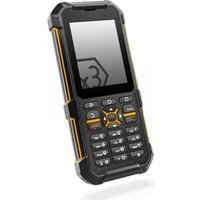
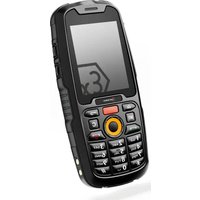
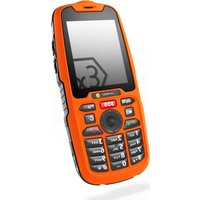
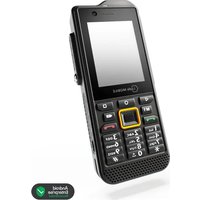
- CONTENTS
- ENGLISH
- >READ AND UNDERSTAND THE INSTRUCTIONS
- PROTECT YOUR LIFE AND READ THE OPERATING MANUAL
- INTENDED USE
- WARRANTY
- EU/UK DECLARATION OF CONFORMITY
- FCC/IC STATEMENT
- EX MARKINGS
- > ATEX:
- >IECEx:
- UKEX:
- > North America:
- > Temperature range:
- > Manufactured by:
- >DEVICE OVERVIEW/FUNCTIONS
- > SAFETY
- USER
- USE IN EXPLOSION HAZARDOUS AREAS
- DANGER
- USE OUTSIDE OF EXPLOSION HAZARDOUS AREAS
- CAUTION
- NOTICE
- POSSIBLE USER ERRORS
- When working in explosion hazardous areas, please note:
- >SCOPE OF DELIVERY
- CELL BROADCAST
- >INSTALLING THE BATTERY
- INSERT/REMOVE SIM CARD
- > INSERT/REMOVE microSD CARD
- CHARGING
- > SWITCHING ON/OFF
- USING THE DEVICE
- CONNECTING APPROVED ACCESSORIES
- 13-PIN ISM INTERFACE
- USB INTERFACE
- CHANGING THE BATTERY
- WARNING
- POSSIBLE DEVICE PROBLEMS
- MAINTENANCE/REPAIR
- RETURN SHIPMENT
- DISTRIBUTION PARTNER
- >CLEANING
- >STORAGE
- RECYCLING
- TRADEMARKS
- DEUTSCH
- >Temperaturbereich:
- >Hersteller:
- PROHLÁŠENÍ FCC/IC
- ZNAČENÍ SOUVISEJÍCÍ S NEBEZPEČÍM VÝBUCHU
- > Teplotní rozsah:
- Výrobce:
- >Temperaturområde:
- Procuent:
- i.safe MOBILE GmbH
- OVERSIGT OVER ENHEDEN/FUNKTIONER
- >Rango de temperatura:
- >Fabricado por:
- FCC-/IC-LAUSUNTO
- EX-MERKINNÄT
- Lämpötila-alue:
- >Valmistaja:
- DÉCLARATION DE CONFORMITÉ UE/UK
- > Plage de temperature:
- > Fabrique par:
- MISE EN MARCHE/ARRÊT
- INTERFACE 13-PIN ISM
- Hömerseklet tartomany:
- Gyarto:
- DICHIARAZIONE FCC/IC
- USO IN AREE A RISCHIO DI ESPLOSIONE
- PERICOLO
- USO FUORI DALLE AREE A RISCHIO DI ESPLOSIONE
- >Temperatuurbereik:
- > Vervaardigd door:
- GOEDGEKEURDE ACCESSOIRES AANSLUITEN
- FCC/IC UTTALELSE
- EX-MERKING
- >Temperaturomrade:
- >Produsert av:
- ENHETSOVERSIKT/FUNKSJONER
- VEDLIKEHOLD/REPARASJON
- Zakres temperatur:
- >Produce:
- >INSERIR/REMOVER CARTÃO SIM
- PERIGO
- POSSÍVEIS PROBLEMAS DO DISPOSITIVO
- IECEx:
- > Nordamerika:
- >Temperaturintervall:
- Tillverkad av:
- ÖVERSIKT/FUNKTIONER HOS ENHETEN
- SÄKERHET
- ANVÄNDARE
- ANVÄNDNING I EXPLOSIONSFARLIGA OMRÅDEN
- FARA
- ANVÄNDNING UTANFÖR EXPLOSIONSFARLIGA OMRÅDEN
- OBSERVERA
- MÖJLIGA ANVÄNDARFEL
- Vid arbete i explosionsfarliga områden observera följande:
- LEVERANSOMFÅNG
- SÄTTA I BATTERIET
- SÄTTA I/TA UR SIM-KORT
- SÄTTA I/TA UR microSD-KORT
- LADDNING
- SÄTT PÅ/AV
- ENHETENS ANVÄNDNING
- > ANSLUTNING GODKÄNDA TILLBEHÖR
- 13-PIN ISM-GRÄNSSNITT
- USB-GRÄNSSNITT
- BYTE AV BATTERI
- MÖJLIGA PROBLEM MED ENHETEN
- UNDERHÅLL/REPARATION
- RETURLEVERANS
- ÅTERFÖRSÄLJARE
- RENGÖRING
- >LAGRING
- ÅTERVINNING
- VARUMÄRKEN
- HRVATSKI
- >PROČITAJTE I RAZUMIJTE UPUTE
- ZAŠTITITE SVOJ ŽIVOT I PROČITAJTE RADNI PRIRUČNIK
- NAMJENA
- JAMSTVO
- IZJAVA O SUKLADNOSTI EU/UK-A
- IZJAVA FCC-A/IC-A
- EX OZNAKE
- Sjeverna Amerika:
- >Raspon temperature:
- >Proizvođač:
- SIGURNOST
- KORISNIK
- UPORABA U PODRUČJIMA UGROŽENIMA EKSPLOZIJOM
- OPASNOST
- UPORABA IZVAN PODRUČJA UGROŽENIH EKSPLOZIJOM
- OPREZ
- NAPOMENA
- MOGUĆE POGREŠKE KORISNIKA
- Kada radite u područjima ugroženima eksplozijom, uzmite u obzir sljedeće:
- OPSEG ISPORUKE
- ĆELIJSKI PRIJENOS
- UGRADNJA BATERIJE
- UMETANJE/UKLANJANJE SIM KARTICE
- UMETANJE/UKLANJANJE microSD KARTICE
- PUNJENJE
- UKLJUČIVANJE/ISKLJUČIVANJE
- UPORABA UREĐAJA
- > SPAJANJE ODOBRENOG PRIBORA
- 13-PIN ISM SUČELJE
- USB SUČELJE
- PUNJENJE BATERIJE
- UPOZORENJE
- MOGUĆI PROBLEMI S UREĐAJEM
- ODRŽAVANJE/POPRAVAK
- POVRATNA DOSTAVA
- > MALOPRODAJNI PARTNER
- ČIŠĆENJE
- ČUVANJE
- RECIKLIRANJE
- ZAŠTITNI ZNACI
- SLOVENSKÁ
- >PREČÍTAJTE SI A POCHOPTE POKYNY
- CHRÁNTE SVOJ ŽIVOT A PREČÍTAJTE SI NÁVOD NA OBSLUHU
- URČENÉ POUŽITIE
- GARANTIE
- ZÁRUKA
- EÚ/UK VYHLÁSENIE O ZHODE
- VYHLÁSENIE FCC/IC
- OZNAČENIA SÚVISIACE S NEBEZPEČENSTVOM VÝBUCHU
- Severná Amerika:
- Teplotný rozsah:
- Výrobca:
- BEZPEČNOST
- POUŽÍVATEL'
- POUŽITIE V OBLASTIACH S NEBEZPEČENSTVOM VÝBUCHU
- NEBEZPEČENSTVO
- POUŽITIE MIMO OBLASTÍ S NEBEZPEČENSTVOM VÝBUCHU
- UPOZORNENIE
- POZNÁMKA
- MOŽNÉ CHYBY POUŽÍVATEL'A
- Pri práci v oblastiach s nebezpečenstvom výbuchu pamätajte na nasledovné:
- ROZSAH DODANIA
- CELULÁRNE VYSIELANIE
- >INŠTALÁCIA BATÉRIE
- VKLADANIE/VYBERANIE SIM KARTY
- VKLADANIE/VYBERANIE microSD KARTY
- NABÍJANIE
- ZAPNUTIE/VYPNUTIE
- POUŽÍVANIE ZARIADENIA
- PRIPOJENIE SCHVÁLENÉHO PRÍSLUŠENSTVA
- ROZHRANIE 13-PIN ISM
- ROZHRANIE USB
- VÝMENA BATÉRIE
- VÝSTRAHA
- > MOŽNÉ PROBLÉMY SO ZARIADENÍM
- ÚDRŽBA/OPRAVA
- VRÁTENIE ZÁSIELKY
- > MALOOBCHODNÝ PARTNER
- ČISTENIE
- SKLADOVANIE
- RECYKLÁCIA
- OCHRANNÉ ZNÁMKY
- СРПСКИ
- ПРОЧИТАЈТЕ И СХВАТИТЕ УПУТСТВО
- ЗАШТИТИТЕ СВОЈ ЖИВОТ И ПРОЧИТАЈТЕ УПУТСТВО ЗА РАД
- HAMEHA
- ГАРАНЦИЈА
- ЕУ/ИК ИЗЛАВА О УСАГЛАШЕНОСТИ
- FCC/IC ИЗJABA
- EX O3HAKE
- > Северна Америка:
- >Температурни опсег:
- >Произвођач:
- БЕЗБЕДНОСТ
- КОРИСНИЦИ
- ПРИМЕНА У ПОТЕНЦИЈАЛНО ЕКСПЛОЗИВНИМ ПОДРУЧЈИМА
- ОПАСНОСТ
- ПРИМЕНА ИЗВАН ПОТЕНЦИЈАЛНО ЕКСПЛОЗИВНИХ ПОДРУЧЈА
- ПАЖЊА
- НАПОМЕНА
- МОГУТЕ ГРЕШКЕ КОРИСНИКА
- САДРЖАЈ ИСПОРУКЕ
- >ИНСТАЛИРАЊЕ БАТЕРИЈЕ
- СТАВЉАЊЕ/УКЛАЊАЊЕ SIM КАРТИЦЕ
- СТАВЉАЊЕ/УКЛАЊАЊЕ microSD КАРТИЦЕ
- ПУЊЕЊЕ
- УКЛЬУЧИВАЊЕ/ИСКЛЬУЧИВАЊЕ
- > КОРИШТЕЊЕ УРЕЋАЈА
- ПРИКЉУЧИВАЊЕ ОДОБРЕНЕ ДОДАТНЕ ОПРЕМЕ.
- 13-PIN ISM ИНТЕРФЕJC
- USB ИНТЕРФЕЈС
- ЗАМЕНА БАТЕРИЈЕ
- УПОЗОРЕЊЕ
- МОГУЋИ ПРОБЛЕМИ СА УРЕЋАЈЕМ
- >ОДРЖАВАНЬЕ/ПОПРАВКА
- ПОВРАТНА ИСПОРУКА
- >МАЛОПРОДАЈНИ ПАРТНЕР
- >ЧИШТЕЊЕ
- >СКЛАДИШТЕЊЕ
- >РЕЦИКЛАЖА
- ЖИГОВИ
- 한국어
- >설명서를 읽고 이해하십시오.
- >용도
- 보중
- EX 마크
- >장치 개요/기능
- >안전
- △위험
- 위험
- 주의
- 알림
- 가능한 사용자 오류
- >공급 범위
- >배터리 설치
- >SIM 카드 삽입/제거
- >microSD 카드 삽입/제거
- 》충전
- >켜기/끄기
- >장치사용
- >승인된 액세서리 연결
- >배터리 교체
- 경고
- 가능한 장치 문제
- >유지보수/수리
- 》소매 대리점
- 》청소
- 》보관
- >재활용
- >상표
- 日本語
- > インストラクションを読んで理解してください
- > 使用目的
- 保証
- EU/UK適合宣言
- FCC/IC宣言
- EXマーキング
- > 北アメリカ:
- 温度範囲:
- 製造元:
- > 安全性
- 危险
- 注意
- 注記
- > 起きる可能性があるユーザー
- 梱包内容
- 危險
- >SIMカードの挿入/取り出し
- > microSDカードの挿入/取り出し
- >充電
- >電源のオン/オフ
- >デバイスの使用
- 承認済みのアクセサリーの接続
- バッテリーの交換
- 警告
- デバイスに起きる可能性がある問題
- メンテナンス/修理
- 製品の返送
- 販売パートナー
- 》清掃
- >保管
- リサイクル
- 商標
- 中国
- 阅读并理解说明书
- >预期用途
- 保修
- 防爆标志
- 安全性
- 小心
- 可能的用户错误
- 标准配置
- >安装电池
- 插入/移除 SIM 卡
- 插入/移除 microSD 卡
- 充电
- 开/关机
- >使用设备
- > 连接获批附件
- USB 接口
- 更换电池
- 可能的设备问题
- >维护/修理
- >零售合作伙伴
- 清洁
- >储存
- 》回收
- 商标
- CONTACT/SERVICE CENTRE
Brand : i.safe Mobile
Model : IS330.1
Category : Mobile Phone