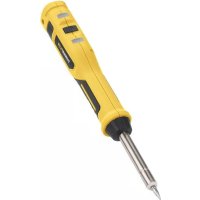
POWX1388 - Welding machine PowerPlus - Free user manual and instructions
Find the device manual for free POWX1388 PowerPlus in PDF.



| Product type | Cordless soldering iron |
| Brand | PowerPlus |
| Model | POWX1388 |
| Power supply | Built-in battery, charges via USB 5 V (adapter not included) |
| Charging time | Approximately 5 to 6 hours |
| Charge indicator | Red (charging) / Green (charged) |
| Maximum temperature | 400 °C |
| Heat-up time | Approximately 60 seconds |
| Tip type | Standard soldering tip (replaceable) |
| Weight | Approximately 200 g |
| Dimensions (L x W x H) | Approximately 20 x 3 x 3 cm |
| Shipping mode | Yes (dormant state to prevent discharge) |
| Usage | Soldering of circuit boards, filler metals |
| Safety | Protective glasses, ventilation, do not touch the tip |
| Tip maintenance | Wipe on a damp sponge before, during and after use |
| Tinning | Required for new tip: melt a little filler metal |
| Spare parts | Soldering tip available |
| Warranty | Conforms to PowerPlus conditions (see manual) |
Frequently Asked Questions - POWX1388 PowerPlus
User questions about POWX1388 PowerPlus
0 question about this device. Answer the ones you know or ask your own.
Ask a new question about this device
Download the instructions for your Welding machine in PDF format for free! Find your manual POWX1388 - PowerPlus and take your electronic device back in hand. On this page are published all the documents necessary for the use of your device. POWX1388 by PowerPlus.
USER MANUAL POWX1388 PowerPlus
natural_image
Yellow powerplush soldering iron with black handle and metal shaft (no text or symbols visible)
NL NEDERLANDS VERTAALDE VERSIE VAN DE ORIGINELE HANDLEIDING
FR FRANÇAIS TRADUCTION DU MODE D'EMPLOI D'ORIGINE
EN ENGLISH ORIGINAL INSTRUCTION MANUAL
natural_image
Yellow powerplug with labeled parts (a and b) and a black cable, no text or symbols on the tool itself.Fig. 2
natural_image
Yellow powerplug with attached black plug and cable, labeled 'POWERPLUS', showing internal components (no text or symbols on main body)Fig. 3

1 PACKAGE CONTENT LIST
- Remove all packaging materials.
- Remove remaining packing and package inserts (if included).
- Check that the package contents are complete.
- Check the appliance, the power cord, the power plug and all accessories for transportation damage.
- Keep the packing materials as far as possible till the end of the warranty period. Dispose it into your local waste disposal system afterwards.

WARNING: Packaging materials are not toys! Children must not play with plastic bags! Danger of suffocation!
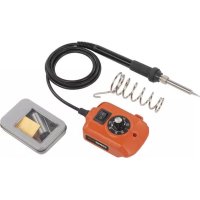
1pc machine 1pc manual 1 pc USB-cable

If any parts are missing or damaged, please contact your dealer.
2 SYMBOLS
In this manual and/or on the machine the following symbols are used:
 | Denotes risk of personal injury or damage to the tool. |  | Read manual before use |
 | In accordance with essential requirements of the European directive(s) | ||
3 GENERAL POWER TOOL SAFETY WARNINGS
Read all safety warnings and instructions. Failure to heed warnings and follow instructions may result in electric shock, fire and/or serious injury. Keep safety warnings and instructions for future reference. The term "power tool" in the safety warnings refers to your mains-operated (corded) power tool or battery-operated (cordless) power tool.
3.1 Working area
- Keep working area clean and well lit. Untidy and dark areas can lead to accidents.
- Do not operate power tools in potentially explosive surroundings, for example, in the presence of inflammable liquids, gases or dust. Power tools create sparks which may ignite the dust or fumes.
- Keep children and bystanders at a distance when operating a power tool. Distractions can cause you to lose control of it.
3.2 Electrical safety
- Always check that the power supply corresponds to the voltage on the rating plate.
- Power tool plugs must match the outlet. Never modify the plug in any way. Do not use adapter plugs with earthed power tools. Unmodified plugs and matching outlets will reduce the risk of an electric shock.
- Avoid body contact with earthed surfaces such as pipes, radiators, kitchen ranges and refrigerators. There is an increased risk of an electric shock if your body is earthed.
- Do not expose power tools to rain or wet conditions. If water gets inside a power tool, it will increase the risk of an electric shock.
- Do not damage the cord. Never use the cord for carrying, pulling or unplugging the power tool. Keep the cord away from heat, oil, sharp edges or moving parts. Damaged or entangled cords increase the risk of an electric shock.
POWX1388
- When operating a power tool outdoors, use an extension cable suitable for outdoor use. Using a cord suitable for outdoor use reduces the risk of an electric shock.
- If operating a power tool in a damp location is unavoidable, use a power supply protected by a residual current device (RCD). Using an RCD reduces the risk of an electric shock.
3.3 Personal safety
- Stay alert, watch what you are doing and use common sense when operating a power tool. Do not use a power tool when you are tired or under the influence of drugs, alcohol or medication. A moment of inattention when operating a power tool may result in serious personal injury.
- Use safety equipment. Always wear eye protection. Using safety equipment such as a dust mask, non-skid safety shoes, a hard hat, or hearing protection whenever it is needed will reduce the risk of personal injury.
- Avoid accidental starts. Ensure the switch is in the off position before inserting the plug. Carrying power tools with your finger on the switch or plugging in power tools when the switch is in the on position makes accidents more likely.
- Remove any adjusting keys or spanners before turning on the power tool. A spanner or key left attached to a rotating part of the power tool may result in personal injury.
- Do not reach out too far. Keep your feet firmly on the ground at all times. This will enable you retain control over the power tool in unexpected situations.
- Dress properly. Do not wear loose clothing or jewellery. Keep your hair, clothing and gloves away from the power tool. Loose clothes, jewellery or long hair can become entangled in the moving parts.
- If there are devices for connecting dust extraction and collection facilities, please ensure that they are attached and used correctly. Using such devices can reduce dust-related hazards.
3.4 Power tool use and care
- Do not expect the power tool to do more than it can. Use the correct power tool for what you want to do. A power tool will achieve better results and be safer if used in the context for which it was designed.
- Do not use the power tool if the switch cannot turn it on and off. A power tool with a broken switch is dangerous and must be repaired.
- Disconnect the plug from the power source before making adjustments, changing accessories, or storing power tools. Such preventive safety measures reduce the risk of starting the power tool accidentally.
- Store power tools, when not in use, out of the reach of children and do not allow people who are not familiar with the power tool or these instructions to operate it. Power tools are potentially dangerous in the hands of untrained users.
- Maintain power tools. Check for misalignment or jammed moving parts, breakages or any other feature that might affect the operation of the power tool. If it is damaged, the power tool must be repaired. Many accidents are caused by using poorly maintained power tools.
- Keep cutting tools sharp and clean. Properly maintained cutting tools with sharp cutting edges are less likely to jam and are easier to control.
- Use the power tool, accessories and cutting tools, etc., in accordance with these instructions and in the manner intended for the particular type of power tool, taking into account the working conditions and the work which needs to be done. Using a power tool in ways for which it was not intended can lead to potentially hazardous situations.
3.5 Service
- Your power tool should be serviced by a qualified specialist using only standard spare parts. This will ensure that it meets the required safety standards.
4 TECHNICAL DETAILS
| Rated Voltage | 4V |
| Battery capacity | 4400mAh |
| Battery technology | Lithium battery |
| Average charging time | 5-6hrs |
5 WARRANTY
- This product is warranted as provided by law for a 36-month period effective from the date of purchase by the first user.
- This warranty covers all material or production flaws excluding : batteries, chargers, defective parts subject to normal wear & tear such as bearings, brushes, cables, and plugs, or accessories such as drills, drill bits, saw blades, etc. ; damage or defects resulting from maltreatment, accidents or alterations; nor the cost of transportation.
- Damage and/or defects resulting from inappropriate use also do not fall under the warranty provisions.
- We also disclaim all liability for any bodily injury resulting from inappropriate use of the tool.
- Repairs may only be carried out by an authorised customer service centre for Powerplus tools.
- You can always obtain more information at the number 00 32 3 292 92 90.
- Any transportation costs shall always be borne by the customer, unless agreed otherwise in writing.
- At the same time, no claim can be made on the warranty if the damage of the device is the result of negligent maintenance or overload.
- Definitely excluded from the warranty is damage resulting from fluid permeation, excessive dust penetration, intentional damage (on purpose or by gross carelessness), inappropriate usage (use for purposes for which the device is not suitable), incompetent usage (e.g. not following the instructions given in the manual), inexpert assembly, lightning strike, erroneous net voltage. This list is not exhaustive.
- Acceptance of claims under warranty can never lead to the prolongation of the warranty period nor commencement of a new warranty period in case of a device replacement.
■ Devices or parts which are replaced under the warranty therefore remain the property of Varo NV. - We reserve the right to reject a claim whenever the purchase cannot be verified or when it is clear that the product has not been properly maintained. (Clean ventilation slots, carbon brushes serviced regularly, etc.).
- Your purchase receipt must be kept as proof of date of purchase.
- Your appliance must be returned undismantled to your dealer in an acceptably clean state, (in its original blow-moulded case if applicable to the unit), accompanied by proof of purchase.
6 ENVIRONMENT
Should your appliance need replacement after extended use, do not dispose of it with the household refuse, but in an environmentally safe way.
Waste produced by electrical machine items should not be handled like normal household rubbish. Please recycle where recycle facilities exist. Check with your Local Authority or retailer for recycling advice.
7 DECLARATION OF CONFORMITY


VARO – Vic. Van Rompuy N.V. – Joseph Van Instraat 9 – 2500 Lier – Belgium, solely responsible declares that,
Product: Soldering iron
Trade mark: POWERplus
Model: POWX1388
is in conformity with the essential requirements and other relevant provisions of the applicable European Directives as they relate to European harmonized standards. Any unauthorized modification of the apparatus voids this declaration.
European Directives (including, if applicable, their amending directives):
2011/65/EU
2014/35/EU
2014/30/EU
European harmonized standards, and their amendments:
EN60335-1 : 2012
EN60335-2-45 : 2002
EN55014-1 : 2017
EN55014-2:2015
The undersigned acts on behalf of and under the power of attorney granted by the company management,
natural_image
Simple hand-drawn sketch of a rounded rectangular shape with no text or symbolsPhilippe Vankerkhove
Certification Manager
22/06/2021, Lier - Belgium
SOLDEERBOUT POWX1388
1 BEOOGD GEBRUIK
A soldering iron is a hand tool most commonly used in soldering. It supplies heat to melt the solder so that it can flow into the joint between two metal workpieces. Not suitable for professional use.

WARNING! For your own safety, read this manual and the general safety instructions carefully before using the appliance. Your power tool should only be given to other users together with these instructions.
2 DESCRIPTION (FIG. A)
- Solder tip
- Shaft
- Grip
- Heating indicator
- ON/OFF switch button
- Charging and battery indicator
- Charging socket
- Flange
- USB cable
3 OPERATING INSTRUCTIONS
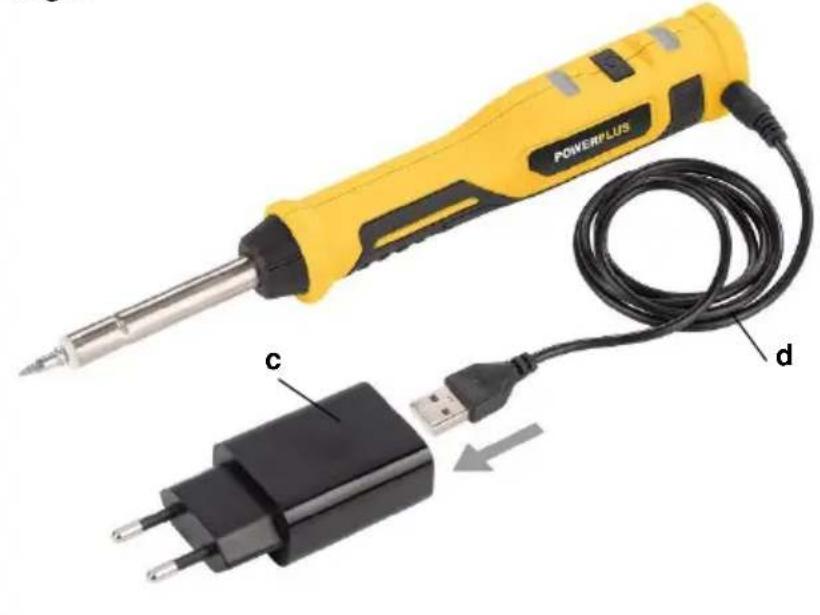
3.1 Charging the battery (Fig. 1 -2)
Description
a. Charging socket
b. DC plug of USB cable
c. Adapter (not included)
d. USB cable

NOTE: During charging the battery will become warm as it is being charged. The battery supplied with this power tool contains a test charge only and must be fully charged before use. First read the safety instructions then follow the charging instructions.
- Use a 5 Volt standard USB adapter (c) only and connect is to the USB cable.
- Plug the charger plug (b) into the charging socket (a) on the rear side of this cordless soldering iron.
- Charge time is approx 5-6hours.
- When the battery is charging, the indicator (6) is RED.
- When fully charged, the indicator (6) will change to GREEN.

NOTE: Do not allow the cable to become knotted or kinked.
NOTE: Do not use the charger that does not meet the voltage of the machine to charge the machine
Unplug the adapter when not in use and store it in a suitable storage cabinet.
Avoid charging your battery in freezing conditions as charging power will not be sufficient.

NOTE: If the tool will not be used for long periods of time, charge the battery every 3-6 months.
NOTE: To prevent damage to the battery, when charge runs out, charge the battery to reach full or no less than half charge before storage.
3.2 ON/OFF switch button (Fig. 3)
The cordless soldering iron is equipped with an ON/OFF switch button (5), an indicator (6) and a heating indicator (4).
3.3 With ON/OFF switch button:
- Single click, power indicating.

Green: Enough power;

- Press and hold 1s – power on.

Red: Operation after preheating 60s.
- Press and hold 1s – power off.
3.4 Release/set shipping mode

NOTE: this tool is preset to shipping mode (dormant state) which to avoid the battery was discharged due to misoperation and the risk of fire, so the switch cannot be start the tool.
Before first use, the soldering iron must be awakened by connecting the adapter to the power supply, the charging indicator (6) shows red, the tool can be used normally after unplug the adapter.
It is recommended that reset the tool to shipping mode when transport or storage. Press and hold the switch button (5) 5-8s, release it after the red indicator (6) flashes 3 times and make sure that the switch does not work.
3.5 Preparing to solder

WARNING: Always use safety glasses and ensure the work area is well ventilated to help avoid breathing in dangerous fumes.
The Soldering Iron is typically used to melt and apply solder on various surfaces including circuit boards.
Before beginning to solder, secure the workpiece so that it does not move and affect your accuracy.
Prepare a damp sponge nearby to clean the tip when required.

NOTE: It is highly recommended that the soldering tip is wiped clean on a damp sponge (not included) after use to prolong service life and performance.
Melt a small amount of solder onto the tip of the iron (1). This process is known as ‘tinning’ and will assist the heat in flowing from the soldering iron’s tip, to the solder joint. It is important to do this immediately with new soldering tips.
Ensure that the workpiece and soldering tip are clean.
The workpiece can be cleaned with the use of a small file or knife blade. It is recommended that the user wipe clean the soldering tip with a damp sponge before, during and after soldering. This will help promote a cleaner and stronger solder joint.
3.6 Soldering
Hold the soldering iron close to the base of the grip (3), and just above the flange (8) like a pen.

WARNING: Never touch the shaft (2) or tip (1) as temperatures can range up to 400°C.
Hold the soldering iron with the tip pressed onto the workpiece for a few second to allow it to heat up.
Slowly feed the solder onto the joint, not the soldering iron, allowing the solder to melt onto the joint.
Once the solder has been applied to the joint, hold the workpiece still while removing the solder and soldering iron simultaneously.

NOTE: A good solder joint will appear smooth and shiny. If this is not the case, you will need to reheat the joint and re-apply the solder.
NOTE: The solder tip is designed for very high lifetime, so do not need to replace it under normal use.
LÖTKOLBEN POWX1388
natural_image
Yellow and black power soldering tool with USB cable, no visible text or symbolsvaro
WWW.VARO.COM
DESIGNED AND MARKETED BY VARO
©copyright by varo
VARO - VIC. VAN ROMPUY nv
JOSEPH VAN INSTRAAT 9 - 2500 LIER - BELGIUM
OFFICES:
- PACKAGE CONTENT LIST
- WARNING: Packaging materials are not toys! Children must not play with plastic bags! Danger of suffocation!
- If any parts are missing or damaged, please contact your dealer.
- SYMBOLS
- GENERAL POWER TOOL SAFETY WARNINGS
- Working area
- Electrical safety
- POWX1388
- Personal safety
- Power tool use and care
- Service
- WARRANTY
- ENVIRONMENT
- DECLARATION OF CONFORMITY
- SOLDEERBOUT POWX1388
- BEOOGD GEBRUIK
- DESCRIPTION (FIG. A)
- OPERATING INSTRUCTIONS
- Charging the battery (Fig. 1 -2)
- ON/OFF switch button (Fig. 3)
- With ON/OFF switch button:
- Release/set shipping mode
- Preparing to solder
- Soldering
- LÖTKOLBEN POWX1388
Brand : PowerPlus
Model : POWX1388
Category : Welding machine