MJ26A6093AT - Microwaves SAMSUNG - Free user manual and instructions
Find the device manual for free MJ26A6093AT SAMSUNG in PDF.



| Product Type | Commercial Microwave Oven |
| Brand | Samsung |
| Model | MJ26A6093AT |
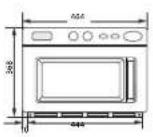
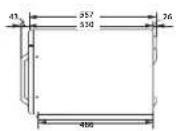
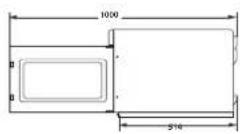
| External dimensions (W x H x D) | 484 x 368 x 557 mm |
| Internal dimensions (W x H x D) | 370 x 190 x 370 mm |
| Capacity | 26 litres |
| Net weight | 33.1 kg |
| Power supply | 230-240 V ~ 50 Hz, 13 A |
| Microwave output power | 1850 W (IEC-705) |
| Operating frequency | 2450 MHz |
| Power levels | 5 levels: High (100%), Medium (70%), Low (50%), High defrost (20%), Low defrost (10%) |
| Cooking functions | One-step cooking, multi-step cooking, defrost, reheat, +20 sec key, memory programming (up to 50 programs), Double quantity key |
| Display | Digital clock, program indicators, power level, defrost, memory, air filter |
| Safety | Child safety lock, automatic empty stop (30 min), safety fuse, door lock system |
| Maintenance and cleaning | Regular cleaning of interior and exterior surfaces, washing the air filter, removing the upper interior part for cleaning |
| Air filter | Removable air filter with cleaning indicator (programmable duration from 1 to 999 hours) |
| Spare parts and repairability | Replaceable fuse (BS1363), interior lamp (category G) not user-replaceable - contact Samsung after-sales service |
| General information | Warranty does not cover travel for usage explanations. Contact local after-sales service (list of numbers in the manual). |
| Included accessories | Turntable, air filter, stacking support (for stack installation) |
Frequently Asked Questions - MJ26A6093AT SAMSUNG
User questions about MJ26A6093AT SAMSUNG
0 question about this device. Answer the ones you know or ask your own.
Ask a new question about this device
Download the instructions for your Microwaves in PDF format for free! Find your manual MJ26A6093AT - SAMSUNG and take your electronic device back in hand. On this page are published all the documents necessary for the use of your device. MJ26A6093AT by SAMSUNG.
USER MANUAL MJ26A6093AT SAMSUNG
Owner's Instructions & Cooking Guide
Please be advised that the Samsung warranty does NOT cover service calls to explain product operation, correct improper installation, or perform normal cleaning or maintenance.
MJ26A6093 (1850 WATT)
MJ26A6053 (1500 WATT)
imagine the possibilities
Thank you for purchasing this Samsung product.
SAMSUNG
CONTENTS USING THIS INSTRUCTION BOOKLET
Using this instruction booklet. 2
Important safety information 2
Legend for symbols and icons. 2
Precautions to avoid possible exposure to excessive microwave energy.3
Important safety instructions 3
Correct disposal of this product (waste electrical & electronic equipment)............5
Installation & Wiring Instructions.. 6
Lamp (light source) 6
Oven 6
Control Panel. 7
Display 7
Setting the time 7
Cooking Instructions 8
Cooking/Reheating 8
Power levels and Time Variations 9
Stopping the cooking 1
Repeat Feature. 10
Using +20s Pad. 10
Using the Defrost Feature 11
Memory Pads Programming 11
How to Operate Memory Cooking 13
How to Operate Double Quantity Pad 13
Double Quantity Pad Programming. 14
Controlling Beep Tone 14
Programming Air Filter Clean Time 15
Error Codes 15
Hidden Keys. 16
Care of Your Microwave Oven. 16
Cleaning the Ceiling Cover. 17
Cleaning the Air Filter 17
Installation Instructions for Stacking 17
Cookware guide 18
Cleaning your microwave oven 22
Storing and repairing your microwave oven. 22
Technical specifications 23
You have just purchased a SAMSUNG microwave oven. Your Owner's Instructions contain valuable information on cooking with your microwave oven:
- Safety precautions
- Suitable accessories and cookware
Useful cooking tips - Cooking tips
IMPORTANT SAFETY INFORMATION
IMPORTANT SAFETY INSTRUCTIONS.
READ CAREFULLY AND KEEP FOR FUTURE REFERENCE.
Before using the oven, confirm that the following instructions are
followed.
- Use this appliance only for its intended purpose as described in this instruction
manual, warnings and Important Safety Instructions in this manual do not contain all possible conditions and instructions that may occur. This is a
not cover all possible conditions and situations that may occur . It is yourresponsibility to use common sense , caution , and care upon instilling
Responsibility to use common sense, caution, and care when installing, maintaining, and operating your appliance.
Because these following operating instructions cover various models, the
characteristics of your microwave oven may differ slightly from those described
in this manual and not all warning signs may be applicable. If you have any
questions or concerns, contact your nearest service centre or find help and
- This microwave oven is supposed for heating food. It is intended for domestic
home-use only. Do not heat any type of textiles or cushions filled with grains,
which could cause burns and fire. The manufacturer cannot be held liable for
- Failure to maintain the oven in a clean condition could lead to deterioration of
the surface that could adversely affect the life of the appliance and possible
result in a hazardous situation.
LEGEND FOR SYMBOLS AND ICONS

WARNING
Hazards or unsafe practices that may result in severe personal
injury or death

CAUTION
Hazards or unsafe practices that may result in minor personal
injury or property damage.
Warning; Fire hazard Warning; Hot surface
Warning; Electricity Warning; Explos material
Do NOT attempt. Follow directions explicitly.
Do NOT disassemble.
Do NOT touch.
Call the service center for help. Note
Important
PRECAUTIONS TO AVOID POSSIBLE EXPOSURE TO EXCESSIVE MICROWAVE ENERGY.
Failure to observe the following safety precautions may result in harmful exposure to microwave energy.
(a) Under no circumstances should any attempt be made to operate the oven with the door open or to tamper with the safety interlocks (door latches) or to insert anything into the safety interlock holes.
(b) Do NOT place any object between the oven door and front face or allow food or cleaner residues to accumulate on sealing surfaces. Ensure that the door and door sealing surfaces are kept clean by wiping after use first with a damp cloth and then with a soft dry cloth.
(c) Do NOT operate the oven if it is damaged until it has been repaired by a qualified microwave service technician trained by the manufacturer. It is particularly important that the oven door closes properly and that there is no damage to the:
(1) door (bent)
(2) door hinges (broken or loose)
(3) door seals and sealing surfaces
(d) The oven should not be adjusted or repaired by anyone other than a property qualified microwave service technician trained by the manufacturer.
This product is a Group 2 Class B ISM equipment. The definition of group 2 which contains all ISM equipment in which radio-frequency energy is intentionally generated and/or used in the form of electromagnetic radiation for the treatment of material, and EDM and arc welding equipment.
For Class B equipment is equipment suitable for use in domestic establishments and in establishments directly connected to a low voltage power supply network which supplies buildings used for domestic purposes.
IMPORTANT SAFETY INSTRUCTIONS
Make sure that these safety precautions are obeyed at all times.
| WARNING | A | A | A | A |
| Only qualified staff should be allowed to modify or repair the microwave oven. | ✓ | ✓ | ✓ | ✓ |
| Do not heat liquids and other food in sealed containers for microwave function. | ✓ | ✓ | ✓ | ✓ |
| For your safety, do not use high-pressure water cleaners or steam jet cleaners. | ✓ | ✓ | ✓ | ✓ |
| Do not install this appliance; near heater, inflammable material; in a humid, oily or dusty location, in a location exposed to direct sunlight and water or where gas may leak; on un level ground. | ✓ | ✓ | ✓ | ✓ |
| This appliance must be properly grounded in accordance with local and national codes. | ✓ | ✓ | ✓ | ✓ |
| Remove all foreign substances such as dust or water from the power plug terminals and contact points using a dry cloth on a regular basis. | ✓ | ✓ | ✓ | ✓ |
| Do not pull or excessively bend or place heavy objecton the power cord. | ✓ | ✓ | ✓ | ✓ |
| In the event of a gas leak (such as propane gas, LP gas, etc.), ventilator immediately without touching the power plug. | ✓ | ✓ | ✓ | ✓ |
| Do not touch the power plug with wet hands. | ✓ | ✓ | ✓ | ✓ |
| Do not turn the appliance off by unplugging the power plug while an operation is in progress. | ✓ | ✓ | ✓ | ✓ |
| Do not insert fingers or foreign substances. If any foreign substance such as water has entered the appliance, unplug the power plug and contact your nearest service centre. | ✓ | ✓ | ✓ | ✓ |
| Do not apply excessive pressure or impact to the appliance. | ✓ | ✓ | ✓ | ✓ |
| Do not place the oven over a fragile object such as a sink or glass object. (Counter top model only.) | ✓ | ✓ | ||
| Do not use benzene, thinner, alcohol, steam cleaner or high pressure cleaner to clean the appliance. | ✓ | ✓ | ✓ | ✓ |
| Ensure that the power voltage, frequency and current are the same as those of the product specifications. | ✓ | ✓ | ✓ | |
| Plug the power plug into the wall socket firmly. Do not use a multiple plug adapter, an extension cord or an electric transformer. | ✓ | ✓ | ✓ | |
| Do not hook the power cord on a metal object, insert the power cord between the objects or behind the oven. | √ | √ | √ | |
| Do not use a damaged power plug, damaged power cord or loose wall socket. When the power plug or power cord is damaged, contact your nearest service centre. | √ | √ | √ | √ |
| Appliances are not intended to be operated by means of an external timer or separate remote control system. | √ | √ | ||
| Do not pour or directly spray water onto the oven. | √ | √ | ||
| Do not place objects on the oven, inside or on the door of the oven. | √ | √ | √ | |
| Do not spray volatile material such as insecticide onto the surface of the oven. | √ | √ | ||
| Children should be supervised to ensure that they do not play with the appliance. Keep children away from the door when opening or closing it as they may bumo themselves on the door or catch their lingers in the door. | √ | √ | √ | √ |
| The appliance is not intended for installing in road vehicles, caravans and similar vehicles etc. | √ | √ | √ | √ |
| Do not store flammable materials in the oven. Take special care when heating dishes or drinks that contain alcohol as alcohol vaspours may contact a hot part of the oven. | √ | √ | √ | |
| The microwave oven is intended to be used on the counter or counter top use only, the microwave oven shall not be placed in a cabinet. (Counter top model only.) | √ | √ | √ | √ |
| WARNING: The appliance and its accessible parts become not during use. Care should be taken to avoid touching heating elements. Children less than 8 years of age shall be kept away unless continuously supervised. | √ | √ | √ | √ |
| WARNING: Only allow children to use the oven without supervision when adequate instructions have been given so that the child is able to use the oven in a safe way and understands the hazards of improper use. | √ | √ | √ | √ |
| This appliance can be used by children aged from 8 years and above and persons with reduced physical, sensory or mental capabilities or lack of experience and knowledge if they have been given supervision or instruction concerning use of the appliance in a safe way and understand the hazards involved. Children shall not play with the appliance. Cleaning and user maintenance shall not be made by children without supervision. | √ | √ | √ | √ |
| WARNING: If the door or door seals are damaged, the oven must not be operated until it has been repaired by a competent person. | √ | √ | √ | √ |
| WARNING: It is hazardous for anyone other than a competent person to carry out any service or repair operation that involves the removal of a cover which gives protection against exposure to microwave energy. | ✓ | ✓ | ✓ | ✓ |
| WARNING: Ensure that the appliance is switched off before replacing the lamp to avoid the possibility of electric shock. | ✓ | ✓ | ✓ | |
| WARNING: Liquids and other foods must not be heated in sealed containers since they are liable to explode. | ✓ | ✓ | ✓ | |
| WARNING: Accessible parts may become hot during use. To avoid burns young children should be kept away. | ✓ | ✓ | ||
| WARNING: Microwave heating of beverages can result in delayed eruptive boiling, therefore care must be taken when handling the container; To prevent this situation ALWAYS allow a standing time of at least 20 seconds after the oven has been switched off so that the temperature can equalize. Stir during heating, if necessary, and ALWAYS stir after heating. In the event of scalding, follow these FIRST AID instructions: • Immense the scalded area in cold water for at least 10 minutes. • Cover with a clean, dry dressing. • Do not apply any creams, oils or lotions. | ✓ | ✓ | ✓ | ✓ |
| During use the appliance becomes hot. Care should be taken to avoid touching heating elements inside the oven. | ✓ | ✓ | ✓ | |
| WARNING: The contents of feeding bottles and baby food jars shall be stirred or shaken and the temperature checked before consumption, in order to avoid burns; | ✓ | ✓ | ||
| The appliance is not intended for use by persons (including children) with reduced physical, sensory or mental capabilities, or lack of experience and knowledge, unless they have been given supervision or instruction concerning use of the appliance by a person responsible for their safety. | ✓ | ✓ | ✓ | ✓ |
| This oven should be positioned proper direction and height permitting easy access to cavity and control area. | ✓ | ✓ | ✓ | ✓ |
| Before using the oven first time, oven should be operated with the water during 10 minute and then used. | ✓ | ✓ | ✓ | ✓ |
| This microwave oven has to be positioned so that plug is accessible. If the oven generates a strange noise, a burning smell, or smoke is emitted, unplug the power plug immediately and contact your nearest service center. | ✓ | ✓ | ✓ | ✓ |
| during cleaning conditions the surfaces may get hotter than usual and children should be kept away. (Cleaning function model only.) | ✓ | ✓ | ||
| Excess spillage must be removed before cleaning and utensils which state in cleaning manual can be left in the oven during cleaning. (Cleaning function model only.) | ✓ | ✓ | ✓ | ✓ |
| ★ Appliance should allow to disconnection of the appliance from the supply after installation. The disconnection may be achieved by having the plug accessible or by incorporating a switch in the fixed wiring in accordance with the wiring rules. (Built-in model only.) | ✓ | ✓ | ✓ |
| If the supply cord is damaged, it must be replaced by the manufacturer, its service agent or similarly qualified persons in order to avoid a hazard. | ✓ | ||
| WARNING: When the appliance is operated in the combination mode, children should only use the oven under adult supervision due to the temperatures generated. | ✓ | ||
| The temperature of accessible surfaces may be high when the appliance is operating | ✓ | ||
| The door or the outer surface may get hot when the appliance is operating | ✓ |
| CAUTION | A | A | A | A |
| Only use utensils that are suitable for use in microwave ovens: DO NOT use any metallic containers, Dinnerware with gold or silver trimmings, Skewers, forks, etc. Remove wire twist ties from paper or plastic bags. Reason: Electric arcing or sparking may occur and may damage the oven. | √ | √ | √ | |
| When heating food in plastic or paper containers, keep an eye on the oven due to the possibility of ignition; | √ | √ | ||
| Do not use your microwave oven to dry papers or clothes. | √ | √ | √ | |
| Use shorter times for smaller amounts of food to prevent overheating and burning food. | √ | √ | √ | |
| If smoke is observed, switch off or unplug the appliance and keep the door closed in order to stifle any flames; | √ | √ | √ | |
| The oven should be cleaned regularly and any food deposits removed; | √ | √ | √ | |
| Do not immerse the power cable or power plug in water and keep the power cable away from heat. | √ | √ | ||
| Eggs in their shell and whole hard-boiled eggs should not be heated in microwave ovens since they may explode, even after microwave heating has ended. Also do not heat airtight or vacuum-sealed bottles, jars, containers, nuts in shells, tomatoes etc. | √ | √ | ||
| Do not cover the ventilation slots with cloth or paper. They may catch fire as hot air escapes from the oven. The oven may also overheat and switch itself off automatically, and will remain off until it cools sufficiently. | √ | √ |
| Always use oven mitts when removing a dish from the oven to avoid unintentional burns. | |||
| Do not touch heating elements or interior oven walls until the oven has cooled down. | |||
| Stir liquids halfway during heating or after heating ends and allow the liquid stand at least 20 seconds after heating to prevent eruptive boiling. | |||
| Stand at arms length from the oven when opening the door to avoid getting scalded by escaping hot air or steam. | |||
| Do not operate the microwave oven when it is empty. The microwave oven will automatically shut down for 30 minutes for safety purposes. We recommend placing a glass of water inside the oven at all times to absorb microwave energy in case the microwave oven is started accidentally. | |||
| Do not use harsh abrasive cleaners or sharp metal scrapers to clean the oven door glass since they can scratch the surface, which may result in shattering of the glass. | |||
| Install the oven in compliance with the clearances stated in this manual. (See installing your microwave oven.) | |||
| Take care when connecting other electrical appliances to sockets near the oven. |
| CORRECT DISPOSAL OF THIS PRODUCT (WASTE ELECTRICAL & ELECTRONIC EQUIPMENT) |
| (Applicable in countries with separate collection systems) |
| This marking on the product, accessories or literature indicates that the product and its electronic accessories (e.g. charger, headset, USB cable) should not be disposed of with other household waste at the end of their working life. To prevent possible harm to the environment or human health from uncontrolled waste disposal, please separate these items from other types of waste and recycle them responsibly to promote the sustainable reuse of material resources. |
| Household users should contact either the retailer where they purchased this product, or their local government office, for details of where and how they can take these items for environmentally safe recycling. |
| Business users should contact their supplier and check the terms and conditions of the purchase contract. This product and its electronic accessories should not be mixed with other commercial wastes for disposal. |
| For information on Samsung's environmental commitments and product specific regulatory obligations e.g. REACH, WEEE, Batteries, visit : www.samsung.com/uk/ aboutsamsung/sustainability/environment/our-commitment/data/ |
INSTALLATION & WIRING INSTRUCTIONS
IMPORTANT NOTE :
The mains lead on this equipment is supplied with a mouldedplug incorporating a fuse.
The value of the fuse is indicated on the pin face of the plug and, if it requires replacing, a fuse approved to BS1363 of the same rating must be used. Never use the plug with the fuse cover omitted if the cover is detachable. If a replacement fuse cover is required, it must be of the same colour as the pin face of the plug.
Replacement covers are available from your Dealer. If the fitted plug is not suitable for the power points in your house or the cable is not long enough to reach a power point, you should obtain a suitable safely approved extension lead or consult your Dealer for assistance. However, if there is no alternative to cutting off the plug, remove the fuse and then safely dispose of the plug. Do not connect the plug to a mains socket, as there is a risk of shock hazard from the bared flexible cord.
LAMP (LIGHT SOURCE)
This product contains a light source of energy efficiency class < G>
The lamps and control gears are not user-serviceable. To replace the lamps or control gears of the product, contact a local Samsung service centre.
OVEN

- DISPLAY
2.CONTROL PANEL - START BUTTON
- DOOR HANDLE
-
DOOR
-
DOOR LATCHES
-
PLATE TRAY
11.CXVEN.AMP
- AIR FILTER
10.SAFETY INTERLOCK HOLES
CONTROL PANEL
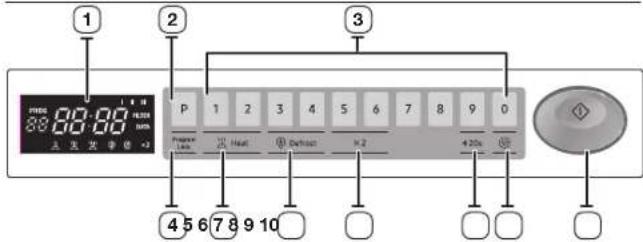
- DISPLAY
2.PROGRAM PAD - NUMBER PADS (Time, Memory Programming)
4.PROGRAM LOCK PAD -
POWER LEVEL SELECTOR PAD
-
DEFROST SELECTOR PAD
- DOUBLE QUANTITY PAD
- +20s PAD (One Touch Cook Pad)
- CANCEL PAD
- START BUTTON
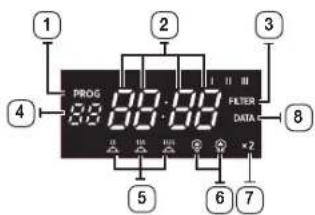
DISPLAY
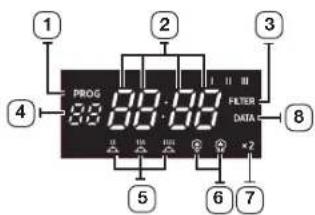
1.PROGRAMINDICATOR
2. TIME DISPLAY
3. AIR FILTER CHECK TIME DISPLAY INDICATOR
4. MEMORY PAD NUMBER INDICATOR
5. POWER LEVEL INDICATORS
6. DEFROST INDICATORS
7. DOUBLE QUANTITY INDICATOR
8. DATA CHECK INDICATOR
SETTING THE TIME
Your microwave oven has an inbuilt clock. When power is supplied, "0", "88:88" or "12:00" is automatically displayed on the display. Please set the current time. The time can be displayed in either the 24-hour or 12-hour notation. You must set the clock:
- When you first install your microwave oven
After a power failure
Do not forget to reset the clock when you switch to and from summer and winter time.
Auto energy saving function
If you do not select any function when appliance is in the middle of setting or operating with temporary stop condition, function is canceled and clock will be displayed after 25 minutes.
Oven Lamp will be turned off after 5 minutes with door open condition.
- To display the time in the... Then press +20s
24-hour notation
12-hour notation
Once
Twice
- Use NUMBER PADS button to enter the current time. You must press at least three numbers to set the clock. If the current time is 5:00 enter, 5,0,0.
- When the right time is displayed, press the START BUTTON to start the clock. The clock sets by itself within 10 seconds.
If you don't want to setting the time, press the CANCEL PAD before starting your cooking.
If you want to change or reset the time setting, plug your oven again.
COOKING INSTRUCTIONS
The IEC Power Output rating is an internationally standardised rating, so all microwave manufacturers now use the same method of measuring power output.
If food packaging gives cooking instructions based on IEC Power ratings, set cooking times according to the IEC Power of your oven. For example:
If the cooking instructions are based on a 650W oven, then you will need to reduce some cooking time for the MW87L (850W) Ready meals are now very convenient and popular. These are meals which are already prepared and cooked by the food manufacturer, and then frozen, chilled or vacuum sealed for long life.
Increasingly, heating times for such ready meals are being based on the Heating Categories A, B, C, D and E.
On this instance, simply match the heating category of your oven to the instructions on the food package, and set your timer accordingly.
For example : If the heating instructions are 3 minutes on HIGH for a D category oven, then you will need to set your timer for less than 3 minutes on HIGH for the MJ26A6093 (E category).
Always remember that cooking instructions are intended only as a guide. If you have followed the instructions and the food is still not piping hot throughout, simply return it to the oven and cook it until it is.
COOKING/REHEATING
One-stage cooking
Make sure the oven is plugged into a properly earthed electrical outlet.
Open the door(The oven lamp will be turned on.). Put the food into a suitable container, place it in the centre of the oven and then close the door securely (The oven lamp will go off.).
- Select the desired power level by pressing the Power Level Selector pad.
Result: The selected power level will be displayed in the display window.

- Set the desired heating time by pressing the NUMBER pads.
Result: The selected time is displayed in the display window.
12:00
The maximum time according to each cooking power level can be referred to in the title "Power Levels ans Time Variations" on page 9. The NUMBER pads will not operate or respond when you press a cooking time exceeding the maximum value. It is not possible to set a cooking time for longer than the maximum time allowed on the chosen program. It is advisable to press CANCEL and to enter a new power level and cooking time.
3. Press the button.
Result: The oven lamp and cooling fan will be turned on. Heating will start. The time on digital display will count down.
1159
When all time is elapsed, the end of cycle Beep Tone will sound 4 times and all heating will stop.
The oven lamp will go off. For 1 min, the cooling fan will keep working in order to cool down the interior parts. During the time, the fan will not stop even when you open the door. 1 min later it will stop. Food may be removed from oven whilst the fan is still running.
During the time, the fan will not stop even when you open the door. 1 min later it will stop. Food may be removed from oven whilst the fan is still running.
4. Open the door and take the food out.
Close the door. The oven lamp will go off.
Whilst in a heating cycle, one press on ( pad stops the oven. You can restart it by pressing the ( button or a second press on ( pad will cancel the selected program. While NOT in a heating cycle, one tap on ( pad cancels the selected program.
You can press +20s pad one or more times in order to add the cooking time by 20 seconds. But you can not exceed the maximum time per power level allowed for power level selected.
When you first plug in the power cord, the oven beeps once and all the indicators show for 5 sec in the display window.
When heating cycle is completed and you open the door, the oven lamp automatically turns on and goes off 5 min later.
When you open the door whilst in a heating cycle, the oven stops operating and the oven lamp automatically turns on for 5 min and goes off 5 min later. If you leave the oven door open for more than 1 min, the oven beeps once every minute.
Multi-stage cooking
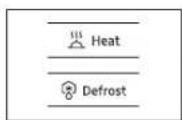
- Select the desired power level by pressing the POWER LEVEL Selector pad or DEFROST pad. Result: The selected power level will be displayed in the display window.

- Set the desired heating time by pressing the NUMBER pads.
Result: The selected time is displayed in the display window.

The maximum time according to each cooking power level can be referred to in the title "Power Levels and Time Variations" on page 9. The NUMBER pads will not operate or respond when you press a cooking time exceeding the maximum value. It is not possible to set a cooking time for longer than the maximum time allowed on the chosen program. It is advisable to press CANCEL and to enter a new power level and cooking time.
3. Repeat steps 1 and 2 for I or II stage memory programming.
4. Press the button.
Result: The oven lamp and cooling fan will be turned
on. The oven will automatically start heating according to pre-programed cooking time and power level.(I stage II stage).
The time on digital display will count down.

You can not set up the same POWER LEVEL or DEFROST. It operates as setting up sequence.
POWER LEVELS AND TIME VARIATIONS
The power level function enables you to adapt the amount of energy dissipated and thus the time required to cook or reheat your food, according to its type and quantity. You can choose between the power levels below.
| Power level | MJ26A6093 MJ26A6053 | ||
| Percentage Output Percentage Output | |||
| HIGH (1) | 100 % 1850 W 100 % 1500 W | ||
| MEDIUM (2) | 70 % 1295 W 70 % 1050 W | ||
| LOW (3) | 50 % 925 W 50 % 750 W | ||
| HIGH DEFROST (4) | 20 % 370 W 25 % 375 W | ||
| LOW DEFROST (5) | 10 % 185 W 13 % 195 W | ||
The cooking times given in recipes and in this booklet correspond to the specific power level indicated.
| Power level | Max. Time |
| HIGH (###) | 25 mins |
| MEDIUM (###) | 40 mins |
| LOW (###) | 40 mins |
| HIGH DEFROST (###) | 50 mins |
| LOW DEFROST (###) | 50 mins |
STOPPING THE COOKING
You can stop cooking at any time so that you can:
Check the food
- Turn the food over or stir it
- Leave it to stand
To stop the cooking... Then...
| Temporarily | Open the door or press ( ⑥pad once. Result: Cooking stops. To resume cooking, close the door and press ( ①again. |
| Completely | Press the ( ⑥pad twice. Result: The cooking settings are cancelled. |
If you want to cancel any cooking settings before starting cooking, simply press CANCEL ( once.
REPEAT FEATURE
- You can repeat the previous cooking setting (regardless of manual or automatic memory heating) by pressing the START ( button. The oven starts with exactly the same heating time and power level that were used in the last operation.
- The repeat feature will be cancelled once the power source is cut off.
USING +20S PAD
You can increase the cooking time by pressing the +20 ssec pad while heating is being done.
A cooking time increases by 20 seconds at each press on +20s pad. But it can not exceed the maximum time.
Like traditional cooking, you may find that, depending on the food's characteristics or your tastes, you have to adjust the cooking times slightly. You can:
- Check how cooking is progressing at any time simply by
- opening the door
- Close the door
- Increase the remaining cooking time.
Before operating the oven, times can be increased/decreased using either the time pads or +20s button During the operating, time may only be added by using the +20s button.
USING THE DEFROST FEATURE
The Defrost feature enables you to defrost meat, poultry or fish.

Only use containers that are microwave-safe.
Open the door. Place the frozen food in the centre of the plate tray. Close the door.
- Press the Defrost selector pad to set DEFROST HIGH (or DEFROST LOW you wish.
Result: The DEFROST indicator appears in the display.

Defrost
- Press the NUMBER pads to set the defrosting time. (Max. 50 min)

- Press the button.
Result: Defrosting begins.

It is not possible to set a defrosting time for longer than 50min. The defrost indicator will flash and it is advisable to press CANCEL ( and enter a new defrost level and time.
When the oven was operating for longer than 25 min under Defrosting cycle, you can NOT change the power level from Defrosting to Heating(Cooking/Reheating) mode.
MEMORY PADS PROGRAMMING
One-stage
- Hold down PROGRAM LOCK (and then press PROGRAM pad. Hold together for 2 sec.
Be sure to press the pads firmly.
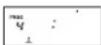
Result: PROG indicator appears in the digital display.
- Press appropriate NUMBER pad for the desired memory number.
Result: Selected memory program code appears below the PROGRAM indicator.
- Select power level by pressing the POWER LEVEL pad or DEFROST pad.
Result: Default power level HIGH appears in the display at first press of the POWER LEVEL pad.
Press the POWER LEVEL pad or DEFROST pad one or more times until you get the desired power level.
- Press NUMBER pads to set the cooking time.
The maximum time according to each cooking power level can be referred to in the title "Power Levels and Time Variations" on page 9. The
NUMBER pads will not operate or respond when you press a cooking time exceeding the maximum value.
It is not possible to set a cooking time for longer than the maximum time allowed on the chosen program. It is advisable to press CANCEL and to enter a new power level and cooking time.
- Hold down PROGRAM LOCK ( 空 ) and then press PROGRAM ( p) pad. Hold together for 2 sec once again.
Result: PROG indicator and memory number indicator blink 3 times in the digital display with a beep sound. And then the display goes blank.
Caution: Be sure to press the pads firmly in the right position.
- When you want to program more, repeat the procedures above again.
Memory programs are available up to 50 items. Make sure the unit is properly programmed.
After programming is finished, all you have to do for memory cooking is to press the NUMBER pad. Then the selected memory program automatically starts cooking.
Multi-stage
- Hold down PROGRAM LOCK ( ) and then press PROGRAM (P) pad. Hold together for 2 sec.
Be sure to press the pads firmly.
Result: PROG indicator appears in the digital display.
- Press appropriate NUMBER pad for the desired memory number.
Result: Selected memory program code appears below the PROGRAM indicator.
- Select power level by pressing the POWER LEVEL pad or DEFROST pad.
Result: Default power level HIGH appears in the display at first press of the POWER LEVEL pad.
Press the POWER LEVEL pad or DEFROST pad one or more times until you get the desired power level.
- Press NUMBER pads to set the cooking time.
The maximum time according to each cooking power level can be referred to in the title "Power Levels and Time Variations" on page 9. The
NUMBER pads will not operate or respond when you press a cooking time exceeding the maximum value.
It is not possible to set a cooking time for longer than the maximum time allowed on the chosen program. It is advisable to press CANCEL and to enter a new power level and cooking time.
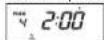
- Repeat steps 3 and 4 for I or II stage memory programming.
- Hold down PROGRAM LOCK ( and then press PROGRAM ( P) pad. Hold together for 2 sec once again.
Result: PROG indicator and memory number indicator blink 3 times in the digital display with a beep sound. And then the display goes blank.
Caution: Be sure to press the pads firmly in the right position.
- When you want to program more, repeat the procedures above again.
Memory programs are available up to 50 items. Make sure the unit is properly programmed.
After programming is finished, all you have to do for memory cooking is to press the NUMBER pad. Then the selected memory program automatically starts cooking.
You can not set up the same POWER LEVEL or DEFROST.
It operates as setting up sequence.
HOW TO OPERATE MEMORY COOKING
After having finished memory programming, just press the NUMBER pad of the memory number you want to select. The oven will automatically start heating according to the pre-programmed cooking time and power level.
- Make sure the oven is plugged into a properly earthed electrical outlet.
- Open the door.
The oven lamp will be turned on. - Put the food into a suitable container, place it in the centre of the oven and then close the door securely.
Result: The oven lamp will go off.
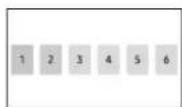
- Press NUMBER pad.
Result: The selected memory program automatically starts heating. But, NUMBER pad 1, 2, 3 operate after 2 seconds.
HOW TO OPERATE DOUBLE QUANTITY PAD
- Press the Double Quantity pad.
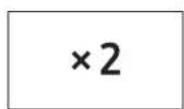
- Press the desired memory NUMBER pad.
Result: Cooking time which was multiplied by the preset factor appears in the display and cooking starts with time digits counting down.
DOUBLE QUANTITY PAD PROGRAMMING
- Hold down (and then press pad. Hold together for 2 seconds.
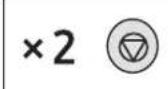
- Select desired program code by using NUMBER pads.
- Press NUMBER pads to set the magnification factor within the range from 1.00 to 9.99.
Default factor is 1.65 preset from the manufacturer for increasing the cooking time. Make sure that you set a correct factor between 1.00 and 9.99 for each memory code number.
- Press 串 button.

Press pad to exit the programming mode. Though you can successfully set a double quantity factor whose setting might result in excess of the maximum time allowed for each power level, the oven does not operate exceeding the maximum time.
Double Quantity Factor Editing
| Feature Key | Entry Display Remark | ||
| Double Quantity Factor Edit | Hold down CANCEL ( ⑦ and then ( )2 pad. | F | Hold down for 2 sec. |
| Code No. | F165 | After 1 sec, default value shows in the display window. | |
| (Input desired factor value.) | F200 | 1.00 - 9.99 available (Change the factor if required.) | |
| START ( ① | F200 | If you don't want to change more, press CANCEL to exit the editing mode. | |
| New Code No. | F165 | Skip this step if not necessary. | |
| (Input desired factor value.) | F230 | Skip this step if not necessary. | |
| START ( ① | F230 | Skip this step if not necessary. | |
| CANCEL ( ⑦ | (State cancel) This exits the editing mode. | ||
You can select the beep tone you require. There are 4 sound levels available.
Hold down CANCEL ( 豆 ) and then press NUMBER 0 pad. Hold together for 2 seconds.
Result: Beep tone is changed to one level higher than current one.
Beep tone 0 does not make beep sound.
Settings are circulating whenever you press the hidden keys in the following order.
Snd 0 → Snd 1 → Snd 2 → Snd 3 → Snd 0 (No sound)
Default tone is Snd 2.
PROGRAMMING AIR FILTER CLEAN TIME
When the air filter check indicator (FILTER) appears in the display window after a certain time of use, you should clean the air filter according to the instructions "Cleaning the Air Filter" on page 17 in this booklet. Then follow the procedure as below if you want to change the air filter clean time.
- Hold down PROGRAM LOCK ( and then press NUMBER 3 pad. Hold together for 2 seconds.
Result: The display will show the length of time in hours between cleaning the air filter you have programmed in or the original time preset by the manufacturer.
Default clean time is 500 hours in terms of pure oscillating time, not the continuity time.
- Press NUMBER pads to set the desired clean time.
You can set up to 999 hours.
-
Hold down PROGRAM LOCK ( and then press NUMBER 3 pad. Hold together for 2 seconds in order to save the new value. This completes the programming of the air filter clean time.
-
Press CANCEL ( 豆 ) pad to return to cooking mode.
e original time preset
After the clean time has expired, you should clean the air filter. See page 17.
ERROR CODES
| Error Items | Code Error Beep | Cause Remedy | |
| Power frequency Error (50/60Hz) | E1 - Power | frequency is other than 50 Hz. | |
| HVT-I Power Error | E41 O | one long beep for 2 sec | The circuitry inside the oven is not working correctly. |
| HVT-II Power Error | E42 O | one long beep for 2 sec | The circuitry inside the oven is not working correctly. |
| EEPROM Error | E5 O | one long beep for 2 sec | Memory IC (EEPROM IC) is not working correctly. In this case, other features except for memory function work properly. (You can operate the oven manually) |
HIDDEN KEYS
Note: Press Key 1 and then the next one. Hold for 2 secs.
| Feature | Key Entry | Display Remark | ||
| Key 1 Next | ||||
| Continuity time total | CANCEL(7) | 1 | 0 | Hold together for 2 sec. Unit: 10 hrs. |
| Magnetron oscillating time total | CANCEL(7) | 2 | 0 | Hold together for 2 sec. Unit: 1 hr. |
| Number of times of use by memory program code | CANCEL(7) | START | : : | Hold together for 2 sec. |
| Code No. | : : | - | ||
| (Data display after 2 sec.) | : 739 | 739 times of use | ||
| (New code can be set after data display) | : - | - | ||
| CANCEL(7) | (Code cancel) | - | ||
| Heating time per memory program code (Automatic sequential display) | CANCEL(7) | (P) | : 200 | Hold together for 2 sec. |
| - | (Sequentially displays for 3 sec from 1 to 30) | - | ||
| CANCEL(7) | (Code Cancel) - | |||
Cleaning the Microwave Oven
- Unplug the oven from the electrical socket before cleaning.
- Clean the inside of the oven. Wipe up all spills with a damp cloth. Kitchen detergent solution may be used if the oven gets too dirty. Do not use harsh detergents or abrasives.
If food remnant or spilled liquids stick to the oven walls, or between door seal and door surface, they will absorb microwaves possibly resulting in arcing or sparks. - Clean the outside of the oven with soap and water, then dry with a soft cloth.
Caution: Make sure that water does not get into the back ventilation or control panel opening.
- When you clean the window of the door, be sure to use a soft cloth after washing with very mild soap and water. Do not use window cleaner as the front door can be scratched by harsh soap or cleaners.
CLEANING THE CEILING COVER
- Hold side stoppers of ceiling cover with both hands and pull them in and down. Then take the ceiling cover out of the oven cavity.
- Rinse ceiling cover in soapy water or Food Sanitizer Solution.
- Be sure to replace the ceiling cover before using the oven.
CAUTION: Ceiling cover must be in place securely when you use the oven. When you removed the Ceiling Cover for the purpose of cleaning, be sure to be extremely careful about the exposed inside components on the top of the oven cavity. If any of them are deformed, abnormal
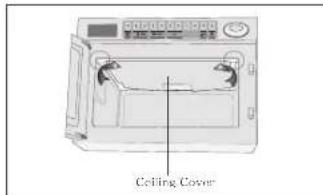
symptom can happen such as arcing or sparks during operation. In case of such problem, contact the nearest after-sales service centre.
CLEANING THE AIR FILTER
Clean the Air Filter regularly according to the following instructions. The oven may have problems when the Air Filter becomes clogged with dust.
- Remove the bolt at both ends of the Air Filter.
- Lift the Air Filter off the post carefully.
- Wash this filter in warm soapy water.
- Be sure to replace the Air Filter before using the oven.
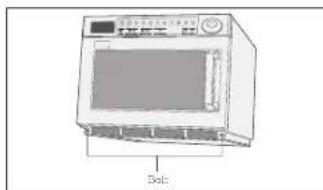
If the Air Filter becomes clogged with debris, this will cause an overheating problem on the oven.
If the want to change the air filter clean time, refer to "Programming Air Filter Clean Time" in page 15.
INSTALLATION INSTRUCTIONS FOR STACKING
Important
- Disconnect the power cord from the wall socket before attempting installation.
- For stacking installation, you must use the "bracket plate" which is enclosed with this unit.
- The maximum stacking height is two units.

Stacking the two units is limited to the following models.
TION:Be sure the oven cavity is empty.
Installation
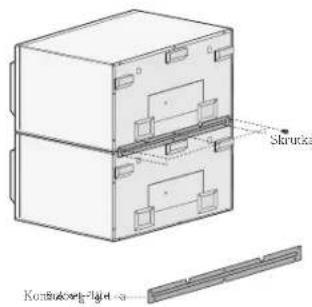
- Stack two units together.
- Remove 6 screws as shown in the figure.
- Place the Bracket-plate to join the two units.
- Attach and tighten 6 screws as shown in the figure here.
- Ensure the top oven is at a safe and workable height.

COOKWARE GUIDE
To cook food in the microwave oven, the microwaves must be able to penetrate the food, without being reflected or absorbed by the dish used. Care must therefore be taken when choosing the cookware. If the cookware is marked microwave-safe, you do not need to worry. The following table lists various types of cookware and indicates whether and how they should be used in a microwave oven.
| Cookware Microwave- | Safe | Comments |
| Aluminum foil | ✓x | Can be used in small quantities to protect areas against overcooking. Arcing can occur if the foil is too close to the oven wall or if too much foil is used. |
| China and earthenware | ✓ | Porcelain, pottery, glazed earthenware and bone china are usually suitable, unless deco-rated with a metal trim. |
| Disposable polyester cardboard dishes | ✓ | Some frozen foods are packaged in these dishes. |
| Fast-food packaging | ||
| • Polystyrene cups containers | ✓ | Can be used to warm food. Overheating may cause the polystyrene to melt. |
| • Paper bags or newspaper | x | May catch fire. |
| • Recycled paper or metal trims | x | May cause arcing. |
| Glassware | ||
| • Oven-to-tableware | ✓ | Can be used, unless decorated with a metal trim. |
| • Fine glassware | ✓ | Can be used to warm foods or liquids. Delicious glass may break or crack if heated suddenly. |
| • Glass jars | ✓ | Must remove the lid. Suitable for warming only. |
| Cookware Microwave- | Safe | Comments |
| Metal | ||
| • Dishes | × | May cause arcing or fire. |
| • Freezer bag twist ties | × | |
| Paper | ||
| • Plates, cups, napkins and Kitchen paper | ✓ | For short cooking times and warming. Also to absorb excess moisture. |
| • Recycled paper | × | May cause arcing. |
| Plastic | ||
| • Containers | ✓ | Particularly if heat-resistant thermoplastic. Some other plastics may warp or discolour at high temperatures. Do not use Melamine plastic. |
| • Cling film | ✓ | Can be used to retain moisture. Should not touch the food. Take care when removing the film as hot steam will escape. |
| • Freezer bags | ✓× | Only if boilable or oven-proof. Should not be airtight. Prick with a fork, if necessary. |
| Wax or grease-proof paper | ✓ | Can be used to retain moisture and prevent spattering. |
:Recommended
√X : Use Caution
X : Unsafe
Cooking Guide
| F: Frozen C: Chilled | ||||
| Recipe Method | Power Level | Timing | Stand Time | |
| 1850W | 1500W | |||
| BREAD & PASTRIES | ||||
| To Defrost | ||||
| Vienna Baton 9" F | DEFROST 1 (3) | 0'45" 0 | 50" 5 mins | |
| Vienna Baton 9" X 2 F | DEFROST 1 (3) | 1'10" 1 | 15" 5 mins | |
| Gateaux, ind. Slice F | Place on plate DEFROST 2 (3) | 2'30" 2 | 40" 5 mins | |
| To warm | ||||
| Quiche 11" sliced 136g | Place on plate DEFROST 1 (3) | 3'00" 3 | 00" 1 min | |
| HIGH 0'45" 0" 0'45" 1 | min | |||
| Mince pies ind. X 2 F | Remove from tin foil Place on plate | HIGH 0'15" 0" 0'15" 1 | min | |
| Fruit pie F Place on plate | on plate HIGH 0'40" 0'45" 1 min | |||
| Croissant X 2 F Place on plate | on plate HIGH 0'05" 0'10" 1 min | |||
| Pastry, baked 227g C | Place on plate HIGH 0'45" 0'55" 1 min | |||
| Chicken & mushroom pie X 2 C | Remove foil. Place on plate | HIGH 0'45" 0'55" 1 | min | |
| Chicken & mushroom pie C | Place on plate, remove foil | HIGH 0'30" 0" 0'40" 1 | min | |
| SNACK & STARTERS | ||||
| To cook | ||||
| Bacon, rasher C | Place on rack HIGH 1'30" 1'40" 1 min | |||
| Eggs, poached X 2 C | Place in ramekins | HIGH 0'30" 0'40" 1 | min | |
| Recipe Method | Power Level | Timing | Stand Time | ||
| 1850W | 1500W | ||||
| Eggs, scrambled X2 C | Beat eggs and place in bowl | HIGH | 25"-30" | 30"-40" | 1 min |
| Sausages X 2 Thick C | Pierce | MED 1'00" 1'10" 2 | mins | ||
| To Reheat | |||||
| Sausages Cumberland F | Place on plate | MED 2'00" 2'10" 2 | mins | ||
| Full breakfast C | Cover | MED | 2'30" | 2'40" | 1 min |
| Beef burgers F | HIGH 0'55" 1'05" 1 | min | |||
| Chickenburger F | HIGH 0'55" 1'05" 1 | min | |||
| Donner kebab 162g F | HIGH 1'00" 1'10" 1 | min | |||
| Hot Dog F | HIGH 1'00" 1'10" 1 | min | |||
| Pizza 190g F | Place on plate | LOW | 2'30" | 2'45" | 2 min |
| Charged ribs 200g F | Place on plate | MED 3'30" 3'45" 1 | min | ||
| Wings of fire X 6 F | Arrange on plate, thin parts to center | HIGH 2'00" 2'15" 1 | min | ||
| Baked Beans 500g | Cover and Stir half way | HIGH 2'00" 2'10" 2 | mins | ||
| Baked Beans 250g | Cover and Stir half way | HIGH 1'00" 1'05" 2 | mins | ||
| DESSERTS | |||||
| To warm | |||||
| Apple Crumble 200g F | Cover in dish | HIGH 1'20" 1'30" 2 | mins | ||
| Christmas Pudding 150g C | Place in bowl | HIGH 0'20" 0'25" 2 | mins | ||
| Jam Roly Poly 80g F | On a plate | HIGH 1'00" 1'05" 2 | mins | ||
| Crepes Suzette 2 F | Pierce film | HIGH 0'50" 1'00" 1 | min | ||
F: Frozen
C:Chilled
| Recipe Method | Power Level | Timing | Stand Time | |
| 1850W | 1500W | |||
| Suet Sponge pudding F | X 2 HIGH 0'35" | 1'05" | 2 mins | |
| X 1 HIGH 0'40" | 0'50" | 2 mins | ||
| Sponge pudding F | X 2 HIGH 0'35" | 1'05" | 2 mins | |
| X 1 HIGH 0'40" | 0'45" | 2 mins | ||
RECIPDE DISH ENTREES
| To Reheat | ||||
| Amorini & Stilton bake C | Place in microwave safe dish | HIGH 3'3" | 0" 3'40" | 1 min |
| Chicken Tikkamasa F | Pierce film HIGH | 3'20" | 3'30" | 2 mins |
| Thai Green Chicken curry F | Pierce film HIGH | 3'00" | 3'15" | 2 mins |
| Chilli con Came F | Pierce film HIGH | 3'30" | 3'45" | 2 mins |
| Chicken cooked 1/2 Chilled | Place in m/w in pierced bag | MED 4'30" | 0" 5'00" | 2 mins |
| Lasagne 192g Plac | Place in microwave safe dish | MED 4'00" | 0" 4'15" | 2 mins |
| Moules Marinieres 466g F | Pierce bag HIGH | 2'30" | 2'45" | 2 mins |
| Salmon & Avacodo Paupiette C | Pierce bag HIGH | 2'30" | 2'45" | 2 mins |
| Shepherd's pie 300g C | Place in oven and cover | MED 3'00" | 0" 3'15" | 2 mins |
| Suet puddings chilled | Cover - place upright on microwave safe plate | LOW 4'00" | 0" 4'20" | 2 mins |
FRESHVEGETABLES
| Recipe Method | Power Level | Timing | Stand Time | |
| 1850W | 1500W | |||
| Supreme of chicken in red pesto 312g F | Pierce bag place on plate | DEFROST 1 (00) HIGH 3'30" | 5'00" 5" 3'45" | 00" 1 min |
| Tagliatelle carbonara C | Pierce film, place on plate | HIGH 1'40" | 2'00" 1 | min |
| Tortellini formaggio C | Place in dish and cover | HIGH 2'00" | 2'15" 1 | min |
| Vegetable Cumberland Pie C | Place in microwave safe dish | HIGH 3'20" | 3'35" 1 | min |
| Plated Meal 350g C | Covered HIGH 2'00" | 2'15" 1 min | ||
| Plated Meal 700g C | Covered HIGH 3'00" | 3'15" 1 min | ||
To cook 500g
| Beans, green sliced | 60ml/4tbsps water cover | HIGH 3'00" 3'15" 2 | mins | |
| Broccoli, florets | 60ml/4tbsps water cover | HIGH 3'00" 3'15" 2 | mins | |
| Cabbage, shredded | 10tbsps water cover | HIGH 5'00" 5'30" 2 | mins | |
| Carrots, sliced | 60ml/4tbsps water cover | HIGH 3'30" 3'45" 2 | mins | |
| Cauliflower, florets | 60ml/4tbsps water cover | HIGH 3'30" 3'45" 2 | mins | |
| Whole Green beans | 60ml/4tbsps water cover | HIGH 3'30" 3'45" 2 | mins | |
| Potatoes, jacket | Turn half way | HIGH 10'00" | 11'00" | 5 mins |
F: Frozen C: Chilled
| Recipe Method | Power Level | Timing | Stand Time | |
| 1850W | 1500W | |||
| Sprouts 60ml/4lb | water cover | HIGH 4'30" | 4'45" 2 | mins |
| Beans, green sliced | Cover, stir half way through cooking | HIGH 3'00" | 3'15" 2 | mins |
| Beans, whole Cover | stir half way | HIGH 4'00" | 4'15" 2 | mins |
| Broccoli Florets Cover | stir half way | HIGH 4'00" | 4'15" 2 | mins |
| Cabbage, shredded | Cover, stir half way | HIGH 4'00" | 4'15" 2 | mins |
| Carrot batons Cover | stir half way | HIGH 4'00" | 4'15" 2 | mins |
| Cauliflower, florets | Cover, stir half way | HIGH 4'00" | 4'15" 2 | mins |
| Corn on the Cob | Cover HIGH 4'00" | 4'30" 2 | mins | |
| Corn, whole baby | Cover, stir half way | HIGH 5'00" | 3'15" 2 | mins |
| Mushrooms, whole | Cover, stir half way | HIGH 3'00" | 3'15" 2 | mins |
| FRESH VEGETABLES | ||||
| To cook 500g | ||||
| Potatoes, jacket 230-290g X 1 | HIGH 3'00" | 4'00" 2 | mins | |
| Potatoes, Mashed X 2 Potatoes, Mashed X 4 | HIGH 6'00" | 6'30" 2 | mins | |
| HIGH 10'00" | 11'15" 2 | mins | ||
| Ratatouille 500g | HIGH 3'30" 4'00" 2 | mins | ||
| Sprouts Cover, st | half way | HIGH 3'00" | 3'30" 2 | mins |
| Recipe Method | Power Level | Timing | Stand Time | |
| 1850W | 1500W | |||
| RICE, 500g | ||||
| To Reheat | ||||
| Rice, boiled F | Cover, stir half way | HIGH 3'00" | 3'15" | mins |
| Rice, Pilau F Cover, stir half way | Cover, stir half way | HIGH 3'00" | 3'15" | mins |
The following parts of your microwave oven should be cleaned regularly to prevent grease and food particles from building up:
- Inside and outside surfaces
Door and door seals
Plate tray
ALWAYS ensure that the door seals are clean and the door closes properly.
Failure to maintain the oven in a clean condition could lead to deterioration of the surface that could adversely affect the of the appliance and possibly result in a hazardous situation.
1. Clean the outside surfaces with a soft cloth and warm, soapy water. Rinse and dry.
2. Remove any splashes or stains on the inside surfaces or on the roller ring with a soapy cloth. Rinse and dry.
3. To loosen hardened food particles and remove smells, place a cup of diluted lemon juice on the turntable and heat for ten minutes at maximum power.
DO NOT spill water in the vents.
NEVER use any abrasive products or chemical solvents.
Take particular care when cleaning the door seals to ensure that no particles:
Accumulate
Prevent the door from closing correctly
Clean the microwave oven cavity right after each use with a mild detergent solution, but let the microwave oven cool down before cleaning in order to avoid injury.
STORING AND REPAIRING YOUR MICROWAVE OVEN
A few simple precautions should be taken when storing or having your
The oven must not be used if the door or door seals are damaged:
- Broken hinge
Deteriorated seals
Distorted or bent oven casing
Only a qualified microwave service technician should perform repair.
NEVER remove the outer casing from the oven. If the oven is faulty and needs servicing or you are in doubt about its condition:
- Unplug it from the wall socket
- Contact the nearest after-sales service centre
TECHNICAL SPECIFICATIONS
SAMSUNG strives to improve its products at all times. Both the design specifications and these user instructions are thus subject to change without notice.
| Model MJ26A6093 MJ26A6053 | ||
| Power source 230-240 V ~ 50 Hz | ||
| Power consumption Microwave | 13 A 12.7 A | |
| Output power | 1850 W (IEC-705)240 V : 1850 W230 V : 1780 W | 1500W (IEC-705)240 V : 1500 W230 V : 1450 W |
| Operating frequency 2450 MHz | ||
| Dimensions (W x H x D) Outside Oven cavity | 464 x 368 x 557 mm370 x 190 x 370 mm | |
| Volume 26 liter | ||
| Weight Net | 33.1 kg approx | |
MEMO
QUESTIONS OR COMMENTS?
| COUNTRY CALL OR VISIT US ONLINE AT | |
| /AUSTRIA 0800/7267864 (0800-SAMSUNG) www.samsung.com/at/support | |
| BELGIUM 02 201 | www.samsung.com/be/support(Dulac)www.samsung.com/be-fr/support(French) |
| DENMARK 707 01970 www.samsung.com/dk/support | |
| FINLAND 030-0227 515 www.samsung.com/fi/support | |
| FRANCE 01 48 630000 www.samsung.com/fr/support | |
| GERMANY 081067755577 www.samsung.com/de/support | |
| ITALIA 800-SAMSUNG (800,726/964) www.samsung.com/yt/support | |
| CYPRUS 8009 4000 only from landline, toll free | www.samsung.com/gr/support |
| CZEURCE 80111-SAMSUNG (80111 726 7864)only from land line(130)210 689/691 from mobile andland line | www.samsung.com/gr/support |
| LUXEMBURG 261 03710 www.samsung.com/be_fr/support | |
| NETHERLANDS 088 90 90 100 | www.samsung.com/ni/support |
| NORWAY 21629099 | www.samsung.com/no/support |
| PORTUGAL 808 207 267 | www.samsung.com/pt/support |
| SPAN 91 175 00 15 | www.samsung.com/es/support |
| SWEDEN 07/1726786www.samsung.com/se/support | |
| SWITZERLAND 0800 726 786 | www.samsung.com/ch/support(German)www.samsung.com/cn.fr/support(French) |
| UK 0333 000 0333 | www.samsung.com.uk/support |
SAMSUNG
| COUNTRY CALL OR VISIT US ONLINE AT | ||
| IRELAND (EIRE) 0819 | 717100 www.samsung.com/c/support | |
| POLAND | [IM]801-172-578* lab +48 22 607-96-33*Specialistyczna infoina do oblastig Zapylari dotycznych kolafterowkomorokwych:801-672-678* (oplata weclug taryfya operatora)[CE]801-172-578* lab +48 22 607-93-33* (oplata weclug taryfya operatora) | http://www.samsung.com/cj/support/ |
| CZECH | 800 - SAMSUNG(800-726788) | www.samsung.com/cz/support |
| SLOVAKIA 0800 - ROMANIA | SAMSUNG (0800-726 786) www.samsung.com/sk/support | |
| 080072678 - Apel gratuit*8000 - Apel tanilat in retea | www.samsung.com/cr/support | |
| BULGARIA | 0800 111 31 - Bezamlaten na zemnienoneparotopy*3000 - Uteha na edin rpadckijnaparotopy kimi chopredarphate na mobianinyi oneparotop09:00 do 18:00 - Понеделник do Петьк | www.samsung.com/bg/support |

DE68-04029H-00
Mikrowellengerät
(GEWERBLICH)
- Mantenga pulsado el BLOQUEO DEL PROGRAMA ( yInvestigators in the study of the human papillomavirus 16 gene, which is a member of the human papillomavirus 16 family, and has been shown to be involved in the pathogenesis of human papillomavirus 16 (HPV-16) infection.
- Mantenga pulsado el BLOQUEO DEL PROGRAMA ( yInvestigators are responsible for the study of the human brain, including the use of a computer program to analyze the data and to determine the optimal dose of drugs. The patient is referred to the hospital for further evaluation.
m = 311
USO DEL TASTO +20SEC
- DISPLAY
2.PROGRAMMATOETSEN - CIJFERTOETSEN
(Tid,Programmageheugen)
- TOETS PROGRAMMAVERGRENDELING
-
KEUZETOETS VERMOGEN
-
KEUZETOETS ONTDOOIER
- TOETS DUBBELE HOEVEELHEID
- +20sec-TCETS
(Koken Met 1x Aanraken) - ANNULEERTOETS
- STARTTOETS
DISPLAY
1.PROGRAMMA-AANDUIDING
2. TJDSWEERGAVE
3.INDICATOR TUIDSWEERGAVE
LUCHTFILTERCONTROLE
4.INDICATOR NUMMER GEHEUGENTOETS
5.INDICATOR VERMOGENSNVEAU
6.INDICATOR ONTDOOIER
7.INDICATOR DUBBELE HOEVEELHEID
8.INDICATOR GEGEVENSCONTROLE
DE KLOK INSTELLEN
PROGRAMMERING GEHEUGENTOETSEN
Eén fase
De standardtoon is Snd 2.
PROGRAMMERING REINIGINGSTIJD LUCHTFILTER
POKNY K PRIPRAVE POKRMU
POKNY NA PRIPRAVU JEDLA
Hodnota vystupnehoVykonu podla IEC je medzinarodne normalizovana hodnota, takze vsetci vyrobocvia mikhrovnych nur teraz pouzivaju rovnaku metodu merania vystupneho vykonu.
Ak su na obale potravin Pokyny na prnipru jeclla na zaklade vykonu podla IEC, nastavte casy pripravy na zaklade vykonu podla IEC vasej rury. Napriklad:
Ak su pokny na pripravu jedia pre ruru s yvkonom 850 W, potom budete musiej cas potrebniy na pripravu jedia v modeli MW87L (850 W) skratif. Hotove jedia su teraz veimi podhnoe a obfubenene.
Su to jedla, ktoe uz pripravila uvari vyroba potravin a ktore su nasledne zmrazene, chladene alebo vakuvo zabalene, ay mali dlhy cas pouziteftosti.
Cas ohrevu takychto hotovych jedal je coraz viac zalozeny na kategiach ohrievania A, B.C.Da E.
V tomato tripida jednodchu prisosobete kategoiu ohrv vaasej rury pokynom na obale potravin a podla toho nastavte casaovac.
Napriklad: Ak jePokyn na ohrev 3 minuty pri nastaveni VYSOKA pre ruru kategorie D, potom bude potebné高新技术 casovac na menej ak 3 minutu pri nastaveni VYSOKA pre model MJ26A6093 (kategoria E).
Vzhy pamatata na to, ze pokyny na pripravu jedia sluzia len ako pomocka. Ak ste postupoval podla poknov a jeglo stale ne je v celom priereze horuce, jegnoducho ho vratte do rury pozhnikvajte, kym sa neprejne.
VARENIE/PRIHRIEVANIE
POKNY NA INSTALACIU STHOVANIM
Dolezite
- Pred instalacioc opjoite napajci kabel zo siefovej zasuvky.
- Pri instalaci stohovanim musite pouzit "konzolov liustu", ktora je prilozena k tejo jednotke.
- Maximalna vyska stohovania su dve Jednotky.
Stohovanie dvoch jednotiek je obmedzene na nasledujuce modely. UPOZORNENIE: Ustite sa, ze vunturny priestor nry je prazdny.
Instalácia
- Stohujte dve jegnotky.
- Odskrutkujte 6 skrutiek podla obrzku.
- Umiestnite konzolovu listu tak, aby ste spojili obe Jednotky.
- Pripevnite a dotiahnite 6 skrutiek podla obrzku.
- Uistite sa, ze vchrna rura je v bezpechej a pouzitelnej yvske.
SPRIEVODCA POMOCKAMI NA VARENIE
Aby ste uvarili jeglo v mikrovinnej rure, mikrovnne ziarenie musi byt schopne preniknuf do jedia bez toho, aby ho odrăzali alebo absorbovali pouzite niady. Preto musite byt pri vibere nacinna na varenie opatmi. Ak bude nacinie na varenie ozanacene ako vchodne do mikrovinnej rury, nemusite mat ziadne obavy. Nasledujica tabu'ka obsahue rozne typy nacinna na varenie a naznacuje, āa a ko sa musia pouzif v mikrovinnej rure.
Paina " +20s"-nappainta
Kerran
Kaksi kertaa
RUOANVALMISTUSJA LAMMITTAMINEN
TEHOTASOT JA ENIMMAISAJAT
KYSMYKSET JA KOMMENTIT
| MAA SOITA TAI KAY OSOITTESSA | |
| AUSTRIA 0800 7267 864 (0800-SAMSUNG) www.samsung.com/ai/support | |
| BELGIUM 02-20124-18www.samsung.com/ba/support [Dutch]www.samsung.com/be.fr/support (French) | |
| DENMARK 707 01970 www.samsung.com.dk/support | |
| FINLAND 030-8227515www.samsung.com/lfs/support | |
| FRANCE 01 48 63000www.samsung.com/hr/support | |
| GERMANY 061967755577www.samsung.com/dc/support | |
| ITALA 800-SAMSUNG (800,7267864) www.samsung.com/it/support | |
| CYPRUS 8009 4000only from landline, toll freewww.samsung.com/g/support | |
| GREECE80111-SAMSUNG (80111 726 7864)only from land line(-30)210 6997691 from mobile andland linewww.samsung.com/gr/support | |
| LUXEMBURG26103710www.samsung.com/be-fr/support | |
| NETHERLANDS068909010www.samsung.com/ml/support | |
| NORWAY21828099www.samsung.com/nor/support | |
| PORTUGAL 808 207287www.samsung.com/pt/support | |
| SPAIN911750015www.samsung.com/ca/support | |
| SWEDEN 0771726788www.samsung.com/ae/support | |
| SWITZERLAND0800 728786www.samsung.com/ch/support (German)www.samsung.com/ch_fr/support (French) | |
| UK0333000333www.samsung.com/uk/support | |
| IRELAND (IRE)0818717100www.samsung.com/ie/support |
SAMSUNG
| MAA SOITA TAI KAY OSOITTESSA | ||
| POLAND | [М]801-172-678' lub -48 22 607-96-33'Specialistyczne Infolinia do obulgi zapytan dotyczyych telefonowkomarkowyth:801-672-678'' (oplate wedlug taryf operatora) [OE]801-172-678' lub -43 22 607-96-33'' (oplate wedlug taryf operatora) | http://www.samsung.com/pt/support/ |
| CZECH | 800 - SAMSUNG(800-726786) | www.samsung.com/cz/support |
| SLOVAKIA | 0800 - SAMSUNG (0800-726 786) www.samsung.com/sk/support | |
| ROMANIA | 0800672678 Apel Gratis"8000 - Apel tarifin in rejea | www.samsung.com/ro/support |
| BULGARIA | 0800 111 31 - Bezlattaten za bcermikon onepatoprn*3000 - Лета на сейн гадскп раловорни посрд тarampfata на моблийт onepatoprp09.00 do 18.00 - Понерник do Петьк | www.samsung.com/bg/support |

DE68-04029H-00
Örbylgjuofn
(VIDSKIPTI)
Hverrig a o notably borofyir twofalt magn 13
Forritun a boroi fyir tvofalt magn 14
Passaoaoyta fastaboroin.
Utkoma: PROG visir birtist a stafraea skjanum.
- Ytto a vioeigandi TALNABORD fynr vioeigandi minnisnumer.
Utkoma: Valinn forritunarkoDi minnis birtist fyir nean visinn KERFI.
- Veldu allstig meo pvia yta a boroi fyir AFLSTIG eoa borio fyir AFPIDINGU.
Utkoma: Sjalfgeio HATT aflstig birtist a skjanum begar cini sinn er ytt a borai AFLSTIG.
Ytua bordi AFLSTIG eoa AFPIDING eunu sinn eoa ofar til ao fa aeskilegt allstig.
- Ytu tALNABORDIN til ao stila eldunartimann.
Hämarkstimi samræmi viö aflstig eldunar ma sköda i hlutanum „Allstig og timabreytingar“ á blāðsió 9. TALNABORDIN virka ekki eða svara ekki jegar ytt er á eldunartima sem fer yfir hämarksgildio.
Ekki er haegt ao stilla eldunartima lengur en leyfilegan hamarkstima f voldu kerfi. Melt er meao yta a HAETTA VID og faera inn nytt afistig og eldunartima.
- Haltu inni KERFISLAESING ( ) og ytu si'an a borio KERFI ( p).
Hallu saman afturi 2 sek.
Utkoma: PROG visir og visirFYIR minnisnumer blikka 3
sinnum a stafraena skjánum og hljoömerki heyrist. Siān
slokknaraksjanum.
HVERNIG NOTA MÁ MINNISELDUN
Eftir ao minnisforritun er loki skal prysta a TALNABORDID fyir pao minnisnumer sem pu vilt velja. Ofinnh hefur hitun sjalfkrafia samraemi vio fyirfram foritaan el Dunartima og afstig.
- Trygău a òninn sé tengdur vii videigandi haetti vii rafmagnsinnstungu.
- Opnaou huroina.
Pa'kviknar á ofnjlósinu. - Settu matinn i vioeigandi ilat, settu hann fyir miou ofnsins og lokaou si'an huroinn tryggilega.
Utkoma: Paš slokmará o ofnljósinu.
- Ytua TALNABORDID
Utkoma: Valo miniskeri fer sjafkrafa a hita. En TALNABORD 1,2,3 er notao
eftir 2 sekundur.
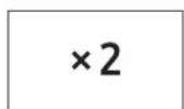
HVERNIG A AD NOTA BORD FYRIR TVOFALT MAGN
- Ytto aboridyir Tvofalt Magn.
- YtTu a TALNABORD meaaskilegu minni.
Utkoma: Eldunartimi sem var margfaldəur med forstilum beetti birist a skjann og eldun hefst me tima sem talinn er niur.
FORRITUN A BORDI FYRIR TVÖFALT MAGN
- Haldu nior (og ytu sian a ( )pria. Haltu saman nior i 2 sekundur.
X2

- Veldu videigandi kerfiskóa mejá o notably TALNABORDIN.

- YtTu a TALNABORDIN til ao stilla margfodunarpatt innan sviodsins 1,00 til 9,99.

Sjalgfnei patturinn 1,65 er forstilltur fra framleiodanda til a/ lengja eldunartimann. Mundu a stilla rettan patt abiliu 1,00 til 9,99 fyir hvm minisko#a.
- Ytlu a (hnpappinn.
Ytu a boroi til a fara ur foritunarstillingu.
Pou bu getir sett upp patti fyir tvofalt magn, hvers stiling gati orio til
pess a fari er yfir leyfigan hamarkstima fyir hvert aflstig, virkar ofinn
ekgi peger fario er yhir hamarkstimann.
Breyting a paetti fyir tvofalt magn
| Aögerð Lykianotkun Skjár Athugasemd | |||
| Breyta á paetti fyrir tvöfalt magn | Haltu niði HÉTTA VID (ø og sioan (ø)2 borðin. | F. | Haltu niði i 2 sek. |
| Kóði nr. | F165 | Eñr i sekündu birlist sjäftgefli gildi i skjáglugganum. | |
| (Settu inn aeskiegt gildi pâttr.) | F200 | 1,00 - 9,99 i boði (breytlu paettinum ef pörf krefur.) | |
| RESA(ø) | F200 | Ef pú vilt okki breyta moirukøttu ðyta à HÉTTA VID till afofara ür breytistillingunni. | |
| Nýr kóði nr. | F165 | Sleptu pessu skrefi ef ekki erpörf á pvi. | |
| (Settu inn aeskiegt gildi pâttr.) | F230 | Sleptu pessu skrefi ef ekki erpörf á pvi. | |
| RESA(ø) | F230 | Sleptu pessu skrefi ef ekki erpörf á pvi. | |
| HÉTTA VID (ø) | (Hætt við stillingu) | Hér er fari ðü breytistillingu. | |
HLJODMERKI TIL STYRINGAR
Pu getur valida bao hjoemerki sempu kyst.Boid er upp a 4 mismunandi hjoostig.
Haltu niəri HEAETTA VID ( ) ogyttu sioan a TOLUR 0 bordsi. Haltu niəri i2 sek.
Utkoma: Hljodmerki breylist i einu stigi haerra en pañ nüverandi.
GEYMSLA OG VIDGERD Å ORBYLGJUOFNI
Hafa skal i huga nokkrar vanuəraδstafanir vi geymslu og vigero a orbylgjuofni. Ekmi ma notafinn ef huro eoa huroarpéttingar eru skemmdar:
Brotin Iom
- Skemmdar bettingar
Almynduo eba beyg o umger ofns Viurkenndur taeknaioli a svdi orbylgjouna aetti aeins ao framkvaema viogedina.
ALDREI skal fiaragja ytri umgero ofnsins. Ef ofinn er biladur og barnast viogerər eə ef pu eri vafu um astand hans:
Taktu hann ur sambandi i veggnum
- Hafou samband vio naosta bjónustuveitanda
TAEKNIFORSKRIFT
SAMSUNG hefur ba a o markmi o a beta sifell tvor sinar. Pessi honnunarfskrift og pessar notendaleiobeingar eru pvia baoar haoar breytingu an fyrirvara.
| Gerö MJ26A6093 MJ26A6053 | ||
| Aflgajf 230-240 V ~ 50 Hz | ||
| Orkunotkun Örbylgjuofn | 13 A 12,7 A | |
| Ütafl | 1850 W (IEC-705)240 V: 1850 W230 V: 1780 W | 1500W (IEC-705)240 V: 1500 W230 V: 1450 W |
| Rekstrartiöni 2450 MHz | ||
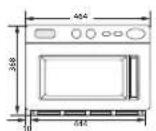
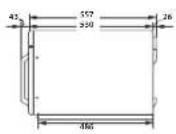
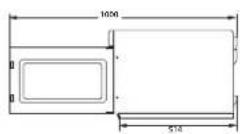
| Mäl (B x H x D)UlanOfnrymi | 464 x 368 x 557 mm370 x 190 x 370 mm | |
| Rümgeta 26 litrar | ||
| PyngdHeildarpyngd | u.p.b. 33,1 kg | |
MINNISBLAD
SPURNINGAR DA ATHUGASEMDIR?
| LAND KALLA | EDA BESÖKNUM OKKUR Ä NETINN | |
| AUSTRIA 0800 | 72 67 864 (0800-SAMSUNG) www.samsung.com/ali/support | |
| BELGIUM 02-201-24-18 | www.samsung.com/be/support(Dutch)www.samsung.com/be_fr/support(French) | |
| DENMARK 707 | 019 70 www.samsung.com/dk/support | |
| FINLAND 030-6227 515 www.samsung.com/fr/support | ||
| FRANCE 01 48 | 63 00 00 www.samsung.com/fr/support | |
| GERMANY 081 | 96 77 555 77 www.samsung.com/de/support | |
| ITALIA 800-SAMSUNG (800.7267864) www.samsung.com/it/support | ||
| CYPRUS | 8009 4000 only from landline, toll free | www.samsung.com/gr/support |
| GREECE | 80111-SAMSUNG (80111 726 786/4) only from land line (+30) 210 6897691 from mobile and land line | www.samsung.com/gr/support |
| LUXEMBURG 261 | 03 710 www.samsung.com/be_fr/support | |
| NETHERLANDS | 088 90 90 100 | www.samsung.com/nl/support |
| NORWAY | 21629099 | www.samsung.com/no/support |
| PORTUGAL | 808 207 267 | www.samsung.com/pt/support |
| SPAIN | 91 175 00 15 www.samsung.com/es/support | |
| SWEDEN 0771 | 726 786 www.samsung.com/se/support | |
| SWITZERLAND | 0800 726 786 | www.samsung.com/ch/support(German)www.samsung.com/ch_fr/support(French) |
SAMSUNG
| LAND KALLA | EDA BESÖKNUM OKKUR ÄNETINN | |
| UK | 0333 000 0333 | www.samsung.com/uk/support |
| IRELAND (EIRE) | 0818 717 100 www.samsung.com/ie/support | |
| POLAND | [IM]801-172-678' lub +48 22 607-96-33*Specialystyczna infolinia do obslugi zapytari dotycznych Telefonowkomorćkowych:501-672-678*(oplata wedlug taryfya operadora)[CE]801-172-678' lub +48 22 607-93-33*(oplata wedlug taryfya operadora) | http://www.samsung.com/pl/support/ |
| CZECH | 800 - SAMSUNG(800-726786) | www.samsung.com/cz/support |
| SLOVAKIA 0800 | SAMSUNG (0800-726 786) www.samsung.com/sk/support | |
| ROMANIA | 0800672678 - Apel gratuit*8000 - Apel tariffat in rejeva | www.samsung.com/ro/support |
| BULGARIA | 0800 111 31 - Белларен за всейпоженистория*3000 - Лета на[eин范围内цератураzerовся поcodета на мобликец�ец opelerop 09:00 до 18:00 - Рочаделендю Петък | www.samsung.com/bg/support |

DE68-04029H-00
Mikrobølgeovn
(HANDELSVARE)
Brukerveiledning og Tilberedningsveiledning
Adversal: Bramfare Adversal: Varm flate
Adversel: Elektriset Adversel: Eksplosive After
Ring servicesenteret for help. Merk

Viktg
FORHOLDSREGLER FOR A UNNGA AB LI EKSPONERT FOR MYE MIKROBOLGEENERGI.
24-timers visiting
12-timers visiting
PROGRAMMERING MED MINNEFLATER
Ettrinns
- Hold nede PROGRAMLAs ( feg tryk deretter PROGRAM ( pflaten. Hold samtidig i2 sek.

SLIK BRUKER DU MINNETILBEREDNING
Etter à ha avsluttet minneprogrammeringen trykker du bare NUMMER-fiaten for minnenummeret du onsker à velge. Oyen starter oppvaming automatisk i henhold til forhandsprogrammert koketid og effekttrinn.
- Sorg for strompluggen for ovenen er satt inn ien korkt jordet elektrisk kontakt.
- Apne doren.
Ovnslampen slas pä. - Plasser maten i en passende beholder, sett den pa midten i ownen og lukk deretter doren sikkert.
Resultat: Ovnslampen slukker. - Trykk NUMMER flaten.
Resultat: Dot valgte minneprogrammet starter
oppvarmingen automatisch. Men NUMMER
fatene 1, 2, 3 fungerer after 2 sekunder.
SLIK BRUKER DU FLATE FOR DOBBEL MENGDE
MINNESKNAPPSPROGRAMMERING
Ett steg
HUR MAN HANTERAR MINNESUPPVÄRMNING
Programming at rengoringsid for luftfilter 15
Fejlkoder 15
Skjute taster 16
Installationsveleding for stabling 17
Adverse: Brandfare Adverse: Varm overfame

Adversel: Elektricitet Adversel: Ekspliavnt materialie

DU MA IKKE forsage. Folg veledingen no

- For at vise tiden i...
Sorg for at trykke hardt pa tastaturene.
Resultat: PROG indikatoren fremkommer på det digitale display.
OPSKRIFT PA FORRETTER
| Til opvarmning | ||||
| Amorini & Stilton bake C | Placer på mikrobolgeovnsikker tallerken | HÖJ 3'30" | 3'40" 1 min. | |
| Chicken Tikka masala F | Stik hul i folien HÖJ 3'20" | 3'30" 2 min. | ||
| Thai Green Chicken curry F | Stik hul i folien HÖJ 3'00" | 3'15" 2 min. | ||
| Chilli con Came F | Stik hul i folien HÖJ 3'30" | 3'45" 2 min. | ||
| Kogt kylling 1/2 alkelet | Placer i mikrobolgeovn i gennemboret pose | MED 4'30" | 5'00" 2 min. | |
| Lasagne 192 g Placer | placer på mikrobolgeovnsikker tallerken | MED 4'00" | 4'15" 2 min. | |
| Hvidvinsdampede blåmulsinger 466 g F | Gennembor pose HÖJ | 2'30" 2'45" 2 min. | ||
| Laks og avocado paupiette C | Gennembor pose HÖJ | 2'30" 2'45" 2 min. | ||
| Shepherd's pie 300 g C | Placer i ovenen og tildak | MED 3'00" | 3'15" 2 min. | |
| Suet puddings alkelet | Tildask - placer lodret på mikrobelgesikker tallerken | LAV 4'00" | 4'20" 2 min. | |
FRISKE GRONTSAGER
| Opskrift Metode | Effektniveauer | Timing | Opholdstid | ||
| 1850W | 1500W | ||||
| ChickenSupremei redpesto 312 g F | Gennembor posenog placar pātallerkenen | OPTØNING 1 | 5'00" | 5'00" 1 min. | |
| HØJ | 3'30" | 3'45" | |||
| Tagliatellocarbonara C | Gennembor filmenog placar pātallerkenen | HØJ 1'40" | 2'00" 1 min. | ||
| Tortelliniformaggio C | Placer pā tällerkenenog bildäck | HØJ 2'00" | 2'15" 1 min. | ||
| VegetableCumberland Pie C | Placer pā mikrobolgeovnsikkertallerkenen | HØJ 3'20" | 3'35" 1 min. | ||
| Plated Meal360 g C | Tildækket | HØJ 2'00" | 2'15" 1 min. | ||
| Plated Meal700 g C | Tildækket | HØJ 3'00" | 3'15" 1 min. | ||
At tilberede 500 g
| Bonner, gronne skiveskärede | 60 ml/4 spk vand tildaek | HÖJ 3'00" | 3'15" 2 min. | |
| Broccolibuketter | 60 ml/4 spk vand tildaek | HÖJ 3'00" | 3'15" 2 min. | |
| Kästrimler | 10 spk vand tildaek | HÖJ 5'00" | 5'30" 2 min. | |
| Gulerodsskiver | 60 ml/4 spk vand tildaek | HÖJ 3'30" | 3'45" 2 min. | |
| Blomkölsbuketter | 60 ml/4 spk vand tildaek | HÖJ 3'30" | 3'45" 2 min. | |
| Hele gronne bonner | 80 ml/4 spk vand tildaek | HÖJ 3'30" | 3'45" 2 min. | |
| Kartofler | Drei en halv omgang | HÖJ | 10'00" | 11'00" 5 min. |
F:Frossen
C:Afkolet
Jerehpa Ha CMMBOMTE u NKOHMTe 2
IpeepnaHmepK13aH35TBAHeHaNoTeHuaHnHO HAraHaHaHaH
MkpoBbHOBa eepn. 3
BakHHHctpyKm 3a603nacHcT. 3
TcABINHO TpDTPM9He HA K3DEMETO CNEK KO88 HA EKOTAOHMR MY KABOTOTNENH N EJEKTNCNECK
I eekpnHn ypea 5
VHCTpykln 3a MoHTax u OKabeTBAHe.
JaMaHa KToHHK Ha CcTINHa 6
Φyph8 6
Kowahno Taibn 7
Dcnnne 7
3aabahe Hbpeyero 7
VHCTpykUN 3a rCTBeHe 8
Tcrahe /Peponuhe 8
HMeHa MoUHcT rOOMHa Ha EpeMeHata 9
Cmpane ha robereto 10
Фунklma 3a nCtOcHnE 10
10
Vnonnnae Ha cyHK mra 3a paaocaaea
IporpaMpaHa.0yToHHTe 3a Namet 11
MetroHa pabota c hactpoika ot nometra 13
MToqHa pa50Ta c 6yToHa 3a DboHcKoHcCTBO. 13
CorpamiphaHa 6yToHa 3a DBOHO KONHcTeBO. 14
ToH Ha Konrrponpaun 36ykoB cinnan. 14
IcorpampeHa BcemTo Ha noHCTeHa HbOyHmHn 15
Koipoe 3a rpeika. 15
CkTNKnBmN 16
Pnka 3a MkpoBbHOBata ycha 16
IChCTBaHe Ha Kanaka Ha TaBaHa. 17
TnHCTBaHe Hb3DyUHx CMITbp 17
HHTpyKUN 3a MOHTAK Bbyx npy Hpeu 17
Ykassen 3a roTbapckn cbdoBe 18
NoWCTBaHe Ha MMKpO8bHcBata Cypha 22
CaxoaneHn cemOH Ha MHKPOBbHObata yOHa 22
Texnneckn cBauKauu 23
N3IPOJI3BAHE HA TA3N INHΦOPMALJIOHHA KHIXKKA
3aKytmC tme MKOPOBTHOBO FyDHa HAsAMSUNG, NHTcOYKlHTe 3a c06tBeHHNkA CbIepkat LHeHNA KFOOMALSA 3a RotEBOTe C MKOPOBTHOBO FyDHa
-Мерки 38 BeşonacHOCT
-0x000000000000000000000000000000000000000
- Pnne3Hn CbBtN 3a RotBeHe
CbbTM 39CTBHe
BAXHA INΦOPMALUNA 3A BE3ONACHOCT
BAKHN INHCTPYKUN 3A BE3ONACHOCT.
IPOYETETE BHIMATEJIHO IIA3ETE 3A BbDEU CnPABKN.
Ipeu da n3non3Bate cypHata, 3aDbjNkTeHNO cna3BaTe CnepHHTe HhCTpyKUIM.
IINCHBIAE TOSI yepc CMO NPOPDAHHEHNE, KAKTO E OCHNAC B P5K0OCTBOCTC, ENKIOKCTO 3A pNDPNPODCHN BANKHOTNCHYKJ3A 63E3GNOCTB HECTOROTC pKOBODTCBO He oBbAAUAT BCNHKN B3MOKHN CTOCHNAR H CNTYSLIM, KOVTC MOKE DA BtB3NKHTA. BALI E OTCBOPOHCTTA Da HONOSBATE aHApaB p3yM, BHNMHME I PrkNN, KOTAO INCTAHAPATE, NOOePbKpAe PAoCBTcO YpeJa.
PnpnHnHnHnHnHnHnHnHnHnHnHnHnHnHnHnHnHnHnHnHnHnHnHnHnHnHnHnHnHnHnHnHnHnHnHnHnHnHnHnHnHnHnHnHnHnHnHnHnHnHn HbAePAKCTMHTHE BA BAAATB. MNPcBbTHBOyPhoHAOTMRDAE OBAIMBAAETBMAKANCTENETOHOTCNAMCHTBE TOBBBbOBOYCTBOI HBOVCAIIPNpTfpeIFINHMILNOMARD 6bDAT PpNNKMM,AKO IMATEHRKAAIBBbPPOOCMI TCE3aRpyXEHNI3aHEIO,CbBpXeTe CCBH-10KHN CEB038CHNHTBPIWNTNTOBCCOTNEOMU,IMHOOPMAJIINOHJAH HAappwS WAMSUNG.com.
TaaMMKpOaBbHOBaCyPha e npDHa3HaHeHa 3a 3aOnnHe Ha xpaHa. Ta e npEhaHe HcMo 3a DmaUHa NtOc06. He 3rPRAe HmAKIN EVDIOB INBT, HTO 3bIaHnHnHk, PIIHn C5c 3bPA, KOTMO MOKe Da npD4MaNkAT KGAnHnNnKap. POM3BQyTeHT He o OTTOBOPe 3a NOpeB, NPOVHEHcOT HEPANBOHnHnHnHnHnHnHOA Hxpe
HcnaabaHto HnnoDboKATA HnOyHATA NCTO CTCTORHE BnMOTo Jn DOBepo Dn BLOUBAHA HnOBpXHOCTTA, KOTo Da ce OTpaTH HebAlorpoHNO Ha bIOTpaHOCHTA HnyednHa nOBoEeNo Dn BEmOKMOna OHa cHcyTAA.
JIEREHDA HA CIMBOJNTE INIKOHITE

OENCHOTN HHe630BACNH PBAKTNIK KVOITMOKE da JO 068DAETJ DO CEPNO3HA DNECKUH KAPAHABHRIIN MIMCPDT
OnbHcTn HbeBcONBCHN pRcTKnK, KOITMOKe da JoBeedat do MANKI H3Hueckn HapaHabHnH Nm HmUeCTBeHn UeTN.

Pnpnepnepnepnepnepnepnepnepnepnepnepnepnepnepnepnepnepnepnepnepnepnepnepnepnepnepnepnepnepnepnepnepnepnepnepnepnepnepnepnepnepnepnepnepnepnepnepnepnepnepn

PepyippeXeHHeH; Fopelua noBpXHOCT

PnpnypneJnEeE:EnekptmncctTO

PnyeynexneneBapboonocen Matoumoy

HE np6baIte.Cna3BaIteVzHH

VbAeTe 1nCnLa h3axpaHbHETO OTCHINKOTAKT.

HEpa3nno6baaie.

Yaepete Ce,CEMaUMHHTaE 3aZMeHema. 3a Da npTeDPTNRTTE TOKO yad

HEdoKocBaIte.

3a6e9ekka

Oeuee e Hc Goeae 4nHgE1Tep aeaonoo

BaxHo
IPEIa3HmMEPKn3AIN36yBAHEHITNEHuaJIHO ⅢJATAHEHAIN3JIMUHAMNKPOBbJIHOBAEHEPTNIA.
HeceaaeHHTo HcneaeIpeTnAaHmepK3a CeacnacOCT MOKe Jda Noobede JoBEOHO 10aHaeae HA MKNPOHIOEHEOPR.
(a) NnHKAKBAOCTOBOTNTAe HpTaBAaCe paaBn OAT3aPb0aCcPHyHATA,doKATO BAPATAEOTBCPOHEYIM3aHMAECBaBIOKPOBHTAEoEOsONACRAHNE (KCHKCHNRTAe BAPATAEYIMKAPBOHEAHXkAKBOTOYaeBOPCtAE3oNOxPOBOKTAe3oEOsONACRAHBe.
(6) HE NOCTABTRE KABATO N, DA BYN PNPET MEKdy BPONTKA HAYOHTA H, NUEBATA HACTHNOBOBNIIE HATPNAHBO HA COTATU ON TPAHIN NIOCHCTBAI INPOPAHIN NOYTHMTHE NOBpXCTOH. NOyDpKaJIe BAPATA NYNBILNTHITTE NOBpXCTOH, KATO YTA STOTVE cne nPBaTA yNTOPEC a ANXA KaP, a ced TCB e MCA CVX KPCNA.
(3) HE pabototc c cyphata, ako o nocpogda, daqto He bpaepompana ot Kbaimpya mHKpObHOB CepBaeN TECHM, c0yHEn OT npoxsBCpynten. OcobeHo 2AHHo B aparata HA cyphata da ce 3atBOPn pabnHO DA Hmna NobpeDn no: (1) Bapata (or bhat) (2) naHTHe hBapata (ClyneHm PAxnaBeH) (3) XnTnTHHnHnA XnTnTHHnTHnTHnTHnTHnTHnTHnTHnTHnTHnTHnTHnTHnTHnTHnTHnTHnTHnTHnTHnTHnTHnTHnTHnTHnTHnTHnTHnTHnTHnTHnTHnTHnTHnTHnTHnTHnTHnTHnTHnTHnTHnTHnTHnTHnTHnTHnTHnTHnTHnTHn
(c)CpyHATA He TpB6Ba Da cepeyNIOA MIM PemCHTPOA OHTHKO,OCBENOTNOXODIKAEBINMUPAH MMKPOBUBHOB CepBENH TXHMAOBYCHNTPOA
TnnpOdyKrIy2KnB ISM oCpDyAe,BepePEnHcHcyTgYra,KeTPO cBbPka
IaONTO ISMOcOpDyAe,B KOETO OoCpOHeCe ReHepPAo HcTeHOHa eHepNtWmE
MOnTO3AaNo pOOMeTA Ha ENEKTPOMAHTHHe PAqUARH 38 ToeTNHPaHTo HA MTePOVAnM, MUsHHN 38
eKETPMcPCKa MxMAaMeMAObOToH N OeKTPoBIOBO 38AaBpHIO OcOpDyBaHO
OcOpDyAe KLnB E o6opDyAoe, NoXoPdauo 3aYtOpeBa 38 BtOBM YCTAOHn H bYctAHOBn
PiyoKc BcpaAn h COTBN XePAaXPBAHBA MPKe a HCNKO HApEKeHn, ycoT AoxoPAH CRpA,
POnTO3Aa 38 cTbnLepi.
BAKHN INHCTPYKUNN 3A BE30NACHOCT
3aBjKHTeHcna3BaIteTe3nPiepnA3HMePkn 3a6eONaCHOCT NO BCXKO BPEMe.
| A PENEДΥΝΕΥΚΑ ΕΙΙΑΟΥ | A | A | A | A |
| Cama Kaia Mmmpn Hapcoan Hma Ipaio Da Maicmikpka Kinn Pemchnty MmnpoeBtHOBATA cyhna. | √ | √ | √ | √ |
| He 3a tonni Tte HIOCT N pyra Y xpaia XepMaTIVHO 3a Tbpeim H KoTHeHepn Hpce MmnpoeBtHOBATA cyhnu. | √ | √ | √ | √ |
| Sa baua Bezaoanoc Hte HmnozBaIte yepda a noctactae c Bcoda noid BmcoO HauRaHn Nn Naocctpykln. | √ | √ | √ | √ |
| He noctabai Tote yypod, bncdo o otontinlntih yypdo, zanaamim Matoaam HA baxkoHoo, Ma3o HN mnpalho MrcTo, Ha MRCTo, HacokgoH Ha npka Cbtae BcTaee CbeTnHn BcDy kInn KByTe MocKe da NMa TeHn ras, bApx yhebaa HnpoBxHocnt. | √ | √ | √ | √ |
| Toa ypd, tprba de a c npaaanHIO 3azAmeh cncpod, mcctHnto H OnmchaiHn Hopm. | √ | √ | √ | √ |
| OTcpanaBai Tepeco HcPCKV BcUeCTBA KATO POX N BODa OT Klemnte KHOTAKHTMe To Hn Ha LcncoTa, Kato JONon3Bato Cyxa Kpna. | √ | √ | √ | √ |
| He dpriabe, He or bai Te pekomepno Hne noctabai Teckkn Pepdmetn Bpxy 3axcaBanwma Kaob. | √ | √ | √ | √ |
| B cnuHai Hn Ta Hs Ra (Kato npbnH, LP Taes i Jep) BeHnWpaai Te HaeBaBHo, Bce da DOKCOBATE Zcencela. | √ | √ | √ | √ |
| He doKocBai To pconcon a C mokpn Pbdu. | √ | √ | √ | √ |
| He ycknichaiye Oede, Kato Mcbkdate uenconela, doKato dyohata paobv. | √ | √ | √ | √ |
| He noctabai Tpebctn HmnyjEtna Ako B yede HauRbTaB THyckn Tena, Kato BODa, K3a2d0e Tcnpcona V CO BcUpkTe C Hau-SbMkay cepBaei ceitbbo. | √ | √ | √ | √ |
| He npmaarai Te pekomepen Hnatck mki ydapn Bpxy ypeia. | √ | √ | √ | √ |
| He noctabai Phyphn HbOxy YyHnH NpEJMET Kato MMbKa An ctbKlen pdeMet. [Camo ma Modane C nnot] | √ | √ | ||
| He kmoaBai BcEon, paapertn, anoxo, yepy, ta nocctBaIe c Bcda noid BMcKo HauRaHne An npocctpyka 3a noctBaIe H ypeia. | √ | √ | √ | √ |
| Iporokket e CnapeKnHrto, hcyctotata a TokbI da OTCBaprr H ChieuФdkaMnTe Hn npdykta. | √ | √ | √ | |
| Noctabai Ucncena TmbTHO B CTENH KONTAKT. He InpOJIbBaiTe paKcHCHITOr, yduKuHnTn INY coktpnHcck TpaHCCOOPMatOp. | √ | √ | √ | |
| He JIaKaHaiTc 3axpaHbAuaKabOe 3a MToTaHn pnpMmT, AkapAHTc Kabena MeKyu nppeWntte NmE San pfynHata. | √ | √ | √ | |
| He IJIOONBAITe NOpeDpOH UoCooN, NOpeDpOH 3axpaHbAuaKabOe NIM paXkBaBEN KKTAKT. Ako UIeCNBt IMI BaxpaHbAuaKabOe Ca NopeDyHn, CbUpKTe Ce c HAI-BiOvKnKCeepVzHcUHbTbp. | √ | √ | √ | √ |
| ElNeTKOpyDeHTE He ca PnpDAHsHaHn Da PaobotT NocOeDCTBOM BbHUNH TEmOp HIN OTDOHNA C XcTAMHUNHO YpIePANHNO. | √ | √ | ||
| He HauHbAte Hne PpckAte IpeKTHIO BcD A Bxpy Cyphata. | √ | √ | ||
| He NoctTabrte PnpMeHm Bxpy Cyphata, BbTpE B H EIN Bxpy BbATYHKATA Ha cyPhata. | √ | √ | √ | |
| He PpckAte C oNACNH PnpAratn, Kato HApimCp IHcCKTmUd, BbPyx Cyphata. | √ | √ | ||
| IaQuta TraBeBa Da bBdA TND NaD300, 3a Da cRapAHTHoA, Ho HMs Da cn HIpAaTc ypeJa, PaeTe TdeAa TJeAe OIapAaT, KOAto a OIapAaT mN 3aTbAaTc, Ta Kato MoKe Da ce UdpAry KIN da PpUHMTN IpbCTle Cn B HEB. | √ | √ | √ | |
| ToaYeoH He bIePpHsAnHey 3a MOHINHepHHe bTbTH NppeKoHm CpeCtbeH, KAPARAB Nm Dpyu NIOpOeH NppeCtbe H T. | √ | √ | √ | |
| He CxpaHbAte 3aIaIaMMa MTopAaHbBx Cyphata, BbDte IKNIOHOTLHIO BHMATEH NpA HApBAAH He RCTYK Nm HAMTNK, CbIbXbAaD iBbXbOa, Ta Kato BbKoXoHInTe HmBapEnH MaKeJa BbBbAaB T KONTK T C TopoeA Hc FyPhata. | √ | |||
| MkpRoBbIbHOBaF cyPha E IpePpHsAnHey 3a NIOHIOBAsBeH Camo H eDyHtBeH, KaTe O NocBaHBe H NocBpXHcT Nm NIOr, Ta He TpoBba Da SSe Doc NocBaHBe B WkAe. (Camo 3a MOnEHN C NTO.) | √ | √ | √ | |
| IIPEUYIPEXJEHHe: YpeBbIb NOKpYHtHe hactH MOrAa Da CE HaBPeT No IpeBHe HApBaTa. ToBbAa Da Ce BHMBaB Da ce JxOByBa DorPbST Do HApBaeBteHHe eGEMHTN, DeLa, KOtO ca PO-MaKHTy O 8 RodHm, TPOBaBa Da He Ce DobMlKBaTdo FyPhata, OCoBHe Ako He Ca HbNIOBdAeHb HOpPKoCHAto. | √ | √ | √ | |
| IIPEUYIPEXJEHHe: IIOpONBaHBe He DaaTa Da IaNIOIaHbT fOyHbTa Boc HbIoDHeMo CMO GKOAt IMc Ca DaDcHbCTHm HcOtpyKm, TgKa He dTeTo Da MoKe Da IaNIOIaHbT Cyphata No BcOtoa HnHn HApBaa CbNcHbCTHe CT HnpBaeHbHbTa Ott A TIOBnH, Ako Cb HApBaoBbT Nm Ca Mm BApBee HcTpyKMa 3a IyotpeBa Hya epda Fo Boaonace HnHn Ye pTaBmP aTcNcHCTHe. DeLa HbBa Da Cm HApBa T cyPha, TocNcHCTHe n OIepbXbKaTa O TpoBta Hn ToBb Ta Da c PpAaTb Da dea Gcs HbNIOHHe. | √ | √ | √ | |
| IIPEUYIPEXJEHHe: Ako ApaTHNKaTa IMI yIbTBHOHMTa H BbATNkAaTa Cn PoBdEHa, C cyPhata He TPOBBA Da ce Pabotn, DoXato He BbIepeVcTPOCAHbOT KCMETEHHIO Nlae. | √ | √ | √ | |
| IIPEUYIPEXJEHHe: OIaBOChOe 3a BcBcAa Dpy TcOeBb 3a KOMmETehHIO Nlae Da IBaBcBLa KaKbMtio N da BxN CepBMAH Nm PemCHTHn paBHTo, KOtO BkNIOBbT CbAHIHe H KAnKb, KOtO OCVYpBBA ZaBHTTA Oeay HMTaEO Hb ILDcHCTNHO H MKNPCBbHOBATA OChPyr. | √ | √ | √ |
| ПЕДУЛТРЕДЕСЕОЕ ПЕДУЛТРЕДЕСЕОЕ ПЕДУЛТРЕДЕСЕОЕ ПЕДУЛТРЕДЕСЕОЕ ПЕДУЛТРЕДЕСSE ПЕДУЛТРЕДЕСSE ПЕДУЛТРЕДЕСSE ПЕДУЛТРЕДЕСSE ПЕДУЛТРЕДЕСSE ПЕДУЛТРЕДЕСSE ПЕДУЛТРЕДЕСSE ПЕДУЛТРЕДЕСSE ПЕДУЛТРΕДЕСSE ПЕДУЛТРΕДЕСSE ПЕДУЛТРΕДЕСSE ПЕДУЛТРΕДЕСSE ПЕДУЛТРΕДCE ПЕДУЛТРΕДCE ПЕДУЛТРΕДCE ПЕДУЛТРΕДCE ПЕДУЛТРΕДCE ПЕДУЛТРΕДCE ПЕДУЛТРΕДCE ПЕДУЛТРΕДCE ПЕДУЛТРΕДCE ПЕДУЛТРΕДCE |
| IocctabHHoTo h ypoda ToHbBa Da NcNobONBa HkKnIOBHe OTe eKcKpOaBaHbAbeTo CReM MoTHAe, Toba Mokse Da Ce NocNHHe, KAtc CocNYOte DoCTn Do U IpUcnela YmK Kato BpOBe NTpeOBKpOBeTate CbOpaHc NoPpMaTata 3a OckAbpBaHc, (Cama 3a BpOBe MOpEi.) | √ | √ | √ |
| Ako ZaxbpHbAaHT kKaBe e NocBaeH, ToT pRbBa Da δbByzamHHe o IpoNDbouHntet EHe, HoiB cepaBHe NpOCTaBHe IYmIe CbC XcDHa KbaHdMkaHc, 3a Da ce NocBe He PICK. | √ | √ | |
| IPeDyTPEKeXJDeHE: Korato ypeDyT paoST bKoMHNupan pexMM, Neuota TpeBa Ta KxNtOaT cyPbHata Cama No NcbHNOyHe OTe BxOpaCHHe Tze Paed CbDaBauHte TemePATEpyr. | √ | ||
| TempepatyPat a Ha DcOCTeHInTE NObEpxHOCTM OKeJa e BVCOke, Korato ypedT paobHn. | √ | ||
| Bcpatata Nm BtBuHInHe NocBpXHOCTM MOrat Da Ca RopOeH, Korato ypedT paobHn. | √ |
| BHIMAHWE | A | A | A |
| BHHAHJXONOBAAHTEKXYHCHNKpXABZIM3aФyphnpiPbMBAQDAH HaKCTEOTCYPHNAT,3aJaXsCBeHETeHEbOHN KsApAByH. | |||
| HeDOKOCBAHITHARPOBATOHHTICOPOMMTNIMBbPTOLIHNTCTOHNAH ΦyphNAt, DcKATHOte CE aOxHADINHA. | |||
| PaRbOKBaYIeTHeNTOCTHNEIOBPEHnHaBaPBAHMeNIMCIIE,KpBn HaAaBpABAHEToHnTcABTeDEpCTOATNO20cKaHyD,3a da npOpaTAPATHTOHKHBAHc. | |||
| CTOHTHe HdEPAbPSbAaCTOANHEOTfPhyHATA,KORATO OTBaOATE BcAaTHHAc, 3a Da pNDOTbPcATHTo HcApaHHe OT HAaKbAaHrTOO BbUlyx Nmnapa. | |||
| HePabotete C MIKPOBbIbHObA tPhyH, KOATO ePiSaHn. MIXPOBbIbHObTAΦyHbA ToMAtMOHINHOce KcKKnOBb CnED 30MHNYTA 3a BcOaTACHOCT, IocOoTbAaVNe Da NcOaTtHnTo HuaBa Oda BbTOB bB ΦyPhNAt, KOHTo IAaCCoBpHbMa MIKPOBbIbHObA eHepN, BcLByH He MIXPOBbIbHObTAΦyHcBEKbOHNCLyBaHIO. | |||
| HeYcIaONBaBArTepybMbpAaBHnNCHCTaAMINTPerapATHNIMCctPr MetaHbH CTbPLAa 3a NcHCTBaHBe HcBbKOtO HbApatNHkATA,Ta KKTTo TcMOrTgAaHApcket NOBbXPCCTBa, KOEt Da NbDeBde IO PbBaCaBaHc HcBbKOTo. | |||
| MIXTcIaPae TcPbHArTa cIopEnMIMaAMIIHmpeoCpTbCTBa NpAaCTOAnHbTbTOBa PbKOBQCDtBc.(Bx.,MONTax Ha BaWtA MikPOBbIbHObA ΦyPhN)a. | |||
| BHHaMbAHTe, KOATO BcNcHbATEcKcTpCyPdB KcHbTktNaH MpeKbAaBcBbOcStJoCpHbHata. |
HPABUNHO TPETNPAHE HA N3DEJMETO CNEK PPAR HA EKCNIOATAUHOHHMy JKBOT (OTNAbHNEJEKTPNUECKN EJEKTPPOHH YPEDN)
Hannno 103nnae Hnnae Bpny KnneHnro Hnnern Hnne Hnne Hnne Hnne Hnne Hnne Hnne Hnne Hnne Hnne Hnne Hnne Hnne Hnne Hnne Hnne Hnne Hnne Hnne Hnne Hnne Hnne Hnne Hnne Hnne Hnne Hnne Hnne Hnne Hnne Hnne Hnne Hnne Hnne Ha nnnnnnnnnnnnnnnnnnnnnnnnnnnnnnnnnnnnnnnnnnnnnnnnnnnnnnnnnnnnnnnnnnnnnnnnnnnnnnnnnnnnnnnnnnnnnnnnnnnnnnnnnnnnnnnnnnnnnnnnnnnnnnnnnnnnnnnnnnnnnnnnnnnnnnnnnnnnnnnnnnnnnnnnnnnnnnnnnnnnnnnnnnnnnnnenn
3a Hcnpmaa aahraknmehtte Ha Samsung Kk m onaahe He okoknha copea ncehnyntne peryaratopnnnncnckbnae 3 npdkyta, harnmpre REACH, WEEU & careyntne, nocetere: www.samsung.com/uk/aboutsamsung/sustainability/environment/our-commitment/data/
HHTPYKUIN 3A MOHTAXI OKABEJIYBAHE
BAKHA 3AEBENKKA:
3axhaaHnKabE HbTaObOcbpyBaHe cHa6eHcFpMoBAn JIeCN, BKNKbau. nepnaAter.
HMMHHHATA CTNOCT HA pnpnntenepnooHb HnpebaTc npha Hpndta H 1ncenera, ako ce hana no/ma, trpaBa da ce nno3Ba npnaanert, oqdpne H 8S1363,cuc cbata HOMHHA cnoHCT.
HInKorA He HnONaBaiTe LcENcA C HEMOnTHpAn KaN A NaepnTBeA, Ako KaNkB Te CaaNNAM. Ae CnNCKBa NpMDHa KaNkA Ha npEaTMeT, ToT TpRbA a Bo bde O CTbIaUeY KATO nIiueBaTa CToHa LcENcA.
Pepoeep KANAK MOKETe PAHCMOTe TcBcB TBPROBQ, Ako MOHTPAHMTUCCNEH e nOxdoa 3aTOKHe 3aXpaHae BBeBaALnDM NkABeTbHE e DOCTAUHO Dblr, 3a daTOTNTHoKHa 3a XaPbAHBeA, TPOBA Da CE CHaBITE C NOxdouO ODOpey yDfIKTeHN KaBEN WIM Da CE KOHCYITMpate C BAUMTBProBEu, Ako o6he HMa anrePHTHMA HAp03aHTe HO HA UenCnca, INBaeTe ppeIaeeTneN cHEn ToRa Beocncho HxkbPnTe He uenCnca. He CbPaBaaTE uenCncia KaBM EKeTPheckata MPeKa, TbKATO cbueCTByBA ONACCHOT Oynap OT OONBHATA TBKASsKua
JAMNA (M3TOUHHK HA CBETJIHHA)
Toa npdykT cBbPxa CBeTNHeH N3TOHHK Ha eHepnC eHepmN KlaC
JaHnrrn H KOHTPONHrte ypeH He CE 06cnykBAT OTNpE6bTeNtne.3a da noJMeHHe TaHnHa npOyKTHn HKOHTPONH 3b6H KAnela, CBBpXeTE CE C MECTHnCEPB38EH eHTb Ha Samsung.
ΦYPHA
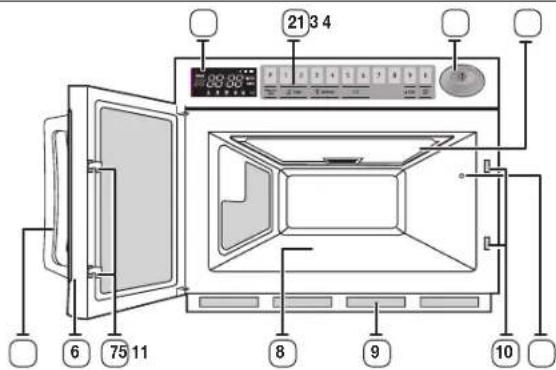
- DMCNTEI
- KOMAHHO TAsNO
- BYTOH CTAPT
- KAIAK HA TABAHA
5.PbXKA HABPATATA - BPATA
7.KIHOHAIHKINHABPATATA
8. IOCTABKA 3A HINH
9.BB3DyWENΦNITbP
10.OTBOPN3A EJOKIPOBKA 3A OBEESONACRAHE
11. JAMTA HA ΦYPHATA
KOMAHДHO TABIO
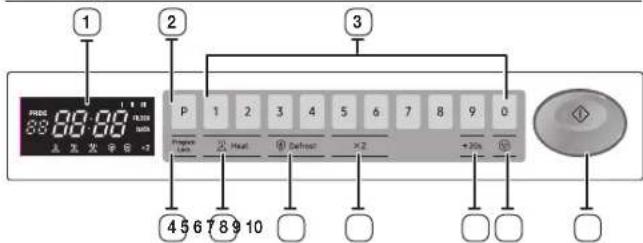
- DMCNNEI
- BYTOH 3A IPOPTPAMM
- JIAPPOBN BYTOH HAc, IIOPIPMAPAHO HAAMETTA
4.5YTOH3A3AKJIOHOBAHEHA IPOPTPAMA - BYTOH 3A/3EOP HMBO HA MOLLIHOCT
DINCNNEI
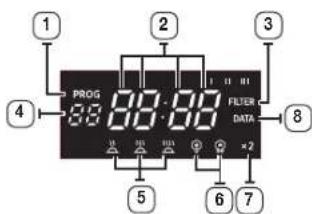
- INHIVKATOP HA IPOPAMATA
- DICΓIJIEN 3A BPEMETO
- MIJIVKATOP HA JNCTTNE 3A BPME HAPPOBEPKAHA Bb3DyUHMI FNITBP
4.LMΦPOBMHDMKATOPHA BYTOHA 3A PAMET - INIKATOPM 3A HMO HA MOLUHOCT
- VHIVIKATOPA3PA3MPA3RABAHE
- INIINIKATOP 3A IBOYHO KOINHECTBO
8.VHINKATOP3A NPOBEPKA.HA DAHHI
3ADABAHE HABPEMETO
MJKPOSSNBOBATA FyHNA 3rraepen HOBACIKN. Korato ce nope da 3axpaHbAbe,Ha ekpahAe pckasaaTAMOTAHNO-0"88:88"moA12:00"
Mon, 3a4nre TeKuTo BpeMe. BpeMeTo MoKeJa Ce nKa3Ba NmB 24-HacOB, HmB 12-HacOB foPomat. Tpa6Ba Da CBePeTae HacOBHnka:
Korato MOHTVPATE BaWATA MKNPOBbJHOBa cypha 3a npbb MT
Cne npekcbaHe Ha 3axpaHbHaTeO
He3aOpabRteJaCEepBaTeHACOBHMKA,KOTATOIPEMMHABATEKBMIMNOTJTHHO 3MIMOYACOBBOBPEME.
A BAtOMaTHHaФyHKm3a neCTeHa eHeprna
AHO He H6pepe HIXKAA FyHKnI, DOKATO ypeBt CE HACPOBA NIM paOHTC BPOEMHO CnPAHE, FyHKNTA Ce CTMOH N CE KOBAS ACBOBHKT CnD 25 MHNMT. LAMNATA H cyPHHTA Ie CE KKNHNI CnD 5 MHNIT NPM OTBOPBA BpATA.
1.3a nokaxete BpemToB... CnTOBA HATNCHTe +208
24-yacob cpcmat
12-accob c0pmat
Benn
Baa nTn
- 甲Ⅲ3aBte LIOPOBNTE BYTOH, 3a Da BBbEeTe TEKUYUO BOEMe. TpR6Ba DA HATNCHETE NOHE TpIuPn4, 3a Da HAcTPOTE HACOBHnA. Ako TKUYUoTo BSpMe E5:00, BBBeTe 5,0,0.
- KORATO CE NOKAKE TOHOTO BPEME, HATICHETE BYTOH CTAPT, 3a da CTAPTAPATE HACOBHINA. YACOBHKBT CE HACTPOVA HA10 cekHydN.
Ako He nckate da 3aadaetep BpemTo, HATMCHETe BYTOHA 3A OTMRAH, npdm da 3anoHHTe da RotBITE.
Ako NCKATE Da NPOMEHITE HNHNHYNPATE HAcTPOIKATA 3a BPeMe, BKIOHETe
NHCTPYKUIN3A TOTBEHE
HOMHHHATAI3XoOHaMOUHOCTCnpedIECEmKdyHapOnDACTAHdpTINpHAPA HOMHHHATAOCHIOHTA,TAaCe CERBAHCNIPPOBcDITENHMAIKPOBbIHOBnFPHN IINON3BATeHNHcBtMetOD3aNIMBPOSAHEHAIOHOCTMOUHOCT. AkoHaONAKOBATAHxApaHATAIMNAHHTCPyKUN3aRTOTBEHeBb3OCHOBHa HOMHHHATAMOUHOCTCnpedIEC,3aJaTe Bemeto Ha rotBeHe cBflaHOIE MQUHOCTTaHbAUbtaFpyHa.
HanoiMep:
Ako Hnctpykumte 3a rotbe ca 3a cypha ra 650 W, ue Tpa 6a da hamanme
manko spemeto 3a rotbe ha MW87L (850 W) B HAWE Bpeme rotoBITE ACTH NECTT
BpeMe n ca doTa tnoyJPHM. ToBa ca RTHK, KOtTO BEHe ca npOTROBeHm cOTBEHm OT
npov3bOpyTBA HA xpaHATA, cnE TOBa ca 3ampa3EH, OxnaeHN Mn BakyyyMPaHn 3a
dbIroTPaHIOCT.
Bce no-He 10e MeTo 3a HarpBaHe Ha TakBa TtoBc Aactn ce Ochosaba Ha KatoPertoe Hb HarpBaHe A, B, C, D, E.
B TaKbIc OyHnIOCTO CIOCToCIOCTe KATEORPHTA HARpHbHaHe HA cyPhHATc
mNCTpykUTHE OANOKoTcKa HApXaTHa N HAcTOPTe TAIMEPA NO COTSBTHMAHNH.
HAnPMMe: Ako MHCPTyKUMTe 3A HarpBaE OnpenepTe 3 MMHyTN Ha cteneH HIGH
(BWC0ka) 3a dyPha OH tKATOPERD D, Ue TPOBa DA HACTOPTe TAIMEPA HA No-MaIKo OT
3MHNH ta cteneH HIGH 3MaJ26A093 (KATOPER E).
He 3a6paBnTE, He HNCTpyKUNITE 3a rotBeHc ca cmo 3a cnpaBA. Ako CTe CnAAMIN HCHTpyKUNITE IN XpAnHATA BCE OJIe He IuUrno HAprrta, npOCTo BbPhETe BbB cyphHnraI rTOBtE, DOKATO E roPoula.
TOTBEHE /IPTEPONJIHE
EHOCTbIKKOBOTBEHe
Ybepetc, He IeceBt Hn FyPHTa E BKnIOH E npABINHO 3a3EMe H eNkTPHeCKN INTOHNT
Orbopete Bpata (namnata Ha cyphata ue cbethe).
Noctabete xpaHATA BIOxOoJI KOHTeHep, paoNIOXeTe R CEHTbpa Ha cyphHata H 3aTbOpTe Bpata CmpyHO (namnata Ha yphHata Ue IaRache).
- 136ecete XenaHOTHO HBO HA MOUHOCT.KATO HATVCHETE 6yTOHa 3a H36Op HA HMBO
HA MOUHOCCTTA
Peyntar: V6paHTo HMoHa MoHocT 6e 6Jne nokaaHO B npO3opea Ha DCnner.

2.3anaTe JeknHTo BpeMe Ha HapraBaHe.KaTO HaTCHETU UΦPOBNTE 6ytoHn
Pesyntar: 36paHOTo Bpeme 5e 6bne nokaaHO B poc0epaHa HnCInner.

MaKcHMAHOTOPBepMeCPOEP3ACKO HbHO HA MOIOCT HA rTOBeHO MOKeJa 6bpea3rIeHa Bpa3dEHNbHA HMOIOCT N POMHa HbPemeHata Ha CTP.9
LHPOBNTE bTOHn HMA da paobotr mHa peaepnpat, KORATO 3aDpTe BPEMe HA rTOBEH, HAPNbAbao MPKcMmHATA CTOHOT. He MOKETe Da 3aDpTe BPEMe HA rTOBEH, NO-BoIO OT MAKcMmHIO pOyCTTMOTO BPEMe 3a 1360aHATA Rporpama. PpenopHBa ce da HATNCHT OEtMa Hda BBeTe HOBO HMOUHOCT N BPEMe HA rTOBEHe.
- HatcHETe byToHa
Peymar:Ha hyphata HoxnkaaHaaBHTNATOP CE KINKCHL. Ls aonHHe HAPRAHHe. Lle 3aoHHe OTbPOBaHe Ha BPEMEHO HcPPOBAHcnnne.
1:59
CnEINTHUHHe HA BpEMEtO 3BvKosHT CnHAn 3a KpaH Ha uKbI Ye np08ByH4
JaMnata Ha cyphata ige 134ache. OxnaaTaHHT BENTNATOp ige npDbKn JIpaB0T MHyTA, 3a Da OXnAIN bStpeHNTe HAcTn. Ipe3 To8a BpEwe BEHTNATOpBt HmHa da cnp Ta paB0TN Dopn KORATO OTBOPTE BpATA.1 MHyTA No-KBCHO ige Cnp. MoKete da 3aEBaNTe XpaHATA OT cyphata,doKato BEHTNATOpBt BCE oige paB0TN.
Pn3 T0Ba BEme BEHNTATOPbT HMa Da Cnpe Da paBOTn DOpN KOrA ToBOPrte Bpata.1 MHHy TaNo-KbOHOIcpe.MoKete Da NsABWTe XpaHATA CT FyphATA, DOKATO BEHTATOPbT BCE Oe pAOTA.
4. OTeBopete SpataTn m3BaTe XpaHATA
3aTbopete 8paata. JAMnata Ha cyphata ue n3rache.
POKato E B UKbn Hn HarpBaHc. fOyHata cTm0a C eHO HATNCKaHc Hb 6yToHa I MOKeTa DE CTAPNTpATE OTHo, KATO HATCHETe BTOHa (a aKO HATCHETe BTOHa I B3a TnB, N6bPAHn npOPpAMa ME 6pe OTMeHA, KorATO FyOHATA HE e B UKbn Hn HarpBaHc, eHO DOKoCBAHc Hb 6yToHa (OTMeHA N6bPAHn npOppAMa, MOKeTa DE HATCHETe BTOHa +20sec" EvHN NOBe HtB, 3a Da DOsABte DoBnIHHTENn 20CeHyn KbM BPEMeTO HA rTOBeHe. Ho ME Kote Ta DnBIMITE MAKCIVMAHTO DOncyCTMO BPEMe Cnpoe N6bPAHTO HbO MAUHCCCT.
PnMbPBOTO BKNHOBAHe Ha 3axpaHbAuaN Ka6en cyphata N3daBa eHN 3ByKOBCHAn H BCINKn HnHkAToPn Cn NOKa3BAt Ha nncner 3a 5 ckyHn.
Cnied 3abpbbahe Ha Lkkbna Hn HapraBa He n OTrapHe Ha Bpata yphata abTomATHIO Ce BKIOHbA Hc NsKIOHbA Cnied 5 MInHyta.
Korato OTbOpTe Bpata Na IbpeMa Ha LkKnHa HApPBAHe,dyPhaTc nipa da paBOni NmNnata Ha cyPhaTc Ce BKIOBa ABTOAnHHO 3a 5 MHyTN mRACBa 5MHyTN NO-KsCHO.AKO OCTaBnE Bpata Na OTbOpBa 3a NoBeHeOT 1 MMHyTN, cyPhaTc HA NDn EEDh 3AkyOB CnTHAI HA BCKa MHyTA.
MHOROCTbIKOBOROTBEHe
- 136epeTe XEAJHATO HMO BA MOUHOCT, KATO HAITVCHETE 5yTOHa 3a 5360p HA HMO BA MOUHOCT Mm 5yTOHa 2A3MPA3RABAE
Pe3yntar: V6paHOTo HMO Ha MOuHoc TJe 6bde nOKa3aHO B IpO3opeHa DcNner.

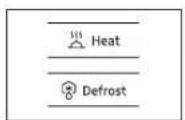
2.3aIeTaeKcHAnHO BpmeHaHarpBaHe, Kato HATCHETe UΦPOBNTe 6yTOHn.
Pesynta: 36paHOTo BpEe 5e 6bJe NOKaHaHO B NOO30eLa Ha DnCTTNE.

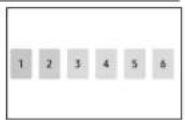
MakcmmanHOTBpeme cnoep BKOHO HA MOUHOCT HA roTBEHE MOKe da bde.
paarnehaO b paeen HbHA HO MOUHO TPOPMHa HBOPEMHATA" HA CTP. 9.
LIAPOBITE ByoTHN HMA da PABOTHTIN da POARVPAT, KORATO ZaadADTO BpEMe HA roTBEHe, HApBnBaAio MAKcmmHATA CTOHCT. He MoKETe Da 3aDaeTe BpEMe HA roTBEHe, NO-DIO TO MAKCMMANHO DcYCTMOTo BpEMe 3a NbOpaHATA NPoPama.
IpenopbHa ce da HtMCHeTE OTMRAH DA BbeDeTe HOBO HMO HA MOUHO HpEOCT HpEme HA roTBEHe.
-
NoToTepoe CTbKn 1 2 3a nporpamipane Ha CTbnkla I mll B narnetta.
-
HATMCHETe 6yToHa
Peynat: Jannata Ha cyphata oxnaqpaHnBENTINATOP LcE CE KIOHAT.
Pyphata ATOOMATNHO 1E ZANOHHe da HARpBa CIOpeD npdpabntnH pnpaMnpaHOTo BpBb HA TOBTBEH IN HBIO HA MOUHOCT. (ctbnka I-ctbnka II).
L3e3a0nhe 06p8baHe Ha bpeMeTo Ha uippoBna DcTneH.

HeMoXBTa Da 3aDaeTe EDAHBO HMOBHO MOLIOCT NIMPA3MPA3RABAHE. Toba Ce 13nHRA KaTO HAcTPOHa HA NOcneObaTeNHOCT.
HINBA HA MOLUHOCT IN IPOMRAHA HABPMEHATA
ФИнкгелятza 3a HIMBO HA MOUHOCCT bN IIO3B0RIBA dI npriOgHTe KONINHECTBOTO OTdJIHbEhePrrnnoHHH - BpEmETo, HeOBxOJIMMO 3a rottebe nnnpetOnnBeHaBaWtua XpaHa, B cBoTBeTcBHe C TTHa N KOINHECTBOTO. MoKete da n36bpate NmMEXkyCnDHTHe HIMBA HA MOUHOCCT.
| НИВО на мошист | MJ26A6093 MJ26A6053 | ||
| Пюцент | Мэх. мошист | Пюцент Мэх. мошист | |
| ВИСКО (1) | 100 % 185 | 50 W 100 % 1500 | W |
| СРЕДно (2) | 70 % 1295 | W 70 % 1050 W | |
| ИСКО (3) | 50 % 925 | W 50 % 750 W | |
| ВИСКО PASMPASBAHE (4) | 20 % 370 | W 25 % 375 W | |
| ИСКО PASMPASBAHE (5) | 10 % 185 | W 13 % 195 W | |
BpeMHATA 3a rotBeHe, daHn B peIeTTnE B Taam KHnKkA, OTOBaprHa KOHKpETHO NOcHoHO HHO HA MOuHOC.
| Инbos на мочице Мас. Врeme | |
| ВИСКО (100 MHI. | |
| СРЕДН (100 MHI. | |
| ИСКО (100 MHI. | 40 MHI. |
| ВИСКО PA3MPA3RBAHE (8) | 50 MHI. |
| ИСКО PA3MPA3RBAHE (8) | 50 MHI. |
CINPAHE HA TOTBEHETO
Mokete da cnpate roTbeHTo no BcKO Bpeme, 3a Da:
- PpOBepePte XpaHata
-06bchete xpaHATAa Pa3bpkate
Ja octabnte da npecto
3a da cnpeTe roTbeHeto... HarnpabeTe cneHto...
| Врemeно | Ов行政处罚 в典型案例 и насяchetе行政处罚 (Ф. энхраимо. Рezулат: Готberгето симра. Здд поюнente Готberгето, заразоре行政处罚 и на性和 ( Ф.OTHOBO. |
| Намлно | НатOMICЕ行政处罚 (Ф.Дза пьши. Рezулат: Нстрикпente за говende ce OTMHRT. |
AkoNCKATEdaOTMENHTKAKBIMOeHACPTPOKNpEaDA3ANCHETeD AROBTBE,NPDCOTHATNCHEOTMRAHA(BBeHbX.
ФУHKUN3A NOBTOPEHNE
- MoKTe Da NoBToPte NpEduHHTa HAcTPOVka 3a TOTBEHe (HE3AICIMo 3a daN p5hHO Mn ABTOMATHNO TOTBEHe C HAcTPOVka OT NAMETTA), Kato HATCHETe 6yTOCTAPT (O PyPhTa CTAPTMA c TOHNO CbUTO BPEMe HA TApRbAEH HMO HO MA MOHIOCT, KOtO Ca 6mN N30J3SAHN PnI NcCNEHDO TDeCTBVE.
2.Функьгета 3a noTOpEme 5e 6bpe OTMeHHe cne, pekbcBaHc H eIeKtpoSaXpaHaHcTeO.
I3NOJ3BAHE HA BYTOHA ^ 一 + 2 0 S E C ^ 一
MoKETe Da yBcHnHTe BpEMTo HA rTOBHe, KATO HATINCHETe 6yToHa+20sec"mo BpEme Ha LkKnHa HArpaBaHe.
Bpemero ha roTbeHe ce yBeHHaBa c 20 cekyHpi np BcKaHO HATMOKAHe Ha byToHa +20sec
HoMaKcMmHnHO BpEme He MoKe Pa Ce HauBmU.
NoDcHO Ha TpaIINIOHOTO OTBEHe, MoKe Da Ce HANOXu, B 3aBNCIVOCT OXTaKTePcTnKtMe He XpaHATA Nm BKyCa Bn, da perynpate neko Spemeto 3a RotBeHe.
PpOBepeKcBvNnTOBHeToNoBCAIO BPeMe,KATO pOCTO
-OTBOPMTBpaTata
- 3atbcpetepaTata
YBeINHTeOCTaBauIOTo BpeMe 3aTOTBeHe
Pepn pa pabotte c cyphata, moke t na yennte/ HAMNTTE BpemTO Upe3 uipoBte 6ytoH mN 6ytoHa
+20sec No Bpeme Ha paOta MoKe Da ce doBaBn BpeMe cAmo C6yToHa +20sec.
H3IIOJI3BAHE HA ΦYHKLIJRA TA 3A PA3MPA3RBAHE
FyHKUaTa 3a pa3mpa3BaHe Bn NcBorRa da pa3mpa3BaTe MECO, DOMAUH ITVUu nn pu5a.
ⅢnnonlaaiTe cAmO KOHeHepn KOnTO ca nOxOaIa 3a MMKpOBbHOBaФyPbA.
OToBopete BpAivNkata. NocTabete 3ampaeeHATA xpaHa S cHTbpa HnocTabkata 3a YHHM. 3aTbOpete Bpata.
- HATNCHETE CENKTOPHM BYTOH Defrost (PA3MPA3BAHE), 3a na 3aandene PA3MPA3RAHAE BWCOKO (PA3MPA3RAHAE HNCKO (CnopeD BaWHTe npdoonHnH
Pezyntar: INHdkatopbT PA3MPA3RABAHE ce noBBA. HADNCNNE.
2.HaTmCHTe LMOPOBITE 6yTOH,3a da 3anaTe BpEMTo Hpa3mpa3BaHe. (MkC,50MM.)
- Hatmchete 6ytoHa
Peynta:Pa3Mpa3BbAeHTo 3a104Ba.
49:59
He BbMxHO da 3aapanepTe Bpeme Ha pa3mpa3BaHa ne-dbnto 05MH. HdkatopBt 3a p3mpa3BaHa Ie npmmba Ic npenopbHa da HATCHET OEYMAH (n Da BBeDETe HOBO HBO INpeMe Ha pa3mpa3BaHa.
Korato cyphatae paobtnia no-byto 25 Mmhytn cneu kbl Ha pmaepaahe, HE MOXTE da npomHNT He HMOUHOCTTA CT PA3MPa3BAHe H PEXM HA Hapbahe (rotBehe/npetornahe).
IPOPTPAMNPAHE HA BYTOHNTE 3A IAMET
BedaTbNka
- 3aDpBxTe 3AKJIOUBAHE HA IPOPROMA (H HATMCHETe 5yTOHa IPOPROMA (P 3apbXTe H HATMCHATN EHOBPEMeHHO 3a 2 cek.
HATMOHETe 5yTOHHTe CINHO.
Peaynta:Ha 4p0BmIe CnBBAHIMKATOP PPOPTPAMA.
2.HATNCHETE CBOTBETHN LHPPOB 6yTOH 3aXeNAH NHOEO HA NAMETTA.
Pezyntar: IVsbpHnT KOHa nIporpMaB NAmETa CE NOBRAA NOI INHkATOPA IPOPTPAMA.
- Ⅲ6bepete HMO HA MOUHOCT, KATO HAHTMCHETe ByToHa 3a HMO BA MOLHOCHT mByToHa PA3MPA3RABAHE.
Pezyntar: HbTO Ha MOUHOT BMCCKO CE NOBBA HA DNCLNPRn PbBcTO HAVCKAHe H 6yTOHa HMBO HA MOUHCT.
HaTCHETe ByToHa 3a HMO Ha MOLHOCHT MInb6yToHa PA3MPA3RABAHE BnBck MMIOBBE HbTN, DOKATO DOCTAHETe XeIaHOTc HMO HA MOUHOCT.
- HATINCHETELIMPOBNTEbytoH,3a da 3aedaeTe BpEMTo HA rotBEHe.
MekmmanHOTOPeMEcnpEaKHOHbMOuHOCHT Ha roTBHe MoKe Na bBe paarneHa paaan Hb
HA MOUHCTN IPOMRA HA BPEMEHATA"HA CTC.9.LIOPOBITE BYTOH HRMda paOaHTI HATA KOATO 3apane BpeMe HA rotbe He,HaBnauBaIACMKcIMATNA CTQHOCT.
He MoXeTe Da 3a4aTe BpeMe Ha RotBeHe, NO-1bIro CT MaKCHMaHIO DoIpyCTMIMO BpeMe 3a 36bpahata nporpama. IpenopHbCe da HaTnCHete OTMRHa n da BBBeTe HOBHO HMO HA MOUHO HPEMe Ha RotBeHe.
- 3aPbXte3AKJIIOUBAHE HA IPOPGPAMA (HATINCHETe6yToHa
IPOPAMA (p. 3aepbxteepnopeMeHO 3a 2 ckyHn Oue BcHbX
Pe3yntat: IVIikatoptb IPOPTPAMA NIOFPOBRTIVIKATop 3a Nametra NPMMRBat 3 NTnHa NIOPOBMA DNCHNE C EDHOKpATEH 38yKO B CMHN. Cnep ToBA DmNnEETe H3MCTBA.
BHHMaHHe: HatncHete 6yToHnTe CnHIO B npaBnHTo nIooKeHne.
200
- Korato nckate da nporpamnpate oue cyHKm, noBtcpene npoeDpyne no-rope.
105enemeha ca doctbHHB npopamte ot nawetta.
YVepeTeCe,YeypeBtE npaMaHIO nporpampa. CnD 3aBpuBaHe Na nporpaMpaHETO Tpr6Ba CAmo Da HATNCHTe LMOPOBn 6yToH,3a Da rotBnTE CbC 3anaMentHa HAcTpoKa.CnD ToBA N36paHATA nporpama OT nAMATEA BCTOMATHIO CTACTIpaOTROBEHO.
TOrBeHE B HAKOJIKO CTbIKN
- 3aipbxte 3AKIIOYBAHE HA IPOPpAMA ( Hn HATINCHETe 6yTOHa IPOPpAMA ( P 3aipbxte n HATINCHATN EHNBOPEMeHHO 3a 2 cek.
HaHnCHETe 6yTOHnTe CmHNO.
Peynta:Ha cippoBna dncnne ce noRa 1HdNkATOP PPOPTAMA.
- HATCHETe CbOTBeTHMn LmPOB 6yToH 3a XeNaHn Homep Ha NametTA.
Pe3yIar: IV6paHHT KOJ HA NpOrpMaB NaMeTt Ce IIO8Ba NOI INMkATOpA PnOPIPAMA.
- Ⅲ6epete HNBO HA MOUHCT, KATO HAATCHETe 6yTOHa 3a HNBO HA MOLUHOCT UINI 6yTOHa PA3MPA3RABAHE
Peaytar: HbTO HA MOUHOT BMCCKO CE NOBRAA HA DCNPIE PNI PNPBOTO HATKCAHE GAyTOHA HMBO HA MOUHOTC.
HATACHETe 5yTOHa.3a HNBO HMOUHOCT mM 6yTOHa
AP3MPA3RBAHE BOIbTbIK NIM NIOBcO HbTI, JOKBO T DOCTHTHE KEBJIOHOTC HNBO HA MOUHOCT.
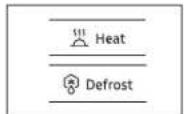
4.HATMCHETELIMPOBNTE6yTOH,3aJa3aJADATE BEMETO HA FOTBEHE.
MaKcMmHnTO BpEme Cnpoe BCPOHO HbHO HA MOnHOT Ha rotBHe MoKe Da bBe paRnHaO Bpaen.HBa
HA MOUHOCHT INPOMRAHA HABPBEHATA"HA CT.P.9.LNPOBNTE 6yTOHHRMA da paoTHTa peanpat, KORATO 3aDaeTe BPEMe HA rTOBHe, HADBMWABAO MAKCMAHATA CTQHOCT.
HEMOXETe da3a4aTeBPEMe HAOTBREHe,NO-1b/IO CTMAKCHMVAHO DOnyCTMIMO BPEMe 3a 36paHata noPcTmB. PpEopbHa ce Da HATNCHTE OTMRA HA da BBeJEte HOBHO HAO HA MOU-OCT NPEMe HA TOTBEHe.
- NoToTe 3bNkM 4 3a nporpamipane Ha cTbnk I nI I B naMeTTA.
6.3aPbKTe 3AKJIOUBAHE HA IPOPGPAMA(E HATNCHETe BYTOHA IPOPGPAMA(P,3aOpbKTe eHOBepemHHo 3a2 ckyHn Oue BcHxk.
Peaynt: HndkatoPITPOPGAMN KpOBAH INKATOP 3a Nametra npmmrBAT 3nTH HA ndpOBmI cepHOKpAteH 3byKOe CnD TOBa DcNNEET CE NCHCTBA.
BHHMAHHe:HaTCHTe 6yTCHTE CmHnO B PpaBIMHO TNOJIOKeHHe.
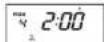
- Korato nckate da nporpamnpate oue dyHKm, noBtcpere npoeDpynte no-rope.
105enemeta ca doctbHHN BnpoPamnte OT naWETTA. YBepete ce, ye ypeBtE npabuHNO nOOPaMpaHn.
Cn3aabpaabaHa nporpampaneto Tprba cavo da HATNCHETe UΦPOBNI 6yTOH,3a da rTOBHe Cb TaanameTeHaCTPOKa.Cn3 ToBA h36paHATA nporpama OTAMETAHOTAPNTPAOTROBHTO.
He moxete da zadane ednako HMOHMOUHOCT mPA3MPA3RABAHE.
ToBaCe HnIbHbA KaTO NaCTPOKa Ha NoCieDobATEJIHOCT.
METOD HA PABOTA C HACTPOIKA OT IAMETTA
CJed KaT O3aBpHHTe nporpaMpaHcTo Ha NamETTA, npocTo HATNCHE LINPOBIA Byton HA HOmepa OT naMeTtA, KOITIO NcKATE da 36bepete. CyPHATA ATOMATuHO He 3aONHe Da HAPR8a Cnped PnepBapVTeHNO nporpaMpaHOTo BpeMe HA TGTBeH INSO HA MOUHCCCT.
1.YBepTeCe,HeUeNceTbHaCyphataEeKIOHcBnpaBnHO3aEMEHNEKTPHECKNHTOHNK.
2. OToBocepTe BpaTmKata.
JAMnata Ha dyPhata N Ie ce BklnH.
3. NoctabeTe xpaHATA B NOxopA KoHTeHep, PaanonoXeTe R CHTbPa Hc yphata n 3aTbOpTe BpTaTc CyypHO.
Peynar: lamnata Ha cypHata Uie mrache.
4.HATNCHE TMOPOBNA6yTOH.
Pe3yntar: 16paHATA nporpama OT nAMETTA abOMATMnHO CTAPrna HarpBaHeto.Ho UΦPOBNTE 6yToH1,2,3aONHbT da pa60rT cne 2 cekyHn.
METOD HA PABOTA C BYTOHA 3A IBOHOKOJIHECTBO
- HarncheTe 6yToHa 3a DboHn KoNmueCTBO.
- Hanchete BytoHa 3a JeknHn HOMEP Ha nporpama.
Peyntat:Bpemeto3aT0BHe,KOToe yMHOxHo No npedapnTeHNO 3aadene HApKTO,CE NORBA HA DIOH NO TOTBEH3AONBa COT6P0BaHa HApEMTo BcIpH
ПОТРAMМРАЕ НА БУTOHA 3A ДBOИНKOЛМСЕCTBO
1.3aPbKTe(HATNCHETe BYTOHa().2pBxTe HATMCHATn EHNOBPeMHHO 3a2ckyHm
- M6epere xenahn Hn nporpma, kato mno3bare LPOBNTe 6ytoH.
3.HATCHETHEUMPOBITE6yTOH,3aJa3a4adete Kc0eMnIeHTaHaYbEINHeHBepaMKTeHaDmAn3oHaOT 1,00do9,99.
KoeqmuHbT no nppa36pahe e npedapntenHO 3aaden KaTO 1,65 ot npouoBouHTe na yBENHabeHa BpemTo HA TOBHe. 3aapane KoepuHnEHTa npabmHIO MeKdy 1,00 n9,993a BceKn HOpE Ha KOD Ha nporpaA.
4.HaHCHETe6yToHa
HaHNTCHETe ByToHA,3a Da HnE3eTe OT pexmHa Hnporpmpahe. BnpeKHe MoKETe YcNEUHO Da 3aDapTe KoeCNIeHT 3a IBOHO KOINBCTO, Hrto HAcTPOKa MOKe Da DOBeDo HADBnBaHe HA MAKCMmaHO DOYCTMIMO BPEMe 3a BCAn HO MaOuHOCf, CyPhATA He pabOn No-dIro MAkCMmaHO DOYCTMOTO BPEMe.
Pepaktpahe Ha KoePhiHnEHTa 3a DBOHO KOINueCTBO
| Функция | Бъбждане с Клавши | Диаспел 3а6еlexьka | |
| Редakтурени Коевichiшени Здровико Колочаго | Задрък'te OTMЯнA ( ) и сlogen таэ Бутона ( )2 | F | Задрък'te за 2 сlogen |
| КoД № | F165 | Сlogen 1 сlogen на сlogenпоста по побразима сlogenда в побразима на сlogenпоста | |
| (Bьбал'de Желоват STОИСТ На КоевсIMENTA.) | F200 | 1,00 - 9,99 дуч'te небрахия (Hex6xOДмУа e псамая на КоевсIMENTA.) | |
| СТАТ ( ) | F200 | Акг Н ecкота ду рогимп; рекima, на лине ТОМЯнA, зда на лине от рекima на pondakтуранe. | |
| НCoB кoД № | F165 | Порочтete TAZI CTbIKA, Акг He e HeobxOДмYа. | |
| (Bьбал'de Желоват STОИСТ Нa КоевсIMENTA.) | F230 | Порочтete TAZI CTbIKA, Акг He e HeobxOДмYа. | |
| СТАТ ( ) | F230 | Порочтete TAZI CTbIKA, Акг He e HeobxOДмYа. | |
| OTMЯнA ( ) | (OTMЯнA Na PekIM) | Така Иллsterот рекima на pondakтуранe. | |
TOH HA KOHTPOJIMPAU 3BYKOB CINHAJI
Moxete pa 136epetE kienanHr TOH Ha 3byKOBv CMHn. IMa 4 HBa Ha 3byKa.
HATnCHETe 3aepbKTe OTMRAH (mCnEDTo8a HATnCHETe LcPBOBn Bytoh O.3aepbKTe HATnCHATn eHOBpEMeHO 3a 2 cekHypn
Peynta:TOHbT Hs3ByKa CE pONMeHr HA eHIO HVRO NO-BMCOKO CT TEKUYIMA TOH
PnTOHHa3Bvka0HeceM3daBa3BvKOBcHHaI.
HaCtpoKnIe LMPkyIupat, KOrato HAtmChTe CKPMTte KnaBnB B cIepHnpeD 3B.0→3B.1→3B.2→3B.3→3B.0(5e33yK)
TOnbI TIO nOpaB6mpane e 3a.2.
NPOPAMPAHE HA BPEMETO HA NOYCTBAHE HA Bb3dUHHNnФJITbP
Korato Ha dncnner ce noBnVHdkatopb3a npOBepka Ha b3dyuHHF pntb [FILTER] cnd onpepe nepno HA yTNTpeba, Tp6ba da noNCTtBe b3dyuHHHaHTbB C50BTcTBNE C NCHCTpykUHTe, NoNCTBaHE Ha B3dyuHHF pHTbHa CT. 17 ot TaBHKnKKa. Cnd ToBA cndbaeI npOeDyPcTa NO-dony, Ako HCKate da npOMHNTbe Bpemeto 3a noNCTBaHE Ha B3dyuHHF pntb.
1.3aPbKTe 3AKIIOYBAHE HA IPOPGAMA(HATNCHTe ByToHa C LMPA3.3apbKTe HATNCHTe EHOBpeMeHHo 3a2cekyHn.
Pezyntar: HbBpEMTO BACOBE MEKND NOHCTBAHTo
HaB3dUHMAHHTbO,KOETCNEpPcPAMPAVNNI
PiPSBOHaHnHO BPME,PPeBaPNTHeo 3aJadEo OT PPOM3EOHTe.
Bpemeto 3a noHCTBaHe No nOpa6bpaHe e 500 yaca, HmepenKato Bpeme Ha bPteHe,a He nocJeOBaTeJH aacCe.
2.HATNCHTE LMOPOBNTE 6yTOH3,3a da 3aadapeTe JEAHOHO BPEMe 3a PCNCTBaHe.
Mokete da 3aadaeTe do 999 haca.
3aepkTe 3AKIOHBAHE HAIPOPAMA HATNCHTE bTOHa C UINPA3. 3aepkTe HATNCHATnBHOBpeMeHHO 3a2 ckyHm, 3a da 3ana3ne HObATA CTNOHCT.
TOBa 3aBbPbBaIpoIpaMpaHETo Ha Bpemeto 3a NOCTBAHe HA B3dyuHARФNTbD.
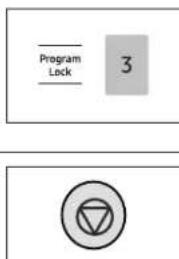
F:3ampa3eHnC:OxnaedeHn
| Peçenta Meto | HIBO HANMOUHOCT | Bpeme | Bpeme 3a npecton | ||
| 1850W | 1500W | ||||
| Брексанzo сeme B | 60 ml/4 c.l. BOda | BVCOKO 4'30" | 4'45" | 2 MHH. | |
| Зени SFOB, Hapязан | ПокочITE,pasбьркайе no copdeta ha roтевенeto | BVCOKO 3'00" | 3'15" | 2 MHH. | |
| Lan phacyn ПокочITE m.pasбьркайе no copdeta | BVCOKO 4'00" | 4'15" | 2 MHH. | ||
| Розчкот OTБрокол | ПокочITE m.pasбьркайе no copdeta | BVCOKO 4'00" | 4'15" | 2 MHH. | |
| Hapязано сeme ПокочITE m.pasбьркайе no copdeta | BVCOKO 4'00" | 4'15" | 2 MHH. | ||
| Летинский OTМорков | ПокочITE m.pasбьркайе no copdeta | BVCOKO 4'00" | 4'15" | 2 MHH. | |
| Розчкот OTКардион | ПокочITE m.pasбьркайе no copdeta | BVCOKO 4'00" | 4'15" | 2 MHH. | |
| Lapавида наКонн | Калak BVCOKO 4'00" | 4'30" | 2 MHH. | ||
| Lдуся саддацупсавида | ПокочITE m.pasбьркайе no copdeta | BVCOKO 5'00" | 3'15" | 2 MHH. | |
| Lси гылл РокочITE m.pasбьркайе no copdeta | BVCOKO 3'00" | 3'15" | 2 MHH. | ||
| Peçenta Meto | Húbo Na MOUHOCT | Bpeme | Bpeme 3a npectoi |
| 1850W 1500W | |||
| ПЕСН 3EЛECHUYДN | |||
| 3a rotbehe 500 g | |||
| Картофи с Корунka 230-290 g X 1 | ВИСКОК 3'00" | 4'00" 2 M. H. | |
| Картофи пое X 2 Kaptoфи nope X 4 | ВИСКОК 6'00" | 6'30" 2 M. H. | |
| ВИСКОК 10'00" | 11'15" 2 M. H. | ||
| Ратул 500 g BИСКО 3'30" 4'00" 2 M. H. | |||
| Буокселко заile F | Буокшпій no разбърaite no cpeData | 3'30" 2 M. H. | |
| OPN3, 500 g | |||
| 3a npeToPJIaHe | |||
| С被告 OPIN F | Покшій no разбърaite no cpeData | ВИСКОК 3'00" | 3'15" 2 M. H. |
| Пиньд от opin F | Покшій no разбърaite no cpeData | ВИСКОК 3'00" | 3'15" 2 M. H. |
IIOYHCTBAHE HA MMKPOBJIHOBATA ΦYPHA
CnHHTe cactHa MMKPOBbHOBaTphiH TpRbBa da Cc noHCtBatpeoBHC,3a da c9 npodotparnt HATpyiIBAHETO HA M3HHN XpaHHeJIH NACTUH:
BbtpuHn BbHUN NOBbpxHOCTN
Boataa HynbTHENsTa Ha BCATA
·DCTABKATA38YMHV9
BNAHANCEYBEPEBAITE,48yU1bTHENHTA HABATATCA NCTINTA 3e 3aTBApa
HecnBaBHeTo No npDpBxKATA HpyOHATA B YICTO CbCTORHA BNO MTO Da DObEe Do BNoaBaeHa NoOBxPOCTA, KOET Da Cc OTPa3n HeBnatOnPHTHO HaTITOTPAHOCCTA HaOyedaN daOBede Do Bu3MOXHa ONACH CHSYLs.
1.ПИССТЕ ВБИЦМЕ ПОББХ-OSTС MЕКА КБРПА И TОЛТС CATYHEA BOДA.NIJIANKETE I NOCDYCHTE.
2. OCTPahre paaHmte n HnHATA NO BbTeHHTe NOBbPxHCTN Nn no pokOBy npcteh cbc canyHe h oBa. Wannakhe tnoocye.
3. 3a pa3mEHEtB7pOeHHe TACTUIN XPAHn n paPMAHET MEPMNMTte, NOCTABETHe Hua p3poedn HMMHOCK Bbpyx BpTURAATC NOCTABK N 3AOTPONE B PPOJXHMO HA DEcET MHHTYN HAKMCHMJA MOLOHOC.
HEpaIbMaIeBoaBOTOpne3aBb3dyx.
HMKOKA He 3N10N3BaHTe a6pa3BHH IpoJyKTH MM XMMNECKn pa3TbOpHTe.
5BdTe OEo6eHO BHMMATEHn npN NOHCTBaHE Ha yIbTHHMRtHa BpATATA, 3a da npedotpaTmte cneHOTc:
HarpynBaHe Ha octTaBn
HerntbTHo 3aTbapnHe Ha BpataTa
NoHCTBaIe KyHMHTaHa MIKPOBBJHOBA tpyHpa SeHPa cneLcEAyNtpeBa C MEK paaTBCO HA npapao, HC octabeTe MIKPOBBJHOBA tpyHpa da CeXnADnPipeBn NOCTA3He, 3a da n3FeHTe HApAHbHeA.
CbXPAHEHNE IN PEMOH HA MUKPOBBJIHOBATA OFYPHA
ToraBaa da CnpePnMBAHRAKOLKO PPOCTN ppeNa3H MepK, KORATO cbxpaHbate WIM 06cuiybaTe MIKPOBbINOBaTa dyOHa.
Dpyhata He TpnaBa da ce n3no3Ba, ako BpaTata uyn ynn THeHnra Ta ca ncepepeHm:
Cuyeha nHa
HapyueneynptbTheHH
- 13kpmbHeHa m0nObHata o6BbKa Ha cyphHata
PemOHrTe TPrBbDa Ce N3BpWbAT CaMo OT KBaHmDnHpaH MMKpO8bHOB CepaH3eH TEXHk.
HKNKOTA HE OTCPAHRAIe BbHnata OBMBkAOT CyhATA.AKO FyphATA e NobpeHn CE HyKDAEOT C6CNyKBaHE,IMN AKO CE ChMHBATEB HEMHO TcBOHME:
-13BAETE KABENAOTCTEHHARKOTAKT
CebpxTece c Hai-6nMkNcIeepnpaXbEe cepBua3eH ceHTbp
TEXHNUECKN CNEUΦIKAUIN
SAMSUNG ceCTPMA DA NOO6pRA H3DJIIMTA Cn HENPEKbCHATO. 3a0Ba N KOHCTpykTBHHTe CnEUPKALM, IN T3N1 HcTpykUM 3a NOTpeBHTEN NODNEKAT HA pOPMHa 6Ba PnEDBCTVE.
| Моden MJ26A6093 MJ26A6053 | ||
| Зхранвае 230-240 V ~ 50 Hz | ||
| Консуц的一项 Ha에л. energie Microwave (Mikropовли) | 13 A 12,7 A | |
| Изхона мочноct | 1850 W (IEC-705) 240 V: 1850 W 230 V: 1780 W | 1500W (IEC-705) 240 V: 1500 W 230 V: 1450 W |
| РавOTHA чектоа 2450 MHz | ||
| Размерп (ЛxxBxД) | ||
| Габаритун | 464 x 368 x 557 MM | |
| Кухшина Фунда | 370 x 190 x 370 MM | |
| Обем 26 лимра | ||
| Тero lo | ||
| Нero | Проб. 33,1 кr | |
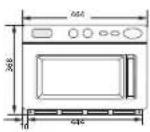
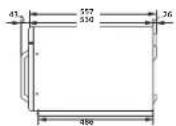
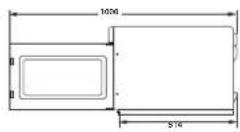
BEJIEXKKA
BbPiPOCN WII KOMEHTAPN?
| CTPAHA OБAJETE CE VIIM HN TOCETETE OHJAIH HA | |
| AUSTRIA 0800 7267 864 (0800-SAMSUNG) www.samsung.com/ai/support | |
| BELGIUM 02-20124-18www.samsung.com/ta/support [Dutch]www.samsung.com/be_f/support (French) | |
| DENMARK 707 01970 www.samsung.com/ck/support | |
| FINLAND 030-8227515www.samsung.com/fi/support | |
| FRANCE 01-48-63000www.samsung.com/fi/support | |
| GERMANY 061967755577www.samsung.com/de/support | |
| ITALIA 800-SAMSUNG (800.7267864) www.samsung.com/it/support | |
| CYPRUS 8009 4000only from landline, toll free www.samsung.com/gr/support | |
| GREECE80111-SAMSUNG (80111 726 7864)only from land line(-50) 210 6997691 from mobile andland line | www.samsung.com/gr/support |
| LUXEMBURG 261 06710www.samsung.com/be_fr/support | |
| NETHERLANDS0689090100www.samsung.com/nl/support | |
| NORWAY21629098www.samsung.com/no/support | |
| PORTUGAL 808 207287www.samsung.com/pl/support | |
| SPAIN911750015www.samsung.com/es/support | |
| SWEDEN 0771 726788www.samsung.com/ai/support | |
| SWITZERLAND0800 720788www.samsung.com/ch/support (German)www.samsung.com/ch_fr/support (French) | |
| UK03330000333www.samsung.com/uk/support | |
| IRELAND (EIRE) 0818717100www.samsung.com/e/support | |
SAMSUNG
| СТРАНA OBДЕТЕ СЕЦИЙ NИ ПОСЕТЕ OHДAJAH HAN | ||
| POLAND | [М] 801-172-678" lub -48 22 607-96-33" Specjalistyczna intolina do obligi zapytan dotycznych telcfterow komdkowych. 801-672-678" "(oplate wedlug taryf operatora) [OF] 801-172-678" lub -48 22 607-93-33" "(oplate wedlug taryf operatora) | http://www.samsung.com/cpl/support/ |
| CZECH | 800 - SAMSUNG (800-728756) | www.samsung.com/cz/support |
| SLOVAKIA | 0800 - SAMSUNG (0800-726 786) www.samsung.com/sk/support | |
| ROMANIA | 0800872678 - Apel grazit *8000 - Apel tanfat in rejea | www.samsung.com/rz/support |
| BULGARIA | 0800 111 31 - Баллaten za Балки onepatoprn *3000 - Лени на的同时�п разговор мени соред Тарфага на мobлийт �ератор 09:00 до 18:00 - Рождени do Петьк | www.samsung.com/bg/support |

DE68-04029H-00