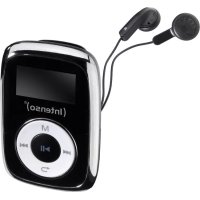
Music Mover - Mp3 player INTENSO - Free user manual and instructions
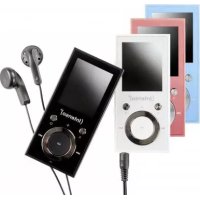
Find the device manual for free Music Mover INTENSO in PDF.



| Product Type | MP3 Player |
| Brand | Intenso |
| Model | Music Mover |
| Display | LCD screen 128 x 64 pixels |
| Battery | Built-in rechargeable Li-polymer, up to 10 hours battery life |
| Supported audio formats | MP3, WMA |
| Supported bitrate | MP3/WMA: 32 kbps ~ 384 kbps |
| Frequency response | 20 Hz ~ 20 kHz |
| Signal-to-noise ratio (SNR) | ≥ 80 dB |
| Channel separation | ≥ 40 dB |
| Headphone output power | L 9 mW, R 9 mW |
| Connectivity | USB 2.0 (High Speed) |
| Storage | Micro SD card slot (card included) |
| Playback functions | Play/Pause, forward/backward, shuffle, A-B repeat, folder navigation |
| System settings | Language, brightness, auto power off, sleep timer, power save |
| Key lock | Yes, via side switch |
| Auto power off | 0 to 60 minutes (adjustable) |
| Sleep Timer | 0 to 120 minutes (adjustable) |
| Dimensions (approx.) | Approx. 9 x 4 x 1.5 cm |
| Weight (approx.) | Approx. 50 g |
| Package contents | MP3 player, stereo headphones, USB cable, Micro SD card, manual |
| Care and cleaning | Use a dry cloth, avoid chemicals and exposure to moisture |
| Safety | Do not disassemble, avoid shocks and extreme temperatures, moderate volume to protect hearing |
| Spare parts and repairability | Built-in battery not user-replaceable; professional repair recommended |
Frequently Asked Questions - Music Mover INTENSO
User questions about Music Mover INTENSO
0 question about this device. Answer the ones you know or ask your own.
Ask a new question about this device
Download the instructions for your Mp3 player in PDF format for free! Find your manual Music Mover - INTENSO and take your electronic device back in hand. On this page are published all the documents necessary for the use of your device. Music Mover by INTENSO.
USER MANUAL Music Mover INTENSO
natural_image
Warning symbol with a triangle containing a stylized ear and sound waves (no text or numbers)text_image
Prohibition sign showing a trash bin crossed with a diagonal line and a blank rectangular base- Contents....1
- About this manual 2
- Notes 2
- Functions 2
- Contents of this pack 2
- Prior to use....3
- Operation....4
- Main menu 5
- Music 5
- System settings....7
- Troubleshooting 8
- Technical data....9
- Disposal of used electric devices 9
2. About this manual
Read this manual carefully and observe, read and follow all instructions mentioned in this to ensure the long life and reliable use of the device. Please keep this manual handy for future reference and pass it on to other users of the device.
3. Notes
- Prevent the device from dropping.
- Do not use the device in extremely cold, hot, humid or dusty areas. Do not expose it to direct sunlight.
- Back up your device regularly to avoid possible data loss.
- Avoid using your player in strongly magnetic fields.
- Protect the device from moisture. Should moisture seep into the device, please switch it off immediately and clean and dry the device afterwards.
- Do not use any chemical solutions to clean the device. Use a dry cloth only.
- We are not liable for damages or data loss caused by malfunctions, incorrect operation, repairs done by you or changing of the battery.
- Please do not disassemble the device into components and do not try to repair it yourself as the warranty expires in this case.
text_image
Warning symbol with a triangle containing a stylized 'e' and sound waves, indicating noise or sound pressure.WARNING: Prolonged exposure to excessively loud music can result in temporary or permanent hearing damage or hearing loss. The use of the Video player in traffic is not recommended. It can cause the listener to react disregardful towards potential hazards such as approaching vehicles.
4. Functions
• Playback of MP3, WMA files
- Folder navigation
• Built-in re-chargeable Li-polymer battery
5. Contents of this pack
- Intenso MP3-Player
- Stereo headphones
- USB cable
- User manual
- Micro SD memory card
6. Prior to use
Please assure that the Micro SD card supplied is inserted.
Connect to the PC
Please proceed as follows:
(1) Connect the player with the USB-port of the PC
(2) The window "Intenso" opens. Now you can store the data from your hard disk on the player.
Safe removal from PC
For Windows 7 / 8 / 8.1 / 10:
Click with the right mouse button bottom right in the task bar onto the symbol "safe removal of hardware". Select "remove USB flash drive" with the left mouse button from the appearing context menu. Please ensure that the data transfer has been finished completely.
Now you can remove the device.
Charging the battery:
The device has a built-in re-chargeable Li-polymer battery. The battery is charged via the USB connection to your PC. Before using the device for the first time, please make sure that the battery is fully charged. This usually takes about 3 hours.
Note: for optimum performance, the re-chargeable Li-polymer battery must be used regularly. If this is not the case, fully charge the battery at least once per month.
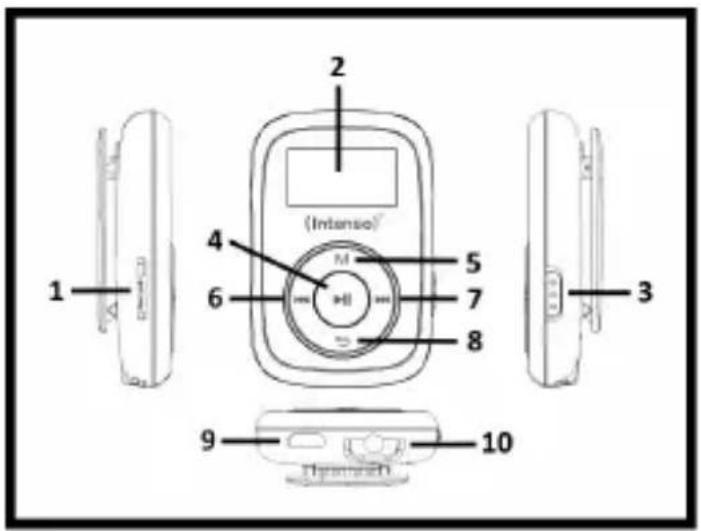
Controls
text_image
(Intense) 1 2 4 5 6 7 8 3 9 10(1) Micro SD - Card
(2) LCD Display
(3) Button Lock
(4) Play / Pause key
(5) Menu key
(6) key
(7) key
(8) Back / Volume key
(9) USB plug
(10) Ear-phone connection
7. Operation
On / Off
Keep the Play/Pause ▶key pressed for approx. 3 seconds to switch on the player. To switch it off, press the key again for approx. 3 seconds.
Play / Pause
Press the ▶ button for playback or stopping of a track.
Adjust volume
Keep the back / volume key pressed to open the volume selection menu. Now with the keys ◀ you can adjust the desired volume. Because of legal provisions, you have to press the menu key to change from level 18 to 19 to continue to increase the volume with the ▶key.
Forward / Back
Press the ◀◀/▶▶button to go to the previous or to the next track.
Fast forward
Press and hold down the ▶ button to fast forward within the track.
Rewind
Press and hold down the ◀ button to rewind within the track.
Key lock
By confirming the sliding key on the side of the appliance you can activate or deactivate the button lock according to the selected position.
8. Main menu
After having switched on the MP3 player the main menu is displayed. Here you can select the functions music and setup.
To select the function press the keys ◀/ ▶ and confirm your selection by the key ▶
9. Music
Select Music from the main menu. Now you can playback the stored tracks.
- Call folder navigation
(1) In the music mode press the menu key in Pause status.
(2) Then select the point List in the submenu.
(3) Now all titles of the currently displayed folders are displayed for you.
(4) To eventually reach a higher level in your folder structure, press the Back key.
(5) With the keys ◀◀/▶▶ select the searched title and confirm your selection by pressing key▶to start playback.
- Delete track
To delete a single track do the following:
(1) In music mode, press the menu key in pause status.
(2) Select Delete File.
(3) All music files of the list of a displayed song are displayed for you (if you want to delete the title in another list, you have to change to the desired list through the folder navigation).
(4) With the keys ◀◀/▶▶ select the searched title and confirm your selection by pressing key▶.
(5) Now you are asked to confirm the deletion process.
(6) Press keys ◀◀/▶▶to select yes or no. Confirm your selection with key 1▶▶Press back key once to delete selection and make a new selection or twice to change back to playback mode.
- Delete all music files
To delete all music files (MP3 and WMA) on the memory card, proceed as described. Please select Delete all music files instead of Delete File and confirm your selection. Now all MP3 and WMA files are deleted from the memory card. Other file and folder types cannot be deleted by the player. For this purpose, use your computer.
- A-B Repeat
To repeat a special section of a title, proceed as follows:
(1) During playback press the key menu and select submenu A-B repetition.
(2) Now you can start the A-B repetition (A-B repetition) or interrupt the number of desired repetitions (repeat number) and the desired pause duration between repetitions (pause between repet.).
(3) If by selection A-B repetition you have started the procedure, you will go back to the playback mode and symbol A flashes for A-B repetition mode. By press key ▶▶▶you set the starting point and by re-pressing the same key the end point of the A-B repetition.
(4) Now the section between the selected start and end point will be repeated according to the selected number.
(5) To end the A-B repetition earlier, press the key menu.
- Exit music mode
Press back key in playback mode to change to main menu.
10. System settings
To set your MP3 player individually do the following:
(1) In the main manu, selection the function Setup.
(2) Press keys ◀◀/▶▶ to select the desired setting (see table). Confirm your selection with key ▶▶▶. Press back key to go back to main menu.
| Function | Selection Opportunities (description) | |
| LCD On/Off | 0–60 seconds in 3 seconds stepsDefine after how many seconds without entry the display has to be switched off. By selecting 0, you deactivate the function. | |
| Language | English, Spanish, French, German, Italian, Portuguese, Russian, PolishAdjust the desired system language here. | |
| Save energy | Auto Off | 0–60 minutes in 5 minutes stepsDefine after how many minutes without use the player has to be automatically switched off. By selecting 0, you deactivate the function. |
| Sleep-Timer | 0–120 minutes in 10 minutes stepsDefine after how much time the player has to be switched off also during active playback. By selecting 0, you deactivate the function. | |
| Brightness 0–15 | Set the desired brightness level of the display. | |
| Firmware Version | The version number of the Firmware is displayed. | |
| Memory Information | The memory location status of the inserted memory card is displayed. | |
| Factory Settings | Select “yes” to reset the appliance to factory settings. | |
| Back | Here you can change back to the main menu. | |
11. Troubleshooting
- The display is blank.
(1) The battery is empty. Charge the battery.
(2) The keys are locked. Please deactivate the key lock.
- No sound during playback of a file.
(1) The volume is too low. Increase the volume.
(2) The audio file is defective. Please transfer the file again.
- No connection can be established with the PC.
(1) The driver was not installed properly. Re-install the driver.
(2) Please carry out a main board update.
(Please refer to the manufacturer's instructions)
- The track time displayed keeps on changing.
(1) The bit rate of the MP3 file changes during playback. Please use a universal bit rate for compression.
- The PC shows an error on connection with the player.
(1) The player was disconnected during data transfer from the PC. Never disconnect the player during data transfer.
• MP3 data is not played properly.
(1) The MP3 data was compressed in a wrong format, e.g. in MPEG 1 or 2. Delete the file formats that are not supported.
12. Technical data
| Item | Parameter: |
| LCD Display | 128 x 64 pixel |
| Battery type | re-chargeable Li-polymer battery |
| Battery run-time | Max. 10 hours |
| Supported music formats | MP3, WMA |
| Bit rate | MP3/WMA: 32kbps ~ 384kbps |
| Output frequency | 20Hz ~ 20kHz |
| SNR | >= 80 dB |
| Channel separation | >= 40 dB |
| Frequency response | <= 3 dB (20Hz ~ 20kHz) |
| Output line headphones | L 9mW, R 9mW |
| USB port | USB 2.0 (High Speed) |
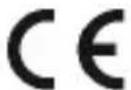
The CE label indicates that this product meets the requirements of all EU directives valid for this product.
Exclusion of liability
Changes to the firmware and / or hardware can be made at any time without prior notification. For this reason it is possible that parts of the manual, technical data and images in this documentation may deviate slightly from the product in your hand. All products described in this manual are only for the purpose of clarification and must not necessarily match any certain situation. No claims can be made based on this manual.
13. Disposal of used electric devices
text_image
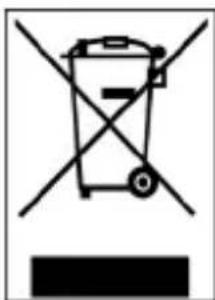
Prohibition sign with crossed-out trash bin and blank rectangular baseDevices marked with this symbol are subject to the European Directive 2012/19/EG. All electric and used electric devices must be separated from the household waste and disposed of at the provided public locations.
With proper disposal of used electric devices you avoid damaging the environment.
(Intenso)®
Intenso International GmbH Gutenbergstraße 2 | 49377 Vechta Germany | www.intenso-international.de
natural_image
Warning symbol with a triangle containing a stylized ear icon (no text or numbers)natural_image
Symbol of a trash bin crossed with no text or labels, accompanied by a black rectangle at the bottom (no readable text or symbols)natural_image
Warning symbol with a triangle containing a stylized ear icon (no text or numbers)natural_image
Symbol of a trash bin crossed with no text or numbers, representing waste sorting or disposal (no text present)text_image
Warning symbol with a triangle containing a stylized 'e' inside, indicating sound or noise.text_image
Prohibition sign with crossed-out trash bin and no text or symbolsnatural_image
Warning symbol with a triangle containing a stylized ear icon (no text or numbers)natural_image
Symbol of a trash bin crossed with no text or numbers, representing waste sorting or disposal (no text present)natural_image
Warning symbol with a triangle containing a stylized ear icon (no text or numbers)natural_image
Symbol of a trash bin crossed with a diagonal line, no text or numbers presentnatural_image
Warning symbol with a triangle containing a stylized ear icon (no text or numbers)natural_image
Symbol of a trash bin crossed with no text or numbers, representing waste sorting or disposal (no text present)natural_image
Symbol of a trash bin crossed with diagonal lines, no text or numbers presentUređaji označeni ovim simbolom podliježu zahtjevima europske direktive 2012/19/EZ. Svi električni uređaji moraju se zbrinjavati odvojeno od kućanskog otpada na predviđenim mjestima za sakupljanje.
Pravilnim načinom zbrinjavanja svih električnih uređaja sprječavate onečišćenje okoliša.
(Intenso) ^8
Intenso International GmbH Gutenbergstraße 2 | 49377 Vechta Germany | www.intenso-international.de