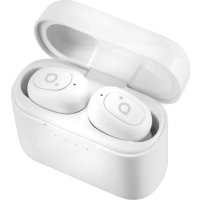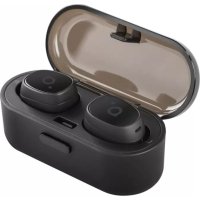
BH411 - Speaker ACME - Free user manual and instructions
Find the device manual for free BH411 ACME in PDF.


| Product Type | Bluetooth In-Ear Headphones |
| Brand | ACME |
| Model | BH411 |
| Bluetooth Version | v4.2 |
| Frequency Response | 20 Hz - 20,000 Hz |
| Speaker Size | 6 mm |
| Operating Range | Up to 10 m |
| Microphone | Built-in |
| Case Battery Capacity | 460 mAh (1.7 Wh), Li-ion Polymer |
| Charging Time of Earbuds | About 1 hour |
| Charging Time of Case | About 2 hours |
| Playback Time | Up to 3 hours (plus 9 hours with case) |
| Standby Time | Up to 80 hours |
| Power Supply | Micro USB, 5 V DC |
| Total Weight | 41 g |
| Main Functions | Auto pairing, call control, play/pause, last number redial |
| Care and Cleaning | Clean with a soft dry cloth; avoid abrasive solvents |
| Safety | Do not expose to extreme temperatures, do not dispose of in fire, avoid shocks |
| Spare Parts and Repairability | Parts not available separately; contact after-sales service |
| General Information | Compliant with RED Directive 2014/53/EU; declaration of conformity available online |
Frequently Asked Questions - BH411 ACME
User questions about BH411 ACME
0 question about this device. Answer the ones you know or ask your own.
Ask a new question about this device
Download the instructions for your Speaker in PDF format for free! Find your manual BH411 - ACME and take your electronic device back in hand. On this page are published all the documents necessary for the use of your device. BH411 by ACME.
USER MANUAL BH411 ACME
natural_image
Black wireless earbuds with open case, no visible text or symbolsBH411
TRUE WIRELESS
Earbuds
4 GB User manual
8 LT Vartotojo gidas
12 LV Lietošanas instrukcija
16 EE Kasutusjuhend
Technical specifications
Type: in-ear, Bluetooth
Frequency response: 20-20 000 Hz
Driver size: 6 mm
Bluetooth version: v4.2
Frequency range: 2.4 - 2.48 GHz
Maximal output radio frequency power: 2.4 dBm / 1.74 mW
Working distance: up to 10 m
Power supply: micro-USB, 5V DC
Microphone: built-in
Battery (charging case): Li-poly, 460 mAH (1.7 Wh)
Earphones charging time: up to 1 hour
Charging time of the charging case: up to 2 hours
Standby time: up to 80 hours
Playback time: up to 3 hours
Recharging with the charging case: 2-3 times
Total weight: 41 g

WARNING: Listening at a high volume for a long time may damage your hearing.
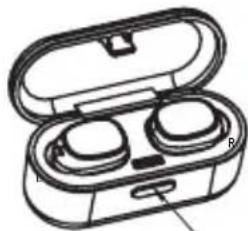
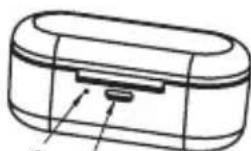
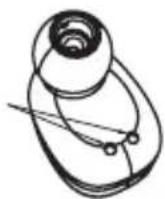
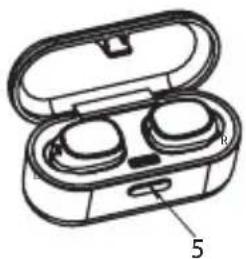
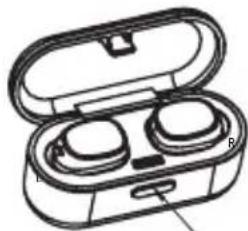
Product overview
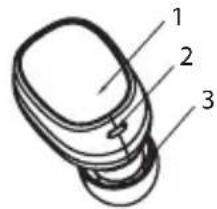
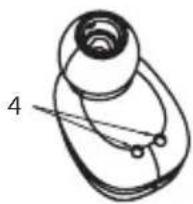
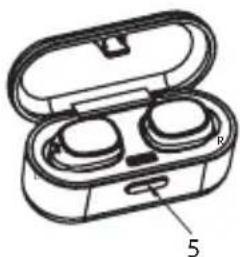
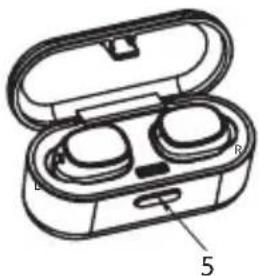
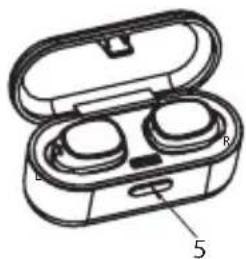
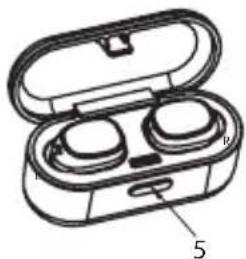
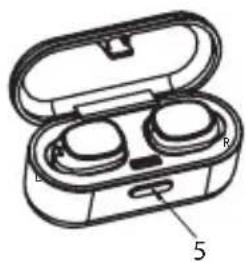
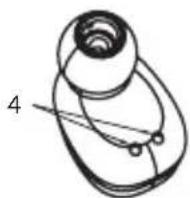
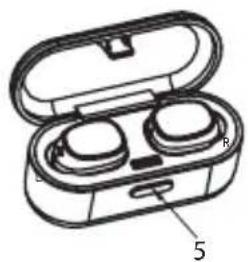
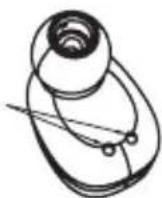
- Power (multifunction) button
- Indicator light and MIC
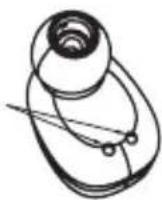
- Speaker
- Charging contacts
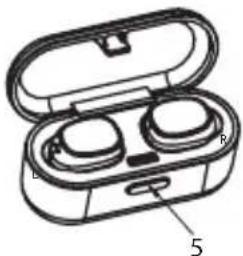
- Opening button
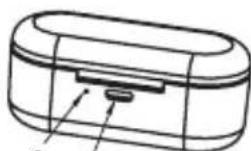
- Charging indicator
- Micro-USB charging port
natural_image
Simple line drawing of a mechanical component with no text or symbols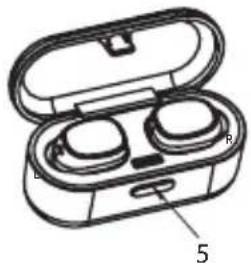
natural_image
Illustration of an open electronic device with two buttons and a labeled part (no text or symbols present)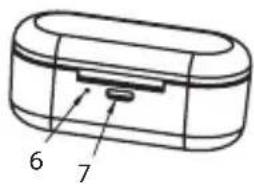

Before you start using the earphones, you must charge the battery and pair the earphones with a compatible device.
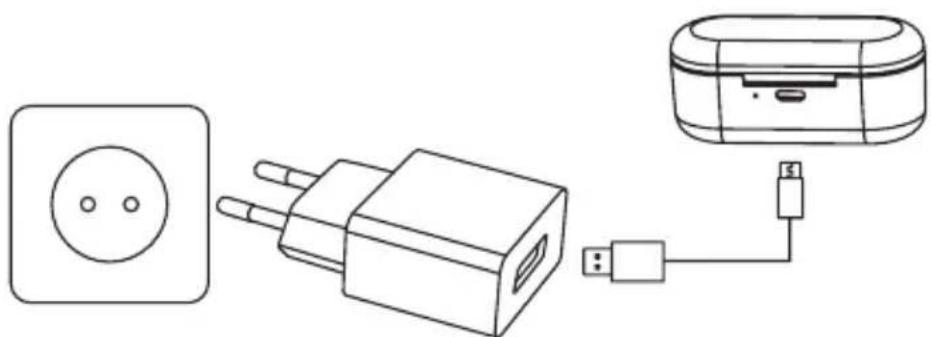
Charging the earphones and charging case
natural_image
Line drawing of three connected devices: a power outlet, a plug-in socket, and a portable device with USB cable (no text or symbols)
The BH411 charging case has an internal, rechargeable battery that must be fully charged before being used for the first time. It takes about 2 hours to
fully charge the battery for the first time. If you do not use the device for a long period of time, please charge it once every 2 months to avoid damage to the battery.
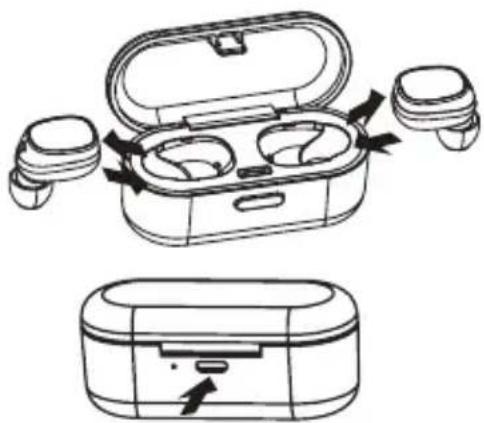
- Put the earphones in the charging case and close the cover to charge. During charging, the indicators will show a steady red colour. When the battery is fully charged, the red light will turn off.
• Use the USB charging cable to charge the charging case. The indicator light of the charging case is red when being charged. It will turn off automatically after being fully charged.
natural_image
Line drawing of an outdoor earbuds with open case and closed case, showing internal components and directional arrows (no text or symbols)Fully charged earphone batteries have the power for up to 3 hours of playback time (9 hours more from the charging case). When the batteries are running out of power, a voice prompt will be heard. This indicates that the earphones need to be charged as soon as possible.
Pairing
Automatic (with the charging case) method:
- Remove the two earphones from the charging case* and wait for 10 seconds. The two earphones will power on and enter to the pairing mode automatically. A fast-blinking red/blue LED light on the right earphone and a slowly-blinking blue LED light on the left one will indicate that the earphone is ready to pair with your device.
- Turn on the Bluetooth function on your device, select BH411 from the list, and pair the earphone.
- A voice prompt will be heard from the right earphone saying that the earphones are connected.

*The charging case must be closed tightly before opening it and removing the earphones.
Manual (without the charging case) method:
- When both earphones are in an off state, press and hold the power (multifunction) button of both for 3-4 seconds. A voice prompt will be heard from both earphones saying that left and right channels are successfully connected. Then a voice prompt will be heard saying which earphone is the left one ("left channel") and which is the right one ("right channel"), and after that in the right earphone you will hear the voice prompt of "pairing".
- Turn on the Bluetooth function on your device, select BH411 from the list, and pair the devices.
- A voice prompt will be heard from the right earphone saying that the earphones are connected.

If pairing is successful, the earphones will enter to an idle mode and the blue lights will flash once every 5 seconds in different earphones. If no Bluetooth connection is made within 10 minutes, the earphones will turn off natically.
Basic Use
To switch on, when both earphones are in an off state, press and hold the power (multifunction) button for 3 seconds for both earphones at the same time until the blue indicator light flashes 3 times with the voice prompt of "power on".
To switch off, when both earphones are in an on state, press and hold the power (multifunction) button of one earphone (left or right) for 3 seconds to power off both earphones until the red indicator light flashes 3 times with the voice prompt of "power off" or just put them back into the charging case.
Automatic reconnection
When both earphones are in an off state, remove them from the charging case at the same time, and they will reconnect automatically. And the right (main) earphone will reconnect to the paired device automatically.
Answer a call
When there is an incoming call, press the power (multifunction) button on the right (main) earphone.

While making phone calls, only the right (main) earphone produces sound.
Reject a call
Press and hold the power (multifunction) button of the right (main) earphone for 2 seconds.
End a call
To end the call, press the power (multifunction) button on the right (main) earphone.
Redial the last dialled phone number
When the BH411 is in an idle mode, you can double-click the power (multifunction) button on the right (main) earphone to redial the last dialled number.
Play/Pause
Short press the power (multifunction) button to play or pause a movie/music.
Wearing the earphones
To properly wear the earphones:
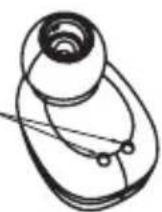
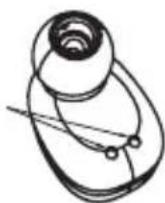
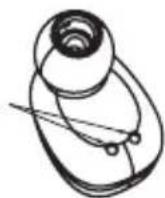
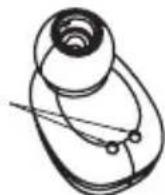
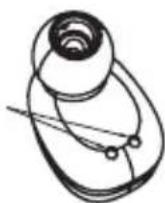
STEP 1. Place the earphones in the ears as shown.
STEP 2. Slightly rotate the earphone until it gets tight.
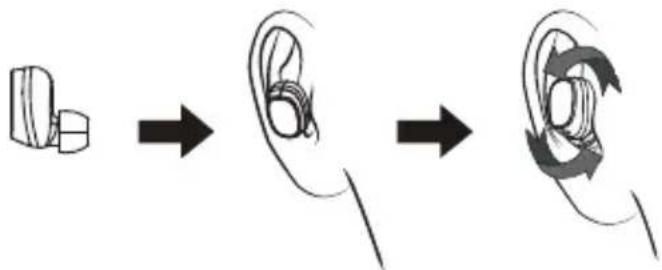
flowchart
graph LR
    A["Rectangular object"] --> B["Osteo"]
    B --> C["Circular ear with directional arrows"]
LED indications
| No. | Status Headset Performance | |
| 1 | Pairing The indicator light of the right earphone flashes red and blue alternately; when successfully connected to the device, the indicator light flashes blue once every 5 seconds. | |
| 2 | Standby mode The indicator light of the right earphone flashes blue every 5 seconds. | |
| 3 | Call state In case of the incoming call, the indicator light of the earphone flashes red every 5 seconds. | |
| 4 | Headset charging state The in diator light of the headset is red when being charged and will turn off automatically after being fully charged. | |
| 5 | Charging case charging state The indicator light of the charging case is red when being charged and will turn off automatically after being fully charged. | |
| 6 | Power on state The indicator light flashes blue 3 times and then flashes red once every 5 seconds. | |
| 7 | Power off state The indicator light flashes red 3 times. | |
| 8 | Low battery alarm The indicator light flashes red once every 20 seconds. |
Troubleshooting
| Faults Reasons and Solutions | |
| The earphones cannot be turned on.The earphones turn off automatically.The earphones cannot turn on by picking them up from the charging case. | Charging case low battery protection. Recharge your earphones and charging case. |
| Music is not playing. Make sure that both devices are paired and connected and that “Media playback” is enabled in your Bluetooth settings. Try to pair it again. | |
| Pairing was successful but the device cannot find the right earphone or reconnect/connect. | Too many pairing records. Delete pairing records (unpair) and try again. It is possible that you are not able to connect because the earphones are paired with another nearby device. You will have to disconnect the other device, or even turn off its Bluetooth function. Now you can try again to pair or reconnect. |
| The charging case indicator has no light while charging. | DC power supply does not output power. Check your USB connections and try to charge with a different charger. |
| The earphone indicator has no light while charging. | Check the pogo pin charging points. Place the earphone correctly in the charging case. |
Care and maintenance
- Don't use abrasive cleaning solvents to clean the headset.
- Do not expose the headset to extremely high or low temperature as this will shorten the life of electronic devices, destroy the battery or distort certain plastic parts.
- Don't dispose of the headset in a fire as it will result in an explosion.
- Don't expose the headset to contact with sharp objects as this will cause scratches and damage.
- Don't let the headset fall down onto the floor. The internal circuit might get damaged.
Waste Electrical and Electronic Equipment (WEEE) Symbol
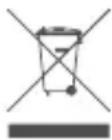
The use of the WEEE symbol indicates that this product may not be treated as household waste. By ensuring this product is disposed of correctly, you will help protect the environment. For more detailed information about the recycling of this product, please contact your local authority, your household waste disposal service provider or the shop where you purchased the product.
4
natural_image
Diagram of an open electronic device with two buttons and a labeled part (no text or symbols present)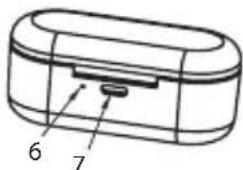

natural_image
Line drawing of three connected devices: a power outlet, a plug-in socket, and a portable device with USB cable (no text or symbols)
natural_image
Line drawing of an open and closed wireless earbuds with ports, showing internal components and directional arrows (no text or symbols)flowchart
graph LR
    A["Tube-shaped object"] --> B["Oscillal ear"]
    B --> C["Circular ear with orbital motion"]
LED indikatoriai
LV "BLUETOOTH" AUSTINAS
natural_image
Diagram of an open electronic device with two buttons and a label pointing to the number 5 (no text or symbols on the device itself)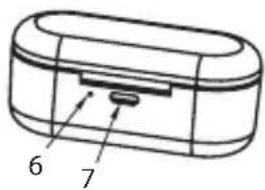

natural_image
Line drawing of three connected devices: a power outlet, a plug-in socket, and a portable device with a USB cable (no text or symbols)
natural_image
Line drawing of an outdoor earbuds with open case and closed case, showing internal components and directional arrows (no text or symbols)
flowchart
graph LR
    A["Rectangular object"] --> B["Osteo"]
    B --> C["Circular ear with directional arrows"]
LED indikatori
natural_image
Line drawing of three connected devices: a power outlet, a plug-in socket, and a portable device with USB cable (no text or symbols)
natural_image
Line drawing of an open wireless earbuds with ports and buttons, showing internal components (no text or symbols)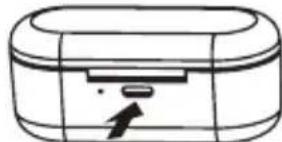
natural_image
Simple line drawing of a cylindrical device with a handle and arrow, no text or symbols present.flowchart
graph LR
    A["Rectangular object"] --> B["Osteo"]
    B --> C["Circular ear with directional arrows"]
LED-tuled
natural_image
Diagram of an open electronic device with two buttons and a labeled part (no text or symbols present)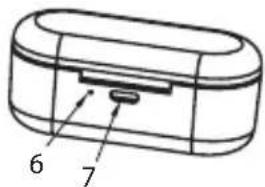

natural_image
Line drawing of three connected devices: a power outlet, a plug-in socket, and a CD card with USB cable (no text or symbols)
natural_image
Line drawing of an open and closed wireless earbuds with USB flash, showing internal components and airflow direction (no text or symbols)flowchart
graph LR
    A["Pre-surgical state"] --> B["Re replacement"]
    B --> C["Post-replacement state"]
Wskaźniki LED
natural_image
Line drawing of three connected devices: a power outlet, a plug-in socket, and a portable device with a USB cable (no text or symbols)
natural_image
Line drawing of an outdoor earbuds with open case and back panel, plus a separate close-up of the same device (no text or symbols)Bluetooth-Version: v4.2
4
natural_image
Diagram of an open electronic device with two buttons and a label pointing to the bottom part (no text or symbols present)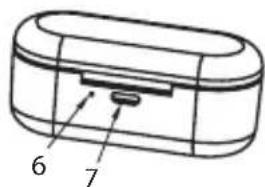

natural_image
Line drawing of three connected devices: a power outlet, a plug-in socket, and a portable device with a USB cable (no text or symbols)
natural_image
Line drawing of an outdoor earbuds with open case and closed case, showing internal components and directional arrows (no text or symbols)flowchart
graph LR
    A["Rectangular object"] --> B["Oscillal orbit"]
    B --> C["Circular ear with orbital motion"]
LED-Anzeigen
4
natural_image
Illustration of an open electronic device with two buttons and a lid (no text or symbols)5
6
7

natural_image
Line drawing of three connected devices: a power outlet, a plug-in socket, and a portable device with USB cable (no text or symbols)
natural_image
Line drawing of an outdoor earbuds with open case and closed case, showing internal components and directional arrows (no text or symbols)flowchart
graph LR
    A["Tube-shaped capsule"] --> B["Osteo"]
    B --> C["Circular ear with directional arrows indicating rotation"]
LED-Anzeigen
4
natural_image
Illustration of an open wireless earbuds with two buttons and a labeled part (no text or symbols present)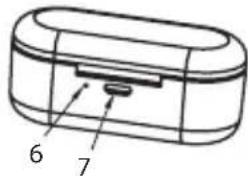

natural_image
Line drawing of three connected devices: a power outlet, a plug-in socket, and a portable device with a USB cable (no text or symbols)natural_image
Line drawing of an outdoor earbuds with open case and closed case, showing internal components and directional arrows (no text or symbols)flowchart
graph LR
    A["Pre-ear"] --> B["Segment"]
    B --> C["Segment"]
    C --> D["Post-ear"]
Tip: in-ear, Bluetooth
natural_image
Line drawing of three connected electrical devices: a power outlet, a plug-in socket, and a portable device with a USB cable (no text or symbols)
natural_image
Line drawing of an open wireless earbuds with ports and buttons, showing internal components (no text or symbols)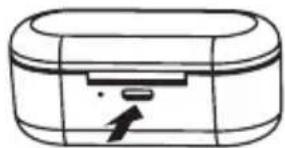
natural_image
Simple line drawing of a device with a handle and arrow indicator (no text or symbols)flowchart
graph LR
    A["Tube with capsule"] --> B["Oscillion"]
    B --> C["Circular Ear with orbital motion"]
Indicatoare LED
4
natural_image
Diagram of an open electronic device with two buttons and a labeled part (no text or symbols present)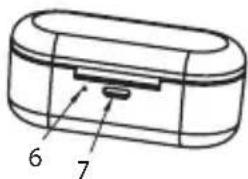

natural_image
Line drawing of three connected devices: a power outlet, a two-pin plug, and a CD with USB cable (no text or symbols)natural_image
Line drawing of an outdoor electronic device with open case and internal earphones, plus a separate close-up of the same device (no text or symbols)flowchart
graph LR
    A["Rectangular object"] --> B["Osteo"]
    B --> C["Circular ear with arrow indicating rotation"]
LED jelzések
4
natural_image
Diagram of an open electronic device with two earbuds and a labeled part (no text or symbols present)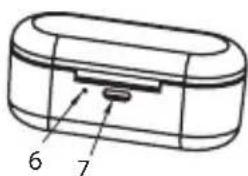

Prije početka uporabe slušalica, morate napuniti bateriju i upariti ih s kompatibilnim uređajem.
natural_image
Line drawing of three connected devices: a power outlet, a plug-in socket, and a CD-ROM with USB cable (no text or symbols)
BH411 kućište za punjenje ima unutarnju punjivu bateriju koja se prije prve uporabe mora u potpunosti napuniti. Potrebno je otprilike 2 sata da se
natural_image
Line drawing of an open and closed wireless earbuds with ports, showing internal components and directional arrows (no text or symbols)Tipo: in-ear, Bluetooth
4
natural_image
Illustration of an open electronic device with two buttons and a lid (no text or symbols)5
6

natural_image
Line drawing of three connected devices: a power outlet, a plug-in socket, and a portable device with USB cable (no text or symbols)
natural_image
Line drawing of an outdoor electronic device with open case and closed case, showing internal components and directional arrows (no text or symbols)flowchart
graph LR
    A["Rectangular object"] --> B["Osteo"]
    B --> C["Circular ear with arrow indicating rotation"]
Indicadores LED
natural_image
Diagram of an open electronic device with two buttons and a labeled part (no text or symbols present)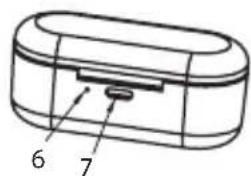

natural_image
Line drawing of three connected devices: a power outlet, a plug-in socket, and a portable device with USB cable (no text or symbols)
natural_image
Line drawing of an open and closed wireless earbuds with ports, showing internal components and airflow direction (no text or symbols)
Tipo: in-ear, Bluetooth
4
natural_image
Diagram of an open electronic device with two buttons and a labeled part (no text or symbols present)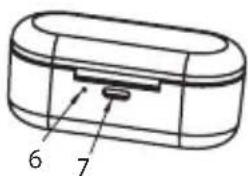

natural_image
Line drawing of three connected devices: a power outlet, a plug-in socket, and a portable device with USB cable (no text or symbols)
natural_image
Line drawing of an open and closed wireless earbuds with internal components, no text or symbols present
flowchart
graph LR
    A["Pre-ear"] --> B["Osteo"]
    B --> C["Post-orbit"]
Indicazioni LED
natural_image
Diagram of an open electronic device with two buttons and a labeled part (no text or symbols present)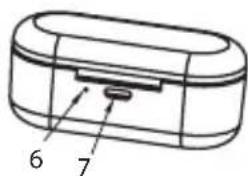

natural_image
Line drawing of three connected devices: a power outlet, a plug-in socket, and a portable device with USB cable (no text or symbols)
natural_image
Line drawing of an open wireless earbuds with attached earphones and a closed case showing a device (no text or symbols)flowchart
graph LR
    A["Pre-ear: 3D block"] --> B["Post-ear: 6D ring"]
    B --> C["Post-ear: 12D ring with arrow indicating rotation"]
LED-lichtjes
4
natural_image
Illustration of an open electronic device with two buttons and a labeled part (no text or symbols present)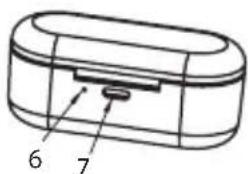

natural_image
Line drawing of three connected devices: a power outlet, a plug-in socket, and a portable device with USB cable (no text or symbols)
natural_image
Line drawing of an open and closed wireless earbuds with ports, showing internal components and airflow direction (no text or symbols)flowchart
graph LR
    A["Tube with capsule"] --> B["Osteo"]
    B --> C["Circular Ear"]
Indications LED
ACME Europe hereby declares that this equipment is in compliance with the requirements and other relevant provisions of:
"RED 2014/53/EU" Directive;
"RoHS 2011/65/EU" Directive.
The declaration of conformity can be accessed at:
http://www.acme.eu/en-us/declarations-conformity
LT ES atitikties deklaracija
Directive RoHS 2011/65/UE
| Product Product model | |
| Product purchase date Seller name, address | |
| Failures (date, description, position of the person who accepts the product, first name, last name and signature) | |
1. Warranty period
Warranty enters into force starting with the day when the buyer acquires the product from the seller. Warranty period is indicated on the package of the product.
2. Warranty conditions
The warranty is valid only by providing an original document of the product acquisition and this warranty sheet, which includes name of the product model, product purchase date, name and address of the seller.
If it is noticed during the warranty period that the product has faults and these faults where not caused by any of the reasons when the warranty is not applied as indicated in the paragraphs below, manufacturer undertakes to replace the product.
The warranty is not applied to regular testing, maintenance and repair or replacement of the parts which are worn out naturally.
The warranty is not applied if damage or failures occurred due to the following reasons:
- Inappropriate installation of the product, inappropriate usage and/or oper product without following the manual, technical requirements and safety standards as provided by the manufacturer, and additionally, inappropriate warehousing, falling from heights as well as hard strikes.
• Corrosion, mud, water and sand.
• Repair works, modifications or cleaning, which were performed by a authorised by the manufacturer.
- Usage of the spare parts, software or consumptive materials which do not apply to the product.
- Accidents or events or any other reasons which do not depend on the manufacturer, which includes lightning, water, fire, magnetic field and inappropriate ventilation.
- If the product does not meet standards and specifications of a particular country, in which it was not bought. Any attempt to adjust the product in order to meet technical and safety requirements such as those in the other countries withdraws all the rights to the warranty service.
If no failures are detected in the product, all the expenses in relation to the service are covered by the buyer.
www.acme.eu