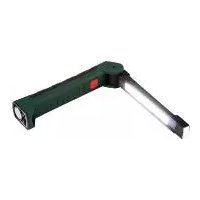
PAL 2200 A3 - LED Lighting PARKSIDE - Free user manual and instructions
Find the device manual for free PAL 2200 A3 PARKSIDE in PDF.


| Product type | LED battery work lamp |
| Brand | Parkside |
| Model | PAL 2200 A3 |
| Power supply | Li-Ion battery 3.7 V, 2200 mAh (non-replaceable) |
| COB LED power | 8 W |
| Front LED power | 1.5 W (2 × 0.75 W) |
| Maximum luminous flux (COB 100%) | 600 lm |
| Luminous flux (COB 50%) | 300 lm |
| Luminous flux (front LED) | 60 lm |
| Battery life (COB 100%) | About 3 hours |
| Battery life (COB 50%) | About 6 hours |
| Battery life (front LED) | About 16 hours |
| Charging time | About 3 hours |
| Connections | Micro-USB input (on lamp and charging cradle) |
| Mounting | Integrated magnet and hook |
| Protection class | Protection class III (SELV/LV) |
| Usage | Dry and dust-free indoor use, manual operation |
| Package contents | Lamp, USB charging cradle, USB cable, manual |
| Warranty | 3 years |
| Customer service | Toll-free: 00800 80040044 (France, Belgium, Switzerland) |
Frequently Asked Questions - PAL 2200 A3 PARKSIDE
User questions about PAL 2200 A3 PARKSIDE
0 question about this device. Answer the ones you know or ask your own.
Ask a new question about this device
Download the instructions for your LED Lighting in PDF format for free! Find your manual PAL 2200 A3 - PARKSIDE and take your electronic device back in hand. On this page are published all the documents necessary for the use of your device. PAL 2200 A3 by PARKSIDE.
USER MANUAL PAL 2200 A3 PARKSIDE
Operating and safety information
ITMTCH
LAMPADA DA LAVORO RICARICABILE
GB IE NI CY MT Before you start reading, please fold out the illustrations page and familiarise yourself with all of the item's functions.
Introduction 37
Explanation of symbols 37
Intended use 37
Specifications supplied 37
Description of parts 38
Technical data 38
Safety information 38
Risk of leakage from rechargeable batteries 39
Assembly and installation 39
Charging the battery 39
Switching the cordless work lamp ON/OFF 39
Cleaning and storage 40
Troubleshooting 40
Disposal 40
Warranty 41
Service 42
HU
EXPLOSIONSGEFAHR! Laden
Emballage of FSC-certificeret blandingstrae

Med CE-maerkningen bekrafter producenten, at dette produit overholder de geldende europaeiske direktiver.
Forskriftsmaessig anvendelse
Andet trin = ca. 67%,
Tredje trin = 100%
Congratulations on the purchase of your new product. You have chosen a high-quality product. Please read
these operating instructions thoroughly and carefully. These instructions are an essential part of the product and contain important information on first-time use and handling. Always observe all safety instructions. If you have any questions or are unsure how to operate the product, please contact your retailer or service centre. Please keep this manual in a safe place and pass it on to third parties where necessary.
- Explanation of symbols

Read the operating instructions!

Issue date of instruction man (month/year)

Date of manufacture (month/year)

Direct current

Risk of fatal injury and accidents for infants and children!

Observe warning notices and safety instructions!

Explosion hazard!

Wear protective gloves!

This symbol indicates that the product operates with safety extra-low voltage (SELV/PELV, protection class III).

Not suitable for indoor lighting

Universal Serial Bus (USB)

Product has USB connection

Dispose of packaging and product in an environmentally friendly manner!

Risk of environmental damage from incorrect disposal of batteries/rechargeable batteries!
Packaging made of FSC certified wood mix

With the CE label, the manufacturer confirms that this product complies with the applicable European directives.
- Intended use
This product is intended for use in private households only. The product is not suitable for general indoor lighting in the home. The lamp is only intended for use in dry and dust-free rooms. Any type of use other than that described above or any modification of the product is prohibited and likely to cause damage or even personal injury. The manufacturer or retailer accepts no liability for loss or damage that occurs as a result of use other than intended or incorrect use. Suitable for hand-held use only.
- Specifications supplied
1 cordless work lamp
1 USB charging holder
1 USB charging cable
1 assembly and operating manual
Description of parts
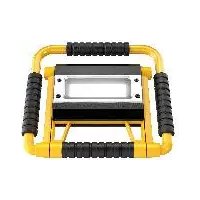
1 Cordless work lamp
2 LED(front light)
3 COB-LED (lamp)
4 ON/OFF button
5 Charge status indicator
6 Micro USB port (lamp)
7 Magnet
8 Hook
9 USB charging holder
10 Standby LED
Micro USB port (USB charging holder)
USB charging cable
Technical data
Model number: 894-3
Li-ion battery: 3.7 V, 2200 mAh (non-replaceable)
8 W COB-LED (lamp) Light source: 1.5 W LED (front light) total (2× 0.75W single)
Input, cordless 5 V-1 A work lamp:
Input, USB charging holder: 5 V ——, 1 A
approx. 3 hours at 100% (COB); max. 600 lm approx. 6 hours at 50% (COB); max. 300 lm approx. 16 hours LED (top); max. 60 lm
- Safety information

Safety information

WARNING!
RISK OF FATAL INJURY AND
ACCIDENTS FOR INFANTS AND
CHILDREN! Never leave children unsupervised with the packaging material. There is a danger of suffocation from the packaging material. Children often underestimate the dangers. Always keep children away from the product.
This product may be used by children aged 8 years or above and by persons with limited physical, sensory or mental capabilities or lacking in experience and knowledge if they are supervised or have been instructed as to the safe use of the product and understand the resulting risks. Do not let children play with the product. Cleaning and maintenance may not be carried out by children without proper supervision.
Do not use the product if you notice any defects.
The light source may only be replaced by the manufacturer, service technician or a similarly qualified person.

Safety instructions for rechargeable batteries
RISK OF DEATH! Keep rechargeable batteries out of the reach of children. If swallowed, seek medical advice immediately!
PLEASE NOTE! The rechargeable battery is not replaceable. When it is worn out, the entire product must be disposed of.
EXPLOSION HAZARD! Never
recharge non-rechargeable batteries. Do not short-circuit and/
or open up batteries/rechargeable batteries. They could overheat, cause a fire or explode.
- Never throw rechargeable batteries into fire or water.
- Do not expose the rechargeable batteries to mechanical stress.
Remove the batteries from the battery compartment as soon as they are empty or if you are not going to use the product for a
longer period of time.
- Never combine different types of rechargeable batteries or batteries with different charge statuses.
- Risk of leakage from rechargeable batteries
- Avoid exposing rechargeable batteries to extreme conditions and temperatures, e.g. radiators or direct sunlight.
Avoid contact with skin, eyes and mucous membranes! In the event of skin contact with battery acid, rinse the affected area immediately with plenty of clean water and seek medical advice immediately!

WEAR PROTECTIVE GLOVES!
Leaking or damaged rechargeable batteries can cause chemical burns
if they come into contact with skin.
Therefore, wear suitable protective gloves in such cases.
In the event that of battery leaks, remove battery from the product immediately to avoid damage.
Assembly and installation
Please note: Take the product out of its packaging and remove all packing material.
Check that all package contents are present.
Check if the product or individual parts are damaged. Should you detect damage, do not use the product. Please contact the retailer via the service address indicated.
The product can be attached to a magnetic surface via the magnet 7 (see Fig. C). Make sure you protect the surface if it is of a type that marks easily. Make sure that the surface is flat and level to ensure the light is firmly attached. Alternatively, the cordless work lamp can also be attached by means of the hook 8 (see Fig. C).
- Charging the battery
If the lamp is on, switch it off by pressing the ON/OFF button 4.
Place the USB charging holder (see Fig. D) on a flat, level surface, making sure to protect the surface if it is of a type that marks easily.
Place the cordless work lamp 1 in the USB charging holder supplied (see Fig. D). Now connect the USB charging cable 12 to the micro-USB port 11 on the USB charging holder 9 and connect the other end of the cable to a standard SELV USB interface.
The battery will then start charging. The battery charge level of the cordless work lamp 1 is indicated by the blue flashing light of the three-level charge status indicator 5 (see Fig. B).
Level one = approx. 35%
Level two = approx. 67%
Level three = 100%
The USB charging holder 9 has a red standby LED 10 (see Fig. D) that indicates when it is ready for use. The standby LED 10 is permanently on whenever the USB charging holder 9 is connected to a power source.
The cordless work lamp can also be charged without the USB charging holder. To do so, connect the USB charging cable to the micro-USB port (see Fig. B) and a standard SELV USB interface.
Please note: The product cannot be switched on during charging process, so continuous operation is not possible.
- Switching the cordless work lamp ON/OFF
Unfold the cordless work lamp.
The ON/OFF button 4 switches the cordless work lamp on/off and also controls its brightness. The battery charge level is indicated by the charge status
indicator 5 (see Fig. B). Pressing the ON/OFF button 4 (see Fig. A) once sets the COB LED to 100% brightness. Pressing the ON/OFF button 4 again reduces the COB LED brightness to 50% . Pressing the ON/OFF button 4 a third time switches the COB LED off and the LED (front light) 2 on. To switch the LED (front light) off, press the ON/OFF button 4 once again.
- Cleaning and storage
Switch off the product by pressing the ON/OFF button 4 if you wish to stop using it and store it away (see the section "Switching the cordless work lamp ON/OFF").
Regularly check that the cordless work lamp is not dirty. Remove any dirt to ensure the product works correctly.
Clean the product with a clean, damp cloth and a mild detergent.
To clean the USB charging holder 9, first disconnect it from the USB charging cable 12. Only use a dry cloth or brush to clean the USB charging holder.
- Troubleshooting
= Fault
Cause
= Solution
= The product fails to switch on.
= The battery is dead.
= Charge the battery (see the section "Charging the battery").
= The lamp is defective.
= Dispose of the product properly (see the section "Disposal").
= The light is flickering.
= The battery is almost fully discharged.
= Charge the battery (see the section "Charging the battery").
- Disposal
Note the labels on the packaging materials when sorting the waste; they are marked with abbreviations (a) and numbers (b) with the following meanings:
1-7: Plastics
20-22: Paper and cardboard
80-98: Composite materials

You can find out how to dispose of the used product by contacting your local district or city council.

The product and packaging materials are recyclable. Please dispose of them separately for better treatment of waste. The Triman logo is only applicable to France.
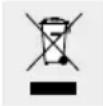
In the interest of environmental protection, when the product has reached the end of its useful life, do not dispose of it as general household waste but have it properly recycled. For information on recycling centres and their opening times, please contact your local council.
Faulty or used batteries must be recycled in accordance with Directive 2006/66/EC and its amendments. Return batteries and/or the product to the local recycling facilities provided.
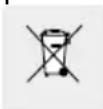
Risk of environmental damage from incorrect disposal of rechargeable batteries!
Batteries must not be disposed of as general household waste. They may contain toxic heavy metals* and are subject to special waste treatment. Batteries and rechargeable batteries that are not permanently fixed inside the product must be removed before disposal of the product and disposed of separately. Please ensure batteries/ rechargeable batteries are fully discharged when disposed of! Wherever possible, use
rechargeable batteries rather than single-use batteries.
*) Marked as followed: Cd = cadmium, Hg = mercury, Pb = lead
Warranty
Dear customer, This product comes with a 3-year warranty from the date of purchase. In the event that this product is faulty, you have legal rights against the seller of the product. These statutory rights are not restricted by our warranty as set out below.
Warranty terms
The warranty period begins with the date of purchase. Please keep the original receipt in a safe place. It is required as proof of purchase. If a material or manufacturing defect occurs within three years of the date of purchase, we will repair or replace the product for you free of charge, or refund the purchase price, at our discretion. This warranty service is granted provided that the faulty device and the proof of purchase (receipt) are presented within three years, along with a brief written description of the fault and of when it occurred. If the fault is covered by our warranty, we will return the fixed product or send you a new one. No new warranty period shall begin upon repair or replacement of the product.
Warranty period and statutory warranty claims
The warranty period is not renewed after a warranty service has been granted. This rule shall also apply for any replaced or repaired parts. Any damage or faults that already existed when buying the product must be reported immediately upon unpacking the product. A fee is charged for any repairs that are carried out after the end of the warranty period.
Warranty scope
The device was carefully manufactured according to the strictest quality guidelines and thoroughly tested before delivery. The warranty applies to material or manufacturing defects. This warranty does not apply to product parts that are subject to normal wear and tear and can therefore be regarded as wearing parts, or damage to fragile parts, such as switches, rechargeable batteries or parts that are made of glass. This warranty is void if the product has been damaged, improperly used or serviced. To ensure proper use, all instructions included in the manual must be followed carefully. All uses and actions that users are discouraged from or warned of in the manual must be avoided under all circumstances. The product is intended for private household use only, and not for commercial activities. The warranty is void, if the product is treated inappropriately, if force is applied, and in the case of any manipulation that is not carried out by our authorised service branch.
Warranty processing
To ensure your request is handled swiftly, please observe the following Notes:
Please have the receipt and the article number (e.g. IAN 123456) ready as proof of purchase for all enquiries.
Please refer to the type plate on the product, an engraving on the product, the cover of the manual (bottom left) or the sticker on the back or base of the product to find out the product number.
In the case of any malfunctions or other defects, please call or email the service department indicated below as a first step. After your product has been registered as faulty, you can send it to the specified service address, free of charge. Please include the proof of purchase (receipt) and information about the defect and about when it occurred.
Service
GB
Service Great Britain
Tel.: 00800 80040044
E-Mail: administration@mynetsend.de
IE NI
Service Ireland
Tel.: 00800 80040044
E-Mail: administration@mynetsend.de
C
Service Cyprus
Tel.: 00800 80040044
E-Mail: administration@mynetsend.de
MT
Service Malta
Tel.: 00800 80040044
E-Mail: administration@mynetsend.de
IAN 378246_2110
Please have the receipt and the article number (e.g. IAN 123456) ready as proof of purchase for all enquiries.
You can find an up-to-date version of the operating instructions at: www.citygate24.de
*) jeloles: Cd = kadmium, Hg = higany, Pb = olom
Garancia
Tiszelt Vásárlónk!
8 W COB-LED (lamp) 1,5 W LED (frontamp)
Lichibron: total (2 x 0,75 W individuel)
lngang accu- 5V1A worklamp:
lngangs- spanning 5 V1A USB- oplaadhouser:
Lichtstroom:
NOSIC REKAWICE OCHRONNE!
NAPOTEK! The rechargeable battery is not replaceable. When it is worn out, the entire product must be disposed of.
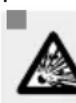
NEVARNOST EKSPLOZije!
Druga stopnja =pribl.67%,
NOSTE OCHRANNÉ RUKAVICE!
- LAMPADA DA LAVORO RICARICABILE
- HU
- FORSKRIFTSMAESSIG ANVENDELSE
- EXPLANATION OF SYMBOLS
- INTENDED USE
- SPECIFICATIONS SUPPLIED
- DESCRIPTION OF PARTS
- TECHNICAL DATA
- SAFETY INFORMATION
- WARNING
- RISK OF FATAL INJURY AND
- ACCIDENTS FOR INFANTS AND
- SAFETY INSTRUCTIONS FOR RECHARGEABLE BATTERIES
- EXPLOSION HAZARD! NEVER
- RISK OF LEAKAGE FROM RECHARGEABLE BATTERIES
- WEAR PROTECTIVE GLOVES
- ASSEMBLY AND INSTALLATION
- CHARGING THE BATTERY
- SWITCHING THE CORDLESS WORK LAMP ON/OFF
- CLEANING AND STORAGE
- TROUBLESHOOTING
- DISPOSAL
- RISK OF ENVIRONMENTAL DAMAGE FROM INCORRECT DISPOSAL OF RECHARGEABLE BATTERIES
- WARRANTY
- WARRANTY TERMS
- WARRANTY PERIOD AND STATUTORY WARRANTY CLAIMS
- WARRANTY SCOPE
- WARRANTY PROCESSING
- SERVICE
- GB
- IE NI
- C
- MT
- IAN 378246_2110
- GARANCIA
- NOSIC REKAWICE OCHRONNE
- NEVARNOST EKSPLOZIJE
- NOSTE OCHRANNÉ RUKAVICE
Brand : PARKSIDE
Model : PAL 2200 A3
Category : LED Lighting