
DW622 - Router DEWALT - Free user manual and instructions
Find the device manual for free DW622 DEWALT in PDF.



Pick your language and provide your email: we'll send you a specifically translated version.
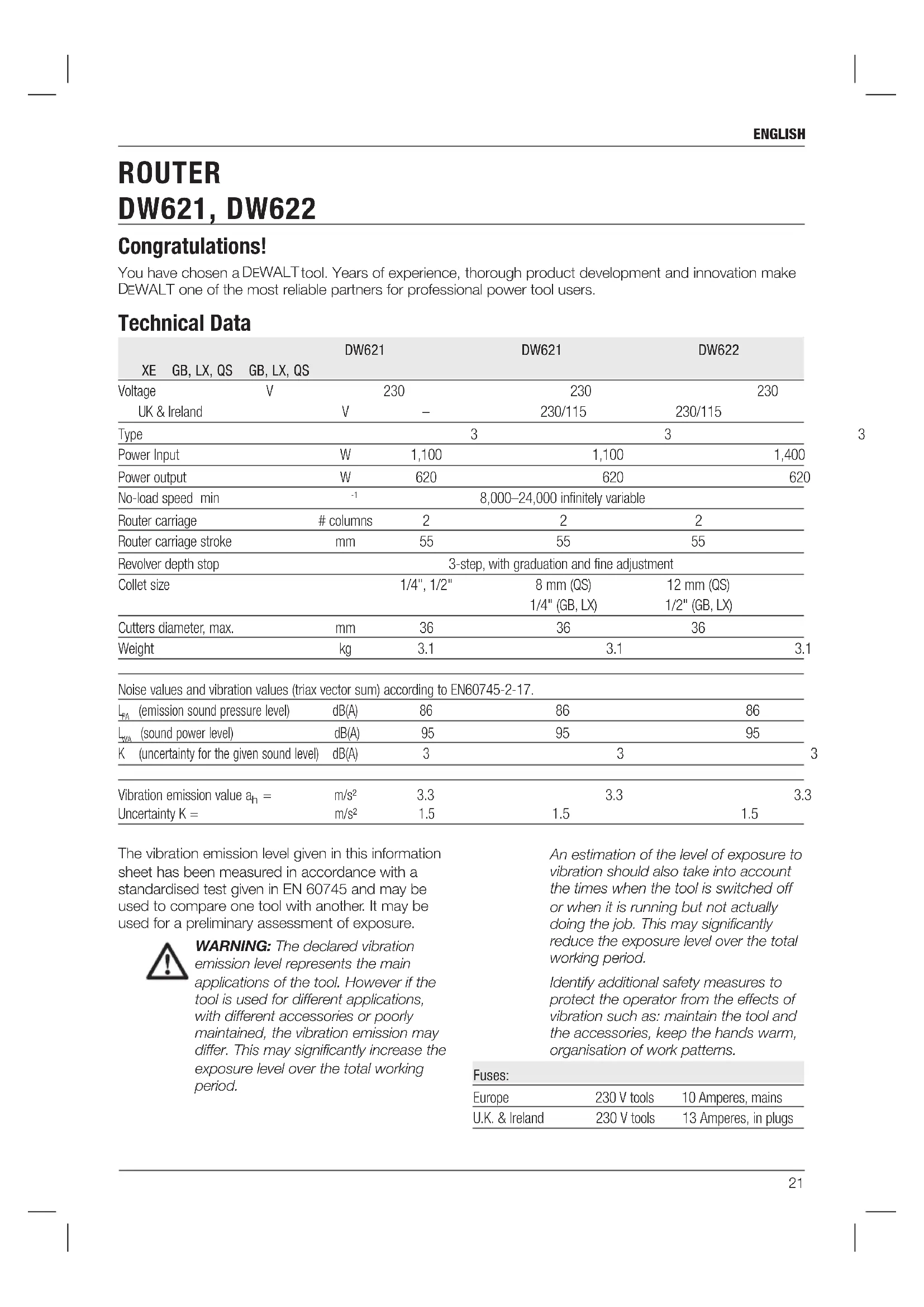
| Product type | Plunge router |
| Brand | DeWalt |
| Model | DW622 |
| Dimensions (L x W x H) | 300 x 200 x 250 mm |
| Weight | 5.2 kg |
| Power supply | 230 V, 50 Hz, 1400 W |
| No-load speed | 8,000 - 24,000 rpm |
| Maximum cutting depth | 50 mm |
| Cutter clamping diameter | 6, 8, and 12 mm |
| Main functions | Plunge routing, grooving, profiling, copying |
| Depth adjustment | Micrometric and by stops |
| Guiding | Parallel guide, copying guide, copy ring |
| Lighting | Integrated LED |
| Variable speed | Yes, electronic |
| Spindle lock | Yes |
| Dust extraction | Suction connection 35 mm |
| Maintenance and cleaning | Clean after each use, lubricate the slides |
| Safety | Double safety switch, emergency stop |
| Spare parts and reparability | Cutters, rings, guides, carbon brushes |
| General information | 1 year warranty, DeWalt after-sales service |
| Noise level | 90 dB(A) |
Frequently Asked Questions - DW622 DEWALT
How to change the cutter on the DeWalt DW622 router?
To change the cutter, unplug the tool, press the spindle lock, loosen the clamping nut using the supplied wrench, replace the cutter, then tighten the nut firmly.
How to set the cutting depth?
Use the micrometric adjustment knob for precise adjustments or the stop system for preset depths. Then lock the position with the locking lever.
What types of cutters are compatible with the DW622?
Cutters with 6, 8, or 12 mm shanks are compatible. Use quality cutters for optimal results.
How to use the parallel guide?
Attach the parallel guide in the grooves on the base. Set the desired distance and tighten the screws. The guide allows cutting parallel to the edge of the workpiece.
Is the speed adjustable?
Yes, the electronic speed control allows you to adjust the speed from 8,000 to 24,000 rpm depending on the material and cutter diameter.
How to install the copy ring?
The copy ring attaches under the base. It allows you to follow a template to reproduce identical shapes. Make sure it is well centered and tightened.
What regular maintenance is required?
Clean the router after each use, especially the slides and the extraction system. Lubricate moving parts with a silicone spray. Check the condition of the carbon brushes every 50 hours of use.
How to connect a vacuum cleaner?
Use the 35 mm suction connection located at the back of the machine. Connect a suitable vacuum cleaner for efficient dust extraction.
What are the essential safety instructions?
Wear safety glasses and a dust mask. Use both hands to hold the tool. Never remove the cutter guard. Always unplug the tool before changing an accessory.
Where to find spare parts for the DW622?
Spare parts (cutters, rings, brushes, etc.) are available from authorized DeWalt dealers or on the official website. Only use original parts to guarantee safety.
User questions about DW622 DEWALT
0 question about this device. Answer the ones you know or ask your own.
Ask a new question about this device
No questions yet. Be the first to ask one.
Download the instructions for your Router in PDF format for free! Find your manual DW622 - DEWALT and take your electronic device back in hand. On this page are published all the documents necessary for the use of your device. DW622 by DEWALT.
USER MANUAL DW622 DEWALT





Manual assistant
Powered by Anthropic
Waiting for your message
Product information
Brand : DEWALT
Model : DW622
Category : Router