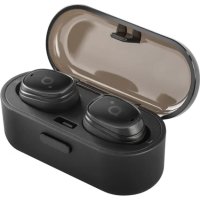
BH410 - Headphones ACME - Free user manual and instructions
Find the device manual for free BH410 ACME in PDF.


| Product Type | True wireless audio headset |
| Brand | Acme |
| Model | BH410 |
| Frequency Response | 20 - 20,000 Hz |
| Speaker Size | 6 mm |
| Bluetooth Version | v4.2 |
| Frequency Range | 2.4 - 2.48 GHz |
| Maximum RF Output Power | 1.05 dBm / 1.27 mW |
| Operating Range | Up to 10 meters |
| Power Input | Micro USB, 5V DC |
| Microphone | Built-in |
| Battery (charging case) | Li-poly, 300 mAh (1.7 Wh) |
| Earphone charging time | Up to 1 hour |
| Case charging time | Up to 2 hours |
| Standby time | Up to 50 hours |
| Playback time | Up to 2 hours (4 additional hours with case) |
| Possible recharges with the case | 2 times |
| Total weight | 38 g |
| Main functions | Call control, play/pause, volume, next/previous track, voice assistant, auto pairing |
| Care and cleaning | Use a soft, dry cloth. Do not use abrasive solvents. |
| Safety | Do not expose to extreme temperatures. Do not dispose of in fire. Avoid shocks and moisture. |
Frequently Asked Questions - BH410 ACME
User questions about BH410 ACME
0 question about this device. Answer the ones you know or ask your own.
Ask a new question about this device
Download the instructions for your Headphones in PDF format for free! Find your manual BH410 - ACME and take your electronic device back in hand. On this page are published all the documents necessary for the use of your device. BH410 by ACME.
USER MANUAL BH410 ACME
Technical specifications
Type: in-ear, Bluetooth
Frequency response: 20 - 20000Hz
Driver size: 6 mm
Bluetooth version: v4.2
Frequency range: 2.4-2.48 GHz
Maximal output radio frequency power: 1.05dBm / 1.27mW
Working distance: up to 10 m
Power supply: micro-USB, 5V DC
Microphone: built-in
Battery (charging case): Li-poly, 300 mAh (1.11 Wh)
Earphones charging time: up to 1 hour
Charging time of the charging case: up to 2 hours
Standby time: up to 50 hours
Playback time: up to 2 hours
Recharging with the charging case: 2 times
Total weight: 38 g

WARNING: Listening at a high volume for a long time may damage your hearing.
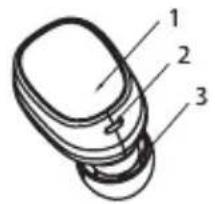
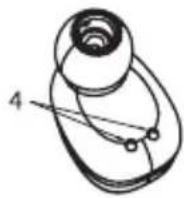
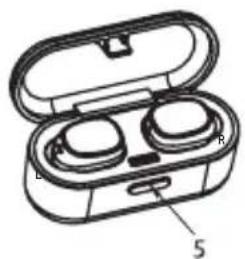
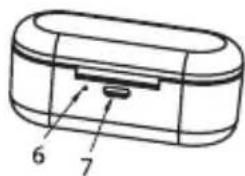
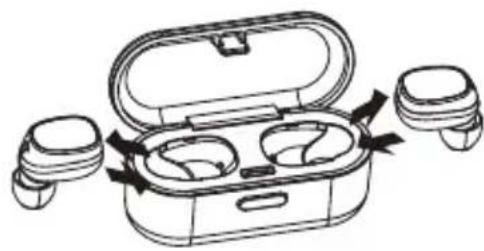
Product overview
- Power (multifunction) button
- Indicator light and MIC
- Speaker
- Charging contacts
- Opening button
- Charging indicator
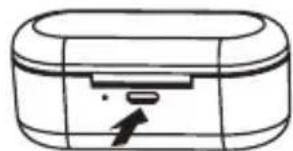
- Micro-USB charging port
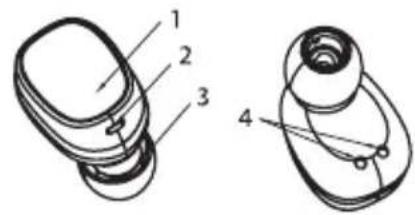
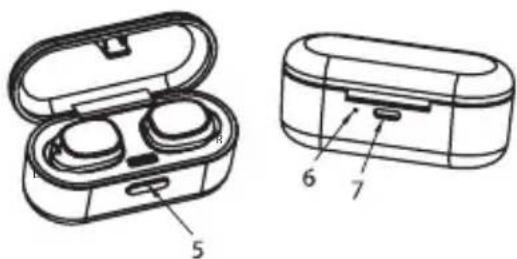

Before you start using the earphones, you must charge the battery and pair the earphones with a compatible device.
Charging the earphones and charging case
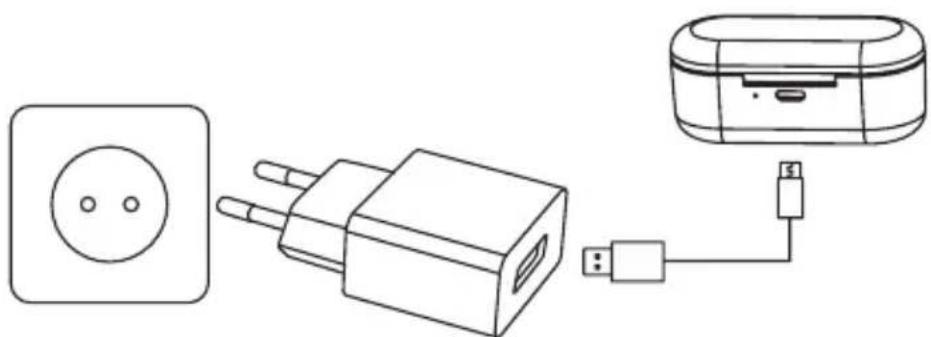

The BH410 charging case has an internal, rechargeable battery that must be fully charged before being used for the first time. It takes about 2 hours to
fully charge the battery for the first time. If you do not use the device for a long period of time, please charge it once every 2 months to avoid damage to the battery.
- Put the earphones in the charging case and close the cover to charge. During charging, the indicators will show a steady red colour. When the battery is fully charged, the red light will turn off.
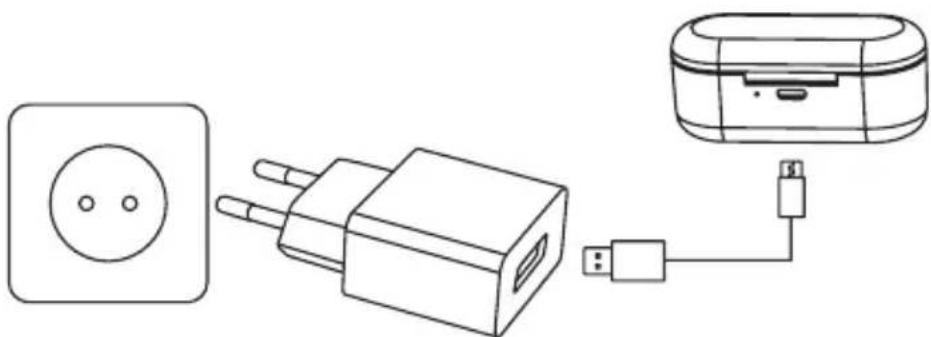
Use the USB charging cable to charge the charging case. The indicator light of the charging case is red when being charged. It will turn off automatically after being fully charged.
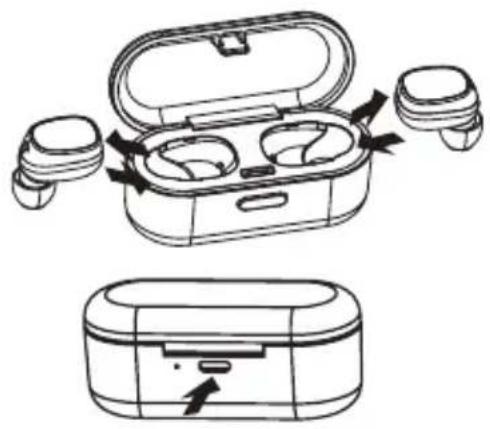
Fully charged earphone batteries have the power for up to 2 hours of playback time (4 hours more from the charging case). When the batteries are running out of power, a voice prompt will be heard. This indicates that the earphones need to be charged as soon as possible.
Pairing
Automatic (with the charging case) method:
- Remove the two earphones from the charging case* and wait for 10 seconds. The two earphones will power on and enter to the pairing mode automatically. A fast-blinking red/blue LED light on the right earphone and a slowly-blinking blue LED light on the left one will indicate that the earphone is ready to pair with your device.
- Turn on the Bluetooth function on your device, select BH410 from the list, and pair the earphone.
- A voice prompt will be heard from the right earphone saying that the earphones are connected.

*The charging case must be closed tightly before opening it and removing the earphones.
Manual (without the charging case) method:
- When both earphones are in an off state, press and hold the power (multifunction) button of both for 3-4 seconds. A voice prompt will be heard from both earphones saying that left and right channels are successfully connected. Then a voice prompt will be heard saying which microphone is the left one ("left channel") and which is the right one ("right channel"), and after that in the right microphone you will hear the voice prompt of pairing.
- Turn on the Bluetooth function on your device, select BH410 from the list, and pair the devices.
A voice prompt will be heard from the right earphone saying that the earphones are connected.

If pairing is successful, the earphones will enter to an idle mode and the blue lights will flash once every 5 seconds in different earphones. If no Bluetooth connection is made within 10 minutes, the earphones will turn off
automatically.
Basic Use
To switch on, when both earphones are in an off state, press and hold the power (multifunction) button for 3 seconds for both earphones at the same time until the blue indicator light flashes 3 times with the sound prompt.
To switch off, when both earphones are in an on state, press and hold the power (multifunction) button of one earphone (left or right) for 3 seconds to power off both earphones until the red indicator light flashes 3 times with the sound prompt or just put them back into the charging case.
Automatic reconnection
When both earphones are in an off state, remove them from the charging case at the same time, and they will reconnect automatically. And the right (main) earphone will reconnect to the paired device automatically.
Answer a call
When there is an incoming call, press the power (multifunction) button on the right (main) earphone.

While making phone calls, only the right (main) earphone produces sound.
Reject a call
To end the call, press and hold the power (multifunction) button on the right (main) microphone for 2s.
End a call
To end the call, press the power (multifunction) button on the right (main) earphone.
Play/Pause
Double tap the power (multifunction) button to pause the song. Single press to play the song.
Increase/Decrease volume
Short press the right earbud to increase the volume. Short press the left earbud to decrease the volume.
Next/Previous song
Press and hold the right earbud to change song to next one. Press and hold the left earbud to change song to previous one.
Voice assistant
Double tap left earbud and the smartphone's assistant will appear. After prompt sound you can ask any question and the answer will play to the earphones.
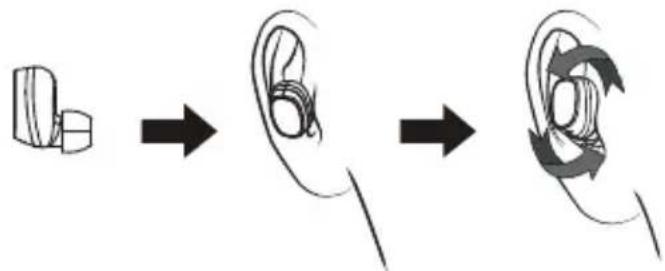
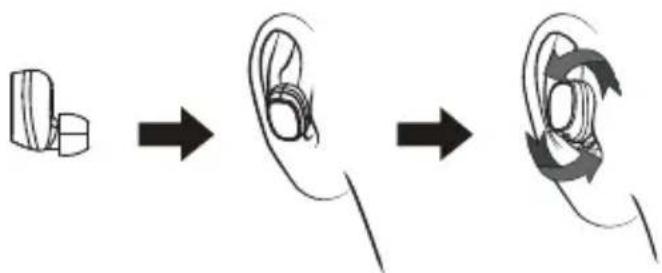
Wearing the earphones
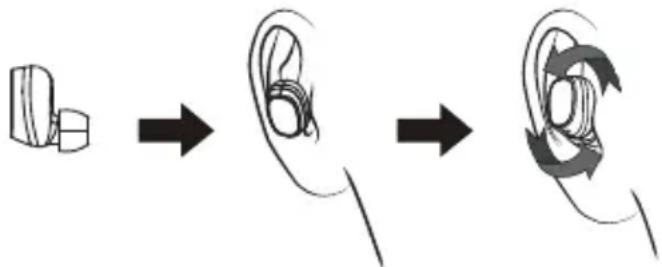
To properly wear the earphones:
STEP 1. Place the earphones in the ears as shown.
STEP 2. Slightly rotate the earphone until it gets tight.
LED indications
| No. | Status Headset Performance |
| 1 | Pairing The indicator light of the right earphone flashes red and blue alternately; when successfully connected to the device, the indicator light flashes blue once every 5 seconds. |
| 2 | Standby mode The indicator light of the right earphone flashes blue every 5 seconds. |
| 3 | Call state In case of the incoming call, the indicator light of theearphone flashes red every 5 seconds. |
| 4 | Headset charging state The indicator light of the headset is red when being charged and will turn off automatically after being fully charged. |
| 5 | Charging case charging state The indicator light of the charging case is red when being charged and will turn off automatically after being fully charged. |
| 6 | Power on state The indicator light flashes blue 3 times and then flashes red once every 5 seconds. |
| 7 | Power off state The indicator light flashes red 3 times. |
| 8 | Battery alarm The indicator light flashes red once every 20 seconds. |
Troubleshooting
| Faults Reasons and Solutions | |
| · The earphones cannot be turned on. · The earphones turn off automatically. · The earphones cannot turn on by picking them up from the charging case. | Charging case low battery protection. Recharge your earphones and charging case. |
| · Music is not playing. Make sure that both devices are paired and connected and that “Media playback” is enabled in your Bluetooth settings. Try to pair it again. | |
| · Pairing was successful but the device cannot find the right earphone or reconnect/connect. | Too many pairing records. Delete pairing records (unpair) and try again. It is possible that you are not able to connect because the earphones are paired with another nearby device. You will have to disconnect the other device, or even turn off its Bluetooth function. Now you can try again to pair or reconnect. To reset earphones, take them out of the charging box. When both earphones are in an on state, press and hold the power (multifunction) button of one earphone (left or right) for 3 seconds to power off both earphones until the red indicator light flashes 3 times. Press and hold power button of both earphones for 7 seconds till sound prompt will be heard. Turn on earphones and wait about 10 seconds till resetting operation will be completed. |
| · The charging case indicator has no light while charging. | DC power supply does not output power. Check your USB connections and try to charge with a different charger. |
| · The earphone indicator has no light while charging. | Check the pogo pin charging points. Place the earphone correctly in the charging case. |
Care and maintenance
- Don't use abrasive cleaning solvents to clean the headset.
- Do not expose the headset to extremely high or low temperature as this will shorten the life of electronic devices, destroy the battery or distort certain plastic parts.
- Don't dispose of the headset in a fire as it will result in an explosion.
- Don't expose the headset to contact with sharp objects as this will cause scratches and damage.
- Don't let the headset fall down onto the floor. The internal circuit might get damaged.
Waste Electrical and Electronic Equipment (WEEE) Symbol
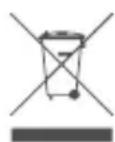
The use of the WEEE symbol indicates that this product may not be treated as household waste. By ensuring this product is disposed of correctly, you will help protect the environment. For more detailed information about the recycling of this product, please contact your local authority, your household waste disposal service provider or the shop where you purchased the product.
LT "BLUETOOTH" AUSINÉS
Naudotojo vadovas
Techniques specifikacijos
LV "BLUETOOTH"AUSTINAS
Pilniba uzladetas austinu baterijas var atskanot lidz 2 stundam (papildu 4, 5, 6, 7, 8, 9, 10, 11, 12, 13, 14, 15, 16, 17, 18, 19, 20, 21, 22, 23, 24, 25, 26, 27, 28, 29, 30, 31, 32, 33, 34, 35, 36, 37, 38, 39, 40, 41, 42, 43, 44, 45, 46, 47, 48, 49, 50, 51, 52, 53, 54, 55, 56, 57, 58, 59, 60, 61, 62, 63, 64, 65, 66, 67, 68, 69, 70, 71, 72, 73, 74, 75, 76, 77, 78, 79, 80, 81, 82, 83, 84, 85, 86, 87, 88, 89, 90, 91, 92, 93, 94, 95, 96, 97, 98, 99, 100
Savienošana pārī
Automatiskais (ar uzladešanas korpusu) panemiens
- Iznemiet abas austinas no uzladeesan korpusa*, pagaidiet 10 sekundes. A austinas ieslegsies un automatiski paries savienosanas pari rezima. Atri mirgojo sa sarkana / zila LED lampina labaja austinun leni mirgojoza zila LED lampina kreisaja austinara, ka austinas ir gatavas savienosanai pari ar jusu icerici.
- Savā icerē iesledziet "Bluetooth" funkcjju, izvlieties sarakstā BH410, un savienojiet pārī ar austinām.
Labaja austinabus dzirdama balss uzvedne, sakot, ka austinas ir savienotas.

*Uzladesanas korpusa ir jabut ciesi aiztaisitam, pirms to atver un iznem austinas.
Bluetooth version: v4.2
PykoBODCTBO NOIb3OBaTeJIa
TexHnueckne xapaKtepncnKn
Tun: BKlaDbWi, Bluetooth
Mana3OH BOCnpon3BODmblx qactOT: 20-20 000 T
Pa3Mep npBODHOro KOMNoHETa: 6MM
Bepcna Bluetooth:v4.2
Dnanaoh yacto:2.4-2.48T
MaKcMnBHa BbIXoHnA MoHocTb paHNoaToTbI:1.05Dm/1.27MBT
Pa6ooye paocToHne:do10M
MCTOCHMKNTaHn: micro-USB, 5 B noct. Toka
Mukpoooh:BCTpoeHHbI
Batape (3apnHbIy cheXon): nntn-nOpImepHa, 300 MA-4 (1,7 B-4)
Bpem3apnKTepeoHa:do1yaca
Bpem3apn3apnHoro qexna:do 2acob
Pe3epBHOe Bpemr:do 50 yacob
Bpem Bocpon3BeHn: Do 2 yacob
Nobtopnha 3apraKa c nOmoaBIO 3apAHO rExna: 2 pa3a
06nBec:38r

PPEyIPEKJEHNE: npocnyuBaHne aydno3anncen Ha 6oJbwo IrpomKoCTB TeueHne dInTeNbHoro BpeMeH MoKeT NobpeDntb cnyx.
O63op n3dennia
- Khonka nHTaHn (MHOROΦyHKUHOHaJIbHa)
2.CBETOBINHINKATOP IN MUKPOOH
3.ДИНAMNK
4.3apAHHbIe KOHTaKtBi - KhoNka OTKpbBaHn
6.Инданахт зардкn - Порг дя зараздк micro-USB

Ppeke qem npctynatb K mnojbs0BaHnO HayuHKnOB, Heo6xOIMo 3apndt6aataeIO N oDknouHTb HayuHKnK COBmecTUMOMy yCTpoIcTB.
3apraKa HayshnKOB n 3apdHoro yexla

3apnBHy qexo BH410 coepxnt BCTpoHHyIO nepe3apXkaemyio
6aTapeio, KOtOpA DOJXHa 6bITb nonHocTbO 3apXeHa nepei nepBbIM nCnoIb3oBaHHeM. DnI nnHOH 3apJKn 6aTapeN B nepBbI pa3 Tpe6yeTcR OKONO 2 YacOB. Ecn Bbl He mCNoJb3yTe yCTpoIcTB O TeueHne dINTeHoro BPemEn, 3apXaIteero oDHN pa3 B 2 Mecra, yTO6bl N36exKaTb NobPexKeHn 6aTapeN.
Yro6b3anyctntb 3apRky, pa3meCTnTe HayuHnKn B 3apRdHom qhexne n 3akpoTKe KpbIku.Bo BpeMa 3apRKn uHnKaTopbl 6ydt noctoHHo rOpTe KpaChbIM. Korda 6atapee 6ydet noHocTb0 3apJxHa, KpaChbIn HnKkaTop norachet.
Yro6b3apAHTb 3apAHybI yexo, nOJb3yJte 3apAHyb I USB-ka6JIb. Korda 3apAHyb I yexo 3apAkaETc, erO INHdkaTOp CBETITcKpaChbIM. NocJe nonHOI 3apAKn OH aBtOMaTneCKN BblIOUHTCra.
I IIOHOCbIO 3apXeHHbIE 6aTapeIN dN HayuHnKOB MMeOT MoUHOCTb Do 2 Yacob BocnpOn3BeHeHn (Ha 4 Yacob 6oJIbWe OT 3apJdHorO yExna). KOrda 3apJd 6aTapeIN 3aKOHHTc, pa3dactcra rONOCBOE COo6ueHne. OHO O3Haayet, UTO Heo6xOIMo KaK MOxHOb 6bICTpe 3apJdNTb HauuHNKn.
CoprajkeHne
ABTomatueckm MeToD (c nOmoUbIO 3apAHoro yexna)
I3BnKeTe 06a HayuHnKa n3 3apAnHoro qexna* nNoOxKnTe 10 cekyHd. HayuHnKn BKNIOUATcN ABTOMaTnueckN BOUY T PEXHM COpJXeHNA. BbICTpO MraHOUI KpaCHb/ CnHnCnHa npABOM HayuHnke N MeDneHNO MrrAooH CNHn CnHn HnEBOm NOKa3bBAoT, yTo HayuHnK rOTOB K COpJXeHnO C BaWIM yCTPOINCTBOM.
BkIOuHTe yHKUIO Bluteoth Ha cBOem ycTpoiCTBe, BbI6epnte BH410 n3 cnNcKa N BblIOJHnTE cOnpaKeHne C HayuHKAMn.
B npabom Hayunke 6ydet cnblho roolocoboe coo6eHne, coo6aiooee o TOM, yTo HayuHKI NOKJIIOUyeHbI.

*Y6eHntecb, qTo 3apAHybI qExoN 6bl NnotHO 3aKpbIT nepe erO OTKpbItnEM nN3BLeueHnem HayuHnKOB.
Puyhoh MeToD (6e3 3apArdHoro yexna)
Korda oba HayuHnka HaxoTcB B BbIKIOeHHOM COCTOHn, HaxMnte ydepXnBaTe MHorOyHKUHOHaIbHyIO KONky NITAHn B TeueHne 3-4 cekyHd. Bby ycblwnte rOLOCOBOe COO6eHne O TOM, YTO leBbN n npaBbN kaHaJIb ycNeuHO noDKlouHeB, B oOxN HayuHKax. 3aTe mP03ByNT rOLOCOBOe COO6eHne O TOM, KaKoN HayuHKn ABJrTcA neBbM («left channel» - neBbN kaHaI), a KOTOpBn ABJrETcA npabM («right channel» - npabN kaHaI), nocne eToro B npabOM hayuHnke Bby ycblwnte rOLOCOBOe COO6eHne O copjKeHN «pairing»
BkIOuHTe yHKUIO Bluteoth Ha cBOe m yCTpoiCTBe, BbI6epnTe BH410 n3 cnNcKa N BblONHITe cOnpaxKeHne C yCTpOINCTBOM.
B npabom Hayunke Bby ycnblnte ronocoboe coo6uene, coo6uaouee o tom, cyto Hayunkn noeknouchebl.

Ecnn cnpjxehne npoJno ycneHNO, HayuHnKn nepeydt B peKIM OxndHn, 6a hayuHnKa 6ydyT mRatb CnHm Cbetom KaXdbie 5 cekyHd. Ecnn B TeeyHne 10 MHyT Bluetooth coeMHHeHne He 6ydet yctahOBNeHo, HKN ABTomATnueckn OTkIouatcra.
OCHOBHOe NcNoJIb3OBaHne
BkIoueHne. KOrda 06a HayuHnka HaxoTcB BByKIOueHHOM COCTOHN, OJHOBPemEHNO HaxMNTe n ydepXnBaIte MHOROyHKUHOHaJIbHyIO KHONKY NITAHN B TeueHne 3 ckyHd nIg OB, nOKa CnHn INDnKaTOP He MmHET 3 pa3a C BbIEeHnEM 3ByKOBOr CnHaJa.
OTKIOUOHeH. Korda o6a HayuHnka HaxoTcB BO BkIOueHHOM COCTOHn, HaKMNTe UyepKbBaTe MHOFOyHKUHOHaIbHyIO KHOKNy NITAHN HA ODNOM HAYHnke (JeBOM nnpabOM) B TeueHne 3 cekyH, YTO6bI OTKIOUHTb O6a HayuHnka, NOKa KpaCHbI INHnKaTOP He MmRHeT 3 pa3c C BBBeDEHnEM 3ByKOBOrO CnHnA, INI PPOCTO BEPHnte nx 6paTHo B 3apJdHbI yexon.
ABTomatnueckoe NOBTOpHoe CoeHHeHne
Korda o6a HayuHKa HxOaTcB B BYKIOueHHOM COCToHm, OHObpeMeHHo 3BLeKeHTe INx 3apdHorO yexla, IN OHn ABToMaTHueCKN NOKIOUaTcNOBtPOHo. PpaBbI (OCHOBHO) HayuHK abTomatueckN NOKIOUHTcK CONpJKeHHOMyycTPOCTBy.
OTBet Ha Bbl3OB
Pn noctynen BxOJaero Bb3Oba HaxMnte MHOroYHKUHOHaBHyIO KONKy nTahnHa npabOM (OCHOBOM) HayuHKe.

Pn COBepHm TeneoHHbIX 3BOHKO 3ByK Bblaet ToIbKO npaBbI (OCHOBHO) HayuHrk.
OTKIOHeHne Bbl3Oba
HaKmnte u ydepKnBaTe MHOroOfoYHKUHOHaIbHyIO KHOJKy nITaHnI npaBOrO (OCHOBHO) HayuHnka B TeueHne 2 cekyHd.
3aBepWeHne Bbl30Ba
YTo6bI 3aBepuNTb Bbl3OB, HaxMnTe N ydepxNBAyTe KHNKy NITaHIN (MHOROfoHKUHOHaBHyIO KHONky) Ha npabOM (rnaBHOM) Hayshnke B TeueHne 2 ckyHd.
Bocnpon3BeDenne/nay3a
YTo6bl npnoCTaHOBnTB BOCpOn3BeDeHne, DBaXDbI HaXMnTe KONKy NITaHn (MHOroOfoyHKcNoHaJIbHyIO KHONKy). YTo6bl BKlIOuHTb BOCpOn3BeDeHne, HAXMnTe OINH pa3.
yBennueHne /ymHeHbWeHne rPOMKoCTn
YTo6bI yBENuHTb rPOMKoCTb, KpaTKO HaxMnTe npaBbHayuHnK. YTo6bl yMeHb rPOMKOCTb, KpaTKO HaXMnTe JEBH HayuHnK.
Cneyuoua/npdbyua nechra
HaJMMTe u ydepxnBaIte npabBn HayuHnK, yTO6bI CMeHnTb neCHIO Ha cneDyUOyIO. HaxmTe u ydepxnBaIte neBbHayuHnK, yTO6bI CMeHnTb neCHIO Ha npeDbIdyUIO.
TonocobonomouhNK
IbaxdbIO KCHNTecb IeBOrO HayuHnka, n NOMoUHcK CMapTfoHa AKTNBUN3NpyETCA. Iocne 3ByKOBOrO CNrHaJa MoXHO 3aDaTb IIO6oB Bonpoc, n OTBeT Ha Hero np03ByuHT B HayuHnKaX.
KaK npaBnIbHO Hocntb HayshnKi
Körvaklappide nōuetekohane kandmine:
WAr1. NomeCTIte HayuHnKn Byu, KaK nokaHa Ho paucyHke.
WAR 2. Cnerka noBpaaTe HayuHnK, YTO6 OHn IIOTHO paCNOJINCb.
CIN-HHaTOpbl
| № | Статус Пожибоведents | Б拱ысту гарнисту | |
| 1 | Сорожени С Beetом | Инд Ин Ин Ин Ин Ин Ин Ин Ин Ин Ин Ин Ин Ин Ин Ин Ин Ин Ин Ин Ин Ин Ин Ин Ин Ин Ин Ин Ин Ин Ин Ин Ин Ин Ин Ин Ин Ин Ин Ин Ин Ин Ин Ин Ин Ин Ин Ин Ин Ин Ин Ин Ин Ин Ин Ин Ин Ин Ин Ин Ин Ин Ин Ин Ин Ин Ин Ин Ин Ин Ин Ин Ин Ин Ин Ин Ин Ин Ин Ин Ин Ин Ин Ин Ин Ин Ин Ин Ин Ин Ин Ин Ин Ин Ин Ин Ин Ин Ин Ин Ин И. | |
| 2 | Рек imm ожданая С Beetо | Вовий Вьзова Рр | Бхоняшем Вьзове С Beetом Ин Ин Ин Ин Ин Ин Ин Ин Ин Ин Ин Ин Ин Ин Ин Ин Ин Ин Ин Ин Ин Ин Ин Ин Ин И. |
| 3 | Состаянце визова Пр | Бхоняшем Вьзове C BeetOM Ин Ин Ин Ин Ин Ин Ин Ин Ин Ин И. | |
| 4 | Состаянце зардким Нayшников | При зардкке С BeetOM Ин Ин Ин Ин Ин И. | |
| 5 | Состаянце зардким Зард Horo уlexna | При зардкке С BeetOM Ин Ин Ин И. | |
| 6 | Вьк liquenhoe состаянце | С BeetOM Ин Ин Ин И. | |
| 7 | Вьк liquenhoe сostаянце | С BeetOM Ин Ин И. | |
| 8 | П repdunpreşende Ониkom уразове Зарда 6a tarpen | С BeetOM Ин Ин И. |
YcTpaHHeHHeNcPpABHOCTeI
Bluetooth-Version: v4.2
OCHOBHe BnKOpncTaHHa
YBIMKHeH. KoIuOIBa HabyuHKn 3HaXoJrTcBcY BUMKHeHOMy cTaHi, OHOuAcHO HATNCiHb Ta yTPmUyIe 6aratofoyHKIOHaJIbHy KONKy JxNBHeHH npOTaROM 3 CekyHd IIN o6ox HabyuHKnIB, NOKI INDKaTOP He 3a6NJMaE TpNci 3 OHOuacHM BUNBeEHNM 3ByKOBOrO CnHAny.
BmKHeH. KOnI O6nDba HabyuHKn 3HaXoJrTcB Ca YbIMKHeHomy CtaHi, HAtNCiTb Ta yTpmyte 6araToOyHKUioHaJIbHy KONkY XINBEHH Ha ONDHYABUYHky (JIBOMy a60 npabomy) npotarom 3 cekHy, 106 BumkhTy N O6nDa HabyuHKn, NOKN cepBOHIn IHnKaTOp He np6nMaTe pnuI 3 OHOaCHM BBeDEHHaM 3ByKOBOrO CNHany a60 npocTo NOBepHtB IX Ha3aD B 3apAHN qoxon,
ABTomatnue He NOBTOpe 3'cHaHHa
KoHn 06uBa HabyuHKn 3hAxOaTbCBy BmKHeHomy CtaHi, OJHOaucHIO iCTaHbTeix 3 3aprHoro yoxna, i BOHn ABTomAtuHNO NobtOpHo nID'eHaIOpbc. IpaBn (OCHOH) HabyuHKn ABTomAtuHNo iD'eHaETbCdo cnoNyehoro npicTpOIO.
BidnoobHa BnKnK
Pn HAnxOxJHHi 3BiHka HATNCHTb 6araToΦyHKcioHaJIbHy KONky XNBneHHa npabomy (OCHOHOMy) HabyuHky.

Pn 3diincheHHI TenefoHHnx 3BihKIB 3ByK Buae TinbKn npabn (OCHOBHn) HabyuHnK.
BixnneHH BnKnky
HaTnCHiB Ta yTpmyTe 6aRaTofoyHKUioHaIbHy KONky XNBHeHH npaboro (OCHOBHoro) HabyuHnka npotarom 2 cekyHn.
3aBepeHHBAKlnky
3abepwnBnKlnk,HaTNCHtbi ytpmyTe KONky XNBHeHHa (6araToyHKcioHaIbHy KHOnKy) Ha npabOMy (roOBHomy) HabyuHnky npotrrom 2cekyHd.
BiDtbOpenhra/Na3a
Io6 npn3ynHHTB BIDTBOpEHn, DbiHi HAITCHtB KHONKy JINBHeHH (6araTofoyHKUHOHaJIbHy KOnKy).Ioo yBIMKHyTn BIDTBOpEHn, HATNCtB II ODN pa3.
36ilbweHH/3MeHweHH ryuHocti
36iNbHTn rYHicTb, KOPOTKo HATNCHITb npabn HabyuHnk. 3MeH rYHcTb, KOPOTKO HATNCHITb IIBN HabyuHnk.
HactynHa/nonepednich
HaTnCHiB i yTpmyte npabn Habywnk, 063miHnTn nichHO Ha hAcTynHy. HATnCHiB i yTpmyte JIBN Habywnk, 063miHnTn nichHO Ha nonepeDnO.
TOnocBn nomiHnK
Ibici TopkHtbcj IIBORo HabyuHnka, i Nomiuchc CmapTphiHa AKTNBiyEcBc. PicJ3ByKOBOrO CuHany MoXHa 3aDaTu 6yNb-Ke NITaHH, Ni BIDNOBID Ha Hboro npOlyHae B HabyuHnKaX.
K npaBnIbHO HocNTn HabyuHnKn
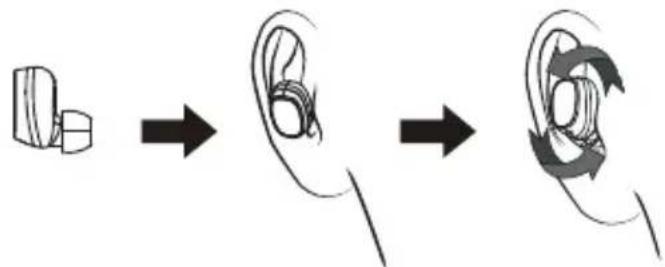
KPOK 1. Nomicitb HabyuHnky Byxa, RaNokaaho Ha MaIIOHky.
KPOK 2. 3nerka npoBepHiTb HabyHnKn, 06 BOHn po3aayBaIncb iJbHO.
LED-Anzeigen
UcyeHHe HecnpaBHOCTe
AbTomaTuHO NOBtOPO CBbp3BaHe
Korato DBeTe CnywaiKn Ca B N3KIOUeHO CbCTOHHne, N3BaTe Tn eHOBpeMeHHo OT KOpNyca 3a 3apeXdaHe N Te ABTOMaTHuHO Ie Ce CbBpXaT OTHOBo. N JIcHata (rnaBHata) CnywaiKa Ie Ce CbBpXe ABTOMaTHuHO KbM CdBEOHOTO YCTPOICTBO.
OTROBOPHaNOBnKBaHe
Korato mMa BXOJauo NOBnKBaHe, HATNCHeTe 6yToHa 3a 3axpaHbHe (MylntfOyHKUHOHaJIe) HaIChATA (rnaBHaTa) CnywaJa.

IIO BpeMe Ha TenefoHepa3roBOp, cAmO JaChata CnywAaKa npou3BexKda 3Byk.
OTka3BaHe Ha NOBnKBaHe
HaTncheTe n 3aIpbkTe 6yToHa 3a 3axpaHbAHe (MyIITnOHyHKuHOHaJIeH) Ha IaCHaTa (rnaBHata) cnUwAlka 3a 2 cekyHnn.
PpKlUcbHeHa06aXdaHe
3a da npnkJIOUHTe 06akJaHe,HaTNCHe T 3aIpbXte 3a 2 cekyHn 6yToHa 3a BkIOUBAHe (MynTHOyHKUHOHaJIHn8 6yToH) Ha dAChTa (OCHOBHata) cnYsAnka.
NyckaHe / Nay3a
HaTnCHeTe Db Ta nTn 6yToHa 3a BkIIOuBaHe (MyNTnOyHKUHOHaHnHn 6yToH), 3a Da octaBnTe neceHTa Ha naY3a. HATnCHeTe BeDhbX, 3a da nyChTe neCeHTa.
YBennuBaHe /HamaJBaHe Ha 3Byka
HaTnchete KpaTko IaChata Cnywajka, 3a Da yBelenuTe cnlaTa Ha 3Byka. HATnchete KpAToIaBata Cnywajka, 3a Da HAMaJIte cnlaTa Ha 3Byka.
CneBbaa/npednHa necen
HaTnchete n 3aDpBxTe JcHata CnywAanka, 3a da CMeHnte neceHTa cbc CneBaAata. HaTnchete n 3aDpBxTe JyBaTa CnywAanka, 3a da CMeHnte neceHTa c npednWHaTa.
TlacobacnCTeHT
HaTnCHete IBa IbTu IaBata CnyuAanka N ue ce aKtunBnpa acnCTeHTbT Ha cMaprfoHa. CneI kpar Ha 3BykoBna CnHan MoKeTe da 3aJaTe npOn3BoneH
IocTaBЯHe Ha CnyuJaNKeTe
KaK npaBnHo da HocuTe cnyuAanKeT:
CTbIIKA 1. NocTabeTe cnUshaJIKe T ByuNTe KaKTo e nOKa3aHo.
CTbNKA 2. JIeKo 3aBbptTe CnyuJaKaTa DOKaTO nache CTa6nHOB yxOTO.
HnKaNaHa CBeToNDnOnte
| №СьстониЕ Функция на снышкпe | |
| 1СьВОЯBAнЕ ИнданКаТоРьт NaДяСНATA снышкka МИгaВЧерBENo I CINьо; KOrATO yCnpeшно e CBbрзанКьМ yCTpoIcTBOTO, ИнданКаТоРьАТа CBeTПИHA MИгaВ СINьо ВEDнБЖ Na BSEКI 5 ceKУнДи. | |
| 2РсКIM HA TOTOBHOCST ИнданКаТоPьТ NaДяСНATA снышкka MИгaВ CINьо Na BSEКI 5 ceKУнДи. | |
| 3СьСТОГИе Na ПОВИКВанe | В снычай Na BxOДЯЦIO NOВИКВанe, ИнданКаТоPьТ Na CNYшКаТа MИгaЧерBENo Na BSEКI 5 ceKУнДи. |
| 4СьСТОГИе NaЗapexДанe Na CNYшКИte | ИнданКаТоPьТ Na CNYшКИte e ChERBEN priЗарEXДан e AByTomaTInUHо Ze ce N3KЛЮчи, cIeD KaTO 6bДaT NaПБЛHо 3apeDEHи. |
| 5СьСТОГИе NaЗapexДанe Na KOPnyca | ИнданКаТоPьТ Na KOPnyca 3a ЗapexДанe eЧERBEN priЗарEXДан e AByTomaTInUHо Ze ce N3KЛЮчи, cIeD KaTO 6bДe HaNБЛHо 3apeDEH. |
| 6СьСТОГИе NaВКЛЮчЕно 3axpaHBaHe | ИнданКаТоPьТ MИгaВ CNYьо 3 ПБТи i CIIeD TOВa MИгaВ ChERBeHв BEdNБЖ Na BSEКI 5 ceKУнДи. |
| 7СьСТОГИе NaИЗКЛЮчЕно 3axpaHBaHe | СВetлинNHЯТ ИнданКаТоMИгaВ ChERBEN O 3 ПБТи. |
| 8Аларma 3a ИЗTOSUЕNaБaterия | СВetлинNHЯТ ИнданКаТоMИгaВ ChERBEN BEdNБЖ Na BSEКI 20 ceKУнДи. |
OtctpaHЯBaHe Ha Heu3npaBHOCTN
| Hem3npabnoctn Прочи и рechа. | Енna |
| Слшankite He може за 6ьдат Вкючени. Слшankite ИЗлочьат abTomatуно. Слшankite He могот за сь Вкючат, КATO ГИ ИЗваду OT kopnyca за зapedда. | Заша на корnyca за зapedдапспспа 6ьдат Вкючени. П配电�дete слшankite и корnyca за зapedда. |
| Музikata He ce вьзпponizbexда. | Уberete ce, ye и дvete устpoиства с сdvoehи и сьврзани и ч „Бьзроиьжданeto на муltimеди" e akтувирало в настpoиокite ви за Bluetooth.Опигайтс сдбоите ото. |
| Слвоганeto устwoho, НустpoистВOTо He може за наимердяся сдушanka плдсе сьврж. | Тьрide Mнoro 3аписи на сdвогане.ИЗгрипite 3аписи ot сdвоганeto (pa3delete Двогкata) и опигайтse ото NOBO. Вьзможио e поу He може за сьвржete, Зашо Тсшankite с сdvoehи с дуго устpoистВОи habиизо. Тразва д „OTКачиte" дугоу устpoистВОи дудои д сретeBluetooth Функцията му. Сera може за опигайтse ото NOBO DA сдвоги ллдсе сьвржete.Здунлспспспспспспспспспспспспспспспспспспспспспспспспспспспспспспспспспспспспспспспспспспспспспспспспспспс? Дытete сdушankи, koratoи дvebete с BAВВ Вкlioquero CBSTOЯн, ИЗвадутЯ OT zapждацala.Tутяи и Натисны. Дытete сdушankи, koratoи дvebete с BAВВ Вкlioquero CBSTOЯн, ИЗвадутЯ OT zapждацala.Tутяи и Натисны. Дытete сdушankи, koratoи дvebete с BAВВ Вкlioquero CBSTOЯн, ИЗвадутя OT zapждацala.Tутяи и Натисны. Дытete сdушankи, koratoи дvebete с BAВВ Вкlioquero CBSTOян, ИЗвадутя OT zapждацala.Tутяи и Натисны. Дытete сdушankи, koratoи дvebete с BAВВ Вкlioquero CBSTOян, ИЗвадутя OT zapждацala.Tутяи и Натисны. Дытete сdушankи, koratoи dngete с BAВВ Вкlioquero CBSTOян, ИЗвадутя OT zapждацala.Tутяи и Натисны. Дытete сdушankи, koratoи dngete с BAВВ Вкlioquero CBSTOян, ИЗвадутя OT zapждацala.Tутяи и Натисны. Опигайтse ото 3ыхранванeto (MHOROФункциюнален) На edha сdушanka (Ява ллдяпс) Здунлспспспспспспспспспспспспспспспспспспспспспспспспспспспспспспспспспспспспспспспспспспспспспспспc Примогнe 3ыхранванeto (MHOROФункциюнален) На edha сdушanka (Ява ллдяпс) Здунлспспспспспспспспспспспспспспспспспспспспспспспспспспc ИЗвадутя OT zapждацala.Tутяи и Натисны. Дытete сdушankи, koratoи dngete с BAВВ Вкlioquero CBSTOян, ИЗвадутя OT zapждацala.Tутяи и Натисны. Опигайтse ото 3ыхранванanto (MHOROФункциюналen) Здунлспспспспспспспспспспспспспспспспспспспспспспспспспспспспспспспспспспспспспспспспспспспспспспс ИЗвадутя OT zapждацala.Tутяи и Натисны. Опигайтse ото 3ыхранванanto (MHOROФункциюналen) Здунлспспспспспспспспспспспспспспспспспс ИЗвадутя OT zapждацala.Tутяи и Натисны. Опигайтse ото 3ыхранванanto (MHOROФункциюналen) Здунлспсрьт ha корnyca Здунлсрьт ha сdушanka Здунлсрьт ha сdушanka Здунлсрьт ha сdушanka Здунлсрьт ha сdушanka Здунлсрьт ha сdушanka Здунлсрьт ha сdушanka Здунлсрьт ha сdуش� Здунлсрьт ha сdуش� Здунлсрьт ha сdуش� Здунлсрьт ha сdуش� Здунлсрьт ha сdуش� Здунлсрьт ha сdуش� Здунлсрьт ha сdуش� Здuroнлсрьт ha сdуش� Здuroнлсрьт ha сdуش� Здuroнлсрьт ha сdуش� Здuroнлсрьт ha сdуش� Здuroнлсрьт ha сdуش� Здuroнлсрьт ha сdуش� Здuroнлсpь Здuroнлсрьт ha сdуش� Здuroнлсрьт ha сdуش� Здuroнлсрьт ha сdуش� Здuroнлсрьт ha сdуش� Здuroнлсрьт ha сdуش� Здuroнлсрьт ha сdуش� ЗдEuroнлсрьт ha сdуش� ЗдEuroнлсрьт ha сdуش� ЗдEuroнлсрьт ha сdуش� ЗдEuroнлсрьт ha сdуش� ЗдEuroнлсрьт ha сdуش� ЗдEuroнлсрьт ha сdуش� ЗдEuroнлсpь ЗдEuroнлсрьт ha сdуش� ЗдEuroнлсрьт ha сdуش� ЗдEuroнлсрьт ha сdуش� ЗдEuroнлсрьт ha сdуش� ЗдEuroнлсрьт ha сdуش� ЗдEuroнлсрьт ha сdуش� Зд Euroнлсрьт ha сdуش� ЗдEuroнлсрьт ha сdуش� ЗдEuroнлсрьт ha сdуش� ЗдEuroнлсрьт ha сdуش� ЗдEuroнлсрьт ha сdуش� ЗдEuroнлсрьт ha сdуش� ЗдEuroнлс... |
PnJn IIOaKka
He n3noJ3BaITe a6pa3nBn IOuNCtBaU pa3TBOpNTeN 3a NOuNCtBaHe Ha cnyuwaankte.
He n3naraTe cnUaKnTe Ha n3KnHouNTeHb BuCoka nn Hncka TemnepaTpy TbKaTOBa 1e CbKpaTN JxNBota Ha eJekTPOHHte yCTpOHTBa, 1e yHnIOXn 6aTePnTa nn 1e DeOpMnpa HAKON PnactMacOBu YactN.
He n3xBbpynnte CnywaaKNTe B OByH, TbN KaTO TOBa Je DOBede Do EKcnno3n.
He no3B0JIaIe donipa Ha cnUshaJIKeTe C ocTpni npedMeTn, TbKATO npuHnHaDpaCKBaHe n nobpei.
He donyckaTe cnyaanKeTe da naat Bbpxy noa. BbtpeHata Bepura moxe da ce nOBpeN.
CmB0J 3a 6paKaYBaHO eNeKtpnuecko n eNeKtpoHNo o6OpyDbAHe (WEEE).

I3non3BaHeTo Ha cmbola WEEE noka3Ba, Ye To3n npoDKr He MoKe da ce TpeTnpa KaTO 6HTOB OTnaTbK. OcnrypraBauKn npabunHOTO 6paKyBaHe npoDKr, Bne ue nomorthe 3a ona3BaHe Ha OKoJHaTa CpeJa. 3a no-noPbo6Ha HOpMaunr OTHOCHO peuKNipAHeTo Ha To3n npoDKr, MOnr, CBpbXeTe Ce C
Ha TO3V
MeCTHnO opraH, cnjxkbata 3a cb6bpaHe Ha 6ntOBtE Bn OTnaDbuN nn MaRa3Ha, OKbTeO ce 3aKynnn npOdykTa.
RO CÁSTI BLUETOOTH
Manual de utiliser
Specifications tehnice
Tip: in-ear, Bluetooth
Frecventa de raspuns: 20-20 000 Hz
Marime: 6 mm
Akkumulator (toltok): Li-poly, 300 mAh (1.11 Wh)
Fulhallgato toltesi ideje: maximum 1 ora
A toltotok toltesi ideje: maximum 2 ora
Tip: in-ear, Bluetooth
Cas polnjenja slusalk: do 1 ure
Tip: in-ear, Bluetooth
Specifications techniques
Type: intra-auriculaire, Bluetooth
ACME Europe hereby declares that this equipment is in compliance with the essential requirements and other relevant provisions of:
"RED 2014/53/EU" Directive;
"RoHS 2011/65/EU" Directive.
The declaration of conformity can be accessed at:
http://www.acme.eu/en-us/declarations-conformity
LT ES atitikties deklaracija
Directive RoHS 2011/65/UE
| Product Product model | |
| Product purchase date Seller name, address | |
| Failures (date, description, position of the person who accepts the product, first name, last name and signature) | |
1. Warranty period
Warranty enters into force starting with the day when the buyer acquires the product from the seller. Warranty period is indicated on the package of the product.
2. Warranty conditions
The warranty is valid only by providing an original document of the product acquisition and this warranty sheet, which includes name of the product model, product purchase date, name and address of the seller.
If it is noticed during the warranty period that the product has faults and these faults where not caused by any of the reasons when the warranty is not applied as indicated in the paragraphs below, manufacturer undertakes to replace the product.
The warranty is not applied to regular testing, maintenance and repair or replacement of the parts which are worn out naturally.
The warranty is not applied if damage or failures occurred due to the following reasons:
- Inappropriate installation of the product, inappropriate usage and/or operating product without following the manual, technical requirements and safety standards as provided by the manufacturer, and additionally, inappropriate warehousing, falling from heights as well as hard strikes.
Corrosion, mud, water and sand.
- Repair works, modifications or cleaning, which were performed by a authorised by the manufacturer.
Usage of the spare parts, software or consumptive materials which do not apply to the product.
- Accidents or events or any other reasons which do not depend on the manufacturer, which includes lightning, water, fire, magnetic field and inappropriate ventilation.
- If the product does not meet standards and specifications of a particular country, in which it was not bought. Any attempt to adjust the product in order to meet technical and safety requirements such as those in the other countries withdraws all the rights to the warranty service.
If no failures are detected in the product, all the expenses in relation to the service are covered by the buyer.
www.acme.eu