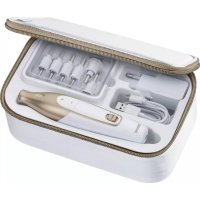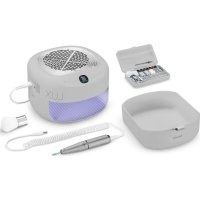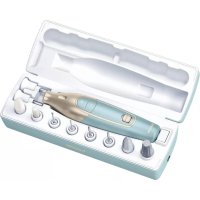
MP 84 - Manicure/Pedicure Device BEURER - Free user manual and instructions
Find the device manual for free MP 84 BEURER in PDF.



| Product type | Manicure/pedicure device |
| Brand | Beurer |
| Model | MP 84 |
| Dimensions (case) | 223 x 74 x 67.5 mm |
| Dimensions (device) | 155 x 37.4 x 38.3 mm |
| Weight (case with accessories) | Approximately 323 g |
| Weight (device) | Approximately 135 g |
| Power supply | Input: 5.0 V, 1.0 A, 5.0 W; Li-ion battery 1500 mAh, 3.7 V |
| Battery life | Approximately 2 hours of use after full charge |
| Charging time | Approximately 3 hours |
| Speeds | 2 adjustable speeds (+ and - buttons) |
| Rotation direction | Right (green LED) and left (red LED) via sliding switch |
| Lighting | Built-in LED light |
| Included attachments | 10 attachments: fine and coarse sapphire discs, felt cone, crystal nail file, round sapphire burr, needle, flame, cylinder, sapphire cone, sapphire nail file, dust protection cap |
| Additional accessories | USB-C cable, storage and charging case, instruction manual |
| Cleaning | Device: slightly damp cloth (do not immerse); attachments: cloth soaked in alcohol |
| Safety | Safety lock after 3 seconds if attachment gets stuck; automatic shut-off; suitable for diabetics with specific attachments (9, 10, 11, 17, 18) |
| Spare parts | Complete attachment kit available (ref. 110.025) at www.beurer.com |
| Warranty | Refer to the warranty card provided |
| General information | For household use only, not professional; do not use on animals |
Frequently Asked Questions - MP 84 BEURER
User questions about MP 84 BEURER
0 question about this device. Answer the ones you know or ask your own.
Ask a new question about this device
Download the instructions for your Manicure/Pedicure Device in PDF format for free! Find your manual MP 84 - BEURER and take your electronic device back in hand. On this page are published all the documents necessary for the use of your device. MP 84 by BEURER.
USER MANUAL MP 84 BEURER
natural_image
Beurer electric toothbrush with charging case and digital display (no text or symbols on device)EN Manicure/pedicure set Instructions for use.....12
natural_image
Illustration of an open book with a geometric design and a curved arrow indicating rotation (no text or symbols)EN Unfold page 3 before reading the instructions for use.
natural_image
Close-up of a black cylindrical electronic component with a textured circular top and metallic leads (no visible text or symbols)Saphirscheibe, grob 10
natural_image
Close-up of a black cylindrical mechanical component with a flanged shaft (no visible text or symbols)Filzkegel 11
natural_image
Close-up of a black and white plastic tool with a pointed tip (no text or symbols visible)Kristall-Hornhautschleifer 12
natural_image
Close-up of a black and white electrical plug component (no text or symbols visible)natural_image
Close-up of a black cylindrical electronic component with a metallic tip and terminal leads (no text or symbols visible)Nadelfräser 14
natural_image
Close-up of a black cylindrical electronic component with metallic leads (no visible text or symbols)Flammenfräser 15
natural_image
Close-up of a black cylindrical electronic component with a metallic shaft (no visible text or symbols)Zylinderfräser 16
natural_image
Close-up of a black cylindrical electronic component with metallic leads (no visible text or symbols)Saphirkegel 17
natural_image
Close-up of a metallic cylindrical object with a textured top and black body (no visible text or symbols)Read these instructions for use carefully. Observe the warnings and safety notes. Keep these instructions for use for future reference. Make the instructions for use accessible to other users. If the device is passed on, provide the instructions for use to the next user as well.
Table of contents
- Warnings and safety notes....12
- Signs and symbols....14
- Included in delivery .....14
- Device description.....15
-
Usage....15
-
Cleaning and maintenance....17
- Accessories and replacement parts.....17
- Disposal....17
- Technical data ....18
- Warranty ....18
1. WARNINGS AND SAFETY NOTES
WARNING
- The device must only be used for the purpose for which it was designed and in the manner specified in the instructions for use. Any improper use may be dangerous.
- The device is only intended for domestic/private use, not for commercial use.
- This device may be used by children over the age of 8 and by people with reduced physical, sensory or mental skills or a lack of experience or knowledge, provided that they are supervised or have been instructed on how to use the device safely, and are fully aware of the consequent risks of use.
• Children must not play with the device. - Cleaning and user maintenance must not be performed by children unless supervised.
- Do not use the device if it shows signs of damage or does not function properly. In such cases, contact Customer Services.
- Repairs must only be carried out by Customer Services or authorised retailers.
- Under no circumstances should you open or repair the device yourself, as correct functioning of the device can no longer be guaranteed should you do so. Failure to observe this will invalidate the warranty.
- Check the results regularly during the treatment. It is particularly important for diabetics to do so as they have a lower sensitivity to pain and could injure themselves more easily. The attachments 9 10 11 17 18, which are included, are generally suitable for diabetics as they are only intended for use over larger areas and not spot treatment.
- In contrast, attachments 12 to 16 are less suitable for diabetics. Always work very carefully. If you have any doubts, consult your doctor.
- The device may heat up faster during prolonged, intensive use, for example when removing calluses on the feet. Allow the device to cool down for a relatively long time between individual applications to prevent skin burns. For your own safety, continuously check the heat generated by the device. This applies in particular to persons that are not as sensitive to heat as others.
- The manufacturer is not liable for damage resulting from improper or incorrect use.
- Keep packaging material away from children. to avoid danger of suffocation.
- In the event of defects and operational faults, switch off the device immediately.
- Only use the device with the supplied accessories.
- Do not use on animals.
- Do not allow the device to come into contact with water (except in the case of cleaning with a slightly damp cloth). Water must never enter inside the device. Never submerge the device in water. Never use the device in the bath, in the shower, in a swimming pool or above a sink filled with water. If water enters the housing of the device nevertheless, immediately disconnect the device from the mains supply and contact your electronics retailer or Customer Services.
- Make sure that no hair can get caught in the rotating attachments when using the device. Use a hair tie for your safety.
- Hands must always be dry when using the device and mains adapter plug.
- Wear appropriate protective equipment (FFP2 mask, protective gloves and protective glasses) when using on acrylic, gel or artificial nails.
Intended use
This device is intended for the treatment of hands (manicure) and feet (pedicure) only.
NOTE
- Keep the device away from sources of heat.
- Never use the device under a blanket, pillow or cushion, etc.
CAUTION
Notes on handling batteries
- If your skin or eyes come into contact with fluid from a battery cell, wash the affected areas with water and seek medical assistance.
- Protect batteries from excessive heat.
- Risk of explosion! Never throw batteries into a fire.
- Do not disassemble, split or crush the batteries.
- Batteries must be charged correctly prior to use. The instructions from the manufacturer and the specifications regarding correct charging in these instructions for use must be observed at all times.
- Fully charge the battery prior to initial use. In order to achieve as long a battery service life as possible, fully charge the battery at least 2 times a year.
2. SIGNS AND SYMBOLS
The following symbols are used on the device, in these instructions for use, on the packaging and on the device's type plate:
 | Read the instructions Manufacturer |  | |
| ⚠ WARNING | Indicates a potentially imminent danger. If it is not avoided, death or serious injury may result. | NOTE | Indicates a potentially harmful situation. If it is not avoided, the system or something in its vicinity may be damaged. |
| ⚠ CAUTION | Indicates a potentially imminent danger. If it is not avoided, slight or minor injuries may result. | CE | CE labellingThis product satisfies the requirements of the applicable European and national directives. |
 | Disposal in accordance with the Waste Electrical and Electronic Equipment EC Directive – WEEE |  | Separate the packaging elements and dispose of them in accordance with local regulations. |
 | Separate the product and packaging elements and dispose of them in accordance with local regulations. |  A A | Marking to identify the packaging material.A = Material code, B = Material number: 1-7 = Plastics, 20-22 = Paper and cardboard |
 | The products demonstrably meet the requirements of the Technical Regulations of the EAEU |  | Product informationNote on important information |
| [5DSW] | United Kingdom Conformity Assessed Mark | 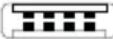 | Polarity of d.c. power connector |
 | Importer symbol | ||
3. INCLUDED IN DELIVERY
Check that the device packaging has not been tampered with and make sure that all contents are present. Before use, ensure that there is no visible damage to the device or accessories and that all packaging material has been removed. If you have any doubts, do not use the device and contact your retailer or the specified Customer Services address.
• 1 manicure/pedicure set
• 1 protective nail dust cap
- 1 USB-C cable
• 1 charging and storage case
• 1 instructions for use
• 10 high-quality attachments made from sapphire and felt
4. DEVICE DESCRIPTION
The associated drawings are shown on page 3.
1 Manicure/pedicure device
2 +/- speed regulation
3 Speed setting display
4 LED display for direction of rotation (red for anti-clockwise rotation; green for clockwise rotation)
5 Slide switch for clockwise/anti-clockwise rotation and OFF position
6 LED light
7 USB-C connection (device)
8 USB-C connection (charging and storage case)
9 Fine-grain sapphire wheel
10 Coarse-grain sapphire wheel
11 Felt cone
12 Crystal callus file
13 Round sapphire cutter
14 Nail cutter
15 Flame-shape cutter
16 Cylindrical cutter
17 Sapphire cone
18 Sapphire callus file
19 Protective nail dust cap
5. USAGE
- Charge the device for approx. 3 hours before the first use. You can either charge the device directly via the USB-C connection on the device 7 or via the USB-C connection on the charging and storage case 8.
- Connect the USB-C connection (device)7 / (charging and storage case)8 to a suitable mains adapter (mains adapter not included in delivery) or via a device with a suitable interface.
- When the 3 blue charger indicator lights 3 flash continuously, it means the battery is charging. Once all 3 LEDs are permanently illuminated, the device is fully charged. One charge is sufficient for approx. 2 hours of operation.
Before using the device, please do not carry out pre-treatment in a water bath, as the callus attachments are less effective on soaked or wet skin.
-
Make sure that the device is switched off beforehand.
-
Select the desired attachment part and carefully press it onto the axle of the device. To remove, pull apart the attachment and the device in opposing directions.
-
Switch on the device by moving the sliding switch 5 down (anti-clockwise rotation, LED lights up red) or up (clockwise rotation, LED lights up green).
-
You can select the speed of the drive axle using the plus (+) and minus (-) speed control buttons ^2 . Start each application at a low speed and then increase as required. Blue LEDs light up on the speed setting display 3 depending on the selected speed.
-
Do not press too hard and always carefully move the attachments towards the area to be treated. Move the device over the area to be treated and apply slight pressure while slowly moving the device in circles.
-
When filing, always move from the outside of the nail towards the tip. Check the results regularly during the treatment. Stop treatment as soon as it becomes unpleasant. Do not remove all calluses to maintain natural skin protection.
-
Ensure the axle can always rotate freely. The axle must not be permanently blocked, as otherwise the device will become too hot and may become damaged.
-
Apply moisturiser to the treated areas after each use.
The device switches off if an attachment is prevented from moving for approx. 3 seconds during use. To restart the device, switch it briefly off and then on again.
Attachments
| Fine-grain sapphire wheel9Suitable for filing nails to reduce length. Whilst the sapphire disk rotates, the external housing remains fixed to prevent friction burns to the skin around the nails. | 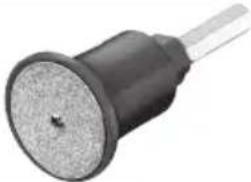 |
| Coarse-grain sapphire wheel10Suitable for filing thicker nails to reduce length. Whilst the sapphire disk rotates, the external housing remains fixed to prevent friction burns to the skin around the nails. | 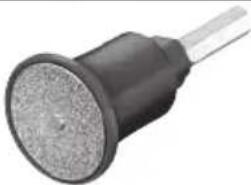 |
| Felt cone11Suitable for smoothing and buffing nail tips after filing and for cleaning the surface of the nails. Position the manicure tool and move around the nail in a constant circular motion. | 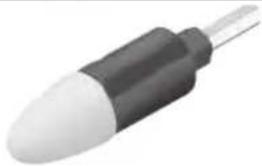 |
| Crystal callus file12Coarse crystal callus attachment to quickly remove thick hard skin or large calluses on the sole of the foot and heel. | 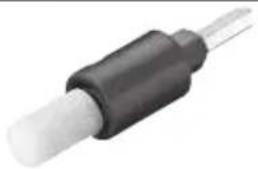 |
| Round sapphire cutter13Suitable for removing corns. Take care to remove the corn slowly, layer by layer to prevent damage to the healthy skin beneath. | 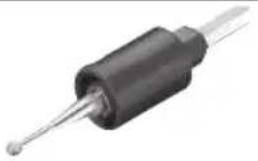 |
| Nail cutter14Suitable for exposing ingrown nails and removing dead nail parts. When using this attachment, use at a low speed. | 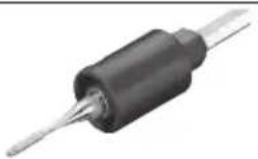 |
| Flame-shape cutter15Suitable for removing ingrowing nails. | 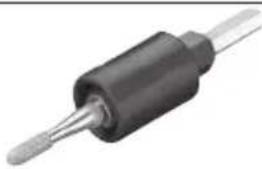 |
| Cylindrical cutter16Suitable for smoothing rough and ridged toenail surfaces. Simply, place the cylindrical cutter horizontally on the nail surface and removed the rough layer with slow circular movements. | 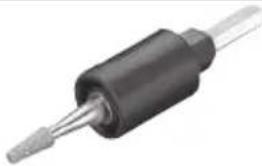 |
| Sapphire cone17Suitable for removing dry skin and softening calluses on the sole and heel. Take care not to remove hardened skin entirely to protect the healthy skin beneath. File until a thin layer remains then moisturise to soften. | 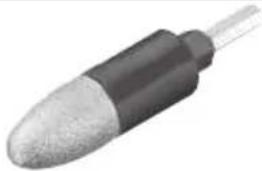 |
| Sapphire callus file18For removing calluses on the soles of the feet and heel. This attachment is intended for application on large areas. | 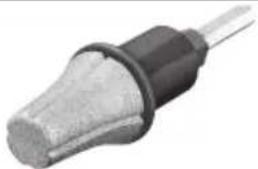 |
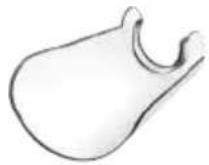
Protective nail dust cap 19
Captures nail dust as you file to minimise inhalation and clean up time.
6. CLEANING AND MAINTENANCE

WARNING
Risk of electric shock
Unplug the device each time before cleaning. Clean the device using only the method specified. Never submerge the device or USB-C cable in water or other liquids.
- Do not use any chemical or abrasive cleaning agents.
- Clean the device with a slightly damp cloth. If it is very dirty, you can also moisten the cloth with a mild soapy solution.
- For hygienic reasons, the attachments can be cleaned with a cloth moistened with alcohol.
7. ACCESSORIES AND REPLACEMENT PARTS
To purchase accessories and replacement parts, please visit www.beurer.com or contact the service address for your country (see the service address list). Accessories and replacement parts are also available from retailers.
| Designation Item number and/or | order number |
| Attachment set(includes the following attachments)1 fine-grain sapphire wheel1 coarse-grain sapphire wheel1 felt cone1 crystal callus file1 round sapphire cutter1 nail cutter1 flame-shape cutter1 cylindrical cutter1 sapphire cone1 sapphire callus file1 protective nail dust cap | 110.025 |
8. DISPOSAL
For environmental reasons, do not dispose of the device in household waste at the end of its service life. Dispose of the device at a suitable local collection or recycling point in your country. Observe the local regulations for material disposal. Dispose of the device in accordance with EC Directive – WEEE (Waste Electrical and Electronic Equipment).
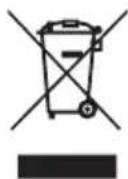
If you have any questions, please contact the local authorities responsible for waste disposal.
You can obtain the location of collection points for old devices from the local or municipal authorities, local waste disposal company or your dealer, for example.
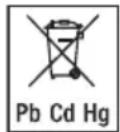
The empty, completely flat batteries must be disposed of in specially designated collection boxes, at recycling points or at electronics retailers. You are legally required to dispose of the batteries.
The codes below are printed on rechargeable batteries containing harmful substances:
Pb = battery contains lead, Cd = battery contains cadmium, Hg = battery contains mercury.
- TECHNICAL DATA
| Power supply Input: 5.0 V 1.0 A; 5.0 W | |
| Case dimensions:Device dimensions: | 223 x 74 x 67.5 mm155 x 37.4 x 38.3 mm |
| Weight Case weight including accessories: approx.323 gDevice weight: approx. 135 g | |
| Battery:CapacityNominal voltageType designation | 1500 mAh3.7 VLithium-ion |
Subject to technical changes.
The Declaration of Conformity for this product can be found at the following address: https://www.beurer.com/web/we-landingpages/de/cedeclarationofconformity.php
10. WARRANTY
Further information on the warranty and warranty conditions can be found in the warranty leaflet supplied.
FRANÇAIS

Remarques relatives aux batteries
natural_image
Close-up of a metallic mechanical component with a cylindrical shaft and flange (no visible text or symbols)natural_image
Close-up of a metallic tool with a cylindrical head and black base (no visible text or symbols)natural_image
Close-up of a metallic mechanical component with a cylindrical shaft and flange (no visible text or symbols)7. ACCESSORI E RICAMBI
https://www.beurer.com/web/we-landingpages/de/cedeclarationofconformity.php
10. GARANTI
natural_image
Close-up of a black cylindrical electronic component with metallic leads (no visible text or symbols)natural_image
Close-up of a black cylindrical electronic component with a metallic shaft (no visible text or symbols)Войлочный конус 11
natural_image
Close-up of a cylindrical electronic component with a black and white body, possibly a battery or plug (no visible text or symbols)natural_image
Close-up of a black and white electrical connector (no text or symbols visible)natural_image
Close-up of a black cylindrical electronic component with a metallic tip and terminal leads (no visible text or symbols)natural_image
Close-up of a black cylindrical electronic component with metallic leads (no visible text or symbols)natural_image
Close-up of a black cylindrical electronic component with a metallic tip (no text or symbols visible)natural_image
Close-up of a black cylindrical electronic component with metallic leads (no visible text or symbols)Сапфировый конус 17
natural_image
Close-up of a cylindrical electronic component with a metallic shaft and textured body (no visible text or symbols)natural_image
Close-up of a metallic cylindrical component with a black end cap and shaft, no visible text or symbols.https://www.beurer.com/web/we-landingpages/de/cedeclarationofconformity.php
10. ГАРАНТИЯ
natural_image
Close-up of a metallic cylindrical electronic component with a black end cap and shaft (no visible text or symbols)Ostonka na pył 19
https://www.beurer.com/web/we-landingpages/de/cedeclarationofconformity.php
10. GWARANCJA
1. WAARSCHUWINGEN EN VEILIGHEIDSRICHTLIJNEN
WAARSCHUWING
4. BESCHRIJVING VAN HET APPARAAT
natural_image
Close-up of a black cylindrical electronic component with a metallic lead, no visible text or symbols.natural_image
Close-up of a black cylindrical electronic component with a metallic rod, no visible text or symbols.Viltkegel 11
natural_image
Close-up of a black and white plastic cylindrical object with a pointed tip, resembling a stylus or tool (no text or symbols visible)natural_image
Close-up of a black and white electrical plug (no text or symbols visible)Saffierfrees, rond 13
natural_image
Close-up of a black cylindrical electronic component with a metallic tip and terminal leads (no visible text or symbols)Naaldfrees 14
natural_image
Close-up of a black cylindrical electronic component with metallic leads (no visible text or symbols)Vlamfrees 15
natural_image
Close-up of a black cylindrical electronic component with metallic leads (no visible text or symbols)Cilinderfrees 16
natural_image
Close-up of a black cylindrical electronic component with metallic leads (no visible text or symbols)Saffierkegel 17
natural_image
Close-up of a cylindrical object with a textured top and shaft, resembling a mechanical or electronic component (no visible text or symbols)natural_image
Close-up of a metallic cylindrical electronic component with a black and white body (no visible text or symbols)https://www.beurer.com/web/we-landingpages/de/cedeclarationofconformity.php
10. GARANTIE
natural_image
Close-up of a black cylindrical electronic component with metallic leads (no visible text or symbols)Safirskive, grov 10
natural_image
Close-up of a black cylindrical electronic component with a metallic shaft (no visible text or symbols)Filtkonus 11
natural_image
Close-up of a black and white plastic cylindrical object with a pointed tip, resembling a stylus or tool (no text or symbols visible)Krystalsliber til hård hud 12
natural_image
Close-up of a black and white electrical plug component (no text or symbols visible)natural_image
Close-up of a black cylindrical electronic component with a metallic tip and terminal leads (no visible text or symbols)Nålefræser 14
natural_image
Close-up of a black cylindrical electronic component with metallic leads (no visible text or symbols)Flammefræser 15
natural_image
Close-up of a black cylindrical electronic component with metallic leads (no visible text or symbols)Cylinderfræser 16
natural_image
Close-up of a black cylindrical electronic component with metallic leads (no visible text or symbols)Safirkonus 17
natural_image
Close-up of a metallic cylindrical object with a textured top and shaft (no visible text or symbols)Safirsliber til hård hud 18
natural_image
Close-up of a metallic electrical plug with a black end cap and metal body (no text or symbols visible)6. RENG∅RING OG VEDLIGEHOLDELSE

ADVARSEL
https://www.beurer.com/web/we-landingpages/de/cedeclarationofconformity.php
10. GARANTI
https://www.beurer.com/web/we-landingpages/de/cedeclarationofconformity.php