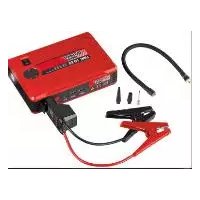
UPK 10 E2 - Power bank ULTIMATE SPEED - Free user manual and instructions
Find the device manual for free UPK 10 E2 ULTIMATE SPEED in PDF.



| Brand | Ultimate Speed |
| Model | UPK 10 E2 |
| Product Type | External Powerbank Battery with Compressor |
| Battery Type | Lithium Iron Phosphate (LiFePO4) |
| Battery Capacity | 14,000 mAh / 44.8 Wh (3.2 V) |
| Charge Cycles | 2000 |
| Charging Time | Up to 8 hours |
| Input Voltage (charging) | 5 V / 2 A |
| USB Output Voltage | 5 V / 1 A (output 1) and 5 V / 2 A (output 2) |
| Peak Current (jump start) | 400 A |
| Rated Starting Current | 200 A |
| Battery Voltage | 12 V |
| Maximum Compressor Pressure | 10 bar (drawable max. 3.5 bar) |
| Compressor Air Flow Rate | 22 l/min |
| Maximum Continuous Compressor Operation | 7 minutes, then 15 minutes cooling |
| Operating Temperature | 0°C to 60°C |
| Charging Temperature | 0°C to 35°C |
| Main Functions | Jump start, compressor, LED light (lighting/flashing/SOS), USB charging |
| Included Accessories | Jump start cable, mains adapter (5 V / 2 A), air hose, 3 valve adapters |
| Care and Cleaning | Clean with a damp cloth or soft brush. Do not immerse in water or use solvents. |
| Safety | Protection against undervoltage, overload and overheating. Do not short-circuit. Use only the supplied adapter. |
| Warranty | 3 years |
| Manufacturer | C.M.C. GmbH, Katharina-Loth-Str. 15, 66386 St. Ingbert, Germany |
Frequently Asked Questions - UPK 10 E2 ULTIMATE SPEED
User questions about UPK 10 E2 ULTIMATE SPEED
0 question about this device. Answer the ones you know or ask your own.
Ask a new question about this device
Download the instructions for your Power bank in PDF format for free! Find your manual UPK 10 E2 - ULTIMATE SPEED and take your electronic device back in hand. On this page are published all the documents necessary for the use of your device. UPK 10 E2 by ULTIMATE SPEED.
USER MANUAL UPK 10 E2 ULTIMATE SPEED
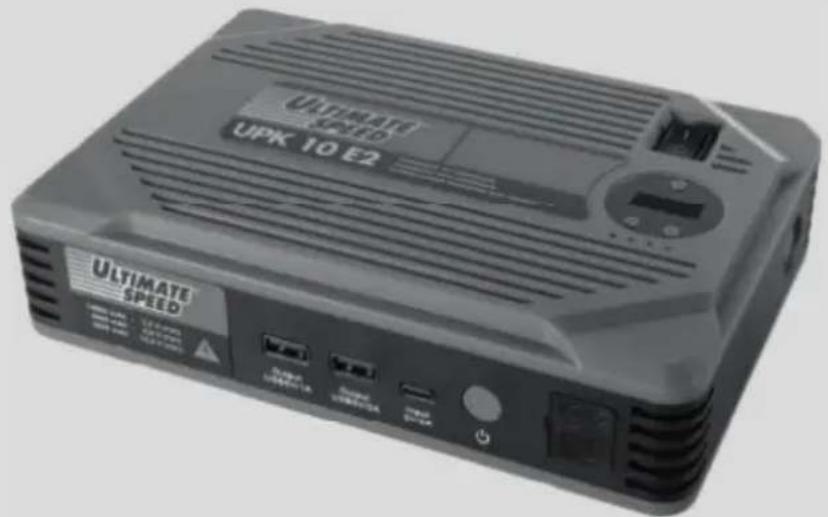
POWER BANK WITH COMPRESSOR UPK 10 E2 POWERBANK MIT KOMPRESSOR 10 E2 BATTERIE EXTERNE POWERBANK AVEC COMPRESSEUR UPK 10 E2
GB IE NICY MT
POWER BANK WITH COMPRESSOR
Operation and Safety Notes
Translation of the original instructions
FR BECH
BATTERIE EXTERNE POWERBANK AVECCOMPRESSEUR
Before reading, unfold the page containing the illustrations and familiarise yourself with all functions of the device.
DE AT CH
GB/IE/NI/CY/MT Operation and Safety Notes Page 5
Technical specifications ...... Page 9
Safety instructions...... Page 10
Specific safety instructions ...... Page 13
Using the device Page 13
Check the charge level of the power bank with compressor ..... Page 14
Charging the power bank with compressor....Page 14
Charging mobile phones and tablets...... Page 14
Using the integrated compressor....Page 15
Switch on lighting Page 18
Using the jumpstart feature...... Page 18
FAQ Page 20
Troubleshooting Page 20
Cleaning Page 21
Storage Page 21
Information about recycling and disposal ...... Page 21
EU Declaration of Conformity Page 22
Warranty and service information ...... Page 23
Warranty conditions ...... Page 23
Warranty period and statutory claims for defects...... Page 24
Extent of warranty....Page 24
Processing of warranty claims ...... Page 24
Service......Page 25
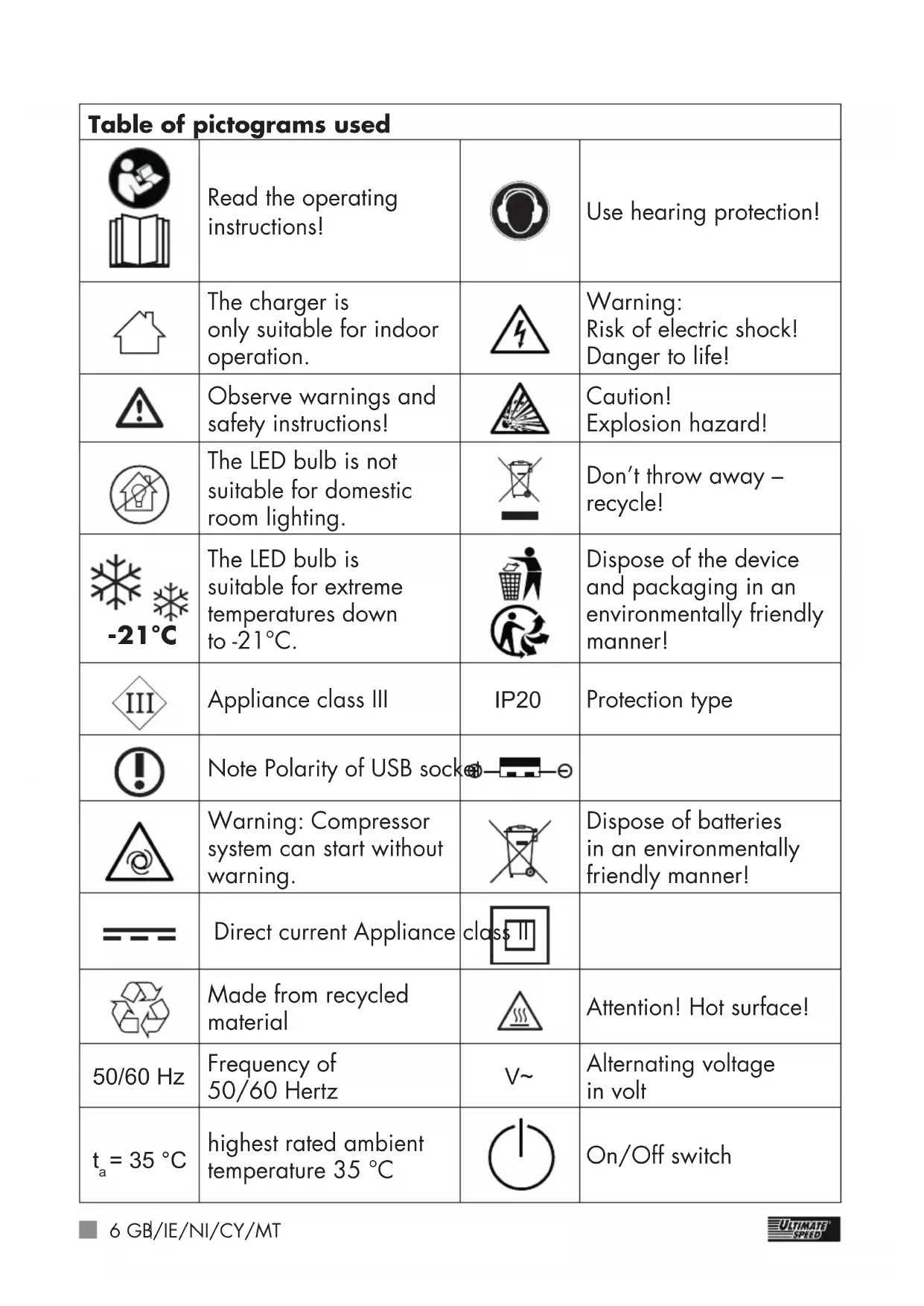
| Table of pictograms used | |||
 | Read the operating instructions! |  | Use hearing protection! |
 | The charger is only suitable for indoor operation. |  | Warning:Risk of electric shock!Danger to life! |
 | Observe warnings and safety instructions! |  | Caution!Explosion hazard! |
 | The LED bulb is not suitable for domestic room lighting. |  | Don't throw away - recycle! |
 | The LED bulb is suitable for extreme temperatures down to -21°C. |  | Dispose of the device and packaging in an environmentally friendly manner! |
 | Appliance class III | IP20 | Protection type |
 | Note Polarity of USB socket- 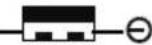 | ||
 | Warning: Compressor system can start without warning. | 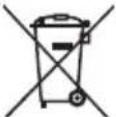 | Dispose of batteries in an environmentally friendly manner! |
 | Direct current Appliance cla 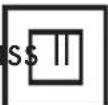 | ||
 | Made from recycled material |  | Attention! Hot surface! |
| 50/60 Hz | Frequency of 50/60 Hertz | V~ | Alternating voltage in volt |
ta 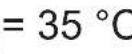 ; ; | highest rated ambient temperature 35 °C |  | On/Off switch |
POWER BANK WITH COMPRESSOR UPK 10 E2
- Introduction
Congratulations! You have purchased one of our high-quality products. Please familiarise yourself with the product before using it for the first time. To do so, please read through the following operating and safety instructions carefully.
KEEP OUT OF THE REACH OF CHILDREN!

The jumpstart feature is only for petrol engines with a max. capacity of 3.5 litres and diesel engines with a max. capacity of 2.2 litres.
- Intended use
This power bank with compressor serves as additional support for 12-V vehicle battery systems during starting problems in diesel and petrol vehicles, which is caused by weak, empty or faulty starter batteries. However, the power bank with compressor cannot replace the vehicle battery. If no more than 400 A are needed for starting (max. peak current), the power bank lets the user single-handedly start
the vehicle when necessary, without additional help from a third party. The power bank with compressor is also fitted with two USB ports. This means that mobile phones, satnavs or other USB-enabled devices can also be charged if needed. The integrated compressor is designed to generate pressure in tyres (e.g. vehicle and bicycle tyres), balls and other small-scale inflatable articles. Do not use the compressor to inflate articles with a large volume, since it can overheat rapidly in the absence of back pressure. This power bank with compressor is not designed for continuous operation to generate pressure for more than 7 minutes at a time. The maximum achievable pressure is 3.5 bar.
Note: The pressure gauge is not trade-approved.
Any other use may cause damage to the device and expose the user to a risk of serious injury. The manufacturer is not liable for any injury or damage resulting from improper use or incorrect operation. This power bank with compressor is not suitable for commercial use. Commercial use will void the guarantee.
The device has been developed for consumer use and is not suitable for use in a commercial or industrial environment. The product must only
be started up initially by people who have been trained to do so.

The LED bulb is not suitable for domestic room lighting.

The LED bulb is suitable for extreme temperatures down to -21 °C.
• Package contents
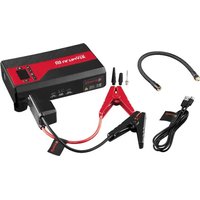
1 Power bank with compressor
1 Operating instructions
Accessories:
1 Jump lead
1 AC adapter (comprised of plug adapter and USB cable)
3 Valve adapter
1 Compressed air hose
• Equipment

After unpacking the product, please check that all of the package contents are present and that the power bank with compressor is in perfect condition. Do not use the device if it is defective.
1 Power bank with compressor
2 On/Off switch for the compressor (0/1)
0 means "off". I means "on".
3 " + " button
4 "-" button
5 Menu button "M"
6 Digital pressure gauge with pressure display (not trade-approved)
7 LED light
8 Vehicle jumpstart outlet
9 Power switch for the power bank
10 Charging port 5 V /2 A
11 USB port 5 V /2 A
12 USB port 5 V /1 A
13 Indicator lights
14 Storagecompartment for the valve adapter
15 Hose connection
16 Warning sign
17 Compressed air hose
18 Jump lead
19 Green Start LED
20 Red Error LED
21 Valve adapter for balls
22 Valve adapter for inflatable items
23 Valve adapter for inflatable items
24 AC adapter (comprised of plug adapter and USB cable)
Note: The use of the term "product" or "device" in the following text refers to the power bank with compressor named in these operating instructions.
- Technical specificationsContinuous
The four individual cells used to construct the rechargeable battery are connected in series to produce a total voltage of 4 × 3.2V ≈ 12V and a capacity of 3500 mAh.
The battery output produced in this way is the same as the output from a rechargeable battery with a total capacity of 14000 mAh at 3.2 V.
Model: UPK 10 E2
Battery type: Lithium iron
phosphate
Batterycapacity: 14,000 mAh,
3.2 V = ,
44.8 Wh
Charge cycles: 2000
Charging time: up to 8 h
Peak current: 400 A
Starting current: 200 A
Operating
temperature: 0 °C - 60 °C
Voltage: 12 V
Input voltage
(charging port): 5 V = /2 A
Output voltage
(USB port): 5 V____/1 A |
5 V = /2 A
Capacity: 8400 mAh/5 V
Current consumption: max. 10 A
Maximum pressure
of the compressor
unit: 10 bar
Maximum
achievable pressure: 3.5 bar
operation: max. 7 min*
Air flow rate: 22 l/min
Power supply:
Name or trade name of the
manufacturer, commercial register
number and address:
Manufacturer:
Dong Guan HP-Power Technology
Limited. Address: Room 103,
Building 1, No. 9 Hepan Road,
Tangxia Town, Donguan 523710,
Guangdong, China.
Importer:
C.M.C. GmbH
Address: Katharina-Loth-Straße 15,
66386 St. Ingbert, Germany
Saarbrücken local court,
HRB 15856
Model number:
HP12U-0502000-CEU
Input voltage:
100-240 V
Input alternating AC frequency:
50/60 Hz
Output voltage:
5.0 V
Output current:
2.0 A
Output power:
10.0 W
Average efficiency during operation:
79.493 %
Efficiency at low load:
76.241%
Power consumption at zero load:
0.06 W
* Continuous operation: do not operate the integrated compressor continuously for longer than 7 minutes. Following this, include a rest period of 15 minutes.
Changes to technical and visual aspects of the product may be made as part of future developments without notice. Accordingly, no warranty is offered for the physical dimensions, information and specifications in these operating instructions. The operating instructions cannot therefore be used as the basis for asserting a legal claim.
- Safety instructions
PLEASE READ THROUGH THE OPER- ATING INSTRUCTIONS CAREFULLY BEFORE USE. THESE FORM PART OF THE PRODUCT AND MUST BE AVAILABLE AT ALL TIMES!
This section covers the basic safety instructions applicable when working with the device.
Personal safety:
■ This device may be used by children aged 8 years and older, and by persons with
reduced physical, sensory or mental capacities, or a lack of experience and knowledge, if they are supervised or have been instructed in how to use the device safely and understand the dangers that may arise when using it. Do not allow children to play with the device. Cleaning and day-to-day maintenance must not be performed by children without supervision.
■ Children must be supervised to ensure that they do not play with the device.
- Keep the device away from people – especially children – and household pets.
■ Within the working area, the user is responsible for any damage or injury to third parties that was caused by the use of the device.
During operation, never point the device at yourself or other individuals, and keep the device well way from your ears and eyes. There is a risk of injury!
- Do not leave the device unsupervised while running. Comply with the filling instructions for the inflatable item. The inflatable article could
burst and cause serious injuries. Switch the compressor off before reaching the maximum permissible pressure.
- Keep the device in a dry location and out of the reach of children.

This helps prevent device damage and possible personal injuries that could result from it:
Working with the device:
- Do not use the device while driving the vehicle.
■ Before setup or first use, check the device for any damage and do not use unless in perfect working order.
- Do not expose the device to rain or wet weather.
Do not let the device come into contact with water.
Do not immerse the device in water. There is a risk of electric shock!
- Keep all openings of the device free during operation.
Do not block the openings with your hands or fingers, and do not cover the device.
There is a risk of overheating!
In hot weather, do not leave the device in a car. This could
permanently damage the device.
■ The device becomes warm during use. There is a risk of burn injuries from touching the hot surfaces.
■ Take care to ensure that sand, dust and other small foreign objects cannot enter the air inlet or air outlet openings.
- Do not operate the device near to flammable liquids or gases. Do not use the device to draw in hot fumes. Failure to do so risks causing a fire or explosion!
■ Switch the device off and remove the mains plug from the socket in the following cases:
- When you are not using the device;
- If you are leaving the device unsupervised;
- If you are doing cleaning work;
- If the connection cable is damaged;
- If foreign objects have got into the device or you notice unusual noises.
■ Only use the accessories supplied and recommended by the manufacturer.
- Do not dismantle or modify the power bank with compressor. This device must only be repaired by a maintenance technician.
- Do not use the device in areas with a risk of explosion, e.g. near flammable liquids, gases or powders.
- Do not expose the device to any source of heat.
- Do not store in places where the temperature can exceed 70 °C.
■ Only charge in an ambient temperature between 0 °C and 35 °C.
■ Only use the AC adapter as supplied 24 with the device.

CAUTION: How to avoid accidents and injuries resulting from electric shock:
Electrical safety:
- Do not use the device if the switch cannot be switched on and off. Arrange for damaged switches to be replaced.
- Do not carry the device by the cable. Do not unplug the plug from the socket by pulling on the cable. Protect
the cable from heat, oil and sharp edges.
■ If the cable is damaged, unplug the plug immediately from the socket.
- Do not short-circuit the two crocodile clips. This can lead to a hazardous situation!
Batteries:

CAUTION! EXPLOSION HAZARD!
- Do not open or short-circuit the power bank with compressor 1. This could cause the device to overheat, ignite or explode.
- Do not expose the power bank with compressor 1 to high temperatures. The battery could explode.
- Check the power bank with compressor 1 regularly to confirm it is not leaking. Leaking or damaged batteries may cause burns if they come into contact with skin. In this situation, always wear suitable safety gloves! Carefully wipe up the liquid with a cloth and avoid contact with skin and eyes. In the event of contact with skin or eyes, rinse immediately with clean
water and seek medical attention.
● Specific safety instructions
■ We recommend charging the power bank with compressor ① once a month.
A slightly higher temperature during charging is absolutely normal and not a malfunction. However, we do recommend leaving the power bank with compressor 1 to rest for 15 minutes before using.
■ Protect the power bank with compressor 1 from moisture and high temperatures, including fires.
■ Store the power bank with compressor 1 in a dry place and protect the device from moisture and corrosion.
If you notice the power bank with compressor 1 is leaking, producing an unusual odour or looking deformed in any way, stop using the device immediately and contact the manufacturer.
- Do not drop the power bank with compressor 1 while it is being used.
The power bank with compressor 1 is designed for use with car tyres. It is not designed for use with large tyres like tractor or truck tyres.
■ During inflation, high temperatures can be produced at the air outlet. There is a risk of burn injuries!
■ When using the jump lead 18, ensure that the black plug is securely plugged into the vehicle jumpstart outlet 8.
■ When using the jumpstart, make sure that all 3 indicator lights 13 are lit.
If the blue indicator light 13 goes out during the start attempt, charge the power bank with compressor 1.
If the vehicle does not start after the 3rd-5TH Start attempt, stop the start process and check the other causes that may be preventing the vehicle from starting.
- Using the device
Note: After switching on the power bank with compressor 1 with the power bank switch ⑨, the device switches off automatically after approximately 20 seconds if the
compressor is not started or if no consumables are connected.
power bank with compressor 1 and then plug into a mains power socket.
- Check the charge level of the power bank with compressor
■ Switch on the power bank with compressor 1 by using the switch for the power bank 9.
■ During charging, the indicator lights will flash 13.
■ The number of permanently lit indicator lights 13 shows the charge level of the power bank with compressor 1.
■ If the device is fully charged, all four indicator lights 13 will be permanently lit.
| Indicator lights Charge level | |
| 0 permanently lit 0% | |
| 1 permanently lit 25% | |
| 2 permanently lit 50% | |
| 3 permanently lit 75% | |
| 4 permanently lit 100% |
- Charging the power bank with compressor
■ Connect the power bank with compressor 1 to a socket using the AC adapter 24.
■ To do so, plug the cable from the AC adapter 24 into the charging port (5 V ---/2 A) 10 on the
Attention: Only use the AC adapter as supplied 24 with the device!
Note: An undervoltage protection circuit is installed in the power bank with compressor 1 to protect the device from damage. This prevents a deep discharge of the power bank with compressor 1 and automatically switches the device off once the battery is fully discharged. In this case, only one of the four blue indicator lights will be lit 13. In this case, no more energy can be obtained and the compressor function will be deactivated. Please recharge the power bank with compressor 1 using an AC adapter 24.
- Charging mobile phones and tablets
■ Press the power switch for the power bank with compressor ⑨ once.
■ Connect a suitable USB charging cable to the USB port (5 V ===/2 A) 11 or the USB port (5 V ===/1 A) 12 and then plug it into your mobile phone or tablet.
■ The charging process starts automatically.
Note: You cannot charge USB devices (e.g. mobile phone, tablet) while the power bank with compressor itself 1 is being charged.
- Using the integrated compressor
■ Screw the compressed air hose on to the hose connection 15 of the power bank with compressor 1 (see Fig. C).
■ Place the device on a level and non-flammable surface. Do not operate the device in a dusty environment. This is a fire risk and the device could also be damaged.
Note: Depending on the inflatable item, you can either use the compressed air hose 17 directly or use it together with the valve adapters 21 , 22 and 23 supplied in the scope of delivery.
Connecting the compressed air hose without a valve adapter
■ Screw the free end of the compressed air hose 17 directly on to the connection valve of the inflatable item.
Connecting the compressed air hose with a valve adapter
■ The valve adapters, 22 and 23 are located in the storage compartment for the valve adapters 14 (see Fig. B).
■ First screw the required valve adapter 21, 22 or 23 to the free end of the compressed air hose 17.
■ Then insert the valve adapter, 22 or 23 into the connection valve of the inflatable item (if necessary remove the valve cap of the inflatable item first).
Remove the compressed air hose
■ Connection without valve adapters 21, 22 or 23: Screw the compressed connection hose 17 off the valve of the inflatable item.
■ Connection with valve adapters 21, 22 or 23: First, pull the valve adapter off the connecting valve on the inflatable item. Screw the valve adapter 21, 22 or 23 off the compressed air hose 17 (if necessary, reattach the valve cap on to the inflatable item).
Note: When disconnecting the compressed air hose 17, air can escape from the valve of the inflatable item. Ensure that you remove the compressed air hose 17 as quickly as possible.
Pressure Preselect Function
■ Switch on the power bank with compressor 1 by using the switch for the power bank 9.
■ Connect the compressed air hose 17 of the power bank with
compressor 1 to the inflatable item which you want to inflate. To do so, please proceed as follows.
■ Use the "M" menu button to select the desired unit of pressure. The units available are bar ("bar"), kilopascal ("KPa"), kilogram per square centimetre ("KG/CM 2 ") and pound per square inch ("PSI") (see Fig. E).
■ Use the "+" button and the "-" button to select the desired pressure. To speed up the selection, you can keep the respective button pressed down. Pressure settings between 0.3 bar and 3.5 bar are possible in 0.05 bar steps (see Fig. E).
Note: While preselecting the pressure, the digital pressure gauge will flash with the pressure display 6. If a button is not pressed for at least 10 seconds, the display will display the ACTUAL value of the pressure. The pressure which has been set remains stored.
- Switch on the integrated compressor by switching the On/Off switch for the compressor 2 to "On" (position I).
■ The compressor will start and pump up the inflatable item.
- You can switch off the compress at any time by switching the On/Off switch for the compressor 2 to "Off" (position 0).
- Otherwise, the compressor will switch off automatically once the inflatable item has reached the preset pressure.
In this case, once the preset pressure has been reached and the compressor automatically switches off, switch the On/Off switch for the compressor 2 off (position 0).
■ Disconnect the inflatable item from the compressed air hose 17 as described in the previous section.
■ At the end of work, screw the compressed air hose 17 back off the hose connection 15 of the power bank with compressor 1.
Attention: The hose connection 15 of the power bank with compressor 1 heats up during operation.
Make sure that you do not come into contact with the hose connection 15 during operation to avoid suffering burns. At the end of work, wait for at least 10 minutes before you unscrew the compressed air hose 17 back off the hose connection 15 of the power bank with compressor 1.
Note: After switching on the power bank with compressor 1 with the power bank switch 9, the device
switches off automatically after approximately 20 seconds if the compressor is not started or if no consumables are connected.
Note: The digital pressure gauge with pressure display 6 of the power bank with compressor 1 is not trade-approved. Therefore, if inflatable items have been pumped up, for which incorrect pressure can be dangerous (e.g. tyres), find a specialist unit with a trade-approved device and check the pressure of the inflatable item.
Tips for use
The device is not intended for continuous operation. The device was designed to create air pressure – not an air flow. Please do not use the device for more than 7 minutes at a time on items with a large volume, to avoid overheating and damage to the device. Then let the device cool down for at least 15 minutes. We recommend first filling a large-volume item with air, in order to then generate the required pressure with the device. Do not use the device for more than 7 minutes at a time without stopping. Then let the device cool down for at least 15 minutes.
Air pressure test with the power bank with compressor
Note: The digital pressure gauge with pressure display 6 of the power bank with compressor 1 is not trade-approved.
■ Switch on the power bank with compressor 1 by using the switch for the power bank 9.
■ Connect the inflatable item to the compressed air hose 17 of the power bank with compressor 1, whose pressure you want to check. To do so, please proceed as described in the section "Connecting the compressed air hose with a valve adapter" or "Connecting the compressed air hose without a valve adapter".
■ Use the "M" menu button to select the desired unit of pressure. The units available are bar ("bar"), kilopascal ("KPa"), kilogram per square centimetre ("KG/CM²") and pound per square inch ("PSI") (see Fig. E).
■ The digital pressure gauge with pressure display 6 shows the pressure of the connected inflatable item in the preset unit.
■ Disconnect the inflatable item from the compressed air hose 17 of the power bank with compressor 1. To do so, please proceed as described in the section "Remove compressed air hose".
Note: When disconnecting the compressed air hose 17 , air can escape from the valve of the inflatable item. Ensure that you remove the compressed air hose 17 as quickly as possible.
Safety fuse
If the device becomes overloaded or malfunctions, the safety fuse triggers to protect the device.

Never use a fuse with a higher release current strength. There is a risk of fire!
Attention: To protect people and property, an overheat protection circuit has been installed for the battery in the power bank with compressor 1. This prevents an overheating of the battery installed in the device and automatically switches off the power bank with compressor 1 if the battery temperature is too high. If this happens, allow the device to cool down prior to re-commissioning it.
- Switch on lighting
Light mode
■ To switch on the LED light, press the power bank switch 9 for 3 seconds.
■ Press the power bank switch for another 3 seconds in order to switch the LED light 7 back off.
Flash mode
■ To switch on the LED light in the flash or SOS mode, first press the power bank switch ⑨ for
3 seconds. Then the LED light 7 will be permanently lit.
- Briefly press the power bank switch ⑨ once again and the LED light ⑦ will switch to flash mode.
- Briefly press the power bank switch ⑨ once again and the LED light ⑦ will switch to SOS mode. There will be 3 short flashes, 3 long flashes and another 3 short flashes.
- Briefly press the power bank switch ⑨ once again to switch off the LED light ⑦.

Caution! Do not look directly at the LED lights 7 as this can damage your eyes.
Note: It is not possible to turn on the light while the power bank with compressor 1 is charging.
- Using the jumpstart feature
■ When using the jumpstart, make sure that at least 3 indicator lights 13 are permanently illuminated.
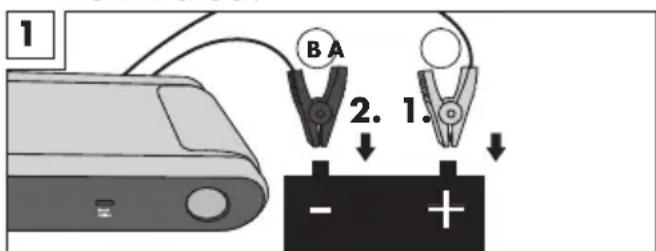
| Step LEDs Meaning / | Error | Solution | |
| 1. Connectthe jump lead 18 of the power bank with compressor 1 to the car-jumpstart-outlet 8 of the power bank with compressor 1. | Red Error LED 20 is continuously lit on the jump lead 18. | The voltage determined in the power bank with compressor 1 is not enough to start the car. | Charge the power bank with compressor 1. |
| Green Start LED 19 and the red Error LED 20 flash alternately. | Power bank with compressor 1 ready. | Carry on to step 2 | |
| 2. First connect the red clamp (A) to the positive pole of the vehicle battery and then connect the black bat-tery clamp (B) to the negative pole (see Fig. 1). | The red Error LED 20 flashes, a short alarm signal sounds. | The tempera-ture is too high, possibly due to several jump start attempts. | Disconnect the black (B) battery clamp first and then the red clamp (A) from the battery poles. Start again from step 1. |
| The red Error LED 20 flashes, a continuous alarm signal sounds. | Battery clamps (A) and (B) are the wrong way round. It is caused by a short circuit or the battery is leaking. | ||
| The red Error LED 20 flashes once, a continuous alarm is sounded and then followed by two short alarm sounds. | |||
| Green Start LED 19 and the red Error LED 20 flash alternately. After 1–2 seconds only the green LED 19 glows. | The connection is correct. | Carry on to step 3 | |
| 3. Starting up the vehicle. | |||
■ Attention: As soon as the vehicle starts, remove the jump lead 18 from the power bank with compressor 1 within 30 seconds and firstly disconnect the black battery clamp (B) and then the red clamp (A) from the battery poles. Otherwise, it could result in dangerous situations!
■ Leave the vehicle engine running.
- FAQ
Q: Question
A: Answer
Q: How long does it take to fully charge a mobile phone with the device?
A: With a battery capacity of 3500 mAh: Approx. 3–4 hours if connected to the USB output 5 V --- /1 A 12 . Approx. 2–3 hours if connected to the USB output 5 V --- /2 A 11 . Please note that if the device is switched on, it will continually use battery power while actually charging and this can extend the charging time.
Q: How long does the power bank with compressor 1 hold a full charge?
A: 3–6 months. However, we recommend recharging the battery monthly.
Q: How is the power bank with compressor 1 switched off?
A: After switching on the power bank with compressor 1 with the power bank switch 9, the power bank with compressor switches off automatically after approximately 20 seconds if the compressor is not started or if no consumables are connected. A manual switching off of the device is not provided for.
- Troubleshooting
● = problem
= cause
○ = remedy
- The power bank with compressor 1 is not fully charged, even though all 4 indicator lights 13 are permanently lit.
- It is 60% charged after a long period out of use or in storage.
- Recharge the power bank with compressor 1 as described in the section "Charge power bank with compressor".
- Power bank does not respond when power bank switch 9 is pressed.
- Deep discharge protection active on the power bank with compressor 1.
○ Connect the power bank with compressor 1 to the 5 V/2A 10 charging port or to a socket using the AC adapter 24.
- One indicator light 13 is lit, however, the power bank with compressor 1 cannot be used.
- Deep discharge protection active on the power bank with compressor 1.
○ Connect the power bank with compressor 1 to the 5 V/2A 10 charging port or to a socket using the AC adapter 24.
- Cleaning
Attention: The device must not come into contact with water or be placed in water. There is a risk of injury due to electric shock if moisture enters the device.
■ Do not use cleaners or solvents. These could damage the device beyond repair.
- Keep the housing and device accessories clean.
■ Use a damp cloth or a soft brush to clean the device and the accessories.
- Storage
- Keep the device in a dry location and out of the reach of children.
■ To avoid damage, take care to ensure that the compressed air hose 17 does not become kinked.
■ Store the valve adapter 23 , 22 and 23 in the storage compartment for the valve adapter 14.
• Information about recycling and disposal

Don't throw away - recycle!
According to European Directive 2012/19/EU, used electrical devices must be collected separately for environmentally compatible recycling or recovery. Please return this device to an approved waste management company or use your municipal waste collection service. Please ensure you comply with local regulations. If you have any questions, please contact your local authority or waste management company.

Please return this device, accessories and packaging to your local recycling depot.

Do not dispose of electrical appliances in household waste!

As the consumer you are legally obliged (by the
German Battery Ordinance)
to return any and all used batteries. Batteries containing harmful substances are labelled with the adjacent symbol, which indicates the prohibition on disposal in house- hold waste. The abbreviations for the relevant heavy metals are: Cd = cadmium, Hg = mercury, Pb = lead.
Take used batteries to a waste management company in your city or community or return them to your dealer. This satisfies your legal obligations while also making an important contribution to protecting the environment.
Note: The installed battery cannot be separately removed for disposal.

Please note the marking on the different packaging materials and separate them as necessary. The packaging materials are marked with abbreviations (a) and digits (b) with the following definitions: 1–7: Plastics, 20–22: Paper and cardboard, 80–98: Composite materials.
• EU Declaration of Conformity
We,
C. M. C. GmbH
Responsible for documentation:
Dr. Christian Weyler
Katharina-Loth-Str. 15
66386 St. Ingbert
GERMANY
hereby take sole responsibility for declaring that the product
Power bank with compressor
IAN: 384811_2107
Art. no.: 2440
Year of
manufacture: 2022/11
Model: UPK 10 E2
meets the basic safety requirements as specified in the European Directives
Electromagnetic Compatibility:
(2014/30/EU)
Low Voltage Directive:
(2014/35/EU)
RoHS Directive:
(2011/65/EU)+(2015/863/EU)
Ecodesign Directive:
(2009/125/EU)
and the amendments to these Directives.
The object of the declaration described above meets the requirements of Directive 2011/65/EU of the European Parliament and of the Council of 8 June 2011 on the restriction of the use of certain hazardous substances in electrical and electronic equipment.
This conformity assessment is based on the following harmonised standards:
EU 1194/2012
EN 1012-1:2010
EN 50498:2010
EN 55032:2015
EN 55035:2017
EN 60335-1:2012
+AC:2014+A11:2014+
+A13:2017+A1:2019+
A2:2019+A14:2019
EN 61000-3-2:2019
EN 61000-3-3:2013+
A1:2019
EN 62233:2008
EN 62471:2008
EN 50563:2011
+A1:2013
EN 50564:2011
St. Ingbert, 01 October 2021
pp Dr. Christian Weyler - Quality Assurance -
● Warranty and service information
Warranty from Creative Marketing & Consulting GmbH
Dear Customer,
The warranty for this equipment is 3 years from the date of purchase. In the event of product defects, you have legal rights against the retailer of this product. Your statutory rights are not affected in any way by our warranty conditions, which are described below.
- Warranty conditions
The warranty period begins on the date of purchase. Please retain the original sales receipt. This document is required as your proof of purchase.
Should this product show any defect in materials or manufacture within 3 years from the date of purchase, we will repair or replace it – at our discretion – free of charge.
This warranty service requires that you retain proof of purchase (sales receipt) for the defective device for the three year period and that you briefly explain in writing what the fault entails and when it occurred. If the defect is covered by our warranty, we will repair and return your product or send you a replacement. The original warranty period
is not extended when a device is repair or replaced.
- Warranty period and statutory claims for defects
The warranty period is not extended by the guarantee. This also applies to replaced and repaired parts. Any damages or defects detected at the time of purchase must be reported immediately after unpacking. Any incidental repairs after the warranty period are subject to a fee.
- Extent of warranty
This device has been manufactured according to strict quality guidelines and carefully inspected before delivery.
The warranty applies to material and manufacturing defects only. This warranty does not extend to product parts, which are subject to normal wear and tear and can thus be regarded as consumable parts, or for damages to fragile parts, e.g. switches, rechargeable batteries or parts made from glass.
This warranty is voided if the product becomes damaged or is improperly used or maintained. For proper use of the product, all of the instructions given in the operating instructions must be followed precisely. If the operating instructions advise you or warn you against certain uses or actions, these must be avoided in all circumstances.
The product is for consumer use only and is not intended for commercial or trade use. The warranty becomes void in the event of misuse and improper use, use of force, and any work on the device that has not been carried out by our authorised service branch.
- Processing of warranty claims
To ensure prompt processing of your claim, please follow the instructions given below.
Please retain proof of purchase and the article number (e.g. IAN) for all inquiries.
The product number can be found on the type plate, an engraving, the cover page of your instructions (bottom left), or the sticker on the back or underside of the device. In the event of malfunctions or other defects, please first contact our service department below by phone or email. If your product is found to be defective, you can then send your product with proof of purchase (till receipt) and a statement describing what the fault involves and
when it occurred free of charge to the service address given.

Note:
You can download this handbook and many more, as well as product videos and software at www.lidl-service.com.
With this QR code you can gain immediate access to the Lidl Service page (www.lidl-service.com) and you can open your operating instructions by entering the article number (IAN) 384811.

Service
How to contact us:
GB, IE, NI, CY, MT
Name: C. M. C. GmbH
Website: www.cmc-creative.de
E-mail: service.gb@cmc-creative.de
Phone: 0-808-189-0652
Registered office: Germany
IAN 384811\_2107
Please note that the following address is not a service address.
Please first contact the service point given above.
Address:
C. M. C. GmbH
Katharina-Loth-Str. 15
66386 St. Ingbert
GERMANY
Limited. Adresse: Room 103, Building 1, No. 9 Hepan Road, Tangxia
Town, Donguan 523710, Guangdong, China.
Importeur:
C.M.C. GmbH
● = Problem
= Ursache
○ = Behebung
service.at@cmc-creative.de
service.ch@cmc-creative.de
Telefon: +49 (0) 6894/ 9989750
Fabricant : Dong Guan HP-Power Technology Limited. Adresse : Room 103, Building 1, No. 9 Hepan Road, Tangxia Town, Donguan 523710, Guangdong, Chine.
Dr. Christian Weyler
Katharina-Loth-Str. 15
DE-66386 St. Ingbert
ALLEMAGNE
Uitrusting....Pagina 80
Technische gegevens....Pagina 80
Limited. Adres: Room 103,
Building 1, No. 9 Hepan Road,
Tangxia Town, Donguan 523710,
Guangdong, China.
Importeur:
C.M.C. GmbH
Cd = cadmium, Hg = kwik,
Pb = lood.
Dr. Christian Weyler
Katharina-Loth-Str. 15
DE-66386 St. Ingbert
DUITSLAND
Building 1, No. 9 Hepan Road,
Tangxia Town, Donguan 523710,
Guangdong, China.
Dovozce:
C.M.C. GmbH
66386 St. Ingbert, Germany
Limited. Adres: Room 103,
Building 1, No. 9 Hepan Road,
Tangxia Town, Donguan 523710,
Guangdong, Chiny.
Importer:
C.M.C. GmbH
Dr. Christian Weyler
Katharina-Loth-Str. 15
66386 St. Ingbert
NEMECKO
Building 1, No. 9 Hepan Road,
Tangxia Town, Donguan 523710,
Guangdong, China.
Importador:
C.M.C. GmbH
66386 St. Ingbert, Germany
Dr. Christian Weyler
Katharina-Loth-Str. 15
66386 St. Ingbert
ALEMANIA
Limited. Adresse: Room 103,
Building 1, No. 9 Hepan Road,
Tangxia Town, Donguan 523710,
Guangdong, Kina.
Importør:
C.M.C. GmbH
Dr. Christian Weyler
Katharina-Loth-Str. 15
66386 St. Ingbert
TYSKLAND
Building 1, No. 9 Hepan Road,
Tangxia Town, Donguan 523710,
Guangdong, Cina.
Importatore:
C.M.C. GmbH
Indirizzo: Katharina-Loth-Straße 15,
66386 St. Ingbert, Germania
Tribunale ordinario di Saarbrücken,
HRB 15856
Identificativo del modello:
HP12U-0502000-CEU
Nome: Riku Service snc
Indirizzo Internet: www.riku-service.com
E-Mail: info@riku-service.com
Telefono: 0039 (0) 4711430103
Sede: Germania
IAN 384811\_2107
Limited. Cím: Room 103, Building 1,
No. 9 Hepan Road, Tangxia Town,
Donguan 523710, Guangdong,
China.
Importálja:
C.M.C. GmbH
66386 St. Ingbert, Germany
Dr. Christian Weyler
Katharina-Loth-Str. 15
DE-66386 St. Ingbert
NÉMETORSZÁG
Limited. Naslov: Room 103,
Building 1, No. 9 Hepan Road,
Tangxia Town, Donguan 523710, Guangdong, Kitajska.
Uvoznik:
C.M.C. GmbH
Naslov: Katharina-Loth-Straße 15, 66386 St. Ingbert, Nemčija


- POWER BANK WITH COMPRESSOR UPK 10 E2 POWERBANK MIT KOMPRESSOR 10 E2 BATTERIE EXTERNE POWERBANK AVEC COMPRESSEUR UPK 10 E2
- POWER BANK WITH COMPRESSOR
- BATTERIE EXTERNE POWERBANK AVECCOMPRESSEUR
- DE AT CH
- GB/IE/NI/CY/MT Operation and Safety Notes Page 5
- Safety instructions...... Page 10
- Specific safety instructions ...... Page 13
- Using the device Page 13
- FAQ Page 20
- Troubleshooting Page 20
- Cleaning Page 21
- Storage Page 21
- Information about recycling and disposal ...... Page 21
- EU Declaration of Conformity Page 22
- Warranty and service information ...... Page 23
- POWER BANK WITH COMPRESSOR UPK 10 E2
- - Introduction
- KEEP OUT OF THE REACH OF CHILDREN!
- - Intended use
- • Package contents
- Accessories:
- • Equipment
- - Technical specificationsContinuous
- - Safety instructions
- PLEASE READ THROUGH THE OPER- ATING INSTRUCTIONS CAREFULLY BEFORE USE. THESE FORM PART OF THE PRODUCT AND MUST BE AVAILABLE AT ALL TIMES!
- Personal safety:
- Working with the device:
- Electrical safety:
- Batteries:
- CAUTION! EXPLOSION HAZARD!
- ● Specific safety instructions
- - Using the device
- - Check the charge level of the power bank with compressor
- - Charging the power bank with compressor
- - Charging mobile phones and tablets
- - Using the integrated compressor
- Connecting the compressed air hose without a valve adapter
- Connecting the compressed air hose with a valve adapter
- Remove the compressed air hose
- Pressure Preselect Function
- Tips for use
- Air pressure test with the power bank with compressor
- Safety fuse
- Never use a fuse with a higher release current strength. There is a risk of fire!
- - Switch on lighting
- Light mode
- Flash mode
- - Using the jumpstart feature
- - FAQ
- Q: How long does it take to fully charge a mobile phone with the device?
- Q: How long does the power bank with compressor 1 hold a full charge?
- Q: How is the power bank with compressor 1 switched off?
- - Troubleshooting
- - Cleaning
- Attention: The device must not come into contact with water or be placed in water. There is a risk of injury due to electric shock if moisture enters the device.
- - Storage
- • Information about recycling and disposal
- Don't throw away - recycle!
- • EU Declaration of Conformity
- M. C. GmbH
- ● Warranty and service information
- Warranty from Creative Marketing & Consulting GmbH
- - Warranty conditions
- - Warranty period and statutory claims for defects
- - Extent of warranty
- - Processing of warranty claims
- Note:
- Service
- How to contact us:
- IAN 384811\_2107
Brand : ULTIMATE SPEED
Model : UPK 10 E2
Category : Power bank