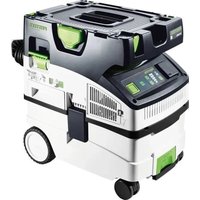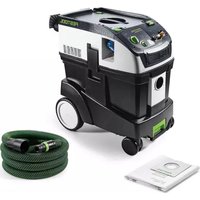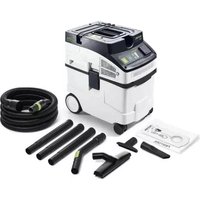
Cleantec CT 15Set - Vacuum Cleaner FESTOOL - Free user manual and instructions
Find the device manual for free Cleantec CT 15Set FESTOOL in PDF.



| Brand | Festool |
| Model | Cleantec CT 15 Set |
| Product type | Wet and dry vacuum cleaner |
| Tank volume | 15 litres |
| Power consumption | 350 - 1200 W |
| Max vacuum | 24 000 Pa |
| Max air flow (vacuum cleaner) | 130 m³/h |
| Max air flow (extraction system) | 222 m³/h |
| Suction hose diameter | 27/32 mm |
| Suction hose length | 3.5 m |
| Mains cable length | 5.5 m |
| Sound pressure level | 72 dB(A) |
| Weight | 10.5 kg |
| Dimensions (L × W × H) | 470 × 320 × 430 mm |
| Protection rating | IP X4 |
| Integrated tool socket | Yes (with max. connection value according to country) |
| Suction power regulation | Yes (+ and - buttons) |
| Automatic shut-off function (liquids) | Yes (by level sensor) |
| Main filter | Filter drawer (replaceable) |
| Filter bag | Used for dry material suction |
| Intended use | Indoor, suction of non-hazardous dust and liquids |
Frequently Asked Questions - Cleantec CT 15Set FESTOOL
User questions about Cleantec CT 15Set FESTOOL
0 question about this device. Answer the ones you know or ask your own.
Ask a new question about this device
Download the instructions for your Vacuum Cleaner in PDF format for free! Find your manual Cleantec CT 15Set - FESTOOL and take your electronic device back in hand. On this page are published all the documents necessary for the use of your device. Cleantec CT 15Set by FESTOOL.
USER MANUAL Cleantec CT 15Set FESTOOL
natural_image
Two industrial vacuum cleaner units shown from front and side views (no visible text or labels)1
text_image
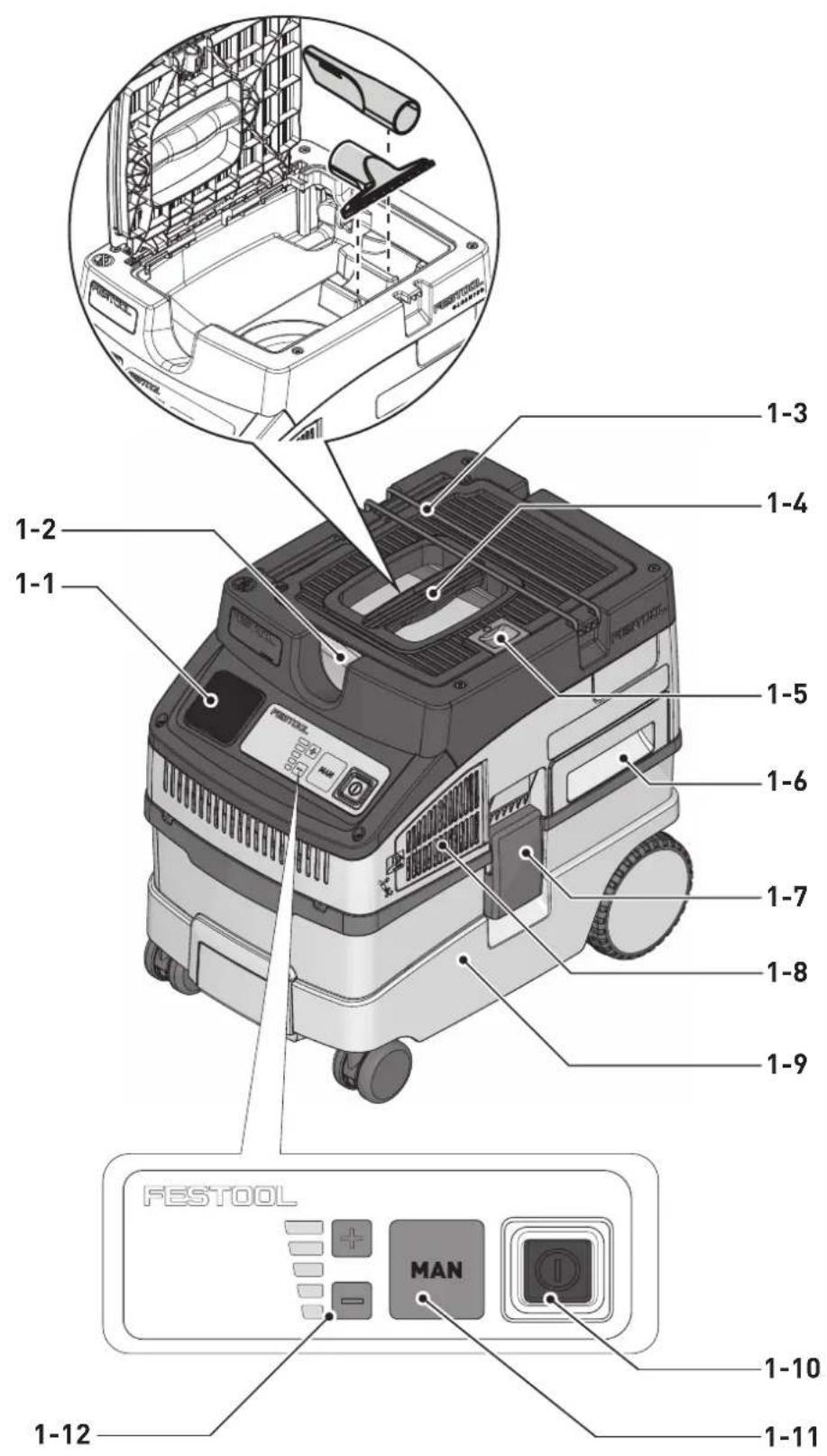
1-3 1-4 1-2 1-1 1-5 1-6 1-7 1-8 1-9 FESTOOL MAN 1-10 1-11 1-122
3
text_image
ESTOOL FLANTS. FESTOOL FESTOOL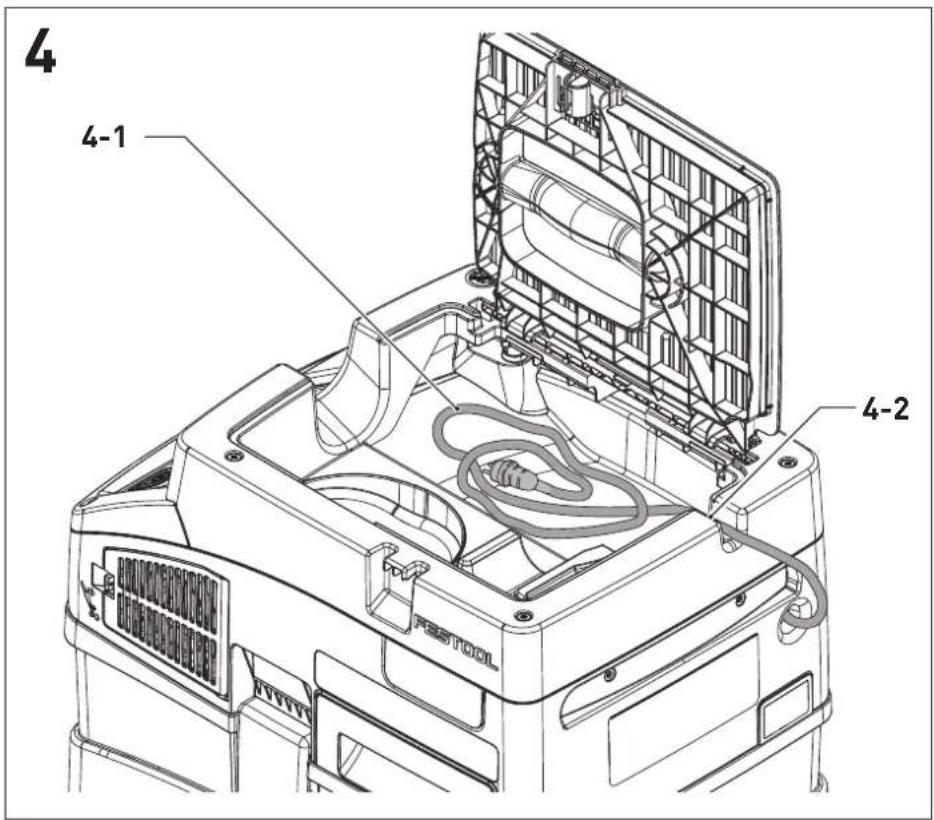
text_image
4 4-1 4-2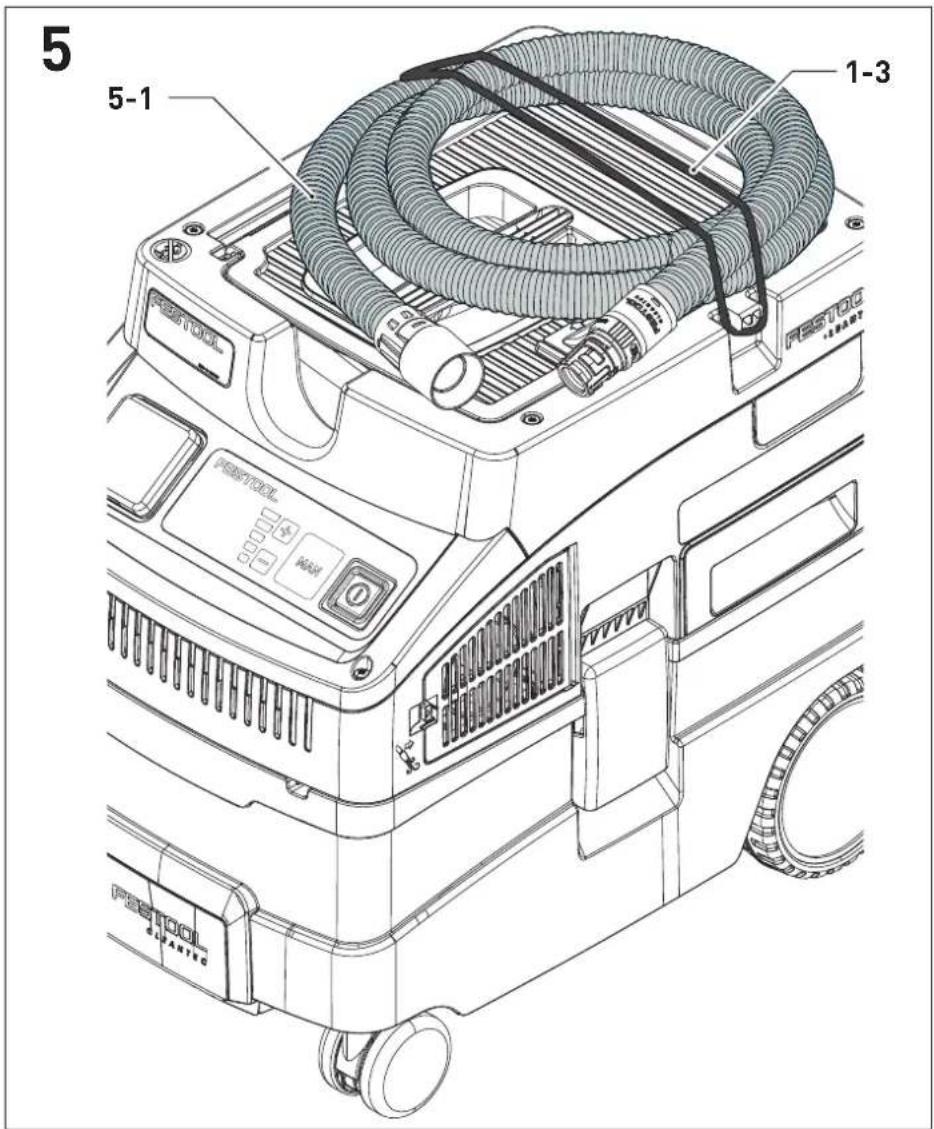
text_image
5 5-1 1-3 FASTOOL LEAVES FASTOOL LEAVES FASTOOL LEAVES FASTOOL LEAVES6

natural_image
Diagram of a car air conditioner unit with airflow path and component placement (no text or symbols)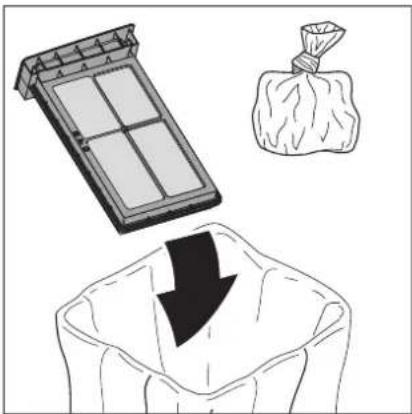
natural_image
Illustration showing a solar panel, a bag of money, and a downward arrow emerging from a sack (no text or symbols)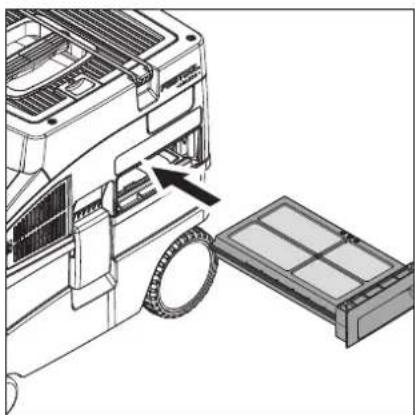
natural_image
Diagram of a car air conditioner unit with a partially assembled battery and a hand inserting a component (no text or symbols visible)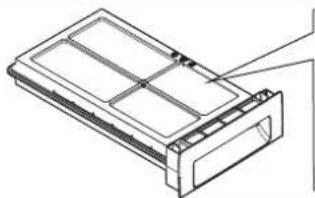
natural_image
Technical line drawing of a rectangular electronic component with internal compartments and mounting holes (no text or symbols)
Festool-Katalog
Festool-catalogue

HF-CT COMP
204 200

NF-CT COMP
204 202
7

natural_image
Technical line drawing of a computer fan with visible internal components and a hand gesture overlay (no text or symbols)7-1
en: EU Declaration of Conformity. We declare under sole responsibility that this product complies with all the relevant requirements in the following EU Directives, and following standards or normative documents were applied:
We as the manufacturer declare under our sole responsibility that the product(s) fulfill(s) all the relevant provisions of the following UK Regulations and are manufactured in accordance with the following designated standards:

S.I. 2008/1597 Supply of Machinery [Safety] Regulations 2008
S.I. 2017/1206 Radio Equipment Regulations 2017
S.I. 2016/1091 Electromagnetic Compatibility Regulations 2016
S.I. 2021/422 Restriction of the Use of Certain Hazardous Substances in Electrical and Electronic Equipment Regulations 2012
BS EN 60335-1:2012 + AC:2014 + A11:2014 + A13:2017 + A15:2021,
BS EN 60335-2-69:2012,
BS EN 300 328 V2.2.2,
BS EN 301489-1 V.1.9.2,
BS EN 301489-17 V3.2.4,
BS EN 303 446-1 V1.2.1,
BS EN 55032:2015 + A11:2020,
BS EN 55014-1:2017 + A11:2020,
BS EN 55014-2:1997 + A1:2001 + A2:2008 + AC:1997,
BS EN 61000-3-2:2014,
BS EN 61000-3-3:2013,
BS EN 62233:2008 + AC:2008,
BS EN 62311:2008,
BS EN IEC 63000:2018
Head of Research & Development Products
Tim Weber
Head of Product Compliance
Inhaltsverzeichnis
1 Safety warnings....15
2 Symbols....16
3 Parts of the machine....17
4 Technical data.... 17
5 Intended use....18
6 Commissioning....18
7 Settings....18
8 Working.... 19
9 Service and maintenance....20
10 Environment....20
11 General information....20
1 Safety warnings



WARNING! Read all safety warnings and instructions. Failure to follow the safety warnings and instructions may result in electric shock, fire and/or serious injury.
Save all safety warnings and instructions for future reference.
- This machine is not intended for use by persons (including children) with reduced physical, sensory or mental capabilities, or lack of experience and knowledge. Children should be supervised to ensure that they do not play with the appliance.
- If the supply cord is damaged, it must be replaced by an authorised service workshop in order to avoid a hazard.
- Always operate with the filter system installed!
- WARNING Operators shall be adequately instructed on the use of these machines.
- The mains plug must always be disconnected from the socket before performing cleaning or maintenance tasks, when replacing consumables or when converting the machine.
- WARNING Only use the socket outlet on the machine for purposes specified in the instructions.
- WARNING If foam or liquid escapes from the machine, switch off immediately.
- CAUTION Clean the water level limiting device regularly and examine it for signs of damage.
- Not suitable for extracting fluids that foam excessively.
- WARNING This machine is not suitable for picking up hazardous dust.
- CAUTION This machine is for indoor use only.
- CAUTION This machine shall be stored indoors only.
– Risk of explosion and fire! Do not extract:
- Sparks, glowing particles or hot dust;
- combustible or explosive materials (e.g. magnesium, aluminium, petrol, diluting agents);
- aggressive materials (e.g. acid, alkaline solutions, solvents);
- chemically reactive materials which lead to the generation of heat, acids/bases, gases, etc. (e.g. reactive two-component materials, aluminium and water).
- Observe all national safety regulations as well as the material manufacturer's specifications!
- Always use suitable protective equipment!
- If intact following a visual inspection, work in a dry environment according to instructions!
- Check the plug, the electrical outlet module, the cable and the filter regularly in order to prevent a hazard. Damaged electrical components must be replaced by an authorised service workshop only.
- Only carry the machine using the handle provided.
- Do not lift or transport using a crane hook or lifting gear.
- The mobile dust extractor must not be carried by the suction hose mount [1-3].
- Only place the tool on level ground and secure it against rolling away.
- This machine must not be used by people who might have a particularly adverse reaction to an electric shock (e.g. people with cardiac pacemakers), because the possibility of the machine building up a static charge cannot be excluded.
- Use only the original Festool suction hose.
- Pay attention to the work environment and watch out for your own safety and the safety of others when transporting or working with the machine.
In this way, you can for example prevent tripping hazards caused by the suction hose or mains cable.
- Keep packaging film away from children.
There is a risk of suffocation.
2 Symbols

Warning of general danger

Warning of electric shock

Read the operating manual and safety warnings.

Do not dispose of it with domestic waste.

Pull out the mains plug

Wear a dust mask.

Do not climb on the unit

Tip or advice

CE conformity marking

UKCA marking: Confirms the conformity of the product with UK regulations.

Handling instruction
[1-3] Suction hose mount
[1-4] Handle
[1-5] Lock
[1-6] Filter drawer
[1-7] Locking clip
[1-8] Exhaust opening
[1-9] Dirt trap
[1-10] On/off switch
[1-11] MAN button
[1-12] Suction power adjustment
The specified illustrations appear at the beginning of the Operating Instructions.
3 Parts of the machine
[1-1] Electrical outlet module
[1-2] Cable and accessory holder
4 Technical data
| Mobile dust extractors CT 15 | CT 25 | |
| Power consumption 350 - 1200 W | ||
| Max. electrical outlet module connected load EU | CH, DK | 2400 W |
| 1100 W | ||
| GB | 1800 W | |
| KR | 2300 W | |
| Max. suction capacity (air), extractor/turbine 130 m3/h / 222 m3/h | ||
| Max. vacuum, turbine 24000 Pa | ||
| Suction hose D 27/32 mm x 3,5 m-RAS/CT | ||
| Suction hose 5,5 m | ||
| Sound pressure level as per EN 60335-2-69/ uncertainty K 72 dB(A)/ 3 dB | ||
| Hand-arm vibration value as per EN 60335-2-69/ uncertainty K <2,5 m/s2/ 1,5 m/s2 | ||
| Type of protection IP X4 | ||
| Container capacity CT 15 15 l | ||
| CT 25 25 l | ||
| Dimensions (LxWxH) CT 15 470x320x430 mm | ||
| CT 25 470x320x510 mm | ||
| Weight CT 15 10,5 kg | ||
| CT 25 | 11,3 kg | |
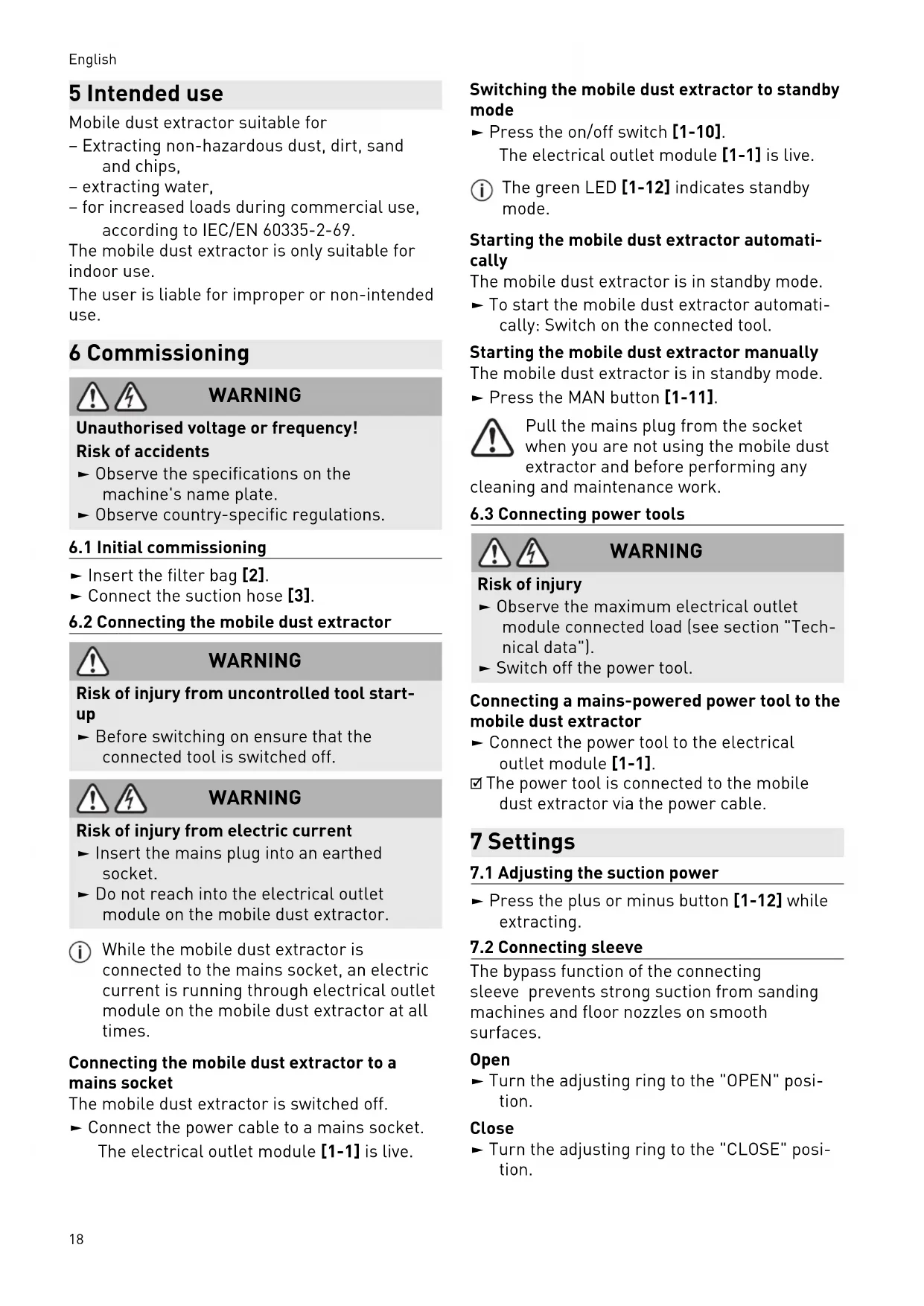
5 Intended use
Mobile dust extractor suitable for
- Extracting non-hazardous dust, dirt, sand and chips,
- extracting water,
- for increased loads during commercial use, according to IEC/EN 60335-2-69.
The mobile dust extractor is only suitable for indoor use.
The user is liable for improper or non-intended use.
6 Commissioning

WARNING
Unauthorised voltage or frequency!
Risk of accidents
▶ Observe the specifications on the machine's name plate.
▶ Observe country-specific regulations.
6.1 Initial commissioning
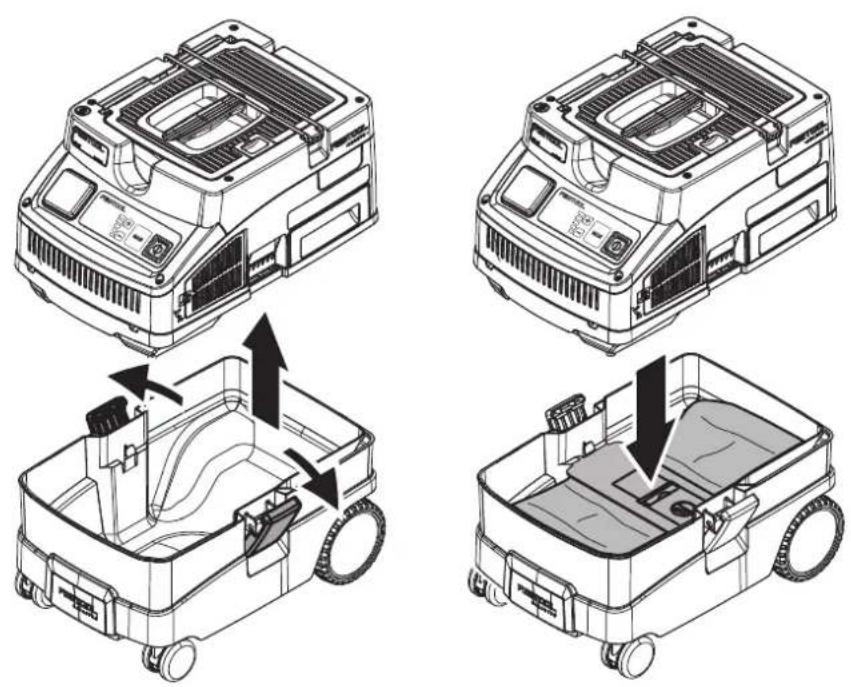
▶ Insert the filter bag [2].
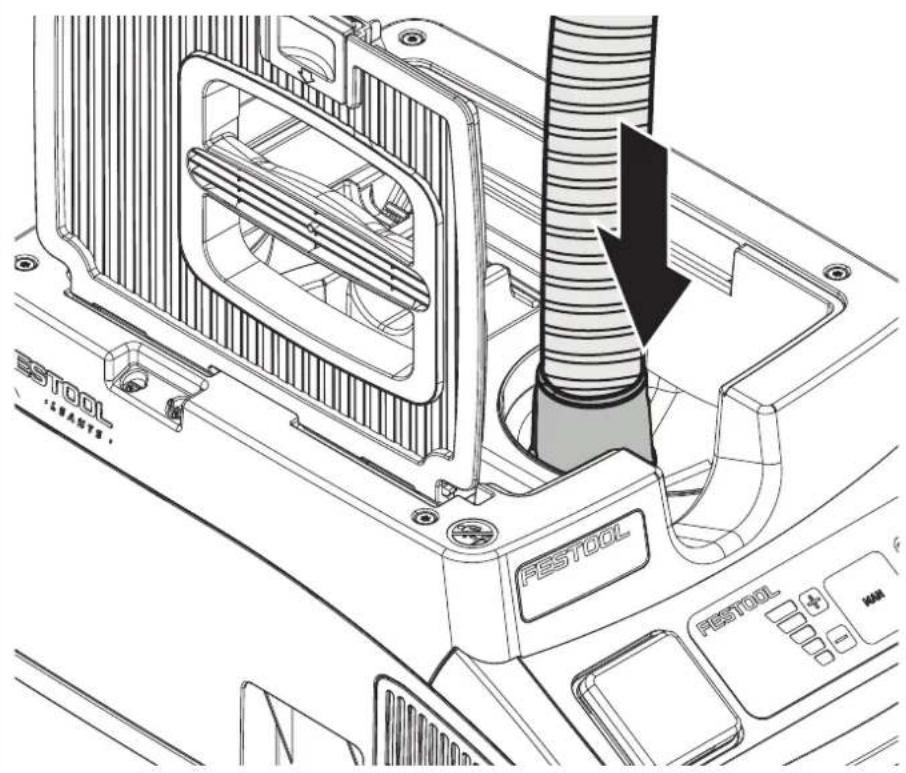
▶ Connect the suction hose [3].
6.2 Connecting the mobile dust extractor

WARNING
Risk of injury from uncontrolled tool start-up
▶ Before switching on ensure that the connected tool is switched off.

WARNING
Risk of injury from electric current
- Insert the mains plug into an earthed socket.
▶ Do not reach into the electrical outlet module on the mobile dust extractor.
While the mobile dust extractor is connected to the mains socket, an electric current is running through electrical outlet module on the mobile dust extractor at all times.
Connecting the mobile dust extractor to a mains socket
The mobile dust extractor is switched off.
- Connect the power cable to a mains socket. The electrical outlet module [1-1] is live.
Switching the mobile dust extractor to standby mode
▶ Press the on/off switch [1-10].
The electrical outlet module [1-1] is live.
i The green LED [1-12] indicates standby mode.
Starting the mobile dust extractor automatically
The mobile dust extractor is in standby mode.
▶ To start the mobile dust extractor automatically: Switch on the connected tool.
Starting the mobile dust extractor manually
The mobile dust extractor is in standby mode.
▶ Press the MAN button [1-11].

Pull the mains plug from the socket when you are not using the mobile dust extractor and before performing any
cleaning and maintenance work.
6.3 Connecting power tools

WARNING
Risk of injury
▶ Observe the maximum electrical outlet module connected load (see section "Technical data").
▶ Switch off the power tool.
Connecting a mains-powered power tool to the mobile dust extractor
- Connect the power tool to the electrical outlet module [1-1].
☑ The power tool is connected to the mobile dust extractor via the power cable.
7 Settings
7.1 Adjusting the suction power
▶ Press the plus or minus button [1-12] while extracting.
7.2 Connecting sleeve
The bypass function of the connecting sleeve prevents strong suction from sanding machines and floor nozzles on smooth surfaces.
Open
▶ Turn the adjusting ring to the "OPEN" position.
Close
▶ Turn the adjusting ring to the "CLOSE" position.
7.3 Temperature cut-out
A temperature cut-out switches the mobile dust extractor off when it reaches a critical temperature to prevent overheating. The bottom LED [1-12] indicates a fault.
LED lights up red Excessive temperature
▶ Switch off the mobile dust extractor, let it cool down.
▶ Switch on the mobile dust extractor again after approx. five minutes.
8 Working
8.1 Dust extraction

Extracting dry materials
Always use a filter bag.
8.2 Extracting wet materials/liquids

Remove the filter bag!
Use a special wet filter.
The dust extraction stops automatically when the maximum fill level is reached.
The bottom LED [1-12] lights up red.
▶ Switch off the mobile dust extractor [1-10].
▶ Open the locking clips [1-7] and remove the top section of the machine.
▶ Empty the dirt trap [1-9].
After wet extraction, allow the wet filter to dry! Dry the mobile dust extractor and dirt trap before extracting dry dust and before storing them.


CAUTION
Hazardous dust
Damage to the respiratory passage
▶ After extracting wet materials, remove the wet filter and replace it with the main filter for dry materials.

CAUTION
Escaping foam and liquids
▶ Switch off and empty the machine immediately.
8.3 Exhaust-air outlet


CAUTION
Hazardous dust
Damage to the respiratory passage
▶ Do not blow off any dust!
The exhaust-air outlet offers the option of diverting the exhaust air outside a building using the suction hose.
▶ Open the grille in front of the exhaust opening [1-8].
▶ Insert the suction hose in the exhaust opening [1-8].
8.4 Changing the filter bag with minimal dust
▶ Open the locking clips and remove the top section of the machine [2].
▶ Pull the tab on the filter bag until the filter bag opening is fully closed.
The filter bag is now securely closed and can be removed.
▶ Fit the top section of the machine and close the locking clips.
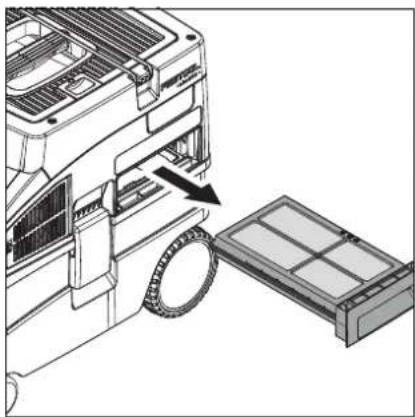
8.5 Changing the filter element [6]
▶ Pull out the used filter drawer [1-6].
▶ Dispose of the used filter drawer in accordance with statutory regulations.
▶ Insert the new filter drawer [1-6].
① Order numbers for accessories, filters and consumables in the Festool catalogue or online at "www.festool.com".
- Only use original Festool accessories and consumables. Only accessories tested and approved by Festool are safe and perfectly adapted to the machine and application.
NOTICE
Damage to the motor
▶ Never extract material without a main filter or with a damaged main filter, as this can damage the motor.
8.6 After finishing work
▶ Switch off the mobile dust extractor and pull out the mains plug.
▶ Empty the dirt trap.
▶ Vacuum and wipe the inside and outside of the mobile dust extractor to clean it.
▶ Wind up the mains power cable.
▶ Place the mains power cable [4-1] in the sealable holder. To do so, lay the power cable through the recess [4-2].
▶ Disconnect the suction hose [5-1] and secure it to the mobile dust extractor with the suction hose mount [1-3].
English
- Clean the fill level sensors [7-1] and inspect them for damage at regular intervals.
- Place the mobile dust extractor in a dry room inaccessible to unauthorised users.
The lid of the holder also serves as a storage area for tools.
9 Service and maintenance

WARNING
Risk of injury, electric shock
▶ Always pull the mains plug from the socket before performing any servicing and maintenance work.
▶ All maintenance and repair work which requires the motor housing to be opened should always be carried out by an authorised service workshop.

Customer service and repairs
must only be carried out by the manufacturer or service workshops. Find the nearest address at: www.festool.co.uk/service
Always use original Festool spare parts. Order no. at: www.festool.co.uk/service
10 Environment

Do not dispose of the device in the household waste! Recycle devices, accessories and packaging. Observe
applicable national regulations.
In accordance with the European Directive on waste electrical and electronic equipment and implementation in national law, used electrical devices must be collected separately and handed in for environmentally friendly recycling.
Information on the collection points can be viewed at www.festool.com/environment.
Information on critical materials:
www.festool.co.uk/reach
11 General information
Imported into the UK by
Festool UK Ltd
1 Anglo Saxon Way
Bury St Edmunds
IP30 9XH
Great Britain