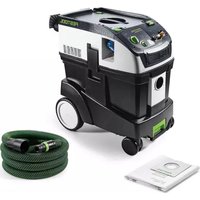
USER MANUAL Cleantec CT 15 FESTOOL
We as the manufacturer Festool GmbH, Wertstraße 20, 73240 Wendlingen, Germany declare under our sole responsibility that the product(s):
Designation:
Designation of Type(s):
Serial number(s) 13
Mobile dust extractor
CT 15 E
201944
fulfills all the relevant provisions of the following UK Regulations:
S.I. 2008/1597
S.l. 2016/1091
S.l. 2012/3032
Supply of Machinery (Safety) Regulations 2008
Electromagnetic Compatibility Regulations 2016
Restriction of the Use of Certain Hazardous Substances in Electrical and Electronic Equipment Regulations 2012
and are manufactured in accordance with the following designated standards:
BSEN60335-1:2012+A2:2019
BSEN60335-2-6g:2012
BSEN55014-1:2017
BSEN55014-2:2015
BSENIEC61000-3-2:2019
BSEN61000-3-3:2013
BS EN IEC 63000:2018
2) in the specified serial number range (S-Nr.) from 40000000 - 49999999

Place and date of declaration: Wendlingen, 03.05.2021
Signed on behalf of and in name of Festool GmbH
i. V. Q.Branched
Ralf Brandt
Head of Productconformity
Absaugmobil
Mobile dust
extractors
Aspirateurs
Seriennummer 1)
Serial number
N° de série 11
(T-Nr.)
CTL Mini 203448
CTL Midi 203449
CTL Mini I 201918, 201919, 201917, 201931
CTL Midi I 201926, 204379, 201922
201925,201924
CTM Midi I 201934, 201933, 10019662, 201935
CT 15 E 201941, 201944, 201943
de EU-Konformitätserklarung. Wir erklären in alleiniger Verantwortung, dass这点es Produkt mit allen relevanten Anforderungen folgender EU-Richtlinien übereinstimmt, und folgende Normen oder normative Dokumente zugrunde gelegt wurden:
en EU Declaration of Conformity. We declare under sole responsibility that this product complies with all the relevant requirements in the following EU Directives, and following standards and normative documents were applied:
fr Déclaration de conformité de l'UE. Nous déclarons, sous notre seule responsabilité, que ce produit satisfait à toutes les exigences pertinentes des directives UE suivantes et repose sur les normes ou documents normatifs suivants:
es Declaracion UE de conformidad. Declaramos bajo esta responsabilidad que este producto cumple todos los requisitos relevantes de las siguientes directivas de la UE y que se han toado como base lassiguientes normas o documents normativos:
it Dichiarazione di conformità UE. Dichiariamo molto nella sua responsabilità che il presente prodotto sa conforms a tutti i requisiti di rilevanza definite nelle seguenti Direttive UE e che siano stati applicati le seguenti norme o i seguenti documenti normativi:
nl EU-conformiteitsverklaring. Wij verklaren en stellen ons ervoor verantwoordelijk dat dit product volledig voldoet aan alle volgende EU-richtlijnen en volgende normen of normatieve documenten daaraan ten grondlag gelegd werden:
SV EU-forsakran om overensstammelse. Vi forklarar pa eget ansvar attenna produit uppyller alla relevanta krav enligt foljande EU-direktiv och baseras pa foljande normer erler normgivande Dokument:
f EU-vaatimustemmukaisuusvakuutus. Vakuutamme yksinomaisella vastuulla, etta tamä tuote tayttäa seuraavien EU-direktiivien kaikki olennaiset vaatumukset ja se on seuraavien standardien tai standardiasiakirjojen mukainen:
da EU-overensstemmelseserklæring. Vi erklær er med eneansvar, at dette produit er i overensstemmelse med alle relevante krav i ffolgende EU-direktiver, og
at falgende standarder eller normative dokumenter danner grundlag for det:
nb EU-samsvarserklæring. Vi erklærer under eneansvar at dette produktet oppfyller alle relevante kravifolgende EU-direktiver og at følgende standarder eller normative dokumenter er blitt lagt til grunn:
pt Declaração de conformidade UE. Sob{nossa inteira responsabilité,declar Ramos que este produits está de acordo com todas as exigências relevantes das seguides direitasas UE, tendo sido tomadas por base as seguides normas ou documents normativos:
ru Deklapauia o cooTBeTCTBn EC. Mblco BcE OTBeTCTBeHHocTbIO 3aBnIeM, yTo DaHna npOdyKUra COOTBeTCTBye T BcEM npIMeHmblm Tpe6oBaHnA m CneDyIoUxN DnpeKTnB EC, cTaHdApTOB n HOpMaTHBbIX DOkymeHTOB:
CS Prohlasei o shode EU. Prohlasejeme s veskerou odpovednosti, ze tento vyrobek splnije vsechny prislusne pozadavky nasledujicich smernic EU a ze byly pouzity nasledujici normy nebo normativni dokumenty:
pl Deklaracja zgodnosci UE. Niniejszym oswiadczamy na wtasna odpowiedzialnosc, ze produkt ten spetnia wzystkie obowychwajace wymogi nastepujacydreyktyw UE, norm lub dokumentow normatywnych.
2006/42/EC, 2014/30/EU², 2014/53/EU³, 2011/65/EU
EN 60335-1:2012, EN 60335-2-69:2012, EN 55014-1:2017 ^2) , EN 55014-2:2015 ^2) , EN 61000-3-2:2015 ^2) 3 ^3) EN 61000-3-3:2014 ^2) 3 ^3) EN 300 328:2019 V2.2.2 ^3) EN 301 489-1:2017 V2.1.1 ^3) EN 301 489-17:2017 V3.1.1 ^3) EN IEC 62311:2020, EN IEC 63000:2018

Signed on behalf of and in name of/
Head of Product Development

Ralf Brandt
Head of Product Conformity
1 im definierten Seriennummer-Bereich [S-Nr.] von 40000000 - 49999999/
in the specified serial number range [S-Nr] from 40000000 - 4999999/
dans la plage de numero de série (S-Nr) de 40000000 - 49999999
21 gilt fur Geräte ohne Bluetooth®
valid for machines without Bluetooth/
s'applique aux disposits sans Bluetooth
3 qilt fur Gerate mit Bluetooth/
valid for machines with Bluetooth/
s'applique aux dispositifs avec Bluetooth
Inhaltsverzeichnis
1 Safety warnings. 13
2 Symbols. 14
3 Parts of the machine. 14
4 Technical data. 14
5 Intended use. 15
6 Commissioning. 15
7 Settings. 15
8 Working 16
9 Service and maintenance. 17
10 Environment. 17
11 General information. 17
1 Safety warnings



Warning! Read and observe all instructions and safety warnings. Failure to observe the instructions and safety warnings may lead to electric shocks, fires and/or serious injuries.
Keep all safety warnings and instructions for future reference.
- This appliance must not be used by persons (including children) with reduced physical, sensory or mental capabilities, or lack of experience and knowledge. Children need to be supervised to ensure they do not play with the device.
- If this device's mains power cable is damaged, it must be replaced by an authorised service workshop to prevent it posing a risk.
- Always operate with the filter system installed.
- Warning Operators must be appropriately instructed in the use of this machine.
- The mains plug must always be disconnect- ted from the socket before performing cleaning or maintenance tasks, when replacing consumables or when converting the machine.
- Warning Only use the electrical outlet module on the machine for the purposes specified in the instructions.
- Warning If foam or fluid starts to escape, switch off the machine immediately.
- Caution Regularly clean the water level limiting device and inspect it for signs of damage.
- Not suitable for extracting fluids that foam excessively.
- Risk of explosion and fire: Do not extract:
Sound pressure level as per EN 60335-2-69/uncertainty K 70 dB(A)/3 dB
- Hand-arm vibration value as per EN 60335-6-69/uncertainty K < 2.5m / s^2 /1.5m / s^2
- Not suitable for extracting hazardous dust.
- Sparks or hot dust;
combustible or explosive materials (e.g. magnesium, aluminium, petrol, diluting agents);
- aggressive materials (e.g. acid, alkaline solutions, solvents);
-
chemically reactive materials, which lead to the generation of heat, acids/bases, gases, etc. (e.g. reactive two-component materials, aluminium and water).
-
Observe all national safety regulations as well as the material manufacturer's specifications!
- Always use suitable protective equipment!
- If intact following a visual inspection, work in a dry environment according to instructions!
- Check the plug, the electrical outlet module, the cable and the filter regularly in order to prevent a hazard. Damaged electrical components must be replaced by an authorised service workshop only.
- Do not lift or transport the device using a crane hook or lifting gear.
- The mobile dust extractor must not be carried by the suction hose mount [1-3].
- CAUTION! Electric shock due to static discharge. The tool is equipped with a "non-antistatic (AS) suction hose" in the scope of delivery. Use the optional AS suction hose to use the antistatic function provided on the tool.
- This machine must not be used by people who might have a particularly adverse reaction to an electric shock (e.g. people with cardiac pacemakers), because the possibility of the machine building up a static charge cannot be excluded.
- Only place the tool on level ground and secure it against rolling away.
- Pay attention to the work environment and watch out for your own safety and the safety of others when transporting or working with the machine.
English
In this way, you can for example prevent tripping hazards caused by the suction hose or mains cable.
- Keep packaging film away from children.
There is a risk of suffocation.
2 Symbols

Warning of general danger

Warning of electric shock

Read the operating instructions and safety instructions.

Do not dispose of it with domestic waste.

Pull out the mains plug

Wear a dust mask.

Do not climb on the unit

UKCA marking: The United Kingdom Conformity Assessed symbol is a marking for products being placed on the market in the United Kingdom. It is a manufacturers indication that the product is in conformance with the relevant regulations in the UK.
3 Parts of the machine
[1-1] Electrical outlet module
[1-2] Cable and accessory holder
[1-3] Suction hose mount
[1-4] Handle
[1-5] Lock
[1-6] Filter drawer
[1-7] Locking clip
[1-8] Exhaust opening
[1-9] Dirt trap
[1-10] On/off switch
[1-11] MAN button
[1-12] Suction power adjustment
The specified illustrations appear at the beginning of the Operating Instructions.
4 Technical data
| Mobile dust extractors |
| Power consumption 350-1200 W |
| Max. electrical outlet module connected load EU | 2200 W |
| CH, DK | 1150 W |
| GB | 1610 W |
| Max. suction capacity (air), extractor/turbine 130 m³/h / 222 m³/h |
| Max. vacuum, turbine 24,000 Pa |
| Filter surface area 3508 cm² |
| Suction hose D 27/32 mm x 3.5 m |
| Mains power cable length 5.5 m |
| Sound pressure level as per EN 60335-2-69/uncertainty K 70 dB(A) |
| Hand-arm vibration value as per EN 60335-2-69/uncertainty K < 2.5 m/s² / 1.5 m/s² |
| Type of protection IP X4 |
Mobile dust extractors
Container capacity 15 L
Dimensions L x W x H 470 x 320 x 430 mm
Weight 11.2 kg
5 Intended use
Mobile dust extractor suitable for
- Extracting non-hazardous dust, dirt, sand and chips,
- Extracting water,
- Increased loads during commercial use, according to IEC/EN 60335-2-69.
The mobile dust extractor is only suitable for indoor use.

The user is liable for improper or non-intended use.
6 Commissioning

WARNING
Unauthorised voltage or frequency!
Risk of accidents
Observe the specifications on the machine's name plate.
Observe country-specific regulations.
6.1 Initial commissioning
Insert the filter bag [2].
Connect the suction hose[3].

WARNING
Before switching on ensure that the connected tool is switched off.

WARNING
Risk of injury from electric current
- Insert the mains plug into an earthed socket.
- Do not reach into the electrical outlet module on the mobile dust extractor.
i While the mobile dust extractor is connected to the mains socket, an electric current is running through electrical outlet module on the mobile dust extractor at all times.
Connecting the mobile dust extractor to a mains socket
The mobile dust extractor is switched off.
- Connect the power cable to a mains socket. The electrical outlet module [1-1] is live.
Switching the mobile dust extractor to standby mode
Press the on/off switch[1-10]. The electrical outlet module [1-1] is live.
The green LED [1-12] indicates standby mode.
The mobile dust extractor is in standby mode.
To start the mobile dust extractor automatically: Switch on the connected tool.
Starting the mobile dust extractor manually The mobile dust extractor is in standby mode
Press the MAN button [1-11].
Pull the mains plug from the socket when you are not using the mobile dust extractor and before performing any cleaning and maintenance work.

WARNING
Risk of injury
- Observe the maximum electrical outlet module connected load (see section "Technical data").
- Switch off the power tool.
Connecting a mains-powered power tool to the mobile dust extractor
- Connect the power tool to the electrical outlet module [1-1].
The power tool is connected to the mobile dust extractor via the power cable.
7 Settings
7.1 Adjusting the suction power
Press the plus or minus button [1-12] while extracting.
7.2 Temperature cut-out
A temperature cut-out switches the mobile dust extractor off when it reaches a critical temperature to prevent overheating. The bottom LED [1-12] indicates a fault.
LED lights up red Excessive temperature
- Switch off the mobile dust extractor, let it cool down.
- Switch on the mobile dust extractor again after approx. five minutes.
8 Working

Always use a filter bag.

Remove the filter bag!
Use a special wet filter.
The dust extractor stops automatically when the maximum fill level is reached.
The bottom LED [1-12] lights up red.
- Switch off the mobile dust extractor [1-10].
- Open the locking clips [1-7] and remove the top section of the machine.
Empty the dirt trap [1-9].
After wet extraction, allow the main filter to dry! Dry the mobile dust extractor before extracting dry dust.


CAUTION
Hazardous dust
Damage to the respiratory passage
After extracting wet materials, remove the wet filter and replace it with the main filter for dry materials.

CAUTION
Escaping foam and fluids
- Switch off and empty the machine immediately.
8.3 Exhaust-air outlet


CAUTION
Hazardous dust
Damage to the respiratory passage
Do not blow off any dust!
The exhaust-air outlet offers the option of diverting the exhaust air outside a building using the suction hose.
- Open the grille in front of the exhaust opening [1-8].
Insert the suction hose in the exhaust opening [1-8].
8.4 Changing the filter bag with minimal dust
- Open the locking clips and remove the top section of the machine [2].
Pull the tab on the filter bag until the filter bag opening is fully closed.
The filter bag is now securely closed and can be removed.
Fit the top section of the machine and close the locking clips.
8.5 Changing the filter element [6]
- Pull out the used filter drawer [1-6].
- Dispose of the used filter drawer in accordance with statutory regulations.
Insert the new filter drawer [1-6].
Order numbers for accessories, filters and consumables in the Festool catalogue or online at "www.festool.com".
- Only use original Festool accessories and consumables. Only accessories tested and approved by Festool are safe and perfectly adapted to the machine and application.
NOTICE
Damage to the motor
- Never extract material without a main filter or with a damaged main filter, as this can damage the motor.
8.6 After finishing work
- Switch off the mobile dust extractor and pull out the mains plug.
Vacuum and wipe the inside and outside of the mobile dust extractor to clean it.
Empty the dirt trap.
Wind up the mains power cable.
- Place the mains power cable [4-1] in the sealable depot. To do so, lay the power cable through the recess [4-2].
-
Disconnect the suction hose [5-1] and fix it to the mobile dust extractor using the suction hose attachment [1-3].
Regularly clean the fill level sensors [7-1] and check for damage.
-
Place the mobile dust extractor in a dry room inaccessible to unauthorised users.
The lid of the depot also serves as a storage area for tools.
9 Service and maintenance

WARNING
Risk of injury, electric shock
Always pull the mains plug from the socket before performing any servicing and maintenance work.
- All maintenance and repair work which requires the motor housing to be opened should always be carried out by an authorised service workshop.

Customer service and repairs must only be carried out by the manufacturer or service workshops. Find the nearest address at: www.festool.co.uk/service
Always use original Festool spare parts. Order no.at: www.festool.co.uk/service
10 Environment

Do not dispose of the device in the household waste! Recycle devices, accessories and packaging. Observe appli-national regulations.
EU only: In accordance with the European Directive on waste electrical and electronic equipment and implementation in national law, used power tools must be collected separately and handed in for environmentally friendly recycling.
Information on REACH: www.festool.com/reach
Imported into the UK by
Festool UK Ltd
1 Anglo Saxon Way
Bury St Edmunds
IP30 9XH
Great Britain
Sommaire
Varning for allman risk

Varning for elstotar

8.5 Byta filter element [6]
-B3pbIbO- n noXkapoonacHocTb! He donyckaIte BCacbIBaHn:
-BHMaHHe PeryIaRHO uNCTnTe yCTpOInCTBO orpaHnueHnYPOBn BOnbl N pOBepeTte 0TCyTCTBnE npn3HaKOB nOBpeXKeHn.
-He noxdoxnIT nla BCacbBaHna CnIbHO BcpeHbAIOUxxCsKuDKoCTeN.
- YpoBHeB 3ByKOBOrO DaBHeHnA corlacho EN 60335-2-69/ noRpeuHocTb K 70 dB(A)/3 dB
-Bn6paunna Knctn pykn/npednneyb corlaacno EN 60335-6-69/ norgewhoctb K < 2,5M /c^2 / 1,5M /c^2
-He noDxOuNT nIy BCacbIBaHnO npacHOJ 3OpOBbYPiIIN.
- nckp nnI ropaye nnI;
-TopuHx HnB3pbBBOOanChbIX MaTePnaIIOB (Ha npMep, MaHnA, anOMnHnA, 6eH3nHa, pa36aBnteJe);
- eKnx BeIecTB (Ha np. KncIOTbl, IeIo-yei, pactBopnteJei);
- xHIMnueeKn peaKTHBbIX BeIeCTB, BCTy- nAIOxN B peakCIO C BbIeJIeHneM TeIIa, o6pa3oBaHnem KncIoTbI/uoHn, rA3OB N T.Д.(HaNP. peaKTHBbIe 2-KOMnoHeHThIbe MaTePnaJIbI, aIIOMHn I BOda).
-Co6IIOJaIe HaCuHOHaJIbHbIe npaBnla Tex-HNKI 6e3OpaCHOCTN I daHHbIe N3rOToBNTeJI MaTePua!
- Pa3pewaaetcra p6oTaTb TOnbKoc nCnoJb30BaHnem POnxOJaXnx CpeIcTB INHnBn-DyaJIbHOJ 3aUHTbl!
- Y6eIntecb B nCnpaBHom COCTOHN annapata, pa6oTaIte TOnbko BCyXOM NOMEHn!
- Perylnapno npOBepaIte BnIky, po3eTky n Ka6elb BO n36exKaHne Bo3MOxHbIX ONaChbIX cnTyauu. B clyuae nobpeJdeHna 3JeK- Tpucecknx KOMNoHErTOB BblIOJIHryTe INX 3aMeHy ToJIbKO B aBTOpN3OBAHHoM MaCTepcKo CepBnchoh cnyk6bl.
-3anpeuaeTcnoHMaTb n nepemeaTb yctpoiCTBO C NOMOuKpaHOBbIX KpIOKOB IIN NOBEMhblx npncnocobhen!
-3anpeaetcnapehocntb nbileydaIou- 申n annapat 3a ckoby [1-3] KpePneHnra
-BHIMAHHE!IopaxeHne cTaTnueckm 3JIeKTPnueCTBOM..B KOMIIeKT NocTabKn INHcTpymEnTa He BXoJNT aHTncTaTnueckn BCacbIBaIOUnn IlaHr (AS)!ДЯ pa6Otbl npedycMOtpeHHoB B INHcTpymente aHTNCta-
Pycckn
Tnuecko fynkun Tpebyetcra onuohnbHbI BcaBbauoui nn IaHr AS.
-ДаньIM aannapaTom HeIb3Я NOIb3OBAtbcra
Лицam c NOBblseHHo BOCnPmUHBOCTbIO
К ЗлЕктprueckOMy TOky (HaNPmep Лицam c
ЗлЕкТрOKapdnoCTMMyJrTOpOM), NocKoJIbKY
HeBO3MOxHNo ICKJIQUHTb HaKOpJIeHne CTa-
TNUeCKOrO ZIeKTpPruecTBa Ha aannapate.
-CTaBbTe HnHcTpymeHT TOnbKO Ha poBHOe oc-HOBaHne NΦHKcnpyIte IpoTINB OTKaTbIbAHNIA.
-ПиТранспортувке и paбоTe с Инсту-MeHTOM следиTe 3a obstahOBkoI, CBOIMN DeiCTBnAMN I DeiCtBnAMN OkpyKaIOxN.
Tak Bbl cMOKeTe NCKHouHTb onaCHocTb CNOTbIKAHnO WJahr INN ceTeBOKa6eJIb.
-He daBaTe DeTm nIgpaTb c ynaKOBoHoi nnEHKoJ.
Onapoctb ydyuby.
2 CnMBOJbI

PpeynpejxdeHne 6 o6eJ onacnoctn

PpeynpeKdeneo6ynapetokom

IpoHTte pyKOBoDCTBO nO 3KcNlyaTa- uHn yKa3aHnA no TexHnke 6e3oNaC-HocTn!

He BbI6paCbIBaIe BMeCTe C 6bITOBbIMN OTXoJaMn.

N3BneKeNTe BnIky n3 po3eTKu

Pa6oTaIe B pecnnpaTope!

3aPpeuaeTcB36npaTbcHa yctpoi-CTBO

MapknpoBka EAC: NpTBePxJaet co-OTBeTCTBnE 3JIeKTPoHnHcTpymEnTa OC-HOBhIM Tpe6ObaHnM dIneKTHB EBpa3NCKOrO 3KOHOMUeCKOrO c0103a.

YkpanHcKn cMBOJ SEPRO noTBeP- Xdaet COOTBeTCTBne 3JeKtpoHcTppyMeHTa OCHOBHbIM Tpe6OBAHNm DInpeK- TNB YkpanHbl.
3 CoctaBhble qactn HcTpymeHTa
[1-1] Tencelbny pa3bem annapata
[1-2] Œtceк дя кабели ос��КИ
[1-3] Cko6a kpeIeHnJ nnHa
[1-4] RykoRTka
[1-5] ΦικcaTop
[1-6] ΦιλbTp
[1-7] 3axmmha cko6a
[1-8] BbInyckHoe OTBepcTne
[1-9] Pe3epeByap IJIa rpa3n
[1-10] KhoNka BkJIoueHn/ByIKJIoueHn
[1-11] Khoja MAN
[1-12] Perjatop nHTeHcBHOCTN BCacbBa-Hn
HJIIOCTpaun HaxoJrTcB Haayane pyKOBoDCTBa no 3KcNlyatau.
4 TexHnueckne daHHbIe
Pa3MepeblIxLxB470x320x430MM
Macca 11,2 Kr
BcTaBbTe BnIKy B po3eTKy c 3a3eMJIaHOUIM KOHTaKTOM.
He BckpbBaIte po3eTKy Ha nbIeYdaIaIou- 10 em annapate.
Korda annapat nodknquH K 3JeKTpocetn, po3etka annapata noctoHaHHO HaxoNTcra nOd Ha npjxKeHneM.
CoeHHeHne IbIeUdAJaIooero annapaTa c po-3eTKo
Пынneyдалаяюи annapaT bblKlnoyeH.
-Подсоeннte ceteBoi Ka6eIb Kpo3eTke. Ha po3eTKy [1-1] annapata nodaetcra Ha-npЯжehne.
IpeekloueHne nbileydaJIoUeO annapata B peKIM OXnDaHnA
- HaXMMTe BBIKHIOuHaTeIb [1-10].
Ha po3eTky [1-1] annapata noaetcra Ha-nprrkHe.
BpeKIMeOxNdaHnraRopnt3eIeHbIcBeToDIOd[1-12].
ABTomatnueckn nyck nbileydaIauo annapaTa
Tognt KpaChbI CBeToOnoN PepepeB
OTKJIIOUHTe nbIeYdaIaIouuI annapaT n daITe emy octbITb.
-Примерно uepe3 5 MmHyT choBa BKIOUHTe nbIleydaJIAOuN annapaT.
8 Bылненье pa60T
8.1 C6op cyxnx MaTePnaJIOB

C6op cyxnx MaTepeNaIOB
Bcerda nCnoIb3yIe MeWoK-ПыIec6Op-
HVK.
8.2 BcacbBaHne MOKpbIX MaTePnaIaIOB/ KNDKocTei

YdaInte MeIoo-k- nblIec6OpHnK!
Icnojb3yInTe cneuaJIbHbI ΦnIbTp dJa nOu y6OpKn.