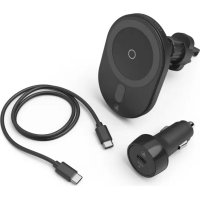
MagCharge Car FC15 - Battery charger HAMA - Free user manual and instructions
Find the device manual for free MagCharge Car FC15 HAMA in PDF.



| Product Type | Wireless car charger |
| Brand | Hama |
| Model | MagCharge Car FC15 |
| Input (charger) | 5V 3,0A / 9V 2,22A / 12V 1,67A |
| Maximum output (charger) | 15W |
| Total adapter power | 20W max |
| On-board circuit voltage | 12V / 24V |
| Operating temperature | 0°C to 40°C |
| Connectivity | USB-C (input) |
| Compatibility | Recent Apple smartphones with wireless magnetic charging |
| Mounting | Air vent grille (width 15-35 mm) |
| Included cable | USB-C to USB-C |
| Status LED | Blue (power/charging), off (standby/charge complete), blue flashing (error) |
| Frequency band | 112,6 – 152,6 KHz |
| Maximum emission power | -14,69 dBμA/m at 10 m |
| Package contents | Charger, air vent grille mount, car adapter, USB-C cable, user manual |
| Safety | Magnet warning, avoid metal objects on the back, do not obstruct airbags |
| Maintenance | Slightly damp lint-free cloth, without harsh detergents |
| Recycling | Do not dispose of with household waste, follow local regulations |
| Standard | Compliant with directive 2014/53/EU |
Frequently Asked Questions - MagCharge Car FC15 HAMA
User questions about MagCharge Car FC15 HAMA
0 question about this device. Answer the ones you know or ask your own.
Ask a new question about this device
Download the instructions for your Battery charger in PDF format for free! Find your manual MagCharge Car FC15 - HAMA and take your electronic device back in hand. On this page are published all the documents necessary for the use of your device. MagCharge Car FC15 by HAMA.
USER MANUAL MagCharge Car FC15 HAMA
WirelessCarCharger"MagChargeCarFC15"
Kabelloses Kfz-Ladegerät "MagCharge Car FC15"
Operating Instructions
Bedienungsanleitung
Moded'employi
Instruccionesdeuso
PykoBOIDCTBOIO3Kcnpyaatau
Istruzioniperl'uso
Gebruiksaanwijzing
O8nyiecxponc
Instrukcjaobslugi
Hasznalatiutmutato
Navodk pouziti
Návodnapoužitie
Manualdeinstruções
Kullanmakilavuzu
Manualdeutilizare
Bruksanvisning
Käyttoohje
GB
D
F
E
RUS
1
NL
GR
PL
H
CZ
SK
P
TR
RO
S
FIN
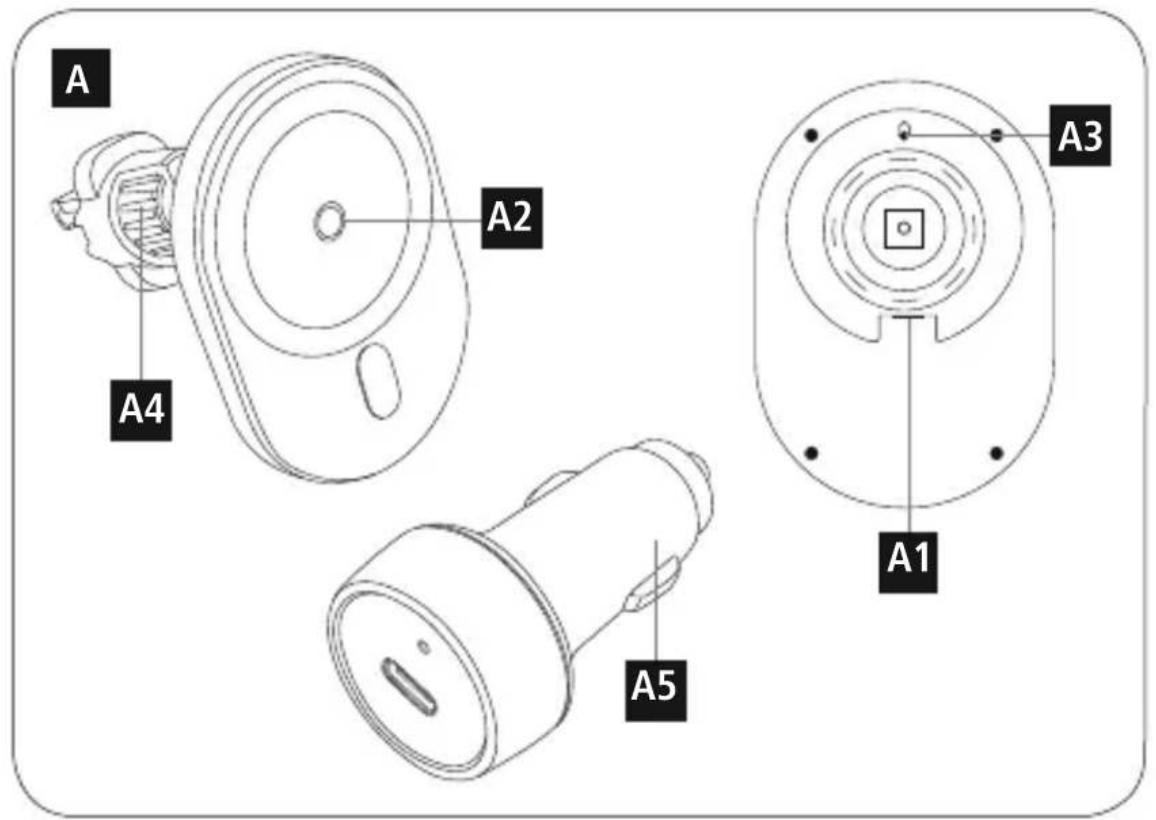
Controlsanddisplays
A1.USB-Cinput
A2.StatusLED
A3.FunctionLED
A4.Gratingattachment
A5.Carapapterforpowersupply
LEDfunctionindicator
| Powersupply | Briefilluminationblue |
| Standby | off |
| Chargingprocess | Lightsupblue |
| Endofcharging | off |
| Errormessage | Flashesblue |
ThankyouforchoosingaHamaproduct.
Take your time and read the following instructions and information completely. Please keep these instructions in a safe place for future reference. If you sell the device, please pass these operating instructions on to the newowner.
1.Explanationof warningsymbolsandnotes
Riskofelectricshock
This symbol indicates a risk of electric shock from touching product parts carrying hazardous voltage.

Warning
This symbol is used to indicate safety instructions or to draw your attention to specific hazards and risks.

Note
This symbolisusedtoindicateadditionalinformationorimportantnotes.

2.Packagecontents
"MagChargeCarFC-15"wirelesscharger
Gratingholder
- 1 x caradapterforpowersupply
-1 x USB-CtoUSB-Cconnectingcable
Theseoperatingsinstructions
3.Safetyinstructions
- Protect the product from dirt, moisture and overheating and use it in dry environments only.
- Donotdroptheproductanddonotexposeittoanymajorshocks.
- Do not operate the product outside the power limits specified in the technical data.
- Do not use the product in areas in which electronic products are not permitted.
- Ensure that the product is not covered up by textiles, metal or other objects in order to avoid damage caused by overheating.
-
Dispose of packaging material immediately in accordance with the locally applicable regulations.
-
Do not modify the product in any way. Doing so voids the warranty.
- Donotcontinuetooperatetheproductifitisvisiblydamaged.
- Use the product only for the intended purpose.
- Do not use the product in the immediate vicinity of heaters, other heat sources or in direct sunlight.
- Onlyusethearticleundermoderateclimaticconditions.
- As with all electrical products, this device should be kept out of the reach of children.
- Do not use the product in a damp environment and avoid splashing water.
- Donotbendorcrushthecable.
- Neverapplyforcewhenusingtheproductorduringinstallation.
- When using this product, observe the applicable local traffic laws and regulations.
Take care that components such as airbags, safety areas, controls, instruments, etc. and visibility are not blockedorrestricted. - Ensure that the product is securely mounted before every journey.
- Do not allow yourself to be distracted by the product when driving a vehicle. Always pay attention to the surroundingtraffic and your environment.
- Always pull directly on the plug when disconnecting the cable, never on the cable itself.
Warning-magnets


- People with pacemakers should keep away from the magnets. The magnets can negatively affect the functionofthepacemaker.
- Do not place any bank or similar cards with magnetic strips or magnetically sensitive objects on the product. The dataonthecardscouldbedamagedorcompletelydeleted
Warning

Ensure that there are no metal parts (e.g. metal plate for magnetic holders) on the back of your device. Metal heats up significantly in the field of an induction charger and can damage your device and/or the charger.
Riskofelectricshock

- Donotopentheviceorcontinuetooperateititifbecomesdamaged.
- Donotusetheproductifthechargingcable,adaptercableorpowercableisdamaged.
- Do not attempt to service or repair the product yourself. Leave any and all service work to qualified experts.
4.Start-upandoperation

Note
- Please be aware that this wireless car charger is only suitable for Apple smartphones of the latest generationthatsupportmagnetic,wireless charging.
Note that mobile phone cases, covers, etc., and other materials between the wireless charger and the back of your device may interfere with or even prevent the charging process.
Note- 12 V, 24 V vehiclelectricalsystems

The charger is suitable for 12V and 24V vehicle electrical systems.
-
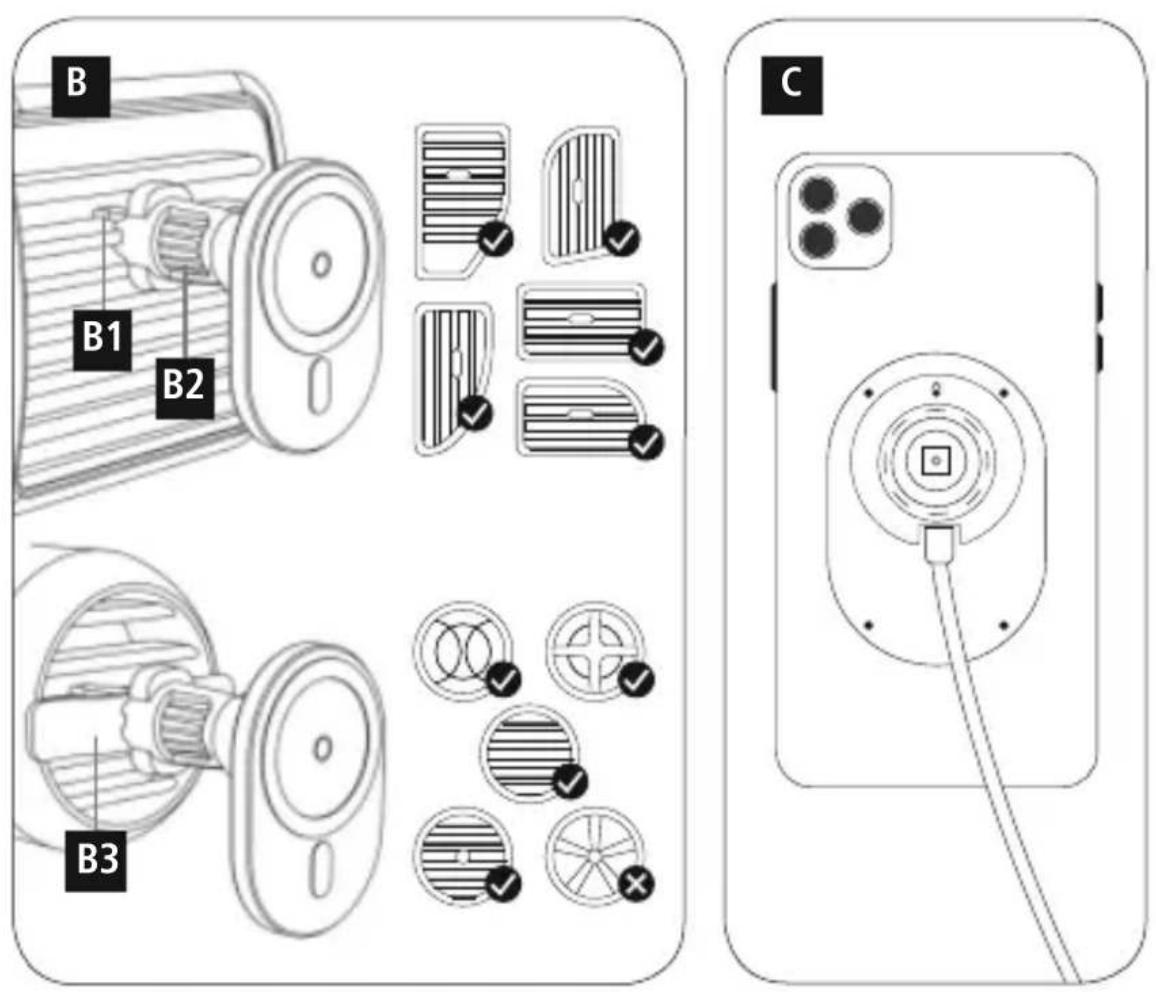
Attach the wireless car charger using the grating holder included (A4) to the grating in your car by introducing the holder pin(B1) into the grating and locking it in place with the lockingscrew(B2). With rounded gratings, please use the retaining plate supplied (B3). The grating holder (A4) is suitable for gratings between 15mm and 35mm wide.
-
Connect the enclosed USB-C to USB-C connecting cable to the USB-C input (A1) on the wireless charger andtheenclosedcaradapterforthepowersupply(A5).
- Whenthepowersupplyisactive, thestatusLED(A2)lightsupblue.
Note
The maximum charging power of up to 15W is only achieved with a Power Delivery (20W) car adapter (5V/3A,9V/2.22A,12V/1.67A) which is included in the extentofdelivery.

Warning
-OnlyusesuitablechargingdevicesorUSBconnectionstochargetheproduct.
- DonotusedefectivechargersorUSBportsanddonattempttorepairthem.
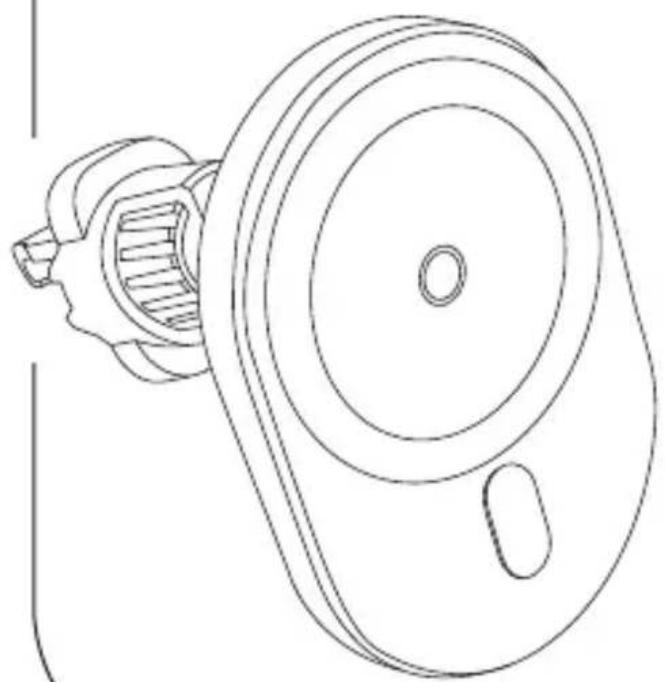
- Place the back of your Apple smartphone on the wireless car charger. It attaches automatically thanks to the integrated magnets.(Figure C)
- The charging process begins as soon as an effective induction field has been established. The status LED (A3) lights up blue. The current charge status is displayed on your device.
- The charging process ends automatically once your device's battery is fully charged. The function LED (A3)goesout.
If metallic or magnetic objects are on the charger, this is indicated by the function LED (A3) flashing blue.
Note- carbattery
Withsomevehicles, it can happen that power continues to be supplied even though the ignition has been switched off. You should therefore disconnect the product from the line connection when not in use to protect your car battery from being drained.

5.Careandmaintenance
Only clean this product with a slightly damp, lint-free cloth and do not use aggressive cleaning agents. Ensure that nowaterisabletoentertheproduct.
Note
Disconnect the device from the mains before cleaning and during prolonged periods of non-use.

6.WarrantyDisclaimer
Hama GmbH & Co KG assumes no liability and provides no warranty for damage resulting from improper installation/mounting, improper use of the product or from failure to observe the operating instructions and/ or safetynotes.
7. Technical data
Wireless carcharger
Input
Output(underoptimisedconditions)max.15W
5V- 3.0A
9V2.22A
12V1.67A
| Car a adapter: | |
| vehicleelectricalsystemvoltage12V, 2 4 V | |
| Outputvoltage/ c currentmax. | 5V3-0A 9V2-22A 12V1-67A |
| Outputpowertotal20Wmax. | |
| Ambient temperature | 0°C – 40°C |
8.Recyclinginformation
Noteonenvironmentalprotection:
AftertheimplementationoftheEuropeanDirectives2012/19/EUand2006/66/Euinthenational legalsystem, the following applies: Electricalandelectronicdevicesaswellasbatteriesmustnotbe disposed of with household waste. Consumers are obliged by law to return electrical and electronic devicesaswellasbatteryestothedesignatedpubliccollectionpointsortothepointofsaleatthe
end of their service lives. Detailed information on this topic is defined in the national laws of the respective country. This presence of the above symbol on the product, operating instructions or package indicates that theproductissubjecttotheseregulations.Byrecycling,reusingthematerialsorotherformsofutilisingold devices/batteries, you are making an important contribution to protecting our environment.
9.DeclarationofConformity
Hama GmbH & Co KG hereby declares that the radio equipment type [00187268] is in compliance with Directive 2014/53/EU. The full text of the EU declaration of conformity is available at the following internetaddress:
www.hama.com->00187268->Downloads.
| Frequencyband(s)112.600KHz- 1 52.600KHz |
| Maximumradio-frequencypowertransmitted-14.69dBμA/mat10m |
Ipepe nncnoB3OBAHnem BHNMaTeIbHO npoHTte CneIyUOuHe IHCTpyKun yka3aHn. XpaHnTe daHnoe pyKOBOCTBO nO kcnIyataun B HAdexxHom MeTe, TTObB Cnyae Heo6XoUMocTyn Bac BcerDa 6bl doctyn K hemy. Ppi npoJaxe ycTpoiCTBa nepeaTe pyKOBOCTBO HOBOMy BnaJeBcy.
Yka3aHne-6OpTobar ceTb 12B,24B
3apnHoe yctpoCTBO npedHa3NaHeNo dla 60pToBo cTe 12 B n 24B.
C nOMOsbIO npnlaraUoeroC KpenneHna DnB eHTnlauOnHO peWeTKn (A4) 3akpeNTe 6ecnpobODnoaEBTomOBnIbHOe3apdHOeycTPOINCTBOHaBeHTnlauOnHOpeWeTeKBaWeroaBtOMoBnIa; Iy3TOrO BCTabte WntΦT KpenneHna (B1) B BeHTnlauOnHOу peWeTky 3aФNKcpyTe CTOpOpHBm BVHTOM (B2). B cnyae kpyIIOB BeHTnlauONHOHpo WeTKeN cNoJIb3yIte npnlaRaUOnuOc KpenexHyO nactHy (B3). KpenneHne DnB eHTnlauOnHOHpo peWeTKn (A4) NOxOIT dNBA BeHTnlauOnHOhbyX peWeToKUnpHNOH15-35MM.
- PoiKJIIOHTe npINarAOUIc coeINHITeINbHbI Ka6eINb USB-C Ha USB-C Ko BXOy USB-C (A1) 6ecnpoBOJHO aBTOMO6nIBHO 3apdHOrO yCTPOINCTBa I K npINARAOUeMyca ABTOMO6nIBHOMy aanTepyJnRAEKeTPOINHTAHN(A5).
- PnAeTNBOM 3JKeTPONTAHm CBTeODNoDHyI HmNkATOp COCTOHHA (A2) Ropnt CnHIM.
Yka3aHne
MaKcImaJIbHaJa 3apIHa Ha MoUHocTb Do 15 BToIOCTnraetc TOnbKO C NOMOuBHO ABTOMO6nblHo aAnTePaPowerDelivery(20Bt)
(5 B/3A, 9 B/2, 22 A, 12 B/1, 67 A), KOTOpBb BxOuNT B KOMnJIeKT NocTaBKn.
PpeynpeKdHne
Pa3pe7aetcnaCnoB3OBaTbIJIa3apJkNToIbKOcoBMeCTMmble3apJHbIeycTpOHTBaUNSBpa3beMbI.
He nCnoB3yIte HecnpabHbIe 3apAaHbIe yCTpoiCTBa nn USB-pa3bEmbln He nbTaTecb nx peMOHTPOBAtb.
- IomeCTnTe BaIcMapTFOH Apple o6paTHoCtOPOHOHa 6ecnpoBOHOe 3apAHOe yCTPOINCTBO, KpeIIeHne npOn30JET ABOMaTuWeCKN 6laRoJaPRA BCTpoEHbIM MaHHTAM. (pnc.C)
- Ipocecc 3apnKn HauHaeTc TOrda, KOrda yCTaHO bHeo aKTHBHeuNHyDyKUOHHe nOJe. CBeToNDOp
- fYHKUONHUPOBAHNA (A3) ropnt cInHM. Tekyuun ypOBeHb 3apra yka3aHa Ha BaWeM OKOHeHOM
- ycTPOINCTBE.
- Ipoce3aapAnk n ABToMaTHueckn 3aBepwaeTcK, KOrJa aKKMyJATOp OKOHeuHOro yCTpOHTBa NOJIHOCTbIO 3apJKeH. CBeToNDФyHKUOnHIpOBaHnA(A3) CoCTOHNr RaCHeT.
- Ecnn praIOM C 3apAINbIM yCTPOIcTBOM HaxoJITcM TaJIINueCKne ININ MaHHTbIe IpeJMeTbl, CBETOIOIDyHKUOnHPOBaHnA(A3)MnraeTCNHMM.
Yka3aHHe-ABTOMo6nIbHbIaKKyMylrTop
B HeKOTopbIX abTOMO6nIaX NOdaa NITaHna COxpaHReTc HecMOTpHa BbIKIOueHHoe 3axnraHne. IOnTOMynPnHeNcNoJIb3OBaHInOTKnHuaTeu3dEJIneOT6OpTOBOiCeTu,HTo6bIppeDToBpaTtbpa3pykky abTOMO6nIbHOrOaKKyMylrTopa.
5.TexHueeckoeo6cnykubHneu y xo
HCTTE H3dJIe TOIbKO C NOMOUsBIO CNeRka BnAxxHO B63BOPCOB O CaNΦeTK; He IcNoIb3yTe arpeccNBbIe YHCTaUe CpeCTBa. CJeNTe 3a TeM, YTObByCToPOnCTBO He IonaJaIa BOJa.
Yka3aHne
Ipeed ouhctkoi npn dInTeJbHOM HeinCnoJb3ObaHHn 06aTeJbHO OTKJIOaHTe yCTPOBCTBOOTcTNI.
6.0cbo6oxdHneoTOBtCTBeHHOCTn
Hama GmbH & Co. KG He HeceT OTBeTCTBHeHOct3a NOBpeXeHn, BO3NkUne B pe3yIbTaTe HeHaJIexKaUe yCTaHOBKn, MOHTaxa HHeAJIexKaUeRO NcIOJIb3OBAHn I3JeHn IIN HeCO6JIoDEHn Tpe6OBaHn pyKOBOCTBaNoKcnJyatauNN/nnNyKa3AHnNOTExHKe6e3OnaCHOCTn.


7.TexHnueckneHaHHbIe
8.Yka3aHnnooyTnIn3aun
OxpaHaokpykaoueienpeDbI
CM OMeHTanepeXoHaaHuaHOHaJIbHOrO3aKHOdaTeIbCTBaHaeBponeckneHOpMaTbBICOrJaCHO dIpeKTHBAM 2012/19/EC n 2006/66/EC DeIcTByIOCTNe cIeNyIOUne npabnla: YtINn3aunna 3JleKTPnuCeCKnx n 3JleKTPoHHbIX np6obopB, a TaXke 6aTaape BmEcTe C 6bITOBbIM MycopoM He pa3peShaETc. NTope6ntel no 3aKOHy o6ra3AH yTNIn3npuOBaTb 3JleKTPnuCeKne n 3JleKTPoHHbIe
np60bI, a TAKKe 6aTapeNo nCTeueHn Cpoka IN FOJHO B CNEuaJIbHO npeHa3HaueHHbIX DnA 3TOO 6oeeCTBeHHbIX nyKtax c6opa nnBnyHKTe npOax. DeTaJIbHAp erJaMaHcTAuNr 3TNx Tpe6oBaHn OcyUeCTBJIaETCROBTCTBYIOUmmMeCTHBIM3aKOHOaTeJBCTBOM.Heo6XoIMOCb6IoHeHnaHHbIX npEINsAHm 6o03HaaueTc8oc6bIM 3NaKOM Ha N3DeIIM, INHCTpyKUnn PO KcIIyatauNn IIn yNAKOBKe. CdabA 6bIBWne B yNtpe6bHeHn np60bp/6aTapeHn Hpepa60Ky, BTOpNUHy opepa60kU NaH naHTIN3aUIO B dpyroF fOpMe, Bbl BHOcNTe BaxHbI BKlaD B OXPaHy OKpyKaIOSe Cpebl.
9.CepTNΦNkATCOOBETCBNA
HactoIIM KOMnHaHama GmbH & Co KG 3aBnAET, YTO paNoo6OpyObaHne Tuna [00187268] OTBeuAeT Tpe6oBaHnM dInpeKtNBb2 2014/53/EC. C noJIbIM TeKCTOM DeKnapauO o COOTBetCTBnITpe6oBaHnMECMOxHo03HaKOMNTbc3Decb: www.hama.com->00187268->Downloads.
3.Yka3aHn3a6e3oNaCHOCT
- Na3eTe npOdykTa oT 3ambpcBaHe, Bnara n nppepRbAne I ro n3noJ3BaIte cAm Bo cyxa cpeJa.
He no3B0JIaIbIeHa npOdykTa Da naDa n He ro n3naIaIte Ha cnINn Bn6paun.
He n3noJI3BaIte npOdykTa I3BbH HEROBITE rpaHnCi HA MOUHOCITa, NOCOeHN B TEXHnueCKTe DaHHN.
He n3noI3BaIte npOdykTa B 30Hn, B KOnTO He ca pa3peWeHH eJIeKtpoHNn npOdykTN.
BHHMaBaTe n3dJeMeTo Da He 6bDe NOKpBaHO C TeKCTnI, MetaJIHn IIN DpyrN PpeDMeTn, 3a Da 6bDaT n36ErHaTNOBpeDNOTnperPraBaHe.
-3XbBpIeONaKOBbHnMaTeepHaJIbEdHaIacbIlaChOJeCTBaIHTeHaMCTopa3nope,I6n3a I3XbBpIaHeHaOTnAdbu.
He npabete npomehn B ypea. TaKa 3e 3ary6bnte npaBo Ha BCaKBN rapaHIOHn npTeHcnn.
He npobjxabate da n3noJ3BaTe npoykta, aKO ToI mA OeBnHn Nobpeu.
-Изпалзайтейрогоуктасамоанpeдьденataцел.
He n3noI3BaIte npOdykTa B HenocpeDCTBeHa 6n30CT Do OTOJIInTeHNy ypei, DpyrN I3TOHnCn Ha TOINHnIHnHaInpEeKTHAcJbHueBcBETnHa.
-ИЗполз BavтейрдуктасamОнмОпсмЕнКлIMMaTиЧИУСLOВЯ.
- Pioo6HO Ha BCNUK eNEKTPnueckn npOyKTN, TO3N npOyKT He 6uBa da nonaDa B pbcTe Ha neca!
He n3noJ3BaIte npOdykTa BbB BlaJxHa cpea n 36raRbaTe BOHn npbckn.
He npueynbae n He npntuckaTe Kaeba.
- Ppi pa6oTa C npOdykTA u npu MoHTaX HnKOrA He npuJaarTe ycJIne uJr roJMa cUla.
- Pn ynoTpe6a Ha npOyKTA B DnBxKeHneTo No nbTuAata BaXaT pa3npoe6nte Ha 3aKaHa 3a DnBxKeHneTo nonbTuAata.
BHMMABaIe KOMnoHEHT NaKato ebp6er, npeJna3Hn 30Hn, enemeHTn 3a 06cnyXbaHe, INCTpyMeHTn T. H. JINBUNIMOCCTTadaHe6bDaTNOkPNTNINIOrpaHueHN.
-ПюоверяВайТeпенивсякOBТУВаЕнчурниМоNTахиНарюдуктА.
- Ppi nIbTyBaHe c MToTOpHIO ppeB03HO cpeiCTBO He ce pa3ceBaiTe ype3 npOyKta N CJIeJeTe nbTHaTa 06ctaHObKaN O 6KpbXeHneTO.
3a n3KJIIOUBaHe Ha Ka6eNa IbPnAte DnpeKTHO Ukeepa HnKOra Ka6eNa.
Ppeynpeckdne-MarHHTN


- Iuca cbc sbpeHn CTmMyIaTopn Tp86Ba da cTOrT daJeU OT MaHHTnte. MaHHTnte MoRat da HapywaTphiHKunraTaHaeneCMeKbpa.
He 3apexdaiTe EC nIIN dpyrn noIO6HN KapTc MaHHTHa JeHTa, KaKTo N UyBCTBNTeHH Ha MaHHTHO DeiCTBnepeDMeTnBBpxynpOkyTA. dAHHTeOTkApTaTAmoraTda6bDaTnOBpeDeHHnnnnn3TpTN
PpeynpeKdHne

YBepete ce,Ye no Tb6a Ha BaWte O KpaHIO yCTPOINCTBO HMa MetaHn npedMeTn (HaPmep MeTAlHa IIoOa 3a MaHHTe Hbpxa).MetaIbTe Ce HArpBa MHO RO CNHIO B NOJeTO Ha yCTPOINCTBOTo 3a INyKUHO 3apeXdaHe I MoKe Da NOBpeDN KpaHOTo Bu yCTPOINCTBOu/INy UCTPOINCTBOTo 3a 3apeXdaHe.
OnachocOTTOKOByap

He OTBapAHTe npOyKTa n npn nobpea He npOdbJIkaBaIte da ro n3noJI3BaTe.
He n3no3BaIte npOyKta, aKO ca nobpeHn Ka6eJIbT 3a 3apeXdaHe, Ka6eJIbT Ha aIanTepa nn MPexKOBnraTka6eJ.
He ce onntBaIte camn da o6cnykBaTe nIn peMOHTnpaTe npOyKta. OCTabeTe BCaKaBa texHuecka noDpBxKaHaKOMnTeHTnITecneuaNtN.
4. BbBexdahe Beeknloaataunneeknloataun

Yka3aHne
- ObpheTe BnMaHne, Ye TOBa 6e3Ka6eJHo 3apAHO yCTPOIcTBO 3a ABTOMO6uI e NOxOJaIO cAmO 3a CMaprfoHn Ha Apple ot nocJeHNO pOKoJIeHne, KOITOn POJDbPxAt MaHHTHO, 6e3Ka6eJHo 3apeXdaHe.
- 06bphete BHMaHne, Ye KaIbΦnte 3a TelefoHn, NOKpUtnraT a T.H. n DpyrMaTepeNaM MeXny 6e3KmHTo yCtpoCTBO 3a 3apexJaHe n rbp6a Ha BaWeTo KpaHYo yCtpoCTBO HApYsAbat npOceCa Ha3apeXdaHen d OpIMoratDaIarOpEnoTbPaTAT.
Yka3aHHe-6OpDObAmpexka12V,24V
3apndto yctpoiCTBO e noxdoa 3a 60pdoBa mpeka c 12V n 24V.
3akpenete 6e3ka6eHnOTo 3apJNoHO yCTPOIcTB0 3a ABTOMO6NJpe3 npINOKeHn Jbpxa3a BEHTnlaucnoHha peweTka (A4) KbM BEHTnlaucnoHHa TpeweTKa Ha Baunr ABTOMO6NJ KATO NOCTABNTe uΦTaHa IbpXaHa (B1) BbB BeHTnlaucnoHHa peweTKa N 3actOnopTe C pKcnpaunBnT (B2).PpN oBn BEHTnlaucnoHHn peweTKn, MoJI N3NOJI3BaIte npINOKeHATA KpeIeKHa IIaHkA (B3).DbpxaYbT 3a BEHTnlaucnoHHa peweTka (A4) e noJxOJa3a BEHTnlaucnoHHn peweTKn c WnpHa ot 15 mm do 35mm.
- Cbpxte npnloxhen kaben 3a cbp3bahe ot USB-C KBM USB-C c USB-C Bxoja (A1) ha 6e3ka6enHto 3apdno yctpoiCTBO 3a aBtOMo6nI n C npnloxhen aBtOMo6nne h aanTep KbM eJektp03axpaHbaHeTO (A5).
- PnAeKtpo3aXpaHbAe CBeToNObT 3a CtaTyc (A2) CBeTN B CnHbO.
Yka3aHne
MakcmaHaTMOHocT Ha 3apeKdahe do 15 W ce noctura cmo c aBtOMo6nJeH aanTep Power Delivery(20W)
(5V/3A,9V/2,22A,12V/1,67A)KoITo Ce CbIbpka B Oxbvata Ha DoCTaKaTa.
PpeynpeKdHne
- 3a 3apejdahe n3noJ3BaIte cmo noJxoJauu 3apJHn yctpoCTBa nn USB n3BOJn.
-
IIO npHnI INe H3noJ3BaIte DeΦeKTHn 3apAaHn yCTpoiCTBa nn USB n3BOaN He ce OOnTbaIte da rnonpaBATE.
-
IocTabIe 3aHaTa CTpaHa Ha BaIiM CmapToH Apple BbPxy 6e3Ka6eHnTO 3apAHO yCTpoIcBO 3a ABTomO6uI, 3aKpeBnBaHeTo CTaBA ABTomAtuHNO 4pe3 BrpAdeHnTe MaHHTN. (fynypa C)
- PpOeCbT Ha 3apeXdaHe 3aNoUBa, KOrATo 6bJe Cb3JaDeHo INHdyKuOnHO nOle. LED 3a cyHKnra (A3) CBETN B CInHbO. AKTyajHnT CTaTyc Ha 3apeXdaHe ce Noka3Ba Ha BaWeTO KpaHNOyCTPOINCTBO.
- IpocebT Ha 3apeKdaHe ppeKcba ABTomTuHO, KOraTo akyMylatOpHaTa 6aTePnHa BaIeTo KpaHOb yctpoCTBO 6bJe HAnbJIHo 3apeDeHa. LED 3aФyHKuA (A3) n3racBa.
- Ako B 6bn30ct Do 3apJnHOTO yCTPOINCTBO Ce HAMnPaT MeTaNHN Nn MaHHTN INpeDMETN, TOBa CE CnHAnIn3npa Ype3 MNrAHe B CnHbO Ha LED 3a cyHKnra (A3).
Yka3aHHe-ABTomo6nJeHaKymyNaTOp
Pn HrKoN ABtOMO6uN 3axpaHbAHeTO C TOK MOxE Da npOdbJxN BbIpeKn N3KIOUeHO NOdaBaHe Ha KOHTaKT. 3aTOba pa3eDInHeTe npOdykTA OT MpeXOBaTa BpB3Ka, KOrTo HMa da r O n3NoJ3BaTe, 3a da npEdnaTeaBTOMO6uINHnCnAkyMynlatoPtoPa3peXDaHe.
5.TexHueckoo6cnyXbaHe n oDpxbkKa
NoCTBaIeTo3n npOyKT cMo C Jeko HabJaxHeHa Kbpna 6e3 BJaCInHKn H He n3non3BaIe arpeCINBn NoCTBaIe npenapatn. BHMabaTe da He nonada Boga B npOyKta.
Yka3aHne
HenpeMeHHo pa3eHHeTe ypea ot MpeXaTa npEi nouchBaHeTo I KOraTo HMa Da ce n3noJI3Ba 3a no-DbIroBpeMe.
6.N3KJIIOU4BaHeHaOTROBOPHOCT
Hama GmbH & Co KG He noema OTROBOPHOCT nI rapaunzra 3a nobpei, KOITo ca peyntat OT HnnpabnHa nHctalaun, MOHTAK N ynoTpe6a Ha npOkyta nIOn THeCna3BaHe Ha pKOBODCTBOTo 3a ekCnloatau n/ nInhayka3aHnraTa3a6e3onacHOCT.


7.TexHnuecknDaHHN
| Бeзka6eJHo 3aApJdHо yCtpoIcTBo 3a aBtOMo6n | |
| ВхoД | 5V3.0A9V2.22A12V67A |
| ИЗхoД(прионимирарыс nobя)мakс.15W | |
| Адалтер 3a aBtOMo6n: | |
| На探测еньеобор dovbatampeka12V,24V | |
| ИзхoДнога探测енье/Тokмakс. | 5V3.0A9V2.22A12V67A |
| ОьшанЗхoДнамошноct20Wмakс. | |
| Околнатemпepатура0°-40°С | |
8.Yka3aHnna3aN3XbBpJHe
Yka3aHneOTHOCHo3aUNTaTaHaOKOJIHaTacpeda:
OT MOMENTa Ha npilraheTo Ha ebponecknte npektnb 2012/19/EU u 2006/66/EO B HauhoHaHHTO npaBO Ha cBtBeTHnte CtpAHn Baxn CneHOTO: EneKtpuecknte n ekeKtpoHHnte ypei n 6aTePnnte He 6bNA da Ce n3XbPJIr T C 6ntOBte OTnaDbu. NpTe6nTeJIr T dIbXeH no 3aKOH Da BbpHe eNEKtpuecknte n ekeKtpoHHnte ypei n 6aTePnnte B KpaH aTexHn
eKcIIOaTcHHeCpOKHa3rpaDeHnTe3aueNTao6uCTBeHNyHKTOBeaCb6npaHeHaOTaNbUINiHa TbproBckna 06ekt. Ioppo6HocHTne NO Bbnpoca ca perlanemntpann B 3akOHoTaTeJCTBOTo Ha CbOTBeHaT a ctpaHa.CmBoNt Bbpx npdykta,ynbTBaHeto 3a ynotpeba Hn OnakOBkata HacOyBa KbM Te3n pa3npoe6n. Ype3 peunKlnpaHeto, npepaotkata Ha MaTePnaTe nn Dpyn foPm Ha ONON3OTBOPBAHe Ha cTapte ypeN/6atepnn Bne dOnpnhacTe 3a aunTata Ha Hauata OKonHa cpea.
9.Deknapaun3acb0TBeTCTBne
C hactoIto Hama GmbH & Co KG DeKnapupa, ye TnBt Ha paAnoo6opyDbaHeto [00187268] CbOTBeTCTBa Ha InpekTnBa 2014/53/EC. Nblnrt TeKT Ha EC DeKnapaunra Ta 3a CbotBeTCTBne e Hapa3noJoxHeHaCnEHNHnHTepHeTaadpec: www.hama.com->00187268->Downloads.
| Чебта Леничестоchnй Лени | 112.600 KHz - 152.600 kHz |
| Мakсимална Ильчateleyma моцноct | -14.69 dBμA/m по 10 m |
Teixiaexipoukatev6Eic
A1.KaλωδiεισδοδuUSB-C
A2.AuxviakataoantcLED
A3.AuxviaiaetoupyiacLED
A4.Σερεωηγριλεξαερισμού
A5.Avtantopacatautoktouyianapoxnepuato
Auxvia etoupyiac LED
- WirelessCarCharger"MagChargeCarFC15"
- Kabelloses Kfz-Ladegerät "MagCharge Car FC15"
- Controlsanddisplays
- 1.Explanationof warningsymbolsandnotes
- Riskofelectricshock
- Warning
- Note
- 2.Packagecontents
- 3.Safetyinstructions
- Warning-magnets
- 4.Start-upandoperation
- Note- 12 V, 24 V vehiclelectricalsystems
- Note- carbattery
- 5.Careandmaintenance
- 6.WarrantyDisclaimer
- Technical data
- Wireless carcharger
- 8.Recyclinginformation
- Noteonenvironmentalprotection:
- 9.DeclarationofConformity
- Yka3aHne-6OpTobar ceTb 12B,24B
- Yka3aHne
- PpeynpeKdHne
- Yka3aHHe-ABTOMo6nIbHbIaKKyMylrTop
- 5.TexHueeckoeo6cnykubHneu y xo
- 6.0cbo6oxdHneoTOBtCTBeHHOCTn
- 7.TexHnueckneHaHHbIe
- 8.Yka3aHnnooyTnIn3aun
- OxpaHaokpykaoueienpeDbI
- 9.CepTNΦNkATCOOBETCBNA
- 3.Yka3aHn3a6e3oNaCHOCT
- Ppeynpeckdne-MarHHTN
- OnachocOTTOKOByap
- BbBexdahe Beeknloaataunneeknloataun
- Yka3aHHe-6OpDObAmpexka12V,24V
- Yka3aHHe-ABTomo6nJeHaKymyNaTOp
- 5.TexHueckoo6cnyXbaHe n oDpxbkKa
- 6.N3KJIIOU4BaHeHaOTROBOPHOCT
- 7.TexHnuecknDaHHN
- 8.Yka3aHnna3aN3XbBpJHe
- Yka3aHneOTHOCHo3aUNTaTaHaOKOJIHaTacpeda:
- 9.Deknapaun3acb0TBeTCTBne
- Teixiaexipoukatev6Eic
Brand : HAMA
Model : MagCharge Car FC15
Category : Battery charger