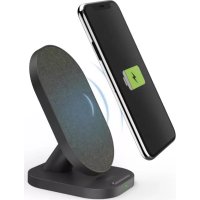
QIFC10SFabric - Battery charger HAMA - Free user manual and instructions
Find the device manual for free QIFC10SFabric HAMA in PDF.



| Product type | Wireless charger for smartphones |
| Brand | Hama |
| Model | QIFC10SFabric |
| Dimensions (L x W x H) | 109 mm x 65 mm x 8.2 mm |
| Power input | USB-C input: 5 V ⎓ 2 A or 9 V ⎓ 1.67 A |
| Maximum output power | 10 W (fast charging with compatible Qualcomm Quick Charge adapter) |
| Connector | USB-C input (female) |
| Compatibility | Smartphones compatible with inductive charging (Qi) |
| LED indicator | Red/green for power, charging, end of charge and error |
| Top material | Fabric |
| Package contents | Wireless charger, USB-C cable, user manual |
| Maintenance | Clean with a slightly damp, lint-free cloth. Disconnect before cleaning. |
| Safety | Do not cover with textiles or metal objects. Keep away from magnetic cards. Indoor use only. |
| Repairability | Do not open or repair yourself. Entrust to a qualified technician. |
| Operating temperature | Dry environment, away from direct sunlight and heat sources |
| Certifications | CE |
| Frequency bands (Qi) | 115.22 – 164.42 kHz |
| Maximum radiated power | 19 dBµA/m at 3 m |
Frequently Asked Questions - QIFC10SFabric HAMA
User questions about QIFC10SFabric HAMA
0 question about this device. Answer the ones you know or ask your own.
Ask a new question about this device
Download the instructions for your Battery charger in PDF format for free! Find your manual QIFC10SFabric - HAMA and take your electronic device back in hand. On this page are published all the documents necessary for the use of your device. QIFC10SFabric by HAMA.
USER MANUAL QIFC10SFabric HAMA
1) Thedisplayattheendofchargingmaydifferonsomedevices,dependingonthemanufacturer.
ThankyouforchoosingaHamaproduct.
Take your time and read the following instructions and information completely. Please keep these instructions in a safe place for future reference. If you sell the device, please pass these operating instructions on to the newowner.
1.Explanationof warningsymbolsandnotes
| Riskofelectricshock This symbol indicates a risk of electric shock from touching uninsulated product parts that may carry hazardousvoltage. |
| Warning This symbol is used to indicate safety instructions or to draw your attention to specific hazards and risks. |
| Note Thissymbolisusedtoindicateadditionalinformationorimportantnotes. |
2.Packagecontents
"QI-FC10S-Fabric"WirelessChargerforSmartphones
- 1xUSB-Ccable
theseoperatingsinstructions
3.Safetyinstructions
- Protect the product from dirt, moisture and overheating and use it in dry environments only.
- Donotdroptheproductanddonotexposeittoanymajorshocks.
- Do not operate the product outside the power limits given in the specifications.
- Do not use the product in areas in which electronic products are not permitted.
- Ensure that the product is not covered up by textiles, metal or other objects in order to avoid damage caused by overheating.
- Disposefpackagingmaterialinaccordancewiththelocallyapplicableableregulations.
- Do not modify the product in any way. Doing so voids the warranty.
- Usetheproductonlyforthenthintendedpurpose.
- Do not use the product in the immediate vicinity of heaters, other heat sources or in direct sunlight.
- As with all electrical products, this device should be kept out of the reach of children.
- Onlyusethearticleundermoderateclimaticconditions.
- Do not use the product in a damp environment and avoid splashing water.
The product is intended only for use inside buildings. - This product is not intended for use by persons, including children, with limited physical, sensory or mental abilities or lacking in experience or knowledge, unless they are supervised by a person responsible for their safety or have been instructed on how to use the product.
- Pulldirectlyontheplugwhendisconnectingthecable,neveronthecableitself.
- Donotopenthedevicorcontinuetooperatietitifitbecomesdamaged.
- Do not attempt to service or repair the product yourself. Leave any and all service work to qualified experts.
- Donotbendorcrushthecable.
- Do not place any liquid-filled vessels such as flower vases on or in the immediate vicinity of the product. The vessel may toppleover andtheliquidcanthenimpairtheelectricalsafety.
Riskofelectricshock

- Donotopenthedevicerecontinuetooperateitifitbecomesdamaged.
- Donotusetheproductifthe AC adapter, the adapter cable or the mains cable are damaged.
- Do not attempt to service or repair the product yourself. Leave any and all service work to qualified experts.
Warning


Donotplaceanybankorsimilarcardswithmagneticstripsormagneticallysensitiveobjectsonthe product.Thedataonthecardscouldbedamagedorcompletelydeleted
Warning

Ensure that there are no metal parts (e.g. metal plate for magnetic holders) on the back of your device. Metal heats up significantly in the field of an induction charger and can damage your device and/or the charger.
4.Start-upandoperation
Warning
- Only operate the product from a socket that has been approved for the device. The socket must be installedclosetotheproductandmustbeasilyaccessible.
- Disconnect the product from the power supply using the On/Off switch - if this is not available, unplug the power cord from the socket.
- If using a multi-socket power strip, make sure that the total power consumption of all connected devices doesnotexceedthepowerstrip'smaximumthroughputrating.
- If you will not be using the product for a prolonged period, disconnect it from mains power.
Note
To be able to charge your device via the wireless charger, it must be compatible with induction charging technology. Please refer to the operating instructions of your device for more information.
- Note that mobile phone cases, covers, etc., and other materials between the wireless charger and the back of your device may interfere with or even prevent the charging process.
- Connect the enclosed USB-C cable with the USB-C input (1) on the inductive charger and a suitable USB charger. When doing so, consult the operating instructions for the USB charger.
Note
The maximum charging power of up to 10W is only achieved with a Qualcomm quick charging device (9V/1.67A).
- An active power supply is confirmed by the brief, alternate illumination of the status LED (2) in red - green - red. The LED then goes out.
Warning
DonotusedefectivechargersorUSBportsanddonotattempttorepairthem.
- Placeyourdevicewithitsbackontheinductivecharger(B).
- The charging process begins as soon as an effective induction field has been established. The status LED (2)lightsolidgreen.Thecurrentchargestatusisdisplayedonyourdevice.
- If no induction connection can be established, change the position of your device if necessary (B).
- The charging process ends automatically once your device's battery is fully charged. The status LED (2) goes out.
- Removeyourdevicefromtheinductivechargeranddisconnectitfromthepowersupply.
5.Careandmaintenance
Only clean this product using a lint-free, slightly damp cloth and do not use any harsh cleaners. Ensure that no waterisabletoentertheproduct.
Note
Disconnect the device from the mains before cleaning and during prolonged periods of non-use.
6.Warrantydisclaimer
Hama GmbH & Co KG assumes no liability and provides no warranty for damage resulting from improper installation/mounting, improper use of the product or from failure to observe the operating instructions and/ or safetynotes.


7. Technical data
| Wireless charger | |
| Input | 5 V 2.0A 9 V 1.6ZA |
| Output (under optimised conditions) | 5W / 7.5W / 10W max. |
| Dimensions65mmx109mmx82mm | |
8.Declarationofconformity
CE Hama GmbH & Co KG hereby declares that the radio equipment type [00201685, 00201686] is in compliance with Directive 2014/53/EU. The full text of the EU declaration of conformity is availableatthefollowingInternetaddress:
www.hama.com->00201685,00201686->Downloads.
Frequencyband(s)115.22kHz-164.42kHz
Maximumradio-frequencycypowertransmitted19dBμA/mat3m
He BCKpbBaIte n3dJIne H He nCnOJb3yIe ero npn HauNHyn nobpejdeHn.
-HeuCnoIb3yIteu3JeIeIeepn
NOBpeKdHn aDantepa nepemEHoro ToKa, Ka6eJra aDantepa nn cTeBOrO Ka6eJra.
He bItaTaeTcB cAmOCToTeNbHO BbIOnHHTb TexHnueckoe 06CnyXnBaHne nn peMOHT n3dEInna. PeMOHT pa3peWaaTcAnpOn3BODnTbToKoKBaINuNpOpBaHHomyepcoHaJy.
PpeynpeKdHne


He KlaIaIte Ha n3dJIe 6aHKnOBCKne n aHaIaIogUHbIe KaPTbI C MaHHTHOJ NOLOCO, a TaKKe YcBCTBnTeJIbHbIe K MaHHTHOmY NOpIO npEIMeTbI. 3To MoXeT pNBeCTN K NobpeXJeHIO Kap Tnn UdaJIeHNIOcoXpaHEnHOHaHINxHΦopMaun.
PpeynpeKdHne

Y6eIntecb,HTOHaO6paTHoCTopoHeBaWero00KHeUHOrOyCTpoiCTBaHEtMeaJIuYeCKNXJemeHTOB (Hanpimep,MetaJIuueckoi nactInbI dIy MaHHTHO DEpxaTeJI).MetaJIOn OyeHc NlBHO HArpeBaETCB I NOJIe INdYkUIOHOrO 3apJHO 0yCTpoiCTBa IMoXeT IOBpeDiTB 3apJHOe yCTpoiCTBO.
4.BBOD B 3KcNpyatauio npa60ta
PpeynpeXeHne
-Дя noДКIOUHEnI N3dJIeN IcNoIb3yIte TOnIbKO po3eTKy, pa3peWEnHHyIO IJRA nCNOJIb3OBAHnR. Po3eTKa DOJIxHa paCNoJIaratbcra B6IIN3I N3dJIeN I 6bITb JERKo DoCTynHa.
- OToeHNHTe N3dJIneOT cETn C nOmoIbHO nepeKJIouaTeIa Ipn OTCyTCTBn HAnpJxHn B cETn, OToeHNHTecTeBOkA6BeIb0TpO3EtKn.
- PnHaHnn6boka WTeNceBbIX po3eTOK CneIte 3a Tem, YTObI OoBaA NOtpeBnEma MOUHOCTb NOKJIQUeHHbIX3JIeKTPoPn6OpOBHePbeBbIaIaONyCTMIOe3HaueHne.
- OToCoeINHInTe m3dEJIne OT cETn B Cnyae, eCNI Bbl erO He nCNOJb3yeTe B TeueHne npOIOJXnTEIbHOBVPemEni.

PpmeaHne
- 3apraHbOKOHeHoe yctpoCTBO C nOMoIbIO 6ecnpOBODHO 3apraHoro yctpoCTBa, OHO DOJIHXO 6bITb COBMeCTIMO C TexHOJIORe INHyKUHOHN 3aprKn. Co6JIOnaTe COOTBeTCTByIOuyeKa3aHnpykoBDCTBaONKCNlyataunBaUeROOKHeHOrOyctPoCTBa.
- PnIMTe BO BHMaHne, YTO qexIbI dIy MOBnIbHbIX TepeHOHOB, HAKNaIKN IINbIe MaTePnaJIbI, INoJIb3yeMbIe MeKJy 6ecnpoBOdHbIM 3aprIbHbIM yCTpoIcTBOM I ObaTHOu CTOPOHOBaWero OKOHeHOrO yCTPOIcTB MoYr Bbl3BaTb HEnOJaIKN B IpOceCE 3aprIKN IIN NOMEaTaB 3aprIKe.
CoeHHnTe npnnaembI Ka6eIb USB-C co BXoOM USB-C (1) Ha INdyKuHOHOM 3aprHOM yCTPOINCTBE nnoXoJauM 3aprHbIM yCTpoINCTBOM USB. Co6JIIOaIte yka3aHnB pyKOBOINCTBE NO EKcNllyaTauIN 3aprHoroUSB-yCTPOINCTBa.

PpimueaHne
- MakcmaJIbHa3apIaHnMoUHocTb Do 10 Bt doCTnraetc TOnbKO c nOMOu yCTpoIcTaBa 6bICTPOI 3apIqKnQualcomm(9B/1,67A).
- PpiakTNBHOIOJaue 3JIeKTPoNITAHnCBETOaNOHbI HmDnKaTOp COCTOHHa (2) nooopeepno KpaTKOBpemEHMO MRaeT KpaCHbIM -3eJeHbIM -KpaChbIM CBETAM. 3aTeM CBeToaNOIraCHeT.

PpeynpeXeHne
He nCnoIb3yIte HeucnpaBHBie 3apAaHbIe yCTpoiCTBa IIN USB-pa3beMbI Hne NItaTecb INX peMOHTnPOBaTb.
-ПолхиTe OKонуhoe yctpoiCTBO Ha INdukunOHnOe 3apJdHoe yctpoiCTBO (B) O6paTHoI CTopoHOH.
- Ppoecc 3aprKn HauHnaeTc TOrda, KOrJa yCTaHO bHe aKTHBHe uNHykUHO He NoJe.
CBeToHNOHb HnHnKATOp COCTOAHN (2) NOCToHHo ropnt 3eHehIM. TeKyuH yPOBeH 3aprayka3aHHaBaMeKOHeHOMycTPOCTBE.
- Ecnn HnDyKUHOHoe CoeINHeHne He yCTaHaBJIbAeTcR, MOxHO n3MeHHTb IIOXKeHne OKOHeuHOYcTpoiCTBa(B).
- Ipouecc 3apAKn ABTomatneckn 3aBepwaeTcR, KOrda aKKyMnyTOp OKoHeuHoro yCTpOInCTBa NOLHOCTbIO 3apJKeH. CBeToNDnHbI INHdkaTOp COCTOHNH (2) rachet.
- CHINMTe OKOHeHoe yCTPOINCTBO C INNdyKcUHOHORO 3apAHHORO yCTPOINCTBA N OTCOeHNHTe erO OT CNTEmBt 3JIeKTPoINTAHn.
5.TexHnueckoeo6cnyxuBaHneu y xoJ
OuetaeI3dJIeNToJbKc NOMoBbC JnErKa BnaXHo6E3BOpcoBoCaJnKe; He IcNoIb3yTe arpeccmbHbIe HCTaUne CpeCTBa.CJeNTe 3a TeM, YTObByCPOCTBO He nonaJaNa BOJa.

PpmeaHne
Ipeed ouncTkO u npn dnteHOM HNCNOb3OBaHm OTKIOHTe yctpoCTBO OT cETN.
6.NCKJIIOUeHHeNEOTBETCTBEHHOCTN
Hama GmbH & Co. KG He HeceT OTBeTCTBHeHOct3a NOBpeXdeHn, BO3HKnIe B pe3yIbTaTe HeHaIeXaIeYcTaHOBKn, MOHTaxa n HeHaJIeXaIeTo IcNoJIb3OBAHn I3DeJIeN IIN HeCo6JIIODeHn Tpe6OBaHn pyKoBOdCTBaNO3KcNlyaatauun/IInuKa3aHnIOTeHXKe6e3OnaCHOCTn.
7.TexHnuecknExapakTepeNCTKn
6.N3KIIUoyBaHeHaOTROBOPHOCT
Hama GmbH & Co KG He noema OTROBOPHOCT nI rapaunca 3a nobpei, KOnto ca pezytat OT HenpabnHa Hnctanaqna, MoNTax n ynoTpe6a Ha npOyka TnI ON He cna3BaHe Ha pKOBODCTBOTO 3a ekCnloatauia N/ nnHayka3aHnraTa3a6e3onacHOCT.
7.TexHnueckndaHHN
| Бeзшино зарадно устюстvo | |
| Вхов | 5 V 2.0A 9 V 1.6ZA |
| Изхов (при ортимиз四项 устовя) | 5 W / 7,5 W / 10 W м akс. |
| Размери | 65 mm x 109 mm x 82 mm |
8.Deklaapau3a3cb0TBeTCTBNE
C hactoIto Hama GmbH & Co KG deKnapupa, ye TnblT ha paanio o6opyDbaHeTo [00201685, 00201686] cbotBcTbHa Ha DnpeKtNbBa 2014/53/EC. PbInnT TekCT Ha EC deKnapaunTa 3a CbotBeTCTBne e Ha pa3noJoxeHne Ha CnEHNr INTePHT aDpec:
www.hama.com->00201685,00201686->Downloads.
| Чебта лесда/чеботни лесни | 115,22 kHz - 164,42 kHz |
| Мakсималанзльвateлароц�数19dBμA/mнри3 m |
TolxieiaxepiopoukatevdsEietc
1.KaωδiεισόδουUSB-C
2.AuxviakataoantcLED
- 1.Explanationof warningsymbolsandnotes
- 2.Packagecontents
- 3.Safetyinstructions
- Riskofelectricshock
- Warning
- 4.Start-upandoperation
- Note
- 5.Careandmaintenance
- 6.Warrantydisclaimer
- Technical data
- 8.Declarationofconformity
- PpeynpeKdHne
- 4.BBOD B 3KcNpyatauio npa60ta
- PpeynpeXeHne
- PpmeaHne
- PpimueaHne
- 5.TexHnueckoeo6cnyxuBaHneu y xoJ
- 6.NCKJIIOUeHHeNEOTBETCTBEHHOCTN
- 7.TexHnuecknExapakTepeNCTKn
- 6.N3KIIUoyBaHeHaOTROBOPHOCT
- 7.TexHnueckndaHHN
- 8.Deklaapau3a3cb0TBeTCTBNE
- TolxieiaxepiopoukatevdsEietc
Brand : HAMA
Model : QIFC10SFabric
Category : Battery charger