73200006 - Battery charger HAMA - Free user manual and instructions
Find the device manual for free 73200006 HAMA in PDF.


| Product type | Universal USB-C laptop power adapter |
| Brand | Hama |
| Model | 73200006 |
| Input voltage | 100-240 V AC, 50/60 Hz |
| Output voltage | 5.0 V / 9.0 V / 12.0 V / 15.0 V / 20.0 V DC (range 3.3-21.0 V) |
| Maximum output current | 3.25 A |
| Maximum output power | 65 W |
| Average efficiency in active mode | 83.8% |
| Low load efficiency (10%) | 75.8% |
| No-load power consumption | 0.06 W |
| Operating ambient temperature | 0 °C to 35 °C |
| Charging functions | Power Delivery (PD), Thunderbolt 3, Quick Charge |
| Voltage adjustment | Automatic via PD/TBT3/QC |
| Safety | Overload and short-circuit protection |
| Maintenance | Clean with a slightly damp, lint-free cloth |
| Package contents | Power adapter, power cable, instruction manual |
Frequently Asked Questions - 73200006 HAMA
User questions about 73200006 HAMA
0 question about this device. Answer the ones you know or ask your own.
Ask a new question about this device
Download the instructions for your Battery charger in PDF format for free! Find your manual 73200006 - HAMA and take your electronic device back in hand. On this page are published all the documents necessary for the use of your device. 73200006 by HAMA.
USER MANUAL 73200006 HAMA
OperatingInstructions
Bedienungsanleitung
Moded'emploi
Instruccionesdeuso
Gebruiksaanwijzing
Istruzioniperl'uso
Instrukcjaobstugi
Használatiútmutató
Manualdeutilizare
Návodk p oužití
Návodnapoužitie
Manualdeinstruções
Bruksanvisning
1. Explanationofwarningsymbolsandnotes
Riskofelectricshock

This symbol indicates a risk of electric shock from touching product parts carrying hazardous voltage.
Warning

This symbol is used to indicate safety instructions to draw your attention to specific hazards and risks.
Note

This symbol is used to indicate additional information or important notes.
2.Packagecontents
• UniversalUSB-Cnotebookpowersupplyunit
- Netcable
• Theseoperatinginstructions
3. Safetyinstructions
- Usetheproductonlyfortheintendedpurpose.
- Donotusetheproductintheimmediatevicinityof heaters,otherheatsourcesorindirectsunlight.
- Ensure there is sufficient scope for heat dissipation and ventilation.
- Onlyusethearticleundermoderateclimaticconditions.
- Donotusetheproductinareasinwhichelectronic productsare notpermitted.
- Do not use the product in a damp environment and avoidsplashingwater.
- Donotshort-circuitthebatteryoftheopenedterminal device.There is a riskofexplosion.
- Protect the product from dirt, moisture and overheating and use it indry environments only.
- Donotdroptheproductanddonotexposeittoany majorshocks.
- Donotoperatetheproductoutsidethepowerlimits specifiedinthetechnicaldata.
- Alwayspulldirectlyontheplugwhendisconnectingthe cable,neveronthecableitself.
- Make sure that cables do not pose a tripping hazard or blockemergencyexits.
- Donotbendorcrushthecable.
- Aswithallelectricalproducts, thisdevicesshouldbekept outofthereachofchildren.
- Do not modify the device in any way. Doing so voids the warranty.
- Keep the packaging material out of there each of children duet other risk of suffocation.
- Disposeofpackagingmaterialimmediatelyin accordancewiththelocallyapplicableregulations.
- Make sure that the connected device meets the requirements for supply through class PS3 powersources. If there is any doubt, ask your device manufacturer.
Riskofelectricshock

- Donotopenthedeviceorcontinuetooperateitifit becomesdamaged.
- Do not use the product if the AC adapter, adapter cableorpowercableisdamaged.
- Donotattempttoserviceorrepairtheproduct yourself. Leave any and all service work to qualified experts.
4. Start-up and operation
Note- m ainsvoltage100- 2 4 0 V

The powersupply unit issuitable formains voltages of 100 – 240 V and therefore can be used worldwide. Please note that a country-specific adapter may be necessary.
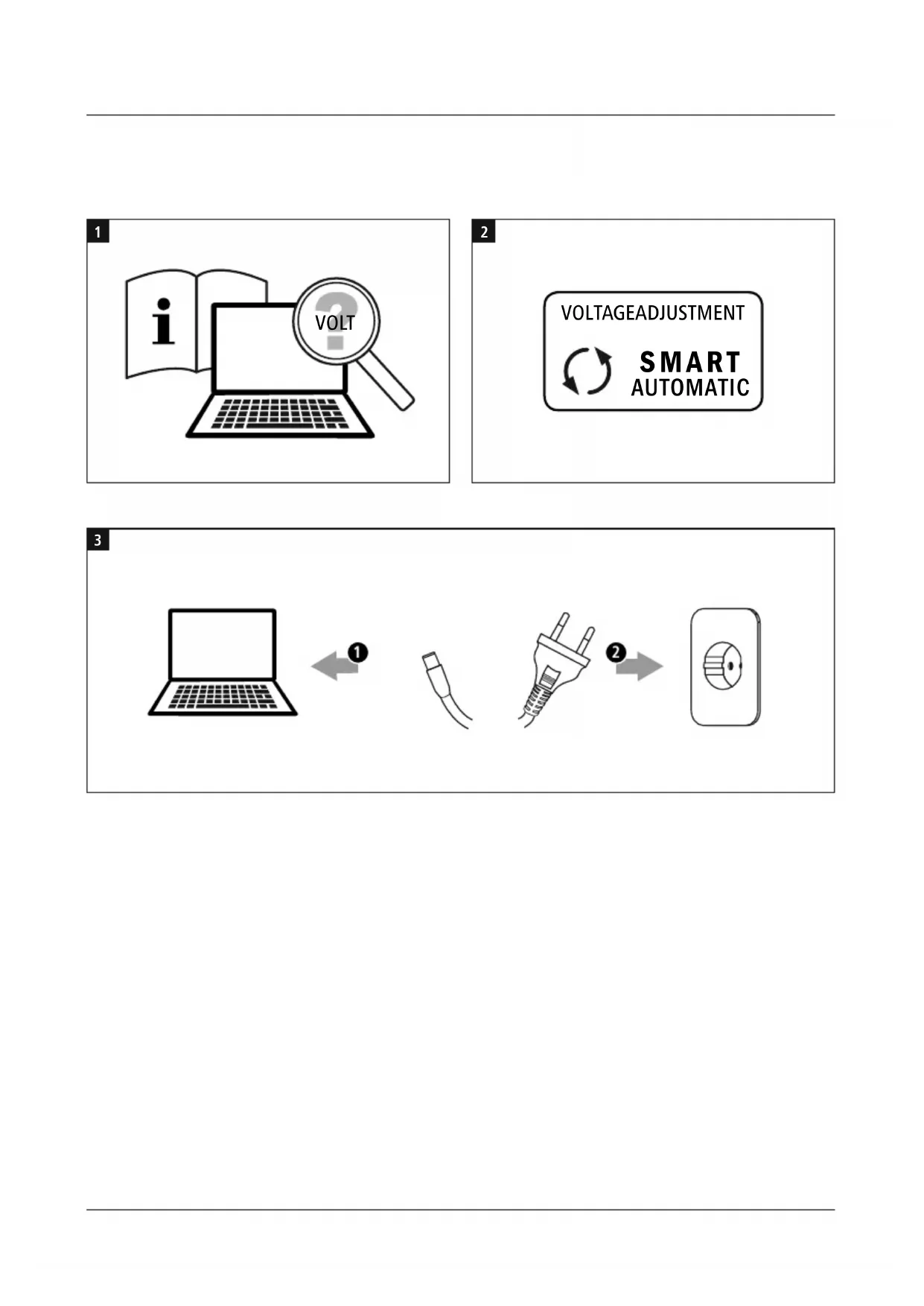
- Ensure that your notebook requires a supply voltage of 5V / 9V / 12V / 15V / 20V (+/- 1 Volt).
- You can find this information on the original power supplyunitorinyourterminaldevice'soperating manual.Ifnecessary, a skthedealerwhosupplied yourterminaldeviceorcontactyourterminaldevice manufacturer'ssupportservice.
Warning

- Donotusetheuniversalnotebookpowersupplyunitif you are unable to definitively determine your terminal device'ssupplyvoltage.
- Ensure that the notebook's total power consumption does not exceed the powersupply unit's rated output of 65W.
- Failure to comply with this may cause damage to the universal notebook powersupply unit and the connected terminal device!
Notetheinstructionsinyourdevice'soperatingmanual. Ifthesedonotcontainanyinstructionsexpresslytothe contrary, p roceedasfollows:
Note— PowerDelivery

- Plug & GO: no additional software required, simply pluginandstart:
ThankstoPowerDelivery/Thunderbolt™3/Quick Charge, the voltage and power are a d j u s t e d automatically. - Be aware that, for efficient and optimised charging, yourterminaldevicemustsupportthePD(Power Delivery)/TBT3(Thunderbolt™3)/QC(QuickCharge) function.
- If you have a large number of PD/TBT3/QC-enabled terminal devices with different firmware updates, it may be that the function is not fully supported.
Warning

- Only operate the product from a socket that has been approvedforthedevice. Thesocketmustbeinstalled closetotheproductandmustbeeasilyaccessible.
- Disconnect the product from the powersupply using the On/Offswitch— if this is not available, unplug the power cord from the socket.
- If using a multi-socket power strip, make sure that the totalpowerconsumptionofallconnecteddevicesdoes notexceedthepowerstrip'smaximumthroughput rating.
- Connect the power cord to the power supply unit and your terminal device.
- Then connect the mains plug to a properly installed socket.
- Theterminaldevicecannowbeusedandswitchedon/charged.
Note

Disconnect the product from themains after use.
5. Care and Maintenance

Note
Disconnect the product from themains before c leaning.
- Only clean this product with a slightly damp, lint-free clothanddonotuseaggressivecleaningagents.
- Ensure that no water is able to enter the product.
6.WarrantyDisclaimer
Hama GmbH & Co KG assumes no liability and provides no warrantyfordamageresultingfromimproperinstallation/mounting,improperuseoftheproductorfromfailuretoobservetheoperatinginstructionsand/orsafetynotes.
7.Technicaldata
| [HEYX] | ||
| - | ||
| Ambienttemperature | 0 | ° - 3 5°C |
| Specificationsinaccordancewith Regulation(EU)2019/1782 | |
| Manufacturer's nameortrade mark,commercialregistration numberandaddress | Hama,HRA12159,DresdnerStr.9,86653Monheim |
| Modelidentifier00200006 | |
| Inputvoltage100-240V | |
| InputACfrequency50/60Hz | |
| Outputvoltage/ Outputcurrent/ Outputpower | 5.0V DC / 3.0A / 15.0W9.0V DC / 3.0A / 27.0W12.0 V DC / 3.0 A / 36.0 W15.0 V DC / 3.0 A / 45.0 W20.0 V DC / 3.25 A / 65.0 W3.3V - 21.0V DC /3.0A - 3.25A /9.9W - 65.0W |
| Averageactiveefficiency83.8% | |
| Efficiencyatlowload(10%)75.8% | |
| No-loadpowerconsumption0.06W | |
After the implementation of the European Directive 2012/19/EU and 2006/66/EU in the national legal system, the following applies: Electric and electronic devices as well as batteries must not be disposed of with household waste. Consumers are obliged by law to return electrical and electronic devices as well as batteries at the end of their service lives to the public collecting points set up for this purpose or point of sale. Details to this are defined by thenational law of the respective country.
This symbol on the product, the instruction manual or the package indicates that a product is subject to these regulations. By recycling, reusing the materials or other forms of utilising old devices/Batteries, you are making an important contribution to protecting our environment.
86652Monheim/Germany
Service& Support

www.hama.com

+499091502-0
D GB