Freedom Lit - Bluetooth Headset HAMA - Free user manual and instructions
Find the device manual for free Freedom Lit HAMA in PDF.


User questions about Freedom Lit HAMA
0 question about this device. Answer the ones you know or ask your own.
Ask a new question about this device
Download the instructions for your Bluetooth Headset in PDF format for free! Find your manual Freedom Lit - HAMA and take your electronic device back in hand. On this page are published all the documents necessary for the use of your device. Freedom Lit by HAMA.
USER MANUAL Freedom Lit HAMA
GB Operating Instructions
Thank you for choosing a Hama product.
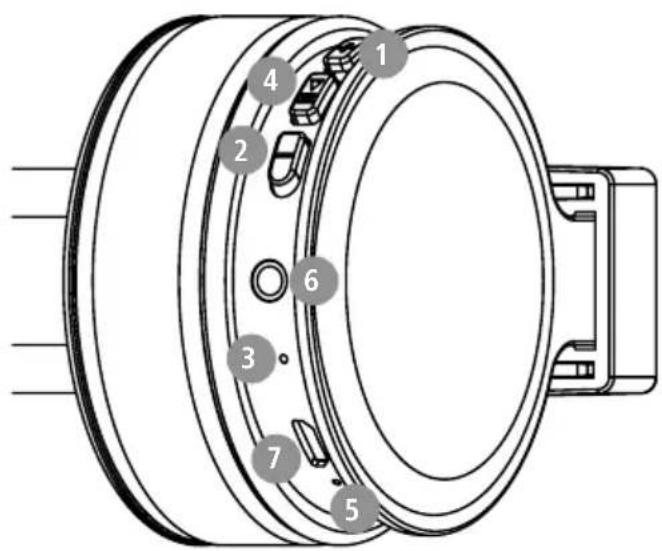
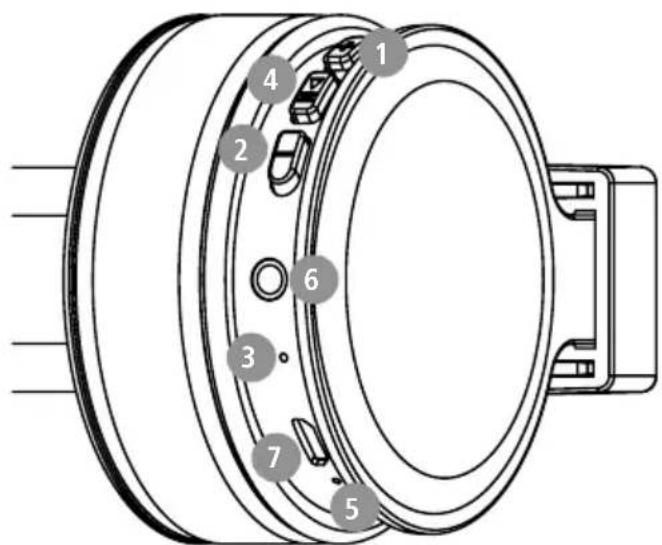
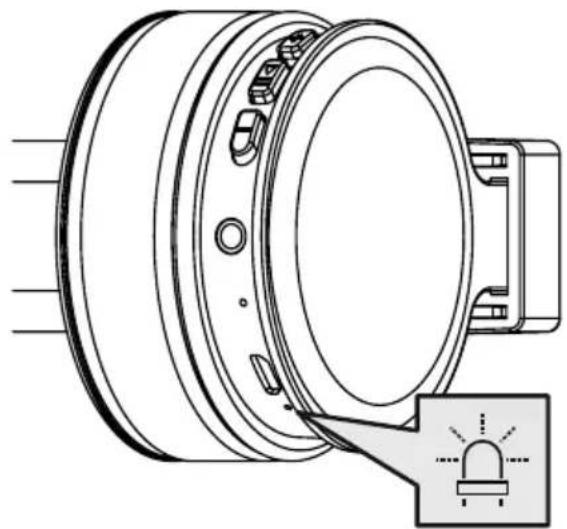
Controls and displays
Take your time and read the following instruction. + button
and information completely. Please keep these 2. - button
instructions in a safe place for future reference. f. Microphone
you sell the device, please pass these operating 4. Multi-function button (MFB)
instructions on to the new owner. 5.Status LED
-
Audio input (3.5 mm)
-
Micro-USB connection
1. Explanation of warning symbols and notes
Warning

This symbol is used to indicate safety instructions or to draw your attention to specific hazards and
Note

This symbol is used to indicate additional information or important notes.
2. Package contents
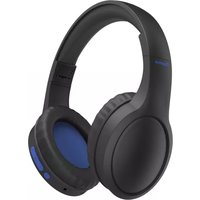
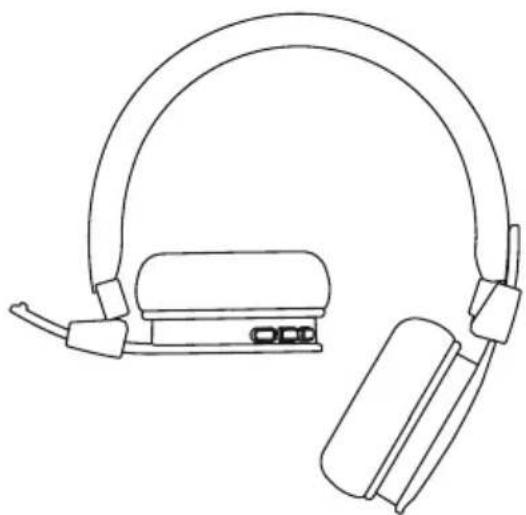
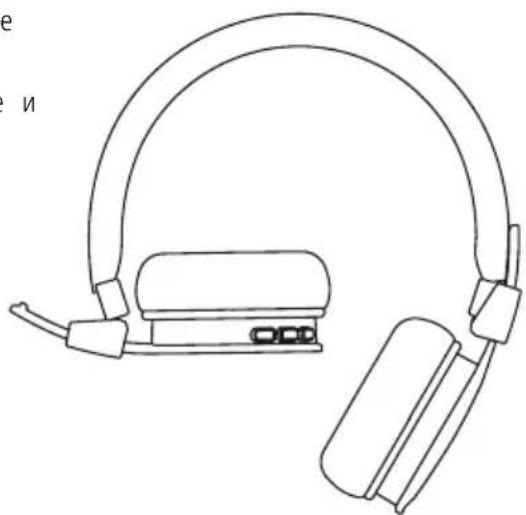
1x "Freedom Lit" Bluetoston-ear headphones
1x micro-USB charging cable
1x quick guide
1x warning and safety instructions

3. Safety instructions
The product is intended for private, non-commercial use only
- Use the product only for the intended purpose.
- Children should be supervised to ensure that they do not play with the product
- Do not use the product in areas in which electronic products are not permitted
- Do not attempt to service or repair the product yourself. Leave any and all service work to qualified experts
- Do not open the device or continue to operate it becomes damaged
- Do not bend or crush the cable.
- Do not drop the product and do not expose any major shocks.
- Dispose of packaging material immediately in accordance with the locally applicable regulations.
- Do not modify the product in any way. Doing voids the warranty
- Protect the product from dirt, moisture and overheating and use it in dry environments only
- Do not use the product in the immediate vicinity of heaters, other heat sources or in direct sunlight.
- Only use the article under moderate climatic conditions.
- As with all electrical products, this device should be kept out of the reach of children
- Do not operate the product outside the power limits specified in the technical data
- Do not use the product in a damp environment and avoid splashing water
While driving a car or using sports equipment, do not allow yourself to be distracted by your product and keep an eye on the traffic situation and your surroundings.
- The battery is permanently installed and cannot be removed; dispose of the product as a whole in accordance with the statutory regulations
- Do not incinerate the battery or the product.
- Do not tamper with or damage/heat/disassemble the batteries/rechargeable batteries
- Do not use the product during the charging process!
Warning - rechargeable battery
- Only use suitable charging devices or USB connections to charge the product.
- Do not use defective chargers or USB ports and do not attempt to repair them.
- Do not overcharge the product or allow the battery to completely discharge.
- Avoid storing, charging and using in extreme temperatures and at extremely low atmospheric pressures (such as at high altitudes).
it charge regularly (at least quarterly) during periods of prolonged storage.
Warning - magnets


- This product generates magnetic fields. Persons with a cardiac pacemaker should consult a doctor before using this product, as the pacemaker's proper function could be affected.
- Do not store bank or similar cards with magnetic strips near the charging box or earphones. The data on the cards could be damaged or completely deleted.
Warning - high volume

High sound pressure!
- There is a risk of hearing damage.
To prevent any loss of hearing, avoid listening at loud volumes for prolonged periods.
Always keep the volume at a sensible level. Loud volumes, even over short periods, can cause hearing loss.
Using this product limits your perception
of ambient noise. You should
therefore not drive
or operate machinery while using them.

4. Switching on/off
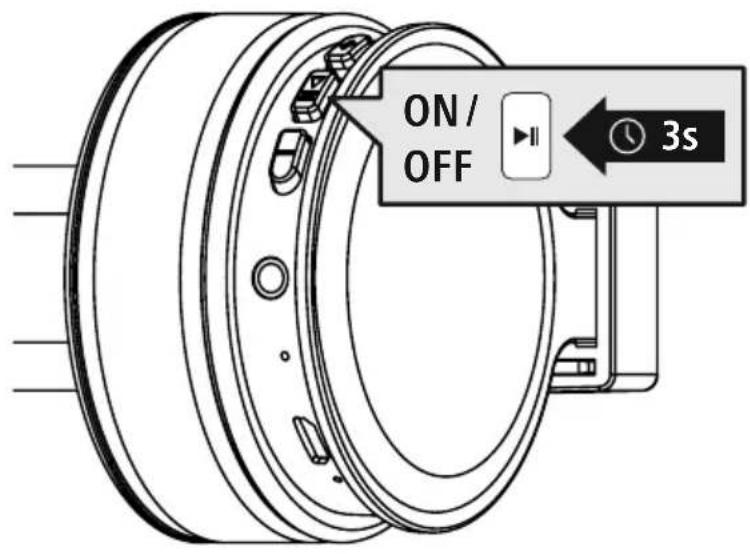
Press the MFB button (4) for around 3 seconds until a signal tone is heard and the LED flashes blue.

To switch off, press the MFB button (4) for around 3 seconds until a signal tone is heard. the LED (5) flashes red and then goes out.
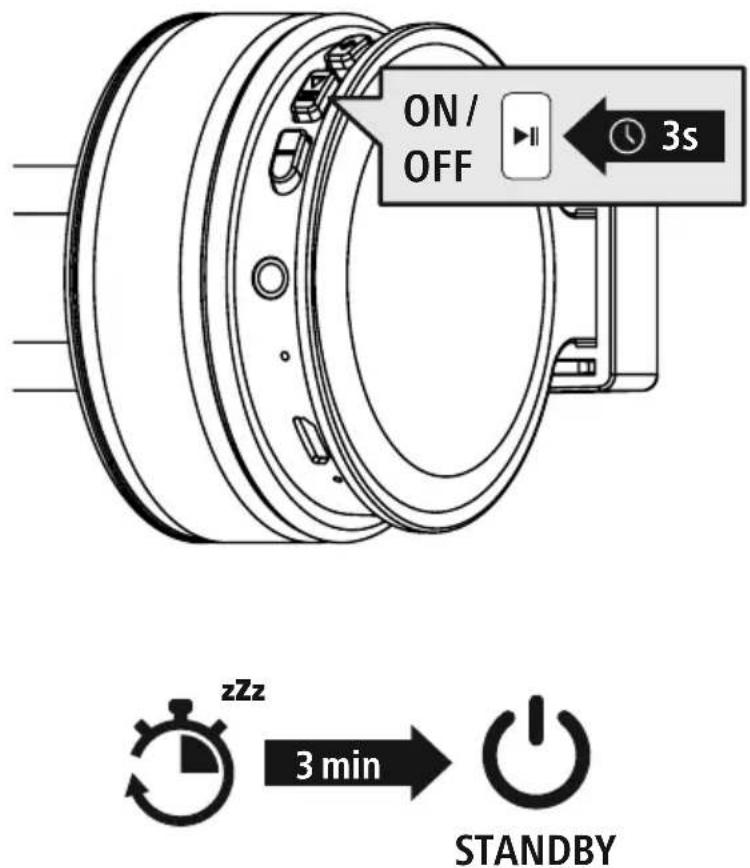
Note - Automatic switch-off of the headphones

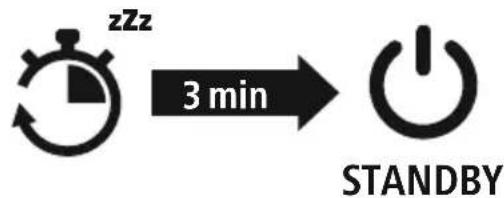
The headphones are equipped with an automatic switch-off mechanism. If there is no connection to your device within 3 minutes, they switch off automatically.

5. Charging
Fully charge the headphones once before using them for the first time.
Switch off the headphones and connect them
Ensure that the headphones are switched off before charging them.
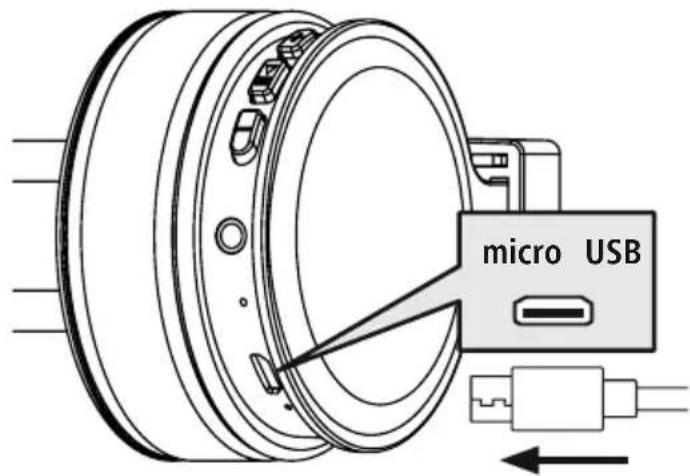
Connect the USB charging cable included to the charging socket (7). Connect the free plug on micro-USB charging cable to a suitable USB charger. To do this, consult the operating instructions for the USB charger you are using.
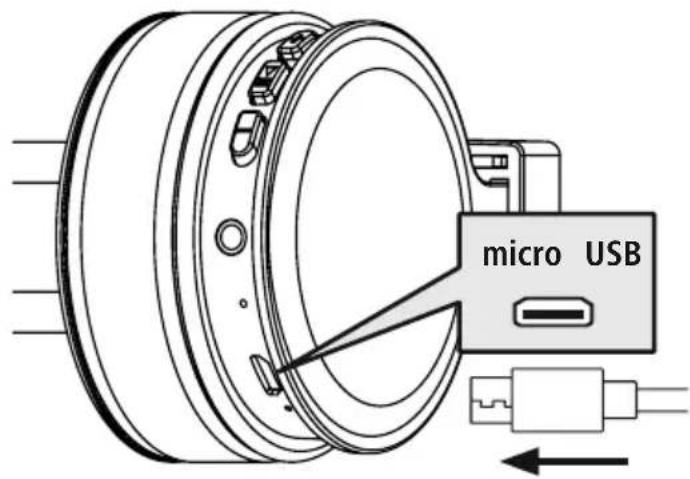
2 Charging process for the headphones
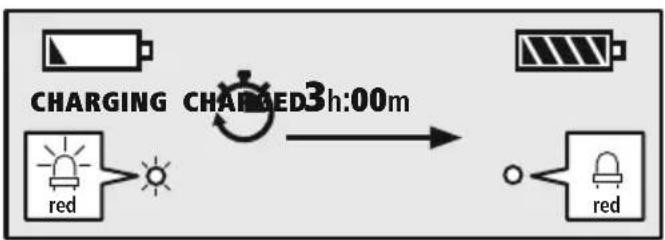
The LED (5) lights up solid red during the charging process.
Once the charging process is complete, the LED (5) goes out.
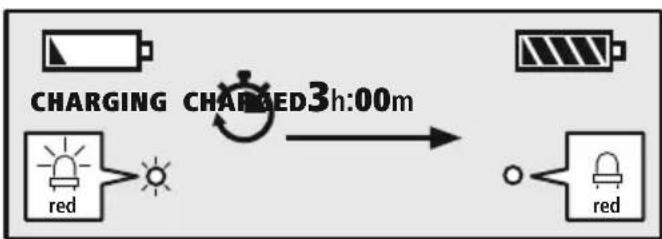
It can take up to 3 hours for the battery to be fully charged.
3 Battery capacity
When the headphone battery capacity is low, the LED (5) flashes red and a signal tone is hea
Note
During the charging process, the Bluetostnction is automatically disconnected.

6. Bluetooth pairing
Note - Pairing

- Make sure that your Bluetooth device is switched on and that Bluetooth activated.
- For more information, please refer to the operating instructions of your device.
The headphones and the device should not be more than 1 metre apart. The shorter the distance, the better.
Switch the headphones on using the MFB key (4).
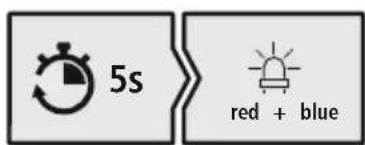
1 Check the status of the status LED (5) and the signal tone
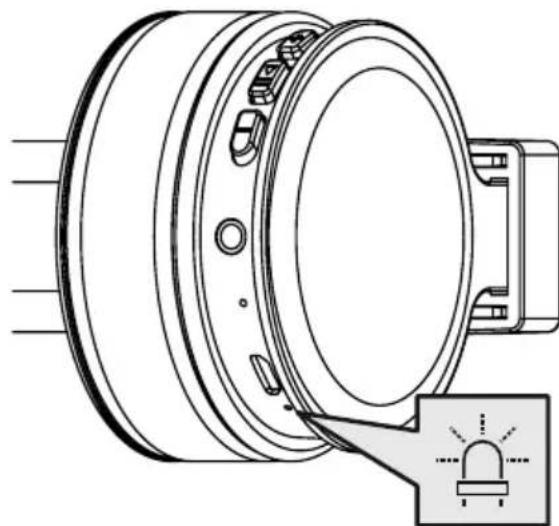
If the LED (5) is flashing alternately and a signal tone is heard:
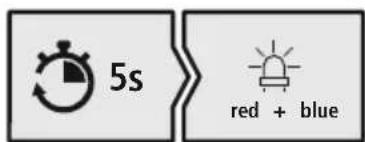
Headphones searching for a Bluetooth connection.
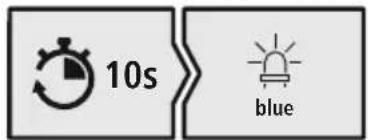
If the LED (5) is flashing and a signal tone is heard:
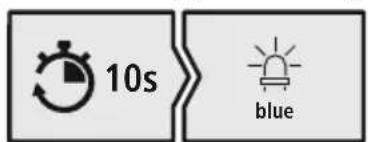
The headphones are already paired with a Blutdetoe.
Search using your device for the headphones (only required on the first connection)
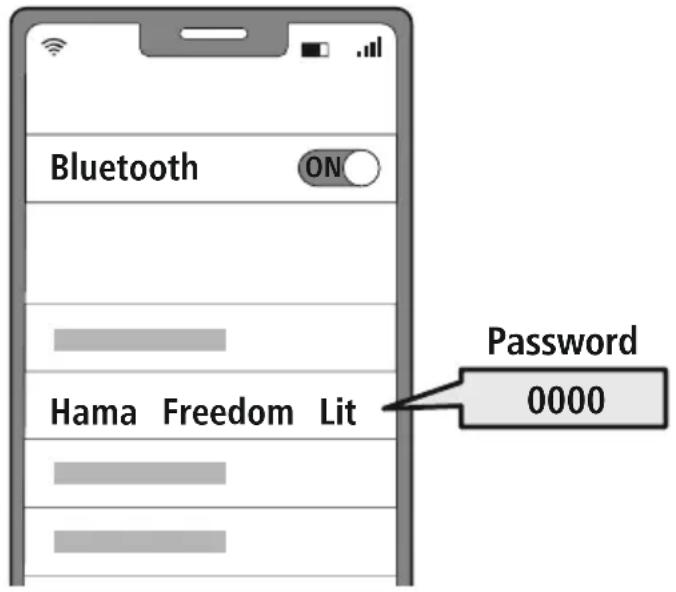
Open the Bluetooth settings on your device and wait until the list of found Bluetooth shows Hama Freedom Lit.
Select Hama Freedom Lit and wait until the headphones are shown as connected in your device's Bluetooth® settings.
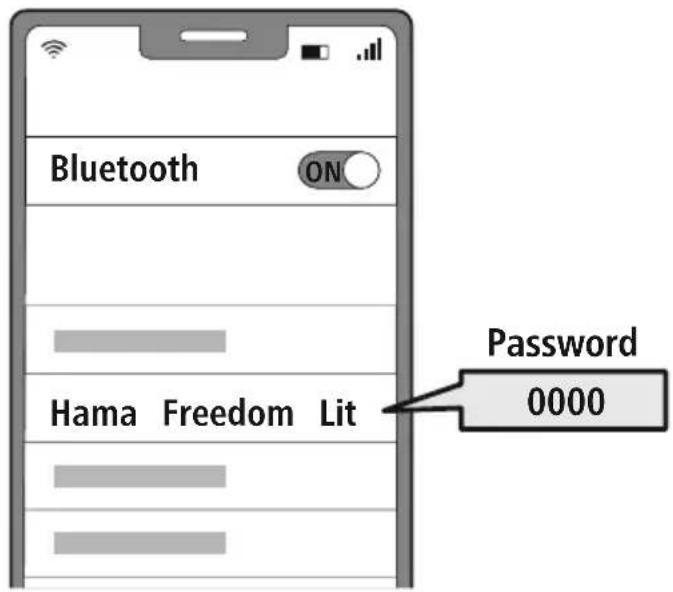
Note - Bluetoothpassword

Some devices require a password in order to connect to another Btdewiceth
- If your device requests a password to connect to the headphones, enter 0000.
3 Disconnecting the Bluetoothconnection
Disconnect the headphones via your device's Bluefoxttings.
7. Controls
Note

- Please be aware that your terminal device must support some functions if they are to be used.
- For more information, please refer to the operating instructions of your device.
7.1 Voice assistant function
Siri/ Google
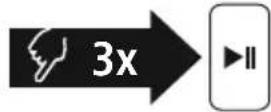
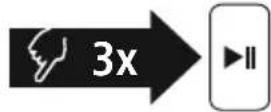
Press the MFB button (4) three times to initiate communication with your Siri or Google Assistant. As soon as you hear a signal tone, your voice assistant is ready to assist you.
Note - Siri

Siri is only available on suitable devices running iOS 5 (iPhone 4s or later) or higher.
Note - Google Assistant

- The Google Assistant is only available on suitable devices running Android 5.0 or higher with Google Play Services, ≥ 1 GB offer memory and a minimum resolution of 720P
- The Google Assistant App must be available on your device and be set as the default voice assistant.
7.2 Hands-free function
It is possible to use the earphones like a hands-free facility for your mobile phone.
1 Make a call
Dial the number directly via your device to make a call.
Accept a call

Press the MFB button (4) to accept an incoming call.
3 Reject a call
Press and hold the MFB key (4) for around 2 seconds or use your device to reject an incoming call.
4 End a call
During the call, press the MFB button (4) once to end the call.
5 Last number redial
Press the MFB button (4) twice to redial the last number.




7.4 Audio playback
Note

Please note that this function is only possible when a Bloch condition is active.
1 Start playback on your device.
Play / Pause

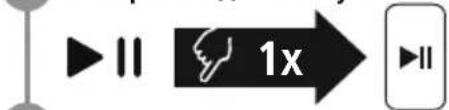
Press the MFB button (4) once to pause or start audio playback.
3 Next track
- Press the + button (1) once to skip to the next track.
4 Previous track

Press the -button (2) once to skip to the previous track.
7.5 Volume control
1 Increase volume
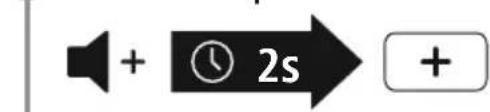
Press and hold the + button (1) for 2 seconds to increase the volume. Once the maximum volume is reached, the announcement "beep beep" is heard.
2 Reduce volume
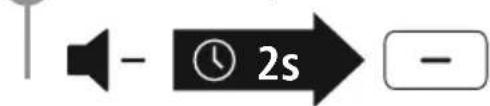
Press and hold the - button (2) for 2 seconds to reduce the volume. Once the minimum volume is reached, you will hear "beep beep".
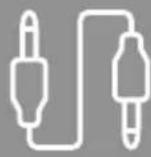
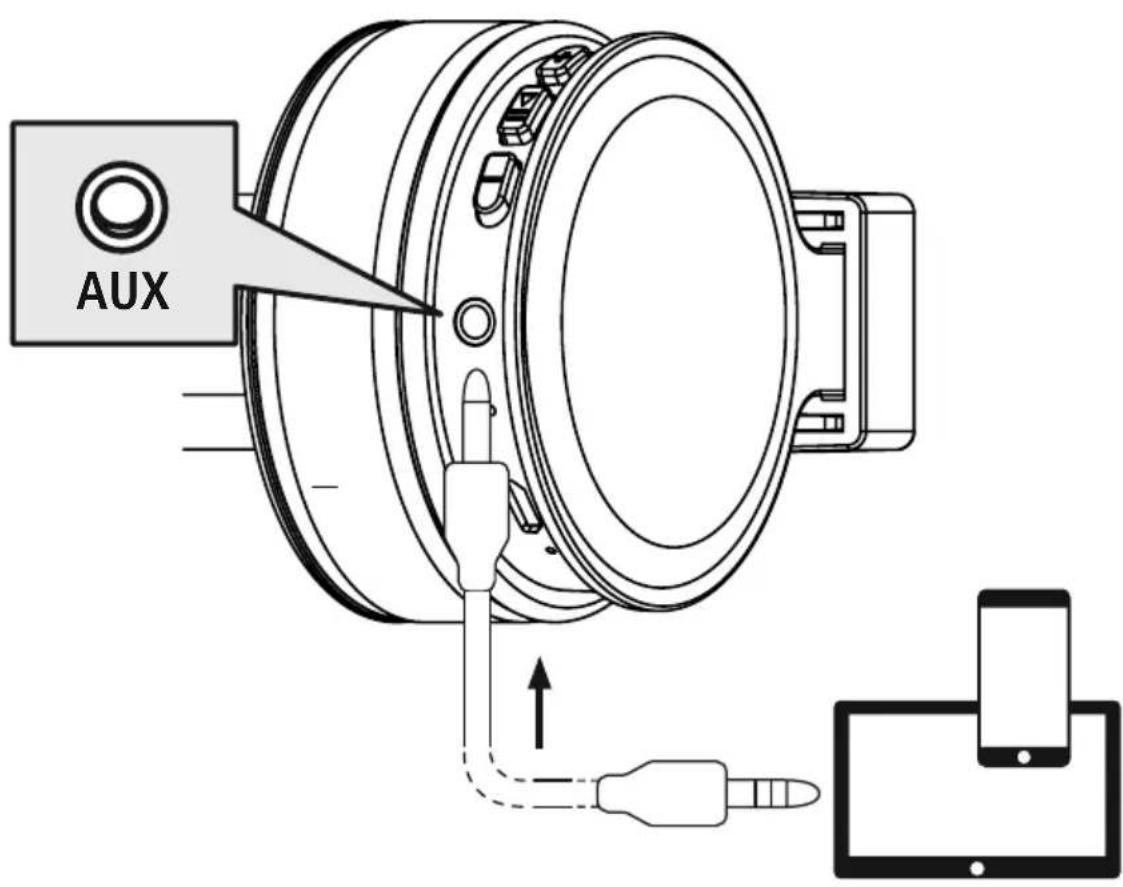
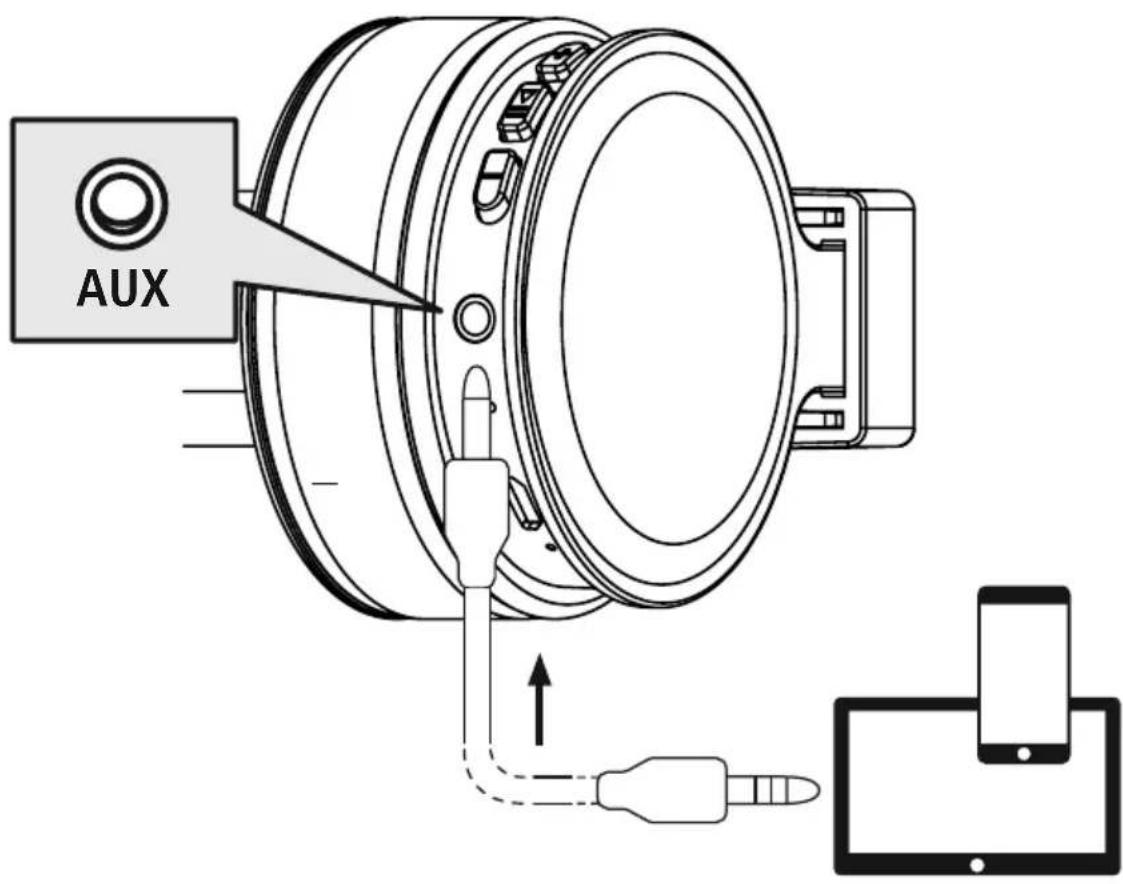
7.6 Audio playback via an audio cable (not included in the package contents) In addition to the connection via Bluetooth can also connect these headphones using an AUX cable. To do this, plug one end into the device and the other end into the audio input (6). When the audio cable is inserted, the Bluetooth connection is automatically disconnected. The headphones now function like cabled headphones.
8. Technical data
| Bluetooth® headphones | |
| Impedance headphones / microphone | 32Ω / < 2.2kΩ |
| Frequency headphones / microphone | 20Hz - 20kHz / 50 Hz - 8kHz |
| Sensitivity Headphones / microphone | 98dB / -42dB |
| Range Max. 10 m | |
| Bluetooth® technology v5.0 | |
| Profiles HFP V1.7 / A2DP V1.3 | / AVRCP V1.6 |
| Transmission frequency 2.4 - | 2.48 GHz |
| Rechargeable battery Li-Po 3.7V | |
| Battery capacity 180 mAh | |
| Power consumption Max. 150 mA | |
| Charging voltage max. 5 V USB | |
| Total weight 120g | |
| Standby / music / talk time | max. 185 d / 8h / 8 h |
9. Care and maintenance
Only clean this product with a slightly damp, lint-free cloth and do not use aggressive cleaning agen
10. Warranty disclaimer
Hama GmbH & Co KG assumes no liability and provides no warranty for damage resulting from improper installation/mounting, improper use of the product or from failure to observe the operating instructions and/or safety notes.
11. Service and Support
Please contact Hama Product Consulting if you have any questions about this product.
Hotline: +49 9091 502-0 (German/English)
Further support information can be found here: www.hama.com
12. Recycling information
Note on environmental protection:
After the implementation of the European Directives 2012/19/EU and 2006/66/EU in the national legal system, the following applies:
Electrical and electronic devices as well as batteries must not be disposed of with household waste. Consumers are obliged by law to return electrical and electronic devices as well as
batteries to the designated public collection points or to the point of sale at the end of their service. Detailed information on this topic is defined in the national laws of the respective country. This preses of the above symbol on the product, operating instructions or package indicates that the product is subject to these regulations. By recycling, reusing the materials or other forms of utilising old devices, batteries, you are making an important contribution to protecting our environment.
13. Declaration of Conformity
CE Hama GmbH & Co KG hereby declares that the radio equipment type [00184084, 00184080, 00184086, 00184087, 00184088, 00184089] is in compliance with Directive 2014/53/EU.
The full text of the EU declaration of conformity is available at the following Internet address: www.hama.com->00184084, 00184085, 00184086, 00184087, 00184088, 00184089-> Downloads.
Frequency band(s) 2402MHz - 2480MHz
Maximum radio-frequency power transmitted 2,5mW E.I.R.P.
6. Bluetooth Verbinding (Pairing)
Hinweis - Pairing

Remarque - Assistant Google

Wskazowska - Google Assistant

Avertizare - Accumulator
In cazul in care LED-ul (5)
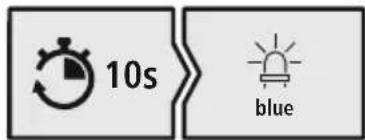
se aprinde intermitent si se aude un ton de semnalizare:
Càstile sunt deja conectate la un terminal Bluètooth
7.1 Funcão Voice Assistant
Siri/ Google
2 Bocnpoun3BedeHne/ny3a
Ondokpatno HaxMnte KhoNky MFB (4),YTo6bl npnoctaHOBNTb Nn 3anyCTntb npourpblBaHne My3bIK.
3 Cnejdyoun TpeK

Дяпор exoаксуюшу Tpeky haxmite KhoNky + (1).
4 Ppebidyun TpeK

ДляперекдакпрдьушемутpekyнжмITEКногк--(2).
7.5 PerynipoBka rpoMkoCTN
1 YBENUeHne rpOMKoCTn
Дя уBERHENЯ ГROMKOCn HaxMITE KHOKNy+- (1) n ydePxNBaIe ee B TeueHne 2 c. ПрdoCTnxHmMaKcMaJIbHoN rPOMKOCTn pa3daetcra YcTHoe onOBeSeHne "beep beep".
2 yMeHbWeHne rPOMKoCTn
pepepa0ky, BToPnHyU pepepa0kny nHa yTuN3aunIO B npyro fOpme, Bbl BHOCuTe BaXhbl
BklaD B OxpaHy OkpykaIoueien Cpebl.
13. CeptnФнкaT COOTBETCTBna
Hactoam Hama GmbH & Co KG 3aBnE, yTo paAnooBopyObaHne Tuna [00184084, 00184085, 00184086, 00184087, 00184088, 00184089] coOTBeTCTByeT tpe6oBaHnM
Директу bI 2014/53/EC. C NonньIM TeKCTOM DeКларцIN O COOTBETCTBIM Tpe6OBaHnM EC MoxHo O3HaKOMITbCЯ 3deCb:
www.hama.com->00184084, 00184085, 00184086, 00184087, 00184088, 00184089-> Downloads.
Dnana3OH/Dnana3OHBi 2402 Mf - 2480 Mf
MaKcMmaIbHaN 33NyaaMaJ MoUHocTb 2,5 MBT E.I.R.P.
BG Pa60THa INHCTpyKzna
Blaorodapm Bn, ye cte n36paan npoynk Ha Hama!
OTeIeBpeMe n npoyete n3qAno CneBaunTe HnCTpyKuHn uKa3aHn. CneT OBa 3ana3eToBa pkoBDCTBO 3a EKCnloatauaHa cNpyHO MAcTO, 3a Da MoXeTe Da npaBte CnpabKn B H npn HykaA.Ako npoJaTe ypeA, npdaite TOBa pkoBDCTBO 3a EKCnloatauaHa HOBn CO6CTBeHnK.
Elenentn 3a ynpabIeHne m HdkaTopn
- ByToH +
- ByToH -
- Mukpooh
MylntduyHKuHaJeh 6yTOH (MFB)
- LED 3a cTaTyc
- AynobxoJ (3,5 mm)
- Micro USB nopT
1. 06aChHeHne Ha npEynpeIteJHn cIMBOIn yka3aHna
PpeynpeKdHne

I3noJ3Ba ce, 3a da 06o3Haayaba yka3aHne 3a 6e3OnachOCT nn 3a da HAcOyn BHHMaHHeTO KbM KOHKpeTHn OnachOCTn n pNCKOBe.
Yka3aHne

N3noJ3Ba ce, 3a Da 06o3Haayaba DOnbHnTeHn HhOpMaun nBaxHN yKa3aHn.
2. CbДьрЖане Ha onaKOBkata
1 x BluetoothcnywaJkn On-Ear "Freedom Lit"
1 x Micro USB ka6en 3a 3apejdahe
1XKpaTKaNHCTpykLm
1 x nHCTpyKcnn 3a npedynpexdene HocnpyraBe Ha 6e30nacHOCTTa

3. Yka3aHnna 3a 6e3onachocT
IpoDyKTBe npEiBnDeH 3a JmHa, HeCTOnaHcKa 6bntoBa ynoTpe6a
- N 3noJ3BaIte npOyKta cMo 3a npeBnIeHaTa ceJ.
-Д eцета Трбва Да Бьдат РднДзор,Здукта
-Ехларантура,Чу Нима Да си ИграгТС пpondуктА
He n3no3BaIte npOykTa B 30Hn, B KOnTo He pa3peWeHH eNeKtpoHH ypeiN
He ce onntBaIte camn da o6cnyxBate nn peMOHTnpaTe npOdykTa OCTabete BCraKaBb texHnuecka NODpBxka Ha KOMnTeHTHInTe CNEuaJIInCTn.
He OTBapAHTe npOyKTA n npn nobpea He npoBbKaBaTe Da ro n3non3BaTe
He npeynbaaTe He npntncKaTe Ka6eJa.
He no3BoJBaIe Ha npOdyKta da napa Hn 3JaarTe Ha cnHn Bu6paun.
- N3xBbPnTe ONaKOBbHnMaTePnJI BeHara CbIaCHO DeNCTBaUHTe Ha MRCTo pa3Nope6n 3a N3XBpJnHe Ha OTnAnBn.
He npabete npomeHn Bypea.Taka 3ary6nt npabo Ha BCraKaBn rapaHIOHH npTeHcnn
- Na3eTe npOdykTa OT 3aMbpcraBaHe, Bnara n nppePraBaHe n rO n3noJ3BaIte cAmo B cyxN NOMeueHn.
He n3noJ3BaIte npOdykTa B HenocpeIcTBeHa 6JIIM3OCT DO OTONJIteJIHn yPeDN, IpyrN N3TOUHNi Ha TOnNIHa IIN Ha DInpeKTHa CJIbHueBa CBETNIHa
-ИЗПОЛЗВАЕпюдУТССМОпи УМЕЧИ KЛIMМATУЧИ YСЛOBИ
I Odo6Ho Ha BCnKNe eKeKtpnueckn npOyKtn, To3n npOyKT He 6nBa Da nonaDa B pbTe Ha deua!
He n3no3BaIte npOyKta N3BbH HerOBHTe rpaHnHa MoHocTtA, NOcOeHN B TEXHueCKNTe DaHHN
He n3no3BaIte npOyKta BbB BnaJHa cpeJa n36BaIte BOHN pBcKn
- По Врeme на nbTyBaHTo c MmC nJIn cnOpTeH ypeД He pa3peWsaBaIte Da 6bJeTe OTKIOHЯBaHn ot Baunr npOdyKT n BHMaBaIte 3a noLoXeHMeTO npN DvIXeHne n BaUata OkJHa cpeJa.
- AkymylatopHata batepe n e HenoDbnKHO BpadeHa n He Moxe da ce Maxa, N3XBpIeTe npOyKa KaTo cNoCnped 3aKOHOBtep pa3npoe6n
- He xBbPnIe 6aTepeTn nn npOyKa BOrbH.
He npomehnTe n/nn He dephiopmaite/ HarpraBaiTe/pa3rno6baIte akymylatopHnte 6atepn/6atepuinte.
He n3noJ3BaIte npOdykTa no BpeMe Ha 3apejdahe!
Ppeynpexdene -BaTepey

- 3a 3apekdahe n3noJ3BaIte cAmo noXOJaU3n3apAHN yCTpoNCTBa nn USB n3BOuN.
- По пинци He n3noJ3BaIte DepeKTHn 3apAHH yCTpoiCTBa IIn USB n3BODn Hc ce ONITBaIte Da Tn nonpaBATE.
a He no3B0JBAIte npOyKta da ce 3apekda NOBeue ot Heo6xOIMOTO nIN da ce pa3pekda Hnblno. - N368raBaiTe CbXpaHeHne, 3apeKdaHe nN3noJ3BaHe npn ekTpeMn TemnepaTpyn3KIOUHTeJIHO HNCO HaIraHe Ha Bb3Dyxa (kato HanpImep Ha roJeMn BvCOuHN).
- Ppi no-npOdbIjxHteJHo cbXpaHeHne r03apexJaTe nepnoDnUHO (nohe BeiHbX Ha Tprn Meceua).
PpeynpexkdeHne - MarHnTm


IpoodykTbT reHepnpa MarHHTn noJeta. IInuata CbC cbPdeHn CTmUyIaTOPn Tp8Ba Da ce KOHCyIITnpat C Jekap npedn yNtpe6a Ha npOdyKTA, Tb KATO cyHKunraHa cbPdeHn CTmUyIaTOP moKe da 6bJe HApyuSha.
ECnnn Dpyrno noo6n Kaptn C MarHHTn He nBa da ce cbxpaHbAT B 6n30CT Do 3apndHOTo yctpoNCTBO nn CnyuAaKnte. DaHHnte ot KapTata Morat da 6bdat NOBpeHn nn n3tpNTn.
PpeynpexKeHne - cnJeH 3ByK

- TOnlmo aKcTnHnHaHe!
CbueCTByBa onaCHOCT OT yBpeXdaHe Ha cnlyxa.
3a da 6bne npedotBpateHa 3ary6a Ha cnyxa, n36raBaIte cnuShaHeTo Ha cnJeH 3ByK 3a nnblr nepnoD OT BpeMe. - PoiDlbpxKaIte CnJaTa Ha 3ByKa BnHaRn Ha pa3ymHO HnBO. TOnMaTAt CnJa Ha 3ByKa MoKe - DOpN n npn MaKApnoBbXHTeHOCT - Da IOBeNe Do yBpeXDaHn Ha CnYa.
- YnOtpe6aTa Ha npOyKta orpaHnUaBa Bb3npEmaHTo Bn Ha shymoBe ot okJHaTa cpeJa. 3aTOba no Bpeme Ha n3noTbaHTo He ynpabIbAaTe ppeB03Hn CpeDTo NmMaunHn.

4. BkIIOUbaHe/ɪnKJIIOUbaHe
ON
HaTnchete 6yToHa MFB (4) 3a okono 3 cekyni, okaTo npo3ByuN 3BykoB cnHan n CBeToNDobT (5) 3anoHe da Mra B CnHbO.
OFF
3a n3KnHouBaHe HATnCHTe 6yToHa MFB (4) 3a OKoNo 3cekyHn, IDOKaTO npO3ByuN 3ByKO BcHnI CBeTOnIONbT (5) 3anOChE da MmRa B UepBeHo, CneJ KOeTO n3raChe.
YKa3aHne - aBtOMaTmUHo n3KJIIOUBaHe Ha cnywaJKNITE

Cnyuankne pa3nojarat c yHKnna 3a aBtOMaTHNo n3KnOuaHe. Ako B pAMknte Ha 3 MInHyTn He ce OcbIeCTBN Cbbp3BaHe C KpaHOTo yCTPOINCTBO, Cnyuankne aBtOMaTHNo Ce N3KIOUbaT.

5. 3apexkahe
Ppei npbpaTa ynoTpe6a 3apeTe HnblHo CnyuAknTe.
1 N3KIOUOBAHe n Cbbp3BaHe Ha CnywaJKNITE
Ipeu 3apekdahe Tpa6Ba da ce yBepnte, ye cnyaJKeTe ca nKIOueHn.
BknIOueTe npnIOxKeHn USB ka6eJ 3a 3apeXdaHe KbM rHcE3dTo 3a 3apeXdaHe (7).CbpxKeTe
Cbo6oHnHa Keep Ha Micro USB Ka6ena 3a 3apeXdahe KbM noDxOJaIO USB 3apAHO
yctpoiCTBO.3a ceIta cna3BaIte nHcTpyKuIra 3a o6ClyXbaHe Ha n3noJ3BaHOTo USB 3apJdHO yctpoiCTBO.
2 3apekdaheHa cnywaanknTe
CbeToIOHObT (5) CBETI NOCTOARHNO B UepBeHO No BpeMe Ha 3apexKaHeTO.
Cne3aBpWbAeHa 3apeXdaHTo CBTeOnNoTb (5) n3raCBA.
IbHTo 3apexKaHe Ha akymlyaTopHaTa 6aTepy MoKe Da OTHeMe Do 3 Yaca.
3 KanauTet Ha akymylaTophata 6aTepeyra
Ipn HnCKo HnBO Ha 3apraHa akyMylatopHata 6aTepeHr Ha cnyuankte CBeToIOoBt (5) Mra B cepBeHO np03Byuaba 3BykoB cnHaJ.
yka3aHne

No Bpeme Ha 3apeKdaHTo Bluetobpb3kata ce n3KnIOyBa aBtOMaTnHO.
6. Bluetooth® Bpb3ka (CDBOBAHe)
Yka3aHne 3a cDBoBaHe

- YBepete ce, Ye BaSeTe noDbpxaIo Bluetooth® kpaHNo yCTpOietBO e BKnIOyeHO n Ye BluTooth aKTNbPapH.
- 3a Ta3n cIe n C7BaIte yKa3aHnIaT o TpbKOBoDCBTO 3a yNtpe6a Ha BaIeTo KpaHo yCTpOInCTBO.
Cnyuankte n KpaHOTO yCTPOIcTBo Tp86Ba Da 6bDaT Ha pa3CTOAHne Iod 1 MeTbp. KonKOTO no-MaIKo e TOBa pa3CTOAHne, ToNKOBa No-Do6pe.
BkHouTe cIywaKnTe C 6yToH MFB (4).
1 IpoBepTe CbCToHHeTo Ha CBeToDnOda 3a CtaTyc (5) n 3ByKOBnCnHaJ
Korato cBeToaNoBt (5) Mrra nocJeIOBaTeJHo n npo3ByaBa 3BykoB cnHaI:
CnywaanKnte Tbpctn BluetoothBpb3ka.
Korato cBeToaNoBt (5) mra n npo3ByaBa 3BykoB cnHaJ:
Cnyuankte Buee ca Cbbp3aHn C KpaHNO yCTPOIcTBO C Bluetooth®.
2 Tbpcete cnyuanknte c BaeweTo KpaHOb yctpoiCTBO (Heo6xOIMo e caMo npn nbpBo yctaHOBAHe Ha Bpb3Ka)
OTbopTe HacTpoKnTe 3a BluetoHa BaWeTo KpaHOb yCTpOcTB0 n N3uKaIe, DOKaTO B cnCbKa Ha HamepeHnTe BluetoHcyTpoCtBa He ce nokaKe Hama Freedom Lit.
H36epe Hama Freedom Lit n 3a KaTe, dKaTo CnyaKNe He ce nokKaTa KaTO CBp3aHn B NaTpoKnTe 3a Bluetooth Haaweto KpaHo yctpoNCTBO.
Yka3aHne - Bluetooth napola

HЯко Краину устюп CTBA ce hyждяг OT napona 3a Habстюкata Ha Bpb3kata C pyro Bluetooth® устюCTBO.
- 3a Cbbp3BaHe CbC CnyuJaKite BbBedeTe napoJata 0000, KOrato 6bJeTe noKaHeH/a 3a ToBa ot BaWeTo KpaHNo yCTpoiCTBO.
3 IpeKbcBaHe Ha BluetoothBpb3kata
IpeKbcheTe Bpb3kata Ha CnywaJknte OT HacTpoiKnTe 3a BluteothBaWeTo KpaHoyctpoiCTBO.
7. Elenentn 3a ynpabJeHne
Yka3aHne

- 06bphete BHMaHne, ye noDnBpXaHeTo Ha HApKoN OT cyHKcUNTe 3aBNCn OT BaSeTo KpaHNo yCTpoNCTBO.
- 3a ta3n c9e n cna3BaIte yka3aHnraTa o pkbOBOdCTB0To 3a ynoTpe6a Ha BaSeTo KpaHo yctpoiCTBO.
7.1Функцязглacob acncteHT
Siri/ Google
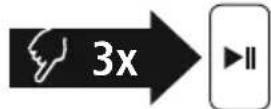
HaTnCHeTe TpN nbTu 6yToHa MFB (4), 3a Da cTApTpate KOMyHnKaunc BaaNra Siri nn Google AcnteHT. Korato yyeTe 3ByKOB CnHaJ, Baunr rnaocb acnteHT e rotob da Bn nomara.
Yka3aHne - Siri

Siri ce npednara cmo Ha noDxOJaK paHn ycTpoiCTBa ciOS 5 (ot iPhone 4s) nIIN no-BncoKa.
Yka3aHne - Google AcnCTeHT

Google Assistant ce npednara cmo Ha noDxOJaKpaHn yCTpoNCTBa C Android 5.0 nnn noBucoka c ycnyra Google Play, >1.5GB cbo6oHa naMeT mHmMaHa pa3dJIteHa cnoc6HOCT Ha ekpHa 720P.
- PpnooxeHnTo Google Assistant TpaBb Da e HauuHb BaWTo KpaHOb yctpoCTBO n da e HaCTpoEHO KaTO CtAHdApTeH rnaocB acnCTeHT.
7.2Функця"cbo6oDn npue"
CbueCTByBa Bb3MOxHocTtA da n3nOJ3BaTe cIyuaJknte KaTo yctpoiCTBO "cB6oJHn pIe" 3a Baun MoBnJen TeJefoH.
06axdane
HahepeHomepa Hapabo ot Baaweto KpaHOn yctpoNCTBO,3a da Hapabnte 0baxdaHe.
2 PnpemHa NaOBNKBaHe
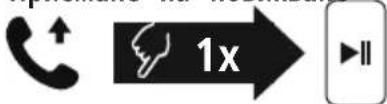
HaTnchete BeiHbX 6yToH MFB (4), 3a da npneMeTe BxoDrao NOBnKBaHe.
3 OTka3BaHe Ha NOBnKBaHe
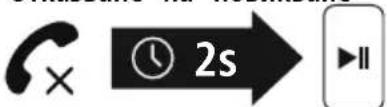
HaTnCHete n 3aIpBxTe 6yToH MFB (4) 3a OkoJIO 2 cekyHnn nn n3noJI3BaIe BaIeTo KpaIIHO yCTpoIcTBO, 3a daOTkaxTe npIeMaHTo Ha BXOJaIoo obAxJaHe.
4 PnKIOUbaHe Ha NOBkBaHe
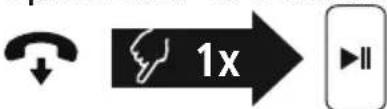
IbpeMe Ha pa3roBopa HATNCHeTe BeHbX 6yToH MFB (4), 3a Da npNKIOUHTe ObaXdaHeTo.
5 NobTapaHHe Ha H6upaHaTeO
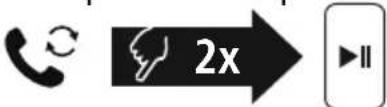
HaTnchete DbA nbTu 6yToH MFB (4), 3a da Ha6epTe OTHOBO nocJeHnra H6upan Homep.


7.4 Bb3npo3BexkaHe Ha aydno
Yka3aHne

06bphTe BHMmaHne, ye Ta3n cyHKun e Bb3MOxHa cAmo npn aKTHBHa Blaepsooth
CtaptnpaTe Bb3npOn3BexKaHTo Ha aydno Ha BaSeTo KpaHNo yCTpoNCTBO.
Bb3npoun3Bexkahe/Naay3a
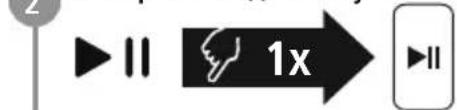
HaTnchete BeHbX 6yToH MFB (4), 3a da cnpete nn 3a da CTaptnape Bb3npOn3BexJaHeTo Ha aydno.
3 CneBbauo 3aRnabne

Hattchete BeHHbX 6yToHa+- (1),3a da npceKoHTe Ha cneBaTO 3aIabnE.
4прдишно 3arлави

Hattnche Te BeHbX 6yToHa -- (2), 3a da npceKoHTe Ha npednshoto 3arnaBne.
7.5. Perynnape Ha cnnaTa Ha 3Byka
1 YBeJIuHaBaHe Ha cIJaTa Ha 3ByKa
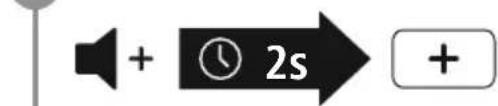
HaTnchete 3aApbXte 6yToHa+-(1)3aOKoNo 2 cekyHn, 3a Da yBelenuTe CnIata Ha 3Byka. PpN DoCTnraHe Ha MaKcImaHnata Cnla Ha 3Byka ce CyBa cbObueHneTo
"beep beep".
HaMaJaBaHe Ha cnlaTa Ha 3Byka

HaTnCHETe 3aIpbXTe 6yToHa -- (2) 3a OKoNo 2 cekyni, 3a Da HAMJIte CInata Ha 3Byka. PpN DoCTnraHe Ha MNHIMaHnata CIna Ha 3Byka ige yyeTe "beep beep".
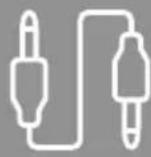
7.6 Bb3npo3Bexkahe Ha aydno npes aydnoka6en (He e BKIOueH B CbIbpxkHaNeTo Ha OnaKOBkata)
Ocbenчpe3 Bluetooth moxe Te da CbpxeTe Te3n CnywaKn n C nomoUta Ha AUX Ka6en. 3a Ta3n ueBkIIOHte eHNn KpaB KpaHOTo yCTPOJCTBO, a Dpyrna-B ayDNOBXoJa (6). Ppi BkIIOvBaHe Ha ayDnOKa6ena Bluetooth BPb3kata ce npekbcba ABTomuHNo. Cera cnYwAanKeTc FyHKUHOHpAT KaTO Ka6enHn CnywaALKn.
- TexHnueckn daHHN
| Bluetooth® с unlалки | |
| Инselfанс с unlалки/Мнкрфон | 32 Ω/< 2,2 kΩ |
| Чеб耗费лесов/Мнкрфон | 20 Hz - 20 kHz/50 Hz - 8kHz |
| Чв BSTВITELNOCTС unlалки/Мнкрфон | 98 dB/-42 dB |
| Оьхват Мар. 10 m | |
| Bluetooth® Тхнология v5.0 | |
| Прфели HFP V1.7/A2DP V1.3/AVRCP V1.6 | |
| Чебota на predecessor 2.4 - 2.48GHz | |
| Батерия Li-Po 3,7 V | |
| Кацитек на akumу latорна вaitерия | 180 mAh |
| Консу мача на тok Мар. 150mA | |
| Зарадно нальожения Мар. 5 V USB | |
| Тер lo obшо 120g | |
| Реким на готовноct- /Вре'mе на музika/teleфонтпраztrobори | мар. 185 д/8 у/8 у |
9. TexHnuecko obcnykBaHe n noDpBxKka
IOnuCTBaIe To3n npOyKT cAmO c JeKO HABJaxHeHa KbPna 6e3 BlnaCInHKn He n3NoJ3BaIe arpeCnB noUcTBAu npenapatn.
10.ИЗкlioquBaHe Ha OTROBOPHOCT
Hama GmbH & Co KG He noema OTROBOPHOCT uIraHua 3a NOBpeNi, KOITo ca pe3yIiTat OT He npabuHa IHCTaJIaUa, MOHTaX uYnoTpe6a Ha IpoDyKta uNl OT HcNa3BaHe Ha pbKOBOdCTBOTO 3a EKcPiLoatauHa uNl Ha yKa3aHnTa 3a 6e3ONaCHOCT.
11. CepBn3 n noDnpbXka
PnBbnpocn OTHOCHO npOyKTA,MOJI,OBbpHeTe Ce KbM npOyKTOBtKe KOHCytTaHTn Ha Hama.
Tpeua 9091-0 (Hemckn/aHrnnckn)
Доьнштейна Иформача за подрьжкata можete на hamepinte tyk: www.hama.com
12. Yka3aHnna 3a n3XbpynHe
Yka3aHne OTHoCHO 3aunTaHa Ha OKoJHaTa CpeJa:
OT MOMENTa Ha npilaraheTo Ha ebponecknte dinpekntbN 2012/19/EU n 2006/66/EO B HauNoHaJIHOTO npabo HA CbOTBeHTnTe CTpaHH Baxn CJeIHOTo: EneKtpuecknTe n ekeTpOHnTe ypei n batepnTe He 6nBa da ce n3xBpIaT c 6nTOBnTe OTnadbu. Iotpe6nTeJrT e nnBxhen no 3aKOH da BbpHe ekeTpuecknTe n ekeTpOHnTe
ypei n 6bapeinTe B kpa Ha texnHa eKcnloataaOnHe Cpok Ha n3rpaedHte 3a ceIa o6eCTBeHn
nykTObE 3a c6bupane Ha OTnAbuN uJn Ha TbproBckn O6ekt. Ioppo6HocHTe no Bbnpoca ca
perIamentupaHn B 3aKOHOaTeJIcTBOTo Ha CbOTBETHATA CTpHa. CmBOJbTV Bbpx npOdykTa, ynbTbaHeto
3a ynoTpe6a uJn OnakOBkata HacOyBa KbM Te3n pa3nope6n. Ype3 peuKlnpaHeto, npepa60Tkata Ha
MaTePnaIte uJn dpyn fOpMn Ha ONoJ3OTBOPraBaHe Ha cTapnte ypei/6aTePnn Bne DOnpnHacTe 3a
3aunTata Ha Na7aTa OKolHa cpea.
13.ДeКларачиЗa CBOTBETCTBNE
C HacToaTo Hama GmbH & Co KG DeKnappa, ye TnT ha paAnoo6OpyDbaHeTo [00184084, 00184085, 00184086, 00184087, 00184088, 00184089] CbOTBeTCTBa Ha DInpeKtNa 2014/53/EC. ПынгтTekT ha EC DeKnapaunraTa 3a CbOTBeTCTBne e Ha pa3NoIoxHne Ha cnHnna INHTepHet aIpec:
www.hama.com->00184084, 00184085, 00184086, 00184087, 00184088, 00184089-> Downloads.
YeCToTHaJeHTa/YeCToTHnJeHTn 2402MHz-2480MHz
MaKcMmaJIHa n3JIbYBaTeJIHa MoUHocT 2,5 mW E.I.R.P.

GR O8nyiec xpno
Euyapiotoue nou eiléate eva npoiov tnc 2toixia xepiooou kal vdsieic
Hama!
- +
ApXiKa, aΦIepωTe λiyo XpOvo yia va δiaβaσeTe
- k 0 -
tic napakatowoyieKai unoedeixie.2Tn
- Míkpóφωvo
ouvexia, ouaTe to eYxepidio odnyiw oE
Ynóδειξη - Google Assistant