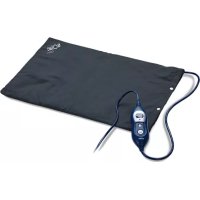
CT8639 - Electric cushion SOLAC - Free user manual and instructions
Find the device manual for free CT8639 SOLAC in PDF.



| Product Type | Electric Heating Cushion |
| Brand | Solac |
| Model | CT8639 |
| Power Supply | Mains 220-240 V ~ 50/60 Hz |
| Number of Heat Levels | 4 (1 to 4) |
| Automatic Shut-off | After 120 minutes of continuous operation |
| Maximum Washing Temperature | 30°C, gentle cycle |
| Tumble Drying | Not allowed |
| Removable Cover | Yes, machine washable at 30°C |
| Usage | Household use only |
| Minimum Age of Use | 3 years (by an adult or under supervision) |
| Safety Features | Automatic shut-off, safety indicator light, overheating detection |
| Cleaning the Control | With a damp cloth, do not immerse |
| Electrical Connector | Reference 1020035 |
| Repairability | Approved technical service only |
| Warranty | In accordance with applicable legislation (see Solac website) |
Frequently Asked Questions - CT8639 SOLAC
User questions about CT8639 SOLAC
0 question about this device. Answer the ones you know or ask your own.
Ask a new question about this device
Download the instructions for your Electric cushion in PDF format for free! Find your manual CT8639 - SOLAC and take your electronic device back in hand. On this page are published all the documents necessary for the use of your device. CT8639 by SOLAC.
USER MANUAL CT8639 SOLAC
natural_image
Three black medical or fitness equipment cases with sensors and earphones, no visible text or symbolsALMOHADILLA ELÉCTRICA
INSTRUCCIONES DE USO
ELECTRIC CUSHIONS
INSTRUCTIONS FOR USE
COUSSIN ÉLECTRIQUE
MODE D'EMPLOI

This symbols means that user must to consult instructions thoroughly before use.
Do not use folded or rucked.
Not to be used by very young children (0 - 3 years).
Maximum washing temperature 30°C, mild process.
The control may not be immersed in water. Clean it with a damp cloth.
Many thanks for choosing to purchase a SOLAC brand product.
Thanks to its technology, design and operation and the fact that it exceeds the strictest quality standards, a fully satisfactory use and long product life can be assured.
SAFETY ADVICE AND WARNINGS
IMPORTANT INSTRUCTIONS. RETAIN FOR FUTURE USE.
- Read these instructions carefully before switching on the appliance and keep them for future reference. Failure to follow and observe these instructions could lead to an accident.
- Appliance is not designed for a continuous use or for an extended period. As a security measure, the appliance is programmed to disconnect automatically after: CT8635 – CT8639: 120 minutes CT8680 – CT8690: 90 minutes.
. Only use the appliance with the specific detachable control unit provided (CT8635: 1020034; CT8639: 1020035; CT8680: HB05-028054; CT8690: HB57-052056). -
This appliance is not for professional or industrial or medical/hospital use, it is intended for household use only.
-
This appliance must not be used by persons insensitive to heat or other vulnerable persons who are unable to react to overheating.
- Children under the age of three are not to use this appliance due to their inability to react to overheating.
- This appliance is not to be used by young children over the age of three unless the controls have been pre-set by a parent or guardian, or unless the child has been adequately instructed on how to operate the controls safety.
This appliance can be used by children aged from 8 years and above and persons with reduced physical, sensory or mental capabilities or lack of experience and knowledge if they have been given supervision or instruction concerning use of the appliance in a safe way and understand the hazards involved. - This appliance is not a toy. Children should be supervised to ensure that they do not play with the appliance.
· Cleaning and user maintenance shall not be made by children unless they are supervised.
EN
- Do not store the appliance if it is still hot; allow it to cool down before folding.
· Examine the appliance frequently for signs of wear or damage. If there are such signs, if the appliance has been misused or does not work, return it to the supplier before switch it on again. - When not in use store as explained in “When not in use, store as follows”.
. Do not insert pins. - Do not crease the appliance by placing items on top of it during storage.
. Do not use if wet. - Remove the control before washing. The control must never be submerged in water.
- If the connection to the mains has been damaged, it must be replaced, take the appliance to an authorised technical support service. Do not attempt to disassemble or repair the appliance by yourself in order to avoid a hazard.
- Ensure that the voltage indicated on the rating label matches the mains voltage before plugging in the appliance.
- Connect the appliance to a socket that can supply a minimum of 10 amperes.
- The appliance's plug must fit into the mains socket properly. Do not alter the plug. Do not use plug adaptors.
- Do not force the power cord. Never use the
power cord to lift up, carry or unplug the appliance.
- Do not allow the power cord to hang or to come into contact with the hot surfaces of the appliance.
- Check the state of the power cord. Damaged or tangled cables increase the risk of electric shock.
- Do not touch the plug with wet hands.
- Do not use the appliance if the cable or plug is damaged.
- If any of the appliance casings breaks, immediately disconnect the appliance from the mains to prevent the possibility of an electric shock.
- Do not use the appliance if it has fallen on the floor, if there are visible signs of damage or if it has a leak.
- Do not use the appliance in association with a programmer, timer or other device that automatically switches it on.
- Do not leave the appliance out in the rain or exposed to moisture. If water gets into the appliance, this will increase the risk of electric shock.
USE AND CARE:
- Fully unroll the appliance's power cable before each use.
- Do not use the appliance if the on/off switch does not work.
- Disconnect the appliance from the mains when not in use and before undertaking any cleaning task.
- Store this appliance out of reach of children and/or persons with physical, sensory or reduced mental or lack of experience and knowledge.
- Make sure that the control is not covered during the use.
SERVICE:
- Any misuse or failure to follow the instructions for use renders the guarantee and the manufacturer's liability null and void.
DESCRIPTION
- Pad
- Cover
- Power cord
- Power cord connector
- Pad connector
- Control
EN
a. ON/OFF switch
b. Temperature control switch
c. Automatic safety shut-off pilot light
d. Temperature display screen
INSTRUCTIONS FOR USE
BEFORE USE:
- Make sure that all products' packaging has been removed.
- This appliance has been designed exclusively for heating specific area of the body. Do not use it for any other purpose.
USE:
- Spread the pad out fully, making sure it's not folded or creased.
- Unroll the cable completely before plugging it in.
- Ensure that the electronic connector is properly attached to the appliance.(Fig. 1).
- Connect the appliance to the mains.
- The display screen (d) and the automatic shut-off pilot light (c) will light up for a moment (Fig. 2).
- Turn the appliance on, by using the on/off switch (a).
- The display screen will light up (d) and show temperature position 1.
- If the letter F (CT8635, CT8639, CT8680) flashes on the screen, please refer to section Troubleshooting (Fig. 3).
- Press the temperature control button (b). It will start at level 1. Continue to press the button to increase the temperature up to the maximum level 4 (CT8635 - CT8639) or 6 (CT8680 - CT8690) (Fig. 4).
- As a security measure, the appliance is programmed to turn off automatically after 120 min (CT8635- CT8639) and 90 min. (CT8680 – CT8690) of continuous use. If the appliance is stopped in this way, press the power switch again to reheat.
- Select the desired temperature
ONCE YOU HAVE FINISHED USING THE AP- PLIANCE:
- Turn the appliance off, using the on/off switch (a).
- Unplug the appliance from the mains.
- Clean the appliance.
TROUBLESHOOTING
- If the letter F appears on the display screen,
proceed as follows:
- Check that the power cable connector (4) is correctly inserted into the pad connector (5). If not, press the ON/OFF button (a) and insert it correctly.
- Check that the operating failure is not caused by overheating. To do so, press the ON/OFF button (ai) and allow the pad to cool. Find out what is causing the pad to overheat and eliminate the cause.
- If the appliance stops working, contact an authorised technical service.
CLEANING
- Disconnect the appliance from the mains and allow it to cool before undertaking any cleaning task.
- Clean the equipment with a damp cloth with a few drops of washing-up liquid and then dry.
- Do not use solvents, or products with an acid or base pH such as bleach, or abrasive products, for cleaning the appliance.
- The pad may be washed by hand in warm water (CT8680) and by machine (CT8635, CT8639, CT8690) at a temperature of up to 30°C. Remove the control before washing (Fig. 1). The control must never be submerged in water.
- Dry the product immediately after any cleaning task making sure that the appliance inlet is perfectly dry.
- The pads (CT8635, CT8639) have a removable cover that can be washed by hand or machine at a temperature that does not exceed 30 °C.
- Do not use the pad if the removable cover is not completely dry.
- Never submerge the connector in water or any other liquid or place it under running water.
- It is advisable to wash the cushion and cover only if they are dirty or dusty. If washed too often the product could wear out vey quickly.
WHEN NOT IN USE, STORE AS FOLLOWS:
- Let the appliance cool down before putting it away.
- When the appliance is not in use, keep in a dry place and avoid placing heavy objects on top as they could damage the cables.
- Avoid creases forming. Check the appliance and power cord frequently to make sure they are in perfect condition.
EN
ANOMALIES AND REPAIR
- Take the appliance to an authorised technical support service if product is damaged or other problems arise. Do not attempt to disassemble or repair the appliance yourself as this may be dangerous.
FOR EU PRODUCT VERSIONS AND/OR IN CASE THAT IT IS REQUESTED IN YOUR COUNTRY:
ECOLOGY AND RECYCLABILITY OF THE PRODUCT
The materials of which the packaging of this appliance consists are included in a collection, classification and recycling system. Should you wish to dispose of them, use the appropriate public recycling bins for each type of material.
The product does not contain concentrations of substances that could be considered harmful to the environment.
- This symbol means that in case you wish to dispose of the product once its working life has ended, take it to an authorised waste agent for the selective collection of Waste from Electric and Electronic Equipment (WEEE).
This appliance complies with Directive 2014/35/EU on Low Voltage and Directive 2014/30/EU on Electromagnetic Compatibility, Directive 2011/65/EU on the restrictions of the use of certain hazardous substances in electrical and electronic equipment and Directive 2009/125/EC on the ecodesign requirements for energy-related products.
FRANÇAIS FR
Cher Client,
NIEPRAWIDŁOWOŚCI I NAPRAWA
This product enjoys the recognition and protection of the legal guarantee in accordance with current legislation. To enforce your rights or interests you must go to any of our official technical assistance services.
You can find the closest one by accessing the following web link: http://solac.com
You can also request related information by contacting us by phone.
You can download this instruction manual and its updates at http://solac.com
DE) GARANTIE UND TECHNIS- CHER SERVICE
Unit 25 & 26, San Croy Office Park, Die Agora
Road, Croydon, Kempton Park, 1619
Johannesburg
(+27) 011 392 5652
_
| _
一
1
sOlac

- SAFETY ADVICE AND WARNINGS
- IMPORTANT INSTRUCTIONS. RETAIN FOR FUTURE USE.
- EN
- USE AND CARE:
- SERVICE:
- DESCRIPTION
- INSTRUCTIONS FOR USE
- BEFORE USE:
- USE:
- ONCE YOU HAVE FINISHED USING THE AP- PLIANCE:
- TROUBLESHOOTING
- CLEANING
- WHEN NOT IN USE, STORE AS FOLLOWS:
- ANOMALIES AND REPAIR
- FOR EU PRODUCT VERSIONS AND/OR IN CASE THAT IT IS REQUESTED IN YOUR COUNTRY:
- ECOLOGY AND RECYCLABILITY OF THE PRODUCT
- FRANÇAIS FR
- NIEPRAWIDŁOWOŚCI I NAPRAWA
- DE) GARANTIE UND TECHNIS- CHER SERVICE
- sOlac
Brand : SOLAC
Model : CT8639
Category : Electric cushion