
CT8635 - Electric cushion SOLAC - Free user manual and instructions
Find the device manual for free CT8635 SOLAC in PDF.



| Brand | Solas |
| Model | CT8635 |
| Product type | Electric heating pad |
| Number of temperature levels | 4 (30 °C, 35 °C, 40 °C, 45 °C) |
| Built-in timer | Yes, from 10 to 120 minutes |
| Automatic shut-off | Yes, after the set time |
| Remote control | Yes, with screen and adjustment buttons |
| Power supply | 220-240 V, 50 Hz |
| Removable cover | Yes, machine washable at 40 °C |
| Washable pad | Yes, hand or machine wash (delicate cycle, max 40 °C) |
| Maintenance | Unplug before cleaning, dry completely before use |
| Safety instructions | Do not fold, do not insert metal objects, supervised use, do not use when wet |
| Error display | ER (bad connection), FF (end of cycle) |
| Storage | In a dry place, without sharp folds |
| Package contents | Pad, remote control, power cord |
Frequently Asked Questions - CT8635 SOLAC
User questions about CT8635 SOLAC
0 question about this device. Answer the ones you know or ask your own.
Ask a new question about this device
Download the instructions for your Electric cushion in PDF format for free! Find your manual CT8635 - SOLAC and take your electronic device back in hand. On this page are published all the documents necessary for the use of your device. CT8635 by SOLAC.
USER MANUAL CT8635 SOLAC
ALMOHADILLAS ELECTRICAS
ELECTRIC PILLOWS
natural_image
Two medical devices: a black SOLAC pressure monitor and a gray SOLAC thermometer, both placed on a textured surface (no visible text or symbols)5- 8 • ESPAÑOL
9-12 • ENGLISH
13-16 • FRANÇAIS
17-20 • DEUTSCH
21-24 • PORTUGUÊS
25-28 • ITALIANO
29-32 • NEDERLANDS
33-36 • ČESKY
37-40 • POLSKA
41-44 • SLOVENSKY
45-49 • MAGYAR
50-53 • българск
54-57 • HRVATSKA
58-61 · ROMANA
Explicación de los símbolos • Explanation of symbols • Légende des symboles • Erklärung der Symbole • Explicação dos símbolos • Spiegazione dei simboli • Uitleg van de symbolen • Vysvětlení symbolů • Objaśnienie symboli • Vysvetlenie symbolov • Jelmagyarázat • Značenje simbola • Обяснение на символите • Značenje simbola • Explicarea simbolurilor
 | Por favor, lea las instruccionesPlease, read the instructionsLire les remarquesBitte lesen Sie die BedienungsanleitungPor favor, leia as instruçõesPer favore, legga le istruzioniGelieve de gebruiksaanwijzingen door te lezen | Prosim, čtěte pokynyProsimy o przeczytanie instrukcjiProsim, prečitajte si návodyKárjük, figyelmesen olvassa el a használati utasítást!Móna, prochete instrukcyimteMolimo Vas, pročitajte uputeVá rugám sá citiți instrucțiunile |
 | No usar la almohadilla dobladaDo not use if folded or creasedN'utilisez pas le coussinet piléNicht benutzten wenn es zusammengelegt ist oder Falten hatNão usar a almofada dobradaNon usare il cuscinetto piegatoHet kussen niet dubbelgevouwen gebruiken | Nepouživat přehnuté nebo pomačkanéNie używać žłożonejNepouživajte pokrćené alebo stlačenéNe használja összehajtva ill. összegyűrödve!He използвайте, ако е прегънато или намачканоNe upotrebljavajte ako je zgužvano ili savijenoNu o folositi impăturită sau dacă are cute |
 | No insertar alfileres ni agujasDo not insert pins or needlesN'y introduisez pas d'épingles ni d'aiguillesKeine spitzen Gegenstände hineinsteckenNão introduzir alfinetes nem agulhasNon introdurre aghi né spilleGeen spelden of naalden insteken | Nevkládat špendliky nebo jehlyNie wbijća zadnych ostrych przedmiotówNevkaladať ostré predmetyNe illesszen bele kitüzöket, tüket!He zabojkdайте игли и карфициNe zabadajte iglice ili čavlicéNu introduceți pioneze sau ace |
 | No tratar con lejíaDo not use bleachNe pas utiliser de chloreNicht bleichenNão tratar com lixiviaNon trattare con candegginaGeen bleekwater gebruiken | NebélitNie używać wybielaczaNebielit'Ne tisztitsa fehérítőszerekkel!He използвайте избелващи веществаNe koristite izbjeljivačeNu folositi înălbitor |
 | Lavar a 30°CWash up 30°CLaver a 30°CBei 30°C waschen.Lavar a 30%CLlavare a 30°CWassen op 30°C | Prát do 30 CPrać w temperaturze do 30°CUmyývat' pri 30°C30°C alatt moshatóПране до 30°CPrati na 30°CSpălati la temperaturi de până la 30°C |
 | No plancharDo not ironNe pas repasserNicht BügelnNão passar a ferroNon stirare | Niet strijkenNežehlitNie prasowaćNežehlit'Vasalni titlos!Ne glačati |
 | No limpieza en secoDo not dry cleanNe pas laver à secKeine chemische ReinigungNão limpeza em secoNon pulizia a secco NietStomen | Nečistit chemickyNie czyścić chemicznieNečistit chemickyVegytisztitani tilos!без химическо чистенеНe čistiti kemijskiNu curatati chimic |
 | No utilizar secadoraDo not tumble dry.Ne pas utiliser de séchoirNicht im Trockner trocknenNão utilise máquina de secar a roupaNon utilizzare l'asciugatriceDroger niet gebruiken | Nesušte v bubnu převalovánímДа не се суши в центрофугаNe centrifugiratiNe centrifugaljaNie suszyć w suszarce automatycznejNu folositi pentru uscare uscâtorul de rufeNesušte v bubne prevalovaním |
 | El mando de control no puede ser sumergido.Límpielo con un paño húmedo.The control may not be immersed in water.Clean it with a damp cloth.Il ne faut pas mouiller la télécommande.Nettoyez-la à l'aide d'un chiffon humide.Die Fernbedienung darf nicht in Wasser getaucht werden.Reinigen Sie sie mit einem feuchten Tuch.O comando de controlo não pode ser submergido.Limpe-o com um pano húmido.Evitare che il comando di controllo entri in contatto con l'acqua.Pulirlo con un panno umido.De temperatuurregelaar mag niet ondergedompeld worden.Reinig deze met een droge doek. | Ovladač nenamăčejte do vody.Čistete jej vlhkým hadřikem.Urzadzenie sterujące nie može być zanurzane w wodzie.Należy je czyścić wilgotną ściereczką.Ovladač nenamăčajte do vody.Čistite ho vlhkou látkou.A szabályzót ne meritse vízbe.Enyhén megnedvesített törlökendővel tisztitsa.Управлението не може да се потаяв във вода.Почистете ro с влажна кърпа.Ne uranjajte upravljač u vodu.Očistite ga vlažnom krpom.Nu introduceți dispozitiivul de control în apă.Curățaji-ı cu o cărpa umedă. |

WARNING!!: When you want to dispose of the appliance, NEVER throw it in the rubbish. Take it to your nearest RECYCLING POINT or waste collection centre for treatment. If you do that, you will be helping to look after the environment.
- ESPAÑOL
IMPORTANT INSTRUCTIONS. KEEP THEM FOR FUTURE REFERENCE.
IMPORTANT
- Read the instructions carefully before using your appliance.
- Before connecting the appliance, make sure that the voltage shown on the specifications plate is the same as the mains power supply at your home. Never connect it to a DC power supply.
- Remove all the paper and plastic bags, plastic sheets, cards and possible stickers that may be on the inside or outside of the appliance for handling protection or sales promotion material.
- Use the pillow without folding and do not iron out creases.
- Never insert pins, needles or other metal objects. Do not cover the pillow with objects or additional covers.
- Do not place the pillow on hot water bottles or animals.
- Do not use if damp or wet. Follow the detailed instructions in the Cleaning and Maintenance section.
• The pillow should be used under direct supervision especially if being used by persons who are disabled, insensitive to heat, sick or children. Do not use under the effects of alcohol, sleeping pills or sedatives. The pillow should not be used by small children unless the operating control has been adjusted by an adult or else the child has been previously instructed on how to operate the controls safely. Prolonged application at maximum power can cause skin burns. - During use, the power cord should not be wound round or over the pillow. Never try to unplug the pillow by pulling the cord.
- Do not go to sleep without switching off the pillow.
- Use it only with the control unit supplied with the pillow.
- This product is not designed for medical use in hospitals or for use in excessively humid environments (tropical countries, etc)
- Do not place the appliance near baths, showers, swimming pools or vessels containing water. Should the pillow fall into water, do NOT pick it up. Unplug it from the mains.
- Always make sure you turn off and unplug the appliance from the mains when it is not in use.
-
Keep the appliance out of the reach of children.
-
Do not use your pillow if the power cord is damaged or the appliance is faulty. Take it to an Authorized Service Centre to have it repaired or replaced, as proper tools are required to do so.
- If you decide not to use the pillow again, it is best to put it out of service. To do so, unplug the appliance and cut the power cord. In addition, it is best to disable the parts of the appliance that could be dangerous, especially for children, as they might use it improperly during play.
- Check the pillow frequently for signs of wear or damage. If these signs appear, or if the product has been used improperly, take it to an Authorised Service Shop.
- Electrodomésticos Solac, S.A. hereby disclaims all liability for injuries or damage that could be caused to persons, animals or property due to the failure to heed these warnings.
MAIN COMPONENTS
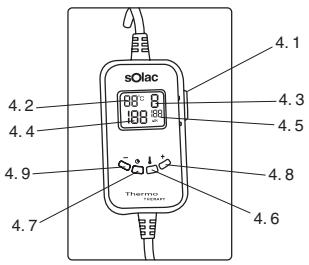
- Connect the power cord (3) first to the product and then connect it to the mains.
- Place the switch on the control (4.1) in the ON position.
- The selection that appears on the screen automatically is the minimum temperature position 1 and 120 minutes of operation before the appliance switches off automatically.


SELECTING THE TEMPERATURE
- To change the temperature selection, press the temperature button (4.6); you can increase the temperature position by pressing the selection increase button (4.8). If a position higher than 1 is selected, you can reduce the temperature position by pressing the selection reduction button (4.9).
- To confirm your selection, press the temperature button again (4.6) or else it confirms automatically after a few seconds. The temperature that corresponds to the selected temperature position appears on the screen when you confirm the selection (4.2).
- There are 4 temperature positions that correspond to the following temperatures:
Position 1: 30°C
Position 2: 35°C
Position 3: 40°C
Position 4: 45°C
- The selected temperature will be reached after 10 minutes and it will remain stable after this time regardless of how long the appliance is left running.
- When the appliance is switched on, the time selected by default before the product switches off is 120 minutes. It is possible to reduce this time by pressing the timer button (4.7) and then pressing the selection reduction button (4.9). If a time of less than 120 min. is selected, you can use the selection increase button (4.8) to increase the time before the appliance switches off automatically.
- From 10 to 50 minutes, these buttons allow you to increase/reduce the time by five minutes every time they are pressed. After 50 minutes these buttons change the time by 10 minutes.
- To confirm your selection, press the timer button again (4.7) or else it confirms automatically once a few seconds have passed since your last selection.
- When you confirm the selection, the selected time appears on the screen (4.5) and the time starts to count down one minute at a time; this also appears on the screen (4.4).
- Once the selected time has passed, the appliance stops heating up, the screen shows the FF symbol and the light on the control flashes until any button is pressed.
- If any operating error is detected or the power cord is not properly connected to the product, the screen shows the ER symbol and the light flashes. Make sure the cord is properly connected, switch off the control and switch it back on.
- The light of the screen is blue; it comes on while the control is being used and switches off automatically after 5 seconds. If you want it to light up again, press the selection increase button 4.8 or the selection reduction button 4.9.


- To switch the appliance off, select the OFF position on the control (4.1). Unplug the appliance.
CLEANING AND MAINTENANCE
- Both the cover (1) and the pillow (2) can be washed by machine using a setting for delicate garments (maximum temperature: 30^ ).
- To wash the pillow, ALWAYS unplug the power cord (3); it must never come into contact with water.
- It is advisable to wash the pillow only if it becomes dirty or dusty. If you wash it too often the product can wear out very quickly.
To wash the pillow by hand, follow these instructions:
- Use neutral soap in warm water (maximum temperature: 30^ ). Soak the pillow in water for 15 minutes.
- Carefully rinse the pillow with cold water, without wringing or squeezing it: simply shake it to remove the excess water.
- Hang the pillow in the air in horizontal position and allow it to drip dry until completely dry.
• After washing the pillow or its cover, make sure they are completely dry before using them again. - Storage: Keep this product in a dry place with as few folds as possible and do not place any heavy objects on it that could cause permanent creases.
INSTRUCTIONS IMPORTANTES CONSERVEZ-LES POUR TOUTE CONSULTATION ULTÉRIEURE.
ATTENTION
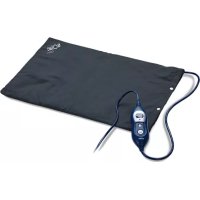
Brand : SOLAC
Model : CT8635
Category : Electric cushion