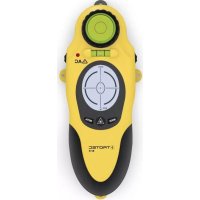
BI15 - Measuring equipment TROTEC - Free user manual and instructions
Find the device manual for free BI15 TROTEC in PDF.



| Product type | Multifunction wall scanner |
| Brand | Trotec |
| Model | BI15 |
| Weight | 180 g |
| Power supply | 9 V battery |
| Main functions | Locating wood, metal and live cables; rotating laser pointer; spirit levels |
| Wood detection depth | Up to 19 mm |
| Metal/cable detection depth | Up to 38 mm |
| Laser | Class II, max range 6.1 m, 180° rotation in 45° increments |
| Laser accuracy | 12.7 mm at 6.1 m |
| Operating temperature | -7 °C to +49 °C |
| Storage temperature | -29 °C to +66 °C |
| Relative humidity | 33-55 % |
| Care and cleaning | Soft lint-free damp cloth; avoid solvents and harsh cleaners |
| Safety | Do not look into laser beam; do not use in explosive areas or in contact with water |
| Manufacturer | Trotec GmbH & Co. KG |
Frequently Asked Questions - BI15 TROTEC
User questions about BI15 TROTEC
0 question about this device. Answer the ones you know or ask your own.
Ask a new question about this device
Download the instructions for your Measuring equipment in PDF format for free! Find your manual BI15 - TROTEC and take your electronic device back in hand. On this page are published all the documents necessary for the use of your device. BI15 by TROTEC.
USER MANUAL BI15 TROTEC
TROTEC
AT WORK.
Inhaltsverzeichnis
Reinigung
Description of the device B - 05
Operation B - 07
Maintenance and repair...... B - 09
Disposal B - 10
Declaration of conformity...... B - 10
Notes regarding the operating manual
Symbols

Hazardous electric current!
Warns about a hazard from electric current which can lead to injuries or even death.

Risk from laser radiation!
Warns of injury risk from laser radiation.

Caution!
Warns of a hazard which can lead to damage to property.
Legal notice
This release replaces all previous versions. No part of this publication may be reproduced without written permission from Trotec. The same applies for electronically processing, duplicating or spreading the publication. Subject to technical changes. All rights reserved. Trademarks are used without guarantee that they may be used freely and primarily following the spelling of the manufacturer. Product names are registered. Changes to construction in the interests of constant improvements to the product, as well as changes to the shape and colour are reserved. The delivered product may vary from product images. This document was created with all due care. Trotec accepts no liability whatsoever for possible mistakes or omissions. © Trotec
Safety
Intended use
This device is exclusively intended for detecting wood, metal and live AC cables in the range specified in the technical data. People who use this device must have read and understood the operating manual, especially the "Safety" chapter.
Improper use
The device may not be used in potentially explosive atmospheres, when wet or very humid.
Trotec accepts no liability for damages resulting from improper use. In such a case, entitlements to a warranty are forfeited.

Caution!
- Do not use abrasive cleaners or solvents to clean the device.
- The device must not be exposed to direct sunlight, high temperatures or humidity! Otherwise, the insulation or electronics of the device can be damaged.
- Do not use the device when the battery compartment or the housing are open.
- Do not leave the packaging lying around. Children may use it as a dangerous toy.
- The device is not a toy and does not belong in the hands of children.

Risk from laser radiation!
- Do not look into the laser beam. Do not point the device at people.

Danger!
- Cables and connections can differ in terms of construction, shielding and insulation, which can influence the AC power detection.
Personnel qualifications
People who use this device must:
- know and understand the dangers of working on live parts;
- take measures to protect themselves from direct contact with live parts;
• have read and understood the operating manual, especially the Safety chapter.
Technical data
Model BI15
Weight 180 g
Dimensions H x W x D 180 x 67 x 38 mm
Laser output < 1 mW (630–670 nm)
Laser class II
Laser accuracy 12.7 mm at 6.1 m
Maximum range of the laser up to 6.1 m
Rotation of the laser 180° in 45° steps
Operating temperature -7 °C to +49 °C (19.4 °F to 120.2 °F)
Storage temperature -29 °C to +66 °C (20.2 °F to 150.8 °F)
Relative humidity 33-55 %
Maximum detection depth for wood up to 19 mm (3/4")
Maximum detection depth for metal + live cables up to 38 mm (1 1/2")
Power supply
9 V battery
Description of the device
Functional description
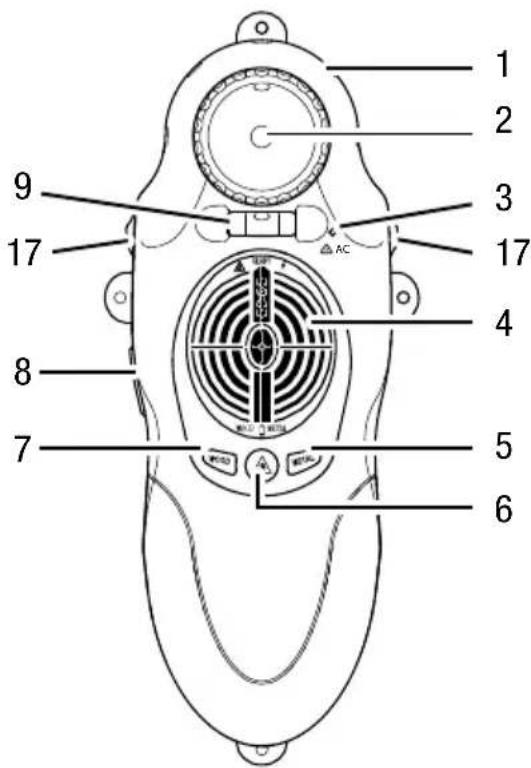
Using the locating device BI15, cables, wooden beams or metal braces to a depth of 19 mm can be located in walls or floors. The exact position of beams and braces is detected and shown in the display as edges. The laser pointer rotates by 180° to show where other beams are found. For precision, two spirit levels are built into the device. The adjustment wheels are used to precisely align the device on uneven surfaces.
- Laser pointer 2. Bulls eye level
- LED (AC voltage detected) 4. Display
- "METAL" button 6. "Laser" button
- "WOOD" button 8. "On" button
- Spirit level 17. Adjustment
wheels
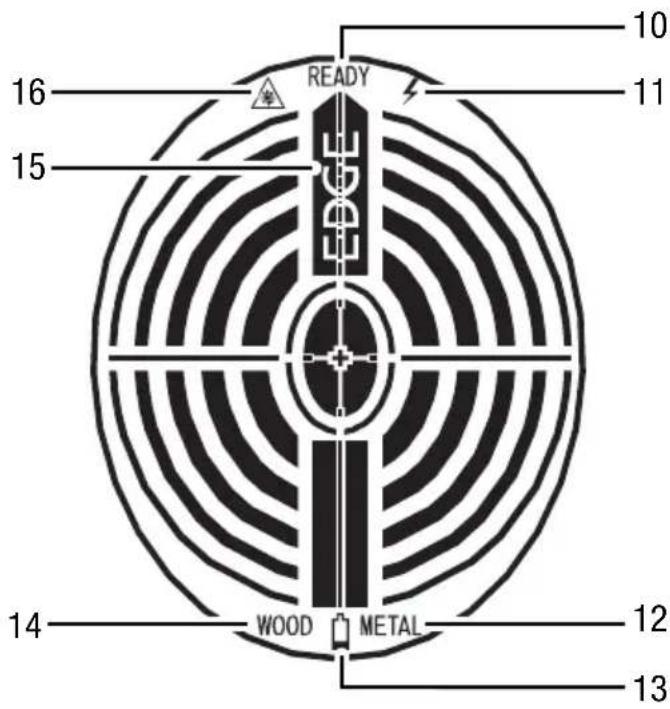
Display 10. Device is ready
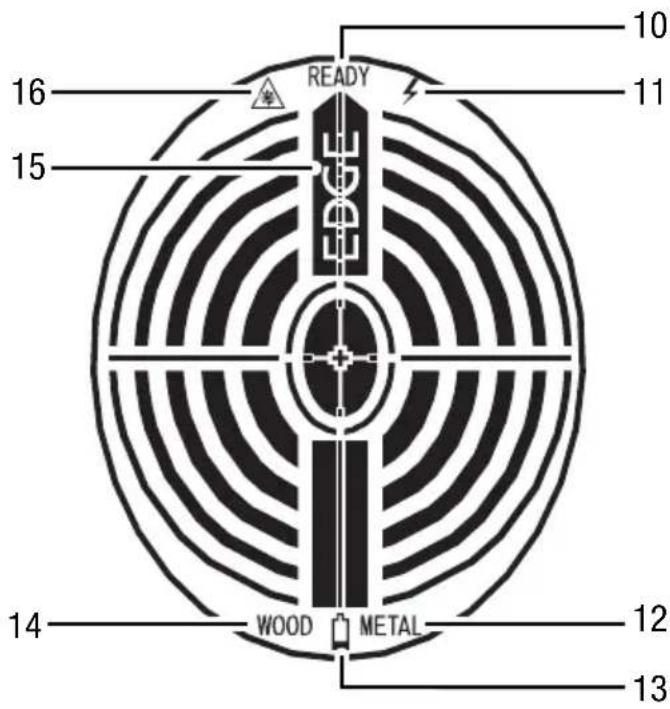
- AC power detection
- Metal detection
- Battery indicator
- Wood detection
- Edge reached
- Laser pointer on
Operation
Calibration
So that the detection works, the device must first be calibrated on the surface to be tested.
Dense material and damp or recently painted walls can influence the calibration.
- Place the device on the surface to be tested in a position under which there is no metal or wood.
- Press and hold the "On" button (8) during the calibration and the subsequent measurement.
– All symbols appear on the display for one second. - The "WOOD" (14) or "METAL" (12) symbols flash depending on which material was set beforehand.
- After 3 seconds, a beep is emitted and the "READY" symbol (10) appears.
The calibration is complete.
Wood detection
- Press the "WOOD" button (7).
- The "READY" (10) and "WOOD" (14) symbols appear.
- Push the device over the surface in a straight line.
- If wood is detected, lines appear in the display. When near wood, the lines in the middle of the display move closer to the middle of the display (see figure on page B - 6).
- If an edge is detected, the "EDGE" symbol (15) appears and a beep is emitted.
Metal detection
- Press the "METAL" button (5).
- The "READY" (10) and "METAL" (12) symbols appear.
- Push the device over the surface in a straight line.
- If metal is detected, lines appear in the display. When near metal, the lines in the middle of the display move closer to the middle of the display (see figure on page B - 6).
- If an edge is detected, the "EDGE" symbol (15) appears and a beep is emitted.
AC power detection
AC power detection is always activated. If a live AC cable is detected, the LED (3) glows and a beep is emitted.
Laser pointer
Press the "Laser" button (6) to switch the laser on/off. Turn the bulls eye level (2) to rotate the laser pointer in 45° steps.
Switching off
The device switches off as soon as you release the "On" button (8).
Maintenance and repair
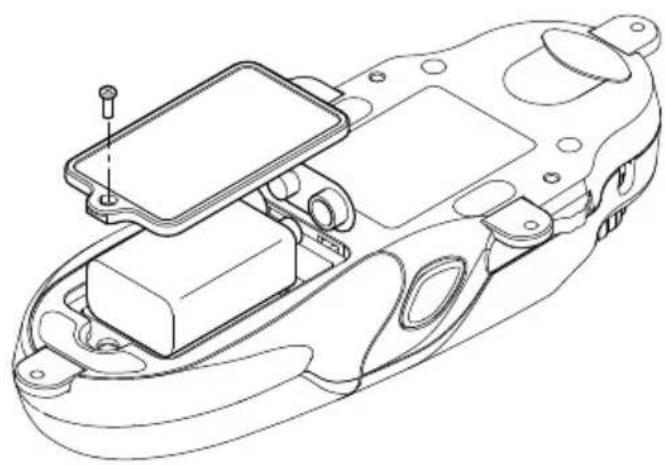
Battery change

Caution!
Make certain that the surface of the device is dry and the device is switched off.
Cleaning
Clean the device with a soft, damp and lint-free cloth. Ensure that no moisture enters the housing. Do not use any sprays, solvents, alcohol-based cleaning agents or abrasive cleaners. Only use clean water to moisten the cloth.
Repair
Do not modify the device or install any spare parts. For repairs or device testing, contact the manufacturer.
Disposal
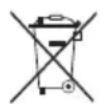
In the European Union, electronic equipment must not be treated as domestic waste, but must be disposed of professionally in accordance with Directive 2002/96/
EC of the European Parliament and Council of 27th January 2003 concerning old electrical and electronic equipment. After the end of its use, please dispose of this device in a manner appropriate to the relevant legal requirements.
Declaration of conformity
in accordance with the EC Low Voltage Directive 2006/95/EC, Annex III, Section B and the EC Directive 2004/108/EC about electromagnetic compatibility. We hereby declare that the locating device BI15 was designed, developed and produced in compliance with the named EC Directive.
Manufacturer:
Trotec GmbH & Co. KG Phone: +49 2452 962-400
Glebbener Straße 7 Fax: +49 2452 962-200
D-52525 Heinsberg E-mail: info@trotec.com
Heinsberg, 5 April 2012

Dimensions (H x L x P) 180 x 67 x 38 mm
Puissance laser < 1 mW (630–670 nm)
Nettoyage
Pulitura
Laservermogen < 1 mW (630–670 nm)
Laserklasse II
Display 10. Apparaat is gereed
Reiniging
Limpieza
Limpeza
Moc lasera < 1 mW (630–670 nm)
Klasa lasera II
Czyszczenie
Temizlik
Rengøring
- Paina painiketta "WOOD" (7).
Puhdistus
Deponering.... L - 10
Samsvarserklæring.... L - 10
Rengjøring
Rengöring
Чистка


- INHALTSVERZEICHNIS
- REINIGUNG
- NOTES REGARDING THE OPERATING MANUAL
- SYMBOLS
- HAZARDOUS ELECTRIC CURRENT
- RISK FROM LASER RADIATION
- CAUTION
- LEGAL NOTICE
- SAFETY
- INTENDED USE
- IMPROPER USE
- DANGER
- PERSONNEL QUALIFICATIONS
- TECHNICAL DATA
- DESCRIPTION OF THE DEVICE
- FUNCTIONAL DESCRIPTION
- OPERATION
- CALIBRATION
- WOOD DETECTION
- METAL DETECTION
- AC POWER DETECTION
- LASER POINTER
- SWITCHING OFF
- MAINTENANCE AND REPAIR
- BATTERY CHANGE
- CLEANING
- REPAIR
- DISPOSAL
- DECLARATION OF CONFORMITY
- NETTOYAGE
- PULITURA
- REINIGING
- LIMPIEZA
- LIMPEZA
- CZYSZCZENIE
- TEMIZLIK
- RENGØRING
- PUHDISTUS
- RENGJØRING
- RENGÖRING
- ЧИСТКА
Brand : TROTEC
Model : BI15
Category : Measuring equipment