
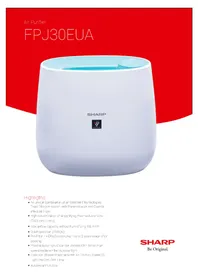
FPJ40EUW - Air purifier SHARP - Free user manual and instructions
Find the device manual for free FPJ40EUW SHARP in PDF.
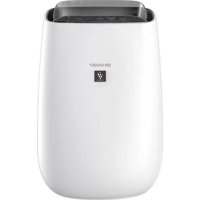



| Product type | Air purifier |
| Brand | Sharp |
| Model | FPJ40EUW |
| Dimensions (L × D × H) | 390 × 270 × 583 mm |
| Weight | 6.2 kg |
| Power supply | 220-240 V, 50-60 Hz |
| Rated power consumption | 23 W (MAX), 14 W (MED), 3.5~7.5 W (SLEEP) |
| Standby power consumption | 0.9 W |
| Fan speed | MAX, MED, SLEEP (automatic) |
| Airflow rate | 240 m³/h (MAX), 186 m³/h (MED), 48~120 m³/h (SLEEP) |
| Noise level | 45 dBA (MAX), 39 dBA (MED), 15~30 dBA (SLEEP) |
| Recommended area | Up to 30 m² (max speed), up to 23 m² for Plasmacluster |
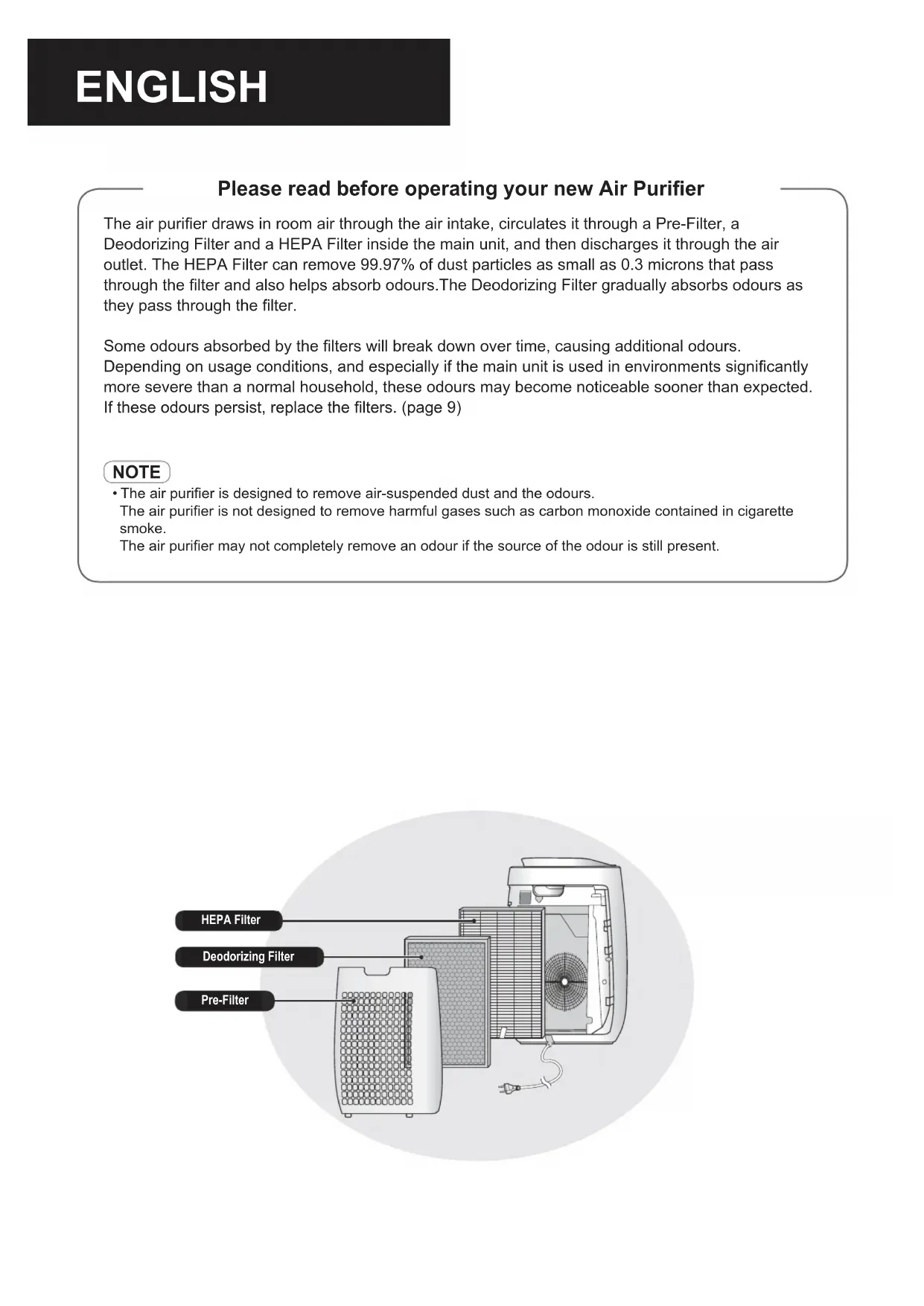
| Filters | Pre-filter (back panel), HEPA filter, deodorizing filter |
| Ionizing technology | Plasmacluster (emission of positive and negative ions) |
| Sensors | Dust, odor, brightness |
| Operating modes | Auto, Sleep, ion shower, timer (2/4/8 h) |
| Brightness control | Auto, dimmed, off |
| Pre-filter maintenance | Monthly cleaning with vacuum or soapy water |
| Sensor maintenance | Cleaning every 2 months |
| Filter lifespan | HEPA and deodorizing: about 10 years |
| Replacement filters | HEPA: FZ-J40HFX, Deodorizing: FZ-J40DFX |
| Auto restart | Yes (after power outage) |
| Cord length | 2.0 m |
Frequently Asked Questions - FPJ40EUW SHARP
User questions about FPJ40EUW SHARP
0 question about this device. Answer the ones you know or ask your own.
Ask a new question about this device
Download the instructions for your Air purifier in PDF format for free! Find your manual FPJ40EUW - SHARP and take your electronic device back in hand. On this page are published all the documents necessary for the use of your device. FPJ40EUW by SHARP.
USER MANUAL FPJ40EUW SHARP
"Plasmacluster" and "Device of a cluster of grapes" are trademarks of Sharp Corporation.
HIGH-DENSITY 25000
PL Instrukcja obsługi SI Navodila za uporabo CZ Návod k obsluze SK Návod na použitie HU Használati útmutató LV Lietošanas instrukcija LT Valdymo vadovas ET Kasutamisjuhend RO Manual de utilizare HR Priručnik za upotrebu BG Ръководство за експлоатация UA Інструкція з експлуатації DE Bedienungsanleitung FR Manuel d'utilisation IT Manuale di istruzioni ES Manual de uso NL Bedieningshandleiding EN Operation manual

Air Purifier With Humidifying Function
FP-J40EU
POLSKI
INSTALACJA FILTRÓW 5
OBSŁUGA 6
CZYSZCZENIE I KONSERWACJA 8
WYMIANA FILTRÓW 9
ROZWIĄZYWANIE PROBLEMÓW 10
DANE TECHNICZNE 11
RIEŠENIE PROBLÉMOV 10
TECHNICKÉ ÚDAJE 11
ZAP./WYP. JONY PLASMACLUSTER
When the Plasmacluster Ion mode is turned on, the Plasmacluster Ion indicator light (blue) will turn on.
ON / OFF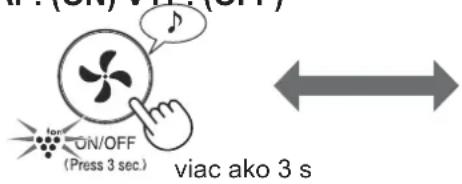
NOTE
When the main unit starts operation, it will start in the last mode in which the unit was operated.
SETTING THE SENSOR DETECTION SENSITIVITY
The sensitivity of the dust sensor / odor sensor and light sensor can be changed.
TROUBLESHOOTING 10
SPECIFICATIONS 11
IMPORTANT SAFETY INSTRUCTIONS
IMPORTANT SAFETY INSTRUCTIONS
PLASMACLUSTER ION ON/OFF
When Plasmacluster Ion is ON, the Plasmacluster Ion lamp will light up. (blue)
(when the main unit is turned ON)
ON/OFF
(Press 3 sec.)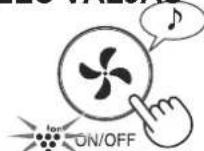
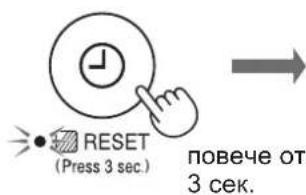
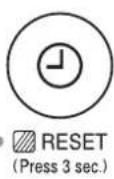
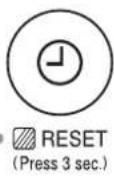
RESET (Press 3 sec.)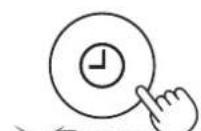

More than 3 seconds. RESET (Press 3 sec.)
*The filter reset indicator lamp lights up after approximately 720 hours of operation
NOTE
Rear panel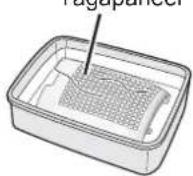
IMPORTANT SAFETY INSTRUCTIONS
For indoor use

SENSORS
Two months

HEPA FILTER
When the opening is blocked, the air purifier will not work properly

PRE-FILTER
When the opening is blocked, the air purifier will not work properly
Rear panel (pre-filter)
Two months
Light indicator for filter control
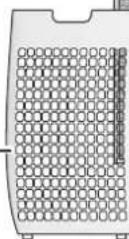

Basic
Water
REPLACEMENT FILTER (optional)
Filter replacement
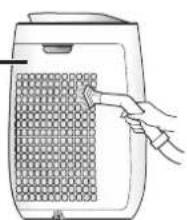
Remove the device from the water and clean it with a vacuum cleaner or other suitable instrument.
WARNING
When cleaning, do not use strong force.
Cleaning
Cleaning is necessary to control the filter indicator.
RESET
Filter replacement
Cleaning the control unit
1. Add a small amount of cleaning agent to the water and let it soak for about 10 minutes. 2. Rinse thoroughly with water. 3. Leave the filter to air dry completely before reinstalling.
The light indicator for filter control activates automatically after approximately 720 hours of operation.
Sensor for dust
Sensor inlet for dust

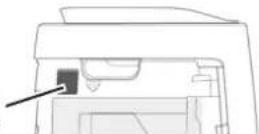
Sensor for vacuum
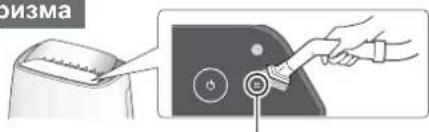
Sensor for vacuum
1. Turn off and unplug. 2. Remove the dust sensor filter. 3. The accessory filter is very dirty; clean it well.
Carefully remove the dust from the vacuum sensor using the dust brush or another suitable tool.
Filters
HEPA filter label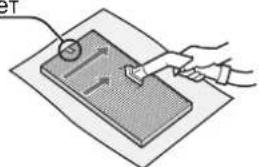
Deodorizing filter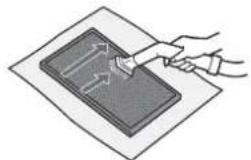
Carefully remove the dust from the HEPA filter and the deodorizing filter using the dust brush or another suitable tool.
WARNING
Do not wash or wet the filters.
The filters are delicate. Be careful not to use excessive force while cleaning them.
HEPA filter
The device is intended for the country indicated by the label.
Do not use the device in reverse; in the opposite case, the filter may be damaged.
-Dehumidifying filter
It can be cleaned separately.
BASIC MODEL
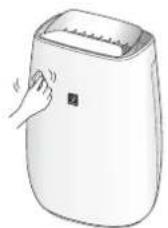
Clean with a dry cloth.
If the filter is not cleaned regularly, use a dry cloth, placed in warm water.
WARNING
Do not use flammable liquids
They may damage the surface.
-Do not use cleaning agents
Cleaning agents may damage the device.
FILTER REPLACEMENT
Lifespan of the device
The lifespan and the replacement period of the filter are based on an average of 5 hours of daily use, as well as the amount of dust in the environment, compared to that of a new filter.
The service life of the filter varies depending on the working environment, the use and the placement of the device.
When used in significantly more difficult conditions than normal household use, the filter should be replaced more often.
PRE-FILTER: Approximately 10 years after the start of operation - decontaminating filter: Approximately 10 years after the start of operation
Model filter replacement
When purchasing a new filter, consult your dealer.
PRE-FILTER: 16 pcs.
Decontaminating filter: 16 pcs.
FZ-J40HFX
FZ-J40DFX
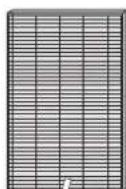
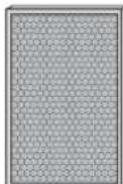
Filter replacement
Dispose of the old filters according to local laws and regulations.
MATERIALS IN THE PRE-FILTER:
-Polypropylene -Polyethylene
Materials in the decontaminating filter
-Polypropylene -Polyester -Activated carbon
TROUBLESHOOTING
Before contacting a qualified technician, please read the list below, as it may be possible to fix the problem without touching the device.
| ПИЗ3HAK ПОПРABKA (ако) | He e Heизправноct) |
| МириимITE и димьт не язчесват. | • 3amehete Фильтуге, akо с силно замьрсени. (стр. 9) • Роверete дали пошеленовату одановka e салена от Фильтура. (стр. 5) |
| Моиторьт за чьстота сбети в синцов; дори когато вьздуньт не язчес. | • Вьздуньт може би e绛л замьрсени по врума на вьклочвано на ур dedа. Изклочete урда о transitу мосте на вьклочны. • Д夷ст用车ю на сенисту можеodia. • Д夷ст用车ю на сенисту мосте на ур dedа. • Д夷ст用车ю на сенисту мосте на ур dedа. • Д夷ст用车ю на сенисту мосте на ур dedа. • Д夷ст用车ю на сенисту мосте на ур dedа. • Д夷ст用车ю на сенисту мосте на ур dedа. • Д夷ст用车ю на сенисту мосте на ур deda. • Д夷ст用车ю на сенисту мосте на ур deda. • Д夷ст用车ю на сенисту мосте на ур deda. • Д夷ст用车ю на сенисту мосте на ур deda. • Д夷ст用车ю на сенисту мосте на ур deda. • Д夷ст用车ю на сенисту мосте на ур dedа. • Д夷ст用车ю на сенисту мосте на ур deda. • Д夷ст用车ю на сенисту мосте на ур deda. • Д夷ст用车ю на сенисту мосте на ур deda. • Д夷ст用车ю на сенисту мосте на ур dedа. • Д夷ст用车ю на сенисту мосте на ур dedа. • Д夷ст用车ю на сенисту мосте на ур deda. • Д夷ст用车ю на сенисту мосте на ур deda. • Д夷ст用车ю на сенисту мосте на ур dedа. • Д夷ст用车ю на сенисту мосте на ур deda. • Д夷ст用车ю на сенисту мосте на ур dedа. • Д夷ст用车ю на сенисту мосте на ур deda. • Д夷ст用车ю на сенисту мосте на ур deda. • Д夷ст用车ю на сенисту мосте на ур dedа. • Д夷ст用车ю на сенисту мосте на ур dedа. • Д夷ст用车ю на сенисту мосте на ур dedа. • Д夷ст用车ю на сенисту мосте на ур deda. • Д夷ст用车ю на сенисту мосте на ур dedа. • Д夷ст用车ю на сенисту мосте на ур deda. • Д夷ст用车ю на сенисту мосте на ур dedа. • Д夷ст用车ю на сенисту мосте на ур dedа. • Д夷ст用车ю на сенисту мосте на ур deda. • Д夷ст用车ю на сенисту мосте на ур dedа. • Д夷ст用车ю на сенисту мосте на ур dedа. • Д夷ст用车ю на сенисту мосте на ур dedа. • Д夷ст用车ю на сенисту мосте на ур dedа. • Д夷ст用车ю на сенисту мосте на ур ded; • Д夷ст用车ю на сенисту мосте на ур ded; • Д夷ст用车ю на сенисту мосте на ур ded; • Д夷ст用车ю на сенисту мосте на ур ded; • Д夷ст用车ю на сенисту мосте на ур ded; • Д夷ст用车ю на сенисту мосте на ур ded; • Д夷ст通车货. • Д夷 carina. • Д夷 carina. • Д夷 carina. • Д夷 carina. • Д夷 carina. • Д夷 carina. • Д夷 carina. • Д夷 carina. • Д夷 carina. • Д夷 carina. • Д夷 carina. • Д夷 carina. • Д夷 carina. • Д夷 carina. • Д夷 carina. • Д夷 carina. • Д夷 carina. • Дwoman. • Дwoman. • Дwoman. • Дwoman. • Дwoman. • Дwoman. • Дwoman. • Дwoman. • Дwoman. • Дwoman. • Дwoman. • Дwoman. • Дwoman. • Дwoman. • Дwoman. • Дwoman. • Дwoman. • Дwoman. • Дwoman. • Дwoman. • Дwoman. • Дwoman. • Дwoman. • Дwoman. • Дwoman. • Д woman. • Дwoman. • Дwoman. • Дwoman. • Дwoman. • Дwoman. • Дwoman. • Дwoman. • Дwoman. • Дwoman. • Дwoman. • Дwoman. • Дwoman. • Дwoman. • Дwoman. • Дwoman. • Дwoman. • Дwoman. • Дwoman. • Дwoman. • Дwoman. • Дwoman. • Дwoman. • Дwoman. • Дwoman. • Д Woman. • Дwoman. • Дwoman. • Дwoman. • Дwoman. • Дwoman. • Дwoman. • Дwoman. • Дwoman. • Дwoman. • Дwoman. • Дwoman. • Дwoman. • Дwoman. • Дwoman. • Дwoman. • Дwoman. • Дwoman. • Дwoman. • Дwoman. • Дwoman. • Дwoman. • Дwoman. • Дwoman. • Дwoman. • ДWoman. • Дwoman. • Дwoman. • Дwoman. • Дwoman. • Дwoman. • Дwoman. • Дwoman. • Дwoman. • Дwoman. • Дwoman. • Дwoman. • Дwoman. • Дwoman. • Дwoman. • Дwoman. • Дwoman. • Дwoman. • Дwoman. • Дwoman. • Дwoman. • Дwoman. • Дwoman. • Дwoman. • Дwoman. • Д wom; • Дwoman. • Дwoman. • Дwoman. • Дwoman. • Дwoman. • Дwoman. • Дwoman. • Дwoman. • Дwoman. • Дwoman. • Дwoman. • Дwoman. • Дwoman. • Дwoman. • Дwoman. • Дwoman. • Дwoman. • Дwoman. • Дwoman. • Дwoman. • Дwoman. • Дwoman. • Дwoman. • Дwoman. • Дwoman • Дwoman • Дwoman • Дwoman • Дwoman • Дwoman • Дwoman • Дwoman • Дwoman • Дwoman • Дwoman • Дwoman • Дwoman • Дwoman • Дwoman • Дwoman • Дwoman • Дwoman • Дwoman • Дwoman • Дwoman • Дwoman • Дwoman • Дwoman • Дwoman • Дwoman. • Дwoman • Дwoman • Дwoman • Дwoman • Дwoman • Дwoman • Дwoman • Дwoman • Дwoman • Дwoman • Дwoman • Дwoman • Дwoman • Дwoman • Дwoman • Дwoman • Дwoman • Дwoman • Дwoman • Дwoman • Дwoman • Дwoman • Дwoman • Дwoman |
SWITCHING ON (optional)
If the LED indicator lights up for 8 seconds, the setting is activated.
(Simultaneously for about 3 sec.)
SPECIFICATIONS
| Зхсанванe | 220-240 V 50-60 Hz | |
| Р散发дега на скороста на вентilatedога | MAKSCIMAJHA CPEДHA CBH* | 1 |
| Скорост на вентilatedога (M3/ч) | 240 186 48~120 | |
| Нимо нашим (dBA) | 45 39 15~30 | |
| Homina на мочност (W) | 23 14 3,5~7.5 | |
| Консуальna на сеньяв В ржим на ratовност (W) | 0,9 | |
| Пробьчтелен размер на пOMESEHIHETO (M3)*2 | 30 | |
| Пробьчтелен размер на пOMESEHIHETO 3a Plasmacluster яони с ВИСОКA ППТHOCT (M2)*3 | 23 | |
| Дылхина на кабILA (M) | 2,0 | |
| Разmersи (MM) | 390 (Ш) x 270 (Д) x 583 (В) | |
| Тerglio (Кг) | 6,2 | |
1. The fan speed is automatically adjusted depending on the amount of dust in the air and the brightness of the room. 2. The recommended room size is suitable for operating the device at maximum fan speed. - The recommended room size is determined for the amount of dust particles that can be removed within 30 minutes. (JEM1467). *3. Room size, in which approximately 7000 particles per cubic centimeter can be measured, with the device placed near the wall, at an approximate height of 1.2 m from the floor, when operating at medium power.
Standby energy consumption
When the device is plugged into the electrical outlet and is in standby mode, the minimum energy consumption is with the fan off. To save energy, unplug the device from the outlet when not in use.
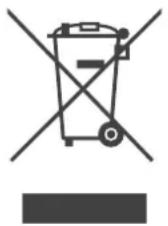
Note: The product is marked with the WEEE symbol. Used electrical and electronic devices must not be mixed with general household waste. There is a separate collection system for these products.
A. Information on disposal for users (private households)
1. European Union
If you wish to dispose of this device, do not use ordinary waste bins and do not throw it into a fireplace or stove! The used electrical equipment must be collected and processed separately, in accordance with local legislation.
Separate collection promotes environmentally friendly processing, recycling of materials, and reduction of waste disposal. Improper disposal may be harmful to human health and the environment, due to certain substances! Please use the local collection points for used electrical and electronic equipment.
If you have any doubts regarding the disposal of your used device, you can contact your local authorities or the dealer of the equipment.
3A NOTP6BNTENITE OT CTPAHNTE BEBPONEENCKNCAH03, KAKTO IN HOPBEI N IWBEEILAPNRA: BaWTeO yuaCTne B pa3JeHnTo c6bnpaHe ce n3nckBaOT 3aKoHa. Poka3aHnTnNo-rope cmBbON CE cpeaBbpxy eNeKtpuYecko n eNeKtpoHHO o6OpyDbaHe (IIINTEXHnTE ONAKOKN), 3a Da HAONMHa Ha NTpe6BNTENITE 3a TOBa.
IOTpe6nteTe OT YACTHNTE DOMAKINHCTBA ce npkaanBa da n3non3BaT cbuectByBaunTe nyHKTOBe 3a cb6npahe Ha n3ne3n ot ynotpe6a eeneKtpueeckn eeneKtpoHHypei. BpbuaHToHa taKbA e63nnatHo.
B cnyaaye ypebt e 6n n3no3baH 3a CTOHAHCKN LELN, moJc bbpkeTe ce C MeCTHNI pIepCTaBHTe H a SHARP, KOITo 1e Bn daJe IHbOpMaunr OTHOCHO o6paT HTO npMeHaNE. B3mOxHO e 4a 6bDeTe TAcYBaHN 3a pa3xoJaTne, npOn3TuHaUN ot TOBA. ManKn npOdykTN (u ManKn KOnMueCTBa) 6nxA MoRn Da 6bDat B3eTN o6paTHO OT MeCTHNI NyHKT 3a cb6npuHe. 3a NcnaHn: Monr, cBpXeTe ce C yctaHoBeHa t CInTeMa 3a cb6npuHe, INN CE 06bpHete KbM MeCTHNTe Bnactn 3a o6paTHO npMeHaNe Ha BaWnte yNoTp6BaHn npOdykTN.
2.BCTpaHnN3BbH EC
Ako nckaTe da n3XbBpNITe To3n npOdyKT, Mo7a CbBpKeTe ce c MecTHNTe BnaCTn pa36peTe npaBnHnHaunn 3a n3XbBpNlHe.
3a 乌Beyucapn: N3n3NtOOT yNtpe6a eEKeTpruecko n eEKeTPOHNO obOpyDahe Moke da BbPeHaTo Ha TbProBeua n 6e3 Da ce KyNyBa HOB npOdyKT. DOnblHHTeHHTe MeCTa 3a cb6bpAne ca u36poEHn Ha HauaHnata cTpaHnca Ha www.swico.ch INN WWW.Sens.ch.
5.ИнфомацязИЗХБьгЯнпpepa6OTka OTpOMuIeHn notpe6nteHn.
1.BEbponecknCbIO3
Ako npodykTBt e 6n n3non3BaH 3a CTOnaHcN cEIn n NcKaTe da ro n3XBpNte:
3a INHOpMaun OTHOCHO 6paTHo PnneMaHe Ha npOyKaTa ce 6bpeTe KbM Hau-6nnKnnpedCTABNTeHa SHARP. B3mOxHO e da 6bTeTakCyBaHN 3a pa3xoJnte, npou3TuAnOT 6paTHo PnneMaHe n peuKnIpuAe. ManKn npOyKTn (n MaKN kONueCTBa) 6nxAmornn Da 6bDat B3EtN 6paTHo OT MeCTHnpyHKT 3a cb6pAhe.
3a NcnaHn: Mon, cBpKeTe ce C yctaHoBeHa t CNTema 3a cb6puHe, nIe Ce o6bpeTe KbM MeCTHnTE Bnactn 3a 06paTHo npneMaHe Ha Baunte ynoTpe6BaHn npOdyKtn.
2.BCTpaHnN3BbH EC
Ako nckate da n3Xbbpnnte To3n npOdyKT, moIra CBbpKeTe ce C MeCTHnTe Bnactn pa36pepe npabunHnaHH 3a n3XbbpnHe.

yKPAIHcbsKA
BAKJIIBI BKA3IBKN 3 TEXHIKN BE3NEKN .2
HA3Bn DETAJIEN 4
BCTAHOBJIeHHH FJIbTPA. 5
IOPRAOK EKCPIYATAUII 6
DOrIaI TEXHlYHe O6CJyROByAHn8
3AMIHA 9
NOWyK I YCYHEHHH HECNPABHOCTE 10
TEXHIHYXAPAKTEPNUCTNIK 11
Дякемо 3а пиббанн очшувача nobiter SHARP.Ybaxho npoHTaTe ue kéрIBHNTBO.перш 키 понати корисьатся виробом,обов'язково npoHTaTe po3dIN «ВaklnBi Bka3iBkn 3 texhikn 6e3neKn》.Почтtabши ue kéрIBHNTBO,36epekijt b noTo y 3pyHOMy Micci дЯ NOdaJIbwoTO BHKOpNCTaHHA.3 MeTOI BHKOpNCTaHHA B MaIbTybOMy peKOMeHdyeMo 3epeiraTи ue kéрIBHNTBO TAm,de MOxHa ChITaTN B 6yd-b-akm MOMeHT.
BAJINBI BKA3IBKN 3 TEXHIKN E3NEKN
Пд час Користуваимя eilektpponpinaamn obob'ra3koBO cnid dOtpmByBaTncb OCHOBHx 3aCTepexHnx 3axodib 3OKpeMa:
YBAGA! 3 MeTOO 3MeHsEHH pN3NKy ypaXeHH eJIeKTPnUHM CTPymOM, NOxExi YtpaBMYaHH O6OB'KOBO DoTpIMyITeCb TaKx npaBnI:
- Iepsh hix nouHaTn KopncTyBaHHraonOBHm6JOKOM, NOBHcTHIO pOHTaTe IHCTpyKciHO. KopncTyntecT tIbKn eJeKeTpopo3eTKoIO 3 Hanpyroio 220-240 BoJbT.
- DITN BIKOM BiD 8 pOKIB, OCO6N 3 noripweHmN φi3nUHMN, yTTeBUMN YI PO3yMOBUMN 3di6HOCTaMn, a6O IIOJN, JKM 6paKyE 3HaHb a6o DoCBiDy, MOxTyb KOpNCyBaTncb anapaTom 3a yMOBn, RaKIo XTOCb HaJIJaAc 3a HIMN, NOAChIOc He6e3NeKeN, NOB'ra3aHI 3 BVKOPNCtAHNM anapaTa, Ta HABYae KOpNCyBaTncb HmY 6e3neuHni cnoci. He do3BOJnTe dITram rpaTncr 3 anapatom. DiTm 3abOpOHeNo 6e3 HarLyDy 3dInCHHOBAtn YNuEHHa Ta NOTouHe o6CnyROByBaHHa.
- ⅢO6 yHnKHyTn He6e3neKn, 3amIny shHypa JINBJIeHNb pa3i NOwKOJxHeHHa MaE 3diIChHTN Bnpo6nHK, Noro areHT i3 o6cIyROByBaHHa, ABTOpI3OBaHn cepBicHn ceHTp Sharp a6o oc06a aHaIorIyHOI KBaIipKaui. JaKIo BnHnKHyTb JIKCb HecnPabHocTi, Heo6XiHicTb y HanaWtYBaHHi YI peMOHTI, 3BepTaITeCb y HaIbIxxuHcN cepBicHn ceHTp. He pemontyute anapat i He po3bnpaTe roIOBHN 6JOK caMOTyKKn. -Перш Иж ВИКОнуВаТи ровOTn 3ТexHiЧHOrO O6CnyroByBaHHЯ, 3HIMaTH Yu BCTaHOBJIbOBArN ΦIiNbTp, a TAKoX KOnI anapat He BИKOPnCTOByBaTmEtbcr NpOTYROM TpINBaIogo Yacy, BInMaIte BnIKky 3 eJekTpopo3eTKn. IHaKSe MoKe CTaTNCa KOpOTke 3aMnKaHHЯ,ЯKe npu3BeDe Do ypaJxeHHЯ eJekTpnuHm CTpyMOM Yu NOxExKi. He kopnctyntecb roNoBHM 6JOKOM, kIIO NOIKoJKeHO NOrO WHyp YN BUNKy XINBJIeHHa, a6o kIoo po3eTKa He 3a6e3neUc HAIHoro 3'EDHaHHa.
- PerioDnUH OunuYte BnKy Bi nIy. He bctabnyTe naIbci uN CTOpOHHi
The power supply unit and the output openings.
When inserting the plug, hold the plug body, not the cord. Otherwise, a short circuit may occur, leading to electric shock or fire. Be careful not to damage the cord, as this may cause electric shock, excessive heating, or fire. - Do not insert the plug with wet hands. Do not place the head unit on or near hot objects, such as stoves or heaters, or in places where steam may hit it. Do not use the head unit while using aerosol products to kill insects. Do not use the head unit in rooms where there is a lot of dust or in places with high humidity, such as a bathroom. - Be careful not to drop the head unit. Strong corrosive agents may damage the outer surface. - Protect the head unit from water. Otherwise, a short circuit may occur, leading to electric shock.
NOTE. If the head unit causes television or radio interference,
If the unit causes interference with radio or television reception, try to eliminate it by applying one or more
of the following measures:
Change the orientation or location of the receiving antenna; increase the distance between the head unit and the radio or television; connect the head unit and the radio or television to different electrical outlets; seek help from the dealer or an experienced radio/TV technician.
PRECAUTIONS FOR USE
Do not block the power supply unit's output openings. - During use, the head unit should always be in a vertical position. Do not move the head unit during operation. - To move the head unit, use the handles on the side panels. - If you need to move the head unit over uneven surfaces, carry it by the handles. Do not use the head unit without a proper filter. Do not reuse the same filter or the deodorizing filter. This will reduce the filtering efficiency and may cause electric shock or malfunction. Clean the outer surface only with a soft cloth. Do not use harsh chemicals or abrasive cleaners.
INSTALLATION PROCEDURE
Do not place the unit in a place where it may be subject to vibration. Otherwise, the head unit may not function properly. Do not use the head unit in a place where objects such as furniture, cloth, or other items may touch it, blocking the air intake and output openings.
Do not use the head unit in a place where moisture may condense on it or where there are significant temperature changes. Use the unit at an ambient temperature of 0 to 35°C. Place the head unit on a horizontal surface in a place with sufficient air circulation.
If the head unit is placed on a thick carpet, it may vibrate slightly.
The device can be placed on a table or mounted on a wall. The outer surface of the main unit may be covered with dust, and the sensors may not function properly. - Clean the main unit regularly with a soft cloth, even if it is placed 3 cm from the wall, but this may cause dust accumulation on the wall and floor. The main unit should be placed at a distance from the wall.
Over time, the wall, located directly behind the exhaust outlet, may become dirty. When the main unit operates in the same place for a long time, periodically clean the wall and nearby surfaces.
FILTER OPERATION PROCEDURE
- To properly perform filter replacement and maintenance, follow the instructions in this manual. (Page 9)
PART NAMES
Replacement
Do not use the main unit without a filter installed.
ON/OFF
ON/OFF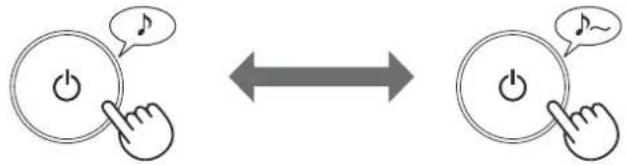
Select the desired fan speed. - If there was no power interruption, the main unit will resume operation in the mode it was in before.
(This does not apply to the clean and dry mode.)
CLEAN DRY MODE
For 10 minutes, the main unit emits Plasmacluster ions with a strong airflow and collects dust, neutralizing static electricity. After this, the ion density automatically adjusts to the selected level, and the device quickly removes odors and intensively cleans the air for 50 minutes.

NOTE
Turn off the Plasmacluster ionizer if necessary. - When operation stops, the main unit returns to the previous operating mode.
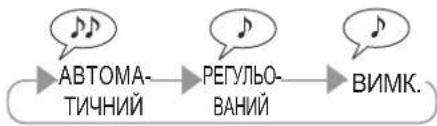
Fan speed
NOTE

AUTOMATIC

The fan speed is automatically adjusted according to the three controlled parameters.
(Humidification / Dehumidification / Ventilation)
SLEEP
The unit operates very quietly and automatically changes the fan speed depending on the air pollution and the brightness of the room.
The indicator of the Plasmacluster ion generator brightness is adjusted or turned off automatically according to the brightness of the room.
When the room is bright: the indicator brightness is adjusted. When the room is dark: the indicator is turned off.
The indicator is turned off, the Plasmacluster ion generator emits into the air, if it is not turned off by pressing the button.
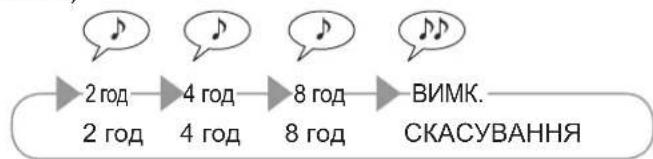
OFF TIMER
Select the required time during which the main unit will remain on. When the set time has elapsed, the main unit will automatically stop operation.
ON/OFF (Reset)
(Main unit is turned on)
2h 4h 8h

BIMNKAY CBITJI A
KoHn iHnKaTOp uHCTOTn / IOHOreHepaTopa Plasmacluster cBITbC, NOrO MOxHa BmKHyTN.
1 (KoJIN rOIOBnI 6nok yBIMKHeHO)
AUTO/DIM/OFF (Press 3 sec.)
6inbwe k3cekyHn
2
AUTO/DIM/OFF (Press 3 sec.)
PIMITKA
- 阿卡阿帕罗夫 8 cekyH He 6 Bye HaTCHY To KHONky YICTORO IOHHoro Duyu, HanaaHTyBaHH 6 Bye ABTomATUHO 36epexKeHO. JaIIO He 6yIO nepepBbAHn EeKTPoNocTauHH, roIOBn I6IOK BIDHOBIOE pOBOy 3 peXIMy, B kOMy II 6yIO npINHeHO.
ABTOMATNUHNI
YbIMKHeHHnHnpepyNIOBaHHnckpABocTi IHmKATopa BiDyBaETbcABTOMATHHO BIDNOBIDHO DOOCBITneHOCTI pIMiueHH.
Y npmuiueHHI CBIITIO: iHdkatop yBIMK.
Y npmiiHHe TMHO: RcKpaBicb HndkaTopa peRyIIOEbCBA
BMMK.
When the power is turned on, the Plasmacluster ion generator starts operating in the recommended mode, and then it turns off.
Turning on the Plasmacluster ion generator
When the Plasmacluster ion generator is turned on, the Plasmacluster ion generator indicator lights up (in blue).
(When the main unit is turned on)
Turn on
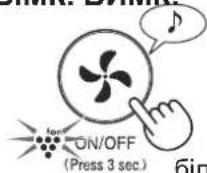
Press for more than 3 seconds
(Press 3 sec.)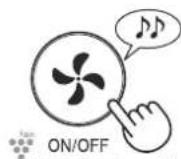
NOTE
If the power supply is not interrupted, the main unit will resume operation in the mode it was in before the power was turned off.
Press for 3 seconds
Adjusting the sensitivity of the sensor
The sensitivity of the sensor for dirt, odors, and brightness can be changed.
1 (When the main unit is turned on)
Press for more than 3 seconds
2 Adjust the sensor sensitivity for dirt and odors, and for brightness.


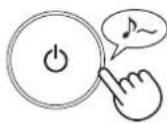
NOTE
- If during 8 seconds the power supply voltage is not pressed, the setting will be saved automatically.
- The power supply setting will be saved even if the main unit is disconnected from the mains.
MAINTENANCE AND TECHNICAL SERVICE
Be sure to unplug the device from the outlet.

To keep this air purifier in optimal working condition, periodically clean the main unit, including the filter.
Before performing any maintenance work, be sure to unplug the device from the power outlet.

DO NOT WASH

Разъединитель

ФИЛЬТР НЕРА
Колы выпускного отверстия, суть запаха, колы запаха, нестерильные
ГОЛОВНОЙ БЛОК
Разъединитель

ФИЛЬТР ЗАПАХОВ
Колы выпускного отверстия, суть запаха, колы запаха, нестерильные
Задняя панель (фильтр предварительной очистки)
Разъединитель
Свяжитесь с инструкцией по эксплуатации фильтра.
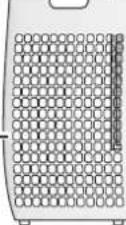
Задняя панель (фильтр предварительной очистки)
Задняя панель
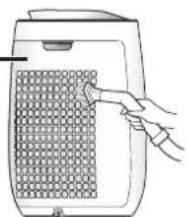
Аккуратно очистите от пыли заднюю панель плоской щеткой или аналогичным приспособлением.
ОСТЕРЕГАЙТЕСЬ
The control panel should not be pressed too hard.
Oil
The filter service life indicator is activated.
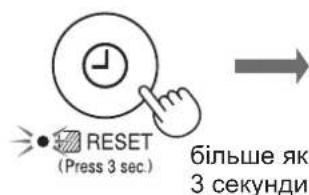
NOTE: The order of cleaning the filter housing.
Filling
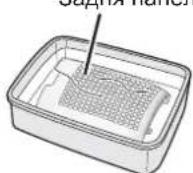
1. Add a little more cleaning agent to the tank and leave the part for about 10 minutes. 2. Rinse the tank with clean water. 3. Completely dry the filter in a well-ventilated place.
The filter service life indicator lights up approximately after 720 hours of operation.
Filters
Filter replacement
Filter replacement

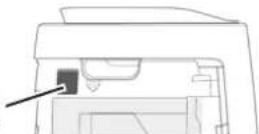
Filter replacement
Filter replacement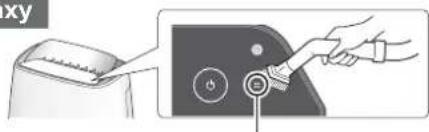
- 1. Remove the rear panel. 2. Remove the filter. 3. If the filter is dirty, wash it with water and dry it thoroughly.
Carefully clean the rear panel with a vacuum cleaner or similar device.
Filters
Carefully clean the HEPA filter and odor filter using a device similar to the appliance.
WARNING
Do not wash in water; do not dry in the sun.
Do not use the filters with excessive force.
HEPA filter
Perform maintenance only on the side where the filters are located. Do not use excessive force, otherwise the filter will be damaged.
Odor filter
Maintenance can be performed from both sides.
MAIN UNIT
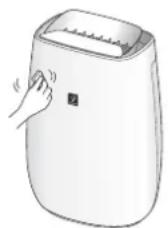
Wipe with a dry, soft cloth.
For stubborn stains, use a soft cloth dampened with warm water.
WARNING
Do not use cleaning agents.
Benzol, gasoline, thinner, powder for cleaning and other agents may damage the surface.
Do not use other agents
Components of other agents may damage the head unit.
FILTER REPLACEMENT
Filter service life
The filter service life and replacement period are calculated according to the following conditions: in a room where 5 cigarettes are smoked per day, and the efficiency of air purification and odor removal has decreased compared to a new filter.
The filter service life depends on the conditions in the room, the usage mode, and the placement of the head unit. If the device is used in conditions significantly more severe than typical household conditions, it is recommended to replace the filter more often.
-HEPA filter: approximately 10 years after unpacking · Odor filter: approximately 10 years after unpacking
Replacement filter model
When you need to purchase a replacement filter, contact the dealer in your region.
HEPA filter: 1 pc.
Odor filter: 1 pc.
FZ-J40HFX
FZ-J40DFX
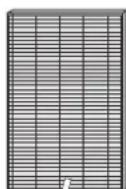
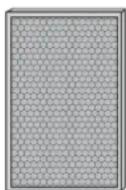
Replacement filters
The device is manufactured in accordance with the laws and regulations of the country of origin.
MATERIALS USED:
-polypropylene
MATERIALS AND SUPPLIES:
- polypropylene -polyester
- activated carbon
TROUBLESHOOTING
Before contacting the service department, please check the troubleshooting table below, as the problem may not be related to a malfunction of the main unit.
FILTER INSTRUCTIONS
PLASMACLUSTER IONS ON/OFF
NOTE
ON/OFF (Press 3 sec.)
TIMER OFF
PLASMACLUSTER ON/OFF
NOTE
RESET (Press 3 sec.)
NOTE
Rear panel
PLASMACLUSTER IONS ON/OFF
NOTE
Please read before operating your new Air Purifier
The air purifier draws in room air through the air intake, circulates it through a Pre-Filter, a Deodorizing Filter and a HEPA Filter inside the main unit, and then discharges it through the air outlet. The HEPA Filter can remove 99.97% of dust particles as small as 0.3 microns that pass through the filter and also helps absorb odours. The Deodorizing Filter gradually absorbs odours as they pass through the filter.
Some odours absorbed by the filters will break down over time, causing additional odours. Depending on usage conditions, and especially if the main unit is used in environments significantly more severe than a normal household, these odours may become noticeable sooner than expected. If these odours persist, replace the filters. (page 9)
NOTE
The air purifier is designed to remove air-suspended dust and the odours.
The air purifier is not designed to remove harmful gases such as carbon monoxide contained in cigarette smoke.
The air purifier may not completely remove an odour if the source of the odour is still present.
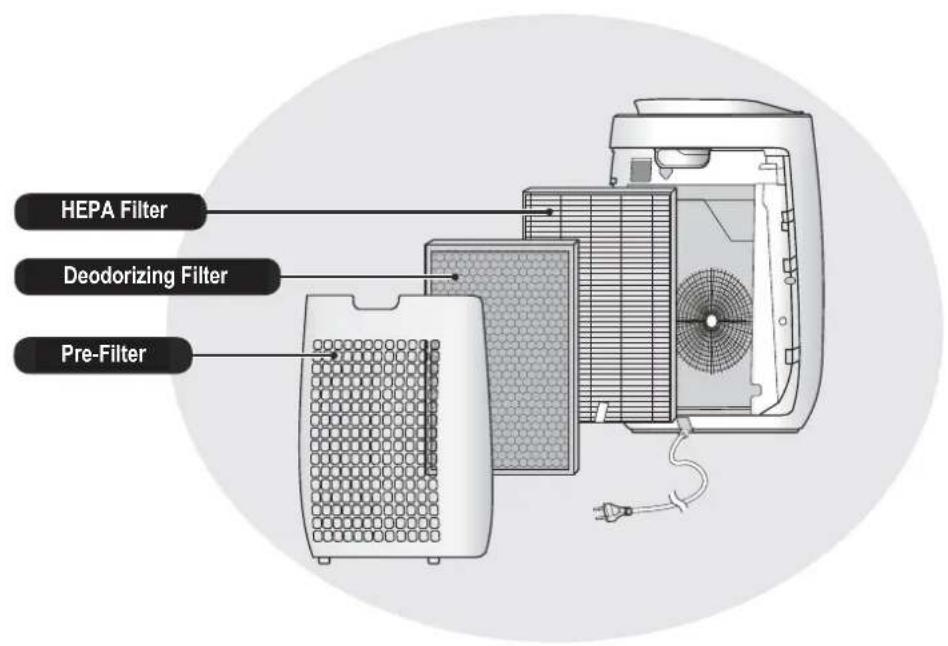
FEATURES
Unique Combination of Air Treatment Technologies
Triple Filtration System + Plasmacluster
TRAPS DUST*
Pre-Filter traps dust and other large airborne particles.
DECREASES ODOURS
Deodorizing filter absorbs many common household odours.
REDUCES POLLEN & MOLD*
HEPA filter traps 99.97% of particles as small as 0.3 microns.
FRESHENS
Plasmacluster treats the air similar to the way nature cleans the environment by emitting a balance of positive and negative ions.
*When air is drawn through the filter system.
Sensor Technology continuously monitors air quality, and automatically adjusting operation based on detected air purity.
CONTENTS
IMPORTANT SAFETY INSTRUCTIONS 2
PART NAMES 4
FILTER INSTALLATION 5
OPERATION 6
CARE AND MAINTENANCE 8
REPLACEMENT 9
TROUBLESHOOTING 10
SPECIFICATIONS 11
Thank you for purchasing the SHARP Air Purifier. Please read this manual carefully. Before using this product, be sure to read the section: "Important Safety Instructions." After reading this manual, keep it in a convenient location for future reference. For your reference, we recommend keeping this manual in a place where you can read it at any time.
IMPORTANT SAFETY INSTRUCTIONS
Always follow basic safety precautions when using electrical appliances, including the following:
WARNING - Always observe the following to reduce the risk of electrical shock, fire, or injury:
- Read all instructions before using the main unit.
- Use only a 220 - 240 volt outlet.
- This appliance can be used by children aged from 8 years and above and persons with reduced physical, sensory or mental capabilities or lack of experience and knowledge if they have been given supervision or instruction concerning use of the appliance in a safe way and understand the hazards involved. Children shall not play with the appliance. Cleaning and user maintenance shall not be made by children without supervision.
- If the power cord is damaged, it must be replaced by the manufacturer, its service agent, a Sharp authorized Service Centre or similarly qualified persons in order to avoid a hazard. Contact the nearest Service Centre for any problems, adjustments, or repairs.
- Do not repair or disassemble the main unit yourself.
- Be sure to remove the power plug before performing maintenance, when removing and attaching and replacing the filter, and when not using for a long time. Failure to do so can cause a short circuit resulting in electrical shock or fire.
- Do not use the main unit if the power cord or plug is damaged or if the connection to the wall outlet is loose. Periodically remove dust from the plug.
- Do not insert fingers or foreign objects into the air intake or air outlet.
- When removing the power plug, always hold the plug and never pull on the cord. Failure to do so can cause a short circuit resulting in electrical shock or fire.
- Be careful not to damage the power cord, it may cause electric shock, excess heat or fires.
- Do not remove the plug when your hands are wet.
- Do not place the main unit near or on hot objects, such as stoves or heaters, or where it may come into contact with steam.
- Do not operate the main unit in rooms where aerosol insecticides are present. Do not operate the main unit in rooms where there is oily residue, incense, sparks from lit cigarettes, or chemical fumes in the air. Do not operate the main unit in places where it may get wet, such as a bathroom.
- Be cautious when cleaning the main unit. Strong corrosive cleansers can damage the exterior.
- Do not expose the main unit to water. Doing so can cause a short circuit or electrical shock.
NOTE - What to do if the main unit interferes with radio or TV reception
If the air purifier interferes with radio or television reception, try one or more of the following measures:
- Adjust or reposition the receiving antenna.
- Increase the distance between the main unit and the radio or TV.
- Connect the equipment into an outlet on a circuit different from that of the radio or TV receiver.
- Consult the dealer or a qualified radio or TV technician.
CAUTIONS CONCERNING OPERATION
- Do not block the air intake or air outlet.
- Always operate the main unit in an upright position.
- Do not move the main unit when it is in operation.
- When moving the main unit, use the handles on both sides.
- If the main unit is on easily damaged flooring, an uneven surface, or thick-piled carpet, lift it up when moving.
- Do not operate the main unit without the filters properly installed.
- Do not wash and reuse the HEPA filter and the Deodorizing filter. Doing so will not improve filter performance and can also cause electric shock or operating malfunctions.
- Clean the exterior with a soft cloth only. Do not use volatile fluids or detergents. The main unit surface may be damaged or cracked with Benzine, paint thinner or polishing powder. In addition, the sensors may malfunction as a result.
- Keep the main unit away from water.
- Do not scrub the Back Panel hard during its maintenance.
INSTALLATION GUIDELINES
- Avoid locations where the sensors are exposed to direct wind. Doing so can cause the main unit to malfunction.
- Avoid locations where furniture, fabrics, or other objects can come in contact with the main unit and interfere with the intake and outtake of air.
- Avoid locations where the main unit is exposed to condensation or drastic changes in temperature. Appropriate room temperature is between 0 - 35°C.
- Place the main unit on a level and stable surface with sufficient air circulation. When placed on heavy carpet, the main unit may vibrate slightly.
- Avoid locations that generate grease or oily smoke. Doing so can cause the main unit exterior to crack and the sensors to malfunction.
- The dust collecting ability of the main unit is effective even when the main unit is as close as 3 cm from the wall, the surrounding walls and floor may get dirty. Please place the main unit at a distance from the wall.
The wall directly behind the air outlet may become dirty over time. When using the main unit for an extended period of time at the same location, periodically clean the walls adjacent to it.
FILTER GUIDELINES
- Follow the instructions in this manual for proper filter care and maintenance. (page 9)
PART NAMES
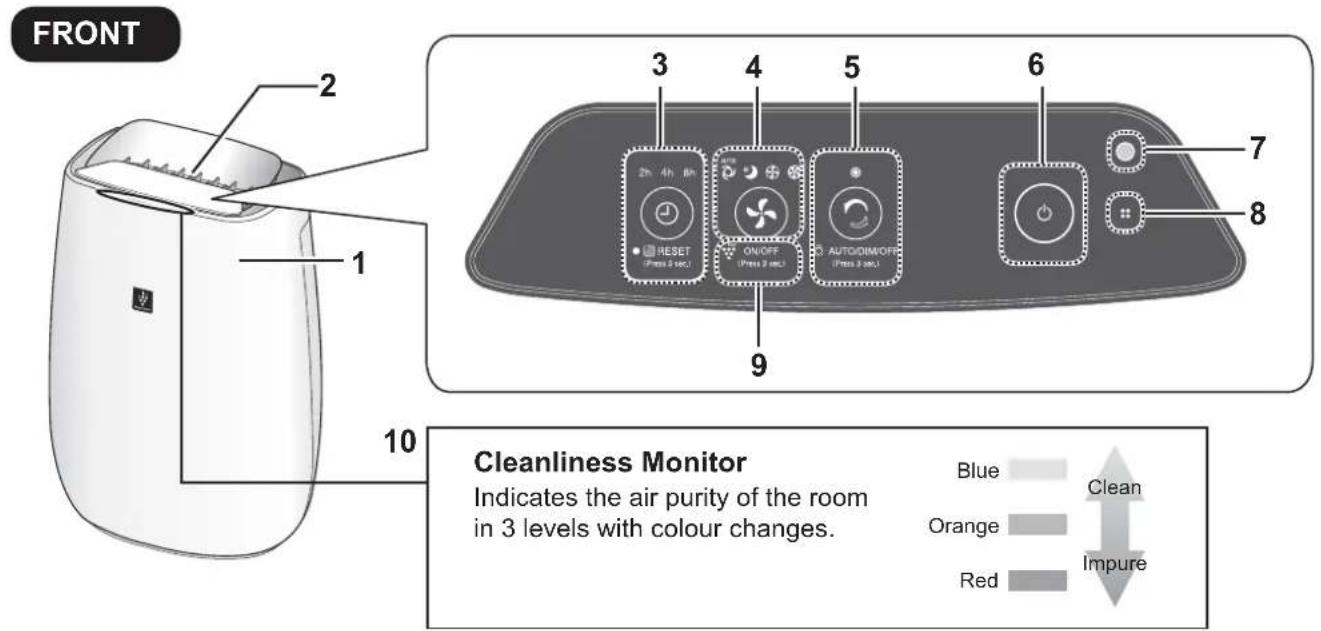
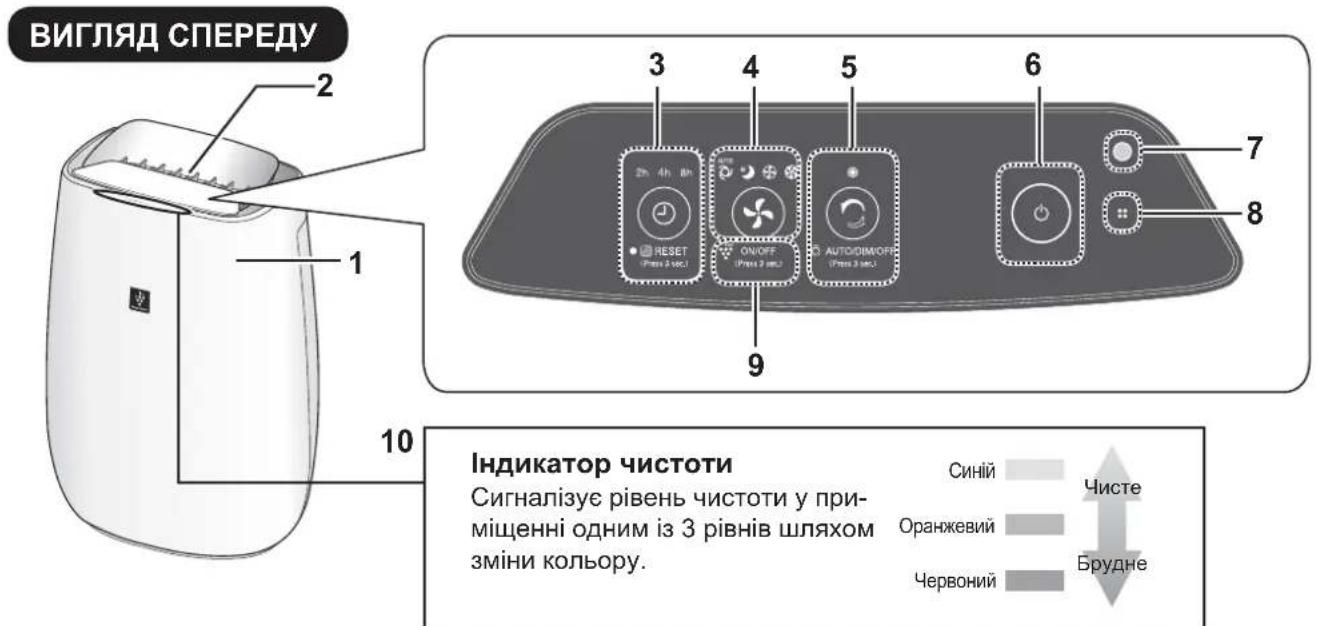
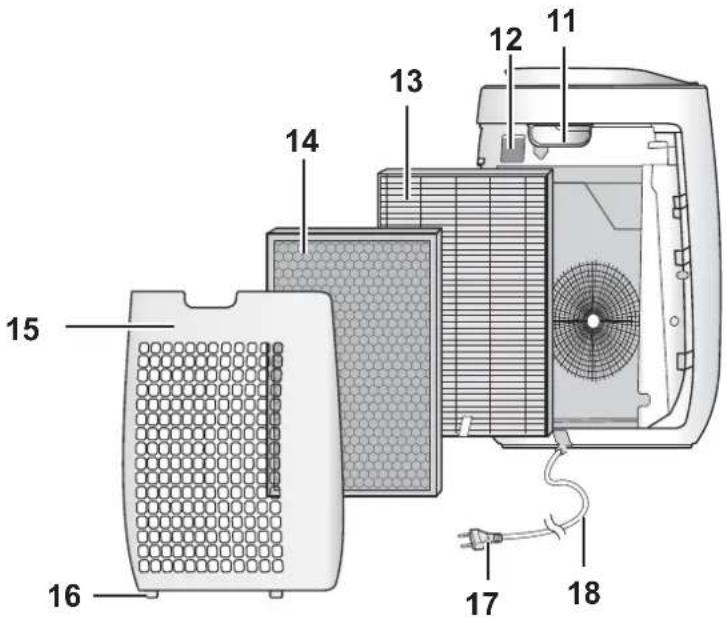
BACK
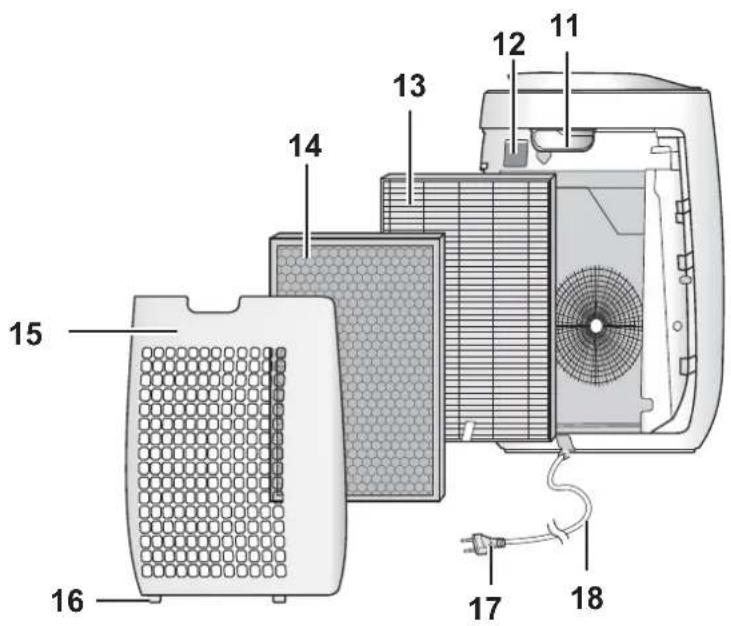
| 1 | Main Unit | 9 | Plasmacluster Ion Light (blue) |
| 2 | Air Outlet | 10 | Cleanliness Monitor |
| 3 | OFF TIMER Button, Indicator Light (white) (Press 3 sec.) Filter Reset Button, Indicator Light (orange) | 11 | Handle |
| 12 | Dust Sensor Filter | ||
| 4 | MODE Button, Indicator Light (white) (Press 3 sec.) Plasmacluster Ion ON/OFF Button | 13 | HEPA Filter |
| 14 | Deodorizing Filter | ||
| 5 | CLEAN ION SHOWER Button, indicator Light (white) (Press 3 sec.) Light Control Button | 15 | Back Panel (Pre-Filter) |
| 16 | Bottom Tabs | ||
| 6 | POWER ON/OFF Button | 17 | Plug |
| 7 | Light Sensor | 18 | Power Cord |
| 8 | Odour Sensor | ||
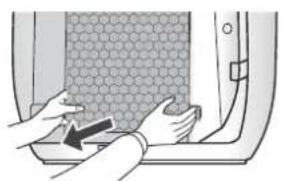
To maintain the quality of the filter, it is installed in the main unit and packed in plastic bag. Be sure to remove the plastic bag from the filter before using the main unit.
1 Remove the Back Panel.
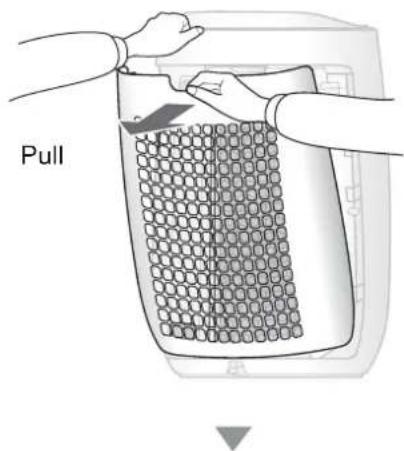
2 Remove the plastic bag from the Filter.
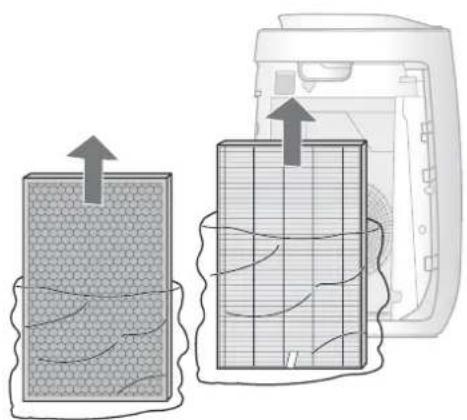
Place the Filter within the main unit.
Do not install the filter backwards or the main unit will not operate properly.

4 Replace the Back Panel to the main unit.
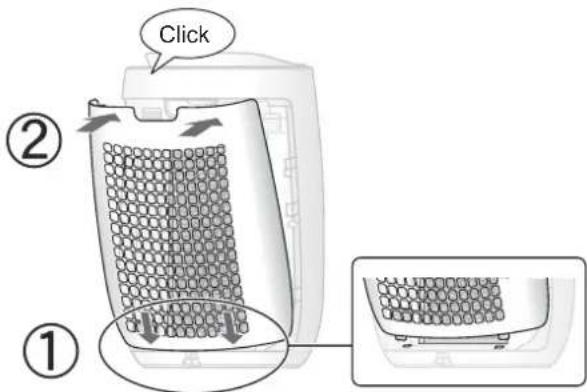
- Do not operate the main unit without the filter.
START/STOP
START STOP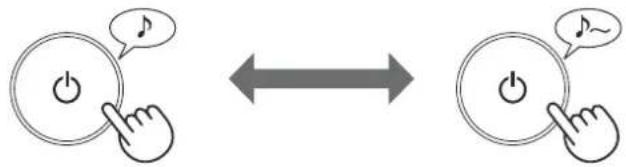
- Select the desired fan speed.
- When the main unit starts operation, the operation starts in the previous mode it was operated in. (Except CLEAN ION SHOWER mode)
CLEAN ION SHOWER
The main unit releases Plasmacluster ions with strong airflow and collects dusts while decreasing static electricity for 10 minutes. After that, the DUST sensor sensitivity is automatically increased and quickly detects impurities and clean the air powerfully for 50 minutes.

NOTE
- The Plasmacluster Ion cannot be turned "OFF".
- When the operation finishes, the main unit will return to the prior operation mode.
It is possible to change to another mode and ° during this mode.
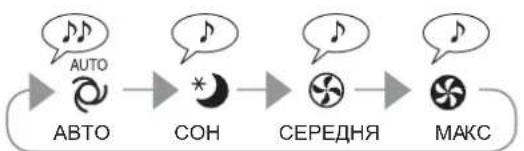
FAN SPEED

NOTE
AUTO

The fan speed is automatically controlled depending on the 3 detection. (Dust / Odour / Light)
SLEEP

The main unit will operate very quietly, and the fan speed is automatically switched depending on the amount of impurities in the air and room brightness.
Cleanliness Monitor / Plasmacluster Ion Light automatically switches DIM or OFF based on room brightness.
Room is bright: light is DIM Room is dark: light is OFF
Even though the indicator is off, Plasmacluster Ion is dispersed into air unless Plasmacluster Ion is turned off by
ON/OFF (Press 3.8c)
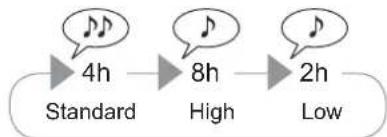
OFF TIMER
Select the length of time you want, with the main unit on. The main unit automatically stops once the selected time is reached.
(with the main unit ON)
2h 4h 8h


-2h
2hour

4h
4hour

8h -
8hour

OFF
CANCELLATION
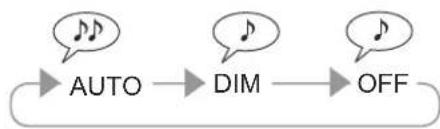
LIGHT CONTROL
You can set the Cleanliness Monitor / Plasmacluster Ion Light to OFF when they are lighting up.
1 (with the main unit ON)

AUTO/DIM/OFF (Press 3 sec.)
more than 3 sec.
2

AUTO/DIM/OFF (Press 3 sec.)
NOTE
- If the CLEAN ION SHOWER Button is not pushed within 8 seconds, the setting will be saved automatically.
- When the main unit starts operation, the operation starts in the previous mode it was operated in.
AUTO
Light automatically switches ON or DIM based on room brightness.
Room is bright: light is ON
Room is dark: light is DIM
OFF
When set to "OFF", the "DIM" light illuminates for 8 seconds after operation starts and then the light turns off.
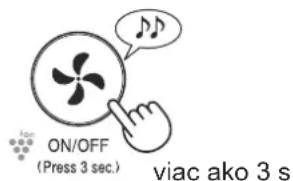
PLASMACLUSTER ION ON/OFF
When Plasmacluster Ion is ON, the Plasmacluster Ion Light will turn on. (blue)
(with the main unit ON)
ON OFF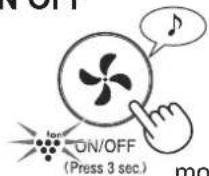

more than 3 sec.
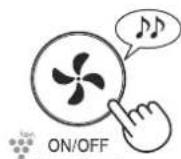
(Press 3 sec.)
more than 3 sec.
NOTE
- When the main unit starts operation, the operation starts in the previous mode it was operated in.
ADJUSTMENT OF SENSOR DETECTION SENSITIVITY
You can change the sensitivity of the Dust sensor / Odour sensor and the Light sensor .
1 (with the main unit OFF)

more than 3 sec.
2 Dust sensor / Odour sensor Light sensor

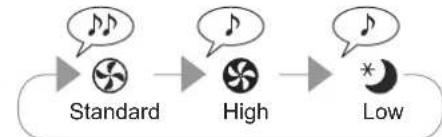

3
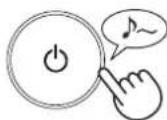
NOTE
- If the power OFF Button is not pushed within 8 seconds of adjusting sensor sensitivity, the setting will be saved automatically.
- The sensor sensitivity setting will be saved even if the main unit is unplugged.
To maintain optimum performance of this air purifier, please clean the main unit including the filter periodically. Be sure to disconnect the power cord from the wall outlet before performing any maintenance.

Do not WASH

SENSORS
Once in two months

HEPA FILTER
When the smell from the Air Outlet When the smell is hard to take

DEODORIZING FILTER
When the smell from the Air Outlet When the smell is hard to take
Back Panel (Pre-Filter)
Once a month, when the filter reset indicator light is on.
MAIN UNIT
Once every two months.
BACK PANEL (Pre-Filter)
Back Panel
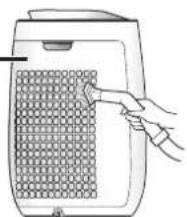
Gently remove dust from the Back Panel with a vacuum cleaner attachment or similar tool.
CAUTION
Do not apply excessive pressure when scrubbing the Back Panel.
After
Please reset the filter reset indicator* after cleaning.
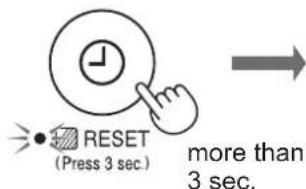
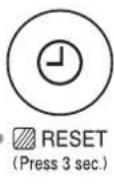
*The Filter Reset Indicator Light will turn on after approximately 720 hours of operation.
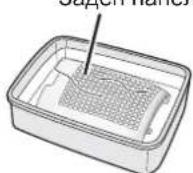
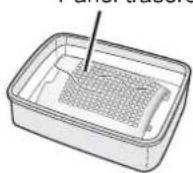
NOTE: How to clean hard-to-remove dirt
Back Panel
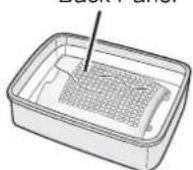
- Add a small amount of kitchen detergent to water and soak for about 10 minutes.
- Rinse off the kitchen detergent with clean water.
- Completely dry the filter in a well-ventilated area.
SENSORS
Dust sensor
Dust sensor filter

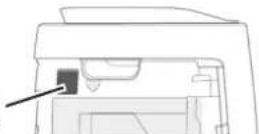
Odour sensor
Odour sensor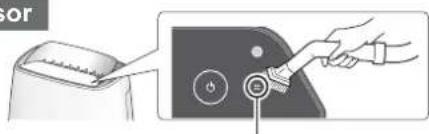
- Remove the Back Panel.
- Remove the Dust Sensor Filter.
- If it is very dirty, wash it with water and dry it thoroughly.
Gently remove dust from the odour sensor by using a vacuum cleaner attachment or similar tool.
FILTERS
HEPA Filter Tag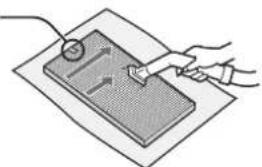
Deodorizing Filter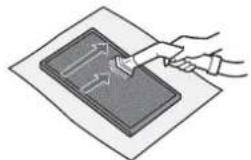
Gently remove dust from HEPA Filter and Deodorizing Filter with a vacuum cleaner attachment or similar tool.
CAUTION
Do not wash in water and dry in the sun.
The filters are fragile, be careful not to apply too much force.
HEPA Filter
Apply the maintenance only on the side with the tag.
Do not clean the opposite side; otherwise, the filter will be damaged.
- Deodorizing Filter
The maintenance can be applied to both sides.
MAIN UNIT
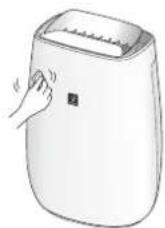
Wipe with a dry, soft cloth.
For stubborn stains or dirt, use a soft cloth dampened with warm water.
CAUTION
-Do not use volatile fluids.
Benzine, paint thinner, polishing powder, etc., may damage the surface.
-Do not use detergents.
Detergent ingredients may damage the main unit.
FILTER REPLACEMENT
Life of Filters
The filter life and replacement period are based on the condition of smoking 5 cigarettes per day and the dust collection power is reduced by half compared with that of new filter.
Filter life varies depending on the room environment, usage, and location of the main unit.
We recommend to replace the filter more frequently if the product is used in a condition significantly severer than normal household use.
HEPA Filter : About 10 years after opening - Deodorizing Filter : About 10 years after opening
Replacement Filter Model
Consult your dealer when purchasing a replacement filter.
HEPA Filter : 1 unit
Deodorizing Filter : 1unit
FZ-J40HFX
FZ-J40DFX
Disposal of Filters
Please dispose of the replaced filter according to the local disposal laws and regulations.
HEPA Filter materials:
- Polypropylene Polyethylene
Deodorizing Filter materials: Polypropylene Polyester - Activated carbon
Before calling for service, please review the Troubleshooting list below, since the problem may not be a main unit malfunction.
| SYMPTOM REMEDY (not a | malfunction) |
| Odours and smoke are not removed. | Replace the filters if they appear to be heavily soiled. (page 9) Check if the plastic bag is removed from the filter. (page 5) |
| The Cleanliness Monitor illuminates blue even when the air is impure. | The air could be impure at the time the main unit was plugged in. Unplug the main unit, wait one minute, and plug the main unit in again. |
| The Cleanliness Monitor illuminates orange or red even when the air is lean. | Sensor operation is affected if the dust sensor openings are dirty or clogged. Gently clean the dust sensor openings. (page 8). |
| A clicking or ticking sound is heard from the main unit. | Clicking or ticking sounds may be audible when the main unit is generating ions. |
| The discharged air has an odour. | Check to see if the filters are heavily soiled. Clean or replace the filters. |
| The main unit does not operate properly when cigarette smoke is in the air. | Is the main unit installed in a location that is difficult for the sensor to detect cigarette smoke? Is the dust sensor opening blocked or clogged? (In this case, clean the opening.) (page 8) |
| Smell from a new filter. | Immediately after removing the plastic bag, a slight odour may occur. This odour is not harmful for filter performance or human exposure. |
| The Cleanliness Monitor is turned off. | Check to see if the Lights OFF Mode selected. Press for 3 seconds to light On. (page 7) Check to see if the SLEEP mode is selected. The Cleanliness Monitor / Plasmacluster Ion Light are turned off automatically when room is dark after the SLEEP mode is selected. |
| The Cleanliness Monitor lights change colour frequently. | The Cleanliness Monitor lights automatically change colours as impurities are detected by the dust sensor. |
| The SLEEP lamp is flashing. | Fan motor error. Turn the power OFF. Wait one minute, and then turn the power ON. |
| AUTO START After a power failure, automatically resume the operation when the power recovers. | Even when the plug is unplugged or the breaker is thrown during the operation, the operation resumes at the previous operation mode and settings if the power recovers. |
ON (default)
(with the main unit OFF) (with the main unit OFF)




(simultaneously for more than 3 sec.)
If the AUTO lamp lights up for 8 seconds, the setting is completed.
OFF

(simultaneously for more than 3 sec.)
SPECIFICATIONS
| Power supply | 220-240 V 50-60 Hz | ||
| Fan speed Adjustment | MAX MED SLEEP* | 1 | |
| Fan Speed (m3/hour) | 240 186 48~120 | ||
| Noise Level (dBA) | 45 39 15~30 | ||
| Rated Power (W) | 23 14 3.5~75 | ||
| Standby Power (W) | 0.9 | ||
| Recommended Room Size (m2)*2 | ~30 | ||
| High density Plasmacluster ion recommended room size ( m2)*3 | ~23 | ||
| Cord Length (m) | 2.0 | ||
| Dimensions (mm) | 390(W) x 270(D) x 583(H) | ||
| Weight (kg) | 6.2 | ||
1 The fan speed is automatically switched depending on the amount of impurities in the air and room brightness. 2 The recommended room size is appropriate for operating the main unit at maximum fan speed.
- The recommended room size is an area in which a given amount of dust particles can be removed in 30 minutes. (JEM1467).
*3 Room size in which approximately 7000 ions per cubic centimetre can be measured in the centre of the room when the main unit is placed next to a wall, is running at MED mode settings, and is at a height of approximately 1.2 metres from the floor.
Standby Power
When the main unit's power plug is inserted in a wall outlet, it consumes standby power to operate electrical circuits. To conserve energy, unplug the power cord when the main unit is not in use.
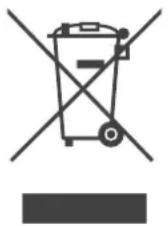
Attention: Your product is marked with this symbol. It means that used electrical and electronic products should not be mixed with general household waste. There is a separate collection system for these products.
A. Information on Disposal for Users (private households)
1. In the European Union
IF YOU WISH TO DISPOSE OF THIS EQUIPMENT, DO NOT USE THE ORDINARY WASTE BIN, AND DO NOT PUT IT INTO A FIREPLACE!
Used electrical and electronic equipment should always be collected and treated SEPARATELY in accordance with local law.
Separate collection promotes an environment-friendly treatment, recycling of materials, and minimizing final disposal of waste. IMPROPER DISPOSAL can be harmful to human health and the environment due to certain substances! Take USED EQUIPMENT to a local, usually municipal, collection facility, where available.
If in doubt about disposal, contact your local authorities or dealer and ask for the correct method of disposal.
ONLY FOR USERS IN THE EUROPEAN UNION, AND SOME OTHER COUNTRIES; FOR INSTANCE NORWAY AND SWITZERLAND: Your participation in separate collection is requested by law.
The symbol shown above appears on electrical and electronic equipment (or the packaging) to remind users of this.
Users from PRIVATE HOUSEHOLDS are requested to use existing return facilities for used equipment. Return is free of charge.
If the equipment has been used for BUSINESS PURPOSES, please contact your SHARP dealer who will inform you about take-back. You might be charged for the costs arising from take-back. Small equipment (and small quantities) might be taken back by your local collection facility. For Spain: Please contact the established collection system or your local authority for take-back of your used products.
2. In other Countries outside the EU
If you wish to discard this product, please contact your local authorities and ask for the correct method of disposal.
For Switzerland: Used electrical or electronic equipment can be returned free of charge to the dealer, even if you don't purchase a new product. Further collection facilities are listed on the homepage of www.swico.ch or www.sens.ch.
B. Information on Disposal for Business Users.
1. In the European Union
If the product is used for business purposes and you want to discard it:
Please contact your SHARP dealer who will inform you about the take-back of the product. You might be charged for the costs arising from take-back and recycling. Small products (and small amounts) might be taken back by your local collection facilities.
For Spain: Please contact the established collection system or your local authority for take-back of your used products.
2. In other Countries outside the EU
If you wish to discard of this product, please contact your local authorities and ask for the correct method of disposal.
SHARP
SHARP CORPORATION

Service & Support
Visit our website:
www.sharphomeappliances.com
Or contact us:



Printed in Thailand
TINS-B268KKRZ 19M-②

- AIR PURIFIER WITH HUMIDIFYING FUNCTION
- POLSKI
- ZAP./WYP. JONY PLASMACLUSTER
- NOTE
- SETTING THE SENSOR DETECTION SENSITIVITY
- IMPORTANT SAFETY INSTRUCTIONS
- PLASMACLUSTER ION ON/OFF
- ON/OFF
- FOR INDOOR USE
- SENSORS
- HEPA FILTER
- PRE-FILTER
- REAR PANEL (PRE-FILTER)
- BASIC
- REPLACEMENT FILTER (OPTIONAL)
- WARNING
- CLEANING
- RESET
- CLEANING THE CONTROL UNIT
- SENSOR FOR DUST
- SENSOR FOR VACUUM
- FILTERS
- BASIC MODEL
- FILTER REPLACEMENT
- LIFESPAN OF THE DEVICE
- MODEL FILTER REPLACEMENT
- TROUBLESHOOTING
- SWITCHING ON (OPTIONAL)
- SPECIFICATIONS
- STANDBY ENERGY CONSUMPTION
- EUROPEAN UNION
- BCTPAHNN3BBH EC
- ИНФОМАЦЯЗИЗХБЬГЯНПPEPA6OTKA OTPOMUIEHN NOTPE6NTEHN
- BEBPONECKNCBIO
- YKPAIHCBSKA
- BAJINBI BKA3IBKN 3 TEXHIKN E3NEKN
- PRECAUTIONS FOR USE
- INSTALLATION PROCEDURE
- FILTER OPERATION PROCEDURE
- PART NAMES
- REPLACEMENT
- CLEAN DRY MODE
- FAN SPEED
- AUTOMATIC
- SLEEP
- OFF TIMER
- BIMNKAY CBITJI A
- PIMITKA
- ABTOMATNUHNI
- BMMK
- TURNING ON THE PLASMACLUSTER ION GENERATOR
- ADJUSTING THE SENSITIVITY OF THE SENSOR
- ADJUST THE SENSOR SENSITIVITY FOR DIRT AND ODORS, AND FOR BRIGHTNESS
- MAINTENANCE AND TECHNICAL SERVICE
- DO NOT WASH
- ФИЛЬТР НЕРА
- ГОЛОВНОЙ БЛОК
- ФИЛЬТР ЗАПАХОВ
- ЗАДНЯЯ ПАНЕЛЬ (ФИЛЬТР ПРЕДВАРИТЕЛЬНОЙ ОЧИСТКИ)
- ОСТЕРЕГАЙТЕСЬ
- OIL
- NOTE: THE ORDER OF CLEANING THE FILTER HOUSING
- MAIN UNIT
- FILTER SERVICE LIFE
- REPLACEMENT FILTER MODEL
- REPLACEMENT FILTERS
- FILTER INSTRUCTIONS
- PLASMACLUSTER IONS ON/OFF
- TIMER OFF
- PLASMACLUSTER ON/OFF
- PLEASE READ BEFORE OPERATING YOUR NEW AIR PURIFIER
- FEATURES
- CONTENTS
- CAUTIONS CONCERNING OPERATION
- INSTALLATION GUIDELINES
- FILTER GUIDELINES
- BACK
- REMOVE THE BACK PANEL
- REMOVE THE PLASTIC BAG FROM THE FILTER
- PLACE THE FILTER WITHIN THE MAIN UNIT
- REPLACE THE BACK PANEL TO THE MAIN UNIT
- START/STOP
- CLEAN ION SHOWER
- AUTO
- LIGHT CONTROL
- OFF
- ADJUSTMENT OF SENSOR DETECTION SENSITIVITY
- DUST SENSOR / ODOUR SENSOR LIGHT SENSOR
- DEODORIZING FILTER
- BACK PANEL (PRE-FILTER)
- CAUTION
- AFTER
- NOTE: HOW TO CLEAN HARD-TO-REMOVE DIRT
- DUST SENSOR
- ODOUR SENSOR
- LIFE OF FILTERS
- DISPOSAL OF FILTERS
- ON (DEFAULT)
- STANDBY POWER
- INFORMATION ON DISPOSAL FOR USERS (PRIVATE HOUSEHOLDS)
- IN THE EUROPEAN UNION
- IN OTHER COUNTRIES OUTSIDE THE EU
- INFORMATION ON DISPOSAL FOR BUSINESS USERS
- SHARP
- SHARP CORPORATION
Brand : SHARP
Model : FPJ40EUW
Category : Air purifier