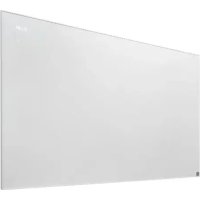
TIHP 600 B2 - Electric heating TRONIC - Free user manual and instructions
Find the device manual for free TIHP 600 B2 TRONIC in PDF.



User questions about TIHP 600 B2 TRONIC
0 question about this device. Answer the ones you know or ask your own.
Ask a new question about this device
Download the instructions for your Electric heating in PDF format for free! Find your manual TIHP 600 B2 - TRONIC and take your electronic device back in hand. On this page are published all the documents necessary for the use of your device. TIHP 600 B2 by TRONIC.
USER MANUAL TIHP 600 B2 TRONIC
INFRARED PANEL HEATER TIHP 600 B2 INFRAROT-HEIZPANEL TIHP 600 B2
PANNEAU CHAUFFANT INFRAROUGE TIHP 600 B2
IECYGBNI MT
INFRARED PANEL HEATER
Operation and Safety Instructions
BEFRCH
PANNEAU CHAUFFANT INFRAROUGE
Before reading, fold out the page with the images and familiarise yourself with all the features of the device.
DE AT CH
GB/IE/NI/CY/MT Operation and Safety Instructions Page 5
1.1 Intended Use 7
1.2 Scope of Delivery 7
1.3 Equipment 7
1.4 Technical Data 8
2. Safety instructions for space heaters 10
2.1 General safety instructions.. 1.1
2.2 Supplementary safety instructions 12
2.3 Information about batteries 13
3.Before commissioning 1.5
3.1Assembly 15
3.2 Remote control: How to insert or change the battery 16
4. Commissioning
4.1 Switching the device on/off 17
4.2 Cancel key lock 17
4.3 Setting the time and day of the week 17
4.4 Set temperature 18
4.5 Setting the comfort temperature 18
5. Set operating mode
5.1 Frost protection mode 18
5.2 Comfort mode 18
5.3 ECO mode 19
6. Additional function
6.1 Boost function 19
6.2 Switch on window open detection 19
- Set timer 19
7.1 Setting the switch-on timer... 19
7.2 Setting the switch-off timer.. 20
7.3 Set vacation timer..20
7.4 Set weekly timer..20
- Protective devices of the appliance 21
8.1 Overheating protection 2.1 - Maintenance, cleaning and storage 21
- Disposal 22
- Resource efficiency 22
11.1 Availability and maximum delivery times for spare parts 22
- EU conformity 22
- ROWI Germany GmbH Warranty 23
- Service 24
INFRARED PANEL HEATER TIHP 600 B2
1. Introduction
We congratulate you on your new device purchase. You have thus opted for a high quality product. These Directions for Use are an integral part of this product. They contain important information for safety, use and disposal. Prior to the product use, make yourself familiar with all instructions for use and safety. Use the product only as described and only for the specified fields of use. If you hand on the product to third parties, also hand over all the product documents.
1.1 Intended Use
This product is only suitable for well-insulated rooms or for occasional use. Only use the appliance for direct heating of walls or furnishings indoors. The appliance is only to be used as a wall-mounted appliance. The appliance is not intended for use in rooms where special conditions prevail, such as corrosive or explosive atmospheres (dust, steam or gas). Do not use the device outdoors. The remote control supplied controls the infrared heater. Any other use or modification of the appliance is considered improper use and entails considerable risk of accidents. We accept no liability for damage resulting from improper use. The appliance is intended for private use only and not for commercial use.
1.2 Scope of Delivery
1 Infrared panel heater TIHP 600 B2
1 Remote control
4 Screws M5*65mm
4 Wall plugs
1 Batteries (LI-ION)
1 Drilling template
1 Instruction manual
1.3 Equipment
Items 1-6 can be found on the front fold-out page.
Heating panel
2 Display
3 On/off switch
4 Mains connection cable
5 Fixing screws
6 Wanddubel
Items 7-28 can be found on the back fold-out page.
Display
7 Display
Heating symbol
9 Plus button
[10] Timer button
11 Minus button
12 On/Off button
13Operation button
Weekly display
Remote control
15 On/off button
16 Boost button
[17] Timer button
18 Plus button
19 Program button
[20] Minus button
21]UNLOCKbutton
22 Settings
23 OK button
24Vacation mode
25Operation button
26 Battery compartment
27 Tab
28 Battery
1.4 Technical Data
Heating panel TIHP 600 B2
Input voltage: 220-240 V
Rated frequency: 50 - 60Hz
Output power: 600 W
Protection class:

Protection class: IP4X: Pro
tection against the penetration
of foreign bodies >1 mm.
Keep tools and wires away.
Protection class IPX4:
Protection against splashing
water from all directions
Mains cable length: 1,8 m
Remote control (only for use with the TIHP 600 B2 heating panel)

Battery supply: 3 V (Direct current)
CR2025

: Lithium-Battery
Battery manufacturer
DONGGUAN TIANQIU ENTERPRISE CO., LTD
TianQiu Industrial Park, Xinji Industrial Zone,
Machong Town, Dongguan, GuangDong, P.R. China
Tel: 0086-769-81210216
Mail: gd@gdtiangiu.com
Website: http://www.tmmq.cn
Information requirements for electric local space heaters
Model identifier(s): TIHP 600 B2
| Item Symbol Value Unit | ||
| Heat output | ||
| Nominal heat output P | nom | 0.6 kW |
| Minimum heat output (indicative) | Pmin | N/A kW |
| Maximum continuous heat output | Pmax,c | 0.6 kW |
| Power consumption | ||
| In off mode P | o | 0.00 W |
| In standby mode P | sm | 0.92 W |
| In idle mode P | idle | 0.92 W |
| In network standby P | nsm | N/A W |
| Standby mode with display information or status | [yes] | |
| Seasonal space heating energy efficiency in active nS, on mode | 92.0 % | |
| Item Unit | ||
Type of heat output/room temperature control (select one)
single stage heat output and no room temperature control [no]
Two or more manual stages, no room temperature control [no]
with mechanical thermostat room temperature control [no]
with electronic room temperature control [no]
electronic room temperature control plus day timer [no]
electronic room temperature control plus week timer [yes]
Other control options (multiple selections possible)
| room temperature control, with presence detection | [no] |
| room temperature control, with open window detection | [yes] |
| with distance control option | [no] |
| with adaptive start control | [no] |
| with working time limitation | [yes] |
| with black bulb sensor | [no] |
| self-learning functionality | [no] |
| control accuracy | [no] |
ROWI Germany GmbH
Werner-von-Siemens-Str. 27
76694 Forst
GERMANY
2. Safety instructions for space heaters

Read all the safety indications and instructions.

Failure to adhere to the safety indications and instructions may cause serious injuries and/or property damages.
Please keep all the safety indications and instructions for future use.

WARNING! Do not cover!
To avoid the heater overheating, it must not be covered.
- The heater must not be installed directly below a wall socket.
- Do not use this heater in the immediate vicinity of a bath, shower or swimming pool.
- If the mains connection cable of this appliance is damaged, it must be replaced by the manufacturer or its customer service department or a similarly qualified person in order to avoid hazards.
- CAUTION: To avoid a hazard due to unintentional resetting of the protective temperature limiter, the appliance must not be supplied via an external switching device such as a timer or be connected to a circuit that is regularly switched on and off by a device.
- Do not operate an appliance that has fallen down.
- Do not use the product if you notice any visible damage.
2.1 General safety instructions
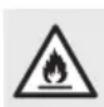
WARNING:
To reduce the risk of fire, keep textiles, curtains and other flammable materials at least 1 m away.
WARNING: The heater must not be used in small rooms occupied by persons who are unable to leave the room independently, unless constant supervision is guaranteed.
- No action is required on the part of the user to set the product to 50 or 60Hz or to 220 or 240V . The product automatically sets itself to the correct frequency or voltage.
- This appliance can be used by children aged from 8 years and above and persons with reduced physical, sensory or mental capabilities or lack of experience and knowledge if they have been given supervision or instruction concerning use of the appliance in a safe way and understand the hazards involved.
Children must not play with the appliance.
- Cleaning and user maintenance must not be carried out by children without supervision.
Children under the age of 3 must be kept away unless they are constantly supervised.
Children aged 3 years and younger than 8 years may only switch the appliance on and off if they are supervised or have been instructed in the safe use of the appliance and have understood the resulting dangers, provided that the appliance is placed or installed in its normal position of use.
Children aged 3 years and younger than 8 years must not insert the plug into the socket, regulate the appliance, clean the appliance and/or carry out user maintenance.
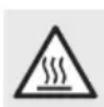
Warning of hot surfaces!
CAUTION: Some parts of the product can become very hot and cause burns. Special care must be taken when children and vulnerable persons are present.
2.2 Supplementary safety instructions

Danger to life due to electrical current!
Danger to life in case of contact with live cables or components!
The appliance is only suitable for indoor operation.
- Before connecting the appliance, compare the connection data on the rating plate (voltage and frequency) with the data for your electrical network. Ensure that the data matches to prevent damage to the appliance.
- Check the appliance for external, visible damage before use. Do not use a damaged or dropped appliance.
- Never open the housing of the appliance. There is a risk of electric shock if live connections are touched and/or the electrical and mechanical structure is changed!
- Ensure that the mains connection cable is not laid over hot surfaces and/or sharp edges.
- Make sure that the mains connection cable is not kinked or pinched.
- Only have repairs to the appliance carried out by authorized specialist companies or customer service. Incorrect repairs can cause considerable danger to the user. The warranty will also become void.
- Protect the device from moisture and the ingress of liquids.
- Only pull the mains cable out of the socket by the mains plug.
- Do not operate the appliance in the vicinity of naked flames.
- Only operate the appliance with the mains connection cable fully unrolled. Never wrap the mains cable around the appliance. Ensure that the mains connection cable does not come into contact with hot surfaces. Lay the mains connection cable so that it cannot be tripped over.
WARNING! Do not install a heating panel designed for walls on the ceiling! This can cause burns!
2.3 Information about batteries

Keep out of reach of children.
Swallowing can lead to injury, perforation of soft tissue and to death. Severe burns can occur within 2 hours of swallowing. Seek medical advice immediately.
Incorrect use of batteries may result in fire, explosion, leakage of dangerous substances, or other hazard!
- Do not throw batteries into the fire and do not expose them to high temperatures.
- Do not open, deform or short-circuit the batteries. Otherwise, the contained chemicals can leak out of them.
- Do not try to recharge batteries. Recharging is only allowed for batteries which are marked as "rechargeable". There is a danger of explosion!
Always remove rechargeable batteries from the device to charge them.
- Regularly check the batteries. Leaking chemicals can cause heavy damage to the device. Dealing with damaged or leaking batteries, exercise a particular caution.
- Risk of chemical burns! Wear protective gloves.
Chemicals escaping from a battery can cause skin irritation.
In case of contact with skin, rinse with much water. In case of contact with eyes, do not rub your eye, but rinse it with water and immediately visit a doctor.
- Different types of batteries or accumulators as well as new and old batteries must not be used together.
- When inserting the battery, pay especial attention to the correct polarity. Wrong polarity can cause risk of bursting.
- Remove the batteries from the unit if you are not going to use it for a long time or if you want to store it.
- Insert the batteries according to the polarity.
- Do not allow children to replace batteries without supervision by an adult.
Always choose the right size and the right battery type for the intended use. The information sheet enclosed with the device which is meant to assist you in choosing the right batteries should be kept for reference. - Clean the battery contacts and also the contacts of the equipment before installing the batteries.
- Remove used up batteries immediately.
- Do not dismantle the batteries.
If the battery compartment does not close securely, do not use the remote control any more and keep it away from children.
Please avoid extreme conditions and temperatures which can adversely affect the batteries/rechargeable batteries, e.g. placing them on radiators/direct solar radiation. - The connection terminals must not be short-circuited.
3. Before commissioning
Remove all packaging material and transportation locks from the appliance. Check that the contents of the package are complete and undamaged.
3.1 Assembly
To ensure safe and fault-free operation of the device, the installation location must meet the following requirements:
The distance between the drill holes on the right and left is 52.5cm the distance between the drill holes at the top and bottom is 36.5cm
Note: The distance between the lower drill holes must be at least 31~cm
If the specified distances are not observed, the appliance must not be installed.
When drilling, take care not to damage any concealed water or power lines!
Do not use the appliance in a hot, wet or very humid environment or in the vicinity of flammable material.
The socket outlet must be easily accessible soplugs 5 supplied. that the appliance can be easily disconnected if necessary.
A minimum distance of 20~cm to the side, 50 cm to the top and 80~cm to the front must be maintained from the housing.
ATTENTION!
Do not install the heating panel directly behind a door.
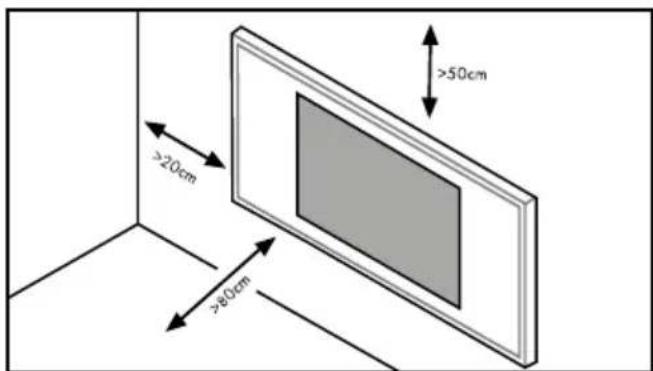
Note: Make sure that the wall is capable of supporting a weight of at least 5 kg.
Note: You may need a climbing aid (e.g. a ladder) to carry out the installation.
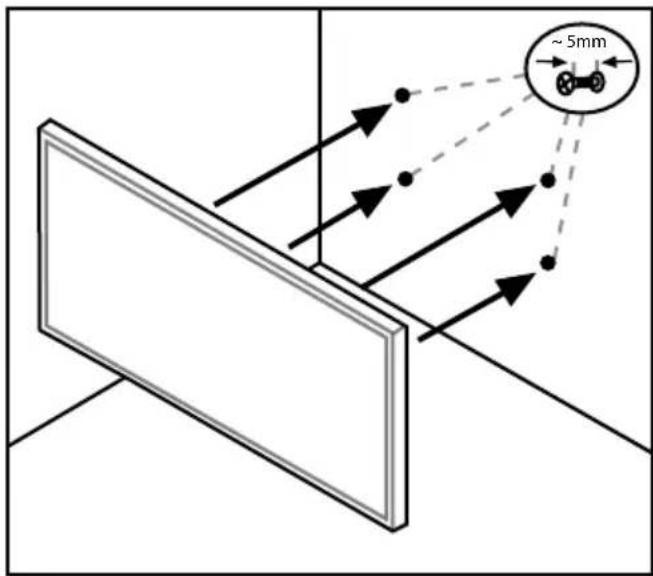
- Drill 4 holes with a 6mm drill bit and insert the wall to plugs supplied.
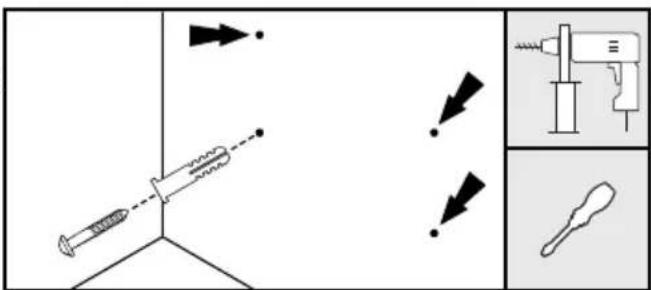
Installation instructions: Please use the enclosed drilling template to position the drill holes correctly. Ensure that the template is positioned horizontally (in the water). You can then drill directly through the template - prior marking is not necessary.
Screw the fixing screws 5 into the wall plugs 6, leaving about 5mm of the fixing screw 5 protruding.
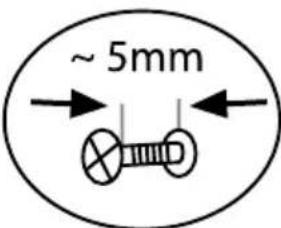
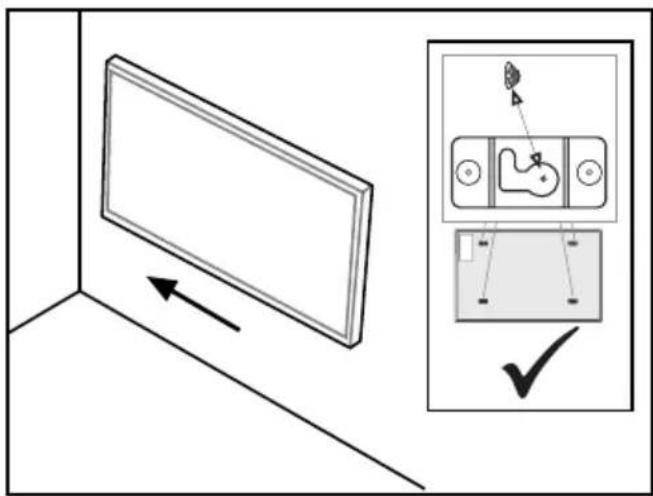
Place the heating panel on the fixing screws 5.
Now move the heating panel to the left to complete the installation. Ensure that the fixing screws 5 are positioned correctly.
3.2 Remote control: How to insert or change the battery
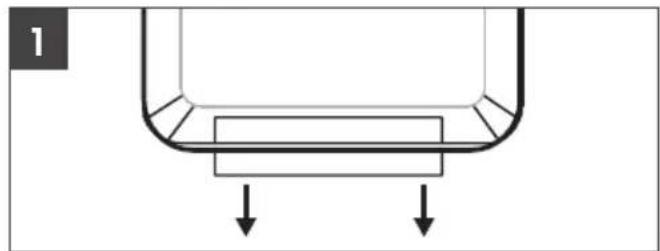
The remote control unit is delivered together with a lithium button cell 28. To enable the remote control, remove the plastic tape that protrudes from the battery compartment 26 (see Figure 1).
If the remote control battery needs to be replaced, insert a new 3-volt lithium button cell. Pay attention to the type of lithium button cell (CR2025).
Press the tab 27 on the battery compartment 26 of the remote control toward the centre. Now pull out the battery compartment 26 (see Figure 2).
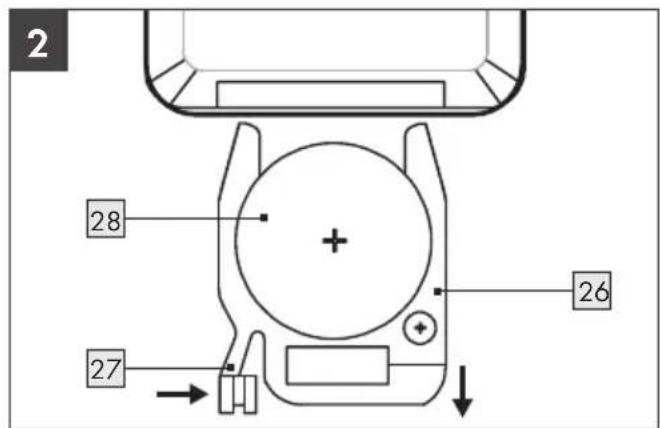
Remove the old battery 28.
Insert a new 3V-button-cell battery (type CR2025). Pay attention to the correct polarity.
Push the battery compartment 2 back into the remote control unit until the tab 2 snaps into place.
4. Commissioning
CAUTION! The appliance may only be put into operation once it has been fully installed on the wall!
NOTE: A beep sounds to confirm that a button has been pressed.
NOTE: You may need a climbing aid (e.g. a ladder) to operate the control buttons on the device.
- Connect the panel to an earthed, fused socket. Set the on/off switch 3 to the "l" position to supply the device with power. The device is now in standby mode.
4.2 Cancel key lock
Note: The button lock automatically locks the appliance as soon as no setting has been made for approx. 30 seconds. The word "LOCK" appears on the display 2.
Press and hold the UNLOCK button 21 on the remote control for approx. 3 seconds until you hear a beep.
To unlock the device on the display 2, press and hold the plus 9 and minus 11 buttons simultaneously for approx. 3 seconds.
- Settings can now be made on the device again.
4.1 Switching the device on/off
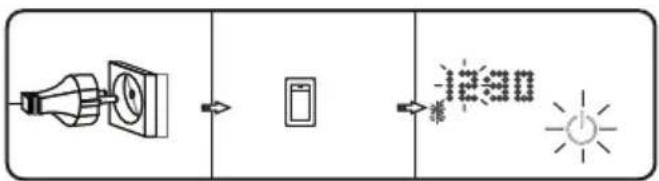
Connect the appliance to a grounded, fused, freely accessible wall socket.
Now switch the appliance on by setting the on/off switch 3 to the "l" position.
The on/off button 12 on the display 2 flashes continuously.
The device now carries out a self-test. This takes a maximum of 13 seconds and is completed when you can set the time.
To switch off the heating panel, set the on/off switch 3 to the "0" position.
Note: To switch between ^ C and ^ F, press and hold the plus button 9 on the display 2 for approx. 3 seconds.
4.3 Setting the time and day of the week
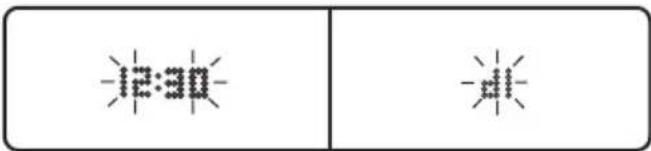
Press the buttons M 13 and P 10 on the device for 3 seconds or press the button 22 on the remote control for 3 seconds.
The time now flashes and can be changed.
As soon as the hours have been set using the plus 9 and minus 11 buttons, confirm with the OK button 23. Repeat the setting for the minutes and confirm with the OK button 23.
The day of the week must then be set.
The display shows d 1 for Monday and can be set to d 7 for Sunday.
The day can be changed using the plus 9 and minus 11 buttons.
Confirm with the OK button 23
After completing the setting, confirm again with the OK button 23.
4.4 Set temperature
Note: The appliance only heats when the set temperature is higher than the current room temperature.
To set the desired temperature on the appliance, press the ON/OFF button 12 on the appliance or the ON/OFF button 15 on the remote control to switch the appliance on from standby mode.
The current room temperature is now displayed.
The desired temperature can now be set using the plus 9 / 18 and minus 11 / 20 buttons.
After completing the setting, confirm with the OK button 23.
The heating symbol 8 on the display 2 lights up.
4.5 Setting the comfort temperature
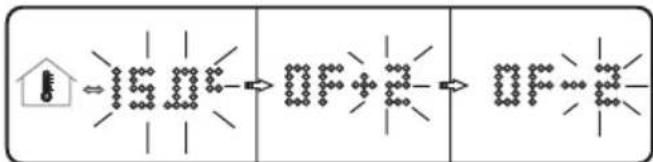
Press the buttons M 13 and P 10 on the device for 3 seconds or press the button 22 on the remote control for 3 seconds.
Skip the settings for the time and day of the week by pressing the button P 10/19 until the display shows "OF".
Here you can change the temperature at which the appliance operates by up to -5^ or +5^ by pressing the plus 9 or minus 11 buttons, depending on whether you like the temperature you are currently feeling.
Confirm with the OK button 23.
5. Set operating mode
To set the desired heating level on the appliance, press the mode button 13 on the appliance or the mode button 25 on the remote control.
The following operating modes can be set:
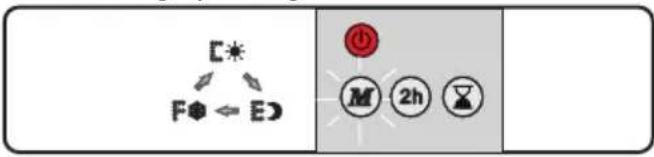
5.1 Frost protection mode
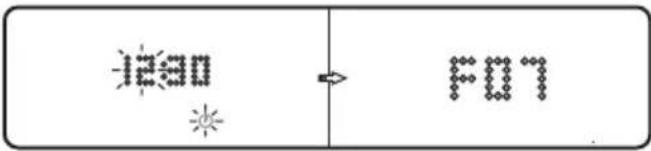
The frost protection function now automatically regulates the room temperature so that it does not fall below 7^
Note: After completing the setting, confirm with the OK button 23.
5.2 Comfort mode
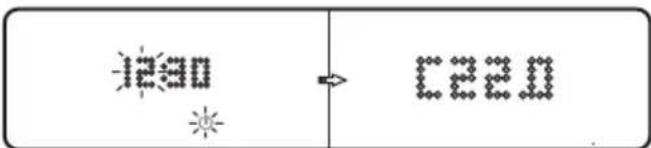
- Comfort mode is set to 22^ as standard and regulates this automatically when activated.
While this mode is being set, the preset 22^ can be changed using the plus 9/18 and minus 11/20 buttons.
The display now shows the abbreviation for the mode and the set temperature.
After completing the setting, confirm with the OK button 23.
The heating symbol 8 on the display 2 only lights up if the set temperature exceeds the actual room temperature.
5.3 ECO mode
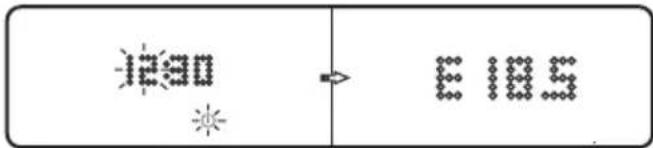
ECO mode is set to 22^ as standard and automatically regulates this when activated as soon as the temperature falls 3.5^ below the set temperature.
While this mode is being set, the preset 22^ can be changed using the plus 9 /18 and minus 11/ 20 buttons. The control when the temperature falls below 3.5^ cannot be changed.
The display now shows the abbreviation for the mode and the set temperature.
After completing the setting, confirm with the OK button 23.
The heating symbol 8 on the display 2 only lights up if the set temperature exceeds the actual room temperature.
Note: If the setting is correct, the display switches between the set mode and the time.
6. Additional function
6.1 Boost function
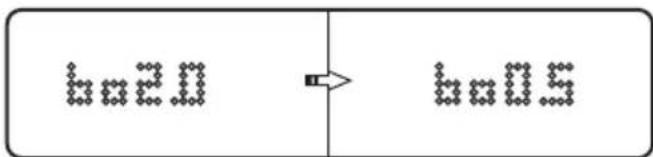
The boost function enables a time-limited setting to maximum power.
To set the boost function on the appliance, press the plus button 9 on the appliance for about 3 seconds or the boost button 16 on the remote control.
By default, the boost function is displayed with the maximum running time of 2 hours.
While setting this mode, the preset 2 hours can be changed using the plus 9 / 18 and minus 11 / 20 buttons.
After completing the setting, confirm with the OK button 23.
The heating symbol 8 on the display 2 lights up.
6.2 Switch on window open detection
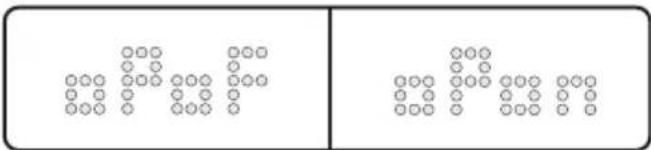
Press the buttons M 13 and P 10 on the device for 3 seconds or press the button 22 on the remote control for 3 seconds.
Skip all settings by pressing the button P10/ 19 until the display shows "oP".
You can now use the plus 9 and minus 11 buttons to switch the window open detection on (on) or off (oF).
Confirm with the OK button 23.
If the window open detection is active, a temperature drop of 5^ within 30 minutes ensures that the product is switched to standby mode. The appliance must then be switched on again using the on/off button.
7. Set timer
7.1 Setting the switch-on timer
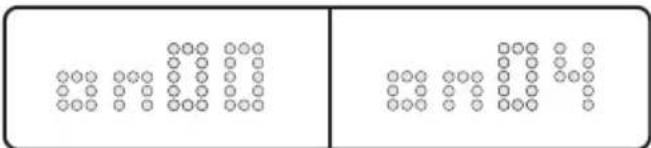
To set the switch-on timer on the device, the device must be in standby mode.
During standby mode, the standby symbol lights up on the display 2.
To ensure that the appliance is in standby mode, press the ON/OFF button 12 on the appliance or the On/Off button 15 on the remote control.
Press the timer button 10 on the appliance or the timer button 17 on the remote control.
The display now shows "on00", the switch-on time now runs automatically in hours from 01-24.
- Confirm with the OK button 23 as soon as the desired switch-on time is displayed.
Theindicator 7 on the display 2 now shows the switch-on timer and the desired number of hours until the appliance switches on.
7.2 Setting the switch-off timer
To set the switch-off timer on the appliance, the appliance must not be in standby mode.
The switch-off timer adopts the previously set temperature and operating mode and, once activated, only regulates the time until the appliance switches off.
Press the timer button 10 on the appliance on the timer button 17 on the remote control.
The display now shows "oF00" and you can set the desired switch-on time using the plus9/ 18 and minus 11/20 buttons.
After completing the setting, confirm with the OK button 23.
The display now shows the switch-off timer and the desired number of hours until the appliance switches off.
7.3 Set vacation timer
The vacation timer can be used to automatically activate frost mode for a desired number of hours per day over a maximum period of 99 days.
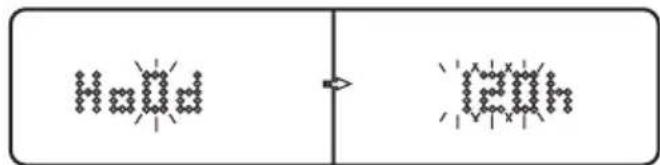
Press the mode button 13 and the plus button 9 simultaneously on the device or the vacation button 24 on the remote control to start programming.
Ho0d is now shown on the display 2 and you can set the desired duration of the vacation timer in days using the plus 9/18 and minus 11/20 buttons.
After completing the setting, press the timer button 10 on the appliance or the OK button 23 on the remote control to set the hours per day in which the frost protection mode should be active using the plus 9/18 and minus 11/20 buttons.
After completing the setting, confirm with the OK button 23.
7.4 Set weekly timer
The weekly timer enables precise setting of the modes including temperature on all days of the week. A total of 7 different weekly timers can be programmed.
Press the program button 19 on the appliance or on the remote control.
The display now shows the mode, a "1" for the first interval of the weekly timer and "P".
Now set the desired mode with the mode button 13 and the temperature with the plus 9/18 and minus 11/20 buttons for the first weekly timer.
After completing the setting, confirm with the program button 19 on the appliance or on the remote control to access the next weekly timer setting. The "2" below the display now flashes on the display.
Repeat this until you have set a mode and a temperature for all 7 intervals of the weekly timer.
The second step is to define the intervals for the weekly timers.
Press and hold the program button 19 on the appliance or on the remote control.
A "1" now lights up on the display 2 for the first interval of the weekly timer and "P" below the "1EXX" display.
This starts the programming for day 1 Monday. In this example, the value of the hours is indicated with the placeholder "XX". An hour display is shown on the display.
You can set the hours of the weekly timer using the plus 9/18 and minus 11/20 buttons.
After completing the setting, confirm with the program button 19 on the appliance or on the remote control to go to the next weekly timer setting: "2EXX"
Here are a few examples of the weekly timer:
"1E08": Start Monday 0:00 am to 08:00 am
"2E16": Start after 1E08 until 16:00 on Tuesday
"3E22": Start after 2E16 until Wednesday 22:00
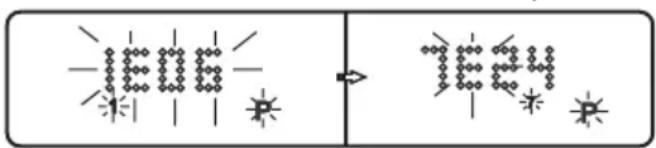
Note: A total of 7 intervals can be defined for 7 weekly timers.
8. Protective devices of the appliance
8.1 Overheating protection
This appliance is equipped with overheating protection. If the appliance gets too hot, the heating element switches off automatically. Switch the appliance off by setting the on/off switch 3 to "0" and unplugging the mains plug from the socket. Allow the appliance to cool down for at least 10 minutes.
ATTENTION: Overheating usually has a reason! It can be a fire hazard!
Check whether the appliance can dissipate enough heat: Is the appliance covered or is it too close to an obstacle?
If possible, rectify the problem. Even if you cannot find a cause but the overheating protection triggers again, you must switch off the appliance and contact the service hotline (see "Service" section).
9. Maintenance, cleaning and storage
Always disconnect the mains plug from the socket when the appliances are not in use and before cleaning or in the event of malfunctions!
Only clean the heating panel and the remote control when they are switched off and cold.
Make sure that no moisture penetrates the appliances during cleaning to avoid irreparable damage to the appliances.
Only clean the housing with a slightly damp cloth and a mild detergent. Never use harsh and/or abrasive cleaning agents.
- Remove dust deposits with a vacuum cleaner or a brush.
Clean the battery contacts and the remote control contacts.
Before storage, remove the batteries so that they cannot damage the device if they leak during storage.
Store the devices in a dry, dark environment protected from frost and heat.
If necessary, cover the devices to protect them from dust.
10. Disposal

The packaging is made of environmentally friendly materials that you can dispose of at your local recycling centres.

These logos are only valid for Spain.
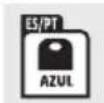

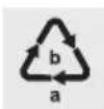
Observe the labelling of the packaging materials when separating waste; these are marked with abbreviations (a) and numbers (b) with the following meaning: 1-7: Plastics/20-22: Paper and cardboard/80-98: Composites.
11. Resource efficiency
Your product has been designed to be durable and easy to maintain. To extend the life of your product, certain replacement parts are available after purchase.

The Triman logo is valid in France only.
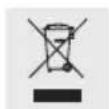
This product is subject to the European Directive 2012/19/EU. Do not dispose of the product in household waste, but via municipal collection points for material recycling! Further information on how to dispose of the discarded device can be obtained from your local authority or city council.

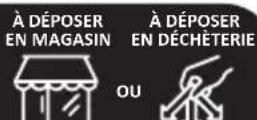
Batteries must be recycled in accordance with Directive 2006/66/EC and may not be disposed of with domestic waste. Each consumer is legally obliged to return all batteries/rechargeable batteries to a collection point in his municipality/district or to the trade. This duty serves to ensure that batteries/rechargeable batteries can be directed to environmentally friendly disposal. Only return batteries/rechargeable batteries which are not charged. Batteries must be removed from the appliance prior to disposal.
11.1 Availability and maximum delivery times for spare parts
Details on spare part availability can be found on our website:
https://rowi-group.com/produkinformationen/
PartsInfo_IAN_487591.pdf
or obtained directly from our service hotline.
Lidl-services@rowi-group.com
Service-Hotline: +800 7694 7694 (free call from a German landline)
NOTE: Please note that replacement parts should only be installed by trained specialists. Repairs carried out by yourself will void the warranty and result in significant safety risks.
12. EU conformity
The product meets the requirements of the applicable European and national directives.
13. ROWI Germany GmbH Warranty
Dear Customer,
This appliance has a 3-year warranty valid from the date of purchase. If this product has any faults, you, the buyer, have certain statutory rights. Your statutory rights are not restricted in any way by the warranty described below.
Warranty conditions
The validity period of the warranty starts from the date of purchase. Please keep your original receipt in a safe place. This document will be required as proof of purchase.
If any material or production fault occurs within three years of the date of purchase of the product, we will either repair or replace the product for you or refund the purchase price at our discretion. This warranty service is dependent on you presenting the defective appliance and the proof of purchase (receipt) and a short written description of the fault and its time of occurrence.
If the defect is covered by the warranty, your product will either be repaired or replaced by us. The repair or replacement of a product does not signify the beginning of a new warranty period.
Warranty period and statutory claims for defects
The warranty period is not prolonged by repairs effected under the warranty. This also applies to replaced and repaired components. Any damage and defects present at the time of purchase must be reported immediately after unpacking. Repairs carried out after expiry of the warranty period shall be subject to a fee.
Scope of the warranty
This appliance has been manufactured in accordance with strict quality guidelines and inspected meticulously prior to delivery.
The warranty covers material faults or production faults. The warranty does not extend to product parts subject to normal wear and tear or fragile parts such as switches, batteries or those made of glass.
The warranty does not apply if the product has been damaged, improperly used or improperly maintained. The directions in the operating instructions for the product regarding proper use of the product are to be strictly followed. Uses and actions that are discouraged in the operating instructions or which are warned against must be avoided.
This product is intended solely for private use and not for commercial purposes. The warranty shall be deemed void in cases of misuse or improper handling, use of force and modifications/repairs which have not been carried out by one of our authorised Service centres.
Warranty claim procedure
To ensure quick processing of your case, please observe the following instructions:
Please have the till receipt and the item number (IAN 487591_2501) available as proof of purchase.
You will find the item number on the type plate on the product, on the front page of the instructions (bottom left), or as a sticker on the rear or bottom of the appliance.
If functional or other defects occur, please contact the service department listed either by telephone or by e-mail.
You can return a defective product to us free of charge to the service address that will be provided to you. Ensure that you enclose the proof of purchase (till receipt) and information about what the defect is and when it occurred.
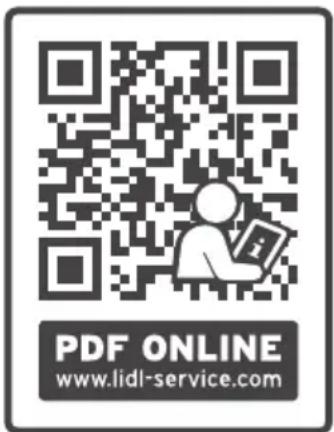
At www.lidl-service.com you can download this manual as well as many other manuals, product videos and installation software. This QR code will take you directly to the Lidl service page (www.lidlservice.com) and allow you to open your operating instructions simply by entering the article number (IAN 487591_2501).
14. Service
If any problems occur during use of your ROWI Germany product, please proceed as follows:
Contact us
You can contact the service team of ROWI Germany at:
ROWI Germany GmbH
(free call from a German landline)
IAN 487591_2501
Most problems can be resolved with the skilled technical support of our Service Team.
TianQiu Industrial Park, Xinji Industrial Zone,
Machong Town, Dongguan, GuangDong, P.R. China
Tel: 0086-769-81210216
Mail: gd@gdtiangiu.com
Website: http://www.lmmq.cn
TianQiu Industrial Park, Xinji Industrial Zone,
Machong Town, Dongguan, GuangDong, P.R. China
Tel: 0086-769-81210216
Email : gd@gdtiangi.com
Site web: http://www.tmmq.cn
Attention aux surfaces chaudes!
Chere cliente, cher client,
TianQiu Industrial Park, Xinji Industrial Zone,
Machong Town, Dongguan, GuangDong, P.R. China
Tel: 0086-769-81210216
E-mail: gd@gdtiangiu.com
Website: http://www.tmmq.cn
WAARSCHUWING! Niet afdekken!
TianQiu Industrial Park, Xinji Industrial Zone,
Machong Town, Dongguan, GuangDong, P.R. China
Tel: 0086-769-81210216
E-mail: gd@gdtiangu.com
TianQiu Industrial Park, Xinji Industrial Zone,
Machong Town, Dongguan, GuangDong, P.R. China
Tel: 0086-769-81210216
E-mail: gd@gdtiangiu.com
Witryna: http://www.tmmq.cn
TianQiu Industrial Park, Xinji Industrial Zone,
Machong Town, Dongguan, GuangDong, P.R. China
Tel: 0086-769-81210216
E-mail: gd@gdtiangiu.com
Webova stranka:http://www.tmmq.cn
Panel calefactor TIHP 600 B2
TianQiu Industrial Park, Xinji Industrial Zone,
Machong Town, Dongguan, GuangDong, P.R. China
Tel: 0086-769-81210216
Email: gd@gdliangiu.com
Sitio web: http://www.tmmq.cn
TianQiu Industrial Park, Xinji Industrial Zone,
Machong Town, Dongguan, GuangDong, P.R. China
Tel: 0086-769-81210216
E-mail: gd@gdtiangiu.com
Website: http://www.tmmq.cn
TianQiu Industrial Park, Xinji Industrial Zone,
Machong Town, Dongguan, GuangDong, P.R. China
Tel: 0086-769-81210216
Email: gd@gdliangiu.com
Sito web: http://www.tmmq.cn
TianQiu Industrial Park, Xinji Industrial Zone,
Machong Town, Dongguan, GuangDong, P.R. China
Tel: 0086-769-81210216
E-mail: gd@gdtiangiu.com