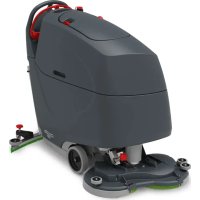
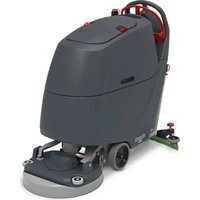
TBL8572 - Sweeper Numatic - Free user manual and instructions
Find the device manual for free TBL8572 Numatic in PDF.



| Product type | Sweeper / scrubber |
| Brand | Numatic |
| Model | TBL8572 |
| Working width | 720 mm (2 brushes of 370 mm) |
| Squeegee width | 948 mm |
| Dimensions (L x W x H) | 1513 x 762 x 1144 mm |
| Net weight (100Ah version) | 204.11 kg |
| Net weight (150Ah version) | 214.91 kg |
| Power source | Lithium iron phosphate (LFP) battery 25.6 V |
| Battery capacity | 2 x 50 Ah (2560 Wh) or 3 x 50 Ah (3840 Wh) |
| Charging time | 5 h (2 batteries) / 7 h 30 min (3 batteries) |
| Runtime | Up to 3 h (100Ah) / 4 h 30 min (150Ah) |
| Brush motor | 600 W, 150 rpm |
| Suction motor | 400 W, vacuum 120 mbar, airflow 24 L/s |
| Clean water tank capacity | 85 L |
| Dirty water tank capacity | 85 L |
| Adjustable water flow | 0 - 3 L/min |
| Brush pressure | 13 / 28 / 50 kg (adjustable) |
| Travel speed | 0 - 4.2 km/h |
| Maximum slope | 6% |
| Sound level (Lpa) | ≤ 70 dB(A) |
| Hand-arm vibration | ≤ 0.54 m/s² |
| Protection rating | IPX4 |
| Brush type | Nulock system, diameter 370 mm (brushes) or 360 mm (discs) |
| Built-in charger | 100-240 V AC, 50-60 Hz, output 25.6 V DC 20 A |
| Main functions | Washing, suction, brushing with speed control, emergency stop, freewheel mode |
| Maintenance | Daily cleaning of tanks, filters, brushes and squeegees. |
Frequently Asked Questions - TBL8572 Numatic
User questions about TBL8572 Numatic
0 question about this device. Answer the ones you know or ask your own.
Ask a new question about this device
Download the instructions for your Sweeper in PDF format for free! Find your manual TBL8572 - Numatic and take your electronic device back in hand. On this page are published all the documents necessary for the use of your device. TBL8572 by Numatic.
USER MANUAL TBL8572 Numatic
EN, DE, FR, NLEN, DNUMtatic
PT, IT, ES, PLPT, IT, ES, P
SV, FI, DASV, FI, DA

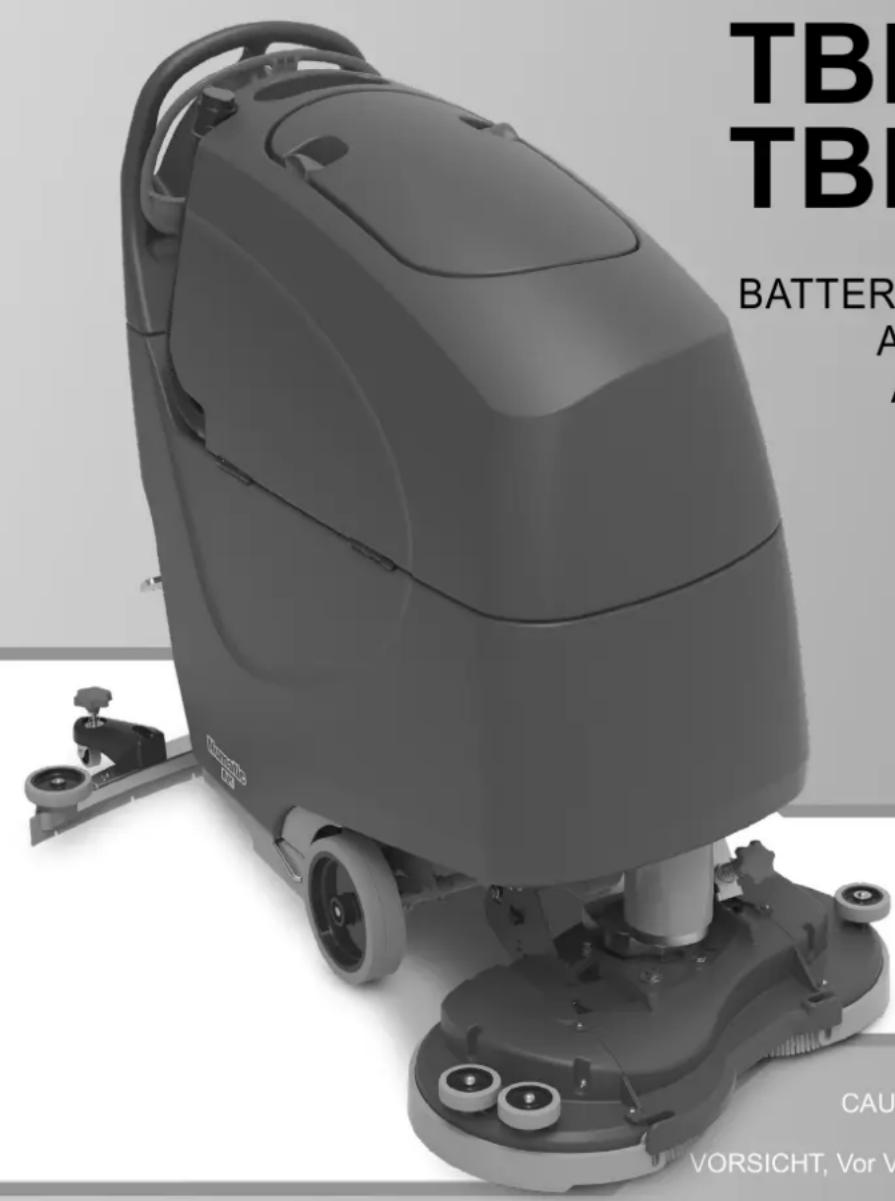
TBL8572/100T TBL8572/150T
BATTERY SCRUBBER DRYER
BATTERIE-SCHEUERSAUGMASCHINE
AUTOLAVEUSE SUR BATTERIE
ACCU-SCHROBZUIGMACHINE
LAVADORA-SECADORA
LAVASCIUGA PAVIMENTI
FREGADORA-SECADORA
MASZYNA CZYSZCZACA
KOMBISKURMASKIN
YHDISTELMÄKONE
BATTERIDREVET SKURE
OG TØRREMASKINE


numatic.com
Original Instructions
CAUTION, Read instructions before using the machine.
Fitting the Brush / Pad . Page 22
Adjusting Deck Pitch Page 22
Fitting the Floor Tool Page 22
Fitting the Hose Guide . Page 28
Filling the Clean Water Tank Page 28
Fill Level Indicator Page 32
Lowering the Floor Tool Page 36
Raise / Lower Brush Deck...... Page 36
Setting the Cleaning Controls Page 36
Brush Pressure Page 42
Breakaway Floor Tool Page 42
Machine in Use Page 42
Machine Cleaning Page 48
Waste Water Tank Full Page 48
Changing Floor tool Blades.. Page 54
Machine Charging
Battery Care
Charging Lights Sequence.. Page 64
Specifications
Free Wheel Function
Schematic Diagram
Recommended Spare Parts Page 78
Trouble Shooting
Rating Label / Personal Protective
Equipment /Recycling
Information for Scrubber Dryer.. Page 101 & 102
Battery Information 133-136
EU Declaration Document Page 167
Company Address Page 168
TBL8572/100T = 2x batteries
TBL8572/150T = 3x batteries
DE
TBL8572/100T = 2x batterien
TBL8572/150T = 3x batterien
FR
TBL8572/100T = 2x batteries
TBL8572/150T = 3x batteries
NL
TBL8572/100T = 2x accu's
TBL8572/150T = 3x accu's
PT
TBL8572/100T = 2x baterias
TBL8572/150T = 3x baterias
IT
TBL8572/100T = 2x batteries
TBL8572/150T = 3x batteries
SV
TBL8572/100T = 2x batterier
TBL8572/150T = 3x batterier
FI
TBL8572/100T = 2x akut
TBL8572/150T = 3x akut
DA
TBL8572/100T = 2x batterier
TBL8572/150T = 3x batterier
EN
PLEASE READ, BEFORE COMMENCING OPERATION
After the removal of all the packaging, carefully open and check the contents.
- Owner Manual 2 x Ignition Keys Battery Charging Lead 1 x 30 Amp Fuse (Brush) 1 x 20 Amp Fuse (Vac)
- 1 x 2.5 Amp Fuse - Maxi Fuse-puller
| EN | Machine Overview 13 Batteries | ||
| 1 | Operator control panel 14 Brush Motor Fuse 30 Amp | ||
| 2 | Charging Socket / Point 15 Vac Motor Fuse 20 Amp | ||
| 3 | Clean Water Fill Point 16 Brush Deck | ||
| 4 | Floor Tool Raise / Lower Lever 17 Clean Water Filter | ||
| 5 | Clean Water Tank Emptying Hose & Fill Level 18 Water Pump | ||
| 6 | Vacuum Hose 19 Waste Water Emptying Hose | ||
| 7 | Charging Lights 20 Separator | ||
| 8 | Brush Deck Lifting Pedal 21 Top Tank (Waste Water) | ||
| 9 | Extra Brush Load Pedal 22 Bottom Tank (Clean Water) | ||
| 10 | Semi Parabolic Floor Tool 23 Detent Pin | ||
| 11 | Brush On/Off / Control Handle | 24 | Key Ignition. On/Off |
| 12 | Safety Fuse 2.5 Amp | 25 Battery Level Indicator | |
| 1 Traction Speed control |
| 2 Key Ignition Switch |
| 3 Water Flow Rate |
| 4 Emergency Stop |
| 5 Vacuum Pick Up On / Off |
| 6 Battery Charge Level Indicator |
| 7 Forward / Reverse |
| 8 Hours Meter |
| 9 Brush On / Off / Control Handle |
| 10 Traction Status Light / Green Light Error Status |
DE
Lift top tank assembly to reveal battery compartment, ensuring you use the handle grip provided.
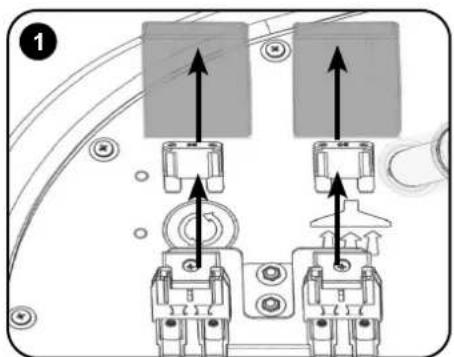
Fit vacuum and brush fuses (contained in start-up pack) into the fuse holders as illustrated. (Fig. 1, 2, 3.)
Charge the machine to activate the batteries. After the batteries were activated, LEDs should illuminate on the top of all the batteries.
Insert Key into ignition located on the control panel (See below (Fig. A)

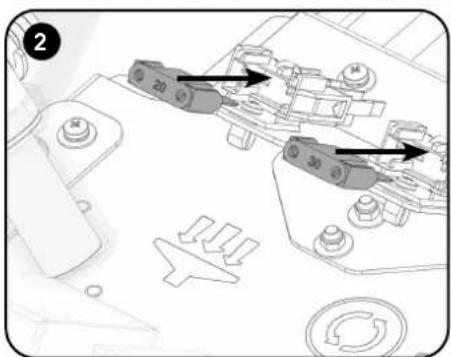
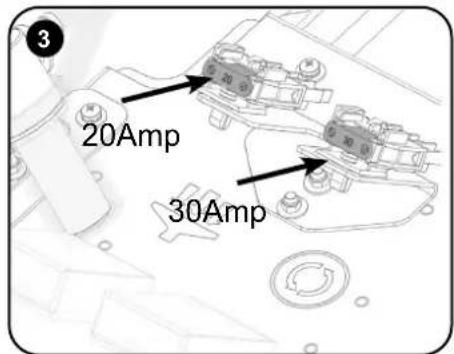
Numatic International Ltd recommends ONLY using 911948 NX1K LFP battery type Lithium Batteries provided with this machine.

ENSURE THAT NO METAL OBJECTS COME INTO CONTACT WITH BATTERY TERMINALS WHILE THE BATTERIES ARE EXPOSED.

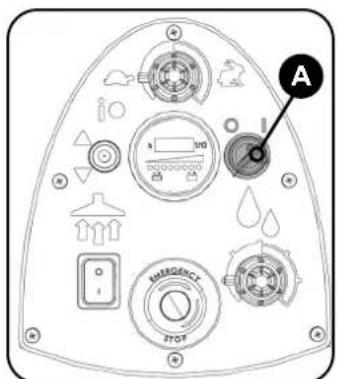
Insert the Ignition key and switch the machine on. (Fig.A)
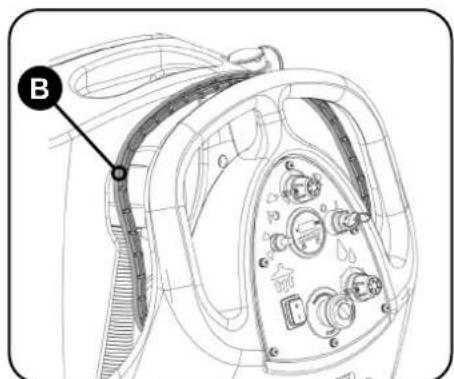
Depress control handle with both hands (Fig.B) and slowly drive machine off of the pallet. When the machine is removed and in a safe position, turn key back to the position (0) 'OFF' Note: During vehicular transportation ensure the product is secured to avoid unnecessary movement.
Fitting the Brush / Pad
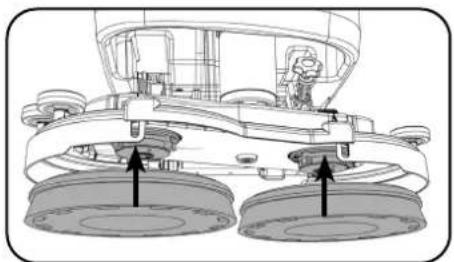
Note: Safety gloves are recommended for the changing of used brushes.
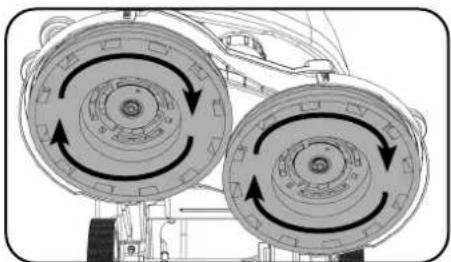
2 x 370mm Brush or a 2 x 360mm Pad on the TBL8572. Featuring the Nulock brush system. The brush is simply pushed and twisted to lock, making fitting and removal a simple process.
Slide the brush / pad under the brush deck.
Fit the brush / pad onto the Nulock drive chuck, twist to lock the brush / pad in place.
Brush Deck Pitch Adjustment
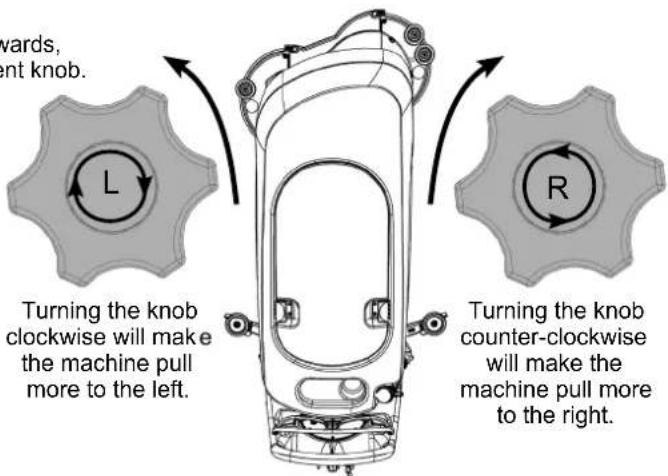
If the machine has a tendency to pull to either side while cleaning forwards, this can be compensated for by turning the brush deck pitch adjustment knob.
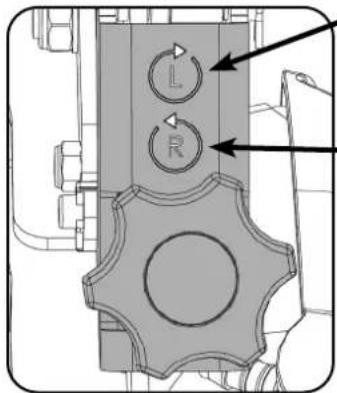
LH Bias: If the machine pulls to the right, turn the knob clockwise to apply left hand bias to the brush deck.
RH Bias: If the machine pulls to the left, turn the knob counterclockwise to apply right hand bias to the brush deck.
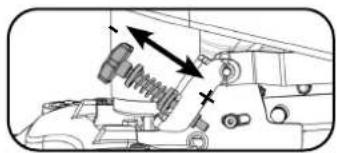
Fitting the Floor Tool
The floor tool has been designed for quick fitting, allowing easy squeezegee blade replacement and a safety knock-off feature if the floor tool gets snagged, whilst in transit.
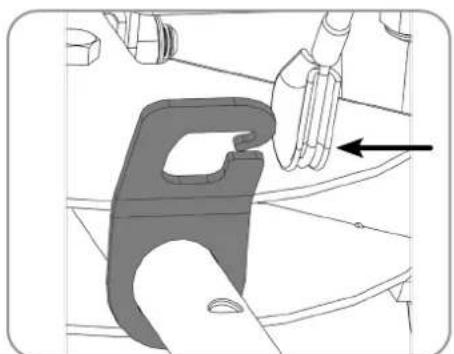
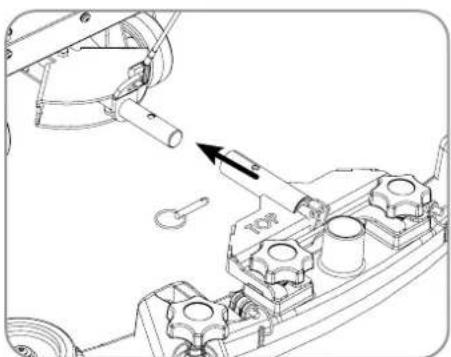
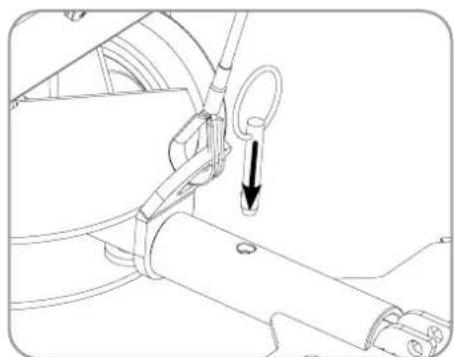
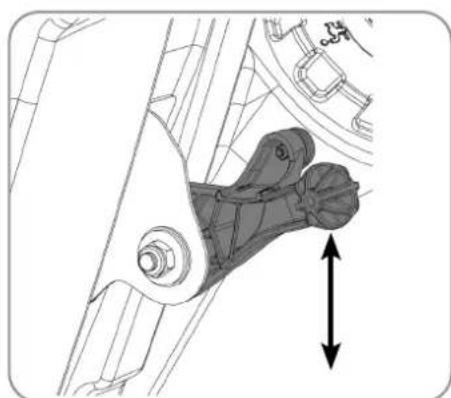
Fit the floor tool and retain using the detent pin.
Push vacuum hose onto the floor tool; ensure a tight fit.
Note: DO NOT push the vacuum hose onto the floor tool with the floor tool in the raised position.
Raise the floor tool for transit or lower for cleaning operation using the lifting handle fitted to the back of the machine.
For fitting the floor tool blades (See P57).
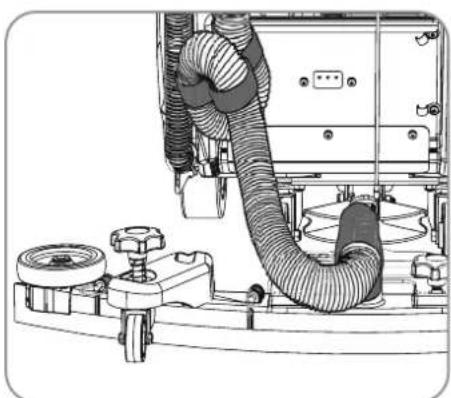
Wsunac szczotke/pad pod glowice.
Fitting the Hose Guide
The vacuum hose has a U-bend clip which creates a U-bend in the hose preventing water spillage when the vacuum is switched off. If you need to remove the U-bend clip for any reason always ensure it is refitted correctly before you resume operation.
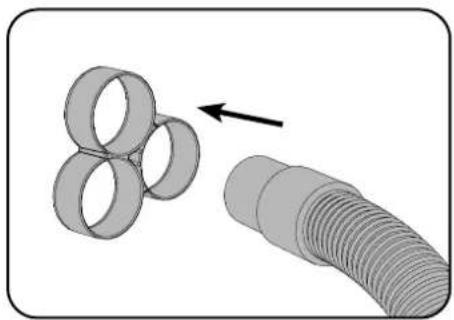
Note: DO NOT push the vacuum hose onto the floor tool with the floor tool in the raised position.
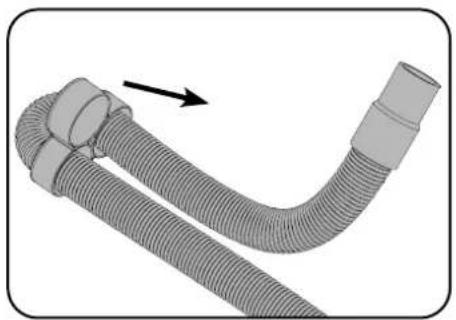
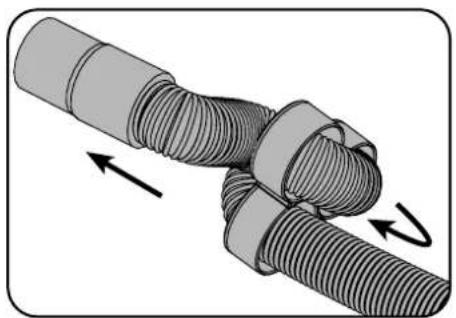
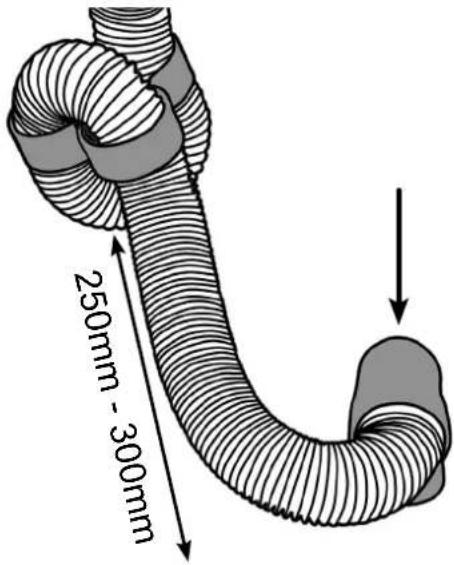
Refit vacuum hose to the Floor tool when finished.
Filling the Clean Water Tank
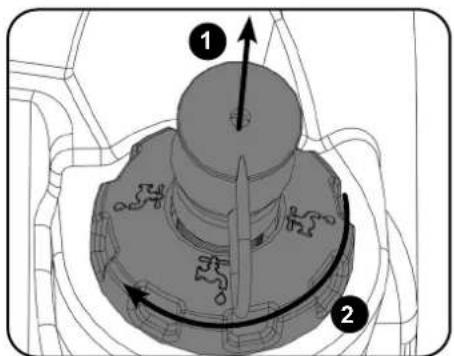
The TBL8572 is equipped with a large capacity clean water tank allowing for large areas to be covered in a single fill.
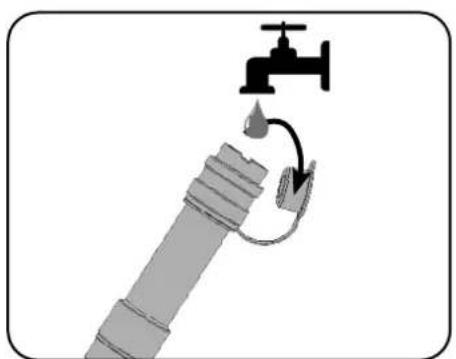
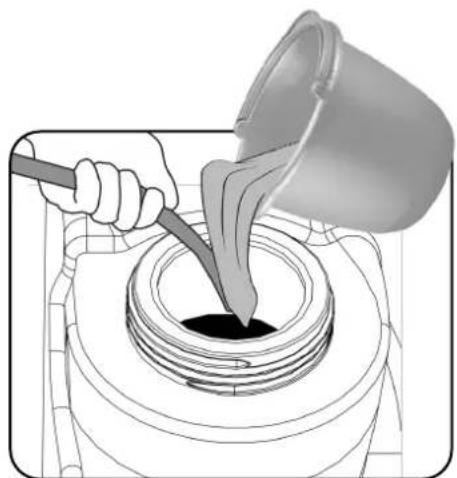
To fill the clean water tank, extend the hose located to the rear of the machine in the centre of the removable filler cap (1). Pull out hose. Open the stopper and place hose under water tap, or use a hose to commence filling. The tank can also be filled by unscrewing the filler cap and using a bucket or similar container (2).
Note: Great care must be taken to ensure that contaminants (leaves, hair, dirt, etc.) are not allowed to enter the clean water tank during the filling process. If using a bucket or similar, ensure it is always clean and free from debris.
The water level in the clean-water tank can be measured using the scale on the rear of the machine. The clean water bottom tank holds 85 litres.
Note: always ensure that the waste water tank is empty before lifting.

WHEN HANDLING AND MIXING CHEMICALS
Always ensure that chemical manufacturer's safety guidelines are followed.
Only use chemicals recommended for use in auto scrubber-dryers.


IMPORTANT
Do not operate machine unless the Operator Manual has been read and fully understood.

The machine is now ready to be moved to the cleaning site.
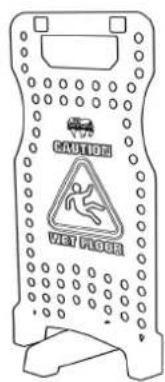
Before performing the cleaning operation, place out appropriate warning signs and sweep or dust-mop the floor.
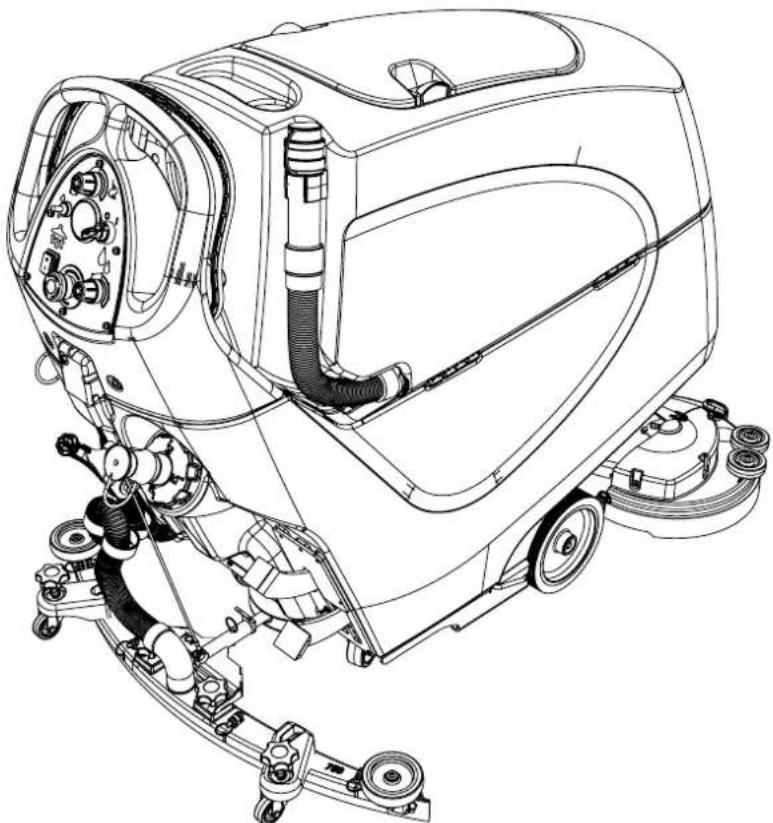
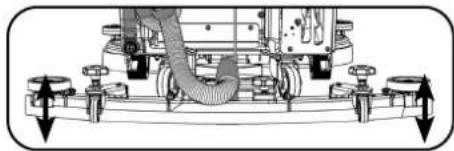
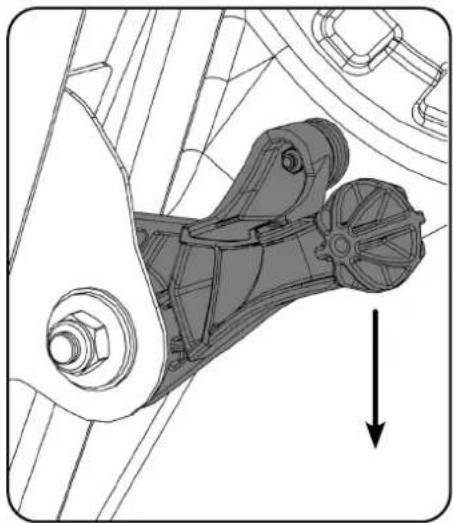
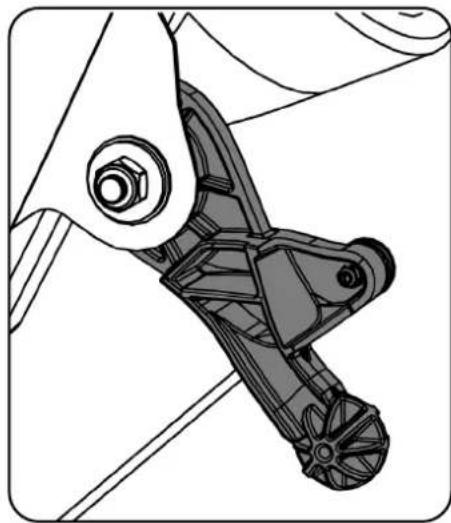
Raising/Lowering the Floor Tool
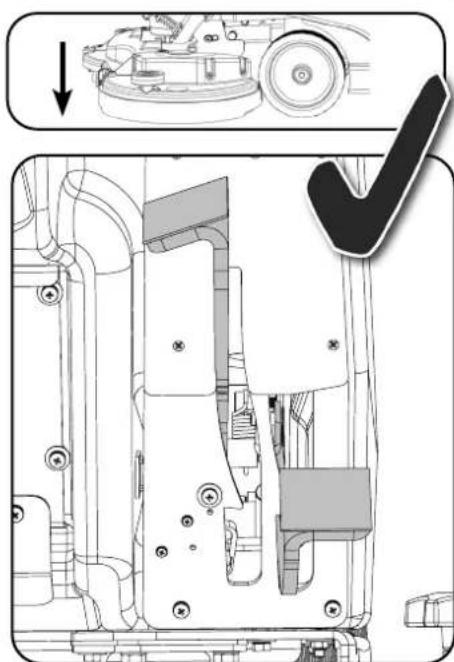
After preparing the floor (see previous section), we are now ready to set the controls to suit the cleaning conditions. Before any settings can be applied, ensure the brush deck is lowered. Move the floor tool lever to its lower position.
Note: Do not drive the machine backwards with the floor tool in the lowered position, this could possibly damage the blades.
Raising/Lowering the Brush Deck
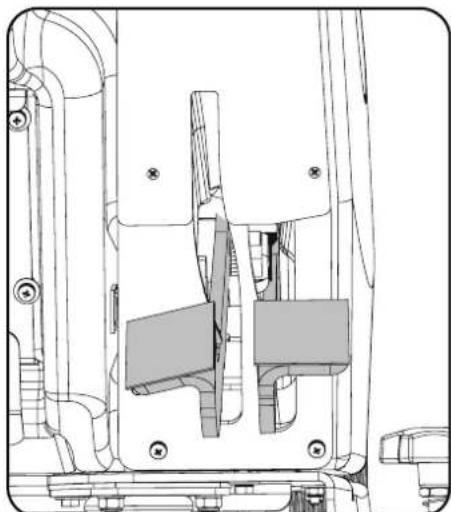
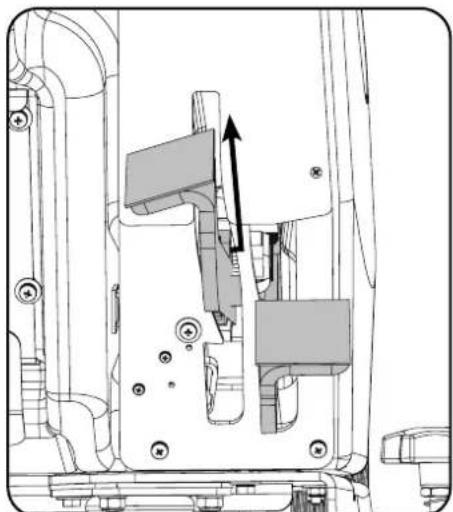
The control for lowering the brush deck can be found to the rear right of the machine. Lower the brush deck by moving the left hand release lever to the upper position.
Setting the Cleaning Controls
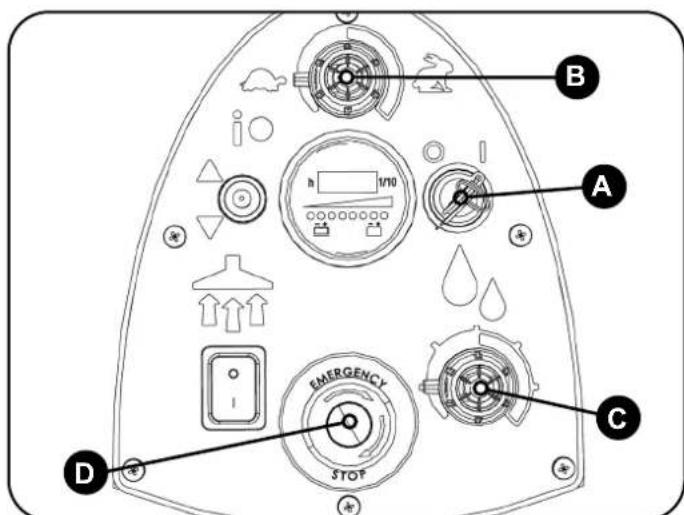
Insert the key, turn the main control on / off key to position '1' (Fig.A). The traction status light will illuminate.
Set desired traction speed as required, depending on floor type and level of soiling (Fig.B).
Middle speed is the optimum cleaning speed.
Set the flow rate (Fig.C).
The TBL8572 is equipped with an electronic braking system. Simply release the hand operated start / stop trigger and the machine will stop. In an emergency, strike the Emergency Stop button (Fig.D). The machine will be disabled. To reset, turn Emergency Stop button clockwise. After re-setting the Emergency Stop button, to restart the machine, turn the main control on / off key to '0' and then position '1'.
NL Bediening machine
Vloerelement optillen/neerlaten
Brush Pressure / Load Adjustment
The brush load lever is located to the right hand side of the machine.
This option is for hard to clean patches, adding extra pressure to the brushes.
NOTE: It is recommended this option is NOT used all the time and is for spot cleaning only.
The run-time of the machine may decrease if the load on the brushes is increased.
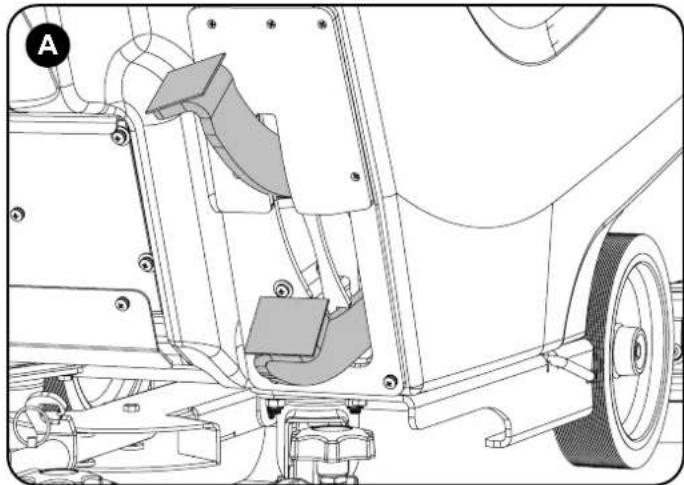
(A) Standard Duty 13 kg Pressure
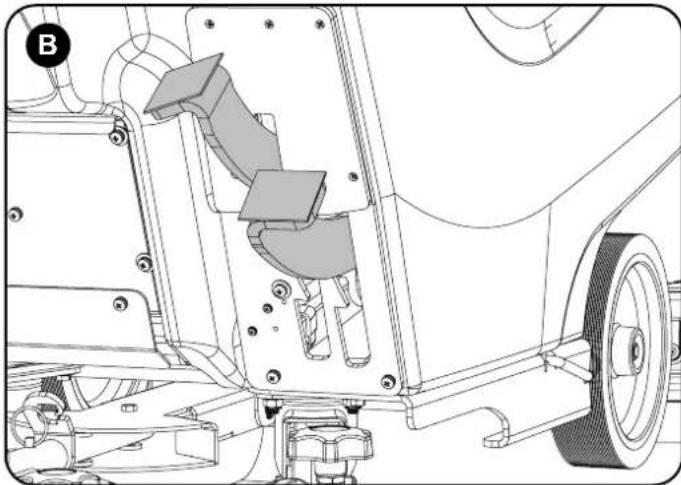
(B) Heavy Duty 28 kg Pressure
Break-away Floor Tool
The floor tool design incorporates a break-away feature.
Allowing it to safely disengage from its mounting should it become caught on an obstruction, during forward machine movement.
To re-attach the floor tool to its holder. First loosen the retaining knobs on the floor tool body and slide onto the holding bracket.
Tighten retaining knobs to finger tight.
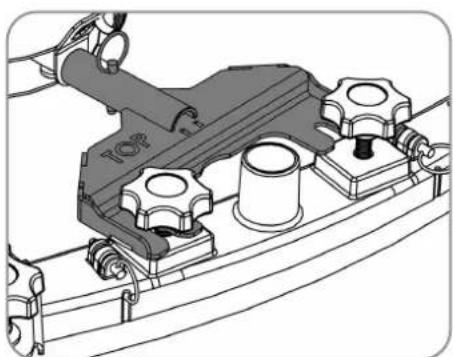
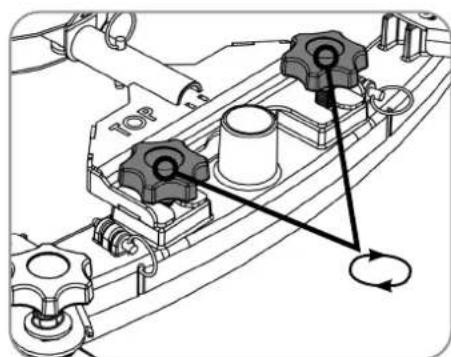

ALWAYS ENSURE THAT THE FLOOR IS PRE-SWEPT AND RELEVANT SAFETY SIGNS ARE DISPLAYED.

Machine In Use
To operate, set water flow rate, lower brush deck, lower the floor tool, press the vacuum switch, pull brush On/Off trigger. Adjust the speed to suit the conditions using the variable speed control, depending on floor type and level of soiling. Middle speed is the optimum cleaning speed.
The waste water is then retrieved by the suction floor tool.
Overlap each scrubbing path by 10cm to ensure an even clean.
Do not operate the machine on inclines that exceed (6%) when full
Warning: While on ramps or inclines, avoid sudden stops. Avoid sharp turns. Use low speed down ramps.
Clean only while descending (driving down) the ramp.
On heavily soiled floors use a 'double scrub' technique.
First pre-scrub the floor with the floor tool in the raised position, allow the chemical time to work then scrub the area a second time with the floor tool lowered.
If streaking occurs wipe floor tool blades clean.
Note: Care must be taken to reduce speed when cornering or when manoeuvring around obstacles
NL Bediening machine
Afstelling borsteldruk/-belasting
Dra at lasskruvarna for hand.
SE ALLTID TILL ATT FÖRSTÄDA GOLVET OCH STÄLL FRAM RELEVANTA SÄKERHETSSKYLTR.
Maskinen i drift
Overlap hver skrubberute med 10 cm for at sikre javn rengoring.
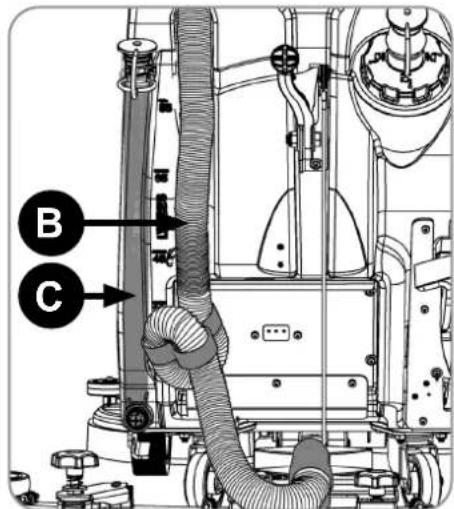
After use, empty waste water tank using emptying hose and flush out with clean water.
Next remove floor tool vacuum hose and flush out with clean water.
Next empty clean water tank, using emptying hose and again flush out with clean water.
Waste Water Tank Full
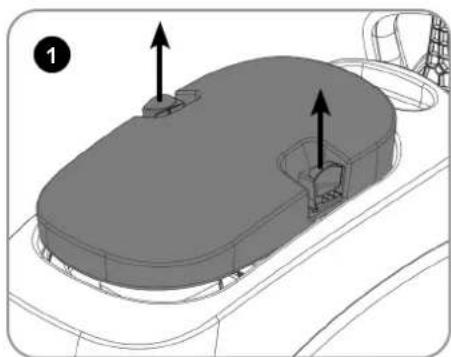
Whilst pressing in the top tank hood toggles, remove the hood. Fig1
The hood also has a sealing-rubber which should be examined at every clean-down. Rinse using clean water, avoiding the vac filter.
Located in your waste water (top) tank is a full tank switch, this stops your machine from working once the waste water reaches its maximum limit.
Sometimes the switch gets clogged and blocked, clean to ensure correct operation. Fig2
Also ensure float pad is clean and in the correct position.
IMPORTANT
Remove vac filter and clean if required (keep dry). Fig3
Never use the machine without the recommended filter as it may cause damage to the machine.
Remove debris basket filter and rinse using clean water, and refit. Fig4 IMPORANT If the debris basket is allowed to become clogged, vacuum performance can deteriorate.
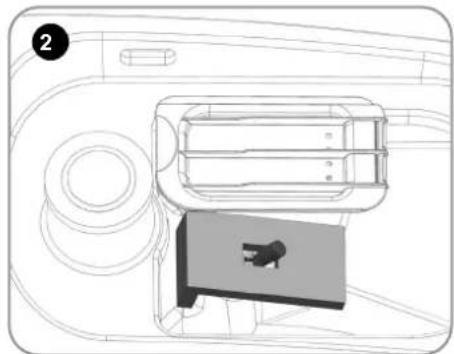
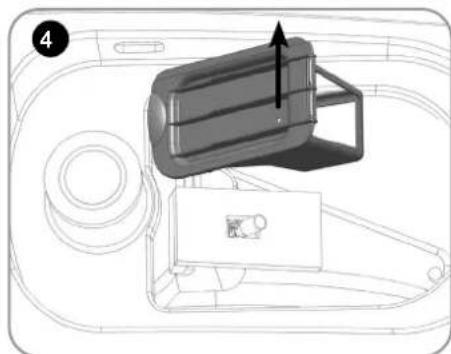
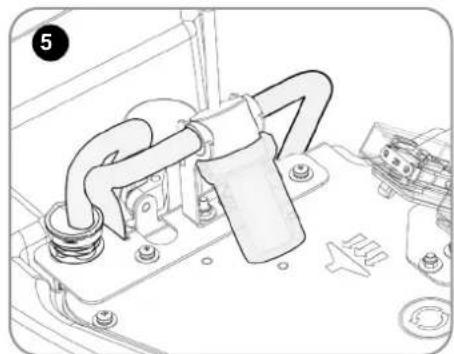
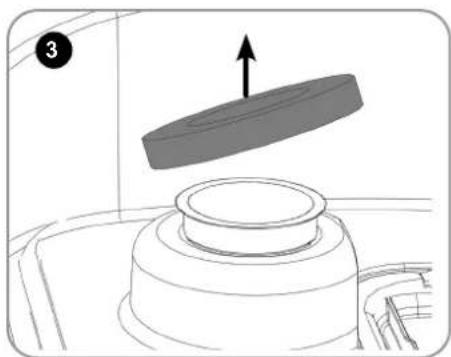
Located under the top tank at the front of the machine is a clean water filter. Fig5 Note: Make sure the top tank is empty before lifting.
Vuilwatertank is vol

Always ensure that the machine is switched off prior to any maintenance.

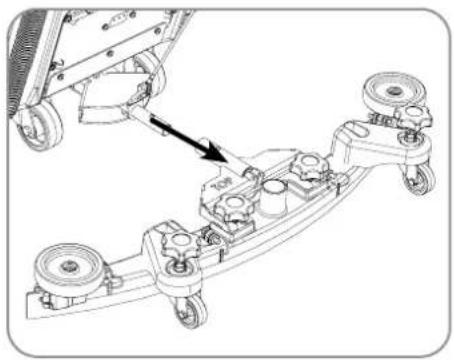
To clean the floor tool, remove securing-pin and pull-free from the holder. Rinse the floor tool assembly with clean water and refit.
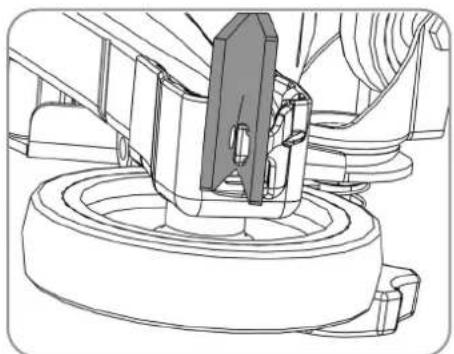
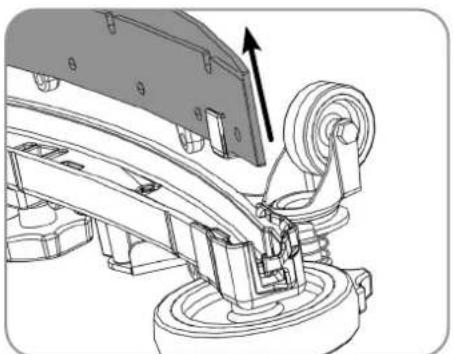
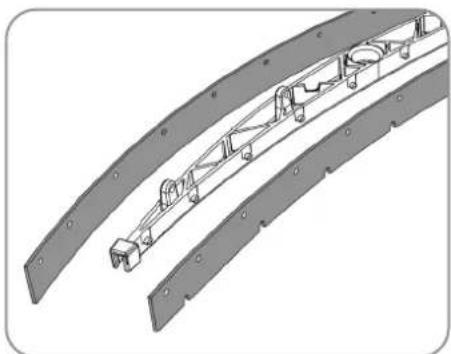
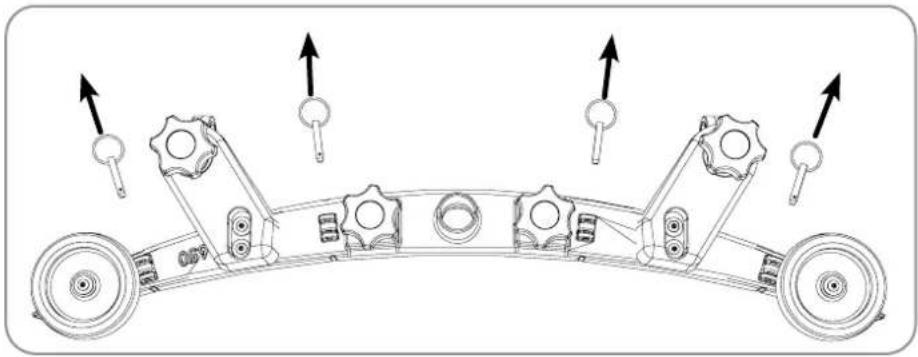
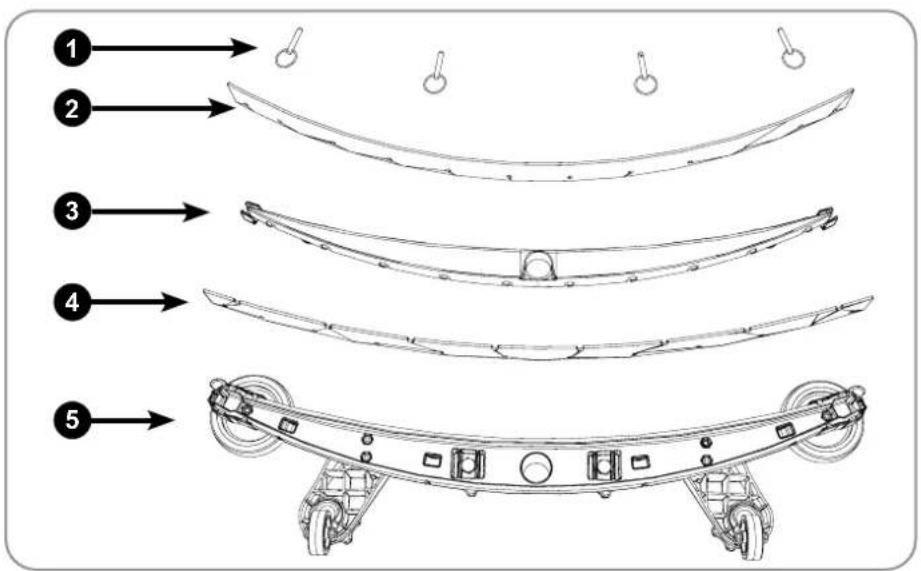
Periodically the floor tool blades should be examined and checked for wear and damage. The blade removal is easy. Simply start by removing the four retaining pins, turn the floor tool over and separate the blade carrier from the body. Peel away the blades from their locating lugs and examine or renew as required. Replacement is a reversal of the removal process.
Floor Tool Overview
-
Retaining pins x 4
-
Rear blade
-
Blade carrier
-
Front blade (slotted)
- Floor tool main body
Note: The blades are designed to be reversible, thus extending their useful working life.
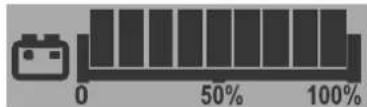
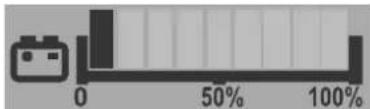
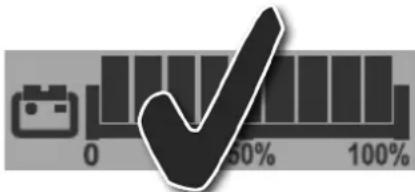
The battery meter displays the charge level of the batteries; when fully charged, all meter lights are illuminated.
1
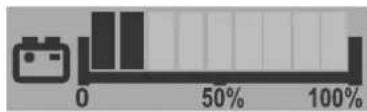
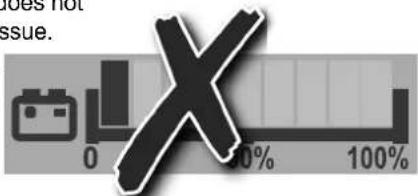
As the machine is used and the batteries are discharged, the meter lights will go out from right to left. If the battery-charge level is allowed to discharge to the point that only one or two lights / bars remain illuminated, the open must consider charging the machine.
2

Always ensure that the machine is switched off prior to charging.

When the machine is getting close to empty the last light starts to flash, the operator should then take the machine to a suitable charging point. When the battery icon starts flashing, the vacuum and brush motors will be disabled and the user should charge the machine.
3
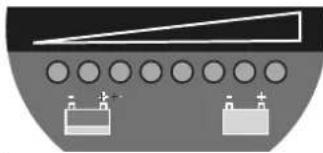
Alternative Display
When the last red light starts flashing, the vacuum and brush motors will be disabled and the user should charge the machine.
The LFP batteries are sealed for life and are totally maintenance free.
The on-board charger automatically monitors the charging process and will switch to float charge mode when the batteries are fully charged. Float charge mode allows to maintenance LFP batteries at the right level of health. The machine should be left on float charge overnight or over the weekend at least once per month or more frequently if needed.
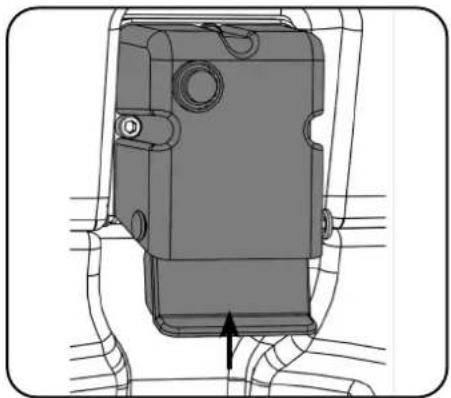
Insert the charging lead required for your country into the charging point.
The machine charging point is located to the rear of the machine under the control panel.
Connect to a suitable power supply.
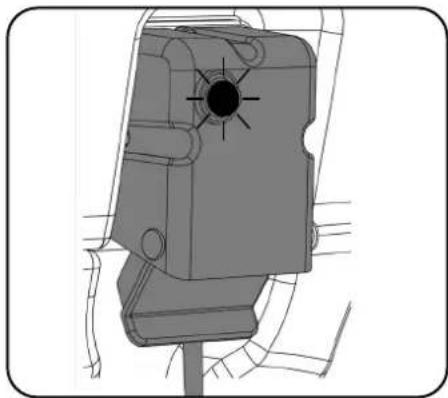
Once mains power is connected the red charging indicator will illuminate.
To ensure a full charge, from an empty state, the machine should be left for a period of 8 hrs.
Once fully charged, disconnect the charging lead from both the power supply and the machine.

Battery Care
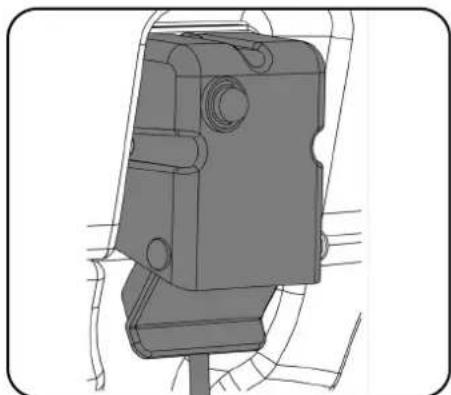

To ensure your machine remains at its maximum efficiency and prolong your battery life, please follow the simple steps below:

Under normal daily usage:
Re-charge the machine FULLY after each use regardless of machine operation time.
It is recommended to leave the machine connected to power grid overnight, at least once a month. If the user does not disconnect the cable after full charge it is not an issue.
Do not leave the machine in a discharged state.
Periodically inspect the battery
connections for tightness and corrosion.
DE Laden des Geräts
| Signal (LED) | Meaning | |||
| Red LED on | First Phase (Constant Current Mode). | |||
| Orange LED on | Second Phase (Constant Voltage Mode). | |||
| Green LED on | Third Phase (Constant Voltage Mode) Charge Complete. However, after full re-charge, leaving the charger connected moves to float-charge mode to help to maintain a healthy balance between batteries. | |||
| Red LED flashing followed by Pause | Cooling Fan Locked >1 flash between pause. Over Voltage Protection / Output Short Circuit / Battery Reverse Polarity >2 flashes between pause. Over Temperature Protection >3 flashes between pause. Charge Time has exceeded 16 hrs during phase 1 or 2 >4 flashes between pause. | |||
| Condition | RED LED | YELLOW LED | GREEN LED | |
| Pre-charge Timeout | Flashing 4 Times | O | ||
| CC Timeout | O | |||
| CV Timeout | O | O | ||
| Battery Disconnection | ||||
| Note: O means illuminates continuously | ||||
Note: Re-charge the machine fully after its last use. Do not leave the machine in a discharged state.
Under abnormal use;
i.e. leaving the machine without charging for a period of time, we advise that you follow these steps:
Float charge mode allows to maintenance LFP batteries at the right level of health.
The machine should be left on float charge overnight or over the weekend at least once per month.
Charge fully the day before you start using the machine again.
Specifications
| Model - TBL8572/100T & TBL8572/150T | ||||||||||||
| Brush Weight Brush | Sizes Brush Pressure | Pad sizes Pad Pressure | Cleaning Area | |||||||||
| 13 / 28 kg | 720 mm(2 x 370 mm) | 8.2/17.5g/cm2 | 700 mm2 x 360 mm | 6.9 / 14.8 g/cm2 | 2592m2/HOUR @ 3.6 kph | |||||||
| Brush Motor Brush | Speed Vac Motor | Vac Motor Suction @Squeegee | Vac Motor Airflow @Squeegee | Water Capacity | ||||||||
| 600W | 150rpm | 400W | 120 mbar | 24 L/sec | 85L | |||||||
| Water Flow | TransaxlePower | Gradient | DriveSpeed | Net Weight Gross Weight Power Source | ||||||||
| 0 - 3L/min | 400W Max 6% | 0 - 4.2km/h | 100Ah: 204.11kg150Ah: 214.91kg | 100Ah: 298.11kg150Ah: 299.91kg | 2 Battery: LFP battery (Li-ion) 25.6 V (2x 50Ah) 2560Wh3 Battery: LFP battery (Li-ion) 25.6 V (3x 50Ah) 3840Wh | |||||||
| Run Time | Recharge Time | (SingleBattery)Weight | Dimensions | SqueegeeWidth | Sound Pressure | Hand ArmVibration | Water IngressProtection | |||||
| 100Ah : 3hr (MAX)150Ah: 4hr 30 mins(MAX) | 2 battery: 5 hrs3 battery: 7 hrs 30 mins20A Charger | 25.6V50Ah10.7kg | Width = 762 mmLength = 1513 mmHeight = 1144 mm | 948mm | Lpa ≤ 70 dB(A) | ≤0.54m/s2 | IPX4 | |||||
EN Free Wheel Function
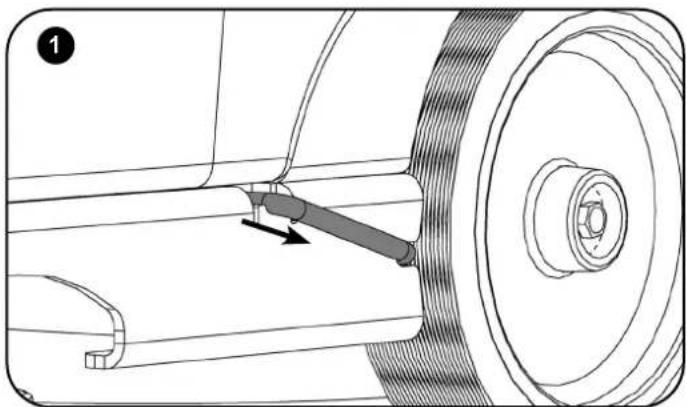
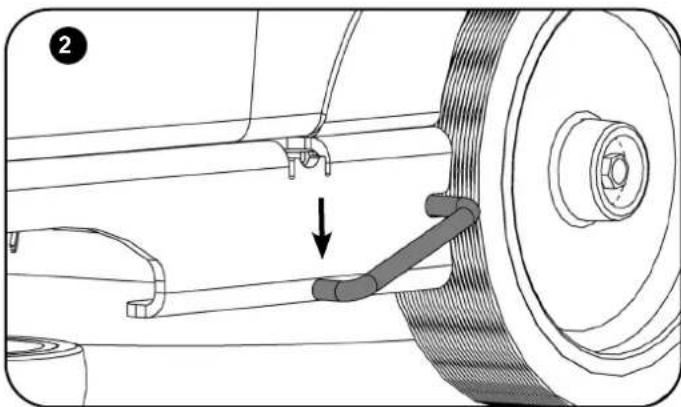
The machine is equipped with a free-wheel function that will enable the operator to move the machine manually if required.
The motor brake is located on the right side of the machine near the rear wheel.
Pull the arm out (Fig.1). Swing to the disengaged position (Fig.2).
The motor brake will be fully disengaged. The machine will now be in full free wheel mode.

Note: Drive functions on the machine will not work whilst in free-wheel mode. Remember to re-engage the drive when you reach your final destination / before using the machine.
DE Freilauffunktion
| Part No. BRUSHES | |
| 918293 370 mm | Ten-Tec Brush (2 required) |
| 903994 370 mm | Nyloscrub Brush (2 required) |
| 606302 400 mm | Long Life Brush (2 required) |
| 900524 360 mm | NuLoc2 Drive Board (2 required) |
| For optimum performance Numatic International Ltd recommend the use of the following batteries in the Twintec machines. | |
| 911948 NX1K LFP battery type (Li-ion) (Numatic Recommended Battery) | |
Trouble Shooting
| PROBLEM CAUSE SOLUTION | ||
| Machine will not operate Low battery | chargeMachine is connected and chargingWaste tank full switch stuck or cloggedKey is off or missingHandle safety fuse blown | Charge batteries (page 58 - 63)Take off charge (page 58 - 63)Inspect & clean switch inside tank (page 48 - 53)Insert key & turn to operating positionReplace fuse (or contact service engineer) |
| Vacuum will not operate Missing or bown fuseWaste tank full switch stuck or cloggedVacuum switch not engagedWaste water tank full | empty fuseWaste tank full switch stuck or cloggedVacuum switch not engagedWaste water tank full | Fit or replace fuse (page 16 - 21)Inspect & clean switch inside tank (page 48 - 53)Press switchEmpty waste water tank (page 48 - 53) |
| Poor water pick-up Waste water tank | fullClogged / blocked vacuum hoseLoose hose connectionsDebris basket filter clogged / blockedSeparator filter clogged / blockedPoor separator sealDamaged separator sealDamaged / split vacuum hoseDamaged floor tool bladesLow battery chargeFloor tool incorrectly adjusted | Empty waste water tank (page 48 - 53)Remove and clean (page 48 - 53)Push tight connections (page 28 - 31)Remove and clean (page 48 - 53)Remove and clean (page 48 - 53)Clean and refit (page 48 - 53)Renew (contact service dept)Renew (contact service dept)Renew (contact service dept)Re-charge batteries (page 64 - 74)Adjust floor tool |
| No brush / scrub function No brushes | fittedBrush deck raisedMissing or blown fuses | Check and fit (page 22 - 27)Lower brush deck (page 36 - 41)Fit or replace fuse (page 16 - 21) |
| Little or no water flow Clean water tank | blank emptyClean water tank filter blocked / cloggedWater flow not onBrush deck raised | Fill clean water tank (page 22 - 27)Remove and clean (page 48 - 53)Switch on water flow (page 36 - 41)Lower brush deck (page 36 - 41) |
| Machine just 'stops' duringoperating | Too much load on the brush systemBrush motor fuse blown due to high loadHandle safety fuse blown | Decrease the brush load to best suit the floor type (page 42 - 47).Replace fuse & reduce load (page 16 - 21)Replace fuse (or contact service engineer) |
Warning:- Do not fit a replacement fuse link having a higher rating than the value stated on the fuse label.
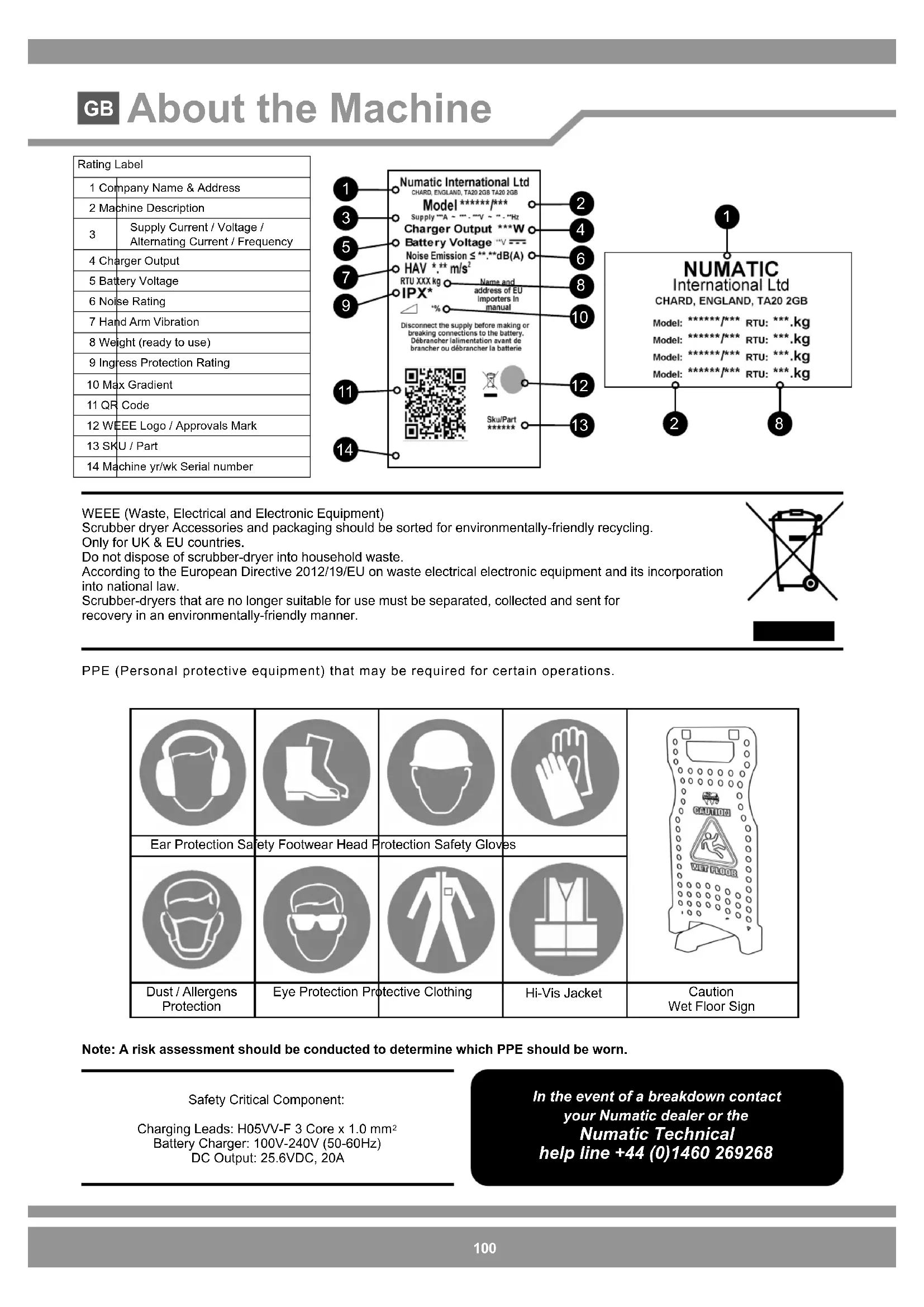
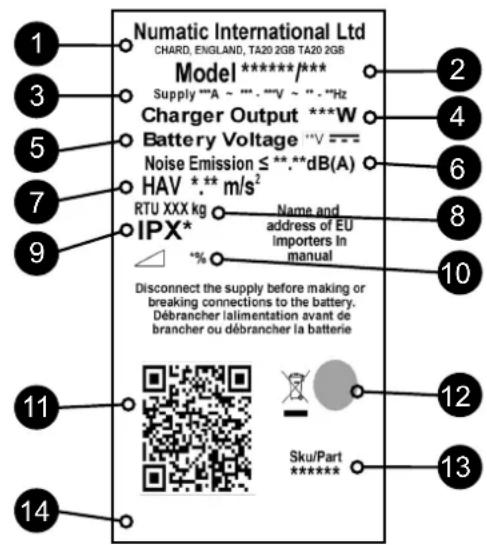
| Rating Label | |
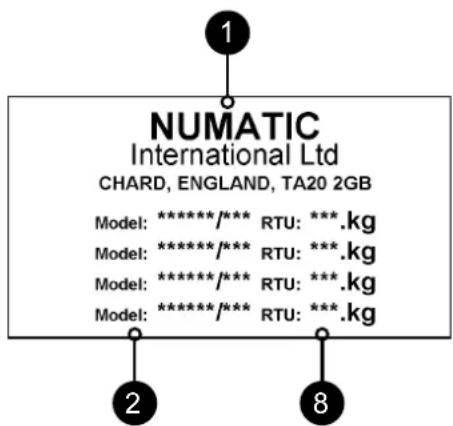
| 1 Company Name & Address | |
| 2 Machine Description | |
| 3 | Supply Current / Voltage / Alternating Current / Frequency |
| 4 Charger Output | |
| 5 Battery Voltage | |
| 6 Noise Rating | |
| 7 Hand Arm Vibration | |
| 8 Weight (ready to use) | |
| 9 Ingress Protection Rating | |
| 10 Max Gradient | |
| 11 QR Code | |
| 12 WEEE Logo / Approvals Mark | |
| 13 SKU / Part | |
| 14 Machine yr/wk Serial number | |
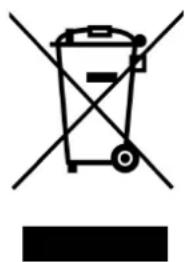
WEEE (Waste, Electrical and Electronic Equipment)
Scrubber dryer Accessories and packaging should be sorted for environmentally-friendly recycling.
Only for UK & EU countries.
Do not dispose of scrubber-dryer into household waste.
According to the European Directive 2012/19/EU on waste electrical electronic equipment and its incorporation into national law.
Scrubber-dryers that are no longer suitable for use must be separated, collected and sent for
recovery in an environmentally-friendly manner.
PPE (Personal protective equipment) that may be required for certain operations.
| Ear Protection Safety Footwear Head Protection Safety Gloves | ||||
| Dust / Allergens Protection | Eye Protection Protective Clothing | Hi-Vis Jacket | Caution Wet Floor Sign | |
Note: A risk assessment should be conducted to determine which PPE should be worn.
Safety Critical Component:
Charging Leads: H05VV-F 3 Core x 1.0 mm²
Battery Charger: 100V-240V (50-60Hz)
DC Output: 25.6VDC, 20A
In the event of a breakdown contact
your Numatic dealer or the
Numatic Technical
help line +44 (0)1460 269268
READ MANUAL BEFORE USE
| COMPONENT INTERVAL INSPECT FOR | ||
| Charging Lead DAILY Scuffing, cracks, splits, conductors showing | ||
| Brushes DAILY Bristle damage, wear, drive collar wear | ||
| Squeegee Blade BEFORE EACH USE Wear, cracks, splits | ||
| Filters BEFORE EACH USE Clogging and debris retention | ||
| Tanks AFTER EACH USE Rinse dirty water tank after use | ||

WARNING
As with all electrical equipment care and attention must be exercised at all times during its use, in addition to ensuring that routine and preventative maintenance is carried out periodically in order to ensure its safe operation. Operators shall be adequately instructed on the use of these machines.
Failure to carry out maintenance as necessary, including the replacement of parts to the correct standard
could render this equipment unsafe and the manufacturer can accept no responsibility or liability in this respect.
When ordering spare parts always quote the Model Number / Serial Number specifi ed on the Rating Plate.
Do not use on cleaning surfaces having a gradient exceeding that marked on the machine. While on ramps or inclines, avoid sudden
stops. Avoid sharp turns. Use low speed down ramps. Clean only while descending (driving down) the ramp.
This machine is not intended for use by persons (including children) with reduced physical, sensory or mental capabilities, or lack of experience and knowledge.
Children should be supervised to ensure that they do not play with the appliance.
Only use brushes provided with the appliance or those specified in the instruction manual.
The use of other brushes may impair safety.
A full range of brushes and accessories are available for this product.
Only use brushes or pads which are suitable for the correct operation of the machine for the specific task being performed.
It is essential that this equipment is correctly assembled and operated in accordance with current safety regulations.
When using the equipment always ensure that all necessary precautions are taken to guarantee the safety of the operator and any other persons who may be affected.
Wear non slip footwear when scrubbing. Use a respiratory mask in dusty environments.
When cleaning, servicing or maintaining the machine, replacing parts or converting to another function the power source shall be switched off.
Mains operated machines shall be disconnected by removing the power plug, and battery operated machines shall be disconnected by using top ON/OFF button on the battery.
In order to prevent unauthorised use of the machine the power key must be removed after use.
Machines left unattended shall be secured against unintentional movement.
When detergents or other liquids are used, read the manufacturer's instructions.

CAUTION
This machine is not suitable for picking-up hazardous dust.
This machine is not to be stored outdoors or in wet conditions.
This machine is for indoor use only.
NOTES: This machine is intended for commercial use, for example in hotels, schools, hospitals, factories, shops, offices and rental businesses.
This product meets the requirements of IEC 60335-2-72
| DO | ·Ensure only competent persons unpack/assemble the machine. ·Keep your machine clean. ·Keep your brushes in good condition. ·Replace any worn or damaged parts immediately. ·Regularly examine the power cord for damage, such as cracking or ageing. If damage is found, replace the cord before further use. ·Only replace the power cord with the correct Numatic approved replacement parts. ·Ensure that the work area is clear of obstructions and /or people. ·Ensure that the working area is well illuminated. ·Pre-sweep the area to be cleaned. |
DON'T
Use steam cleaners or pressure washers to clean the machine or use in the rain.
- Allow any inexperienced repairs. Call the experts.
- Leave the brush pad on the machine when not in use.
- Allow the machine to be used by inexperienced or unauthorised operators or without appropriate training.
Use the machine without the solution tanks properly positioned on the machine, as shown in the instructions
Expect the machine to provide trouble-free, reliable operation unless maintained correctly.
- Lift or pull the machine by any of the operating triggers, use the main handle.
- Allow water solutions to ingress to the battery.
- Remove the handle from the machine except for service and repair.
Precautions when working with batteries
- Always wear protective clothing e.g. face visor, gloves and overalls when working with batteries.
- Whenever possible always use a properly designated and well-ventilated area for charging.
Do not smoke or bring naked flames into the charging area. - Remove any metallic items from hands, wrists and neck i.e. rings, chains etc. before working on a battery.
- Never rest tools or metallic objects on top of the battery.
- When charging is complete disconnect from the mains supply.
- The batteries must be removed from the machine before it is scrapped.
- The machine must be disconnected from the supply when removing the battery.
- To remove the batteries:-- Disconnect machine from the mains supply (if charging) and ensure batteries are switched off using the button that is placed on the battery top. Disconnect hoses from separator and tanks.
Remove separator and tanks. Unscrew battery strap fi xings and remove.
Undo battery terminals and remove. Remove batteries.
- The batteries are to be disposed of safely, as according to local government guidelines.
- Only use genuine Numatic replacement batteries.
- Do not allow the batteries to become fully discharged; it may not be possible to re-charge them. Batteries should not be discharged below 22.5 volts with 10 amps fl owing.
- Do not allow one battery to be discharged separately to the other.
- Do not mix batteries from different machines.
- The batteries fi tted to this product are Lithium-ion (Li-ion), Lithium Iron phosphate (LFP) type.
The fitting of any other type of battery may cause a safety hazard. - Switch off the battery using top ON/OFF button before cleaning or maintenance.
Battery Care
- Battery Storage:
a. Batteries must be stored in a dry, level and clean location not exceeding a temperature range of 15^ 25^ .
b. Batteries must by fully charged every 6 months when on-the-shelf or if the battery voltage reduces to 25V
c. Batteries must be put into use within 12 months of the date of manufacture, failure to do so will lead to reduced capacity in the fi eld. (battery date code) - ZP19006E YYW W0 0001
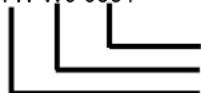
Serial number
Week of Production
Year of Production
d. If a battery does not want to switch ON and the green LED on the top is not illuminating, irreversible damage has occurred. Under this condition, a battery should not enter into service and should be disposed of according to local authority guidelines.
- During Use:
a. Batteries must be recharged after every use regardless of machine run time.
b. If the machine is to be left dormant for any length of time complete the following: i. Fully charge the batteries.
ii. Do not leave batteries dormant for more than 6 months.
Daily
Keep the machine clean.
Ensure brushes/ pads/ squeezegee/ fl iters are in good condition.
Check for any worn or damaged parts and replace immediately. Drain and rinse dirty water tank after every use.
Store machine with brush deck secured in the elevated position.
Weekly - as daily and
Check brush or pad and skirt and rinse.
Check floor tool blades for wear and wipe clean
Clean separator assembly including filter and check condition of seal.
Flush out system with clean water and clean filters.
Batteries
Always re-charge the batteries after use.
Charge for a minimum of 4 hours. Leave the battery on charge overnight, at least once per month.
After it has been fully charged, this will prolong battery life.
Numatic Lithium-ion Rechargeable Battery
25.6V | 50Ah | 1280Wh | LFP26148129






It is important that you observe the following information and warnings!
| Emergency Contact Information | ||
| Address: CBAK BATTERY HEADQUARTERS Shenzhen BAK ENERGY Co. LTD, 2603A BAK Tech Bldg, 9th Keyan Rd, Hi-tech Park, Nanshan Dist, Shenzhen City, China | NUMATIC INTERNATIONAL LTD Millfield Road, Chard, Somerset, TA20 2GB, UK | |
| Tel: Fax | 0086-755-832837100086-755-8328649 | 0044-146-0686000044-146-068458 |
| www.numatic.com | www.numatic.de | www.numatic.ch | www.numatic.frwww.numatic.nl | www.numatic.co.za | www.numatic.pt | www.numatic.eswww.numatic.it | www.numatic.dk | ||
1. DEFECTIVE BATTERIES
- If a customer wishes to return a battery to a supplier after removing from product, then collection of the battery must be arranged by the supplier; however, Faulty batteries must not be returned through the postal system or by courier.
- If on return to a supplier, OR at a customer base, a suspected defective battery shows any signs of impact damage, distortion, blistering, loose parts or leakage then on no account should it be offered for condition checking. It must be considered defective and the procedures described from item 6 below should be followed.
- If, on return to a supplier, OR at a customer base, a suspected defective battery, that shows No signs of impact damage, distortion, blistering, loose parts or leakage, may be offered for condition checking with an appropriate battery condition checking device operated by a competent person.
- If checking shows the battery to be defective then the procedures described from item 6 below should be followed.
- On no account must any further attempt to recharge be made. A defective battery should not be stored inside buildings on any account.
- The defective battery must be switched off, and all electrical terminals sufficiently insulated to remove risk of short circuit. The defective battery can then be stored in a locked battery waste container which should be plastic or plastic lined and placed away from buildings and combustible materials and clearly signed as a defective battery container with appropriate warnings. Defective batteries should be sent for waste disposal / recycling according to your country waste regulations.
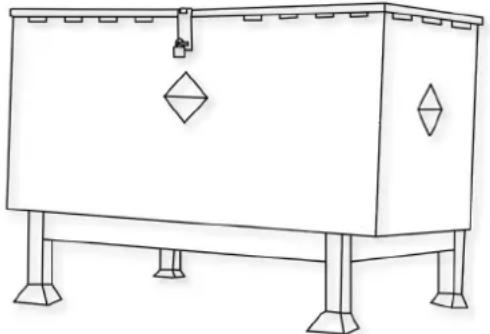
An example of a waste battery storage bin well away from buildings.
2. HANDLING AND STORAGE
EN
DANGER!
Improper handling can lead to an explosion or ignite a fire!
Store batteries out of reach of children.
- Only trained staff can fix the battery in the machine.
Storage temperature range: -10^ 40^ . - Temperatures must not exceed 40^ .
- Relative humidity range: 20% to 80% .
Optimum preservation of functionality: 15^ 25^ .
WARNING:
- Do not open the battery, disassemble it or allow it to fall from a substantial height.
- Protect the battery against short-circuiting - danger of explosion!
- Protect the battery against rain, do not immerse in liquids - danger of short-circuiting.
- Protect the battery against direct sunlight, heat and fire.
- Do not incinerate the battery - danger of explosion!
- Do not use defective or deformed batteries.
- Use only original Numatic specific appliances to charge and discharge batteries.
- Use only an external supply with the following specifications: 100 - 240V 6.8A
STORAGE:
Good batteries should be stored in a protected area away from sources of direct heat and sunlight and should be kept dry.
- The temperature should not exceed 40^ but preferably not be above 25^ to maintain good battery performance.
- Storage area should be of low humidity, non dusty and a non corrosive atmosphere.
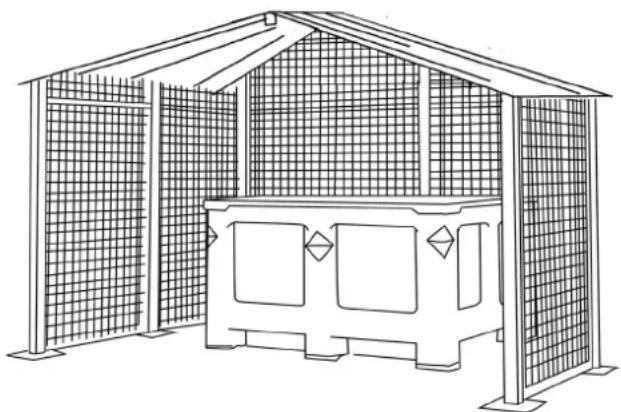
- An example of a well protected area with a cage to protect against accidental impact damage and with the batteries stored in a protective container to protect from heat, impact and accidental spillage of liquids.
- Care when handling / moving with forklift trucks or pallet trucks is needed at all times to avoid any physical damage to the batteries.
- If a good battery at any time is mishandled or subjected to any conditions that may damage it, as described in the battery Instruction manual supplied, it must then be considered as defective and procedures followed from Item 1 of this document overleaf.
3. HAZARDS IDENTIFICATION
- Electrolyte may escape from damaged batteries. Avoid contact.
- Contact can cause skin irritation, burns and chemical burns.
If liquid comes into contact with eyes, seek medical attention. - Avoid inhaling any vapours formed or released from the battery - Contains caustic alkaline electrolytes.
- Warning - Risk of fire - This battery contains No user serviceable parts.
4. FIRST AID MEASURES
EN
In the event of contact with released electrolyte or electrolyte vapours:
Eye contact - flush eyes for at least 15 minutes with plenty of clean water without rubbing and seek medical attention.
Skin contact - wash affected areas of skin with plenty of water and soap; if irritation persists, seek medical attention.
- Inhalation - provide fresh air or administer oxygen immediately and seek medical attention.
- Ingestion - if electrolyte has been ingested, seek medical attention immediately.
Information for physicians:
- Contains caustic alkaline electrolytes in cells with Lithium Iron Phosphate - NO LITHIUM METAL OR LITHIUM ALLOYS.
5. FIRE FIGHTING MEASURES
EN
- In case of fire - Keep clear of vapours and gases generated, take wind direction into consideration. If possible without danger, remove batteries from the vicinity of the fire. In principle, cooling or extinguishing with water is possible, but should only be done by trained personnel with sufficiently large quantities of water.
If the hazard situation is unclear, extinguish only with ABC powder extinguishers (Class D extinguishers for fires involving metals are especially suitable). - Fire fighters should only approach the fire wearing protective clothing and self-contained breathing apparatus.
- Once the fire has been extinguished, as a rule, the area should be monitored (fire watch) and cleaned up by trained and appropriately equipped personnel; fire residue should be contained and disposed of properly.
6. EXPOSURE CONTROLS, PERSONAL PROTECTION
EN
Respiratory Protection:
- In case of battery venting, providing as much ventilation as possible. Avoid confined areas with venting batteries.
- Respiratory Protection is not necessary under conditions of normal use.
Ventilation:
- Not necessary under conditions of normal use.
Protective Gloves:
- Not necessary under conditions of normal use.
Other Protective Clothing or Equipment:
- Not necessary under conditions of normal use.
Personal Protection is recommended for venting batteries: Respiratory Protection, Protective Gloves, Protective Clothing and safety glass with side shields.
7. ACCIDENTAL RELEASE
EN
Disposal - Wear protective clothing and equipment, wipe up with absorbent textile and dispose of as hazardous waste at collection points for hazardous waste according to national regulations.
8. DO
EN
- Use NUMATIC batteries only with NUMATIC appliances and charge them only using NUMATIC chargers.
- Charge battery before use.
- Store the battery out of the reach of children.
- Protect from rain - do not immerse in fluids.
- Protect from direct sunlight, heat, and open flames.
- Keep a battery that is not in use away from metal objects, (e.g. nails, coins, jewellery).
- Follow the disposal advice of the manufacturer and any internal waste management guidance.
- Use and store the battery with-in temperature range (as shown in Temperature Range Table).
- Always switch off the battery using the button by holding it for 6 seconds, before disconnection and handling.
- To activate / turn ON the battery please hold the top button for 6 seconds or alternatively charge the battery using original Numatic specific chargers.
- Be aware of the risk of terminals of the battery-operated appliance or battery being short circuited by metal objects.
Warning: The battery must only be charged by the Numatic Charger supplied with the product and under NO circumstances should an alternative non Numatic charger be used as there is a risk of severe damage and fire could result.
Note* "If batteries are subjected to temperatures beyond normal operating limits automatic shutdown will occur. Under these conditions allow the batteries to acclimatise at room temperature (18°C - 22°C) for several hours to allow the battery to wake up".
| Temperature Range Table | |
| CHARGING 5°C~35°C | |
| DISCHARGING -10°C~35°C | |
| STORAGE OPTIMUM 15°C~25°C | |
| STORAGE LIMIT -10°C~40°C |
9. DO NOT
- Throw battery into fire - risk of explosion!
- Charge or use a defective, damaged or deformed battery.
- Open, damage or drop the battery.
- Expose the battery to microwaves or high pressure.
- Bridge (short circuit) the battery terminals with metallic objects since this may damage the battery.
- Use metal containers for transporting batteries.
- Expose the batteries to high temperatures including direct sunlight.
- Crush, break open or physically abuse the batteries or the equipment that contains them.
10. DISTRIBUTOR TAKE-BACK / DISPOSAL
EN
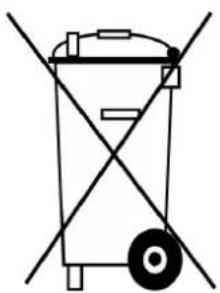
- On the basis of the Battery Directive, the manufacturers take responsibility for financing collection, treatment and recycling of batteries used in devices. To this end, batteries must be handed over for disposal to the collection systems established for this under national law. Disposal of batteries together with household waste is prohibited; batteries must be collected separately according to type.
- Return the battery free of charge to your NUMATIC servicing dealer for disposal or hand it over to an appropriate public collection point.
11. CHARGING BATTERIES
EN
The charger is intended for use only in the machine where it has been installed. The charger is intended for use with the detachable power cord supplied, the power unit is capable of operating at different voltages without user adjustment. If the charger is damaged or does not charge anymore, please return to service centre.
CAUTION!
- Check the mains cord regularly for any sign of damage.
- Do not use damaged devices.
If the mains cord of the charger is damaged, it must be replaced by an original NUMATIC mains cord available from the manufacturer or service agent.
12. WARRANTY
EN
Lithium-Ion Battery Warranty
Warranty: Commercial Use
a. Batteries are warranted for (3 Years) as standard. *Note: Numatic dealerships outside of the UK may provide longer warranty periods. Please confirm with your Numatic dealership on purchase of your product.
b. To claim warranty the following details must be supplied
i. Serial number of the machine
ii. Battery date code
iii. Date purchased
iv. Proof of Purchase
v. Maintenance history and charging regime
Failure to use the correct Numatic charger will void your warranty.
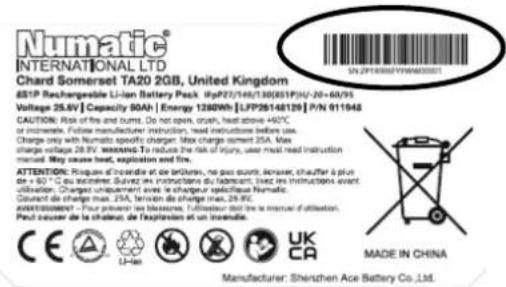
ZP19006-01FYYWW00001
Serial number
Week of production
Year of production
1. SCHADHAFTE BATTERIEN
9.WATU NIET MOETDOEN
NL
NumaticINTERNATIONAL LTD
Chard Somerset TA20 2GB, United Kingdom
8SP Rechargeable Li-ion Battery Pack (FpP27/149/308(ESPI)U-20-60/95)
Voltage 25.6V Capacity 50Ah Energy 1280Wh LFP28148128 P/N 911948
CALIFORNIA: Risk of fire and burns. Do not open, exhaust, heat above +80^ at temperatures below 150^ .
Charge only with Numatic specific charger. Max charge current 25A. Max
charge voltage 28.6V WRRANrTo reduce the risk of injury, user must read instruction
MADE IN CHINA

Manufacturer:Shenzhen Ace Battery Co., Ltd.
1. BATTERIAS COM DEFEITO
NumaticINTERNATIONAL LTD
Chard Somerset TA20 2GB, United Kingdom
651P Rechargeable Li-ion Battery Pack (FP27/48/30851P)/-20+60/95 V/100V 100A L
Vorage 25.8V Capacity SOH | Energy 1200W [LFP261461]
Cablehead: Roll of the tire and burn. Do not open, clean, fuel tanks ^*W = 0 , or incense. Follow manufacturer instruction, read instructions before use.
Charge only with Numemic specific charger. Max charge current 25A. Maxcharge voltage 38 V,扭矩 To reduce the risk of injury, users must read instruction
manual May cause heat, explosion and fire.
ATTENION: Ringues d'incidence et de brûlures, ne pas quasique, decrasser, saufier à plus de 45°C en couverture. Šaupuy est inférieure du fibrés, liné des incisions sur
1.1.2. The double-valued maps on the quotient spaces of are not unique.
Definition. Change unisomement avec le changeur specificus Numatic.
Counant de charge max. 25A, tension de charge max. 28.FK. AVERSISMENT - Pour prévenir les blessures, fuiéseau doit dire la mea
Peut couver de la shater, de l'explosion et un incendie.
CC
Manufacturer: Shenzhen Ace Battery Co. Ltd.

MADE IN CHINA
ZP19006-01FYYWW00001
Número de série
Semana de producao
Anode producao
1. BATTERIE DIFETTOSE
Chard Somerset TA20 2GB, United Kingdom
S101Rechengesabe Li-ion Battery Pack (pP27/148/38851P) 6V-20-60/55 V=10V, 10A, 1.5A
Vegap 1000M capacity 50Ah Energy 1380Wh [LPG24219] PN 91164
CARGO: Port of the sea and ports. Do not open, order, near or within 400 m of the port. Orimeter. Follow manufacturer instruction, read instructions before use.
Charge only with Numatic specific charger Max charge current 25A Max Charge voltage 380V (optional) To enable the data of your car, you need to install
manual . May cause heat , explosion and fire .
ATTENIOn: Rousq d nondre de bneure, he gau quit detnere, ch
Gourant de change max. 25A, tennis de change max. 28.8%
The following are the main results of this section.
P 1000000000000000000000000000000000000000000
Eeny 1280Wh [LFP26148129] P/N 91164
en room , had shown 4627 .100 and participation before it
Max charge current 25A Max
As the risk of injury, after must read instruction
一
A. 1000000000000000000000000000000000000000000000000000000000000000
the change max.28.50.
The Cullerow test (see appendix)

新动动


MADE IN CHINA
Manufacturer: Shenzhen Ace Battery Co. Ltd
Serienummer
Produktionsuge
Produktionsår
| EU, EC, EL, UE, ES: Declaration of Conformity Prohänsen i shodé Konformitätserklaring Overensistemsselleserklaring Declaración de conformidad Vastavusdeclaratiiono Declaración de conformidad | Déknapaíne na cão'tbetrctne Diλλον Μωμιρόφυοπε Neglólelo ségi nyllatkozat Dichiarazione di conformità Attikiets deklaraciá Conformitièsverkerlag Samsvarserklaering Declaração de conformidade | Deklaracá zgodnólci Declaratio de conformitate Déknapaíne o cootactrnni Forskärn om overensstammelse Izjava o skladnotti Vaatimustemukaisuusvakutus | |
| Manufacturer: / Vyrobce / Hersteller / Fabricant / Fabricante / Tootja / Fabricant / npovskýděmě / Katočkačevážć / Gyártó / Fabricante / Gamintojas / Fabricant / Producent / Fabricante / Producent / Productor / npovskýděmě / Tillverkare / Prozvlajalca / Valmistaja: | Numatic International Limited Chard Somerset TA20 2GB www.numatic.co.uk | ||
| Product: / Product / Product / Product / Toodet, Product / Pódký / Pótošov / Termék/ Prodotto / Produttas / Artikel / Produkt / Produtos / Product / Produs / Toobap / Produkt / Izdelka / Tuote: | TGB8572, TBL8572 | ||
| Description: / Popis / Beschrichung / Beskrivelse / Descrizión / Kirjeldus / La descripción / Omscânche / Ieipuyóphí / Leirás / Descrizione / Apibudinmas / Omschrijving / Beskrivelse / Descrição / Opis / Descrizi / Omscânche / Beskrivning / Opis / Kuvaus: | Floor Treatment - Walk Behind - Commercial - Battery | ||
| EN We, Numéric hereby declare under our sole responsibility, that the above-mentioned product(s) is/are in conformity with the following directives and standards. CS My, Numéric prohlásijome na svou wúřínučo odovědónst, je vělá uvedeny wirobek je ve shod'd s nášédulcimi směncimica a normami. DE Wir, Numéric erkränen in alleiniger Verantwortung, dass das ober genannte Produkt den folgenden Richtlinien und Narmen entspricht. DA Vi, Numéric erklarer hermed under egot ansvar at ovennävektrokt (or) i overenstemmelme sed felgende direktriver og standarder. ES Nosotros, Numéric declaramos bajo unsere unaqlica responsabilità que el produit anties mentionado está en conformadion con lassigues directives ynormas ET Meie, Numéric Kieslovego kinnilameta ja kännane iräniskulist vastustol, et espool nimctatud todoe on kozskías järgmiste direkviide ja FR Numéric déclare sous notre seule responsabilità que le produitmentionné ci-dessus est conforme aux directives et normes suvantantes. | BG Hne, Numéric C haicouyero dekkaprième Na caglia liuina OTBOPORHCT, no nococnhière no-rope prodouktHT e c bOCTETCTBNC BCS CNDIHTC DMDOKHNI CTANDAPIR.NEL Elpizic, Numéric blyawoue μασκλεύτημι κας υδύνην, dtο προνανθρούνεν προνιδινούρουν τομι μεις ακλούβεν συβίανις κατιρούνια. HU Mi, Numéric Kijelentjup, egyeduli folelòssaggol, hagy a font emittét termek megilelaz al alubbi irányelnekne é szalványoknak IT Noi, Numéric dichiaro sulla propria responsabilità, che il prodotto di cui sostroe è conforme alle seguniti dirlettive e norme. LT Mes, "Numéric pareškiu viyvässaliðs alsaskomybes, kad pirmiu minéias produkias attilinka sías direktyvas in standartus NL We verklaren Numéric hierbj op eigén verantoodelidjkeid, dat het bovenengenoende product voldoet aan de volgende nichtijcn en normen NO Vi, Numéric erklarer herved under egel ansvar, at del overvenneite produkt ter i samsvar med felgende direktriver og standarder | PT Nos, a Numéric declaramos, sob)nossa exclusiva responsabilitàde, que o produits acima mentionado está em conformidade com as diritizes e nomas a seguri. PL My, Numéric Niníjszym oswiadczamy z peña odpwiedzialnóscía, ze wyzej wymiemylenói product jest zgodný 2新技术pecujácymi dyrektwyam i normami. RO Nai, Numéric Prin prententa declaram impe propria raspundere, cà produxlal mas susmentionate este in conformitate ou urmlitarele standarde á Direclive. RU Mio, Hvnickov kromov krajauvjeynoid naynom odrobovorohuty, da haeneckonipropnoje je xckady na chédehni dineminkhama i stancadpdmia. SV Vi Numéric fürklarar hermed under egel ansvar at olván niñndna produit Überensstämmer med foljende direktiv och normer. SL Mio, Numéric izjavljamo s polno odgovormsoji, da je zgoraj omerjeni idedek v skladu z naslednjimi smernicamii in standardi. FI Mio, Numéric tarten vakuutamme omalla vastaùula, etti edella mainittu zuote on yhdencmukainen seuraavien direktivien ja standardien mukaisesti | |
| 2006/42/EC | Machinery Directive | EN60335-1:2012 + AC:2014 + A11:2014 + A13:2017 + A15:2021 EN60335-2-72:2012 EN62233:2008 | |
| 2014/30/EU | EMC Directive | EN55014-1:2017 + A11:2020 EN55014-2:1997 + A1:2001 + A2:2008 EN61000-3-2:2014 EN61000-3-3:2013 | |
| 2011/65/EU | RoHS Directive | ||
| Authorised Signatory: Mr. Matthew Coles Numatic International Limited Chard, | ||
| Signed: M A l e d Date: 1 February 2024 Somerset, TA20 2GB, UK |
| UKCA Declaration of Conformity | ||
| Manufacturer: | Numatic International LimitedChardSomersetTA20 2GBwww.nmatic.co.uk | Numatic |
| Product: | TGB8572, TBL8572 | |
| Description: | Floor Treatment - Walk Behind - Commercial - Battery | |
| We, Numatic hereby declare under our sole responsibility, that the above-mentioned product(s) is/are in conformity with the following directives and standards. | ||
| S.I. 2008: 1597 | Supply ofMachinery | EN60335-1:2012 + AC:2014 + A11:2014 + A13:2017+ A15:2021 |
| Regulations | EN60335-2-72:2012EN62233:2008 | |
| S.I. 2016: 1091 | EMC | EN55014-1:2017 + A11:2020 |
| Regulations | EN55014-2:1997 + A1:2001 + A2:2008EN61000-3-2:2014EN61000-3-3:2013 | |
| S.I. 2012: 3032 | RoHSRegulations | |
| Authorised Signatory: Mr. Matthew Coles | Position: Head of Technology | |
| Numatic International Limited,Chard,Somerset, TA20 2GB, UK | ||
| Signed: M.Clao Date: 1stFebruary 2024 | ||
| This Machine Has Been Packed With The Following | |
| Brush / Pad | |
| Floor Tool | |
| Charging Lead | |
| Battery | |
| Fuse Pack | |
| Signed | |
Distributed by:
Numatic
numatic.com
Numatic International Limited (Head Office)
Chard, Somerset TA20 2GB, UNITED KINGDOM
Tel: 01460 68600 numatic.com
Numatic International GmbH
Numatic International Denmark
Numatic International BV
Numatic International (PTY) Ltd.
Cnr. 16th & Pharmaceutical Road, Randjes Park, Midrand 1685, SOUTH AFRICA
Tel: +27 (0) 861 686 284 numatic.co.za
Numatic International ULDA
Rua Francisco da Silva Duarte, n°79
4475-269 Santa Maria de Avioso, Castelo da Maia, PORTUGAL
Tel: +351 220 047 700 numatic.pt
Numatic International Spain, S.L.U.
Av. Baix Llobregat, 5-7, Oficina bajos 1 (Parc Negocis Mas Blau II)
08820 EI Prat de Llobregat (Barcelona), SPAIN
Tel: +34 93 647 22 22 numatic.es
Numatic International Italy S.R.L
Via Luigi Galvani, 2, Z.I. Talponedo, 33080 Porcia (PN), ITALY
Tel: +39 (0) 434 046 211 numatic.it
- TBL8572/100T TBL8572/150T
- DE
- FR
- NL
- PT
- IT
- SV
- FI
- DA
- EN
- PLEASE READ, BEFORE COMMENCING OPERATION
- ENSURE THAT NO METAL OBJECTS COME INTO CONTACT WITH BATTERY TERMINALS WHILE THE BATTERIES ARE EXPOSED.
- Fitting the Brush / Pad
- Note: Safety gloves are recommended for the changing of used brushes.
- Brush Deck Pitch Adjustment
- Fitting the Floor Tool
- Fitting the Hose Guide
- Filling the Clean Water Tank
- WHEN HANDLING AND MIXING CHEMICALS
- IMPORTANT
- Raising/Lowering the Floor Tool
- Raising/Lowering the Brush Deck
- Setting the Cleaning Controls
- NL Bediening machine
- Vloerelement optillen/neerlaten
- Break-away Floor Tool
- ALWAYS ENSURE THAT THE FLOOR IS PRE-SWEPT AND RELEVANT SAFETY SIGNS ARE DISPLAYED.
- Machine In Use
- Afstelling borsteldruk/-belasting
- SE ALLTID TILL ATT FÖRSTÄDA GOLVET OCH STÄLL FRAM RELEVANTA SÄKERHETSSKYLTR.
- Maskinen i drift
- Vuilwatertank is vol
- Floor Tool Overview
- Alternative Display
- Battery Care
- Under normal daily usage:
- DE Laden des Geräts
- EN Free Wheel Function
- DE Freilauffunktion
- Trouble Shooting
- Numatic Lithium-ion Rechargeable Battery
- 25.6V | 50Ah | 1280Wh | LFP26148129
- DEFECTIVE BATTERIES
- HANDLING AND STORAGE
- DANGER!
- WARNING:
- STORAGE:
- HAZARDS IDENTIFICATION
- FIRST AID MEASURES
- In the event of contact with released electrolyte or electrolyte vapours:
- Information for physicians:
- FIRE FIGHTING MEASURES
- EXPOSURE CONTROLS, PERSONAL PROTECTION
- Respiratory Protection:
- Ventilation:
- Protective Gloves:
- Other Protective Clothing or Equipment:
- ACCIDENTAL RELEASE
- DO
- DO NOT
- DISTRIBUTOR TAKE-BACK / DISPOSAL
- CHARGING BATTERIES
- CAUTION!
- WARRANTY
- SCHADHAFTE BATTERIEN
- 9.WATU NIET MOETDOEN
- BATTERIAS COM DEFEITO
- BATTERIE DIFETTOSE
- Numatic
Brand : Numatic
Model : TBL8572
Category : Sweeper