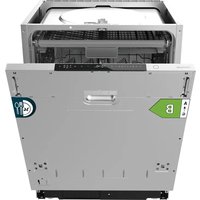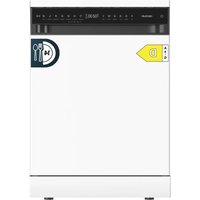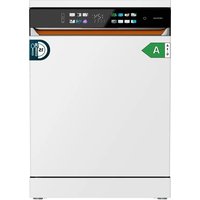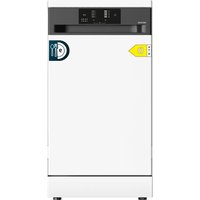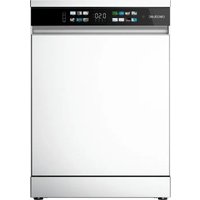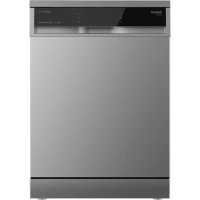
Bolero Aguazero 6600 - Dishwasher CECOTEC - Free user manual and instructions
Find the device manual for free Bolero Aguazero 6600 CECOTEC in PDF.


| Product type | Dishwasher |
| Brand | Cecotec |
| Model | Bolero Aguazero 6600 (Stainless Steel / Dark) |
| Capacity | 14 place settings |
| Height with top panel | 850 mm |
| Power supply | 220-240 V~, 50 Hz, 10 A |
| Total power | 1900 W |
| Water pressure | Min. 0.03 MPa - Max. 1 MPa |
| Wash programs | 8 programs: Mini 14', Rapid 30', Eco, Economy+5.4L, DualPro 60°C, Super 50', Smart 30-50°C, Smart 60-70°C |
| Special functions | Turbo drying, adjustable water softener, delayed start (1-24 h), half load, extra hygiene, energy saving, extra quick, extra silent, child lock |
| Detergent dispenser | Integrated, compatible with tablets and powder |
| Salt reservoir | Yes, with integrated water softener |
| Rinse aid | Adjustable dosage (levels 1 to 5) |
| Noise level | Not specified, but Extra silent function available |
| Filter maintenance | Weekly cleaning recommended |
| Safety | Mandatory grounding, automatic stop when door opens |
| After-sales service | Cecotec after-sales service: +34 963 21 07 28 |
Frequently Asked Questions - Bolero Aguazero 6600 CECOTEC
User questions about Bolero Aguazero 6600 CECOTEC
0 question about this device. Answer the ones you know or ask your own.
Ask a new question about this device
Download the instructions for your Dishwasher in PDF format for free! Find your manual Bolero Aguazero 6600 - CECOTEC and take your electronic device back in hand. On this page are published all the documents necessary for the use of your device. Bolero Aguazero 6600 by CECOTEC.
USER MANUAL Bolero Aguazero 6600 CECOTEC
natural_image
Three white and three black kitchen units against a dark blue background (no visible text or symbols)cecòtec
- Parts and components 60
- Before use 60
- Installation 61
- Before using the dishwasher 62
- Loading the dishwasher 66
- Programmes table 68
- Control panel 69
- Cleaning and maintenance 73
- Troubleshooting 75
- Automatic fault warning and possible solutions 78
- Technical specifications 79
- Disposal of old electrical appliances 80
- Technical support and warranty 80
- Copyright 80
SOMMAIRE
| Icon Type Meaning | |
 | WARNING Risk of serious injury or death |
 | RISK OF ELECTRIC SHOCKRisk of dangerous voltage |
 | FIREWarning: Risk of fire/flammable materials |
 | WARNING Risk of injury or damage to property |
 | IMPORTANT/NOTE Correct system use |
Please, keep this instruction manual in a safe place for future reference or new users.
- Read these instructions carefully before assembling or using the product. These instructions contain important information that will help you get the best out of your equipment. It is your responsibility to make sure every user is informed about the warnings and precautions stated in this instruction manual.
- This appliance can be used by children aged 8 years and above and persons with reduced physical, sensory or mental capabilities or lack of experience and knowledge if they have been given supervision or instruction concerning the use of the appliance in a safe way and understand the hazards involved. Children should not play with the appliance. Cleaning and user maintenance should not be carried out by unsupervised children.
- After using the dishwasher, there may be remains in the interior. Keep children away from the machine when it is open.
- WARNING: check the dishwasher and package are not damaged. Never use the dishwasher if it is damaged, immediately contact the Cecotec Technical Support Service.
- Packaging material may be dangerous to children. Remove it and place it out of their reach.
- Choose a suitable and safe place to install the dishwasher.
- Do not install the dishwasher on a surface in which the base cannot air properly, like a carpet.
- Use the provided hoses, do not reuse old hoses.
- Do not plug the dishwasher before installing it. The machine must be unplugged during its installation.
- It is recommended that the dishwasher is installed by authorised personnel.
- Never use an extension cord or a multi-socket connection.
- The socket must be accessible after the dishwasher installation.
- After the installation, the first time you run the dishwasher, do it while it is empty.
- Always use the socket provided with the dishwasher. Do not modify the socket provided with the device if it does not match the power socket.
- Check the power cord regularly for visible damage. If the cord is damaged, it must be replaced by the official Technical Support Service of Cecotec in order to avoid any type of danger.
- Do not operate the product if its cord, plug or structure show visible damage, do not operate properly or have been dropped.
- In case of malfunctioning, repair must be carried out by the Cecotec Technical Support Service; otherwise the warranty will be void.
- Before! repairing the dishwasher, you must disconnect it from the power supply and close the stopcock.
- To unplug the dishwasher, pull from the socket, never from the cord.
- This dishwasher is intended for household use only. Do not operate it outdoors.
- During use, the dishwasher uses less energy and water than washing dishes by hand, provided that the household dishwasher is used according to these instructions.
- Do not misuse it, do not stand, sit or place any heavy object on the door or baskets of the dishwasher.
- Do not use the dishwasher if all interior elements are not correctly placed.
- Use only detergents and rinse aids specific for dishwashers.
- Some dishwasher detergents are very alkaline. They may be extremely dangerous if you ingest them. Avoid contact with skin and eyes and keep children away from the dishwasher when the door is open.
- Due to the danger of explosion, do not place chemical solvents in the interior of the machine.
- Do not place articles which are not dishwasher safe in the machine.
- Do not fill the baskets over their capacity.
- Cecotec is not responsible for any deformation produced in the interior of the machine due to misuse.
- Do not open the door while the dishwasher is running, as it could spill hot water. The machine features safety devices which will stop the operation if you open the door.
- Do not leave the door open, as it could cause accidents.

- Place knives and other sharp objects with the blade facing down in the cutlery tray or in the cutlery basket.
- For safety reasons, disconnect the mains plug after the programme has finished.
- To avoid electric shock, do not disconnect the dishwasher with your hands wet.
- The maximum place setting capacity is 14.
- The maximum inlet water pressure is 1 MPa.
- The minimum inlet water pressure is 0.03 MPa.
- Top cover
- Height-adjustable cup holder
- Upper spray arm
- Cutlery basket
- Lower spray arm
- Filtering set
- Dishwasher door
- Control panel
- Rinse aid and detergent dispenser
- Lower basket
- Upper basket
- Cutlery tray
Fig. 1.2
- Turbo dry system: this system improves the tableware drying performance.
2. BEFORE USE
- This product includes a safety package to protect it during transport. Unpack the appliance and keep the original packaging and materials in a safe place. It will help prevent any damage if the product needs to be transported in the future. In case the original packaging is disposed of, make sure all packaging materials are recycled accordingly.
- Make sure all parts and components are included and in good conditions. If there is any piece missing or not in good condition, immediately contact the Technical Support Service of Cecotec.
Box contents
- Bolero Aguazero 6600/ Inox/ Dark dishwasher
- Drain hose
- Water supply hose
- Test strips
- Funnel
- Instruction manual
3. INSTALLATION
Step 1: Selecting the dishwasher location
Fig. 2
- When placing the machine, do it in an area in which the tableware can be loaded and unloaded easily. Do not place the dishwasher in an area in which room temperature is below 0^ C.
- Place the dishwasher near a tap, a water drain and a grounded electrical outlet. Remember you should not modify the connections once the dishwasher is installed.
- You must leave at least a 5-mm space between the upper part of the dishwasher and the cabinet, and the exterior door must be aligned with the piece of furniture.
- Follow the indications on image 2 on the dimensions the gap where you want to install the dishwasher must have.
- Do not hold the device by its door or panel.
- Leave an appropriate distance around the machine to make its disconnection from the mains and movement easier when cleaning it.
Step 2: Water supply hose connection
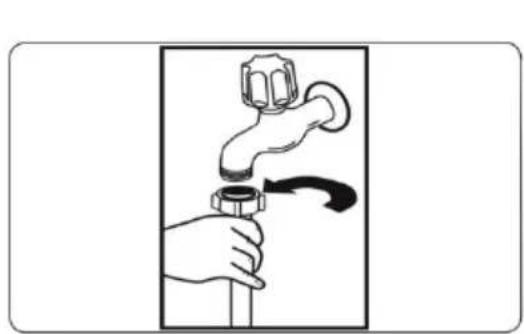
Fig. 3
Connect the water supply hose to a cold water tap, and make sure it is secured in place.

WARNING:
- Use the water supply hose provided with your dishwasher, do not reuse the water supply hose from your old dishwasher.
- Open the tap and let water run through the water supply hose before connecting it to the dishwasher.
- Connect the water supply hose directly to a water inlet. The pressure supplied by the inlet must be at least 0.03 MPa and at most 1 MPa. If the pressure is over 1 MPa, you must install a pressure release valve to the inlet.
- When the connections are ready, open the tap completely and check if there is any water leakage. Close the water supply tap after every washing programme.
Step 3: Drain hose connection
Fig. 4
- Connect the drain hose directly to a drain or to the sink outlet tap. This connection must be at least 50 cm and at most 110 cm over the floor level. Fig. 5
- If the end of the drain hose is free, it should not be immersed in water, to prevent water backflow.
- Make sure the drain hose is not twisted.

IMPORTANT: utensils will not be washed correctly if you use a drain hose with over 4-m length.
Step 4: Electric connection

t the dishwasher to the electric circuit.
WARNING: make sure that the mains voltage matches the voltage stated on the rating label of the appliance and that the wall outlet is grounded.


The dishwasher plug must be connected to a grounded socket. If you do not have a grounded socket, a grounded installation must be carried out by a licensed electrician. In case of ungrounded use, Cecotec shall not be liable for any malfunction or damage that this may cause.
Make sure there is an appropriate grounded socket before using the appliance.
Step 5: Placing the dishwasher
Fig. 2
- If you want to install the dishwasher in an existing cabinet, you must make sure there is enough space to do so and that the wiring and plumbing are appropriate.

WARNING: the worktop under which you want to install the dishwasher must be stable in order to avoid imbalances.
-
Level the dishwasher feet according to the floor slope.
-
Fit the machine by pushing it under the worktop, taking care not to crush or bend the hoses.

Make sure the water supply and water outlet hoses are not crushed or trapped.

Make sure the dishwasher is not placed over the electric cable when installing it.

WARNING: after removing the top panel of the dishwasher, the machine must be placed in a space with the dimensions shown in the following table:
| With the top panel Without the top panel | |
| Height (H) (mm) 850 mm 835 mm |
4. BEFORE USING THE DISHWASHER
For a correct washing, the dishwasher needs soft water. Otherwise, water will leave scale remains in the tableware and in the interior of the machine which may block the dishwasher. To do this, water goes through a system that removes the ions that form the hardness of the water, either special dishwasher salt or a water softener.
4.1 Dishwasher salt
Use only salt special for dishwashers.
Filling the compartment with dishwasher salt
Fig. 6
- Remove the lower basket and loosen the compartment cap.
- Open the salt tank cap by turning it counterclockwise (1) (2).
- Add water to the salt tank until the limit (3) (only in the first use). It is normal for a small amount of water to come out of the salt compartment.
- Fill the tank with salt for dishwasher (4) until it is almost full. Using a funnel will make the process easier.
- Place the cap back and tighten it.
- When running the dishwasher, the salt tank will fill with water, so you must fill the tank before running the dishwasher.
- Fill the salt compartment immediately before running the dishwasher as, otherwise, the filtering system, pump and other important parts of the machine may get damaged. The guarantee shall not cover this eventuality.
4.2 Water softener
- This dishwasher is equipped with a water softener which reduces water hardness.
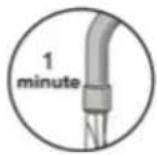
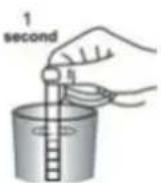
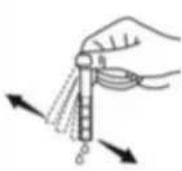
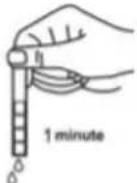
- To find out the water hardness level of the tap water, you can contact your water company or use one of the test strips included following these steps.
| Let tap water run (1 minute) | Hold the test strip immersed in water (1 second) | Shake the strip Wait (1 minute) | Set the water hardness level in your dishwasher |
 |  |  |  |

Note: water hardness is set in L3 by default. If water comes from a well or its water hardness is over 90 dF, it is recommended to use refinement filters and devices.
Water hardness table
| Level 0 | Germany water hardness level (°dH) | France water hardness level (°dF) | United Kingdom water hardness level (°dE) | Indicator on the display |
| 10-5 | 0-9 0-6 L1 | |||
| 26-11 | 10-20 7-14 L2 | |||
| 312-17 | 21-30 15-21 L3 | |||
| 418-22 | 31-40 22-28 L4 | |||
| 5 | 23-31 | 41-55 | 29-39 | L5 |
| 6 | 32-50 | 56-90 40-63 L6 |
Setting the water softener
- Turn on the dishwasher by pressing the power button.
- Hold down the programme button for 3 seconds until the display shows 'SL'. It will then show the last setting level.
- Press the programme button to select the desired level.
- Press the power button to save settings.
4.3 Detergent use
- Use only detergents designed specifically for household dishwashers. Keep the detergent in a cool, dry place and out of reach from children.
- The ingredients used in the detergents are necessary to remove dirt from the dishwasher.
- Do not fill the compartment with powder detergent until it is ready to wash the tableware.
- The necessary detergent amount will depend on the cycle, the load size and the dishes dirt level. Add an adequate amount to ensure optimum performance.
- If the detergent amount is too high, you will notice glass and dishes have whitish stripes or bluish layers, which may rust the tableware. Continued use of too much detergent may cause damage to the dishwasher.
- If the amount of detergent is too low, it can cause bad cleaning, as well as whitish stripes if the water is hard.
- Check the manufacturer instructions for the detergent to get more information.
Filling the detergent dispenser
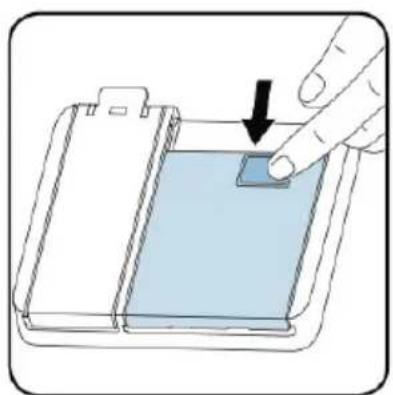
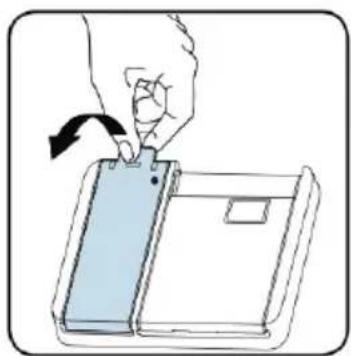
Fig. 7
- Push the tab to open the dispenser and pour the detergent.
- Close the cover and push it until it is fixed in its place. You must refill the dispenser just before starting each programme.
4.4. Combination detergents use
- These products must be used according to the manufacturer instructions.
- Never place combination detergents in the washing section or in the cutlery basket.
- Combination detergents contain, apart from detergent, rinse aids, salt substitution substances and additional components depending on the combination.
- We do not recommend using combination detergents with short programmes. Use powder detergent with these programmes.
- If you have any problem using combination detergents, contact the detergent manufacturer.
- When you stop using combination detergents, make sure the water hardness and rinse aid are set to the correct level.
Rinse aid use
- Use only detergents designed specifically for household dishwashers. Keep the rinse aid in a cool, dry place and out of reach from children.
- Rinse aid is used to promote the drying of the dishes without marks and stains. Rinse aid is released automatically during the rinse at high temperature phase.
- This dishwasher is designed to use liquid rinse aids.
- If the rinse aid dose is too low, there will be whitish stains in the dishes and they will not dry correctly.
- If the rinse aid dose is too high, you will see bluish layers on glass and dishes.

Never fill the rinse aid compartment with other substances, as this could damage the dishwasher.
Filling the aid rinse dispenser
Fig. 8
- Remove the cover of the rinse aid compartment by lifting it.
- Pour the rinse aid in the dispenser carefully, avoiding spilling it out of the dispenser.
- Close the cover by pressing it until it is locked in place.
- Be careful not to spill rinse aid outside the dispenser and clean it if spilled.
- The rinse aid is set at 4 by default.
- If the dishwasher does not dry correctly or leaves stains, increase the rinse aid level.
Rinse aid setting
- Turn on the machine by pressing the power button.
- Hold down the programme button for 5 seconds or until the display shows 'rA'. The rinse aid setting is based on the water hardness. It will then show the last setting level.
- Set the level by pressing the programme button.
- Turn off the dishwasher to save the setting.
ENGLISH
| Level Rinse aid dose Indicator | |
| 1 Rinse aid is not released r1 | |
| 2 1 dose r2 | |
| 3 2 doses r3 | |
| 4 3 doses r4 | |
| 5 4 doses r5 |
The default setting is r4.
5. LOADING THE DISHWASHER
Recommendations
- To get better results, follow the loading tips.
- Use your dishwasher to its maximum capacity, but do not overload it, as it will contribute to saving energy and water.
- Remove any coarse residue from the dishes before placing them in the machine. The pre-rinse of the tableware will lead to higher water and energy consumption and is not recommended.
- Place the utensils and tableware in a safe manner, so they do not tip over, and they do not stop the spray arms rotation.
- You can place mugs, cups, glasses, small dishes, bowls, etc. in the upper basket.
- When placing long stem glasses, lean them on the edge of the basket or over the rack, never on any tableware piece. Make sure that the glasses do not touch each other, as they may not stay still and could be damaged.
- Place every container, like mugs, glasses and pots upside down on the dishwasher, otherwise water may accumulate in the interior.
- We recommend you use the cutlery tray for better results.
- Place all big objects (pots, pans, lids, dishes, bowls, etc.) and those which are not very dirt in the lower basket.
- Dishes and cutlery pieces should not be placed one on top of the other.

WARNING:
- Make sure the rotation of the spray arms is not blocked after loading the dishwasher.
- Make sure after loading the dishes you can open the detergent dispenser.
- To avoid any possible injury, place sharp knives with its sharp part upside down in the cutlery basket or horizontally on the cutlery tray.

NOTE: do not overload baskets nor place dishes in the wrong basket.
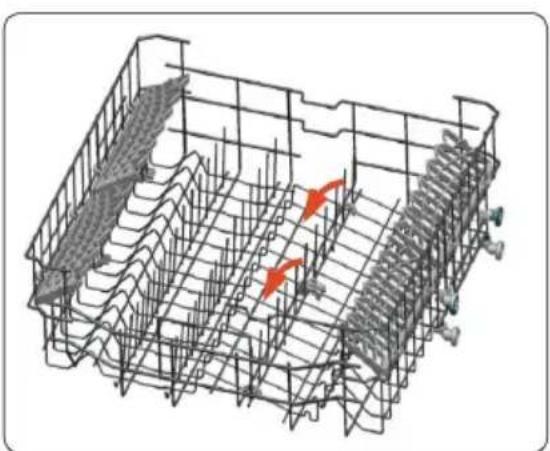
Setting the foldable holders
Fig. 9
The spikes on the upper basket can be folded independently, to allow the introduction of large items, like pots and pans. The foldable holders can be lifted or folded downwards.
Height-adjustable cup holder
Fig. 10
The height-adjustable cup holders allow you to place cups and mugs over and under the holders. The holders can be adjusted in two heights. You can also place utensils and cutlery pieces horizontally over the holders.
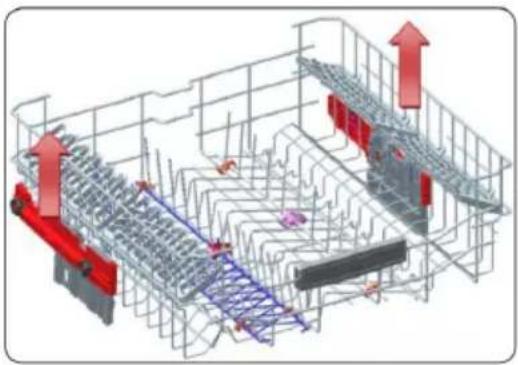
Height setting
Fig. 11
The upper basket includes a mechanism which allows you to set the basket height upwards (1) or downwards (2) without removing it. Hold the basket from both sides and pull it up or down, ensuring both basket sides are in the same position.
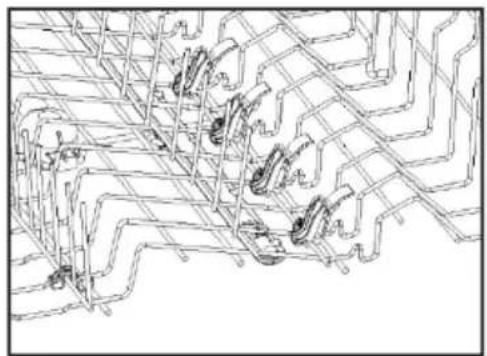
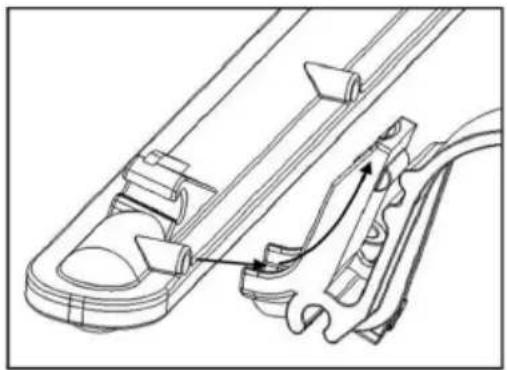
Device for direct washing
Fig. 12
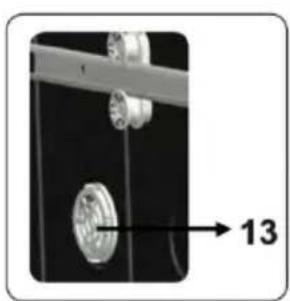
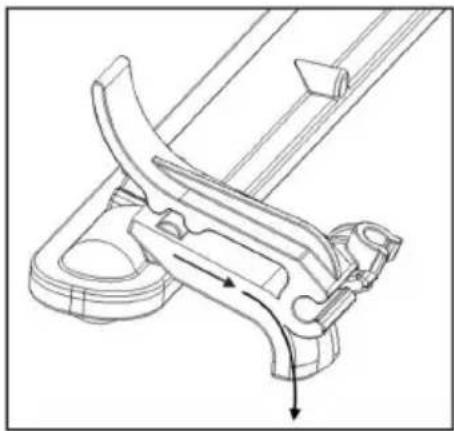
This device is used to wash cups, bottles, etc. as it directs water from the upper spray arm upwards when the device is in an upright position (Fig. 13). When the device is in a horizontal position (Fig. 14), water is directed downwards, contributing to the direct washing of the lower basket.
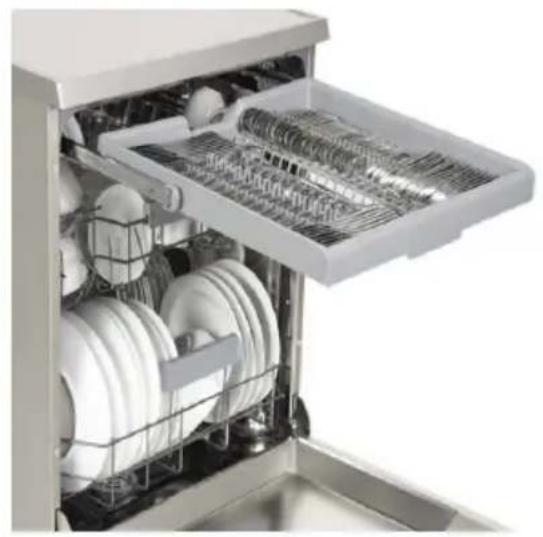
Cutlery tray
Fig. 15
The cutlery tray is designed to place kitchen utensils and larger or smaller cutlery pieces. This dishwasher is designed to wash 14 place settings in every washing.

WARNING: knives and other sharp objects must be placed horizontally in the cutlery tray.
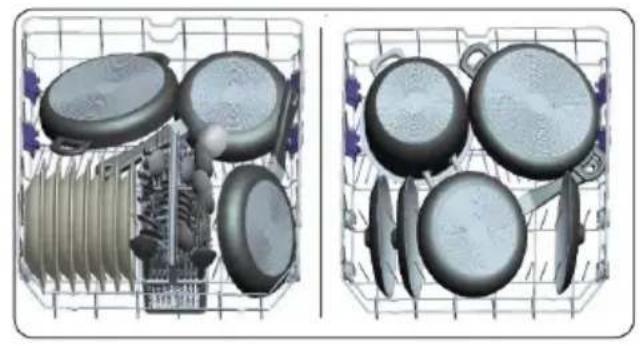
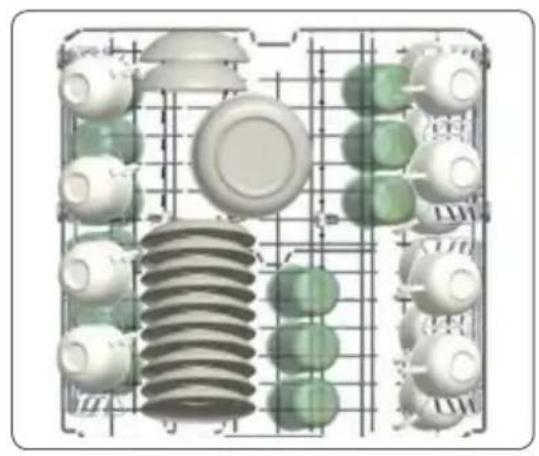
Recommendation for loading the baskets
Lower basket (Fig. 16)
Upper basket (Fig. 17)
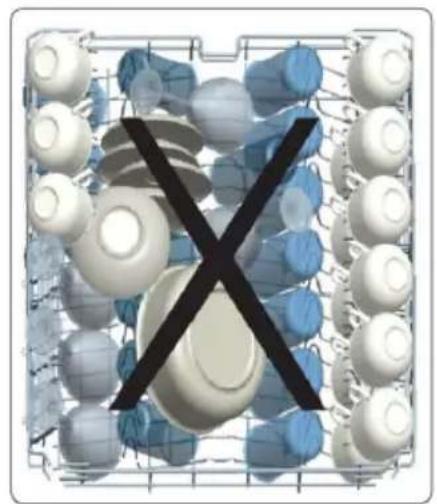
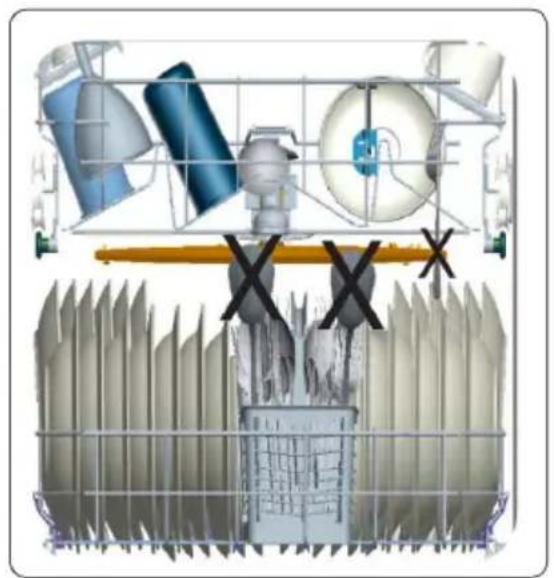
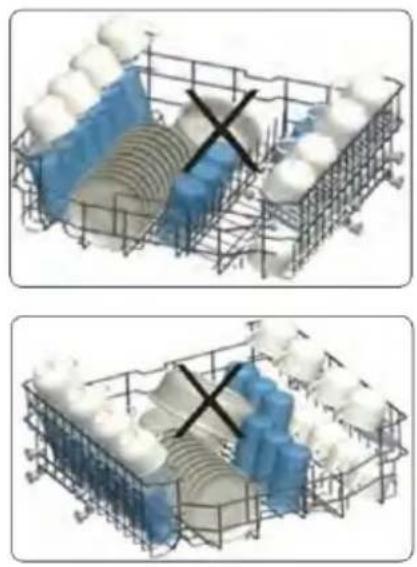
Incorrect load
Fig. 18-20
An incorrect load may cause an inadequate performance in the washing and drying phases.
- PROGRAMMES TABLE
| P1 P2 P3 P4 P5 P6 P7 P8 | ||||||||
| Programme name | Mini 14' | Rapid 30' | Eco | Save+ 5,4 l | DualPro washing 60°C | Super 50' Smart | 30°C-50°C | Smart 60°C-70°C |
| Soiling type The quickest programme for a lightly soiled and recently used tableware. Suitable for 4 place settings. | Suitable for a quick wash and lightly soiled tableware. | Standard programme for daily use with low energy and water consumption. | Suitable for table with normal soiling with fewer water consumption. | Suitable for both delicate and slightly soiled tableware in the upper basket and very soiled tableware in the lower basket. | Suitable for normally soiled and daily used tableware with a quicker programme. | Automatic programme for normally soiled and delicate tableware. | Automatic programme for very soiled tableware. | |
| Soiling level | Low | Low | Medium | Medium | High | Medium | Medium | High |
| Amount of detergent: A: 25 cm3 B:15 cm3 | B | A | A | A | A | A | A | A |
| Programme duration (h:min) | 0:14 | 0:30 | 3:27 | 2:27 | 1:53 | 0:50 | 1:21-1:31 | 1:49-2:59 |
| Energy consumption (kWh/cycle) | 0.340 | 0.650 | 0.645 | 0,950 | 1.600 | 1.000 | 0.650-0.850 | 1.250-1.900 |
| Water consumption (l/cycle) | 6.6 | 10.9 | 9.0 | 5.4 | 15.4 | 9.5 | 10.6-17.7 | 11.8-24.0 |
- The times indicated for each programme match the length with standard loads and temperatures. Other loads and temperatures will need different programme length.
- The programme duration can change according to the amount of dishes, water temperature, room temperature and the selected additional functions.
- The values provided for the programmes, except for the Eco programme, are just indicative.
- The Eco programme is suitable to clean normally soiled dishes; it is the most efficient programme in terms of combined energy and water consumption and is used to assess compliance with EU eco-design legislation.
ENGLISH
- Washing dishes in a household dishwasher generally consumes less energy and water than manual dishwashing when the dishwasher is used according to the manufacturer's instructions.
- It is recommended that you leave the door slightly open after the washing cycle has finished to speed up drying.
- You can access the product database where the information for this model is stored by scanning the QR code on the energy label.
| Bolero Aguazero 6600 dishwasher | Bolero Aguazero 6600 Inox dishwasher | Bolero Aguazero 6600 Dark dishwasher |
 |  |  |
7. CONTROL PANEL
Fig. 21
- Power button
- Programme selection button
2.1. Programme indicators - Delay start button
3.1. Delay start indicator - Remaining time indicator
- Start/Pause button
- Option button
- Selection button
- Rinse aid indicator
- Salt indicator
- Tablet option indicator
- Extra hygiene indicator
- Medium load indicators
- Energy save indicator
- Extra speed indicator
- Extra silence indicator
- Washing cycle phase indicators
a. Washing phase indicator
b. Rinse phase indicator
c. Dry phase indicator
d. Final phase indicator
ENGLISH
1. Power button
Press this button to turn the dishwasher on and off.
2. Programme selection button
- Use this button to choose a programme. The programme indicator for the selected programme will light up (2.1).
- To obtain more details about the programmes, check the "Programmes table" section.
3. Delay start button
- Use this button to delay the start hour of a programme between 1-2 and 24 hours, before running it. The delay start indicator will light up (3.1).
- If you wish to change the delay start time, first press the Start/Pause button and, next, the delay start button to select a new delay start time. To activate the new delay start time, press the Start/Pause button.
- To cancel the delay start, you must select 0 hours with the delay start button.
4. Remaining time indicator
This indicator will help you control the programme status through the washing, rinse, dry, final and remaining time indicators.
5. Start/Pause button
- Press the Start/Pause button to start or pause the programme. The washing indicator will light up and the remaining time indicator will show the programme length.
- It will also show the remaining time during the programme running.
- If you open the machine door will the programme is running, the programme length will stop and the corresponding programme phase indicator will start flashing.
6. Option button
- You can select options by pressing the option button repeatedly.
- A flashing LED will show the selected option.
7. Selection button
- Confirm the option by pressing the selection button.
- The LED of the selected option will light up and will be steady.
8. Rinse aid indicator
If the rinse aid level is low, the rinse aid indicator will warn you that you must refill the rinse aid dispenser.
9. Salt indicator
If there is enough salt, the salt indicator will light up to warn you that you must refill the salt compartment.
10. Tablet option indicator
- Select the tablet indicator when you use combination detergents with salt, rinse aid or other additional elements.
- The tablet indicator will turn on and be steady while this function is active.
11. Extra hygiene indicator
- Select the extra hygiene function to increase the washing temperature for the most hygienic washing operation.
- The extra hygiene indicator will light up.
12. Medium load indicator
- Press the medium load function to select the dishwasher area in which the tableware you wish to wash is located. You can select both baskets, or just the upper or lower basket. Press the button until the indicator corresponding to the loaded basket lights up.
- The medium load indicator will be on while this function is running. The tableware located on other dishwasher areas will not be washed.
13. Energy save indicator
- Select the energy save option to allow the machine to open the door at the end of the programme to improve the dry efficiency.
- This function also saves energy because the dishwasher works at a lower temperature.
14. Extra speed indicator
- Select the extra speed function to reduce the programme length and use less water.
- The extra speed indicator will light up.
15. Extra silence indicator
- Select the extra silence function to start a quieter operation. This option reduces the washing noise pressure level.
- The extra silence indicator will light up.
16. Washing cycle phase indicators
- The display will show the phase indicator for the corresponding running phase.
- While the dry phase indicator is on, the machine will be silent according to the selected programme length from 15 to 100 minutes.

NOTE:
NOTE: The child lock is activated or deactivated by holding down the selection button (7) for about 3 seconds. When it is active, all the indicators will flash and the remaining time indicator will show 'CL' (4). When it is deactivated, all indicators and 'CL' will flash twice.
- If you press the power button after setting the start delay time and the programme is
ENGLISH
running, the delay start time will be cancelled.
- To save any programme as favourite, press the programme selection button (2) and the delay start button (3) at any time. To select your favourite programme, hold down the programme button (2) for 3 seconds.
Energy save mode
- Open the door and hold down the programme button (2) and the option button (6) at once for 3 seconds.
-
After 3 seconds, the machine will show the last setting, 'IL1' or 'ILO'.
-
When the energy save mode is active, the display will show 'IL1'. In this mode, the interior lights (if available) will turn off 2 minutes after opening the door and the dishwasher will turn off after 15 minutes of inactivity to save energy.
- When the energy save mode is active, the display will show 'ILO'. If the energy save mode is deactivated, the interior lights will light up while the door is open and the machine will stay on unless the user turns it off.
- To save the last setting you have selected, turn off the dishwasher.
The machine will have the energy save mode setting activated by default.
Changing the running programme
If you wish to change the programme when the dishwasher is operating:
- Press the Start/Pause button.
- When the programme ends, select the desired programme with the programme selection button.
- Start the new selected programme by pressing the Start/Pause button.
- The new programme which is running will resume the previous programme in the phase it was running.
Cancelling a running programme
If you wish to cancel a programme when it is running:
- Hold down the Start/Pause button for 3 seconds.
- During cancellation, the end of programme indicator will flash. The machine will drain the water.
- When the end of programme indicator lights up, turn off the machine with the power button.
Buzz control
To set the buzz intensity, follow these steps:
-
Open the door and hold down the options and programme selection buttons at once for 3 seconds.
-
The dishwasher will emit a long buzz and machine will show the last setting, from S0 to S3.
-
To decrease the buzz intensity, press the programme selection button. To increase the buzz intensity, press the options button.
-
To save the selected buzz intensity, turn off the machine by pressing the power button. The S0 level deactivates every sound in the machine. The factory setting is S3.
Turning off the machine
Turn off the machine by pressing the power button after the programme has finished and the end of programme indicator is on.

NOTE:
- Do not open the door before the programme ends.
- At the end of the washing programme, you can leave the door of the machine slightly open to speed up the tableware drying.
- If you open the dishwasher door or the power supply stops working during the washing, the programme will resume when the door is closed or when the power supply returns.
8. CLEANING AND MAINTENANCE
- The dishwasher cleaning is important to preserve the machine shelf life.
- Make sure that water softener has been adjusted correctly and the correct amount of detergent is used to prevent limescale build-up.
- Refill the salt tank when the salt indicator lights up.
-
Oil and limescale may accumulate in the dishwasher over time. If this happens:
-
Fill the detergent dispenser, but do not load the tableware.
-
Select a high-temperature programme and let the dishwasher run with no load.
-
If this operation does not clean the dishwasher enough, use a cleaning agent designed to be used in dishwashers.
-
To lengthen your dishwasher shelf life, clean the device regularly every month.
- Clean the door gaskets with a damp cloth to remove any accumulated remain or strange object.
- Clean the control panel with a soft and slightly damp cloth.
- Clean the filters and the spray arms at least once a week. If there are food remains or strange objects in the fine and coarse filters, remove the filters and clean them thoroughly with water.
Warning
- To avoid water entering the door gasket and the electric components, do not use any type of spray cleaning agent to clean the dishwashing exterior.
- Never use abrasive cleaning agents or scouring pads in the exterior surfaces, as they can scratch the finish. Some paper towels can also scratch or leave stains in the surface.
ENGLISH
Filters
Clean the filters and the spray arms at least once a week. If there are food remains or strange objects in the fine and coarse filters, remove the filters and clean them thoroughly with water.
- Fine filter
- Coarse filter
- Metallic filter
Removing and cleaning the filters
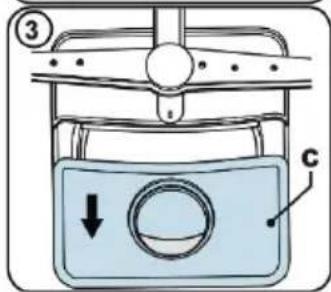
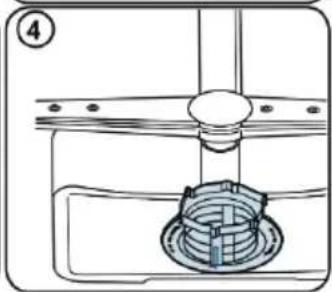
Fig. 22
- Turn the filtering set counterclockwise and remove it by lifting it upwards.
- Remove the coarse filter (b) from the fine filter (a).
- Rinse the filter with plenty of water until it is free from residues.
- Reassemble the filters. Place the filtering set again and turn it clockwise.

WARNING: do not wash any filter in the dishwasher.

NOTE:
- The washing effectiveness will decrease if the filter is placed incorrectly.
- The use of clean filters is necessary for the correct operation of the dishwasher.
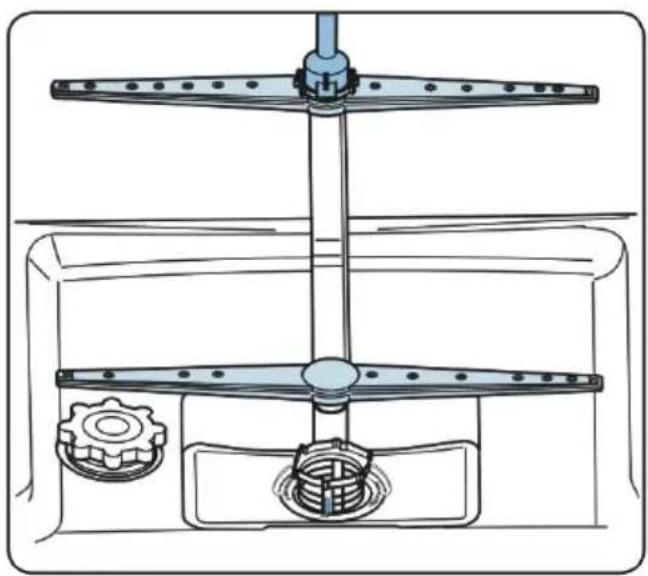
Spray arms
Fig. 23
Make sure the spray arms are not blocked and there are no food remains or strange objects sticked to them. If there is some blockage, remove the spray arms and clean them under running water.
- Loosen the nut which holds the upper spray arm in its position by turning it clockwise and then pull from it downwards.
- Make sure the nut is perfectly tightened when you assemble the upper spray arm.
Drain pump
Large food residues or strange objects which the filters have collected may block the drain pump. If this occurs, rinse water will accumulate over the filter.

Warning, risk of cuts! When cleaning the drain pump, be careful not to cut yourself with any broken glass or sharp instruments.
In this case:
- Unplug the device from the electric circuit.
- Remove the baskets.
- Remove the filters.
-
Empty the water, use a sponge if necessary.
-
Check the area and remove any strange object.
- Install the filters.
-
Place the baskets back in place.
-
TROUBLESHOOTING
| FAULT POSSIBLE CAUSE | POSSIBLE SOLUTIONS | |
| The programme does not start | The dishwasher is not plugged in | Plug in the dishwasher |
| The dishwasher is not on | Turn on the dishwasher by pressing the power button | |
| Blown fuse | Contact the official Technical Support Service of Cecotec | |
| The water inlet tap is closed | Open the water inlet tap | |
| The door of the dishwasher is open | Close the dishwasher door | |
| Blocked water inlet hose and filters | Check the water inlet hose and the machine filters and make sure they are not blocked | |
| There is water inside the machine | Blocked or twisted drain hose | Check the drain hose, clean it and straighten it |
| The filters are blocked Clean the filters | ||
| The programme has not finished yet | Wait until the programme finishes | |
| The dishwasher stops during washing | Supply fault Check the power supply | |
| Water inlet fault Check the water tap | ||
| During the washing operation there are knocking noises | The spray arm is hitting the dishes on the lower basket | Move or remove the items which are blocking the spray arm |
| There are partial food residues on the tableware | Incorrectly placed tableware, the sprayed water does not reach this tableware | Do not overload the baskets |
| The dishes lean over the others | Place the dishes following the instructions on the section about loading the dishwasher | |
| There was not enough detergent | Use the correct quantity of detergent, according to the instructions on the programmes table | |
| Incorrect washing programme selected | Use the information on the programmes table to select the most suitable programme | |
| Spray arms with food residues | Clean the holes on the spray arms with thin objects | |
| Blocked drain pump and filters or incorrectly placed filters | Check the drain hose and the filters are correctly placed | |
| FAULT POSSIBLE CAUSE POSSIBLE SOLUTIONS | ||
| There are whitish stains on the tableware | There was not enough detergent | Use the correct quantity of detergent, according to the instructions on the programmes table |
| The rinse aid dose and/or water softener setting are too low | Increase the rinse aid and/or water softener level | |
| High water hardness level | Increase the water softener level and add salt | |
| The salt tank cap is not correctly closed | Check the salt tank cap is correctly closed | |
| The dishes are not dry | The dry option was not selected | Select a programme with a dry option |
| Low rinse aid dose Increase the rinse aid dose | ||
| Rust stains on the tableware | The quality of the stainless-steel tableware is not enough | Use only tableware which is dishwasher safe |
| High salt level in the washing water | Set the water hardness level according to the water hardness table | |
| The salt tank cap is not correctly closed | Check the salt tank cap is correctly closed | |
| Too much salt spilled in the dishwasher when filling it with salt | Use a funnel to fill the salt compartment to prevent any spilling | |
| Poor earthing of the electrical installation | Seek the advice of a qualified electrician immediately | |
| There is detergent left in the detergent dispenser | The detergent was added when the detergent dispenser was wet | Make sure the detergent dispenser is dry before using it. |
- AUTOMATIC FAULT WARNING AND POSSIBLE SOLUTIONS
| PROBLEM CODE | POSSIBLE FAULT SOLUTIONS | |
| FF Water inlet system fault Make sure the water inlet tap is open and the water is flowing | ||
| Contact the Cecotec Technical Support Service | ||
| F5 Pressure system fault Contact the Cecotec Technical Support Service | ||
| F3 Continuous water inflow Close the tap and contact the Cecotec Technical Support Service | ||
| F2 Unable to drain water The water drain hose and the filters may be blocked | ||
| F8 Heating error Contact the Cecotec Technical Support Service | ||
| F1 Overflow Unplug the machine and close the tap | ||
| FE Defective electronic board Contact the Cecotec Technical Support Service | ||
| F7 Overheating Contact the Cecotec Technical Support Service | ||
| F9 Diverter motor position fault | Contact the Cecotec Technical Support Service | |
| F6 Defective heating sensor | Contact the Cecotec Technical Support Service | |
| HI High voltage fault Contact the Cecotec Technical Support Service | |
| LO Low voltage fault Contact the Cecotec Technical Support Service |
- It is recommended that the installation is carried out by authorised service personnel to avoid possible risks.
- The necessary reparations must be carried out by the Cecotec Technical Support Service. Cecotec shall not be liable for any damage derived from the procedures carried out by unauthorised persons. If you need to replace any pieces, make sure you only use original spare parts.
- Improper repairs or the use of non-original spare parts can cause considerable damage and put the user at significant risk.
11. TECHNICAL SPECIFICATIONS
Technical specifications may change without prior notification to improve product quality.
| Reference: 02369 02370 02371 | ||
| Model Bolero Aguazero 6600dishwasher | Bolero Aguazero 6600Inox dishwasher | Bolero Aguazero 6600Dark dishwasher |
| Code |  |  |
| Nominal voltage 220-240 V AC, 50 Hz | ||
| Total current 10 A | ||
| Water pressure Maximum 1 MPa Minimum 0.3 MPa | ||
| Total power 1900 W | ||
| Capacity | 14 place settings | |
| IPX | IPX 1 | |
Manufactured in Turkey | Designed in Spain
12. DISPOSAL OF OLD ELECTRICAL APPLIANCES
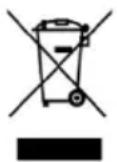
This symbol indicates that, according to the applicable regulations, the product and/or battery must be disposed of separately from household waste. When this product reaches the end of its shelf life, you should dispose of the batteries/accumulators and take them to a collection point designated by the local authorities.
Consumers must contact their local authorities or retailer for information
concerning the correct disposal of old appliances and/or their batteries.
Compliance with the above guidelines will help to protect the environment.
13. TECHNICAL SUPPORT AND WARRANTY
Cecotec shall be liable to the end user or consumer for any lack of conformity that exists at the time of delivery of the product under the terms, conditions and deadlines established by the applicable regulations.
It is recommended that repairs be carried out by qualified personnel.
If at any moment you detect any problem with your product or have any doubt, do not hesitate to contact Cecotec official Technical Support Service at +34 963 210 728.
14. COPYRIGHT
The intellectual property rights over the texts in this manual belong to CECOTEC INNOVACIONES, S.L. All rights reserved. The contents of this publication may not, in whole or in part, be reproduced, stored in a retrieval system, transmitted or distributed by any means (electronic, mechanical, photocopying, recording or similar) without the prior authorization of CECOTEC INNOVACIONES, S.L.
1. PIÈCES ET COMPOSANTS
Img. 1.1
- Fijn filter
- Grof filter
- Metalen filter
9. PROBLEEMOPLOSSING
Fig. / Img. / Rys. / Obr. 1
natural_image
Close-up of a mechanical component with a numbered arrow pointing to a circular feature (no text or symbols visible)Fig. / Img. / Rys. / Obr. 1.2
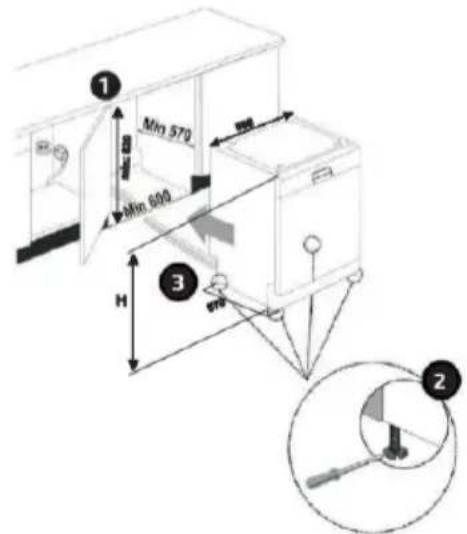
Fig. / Img. / Rys. / Obr. 2
natural_image
Illustration of a hand holding a faucet with a valve, no text or symbols present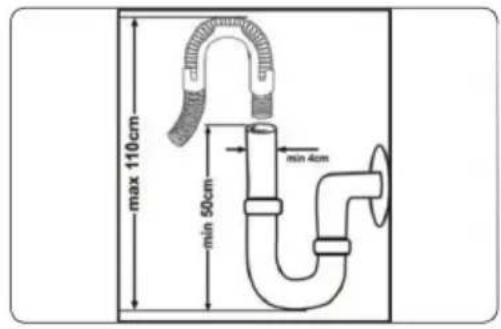
Fig. / Img. / Rys. / Obr. 3 Fig. / Img. / Rys. / Obr. 4
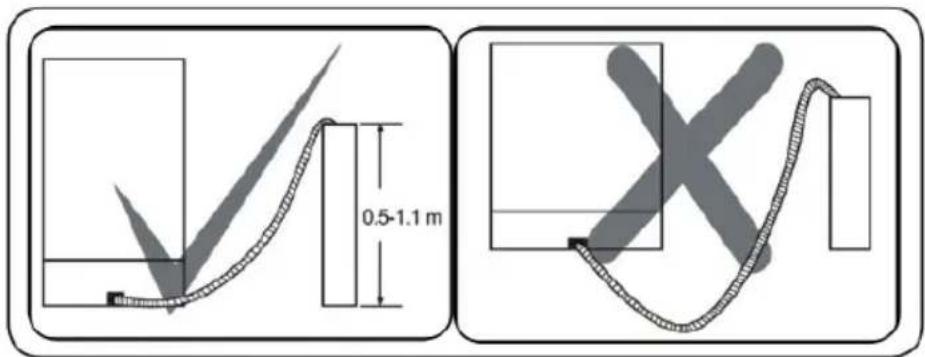
Fig. / Img. / Rys. / Obr. 5
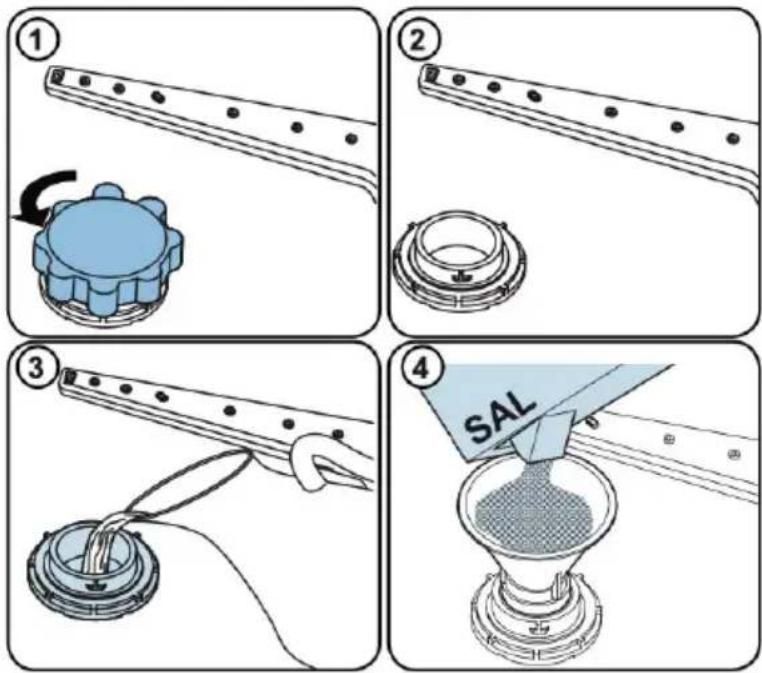
Fig. / Img. / Rys. / Obr. 6
natural_image
Illustration of a hand pressing down on a blue liquid in a container (no text or symbols)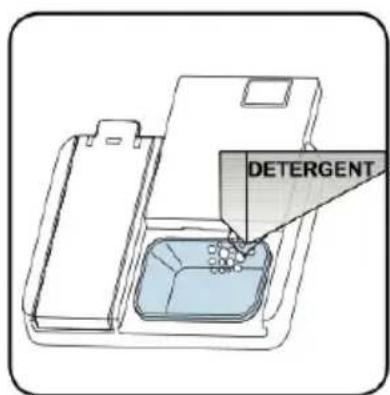
Fig. / Img. / Rys. / Obr. 7
natural_image
Illustration of a hand using a tool to press or adjust a device (no text or symbols visible)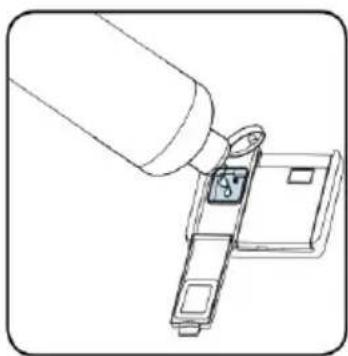
natural_image
Line drawing of a mechanical assembly with a cylindrical component inserted into a housing (no text or symbols)Fig. / Img. / Rys. / Obr. 8
natural_image
3D wireframe model of a mechanical or structural component with internal grid and highlighted red arrows indicating motion or force (no text or symbols)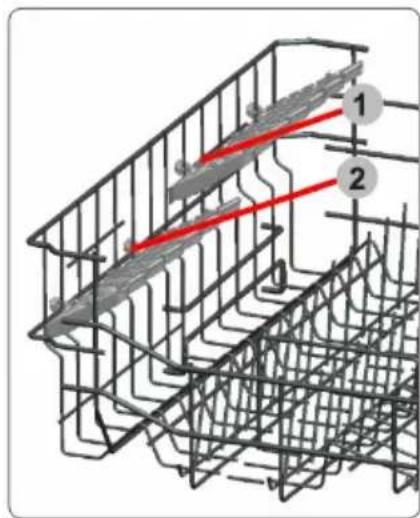
Fig. / Img. / Rys. / Obr. 9 Fig. / Img. / Rys. / Obr. 10
natural_image
3D architectural or engineering diagram showing structural framework with red arrows indicating upward motion (no text or symbols)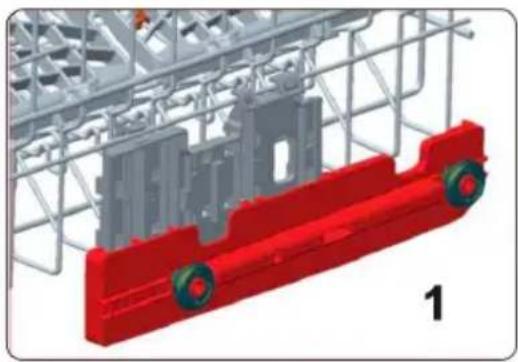
natural_image
3D model of a red and gray mechanical component with wheels, enclosed in a wire cage (no text or symbols visible)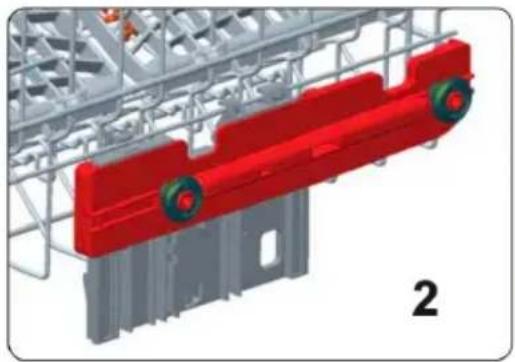
natural_image
3D rendering of a red and gray industrial machine component with wheels, mounted on a metal frame structure (no text or symbols visible)Fig. / Img. / Rys. / Obr. 11
natural_image
Pure technical line drawing of a mechanical assembly without any text, numbers, or symbolsFig. / Img. / Rys. / Obr. 12
natural_image
Technical line drawing of a mechanical component with no visible text or symbolsFig. / Img. / Rys. / Obr. 13
natural_image
Technical line drawing of a mechanical clamp or bracket assembly (no text or symbols)Fig. / Img. / Rys. / Obr. 14
natural_image
Interior view of a kitchen appliance showing multiple white kitchen units with a clear open lid (no text or symbols visible)Fig. / Img. / Rys. / Obr. 15
natural_image
Two 3D-rendered kitchenware baskets with cutouts and lids, no visible text or symbolsFig. / Img. / Rys. / Obr. 16
natural_image
3D diagram of a grid-based mechanical or electrical component assembly with no visible text, numbers, or symbols.Fig. / Img. / Rys. / Obr. 17
natural_image
3D rendered image of a grid with scattered white and blue circular objects and a black 'X' symbol overlay (no text or symbols present)Fig. / Img. / Rys. / Obr. 18
natural_image
Diagram of industrial equipment components including tanks, pipes, and a processing unit (no text or labels)Fig. / Img. / Rys. / Obr. 19 Fig. / Img. / Rys. / Obr. 20
natural_image
3D wireframe diagrams of a multi-layered container with blue and white components, no text or symbols present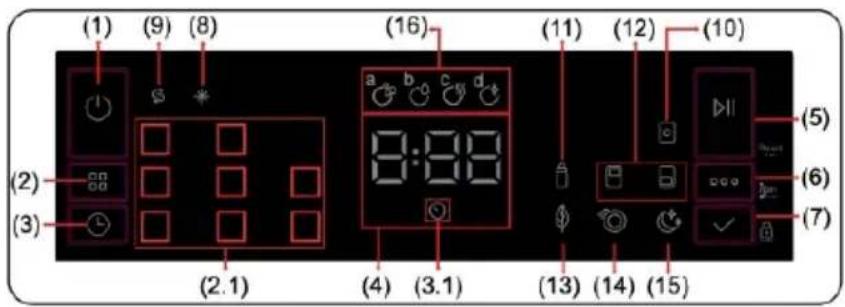
natural_image
Technical diagram of a mechanical assembly with a coiled spring and housing (no text or symbols)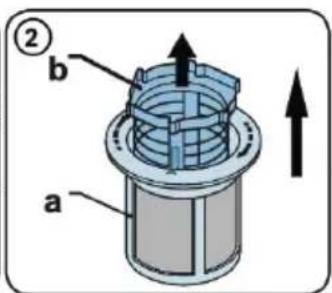
natural_image
Technical line drawing of a mechanical assembly with a central component and mounting base (no text or symbols)Fig. / Img. / Rys. / Obr. 22
natural_image
Technical line drawing of a mechanical device with two components, no text or symbols presentFig. / Img. / Rys. / Obr. 23
www.cecotec.es