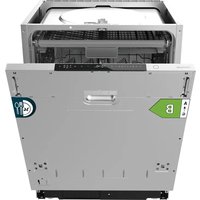
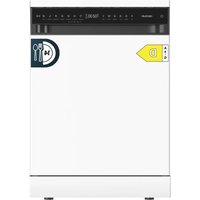
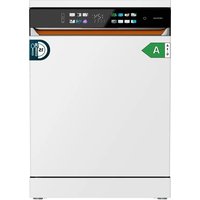
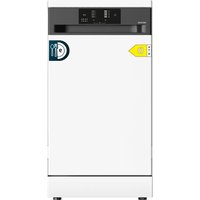
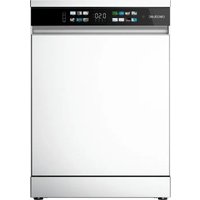
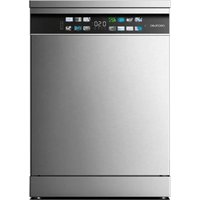
USER MANUAL Bolero Aguazero 8001 Full-BI CECOTEC
natural_image
Interior view of a modern kitchen appliance with open lid and visible internal components (no text or symbols)
bolero
Safety instructions 8
-
Parts and components
-
Before use 64
-
Installation 65
-
Operation 70
-
Loading the dishwasher 78
-
Cleaning and maintenance 82
-
Troubleshooting
-
Technical specifications 90
-
Disposal of old electrical
and electronic appliances 91
-
Technical support and warranty 92
-
Copyright 92
SOMMAIRE
Read these instructions thoroughly before using the appliance. Keep this instruction manual for future reference or new users.
- Read these instructions carefully before assembling or using the product. These instructions contain important information that will help you get the best out of your equipment. It is your responsibility to make sure every user is informed about the warnings and precautions stated in this instruction manual.
- This appliance can be used by children aged 8 years and above and people with reduced physical, sensory, or mental capabilities or lack of experience and knowledge if they have been given supervision or instruction concerning the use of the appliance in a safe way and understand the hazards involved. Children must not play with the appliance. Cleaning and user maintenance should not be carried out by unsupervised children.
- After using the dishwasher, there may be remains in the interior. Keep children away from the machine when it is open.
- WARNING: check the dishwasher and package are not damaged. Never use the dishwasher if it is damaged, contact the official Cecotec Technical Support Service immediately.
- Packaging material may be dangerous to children.
- Remove it and place it out of their reach.
- Choose a suitable and safe place to install the dishwasher.
- Do not install the dishwasher on a surface in which the base
cannot air properly, like a carpet.
- Use the provided hoses, do not reuse old hoses.
- Do not plug the dishwasher before installing it. The machine must be unplugged during its installation.
- It is recommended that the dishwasher is installed by authorised personnel.
- Never use an extension lead or a multi-socket connection.
- The socket must be accessible after the dishwasher installation.
- After the installation, the first time you run the dishwasher, do it while it is empty.
- Always use the plug provided with the dishwasher.
- Do not modify the plug provided with the appliance if it does not match the power socket.
- Check the power cord regularly for visible damage. If the cable is damaged, it must be replaced by the official Cecotec Technical Support Service in order to avoid any type of danger.
- Do not operate the product if its cord, plug, or structure show visible damage, do not operate properly, or have been dropped.
- In case of malfunctioning, repairs must be carried out by the official Cecotec Technical Support Service; otherwise, the warranty will be void.
- Before repairing the dishwasher, you must disconnect it from the power supply and close the stopcock.
- To unplug the dishwasher, pull from the socket, never from the cord.
- This appliance is designed for domestic use only and is not intended for bars, restaurants, farmhouses, hotels, motels, and offices.
- During use, the dishwasher uses less energy and water
than washing dishes by hand, provided that the household dishwasher is used according to these instructions.
- Do not misuse it, do not stand, sit, or place any heavy object on the door or baskets of the dishwasher.
- Do not use the dishwasher if all interior elements are not correctly placed.
- Use only detergents and rinse aids specific for dishwashers.
- Some dishwasher detergents are very alkaline.
- They may be extremely dangerous if you ingest them. Avoid contact with skin and eyes and keep children away from the dishwasher when the door is open.
- Due to the danger of explosion, do not place chemical solvents in the interior of the machine.
- Do not place articles which are not dishwasher safe in the machine.
- Do not fill the baskets over their capacity.
- Cecotec is not responsible for any deformation produced in the interior of the machine due to misuse.
- Do not open the door while the dishwasher is running, as it could spill hot water. The machine features safety devices which will stop the operation if you open the door.
- Do not leave the door open, as it could cause accidents.
- Place knives and other sharp objects with the blade facing down in the cutlery tray or in the cutlery basket.
- For safety reasons, disconnect the mains plug after the programme has finished.
- To avoid electric shock, do not disconnect the dishwasher with your hands wet.
- The maximum place setting capacity is 14.
- The maximum inlet water pressure is 1 MPa.
- The minimum inlet water pressure is 0.04 MPa.
INSTRUCTIONS DE SÉCURITÉ
- Upper spray arm
- Inner tube
- Bottom spray arm
- Salt tank
- Filter assembly
- Rinse aid and detergent dispenser
Fig. 2
Accessories
- Cutlery tray
- Upper basket
- Flip tines for glasses and cups (upper basket)
- Bottom basket
NOTE:
The graphics in this manual are schematic representations and may not exactly match the device.
2. BEFORE USE
- This appliance is packaged in a way as to protect it during transport. Take the appliance out of its box and remove all packaging materials. You can keep the original box and other packaging elements in a safe place. This will help you prevent damage to the appliance when transporting it in the future. In case the original packaging is disposed of, make sure all packaging materials are recycled accordingly.
- Make sure all parts and components are included and in good conditions. If there is any piece missing or in bad conditions, contact the official Cecotec Technical Support Service immediately.
Box content
- Dishwasher
- Bottom basket
- Upper basket
-
Cutlery tray
-
Drain hose
- Instruction manual
3. INSTALLATION

Risk of electric shock
- Disconnect the power supply before installing the dishwasher.
- Failure to do so can result in death or electric shock.
Note
The installation of piping and electrical components must be carried out by a qualified professional.
Electric connection
Make sure that the voltage and frequency of the electrical current correspond to those stated on the rating plate. Insert the plug into an outlet that has a good earth connection. If the socket to which the appliance is to be connected is not suitable for the plug, replace the socket, rather than using adapters or similar devices, as they may overheat and cause burns.
Note
Ensure that there is a proper earth connection before using the appliance.
Electrical requirements
Refer to the appliance connection data on the rating plate for the nominal voltage of the appliance and connect the dishwasher to a suitable power supply. Use a 10A/13A/16A fuse, time delay fuse or suitable circuit breaker and provide a separate circuit for this appliance only.
Warning
For your personal safety
- Do not connect the appliance to extension leads or adapters.
- Do not cut or remove the earth connection of the power cable under any circumstances.
3.1 Water supply and drainage
Cold water connection
- Connect the cold water supply hose to a 3/4 inch (19 mm) threaded connector and make sure it is securely fastened in place.
- If the water pipes are new or have not been used for a long period of time, let the water run to ensure that they are clean. This test is necessary to prevent the water inlet from blocking and damaging the appliance.
ENGLISHENGLISH
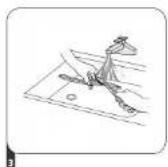
Fig. 3
A. Standard supply hose
B. Safety supply hose
Safety supply hose
- The safety supply hose has two double walls.
- Its system allows the water flow to be blocked in the event of breakage of the supply hose, and when the air gap between the supply hose itself and the outer corrugated hose fills with water.
Warning
In case there is a hose connected to the tap, it could burst if it is installed on the same water supply as the dishwasher. If you have one in your sink, it is recommended to disconnect it and block the hole.
Connecting the safety supply hose
- Remove the safety supply hose from the compartment at the rear of the dishwasher.
- Tighten the hose screws to the 3/4 inch (19 mm) threaded tap.
- Open the tap completely before starting the dishwasher.
Disconnecting the safety supply hose
- Close the water supply.
- Unscrew the safety supply hose from the tap.
Drain hose connection
- Insert the drain hose into a drainpipe with a minimum diameter of 4 cm, or let it run into the sink, making sure not to kink or coll it.
- The height of the drainpipe must be less than 1000 mm. The free end of the hose must not be immersed in water to prevent backflow into the hose.
Note
Fig. 4
Fix the drain hose securely in position A or position B.
-
Worktop
-
Drain pipe
- Drain hose
- Back of the dishwasher
- Water inlet
- Water supply hose
- Power cable
How to drain excess water from the hose
If the drainpipe is 1000 mm above the floor, the excess water in the hose will not be able to drain properly into the sink. Excess water will need to be drained from the hose into a suitable container or tank positioned lower than the sink.
Water outlet
Connect the drain hose. The drain hose must be correctly connected to prevent water leakage. Make sure the drain hose is not twisted or crushed.
Extension hose
If you need a drain hose extension, make sure to use a similar hose.
It must not be longer than 4 metres, otherwise the dishwasher cleaning effect may be impaired.
Siphon connection
The connection of the drainage system must be at a height of less than 1000 mm (maximum) from the inside base of the dishwasher.
3.2 Positioning the appliance
- Position the appliance in the desired location.
- The back should be against the wall and the sides against the adjacent cupboards or walls.
- The dishwasher is equipped with water supply and drain hoses which can be positioned on the right or left for easy installation.
Levelling the appliance
- Once the dishwasher is in place, you can adjust the height of the dishwasher by screwing in the feet.
NOTE: in any case, the appliance must not be tilted by more than 2° (Fig. 5).
3.3 Built-in installation (for built-in models)
Step 1. Selecting the dishwasher location
The dishwasher should be placed close to the water inlet, the drain hose, and the mains socket.
-
You must leave less than 5 mm between the top of the dishwasher and the cabinet and align the outer door with the cabinet.
Figure 6
-
Electricity, drainage, and water supply inlets
- Space between the lower part of the cabinet and the floor
- 600 mm (for 60 cm model)
- 450 mm (for 45 cm model)
ENGLISHENGLISH
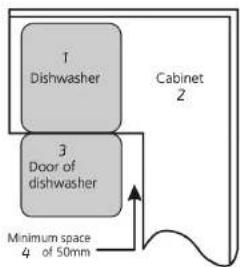
- If the dishwasher is placed in the corner of the cabinet, you should leave some space to be able to open the door.
- Dishwasher
- Cabinet
- Dishwasher door
- Minimum space of 5 mm
Note
Depending on where the socket is located, you may have to drill a hole on the opposite side of the cabinet.
Step 2. Installation of the decorative panel
Follow the specific installation instructions for fixing the decorative door panel.
A Semi built-in model
- Separate Velcro strips A and B and stick the adhesive side of strip A to the inside of the decorative panel.
- Then, stick the Velcro strip B to the outer door of the dishwasher. Once the panel is in place, secure it tightly to the outer door with the screws.
- Velcro strip
- Remove the 4 short screws.
- Fix the 4 long screws.
B Fully built-in model
- Install the fixing piece on the decorative panel and insert it into the slot on the outer door of the dishwasher as shown in picture A.
- Once the panel is in place, secure it tightly to the outer door with the screws, as shown in picture B.
- Remove the 4 short screws.
- Fix the 4 long screws.
Step 3. Adjusting the door spring tension
- The spring tension is set at the factory to facilitate the opening of the door. If a decorative panel is installed, you will need to readjust the tension of the door springs.
-
Turn the adjusting screw to tighten or loosen the springs (Fig. 10).
-
To check that the tension of the door springs is correctly adjusted, open the door fully and observe whether it remains horizontal. Next, check whether it closes easily when pushed lightly.
Step 4. Installing the dishwasher
- Place the anti-condensation strip under the cabinet surface. Make sure the strip is flush with the edge of the surface.
- Connect the water supply hose.
- Connect the drain hose.
- Plug in the power cable.
- Place the dishwasher inside the cabinet.
- Level the dishwasher. The rear feet can be set from the front part of the dishwasher by turning the screw located on the centre of the dishwasher base with a screwdriver. To adjust the front feet, use a flathead screwdriver and turn the feet until the dishwasher is level.
- Install the decorative panel or cabinet door on the outer door of the dishwasher.
- Adjust the spring tension on both sides of the door with a screwdriver by turning the springs clockwise to tighten them. Failure to do so may damage the dishwasher.
- The dishwasher must be fixed into its location. There are two ways to do this (Fig. 11):
A Normal surface: Place the installation hook in the upper holes of the dishwasher and fix it to the surface with the screws.
B Marble or granite surface: Secure the sides of the dishwasher with the screws.
Step 5. Levelling the dishwasher
The dishwasher must be level to operate correctly.
- To check that the dishwasher is level, place a spirit level on the door and on the inside base of the dishwasher near the bottom basket guide.
- Level the dishwasher adjusting the three level feet individually.
- When levelling the dishwasher, take care that it does not tip over.
Fig. 12
- Check the level between the front and rear of the dishwasher.
- Check the level between both sides of the door.
Warning
The maximum height adjustment of the feet is 50 mm.
ENGLISHENGLISH
4. OPERATION
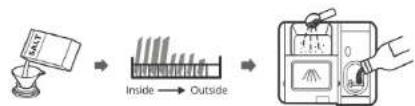
Before starting the dishwasher (Fig. 13):
- Set the salt tank.
- Add salt into the salt tank.
- Load the baskets.
- Fill the detergent dispenser.
Filling up the salt tank
Note
- If your model does not have a salt tank, you can skip this section.
- Always use special salt for dishwashers.
- The salt tank is located under the bottom basket.
Warning
- Only use salt special for dishwashers.
- Any other type of salt that does not meet these conditions, especially table salt, will damage the salt tank. In case of damage caused by the use of unsuitable salt, Cecotec does not give any guarantee and is not liable for any damage caused.
- Add salt into the tank just before starting a full programme.
- This will prevent any grains of salt or salty water, which may have been split, remaining on the bottom of the machine for any period of time, which may cause corrosion.
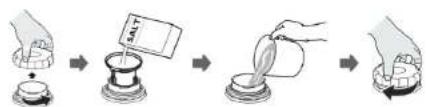
To add salt to the salt tank, follow the steps below as shown in figure 14:
- Remove the bottom basket and loosen the tank cap.
- Place the end of a funnel into the tank hole and pour in about 1.5 kg of dishwasher salt.
- Fill the salt tank to the maximum limit with water. It is normal for a small amount of water to come out of the salt tank.
- Then, screw the cap back on.
- The low salt warning indicator light will switch off once the salt tank is full.
- As soon as you have added the salt in the tank, start a washing programme (short programme is recommended). Otherwise, salt water may damage the filter system, the pump or other important components of the appliance. In such a case, the warranty will not cover the damage.
Warning
The salt tank must be refilled when the low salt warning indicator light ( ) on the control panel lights up. Depending on how well the salt is dissolved, the indicator light may still be lit even if the salt tank is full. If the low salt warning indicator light on the control panel (in some models) does not light up, you can estimate when to fill the salt tank by the cycles the dishwasher has run.
If you spill salt, run a quick programme to dissolve it.
Control panel
| 1 Power icon | Press this icon to switch on/off the dishwasher. The display will light up. |
| 2 | Programmes icon | Press the or icons to select a programme. The indicator light of the selected programme will light up. |
| 3 | Delay start ( /+) icons | To delay the start of the wash cycle, press the + icon to increase the delay start time setting or the - icon to decrease it. You can set a maximum of 24 hours delay. |
| 4 Function icon | | Press this icon to select a function. The indicator light of the selected function will light up. |
| 5 Alternate icon | | Press this icon to choose between the upper or bottom basket. The indicator light of the selected basket will light up. |
Programme indicator lights
- Auto

For lightly soiled, normally, or heavily soiled dishes, with or without food residues.

- Hygiene
When this programme is selected, the water temperature is raised to 70 °C in order to disinfect the dishes.

For loads with normal soiling, such as lightly soiled pots, dishes, glasses and frying pans.

This is the standard programme, suitable for cleaning normally soiled dishes and the most efficient programme in terms of combined energy and water consumption.

For lightly soiled crockery and glasses.

- 90 min
For normally soiled loads that need to be washed quickly.
ENGLISHENGLISH
After-party washing

For lightly soiled and fragile loads such as glasses, crystal, and fine china.
Self-cleaning

This programme provides an efficient cleaning of the own dishwasher.
Warning indicator lights
Rinse aid

If the indicator light lights up, the rinse aid dispenser needs to be refilled.
Salt

If the indicator light lights up, the salt tank needs to be refilled.
Tap

If the Indicator light lights up, the tap is closed.
Display
It shows the remaining time of the programme, the delay start time, error codes, etc.
Function indicator light

Use this function for a more thorough drying result. It can only be used with the Hygiene, Normal, ECO, Delicate and 90 min programmes.
Intensive

Use this function to wash heavily soiled or difficult to clean dishes. It can only be used with the Hygiene, Normal, ECO, Delicate and 90 min programmes.
Turbo+

This function reduces the duration of the wash programme. It can only be used with the Hygiene, Normal, ECO, Delicate and 90 min programmes.
Automatic opening

The dishwasher door opens automatically after the end of the wash programme, which improves drying results. Press the function icon for 3 seconds, the corresponding indicator light will light up.
Alternate function indicator light
Upper basket
Press the alternate icon to only wash the dishware in the upper basket. The bottom spray arm will not be activated.
Bottom basket
Press the alternate icon to only wash the dishware in the bottom basket. The upper spray arm will not be activated.
Water softener
- The water softener must be adjusted manually via the control panel.
- The water softener is designed to remove excess minerals and salts from the water that could otherwise have a detrimental or adverse effect on the operation of the appliance.
The more minerals it contains, the harder the water will be.
- The water softener should be adjusted according to the hardness of the water in your area. Contact your local water supply company for information on the degree of water hardness in your area.
Setting the salt consumption
The dishwasher is designed to allow adjustment of the amount of salt consumed according to the hardness of the water used. This aims to optimise and personalise the level of salt consumption.
Follow these steps to set the salt consumption:
-
Close the door and switch on the appliance.
-
Within 60 seconds after switching on the appliance, press and hold the programme icon for more than 5 seconds, then press the icon to access the water softener setting menu.
-
Press the ▷ icon again to select the appropriate setting according to the water hardness in your area. The selection sequence of the water softener setting level is as follows: H3->H4->H5->H6->H1->H2->H3.
-
To confirm the setting and exit the setting menu, do not press any icon for 5 seconds or press the power icon.
ENGLISHENGLISH
| WATER HARDNESS Setting | the water softener | Regeneration of the water softener every x wash cycles*. | Salt consumption (g/cycle) |
| German degree (°dil) | French degree (°fl) | Clark degree (°el) | Mmol/L |
| 0 - 5 | 0 - 9 | 0 - 6 | 0 - 0.94 | H1 | No regeneration | 0 |
| 6 - 11 | 10 - 20 | 7 - 14 | 1.0 - 2.0 | H2 | 10 | 9 |
| 12 - 17 | 21 - 30 | 15 - 21 | 2.1 - 3.0 | H3 | 5 | 12 |
| 18 - 22 | 31 - 40 | 22 - 28 | 3.1 - 4.0 | H4 | 3 | 20 |
| 23 - 34 | 41 - 60 | 29 - 42 | 4.1 - 6.0 | H5 | 2 | 30 |
| 35 - 55 | 61 - 98 | 43 - 69 | 6.1 - 9.8 | H6 | 1 | 60 |
1°dH=1.25°eH=1.78°FH=0.178 mmol/l
The factory setting is H3.
*Each regeneration process of the water softener consumes an additional 2.0 litres of water, the energy consumption increases by 0.02 kWh and the programme duration is extended by 4 minutes.
Note
If your model does not have a salt tank, you can skip this section.
- Water hardness varies from one place to another. If hard water is used in the dishwasher, timescale deposits will form on the dishes and cutlery.
- The appliance is equipped with a special water softener that uses a salt tank specifically designed to remove timescale and minerals from the water.
Rinse aid and detergent
Rinse aid is released during the last rinse to prevent water droplets from forming on the dishes, which can leave stains and marks. It also improves drying as it allows water to slide through the tableware. The dishwasher is designed to use liquid rinse aids.
Warning
Only use rinse aids for dishwashers. Never refill the rinse aid dispenser with other substances (e.g., dishwasher detergent or liquid detergent). This could damage the appliance.
When to refill the rinse aid dispenser
The frequency with which you need to refill the dispenser depends on the frequency with which you wash your tableware and the rinse aid settings used.
- The low rinse aid indicator light () will light up when the dispenser needs to be refilled.
- Do not overfill the dispenser.
Detergent function
The chemical ingredients that make up the detergent are necessary to remove, break down and remove all the dirt from the dishwasher. Most detergents in the market are suitable for this purpose.
Warning
Proper use of the detergent
- Only use specific detergents for dishwashers. Store the detergent in a dry and cool place.
- Do not fill the dispenser with powder detergent until it is ready to wash the dishes.
- Dishwasher detergent is corrosive. Keep out of the reach of children.
Filling the rinse aid dispenser. Fig. 16
- Remove the dispenser cover by lifting the tab.
- Pour the rinse aid in the dispenser carefully, avoiding spilling it out of the dispenser.
- Close the cover.
Adjusting the rinse aid consumption
To achieve better drying results with little rinse aid, the dishwasher is designed so that the user can adjust the consumption. Follow these steps to set the rinse aid consumption:
- Open the door and switch on the dishwasher.
- Within 60 seconds after step 1, press and hold the programme icon for more than 5 seconds, then press the + delay start icon to access the setting menu. Will start flashing quickly.
- Press the ▷ Icon again to select the appropriate setting according to your usage habits. The selection sequence of the rinse aid setting level is as follows: d3->d4->d5->d1->d2->d3.
- The higher the number, the more rinse aid will be used.
- To confirm the setting and exit the setting menu, do not press any icon for 5 seconds or press the power icon.
Filling the detergent dispenser. Fig. 17
- Choose a dispenser opening way according to your model.
- Slide the dispenser tab to open the cover
- Press the dispenser tab to open the cover
- Add detergent in the larger cavity (A) for the main wash cycle.
For best cleaning results, especially if the dishes are very dirty, also pour a little detergent in the door. The additional detergent will be used during the prewash phase.
- To close the cover, slide it forward and then press it down.
ENGLISHENGLISH
Note
- Remember that, depending on the water hardness, the setting can be different.
- Respect the manufacturer recommendations in the detergent package.
Programming the dishwasher
Washing cycle table
The following table shows the best programmes depending on the level of soiling of the load
and the amount of detergent needed
It also shows detailed information about the programmes.
● Means that the rinse aid dispenser needs to be refilled.
| Programmes | Cycle description | Prewash detergent/ Main wash | Operating time (min) | Energy (kWh) | Water (L) | Rinse aid |
| Prewash (45 °C) Self-cleaning (55-65 °C) Rinse Rinse (50-55 °C) Drying | 4/18 g (1/2 tabs) | 65-100 | 0.650 1.550 | 8.5-18.7 | ● |
| Wash (72 °C) Rinse Rinse Rinse (72 °C) Drying | 22 g (1/2 tabs) | 215 | 1.815 14.9 | | ● |
| Prewash (45 °C) Wash (55 °C) Rinse Rinse (55 °C) Drying | 4/18 g (1/2 tabs) | 175 | 1.230 14.8 | | ● |
| Prewash Wash (50 °C) Rinse Rinse (40 °C) Drying | 4/18 g (1/2 tabs) | 235 | 0.645 | 9.8 | ● |
| PrewashWash (50 °C)Rinse (50 °C)Rinse (50 °CDrying) | 4/18 g(1/2 tabs) | 120 0.935 1⁄4 | 8 | | | ● |
| Wash (60 °C)RinseRinse (50 °CDrying) | 22 g(1 tab) | 90 1.180 11.9 | | | | ● |
| Wash (35 °C)Rinse (35 °C) | 12 g(1 tab) | 20 0.410 11.3 | NO | | | |
| PrewashWash (60 °C)RinseRinse (60 °CDrying) | 4/18 g(1/2 tabs) | 145 1.405 15.1 | | | | ● |
Note
This programme is the test cycle. The information for the comparability test complies with EN60436.
Floor light function
The light under the dishwasher will light up during the wash cycle. It will then flash for 5 minutes and then switch off when the programme is finished.
Power save
- Prewash of the tableware will lead to higher water and energy consumption; hence, it is not recommended.
- Washing the tableware in a household dishwasher generally consumes less energy and water than manual dishwashing when the dishwasher is used according to the manufacturer instructions.
Starting a washing cycle
- Take out the upper and bottom baskets, load the tableware and reinsert them. It is recommended to load the bottom basket first and then the upper basket.
- Pour the detergent.
- Connect the plug to a mains socket. Check the type of power supply by referring to the "Technical Specifications" section. Make sure that the water supply is turned on at maximum pressure.
ENGLISHENGLISH
- Close the door and press the power icon to start the dishwasher.
- Choose a programme, the indicator light of the selected programme will light up. Then, the dishwasher will start the washing cycle.
Changing the programme mid-cycle. Fig. 18
A programme can only be changed if it has been running for a short time, otherwise, the detergent may have already been released and the dishwasher has already started to drain the wash water. If this is the case, it will be necessary to restart the dishwasher and refill the detergent dispenser. To restart the dishwasher, follow the instructions below:
- Open the door slightly to stop the washing cycle. Once the spray arms have stopped, you can open it completely.
- Press and hold for more than 3 seconds, the appliance will enter the programme selection mode.
- You can change the programme to the desired cycle setting.
Introducing dishes during the cycle
If you forget to insert any dishes, you can add dishes at any time before the detergent dispenser is activated. In this case, follow these steps:
- Open the door slightly to stop washing.
- When the spray arms have stopped, you can open it completely.
- Add the tableware you forgot.
- Close the door. After 10 seconds, the dishwasher will start again.
Warning
It is dangerous to open the door in the middle of the cycle, as the hot steam can burn you.
Automatic door opening
After washing, the door will open automatically for better drying effects.
Note
- Make sure the dishwasher door is not locked when the automatic door opening is activated.
- This could damage the door lock function.
- The After-party washing programme is not compatible with this function.
5. LOADING THE DISHWASHER
Adjusting the upper basket
Type 1.
The height of the upper basket can be easily adjusted to fit taller dishes in either the upper or bottom basket.
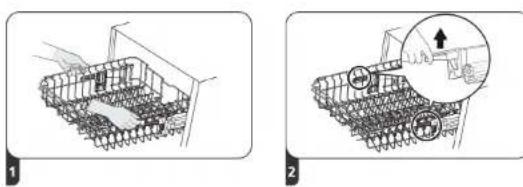
To set the height of the upper basket, follow these steps, as shown in Fig. 19:
- Pull out the upper basket.
- Remove the upper basket.
- Replace the upper basket by sliding the wheels on the upper or bottom guides.
- Push the upper basket into position.
Type 2. Fig. 20
- To adjust the height of the upper basket to the highest position, hold it at both ends and lift it until the basket is in the upper position. No need to lift the adjustment handles.
- To adjust the height of the upper basket to the lowest position, lift the adjustment handles on each side to release the basket and lower it to the bottom position.
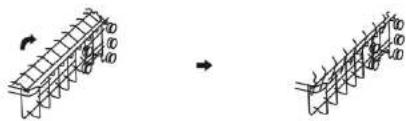
Folding of the flip tines for glasses and cups. Fig. 21
To make it easier to place taller containers in the upper basket, simply lift the tines. In this way, you can place the higher glasses so that they do not tip over during the cycle.
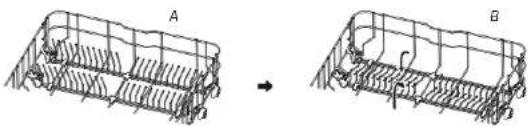
Folding of the flip tines of the bottom basket. Fig. 22
The tines on the bottom basket are used for placing plates and trays. They can be folded down to make it easier to place bulky containers.
Fig. 22 key:
A Lift
B Fold
Basket loading according to EN 60436 standard
Loading the dishwasher to its full capacity will contribute to energy and water saving.
1. Upper basket
Figure 23
- Coffee cups
- Saucers
- Glasses
- Mugs
- Small pots
2. Bottom basket
Figure 24
- Pans
- Small plates
- Flat dishes
ENGLISHENGLISH
- Soup plates
- Platters
- Small melamine dishes
- Melamine bowls
- Glass bowls
- Small bowls
3. Cutlery tray
Figure 25
- Soup spoon
- Forks
- Knives
- Teaspoon
- Dessert spoons
- Serving spoons
- Serving forks
- Gravy ladles
The information for the comparability test complies with EN60436.
- Capacity: 14 place settings
- Upper basket position: bottom position.
- Programme: ECO
Rinse aid setting: Max.
- Water softener setting: H3
Tips on using the cutlery tray
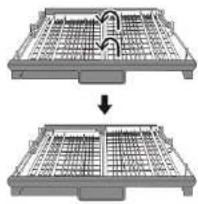
- Lift the right rack so that both are in a horizontal position. Fig. 26
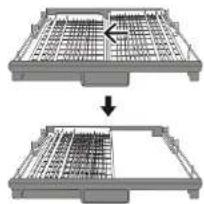
- Move the right rack to the left so that they are on top of each other. Fig. 27
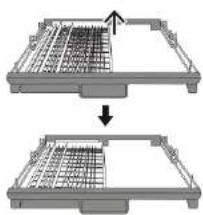
- Remove the right rack from the tray to use only the left rack. Fig. 28
Preparation and loading of tableware
- Use utensils labelled as dishwasher safe.
- For some utensils, select a programme with the lowest possible temperature.
To avoid damage, do not remove the cutlery and glasses from the dishwasher immediately
after finishing the programme.
To wash the following cutlery pieces/dishes
Not dishwasher safe
The following objects are of limited suitability
- Some types of glass can lose their lustre after many washes.
- Silver and aluminium pieces tend to discolour during dishwasher washing
- Enamelled pieces may fade if they are washed frequently in the dishwasher.
Recommendations for loading the dishwasher
- Remove larger food debris and scrape off any encrusted debris.
- Remove burnt food residues from frying pans and pots. It is not necessary to rinse the dishes under running water.
- For best dishwasher performance, follow these loading guidelines.
- (The characteristics and appearance of the baskets and cutlery baskets may vary depending on the model).
Place the items in the dishwasher as follows:
- Items like mugs, cups, pans/pots, etc. must face downwards.
- Curved items or with holes should be loaded at an incline to allow water to drain out.
- All utensils must be stacked securely so that they do not tip over.
- All items must be positioned so that the spray arms can rotate freely during washing.
- Arrange hollow objects, such as cups, glasses, pans, etc., with the opening facing downwards so that water cannot accumulate in the container or in a deep base.
- Dishes and cutlery should not be placed inside each other or cover each other.
- To avoid damage, cups should not be touching each other.
- The upper basket is designed to place the most delicate and light tableware, like cups, coffee, and teacups.
- Long bladed knives facing upwards are a potential hazard.
- Long and/or sharp cutlery, such as carving knives, must be placed in a horizontal position in the upper basket.
- Do not overload the dishwasher. This is important to get better results and a reasonable energy consumption.
Note
Very small items should not be washed in the dishwasher as they could easily fall out of the basket.
ENGLISHENGLISH
Removing the tableware
To prevent water from dripping from the upper basket to the bottom basket, it is recommended to unload the bottom basket first and then the upper basket.
Warning
Items will be very hot. To avoid damage, do not remove glasses and cutlery from the dishwasher until 15 minutes after the end of the washing cycle.
Loading the upper basket
The upper basket is designed to place the most delicate and light tableware, like glasses, mugs, and saucers, as well as plates, small bowls, and shallow pans (as long as they are not too soiled).
Place dishes and cooking utensils so that they do not move when water is sprayed on them.
Loading the bottom basket
It is recommended to place the larger and more difficult to clean items in the bottom basket, such as pots, frying pans, lids, dishes, and bowls. It is preferable to place the dishes and lids on the sides of the baskets to avoid blocking the rotation of the upper spray arm.
The maximum recommended diameter for dishes in front of the dishwasher dispenser is 19 cm, so as not to obstruct the dishwasher opening.
Loading the cutlery tray
The cutlery must be placed in the cutlery tray, separating the items from each other in the correct position, and ensuring the items are not stacked, as it could cause bad washing effects.
Warning
Do not allow any utensils to protrude from the bottom of the tray. Always load sharp objects with the point upside down.
6. CLEANING AND MAINTENANCE
External care
Door and door gaskets
Regularly wipe the door gaskets with a soft, damp cloth to remove food residues.
- When dirty dishes are put in the dishwasher, food or drink residues may fall down the sides of the door. These surfaces are outside the internal structure of the dishwasher, so the water from the spray arms does not reach them. Deposits must be removed before closing the door.
Control panel
If it is necessary to clean the control panel, clean it with a soft damp cloth.
Warning
- To prevent water from entering the door gasket and electrical components, do not use any type of spray cleaner.
- Do not use abrasive cleaners or scouring pads on exterior surfaces as they may scratch the finish. Some kitchen papers may also scratch or leave marks on the surface.
Internal care
Filtering system
- The filtering system located in the inner base of the dishwasher retains larger food debris during the wash cycle, including external objects such as chopsticks. This dirt can cause the filter to become clogged.
- Regularly check the condition of the filters, carefully remove external objects and clean them with tap water if necessary. Follow these steps to clean the filters.
Note
The figures are shown for reference purposes only, as the filter system and spray arms may vary depending on the dishwasher model.
- Hold the coarse filter and turn it counterclockwise to unlock it. Pull the filter upwards to remove it from the dishwasher.
- The fine filter can be removed by pulling from the bottom of the filter assembly. The coarse filter can be detached from the main filter by gently squeezing the tabs at the top and pulling it out.
Figure 29
- Coarse filter
- Main filter
-
Fine filter
-
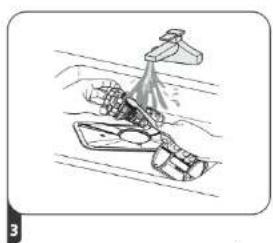
Larger food residues can be cleaned by rinsing the filter under running water. For more thorough cleaning, use a soft brush. Fig. 30
-
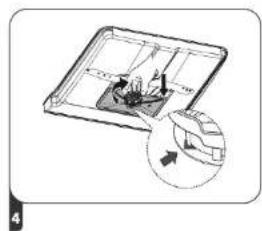
Reassemble the filters in reverse order and fit the assembly into the compartment at the base of the dishwasher. Next, turn it clockwise to fix it. Fig. 31
Warning
- Do not over-tighten the filters. If you remove the filters, be sure to put them back in place, otherwise larger debris may enter the system and clog it.
- Never use the dishwasher without the filters installed. Incorrect filter replacement may adversely affect the performance of the appliance and damage tableware and utensils.
ENGLISHENGLISH
Spray arms
- It is necessary to clean the spray arms regularly, as the chemicals used to remove limescale from the water can clog the spray arm orifices and bearings.
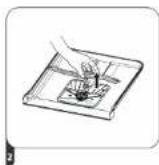
To clean the spray arms, follow the instructions shown in figure 32:
- To remove the upper spray arm, hold the nut in the centre to prevent it from moving, and turn the arm counterclockwise to remove it.
- To remove the bottom spray arm, pull the spray arm upwards.
- Wash the arms with soap and warm water and use a soft brush to clean the holes.
Care of the dishwasher
Frost protection
Take measures to prevent the dishwasher from freezing during the winter.
After each washing cycle, do the following:
- Cut off the power supply to the dishwasher from the power supply.
- Turn off the water supply and disconnect the water inlet pipe from the valve.
- Drain the water from the inlet pipe and the water valve. (Use a container to collect the water).
- Reconnect the inlet pipe to the water valve.
- Remove the filter from the inner base of the dishwasher and use a sponge to soak up the water in the base.
After each wash
After every wash, close the device water supply and leave the door slightly open for some minutes so moisture and odours are not trapped in the interior.
Disconnecting the plug
Always remove the mains plug from the socket before performing any cleaning or maintenance task.
Do not use solvents or abrasive cleaners
- Do not use solvents or abrasive cleaning agents to clean the exterior and rubber parts of the dishwasher. Only use a cloth with lukewarm water and soap.
- To remove stains from the interior surface, use a cloth dampened with water and a little vinegar, or a cleaning product specifically for dishwashers.
If it is not to be used for an extended period of time
We recommend running a washing cycle without any load and, next, disconnect the plug from the mains supply, close the water supply and leave the door slightly open. This will help preserve the door gaskets for more time and will prevent odours forming inside the device.
Moving the appliance
If you need to move the appliance, try to keep it in an upright position. If absolutely necessary, you can place it on its back.
Gaskets
One of the factors that encourage the formation of odours in the dishwasher is food residues that get trapped in the gaskets. Periodically wiping them with a damp sponge will prevent this from happening.
7. TROUBLESHOOTING
Before contacting the official Cecotec Technical Support Service, please read the following section carefully and see if you can solve the problem yourself.
| Problem Possible causes | Solution | |
| The dishwasher does not start | A fuse has blown, or the circuit breaker has tripped. | Replace the fuse or reset the circuit breaker. Switch off any other appliance that is using the same circuit breaker as the dishwasher. |
| It is not connected or switched on. | Make sure the dishwasher is on and door is properly closed.Make sure that the power cord is plugged into the socket properly. |
| Water pressure is too low. Check that | at the water supply is connected properly and that the tap is open. |
| The dishwasher door is not properly closed. | Be sure to close the door properly until it clicks. |
ENGLISHENGLISH
| The dishwasher does not pump water | Drain hose is kinked or crushed. Check the drain hose. |
| The filter is clogged. Check the filtering system. |
| The kitchen sink is clogged. Check the kitchen sink to make sure it is draining correctly. If the problem is that the kitchen sink is not draining properly, you may need to call a plumber rather than the Cecotec Technical Support Service. |
| There is foam at the base of the dishwasher | Unsuitable detergent. Only use detergent special for dishwashers to prevent foam formation. If there is foam forming, open the dishwasher and let it evaporate. Pour 1 litre of cold water into the base of the dishwasher. Close the dishwasher door and select any cycle. At the start, the dishwasher will drain the water. When the draining process is finished, open the door of the dishwasher and check if the foam has disappeared. Repeat the process if necessary. |
| Problem Possible causes Solution | |
| Rinse aid has spilled. Always wipe off any spilt rinse aid immediately with a cloth. |
| There are stains at the base of the dishwasher | You may have used detergent with colouring. | Make sure that the detergent does not contain dyes. |
| There is a white film on the inner surface | Tap water has a lot of limescale. | To clean the inside of the appliance, use a soft, damp cloth with dishwashing detergent and wear rubber gloves. Never use any cleaner other than dishwasher detergent, as this may cause foaming. |
| There are rust stains on the cutlery | The affected utensils are not corrosion resistant. | Avoid washing non-corrosion resistant items in the dishwasher. |
| A programme has not been run after adding salt to the tank.Salt residues have entered during the washing cycle. | Always run a dishwashing programme without dishes after adding salt.Do not select the Turbo function (if it is included in this model) after adding salt to the dishwasher. |
| The water softener cover is loose. | Check the water softener cover is properly closed. |
| Knocking noise is heard in the dishwasher | One of the spray arms is bumping into an item in the basket. | Stop the programme and reposition the objects that are obstructing the arm. |
| A rattling noise is heard in the dishwasher | Some items of crockery are loose in the dishwasher. | Stop the programme and reposition the dishes. |
| A tapping noise is heard in the water pipes | This may be due to the installation or the cross-section of the pipes. | It does not affect the dishwasher operation. If in doubt, contact a qualified plumber. |
| Dishes do not come out clean | You have not loaded them correctly. | Please refer to the relevant section to find out how to load the dishes correctly. |
| The programme is not powerful enough. | Select a more intensive programme. |
ENGLISHENGLISH
| Problem Possible causes Solution | |
| Dishes do not come out clean | Not enough detergent has been used. | Add more detergent or change the detergent. |
| There are items blocking the spray arms movement. | Reposition the objects so that the arm can rotate normally. |
| The filter assembly is not clean or has not been placed correctly on the inner base of the dishwasher.This can cause the spray arm holes to become clogged. | Clean and/or place the filter correctly. Clean the spray arm holes. |
| Glass objects come out opaque or dull | Combination of soft water and too much detergent. | Use less detergent if the water in your area is soft and select a shorter cycle to wash glass or crystal objects and get them clean. |
| Dishes and glasses have whitish stains | In areas with hard water, it is normal for limescale deposits to form. | Check the water softener settings or the salt deposit filling. |
| Black or grey marks on tableware | Aluminium utensils have scratched the crockery. | Use a mild abrasive cleaner to remove these marks. |
| There is still detergent in the dispenser | The dishes block the detergent dispenser. | Reposition the plates correctly. |
| The dishes are not dry You have not loaded them correctly. | Wear gloves if you find detergent residues on the dishes to avoid skin irritation. |
| Do not empty the dishwasher immediately after the wash. Open the door slightly to allow steam to escape. Remove the dishes when the internal temperature is safe to touch. Unload first the bottom basket to avoid water from dripping from the upper basket. |
| Problem Possible causes Solution | | |
| The dishes are not dry An unsuitable programme has been selected. | With a short programme, the washing temperature is lower, which decreases the cleaning performance. Choose a programme with a longer wash cycle time. |
| Use of cutlery with a low-quality coating. |
Warning
Cecotec cannot be held responsible for unprofessional repair as this may cause serious risks to the safety of the user of the appliance and affect the warranty.
Error codes
If there is a malfunction, the following error codes will appear on the display of the dishwasher for identification purposes.
| Error code | Meaning Possible causes | |
| E1 | Excessive water inlet time | The tap is not open, the water inlet is restricted, or the water pressure is too low. |
| E3 | The desired temperature is not reached Heating element failure. |
| E4 | Overflow | Some component of the dishwasher is leaking. |
| E8 | Failure of the direction of the distribution valve | Open circuit or breakage of the distribution valve. |
| EC | Failure of the wash control system PCB or motor failure. |
| Ed | Communication error between the main PCB and the display | Open circuit or broken wiring for communication. |
Warning
- If an overflow occurs, turn off the main water supply before calling the official Cecotec Technical Support Service.
- If there is water in the base due to overflow or leakage, the water must be drained out before restarting the dishwasher.
- If there is an error code that you cannot resolve, ask for professional technical assistance.
ENGLISHENGLISH
8. TECHNICAL SPECIFICATIONS
Dishwasher data sheet according to EU Regulation 2019/2017:
| Manufacturer Cecotec Innovaciones SL. | |
| Model 00999 | |
| Model name | Bolero Aguazero 8001 Full BIB |
| Number of cutlery pieces 14 | |
| Energy efficiency class (1) | B |
| SETTING | VALUE | UNIT |
| Energy consumption of the ECO programme (EPEC) rounded to the third decimal place | 0.645 | kWh/ cycle |
| Standard programme energy consumption (SPEC) rounded to the third decimal place | 1.700 | kWh/ cycle |
| Energy Efficiency Index (EEI) | 37.9 | - |
| Water consumption of the Eco programme (EPWC) rounded to one decimal place | 9.8 | L/cycle |
| Cleaning performance index (IC) | 1.125 | - |
| Drying performance index (ID) | 1.065 | - |
| ECO programme duration (TT) rounded to the nearest minute | 3:55 | (h:min) |
| Power consumption in off-mode (Po) rounded to two decimal places | - | W |
| Standby power consumption (Psm) rounded to two decimal places | 0.49 | W |
| Is information displayed in standby mode? | No | - |
| Standby power consumption (Psm) in mains standby conditions (if applicable), rounded to two decimal places | - | W |
| Power consumption in Delay Start (Pds) (if applicable) rounded to two decimal places | 1.00 | W |
| Noise emission class | 42 | dB(A) re 1 pW |
| Installation | Free-standing |
| Is it built-in | Yes |
| Height 815 cm | |
| Width 550 cm | |
| Depth (with connectors) 598 cm | |
| Energy consumption 1750-2100 W | |
| Rated voltage/frequency 220-240 V AC, 50 Hz | |
| Water pressure (flow pressure) 0.4-10 bar=0.04-1.0 MPa | |
ATTENTION:
(1) A (higher efficiency) to C (lower efficiency).
The device complies with the European standards and directives in the version valid at the time of delivery.
- LVD 2014/35/EU
EMC 2014/30/EU
EU 2019/2022
ATTENTION: the above values have been measured according to the standards under specific operating conditions. The results may vary considerably depending on the amount and soiling of the dishes, the hardness of the water, the amount of detergent, etc.
The instruction manual is based on EU norms and standards.
Technical specifications may change without prior notification to improve product quality. Made in China | Designed in Spain
9. DISPOSAL OF OLD ELECTRICAL AND ELECTRONIC APPLIANCES

This symbol indicates that, according to the applicable regulations, the product and/or batteries must be disposed of separately from household waste. When this product reaches the end of its shelf life, you should dispose of the cells/batteries/accumulators and take them to a collection point designated by the local authorities.
Consumers must contact their local authorities or retailer for information concerning the correct disposal of old appliances and/or their batteries.
Compliance with the above guidelines will help protecting the environment.
ENGLISH
FRANÇAIS
10. TECHNICAL SUPPORT AND WARRANTY
Cecotec shall be liable to the end user or consumer for any lack of conformity that exists at the time of delivery of the product under the terms, conditions, and deadlines established by the applicable regulations.
It is recommended that repairs be carried out by qualified personnel.
If at any moment you detect any problem with your product or have any doubt, do not hesitate to contact the official Cecotec Technical Support Service at +34 963 210 728.
11. COPYRIGHT
The intellectual property rights over the texts in this manual belong to CECOTEC INNOVACIONES, S.L. All rights reserved. The contents of this publication may not. In whole or in part, be reproduced, stored in a retrieval system, transmitted, or distributed by any means (electronic, mechanical, photocopying, recording or similar) without the prior authorization of CECOTEC INNOVACIONES, S.L.
1. PIÈCES ET COMPOSANTS
Image 1
1°dH = 1.25°eH = 1.78°fH = 0.178 mmol/l
1°dH = 1.25°eH = 1.78°fH = 0.178 mmol/l
natural_image
Diagram showing a hand holding a tool with an arrow indicating motion, alongside a circular inset illustrating the movement direction (no text or symbols)
Fig. / Img. / Rys. / Obr. 5
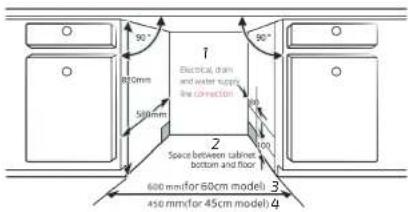
Fig. / Img. / Rys. / Obr. 6
flowchart
graph TD
    A["1 Dishwasher"] --> B["3 Door of dishwasher"]
    B --> C["Cabinet 2"]
    D["Minimum space 4 of 50mm"] --> B
Fig. / Img. / Rys. / Obr. 7
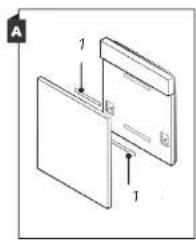
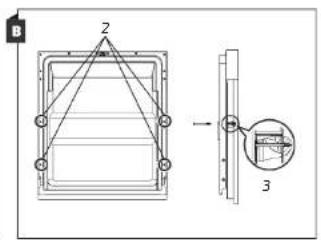
Fig. / Img. / Rys. / Obr. 8
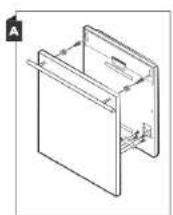
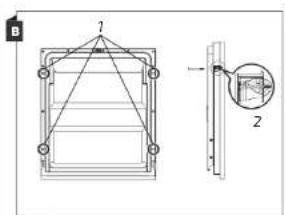
Fig. / Img. / Rys. / Obr. 9
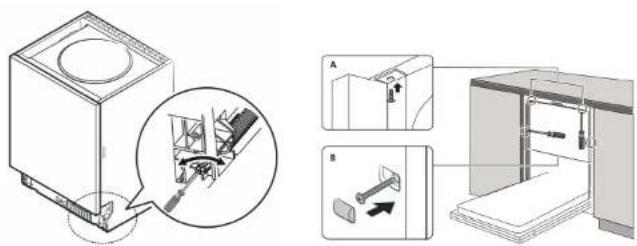
Fig. / Img. / Rys. / Obr. 10 Fig. / Img. / Rys. / Obr. 11
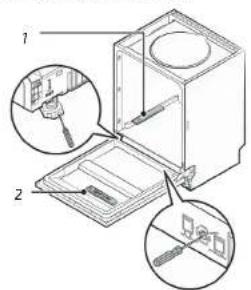
Fig. / Img. / Rys. / Obr. 12
flowchart
graph LR
    A["BAT"] --> B["Inside"]
    B --> C["Outside"]
Fig. / Img. / Rys. / Obr. 13
flowchart
graph LR
    A["Hand with sample"] --> B["Add sample"]
    B --> C["Transfer to container"]
    C --> D[" pouring liquid into container"]
    D --> E["Final container with recycling"]
Fig. / Img. / Rys. / Obr. 14
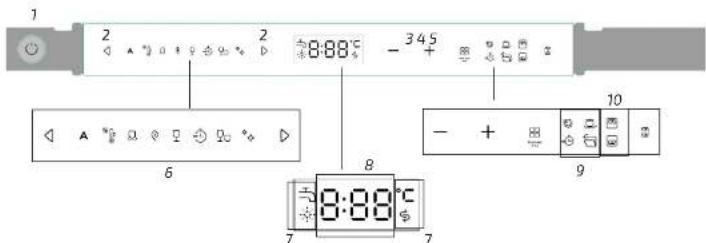
Fig. / Img. / Rys. / Obr. 15
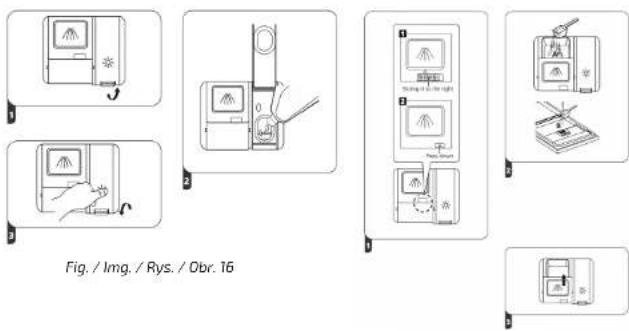
Fig. / Img. / Rys. / Obr. 17
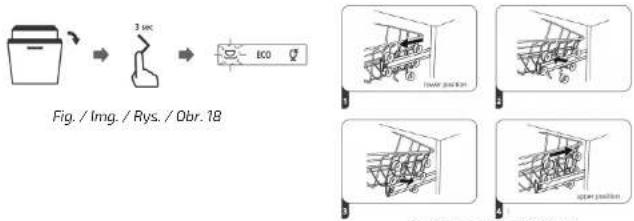
Fig. / Img. / Rys. / Obr. 19
natural_image
Two technical diagrams showing a container with mesh structure and a magnified inset of a mechanical component (no text or symbols)
Fig. / Img. / Rys. / Obr. 20
natural_image
Diagram showing two structural beam assemblies with rotation arrows, no text or symbols present
Fig. / Img. / Rys. / Obr. 21
natural_image
Diagram showing two 3D wireframe structures labeled A and B, with no visible text or symbols.
Fig. / Img. / Rys. / Obr. 22
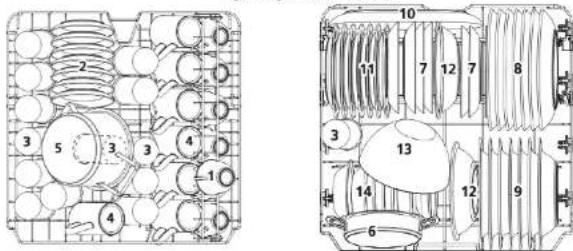
Fig. / Img. / Rys. / Obr. 23 Fig. / Img. / Rys. / Obr. 24
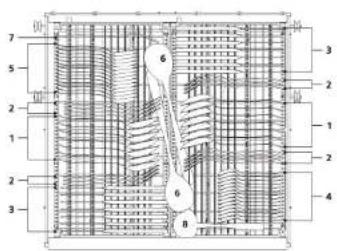
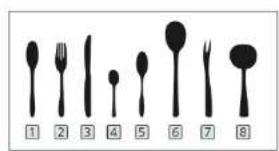
Fig. / Img. / Rys. / Obr. 25
natural_image
Two identical mechanical components with grid patterns, one being cut and the other showing internal structure (no text or symbols)
Fig. / Img. / Rys. / Obr. 26 Fig. / Img. / Rys. / Obr. 27
natural_image
Two views of a metal grate with grid patterns, showing an arrow indicating the process (no text or symbols present)
natural_image
Two mechanical assembly diagrams showing a grid-patterned component before and after processing (no text or symbols)
Fig. / Img. / Rys. / Obr. 28
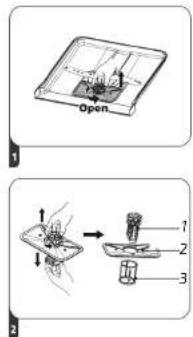
Fig. / Img. / Rys. / Obr. 29
natural_image
Illustration of a person cleaning a boat with a spray bottle (no text or symbols)
Fig. / Img. / Rys. / Obr. 30 Fig. / Img. / Rys. / Obr. 31
natural_image
Diagram of a 3D object with internal structure and a magnified inset showing a circular detail (no text or symbols)
Fig. / Img. / Rys. / Obr. 32

www.cecotec.es