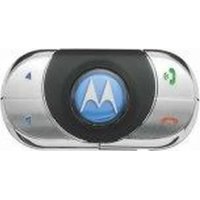
USER MANUAL T305 MOTOROLA
MOTOROLA and the Stylized M Logo are registered in the US Patent & Trademark Office. All other product or service names are the property of their respective owners. The Bluetooth wordmark and logos are owned by the Bluetooth SIG, Inc. and any use of such marks by Motorola, Inc. is under license. Other trademarks and trade names are those of their respective owners.
© 2006 Motorola, Inc. All rights reserved.

motorola Universal Bluetooth Hands-free Speaker T305
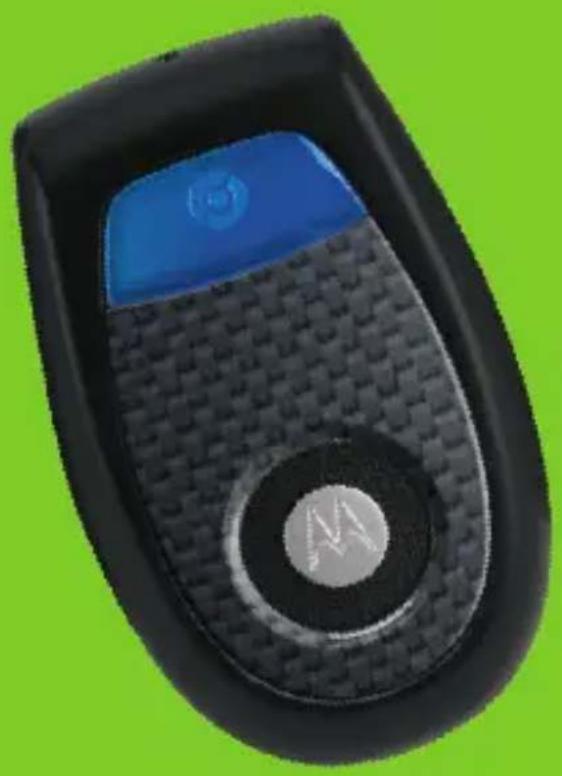
T305
MOTOMANUAL

MOTOROLA
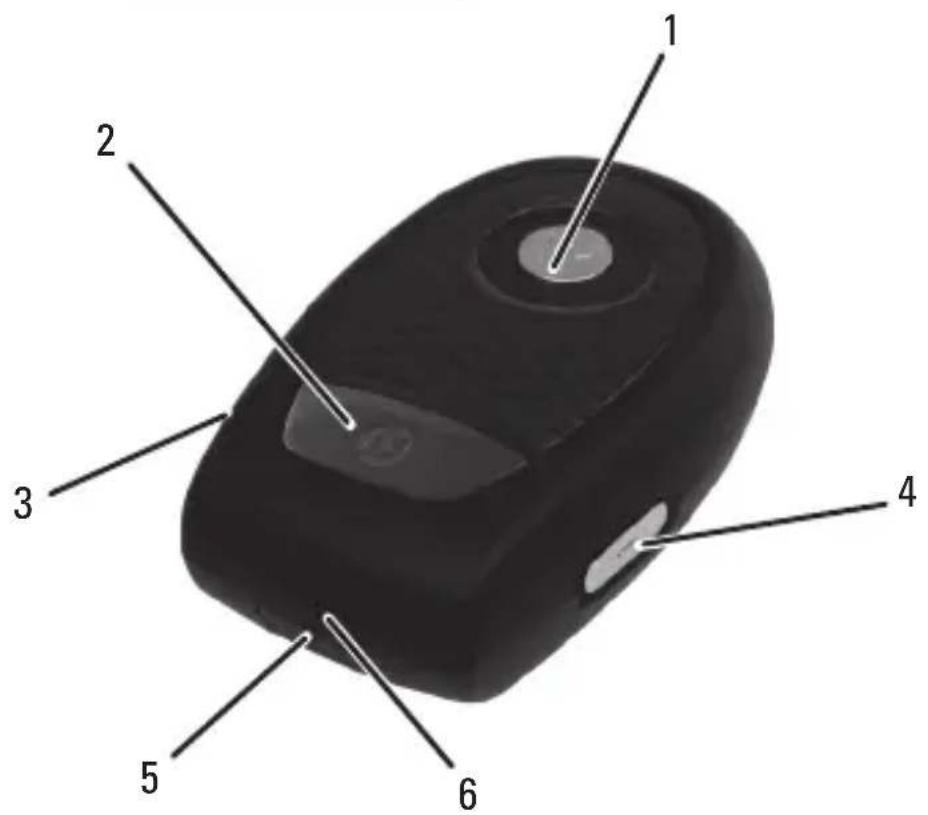
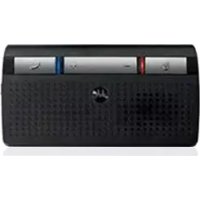
Figure 1
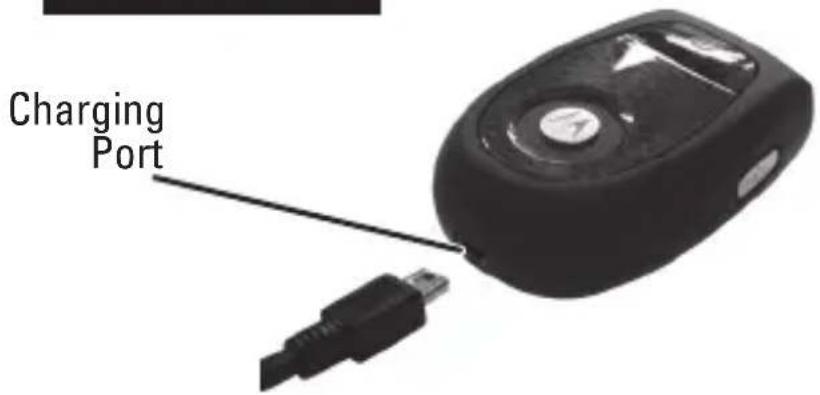
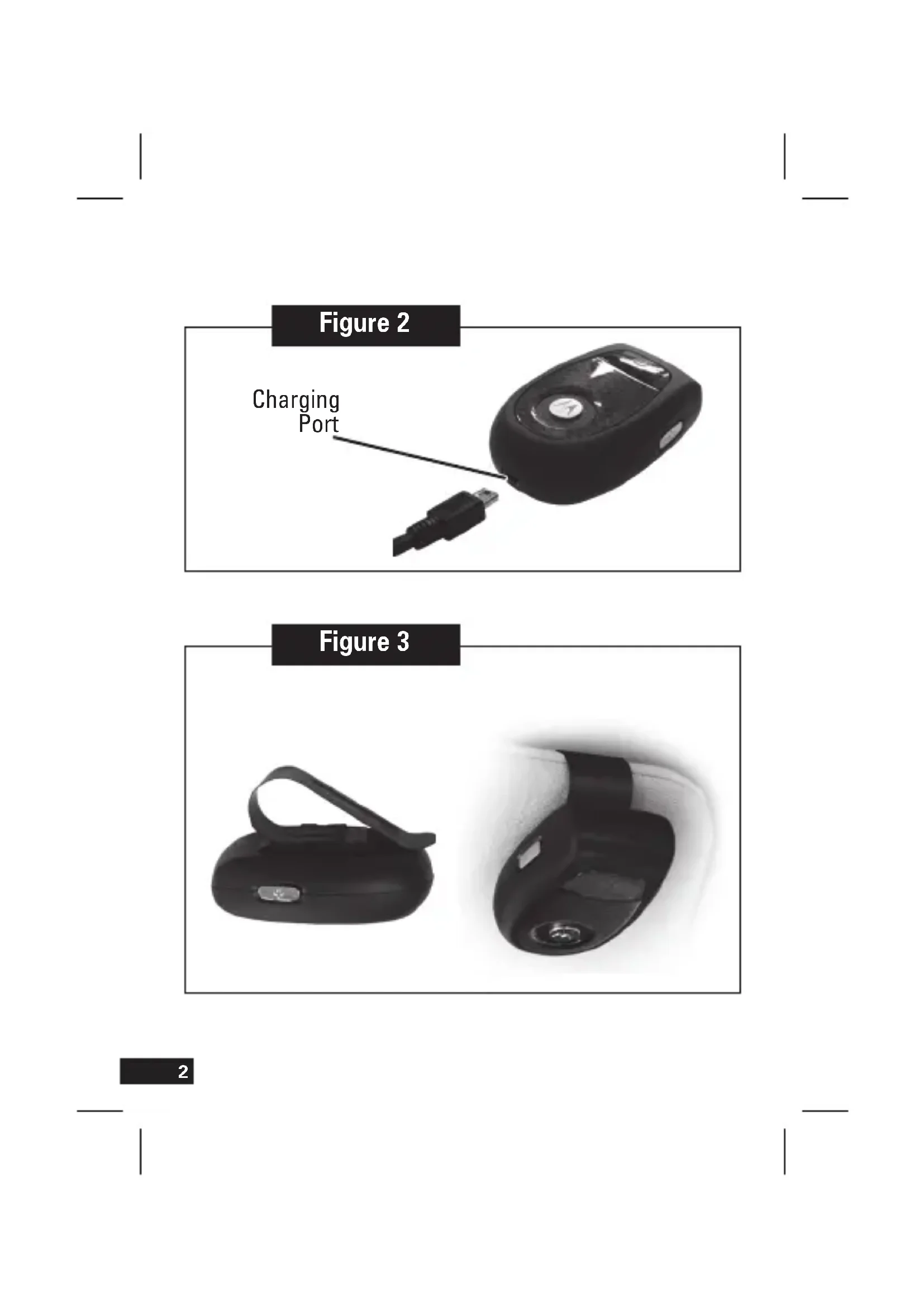
Figure 2
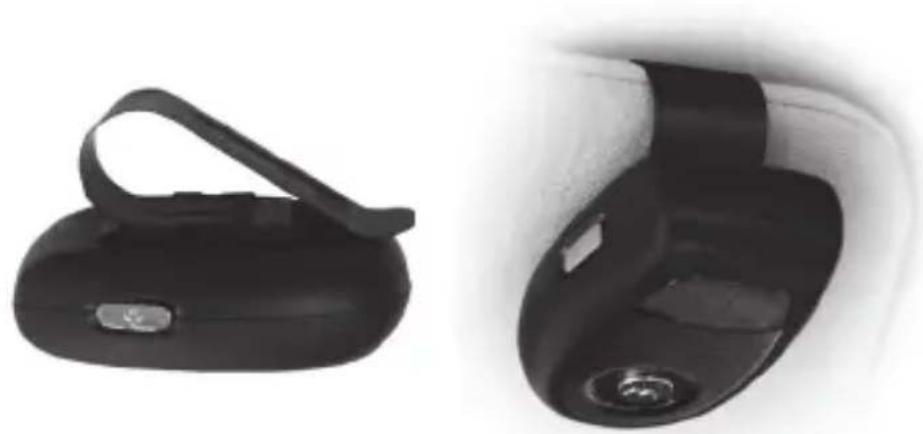
Figure 3

Hereby, Motorola Inc., declares that this T305 is in compliance with the essential requirements and other relevant provisions of Directive 1999/5/EC.
You can view your product's Declaration of Conformity (DoC) to Directive 1999/5/EC (the R&TTE Directive) at www.motorola.com/rtte.
Caring for the Environment by Recycling

When you see this symbol on a Motorola product, do not dispose the product with household waste.
Recycling Mobile Phones and Accessories
Do not dispose of mobile phones or electrical accessories, such as Do not dispose of mobile phones or electrical accessories, such as chargers or headsets, with your household waste. In some countries or regions, collection systems are set up to handle electrical and electronic waste items. Contact your regional authorities for more details. If collection systems aren't available, return unwanted mobile phones or electrical accessories to any Motorola Approved Service Centre in your region.
FCC Notice to Users
Users are not permitted to make changes or modify the device in any way. Changes or modifications not expressly approved by the party responsible for compliance could void the user's authority to operate the equipment.
This device complies with part 15 of the FCC Rules. Operation is subject to the following two conditions: (1) This device may not cause harmful interference, and (2) this device must accept any interference received, including interference that may cause undesired operation.
English
Initial set up
Welcome to the world of Motorola digital wireless communications! We are pleased that you have chosen the Motorola T305 portable Bluetooth® Hands-free Speaker.
Before you begin
Take a moment to familiarize yourself with your T305 hands-free speaker.
See figure 1 on page 1.
1 Speaker
2 Multicolor indicator light and Call Button
3 Volume up (+) button
4 Volume down (-) button
5 Power button
6 Microphone
Charging your hands-free speaker
See figure 2 on page 2.
The indicator light turns steadily red when the battery is charging and the hands-free speaker is turned off. It may take up to 1 minute for the indicator light to turn on. When the hands-free speaker's battery is fully charged (about 2 hours), the indicator light turns steadily blue.
Note: Do not place the hands-free speaker with clip installed on visor while charging. Hands-free speaker is functional while charging.

The rechargeable battery that powers this product must be disposed of properly and may need to be recycled. Contact your local recycling center for proper disposal methods. Never dispose of batteries in fire because they may explode.
English
Installing the hands-free speaker in your car
See figure 3 on page 2.
- Slide the visor clip onto the mounting bracket on the bottom of the hands-free speaker. To do this, place the loop end first onto the hands-free speaker and slide forward.
The visor clip is reversible to allow placement of your hands-free speaker on either leading or trailing edge of your car's sun visor.
- Slide the visor clip on your sun visor.
The visor clip is reversible to allow placement of your hands-free speaker either on the front or the back of your car's sun visor.
When installed, the Power button must be facing toward you.
Adjusting the hands-free speaker volume
To adjust volume, press and hold either volume button on the side of the hands-free speaker.
Note: hands-free speaker volume cannot be adjusted during an incoming call.
Pairing your hands-free speaker and phone
Your phone's Bluetooth feature is off by default. Make sure the Bluetooth feature is turned on in your phone before using your hands-free speaker.
Please check your phone's user's guide.
Before you can use your hands-free speaker, you must pair (link) it with your phone.
1. Ensure the hands-free speaker is in pairing mode
To initiate easy pairing, power on the hands-free speaker by pressing and holding the Power button until the indicator light becomes steadily lit in purple. Then, release the button.
After a few moments, the indicator light will be steadily lit in blue to indicate that the hands-free speaker is in pairing mode. If the hands-free speaker does not enter pairing mode, see the Troubleshooting section for help.
English
2. Set your phone to look for your hands-free speaker
Perform a device discovery (or scan) from the phone. For details about device discovery, consult your phone's user's guide. The phone lists Bluetooth devices it finds.
Select Motorola T305 in the list of discovered devices and confirm by following the on-screen prompts.
When prompted by the phone, enter the passkey 0000 and confirm.
When your hands-free speaker successfully pairs with your phone, the indicator light changes to flashing blue with quick purple flashes.
After you have successfully paired your phone and the hands-free speaker, you do not need to repeat these steps each time you use the hands-free speaker.
Test and use
Your phone and hands-free speaker are now paired and ready to make and receive calls. To confirm they are successfully paired and operating properly, place the hands-free speaker on your car sun visor and make a call from your phone. You will hear ringing from the hands-free speaker.
Using your hands-free speaker
Turning your hands-free speaker on & off
To turn your hands-free speaker on, press and hold the Power button until the indicator light turns purple. Then, release the button.
Note: the hands-free speaker may take up to 3-4 seconds to turn on.
To turn your hands-free speaker off, press and hold the Power button until the indicator light turns purple and then turns off.
To save battery power, your hands-free speaker will turn off when not connected to your phone for more than 30 minutes.
Making and receiving calls
Your hands-free speaker supports both hands-free and headset profiles. Accessing call functions depend upon which profile your phone supports. See your phone's user's guide for more information.
Note: Some features are phone/network dependent.
| Function | Action |
| Receive a call Tap the Call button |
| End a call Tap the Call button – If a call is on hold, tap twice to end all calls |
| Reject a call Tap either volume button |
| Redial last call Press and hold the Call button until you hear a beep |
| Make a voice dial call Tap the Call button and speak the name after the tone |
| Answer a second incoming call Press and hold the Call button until you hear a beep (The 1st call is placed on hold) |
| Toggle between two active calls Press and hold the Call button |
| Mute or un-mute a call Tap both Volume buttons |
Note: when turning on your hands-free speaker during a phone call, audio is transferred automatically to your hands-free speaker (provided that your hands-free speaker and phone have previously been connected and your phone supports this feature).
English
Indicator lights
With the charger plugged in:
| Indicator | Status |
| Steady red Charge in progress | |
| Steady blue Charging complete | |
Note: Charging status is not displayed when hands-free speaker is in use.
With no charger plugged in:
| Indicator | Status |
| Off | Power |
| Steady purple Powering up | |
| Steady blue Pairing mode | |
| Red | Low |
| Blue with rapid purple flashes Successful pairing | |
| Slow blue pulse Connected (not on a call) | |
| Blue flash Standby (not on a call) | |
| Quick blue flash Incoming call | |
| Slow purple pulse Muted | |
Audio tones
| Audio tone Status |
| Single high tone when pressing volume button Volume at minimum or maximum |
| 5 rapid high tones repeated every 60 seconds Low battery |
| No audio indications: deteriorating quality Out of range |
| Ring tone Incoming call |
| Single high tone Pairing confirmation |
| Single low tone Voice activation |
| Dual high/low tone (phone dependent) Voice tag not recognized |
| Single high tone End call |
| Low to high tone Phone network not available |
| 2 ascending tones Mute enabled |
| 2 descending tones Mute disabled |
English
Troubleshooting
My hands-free speaker will not enter pairing mode: make sure that any devices previously paired with the hands-free speaker are turned off. If the indicator light is flashing in blue, turn off the other device and wait for 10 seconds. The indicator light becomes steadily lit in blue indicating that the hands-free speaker is now in pairing mode.
My phone does not find my hands-free speaker: make sure the indicator light on your hands-free speaker is steadily lit when you phone is searching for devices.
My hands-free speaker worked before but now it is not working: Make sure the Bluetooth feature is turned on in your phone. If the Bluetooth feature has been turned off or was turned on temporarily, you may need to restart the Bluetooth feature and pair your phone and hands-free speaker again.
If you have any additional questions, please call your hotline number (0870-9010-555) or visit us at www.motorola.com.
François
Nabijeni rePRODUCTORU
Viz obrazek 2 na strane 2.
Ecnn 3apnHoe yctpoCTBO He noKJIOueHO
CBeTOBOMHnDnKATOp CoCTOHHne
He roput NiTaHne BbIKJIOUeHo
TOpNTΦHONETOBBIM CBetOM BkJIIOUeHHe
Topn CnHm UBeTOM PExHM yCTaHOBKn DBycTOPOHHe CB3N
Topnt kpaChbIM zBcTOM BaTape na3pJKeHa
TOpNT CINHM UBeTOM, DBycTOPOHHA CBA3b yCTaHOBJIeHa KOpOTKne fNOJETOBIe BCNblIKN
MeJIeHHO MHTaET CINHM LBTOM POKKIOUChE (AKTINBbIX BbI3OBOB HET)
CnHne BCbIiKu BpeXmme OxuaHna (aKTHBbIX bbl3OBoB HeT)
YactbIe CnHHe BCbIuKx BxoJauny Bby3OB
MeIeHHO MIRaet pnoJeTOBbIM UBeTOM MInKpOoH BbIKJIoueH
3BykoBbie cnHaJIbI
3BykoBoCnHnCoCToHHe
OdHouhBn CnHnBbICOKOrToHa DcTHHyT MaKcHymM NmMHNMyr pOMKOCTn npn Haxatnn KHOKN peYnnpOBKn rPOMKoCTn
PITb KOPOTKnx CnHAnOB BbICOKO ToHa, BaTape pa3pJxHeNaNOBTOPOUHXCAkXDbie60ceKyHd
3ByKOBbIX CnHAnOB HeT, HbJIIOJaETcB BHe 3ObI DeiCTBnI CetN yXuDWeHne KaueCTBa 3ByKa
CnHaJ 3BOHka BxoJaunBbIOB
OdHouhBn CnHaJI BbICOKoTOHa IOpTBePxDeHne yCTaHOBKn CBa3N C DpyrIM YCTPOJCTBOM
OdHouhBcHnHaHn3KOroToHa PpRJaSeHne rOnocoboro Ha6opa
IbOHHcHnHaBbICOKOrnHnH3KOrToHa TOnOCOBaMeTKa He paCNo3HaHa (3aBNCITOTMOeJIINTepeoHa)
OdHouhBn CnHaBbICOKoTOHa 3aBepueHne Bbl0Ba
3ByKOBoI CNrHaN C NOBbIeHHeM ToHa CoTOba cTe b HeIOcTynHa
BbCaCnHaJa C NOBbIeHHeM ToHa 3ByK BbIKJIIOUeH
DbCaCnHaJa C NOnHKeHHem ToHa 3ByK BKNIOUeH
Pycckn
YcTpaHHe HEnOJaDOK
rPOMKOROBOpNTb He nepexoHT B pexm DByCTOPOHHe CBA3n. Y6eIntecb, TTO BCE yCTPOINCTBa, paHee IODKIOUeHHbIe K rPOMKOROBOpNTeIO, BBIKIOUeHbI. EcIn CBeTobO INDkATOP MIGaET CINHM UCBETOM, BBIKIOUeHTe IOKIOUeHHoe K rPOMKOROBOpNTeIO yCTPOINCTBO N NOOXdTe DeCtB cekyHd. CBeTobO INDkATop 3arOpNTc CINHM UCBETOM, YTO CBNDetEnbCTByET O TOM, YTO rPOMKOROBOpNTb nepeweB B pexm DByCTOPOHHe CBA3N.
Telepon He 6hApxHbAe rPOMKOrOBOpntB. Y6eNTecb, yTO npn nonbITKe 6hApxHHe TlEPOHOM Dpynx yCTpOcTB CBETOBn INDnKaTOp rPOMKOrOBOpntHe MInraet.
HeoxndaHnoe BbIKNoueHne rpomKorOBopntJe. Y6eInTeCb, TTo Ha TeJepoHe BKIOUeHa FyHKuiau Bluetooth. EcnFyHKcuaa Bluetooth 6blna BbyKIOUeHa nn JxE BKIOUeHa BpemEHNO, BO3MOXHO, NOTpe6yeTcN IOBTOPO BkJIIOHTb FyHKcIIO Bluetooth n eue pa3 BbINONHTb NOkKnOueHne TeJeP0Ha K rpOMKOrOBOpNTeIo.
Пи НИЧИ BОРСОВ NOЗBOHITE B MECTHYO CNYX6y TExHnueCKo NOДeRFXKNo NOHomepam:8(800)200-13-13 n+7(495)784-62-62 nIIN NocETnTe NaW Be6-y3eN no aDpecy www.motorola.com
Pnpoopiec aaaiaac kai yevikcs nnpoopiec
Avakkuwon tw Kivnttw TnAeawv kai tw Aeoouap
Mny anoppiTETa kivnta Tnlefova n ta Nktpika aEooauap, onwc optioTe c kalakouotiká, me ta okiak anaoppmuata. Ze opiauevesc xwpec n nepioxec, ta ouoTma tneipoulloync anoppmuatwv elval iidka diapopwoeva yia tn diayepion nektpikov kal nkektpovikov anoppmuatwv. Ia nepioootepe c npnpoopiec enkoivwnote me tic tonikec apxc. Av dev unapxouv ouoTma t nepioulloync anoppmuatwv, eniortpeyte ta kivnta Tnlefova n ta Nktpika aEoouap oE Eouoiobtohe Kevtro Szpic Tnc Motorola Tnc nepioxocac.