USER MANUAL SHLF 2000 C1 SILVERCREST
Operation and safety notes This product is only suitable for well insulated spaces or occasional use.
FR BE
RADIATEUR SOUFFLANT
GB/IE Operation and safety notes Page 21
Warnings and symbols used. 22
Introduction 22
Intended use. 22
Scope of delivery. 23
Description of parts. 23
Technical data 23
Safety instructions. 23
Safety instructions for batteries/rechargeable batteries 28
Before first use. 29
Operation. 29
Turning on the product. 30
Turning off the product. 30
Control panel/Remote control. 30
Selecting an operating mode.. 30
Setting the desired temperature. 31
Swivel function. 31
Timer 31
Overheating protection. 31
Replacing the battery. 31
Transport 31
Cleaning and care 32
Storage 32
Disposal. 32
Warranty 33
Warranty claim procedure. 33
Service 33
Information requirements for electric local space heaters.. Page 34
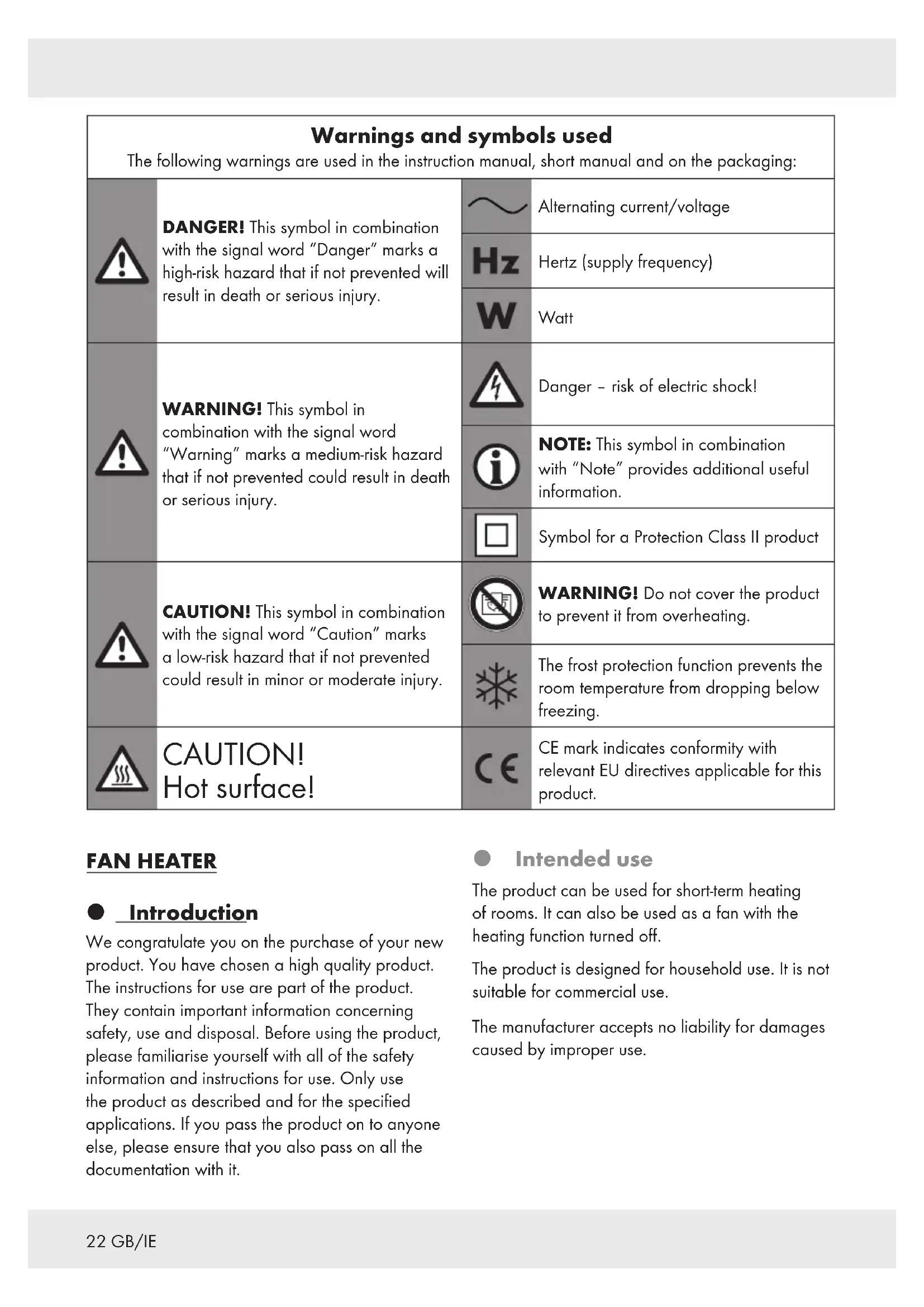
| Warnings and symbols used
The following warnings are used in the instruction manual, short manual and on the packaging: |
| ! | DANGER! This symbol in combination with the signal word "Danger" marks a high-risk hazard that if not prevented will result in death or serious injury. | ~ | Alternating current/voltage |
| Hz | Hertz (supply frequency) |
| W | Watt |
| ! | WARNING! This symbol in combination with the signal word "Warning" marks a medium-risk hazard that if not prevented could result in death or serious injury. | 4 | Danger - risk of electric shock! |
| i | NOTE: This symbol in combination with "Note" provides additional useful information. |
| Symbol for a Protection Class II product |
| ! | CAUTION! This symbol in combination with the signal word "Caution" marks a low-risk hazard that if not prevented could result in minor or moderate injury. | | WARNING! Do not cover the product to prevent it from overheating. |
| The frost protection function prevents the room temperature from dropping below freezing. |
| CAUTION!
Hot surface! | CE | CE mark indicates conformity with relevant EU directives applicable for this product. |
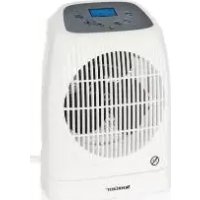
FAN HEATER
Introduction
We congratulate you on the purchase of your new product. You have chosen a high quality product. The instructions for use are part of the product. They contain important information concerning safety, use and disposal. Before using the product, please familiarise yourself with all of the safety information and instructions for use. Only use the product as described and for the specified applications. If you pass the product on to anyone else, please ensure that you also pass on all the documentation with it.
Intended use
The product can be used for short-term heating of rooms. It can also be used as a fan with the heating function turned off.
The product is designed for household use. It is not suitable for commercial use.
The manufacturer accepts no liability for damages caused by improper use.
Scope of delivery
After unpacking the product, make sure that the product is in orderly condition. Remove all packaging materials before use.
1x Fan heater
1 x Remote control with battery (type CR2025)
1xShort manual
Description of parts
Before reading, unfold the page containing the illustrations and familiarise yourself with all the functions of the product.
1Control panel
2Air outlet safety guard
3 button
4 button
5 button
6Display(LCD)
7 button
8 button
9 button
10Infrared receiver
11Control lamp
12]Base
[13]Anti-tip switch (bottom of product)
14 Handle
[15]Storage compartment for remote control
[16]Air inlet safety guard
17 Temperature sensor
18On/off switch
19Power cord with power plug
20Remote control
[2] Battery compartment
22 button
23 button
24 button
25 button
26 button
27 button
28 isscator (swivel function)
[29]Operating mode indicator
30/Timer indicator
31 Room temperature display
32Desired target temperature display
Technical data
Input: 220-240 V ~, 50 Hz
Protection class: II/
Suitable for rooms: Up to approx. 50 - 60m3
Power consumption: 2000-2200 W
Remote control
Battery: 1 × 3 V

Safety instructions
BEFORE USING THE PRODUCT, PLEASE FAMILIARISE YOURSELF WITH ALL OF THE SAFETY INFORMATION AND INSTRUCTIONS FOR USE! WHEN PASSING THIS PRODUCT ON TO OTHERS, PLEASE ALSO INCLUDE ALL THE DOCUMENTS!
In the case of damage resulting from non-compliance with these operating instructions the warranty claim becomes invalid! No liability is accepted for consequential damage! In the case of material damage or personal injury caused by incorrect handling or non-compliance with the safety instructions, no liability is accepted!
Children and persons with limitations
WARNING! DANGER OF DEATH AND ACCIDENTS FOR TODDLERS AND CHILDREN!
Never leave children unsupervised with the packaging material. The packaging material represents a danger of suffocation. Children frequently underestimate the dangers.
Children of less than 3 years should be kept away unless continuously supervised.
Children aged from 3 years and less than 8 years shall only switch on/off the product provided that it has been placed or installed in its intended normal operating position and they have been given supervision or instruction concerning use of the product in a safe way and understand the hazards involved.
Children aged from 3 years and less than 8 years shall not plug in, regulate and clean the product or perform user maintenance.
This product can be used by children aged from 8 years and above and persons with reduced physical, sensory or mental capabilities or lack of experience and knowledge if they have been given supervision or instruction concerning use of the product in a safe way and understand the hazards involved.
Children shall not play with the product.
Cleaning and user maintenance shall not be made by children without supervision.
DANGER! Risk of electric shock! Never attempt to repair the product yourself. In case of malfunction, repairs are to be conducted by qualified personnel only.
WARNING! Risk of electric shock! Do not immerse the product's electrical components in water or other liquids. Never hold the product under running water.
CAUTION! Risk of electric shock! Do not use the product if it is damaged. Disconnect it from the power supply and contact your retailer in the event of damage.
WARNING! Risk of injury!
Turn off the product and disconnect it from the power supply before cleaning and when the product is not in use.
WARNING! Risk of injury!
Improper use may result in personal injury. Use the product only as described in the user manual. Never attempt to alter the product in any way.
Setup instructions
WARNING! Do not use this product in small rooms when they are occupied by persons not capable of leaving the room on their own, unless constant supervision is provided.
The product must not be located immediately below a socketoutlet.
Do not use this product in the immediate surroundings of a bath, a shower or a swimming pool.
Always operate the product on an even, stable, clean, heat-resistant and dry surface.
Use the product in dry indoor rooms only.
Fire/burn hazard and heat
CAUTION! Some parts of this product can become very hot and cause burns. Particular attention has to be given where children and vulnerable people are present.

WARNING! In order to avoid overheating, do not cover the product.
CAUTION! Fire hazard!
Do not cover the product's air vents. Make sure the product has sufficient ventilation. Do not place the product in a cabinet.
WARNING! To reduce the risk of fire, keep textiles, curtains, or any other flammable material at a minimum distance of 1m from the air outlet.
Regularly remove dust and filth with a soft, dry cloth.
Before use, always check the air inlet safety guard for debris and dust. An unclean air inlet safety guard prevents air from flowing through. This may result in the product overheating.
Remove from the product's heating area all firm, liquid and gaseous materials that might ignite.
- Never insert any fingers or foreign objects into the product's openings.
NEVER touch the heating elements with your hands.
If you notice any smoke or unusual noises, immediately disconnect the product from the power supply. Have the product checked by a specialist before continued use.
In the event of a fire, first pull the plug from the power outlet or disconnect the product from the power supply before taking appropriate firefighting measures.
CAUTION! Fire hazard!
This product is not intended to be operated by means of an external timer or separate remote-control system. The product may be switched on, for example even when it is covered.
Do not move the product while it is in operation or cooling down.
Do not use the product anymore if it has been dropped.
Do not use the product if there are visible signs of damage to the product.
Electrical safety

The product complies with protection class II. It has reinforced insulation and therefore does not require protective grounding.
Make sure that the nominal voltage on the rating plate complies with the supply voltage.
The product has increased energy consumption. Do not connect any other devices (e.g. heaters, air conditioners, etc.) to the same circuit.
The use of extension cords is not recommended. If the use of an extension cord is necessary, it must be designed for a current flow of at least 10 A.
Shield the product, power cord and plug from dust, direct sunlight and dripping and splashing water.
Protect the product from heat. Do not place the product in direct proximity to open flames or heat sources such as heaters, ovens or stoves.
Protect the power cord from damage. Do not allow it to hang over sharp corners; do not crush or bend it. Keep the power cord away from any hot surfaces and open flames. Make sure that no one may accidentally pull on it or trip over it.
Regularly check power plug and power cord for damages.
Do not operate the product if the power cord or power plug are damaged, if the product does not work or is damaged in any way.
If the supply cord is damaged, it must be replaced by the manufacturer, its service agent or similarly qualified persons in order to avoid a hazard.
- Do not operate the product with wet hands or while standing on a wet floor. Do not touch the power plug with wet hands.
Always turn off the product before disconnecting it from the power supply.
- Do not unplug the product by pulling on the power cord. Do not wrap the power cord around the product.
Cleaning and storage
- Disconnect the product from the wall outlet during periods of disuse and before cleaning.
Instructions on cleaning the product: see "Cleaning and care"
Store the product in a cool, dry place protected from sunlight and out of the reach of children.

Safety instructions for batteries/ rechargeable batteries
DANGER TO LIFE! Keep batteries/rechargeable batteries out of reach of children. If accidentally swallowed seek immediate medical attention.
DANGER OF EXPLOSION! Never
recharge non-rechargeable batteries. Do not short-circuit batteries/ rechargeable batteries and/or open them. Overheating, fire or bursting can be the result.
Never throw batteries/ rechargeable batteries into fire or water.
- Do not exert mechanical loads to batteries/rechargeable batteries.
Risk of leakage of batteries/rechargeable batteries
- Avoid extreme environmental conditions and temperatures, which could affect batteries/rechargeable batteries, e.g. radiators/direct sunlight.
If batteries/rechargeable batteries have leaked, avoid contact with skin, eyes and mucous membranes with the chemicals! Flush immediately the affected areas with fresh water and seek medical attention!

WEAR PROTECTIVE
GLOVES! Leaked or damaged batteries/ rechargeable batteries can cause burns on contact with the skin. Wear suitable protective gloves at all times if such an event occurs.
In the event of a leakage of batteries/rechargeable batteries, immediately remove them from the product to prevent damage.
Remove batteries/rechargeable batteries if the product will not be used for a longer period.
The supply terminals are not to be short-circuited.
Risk of damage of the product
Only use the specified type of battery/rechargeable battery!
Insert batteries/rechargeable batteries according to polarity marks (+) and (-) on the battery/rechargeable battery and the product.
Use a dry lint-free cloth or cotton swab to clean the contacts on the battery/rechargeable battery before inserting!
Remove exhausted batteries/ rechargeable batteries from the product immediately.
Before first use
Remove the packing materials.
Check the product for any damages.
Pull the insulating strip from the battery compartment [21].
NOTE: The product may give off some vapours or odours during first use. These are production or transport residue that will quickly subside. There may also be quiet noises such as clicking or crackling. These will also quickly subside once the plastic parts have finally adjusted to the operating conditions.
Operation
① NOTES:
The product is equipped with a tilt protection switch 13 at the bottom of the product. The product shuts down automatically if it falls over or if it is lying on its side.
The product cannot be turned on if it is not standing securely and the tilt protection switch 13 is not pressed.
- Turning on the product
Connect the power plug 19 to a suitable socket-outlet.
Activating the standby mode: Set the on/off switch 18 to I. A short beep sounds. The display 6 shows the room temperature 31 and the timer indicator 30 0:00 flashes.
Turning on the product: Press 8/23. The product switches to automatic heating level (Auto) operation mode.
① NOTE: When the product is in operation, the control lamp 11 is lit.
- Turning off the product
Switching to standby mode: Press 8/23.
NOTE: The fan continues to run for about another 4 to 5 seconds. Afterwards, the product turns off and the control lamp goes out.
Turning off the product fully: Set the on/off switch 18 to 0.
- Control panel/Remote control
Press the buttons on the control panel 1 or use the remote control 20 to make settings:
NOTE: In standby mode, no settings can be made. First, switch on the product by pressing 8/23.
| Button Setting |
| 3/22 | Timer | |
| 4/25 | Swivel function | |
| 5/24 | Operating mode | |
| 7/27 | Increase value | |
| 8/23 | Standby/operation | |
| 9/26 | Decrease value | |
- Selecting an operating mode
Switching the mode: Repeatedly press 5/24 until the desired operating mode indicator 29 is shown in the display 6:
| Display Operating mode |
| Auto | Automatic heating level
The product automatically adjusts the heating level to the ambient temperature. |
| Full heating level
100 % heating power |
| Half heating level
50 % heating power |
| Fan
In fan mode, no heating level is activated. |

Frost protection
At room temperature under +6°C the product turns on automatically.
The product heats the room until the temperature exceeds +12°C
At a temperature of +12°C , the product turns off automatically.
① NOTES:
Whether heating level or is the appropriate selection, depends on the room size. We recommend first operating the product on heating level.. Switch to heating level if the heat output on heating level is not sufficient.
The operating mode is memorized when the product is switched to standby mode. When the product is switched on again, the previous operating mode will be recalled.
Setting the desired temperature
NOTES:
The temperature values are displayed in degree Celsius (°C)
The target temperature 32 and the room temperature 31 are shown in the display 6.
Select a heating operating mode (or) with 5/24.
Set the desired temperature 32 with 7/27 and 9/26.
As soon as the room temperature reaches the set target temperature, the product switches off automatically.
The product automatically switches back on again as soon as the room temperature 31 falls below the set target temperature 32. In active heating operation, the control lamp 11 is lit.
- Swivel function
The built-in swivel function allows the product to swivel to the left and right. The air flow is thereby evenly distributed in the room.
Turning the swivel function on/off: Press 4/25.
When the swivel function is active, 28 is shown in the display 6.
Timer
The timer turns off the product automatically after a preset time elapses.
Setting the timer: During operation, press 3/22.
The hour display starts flashing.
Set the hours with 7/27 and 9/26.
Press 3/22 to confirm.
The minute display starts flashing.
Set the minutes with 7/27 and 9/26.
Press 3/22 to confirm or wait for 5 seconds.
When the timer is set, and the remaining time 30 are shown in the display 6.
After the set time runs down, the product turns off automatically.
NOTE: When the product has been turned off by the timer, End is shown in the display 6.
If no button is pressed within 5 seconds after 3 / 22 was pressed, the timer setting will be aborted.
Overheating protection
The product is equipped with overheating protection, which automatically switches off the fan and heating element in the event of internal overheating. As soon as the product has cooled down, the fan and the heating element are switching on again automatically.
Replacing the battery
Replace the remote control's 20 battery as soon as the signal reception weakens.
Follow the illustration on the back of the remote control [20].
Slightly press side lock of the battery compartment 21 to pull it out (Fig. C).
Remove the old battery.
Insert a new battery (type CR2025) with correct polarity.
Push the battery compartment 21 shut.
Transport
WARNING! Do not move the product while it is in operation or cooling down.
- Carry the product by the provided handle[14] only.
- Cleaning and care
DANGER! Risk of electric shock! Always disconnect the power plug 19 from the wall outlet before cleaning the product.
WARNING! Never immerse the product in water or other liquids. Never hold the product under running water.
Wipe down the product with a slightly damp cloth.
Do not let any water or other liquids enter the product interior.
- Do not use any abrasive, aggressive cleaners or hard brushes to clean the product.
Let all parts dry completely after cleaning.
Use a vacuum cleaner to clean the air outlet safety guard 2 and the air inlet safety guard 16 when they have become dirty.
Storage
When not in use, store the product in its original packaging.
Store the product in a dry, secure location away from children.
Disposal
The packaging is made entirely of recyclable materials, which you may dispose of at local recycling facilities.

Product:
The product incl. accessories and packaging materials are recyclable and are subject to extended producer responsibility.
Dispose them separately, following the illustrated Info-tri (sorting information), for better waste treatment.
The Triman logo is valid in France only.
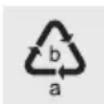
Observe the marking of the packaging materials for waste separation, which are marked with abbreviations (a) and numbers (b) with following meaning: 1-7: plastics / 20-22: paper and fibreboard / 80-98: composite materials.

Contact your local refuse disposal authority for more details of how to dispose of your worn-out product.
To help protect the environment, please dispose of the product properly when it has reached the end of its useful life and not in the household waste. Information on collection points and their opening hours can be obtained from your local authority.
Faulty or used batteries / rechargeable batteries must be recycled in accordance with Directive 2006/66/EC and its amendments. Please return the batteries / rechargeable batteries and / or the product to the available collection points.
Environmental damage through incorrect disposal of the batteries / rechargeable batteries!
Batteries / rechargeable batteries may not be disposed of with the usual domestic waste. They may contain toxic heavy metals and are subject to hazardous waste treatment rules and regulations. The chemical symbols for heavy metals are as follows: Cd = cadmium, Hg = mercury, Pb = lead. That is why you should dispose of used batteries / rechargeable batteries at a local collection point.
Warranty
The product has been manufactured to strict quality guidelines and meticulously examined before delivery. In the event of product defects you have legal rights against the retailer of this product. Your legal rights are not limited in any way by our warranty detailed below.
The warranty for this product is 3 years from the date of purchase. The warranty period begins on the date of purchase. Please keep the original sales receipt in a safe location. This document is required as your proof of purchase.
Should this product show any fault in materials or manufacture within 3 years from the date of purchase, we will repair or replace it - at our choice - free of charge to you. This warranty becomes void if the product has been damaged, or used or maintained improperly.
The warranty applies to defects in material or manufacture. This warranty does not cover product parts subject to normal wear, thus possibly considered consumables (e.g. batteries) or for damage to fragile parts, e.g. switches, rechargeable batteries or glass parts.
Warranty claim procedure
To ensure quick processing of your case, please observe the following instructions:
Please have the till receipt and the item number (IAN 392302_2201) available as proof of purchase.
You will find the item number on the rating plate, an engraving, on the front page of the instructions for use (bottom left), or as a sticker on the rear or bottom of the product.
If functional or other defects occur, please contact the service department listed either by telephone or by e-mail.
You can return a defective product to us free of charge to the service address that will be provided to you. Ensure that you enclose the proof of purchase (till receipt) and information about what the defect is and when it occurred.
Service
GB Service Great Britain
Tel.: 08000569216
E-Mail: owim@lidl.co.uk
IE Service Ireland
Tel.: 1800200736
E-Mail: owim@lidl.ie

| Information requirements for electric local space heaters |
| Model identifier(s): Fan heater, SHLF 2000 D3, HG07992 |
| Item Symbol Value Unit Item | Unit | | | | |
| Heat output Type of heat input (select one) |
| Nominal heat output P | nom | 2.0-2.2 kW | Manual heat charge control, with integrated thermostat | [yes/no] |
| Minimum heat output (indicative) | Pmin | 1.0-1.1 kW | Manual heat charge control with room and/or outdoor temperature feedback | [yes/no] |
| Maximum continuous heat output | Pmax, c | 2.0-2.2 kW | Electronic heat charge control with room and/or outdoor temperature feedback | [yes/no] |
| Auxiliary current consumption | Fan assisted heat output | [yes/no] |
| At nominal heat output el | max | 2.0-2.2 kW | Type of heat output/room temperature control (select one) |
| At minimum heat output el | min | 1.0-1.1 kW | Single stage heat output and no room temperature control | [yes/no] |
| In standby mode el | SB | 0.0004 kW | Two or more manual stages, no room temperature control | [yes/no] |
| With mechanic thermostat room temperature control | [yes/no] |
| With electronic room temperature control | [yes/no] |
| Electronic room temperature control plus day timer | [yes/no] |
| Electronic room temperature control plus week timer | [yes/no] |
| Information requirements for electric local space heaters |
| Model identifier(s): Fan heater, SHLF 2000 D3, HG07992 |
| Item Symbol Value Unit Item Unit | | | | | |
| Other control options(multiple selections possible) |
| Room temperature control, with presence detection | [yes/no] |
| Room temperature control, with open window detection | [yes/no] |
| with distance control option | [yes/no] |
| With adaptive start control | [yes/no] |
| With working time limitation | [yes/no] |
| With black bulb sensor | [yes/no] |
| Contact details | OWIM GmbH & Co. KGStiftsbergstraße 174167 NeckarsulmGERMANY |
Entree:220-240V\~,50Hz
Classe de protection: II/
Tailles de pieces
NOSTE OCHRANNÉ RUKAVICE! Vytečené
FORSIGTIG! Brandfare!
FORSIGTIG! Brandfare!
Pooblasceni serviser:
OWIM GmbH & Co. KG
Stiftsbergstraße 1
74167 Neckarsulm
NEMCIJA
Servisna telefonska stevilk: 00386 (0) 80 70 60
Garancijski list