
SIKP 2000 D1 - Frying Pan SILVERCREST - Free user manual and instructions
Find the device manual for free SIKP 2000 D1 SILVERCREST in PDF.


| Product Type | Frying Pan |
| Brand | SilverCrest |
| Model | SIKP 2000 D1 |
| Hob Compatibility | All hob types including induction, gas, electric, ceramic |
| Diameter | 28 cm |
| Height | 7 cm |
| Weight | 1.2 kg |
| Material | Aluminum with non-stick coating |
| Handle Material | Bakelite with cool-touch technology |
| Oven Safe | Up to 180°C |
| Dishwasher Safe | No, hand wash recommended |
| Non-Stick Coating | PFOA-free, scratch-resistant |
| Cleaning Instructions | Use soft sponge, mild detergent, avoid abrasive cleaners |
| Safety Features | Stable base, non-slip handle, heat-resistant |
| Spare Parts Availability | Not available separately |
| Warranty | 2 years |
| Country of Origin | China |
Frequently Asked Questions - SIKP 2000 D1 SILVERCREST
User questions about SIKP 2000 D1 SILVERCREST
0 question about this device. Answer the ones you know or ask your own.
Ask a new question about this device
Download the instructions for your Frying Pan in PDF format for free! Find your manual SIKP 2000 D1 - SILVERCREST and take your electronic device back in hand. On this page are published all the documents necessary for the use of your device. SIKP 2000 D1 by SILVERCREST.
USER MANUAL SIKP 2000 D1 SILVERCREST
natural_image
Black-and-white photo of a cooking pot on an induction cooktop with food items nearby (no text or symbols on main subject)Placa de inducción portátil SIKP 2000 D1 Piastra ad induzione SIKP 2000 D1
TARGA GMBH
DE39494 Soes
GERMANY
Operating instructors and safety instructions
IAN 289597
IAN 289597
图 10
Español....2
Italiano....29
Português....55
English 81
Deutsh 105
Índice
DIN EN 60350-2: 2013+A11: 2014, Household electric cooking appliances - Part 2: Hobs - Methods for measuring performance.
(tested in accordance with (EU) Regulation 66/2014, Appendix I, Section 2 and 2.2)
- Intended use....82
- Package contents 84
- Controls and displays 84
- Technical specifications 85
- Safety instructions 86
- Before you start....97
6.1 Introduction to induction cooking....97
6.2 Suitable cookware 97 - Getting started 97
7.1 Setup and connection 97
7.2 Use 98
7.3 Switching off using the timer....99
7.4 Child lock....100 - Maintenance / cleaning 100
- Troubleshooting 101
- Environmental regulations and disposal information.... 102
- Conformity 102
- Guarantee information.... 103
Congratulations!
By purchasing the SIKP 2000 D1 induction hotplate you have opted for a quality product.
Before first using it, familiarise yourself with the way the induction hotplate works and read these operating instructions through carefully. Be careful to follow the safety instructions and only use the induction hotplate as described in the operating instructions and for the applications given.
Keep these operating instructions in a safe place. If you pass the induction hotplate on to someone else, make sure to give them all the relevant documents with it.
1. Intended use
The SIKP 2000 D1 induction hotplate can be used for preparing and cooking food and keeping it warm in suitable pans. It is portable and easy to operate thanks to the touch-sensitive control panel.
This induction hotplate is not intended for commercial use. This induction hotplate is suitable exclusively for use indoors, in dry, sealed spaces. Always make sure that the induction hotplate is on a stable surface.
The device fulfils all relevant norms and standards relating to CE conformity. Any modifications to the device other than recommended changes by the manufacturer may result in these standards no longer being met.
Information on domestic electrical hobs
| Symbol Value | ||
| Model code | x | SIKP 2000 D1 |
| Hob type x Electric | ||
| Number of burners and cooking surfaces x 1 | ||
| Heating technology (induction burners and cooking surfaces, radiation burners, hotplates) | x Induction | |
| For circular cooking surfaces and hotplates:Diameter of usable area for each electrically heated cooking surface, accurate to 5 mm. | ∅ 22 cm | |
| For non-circular cooking surfaces and hotplates: Length and width of usable surface for each electrically heated cooking surface and each electrically heated hotplate, accurate to 5 mm. | L W | x |
| Energy consumption for each cooking surface, per kg EC | electric cooking 182.6 Wh/kg | |
| Electricity consumption of hob per kg | EC electric hob | 182.6 Wh/kg |
Testing method:
The product has been tested in accordance with the following testing standards:
DIN EN 60350-2: 2013+A11: 2014, Household electric cooking appliances - Part 2: Hobs - Methods for measuring performance.
(tested in accordance with (EU) Regulation 66/2014, Appendix I, Section 2 and 2.2)
Information on reducing environmental impact:
Only use the induction hotplate with induction-compliant pans. Never use 'induction adapter plates', these adapter plates considerably reduce the energy efficiency of an induction hotplate (available temperature in the pan relative to the energy used) and invalidate all the benefits of a hob of this kind. This is down to the heat transfer between the adapter plate and the base of the pan. This means the process takes longer and energy is wasted.
Predictable misuse
The induction hotplate is not designed to be used with an external timer or a separate remote control system.

Risk of burns!
Do not place other items (e.g. cutlery, utensils, pan lids, etc.) on the hotplate. These could get very hot and you could burn yourself.
2. Package contents
• SilverCrest SIKP 2000 D1 induction hotplate
- This user manual
3. Controls and displays
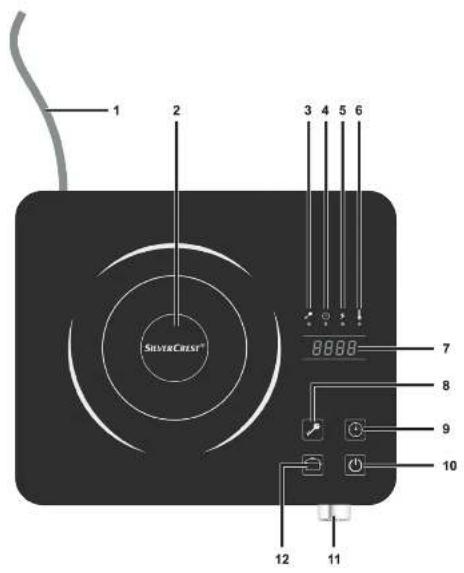
These operating instructions have a fold-out cover. On the inside of the cover, the induction hotplate is shown with figures indicated. The meanings of the numbers are as follows:
1 Power cable
2 Heating zone
3 Symbol for child lock
4 Symbol for timer
5 Symbol for power display (Watt)
6 Symbol for temperature display
7 Display
8 Sensor button for child lock
9 Sensor button for timer
10 On/Off button
11 Rotary controller (- Level down / + Level up)
12 Function button (switch between power/temperature display)
4. Technical specifications
Manufacturer
SilverCrest
Model name: SIKP 2000 D1
Operating voltage: 220 - 240 V
\~ (AC), 50/60 Hz
Power: max. 2000 W
10 power levels: 200, 400, 600, 800, 1000, 1200, 1400,
1600, 1800, 2000 Watt
Correspond to 10 temperature levels: 60, 80, 100, 120, 140,
160, 180, 200, 220, 240 °C
Display: 4 digits with LED lighting
Timer: 3 hour countdown in 1 minute increments
Control panel: touch-sensitive sensor buttons and rotary controller, child lock
Power cord length: 2.00 m
Dimensions: approx. 34 cm x 29.5 cm x 7.4 cm (W x D x H)
Weight:
approx. 2,820 g
Max pan diameter:
26 cm
Protection Class II

5. Safety instructions
Before you use this device for the first time, please carefully read the following instructions and heed all warnings, even if you are familiar with handling electronic devices. Keep these operating instructions in a safe place for future reference. If you sell the device or give it away, pass on the user manual at the same time. It forms part of the product.
Explanation of symbols
In this user manual, warnings are used as follows. Some of these symbols are affixed to the product itself in order to alert the user to potential risks.
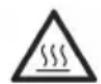
Risk of burns!
This symbol warns of hot surfaces.

Do not touch!
This warning warns against touching the surface of the hotplate.

WARNING!
This symbol denotes important information for the safe operation of the product and user safety. It warns against risks which could, if left unheeded, cause danger to life and limb, injuries or material damage.
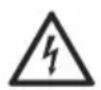
Risk of electric shock!
This symbol warns of risks which could, if left unheeded, cause damage to life and limb through electric shock.

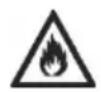
Risk of fire!
This symbol warns that fires could start if the warning is left unheeded.

This symbol denotes further information on the topic.
Children and people with disabilities
This device may be used by children older than 8 years as well as by persons with reduced physical, sensory or mental capacities or those persons who
have lack of knowledge or experience, as long as they are supervised or they have received instructions regarding the proper use of the appliance and they understand the associated risks. Do not allow children to play with the appliance. Cleaning and user maintenance must not be carried out by children unless they are older than 8 years old and supervised.
Children under the age of 8 must be kept away from the device and the power cable (1).

Risk of suffocation!
Packaging material is not a toy. Do not allow children to play with plastic bags. There is a risk of suffocation.

Risk of falling objects!
Make sure that children cannot pull the device from the work surface by the power cable (1). There is a danger of injury.
Keep the device out of the reach of children.
General safety instructions

Risk of burns!
- Do not place other items (e.g. cutlery, utensils, pan lids, etc.) on the heating zone (2). These can become very hot and cause burns.
- Do not touch the heating zone (2) surface a cooking vessel has previously been standing on. After the cooking vessel is removed, the heating zone (2) surface can still be very hot.
Risk of fire!
- Oil and fat can catch fire if over-heated. Therefore, be careful when heating oil and fat. Never leave hot oil or fat unattended.
- Risk of explosion! Never attempt to extinguish burning oil or fat with water. Instead, smother it by covering the cooking pan with a well-fitting lid or plate. Unplug
the mains plug from the mains socket.
- Do not place the device on textile surfaces such as tablecloths.
- Do not place the device on metal surfaces. These can heat up quickly and cause a fire.
- Never place the device under flammable items such as curtains.
- The openings on the bottom of the product must never be covered. Keep a distance of at least 10 cm clear all around the device and at least 60 cm clear above it to guarantee sufficient cooling.

Risk of electric shock!
- The induction hotplate housing and power cable (1) must not be damaged in any way. Never replace a faulty cable, instead contact our customer service (see "Warranty information" on page 103). If the housing or power cable (1) are damaged, there is a
risk of electric shock.
- Never open the housing of the induction hotplate as there are no components inside which require maintenance. If the housing is open, there is a risk of electric shock.
- If you notice any smoke, unusual noises or strange smells, switch off the device immediately and remove the plug from the mains socket. If this occurs, do not continue to use the device and have it checked out by an expert. Never inhale smoke from a possible device fire. If you do inadvertently inhale smoke, seek medical attention.
Smoke inhalation can be damaging to your health.
- Make sure that the power cable (1) cannot be damaged by sharp edges or hot spots. Never wrap the power cable (1) around the heating zone (2).
• Make sure that the power cable (1) cannot
become crushed or squashed.
- Even when switched off, the induction hotplate is not entirely disconnected from the mains socket. In order to disconnect it from the mains completely, unplug the mains plug from the mains socket.
- When disconnecting the power supply, always pull on the plug and never on the power cable (1) itself.
- Always remove the plug from the mains socket if you have any problems, if you are not using the device, before cleaning and during thunderstorms.
-
If you notice visible damage to the induction hotplate or the power cable (1), switch the device off, disconnect the mains plug from the mains socket and contact customer services (see "Warranty information" on page 103).
-
Only connect the induction hotplate to a properly installed, easily accessible mains socket whose mains voltage corresponds to that on the rating plate. After connecting the device, the mains socket must still be easily accessible so that you can remove the mains plug quickly in the event of an emergency.
- Never immerse the induction hotplate, the power cable (1) or the mains plug in water or other liquids. If liquids have entered the product, disconnect the mains plug from the mains socket immediately and contact customer service (see "Warranty information" on page 103).
- If the glass plate on the heating zone (2) is cracked or broken, switch the device off and disconnect it from the mains socket in order to avoid a possible electric shock.

Danger from electromagnetic fields!
Medical devices (pacemakers, hearing aids,
etc.) can be influenced and damaged by electromagnetic fields. Maintain a safety distance as recommended by the device manufacturer.

Damage caused by electromagnetic fields!
Keep the induction hotplate at least 1 m away from devices which could be affected by electromagnetic fields (e.g. magnetic storage media, electronic devices, clocks, etc.).

Warning about property damage
- Do not heat empty cooking vessels as they can quickly overheat and damage both the pans and the device.
- Make sure that the induction hotplate is not subject to excessive vibration, as this can cause the heating zone (2) to break. Be careful not to drop the induction hotplate! There is a risk of injury if the heating zone
(2) is broken!
- Be careful when preparing soups and stews. The weight of the cooking vessel and the contents together must not exceed 10 kg.
-
You can damage the induction hotplate by trying to scrape caramel off it. If you do spill food containing sugar, remove it immediately before it cools. In general, any food spillages should be removed immediately.
-
Do not use abrasive or astringent detergents or tools which could scratch the surface. These could damage the heating zone (2).
- The induction hotplate has non-slip plastic feet. If necessary, place something underneath the device, as work-surfaces are sometimes treated with detergents which could attack or even dissolve the plastic feet.

Power cable
Unplug the power cable (1) holding the mains plug and never pull on the cable (1) itself. Never place the device, pieces of furniture or other heavy objects on the power cable (1) and take care that this does not become trapped. Never tie knots in the power cable (1) and do not tie it to other cables. All cables should be positioned so that nobody can trip over them or be obstructed by them. Never use adapter plugs or extension cables that do not comply with the safety regulations applicable in your country, and do not modify the power cable (1) yourself. Any damaged power cable (1) must be replaced by the manufacturer or authorised customer service.
The induction hotplate is not designed to be used with an external timer or a separate remote control system.
6. Before you start
Unpack the device. First check whether all the parts are complete and undamaged. If any items are missing or damaged, please phone our hotline (see "Guarantee information" on page 103). Keep the packaging material away from children and dispose of appropriately.
6.1 Introduction to induction cooking
Cooking with an induction hotplate works differently to what you are used to from normal hotplates. The heat is generated by means of an electromagnetic field in the base of the cooking vessel and not by means of heat resistors in the heating zone (2). This saves energy and reduces cooking times.
At high power, the content of the cooking vessel is heated much quicker, it also reacts much more quickly to the temperature being turned down. You could say that using an induction hotplate is very similar to cooking with gas.
But you do need special induction-compatible cookware with a ferromagnetic base.
6.2 Suitable cookware
Only use ferromagnetic cookware which is suitable for induction hotplates. These should be labelled accordingly when you buy them. Cookware made of non-magnetic metals (aluminium, copper, etc.) and other materials (e.g. ceramics, porcelain, glass, etc.) is not suitable.
The base of the cookware must be able to stand flat on the induction hotplate, be smooth and have a diameter of between 16 and 22 cm.

If the cookware is not the right diameter or is made of unsuitable material, the hotplate automatically switches off. A beeper sounds every 4 seconds and the error EO is shown on the display (7).
7. Getting started
7.1 Setup and connection
Place the device on an even, non-slip and dry surface.

Risk of fire!
- Do not place the device on textile surfaces such as a tablecloth.
- Do not place the device unit on metal surfaces. These can heat up quickly and cause a fire.
• Never place the device under flammable items such as curtains. - The openings on the bottom of the product must never be covered. Keep a distance of at least 10 cm clear all around the device and at least 60 cm clear above it to guarantee sufficient cooling.
7.2 Use

- If you switch the induction hotplate off and the surface temperature of the heating zone (2) is higher than 60 °C, "H" is shown on the display (7). If the temperature drops below 60 °C, the display (7) shows "L".
- If you remove the pan from the induction hotplate when in use and the surface temperature of the heating zone (2) is greater than 60 °C, the display shows "H-E0" and a beeper sounds every 4 seconds. After around 45 seconds, the beeper stops and only "H" is displayed. About a minute later, the fan switches off. The display (7) continues to show "H" as long as the surface temperature of the heating zone (2) is greater than 60 °C. If the temperature drops below 60 °C, the display (7) shows "L".
- The only way to hide the "H" and "L" symbols from the display (7) is by disconnecting the product from the mains.
-
When the hotplate is switched on, the preset power level is 1000 W.
-
Connect the hotplate to a live wall socket using the power cord (1). A beeper then sounds and the display (7) shows "L" or "H" depending on the temperature.
- Place a pan on the hotplate (2).

Warning about property damage
- The pan must be explicitly suitable for induction hotplates. Do not use any other pans (e.g. ceramic ones).
-
Be careful when preparing soups and stews. The weight of the cooking vessel and the contents together must not exceed 10 kg.
-
Press the On/Off button ⏻(10) to switch the hotplate on. The display (7) reads "1000".
- Press the function button (12) to show the temperature.

When it is running, the cooler fan is also running and the hotplate can hum slightly when cooking. This is not a malfunction.
- Use the rotary controller (11) to set the power required in Watts or press the function key (12) to display the cooking temperature on the display (7) and adjust it using the rotary controller (11).

Risk of burns!
Do not touch the contact surface a cooking vessel has previously been standing on. After the cooking vessel is removed, the cooking surface can still be very hot.

Use the function key ☐12) to switch between the power (5) and the temperature display (6). However, please note that when you switch over, the power is always set to 1000 W and
the temperature to 120 °C , irrespective of what it was set to before. So you need to make sure your food does not burn.

Risk of fire!
- Oil and fat can catch fire if over-heated. Therefore, be careful when heating oil and fat. Never leave hot oil or fat unattended.
-
Risk of explosion! Never attempt to extinguish burning oil or fat with water. Instead, smother it by covering the cooking pan with a well-fitting lid or plate. Unplug the mains plug from the wall socket.
-
Prepare your food. While you are cooking, set the power or temperature you want using the rotary controller (11).
-
When you are finished, switch off the induction hotplate. To do this, press the On/Off button (10). A beeper then sounds and the display (7) shows "L" or "H" depending on the temperature.

Warning about property damage
The cooling fan runs for a while after you switch off. Do NOT remove the mains plug from the wall socket while the cooling fan is still running.

- If you switch the induction hotplate off and the surface temperature of the hotplate is higher than 60 °C, "H" is shown on the display (7). If the temperature drops below 60 °C, the display (7) shows "L".
- After approx. 2 hours of continuous operation the appliance switches off automatically (even if you change any settings/display icons) and a beep can be heard. If you have programmed the timer, the timer countdown will have priority and the appliance switches off automatically after the set time.
7.3 Switching off using the timer
You can program the timer to switch the hotplate off automatically after a preset time.
- Press the sensor button for the timer ⏻ (9) when cooking with the hotplate to program the timer.
- Use the rotary controller (11) to set the cooking time you want (hours:minutes) before the hotplate is to switch off.

You can program the cooking time to between 00:00 to 3:00 hours.
The time set flashes briefly and then the remaining time (countdown) is shown on the display (7).
If the timer is activated, the indicator (4) lights up and alternates showing the power or temperature and the remaining time at around 5 second intervals.
If necessary, you can adjust the power or temperature using the rotary controller (11).
Once the countdown reaches zero, the hotplate automatically switches off. A beeper sounds.

In order to switch the hotplate off manually before the time has elapsed, press the On/Off button (10).
7.4 Child lock
The induction hotplate has a child lock so that the settings cannot be changed accidentally.
How to activate or deactivate the child lock:
- Press the 📋 button (8) once. An acoustic signal can be heard and the indicator (3) lights up. The child lock is now activated.
- Press and hold the 📋 button (8) for 3 seconds. An acoustic signal can be heard and the indicator (3) light goes out. The child lock is now deactivated again. You can use the hotplate as normal.

You can also activate the child lock when the induction hotplate is switched off.
8. Maintenance / cleaning
In order to avoid burning food residues, clean the hotplate after every use.

Risk of burns!
Wait until the heating zone (2) is completely cool before cleaning it. Otherwise you could get burnt.

Risk of electric shock!
- Always remove the mains plug from the socket before cleaning. Failure to do so could cause an electric shock.
- Do not poor or spray liquids onto the induction hotplate or through the ventilation slots. This could cause short circuits which could cause electric shocks or burns.

Warning about property damage
Do not use abrasive or astringent detergents or tools which could scratch the surface. These could damage the hotplate.
Clean the side surfaces and the mains cable with a slightly damp cloth.
Dirt and burnt-on food residues on the surface of the heating zone (2) can be cleaned off using a scraper for glass hotplates and an appropriate detergent.
9. Troubleshooting
If your induction hotplate does not work as normal, follow the instructions below to try to solve the problem. If working through the tips below does not fix the fault, please contact our hotline (see "Guarantee information" on page 103).

Risk of electric shock!
Never try to repair the device yourself.
| Problem | Possible causes | yRemed |
| Induction hotplate not working | Mains cable not connected Connect the mains cable to a live wall socket. | |
| Child lock activated. Press and hold the button (8) for 3 seconds to deactivate the child lock. | ||
| Heating zone (2) not getting hot | No pan on the heating zone (2) | Place a pan on the heating zone (2). |
| Cookware not suitable for induction | Only use cookware which is suitable for induction hotplates. | |
| Error E0 is shown on the display (7) | No pan on the heating zone (2) | Place a pan on the heating zone (2). |
| Cookware not suitable for induction | Only use cookware which is suitable for induction hotplates. | |
| Cookware is too small in diameter or not standing centrally on the heating zone (2). | Only use cookware with a diameter of between 16 and 26 cm and place it on the centre of the heating zone (2). | |
| Error E3 is shown on the display (7) | Hotplate temperature too high Wait a few minutes until the heating zone (2) has cooled down. | |
| Empty pan Fill the pan with food. | ||
| Error E6 is shown on the display (7) | Empty pan or cooling fan defective | Fill the pan with food. If the pan was filled and error E6 is still displayed, the cooling fan may be defective. In this case, contact our hotline. See the "Warranty information" on page 103. |
| Error E1, E2, E4, E5, E7, E8 or Eb is shown on the display (7) | Technical fault Contact our hotline. See the "Guarantee information" on page 103. | |
10. Environmental regulations and disposal information

A symbol depicting a crossed-out rubbish bin on a product means it is subject to European Directive 2012/19/EU. All electrical and electronic devices must be disposed of separately from household waste at official disposal centres.

Do not dispose of the device in household waste or bulky waste collections. Information on collection points and pick-up times can be obtained from your local council or waste disposal company.
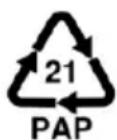
Dispose of all packaging in an environmentally friendly manner. Cardboard packaging can be taken to paper recycling centres or public collection points for recycling. Any film or plastic contained in the packaging should be taken to your public collection points for disposal.
11. Conformity

This device complies with the basic and other relevant requirements of the EMC Directive 2014/30/EU, the Low-voltage Directive 2014/35/EU, the ErP Directive 2009/125/EC and the RoHS Directive 2011/65/EU.
The complete EU Declaration of Conformity is available for download from this link:
www.targa.de/downloads/conformity/289597.pdf
12. Guarantee information
Dear Customer,
This device is sold with three years warranty from the date of purchase. In the event of product defects, you have legal rights towards the seller. These statutory rights are not restricted by our warranty as described below.
Warranty conditions
The warranty period commences upon the date of purchase. Please keep the original receipt in a safe place as it is required as proof of purchase. If any material or manufacturing faults occur within three years of purchase of this product, we will repair or replace the product free of charge as we deem appropriate.
Warranty period and legal warranty rights
The warranty period is not extended in the event of a warranty claim. This also applies to replaced and repaired parts. Any damage or defects discovered upon purchase must be reported immediately when the product has been unpacked. Any repairs required after the warranty period will be subject to charge.
Scope of warranty
The device was carefully manufactured in compliance with stringent quality guidelines and subjected to thorough testing before it left the works. The warranty applies to material and manufacturing faults. This warranty does not cover product components which are subject to normal wear and which can therefore be regarded as wearing parts, or damage to fragile components such as switches, rechargeable batteries or components made of glass. This warranty is void if the product is damaged, incorrectly used or serviced. To ensure correct use of the product, always comply fully with all instructions contained in the user manual. The warnings and recommendations in the user manual regarding correct and incorrect use and handling of the product must always be observed and complied with. The product is solely designed for private use and is not suitable for commercial applications. The warranty is rendered void in the event of incorrect handling and misuse, if it is subjected to force, and also if any person other than our authorised service technicians interfere with the device. No new warranty period commences if the product is repaired or replaced.
Submitting warranty claims
To ensure speedy handling of your complaint, please note the following:
- Before using your product for the first time, please read the enclosed documentation carefully. Should any problems arise which cannot be solved in this way, please call our hotline.
- Always have your receipt, the product article number as well as the serial number (if available) to hand as proof of purchase.
- If it is not possible to solve the problem on the phone, our hotline support staff will initiate further servicing procedures depending on the fault.

Service
Phone: 020 - 70 49 04 03
E-Mail: service.GB@targa-online.com

Phone: 01-4370121
E-Mail: service.IE@targa-online.com

Phone: 027 78 11 03
E-Mail: service.MT@targa-online.com
Phone: 02 - 20 09 025
E-Mail: service.CY@targa-online.com
IAN: 289597

Manufacturer
Please note that the following address is not a service address. First contact the service point stated above.
TARGA
GmbH
Coesterweg 45
59494 SOEST
GERMANY
Inhalt
Inhalt.... 105



- Índice
- Congratulations!
- Intended use
- Testing method:
- Information on reducing environmental impact:
- Predictable misuse
- Risk of burns!
- Package contents
- Controls and displays
- Technical specifications
- Safety instructions
- Explanation of symbols
- Do not touch!
- WARNING!
- Risk of electric shock!
- Risk of fire!
- Children and people with disabilities
- Risk of suffocation!
- Risk of falling objects!
- General safety instructions
- Danger from electromagnetic fields!
- Damage caused by electromagnetic fields!
- Warning about property damage
- Power cable
- Before you start
- Introduction to induction cooking
- Suitable cookware
- Getting started
- Setup and connection
- Use
- Switching off using the timer
- Child lock
- Maintenance / cleaning
- Troubleshooting
- Environmental regulations and disposal information
- Conformity
- Guarantee information
- Warranty conditions
- Warranty period and legal warranty rights
- Scope of warranty
- Submitting warranty claims
- Service
- Manufacturer
- Inhalt
- Inhalt.... 105
Brand : SILVERCREST
Model : SIKP 2000 D1
Category : Frying Pan