RTN19 - Wireless Router ASUS - Free user manual and instructions
Find the device manual for free RTN19 ASUS in PDF.



| Product Type | Wi-Fi Router |
| Brand | ASUS |
| Model | RT-N19 |
| Dimensions (estimated) | Approximately 15 x 12 x 2.8 cm |
| Weight (estimated) | Approximately 200 g |
| Power Supply | DC power adapter, output +12V max 0.5A |
| Wi-Fi Standards | 802.11b/g/n, 2.4 GHz band |
| Ports | 1 WAN port (Internet), 2 LAN ports (RJ-45) |
| Buttons | Power, WPS, Reset |
| LED Indicators | Power, LAN, WAN, 2.4 GHz |
| Main Functions | Wireless router, access point, firewall, Internet sharing |
| Configuration | Via web interface (http://router.asus.com) or ASUS Router app |
| Wireless Security | WPA/WPA2, SSID and password change recommended |
| Operating Temperature | 0°C to 40°C |
| Operating Humidity | 50% - 90% |
| Maintenance and Cleaning | Clean with a soft, dry cloth. Do not use chemicals. |
| Safety Precautions | Use the supplied adapter, avoid moisture, maintain a distance of 20 cm for RF exposure |
| Spare Parts and Repairability | Power adapter only. For any other parts, contact ASUS support. |
| General Information | ASUS RT-N19 wireless router, designed for home and small office use |
Frequently Asked Questions - RTN19 ASUS
User questions about RTN19 ASUS
0 question about this device. Answer the ones you know or ask your own.
Ask a new question about this device
Download the instructions for your Wireless Router in PDF format for free! Find your manual RTN19 - ASUS and take your electronic device back in hand. On this page are published all the documents necessary for the use of your device. RTN19 by ASUS.
USER MANUAL RTN19 ASUS
Wireless-N600 High Speed Router
natural_image
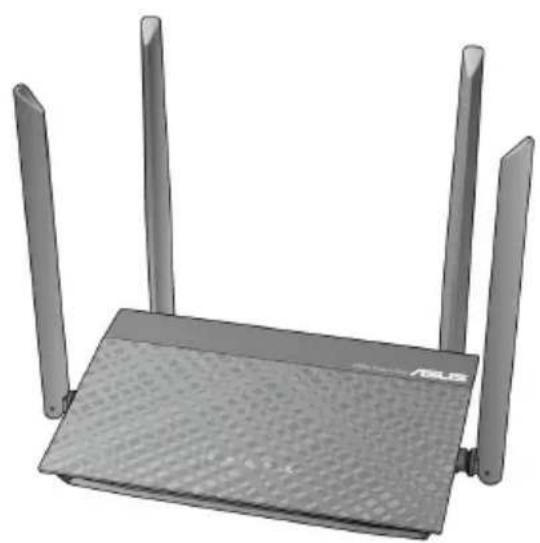
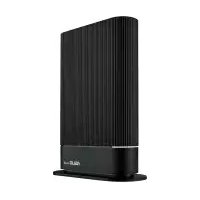
Exterior view of a black wireless router with three vertical posts and a base plate (no text or symbols visible)Quick Start Guide
U15445 / First Edition / May 2019
Table of contents
English....3
Български....9
Français 15
Hrvatski....21
Čeština....27
Dansk 33
Nederlands 39
Eesti 45
Suomi....51
Deutsch....57
Ελληνικά....63
Magyar 69
Italiano 75
Lietuvių 81
Latviešu....87
Norsk....93
Português....99
Polski....105
Română....111
Español....117
Srpski 123
Slovenský....129
Slovenščina....135
Svenska 141
Türkçe 147
Package contents
√ RT-N19 Wireless Router AC adapter
√ Network cable (RJ-45) Quick StartGuide
A quick look at RT-N19
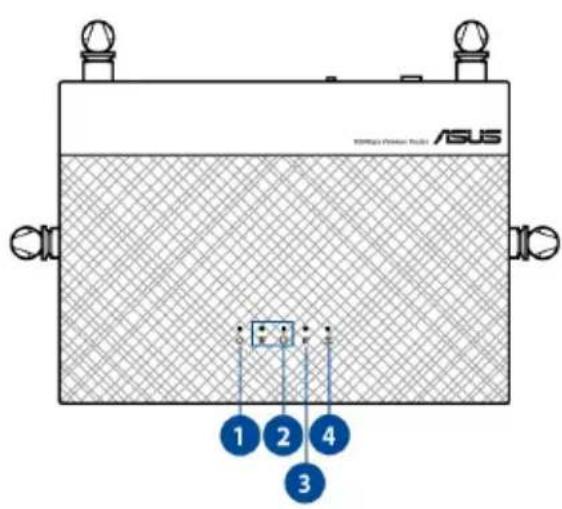

| 1 Power LED Power switch | 6 |
| 2 LAN LED Power (DC-IN) port | 7 |
| 3 WAN (Internet) LED WPS button | 8 |
| 4 2.4GHz LED WAN (Internet) port | 9 |
| 5 Reset button LAN 1 ~ 2 ports | 10 |
NOTES:
- Use only the adapter that came with your package. Using other adapters may damage the device.
- Specifications:
| DC Power adapter DC Output: +12V with 0.5A current | |||
| Operating Temperature | 0~40 °C Storage | 0~70 | °C |
| Operating Humidity | 50~90% Storage | 20~90% | |
Position your wireless router
For optimal wireless transmission between the wireless router and connected wireless devices, ensure that you:
- Place the wireless router in a centralized area for a maximum wireless coverage for the network devices.
- Keep the wireless router away from metal obstructions and away from direct sunlight.
- Keep the wireless router away from 802.11g or 20MHz only Wi-Fi devices, 2.4GHz computer peripherals, Bluetooth devices, cordless phones, transformers, heavy-duty motors, fluorescent lights, microwave ovens, refrigerators, and other industrial equipment to prevent signal interference or loss.
- Always update to the latest firmware. Visit the ASUS website at http://www.asus.com to get the latest firmware updates.
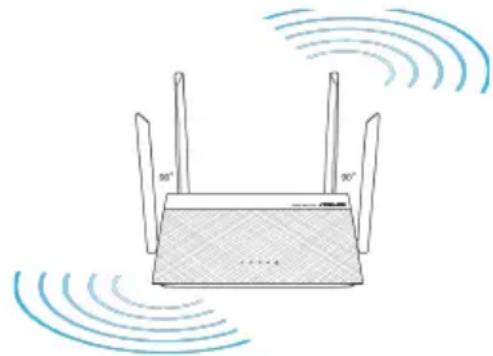
- To ensure the best wireless signal, orient the four detachable antennas as shown in the drawing below.
natural_image
Diagram of a wireless router with two antennas and signal waves (no text or symbols)Preparing your modem
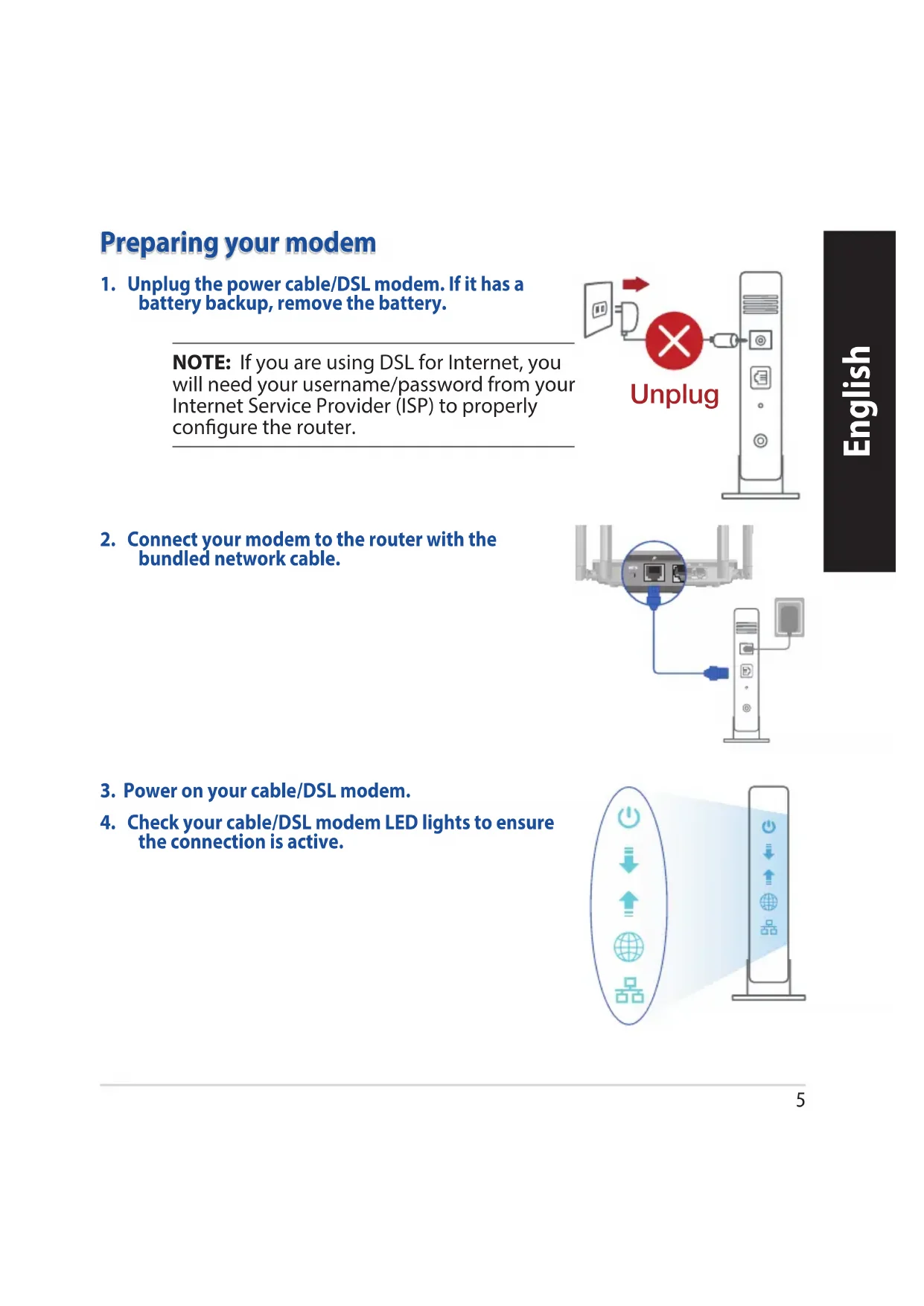
- Unplug the power cable/DSL modem. If it has a battery backup, remove the battery.
NOTE: If you are using DSL for Internet, you will need your username/password from your Internet Service Provider (ISP) to properly configure the router.

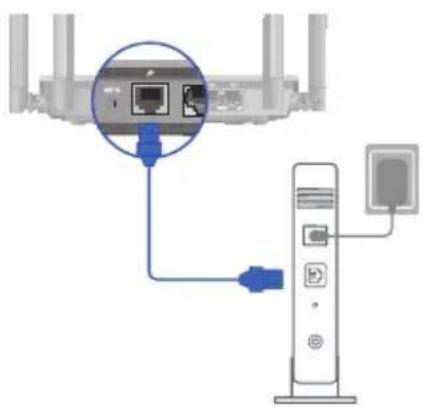
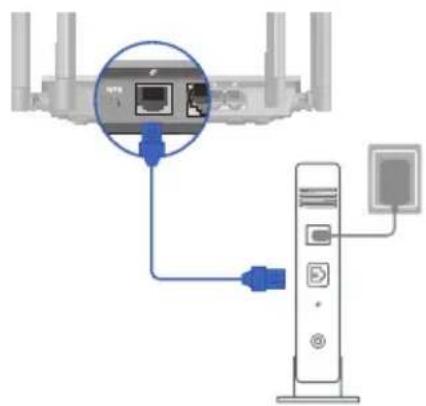
- Connect your modem to the router with the bundled network cable.
natural_image
Diagram showing a router connected to a server via cable, with no visible text or symbols-
Power on your cable/DSL modem.
-
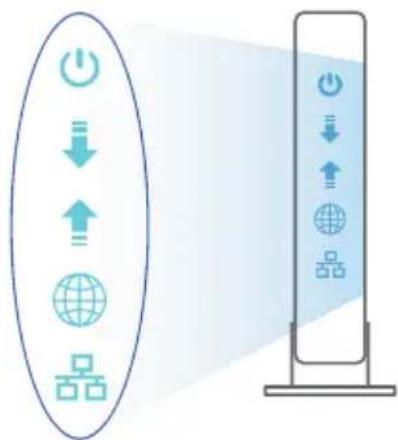
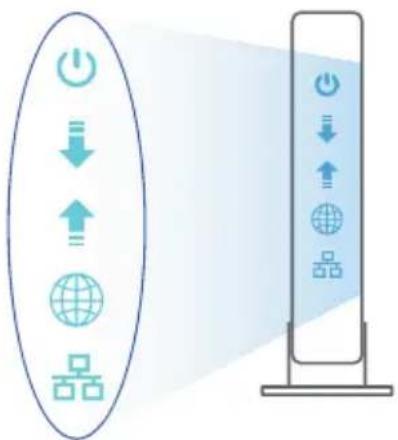
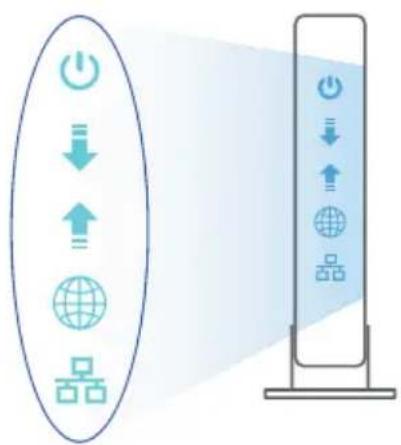
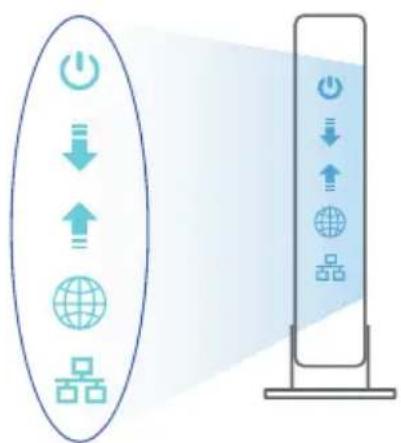
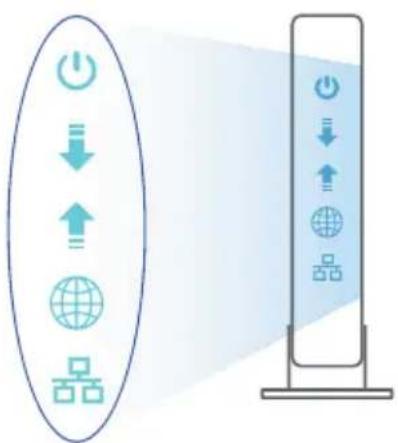
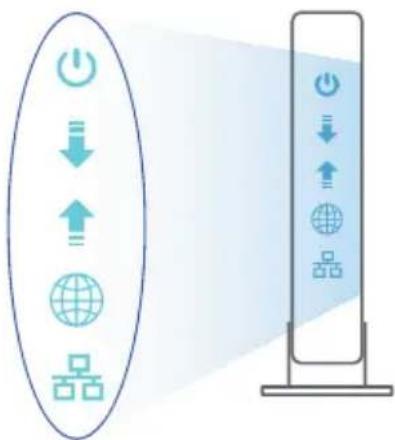
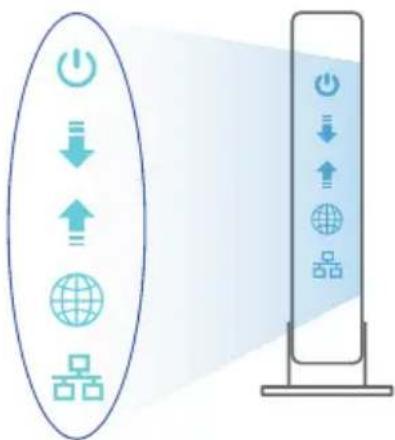
Check your cable/DSL modem LED lights to ensure the connection is active.
flowchart
graph TD
    A["Power Icon"] --> B["Download Icon"]
    B --> C["Upload Icon"]
    C --> D["Global Icon"]
    D --> E["Storage Icon"]
    style A fill:#f9f,stroke:#333
    style B fill:#ccf,stroke:#333
    style C fill:#cfc,stroke:#333
    style D fill:#fcc,stroke:#333
    style E fill:#cff,stroke:#333
Setting up your RT-N19
You can set up your RT-N19 via wired or wireless connection.
A. Wired connection
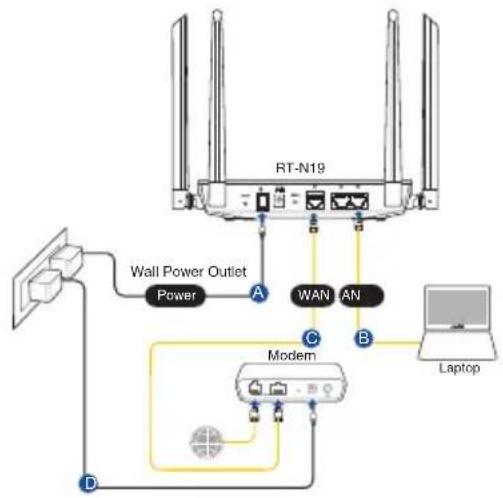
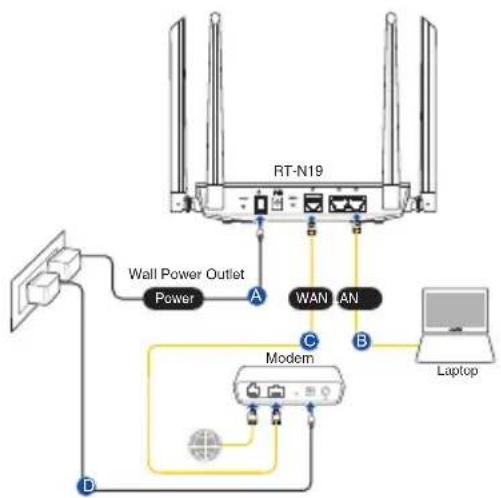
- Plug your router into a power outlet and power it on. Connect the network cable from your computer to a LAN port on your router.
flowchart
graph TD
    A["RT-N19"] -->|A| B["Modem"]
    A -->|B| C["Laptop"]
    A -->|C| D["Wall Power Outlet"]
    D -->|D| A
    A -->|WAN| E["An"]
    A -->|WAN| F["An"]
    style A fill:#f9f,stroke:#333
    style B fill:#ccf,stroke:#333
    style C fill:#cfc,stroke:#333
    style D fill:#fcc,stroke:#333
    style E fill:#ffc,stroke:#333
    style F fill:#ffc,stroke:#333
- The web GUI launches automatically when you open a web browser. If it does not auto-launch, enter http://router.asus.com.
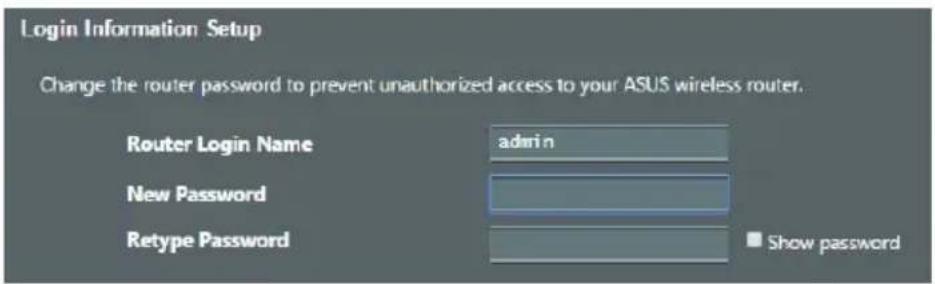
- Set up a password for your router to prevent unauthorized access.

B. Wireless connection
- Plug your router into a power outlet and power it on.
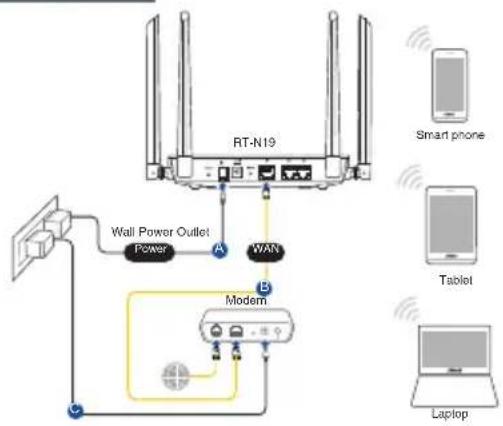
flowchart
graph TD
    A["RT-N19"] -->|Power| B["Wall Power Outlet"]
    A -->|WAN| C["Modem"]
    B --> D["Smart phone"]
    C --> E["Laptop"]
    style A fill:#f9f,stroke:#333
    style B fill:#ccf,stroke:#333
    style C fill:#cfc,stroke:#333
    style D fill:#fcc,stroke:#333
    style E fill:#cff,stroke:#333
- Connect to the network with SSID shown on the product label on the back side of the router. For better network security, change to a unique SSID and assign a password.
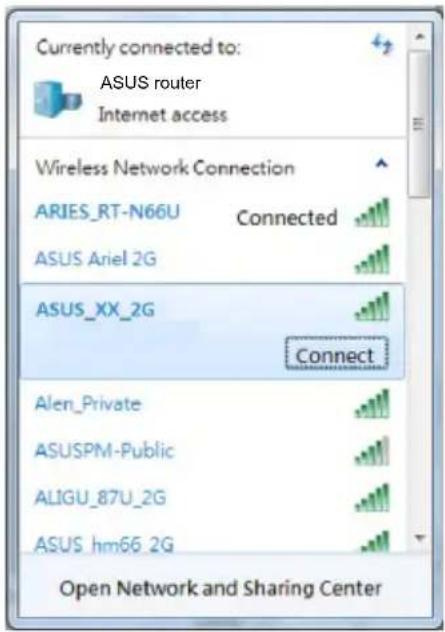
2.4G Wi-Fi Name (SSID): ASUS_XX_2G
* XX refers to the last two digits of 2.4GHz MAC address. You can find it on the label on the back of your RT-N19.
- You can choose either the web GUI or ASUS Router app to set up your router. a. Web GUI Setup
Once connected, the web GUI launches automatically when you open a web browser. If it does not auto-launch, enter http://router.asus.com.
- Set up a password for your router to prevent unauthorized access.
b. App Setup
Download ASUS Router App to set up your router via your mobile devices.
• Turn on Wi-Fi on your mobile devices and connect to your RT-N19's network.
• Follow ASUS Router App setup instructions to complete the setup.

ASUS
Router



ASUS Router
Remembering your wireless router settings
- Remember your wireless settings as you complete the router setup.
| Router Name: Password: | |
| 2.4 GHz network SSID: Password: |
FAQ
- Where can I find more information about the wireless router?
• Online FAQ site: https://www.asus.com/support/faq
• Technical support site: https://www.asus.com/support
- Customer hotline: refer to the Support Hotline section in this Quick Start Guide
• You can get the user manual online at https://www.asus.com/support
Бърз преглед
natural_image
Diagram of a wireless router with two antennas and signal waves (no text or symbols)
flowchart
graph TD
    A["Input"] --> B["Output"]
    C["Global Connection"] --> D["Server Tower"]
    style A fill:#f9f,stroke:#333
    style B fill:#ccf,stroke:#333
    style C fill:#cfc,stroke:#333
    style D fill:#fcc,stroke:#333
В. Безжична връзка
2,4G Wi-Fi име (SSID): ASUS_XX_2G
natural_image
Diagram of a wireless router with two antennas and signal waves (no text or symbols)natural_image
Diagram showing a router connected to a server via cable, with no visible text or symbolsB. Connexion Wi-Fi
b. Configuration via l'application
natural_image
Diagram of a wireless router with two antennas and signal waves (no text or symbols)Pripremanje modema
natural_image
Diagram showing a router connected to a server via cable, with no visible text or symbols
flowchart
graph TD
    A["Power Icon"] --> B["Down Arrow"]
    B --> C["Up Arrow"]
    C --> D["Global Icon"]
    D --> E["Group Icon"]
    F["Monitor Icon"] --> G["Down Arrow"]
    G --> H["Up Arrow"]
    H --> I["Global Icon"]
    I --> J["Group Icon"]
B. Bežična veza
Naziv za 2,4G Wi-Fi (SSID): ASUS_XX_2G
b. Podešavanje aplikacije
flowchart
graph TD
    A["Power Icon"] --> B["Download Icon"]
    B --> C["Upload Icon"]
    C --> D["Global Network Icon"]
    D --> E["Server Tower"]
Downloaded on the App Store

ASUS Router
natural_image
Diagram of a wireless router with two antennas and signal waves (no text or symbols)natural_image
Diagram showing a router connected to a server via cable, with no visible text or symbols
flowchart
graph TD
    A["Power"] --> B["Download"]
    B --> C["Upload"]
    C --> D["Global"]
    D --> E["Server"]
    style A fill:#f9f,stroke:#333
    style B fill:#ccf,stroke:#333
    style C fill:#cfc,stroke:#333
    style D fill:#fcc,stroke:#333
    style E fill:#cff,stroke:#333
Sådan indstilles din router
natural_image
Diagram of a wireless router with two antennas and signal waves (no text or symbols)natural_image
Diagram showing a router connected to a server via cable, with no visible text or symbols
flowchart
graph TD
    A["Power"] --> B["Down"]
    B --> C["Up"]
    C --> D["Global Network"]
    E["Grid"] --> F["Data Tower"]
    style A fill:#f9f,stroke:#333
    style B fill:#ccf,stroke:#333
    style C fill:#cfc,stroke:#333
    style D fill:#fcc,stroke:#333
    style E fill:#cff,stroke:#333
    style F fill:#ffc,stroke:#333
De router installeren
B. Draadloze verbinding
2.4 G wifi-naam (SSID): ASUS_XX_2G
b. App-instelling

Download on the App Store

ASUS Router
natural_image
Diagram of a wireless router with two antennas and signal waves (no text or symbols)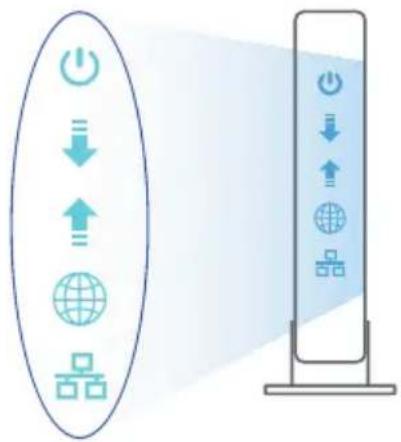
flowchart
graph TD
    A["Power Icon"] --> B["Download Icon"]
    B --> C["Upload Icon"]
    C --> D["Global Icon"]
    D --> E["Storage Port"]
    style A fill:#f9f,stroke:#333
    style E fill:#bbf,stroke:#333
B. Traadita ühendus
2,4 G Wi-Fi nimi (SSID): ASUS_XX_2G
b. Rakenduse seadistamine
Downloaded on the App Store

ASUS Router
Traadita ruuteri sätete meeles pidamine
natural_image
Diagram of a wireless router with two antennas and signal waves (no text or symbols)Modeemin valmistelu
natural_image
Diagram showing a router connected to a server via cable, with a magnified inset highlighting the internal network (no text or symbols present)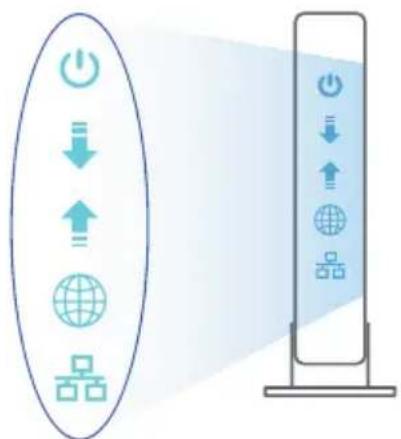
flowchart
graph TD
    A["Power Icon"] --> B["Download Icon"]
    B --> C["Upload Icon"]
    C --> D["Global Network Icon"]
    D --> E["Server Tower"]
B. Langaton yhteys
2,4 G Wi-Fi-nimi (SSID): ASUS_XX_2G
natural_image
Diagram of a wireless router with two antennas and signal waves (no text or symbols)natural_image
Diagram showing a router connected to a server via cable, with no visible text or symbols2,4G WLAN-Name (SSID): ASUS_XX_2G
natural_image
Diagram of a wireless router with two antennas and signal waves (no text or symbols)natural_image
Diagram showing a router connected to a server via cable, with no visible text or symbols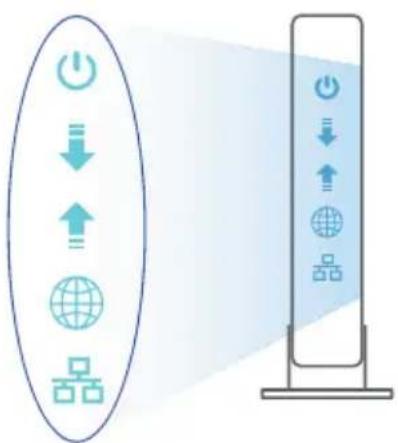
flowchart
graph TD
    A["Power Icon"] --> B["Down Arrow"]
    B --> C["Up Arrow"]
    C --> D["Global Icon"]
    D --> E["Group Icon"]
    F["Server Tower"] --> G["Power Icon"]
    G --> H["Down Arrow"]
    H --> I["Up Arrow"]
    I --> J["Global Icon"]
    J --> K["Group Icon"]
Εγκατάσταση RT-N19
B. Ασύρματη σύνδεση
2,4G Wi-Fi'Ovoμα (SSID): ASUS_XX_2G
natural_image
Diagram of a wireless router with two antennas and signal waves (no text or symbols)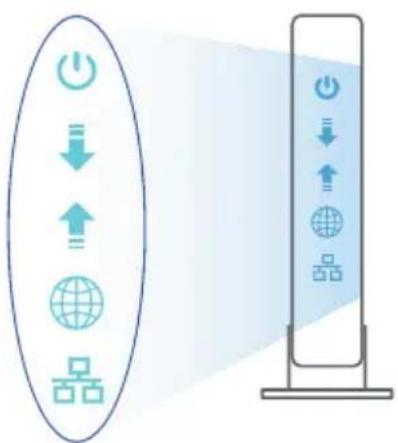
flowchart
graph TD
    A["Power"] --> B["Download"]
    B --> C["Upload"]
    C --> D["Global"]
    D --> E["Data Blocks"]
    E --> F["Server Tower"]
    style A fill:#f9f,stroke:#333
    style F fill:#bbf,stroke:#333
Az beállítása
2,4G Wi-Fi neve (SSID): ASUS_XX_2G
natural_image
Diagram of a wireless router with two antennas and signal waves (no text or symbols)
flowchart
graph TD
    A["Power Icon"] --> B["Down Arrow"]
    B --> C["Up Arrow"]
    C --> D["Global Circle"]
    C --> E["Group Icon"]
    F["Vertical Stack"] --> G["Power Icon"]
    G --> H["Down Arrow"]
    H --> I["Up Arrow"]
    I --> J["Global Circle"]
    I --> K["Group Icon"]
Nome Wi-Fi 2.4G (SSID): ASUS_XX_2G
natural_image
Diagram of a wireless router with two antennas and signal waves (no text or symbols)Modemas ruošiamas
natural_image
Diagram showing a router connected to a server via cable, with no visible text or symbols
flowchart
graph TD
    A["Power Icon"] --> B["Down Arrow"]
    B --> C["Up Arrow"]
    C --> D["Global Icon"]
    D --> E["Square Component"]
    F["Server Tower"] --> G["Power Icon"]
    G --> H["Down Arrow"]
    H --> I["Up Arrow"]
    I --> J["Global Icon"]
    J --> K["Square Component"]
RT-N19 nustatymas
B. Belaidis ryšys
natural_image
Diagram of a wireless router with two antennas and signal waves (no text or symbols)Jūsu modems tiek sagatavots darbam
2,4 G Wi-Fi nosaukums (SSID): ASUS_XX_2G
natural_image
Diagram of a wireless router with two antennas and signal waves (no text or symbols)Forbereder modemet
- Iskopčajte kabel za napajanje/DSL modem. Ako postoji baterijsko napajanje, uklonite bateriju.
natural_image
Diagram showing a router connected to a server via cable, with no visible text or symbols-
Slå på kabel-/DSL-modemet.
-
Se LED-lampen på kabel-/DSL-modemet for å kontrollere at forbindelsen er aktiv.
flowchart
graph TD
    A["Power"] --> B["Download"]
    B --> C["Upload"]
    C --> D["Global"]
    D --> E["Server"]
    style A fill:#f9f,stroke:#333
    style B fill:#ccf,stroke:#333
    style C fill:#cfc,stroke:#333
    style D fill:#fcc,stroke:#333
    style E fill:#cff,stroke:#333
Sette opp RT-N19
2,4 GHz Wi-Fi-navn (SSID): ASUS_XX_2G
* XX refererer til de to siste sifrene i 2,4 GHz-MAC-adressen. Du finner det på etiketten på baksiden av RT-N19.
- Du kan velge enten web-brukergrensesnittet eller ASUS Router-appen til å konfigurere ruteren.
b. Oppsett med app
Last ned ASUS Router-appen for å konfigurere ruteren via en mobilenhet.
Download on the App Store

ASUS Router
natural_image
Diagram of a wireless router with two antennas and signal waves (no text or symbols)Preparar o modem
flowchart
graph TD
    A["Power"] --> B["Download"]
    B --> C["Upload"]
    C --> D["Global"]
    D --> E["Server"]
    style A fill:#f9f,stroke:#333
    style B fill:#ccf,stroke:#333
    style C fill:#cfc,stroke:#333
    style D fill:#fcc,stroke:#333
    style E fill:#cff,stroke:#333
Configurar o RT-N19
B. Ligação sem fios
Download on the App Store

ASUS Router
natural_image
Diagram of a wireless router with two antennas and signal waves (no text or symbols)
flowchart
graph TD
    A["Power"] --> B["Download"]
    B --> C["Upload"]
    C --> D["Global"]
    D --> E["Storage"]
    style A fill:#f9f,stroke:#333
    style B fill:#ccf,stroke:#333
    style C fill:#cfc,stroke:#333
    style D fill:#fcc,stroke:#333
    style E fill:#cff,stroke:#333
Konfiguracja RT-N19
Downloaded on the App Store

ASUS Router
natural_image
Diagram of a wireless router with two antennas and signal waves (no text or labels)natural_image
Diagram showing a router connected to a server via cable, with a magnified inset highlighting the internal network (no text or symbols present)
flowchart
graph TD
    A["Power Icon"] --> B["Down Arrow"]
    B --> C["Up Arrow"]
    C --> D["Global Icon"]
    D --> E["Blocks"]
    F["Server Tower"] --> G["Power Icon"]
    G --> H["Down Arrow"]
    H --> I["Up Arrow"]
    I --> J["Global Icon"]
    J --> K["Blocks"]
Nume rețea Wi-Fi 2,4 GHz ASUS_XX_2G (SSID):
natural_image
Diagram of a wireless router with two antennas and signal waves (no text or symbols)Preparar el módem
Nombre Wi-Fi 2,4 GHz (SSID): ASUS_XX_2G

Download on the App Store

ASUS Router
natural_image
Diagram of a router with two antennas and signal waves, no text or symbols presentPriprema vašeg modema
- Izvucite kabl za struju/DSL modem. Ukoliko postoji baterija za podršku, izvadite bateriju.
NAPOMENA: Ukoliko koristite DSL za internet, biće vam potrebni korisničko ime/lozinka od vašeg internet provajdera (ISP) da ispravno konfigurišete ruter. - Povežite svoj modem za ruter uz pomoć priloženog mrežnog kabla.
- Uključite svoj kabl/DSL modem.
- Proverite LED lampice svog kabla/DSL modema da proverite da je veza aktivna.


flowchart
graph TD
    A["Power"] --> B["Down"]
    B --> C["Up"]
    C --> D["Global"]
    D --> E["Network Components"]
    E --> F["Vertical Stack with Power, Down, Up, Global, Network Components"]
2,4G Wi-Fi ime (SSID): ASUS_XX_2G
b. Podešavanje aplikacije
flowchart
graph TD
    A["Power Icon"] --> B["Download Icon"]
    B --> C["Upload Icon"]
    C --> D["Global Network Icon"]
    D --> E["Product Icon"]
    style A fill:#f9f,stroke:#333
    style E fill:#bbf,stroke:#333
Inštalácia RT-N19
flowchart
graph TD
    A["RT-N19"] -->|Power| B["Wall Power Outlet"]
    A -->|WAN| C["Modem"]
    A -->|AN| D["Laptop"]
    B -->|D| E["Network Interface"]
    C --> F["Network Interface"]
    D --> G["Network Interface"]
b. App Setup
flowchart
graph TD
    A["Power Icon"] --> B["Download Icon"]
    B --> C["Upload Icon"]
    C --> D["Global Network Icon"]
    D --> E["Storage Unit Icon"]
B. Brezžična povezava
Ime 2,4 GHz omrežja Wi-Fi (SSID): ASUS_XX_2G
natural_image
Diagram of a wireless router with two antennas and signal waves (no text or symbols)Förbered ditt modem
flowchart
graph TD
    A["Power Icon"] --> B["Down Arrow"]
    B --> C["Up Arrow"]
    C --> D["Global Icon"]
    D --> E["Blocks"]
    F["Server Tower"] --> G["Power Icon"]
    G --> H["Down Arrow"]
    H --> I["Up Arrow"]
    I --> J["Global Icon"]
    J --> K["Blocks"]
2,4 G Wi-Fi-namn (SSID): ASUS_XX_2G
b. App-inställning

flowchart
graph TD
    A["Input"] --> B["Output"]
    C["Global Network"] --> D["Storage Unit"]
    style A fill:#f9f,stroke:#333
    style B fill:#ccf,stroke:#333
    style C fill:#cfc,stroke:#333
    style D fill:#fcc,stroke:#333
2,4 G Wi-Fi Adı (SSID): ASUS_XX_2G
ASUS recycling and takeback programs come from our commitment to the highest standards for protecting our environment. We believe in providing solutions for you to be able to responsibly recycle our products, batteries, other components, as well as the packaging materials. Please go to http://csr.asus.com/english/Takeback.htm for the detailed recycling information in different regions.
REACH
Complying with the REACH (Registration, Evaluation, Authorisation, and Restriction of Chemicals) regulatory framework, we published the chemical substances in our products at ASUS REACH website at http://csr.asus.com/english/REACH.htm
Federal Communications Commission Statement
This device complies with Part 15 of the FCC Rules. Operation is subject to the following two conditions:
• This device may not cause harmful interference.
- This device must accept any interference received, including interference that may cause undesired operation.
This equipment has been tested and found to comply with the limits for a class B digital device, pursuant to part 15 of the FCC Rules. These limits are designed to provide reasonable protection against harmful interference in a residential installation.
This equipment generates, uses and can radiate radio frequency energy and, if not installed and used in accordance with the instructions, may cause harmful interference to radio communications. However, there is no guarantee that interference will not occur in a particular installation. If this equipment does cause harmful interference to radio or television reception, which can be determined by turning the equipment off and on, the user is encouraged to try to correct the interference by one or more of the following measures:
- Reorient or relocate the receiving antenna.
-
Increase the separation between the equipment and receiver.
-
Connect the equipment into an outlet on a circuit different from that to which the receiver is connected.
- Consult the dealer or an experienced radio/TV technician for help.

WARNING! Any changes or modifications not expressly approved by the party responsible for compliance could void the user's authority to operate the equipment.
Prohibition of Co-location
This device and its antenna(s) must not be co-located or operating in conjunction with any other antenna or transmitter.
IMPORTANT NOTE:
Radiation Exposure Statement: This equipment complies with FCC radiation exposure limits set forth for an uncontrolled environment. End users must follow the specific operating instructions for satisfying RF exposure compliance. To maintain compliance with FCC exposure compliance requirement, please follow operation instruction as documented in this manual.

WARNING! This equipment must be installed and operated in accordance with provided instructions and the antenna(s) used for this transmitter must be installed to provide a separation distance of at least 20 cm from all persons and must not be co-located or operating in conjunction with any other antenna or transmitter.
Compliance Statement of Innovation, Science and Economic Development Canada (ISED)
This device complies with Innovation, Science and Economic Development Canada licence exempt RSS standard(s). Operation is subject to the following two conditions: (1) this device may not cause interference, and (2) this device must accept any interference, including interference that may cause undesired operation of the device.
Operation in the band 5150–5250 MHz is only for indoor use to reduce the potential for harmful interference to co-channel mobile satellite systems.
CAN ICES-3(B)/NMB-3(B)
Radio Frequency (RF) Exposure Information
The radiated output power of the ASUS Wireless Device is below the Innovation, Science and Economic Development Canada radio frequency exposure limits. The ASUS Wireless Device should be used in such a manner such that the potential for human contact during normal operation is minimized.
This equipment should be installed and operated with a minimum distance of 20 cm between the radiator any part of your body.
This device has been certified for use in Canada. Status of the listing in the Innovation, Science and Economic Development Canada's REL (Radio Equipment List) can be found at the following web address: http://www.ic.gc.ca/eic/site/ceb-bhst.nsf/eng/h_tt00020.html
Additional Canadian information on RF exposure also can be found at the following web: https://www.ic.gc.ca/eic/site/smt-gst.nsf/eng/sf08792.html
https://www.ic.gc.ca/eic/site/smt-gst.nsf/eng/sf08792.html
Precautions for the use of the device
a. Pay particular attention to the personal safety when use this device in airports, hospitals, gas stations and professional garages.
b. Medical device interference: Maintain a minimum distance of at least 15 cm (6 inches) between implanted medical devices and ASUS products in order to reduce the risk of interference.
c. Kindly use ASUS products in good reception conditions in order to minimize the radiation's level.
d. Keep the device away from pregnant women and the lower abdomen of the teenager.
- UK support e-mail: network_support_uk@asus.com
- For more information, visit the ASUS support site at: https://www.asus.com/support/
English
CE statement
Simplified EU Declaration of Conformity
ASUSTek Computer Inc. hereby declares that this device is in compliance with the essential requirements and other relevant provisions of Directive 2014/53/EU. Full text of EU declaration of conformity is available at https://www.asus.com/Networking/RTN19/HelpDesk/.
Declaration of Conformity for Ecodesign directive 2009/125/EC
Testing for eco-design requirements according to (EC) No 1275/2008 and (EU) No 801/2013 has been conducted. When the device is in Networked Standby Mode, its I/O and network interface are in sleep mode and may not work properly. To wake up the device, press the Wi-Fi on/off, LED on/off, reset, or WPS button.
This equipment complies with EU radiation exposure limits set forth for an uncontrolled environment. This equipment should be installed and operated with minimum distance 20 cm between the radiator & your body.
All operational modes:
2.4GHz: 802.11b, 802.11g, 802.11n (HT20), 802.11n (HT40), 802.11ac (VHT20), 802.11ac (VHT40)
The frequency, mode and the maximum transmitted power in EU are listed below:
2412-2472MHz (802.11g 6Mbps): 19.81 dBm
The adapter shall be installed near the equipment and shall be easily accessible.
Safety Notices
- Use this product in environments with ambient temperatures between 0^(32^) and 40^(104^) .
- Refer to the rating label on the bottom of your product and ensure your power adapter complies with this rating.
• DO NOT place on uneven or unstable work surfaces. Seek servicing if the casing has been damaged. - DO NOT place or drop objects on top and do not shove any foreign objects into the product.
- DO NOT expose to or use near liquids, rain, or moisture. DO NOT use the modem during electrical storms.
- DO NOT cover the vents on the product to prevent the system from getting overheated.
- DO NOT use damaged power cords, accessories, or other peripherals.
- If the Adapter is broken, do not try to fix it by yourself. Contact a qualified service technician or your retailer.
- To prevent electrical shock hazard, disconnect the power cable from the electrical outlet before relocating the system.
Bulgarian
- Wireless-N600 High Speed Router
- Table of contents
- Package contents
- A quick look at RT-N19
- NOTES:
- Position your wireless router
- Preparing your modem
- Setting up your RT-N19
- b. App Setup
- Remembering your wireless router settings
- FAQ
- Бърз преглед
- Connexion Wi-Fi
- b. Configuration via l'application
- Pripremanje modema
- b. Podešavanje aplikacije
- Sådan indstilles din router
- De router installeren
- b. App-instelling
- b. Rakenduse seadistamine
- Traadita ruuteri sätete meeles pidamine
- Modeemin valmistelu
- Εγκατάσταση RT-N19
- Az beállítása
- Modemas ruošiamas
- RT-N19 nustatymas
- Jūsu modems tiek sagatavots darbam
- Forbereder modemet
- Sette opp RT-N19
- b. Oppsett med app
- Preparar o modem
- Configurar o RT-N19
- Konfiguracja RT-N19
- Preparar el módem
- Priprema vašeg modema
- Inštalácia RT-N19
- Förbered ditt modem
- b. App-inställning
- REACH
- Federal Communications Commission Statement
- Prohibition of Co-location
- IMPORTANT NOTE:
- Compliance Statement of Innovation, Science and Economic Development Canada (ISED)
- Radio Frequency (RF) Exposure Information
- Precautions for the use of the device
- English
- CE statement
- Simplified EU Declaration of Conformity
- Declaration of Conformity for Ecodesign directive 2009/125/EC
- Safety Notices
- Bulgarian
Brand : ASUS
Model : RTN19
Category : Wireless Router