
CYBER-SHOT DSC-W710 - Camera SONY - Free user manual and instructions
Find the device manual for free CYBER-SHOT DSC-W710 SONY in PDF.



| Product type | Compact digital camera |
| Brand | Sony |
| Model | Cyber-shot DSC-W710 |
| Dimensions (W x H x D) | 97.0 x 55.1 x 20.0 mm |
| Weight (with battery and card) | Approx. 114 g |
| Sensor | 1/2.3" CCD, 16.1 effective megapixels |
| Lens | 5x optical zoom (f=5-25mm, 35mm equivalent: 28-140mm) |
| LCD screen | 6.7 cm (2.7 inches), 230,400 dots |
| Image stabilizer | Electronic SteadyShot |
| Built-in flash | Range: 0.5 to 2.7 m (W) / 0.5 to 1.2 m (T) |
| Shooting modes | Auto, Scene, Sweep Panorama, Movie |
| Recording formats | JPEG (still images), MP4 (movies) |
| Storage media | Internal memory approx. 28 MB, Memory Stick Duo/Micro, SD/SDHC, microSD/microSDHC |
| Power supply | Lithium-ion battery NP-BN (3.6V, 630mAh) or AC adapter AC-UB10 |
| Battery life (shots) | Approx. 220 images (CIPA standard) |
| Connections | USB 2.0 Hi-Speed, A/V output |
| Care and cleaning | Clean with a soft cloth slightly dampened with water; avoid chemicals |
| Safety | Do not expose to water or shock; use genuine Sony accessories |
| Replacement parts | NP-BN battery, AC-UB10 AC adapter, dedicated USB cable, wrist strap |
| General information | Online manual at support.sony.com; complies with FCC and CE standards |
Frequently Asked Questions - CYBER-SHOT DSC-W710 SONY
User questions about CYBER-SHOT DSC-W710 SONY
0 question about this device. Answer the ones you know or ask your own.
Ask a new question about this device
Download the instructions for your Camera in PDF format for free! Find your manual CYBER-SHOT DSC-W710 - SONY and take your electronic device back in hand. On this page are published all the documents necessary for the use of your device. CYBER-SHOT DSC-W710 by SONY.
USER MANUAL CYBER-SHOT DSC-W710 SONY
http://www.sony.net/SonyInfo/Support/
SONY®
4-445-018-53(1)
DSC-W710
| Digital Still Camera / Instruction Manual | GB |
| Appareil photo numérique / Mode d'emploi | FR |
| Fotocamera digitale / Istruzioni per l'uso | IT |
| Cámara fotografia digital / Manual de instrucciones | ES |
| Câmara fotográfica digital / Manual de instruções | PT |
| Digitale Fotokamera / Gebrauchsanleitung | DE |
| Digitale camera / Gebruiksaanwijzing | NL |
| Cyfrowy aparat fotograficzny / Instrukcja obsługi | PL |
| Digitální fotoaparát / Návod k obsluze | CZ |
| Digitális fényképezőgép / Használati útmutató | HU |
| Digitálny fotoaparát / Návod na používanie | SK |
| Digital stillbildskamera / Handledning | SE |
| Digitaalikamera / Käyttöopas | FI |
| Digitalt stillkamera / Bruksanvisning | NO |
| Digitalt stillbilledkamera / Betjeningsvejledning | DK |
| Digitalni fotoaparat / Priručnik za upotrebu | HR |
| Aparat foto digital / Manual de instrucțiuni | RO |
| Ψηφιακή φωτογραφική μηχανή / Εγχειρίδιο οδηγιών | GR |
Learning more about the camera (“Cyber-shot User Guide”)
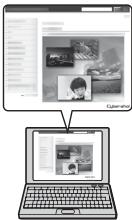
“Cyber-shot User Guide” is an on-line manual. Refer to it for in-depth instructions on the many functions of the camera.
① Access the Sony support page.
http://www.sony.net/SonyInfo/Support/
② Select your country or region.
③ Search for the model name of your camera within the support page.
- Check the model name on the bottom of your camera.
Checking the supplied items
The number in parentheses indicates the number of pieces.
- Camera (1)
- Rechargeable battery pack NP-BN (1)
(This rechargeable battery pack cannot be used with Cyber-shot that are supplied with the NP-BN1 battery pack.)
• Dedicated USB cable (1) (Sony Corporation 1-834-331-) - AC Adaptor AC-UB10/UB10B/UB10C/UB10D (1)
- Power cord (mains lead) (not supplied in the USA and Canada) (1)
- Wrist strap (1)
- Instruction Manual (this manual) (1)
Owner's Record
The model and serial numbers are located on the bottom. Record the serial number in the space provided below. Refer to these numbers whenever you call your Sony dealer regarding this product.
Model No. DSC-W710
Serial No. ____
Model No. AC-UB10/AC-UB10B/AC-UB10C/AC-UB10D
Serial No. ____
GB
WARNING
To reduce fire or shock hazard, do not expose the unit to rain or moisture.
IMPORTANT SAFETY INSTRUCTIONS -SAVE THESE INSTRUCTIONS DANGER TO REDUCE THE RISK OF FIRE OR ELECTRIC SHOCK, CAREFULLY FOLLOW THESE INSTRUCTIONS
If the shape of the plug does not fit the power outlet, use an attachment plug adaptor of the proper configuration for the power outlet.
CAUTION
Battery pack
If the battery pack is mishandled, the battery pack can burst, cause a fire or even chemical burns. Observe the following cautions.
- Do not disassemble.
- Do not crush and do not expose the battery pack to any shock or force such as hammering, dropping or stepping on it.
- Do not short circuit and do not allow metal objects to come into contact with the battery terminals.
- Do not expose to high temperature above 60^ (140°F) such as in direct sunlight or in a car parked in the sun.
- Do not incinerate or dispose of in fire.
-
Do not handle damaged or leaking lithium ion batteries.
-
Be sure to charge the battery pack using a genuine Sony battery charger or a device that can charge the battery pack.
- Keep the battery pack out of the reach of small children.
- Keep the battery pack dry.
- Replace only with the same or equivalent type recommended by Sony.
- Dispose of used battery packs promptly as described in the instructions.
AC Adaptor
Use the nearby wall outlet (wall socket) when using the AC Adaptor. Disconnect the AC Adaptor from the wall outlet (wall socket) immediately if any malfunction occurs while using the apparatus.
For Customers in the U.S.A. and Canada
I RECYCLING LITHIUM-ION BATTERIES
Lithium-Ion batteries are recyclable.
You can help preserve our environment by returning your used rechargeable batteries to the collection and recycling location nearest you.
For more information regarding recycling of rechargeable batteries, call toll free
1-800-822-8837, or visit http://www.rbrc.org/

Caution: Do not handle damaged or leaking Lithium-Ion batteries.
Battery pack
This device complies with Part 15 of the FCC Rules. Operation is subject to the following two conditions:
(1) This device may not cause harmful interference, and (2) this device must accept any interference received, including interference that may cause undesired operation.
This Class B digital apparatus complies with Canadian ICES-003.
For Customers in the U.S.A.
UL is an internationally recognized safety organization. The UL Mark on the product means it has been UL Listed.
GB
If you have any questions about this product, you may call: Sony Customer Information Center 1-800-222-SONY (7669) The number below is for the FCC related matters only.
Regulatory Information
Declaration of Conformity
Trade Name: SONY
Model No.: DSC-W710
Responsible Party: Sony Electronics Inc.
Address: 16530 Via Esprillo,
San Diego, CA 92127 U.S.A.
Telephone No.: 858-942-2230
This device complies with Part15 of the FCC Rules. Operation is subject to the following two conditions: (1) This device may not cause harmful interference, and (2) this device must accept any interference received, including interference that may cause undesired operation.
CAUTION
You are cautioned that any changes or modifications not expressly approved in this manual could void your authority to operate this equipment.
I Note:
This equipment has been tested and found to comply with the limits for a Class B digital device, pursuant to Part 15 of the FCC Rules.
These limits are designed to provide reasonable protection against harmful interference in a residential installation. This equipment generates, uses, and can radiate radio frequency energy and, if not installed and used in accordance with the instructions, may cause harmful interference to radio communications. However, there is no guarantee that interference will not occur in a particular installation. If this equipment does cause harmful interference to radio or television reception, which can be determined by turning the equipment off and on, the user is encouraged to try to correct the interference by one or more of the following measures:
– Reorient or relocate the receiving antenna.
– Increase the separation between the equipment and receiver.
- Connect the equipment into an outlet on a circuit different from that to which the receiver is connected.
- Consult the dealer or an experienced radio/TV technician for help.
The supplied interface cable must be used with the equipment in order to comply with the limits for a digital device pursuant to Subpart B of Part 15 of FCC Rules.
For Customers in Europe
Notice for the customers in the countries applying EU Directives
This product has been manufactured by or on behalf of Sony Corporation, 1-7-1 Konan Minato-ku Tokyo, 108-0075 Japan. Inquiries related to product compliance based on European Union legislation shall be addressed to the authorized representative, Sony Deutschland GmbH, Hedelfinger Strasse 61, 70327 Stuttgart, Germany. For any service or guarantee matters, please refer to the addresses provided in the separate service or guarantee documents.
This product has been tested and found compliant with the limits set out in the EMC regulation for using connection cables shorter than 3 meters (9.8 feet).
Attention
The electromagnetic fields at the specific frequencies may influence the picture and sound of this unit.
Notice
If static electricity or electromagnetism causes data transfer to discontinue midway (fail), restart the application or disconnect and connect the communication cable (USB, etc.) again.
Disposal of Old Electrical & Electronic Equipment (Applicable in the European Union and other European countries with separate collection systems)
natural_image
Symbol of a trash bin crossed out by two crossed lines, with no text or numbers present.This symbol on the product or on its packaging indicates that this product shall not be treated as household waste. Instead it shall be handed over to the applicable collection point for the recycling of electrical and electronic equipment. By ensuring this product is disposed of correctly, you will help prevent potential negative consequences for the environment and human health, which could otherwise be caused by inappropriate waste handling of this product. The recycling of materials will help to conserve natural resources. For more detailed information about recycling of this product, please contact your local Civic Office, your household waste disposal service or the shop where you purchased the product.
Disposal of waste batteries (applicable in the European Union and other European countries with separate collection systems)

natural_image
Simple line drawing of a trash bin with two crossed lines indicating no waste or prohibition (no text or symbols)This symbol on the battery or on the packaging indicates that the battery provided with this product shall not be treated as household waste.
On certain batteries this symbol might be used in combination with a chemical symbol. The chemical symbols for mercury (Hg) or lead (Pb) are added if the battery contains more than 0.0005% mercury or 0.004% lead. By ensuring these batteries are disposed of correctly, you will help prevent
GB
potentially negative consequences for the environment and human health which could otherwise be caused by inappropriate waste handling of the battery. The recycling of the materials will help to conserve natural resources.
In case of products that for safety, performance or data integrity reasons require a permanent connection with an incorporated battery, this battery should be replaced by qualified service staff only. To ensure that the battery will be treated properly, hand over the product at end-of-life to the applicable collection point for the recycling of electrical and electronic equipment.
For all other batteries, please view the section on how to remove the battery from the product safely.
Hand the battery over to the applicable collection point for the recycling of waste batteries.
For more detailed information about recycling of this product or battery, please contact your local Civic Office, your household waste disposal service or the shop where you purchased the product.
Notice for customers in the United Kingdom
A moulded plug complying with BS 1363 is fitted to this equipment for your safety and convenience.
Should the fuse in the plug supplied need to be replaced, a fuse of the same rating as the supplied one and approved by ASTA or BSI to BS 1362, (i.e., marked with an ◆ or ▽ mark) must be used.
If the plug supplied with this equipment has a detachable fuse cover, be sure to attach the fuse cover after you change the fuse. Never use the plug without the fuse cover. If you should lose the fuse cover, please contact your nearest Sony service station.
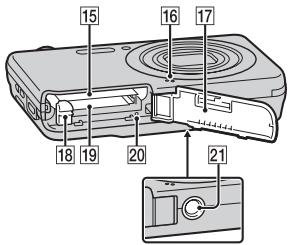
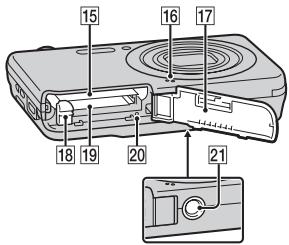
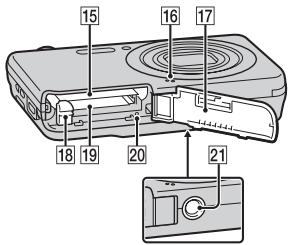
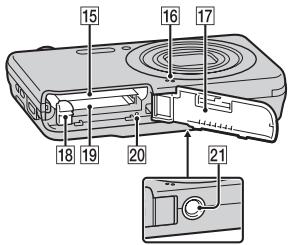
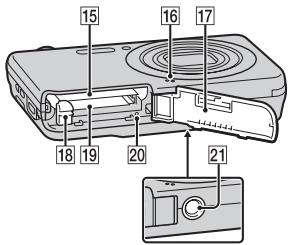
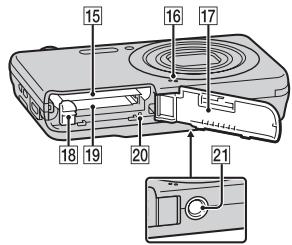
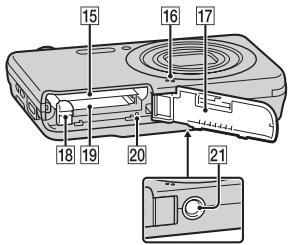
Identifying parts
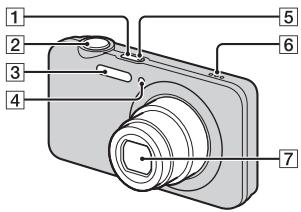
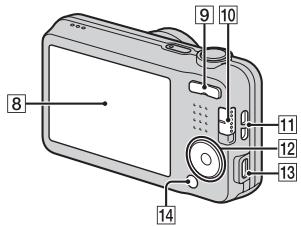
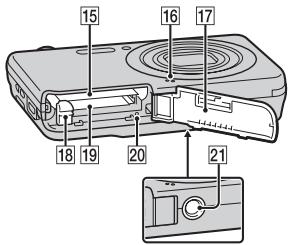
1 ON/OFF (Power) button
2 Shutter button
3 Flash
4 Self-timer lamp/Smile Shutter lamp/AF illuminator
5 Charge lamp
6 Speaker
7 Lens
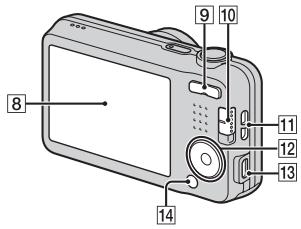
8 LCD screen
9 W/T (zoom) button
10 Mode switch
(Still Image)/☐ (Sweep Panorama)/☐ (Movie)
11 Hook for wrist strap
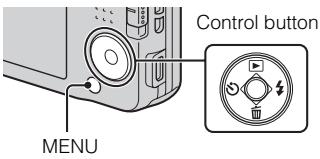
12 Control button
MENU on: ▲/▼/◄/►
MENU off: ▶ (Playback)/
(Delete)/ (Self-Timer)/ (Flash)
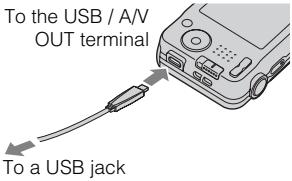
13 USB / A/V OUT terminal
14 MENU button
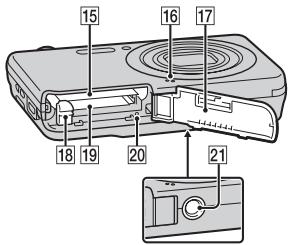
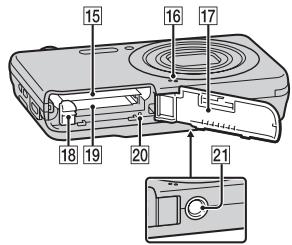
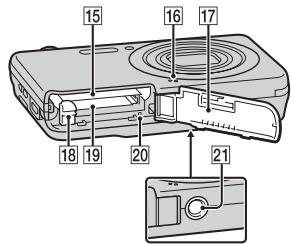
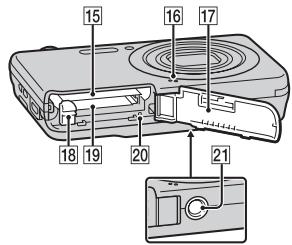
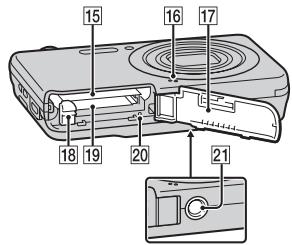
15 Battery insertion slot
16 Microphone
17 Battery/Memory card cover
18 Battery eject lever
19 Memory card slot
20 Access lamp
21 Tripod socket hole
- Use a tripod with a screw less than 5.5 mm (7/32 inches) long. Otherwise, you cannot firmly secure the camera, and damage to the camera may occur.
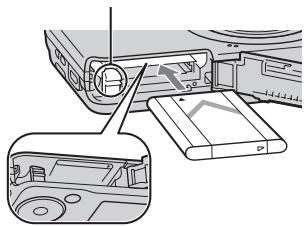
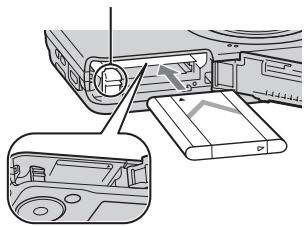
Inserting the battery pack
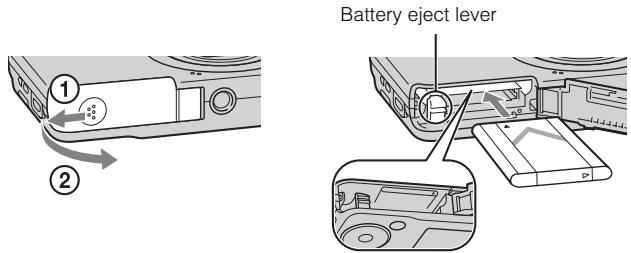
GB
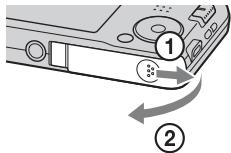
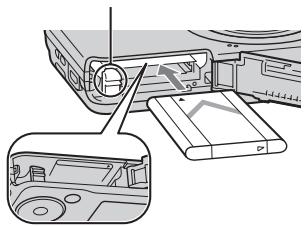
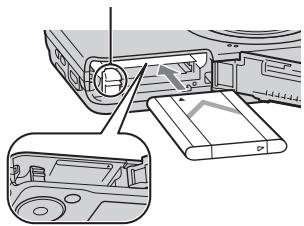
1 Open the cover.
2 Insert the battery pack.
- While pressing the battery eject lever, insert the battery pack as illustrated. Make sure that the battery eject lever locks after insertion.
- Closing the cover with the battery inserted incorrectly may damage the camera.
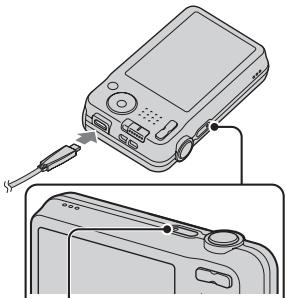
Charging the battery pack
For customers in the USA and Canada
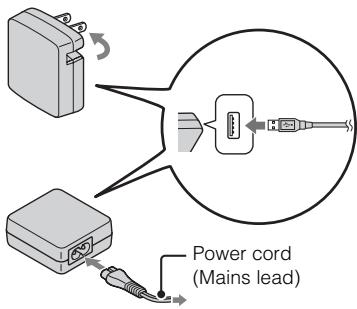
For customers in countries/regions other than the USA and Canada
natural_image
Diagram showing a digital camera connected to a cable, with a close-up of its cable (no text or symbols present)Charge lamp
Lit: Charging
Off: Charging finished
Flashing:
Charging error or charging paused temporarily because the camera is not within the proper temperature range
1 Connect the camera to the AC Adaptor (supplied), using the dedicated USB cable (supplied).
2 Connect the AC Adaptor to the wall outlet (wall socket).
The Charge lamp lights orange, and charging starts.
- Turn off the camera while charging the battery.
- You can charge the battery pack even when it is partially charged.
- When the Charge lamp flashes and charging is not finished, remove and re-insert the battery pack.
Notes
- If the Charge lamp on the camera flashes when the AC Adaptor is connected to the wall outlet (wall socket), this indicates that charging is temporarily stopped because the temperature is outside the recommended range. When the temperature gets back within the appropriate range, the charging resumes. We recommend charging the battery pack in an ambient temperature of between 10^ to 30^ ( 50^ to 86^ ).
- The battery pack may not be effectively charged if the terminal section of the battery is dirty. In this case, wipe any dust off lightly using a soft cloth or a cotton swab to clean the terminal section of the battery.
- Connect the AC Adaptor (supplied) to the nearest wall outlet (wall socket). If malfunctions occur while using the AC Adaptor, disconnect the plug from the wall outlet (wall socket) immediately to disconnect from the power source.
- When charging is finished, disconnect the AC Adaptor from the wall outlet (wall socket).
- Be sure to use only genuine Sony brand battery packs, dedicated USB cable (supplied) and AC Adaptor (supplied).
Charging time (Full charge)
The charging time is approximately 115 min. using the AC Adaptor (supplied).
Notes
- The above charging time applies when charging a fully depleted battery pack at a temperature of 25^ (77°F). Charging may take longer depending on conditions of use and circumstances.
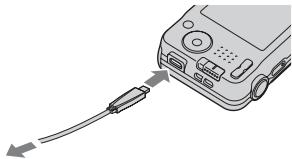
Charging by connecting to a computer
The battery pack can be charged by connecting the camera to a computer using the dedicated USB cable.
natural_image
Illustration of a device with a cable and connector, no text or symbols presentTo a USB jack
Notes
- Note the following points when charging via a computer:
- If the camera is connected to a laptop computer that is not connected to a power source, the laptop battery level decreases. Do not charge for an extended period of time.
- Do not turn on/off or restart the computer, or wake the computer to resume from sleep mode when a USB connection has been established between the computer and the camera. The camera may cause a malfunction. Before turning on/off, or restarting the computer or waking the computer from sleep mode, disconnect the camera and the computer.
- No guarantees are made for charging using a custom-built computer or a modified computer.
Battery life and number of images that can be recorded and played back
| Battery life | Number of images | |
| Shooting (still images) | Approx. 110 min. | Approx. 220 images |
| Actual shooting (movies) | Approx. 50 min. | — |
| Continuous shooting (movies) | Approx. 110 min. | — |
| Viewing (still images) | Approx. 175 min. | Approx. 3500 images |
Notes
- The above number of images applies when the battery pack is fully charged. The number of images may decrease depending on the conditions of use.
- The number of images that can be recorded is for shooting under the following conditions:
- Using Sony "Memory Stick PRO Duo" (Mark2) media (sold separately)
- The battery pack is used at an ambient temperature of 25^ (77°F).
- The number for “Shooting (still images)” is based on the CIPA standard, and is for shooting under the following conditions:
(CIPA: Camera & Imaging Products Association)
– [SteadyShot] is set to [Off].
– [Disp. Resolution] is set to [Standard].
– Shooting once every 30 seconds.
- The zoom is switched alternately between the W and T ends.
– The flash strobes once every two times.
– The power turns on and off once every ten times.
- The battery life for movies applies shooting under the following conditions:
– Recording mode: 1280×720
- When continuous shooting ends because of set limits (29 minutes), press the shutter button again to continue shooting. Shooting functions such as zoom will not operate.
– The above “Actual shooting (movies)” indicates the approximate shooting time as a guideline when you repeatedly perform shooting, zooming, standby for shooting, and turning on and off the camera.
Supplying power
The camera can be supplied with power from the wall outlet (wall socket) by connecting to the AC Adaptor (supplied), using the dedicated USB cable (supplied).
You can import images to a computer without worrying about draining the battery pack by connecting the camera to a computer using the dedicated USB cable.
In addition, you can use the AC Adaptor AC-UD10 (sold separately) or AC-UD11 (sold separately) to supply power when shooting.
Notes
- Power cannot be supplied when the battery pack is not inserted in the camera.
- When the camera is connected directly to a computer or to a power outlet using the supplied AC Adaptor, power supply is available only in playback mode. If the camera is in shooting mode or while you are changing the settings of the camera, power is not supplied even if you make a USB connection using the dedicated USB cable.
- If you connect the camera and a computer using the dedicated USB cable while the camera is in playback mode, the display on the camera will change from the playback screen to the USB connection screen. Press ▶ (Playback) on the control button to switch to the playback screen.
- The AC Adaptor AC-UD11 (sold separately) may not be available in some countries/regions.
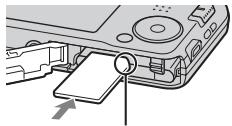
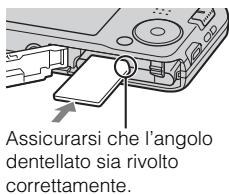
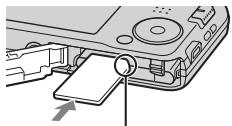
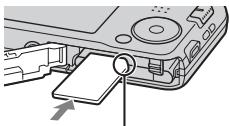
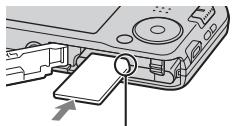
Inserting a memory card (sold separately)
natural_image
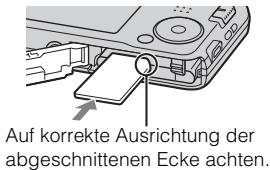
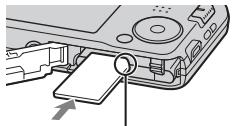
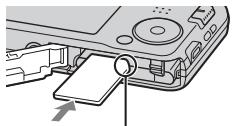
Diagram of a device's internal components with a magnified view showing a pin (no text or symbols present)Ensure the notched corner faces correctly.
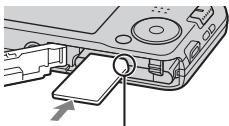
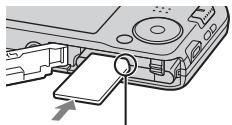
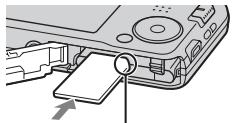
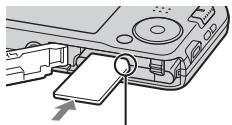
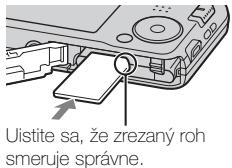
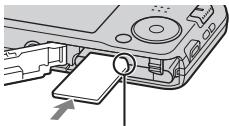
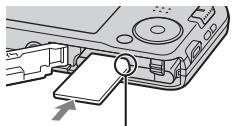
1 Open the cover.
2 Insert the memory card (sold separately).
- With the notched corner facing as illustrated, insert the memory card until it clicks into place.
3 Close the cover.
■ Memory cards that can be used
| Memory card | For still images | For movies | |
| A | Memory Stick PRO Duo | √ | √ (Mark2 only) |
| Memory Stick PRO-HG Duo | √ | √ | |
| Memory Stick Duo | √ | — | |
| B | Memory Stick Micro (M2) | √ | √ (Mark2 only) |
| C | SD memory card | √ | √ (Class 4 or faster) |
| SDHC memory card | √ | √ (Class 4 or faster) | |
| D | microSD memory card | √ | √ (Class 4 or faster) |
| microSDHC memory card | √ | √ (Class 4 or faster) |
- In this manual, the products in the table are collectively referred to as follows:
A: "Memory Stick Duo" media
B: "Memory Stick Micro" media
C: SD card
D: microSD memory card
Notes
- To use a “Memory Stick Micro” media or microSD memory card with the camera, be sure to insert it into a dedicated adaptor first.
To remove the memory card/battery pack
Memory card: Push the memory card in once to eject the memory card.
Battery pack: Slide the battery eject lever. Be sure not to drop the battery pack.
Notes
- Never remove the memory card/battery pack when the access lamp (page 8) is lit. This may cause damage to data in the memory card/internal memory.
Setting the clock
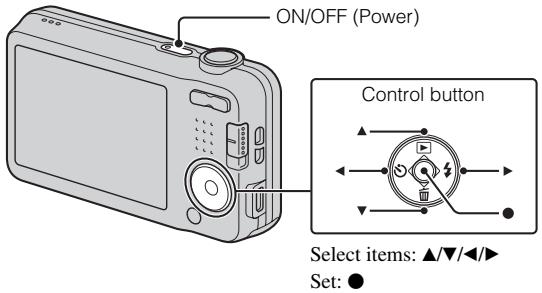
1 Press the ON/OFF (Power) button.
Date & Time setting is displayed when you turn on the camera for the first time.
- It may take time for the power to turn on and allow operation.
2 Select a desired language.
3 Select a desired geographic location by following the on-screen instructions, then press ● on the control button.
4 Set [Date & Time Format], [Summer Time] and [Date & Time], then select [OK] → [OK].
- Midnight is indicated as 12:00 AM, and noon as 12:00 PM.
5 Follow the instructions on the screen.
- If you set [Disp. Resolution] to [High], the battery charge may be depleted faster.
Shooting still images/movies
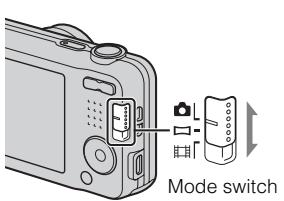
: Still image
: Sweep Panorama
Movie
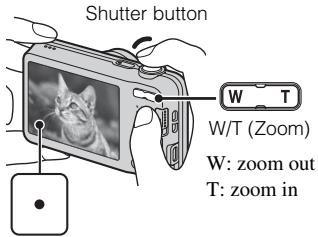
Shooting still images
1 Press the shutter button halfway down to focus.
When the image is in focus, a beep sounds and the ● indicator lights.
2 Press the shutter button fully down to shoot an image.
Shooting movies
1 Press the shutter button fully down to start recording.
- Use the zoom button to change the zoom scale.
2 Press the shutter button fully down again to stop recording.
Notes
- When using the zoom function while shooting a movie, the sound of the lens operating will be recorded.
- The panoramic shooting range may be reduced, depending on the subject or the way it is shot. Therefore even when [360^] is set for panoramic shooting, the recorded image may be less than 360 degrees.
- Continuous shooting is possible for approximately 29 minutes at one time at the camera's default settings and when the temperature is approximately 25^ (77^) . When movie recording is finished, you can restart recording by pressing the shutter button again. Recording may stop to protect the camera depending on the ambient temperature.
Viewing images
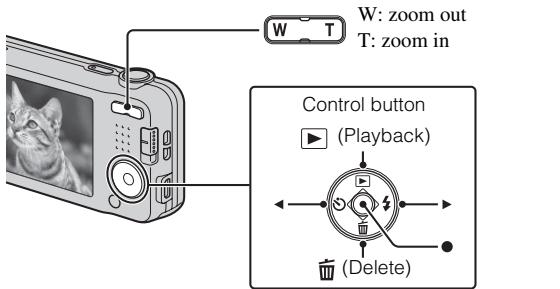
Select images: ▶ (next)/◀ (previous) Set: ●
1 Press ▶ (Playback) on the control button.
- The last image shot is displayed.
■ Selecting next/previous image
Select an image by pressing ▶ (next)/◀ (previous) on the control button. Press ● in the center of the control button to view movies.
■ Deleting an image
① Press ☑ (Delete) on the control button.
② Select [This Image] with ▲ on the control button, then press ●.
■ Returning to shooting images
Press the shutter button halfway down.
Introduction of other functions
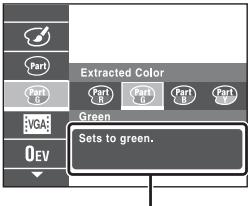
Other functions used when shooting or playing back can be operated using the control button or MENU button on the camera. This camera is equipped with a Function Guide that allows you to easily select from the functions. While displaying the guide, you can use various functions.
Function Guide
Control button
▶ (Playback): Switches the camera to playback mode.
(Delete): Allows you to delete images.
(Self-Timer): Allows you to use the self-timer.
(Flash): Allows you to select a flash mode for still images.
Center button (Tracking focus): The camera tracks the subject and adjusts focus automatically even when the subject is moving.
Menu Items
Shooting
| REC Mode | Select still image recording mode. |
| Movie shooting scene | Select movie recording mode. |
| Panorama Shooting Scene | Select recording mode when shooting panoramic images. |
| Scene Selection | Select pre-set settings to match various scene conditions. |
| Picture Effect | Shoot a still image with an original texture according to the desired effect. |
| Easy Mode | Shoot still images using minimal functions. |
| Color hue | When [Toy camera] is selected in Picture Effect, sets the color hue. |
| Extracted Color | When [Partial Color] is selected in Picture Effect, selects the color to extract. |
| Soft Skin Effect | Set the Soft Skin Effect and the effect level. |
| Still Image Size/ Panorama Image Size/Movie Size | Select the image size for still images, panoramic images or movie files. |
| Shooting Direction | Set the direction to pan the camera when shooting Sweep Panorama images. |
| SteadyShot | Select the anti-blur mode. |
| Exposure Compensation | Adjust the exposure manually. |
| ISO | Adjust the luminous sensitivity. |
| White Balance | Adjust color tones of an image. |
| Focus | Select the focus method. |
| Metering Mode | Select the metering mode that sets which part of the subject to measure to determine the exposure. |
| Cont. Shooting Settings | Select single-image mode or burst mode. |
| Smile Shutter | Set to automatically release the shutter when a smile is detected. |
| Smile Detection Sensitivity | Set the Smile Shutter function sensitivity for detecting smiles. |
| Face Detection | Select to detect faces and adjust various settings automatically. |
| DRO | Set DRO function to correct the brightness and contrast and improve the image quality. |
Viewing
| Easy Mode | Increase the text size on the screen for ease of use. |
| Beauty Effect | Retouch a face on a still image. |
| Retouch | Retouch an image using various effects. |
| Delete | Delete an image. |
| Slideshow | Select a method of continuous playback. |
| Protect | Protect the images. |
| Print (DPOF) | Add a print order mark to a still image. |
| Rotate | Rotate a still image. |

Setting items
If you press the MENU button while shooting or during playback,
☑ (Settings) is provided as a final selection. You can change the default settings on the ☑ (Settings) screen.
| [IMAGE]Shooting Settings | AF Illuminator/Grid Line/Disp. Resolution/Digital Zoom/Red Eye Reduction/Write Date |
| [IMAGE]Main Settings | Beep/Volume/Panel Brightness/Language Setting/Display color/Initialize/Display Setting/Function Guide/Video Out/USB Connect Setting/USB Power Supply/LUN Setting/Power Save |
| [IMAGE]Memory Card Tool* | Format/Create REC.Folder/Change REC.Folder/Delete REC.Folder/Copy/File Number |
| [IMAGE]Clock Settings | Area Setting/Date & Time Setting |
* If a memory card is not inserted, (Internal Memory Tool) will be displayed and only [Format] can be selected.
Features of "PlayMemories Home"
The software “PlayMemories Home” allows you to import still images and movies to your computer and use them.
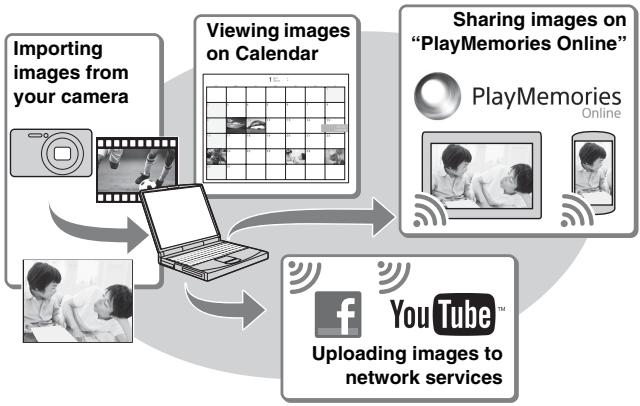
flowchart
graph TD
    A["Importing images from your camera"] --> B["Viewing images on Calendar"]
    B --> C["Sharing images on "PlayMemories Online""]
    C --> D["You Tube"]
    D --> E["Uploading images to network services"]
    A --> F["Facebook icon"]
    B --> G["PlayMemories Online icon"]
    C --> H["PlayMemories Online icon"]
    D --> I["PlayMemories Online icon"]

Downloading “PlayMemories Home” (for Windows only)
You can download “PlayMemories Home” from the following URL: www.sony.net/pm
Notes
- An Internet connection is required to install “PlayMemories Home”.
- An Internet connection is required to use “PlayMemories Online” or other network services. “PlayMemories Online” or other network services may not be available in some countries or regions.
- “PlayMemories Home” is not compatible with Macs. Use the applications that are installed on your Mac. For details, visit the following URL: http://www.sony.co.jp/imsoft/Mac/
1 Using the Internet browser on your computer, go to the following URL, then click [Install] → [Run].
www.sony.net/pm
2 Follow the instructions on the screen to complete the installation.
- When the message to connect the camera to a computer is displayed, connect the camera and computer using the dedicated USB cable (supplied).
■ Viewing “PlayMemories Home Help Guide”
For details on how to use “PlayMemories Home”, refer to the “PlayMemories Home Help Guide”.
1 Double-click the [PlayMemories Home Help Guide] icon on the desktop.
- To access the “PlayMemories Home Help Guide” from the start menu: Click [Start] → [All Programs] → [PlayMemories Home] → [PlayMemories Home Help Guide].
- For details on “PlayMemories Home”, you can also see the “Cyber-shot User Guide” (page 2) or the following PlayMemories Home support page (English only):
http://www.sony.co.jp/pmh-se/
Number of still images and recordable time of movies
The number of still images and recordable time may vary depending on the shooting conditions and the memory card.
Still images
(Units: Images)
| Size\Capacity | Internal memory | Memory card |
| Approx. 28 MB | 2 GB | |
| 16M | 4 | 280 |
| VGA | 170 | 11000 |
| 16:9(12M) | 5 | 360 |
Movies
The table below shows the approximate maximum recording times. These are the total times for all movie files. Continuous shooting is possible for approximately 29 minutes (limited by product specifications). For [1280×720] size movies, continuous shooting is possible for approximately 10 minutes (limited by 2 GB file size).
(h (hour), m (minute), s (second))
| Size\Capacity | Internal memory | Memory card |
| Approx. 28 MB | 2 GB | |
| 1280×720 | — | 8 m |
| VGA | 25 s | 25 m |
| QVGA | 1 m | 1 h 15 m |
Notes on using the camera
On use and care
Avoid rough handling, disassembling, modifying, physical shock, or impact such as hammering, dropping, or stepping on the product. Be particularly careful of the lens.
GB
Notes on recording/playback
- Before you start recording, make a trial recording to make sure that the camera is working correctly.
- The camera is neither dust-proof, nor splash-proof, nor water-proof.
- Avoid exposing the camera to water. If water enters inside the camera, a malfunction may occur. In some cases, the camera cannot be repaired.
- Do not aim the camera at the sun or other bright light. It may cause the malfunction of the camera.
- If moisture condensation occurs, remove it before using the camera.
- Do not shake or strike the camera. It may cause a malfunction and you may not be able to record images. Furthermore, the recording media may become unusable or image data may be damaged.
Do not use/store the camera in the following places
- In an extremely hot, cold or humid place In places such as in a car parked in the sun, the camera body may become deformed and this may cause a malfunction.
- Storing under direct sunlight or near a heater The camera body may become discolored or deformed, and this may cause a malfunction.
- In a location subject to rocking vibration
- Near a location that generates strong radio waves, emits radiation or is strongly magnetic place. Otherwise, the camera may not properly record or play back images.
- In sandy or dusty places Be careful not to let sand or dust get into the camera. This may cause the camera to malfunction, and in some cases this malfunction cannot be repaired.
On carrying
Do not sit down in a chair or other place with the camera in the back pocket of your trousers or skirt, as this may cause malfunction or damage the camera.
Notes on the screen
The screen is manufactured using extremely high-precision technology so over 99.99% of the pixels are operational for effective use. However, some tiny black and/or bright dots (white, red, blue or green) may appear on the screen. These dots are a normal result of the manufacturing process, and do not affect the recording.
On camera's temperature
Your camera and battery may get hot due to continuous use, but it is not a malfunction.
On the overheat protection
Depending on the camera and battery temperature, you may be unable to record movies or the power may turn off automatically to protect the camera.
A message will be displayed on the screen before the power turns off or you can no longer record movies. In this case, leave the power off and wait until the camera and battery temperature goes down. If you turn on the power without letting the camera and battery cool enough, the power may turn off again or you may be unable to record movies.
On charging the battery
If you charge a battery that has not been used for a long time, you may be unable to charge it to the proper capacity.
This is due to the battery characteristics, and is not a malfunction. Charge the battery again.
Warning on copyright
Television programs, films, videotapes, and other materials may be copyrighted. Unauthorized recording of such materials may be contrary to the provisions of the copyright laws.
No compensation for damaged content or recording failure
Sony cannot compensate for failure to record or loss or damage of recorded content due to a malfunction of the camera or recording media, etc.
Cleaning the camera surface
Clean the camera surface with a soft cloth slightly moistened with water, then wipe the surface with a dry cloth. To prevent damage to the finish or casing:
- Do not expose the camera to chemical products such as thinner, benzine, alcohol, disposable cloths, insect repellent, sunscreen or insecticide.
Maintaining the LCD monitor
- Hand cream or moisturizer left on the screen may dissolve its coating. If you get any on the screen, wipe it off immediately.
- Wiping forcefully with tissue paper or other materials can damage the coating.
- If fingerprints or debris are stuck to the screen of the LCD monitor, we recommend that you gently remove any debris and then wipe the screen clean with a soft cloth.
Specifications
Camera
[System]
Image device: 7.75 mm (1/2.3 type) CCD, Primary color filter
Total pixel: Approx. 16.4 Megapixels
Effective pixel: Approx. 16.1 Megapixels
Lens: 5× zoom lens f = 5 mm - 25 mm (28 mm - 140 mm (35 mm film equivalent)) F3.2 (W) - F6.5 (T) While shooting movies (16:9): 30.5 mm - 152.5 mm While shooting movies (4:3): 28 mm - 140 mm
SteadyShot: Electronic
Exposure control: Automatic exposure, Scene Selection
White balance: Automatic, Daylight, Cloudy, Fluorescent 1/2/3, Incandescent, Flash
Burst shooting (when shooting with the largest pixel number): Approx. 1.0 images/second (up to 100 images)
File format: Still images: JPEG (DCF, Exif, MPF Baseline) compliant, DPOF compatible Movies: AVI (Motion JPEG)
Recording media: Internal Memory (Approx. 28 MB), “Memory Stick Duo” media, “Memory Stick Micro” media, SD cards, microSD memory cards
Flash: Flash range (ISO sensitivity (Recommended Exposure Index) set to Auto): Approx. 0.5 m to 2.7 m (1 ft. 7 3/4 inches to 8 ft. 10 1/8 inches) (W) Approx. 0.5 m to 1.2 m (1 ft. 7 3/4 inches to 3 ft. 11 inches) (T)
GB
[Input and Output connectors]
USB / A/V OUT jack: Video output Audio output USB communication
USB communication: Hi-Speed USB (USB 2.0)
[Screen]
LCD screen: 6.7 cm (2.7 type) TFT drive Total number of dots: 230 400 dots
[Power, general]
Power: Rechargeable battery pack NP-BN, 3.6 V AC Adaptor AC-UB10/UB10B/ UB10C/UB10D, 5 V
Power consumption (during shooting): 1.1 W
Operating temperature: 0 °C to 40 °C (32 °F to 104 °F)
Storage temperature: -20 ^ to +60 ^ (-4 ^ to +140 ^)
Dimensions (CIPA compliant): 97.0 mm × 55.1 mm × 20.0 mm (3 7/8 inches × 2 1/4 inches × 13/16 inches) (W/H/D)
Mass (CIPA compliant) (including NP-BN battery pack, “Memory Stick Duo” media): Approx. 114 g (4.0 oz)
Microphone: Monaural
Speaker: Monaural
Exif Print: Compatible
PRINT Image Matching III: Compatible
AC Adaptor AC-UB10/UB10B/UB10C/UB10D
Power requirements: AC 100 V to 240 V, 50 Hz/60 Hz, 70 mA
Output voltage: DC 5 V, 0.5 A
Operating temperature: 0 °C to 40 °C (32 °F to 104 °F)
Storage temperature: -20 ^ to +60 ^ (-4 ^ to +140 ^)
Dimensions:
Approx. 50 mm × 22 mm × 54 mm (2 inches × 7/8 inches × 2 1/4 inches) (W/H/D)
Mass:
For the USA and Canada: Approx. 48 g (1.7 oz)
For countries or regions other than the USA and Canada: Approx. 43 g (1.5 oz)
Rechargeable battery pack NP-BN
Used battery: Lithium-ion battery
Maximum voltage: DC 4.2 V
Nominal voltage: DC 3.6 V
Maximum charge voltage: DC 4.2 V
Maximum charge current: 0.9 A
Capacity:
typical: 2.3 Wh (630 mAh)
minimum: 2.2 Wh (600 mAh)
Design and specifications are subject to change without notice.
Trademarks
- The following marks are trademarks of Sony Corporation.
Cyber-shot, “Cyber-shot,” “Memory Stick PRO Duo,” “Memory Stick PRO-HG Duo,” “Memory Stick Duo,” “Memory Stick Micro”
- Windows is registered trademark of Microsoft Corporation in the United States and/or other countries.
• Mac and Mac OS are registered trademarks of Apple Inc.
- SDHC logo is a trademark of SD-3C, LLC.
- Facebook and the “f” logo are trademarks or registered trademarks of Facebook, Inc.
- YouTube and the YouTube logo are trademarks or registered trademarks of Google Inc.
- In addition, system and product names used in this manual are, in general, trademarks or registered trademarks of their respective developers or manufacturers. However, the ^TM or ^® marks are not used in all cases in this manual.
Additional information on this product and answers to frequently asked questions can be found at our Customer Support Website.
http://www.sony.net/
Printed on 70% or more recycled paper using VOC (Volatile Organic Compound)-free vegetable oil based ink.
GB
Responsible : Sony Electronics Inc.
Adresse : 16530 Via Esprillo, San Diego, CA 92127 É.-U.
natural_image
Symbol of a trash bin crossed with no text or numbers, representing waste sorting or disposal (no text present)natural_image
Symbol of a trash bin crossed out by two diagonal lines (no text or numbers present)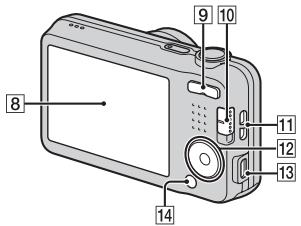
natural_image
Diagram showing a device with internal components and a close-up view of the interior panel (no text or symbols)natural_image
Diagram showing a device connected to a cable, with no visible text or symbolsTémoin de charge
Allumé : Charge
natural_image
Illustration of a handheld device with cable and connector, no text or symbols presentVers un port USB
FR
Remarques
(CIPA : Camera & Imaging Products Association)
natural_image
Diagram of a device's internal components with a magnified view showing a screen and cable (no text or symbols)(h (heures), m (minutes), s (secondes))
| Taille\Capacité | Mémoire interne | Carte mémoire |
| Environ 28 Mo | 2 Go | |
| 1280×720 | — | 8 m |
| VGA | 25 s | 25 m |
| QVGA | 1 m | 1 h 15 m |
Environ 1,0 images/seconde
(DCF, Exif, MPF Baseline),
compatibles DPOF
Films : AVI (Motion JPEG)
(Indice de lumination
Alimentation : Batterie rechargeable
NP-BN, 3,6 V
Batterie rechargeable NP-BN
natural_image
Symbol of a trash bin crossed out by two crossed lines, with no text or labels present.natural_image
Symbol of a trash bin crossed out by two crossed lines (no text or numbers present)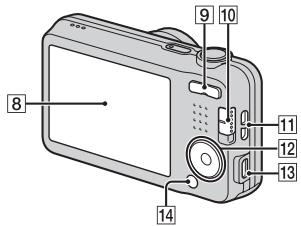
natural_image
Diagram showing a device with a close-up view of its internal components (no text or symbols visible)IT
natural_image
Diagram showing a digital camera connected to a cable, with a close-up of its cable (no text or symbols present)Spia di carica
Illuminata: Carica
Spenta: Carica terminata
Lampeggiamento:
natural_image
Illustration of a handheld electronic device with cable and connector (no text or symbols)Ad una presa USB
Note
(CIPA: Camera & Imaging Products Association)
A: "Memory Stick Duo"
B: "Memory Stick Micro"
C: Scheda SD
D: Scheda memoria microSD
Note
Circa 50 mm × 22 mm × 54 mm (L/A/P)
Peso:
Cyber-shot, “Cyber-shot”, “Memory Stick PRO Duo”, “Memory Stick PRO-HG Duo”, “Memory Stick Duo”, “Memory Stick Micro”
natural_image
Symbol of a trash bin crossed with no text or numbers, representing environmental restriction (no text present)natural_image
Symbol of a trash bin crossed out by two crossed lines (no text or numbers present)
natural_image
Diagram showing a device with a close-up view of its internal components (no text or symbols visible)ES
1 Abra la tapa.
natural_image
Diagram showing a digital camera connected to a cable, with a close-up of its cable (no text or symbols present)Lámpara de carga
Illuminada: Cargando
Apagada: La carga ha terminado
Parpadea:
natural_image
Illustration of a handheld electronic device with cable and connector (no text or symbols)A una toma USB
Notas
(CIPA: Camera & Imaging Products Association)
natural_image
Diagram of a device's internal components with a magnified view showing a paper slot and a circular component (no text or symbols)Cyber-shot, “Cyber-shot”, “Memory Stick PRO Duo”, “Memory Stick PRO-HG Duo”, “Memory Stick Duo”, “Memory Stick Micro”
natural_image
Symbol of a trash bin crossed with no text or numbers, representing waste sorting or disposal (no text present)
natural_image
Symbol of a trash bin crossed out by two diagonal lines (no text or numbers present)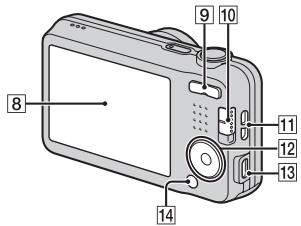
natural_image
Diagram showing a device with a close-up view of its internal components (no text or symbols visible)PT
1 Abra a tampa.
2 Insira o pack de baterias.
natural_image
Diagram showing a digital camera connected to a cable, with no visible text or symbolsLuz de Carregamento
Acesa: Carregamento
natural_image
Illustration of a handheld electronic device with cable and connector (no text or symbols)A uma tomada USB
Notas
(CIPA: Camera & Imaging Products Association)
natural_image
Diagram of a device's internal components with a magnified view showing a screen and cable (no text or symbols)Aprox. 50 mm × 22 mm × 54 mm (L/A/P)
Peso:
Cyber-shot, “Cyber-shot”, “Memory Stick PRO Duo”, “Memory Stick PRO-HG Duo”, “Memory Stick Duo”, “Memory Stick Micro”
natural_image
Symbol of a trash bin crossed with no text or numbers, representing waste sorting or disposal (no text present)natural_image
Symbol of a trash bin crossed out by two crossed lines (no text or numbers present)natural_image
Diagram showing a digital camera connected to a cable via cable to a physical device (no text or symbols present)Ladekontrolllampe
Erleuchtet: Laden
natural_image
Illustration of a handheld electronic device with cable and connector (no text or symbols)An eine USB-Buchse
Hinweise
(CIPA: Camera & Imaging Products Association)
natural_image
Symbol of a trash bin crossed out by two crossed lines (no text or numbers present)
natural_image
Symbol of a trash bin crossed out by two diagonal lines (no text or numbers present)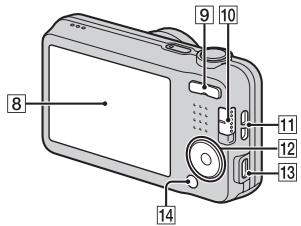
natural_image
Diagram showing a digital camera connected to a cable, with a close-up of its cable (no text or symbols present)Oplaadlampje
Brandt: opladen
Uit: opladen klaar
Knippert:
natural_image
Illustration of a handheld electronic device with cable and connector (no text or symbols)(CIPA: Camera & Imaging Products Association)
natural_image
Diagram of a device's internal components with a magnified view showing a paper slot (no text or symbols)Cyber-shot, "Cyber-shot", "Memory Stick PRO Duo", "Memory Stick PRO-HG Duo", "Memory Stick Duo", "Memory Stick Micro"
natural_image
Symbol of a trash bin crossed out by two diagonal lines (no text or numbers present)
natural_image
Symbol of a trash bin crossed out by two diagonal lines (no text or numbers present)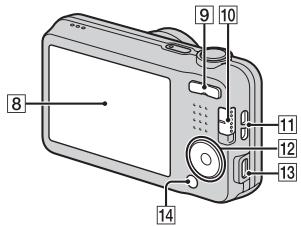
natural_image
Diagram showing a device with a cable being inserted into a box, with an inset close-up of the interior panel (no text or symbols visible)1 Otwórz osłone.
2 Włóż akumulator.
natural_image
Diagram showing a digital camera connected to a cable via a cable connector, with an additional close-up view of the camera's cable (no text or symbols present)Lampka ładowania
natural_image
Illustration of a device with a cable and connector, showing no text or symbolsDo przyłącza USB
Uwagi
(CIPA: Camera & Imaging Products Association)
natural_image
Diagram of a device's internal components with a magnified view showing a paper slot and a pointer (no text or symbols)Sony Europe Limited, The Heights, Brooklands, Weybridge, Surrey, KT130XW, United Kingdom
PL
natural_image
Symbol of a trash bin crossed out by two crossed lines, with no text or numbers present.natural_image
Symbol of a trash bin crossed out by two diagonal lines (no text or numbers present)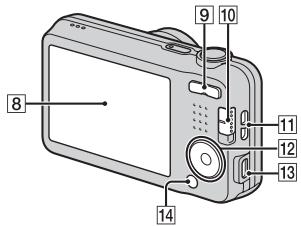
natural_image
Diagram showing a device with a cable being inserted into a box, with an inset close-up of the interior panel (no text or symbols visible)1 Otevřete kryt.
natural_image
Diagram showing a digital camera connected to a cable, with a close-up of its cable (no text or symbols present)natural_image
Illustration of a device with a cable and connector, showing no text or symbolsDo konektoru USB
Poznámky
(CIPA: Camera & Imaging Products Association)
natural_image
Diagram of a device's internal components with an arrow pointing to a component (no text or symbols visible)natural_image
Symbol of a trash bin crossed with no text or numbers, representing waste sorting or disposal (no text present)natural_image
Symbol of a trash bin crossed out by two diagonal lines (no text or numbers present)natural_image
Diagram showing a digital camera connected to a cable, with no visible text or symbolsTöltés lámpa
Világít: Töltés
natural_image
Illustration of a device with a cable and connector, showing no text or symbolsUSB-aljzathoz
Megjegyzések
(CIPA: Camera & Imaging Products Association)
natural_image
Diagram of a device's internal components with a paper clip and arrow indicating motion (no text or symbols)natural_image
Symbol of a trash bin crossed with no text or numbers, representing environmental restriction (no text present)natural_image
Symbol of a trash bin crossed out by two diagonal lines (no text or numbers present)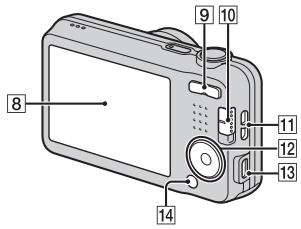
( Vymazaf)/(Self-Timer)/(Flash)
natural_image
Diagram showing a device with a cable inserted into a box, and a close-up of its internal components (no text or symbols visible)1 Otvorte kryt.
natural_image
Diagram showing a digital camera connected to a cable, with an inset close-up of its cable (no text or symbols present)Kontrolka nabijania
Svieti: Nabija sa
natural_image
Illustration of a device with a cable and connector, showing no text or symbolsDo USB konektora
Poznámky
(CIPA: Camera & Imaging Products Association)
– [SteadyShot] je nastavené na [Off].
– [Disp. Resolution] je nastavené na [Standard].
– Snímanie každých 30 sekúnd.
– Zoom sa striedavo prepína medzi koncovými hodnotami W a T.
– Blesk blysne pri každom druhom zábere.
– Napájanie sa vypína a zapína po každom desiatom zábere.
| Shooting Settings | AF Illuminator/Grid Line/Disp. Resolution/Digital Zoom/Red Eye Reduction/Write Date |
| Main Settings | Beep/Volume/Panel Brightness/Language Setting/Display color/Initialize/Display Setting/Function Guide/Video Out/USB Connect Setting/USB Power Supply/LUN Setting/Power Save |
| Memory Card Tool* | Format/Create REC.Folder/Change REC.Folder/Delete REC.Folder/Copy/File Number |
| Clock Settings | Area Setting/Date & Time Setting |
* Ak nie je vo fotoaparáte vložená pamätová karta, zobrazí sa (Internal Memory Tool), pričom bude možné zvolit len [Format].
Funkcie softvéru „PlayMemories Home“
natural_image
Symbol of a trash bin crossed out by two diagonal lines (no text or numbers present)
natural_image
Simple line drawing of a trash bin with two crossed lines indicating no waste or prohibition (no text or symbols)
Batteriutmatningsknapp
natural_image
Diagram showing a device with a close-up view of its internal components (no text or symbols visible)1 Öppna locket.
2 Sätt i batteripaketet.
natural_image
Diagram showing a digital camera connected to a cable, with a close-up view of the camera's cable (no text or symbols present)Laddningslampa
Tänd: Uppladdning
natural_image
Illustration of a handheld electronic device with cable and connector (no text or symbols)Till ett USB-uttag
Observera
(CIPA: Camera & Imaging Products Association)
natural_image
Diagram of a device's internal structure showing a paper clip inserted into a folder, with an arrow indicating direction (no text or symbols present)Cyber-shot, "Cyber-shot", "Memory Stick PRO Duo", "Memory Stick PRO-HG Duo", "Memory Stick Duo", "Memory Stick Micro"
natural_image
Symbol of a trash bin crossed out by two diagonal lines (no text or numbers present)
natural_image
Symbol of a trash bin crossed out by two diagonal lines (no text or numbers present)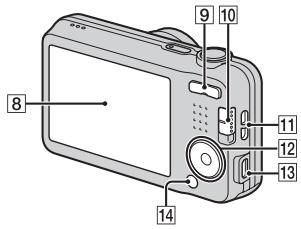
natural_image
Diagram showing a digital camera connected to a cable, with an inset close-up of its cable (no text or symbols present)Latausvalo
natural_image
Illustration of a handheld electronic device with an attached cable and indicator lights (no text or symbols)USB-liittimeen
Huomautuksia
(CIPA: Camera & Imaging Products Association)
natural_image
Diagram of a device's internal components with an arrow pointing to a component (no text or symbols visible)Cyber-shot, "Cyber-shot", "Memory Stick PRO Duo", "Memory Stick PRO-HG Duo", "Memory Stick Duo", "Memory Stick Micro"
natural_image
Symbol of a trash bin crossed out by two diagonal lines (no text or numbers present)
natural_image
Symbol of a trash bin crossed with no text or numbers, representing waste sorting or disposal (no text present)Dette symbolet på batteriet eller på forpakningen betyr at batteriet ikke skal behandles som vanlig husholdningsavfall.
① ON/OFF-knapp (strømbryter)
2 Lukkerknapp
3 Blits
4 Selvutløserlampe/Smilutløserlampe/AF-lys
5 Ladelampe
6 Høyttaler
7 Linse
8 LCD-skjerm
9 W/T (Zoomeknapp)
10 Modusbryter
(Stillbilde)/
(Panoramafotografering)/
Film
11 Krok for håndleddsrem
12 Kontrollknapp
MENU på: ▲/▼/◄/►
natural_image
Diagram showing a digital camera connected to a cable, with an inset close-up of its cable (no text or symbols present)Ladelampe
Tent: Lading pågår
natural_image
Illustration of a device with a cable and connector, showing no text or symbolsTil en USB-kontakt
Merknader
(CIPA: Camera & Imaging Products Association)
natural_image
Diagram of a device's internal components with a magnified inset showing a paper slot (no text or symbols)Vise "PlayMemories Home Help Guide"
(h (time), m (minutt), s (sekund))
| Størrelse\Kapasitet | Internminne | Minnekort |
| Ca. 28 MB | 2 GB | |
| 1280×720 | — | 8 m |
| VGA | 25 s | 25 m |
| QVGA | 1 m | 1 h 15 m |
NO
Om bruk av kameraet
Om bruk og stell
natural_image
Symbol of a trash bin crossed out by two diagonal lines (no text or numbers present)
natural_image
Symbol of a trash bin crossed out by two crossed lines (no text or numbers present)
natural_image
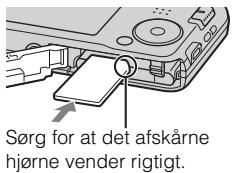
Diagram of a device with internal components and a close-up view of a device casing (no text or symbols)1 Åbn dækslet.
2 Indsæt batteriet.
natural_image
Illustration of a handheld electronic device with cable and connector (no text or symbols)Til et USB-jackstik
Bemærkninger
(CIPA: Camera & Imaging Products Association)
»Korisnički priručnik za Cyber-shot« je online priručnik. Konzultirajte ga za detaljne upute o mnogim funkcijama fotoaparata.
① Pristupite stranici za Sony podršku. http://www.sony.net/SonyInfo/Support/
② Odaberite svoju zemlju ili regiju.
③ Potražite naziv modela svog fotoaparata na stranici podrške.
- Naziv modela provjerite na donjem dijelu fotoaparata.
natural_image
Symbol of a trash bin crossed with no text or numbers, representing waste sorting or disposal (no text present)natural_image
Symbol of a trash bin crossed out by two diagonal lines (no text or numbers present)Ova oznaka na bateriji ili na ambalaži označava da se baterija ne smije zbrinjavati kao ostali kućni otpad.
Na nekim baterijama se uz ovaj simbol može nalaziti kemijski simbol. Kemijski simboli za živu (Hg) ili olovo (Pb) dodaju se ako baterija sadrži više od 0,0005% žive ili 0,004% olova.
① Tipka ON/OFF (napajanje)
2 Okidač
3 Bljeskalica
4 Svjetlo samookidača/indikator snimanja osmijeha/AF svjetlo
5 Svjetlo punjenja
6 Zvučnik
7 Objektiv
8 LCD zaslon
9 tipka zuma W/T
10 Mjenjač moda
(Fotografija)/
(Panoramsko snimanje)/
(Videozapis)
Polugica za vađenje baterije
natural_image
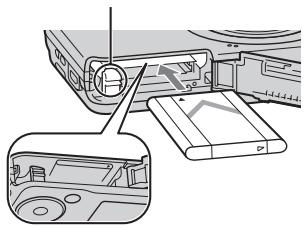
Diagram showing a device with a cable inserted into a box, and a close-up of its internal components (no text or symbols visible)1 Otvorite poklopac.
2 Umetnite baterijsku jedinicu.
- Dok pritišćete polugu za vađenje baterije, umetnite baterijsku jedinicu kako je prikazano. Osigurajte da se poluga za vađenje baterije nakon umetanja zaključa.
- Zatvaranjem poklopca kad je baterija nepravilno umetnuta možete oštetiti fotoaparat.
HR
Punjenje baterijske jedinice
natural_image
Diagram showing a digital camera connected to a cable via a cable connector, with an additional close-up view of the camera's cable (no text or symbols present)Svjetlo punjenja
Svijetli: Punjenje
Ugašeno: Punjenje dovršeno
Trepće:
Pogreška punjenja ili je punjenje privremeno pauzirano jer se fotoaparat ne nalazi na temperaturi odgovarajućeg raspona
1 Spojite fotoaparat na AC ispravljač (isporučeno) predviđenim USB kabelom (isporučeno).
2 Spojite AC ispravljač u zidnu utičnicu.
natural_image
Illustration of a device with a cable and connector, no text or symbols presentNa USB utičnicu
Napomene
(CIPA: Camera & Imaging Products Association)
– [SteadyShot] je podešen na [Isključeno].
– [Rezolucija prikaza] je podešen na [Standardna].
– Jedno okidanje svakih 30 sekundi.
– Zum se uključuje/isključuje pritiskom na W odnosno T stranu.
– Bljeskalica će se aktivirati svaki drugi put.
– Uređaj će se uključiti i isključiti svaki deseti put.
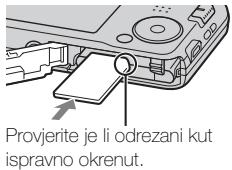
1 Otvorite poklopac.
2 Umetnite memorijsku karticu (prodaje se zasebno).
natural_image
Symbol of a trash bin crossed with no text or numbers, representing waste sorting or restriction (no text present)
natural_image
Symbol of a trash bin crossed out by two diagonal lines (no text or numbers present)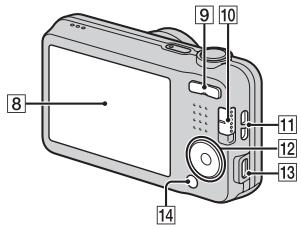
Introducerea accumulatorilor
natural_image
Diagram showing a device with a cable inserted into a box, and a close-up of its internal components (no text or symbols visible)1 Deschideti capacul.
natural_image
Diagram showing a digital camera connected to a cable via a cable connector, with an additional close-up of the camera's cable (no text or symbols present)Led de încărcare
Aprins: Se încarcă
natural_image
Illustration of a handheld electronic device with an attached cable, showing no text or symbols.La o mufă USB
Observații
(CIPA: Camera & Imaging Products Association)
natural_image
Diagram of a device's internal components with an arrow pointing to a component (no text or symbols visible)(28 mm – 140 mm (echivalent film 35 mm))
F3,2 (W) - F6,5 (T)
SteadyShot: electronic
natural_image
Symbol of a trash bin crossed with no text or numbers, representing waste sorting or disposal (no text present)natural_image
Symbol of a trash bin crossed out by two diagonal lines (no text or numbers present)natural_image
Illustration of a device with a cable and connector, no text or symbols presentΠρος υποδοχή USB
Παρατηρήσεις
(CIPA: Camera & Imaging Products Association)
natural_image
Diagram of a device's internal components, showing a paper clip inserted into a folder with a magnified inset (no text or symbols)Cyber-shot, "Cyber-shot", "Memory Stick PRO Duo", "Memory Stick PRO-HG Duo", "Memory Stick Duo", "Memory Stick Micro"
- SONY®
- Learning more about the camera (“Cyber-shot User Guide”)
- Checking the supplied items
- Owner's Record
- WARNING
- IMPORTANT SAFETY INSTRUCTIONS -SAVE THESE INSTRUCTIONS DANGER TO REDUCE THE RISK OF FIRE OR ELECTRIC SHOCK, CAREFULLY FOLLOW THESE INSTRUCTIONS
- CAUTION
- Battery pack
- AC Adaptor
- For Customers in the U.S.A. and Canada
- I RECYCLING LITHIUM-ION BATTERIES
- For Customers in the U.S.A.
- Regulatory Information
- Declaration of Conformity
- I Note:
- For Customers in Europe
- Notice for the customers in the countries applying EU Directives
- Attention
- Notice
- Disposal of Old Electrical & Electronic Equipment (Applicable in the European Union and other European countries with separate collection systems)
- Disposal of waste batteries (applicable in the European Union and other European countries with separate collection systems)
- Notice for customers in the United Kingdom
- Identifying parts
- Inserting the battery pack
- Open the cover.
- Insert the battery pack.
- Charging the battery pack
- Notes
- Charging time (Full charge)
- Charging by connecting to a computer
- Supplying power
- Inserting a memory card (sold separately)
- ■ Memory cards that can be used
- To remove the memory card/battery pack
- Setting the clock
- Shooting still images/movies
- Shooting still images
- Shooting movies
- Viewing images
- ■ Selecting next/previous image
- ■ Deleting an image
- ■ Returning to shooting images
- Introduction of other functions
- Control button
- Menu Items
- Viewing
- Setting items
- Features of "PlayMemories Home"
- Downloading “PlayMemories Home” (for Windows only)
- ■ Viewing “PlayMemories Home Help Guide”
- Number of still images and recordable time of movies
- Still images
- Movies
- Notes on using the camera
- On use and care
- Notes on recording/playback
- Do not use/store the camera in the following places
- On carrying
- Notes on the screen
- On camera's temperature
- On the overheat protection
- On charging the battery
- Warning on copyright
- No compensation for damaged content or recording failure
- Cleaning the camera surface
- Maintaining the LCD monitor
- Specifications
- Camera
- [System]
- [Input and Output connectors]
- [Screen]
- [Power, general]
- AC Adaptor AC-UB10/UB10B/UB10C/UB10D
- Rechargeable battery pack NP-BN
- Trademarks
- Remarques
- Batterie rechargeable NP-BN
- Note
- Abra la tapa.
- Notas
- Abra a tampa.
- Insira o pack de baterias.
- Hinweise
- Otwórz osłone.
- Włóż akumulator.
- Uwagi
- Otevřete kryt.
- Poznámky
- Megjegyzések
- Otvorte kryt.
- Funkcie softvéru „PlayMemories Home“
- Öppna locket.
- Sätt i batteripaketet.
- Observera
- Huomautuksia
- Merknader
- Vise "PlayMemories Home Help Guide"
- Om bruk av kameraet
- Om bruk og stell
- Åbn dækslet.
- Indsæt batteriet.
- Bemærkninger
- Otvorite poklopac.
- Umetnite baterijsku jedinicu.
- Punjenje baterijske jedinice
- Napomene
- Introducerea accumulatorilor
- Deschideti capacul.
- Observații
- Παρατηρήσεις
Brand : SONY
Model : CYBER-SHOT DSC-W710
Category : Camera