
Bravia KDL50WG665 - Television SONY - Free user manual and instructions
Find the device manual for free Bravia KDL50WG665 SONY in PDF.
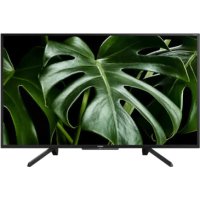



| Product type | LED LCD Television |
| Brand | Sony |
| Model | Bravia KDL50WG665 |
| Screen size (diagonal) | 50 inches (127 cm) |
| Screen resolution | 1920 x 1080 pixels (Full HD) |
| Operating system | Android TV |
| Dimensions (without stand) | 1130 x 660 x 88 mm |
| Weight (without stand) | Approximately 13 kg |
| Power supply | 220-240 V AC, 50/60 Hz |
| Power consumption (max) | 120 W |
| Connectivity | HDMI inputs (2), USB (1), Ethernet, built-in Wi-Fi |
| Tuner | Digital terrestrial (TNT), SAT, cable |
| Smart TV functions | Apps, web browsing, voice assistant compatibility |
| Wall mount compatible | Sony SU-WL450 bracket (optional) |
| Included accessories | Remote control, batteries, table stand, installation guide |
| Care and cleaning | Use a soft, dry cloth. Do not use chemical products. |
| Safety | Do not expose to moisture, do not obstruct ventilation openings |
| Spare parts and repairability | Parts available through authorized Sony network. Repair possible by a professional. |
| General information | User manual available for download. Statutory warranty 2 years. |
Frequently Asked Questions - Bravia KDL50WG665 SONY
User questions about Bravia KDL50WG665 SONY
0 question about this device. Answer the ones you know or ask your own.
Ask a new question about this device
Download the instructions for your Television in PDF format for free! Find your manual Bravia KDL50WG665 - SONY and take your electronic device back in hand. On this page are published all the documents necessary for the use of your device. Bravia KDL50WG665 by SONY.
USER MANUAL Bravia KDL50WG665 SONY
- In the actual model names, the "□□" indicates numbers and/or characters specific to each model.
To Customers: For product protection and safety reasons, Sony strongly recommends that installation of your TV be performed by Sony dealers or licensed contractors. Do not attempt to install it yourself.
To Sony Dealers and Contractors: Provide full attention to safety during the installation, periodic maintenance, and examination of this product.
Sufficient expertise is required for installing this product, especially to determine the strength of the wall for withstanding the TV's weight. Be sure to entrust the attachment of this product to the wall to Sony dealers or licensed contractors and pay adequate attention to safety during the installation. Sony is not liable for any damage or injury caused by mishandling or improper installation.
For safety and proper installation, follow the Wall-mount Bracket Operation Instructions, TV Setup Guide, and the directions in this manual.
On Safety
Thank you for purchasing this product.
To Customers
Sufficient expertise is required for installing this product. Be sure to subcontract the installation to Sony dealers or licensed contractors and pay special attention to safety during the installation. Sony is not liable for any damages or injury caused by mishandling or improper installation, or installing any other than the specified product. Your Statutory Rights (if any) are not affected.
To Sony dealers
Sufficient expertise is required for installing this product. Be sure to read this instruction manual thoroughly to do the installation work safely. Sony is not liable for any damages or injury caused by mishandling or improper installation. Please give this manual to the customer after installation.
This instruction manual shows the correct handling of the product and important precautions necessary to prevent accidents. Be sure to read this manual thoroughly and use the product correctly. Keep this manual available for future reference.
Products by Sony are designed with safety in mind. If the products are used incorrectly, however, it may result in a serious injury through fire, electric shock, the product toppling over, or the product dropping. Be sure to observe the precautions for safety to prevent such accidents.
CAUTION
Specified products
This Wall-Mount Bracket is designed for use with the specified TVs. For TVs, refer to their Reference Guide to verify that the Wall-Mount Bracket can be used.
To Customers
WARNING
If the following precautions are not observed, serious injury or death through fire, electric shock, or the product dropping can result.
Be sure to subcontract the installation to licensed contractors and keep small children away during the installation.
If the Wall-Mount Bracket or the TV is not installed correctly, the following accidents may occur. Be sure licensed contractors carry out installation.
The TV may fall and cause a serious injury such as a bruise or a fracture. - If the wall on which the Wall-Mount Bracket is installed is unstable, uneven, or not perpendicular to the floor, the unit may fall and cause injury or property damage. The wall should be capable of supporting a weight of at least four times the TV weight. (Refer to your TV's Reference Guide for its weight.) - If the installation of the Wall-Mount Bracket on the wall is not sufficiently sturdy, the unit may fall and cause injury or property damage.
Be sure to subcontract moving or dismounting of the TV to licensed contractors.
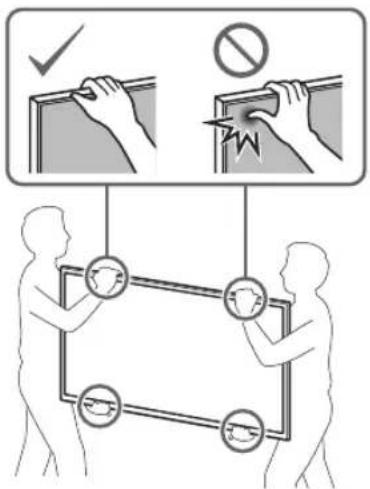
If persons other than licensed contractors transport or dismount the TV, it may fall and cause injury or property damage. Be sure that two or more persons (three or more persons for 75 inches and above TV set) carry or dismount the TV.
Do not remove screws, etc., after mounting the TV.
If you do so, the TV may fall and cause injury or property damage.
Do not make alterations to the parts of the Wall-Mount Bracket.
If you do so, the Wall-Mount Bracket may fall and cause injury or property damage.
Do not mount any equipment other than the specified product.
This Wall-Mount Bracket is designed for use with the specified product only. If you mount equipment other than specified, it may fall or break, and cause injury or property damage.
Do not apply any load other than the TV on the Wall-Mount Bracket. Do not shake the TV left/right, up/down.
If you do so, the TV may fall and cause injury or property damage.
Do not lean on or hang from the TV.
Do not lean on or hang from the TV as it may fall on you and cause serious injury.
CAUTION
If the following precautions are not observed, injury or property damage may occur.
Do not handle the product with excessive force during cleaning or maintenance.
Do not apply excessive force on the topside of the TV. If you do so, the TV may fall and cause injury or property damage.
Precautions
- If you use the TV installed on the Wall-Mount Bracket for a long time, the wall behind or above the TV may become discolored or the wallpaper may come unstuck, depending on the material of the wall.
- If the Wall-Mount Bracket is removed after installing it on the wall, the screw holes are left.
- Do not use the Wall-Mount Bracket in a place where it is subjected to mechanical vibrations.
Installing the WallMount Bracket
To Sony Dealers
WARNING
The following instructions are for Sony dealers only. Be sure to read the safety precautions described above and pay special attention to safety during the installation, maintenance, and checking of this product.
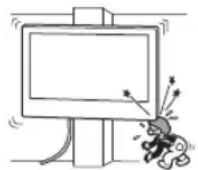
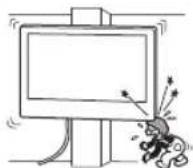
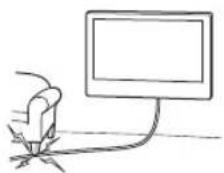
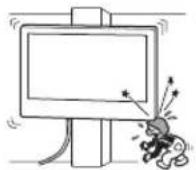
Do not install the Wall-Mount Bracket on wall surfaces where the corners or the sides of the TV protrude away from the wall surface.
Do not install the Wall-Mount Bracket on wall surfaces such as a pillar, where the corners or the sides of the TV protrude away from the wall surface. If a person or object happens to hit the protruded corner or side of the TV, it may cause injury or property damage.
Do not install the TV over or under an air conditioner.
If the TV is exposed to water leaks or air current from an air conditioner for a long time, it may cause a fire, an electric shock, or a malfunction of the TV.
Be sure to install the Wall-Mount Bracket securely to the wall following the instructions in this instruction manual.
If any of the screws are loose or fall out, the Wall-Mount Bracket may fall and cause injury or property damage. Be sure to use the appropriate screws for the material of the wall and install the unit securely using four or more screws of 8 mm diameter (or equivalent).
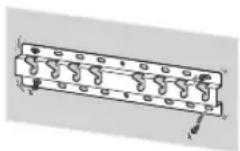
Be sure to use the supplied screws and attachment parts properly following the instructions given in this instruction manual. If you use substitute items, the TV may fall and cause bodily injury to someone or damage to the TV.
Be sure to assemble the bracket properly following the instructed procedure explained in this instruction manual.
If any of the screws are loose or fall out, the TV may fall and cause bodily injury to someone or damage to the TV.
Be sure to tighten the screws securely in the designated position.
If you fail to do so, the TV may fall and cause bodily injury to someone or damage to the TV.
Be careful not to subject the TV to shock during installation.
If the TV is exposed to shock, it may fall or break apart. This may cause injury.
Be sure to install the TV on a wall that is both perpendicular and flat.
If you fail to do so, the TV may fall and cause injury.
After proper installation of the TV, secure the cables properly.
If people or objects get tangled with cables, this may result in injury or damage to the TV.
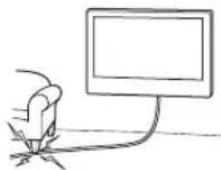
Do not allow the mains lead or the connecting cable to be pinched.
If the mains lead or the connecting cable is pinched between the unit and the wall or is bent or twisted by force, the internal conductors may become exposed and cause a short circuit or an electrical break. This may cause a fire or an electric shock.
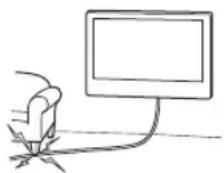
The screws needed to secure the Wall-Mount Bracket to the wall are not supplied.
Use the appropriate screws for the wall material and structure when mounting the Wall-Mount Bracket.
Installing the TV onto the wall
Installation procedure differs, depending on your TV.
Use the Wall-Mount Bracket SU-WL450 to install the TV to the wall.
Note
- If the Table-Top Stand is attached to the TV, detach the Table-Top Stand beforehand. See the Setup Guide and follow in reverse order the steps to detach the Table-Top Stand.
- Place the TV with its screen facing down on a level and stable surface covered with a thick and soft cloth, when securing the Attachment parts for Wall-Mount Bracket or when removing the Table-Top Stand from the TV to prevent damaging the surface of the LCD display.
- Be sure to store the removed screws in a safe place, keeping them away from children.
Preparing for installation
- Have the TV's Reference Guide and Setup Guide at hand before installation.
- Be sure to have a Phillips screwdriver that fits the screws prior to the assembly.
- Confirm the installing position of your TV.
- Prepare four or more screws of 8 mm diameter and one screw of 5 mm or equivalent (not supplied). Select screws suitable for the material of the wall.
Checking the parts
Supplied with SU-WL450
- Verify that all the parts are included.
| A Base (20) (1) B Pulley (2) | |
| ◎ PSW 6x20 (4)◎ PSW 4x20 with Bush (2) | |
| E Spacer (20) (2) E Belt (1) | |
| G Bush (20) (M4) (2) G PSW 4x20 (2) | |
| I Base Adaptor (2) I PSW 4x10 (8) | |
| K Spacer (60) (2) L PSW 6x50 (2) | |
| M Bush (M4) (2) N PSW 4x50 (2) |
Deciding on the installation location
1 Decide on the installation location.
Make sure that the wall has enough space for the TV and is capable of supporting a weight of at least four times that of the TV.
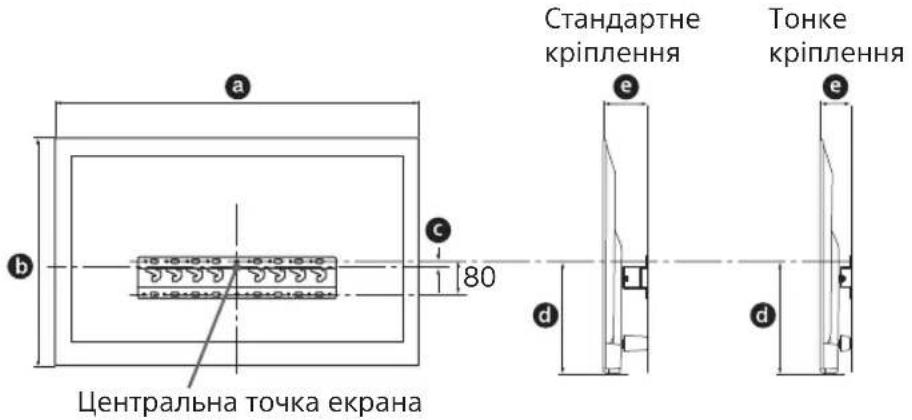
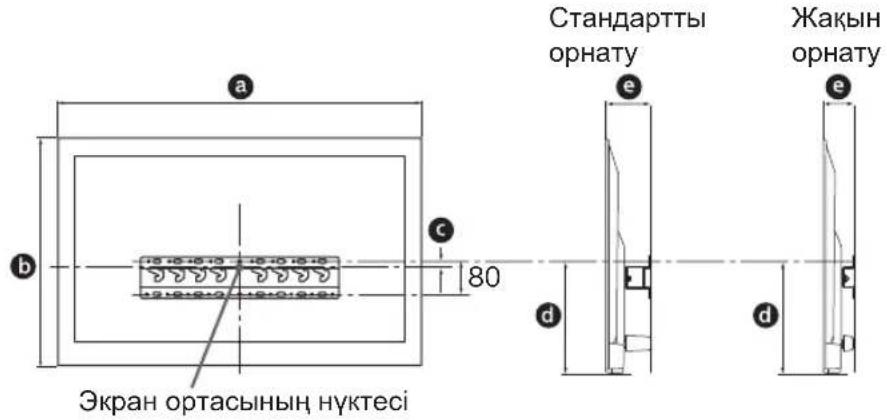
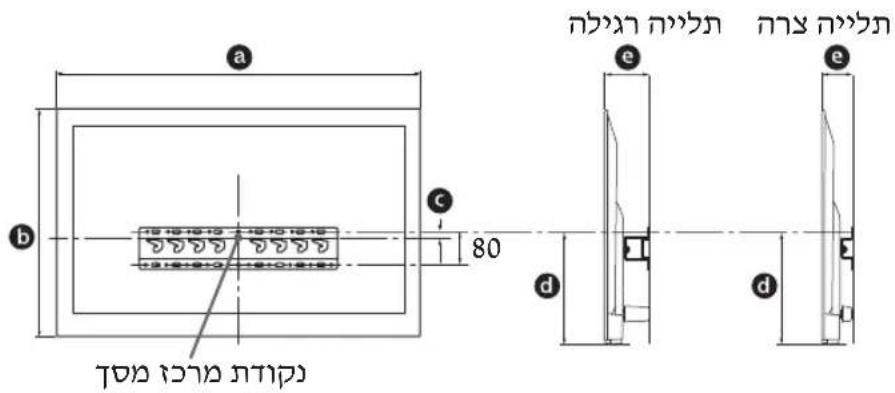
Refer to the following table on installing the TV to the wall. Refer to your TV's Reference Guide for the TV's weight.
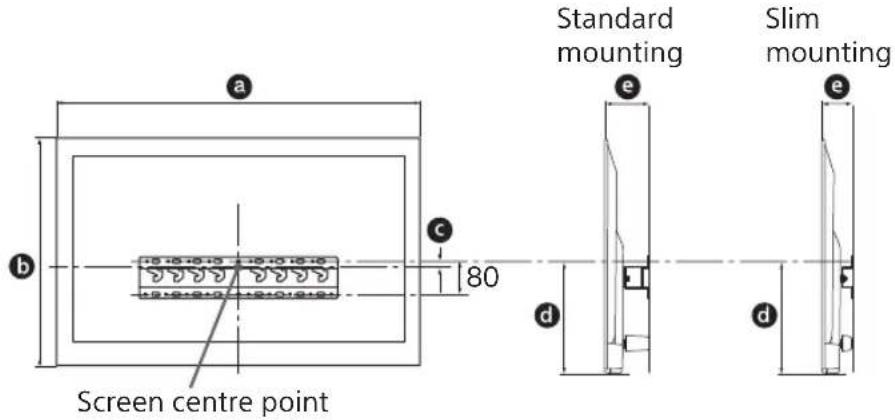
Unit: mm
| Model Name | Display dimensions | Screen centre dimension | Length for mounting | |||
| a | b | c | d | e | ||
| Standard mounting | Slim mounting | |||||
| KDL-50WG6□□ | 1,130 660 21 358 130 88 | |||||
| KDL-43WG6□□ | 974 572 54 346 130 88 | |||||
Note
- Figures in the table may differ slightly depending on the installation.
- When your TV is installed on the wall, the upper side of the TV slightly leans forward.
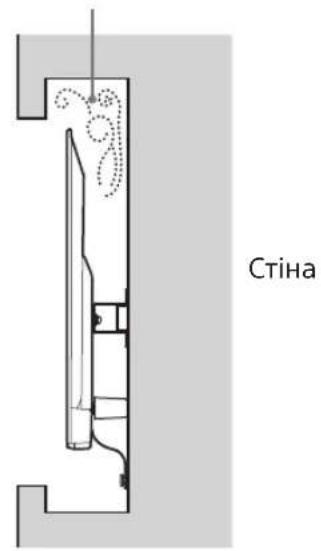
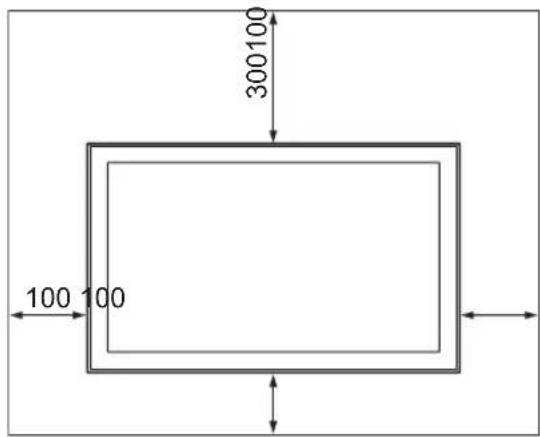
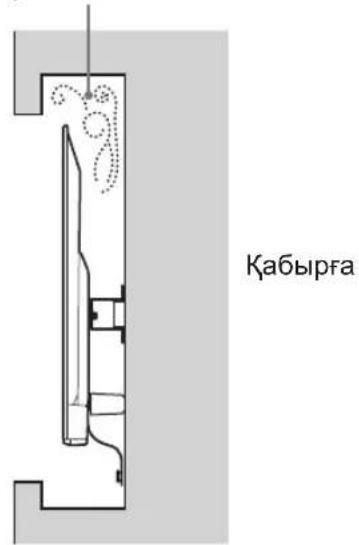
Allow for suitable clearance between the TV and the ceiling and protruding parts of the wall as shown below.
Unit: mm
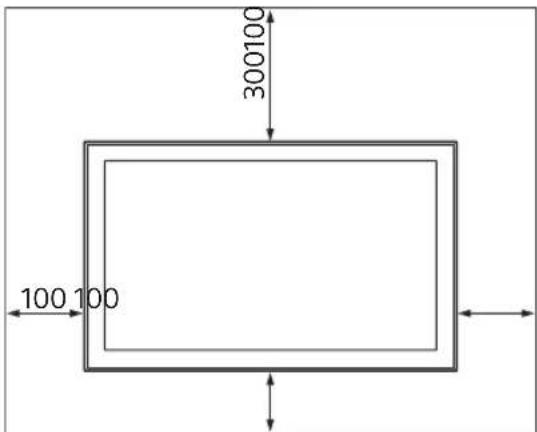
To ensure proper ventilation and prevent the collection of dirt or dust:
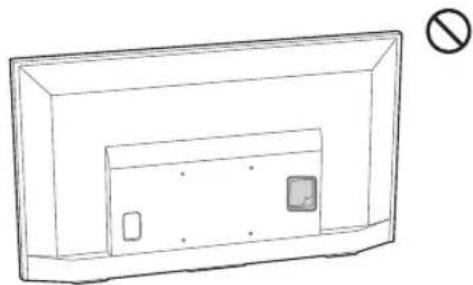
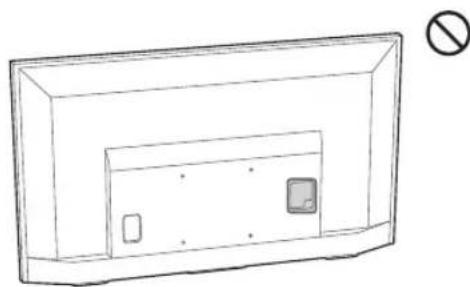
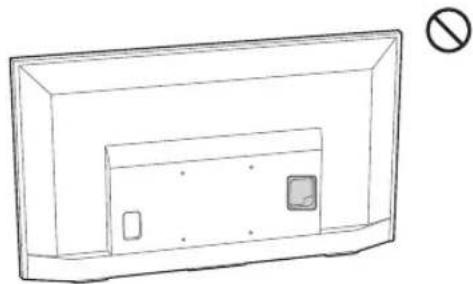
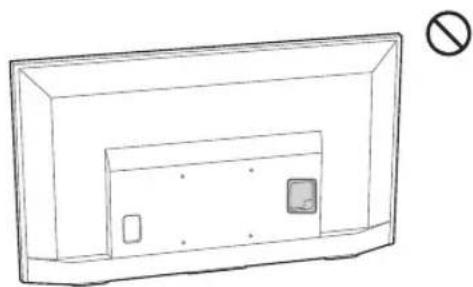
Do not lay the TV set flat, install upside down, backwards, or sideways. - Do not place the TV set on a shelf, rug, bed or in a closet. - Do not cover the TV set with a cloth, such as curtains, or items such as newspapers, etc. - Do not install the TV set as shown below.
Air circulation is blocked.
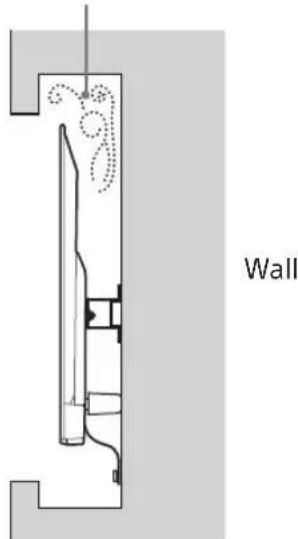
Note
- If you intend to route the cables in the wall, make a hole in the wall to insert the cables before beginning the installation.
To prevent pinching the cables, prepare a hole in the wall somewhere outside the perimeter of the Base (20) A, Base Adaptor 1 and Spacer (20) E, Spacer (60) K.
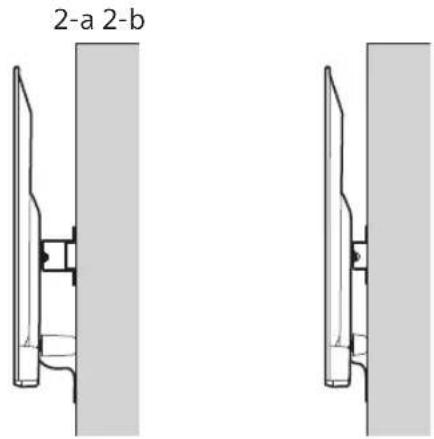
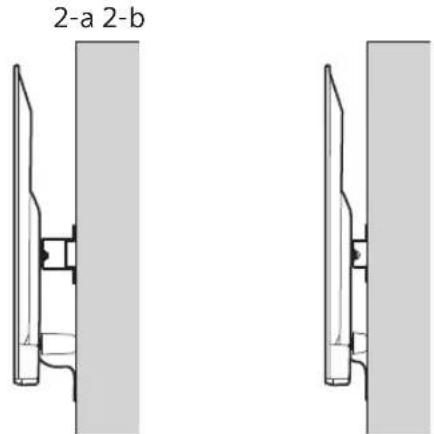
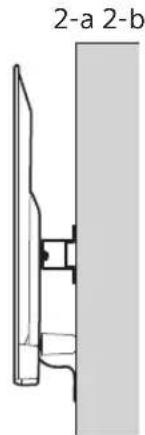
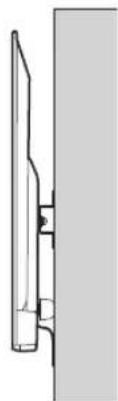
2 Select Wall mounting style. It is selectable as shown below.
2-a Standard mount
2-b Slim mount
Refer to the table of step 1.
WARNING
- When 2-b is selected, rear terminal access is limited.
2-a 2-b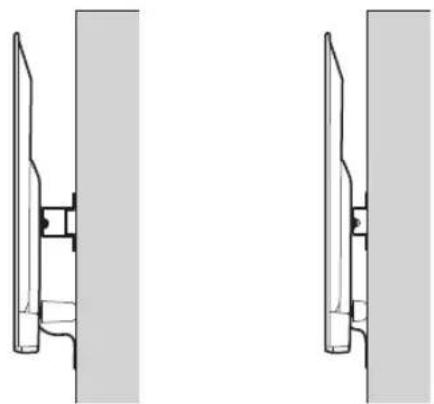
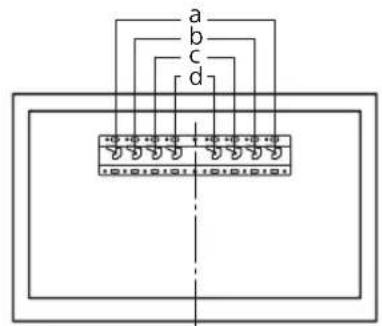
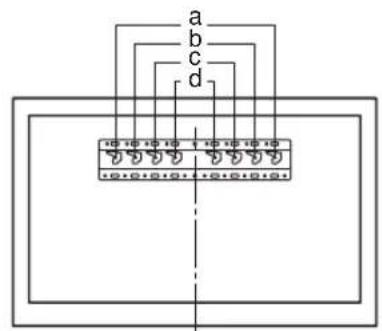
3 Refer to the table below about the Base Adaptor fitting location. In case of selecting 2-b, then skip this step.
| Model Name Hook location | |
| KDL-50WG6□□ | c |
| KDL-43WG6□□ | |
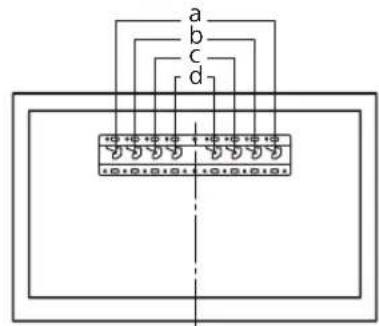
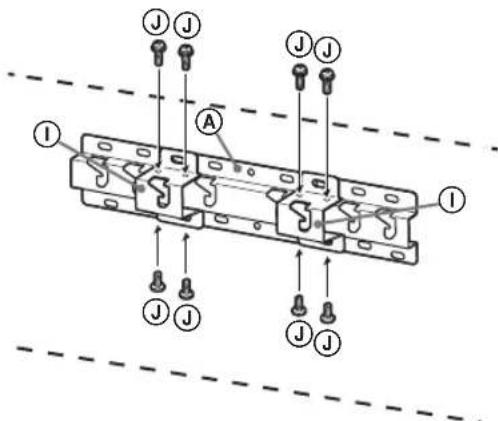
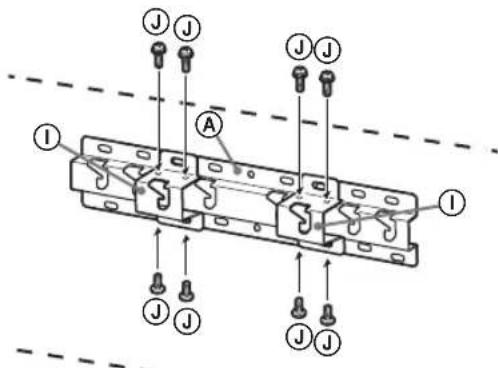
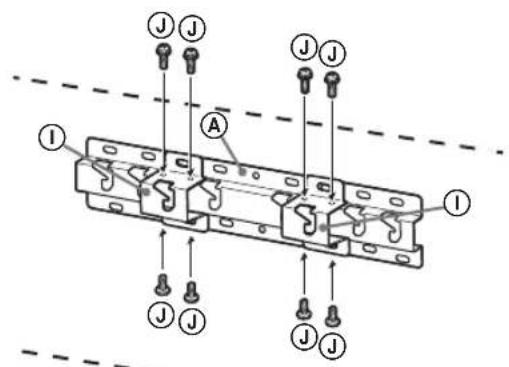
Fit Base Adaptor ① by using Screw (PSW 4x10) ② to Base (20) ④ when selecting 2-a.
4 Decide the positions of the screws for installing the Base (20) A.
Refer to the specifications on page 12. When selecting 2-a, please use the hole positions of Base Adaptor ①
WARNING
The wall that the TV will be mounted on should be able to support a weight of at least four times that of the TV (Refer to your TV's Reference Guide for its weight.). - Determine the strength of the wall the TV will be mounted on. Reinforce the wall sufficiently, if necessary.
Installing the Base on the wall
- Use four or more screws of 8 mm diameter or equivalent (not supplied).
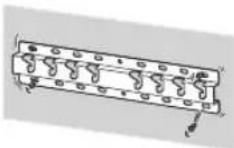
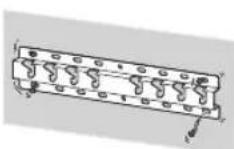
- Fit four screws to the holes of Base Adaptor ① with Base (20) A (2-a only). Install the Base (20) A on the wall horizontally.
Standard mounting (2-a)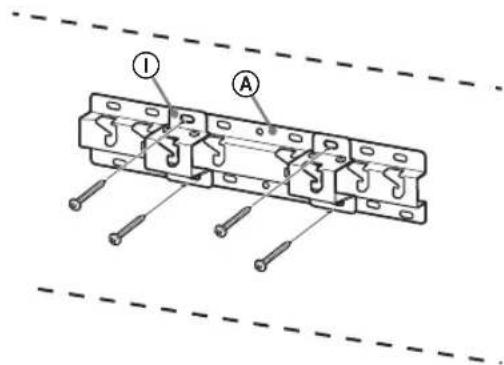
Slim mounting (2-b)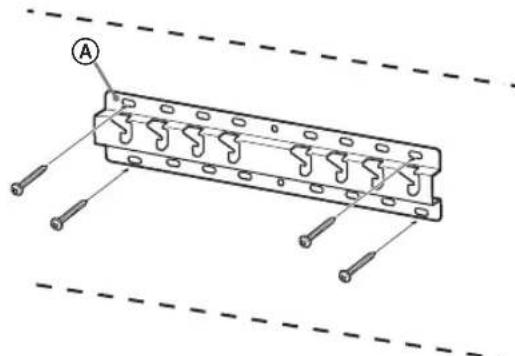
Preparing for the installation of the TV
Refer to the Setup Guide for stand installation.
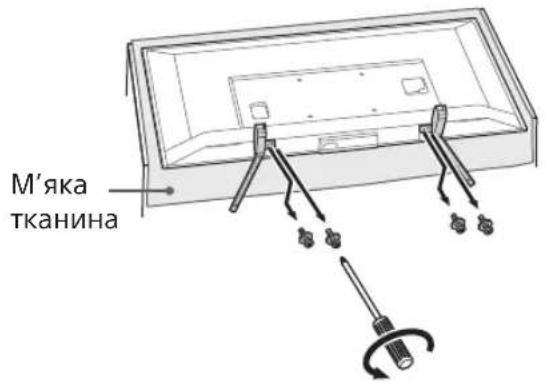
1 Detach the Table-Top Stand from the TV.
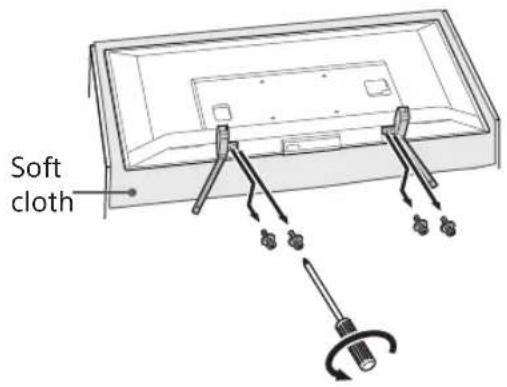
Note
Make sure to place the TV on a soft cloth to prevent damaging the display's surface. - When installing the Wall-Mount Bracket, do not use the screws removed from the Table-Top Stand. - Be sure to store the removed Table-top Stand and its screws in a safe place, keeping them away from children. You will need them if you want to use the TV on a table in the future. The Table-Top Stand cannot be purchased separately.
WARNING
- Be sure the TV is in the vertical position before switching it on. The TV set must not be powered on with the LCD panel face down to avoid uneven picture uniformity. If pressure or shock is applied to the surface of the TV, the TV may break or become damaged.
- Lay the TV face down on a stable and level surface with the Table-Top Stand hanging over the edge of the surface. Having the TV face and the base of the Table-Top Stand on the same level surface will create an unstable working condition and can damage the TV.
- When detaching the Table-Top Stand from the TV, hold the Table-Top Stand securely.
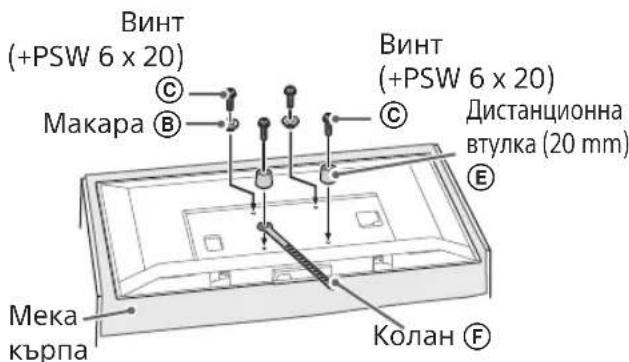
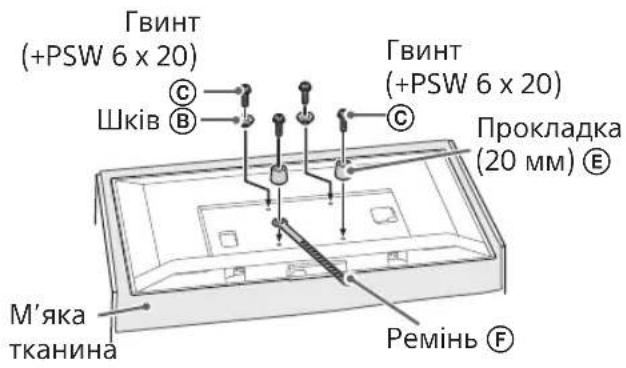
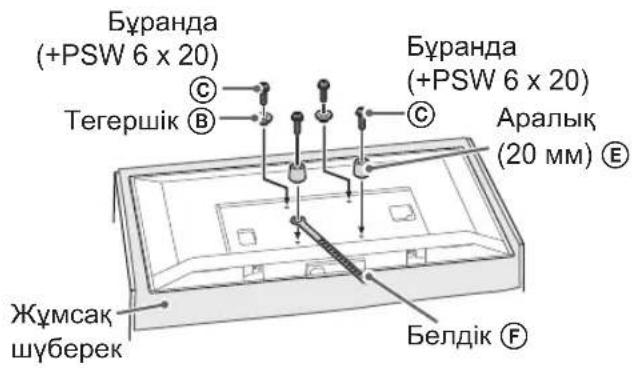
2 Attach the Attachment parts for Wall-Mount Bracket. Check the Attachment parts by referring to "Supplied with SU-WL450" in "Checking the parts" on page 5.
Note
- Firmly secure the Attachment parts using screws.
- When using an electric screwdriver, set the torque setting to approximately 1.5 N·m {15 kgf·cm}.
- Be sure to store the used or unused parts in a safe place for future use. Retain this manual for future reference.
Standard mounting (2-a)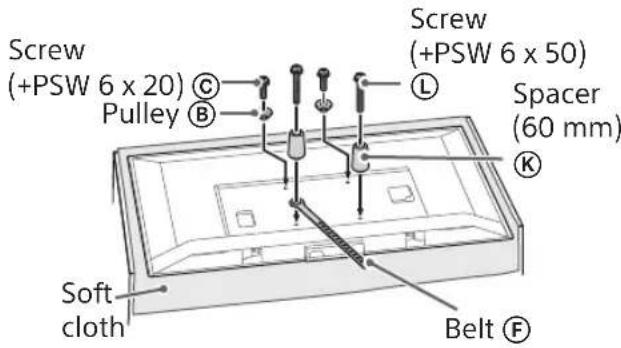
Slim mounting (2-b)
Note
- You cannot use some of the terminals on the rear of the TV when using this mounting style.
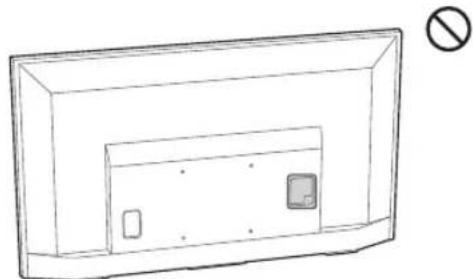
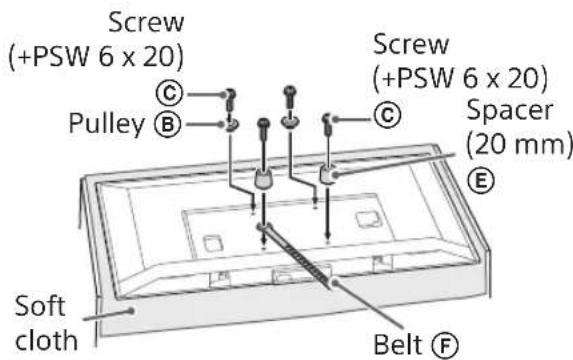
3 Connect the necessary cable(s) to the TV.
Make sure to connect the cables before installing the TV on the wall. You will be unable to connect the cables when the TV is installed.
Refer to the Reference Guide supplied with your TV.
Note
- Subcontract the cable routing in the wall to a licensed contractor.
- Bundle the connecting cables to prevent stepping on them before wall mounting.
Installing the TV on the wall
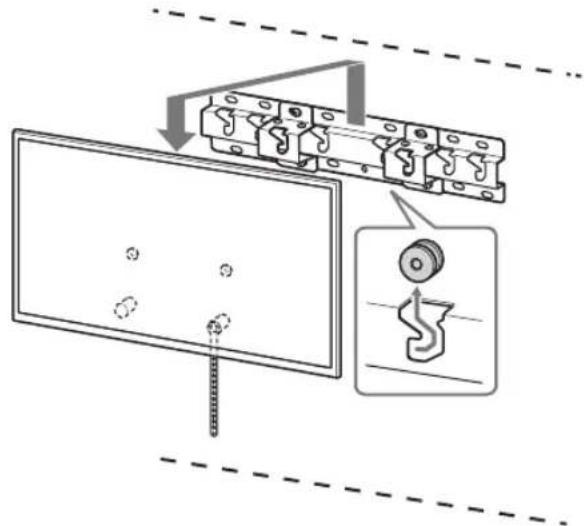
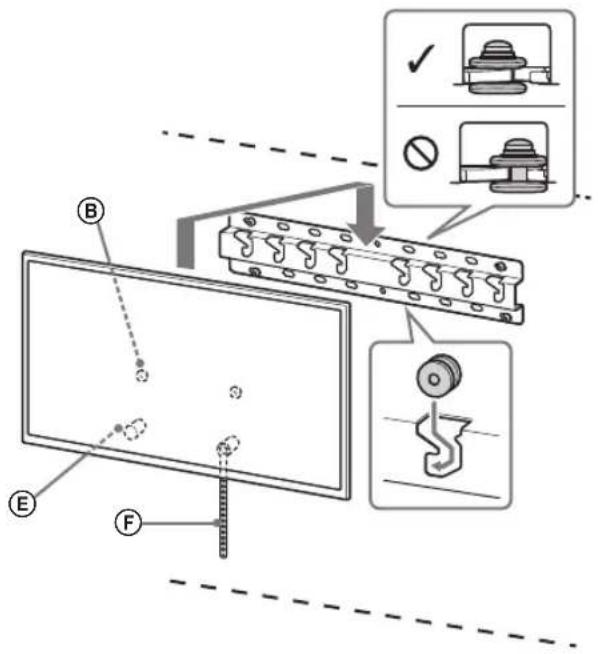
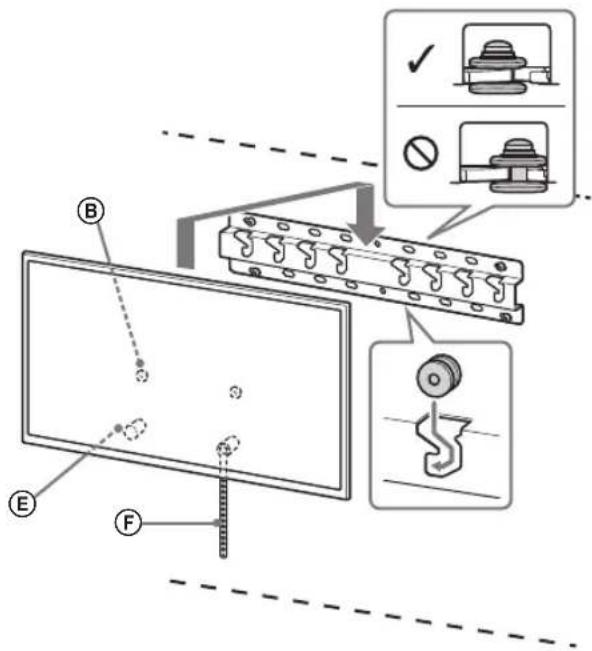
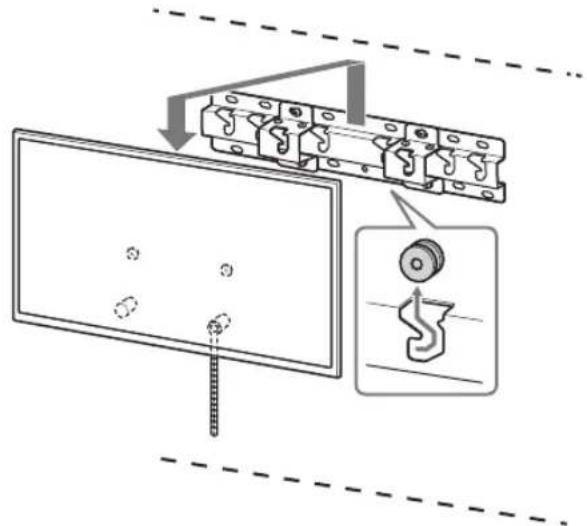
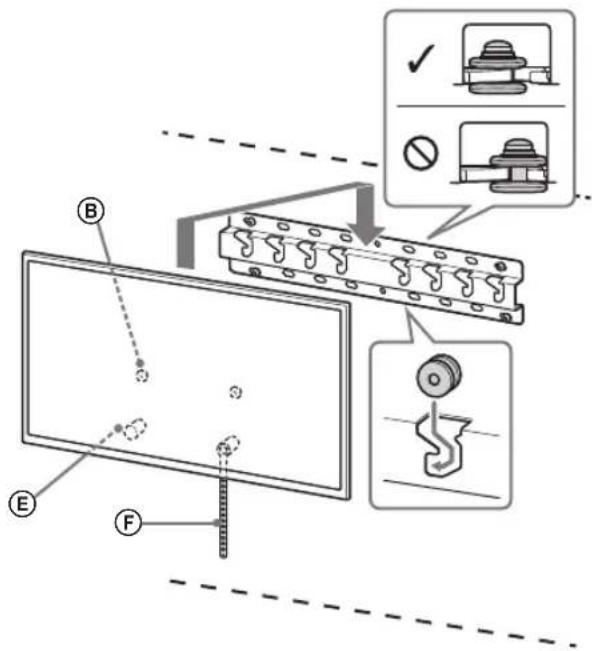
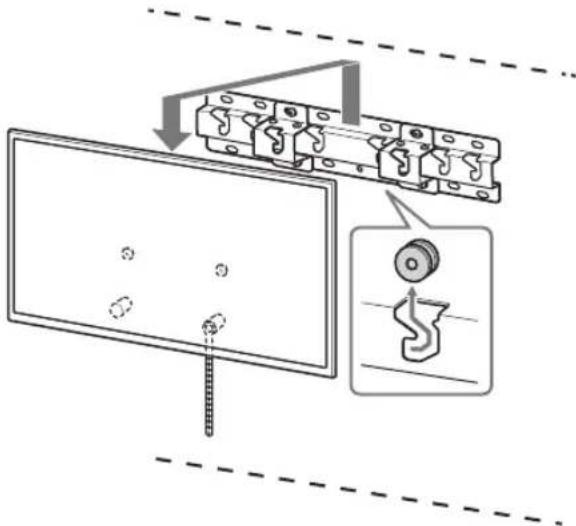
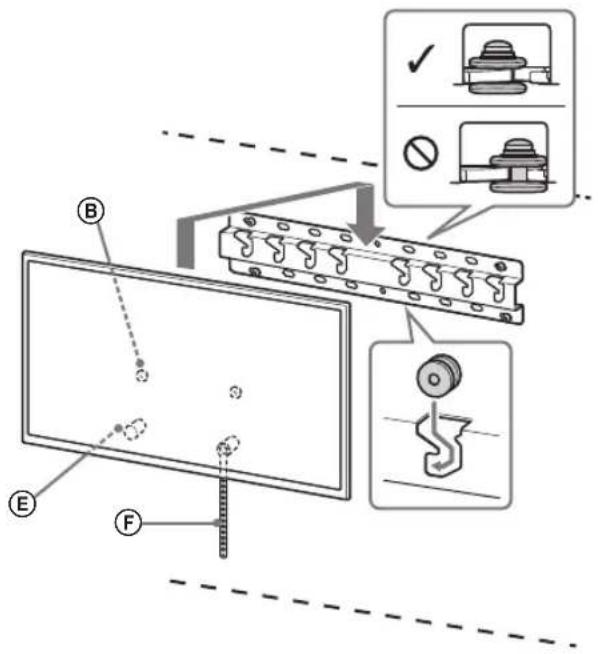
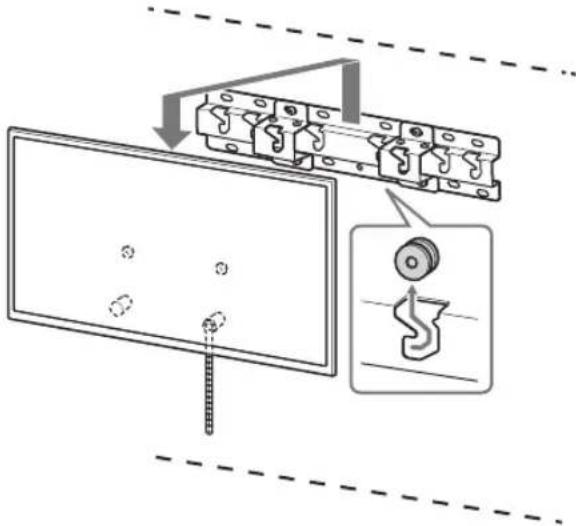
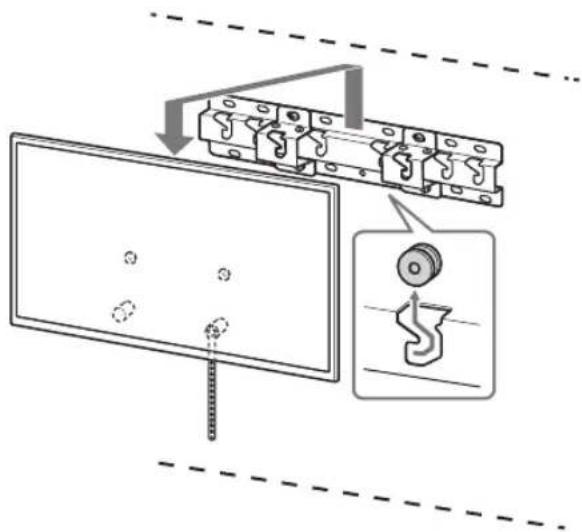
1. Install the TV onto the Base or Base Adaptor.
- For the location of the Pulleys (B) to hang on the Base or Base Adaptor, refer to the table of step 3 in "Deciding on the installation location" on page 7.
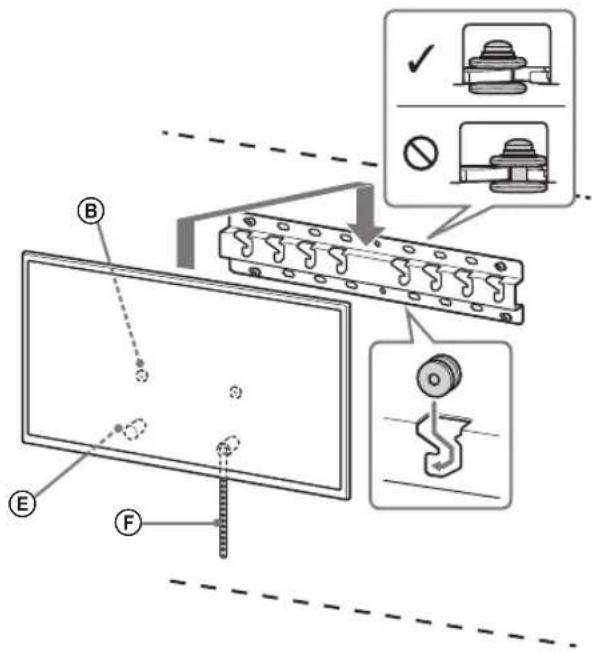
- Gently slide down the TV and hang the Pulleys (B) attached to the rear of the TV to the Base or Base Adaptor, making sure to confirm the shape of the holes. After installing the TV on the wall, confirm the Pulleys (B) are firmly latched into the Base or Base Adaptor.
- Release both hands slowly to ensure that the TV does not fall.
Standard mounting (2-a)
Slim mounting (2-b)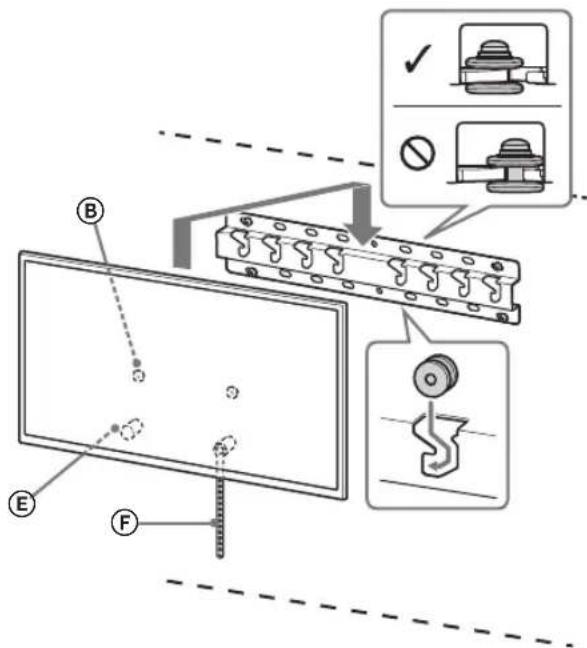
WARNING
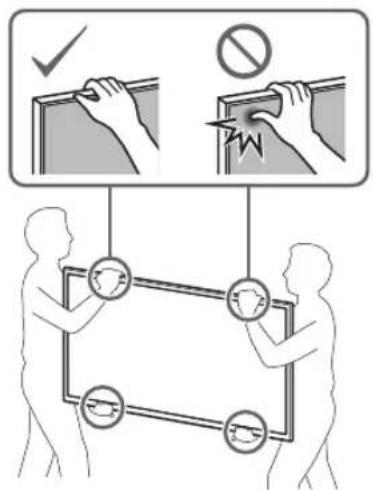
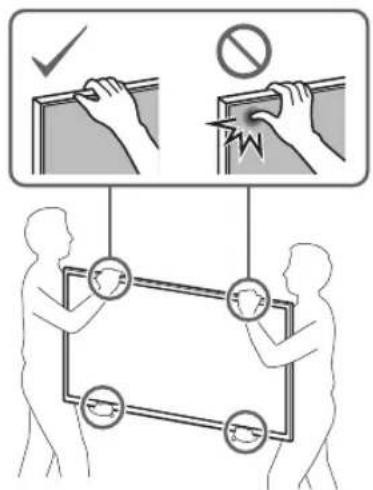
- Be sure that two or more persons (three or more persons for 75 inches and above TV set) hold the TV when carrying it.
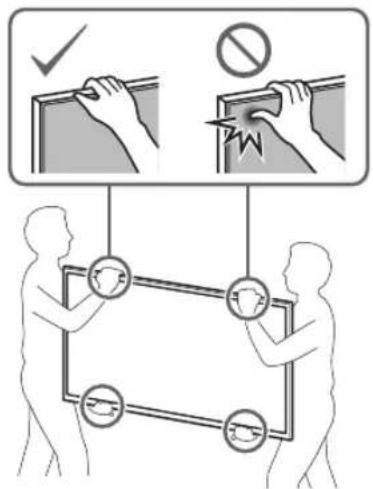
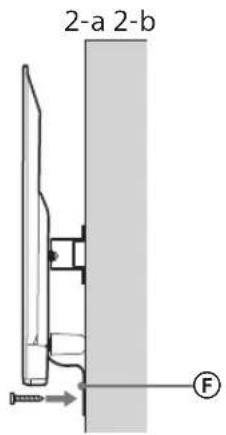
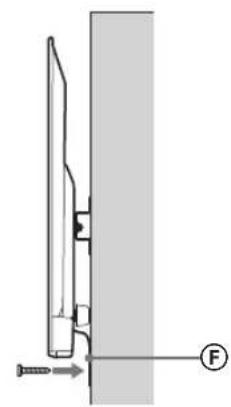
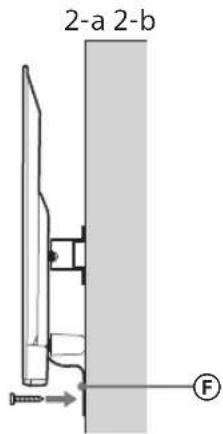
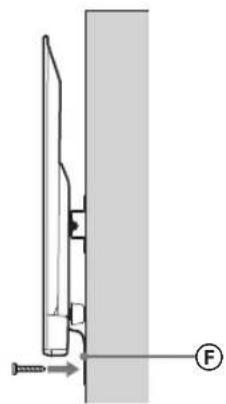
2. Preventing the bottom of the TV from shifting.
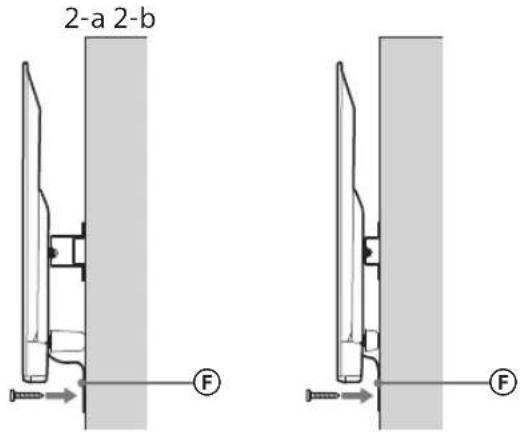
Take up the slack of Belt F and attach it to the wall tightly.
2-a 2-b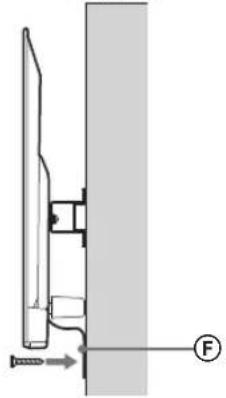
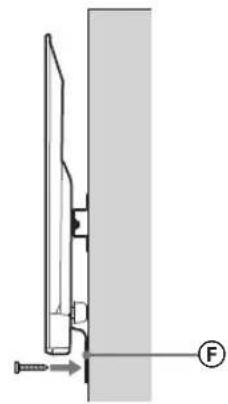
- Use a 5mm diameter screw or equivalent (not supplied).
Note
Try to pull the bottom of the TV towards yourself slightly, to make sure that it does not move forward. If there is any movement, it is not fixed correctly, and the Belt should be secured firmly again.
Confirming the completion of the installation
Check the following points.
- The Pulleys (B) are firmly hung onto the Base or Base Adaptor.
- The cord and the cable are not twisted or pinched.
- The Belt (F) is tight with no slack.
WARNING
- Improper placement of the mains lead, etc., may cause fire or electric shock through a short circuit. Be sure to confirm the completion of the installation for safety.
Other information
When removing the TV, reverse the previous installation procedure.
WARNING
- Be sure that two or more persons (three or more persons for 75 inches and above TV set) hold the TV when removing it.
Specifications
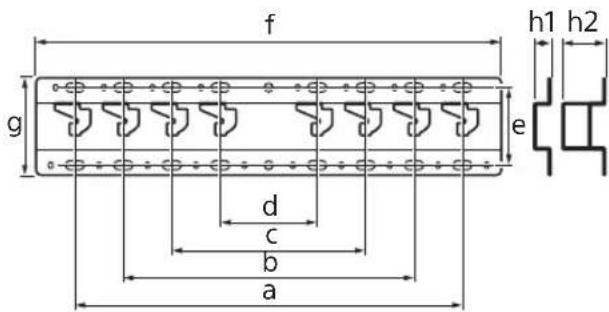
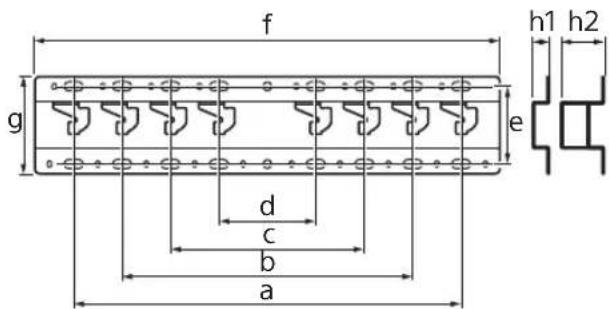
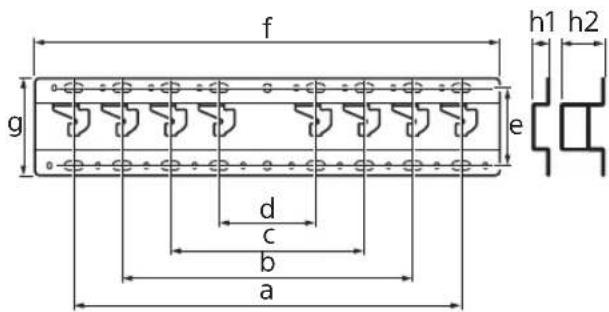
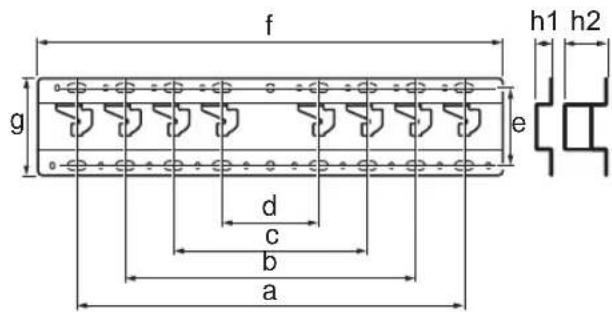
Dimensions: (Approx.) [mm]
a : 400
b : 300
c:200
d : 100
e:80
f:480
g : 100
h1:20(case2-b)
h2:60(case 2-a)
Weight (base only): (Approx.) [kg]
0.8
Design and specifications are subject to change without notice.
Dimensions: (approx.) [mm]
a: 400
b: 300
c: 200
d: 100
e: 80
f: 480
g: 100
h1: 20 (case 2-b)
h2: 60 (case 2-a)
Weight (base only): (approx.) [kg]
0.8
Dimensions: (approx.) [mm]
a: 400
b: 300
c: 200
d: 100
e: 80
f: 480
g: 100
h1: 20 (case 2-b)
h2: 60 (case 2-a)
Weight (base only): (approx.) [kg]
0.8
Preparation for installation
1 Find the TV's location.
Dimensions: (approx.) [mm]
a: 400
b: 300
c: 200
d: 100
e: 80
f: 480
g: 100
h1: 20 (case 2-b)
h2: 60 (case 2-a)
Important notice for Sony
For installation of the product, experience is required. Read this manual carefully to perform the installation safely. Sony is not responsible for damages or injuries caused by improper installation. Keep this manual for future reference.
This manual shows the correct way to work with the product and the important precautions that must be followed to avoid accidents. Read this manual carefully and use the product correctly. Keep the manual for future reference.
Sony products are designed with safety in mind. However, if you use the product incorrectly, it may lead to serious injury or damage due to fire, electric shock, falling, or product damage. Follow the safety measures to prevent such incidents.
WARNING
Product description
This wall-mounting console is designed for use only with the specified televisions. Refer to the television manuals to ensure that this console is used for mounting on the wall.
For customers
PRECAUTIONS
If these safety measures are not followed, it could lead to serious injury or damage to the product.
Perform the installation of the licensed installer and the product according to the installation time.
If the wall mount is not installed correctly, the following incidents may occur. Make sure the installers are licensed installers.
The TV may fall and cause serious injury if the wall mount is not properly installed. If the wall on which the wall mount is installed is unstable, uneven, or not perpendicular to the floor, the structure may fall and cause injury or property damage. The wall must be capable of supporting the weight, as the TV is heavy. (See the TV's reference guide for its weight.) If the wall mount is not properly installed, the structure may fall and cause injury or property damage.
Make sure you have performed the installation of the TV with a licensed installer.
If the group, the licensed installer, transports or disassembles the TV, it may fall and cause injury or property damage. Make sure two or more people (two or more people for a large TV with a 75-inch screen) are present to transport or disassemble the TV.
Do not screw in the screws or other items after installing the TV.
If you do, the TV may fall and cause injury or property damage.
Do not skip the parts of the wall mount.
If you do, the wall mount may fall and cause injury or property damage.
Do not install other equipment other than the specified product.
This wall mount is designed for use only with the specified product. If you install equipment other than the specified one, it may fall or break and cause injury or property damage.
Do not place the wall mount on any other product other than the TV. Do not place the TV on the floor/on the floor, on the floor/on the floor.
If you do, the TV may fall and cause injury or property damage.
Do not lean on or hang on the TV.
This television can be used to watch programs, but it can also cause serious damage.
WARNING
If the safety instructions are not followed, damage to property may occur.
Do not operate the product with a damaged power cord during cleaning or repair.
Do not place the power cord on the television. If damaged, the television may cause damage or injury.
Safety Instructions
- If you use the television for a long time, mounted on a wall mount, the wall may not be able to support it or the wall may crack, depending on the wall material. If the wall mount is not properly installed, it may fall. Do not use the wall mount in a place where it may be subjected to mechanical vibration.
Wall Mount Installation
For Sony dealers
CAUTION
These instructions are for Sony dealers only. Read the safety instructions above, paying special attention to safety during installation, maintenance, and operation of the product.
Do not install the wall mount on a wall surface where the television protrudes from the wall surface.
Do not install the wall mount on a wall surface, such as a column, where the television protrudes from the wall surface. If the television is subjected to impact or falls, it may cause damage or injury.
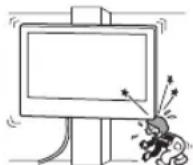
Do not install the television on or near air conditioners.
If the television is exposed to direct airflow from an air conditioner, it may cause fire, electric shock, or malfunction of the television.
Mount the wall mount securely to the wall following the instructions in this manual.
If any of the screws come loose or fall out, the wall mount may fall and cause damage or injury to property. Use screws appropriate for the wall material and tighten the structure securely using four or more screws with a diameter of 8 mm (or equivalent).
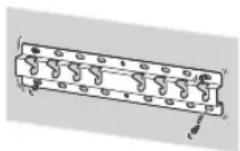
Use the correct screws and mounting parts as you follow the instructions in this manual. If you use replacement parts, the TV may fall and cause bodily injury or damage.
Make sure you use the mount correctly by following the procedure described in this manual.
If any of the screws come loose or fall out, the TV may fall and cause bodily injury or damage.
Tighten the screws securely in the indicated position.
If you do not do this, the TV may fall and cause bodily injury or damage.
Be careful not to subject the TV to impact during installation.
If the TV is subjected to impact, it may fall and cause injury. This could lead to damage.
Mount the TV on a wall that is perpendicular and flat.
If you do not do this, the TV may fall and cause damage.
After correctly mounting the TV, secure the cables properly.
If people or objects get caught on the cables, this may cause damage or injury to the TV.
Do not allow the power cord or connecting cable to be pinched.
If the power cord or connecting cable is pinched between the wall structure or if it is bent or pulled with force, the internal wires may break and cause a short circuit or electric shock. This may cause fire or electric shock.
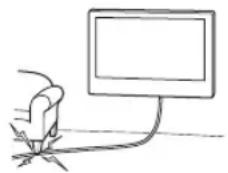
The screws needed to secure the wall mount bracket to the wall are not included in the package.
Use screws appropriate for the wall material and structure when mounting the bracket to the wall.
Mounting the TV on the wall
The mounting procedure differs depending on the TV.
Use the wall mount bracket SU-WL450 to mount the TV on the wall.
Precautions
If the stand is attached to the TV, remove the stand beforehand. Refer to the setup guide and follow the steps in reverse order to remove the stand. Place the TV face down on a flat, stable surface covered with a thick, soft cloth when attaching the wall mount bracket or removing the stand, to prevent damage to the LCD display surface. Do not forget to store the removed screws in a safe place, keeping them away from children.
Mounting procedure
The setup guide for the TV should be at hand before starting the mounting. Prepare a Phillips screwdriver that matches the screws. Prepare the wall mount bracket. Prepare four screws with a diameter of 8 mm and one screw with a diameter of 5 mm, or equivalent (not included in the package). Select screws suitable for the wall material.
Checking the parts
Supplied with SU-WL450
- Check that all parts are present.
| A Oснова (20) (1) B | Makapa (2) |
| ◎ PSW 6x20 (4)◎ | PSW 4x20 c Втулka (2) |
| E Дистанционна Втулka (20) (2) | F Колан (1) |
| ◎ Bтулka (20) (M4) (2) | H PSW 4x20 (2) |
| ◎ Aдантета Oснова (2) | J PSW 4x10 (8) |
| ◎Дистанционна Втулka (60) (2) | L PSW 6x50 (2) |
| ◎ Bтулka (M4) (2)◎ | PSW 4x50 (2) |
Determining the mounting location
1 Select the mounting location.
Ensure that the wall has sufficient space for the TV and is strong enough to support its weight, which is more than four times the TV's weight. Refer to the wall mounting table. Refer to the TV's setup guide for its weight.
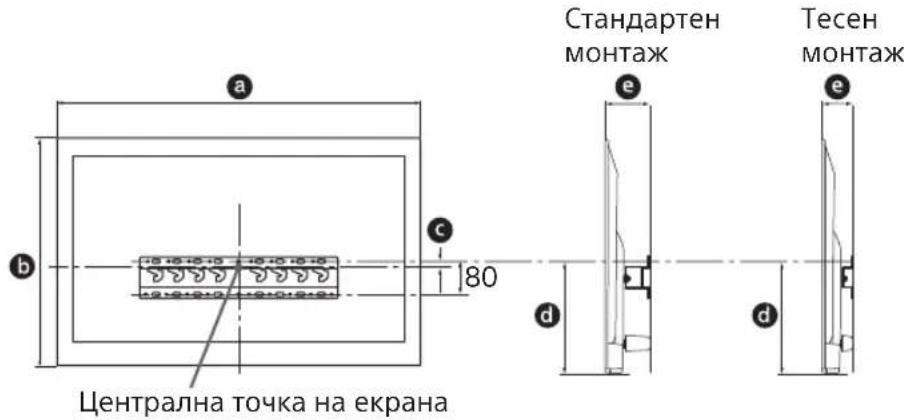
Determine the locations of the screws for mounting on the base (20) A.
See the specifications on page 12.
When you select 2-a, use the holes for the adapter on the base ①.
WARNING
The wall on which the TV will be mounted must be able to support at least four times its weight (see the TV's reference manual regarding its weight).
- Determine the strength of the wall on which the TV will be mounted. If necessary, reinforce the wall sufficiently.
Mounting the base on the wall
- Use four or more screws with a diameter of 8 mm or equivalent (not supplied). Secure the four screws in the holes of the adapter on the base ① with the base (20) A (see 2-a).
- Mount the base (20) A horizontally on the wall.
Standard mounting (2-a)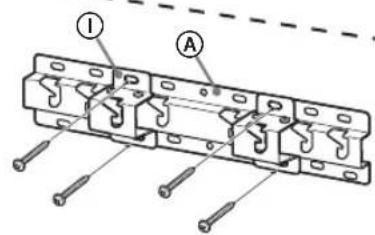
Tilted mounting (2-b)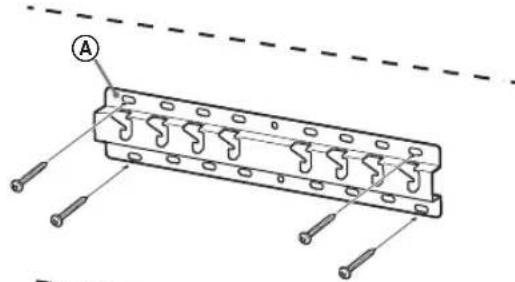
Preparation for mounting the TV
Follow the mounting instructions in the setup guide.
1. Remove the packaging from the TV.
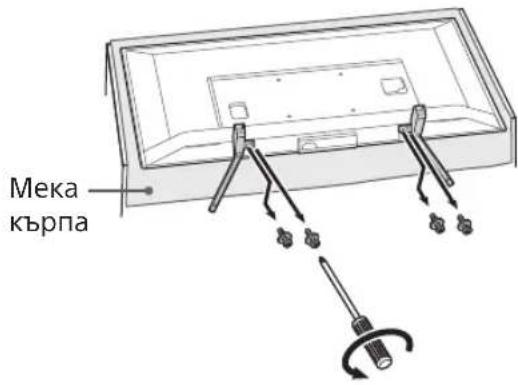
- Make sure to place the TV on the wall mount to prevent damage to the surface. When mounting the wall mount bracket, do not use the screws supplied with the mass. The mass supply is equipped with safety screws, adjusted by the device. They will be used to mount the TV on the mass in the future. The mass supply cannot be purchased separately.
WARNING
Before installing the TV, make sure it is in a vertical position. The TV should not be placed in a location with LCD panel, exposed to direct sunlight, to avoid unevenness of the picture. If the surface of the TV is subjected to pressure or impact, it may be damaged. Place the TV with the screen facing down on a stable and flat surface, with the mass supply placed on the surface. If the TV and the base of the mass supply are at the same level, this will lead to unstable conditions and may damage the TV. When removing the mass supply from the TV, hold the mass supply firmly.
Check the wall mount bracket parts. Verify the parts by comparing with "Supplied with SU-WL450" in "Parts Check" on page 5.
Secure the wall mount bracket with screws. When using an electric screwdriver, set the tightening torque to approximately 1.5 N·m {15 kgf·cm}. Store the used and unused parts in a safe place for future use. Keep the manual for future reference.
Standard mounting (2-a)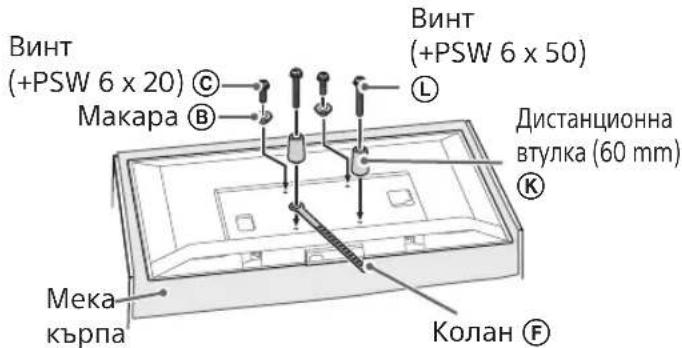
Recessed mounting (2-b)
If you use the mounting method, you cannot use any of the terminals on the back of the TV.
Connect the necessary cables to the TV.
Make sure you have connected the cables before mounting the TV on the wall. If you need to connect them, do so after the TV is mounted. See the instruction manual supplied with your TV.
Have the cable routing in the wall done by a qualified installer. Connect the cables so that they do not interfere with the wall installation.
Wall Mounting the TV
1 Mount the TV onto the base stand plate.
For the location of the brackets ⑧ for securing to the base stand plate, see the table in the "Determining the mounting position" section on page 7. Carefully lift the TV and attach the brackets to the corresponding side of the TV, securing them to the base stand plate, while checking the alignment of the holes. After mounting the TV, verify that the brackets are correctly secured to the base and the stand plate. It is important to follow the instructions to ensure the TV is stable.
Standard Mounting (2-a)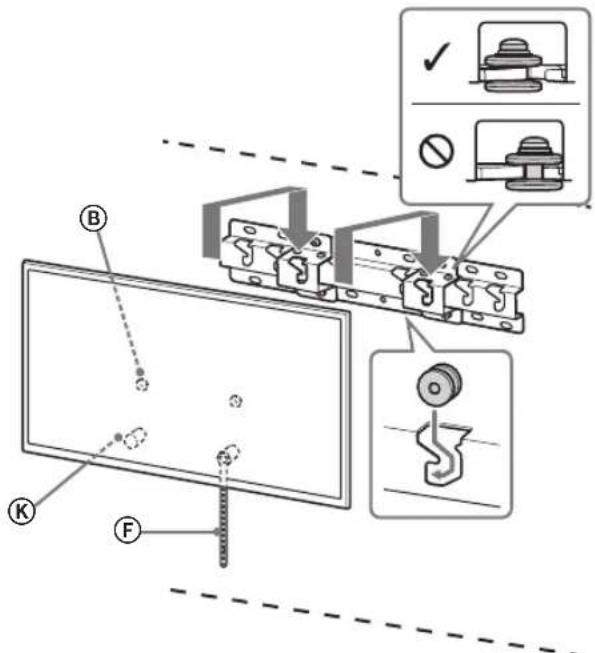
Tight Mounting (2-b)
WARNING
- Ensure that the screws (three or more screws for a TV with a screen size of 75 inches or more) are firmly tightened to the TV when mounting it.
Do not allow children to climb on the TV. Keep small parts out of the reach of children to prevent accidental ingestion.
After mounting the TV, do not remove the screws or other fasteners.
Otherwise, the TV may fall and cause serious injury or damage.
Do not disassemble or modify the wall mount bracket.
Otherwise, the wall mount bracket may fall and cause serious injury or damage.
Do not attach any equipment other than the specified one to the bracket.
This wall mount bracket is intended for use only with the specified products. If equipment not intended for such installation is attached to this mounting bracket, it may fall or be damaged, and may cause injury or property damage.
To avoid overloading the wall mount bracket, do not place anything other than the TV on it. Do not tilt the TV left/right or up/down.
In any case, the TV may fall and cause injury or property damage.
Do not lean on the TV or hold onto it.
Do not lean on the TV or hold onto it, as it may fall and cause injury or serious damage.
WARNING
Follow the precautions below. There is a risk of injury or property damage.
It must be maintained without applying excessive force.
Do not overload the top of the TV. Otherwise, the TV may fall and cause injury or property damage.
Precautions
If the TV is installed on a bracket for wall mounting and is used for a long time, depending on the wall material, the wall behind or below it may become discolored or the wallpaper may peel. - After removing the bracket for wall mounting, holes will remain in the wall. Do not use the bracket for wall mounting in places with mechanical vibrations.
Do not install the wall-mount bracket on walls where the edges of the TV will protrude beyond the edges of the wall.
Do not install the wall-mount bracket on wall surfaces (for example, on columns) where the edges of the TV will protrude beyond the edges of the wall surface. Grabbing the protruding edges of the TV may cause injury or property damage.
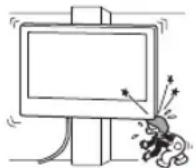
Do not place the TV under or on top of an air conditioner.
If the TV is exposed to condensation or airflow from the air conditioner for a long period, it may cause a fire, electric shock, or malfunction of the TV.
Be sure to securely attach the wall-mount bracket to the wall, following the instructions provided in this manual.
If any of the screws are loose or missing, the wall-mount bracket may fall and cause injury or property damage. When performing installation, be sure to use screws that match the wall material and securely install the device, using no less than four 8 mm screws (or equivalent).
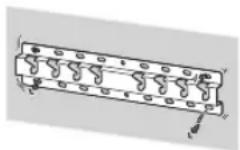
Be sure to use only the screws and parts included in the kit for mounting, and strictly follow the instructions provided in this installation guide. If other mounting materials were used, the TV may fall and be damaged or cause injury.
Be sure to assemble the bracket exactly as described in the installation instructions in this manual.
If any of the screws are loose or fall out, the TV may fall and be damaged or cause injury.
Tighten the screws securely in the designated mounting holes.
Otherwise, the TV may fall and be damaged or cause injury.
Make sure that during installation the TV is not subjected to any impacts.
Impacts may cause the TV to fall and be damaged. This can lead to injury.
Install the TV on the wall only if the wall is perpendicular to the floor.
Otherwise, the TV may fall and cause injury.
After installing the TV, ensure that the cables are arranged safely.
Cables that present a tripping hazard or obstruction may cause serious injury or damage to the TV.
Do not allow cables to become tangled.
connecting cables.
If the power cord or connecting cables are pinched between the device and the wall, or are bent or twisted, the insulation of the internal wires may be damaged, which could cause a short circuit or break. This may result in fire or electric shock.
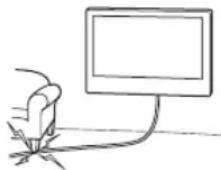
Screws for mounting the bracket to the wall are not included in the package.
The wall mounting bracket is made of material and structure corresponding to the wall.
The products should be stored in cardboard packaging in a dark, dry, clean, well-ventilated room, away from sources of acid and alkali. Storage temperature: -20°C to +60°C. Humidity: <80%.
Do not install the TV on a shelf, carpet, bed, or in a closet.
Do not cover the TV with fabric, such as curtains, or with newspapers, etc.
Do not install the TV as shown in the figure below.
Air circulation is obstructed.
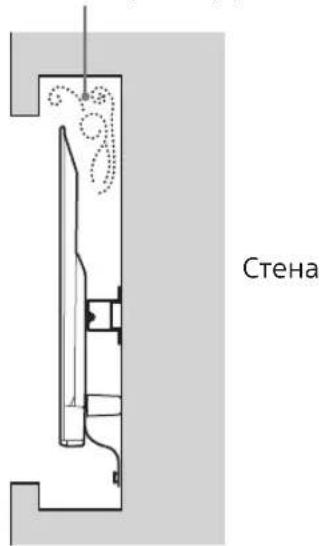
Installation
- Before installation, if you plan to run cables in the wall, also determine the holes for the cables and drill the holes in the wall. To prevent cable damage, prepare the holes in the wall outside the perimeter of the base (20) A, behind the base ① and the grommet (20) E, and the grommet (60) K.
2 Choose the wall mounting method. The distance from the back of the TV to the wall can be selected as shown below.
2-a Standard mounting
2-b Compact installation
See step 1 in the table.
WARNING
- When choosing option 2-b, access to the rear connectors is restricted.
3 The location of the base adapter mounting holes is shown in the table below. If you choose option 2-b, skip this step.
KDL-50WG6□□
KDL-43WG6□□
C
Attach the base adapter ① to the base (20) using the screw (PSW 4x10) when selecting item 2-a.
Determine the position of the screws for installing the base (20).
See specifications on page 13. When selecting item 2-a, use the holes of the base adapter ①.
WARNING
The wall on which the TV will be installed must support at least four times the total weight of the TV (to find out the weight of the TV, see the reference manual).
- Determine the strength of the wall on which the TV will be installed. If necessary, reinforce the wall.
Installing the base on the wall
- Use four or more screws with a diameter of 8 mm or equivalent (not supplied). Insert four screws into the holes of the base adapter ①, and attach it to the base (20) (only 2-a).
- Install the base (20) horizontally on the wall.
Standard mounting (2-a)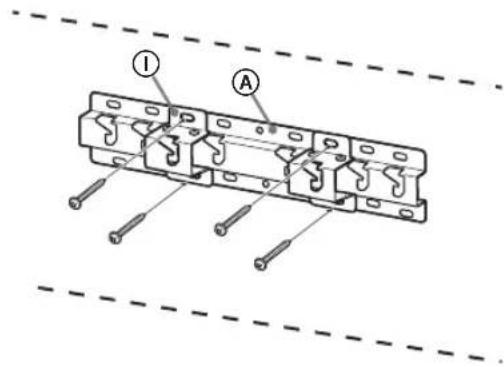
Compact installation (2-b)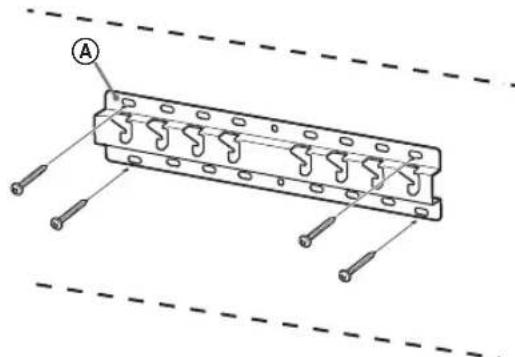
Compact installation (2-b)
Application
You will not be able to use some connectors on the rear panel of the TV with this type of installation.
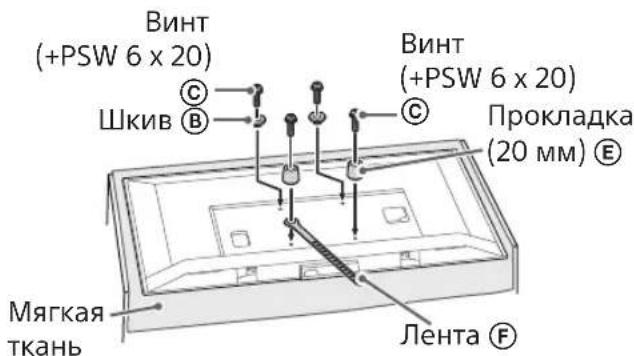
Connect the necessary cables to the TV.
Before installing the TV on the wall, you must connect the cables. After installing the TV, connecting the cables will be impossible. See the User Manual supplied with the TV.
Application
- Route the cables in an orderly manner. - Before mounting the device on the wall, lay the connecting cables so that you do not accidentally step on them.
Wall-Mount Installation
1 Install the TV on the base for the wall mount bracket.
The location of the hooks for mounting the bracket base is shown in Table 3 in the section "Determining the mounting position" on page 8. Carefully lower the TV and hang the hooks on the brackets installed on the rear panel of the monitor, onto the base for the wall mount bracket, aligning the holes. - After installing the TV on the wall, make sure that the hooks are securely fastened in the base for the wall mount bracket. Gently release both hands and make sure the TV is securely installed.
Standard mounting (2-a)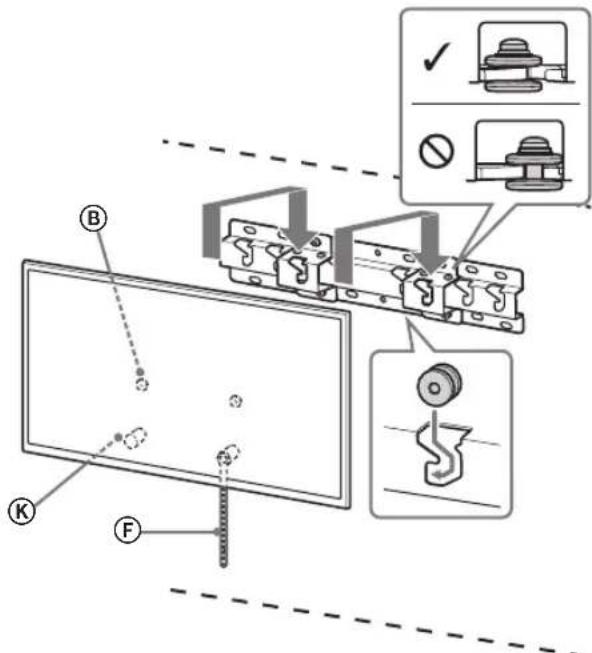
Compact installation (2-b)
WARNING
- Make sure that the TV is held by two or more people (three or more people for TVs with a screen size of 75 inches or larger) when carrying it.
2 Adjusting the tilt of the lower part of the TV.
- Secure the strap F and attach it to the wall.
- Use a screw with a diameter of 5 mm or its equivalent (not supplied).
Application
Gently pull the TV towards you to make sure it does not tilt forward. If there is a slight tilt, the TV is not secured properly, and strap F should be attached lower.
- The hooks ⑧ are securely attached to the base or the base adapter.
- The cord and cable are not twisted or pinched.
- Strap F is securely attached without slack.
WARNING
- Incorrect routing of cables, straps, etc. can lead to fire or electric shock due to a short circuit. To ensure safety, make sure all installation steps are completed.
Initial Information
To remove the TV, perform the procedure described above in reverse order.
CAUTION
Make sure that the monitor is held by two or more people (three or more people for TVs with a diagonal of 75 inches or more) when removing it.
Technical Specifications
Dimensions: (approx.) [mm]
Tighten the screws, too, when mounting the TV.
If this is done, the TV may fall and cause serious injury or lead to damage.
Do not remove the bracket parts for partial mounting.
If this is done, the bracket for partial mounting may fall and cause serious injury or lead to damage.
Do not install any other devices other than the specified product.
The bracket for partial mounting is designed for use only with the specified product. If other devices are installed, the bracket may fall and cause serious injury or lead to damage.
Do not use the bracket for partial mounting with any TV other than the specified one. Do not tilt the TV up/down or left/right.
If this is done, the TV may fall and cause serious injury or lead to damage.
Do not lean on the TV or hang on it.
Do not lean on the TV or hang on it, as it may fall on you and cause serious injury.
WARNING
If the following safety precautions are not followed, it may lead to serious injury or damage.
During cleaning or servicing, do not apply excessive force to the product.
Do not apply excessive force to the top of the TV. If this is done, the TV may fall and cause serious injury or lead to damage.
Safety precautions
The TV bracket for partial mounting will be used for a long time, depending on the material the wall is made of. The wall surface behind the bracket may become dirty or the wall may be damaged.
Partial mounting is only possible if the wall is strong enough. Do not use the bracket for partial mounting in places where mechanical stress may occur.
Installing the bracket for partial mounting
When mounting the bracket for partial mounting, use screws appropriate for the wall structure and the material it is made of.
Store the product in a cardboard box, in a dark, dry, clean place with good ventilation, separately from acid and alkali storage. Storage temperature: from -20 to +60°C. Storage humidity: <80%.
Installing the TV on the wall
The installation procedure depends on the TV model.
To install the TV on the wall, use the bracket for partial mounting SU-WL450.
Stand
The stand is partially attached to the TV; remove it. Follow the instructions and perform the steps in reverse order to remove the stand. - To avoid damaging the panel during installation of the bracket elements or removal of the stand, place the TV with the screen down on a flat, soft surface covered with thick cloth. Keep the removed parts in a safe place.
Pre-installation
- Before installation, carefully read the manual and the instructions for the TV.
- Before assembling, make sure the cross screwdriver fits the screws.
- Check the installation position of the TV. Tighten the four screws with a diameter of 8 mm and one screw with a diameter of 5 mm or equivalent (not included in the delivery). Choose the screws according to the material the wall is made of.
Checking the parts
- The stand is included in the delivery set.
| AБаза(20)(1)ВШК | В(2) |
| CГВИNTPSW6x20(4) | DГВИNTPSW4x20i3ВТУЛКОЮ(2) |
| EПрOKладka(20)(2) | FРемиь(1) |
| GВтулka(20)(M4)(2) | HГВИNTPSW4x20(2) |
| IПерек中级6aЗn(2) | JГВИNTPSW4x10(8) |
| KПрOKладka(60)(2) | LГВИNTPSW6x50(2) |
| МВтулka(M4)(2) | NГВИNTPSW4x50(2) |
Installation
1 Installation of the stand.
Before installation, make sure the surface is large enough and strong enough to support the weight, which is several times greater than the weight of the TV.
The screws needed for mounting the TV on the wall can be found in the table below. The weight of the TV can be found in the TV's manual.
Precautions
Do not place the TV horizontally, do not install it with the bottom side up, upside down, or on its side.
- Do not place the TV on the floor, carpet, bedding, or similar.
Do not cover the TV with fabric (curtains) or other materials, such as newspapers. Do not install the TV as shown below.
Damage
Mounting
If the cables are routed through the wall, make a hole in the wall to insert the cables before starting installation. To prevent cables from being pinched, make a hole in the wall outside the perimeter of the base (20) A, the base cover (20) E, and the cable guide (60) K.
2 Choose the mounting method for the wall. Choose the height for the TV on the wall as shown below.
2-b ToHke KpInJIeHHa
ДиВ.ТаБлИЦИВКроцI1.
3ACTEPEKEHH
- Y pa3i Bn6bopy 2-b doctyn Do rHi3d Ha 3aHi nHaHeJI 6yJe o6mexeHn.
3 Miche BCTaHOBJIeHnAaIaTepa OCHOBINIBITbcB Ta6NIuI HxKHe. KaIO Bn6paHo 2-b, npOnyctItb uekPok.
ToHke KpInIeHHa (2-b)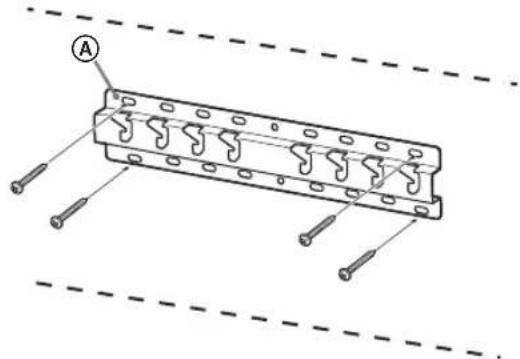
Пид�товka дOBCTановленnersTelebi3opa
IIN. NocihNK i3 HanaWtYBaHHa IJI BCTaHOBHeHH nOpN.
1 BiD'eHaIte HaCTiBHy NiDnopy BiD TeLeBi3Opa.
PpMItka
- He nouKoHTn DcNnei, 3actnlb nobepxHIO, Ha kky bdeTe KnaCTn TeneBisOp, mATKOM M'koT tKaHHI. He BnKOpNCTOByIe npn BCTaHOBNeHHi KPOHHTeHa dIy HactiHHoro KpinneHHra BnHTN, BnKpyHeHi 3 HactiIbHoI niOpn. TpmaTe 3HrTy HactIbHy nIINpOy Ta BnKpyeHi rBHTN B63NeuHOMy, HeIOcXHOMy dIaTne Micci.BoHI 3HaIObIaTbcBaM, kIOo B MaIbTyBbOMy BN 3axOyTe BCTaHObITN TeNEBI3Op Ha cToJI. HactIbHa nIINopa He npOdaTbcra OkpeMo.
NONEPEDXEHN
-NepeTUMKYBIMKHyTNTeNBeI3Op,BCTaHOBITb Ioro BepTKaJIbHO.1063anO6IITnfoPMyBaHHIO HEPIBHomIPHOro 3o6paXeHHn,He BMkaIte TeneBI3Op,pO3taWObAHNI PK-nAHeJIIO DOHN3y. Bid HATnCKaHH a60 ydapy NOBepxH TelenbiOpa MoKe po3bntnc a60 3aHTn NOnKoJKeHH. Knaitb Telebiop ekaHOM doH3y Ha pibHy, MiHy nobepxHIO, u6 HactIbHa nIINopa 3BiUyBaIacra yepe3 kpaNOBepxHi. Raio IuBoBa NOBepxHr TelebiOpa NOnopa HactIbHOi NiINOPn 3haxoTbcra Ha ODNHYPiHI, To yMOBuPo6OTn 6ydyTB HeCTa6IbHMn, i MoXJIne NoWKoJKeHHa TelebiOpa. MiHOTpMaTeHaCTIbHyPiDnopy,BID'EDHyIOUHII BIDTENEBi3Opa.
2 3aФICyIe KpINJIbHi eIemENTn KPOHHTeHa dIa HaCTiHHOrO KpInJIeHHra. IpeBipTe HaABHicTb ycix KpINJIbHNx eIemEHTIB, KOpNCTUOuNCb CnNCKOM «ПocTauaeTbc3 SU-WL450» y po3dJIi «IpeBipKa DeTaJeN» Ha cTOp.5.
Ppimtka
Tighten the wall-mounted elements with screws. -For the wall mounting, set the tightening torque to approximately 1.5 N·m {15 kgf·cm}. -Be sure to keep unused components in a safe place for future use, if they are included in the manual. Keep this manual for future use.
Standard mounting (2-a)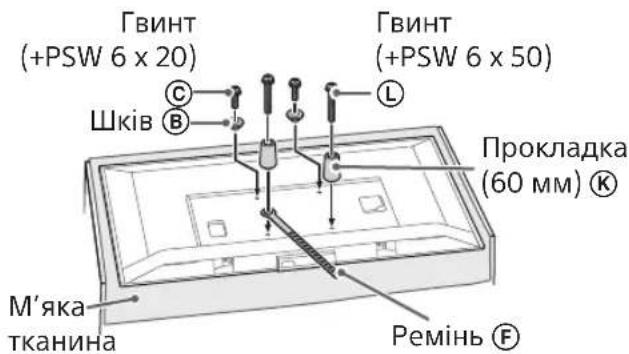
Thin mounting (2-b)
Screw
- With this mounting option, you will not be able to use some sockets on the back panel of the TV.
Connect the TV cable.
Check the cable connection before mounting the TV on the wall. After mounting the TV, it will be impossible to connect the cable. Note: Refer to the TV manual.
Screw
- Have the cables laid in the wall by a licensed professional. Connect the connection cables inside so as to prevent them from getting caught when moving the wall.
Mounting the TV on the wall
1 Mount the TV on the base or the base adapter.
- Insert the hooks ⑧, by which the TV is hung on the base or the base adapter, see the table for the base in section «Determining the mounting position» on page 7. -Carefully lower the TV and insert the hooks ⑧, attached to the back of the TV, into the base or the base adapter (they must match the hole sizes).
- After mounting the TV on the wall, make sure that the hooks are securely fastened in the base or the base adapter. -Carefully slide the TV with both hands so that it does not fall.
Standard mounting (2-a)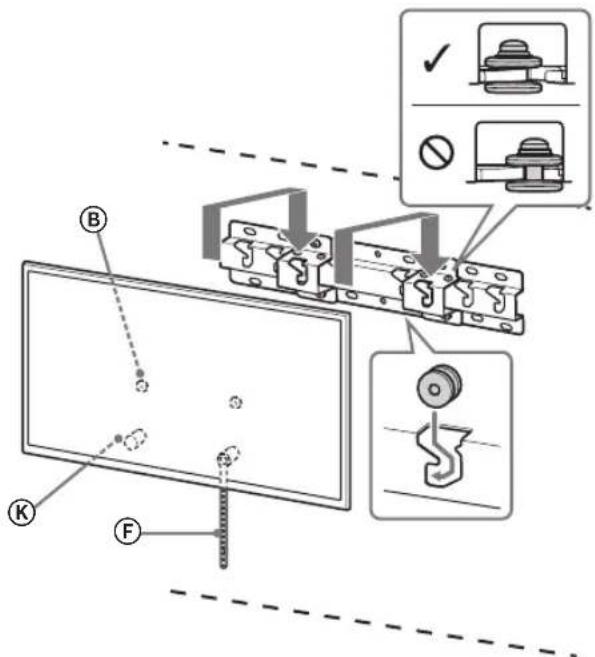
Thin mounting (2-b)
The place for installing the TV must be able to support the weight of two people (the weight of three, if the TV diagonal is 75 inches or more).
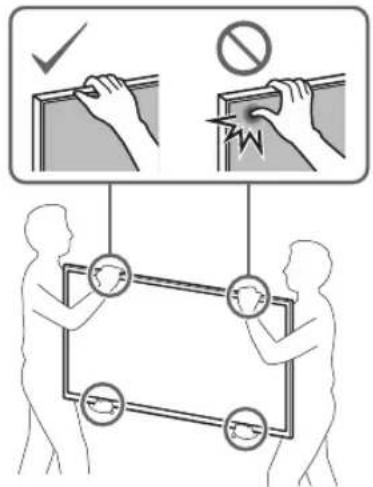
2. To replace the lower part of the TV.
Check the lower part of the repair kit and make sure it is securely attached to the wall.
Use a screwdriver with a 5 mm diameter or equivalent (not included in the delivery set).
Note
Try to gently pull the lower part of the TV towards you to make sure it does not move forward. If the TV moves, close it incorrectly and it is necessary to repeat the closing procedure.
Check after installation is complete
Check the following points.
- If the base or the adapter for the base is installed.
- The cord and cable are not crossed or pinched.
- The F connector is closed without gaps.
WARNING
- Incorrect placement of the power cord with alternating current can cause interference or electric shock due to a short circuit. For safety reasons, be sure to check everything after installation is complete.
Other information
To access the TV connectors, follow the procedure indicated in the reverse order.
CAUTION
The TV connectors are fragile. Handle them carefully to avoid damage (especially the antenna connector, which can break if the TV is placed on its side).
Technical specifications
Dimensions: (approx.) [mm]
a: 400
b: 300
c: 200
d: 100
e: 80
f: 480
g: 100
h1: 20 (see drawing 2-b)
h2: 60 (see drawing 2-a)
Weight (base only): (approx.) [kg]
0.8
The design and technical specifications may be changed without prior notice.
Wall mounting (2-b)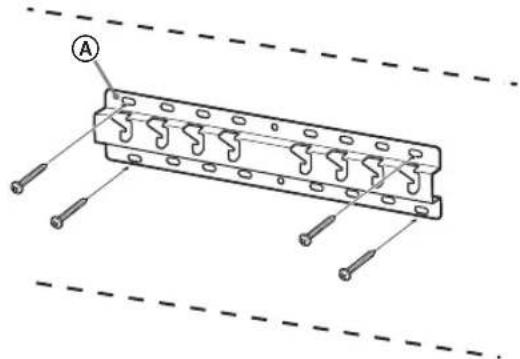
Wall mounting (2-b)
Note.
Wall mounting (2-b)
WARNING
Weight (base only): (approx.) [kg]
0.8
h1:20 (2-b variants)
Do not place the device near heat sources or in direct sunlight.
The temperature may rise and cause damage. If the device is placed near a heat source, the temperature may rise and cause damage or malfunction.
Safety instructions
When mounting on a wall, ensure that the wall can support the weight of the device. If the wall is not strong enough, the device may fall and cause injury or damage. When mounting on a wall, use appropriate mounting hardware. When mounting on a wall, ensure that the mounting hardware is securely attached.
Wall mounting hardware
The drill holes must be positioned correctly relative to the cable duct outlet.
When drilling into the cable duct, the drill bits must not be positioned at an angle to the cable duct outlet. If the drill bit hits a reinforcement bar or other metal parts, it may cause damage to the drill bit or the duct.
The drill bit must not be positioned incorrectly relative to the duct.
If the drill bit hits a metal part, it may cause damage to the drill bit, the duct, or the drill. In such cases, stop drilling immediately.
When drilling into the cable duct, do not use excessive force.
If the drill bit becomes stuck or breaks, it may cause damage to the drill bit, the duct, or the drill. The drill holes must be positioned at least 8 mm (or more) away from the edges of the duct and must be drilled perpendicular to the duct surface.
The drill holes and the drill bit must be positioned according to the instructions in this manual. If the components are not positioned correctly, the drill bit may break, and the duct may be damaged.
Follow the procedures described in the manual when drilling into the duct.
Be careful.
If the drill bit becomes stuck or breaks, it may cause damage to the drill bit, the duct, or the drill.
The drill holes must be drilled in the correct positions as indicated.
If this is not done, the drill bit may break, and the duct may be damaged.
Do not remove the duct during installation.
If the duct is removed, it may be damaged or bent. This may cause damage.
The duct must be installed perpendicular to the cable duct and the floor.
Erep conai 6oImaca, Teneiupap KnyaybI Hemece xapaKaT anyBIsMMyKIn.
Tepeiap dypbic opHaTbIraHHaH KeiH Ka6eJIbepdi Aypbc 6ekITiHi3.
Aamap HeMece 6acka 3attap KaebIre opanatbH 6onca, xapaKaTka He TeneiNapDbH 3akBIMdAhybHa eKeyi MymKiH.
AinHbIMaJIbI TOK cbIMbl HeMece Kocy Ka6eni KbICbIJbIN KaImaybl KepeK.
Ainbimab Tok cbmbi Hemece Kocy ka6eni KpaJI MeH Ka6bipra apacBHa KaCbIbn KaIcA, MaBICaH Hemece KyuTEN opaIraH Bonca, Iki KaBITTaBHTap 3AkIMDaHIn, KbIcKa TYbIKaTnyra Hemece 3NeKTP Ke3IHH y3inyHe ce6en 6onyb MyMkh. ByeptTih nai Da bonyha Hemece Tok coryr Akenyi MyMKH.
KpoHwTeHdi Ka6bipfara 6ekityre kaxeTTI 6ypaHaJap 6epiImereH.
Ka6bipfara 6eKity KPOHHTeHH 6eKITy Ke3IHKe Ka6bipraHH MaTepnaJIbMeH KpyblmbHa caBypaHdaanapDb naDaanahbHb3.
TeJeIaIapIbI Ka6bIpFaFa opHaTy
TeeneiapdbH Typhe 6aHaNbICTbI opHaTy npoueypacbi e3rewe 60ana.
TД-ды ka6biprafa opnaty ywiH SU-WL450 Ka6biprafa opHaTaTBiH KPOHwTeHiH NaДананьИЗ.
HycKay
YCTEN TYfblpI T-FA 6eKITInce, YCTEN TYfblpIH anDbIH ana axkbpatbHb3. OPhATy HcaynblbHIN Kapan, yCTEN yCTI TiperIH WcWy KaamdapbH IN KePI petneH opBHaHb3. CKD nncnnei 6etinH 3aKbIMdaNyib H 60ndbp May yuH Kabiprafopa hataTbH kpoHHTeHi Tipkey 6enwekeTpH 6ekemdey Hemece Td-dan Ycten TybipH anbn Tactay Ke3iHde Td 3kpaBH TeMeH KapaBH KaBn JxymCaK WBepeken HxaBbIFAH Teric, TypaKb 6etke KoBbHbI3. AnbHrah 6paHdapanapdb6anaanapda anbc, kayinciOpbHfKaonbiHb3.
Ophatyfa daibihdbik
OpHaTy aIbIHJa TД aHbIKTaMaJIbIK HcayIbIFbIH XHe opHaTy HcKayIbIFbIH aIbIHbI3. Kypactbipmac 6ypbH 6paHda napra cai Keletin Phillips 6ypaybiu 6onyiKepek. Teeneiap6ekitietinopbIHbIaHbIKTaHbI3. Диametpi 8 MM 60JIaTH TeP HEme OdaH da KeI 6ypaHaJa XHe 5 MM-Nik HEme YKcac (6epiImereH) 6ypaHa DaIbIHdIaI3. Ka6bIpraHaBH MaTepnaIbHa caI KeJeTIn 6ypaHaIapDbI TaHaHbI3.
БошекердTekcepy
SU-WL450 User Manual
- Please read this manual carefully before use.
| A Heri3 (20) (1) B Terepiik (2) | |
| ◎ PSW 6x20 (4)◎ TblfbiH PSW 4x20 (2) | |
| ◎ ApaIbIK (20) (2)◎Белдik (1) | |
| ◎ TblfbiH (20) (M4) (2) | ◎ H PSW 4x20 (2) |
| ◎ Heri3ri ādantep (2) | ◎ J PSW 4x10 (8) |
| ◎ ApaIbIK (60) (2) L | PSW 6x50 (2) |
| ◎ TblfbiH (M4) (2) N | PSW 4x50 (2) |
Safety Instructions
1. Read the safety instructions.
There is a risk of electric shock if the device is not used as described in this manual.
For instructions on installing the device, see the relevant section. For servicing the device, refer to the device's technical documentation.
Installation
| Ynlri hemipi | Зкран салем dipei | Зкран opтасын cIeшемi | Орнату узbingíbli | |
| a | b | c | d | |
| Стондартыbli opнату | ||||
| KDL-50WG6□□ | 1130 660 21 358 130 88 | |||
| KDL-43WG6□□ | 974 572 54 346 130 88 | |||
Inspection
It is possible to change the installation position without any additional work. - When installing the device, the device's warning label must be placed in a visible position.
Leave a gap between the device and the wall and the device's ventilation openings.
Installation
To prevent damage and injury from fire and electric shock:
- Do not place the device near heat sources, open flames, or in direct sunlight. Do not place the device on soft surfaces such as beds, sofas, or carpets. Do not cover the device with cloth, paper, or other materials.
- Install the device on a stable surface.
Avoid placing the device in areas with high humidity.
Cable routing: Before routing the cables, it is necessary to check the cable routing. For the basic (20) A cable, the basic and spare (20) E, and spare (60) K, the cable routing must be checked around the perimeter.
2 Select the routing method. The choice of routing method depends on the conditions at the installation site.
2-a Standard routing 2-b Closed routing
1 Check the cable cross-section.
NOTE
-2-b When closed routing is selected, the terminal block must be protected.
3 Refer to the section on securing the basic cable. When closed routing is selected, follow this procedure.
| Y NFLI HEMIPI IIMEK OPHBI |
| KDL-50WG6□□C KDL-43WG6□□ |
Secure the basic (PSW 4x10) cable with brackets when using 2-a routing for the basic (20) A.
4 Determine the bracket positions for the basic (20) A routing.
Refer to the diagrams on page 12. When using 2-a routing, secure the basic cable as shown in ①.
NOTE
When routing cables, refer to the cable bending radius and the minimum distance to the cable tray (see the cable manufacturer's instructions for the minimum bending radius).
Determine the tightness of the cable routing. If necessary, tighten the cable routing.
Cable routing method
- Diameter 8 MM. Do not use the drill bits that are not sharpened (discard them). ① The sharpened drill bits (20) must be installed in the base (see Fig. 2-a). Install the base (20) by aligning it with the hole.
Standard installation (2-a)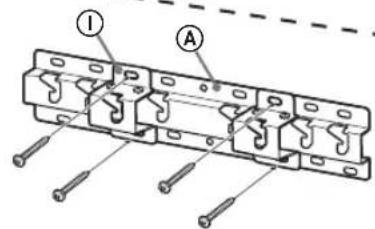
Correct installation (2-b)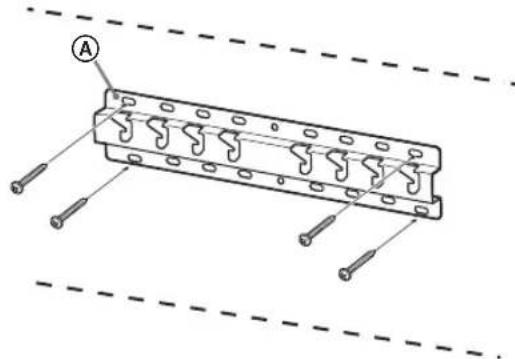
Adjusting the television
Before installation, check the wall.
1. Insert the television mounting screws.
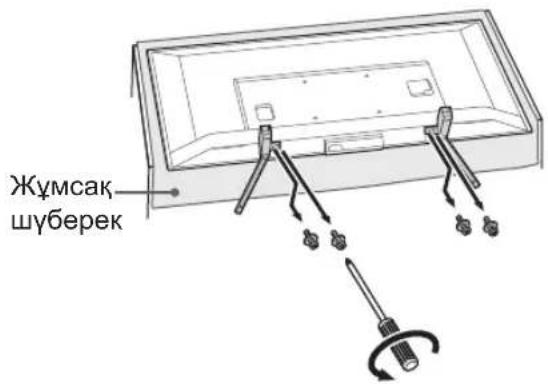
Note
- To prevent the television from falling, place it on a soft surface and move it to the desired location. During installation, remove the screws that were installed in the hole. After removing the screws, keep them and the other parts in a safe place. If the television is moved and the screws are removed, they will be needed. The screws must be kept for later use.
CAUTION
The television must be installed on a flat surface. To prevent the television from tipping over, the television must be secured with the included screws. If the television is not secured, it may tip over or fall. Do not place the television on an unstable surface. If the television is not properly secured, it may fall and cause injury. - After removing the screws from the television, install the screws in the correct position.
2. For installation in the hole, use the included screws. Refer to the "SU-WL450" section in the "Screws" section of the manual for the screws.
Note
- Install the screws using the included drill bits. When drilling, drill to a depth of 15 cm. - If the screws are not installed or are not installed correctly, the television may fall. Check the screws for safety.
Standard installation (2-a)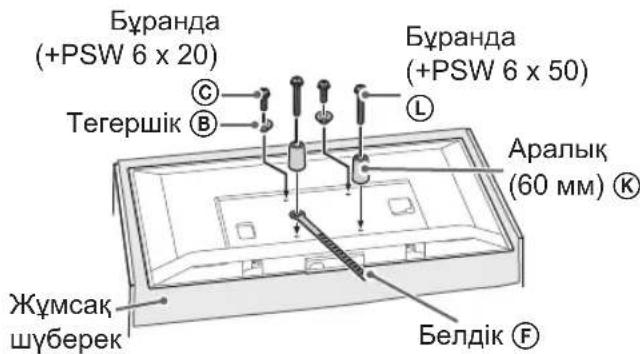
Correct installation (2-b)
Before starting installation, it is necessary to familiarize yourself with some terms used in this manual.
Connect the cables to the devices.
Before placing the devices, check the cables. After placing the devices, the cables should not be pulled. See the instructions for connecting the devices.
Connection
To connect the cables, you must have a license for the appropriate connectors. Before connecting the cables, check the cable channels to avoid damaging them.
Placing the devices in the rack
1 Place the devices on the base or on the base plates.
For the screws on the base or base plates, see step 3 in the "Identifying the mounting location" section on page 7-8. - Lift the devices and place them on the base or base plates, aligning the screws. After placing the devices in the rack, tighten the screws. To prevent the devices from falling, hold them with both hands.
Standard mounting (2-a)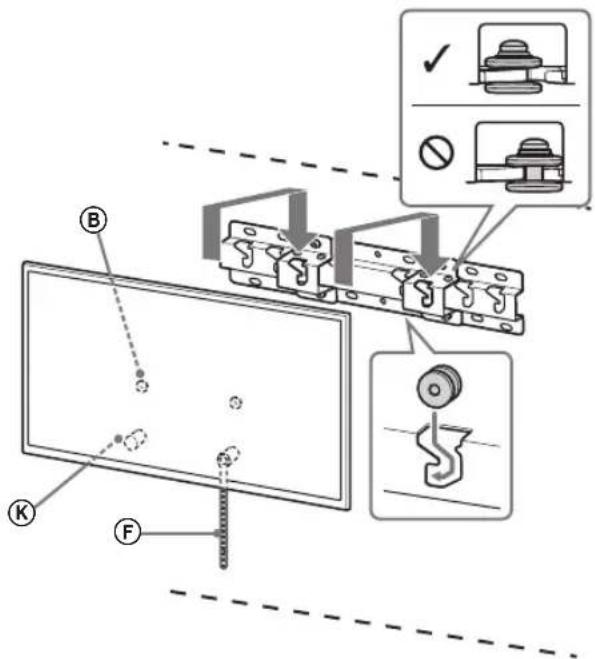
Recessed mounting (2-b)
NOTE
After installing the devices, check that they are secure with one or more people (for devices weighing more than 75 kg, use three or more people).
2 Do not lift the devices by the handles.
- Take the handle and try to attach it to the rack.
Diameter 5 mm, 60 watts, incandescent lamp (not included).
Startup
To operate the device, you must follow the safety instructions provided in the manual. If you have any questions, please contact the manufacturer.
Installation procedure
Check the connections.
Make sure the device is properly grounded. - Do not touch the lamp or cable with wet hands. - The ground (F) must be connected.
WARNING
Do not use the device if the power cord or plug is damaged. Do not operate the device in wet or damp conditions. Keep the device away from flammable materials.
Other equipment
Follow the installation procedure described in the manual.
WARNING
Do not install more than one lamp (75W max) or a lamp of higher wattage than specified. Use only the recommended lamp type.
Technical specifications
Sony
y
177
Sony
SU-WL450
| (2) 陳鈞⑧ | (1) (20) 陳鈞⑧ |
| (2) PSW 4x20⑥ | (4) PSW 6x20⑥ |
| (1) 陳鈞⑤ | (2) (20) 陳鈞⑤ |
| (2) PSW 4x20⑧ | (2) (M4) (20) 陳鈞⑥ |
| (8) PSW 4x10① | (2) 陳鈞⑦⑧① |
| (2) PSW 6x50① | (2) (60) 陳鈞⑧ |
| (2) PSW 4x50⑨ | (2) (M4) 陳鈞⑧ |
Therefore, the area of triangle APQ equals the area of triangle AQP plus the area of triangle PQQ.
77
PN.00N 00 - mnnn, m: -2y no 5 - -
n nn nnnn
3
.
one of n
1 IN DODN
nnn nn n nn nn nn nn
therefore {PB} is perpendicular to {BA}
77
ybn75
nannnny
- ON SAFETY
- TO CUSTOMERS
- TO SONY DEALERS
- CAUTION
- SPECIFIED PRODUCTS
- WARNING
- BE SURE TO SUBCONTRACT THE INSTALLATION TO LICENSED CONTRACTORS AND KEEP SMALL CHILDREN AWAY DURING THE INSTALLATION
- BE SURE TO SUBCONTRACT MOVING OR DISMOUNTING OF THE TV TO LICENSED CONTRACTORS
- DO NOT REMOVE SCREWS, ETC., AFTER MOUNTING THE TV
- DO NOT MAKE ALTERATIONS TO THE PARTS OF THE WALL-MOUNT BRACKET
- DO NOT MOUNT ANY EQUIPMENT OTHER THAN THE SPECIFIED PRODUCT
- DO NOT LEAN ON OR HANG FROM THE TV
- DO NOT HANDLE THE PRODUCT WITH EXCESSIVE FORCE DURING CLEANING OR MAINTENANCE
- PRECAUTIONS
- INSTALLING THE WALLMOUNT BRACKET
- DO NOT INSTALL THE TV OVER OR UNDER AN AIR CONDITIONER
- BE SURE TO INSTALL THE WALL-MOUNT BRACKET SECURELY TO THE WALL FOLLOWING THE INSTRUCTIONS IN THIS INSTRUCTION MANUAL
- BE SURE TO ASSEMBLE THE BRACKET PROPERLY FOLLOWING THE INSTRUCTED PROCEDURE EXPLAINED IN THIS INSTRUCTION MANUAL
- BE SURE TO TIGHTEN THE SCREWS SECURELY IN THE DESIGNATED POSITION
- BE CAREFUL NOT TO SUBJECT THE TV TO SHOCK DURING INSTALLATION
- BE SURE TO INSTALL THE TV ON A WALL THAT IS BOTH PERPENDICULAR AND FLAT
- AFTER PROPER INSTALLATION OF THE TV, SECURE THE CABLES PROPERLY
- DO NOT ALLOW THE MAINS LEAD OR THE CONNECTING CABLE TO BE PINCHED
- THE SCREWS NEEDED TO SECURE THE WALL-MOUNT BRACKET TO THE WALL ARE NOT SUPPLIED
- INSTALLING THE TV ONTO THE WALL
- NOTE
- PREPARING FOR INSTALLATION
- CHECKING THE PARTS
- SUPPLIED WITH SU-WL
- DECIDING ON THE INSTALLATION LOCATION
- DECIDE ON THE INSTALLATION LOCATION
- INSTALLING THE BASE ON THE WALL
- PREPARING FOR THE INSTALLATION OF THE TV
- DETACH THE TABLE-TOP STAND FROM THE TV
- ATTACH THE ATTACHMENT PARTS FOR WALL-MOUNT BRACKET. CHECK THE ATTACHMENT PARTS BY REFERRING TO "SUPPLIED WITH SU-WL450" IN "CHECKING THE PARTS" ON PAGE
- SLIM MOUNTING (2-B)
- CONNECT THE NECESSARY CABLE(S) TO THE TV
- INSTALLING THE TV ON THE WALL
- INSTALL THE TV ONTO THE BASE OR BASE ADAPTOR
- PREVENTING THE BOTTOM OF THE TV FROM SHIFTING
- CONFIRMING THE COMPLETION OF THE INSTALLATION
- OTHER INFORMATION
- SPECIFICATIONS
- DIMENSIONS: (APPROX.) [MM]
- WEIGHT (BASE ONLY): (APPROX.) [KG]
- PREPARATION FOR INSTALLATION
- FIND THE TV'S LOCATION
- IMPORTANT NOTICE FOR SONY
- PRODUCT DESCRIPTION
- FOR CUSTOMERS
- PERFORM THE INSTALLATION OF THE LICENSED INSTALLER AND THE PRODUCT ACCORDING TO THE INSTALLATION TIME
- MAKE SURE YOU HAVE PERFORMED THE INSTALLATION OF THE TV WITH A LICENSED INSTALLER
- DO NOT SCREW IN THE SCREWS OR OTHER ITEMS AFTER INSTALLING THE TV
- DO NOT SKIP THE PARTS OF THE WALL MOUNT
- DO NOT INSTALL OTHER EQUIPMENT OTHER THAN THE SPECIFIED PRODUCT
- DO NOT PLACE THE WALL MOUNT ON ANY OTHER PRODUCT OTHER THAN THE TV. DO NOT PLACE THE TV ON THE FLOOR/ON THE FLOOR, ON THE FLOOR/ON THE FLOOR
- DO NOT LEAN ON OR HANG ON THE TV
- DO NOT OPERATE THE PRODUCT WITH A DAMAGED POWER CORD DURING CLEANING OR REPAIR
- SAFETY INSTRUCTIONS
- WALL MOUNT INSTALLATION
- DO NOT INSTALL THE WALL MOUNT ON A WALL SURFACE WHERE THE TELEVISION PROTRUDES FROM THE WALL SURFACE
- DO NOT INSTALL THE TELEVISION ON OR NEAR AIR CONDITIONERS
- MOUNT THE WALL MOUNT SECURELY TO THE WALL FOLLOWING THE INSTRUCTIONS IN THIS MANUAL
- MAKE SURE YOU USE THE MOUNT CORRECTLY BY FOLLOWING THE PROCEDURE DESCRIBED IN THIS MANUAL
- TIGHTEN THE SCREWS SECURELY IN THE INDICATED POSITION
- BE CAREFUL NOT TO SUBJECT THE TV TO IMPACT DURING INSTALLATION
- MOUNT THE TV ON A WALL THAT IS PERPENDICULAR AND FLAT
- AFTER CORRECTLY MOUNTING THE TV, SECURE THE CABLES PROPERLY
- DO NOT ALLOW THE POWER CORD OR CONNECTING CABLE TO BE PINCHED
- THE SCREWS NEEDED TO SECURE THE WALL MOUNT BRACKET TO THE WALL ARE NOT INCLUDED IN THE PACKAGE
- MOUNTING THE TV ON THE WALL
- MOUNTING PROCEDURE
- DETERMINING THE MOUNTING LOCATION
- SELECT THE MOUNTING LOCATION
- MOUNTING THE BASE ON THE WALL
- PREPARATION FOR MOUNTING THE TV
- REMOVE THE PACKAGING FROM THE TV
- RECESSED MOUNTING (2-B)
- CONNECT THE NECESSARY CABLES TO THE TV
- WALL MOUNTING THE TV
- MOUNT THE TV ONTO THE BASE STAND PLATE
- TIGHT MOUNTING (2-B)
- AFTER MOUNTING THE TV, DO NOT REMOVE THE SCREWS OR OTHER FASTENERS
- DO NOT DISASSEMBLE OR MODIFY THE WALL MOUNT BRACKET
- DO NOT ATTACH ANY EQUIPMENT OTHER THAN THE SPECIFIED ONE TO THE BRACKET
- TO AVOID OVERLOADING THE WALL MOUNT BRACKET, DO NOT PLACE ANYTHING OTHER THAN THE TV ON IT. DO NOT TILT THE TV LEFT/RIGHT OR UP/DOWN
- DO NOT LEAN ON THE TV OR HOLD ONTO IT
- INSTALLATION
- A STANDARD MOUNTING
- B COMPACT INSTALLATION
- COMPACT INSTALLATION (2-B)
- APPLICATION
- WALL-MOUNT INSTALLATION
- INSTALL THE TV ON THE BASE FOR THE WALL MOUNT BRACKET
- ADJUSTING THE TILT OF THE LOWER PART OF THE TV
- INITIAL INFORMATION
- TECHNICAL SPECIFICATIONS
- TIGHTEN THE SCREWS, TOO, WHEN MOUNTING THE TV
- DO NOT REMOVE THE BRACKET PARTS FOR PARTIAL MOUNTING
- DO NOT INSTALL ANY OTHER DEVICES OTHER THAN THE SPECIFIED PRODUCT
- DO NOT USE THE BRACKET FOR PARTIAL MOUNTING WITH ANY TV OTHER THAN THE SPECIFIED ONE. DO NOT TILT THE TV UP/DOWN OR LEFT/RIGHT
- DO NOT LEAN ON THE TV OR HANG ON IT
- DURING CLEANING OR SERVICING, DO NOT APPLY EXCESSIVE FORCE TO THE PRODUCT
- SAFETY PRECAUTIONS
- INSTALLING THE BRACKET FOR PARTIAL MOUNTING
- STAND
- PRE-INSTALLATION
- INSTALLATION OF THE STAND
- MOUNTING
- ACTEPEKEHH
- ПИД�ТОВKA ДOBCTАНОВЛЕНNERSTELEBI3OPA
- PPMITKA
- NONEPEDXEHN
- PPIMTKA
- THIN MOUNTING (2-B)
- SCREW
- CONNECT THE TV CABLE
- MOUNT THE TV ON THE BASE OR THE BASE ADAPTER
- TO REPLACE THE LOWER PART OF THE TV
- CHECK AFTER INSTALLATION IS COMPLETE
- WALL MOUNTING (2-B)
- DO NOT PLACE THE DEVICE NEAR HEAT SOURCES OR IN DIRECT SUNLIGHT
- WALL MOUNTING HARDWARE
- THE DRILL HOLES MUST BE POSITIONED CORRECTLY RELATIVE TO THE CABLE DUCT OUTLET
- THE DRILL BIT MUST NOT BE POSITIONED INCORRECTLY RELATIVE TO THE DUCT
- WHEN DRILLING INTO THE CABLE DUCT, DO NOT USE EXCESSIVE FORCE
- FOLLOW THE PROCEDURES DESCRIBED IN THE MANUAL WHEN DRILLING INTO THE DUCT
- BE CAREFUL
- THE DRILL HOLES MUST BE DRILLED IN THE CORRECT POSITIONS AS INDICATED
- DO NOT REMOVE THE DUCT DURING INSTALLATION
- THE DUCT MUST BE INSTALLED PERPENDICULAR TO THE CABLE DUCT AND THE FLOOR
- TEPEIAP DYPBIC OPHATBIRAHHAH KEIH KA6EJIBEPDI AYPBC 6EKITIHI
- AINHBIMAJIBI TOK CBIMBL HEMECE KOCY KA6ENI KBICBIJBIN KAIMAYBL KEPEK
- KPOHWTEHDI KA6BIPFARA 6EKITYRE KAXETTI 6YPAHAJAP 6EPIIMEREH
- TEJEIAIAPIBI KA6BIPFAFA OPHATY
- HYCKAY
- OPHATYFA DAIBIHDBIK
- БОШЕКЕРДTEKCEPY
- SU-WL450 USER MANUAL
- READ THE SAFETY INSTRUCTIONS
- INSPECTION
- CABLE ROUTING METHOD
- ADJUSTING THE TELEVISION
- CORRECT INSTALLATION (2-B)
- CONNECT THE CABLES TO THE DEVICES
- CONNECTION
- PLACING THE DEVICES IN THE RACK
- PLACE THE DEVICES ON THE BASE OR ON THE BASE PLATES
- STARTUP
- INSTALLATION PROCEDURE
- OTHER EQUIPMENT
- SONY
- SU-WL
- N NN NNNN
Brand : SONY
Model : Bravia KDL50WG665
Category : Television