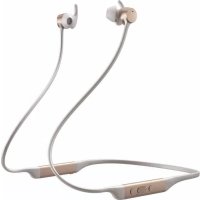
PI4 - Earplug BOWERS & WILKINS - Free user manual and instructions
Find the device manual for free PI4 BOWERS & WILKINS in PDF.



| Product type | Bluetooth wireless in-ear headphones |
| Brand | Bowers & Wilkins |
| Model | PI4 |
| Weight | 40 grams |
| Battery life | Up to 10 hours (with noise cancellation on) |
| Full charge time | Approximately 3 hours |
| Quick charge | 15 minutes for 3 hours of listening |
| Battery type | Rechargeable lithium polymer |
| Connectivity | Bluetooth 5.0 with support for aptX Adaptive, aptX HD, aptX Classic, AAC and SBC |
| Bluetooth profiles | A2DP v1.3.1, AVRCP v1.6.1, HFP v1.7.1, HSP v1.2, BLE GATT |
| Active noise cancellation | Adaptive (ABA) with High, Low, Auto and Off modes |
| Transparency function | Ambient Pass-Through (ambient sound transmission) |
| Sensors | Magnetic (clip sensing) for auto pause/play |
| Speakers | 2 x 0.142 mm wide band |
| Microphones | 2 for noise cancellation, 2 for telephony (CVC) |
| Frequency response | 10 Hz – 30 kHz |
| Total harmonic distortion | <0.3% (1 kHz / 10 mW) |
| Included accessories | Storage case, USB-C cable (20 cm), ear tips (S/M/L), stabilizing fins (S/M/L), documentation |
| Care and cleaning | Clean with a soft, slightly damp microfiber cloth. Remove the ear tips and fins to clean them separately. Do not use abrasive products or immerse in water. |
| Environmental compliance | RoHS, REACH, WEEE (compliance with directives) |
Frequently Asked Questions - PI4 BOWERS & WILKINS
User questions about PI4 BOWERS & WILKINS
0 question about this device. Answer the ones you know or ask your own.
Ask a new question about this device
Download the instructions for your Earplug in PDF format for free! Find your manual PI4 - BOWERS & WILKINS and take your electronic device back in hand. On this page are published all the documents necessary for the use of your device. PI4 by BOWERS & WILKINS.
USER MANUAL PI4 BOWERS & WILKINS
Welcome to Bowers & Wilkins and PI4
Thank you for choosing Bowers & Wilkins. When John Bowers first established our company, he did so in the belief that imaginative design, innovative engineering and advanced technology were keys that could unlock the enjoyment of audio in the home. His belief is one that we continue to share and inspires every product we design, tailored for new audio experiences outside of the home.
The Bowers & Wilkins PI4 are high performance in-ear headphones designed to deliver the highest quality mobile personal audio experience combined with the convenience of wireless operation and the serenity of noise-cancellation. This manual will tell you everything you need to know to get the most from your PI4 headphones.
- Your PI4 headphones can play music streamed wirelessly from your mobile phone, tablet or computer via Bluetooth and used for wireless telephony. PI4 can also play audio while being charged via USB.
PI4 Real World Listening features include our latest innovations in Adaptive Noise Cancellation, Ambient Pass-Through and Magnetic Clip Sensor technologies. Our latest generation noise cancellation feature was designed from the ground up with intelligent environment sensing capabilities, automatically selecting the appropriate type of noise cancellation best suited to your surrounding environment, its only goal is to deliver an uncompromised listening experience. Ambient Pass-Through enables external sounds, such as conversation or safety announcements, to be heard clearly without any need to remove the headphones. The Magnetic Clip Sensing feature enables the PI4 to respond naturally, pausing and resuming the music simply by clipping the earpieces together. These features can be enabled and further customised via the Bowers & Wilkins Headphone App available for free on iOS and Android devices.
PI4 headphones incorporate a rechargeable battery pack. When fully charged and depending on the degree of Bluetooth, Adaptive Noise Cancellation and Ambient Pass-Through use, the battery pack can provide up to 10 hours of continuous wireless media streaming with noise cancellation enabled at average playback volume levels.
1. PI4 Carton Contents
PI4 headphones
Storage case
USB-C charging cable
Ear tips (small, medium and large)
Ear stabilisers (small, medium and large)
Document pack
2. Getting to know your PI4
2.1 Switching Headphones On and Off
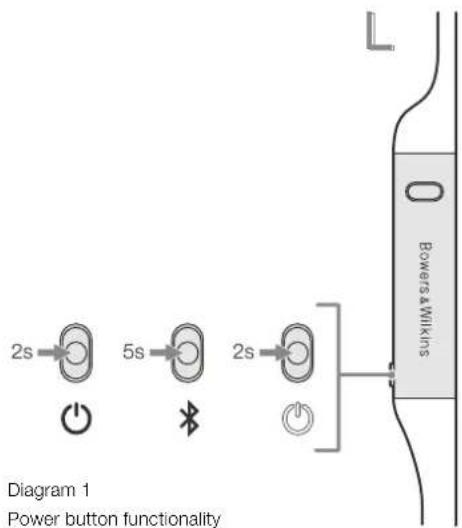
Diagram 1 illustrates Power button functionality.
Switching On
The Power button is located on the left control unit. Press and hold the Power button for 2 seconds. An audible cue will be presented and the LED indicator will light up in either green, amber or red displaying the current charge level.
Switching Off
Press and hold the Power button for 2 seconds.
An audible cue will be presented and the
headphones will power down when the LED
Indicator is no longer fit.
2.2 Headphone Controls
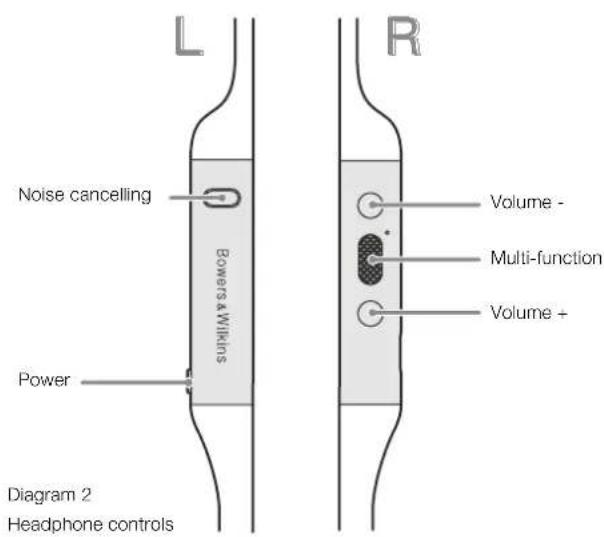
Diagram 2 illustrates the headphone controls. The following buttons on the right control unit are used to for media playback:
Function Action
| Play or pause | Press the Multi-function button once. |
| Play to next track | Press the Multi-function button twice in quick succession.Note: functionality dependent on source device. |
| Play previous track | Press the Multi-function button three times in quick succession. Note: functionality dependent on source device. |
| Increase Volume Press the Volume + button. | |
| Lower Volume Press the Volume - button. | |
The following buttons on the right control unit are used for phone call functionality:
Function Action
| Answer or end call | Press the Multi-function button once. |
| Answer an incoming call | When incoming call occurs, press the Multi-function button once. |
| Decline an incoming call | When incoming call occurs, hold the Multi-function for 2 seconds. |
| Switch between two calls | With two calls active, press the Multi-function button twice. |
| Merge two calls | With two calls active, hold the Multi-function button for 1 second. |
| Toggle mute | While on a call, press the Multi-function button three times. |
2.3 Status Indicator
The status LED indicator is located on the right control unit, Diagram 3 explains the illumination states.
Illumination Operational state
| White Battery charge > 30% |
| Amber Battery charge between 30% and 10% |
| Red Battery charge < 10% |
| Red flashing Battery charge insufficient for headphone operation |
| Blue flashing Pairing mode enabled |
| Blue (2 sec solid) Pairing successful |
| Blue flashing (calls) Incoming call |
| Green flashing Rapid charging |
| Green solid Battery charge full, trickle charging |
Diagram 3
Status indicator illuminations
3. Intelligent Features
3.1 Adaptive Noise Cancellation
Noise cancellation is a series of advanced technologies that aids in removing undesired noise from the surrounding environment.
PI4 features our latest innovations in adaptive noise cancellation, this includes intelligent sensing that adapts noise cancellation and tuning best suited to your surrounding environment. As your surroundings change, noise cancellation will auto adapt to complement your new environment.
The Noise Cancellation button on the left control unit is used to cycle between the following modes, see Diagram 2 for button location:
Mode Application
| High | Suitable for consistently noisy environments such as an airplane cabin. |
| Low | Suitable for environments where you need awareness of your surroundings. |
| Auto | Intelligently adapts noise cancellation best suited to your current environment. |
| Off Turns off the noise cancellation feature. | |
3.2 Ambient Pass-Through
PI4 features Ambient Pass-Through which lets some external noise from the surrounding environment, such as safety announcements or conversations, to be heard without taking the headphones off.
The Noise Cancellation button on the left control unit also controls this feature, see Diagram 2 for button location.
Function Action
| Enable ambient pass-through | Press and hold the Noise Cancellation button for 2 seconds. |
| Disable ambient pass-through | With ambient pass-through enabled, either hold down or single press the Noise Cancellation button for 2 seconds, the headphones will return to the previous noise cancellation mode |
The level of ambient pass-through can be further customised to suite your needs using the Bowers & Wilkins Headphones App.
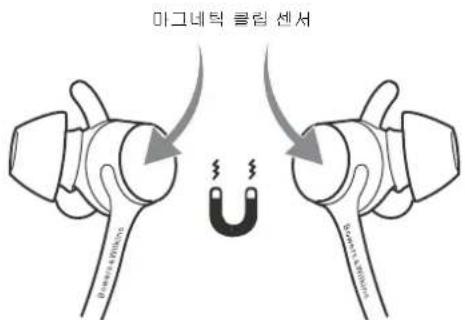
3.3 Magnetic Clip Sensors
PI4 incorporate magnetic clip sensors in the earpieces, enabling intelligent battery conservation by entering standby when clipped together. When unclipped again, PI4 automatically wakes and connects to the last connected Bluetooth device.
During media playback, PI4 will auto pause when both earpieces are clipped together. If unclipped before standby, playback will automatically resume. Auto resume has also been optimised so it is ready only when you are. This means the headphone will not attempt to resume playback during following conditions:
- Headphone powers on from the off state.
- Headphone wakes from the standby state.
- Headphone reboots (such as after a factory reset).
Magnetic sensors and standby can be adjusted using the Bowers & Wilkins Headphones App.
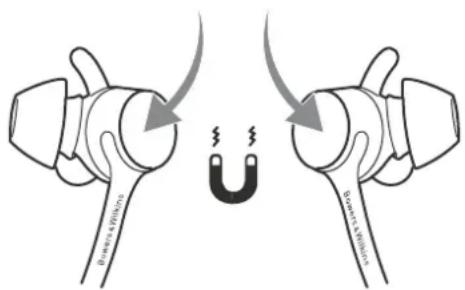
Magnetic clip sensors
Diagram 4
Magnetic clip sensor location
4. Battery Charging and Power Saving
Your PI4 comes with the battery partially charged may be used immediately. For best practice we recommend to fully charge the headphones before first use. Please allow up to 3 hours for full charge. The headphones can be used while charging.
To charge:
- Please use the supplied charging cable and connect the USB-A plug to a wall charger or a powered computer USB-A socket.
- Then connect the USB-C end to the headphones USB-C socket
Note: During charging, the headphone indicator will flash green. When fully charged, the indicator will remain illuminated. See Diagram 3 for status indicator details.
4.1 Standby Power Saving
PI4 magnetic clip sensors intelligently conserve power. When removed from your ears and clipped together, PI4 will automatically enter Standby which will pause media playback, disconnect Bluetooth, and switch to a low power state.
When unclipped again, PI4 will wake and reconnect to the last connected Bluetooth source. If the magnetic sensors are disabled using the App, this feature will also be disabled.
With the app, you can customise how long the headphones will wait before switching to Auto Standby, please see Standby Timer under Settings in the App.
5. Wearing Your Headphones
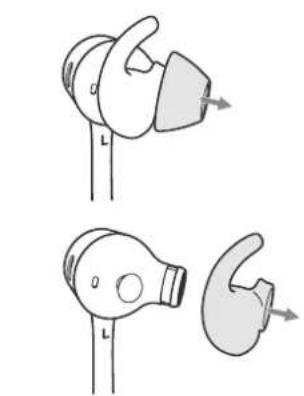
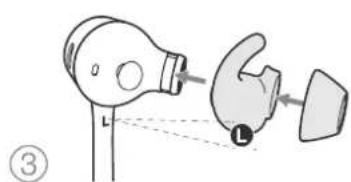
Wearing your headphones correctly will help ensure you get the best possible experience, see Diagram 5. Like many in-ear headphones, the P14 earpieces are designed to seal the ear canal in order to perform optimally. The earpieces are also designed be used with the stabiliser fins and must be installed prior to use.
Both ear tips and stabiliser fins come in three sizes (small, medium and large). Finding the proper size for your ear is critical to obtaining a good seal and ensure PI4 and the advanced features such as Adaptive Noise Cancellation performs optimally.
- Identify the left and right earpieces by finding the identification legends located on the interior of each cable near the earpieces. Hold PI4 by the left and right control units and hang the headphone around your neck comfortably, the earpieces should be at equal length.
- Place the earphones in your ear so that the tips sit comfortably at the opening of the ear canal.
- Ensure the stabiliser fins are sitting comfortably in the ear. Try another size if they do not fit. Different sized ear tips and stabiliser fins can be used to ensure the best possible fit.
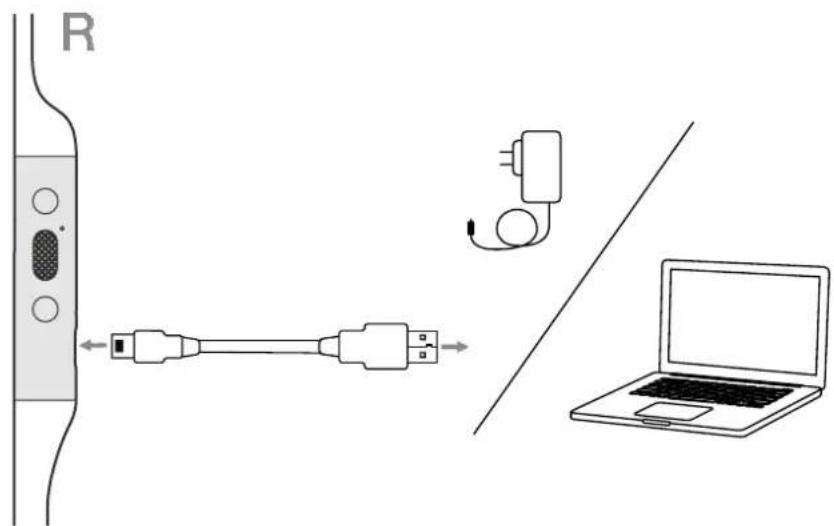
Diagram 4
USB-C cable connection
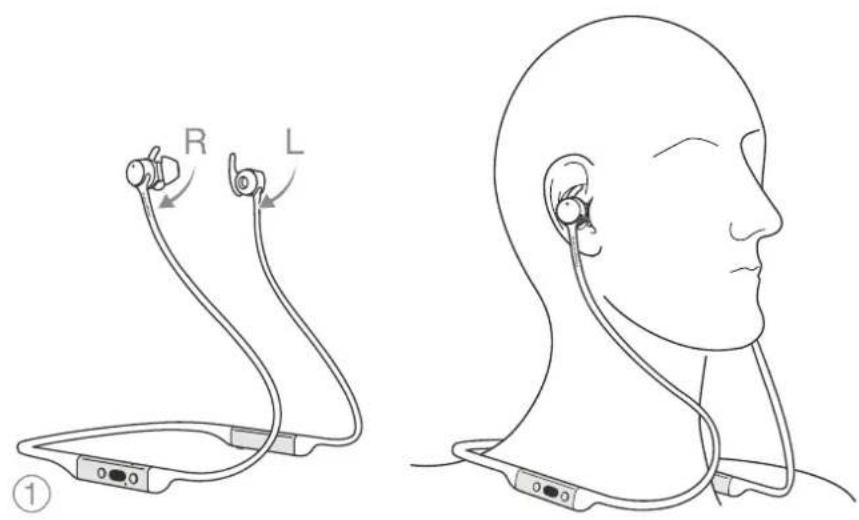
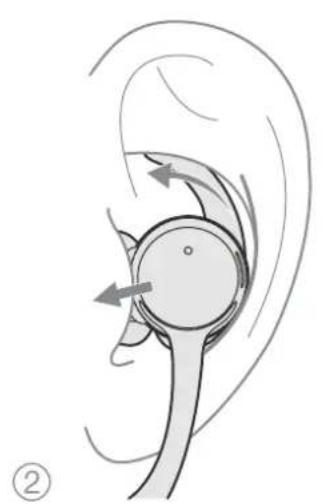
Diagram 5
Wearing your headphones
6. Bluetooth Connection
6.1 Pairing
PI4 is designed to stream media wirelessly from Bluetooth audio devices, such as smartphones, tablets or personal computers. To do so, the headphone and device (source) must first be paired, see Diagram 6.
- The first time you switch on your headphones, Bluetooth pairing mode will be enabled, the indicator will flash blue. If pairing mode is not enabled, press and hold the power button for 5 seconds, let go when the indicator blinks blue and when an audible cue is presented.
- Ensure the Bluetooth feature is enabled on the audio device, PI4 will appear in the discovery list, select it to pair.
- The indicator will flash blue while pairing is in progress, this will change to solid blue and an audible cue presented when pairing is successful.
Your headphones will remember up to eight paired Bluetooth devices. Repeat the above steps to pair more devices.
Note: Your headphones will automatically exit Bluetooth pairing mode if no device is paired within 5 minutes. If pairing fails, the indicator will rapid flash blue, please try pairing again.
6.2 Multiple Bluetooth Connections
PI4 can connect up to two devices at the same time, but note that you can only play audio or take calls from one device at a time.
To switch between two devices:
- Pause audio on the first device, or use the PI4 multi-function button.
- Play audio from the second device and the headphone will switch over.
When streaming audio, receiving a call on the second device will automatically pause playback and the call will be routed automatically to your headphones. Ending the call will automatically resume playback from the first device.
6.3 Disconnect from a Device
You can quickly disconnect P14 from a device by pressing the Power button two times in quick succession, an audible tone will be presented indicating successful disconnection.
Alternatively, you can manage connection in further detail using the Bowers & Wilkins Headphones app under Connections.
6.4 Setting Up Headphones with the App
The Bowers & Wilkins Headphones app provides extended setup. The app also provides further customisations such as voice prompt, standby time, connection management and headphone software updates. The app is available as a free download on iOS and Android devices.
To add your headphones:
- From your mobile device, download and install the Bowers & Wilkins Headphones app.
- Launch the app, then read and follow the instructions pertaining app notification and permissions.
- After reaching the main screen, simply tap + and following the in-app instructions.
6.5 Headphone Software Updates
Bowers & Wilkins will occasionally make available software updates that refine and optimise the performance of your headphones or add new features.
The Bowers & Wilkins Headphones app will notify you when a software update is available, tap on the notification and the follow in-app instructions.
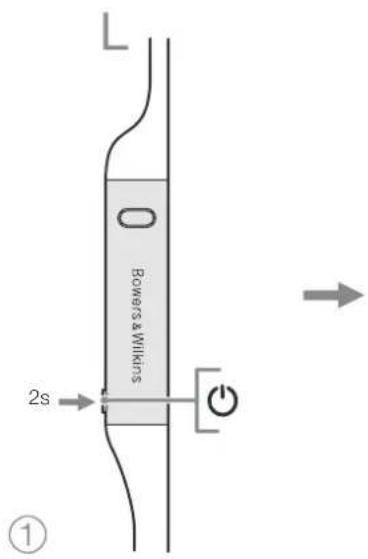
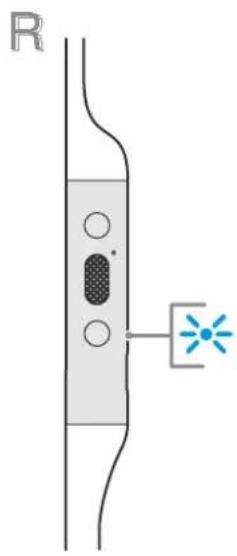
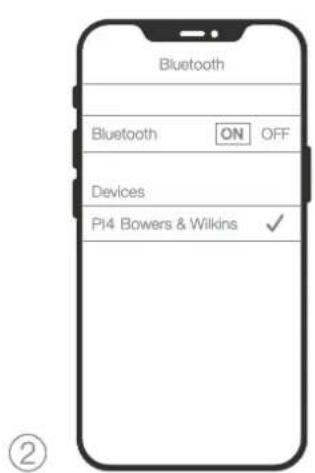
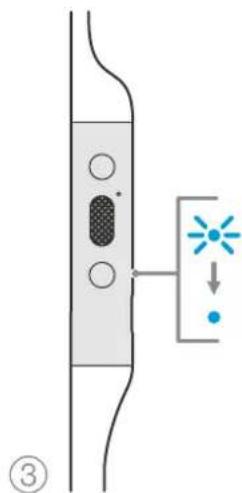
Diagram 6 Bluetooth pairing
7. Power Cycle and Reset
7.1 Power Cycle
You can power cycle your PI4, simultaneously hold the Volume + and Volume - buttons for 10 seconds until the indicator LED extinguishes, let go when the indicator lights up again. Rebooting your headphones will not reset their internal settings or clear the paired device history.
7.2 Reset to Default
You can clear the paired device history and restore all settings to their defaults. With the PI4 powered on, simultaneously hold the Volume + , Volume - and Noise Cancellation buttons for 10 seconds until the indicator LED extinguish, let go when the indicator lights up again, the headphones will be ready to pair to a device.
Alternatively, you can also Reset from the Bowers & Wilkins Headphones app, please see Reset under Settings in the app.
8. Care & Maintenance
8.1 Storing Your PI4
Taking care of your PI4 will ensure they continue to deliver the best performance and experience.
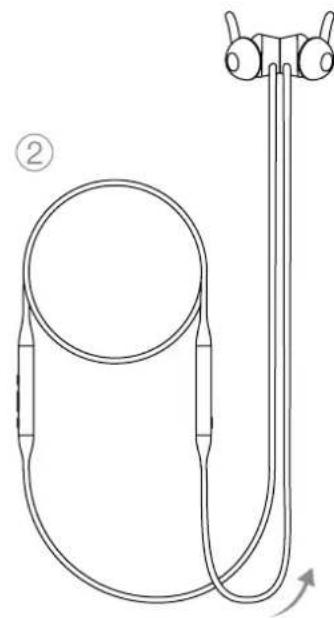
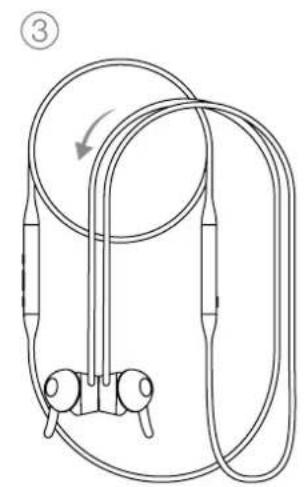
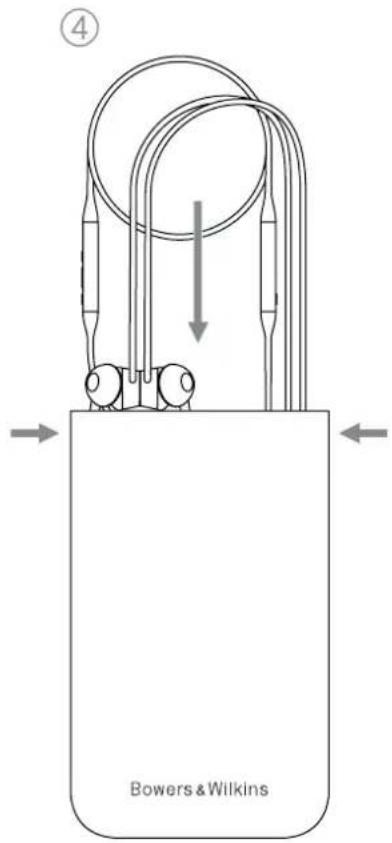
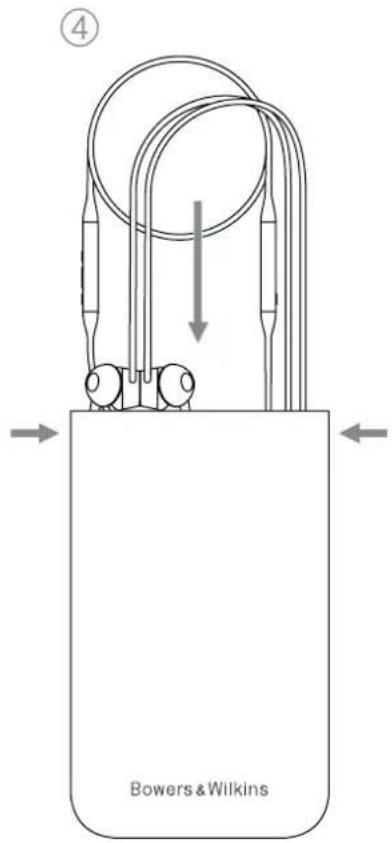
When not used, stow your headphones using the included storage pouch, see Diagram 7. It is recommended the headphones are first powered off:
- With the headphones not worn, take the neckband and form a single loop.
- Bundle the loop and control units together in one hand. With the free hand, clip the earpieces together and loop the earbuds over the bundle.
- The opening of the pouch can be pinched open, slide the headphones in, then ensure the opening is closed and no parts of the headphones are sticking out.
8.2 Cleaning Your PI4
Your PI4 can be cleaned by a soft, damp microfiber cloth, gently wipe or dab clean. Removable pieces such as ear tips and stabiliser fins should be taken off and cleaned separately.
If you notice wax and residue accumulation on the sound tubes, take a cotton swab or soft brush and gently wipe away.
- Do NOT aggressively rub or use an abrasive tool to clean.
- Do NOT use paper towels, napkins or tissue as they will leave residue.
- Do NOT use cleaning detergents, soapy water, polish or chemical cleaners.
- Do NOT wash or submerge all or parts of the headphones in liquid.
9. Support
Should you require further help or advice regarding your PI4 please visit the Headphones support site here www.bowerswilkins.com/support.
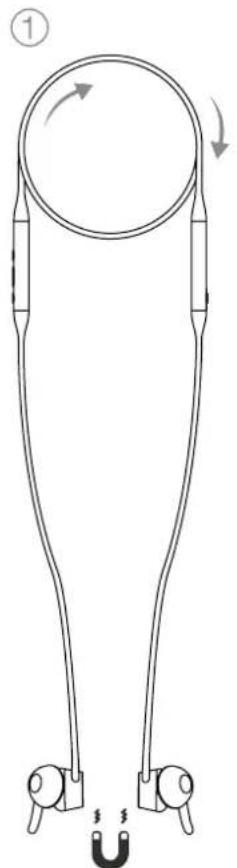
Diagram 7
Storing your headphones
Specifications
Wearing Style Bluetooth Wireless In-Ear Headphone
Technical Features Adaptive Noise Cancellation
Ambient Pass-Through
Magnetic Clip Sensor
Bluetooth 5.0 with AptX-Adaptive technology
USB-C charging and audio interface
Bluetooth Codes AptX-Adaptive
AptX-HD
AptX-Classic
AAC
SBC
Bluetooth Profiles A2DP v1.3.1
AVRCP v1.6.1
HFPv1.7.1
HSP v1.2
BLE GATT (Generic Attribute Profile)
Drive Units 2x014.2mm full range
Microphones 2x mics for ANC
2x mics for telephony (CVC1 - Clear Voice Communication v1)
Frequency Range 10Hz to 30kHz
Distortion (THD) <0.3% (1kHz/10mW)
Battery Type Rechargeable Lithium Polymer
Battery Life & Charging 10 hrs Bluetooth with ANC, 3hrs with 15min charge
Inputs Bluetooth, USB-C audio
In Box Accessories 20cm USB-A to USB-C cable, Storage Pouch, Ear Tips (S, M, L) & Stability Fins
(S,M,L)
Weight 40 grams
Environmental Information
This product complies with international directives, including but not limited to the Restriction of Hazardous Substances (RoHS) in electrical and electronic equipment, the Registration, Evaluation, Authorisation and restriction of Chemicals (REACH) and the disposal of Waste Electrical and Electronic Equipment (WEEE). Consult your local waste disposal authority for guidance on how properly to recycle or dispose of this product.
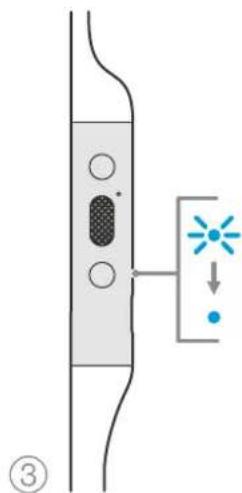
Figure 6 Jumelage Bluetooth
Codes Bluetooth aptX Adaptive
aptX HD
aptX Classic
AAC
SBC
Perfiles Bluetooth A2DP v1.3.1
AVRCPv1.6.1
HFP v1.7.1
HSP v1.2
BLE GATT (General Attribute Profile)
3.2 Ambient Pass-Through
Ambient Pass-Through
DWTIOOcEvEeIKTKnKxViaqKaTcTaOaOng
3.EunvScduvatotntc
3.1 PpOaPooTik eouoetepwOn BOpou
H eoustepwn Opuouivai ma asip a Eeayuivw texvoanyiw nou Bnouov atny Eaeaiyn avenitou Opuou and to nepaalow.
Ta PI4 dia8etouv tic TEautaie mac kaivotouie otyn npaoapuoukTHEoueTepwOoPbou.oi otaee nepiaiauov Euvn avxueon npaoapoctei tvEoueTepwOoPbouOTc puaiaic nou eivai kauTEpey ia To piaBAAov ac Kaow to PpiaBAAov aac aaAca, n EoueTepwOoPbou npaoapucctai autopata wate va taipiaCk KaUTepa ato veo nepiaBAAov ac.
To koumi Eouodetepwong oopoua oto apotepo akoutko xponoutoieiTai yva ealayn metao tu npapakatw aeitoupyu. AvatpeTe oTo diyaipma 2 ia Tg on Tou koumou.
Aetoupyia Epapuoyn
Mkp0pomega 2knp00wva yAna NC
2 μkρóφωνγi τηλεφωνια (CVC1 - Clear Voice Communication v1)
Eupoc ouxvoituw 10 Hz ewc30 kHz
1apcpoepwoTHD<0.3%(1kHz/10mW)
Tucocmuataipac EnavaopctcouevnAilou-nolpuoc
Aupkia kai fopionmuataipac 10 upeC Bluetooth μe ANC,3 upeC u e fopion 15 aeivw
EiooBbluTooth,youUSB-C
Eapntjata ot oukeuaia Kaawio USB-A npoc USB-C mKouc 20 cm, nKn pfAeNc, kaumuata (mukpó, eaoio, eya) koi staepoantuk aTepuyia (mukpó, eaoio, eya)
Bapoc 40 ypaipia
Pnpoopoe c oxetka u to npiaaov
AutoTo npoiovTnpoI tic dbBvic oynlyc, otie
otolec ouykataeoyovtal, xwippepiopuoc;
n oyndia Restriction of Hazardous Substances
(RoHS-PiopioiOc otxpyan etikivduuvw
ouuW) yaa nAektpko kai nAektpovko eonlAupo,
n oyndia Registration, Evaluation, Authorisation
and restriction of Chemicals (REACH-Kataxipoi,
aElaOyAn, aebio6tjnn kal npapuooi TuV Xnmuiv
npoiovTuW) kai nOeyna oxetikke me tyv anoppuaJn
Waste Electrical and Electronic Equipment (WEEE -
AntbetaTa nAektpkoKai nAektpovko eonluoou).
LauBouAEuteTm toink apxH antoppunc anbaTuw
ya onyie cxetika me touc tponou owotnic
avakowwnf h antopppuuc autou To npoiovtc.
Dó6po noxajobatb Bowers & Wilkins n PI4
2.3HaKOMCTBOcHayuHnKaMn PI4
2.1 BkIOueHHe/BBkIOueHHe HayuHkoB
Ha Diagram 1 noka3aHbI dyHKm KhoNk Power (Bkn/Blkn).
Bknouehne
KHOKA Powe PaonnoXeHa Haaeo naHonn
ynpaBHeHH. HaxMnTe uDpXte KHOKNy nTuHnn
Power B TeuHHe 2 cekHyd, HayuHNu n3aDyT
3bYkoBOi CnHAn, a CBeTOmOHDn INHdkATOp
3arOpNTCA 3eHbIM, KeIbIM NkPcHbIM LCBetOM,
OTobpaA TckyuIm ypoBeb 3apJa.
BbIKIOueHne
HaKMMTe N ydepXnTe KhoNky nHTAHnHr Powe B TeHeHne 2 cekyHd. HayuHnKOnnTb HsIaJyT 3aykoBcOu CnTHan n bKIOHcTa, a3atam CaTeONHOHm HnNKAtop norachet.
2.2 OprAhIynpaBHeHn HayuHnKaMn
Ha Diagram 2 noxaabaoprahaynpaanchna HayuHnKAMn.CsEuyoume KHOKN Ha npabon naHe nnONoLbEyOTcDn ynpaBnEHBOCpOANBeDEHm e ayino:
ФункцнДeнctBnE
| BocnpounBeDeHnne (Play) ини ралуэ (Pause) | Haxmite Ha MHOOФункши�ьну кнпку ODINH pAs. |
| Порсintу К ВOCрpon3BcDchenu слелюшero Трека | Haxmite Быстpo 2 раза Ha MHOROФункши�ьну кнпку ПROMeЧANe: BbIOLHNeHne STOY KOMAндз 38BAncNT OT VCTOCHNKA |
| Порету К ВOCрpon3BcDchenu прелюшero Трека | Haxmite Быстpo 3 раза Ha MHOROФункши�ьну кнпку ПROMeЧANe: BbIOLHNeHne STOY KOMAндз 38BAncNT OT VCTOCHNKA |
| Повсintу РомКоctь | Haxmite Ha Klonky VoluMe + |
| Сннitsу РомКоctь | Haxmite Ha Klonky VoluMe - |
TeneoHHpaarOBopoBncnoB3yTe cneyoUe HKNHn npaon naneyn ynpaenHn HabyuHKOB:
ФункцнДeнctBnE
HnKauncoCToHN CBTOIOOM
2.3HnkauncaTatya
CBeTODnDhBmHnDKaTOPcoCTOnHHpaCnOKeHHa npabOyaukeHayuHKOB.HaDiagram3noa3aHb 3aueHNrUBeTOB mpeKMOBLEDnDnKaTopa coCTOnHH.
3.ИnteKeTaybHbIeФyHKmN
3.1AaantnBHe wymonoadBneHne
Uymonoabnene npedctaanreT cobomKOMNekc npocdoBuxTexHONrnn, KOTOpC NOMOaCT B ycpaHHeHH HeKeJIaTeIbHo rUyMa n3 OpykaioJe CpeD.
PI4OTNAAOTCRNIOJIb30AHHEMHAIIX
cAMBXNOCNEHHXDOCTNXEHINBAdTNNBHOM
UWMONOaIbIeHN,BTOMHCNTENIEKUTyIbIbX
CEHCOBC,BOCPNPHHMAIOxSyKN
npncnoCABnBaIOxvpeKMMbUWMONOaIbIeHN,a
TaKke BbIpaIOxNxCAMbcIyUHNC HAcTPOKnDN
BaIeKOKpyKaIOuIe CpeDbl.No Mepe NmMeHHeH
BaIero OKpyKHeH,UWMONoAbeHcNcABTomATueckn
adantnpcyTcR,YTOBbCOOTBCTCTBOBaTbHOBMGY
coCTOHNcCpeDbl.
KhONKa 1yMOnoDAnHeNn (Noise Cancellation)
HaIeBOM npIbTe npIapBnOuNcNIOBpyETDR nIepeKNoHEnMeKdy cneDy pckmMn CM. Diagram 2, rJe noka3aOpacnoNoKeHn KhoNk:
PexnmpummeheHne
6.1 ConpnxHeHnHayuHnKOB
HayuHKPi4 npdaHaHaeHbI 86cnpoAoHoi
peepaNoTOKBOO aymo C Bluteoth yctpoAcb,
TaKxKAK maptFOHII NaHwCTB NnNepcoHbHbc
KOMTHOpEbl. TTOCCHAAHHe0xOJMO
BbIOHHTCBcPAnRHeHayuHKOByctpoCTBa
(NTCHKA), CM.Diagram 6.
- KOrda BbBKnOHTe HayuHnK P14 nepBbI pa3, OHc np3y BOyT B pexm cnpjKeHnNo BluTooth, INHnKATOp npr atom HauHET MIRtBc CINHM qEToEM. EcnP pexm cnpjKeHn He AKTNBPoBaH, HaxMMTC uDcpxNTc KOnkny NITAHNPOwER B TceHHe 5 ckyHd-Noka INHnKATOp HE HauHET MIRtBc CINHM qEToOM IN He pa3dactc3BykoBoCnHAn.
2.Y6eIntecb,TOfynKnBnBluTehtakTmBnpoBaHa HyaDyoycptpOCTBE,NKOraPHNoBtC B cNcKc 6oBapyKeHHx yCPTPOCTB,BHbEpnte IV nIcnopkKeHHa. - HnHkKatop HanyuHKnOB 6ydtMrratb cnHMM, nKa cOpJxHeHne npOdoNxaetcra nnpckKIOHTCR HA HncpBbHbN CHHN, KOrda coeHNHeHBe 6ydt yctAHOBHeHO.HayuHKn NnPOM AaBbDyT 3ykoBOc mHAI, KOrpa cOpJxHeHc 6ydt yctAHOBHeo.
BaH HuyuHmK Mory3aONMHyTb DO BOOCBMN conpaekhenhX Bluetooth yctpoCTs. NoBtropnte YkaahHbe Bwue WnI daNocJyouix conpaekhen H cDpyHMN yCTPOCTBAMN
PnMueaHc:BaHnHayuHKnA BtOMaTHUeCKN bMyDyHpeXMMBleetooCOnpJxEHm,ecm BTOCHNO5MHHT He daCToCoPnRb XH N C OIHMMYCTPOHCTOB. Ecm CONPKeHHe H BydET YCTAHOBJIHO, INMKAToP 6yIET TACTO BCbXMBaTb 6BeLb IMBcTOM,ONPbOyTe NOBtOpNT PpoUeDpy COINPKeHHuEe paa.
6.2 CoeHHeHe c HeckoBKMn Bluetooth yctpoCTbAMn
MoxHoNoocnHbK1P4cpa3yDbacnpaekHHbx yctpoCTBa,HOUmeB BNDy,TOBbCMQeTe CNYuTaMy3bkyNIMPiHmTbTenepeHHBe 3BOHK ToIbkoC OoHOrOy cYtPOCTBA OoHOBpEmHeH.
TepeKIOHHe MEXy yBMy yTOpOCTBaMn:
1.CnnaIte naayHa nepBOM yctpoCTBE HINN NOONbEyIe MHOroFOyHKUHOHbHY KOHNky.
2.3aynctte BocnponabedHHe HA BtpoM yctpoCTB, HnayuHKn camapeKIOyTcH HcTO.
PnIOTOKOBINpeBaeayIO,NOUYEHNE TENEFOHOROBHBOAHA BTOPOEyCTPOICTBO AOBMATWNECKNPIPOCTAOHBONBACIOIPAN3EHEINE, IN3BOHK6yDEtABOMATNUeCKNpeBedeENBAUHN HAYUNKINoCne3aEBPeHHNBy3OBApON3OJET ABOMATNUeCKOEa03bHOHeHNEBACIOPN3EHEHNC nEPBOBvYCPOnCTBa.
6.3 OTKIOUOHeHne OTOyCTPOIcTBA
TtO6bOTcoeHNHb Bluetooth yCpOCTBO CT PI4, HAKMNTE 6btp2 Pasa nOIOHn HA KHOIky Power - Noone storo paoactc3ByKOBO CNHAN, noDTBepxKaoun pa3pUb CoeINHeHNA.
Kpome Toro, Bbl mokebe bonee noop6ho ynpabantb coocnHem, nncnBayr npnoKeHne Bowers & Wilkins Headphones app bpaedene Connections.
6.4 Hactpoika HayuHnKOB c nomoubbo npnoxehna
PpnoKHe Bowers & Wilkins Headphone app
06epeHBeBt paUHepHHe BO3MOXHOCTN HACTPOKn
uYpABeHHe. PpnoKHe He TaKxE oecneHuBaET
DOONHTCbHbC HAcTPOKn, TaKxC KAK rOncOBaR
NOcKa3A, aPemJIOIepeXoJa B pexMm OxNJAHn
standby, ynpabHe He CoeDInHeHEM n 6hOpHHeHne
PpnpAMHHOr o6ocneHHe HauHnIKoB. PpnoKHe
DOctyHnB KaueCTBe SeCINHaHs aRpyaKn Ha
ycToPiCTax IOS n Android.
Yro6bdo6abntBaHAYUHHKu:
- C baillero MObIbHO rOyctpoINCTBa,ckHauTne yctahOBnTe npUIOXeHc Bowers & Wilkins Headphones.
2.3anyctntepnnoxehne,a 3atemytaTae ykaaHnncjIe HNCTpyKuHn. OTHOcuaMcmK paapeueHnM yBaedomLeHnM DHHORo PnNOXeHnH. - Ncne doctKHeNnIaBHOrOxepHa, npoTo KocHHeTc BmBOna + n, CnoSyTe HnCTpyKUam, NOBRAIOUMC B pNOIOKeHN.
6.5 06noBnne nporpamMhoro oecneueHHayuHKnOB
BpmaOT BpmeH Bowers & Wilkins 6ydt Bbnyckatob 6bohne HnporpaMMHOo6ceueHNO, KOTOpHE yu7wOHT INOTMn3NpyOT p80Ty BAuxHX HuyHNIKOB uX JoDabAANT HOBc FyHKIN.
Ppnooxhene Bowers & Wilkins Headphones yBdoMNT Bac, Korda CTaHTedocTyHNO 06OBnEne nporpaAMHOO oBceNneHNO, noCNE STOro Haxmne HA yBdoMnHeHne n CledyTne HcTpyKUINM B npioxhen
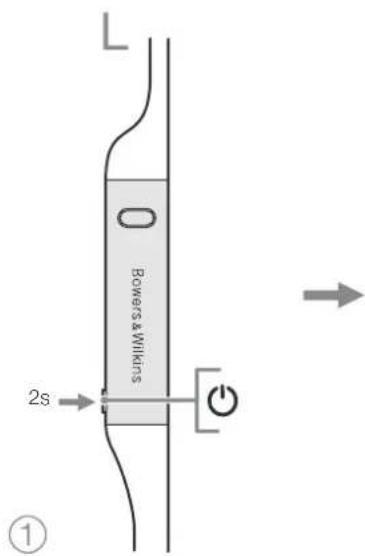
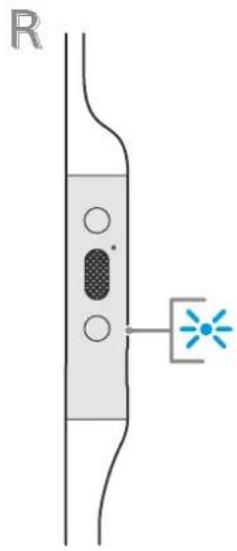
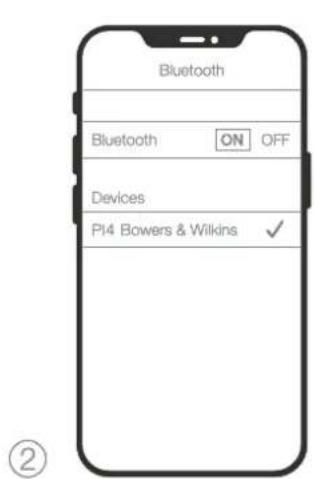
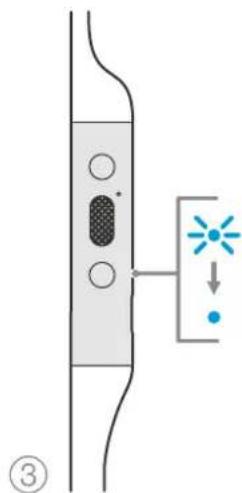
Diagram 6 Bluetooth conpaxeHne
7. BbIKIOueHne/BKIOueHne n c6poc Hactpoek
7.1 BbIKIOHHe/BKIOHHeHnE
BbMOKeTe BbIKNOHTb, a 3aTEM BHOB bKIOUHTb CBOH HAYUNH NPI, OJHOBpeMeHO HAXAB NjEDPXA KHOHN VoluH + N VoluH-TEeHeHME 10 cexyH, JO Tex NOP, NOKA HINDKATOP He nORACHT, NOOE tTOI OTNCTNE KHOKN IN HINDKATOP CHOBA 3AROPTc. Peeparyska BaAMX HAYUNHKOB He c6pocNT IN BHYTpEHnE HAcTPOKn IN He OHNCNT CNWOCO CONPAKCHHXYCTPOHCTe.
7.2 C6poc K3HaueHnM no yMoNauHnO
Bb mokeTe oocntTb nctopnIO cnpkexHHbx yctpoACTB NBOCCTAHOBH T Bce HactPOKNI NO ymonHNO. PpN BKNIOeHNHPI 4O hOBpeMeHHo ydepXBAIte KhoKN Volure ^+ Volume-N Noise Cancellation (yymonodabeneHnB TteHeNe 10 cekHy, nOKA CBTOIDHn HINKATOp He norACHT, 3aTEM OTNyCTNE x, N KOJDA INMdkatop 3aOpNTC CHOBA, HAYuHKN CHOBA oyT roTOBbl KcnpkexHHc yctpoCTBOM.
Kpome 3Toro, c6pocnHb HAcToPkn Bbl MoKeTe C nmoiHb npinoXeHNBowers & Wilkins Headphones, noXaJyCTa, CMOTPiTE nyHKT Reset B paadene Settings npinoXeHNH.
8.YxOJn 06cnyxuBaHne
8.1 XpaHHeHne PI4
Yxod3aBauHMMHayuHnKAMPi4o6ocnHIT npDjHmE CMOrLyuWToKaecCTBA BOCPOV3BDCCHNBAuBXINBnOHTAHn
Ecln HuyuHK He nOeBlyOTc, cnpebte xB npnilaraemycmyoKy dNxpaHHeN, cM Diagram 7. PekomeyETCH CHAHAA BkIOHcyHuyuHK
1.CH8 HAYHNIK,BOBMTe WeyHOe ORONOBBe IN CENATTE K3 Hero OINHOHYIO NETIIO.
2.BoBmTe TnN nHaONynpAeHnB OdyHyky,aCBOOHOHpyoONcMeTHe HuyHKnNnO6epHTnIXbOPyrTn
3. 3acybte HayuHKy CmyOky xpaHnH, npBapntbno OTOKpbBee, 3aTeM 3aKpOte OTeBPCTe, npBAPNTbHO y6eJINbC, TcH H OHHa mTaeane He TopHTI ChApKy.
8.2 OuNTKa BauNX PI4
Baun P14 MoXHO CHNTb MANKO, BnAXHOI MNPOBOLOKHOH KOaHBIO, pOcTO AKKyPato H npoTepeBxNnMPOMOHYb NCHOTKABHO. CBeHMHe DeTaN, TaKae KAYuHHe BoCTaBN pOrataBnAHTOpB, HyXHO CHIMAtb OHUdAaTb OTcJIbHO.
EcnBbSamTnNCKONJIHNE BOCKa ININpDyTNX OCTaKOB HA TpykAx, BblDaOuIXN 3ByK, BO3bMMTe BATHBI TAMNOH MIMMRTKYIeK TYAKypATHBbPTOE XN.
HE chenyetarpeccuHBOtepebKINNCN0JIb3OBaB aboaBHBe CpeCTBaJINCHKTUOC6eHHOJINTKAH。
HEncnoIb3yIe6yMaxHbIe nonoTeHua,caFepTKn
HEHIOHbayyueCHuHneCpeCTBa,MnHbHyBOdy.NIPOBOHHe HJINDpyTHeXMHHeCKHepeCTBa.
HEMOHTNEHENORpykaTeBBOynnDpyryIO XIKKoCTbIO6bIeTaNAYUHNKO8.
9. Nopdepkka
EcnBAM TpebyetcnoMooub mncobertnna
bnadbeue P14, noxanycta, nocertne cait
nodepxxn Headphones www.bowerswilkins.com/ support.
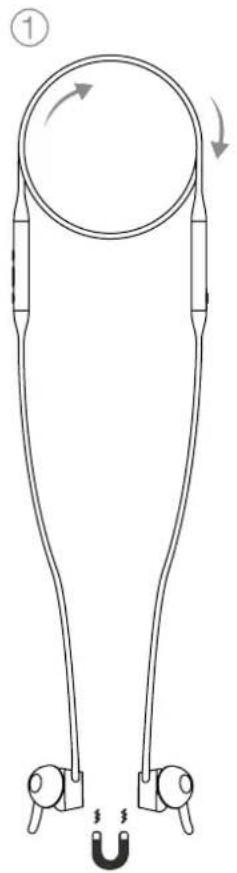
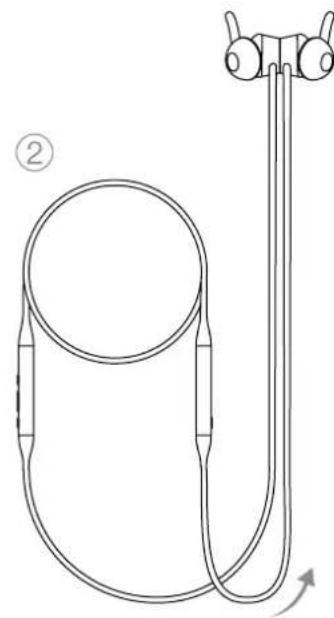
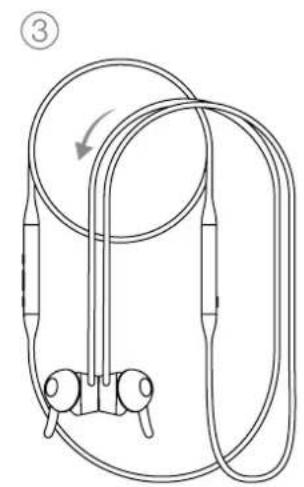
Diagram 7
XpaHHeHnBaWnX HayWnKOB
Texnueckne xapakTepnKu
CTnJIb HOWeHmB BcTaBHeIbe 6ecnpoBoHbIe Bluetooth HAYHnIKN
DcHCTBaAaANTNBHOeWymONDaBHeHnE
CKBO3HO nponyck Okpyxauux 8ByKOB
MaHHTbIe DaTnKnpKpEnnHm
AaantmbHaeTexhoIornae Bluetooth - Bluetooth 5.0 capXTM
PnT USB-C nIaIaIaN n ayIIO cunHaIa
Bluetooth kondeapXAdaptive
aptXTMHD
aptX™ Classio
AAC
SBC
Bluetooth npoqwn A2DPv1.3.1
AVRCP v1.6.1
HFPv1.7.1
HSP v1.2
BLE GATT (Generic Attribute Profile)
HAMMK2x014.2MM,NONHOHaNA3OHHe
MnKpoHb2xMnKpOoHaDnA ANC
2x MmKpOoHa nTneFooHn (CVC2-Clear Voice Communication v1)
Hana30HacToT 104-30K
MCKAXEHMRTHD)<0.3%(1KFL,10MBT)
AkkmyIaTOpPiTuNBeo-ONIMePbHbI
BpempaobTo 10acobcBluetooth ANC,3aca nocne 15MnHy 6bIcTpo3apdKn
8.2 A PI4 tisztitasa
A PI4 fulhallgato puha, nedes mikroszalias ronggyai tisztlhato, ovatos letorfessel. Az etivolfthatro reszek, mint a gumiharang es a stabilizalo gumi levehetoek es kulon tisztlhataoak.
Bluetooth 5.0 aptXTM Adaptive technological
| High | HiHiHiHiHiHiHiHiHiHiHiHiHiHiHiHiHiHiHiHiHiHiHiHiHiHiHiHiHiHiHiHiHiHiHiHiHiHiHiHiHiHiHiHiHiHiHiHiHiHiHiHiHiHiHiHiHiHiHiHiHiHiHiHiHiHiHiHiHiHiHiHiHiHiHiHiHiHiHiHiHiHiHiHiHiHiHiHiHiHiHiHiHiHiHiHiHiHiHiHiMiMiMiMiMiMiMiMiMiMiMiMiMiMiMiMiMiMiMiMiMiMiMiMiMiMiMiMiMiMiMiMiMiMiMiMiMiMiMiMiMiMiMiMiMiMiMiMiMiMiMiMiMiMiMiMiMiMiMiMiMiMiMiMiMiMiMiMiMiMiMiMiMiMiMiMiMiMiMiMiMiMiMiMiMiMiMiMiMiMiMiMiMiMiMiMiMiMiMiMi MiMiMiMiMiMiMiMiMiMiMiMiMiMiMiMiMiMiMiMiMiMiMiMiMiMiMiMiMiMiMiMiMiMiMiMiMiMiMiMiMiMiMiMiMiMiMiMiMiMiMiMiMiMiMiMiMiMiMiMiMiMiMiMiMiMiMiMiMiMiMiMiMiMiMiMiMiMiMiMiMiMiMiMiMiMiMiMiMiMiMiMiMiMiMiMiMiMiMiMiMirr |
| Low | You're going to die tomorrow. You're going to die tomorrow. You're going to die tomorrow. You're going to die tomorrow. You're going to die tomorrow. You're going to die tomorrow. You're going to die tomorrow. You're going to die tomorrow. You're going to die tomorrow. You're going to die tomorrow. You're going to die tomorrow. You're going to die tomorrow. You're going to die tomorrow. You're going too late. |
| Auto | You're already in the middle of your day. You're already in the middle of your day. You're already in the middle of your day. You're already in the middle of your day. You're already in the middle of your day. You're already in the middle of your day. You're already in the middle of your day. You're already in the middle of your day. You're already in the middle of your day. You're already in the middle of your day. You're already in the middle of your day. You're already in the middle of your day. You're already in the middle of your day. You're already in the middle of your day. You're already in the middle of your day. You're already in the middle of your day. You're already in the middle of your day. You're already in the middle of your day. You're already in the middle of your day. You's not yet in the middle of your day. You're not yet in the middle of your day. You're not yet in the middle of your day. You're not yet in the middle of your day. You're not yet in the middle of your day. You're not yet in the middle of your day. You're not yet in the middle of your day. You're not yet in the middle of your day. You're not yet in the middle of your day. You're not yet in this country. You're not yet in this country. You're not yet in this country. You're not yet in this country. You're not yet in this country. You're not yet in this country. You're not yet in this country. You're not yet in this country. You're not yet in this country. You're not yet in this country. You're not yet in this country. You're not yet in this country |
Bowers & Wilkins Headphones App® serakngi
4
4. 画图法
P14是贝T拉如日早的电到云,
音速将之
-
用者国中电电电电电电电电电电电电电电电电电电电电电电电电电电电电电电电电电电电电电电电电电电电电电电电电电电电电电电电电电电电电电电电电电电电电电电电电电电电电电电电电电电电电电电电电电电电电
-
1000USB-CD卡机电
Bowers & Wilkins Headphones App 电
6.4 云王三
Bowers & Wilkins Headphones Appstore To 求的设置表 Set to
8. 1
8.1 PI4
P14]
音韵哉贝凿越德三元的首原贝卫和贝,贝
Bluetooth v5.0 aptX Adaptive
USB-C 云
Bluetooth 3.0 Apx-Adaptive
Aptx-HD
Aptx-Classic
ACC
SBC
Bluetooth 2A2DP v1.3.1
AVRCPv1.6.1
HFPv1.7.1
HSP v1.2
BLE GATT (Generic Attribute Profile)
三拉11 2x014.2mm
H013 2x ANC
2x 1 (CVC1-Clear Voice Communication v1)
李如丰 10Hz~30kHz
0.3% (1KHz/10mW)
田T
田L 1015
默默默,USB-C
KsL 20cm USB A-USB C 0101,4uWt,0101(S,M.L),
S-4
40g
图
B&W原音同异原音同
(RoHS), 卜默雷默贝利斯REACH)
期前园首原责建责国志(WEEE)
默
青藥藥記者原的贝
中

- Welcome to Bowers & Wilkins and PI4
- PI4 Carton Contents
- Getting to know your PI4
- Switching Headphones On and Off
- Switching On
- Switching Off
- Headphone Controls
- Status Indicator
- Intelligent Features
- Adaptive Noise Cancellation
- Ambient Pass-Through
- Magnetic Clip Sensors
- Battery Charging and Power Saving
- Standby Power Saving
- Wearing Your Headphones
- Bluetooth Connection
- Pairing
- Multiple Bluetooth Connections
- Disconnect from a Device
- Setting Up Headphones with the App
- Headphone Software Updates
- Power Cycle and Reset
- Power Cycle
- Reset to Default
- Care & Maintenance
- Storing Your PI4
- Cleaning Your PI4
- Support
- Specifications
- Environmental Information
- 3.EunvScduvatotntc
- PpOaPooTik eouoetepwOn BOpou
- Pnpoopoe c oxetka u to npiaaov
- Dó6po noxajobatb Bowers & Wilkins n PI4
- 2.3HaKOMCTBOcHayuHnKaMn PI4
- BkIOueHHe/BBkIOueHHe HayuHkoB
- Bknouehne
- BbIKIOueHne
- OprAhIynpaBHeHn HayuHnKaMn
- 2.3HnkauncaTatya
- 3.ИnteKeTaybHbIeФyHKmN
- 3.1AaantnBHe wymonoadBneHne
- ConpnxHeHnHayuHnKOB
- CoeHHeHe c HeckoBKMn Bluetooth yctpoCTbAMn
- OTKIOUOHeHne OTOyCTPOIcTBA
- Hactpoika HayuHnKOB c nomoubbo npnoxehna
- 06noBnne nporpamMhoro oecneueHHayuHKnOB
- BbIKIOueHne/BKIOueHne n c6poc Hactpoek
- BbIKIOHHe/BKIOHHeHnE
- C6poc K3HaueHnM no yMoNauHnO
- 8.YxOJn 06cnyxuBaHne
- XpaHHeHne PI4
- OuNTKa BauNX PI4
- Nopdepkka
- Texnueckne xapakTepnKu
- A PI4 tisztitasa
- 画图法
- 音速将之
- 云王三
- 1
- PI4
- 图
Brand : BOWERS & WILKINS
Model : PI4
Category : Earplug