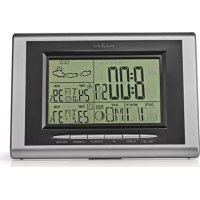
WEST202GY - Weather Station NEDIS - Free user manual and instructions
Find the device manual for free WEST202GY NEDIS in PDF.



| Product type | Weather station |
| Brand | Nedis |
| Model | WEST202GY |
| Power supply | Batteries (not included, type not specified) |
| Display | LCD screen with backlight |
| Weather forecast | 4 icons: sunny, partly sunny, cloudy, rainy |
| Indoor temperature | Display range: 0°C to +50°C; resolution 0.1°C |
| Outdoor temperature (RF) | Display range: -20°C to +60°C; up to 3 channels |
| Indoor/outdoor humidity | Range: 20% to 95%; resolution 1% |
| RF frequency | 433.92 MHz |
| Sampling cycle | 12 seconds |
| Alarm function | Alarm with snooze (5 minutes) |
| Moon phases | Moon phase display |
| Calendar | Year, month, date, day of week (7 languages) |
| Day languages | English, German, French, Italian, Spanish, Dutch, Danish |
| Time format | 12h/24h |
| Temperature unit | °C or °F |
| Maintenance | Clean with a dry cloth; do not use solvents |
| Safety | Do not open; do not expose to water or humidity |
| Warranty | Any modification voids warranty |
| Compliance | Compliant with European directives |
Frequently Asked Questions - WEST202GY NEDIS
User questions about WEST202GY NEDIS
0 question about this device. Answer the ones you know or ask your own.
Ask a new question about this device
Download the instructions for your Weather Station in PDF format for free! Find your manual WEST202GY - NEDIS and take your electronic device back in hand. On this page are published all the documents necessary for the use of your device. WEST202GY by NEDIS.
USER MANUAL WEST202GY NEDIS
MANUAL DE USO (p.22)
NAVOD (5.74)
MANUAL (p. 26)
ROKASGRAMATA (Ipp. 78)
HASZNÁLATI UTMUTATO (o.30)
NAUJOJIMO VADOVAS (82 p.)
KAYTTOOHJE (s.34)
PRIRUCNIK(str.86)
- Eather forecast for 4 states: sunny, semi-sunny, cloudy, rainy
- Seven languages to show the day: English, Germany, French, Italian, Spanish, Dutch, Danish
- Indoor temperature range: 0^ 50^, sampling cycle: 12 seconds
- Indoor humidity range: 20% 95%
- Outdoor temperature/ humidity with RF: up to 3 channels
- In/out trend indication of temperature/humidity
- Indication of the comfort index
- The function of Alarm/Snoopze
- Moon phase
2. Power-On and Reset
- When Power-On and reset, LCD full display for 3 seconds enter the normal state after "Beep" check temperature and humidity.
- The calendar defaults 0:00 January 1, 2007.
- Alarm defaults 0:00.
- The weather icon defaults semi-sunny.
- Temperature scales defaults Celsius degree ^ C . Time system defaults 24 hr.
3. Instruction of Operating the KEYS
3.1 Key functions
Functional keys: Set, Alarm, CH, Up, Snooze, Channel, Max/Min
| Function Operation | Set Alarm | Up Down SNO/OZE Channel | |||||
| standard mode | Click --- | Alarm on/off 1 | 2 hr/24 hr | switch possible | °C/F switch possible | Enter into snooze state | Switch possible between CH1, 2, 3 |
| Hold Enter into clock setting | Enter into alarm setting | ——— | Clear current | registered | |||
| Times | Click Confirm the setting | ---- One step forward | One step backward | —— —— | |||
| Hold ---- | ----8 steps/ | second forward | 8 steps/second backward | —— —— | |||
| Alarm set | Click --- | Confirm the setting item | One step forward | One step backward | —— —— | ||
| Hold ---- | ----8 steps/ | second forward | 8 steps/second backward | —— —— | |||
nedis
ENGLISH
3.2 Normal states
- Hold "Set" for 2 seconds to enter into time setting.
- Click "Alarm" to switch the alarm on/off.
- Hold "Alarm" for 2 seconds to enter into Alarm setting.
- Click "Up" to switch between 12 hr/24 hr.
- Press "Down" to switch between ^ C / ^ F
- When ALARM rings, click "snooze" to enter into the snooze state every 5 minutes.
- Press "Channel" to switch RF channel, CH1 CH2 CH3.
- Hold "Channel" key for 2 seconds to clear out all data of current "Channel".
3.3 Time set
- Hold "Set" key for 2 seconds to enter into time setting.
- The sequence of time setting: Year Month Date Language Hour Minute Time zone Exit.
- There will have 1Hz flashing during setting.
- Press "Set" to confirm the setting, and enter the next setting state.
- Press "Up" one time, the setting will go ahead for one step; hold the key for 2 seconds, it will run forward by 8 steps/second.
- Press "Down" one time, the setting will backward for one step; hold for 2 seconds, it will run back by 8 steps/second.
- Moon phase is changed accordingly.
- The system will exit automatically if no key is operated in 8 seconds.
3.4 Alarm set
- Hold "Alarm" key for 2 second to enter into alarm setting.
- The sequence of alarm setting: Hour → Minute → exit.
- There will have 1Hz flashing during setting.
- Press "Alarm" to confirm the setting, and enter the next setting state.
- Press "Up" one time, the setting will go ahead for one step; hold the keys for 2 seconds, it will run forward by 8 steps/seconds.
- Press "Down" one time, the setting will backward for one step; hold for 2 seconds, it will run back by 8 steps/second.
- The system will exit automatically if no key is operated in 8 seconds.
4. Function and Effect
4.1 The receiving function of RF
- After installing the battery and checking temperature/humidity, it will enter RF receiving state automatically for 3 minutes.
- Under normal display mode, hold the "Channel" key for 2 seconds to clear out the channel information.
- If there is no effective signal with same ID code received for the current channel in 35 minutes, the temperature of that CH will show "----".
nedis
ENGLISH
- The temperature display will resume back when the correct signal is received again.
4.2 The function of alarm
- The BUZZER will ring for 2 seconds as below:
a 0-10 sec.: one "beep" per second
b 10-20 sec.: two "beeps" per second
c 20-30 sec.: four "beeps" per second
d After 30 sec.: "beeps" continuously
- When the alarm goes off, click "Snoopze" key once to enter states 5 minutes snooze states, exit if any other key is clicked.
4.3 The function of temperature and humidity
- The indoor temperature display range: 0^ +50^ ( 32^ +122^ )
- The indoor temperature proposed operating range: 0^ +40^ (32^ +104^)
- The outdoor temperature display range: -20^ +60^ (-4^ +140^)
- The outdoor temperature proposed operating range: -5^ +45^ (23°F +113^ )
- The temperature resolution: 0.1^
- The indoor & outdoor humidity range: 20% 95%
- The humidity resolution: 1% RH
- Sampling period: 12 seconds.
- The temperature and hygrometer sampling will be held when the alarm is ringing
- The RF Transmission Frequency: 433.92 MHz
4.4 The function of weather forecast
Weather icons for 4 states: sunny semi-sunny cloudy rainy
nedis
ENGLISH

Safety precautions:
To reduce risk of electric shock, this product should ONLY be opened by an authorized technician when service is required.
Disconnect the product from mains and other equipment if a problem should occur. Do not expose the product to water or moisture.
Maintenance:
Clean only with a dry cloth.
Do not use cleaning solvents or abrasives.
Warranty:
Any changes and/or modifications to the product will void the warranty. We cannot accept any liability for damage caused by incorrect use of this product.
General:
Designs and specifications are subject to change without notice. All logos, brands and product names are trademarks or registered trademarks of their respective holders and are hereby recognized as such.
Attention:

This product is marked with this symbol. It means that used electrical and electronic products should not be mixed with general household waste. There is a separate collections system for these products.
This product has been manufactured and supplied in compliance with all relevant regulations and directives, valid for all member states of the European Union. It also complies to all applicable specifications and regulations in the country of sales.
Formal documentation is available upon request. This includes, but is not limited to: Declaration of Conformity (and product identity), Material Safety Data Sheet, product test report.
Please contact our customer service desk for support:
via website: http://www.nedis.com/en-us/contact/contact-form.htm
via e-mail: service@nedis.com
via telephone: +31 (0)73-5993965 (during office hours)
NEDIS B.V., De Tweeling 28, 5215 MC 's-Hertogenbosch, THE NETHERLANDS
nedis
DEUTSCH
1. Hauptfunktion:
3.4 Alarminnstilling
OTKnIOHTe yCTPOICTBO OT cETN IN DpyrTOO6OpyIOBaHN,ecIN BO3HNIKHT pO6nEMbl. He donyckaIte BO3dEICTBNA BODb INN BnAri.
TexHueckoe 6cnykubHne:
OuIaTb TOnbKO cyxON BetoBIO.
He npo3BOJTe OUcTky, nCOnb3yra pactBOpnten nn a6pa3nBbl.
TapaHTNIA:
IIO6bIe N3MeHHeN H/INMOJnOuHnKaUyCtPoIcTbA PnBBeYr K aHHyIpOBaHmIO npAB NOb3oBaTeHa rapaHTnHOe 06cnyKbAHme. Mbl He Hecem OTBeCTBeHHocTn 3a yuep6, NoHeceHHb BCJeCTBne He npBaBnBHorO nCNoB3oBAHn 3TOrO npOdykTa.
06nne noJoxehna:
IaHn IN TExHMcNEKx XapaKTepNCTNI MOrT 6bIb N3MeHHe b6e IpeBapntelhOro yBedOMHeHna. Bce IorotInbl 6peHDoN HaaBaHNIO npOyKO8 TOBIAJTOC TOBaHPmI 3NaAKMn IMI 3ApERiCTpnpoBaHbIMn TOPROBIMn MAPKaMn IN COOTBCTByUQXIN BnaDJIeBbE n CIEOBaTeBNHO pni3AIOCTa TAKOBIMn
BHHMaHHe:

DAnHHb npOyKT OTMeueH 3TUM CmBONOM. 3TO O3Haaye, 4TO 3TN 3NeKtpnueckne uN 3NeKtpoHHbe u3denn He DOnJXhbl CMeUWBaTcBcA C 6obuHbIMI DomaiHMMOTxOdaMn. IIN 3TNX npOyKTOB cyueCTBye TOnbHaC nCTema c6opa oTxOOB.
DAnHoe 3nIeNne6blno nIroTobJeHO NocTabJeHO B COOTBETCTBN CO BCEMN PnIMMeHMbIMN NOJNOXeHNMMN INepKtNBAMn, DeIcTByIOUIMN dBaCx CtpaH-NeHOB Ebponeckoro CoIO3a. OHO TAKKE COOTBeTCTByET BcEM HOpMmN npabnnAmn, DeIcTByIOUIMN B cTpaHe IpOdAnN.
OfuiabnaDOKymeHTaunnpoctabnTcno3anpocy.3aDokymeTaBkIOuAet (HO He OrpaHnBaETCAIUM) DeKnapauncooTBcTBn (N3denn), nacnpot 6e0nachoCTn, OTcT no npOBepKe npOkyta.
3.3 HacpoiKa Ha Yaca
- 3aɪpʰjxTe 6yToHa „Set“ 3a 2 cekyHДn, 3a ᵠa BJIe3eTe B pexIM Ha 3aɪaBaHe Ha BPemTo.
- Послесователноста насясторька на Времето: Year (Толина) → Month (Meceц) → Date (Ден) → Language (Езк) → Hour (Чac) → Minute (Минута) → Time zone (Времeba зона) → Exit (Изхов).
3.ПВЕмеHaHactpoIkaTApIMMURBaOTHTaHeTo1Hz. - HatncheTe "Set" 3a da notBbpDnTe HAcTpoiKaTa n da npemHeTe KbM CneBaata HAcTpoiKa.
- HatncheTe eHOKpatHO,Up". HactpoKaTa npemHaBa KbM cIeBaata CTbNka. 3aipbXte 6yToHa 3a 2 cekyHn. ToBa BoDn Do npuBxBAHe Ha nped C 8 CTbKn/ cekyHda.
- HatncheTe eHOKpaTHo, Down". HactpoiKaTa ce npnBnKbHa Ha3aC cedHa CTbIka. 3aIbPkaHeTo Ha 6yToHa 3a 2 cekyHn BODn Do npnBnKBaHe C 8 CTbIKn/ cekyHda.
- CbotbetoHccecmeha3aHaNyHata.
8.Cntemata n3nn3a aBtOMaTnH0,aKO He 6bJe HaTnCHaT KJIaBnB paMKInTe Ha 8ceKHyn.
3.4 3aDaaBHe Ha aJapMa
- 3aɪpɒkTe 6yToHa „Alarm“ 3a 2 ceKuHɪn, 3a ᵠa Bne3eTe B pɛɡm Ha HacTpɒnKa Ha aIapMaT。
nedis
B'BJIAPCKH
- Послесователноста настюка на anapmaTa: Hour (Yac) → Minute (MnHyTa) → Exit (Изхд).
- Поврема на Настюйкata npimurrba 1 Hz.
- HatncheTe "Alarm", 3a da notBbpnte HactpoiKaTa n da npemHeTe KbM cnEdBaata.
- HatncheTe eHOKpaTHO "Up". HAcTpoKata npemHaBA KbM CneBaTa CTbNka. 3aepbXte 6yToHa 3a 2 cekyn. ToBa BOn Do npuBnKbaHe Hanpei c 8 CTbKn/ cekynda.
- Hatnche Te eHokpatHO „Down". HactpoiKaTa ce npuBnKbHa Ha3aC cedha CTbNka. 3aIbPjXaHeTo Ha 6yToHa 3a 2 cekyHn BODn Do npuBnKBaHe c 8 CTbKn/cekyHda.
- CnCTemata n3nn3a aBtOMaTnUHO, aKO He 6bJe HaTnCHa TKnabN B paMKnte Ha 8 cekyHn.
4.Функци n eфekt
4.1Функцяз苹pneMaHeHaP
- CneI KaTo NoCTaBnTe 6aTepeNtA n npOBePte TempePaTpaTbAnXHoCTTa, ypeDbT Bn3a B pexm Ha npEmaHe Ha Puy aBTOMaTuH O 3 MHyTu.
- B pexim Ha HopmaHOn OTuHTaHe HATNCHe 6yToHa ,Channel" 3a 2 cekyn, 3a Da n3TpneTe INΦOpMaunrTa 3a KaHana.
- Ako Hma efeKtBHeCnHaN CbCbUaN IKD KOJ OT TeKyuaN KaHaJ 3a 35 MmHyTN, TemnepaTypaTa Ha TozN KaHaN Je NOKaKe.
- OtuHTaHTo Ha TemnepaTpyTa Ce Bb3O6HOBRA npN Bb3CTaHOBBAhe Ha NOnyuaBaHTo Ha HOpMaqraTa OT KaHaJa.
4.2ФyHKn3aanapMa
-
3BbHEUbT 3aJeIcTBa 3a 2 cekyHn, KaKTo e onuCaHO no-dony: a 0-10 cek.: eINH 3BykOB cInHaB B cekyHda b 10-20 cek.: dBa 3BykOB n CInHaJb B cekyHda c 20-30 cek.: yeTnpn 3BykOBn CInHaJa B cekyHda d Cnei 30 cek.: HnpeKbChat 3BykOB CInHaJ
-
Korato anapmata ce n3KnIOuH, HATNCheTe eHOKpaTHo 6yToHa „Snoooze", 3a Da BnE3eTe B cbCTOarHHe Ha 3aJeIcTBaHe Ha anapmata ppe 5 MInHyTu. PnHaTnCKaHe Ha npOn3B0Jen dpyr 6yToH anapmata cnpa.
4.3Функцязaternepepatypu nBnaXHOCT
- 06xbat Ha otuHaTo Ha TemnepaTpaTa Ha 3akpuTo 0^ +50^ (32^ +122^)
2.Прелложен pa6oTeH 0xbaT 3a TeMpepaTypa Ha 3akpnto: 0^ +40^ (32^ +104^) - OTuHaHe Ha 06XbTa Ha TempepaTpaTa Ha OTKpuTo: -20°C~+60°C (-4°F~+140°F)
4.Прелюжен pa6oTeH 06xBaT Ha TempepaTypaTa Ha OTkpTuTo: -5°C~+45°C (23°F~+113°F) - Pe3oIouzna Ha TemnepaTpyata: 0,1°C
nedis
B'BJIAPCKH
- BbtpeueH n BbHueH oxbaT Ha BnaJxHocCTTa: 20%~95%
- Pe3oIouzna 3a Bnara: 1% RH
8.Перпд haобоваянe:12cekydni - Перноьт Ha obHOBaHe Ha TempepaTpaT a N BlaxHoCTTa npOdbJIkaBa da ce пдьрka no BpeMe Ha aJapMa.
- YecToHa npedAbaHe Ha P4: 433,92 MHz

- Power-On and Reset
- Instruction of Operating the KEYS
- Key functions
- nedis
- Normal states
- Time set
- Alarm set
- Function and Effect
- The receiving function of RF
- The function of alarm
- The function of temperature and humidity
- The function of weather forecast
- Safety precautions:
- Maintenance:
- Warranty:
- General:
- Attention:
- Hauptfunktion:
- Alarminnstilling
- TexHueckoe 6cnykubHne:
- TapaHTNIA:
- 06nne noJoxehna:
- BHHMaHHe:
- HacpoiKa Ha Yaca
- 3aDaaBHe Ha aJapMa
- 4.Функци n eфekt
- 4.1Функцяз苹pneMaHeHaP
- 4.2ФyHKn3aanapMa
- 4.3Функцязaternepepatypu nBnaXHOCT
Brand : NEDIS
Model : WEST202GY
Category : Weather Station