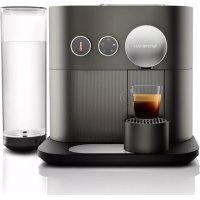
Expert D80 - Coffee machine NESPRESSO - Free user manual and instructions
Find the device manual for free Expert D80 NESPRESSO in PDF.



| Brand | Nespresso |
| Model | Expert D80 |
| Category | Coffee machine |
| Product type | Automatic espresso machine with Bluetooth connectivity |
| Dimensions (W x D x H) | Approximately 28 x 35 x 25 cm |
| Weight | Approximately 3.5 kg |
| Power supply | 220-240 V, 50-60 Hz |
| Power | Approximately 1500 W |
| Pressure | Up to 19 bars |
| Water tank | Capacity: 1.2 L, removable |
| Capsule container | Capacity: up to 11 used capsules |
| Main functions | Preparation of Ristretto, Espresso, Lungo, Americano and hot water; water volume programming; temperature adjustment; Bluetooth connectivity via Nespresso app; very high pressure extraction |
| Programming | Customizable water volume for each recipe; adjustable automatic shut-off (9 min by default) |
| Connectivity | Bluetooth for pairing with smartphone/tablet; Nespresso app for recipe management, capsule stock, remote preparation, maintenance notifications |
| Maintenance and cleaning | Automatic descaling with Nespresso solution; system draining; cleaning surfaces with damp cloth; removable hand-washable parts (tank, capsule container, drip tray) |
| Safety | Automatic shutdown in case of overheating or freezing; sliding window lock during operation; protection against electric shocks (cord with earth plug); identified hot surfaces; limitations for children and persons with reduced capacities |
| Spare parts and repairability | Water tank, capsule container, drip tray, metal grid, seals are replaceable; repair by Nespresso Club or authorized dealer (limited 2-year warranty) |
| General information | Domestic use; energy-saving modes (automatic shut-off); water hardness test provided; recycling via collection points; manual available in several languages |
| Package contents | Nespresso Expert machine, tasting set of capsules, welcome brochure, user guide, quick start guide, water hardness test strip |
Frequently Asked Questions - Expert D80 NESPRESSO
User questions about Expert D80 NESPRESSO
0 question about this device. Answer the ones you know or ask your own.
Ask a new question about this device
Download the instructions for your Coffee machine in PDF format for free! Find your manual Expert D80 - NESPRESSO and take your electronic device back in hand. On this page are published all the documents necessary for the use of your device. Expert D80 by NESPRESSO.
USER MANUAL Expert D80 NESPRESSO
Get the App / Obtain the Application

Download the Nespresso App
If you have it already, please update the App.
Telechargez I'Application Nespresso.
To check your device's compatibility, go on www.nespresso.com
Click on the Machine Icon.
Pairing/Jumelage Connectivity Functions/

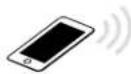
Please remember that the Bluetooth mode must be activated beforehand on your
smartphone or tablet.
- Recipe Management
Capsules stock management
Schedule a coffee brewing
Brew Now - Maintenance notifications
- Descaling alert
- And more to see via the App
USER MANUAL Nespresso is an exclusive system creating the ultimate Espresso, time after time. All Nespresso machines are equipped with a unique extraction system that guarantees up to 19 bar pressure. Each parameter has been calculated with great precision to ensure that all the aromas from each capsule can be extracted, to give the coffee body and create an exceptionally thick and smooth crema.
CAUTION: when you see this sign, please refer to the safety precautions to avoid possible harm and damage.
D80 Specifications/D80 Specifications techniques
220-240V-,50-60Hz,1150-1260W
Frequency/ 2.402-2.480 GHz
FrequencemaxTransmitPower4dBm/MaxTransmitPower4dBm

19 bar / 1.9 MPa / Pression maxima: 19 bars / 1.9 MPa

Standard version: -4.4 kg / Version standard: -4.4 kg

\~1.11L

38.05cm

29.7 cm

Content/Table des matieres
Get the App /Obtenir I'Application 3
Paining/Jumelage3
Specifications / Specifications techniques 5
First use (or after a long period of non-use) /
Settings mode: Reset to Factory Settings /
Settings mode: Emptying the System /
Cleaning/Nettoyage 22
Water Hardness / Durete de I'eau 23
Descalang/Detartrage 24-25
Troubleshooting / Dépannage 26-27
Contact Nespresso Club / Contacter le Club Nespresso 28
Disposal and Environmental Protection /
CAUTION: the safety precautions are part of the appliance. Read them carefully before using your new appliance for the first time. Keep them in a place where you can find and refer to them later on.
CAUTION: when you see this sign, please refer to the safety precautions to avoid possible harm and damage.
CAUTION: risks of injuries if you don't use this appliance correctly.
CAUTION: after using, do not touch hot surfaces (brewing unit, coffee and hot water nozzles), subjected to residual heat.
CAUTION: do not insert foreign objects into the
water tank and the brewing unit.
iINFORMATION:when you see this sign, please take note of the advice for the correct and safe usage of your appliance.
- The appliance is intended to prepare beverages according to these instructions.
- Do not use the appliance for anything other than its intended use.
- This appliance has been designed for use indoors and in non-extreme temperature conditions only.
- Protect the appliance from direct sunlight, prolonged water splash and humidity.
- This appliance is intended to be used in households and similar applications only such as: staff kitchen areas in shops, offices and other working environments, farm
houses; by clients in hotels, motels and other residential environments; bed and breakfast type environments.
- This appliance may be used by children who are at least 8 years of age, as long as they are supervised and have been given instructions about using the appliance safely and are fully aware of the dangers involved. Cleaning and user maintenance shall not be conducted by children unless they are older than 8 and they are supervised by an adult.
- Keep the appliance and its cord out of reach of children under 8 years of age.
- This appliance may be used by persons with reduced physical, sensory or mental capabilities, or whose experience or knowledge is not sufficient, provided they are supervised or have received instruction to use
the appliance safely and understand the dangers.
Children shall not use the device as a toy.
- The manufacturer accepts no responsibility and the guarantee will not apply for any commercial use, inappropriate handling or use of the appliance, any damage resulting from use for other purposes, faulty operation, repair by non-professionals or failure to comply with the instructions.
Always follow the cleaning instruction to clean your appliance.
- Unplug the appliance.
- Do not clean the appliance while hot.
- Clean with a damp cloth or sponge.
- Never immerse the appliance in water or put it under running water.
Avoid risk of fatal electric shock and fire.
- In case of an emergency: immediately remove the plug from the power socket.
- Only plug the appliance into suitable, easily accessible, earthed mains connections. Make sure that the voltage of the power source is the same as that specified on the rating plate. The use of an incorrect connection voids the guarantee.
The appliance must only be connected after installation.
- Do not pull the cord over sharp edges, clamp it or allow it to hang down.
- Keep the cord away from heat and damp.
-
If the supply cord is damaged, it must be replaced by the manufacturer, its service agent or similarly qualified persons, in order to avoid all risks.
-
If the cord is damaged, do not operate the appliance. Return the appliance to the Nespresso Club or to a Nespresso authorised representative.
- If an extension cord is required, use only an earthed cord with a conductor cross-section of at least 1.5mm^2 or matching input power.
- To avoid hazardous damage, never place the appliance on or beside hot surfaces such as radiators, stoves, ovens, gas burners, open flame, or similar.
Always place it on a horizontal, stable and even surface. The surface must be resistant to heat and fluids, like water, coffee, descale fluid or similar liquids. - Disconnect the appliance from the mains when not in use for a long period. Disconnect by pulling out the plug and not
by pulling the cord itself or the cord may become damaged.
- Before cleaning and servicing, remove the plug from the mains socket and let the appliance cool down.
- Never touch the cord with wet hands.
- Never immerse the appliance or part of it in water or other liquid.
- Never put the appliance or part of it in a dishwasher.
Electricity and water together is dangerous and can lead to fatal electrical shocks. - Do not open the appliance. Hazardous voltage inside!
- Do not put anything into any openings. Doing so may cause fire or electrical shock!
Avoid possible harm when operating the appliance.
- Never leave the appliance unattended in case of manually operated brewing
mode. In case of preprogrammed or remote brewing mode, additional safety precautions must be undertaken to avoid any possible harm, such as: respect the intended use, make sure the cup of adequate size is placed on the cup support, slider is completed closed, ensure there is water in the water tank and keep the appliance and its cord out of reach of unassisted children or pets.
- Do not use the appliance if it is damaged or not operating perfectly. Immediately remove the plug from the power socket. Contact the Nespresso Club or Nespresso authorised representative for examination, repair or adjustment.
- A damaged appliance can cause electrical shocks, burns and fire.
Always completely close the
EN Safety Precautions
slider and never open it during operation. Scalding may occur.
- Do not put fingers under coffee outlet, risk of scalding.
- Do not put fingers into capsule compartment or the capsule shaft. Danger of injury!
- Water could flow around a capsule when not perforated by the blades and damage the appliance.
- Never use a damaged or deformed capsule. If a capsule is blocked in the capsule compartment, turn the machine off and unplug it before any operation. Call the Nespresso Club or Nespresso authorised representative.
- Fill the water tank only with fresh potable water.
- Empty water tank if the appliance will not be used for an extended time (holidays, etc.).
- Replace water in water tank when the appliance is not
operated for a weekend or a similar period of time.
- Do not use the appliance without the drip tray and drip grid to avoid spilling any liquid on surrounding surfaces.
- Do not touch hot surfaces. Use handles, protected surfaces or knobs.
- To avoid scalding, keep always the milk frother lid closed during preparation.
- Do not use any strong cleaning agent or solvent cleaner. Use a damp cloth and mild cleaning agent to clean the surface of the appliance.
- To clean machine, use only clean cleaning tools.
- When unpacking the machine, remove the plastic film and dispose.
- This appliance is designed for Nespresso coffee capsules available exclusively through the Nespresso Club or your Nespresso authorised
representative.
- All Nespresso appliances pass stringent controls. Reliability tests under practical conditions are performed randomly on selected units. This can show traces of any previous use.
- Nespresso reserves the right to change instructions without prior notice.
- This machine contains magnets.
Dscaling
- Nespresso descaling agent, when used correctly, helps ensure the proper functioning of your machine over its lifetime and ensures that your coffee experience is as perfect as the first day.
- Nespresso descaling agent has been specifically developed for Nespresso machines; the use of any other descaling agent may
lead to machine component damage or an insufficient.
descaling process.
- Your Nespresso machine calculates when a descale is necessary based on the amount of water used and your water hardness level. This is set at the first use with the help of the water hardness test stick. Make sure to test the water hardness again if you use your machine in another state/region.
Make sure you descale your machine as soon as the machine requests it; a late.
descaling procedure may not be completely efficient.
SAVE THESE INSTRUCTIONS Pass them on to any subsequent user.
This instruction manual is also available as a PDF at nespresso.com
Turn the machine ON by pressing the brewing button, moving the dials or by opening the slider. Lights will blink. Heating up takes approximately 25-30 seconds. Steady lights: machine is ready.
To connect your machine, please follow the instructions in sections "Get the App" and "Pairing" on page 3. Multiple devices can be connected to your Nespresso Expert machine only if using a unique Club Members number. To pair these additional devices, please follow the instructions in the sections "Get the App" and "Pairing".
Turn the machine OFF by turning the temperature dial anti clockwise until it reaches 0 temperature. The light will blink for 5 seconds before shutting off.
Before making any coffee, make sure to rinse your machine by:
- Placing a container under coffee outlet.
- Close the slider, select the Lungo icon and press the brewing button.
- Repeat three times.
- Select hot water icon and press the brewing button.
- Repeat two times
- Empty the drip tray.
Heating up takes approximately 25-30 seconds. During heat up, you can select any coffee preparations and press the brewing button. The coffee will then flow automatically when the machine is ready.
Fill the water tank with fresh potable water. Place a cup under the coffee outlet.
Open the slider, insert a capsule and close the slider.

Ristretto (25 ml)

Espresso (40 ml)

Americano (25 ml coffee; 125 ml hot water)

Hot water (200 ml)
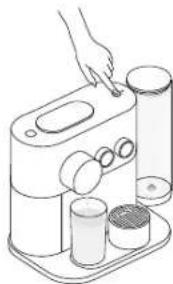
To select you recipe, turn the beverage dial until the desired beverage. Then select the desired temperature by turning the temperature dial. Push the brewing button on the top of the machine. The coffee will then flow.

To ensure hygienic conditions, it is highly recommended to not reuse a used capsule.

The highest temperature setting is very hot, we recommend to use a cup with a handle.
Preparation will stop automatically.
The capsule will eject automatically after 10 seconds.
To manually top up your beverage, press the brewing button within 10 seconds from the end of preparation. For water top-up you may add manually by selecting the water icon on the beverage button. Please note the temperature cannot be changed during the brew.
To stop the coffee flow, press the brewing button or slightly move the slider towards the right of the machine. Please note, a manual top-up is not possible in this case.
To change the selected cup size during brewing select the new desired coffee button. The machine will immediately stop if the coffee volume extracted is larger than new desired coffee size.
To accommodate a tall recipe glass, slide the cup support across the metallic base of the machine.
To enter a settings mode:
- Ensure machine is OFF and slider is closed.
- Press the brewing button for 6 seconds
- Select the relevant dial.
- Press the brewing button.
To exit settings mode: - The machine goes back to stand-by mode automatically after 30 seconds.
- Open the slider.
Settings mode options:
| Ristretto: Descalng |
| Espiroso: Emptying the system |
| Lungo: Reset to factory settings |
| Americano: Water hardness |
| Hot water: Energy savings mode |
| All Lights lit up: Bluetooths |
The machine will turn into
OFF mode automatically after
9 minutes of non-use
La machine s'eteint
To change automatic OFF mode:
- Enter settings mode and select the hot water icon [ ]
- Press the brewing button for confirmation.
- Use temperature dial to choose desired time.
- Confirm by pressing the brewing button.
You can now program another auto OFF mode:
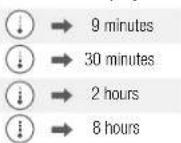
The selected icon will blink twice to confirm change has been made and then the machine will turn OFF.
Any coffee button can be programmed:
Ristretto: from 15 to 30 ml
Espresso: from 30 to 70 ml
Lungo: from 70 to 130 ml
Americano: coffee from 15 to 110 ml, hot water from 25 to 300 ml
Hot water from 50 to 300 ml
To program Ristretto, Espresso and Lungo volumes:
1. Ensure the machine is ON. 2. Open the slider and insert the capsule. 3. Close the slider. 4. Select desired coffee and press and hold brewing button. 5. Release the button when desired volume is reached. 6. Brewing button will flash 3 times for confirmation.
To program Americano volume:
1. Select Americano recipe and press and hold brewing button until desired coffee volume is reached. 2. Press and hold again and keep pressed until desired water volume is reached. 3. Brewing button will flash once for confirmation. 4. Water and coffee volume are now stored.
To program water volume:
1. Select hot water icon and press and hold brewing button until desired water volume is reached. 2. Water volume is now stored.
Factory settings are:
- Ristretto (25 ml), Espresso (40 ml), Lungo (110 ml), Americano (25 ml coffee; 125 ml hot water). Or select the drop icon for hot water (200 ml).
- Automatic OFF mode after 9 minutes.
- The water hardness set by default is hard.
4.No device paired.
To do it via your machine:
- Ensure machine is OFF and slider is closed.
- Press brewing button for 6 seconds - both dials will flash to confirm you are in settings mode.
- Select Lungo cup and press brewing button.
- The Lungo cup will blink to confirm you have entered this mode.
- To exit this mode without doing a factory reset, push the brewing button. No / Exit;
Yes/Confirm: - To factory reset, turn temperature dial up to maximum position and press brewing button.
- All lights will blink to confirm.
Remove the water tank. Place a container under the coffee outlet. Remove, empty and place back the drip tray.
Enter settings mode:
- Press brewing button for 6 seconds - both dials will flash to confirm you are in settings mode.
- Select Espresso and press brewing button - Espresso icon flashes for confirmation.
To exit this mode without doing a factory reset, push the brewing button. No/Exit: Yes/Confirm: - To factory reset, turn temperature dial up to maximum position and press brewing button.
- The emptying process will begin.
- When the procedure is finished, clean the drip tray and the cup support.
Machine tums to OFF mode automatically when empty.
EN Cleaning/Nettoyage
FR
To ensure hygienic conditions, it is highly recommended to empty and clean the used capsule container every day. Par mesure d'hygiene, il est fortement recommende de vider et de nettoyer quotidienment le bac a capsules usages.
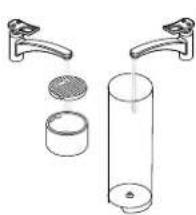
Remove lid and water tank and clean them all with odorless detergent and rinse with warm / hot water.
- Dry all water tank container parts with a fresh and clean towel, cloth or paper and reassemble all parts.
Never immerse the appliance or part of it in water or any other liquid.
The water hardness level can be tested with the water hardness stick available on the first page of the user manual. To enter the water hardness mode:
- Ensure machine is OFF and slider is closed.
- Press brew button 6 seconds, both dials will flash for confirmation.
- Select Americano icon, press brew buton, Americano icon will flash for confirmation.
- Use the temperature dial to select the appropriate level.
Once done, press brew button for confirmation
The machine will exit setting mode and turn off.
Read the safety precautions on the descending package and refer to the table for the frequency of use. The descending solution can be harmful. Avoid contact with eyes, skin and surfaces. Never use any product other than the Nespresso descaling kit available at the Nespresso Club to avoid damage to your machine. Please refer to the table on the "water hardness" section that indicates the descending frequency required for the optimum performance of your machine, based on water hardness. For any additional questions you may have regarding descending, please contact the Nespresso Club.
To exit the descending mode before final validation with the temperature dial, open slider or machine goes back to stand-by mode automatically after 30 seconds.
Duration approximately 20 minutes.
Durée approximative: 20 minutes.
Empty the drip tray and the used capsule container.
Fill the water tank with 2 units of Nespresso descaling liquid and add potable water up to the max level.
Place a container (minimum volume: 1.2 L) under the coffee outlet.
To enter the descending mode: Ensure machine is OFF and slider is closed. Press brewing button for 6 seconds - both dials will flash for confirmation. On the recipe dial, select Ristretto icon, press brewing button to validate selection. Then, on the temperature dial, select high level "I" to confirm or lower level "0" to cancel, press brewing button to validate choice. Ristretto icon blinks to confirm you are in descending mode.
Ristretto icon will blink during the entire descending process. Maintenance light will be steady ON while machine is automatically proceeding. Maintenance light will blink when a manual user action is required.
Rinse the water tank, drip tray and cup support thoroughly to avoid any residue.
7 Refill the water tank with 1.2 L fresh potable water.
Press brewing button to start the descending cycle; descending agent will flow through the coffee and hot water outlets. When machine stops and maintenance light blinks, remove and empty the drip tray and place back. Push brewing button again. Machine will stop when water tank is empty.
Throughout the descending process you can pause at any time by pressing the brewing button (e.g. to empty and place back your container). Continue by pressing the brew button again.
Press brewing button to start rinsing the machine, pump will run. Machine will stop automatically when the water tank is empty. Remove and empty the drip tray and place back. The machine will automatically switch OFF when the descending process is done. The machine is now ready for use.
If maintenance light continues to blink after rinsing it means less than 1.2 L water was added. Repeat step 7.
i Videos are available on the App and on www.nespresso.com - Go to section "services".
| Pairing has not succeeded. - Check that the Bluetooth on the smartphone or tablet is activated. - Check the compatibility of your smartphone or tablet with the machine (see page 3). If you want to unpair your machine, via the App. - Go on the App "Name", click on "Machine status", then click on "Unpair this machine". - Click on "unpair this device" to confirm the unpairing. No lights on the coffee machine. - Machine turned OFF automatically. See paragraph on 'Energy Saving Concept'. No coffee, no water, unusual coffee flow. - Check if the water tank is correctly positioned, if empty, fill with potable water. Coffee is not hot enough. - Preheat cup. - Discale the machine if necessary. The slider does not close completely or the machine doesn't start brewing. - Empty the capsule container. - Check that no capsule is blocked inside the machine. Leakage (water under the machine). - Unplug the machine. - Empty drip tray if full and remove all the water under the machine. Then plug again the machine. Maintenance light is ON. - Brew button light ON and maintenance LED slow blinking means descending is required. Nespresso light is ON. - It means your capsule stock is empty. You can order capsules via the App or Nespresso website. Machine overheating or in an environment below 0°. - Maintenance light will go on. - Brewing button will be off. Water or coffee flow does not stop even when pushing the brewing button. - Gently move the slider towards the back of the machine to stop the flow. No coffee flow, water goes directly into the drip tray (despite inserted capsule). - Pull the slider to ensure it is closed. Machine turns to OFF mode. - To save energy the machine will turn to OFF mode after 9 minutes of non-use. - See paragraph on "Energy Saving Concept". Capsule container and drip tray are stuck. - Unplug the main. - Lift the machine. | - Ensure the smartphone or tablet is placed next to the machine (max distance 20 cm) during the pairing. - Make sure to not turn ON any microwave close to the machine during pairing. - Note: In case of an unpairing, all the setups and specifications will be lost and the machine will be reset to factory settings. - Check the mains plug, voltage, fuse. - Discale it if necessary. (Note: do not put the finger inside the machine) - If problem persists, call the Nespresso Club. - Brew button is OFF and maintenance LED is ON means water tank is empty and/or capsule tray full. - If problem persists, call the Nespresso Club. - Hot water flow always stops a short time after pressing the brewing button to stop. This is a normal behavior not a troubleshooting. - If problem persists, call the Nespresso Club. - Press one of the coffee buttons to turn to "ON-mode" or open the slider. - Use the hole underneath the machine to manually push out the container. - Clean the capsule container, the drip tray and the insert. |
Dépannage

As we may not have foreseen all uses of your appliance, should you need any additional information, in case of problems or simply to seek advice, call the Nespresso Club or your Nespresso authorised representative. Contact details for your Nespresso Club or your Nespresso authorised representative can be found in the "Welcome to Nespresso" folder in your machine box or at nespresso.com
This appliance complies with the EU Directive 2012/19/EC. Packaging materials and appliance contain recyclable materials. Your appliance contains valuable materials that can be recovered or can be recycled. Separation of the remaining waste materials into different types facilitates the recycling of valuable raw materials. Leave the appliance at a collection point. You can obtain information on disposal from your local authorities. To know more about Nespresso sustainability strategy, go to www.nespresso.com/positive
De'Longhi warrants this product against defects in materials and workmanship for a period of two years from the date of purchase, during this period, De'Longhi will either repair or replace, at its discretion, any defective product at no charge to the owner. Replacement products or repaired parts will be guaranteed for only the unexpired portion of the original warranty or six months, whichever is greater. This limited warranty does not apply to any defect resulting from accident, misuse, improper maintenance, or normal wear and tear. Except to the extent allowed by applicable law, the terms of this limited warranty do not exclude, restrict or modify, and are in addition to, the mandatory statutory rights applicable to the sale of the product to you. If you believe your product is defective, contact De'Longhi for instructions on where to send or bring it for repair.
estiver conclusdo, a luz
9 minutes
30 minutes
2 hours
8hras
Descalcification/Descalilfication
RMepbI npedoctopoxkHOCTN

BHIMAHNE:
He BCTabIaIte
NoCTOpOHnE
IpeMTeB KOHTeHep
IJa BObI N BaOpHbI
6Jok.
iHOPMALIe: Ecnn Bbl Bnnte 3TOT 3nak, cJeDyTe peKOMeHaCnAm NO KOppeKTHomU n6e3OnaChOMy NcNoJIb3OBAHIO yCTpOJCTBa.
KofoMaunHa npedHa3HaueHa IaI piroTOBneHn HaNTKO B COOTBETCTBN C daHHO INHCTpyKUnei.
He nCnoJIb3yIte DaHHyuKOcpeMaUHHy He NoHa3HaueHIO.
JaHHa KOpemaunha pa3pa6oTaHa IJN NCNoJIb3OBAHnB 3aKpbITOM NOMEueHnB HOpMaJIbHbIX TEMpePAtyPbIX YCIOBnX.
HeDonyckaIte
PONadaHnI pRmblx
COJHeuHbIX Lyuei,
DNITeJIbHOro
BO3deIcTBnI 6pbI3r
BOdbI IN BlaXHOCTN.
JaHHa KcpeMaunHa npedHa3HaueHa JIOMaHHeO IcIOJIb3OBaHn IJIN aHaJIOrNHyoro,
Hapimep: PecpoHaJOM
Ma3INOB B 3OHe
KxHN, Ofncax N Dpynx
pa6oHx NOMeUeHnX;
KIneHTAMN B OTeJx,
MOTeJx IN PoOvIX TINax
PPOXIBaHnA, a TaKke B
MNHN-OTEJx.
JaHHyKOcPemaunHy MOryt NcNoJIb3OBaTb (IOJPiNCMOTpOM B3PoCJIbIX)JeTI, IOCTnIuHne 8 JeT n CTapLHe, ECNI OHI INoHNCTpyKTHIpOBAhbl KacatelbHO 6e3OnaChoro NCNOJIb3OBaHnI OCO3HaOT OnaCHOCTb Pn HEnpaBnJIbHOJ 3KcNJIyaTaUIN.OChtKa I PEmOHr KoPeMaunHbI DeTbMn Be3PiNCMOTpa HeONyCTmbl.
XpaHnTe KOpemaunHy n ee Lhyp B MeCTe, HeoCTynHom IJr JTei
Mnaaie 8 Jnt.
Данная кофемашина
MOKET ИСПОЛьЗОВТБСА
ЛИЦAMN C
ОГРАИЧЕНБIMN
ФИЗИЕСКIMN,
CEHCOPHBIM NII
YMCTBEHNBIMN
СПОСБHOCТЯМN IINI
OTCYTCTBиEM ONbITA
И 3HAHIM, EСЛ NOH
ПОННСТPyкТИРОВAHы
КасATEЛьНО
БeЗОПаСHOrO
ИСПОЛьЗОВАнЯ N
ОСОЗHAJOТ ONaCHOCTь
ПрIN HENРаВЛьНОH
ЗКСПЛУАТALI.N.
JETNHEIOJIKNHbIINpTaBCOΦeMaUNHOI.
-ПОНЗВОДИТЕЛБ He HECET OTBETCTBEHHOCTN, И ДЕИСТВИЕ ГАРНИн He paCnpoCtpaHЯETcR Ha NOBPEXDEHIN, BO3HNIUINE B pe3yIbTaTe KOMMepHeCKOTo
NcnoJIb3OBaHnI
KoΦeMaUHnbl,
HePpaBnIbHoro
NcNoJIb3OBaHnI Nn
NcNoJIb3OBaHnI He No
Ha3NaYeHnO,a TaXKe
HePiPoPeCCnOHaJIbHOrO
peMOHTa Nn
HEco6JIouDeHnI
HaCTOJaEi VHCTpyKuIN.
Bcerda cJeDyIte HNCTpyKUNIO ONUCTKN KOeMaunHbI.
- OTKJIIOHITe npi6op.
He cIeJeT OuyuTaB KOpemaHIny B TropaHc COCTOHN.
-ПлотираітЕ ВlaжнOH TkaHbIO NIII ry6Koi.
Hikorda He norpykai Te KofemaunHy nn ee Yactn B Bodny nn npyryo XIKOCTb.
BepenTecb BO3HMKHOBeHn NOXapa N nopaxKeHHN 3JIeKtpnueckmTOKOM.
Bcnyae OAnchOCTn HEmeJIeHHOOTKJIOUHTe KOpemaunHyOT CETN, BbIePHyB BNkky N3 p03eTKI.
BkIIOUaTe KOfemaunHy TOnbKO B IOxOJaIyIO N IeKo DoCTyHyo 3JIeKTPnueckyIO po3ETKY C 3a3eMJIeHNEM. Y6eIITcB, yTO HAnpJxKeHne B CETN COOTBeTCTByET paOChemy HAnpJxKeHIO KOfemaunHbl, yKa3aHHOMy B Ta6JIuCe TexHnuecknx DaHHbIX. Pn HnnpaBnJIbHOM IOKJIIOUeHNI KOfemaunHbl K CETN rapaHTna aHHyInpOyETcra.
KoepMaunHa doJXHa 6bItb NOKIIOUeHa K CETN TOJBKO NOCJe ee yCTaHOBKn.
- He npotraIbaiTe KaebIb OKOIO OCTpbIX yTIOB. 3akpenite TaK, YTObI OH HE CBICAI BHIN3.
He donyckaite HargebaHnI nonandaHn BlaHn Ha Ka6JIb. - EcIn KaebIn NOBpeKdEn, CJeDyET BepHyTb KoPeMaUHnHy IPOIN3BOIDTEJIIO, B CEPBICbI LcHTp INI JIuCaM aHaJIoNHyON KBaJIINKauIN.
He nCnoJb3yIte KOpeMaunHy,ecnBnIte,HTo KaBeJIb NOBpeKdEn. JnBO3BpaTa KoPeMaunHbI o6paTITecb BV Kny6 Nespresso nn K OoNuaJIbHbIM
RMepbI npedoctopoxKHOCTN
PpeiCTaBITeIaM Nespresso.
- Ecln BO Bpemr
NcnoJIb3OBAHnra
Tpe6yETcPOdkIIOUeHneC NOMoUbKO yDNIHNTeJIa,NCNOJb3yHTe TOJIbKO 3a3EmJIeHHbIyDNINHTeB C CeHeHnEMKaBeJI He MeHee 1.5 MM2NJN COOTBETCTBYHOUJI BXODHO MOUHOCTHN.
Bo n36eXaHne NOBpeXdEHH He CTaBbTe KOpemAluHnHa rOpAue NoBepxHOCTn IIN B6IIN3n TaKOBbIX, HApPIMeP,paDnATOPOB, PINT,ra3OBbIX ROpELOK, OTKpbITOrO OrHn INp.
Bcerda cTaBbTe KOfemaunHy Ha POBHbIe, TOpN3OHTaNbHbIe, yCTOnuHBbIe IOBepxHOCTn. IOBePxHOCTb IOnxHa 6bITb CToIKoK
HaRpeBaHnIO N KNDKOCTM, TaKIM KaK BOda, KoPe, cpeIcTba OT HAKINN INp.
OTKJIIOUHAnTE KOeMaUHHyOT CETN B CUYHae DINTEbHOrO HEICNOJIb3OBaHn. Pn OTKJIIOUHn KOeMaUHHbIOT CETN, BBHIMAR BNILKY N3 PO3ETKN, He TANITE 3a npBOID BO N36EkaHne ERO NOBPEXdEHn.
- PapeO uNCTKoN I pEmOHToM BbIHbTe BNIKy N3 Po3ETKn I daITe KOpeMaUInHe OCTbITb.
Hikorda He TporaiTe KaebMb MOKpbIMN pykam.
Hikorda He norgykaite KoepemaunHy Ie ee Yactn B Bodny IIN DpyTuO XuKoCTb.
Hikorda He nCnoJIb3yIte NocuydOMoeHyO
MaLLINHy DnI OCHCTKIOKOcpeMaLLINHbI NIN eeHaCTeN.
B3aIMoJeCTBVe BObI N TOKa ONaCHO IN MOKeT IprNBecTI K JETaJIbHOMy ICXOy BCJIeDCTBVe NOPaXeHnA 3JIeKTPuHECKM TOKOM.
KoPemaHnHa HaxOJITcR NOI HAnpXKeHmE - HNKOrda He BCKpbBaHTe ee BO N36ExKaHne ydapa 3JIeKTPuHecKIM TOKOM.
He BCTaBJIaTe NOCTOpOHnIe NpeDMtbl B OTBepCTnKoPemaunHb.ITo MOXET PnVBECTN K NopaxKeHIO 3JIeKTpUcEckmTOKOM IIN BO3rOpaHIO.
N36eaiTe BO3MOXHbIX TpaBM npu NcNoJIb3OBAHN
KoΦeMaunHbI.
Hikorda He octabJnTe npibop 63 npimcMOTpa B clyuae pexkma pyHoro npiroTOBJIeHnI Kohe.Bo n36exkaHne npunHeHn BO3MOxHoro BpeDa B clyuae npedBapnteJIbHOro nporpammmipOBaHnI nn peKIMMa ydaJeHHORO 3aynCKa npITOrOBJIeHnI, D0JXHbI 6bl TnpdPnHrTbI DOIOJIHtEJIbHbIe Mepbl npedOctOpOXHOCTN, TaKne Ka: IcnoJIb3OBAHnE CTrPOr OHa3HaueHIO, y6eINTecb, YTO qaShka COOTBETCTByIOUeRo pa3mepa HaxoNTcra Ha NODCTaBKe IINyAaIKN, CIAJdep NOJHOCTbO 3akpbIT, npOBepbTe, 4TO Bpe3epByape
IOCTaTOUHoe KOJIuHcTBo BObI, a TaKKe, YTO pNbOp I UHyp HaxOJrTCB HeIOCTyINHom MecTe IJIeTei INII JOMaUHnX XINBOTbIX.
He nCnoIb3yIte KoFemaunHy,ecn OHaIOBpeKdEHa IINHEnpaBulbHO paBotaet.HemedeHEnHO OTcoeHNHTe KoFemaunHyOT cTNI.CBxKITecb C KJy6om Nespresso IINOOPuAJIbHbIM npedCTabNTelem Nespresso dIra DnaarHOCTIKN,ycTpaHEnH NcnpaBHOCTNI IIN pEMOHTa.
-3KcIpyataHnIOBpeXdeHHoIKoPemaunHbIMoKETBb3BaTbNopaxKeHne3JIeKTPnueckm TOKOM,
OKONI IN BO3ROPAHIA.
Bcerda 3akpbibaTe cnaipeu HIKoTda He OTkpBaIte ero BO Bpema paBoTbI.3To MOKET PnBeCTN K OUInapuBaHIO.
He noctabnIte nalbUpoHOCNIPOJAHIOKoe BO I36eKaHneOwnapnBaHH.
I36eaiTe IopadHnnaIaJIbueB BOTBepCTMeIINKANCyI.3TOMOKETPpIBecTI K TpaBMam.
Boda moKet npOtey BOKpyr KaNCyIbI, He IpOTKHyTOH OXkAMN, INIOBpeINITb KoDemaunHy.
Hikorda He nCnoJb3yIte NOBpeKdEHHbIe IINI DeOpMnPoBaHHbIe KaCynbl. B cIyhae 3aCTpeBaHnKaCynbl B OTdJeHnKaCynOePkaTeJIa
BbIKHOUHTe
KoCpeMaUHHy N
OTCoEINHHTe OT
CTn, npexJe Yem
PpeIpnHmAtb
KaKHe-JIn6 OeiCTBna.
No3BOHHTe B Kny6
Nespresso nnn
OphiuaJIbHOMy
npedCTaBHTeIIO
Nespresso.
3aIJIHnIe pe3epByap TOJIbKO YNCTOINITBeBOI BOIOI.
- EcIn Bbl pHaHpyeTe DlnteJbHOe BpEmr HE NcNoJIb3OBAtB KOpemaunHy (HaIpUmEp, BO BpEmr OTnYcKa nT.D.), ONyCToWauTe pe3epByap dJa BoDbl.
3aMeHnTe Body Bpe3epByape Ha CBexkyo,ecnBbI HeNCIOJIb3OBaII NKoFemaUHHy B TeHeHne HECKOJIbKINx DHei.
He nCnoIb3yIte KoΦeMaUHnHy 6e3 NODOnHa IJRA C6Opa KaIeJIb N peWetK, YTO6bI He DOnYCTNTb NOPaJaHn JXnDKOCTe Ha OKpyKaIOLJIe NOBepxHOCTN.
He npikacaiTecb K HappeBaIOUIMcra NOBepxHOCrM. IcnoJIb3yIte pyky, KHOPIKNIbe3OJaChbIe Yactn npi60pa.
He nCnoJb3yIte arpeccnBHOe YNCTaUe CpeCTBO Nnn paCTBOPHTEIN DIA XIMNUeCKOY NCTKN. IcNoJIb3yInTe BLnXKHyTO TKAHb IMrKOe YNCTAUIEE CpeCTBO DIA OYNCTKN IOBepxHOCTNI KOpemaunHbl.
JIY ONUCTKINKOΦeMaUHHIbINCNOB3yHTe TOnbKO
RMepbI npedoctopoxknoctn
pekomehIOBaHHbIe CpeIDCTBa.
- BbIHMaKoPeMaunHy n3 yNaKOBKn, CHIMITE pHeKy C NOIOna dJa cOpa KaIeIb u yTnIIN3npyInTe ee.
JaHHa KcpeMaunHa pa3pa6oTaHa cHeuAJIbHO dIa KcpeKancyI Nespresso, KOtOpBIE MOxHn PnIO6pctn NCKJIOHHTeJIbHO B KnyBe Nespresso, ByTKax Nespresso, IVHTepHET-ByTke Nespresso nIc nOMOUsbMObUHBO npINOKeHn Nespresso.
Bce KofoMaunHbI Nespresso npoxoJr CTpOri KOnTpoJI KaueCTBa.Ha ClyuayHIO OTo6paHHbIX KofoMaunHax IPOBOJrTa TcTebl B ycIOBnX paKTnHeCKoN
3KCNJIyatauM. N03TOMY Ha HeKOTOpbIX MaLIMHAX MOrYT OCTaTBcR CJIeIbI IpeIbI dyUeFo NCIOJIb3OBAHnR.
- Nespresso octablanet3a coboi npaboNIMeHnTb IHCTpyKUIN6e3 ppeBapnteJbHOrOyBeDOMJIeHNI.
KoepMaunHa coepxHt MaHTbIe 3JemehTbI.
Ouuctka OT HAKIN
-Пи правьном
ИСПОЛБЗОВАНИ
СРЕДСТВА OT HAКПИ
Nespresso rapaHTИpyET
ИСпраВHyО pa6OTy
КофемALHbI B
Тechене BCERO CPOKA
СлУЖБИ И ИНЗМEHNO
П repEOCXODHbI BKcC
Кофe.
CpeIcTBOIyOuNCTKNOTHaKINNespresso pa3pa6oTaHo
CneuNbHO nn
KoPemaunN Nespresso,
NCIOJIb3OBaHnE JIO6Oro
DpyrOcreCTBa
MOKET PnIBeCTn K
NOBpeXdEHnO YaCTeN
KoPemaunHb IIN
IOBJIaHTb Ha KaHeCTBO
KoPe.
BaSHA KoFemaUNHa Nespresso cama ONpeJeNT, KOrda Heo6xoJIMO IPOBECTU ONUCTKY OT HAKIN, OCHOBbIBaRcB Ha KOJIueCTBe NCNoJIb3yeMOI BObl N yPoBHe JKeCTKOCTI BObl. XKeCTKOCtB BObl YCTaHabJIbIAeTCr PnI NepBOM NcNoJIb3OBAHN C NOMOuIbIO npNlaeraMoro INdikKaTopa JKeCTKOCTI BObl. EcIn Bbl pAnHiPyTe NCNoJIb3OBAbT
KoepemaunHy Bpyrom CTpaHepnOHe, peKOMeHNyETcCHOBa IPOBECTN PPOBepKy JXECTKOCTN BObl.
CTapaaTeCbOuHuaTb KOpemAlunHyOT HAKINI pRi NepBOH NOOXODMOCTN;NO3DnHApnoeDypa ydaJeHHN HAKINI HE MOXET 6bITB PONHOCTbIO 3ΦΦEKTINBHOJ.
COXPAHNTE DAHHYIO
IHCTPYKUIO
IpeaTe IHCTpyKUIO
yeNoBeKy, KOTOpBIM
6yDet NOJb3OBaTbcra
KoΦeMaunHO
BnOcJIeDCTBNI.
DaHHYIO IHCTpyKUIO
MOxH0 HaHTN B
φopMaTe PDF ha caTe
nespresso.com
EAC
IpeepnepbblmncnoB30BaHem npomOHTe Kcpoemauny CnDyoCIM o6pa30M
- Pâmečněte KohtěříHep noD HocHK noDAM Kópe.
- 3aKoPoeIe cnaepd, Bb6peIte oBem IyHro I NaKmVKeIc KHOKNJ PnIRTOBJIaN KoCfE
- No8TopuTe 3 paa
- Bb6BePteRgEeKIMnTPOGTOBIEHINrPoRTH BoBdI HAKMMeT KHONKY PnOToPTOBIEHINr
- FlobTopuTe 2 paa3a
- Onyctowite noonoh nna kaneb.
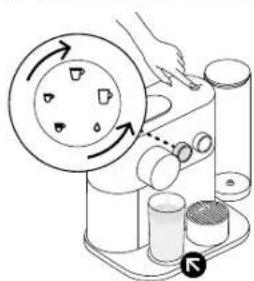
PrzygotOWanie kawy/ПригOTOBLANHe kofoe

YcTpaHHe HeNCnPaBHOCTeI

B npnloKenHn Ha caIte www.nespresso.com doctynbObyaouiue bIe.o - OpatntecbBa p3dE "CepBcbl"
| Uctanobka coedinienen He ydalanb. | - Ybodnytcb,Чтфукша Bluefoot Ha Baalem smapfdohe Ил палшete Bknochena. - Поровпс, coamestmл BaalcsmatfchnHa II palaHuet c kofomauhni (cm. ctrp. 140). | - Ybodnytcb, ChTo BaalcsmatfchnHa II palaHuet c kofomauhni (He Bokce 20 cm). - Ybodnytcb, ChTo BbVbmeYCTAeKoCoeHneHn (He Bokce 20 cm). - Ybodnytcb, ChTo BbVbmeYCTAeKoCoeHneHn (He Bokce 20 cm). - Мнрбоголыхьу eztprotsb. |
| ЧтоныPrepacktib coedinienhe c Кофемашин с поюь римлжени. | - B pOLOXENHIM PerieuDyte BO KIbLdKy «NIM». HaxMVTE Ha KONKy «CTaryc KoBEMauHINb, zatem HaxMVTE «OTcoEduHInb 3Tb KcPcMauHINb». - HaxMVTE Ha «OTcoEduHInb 3Tb OYcTpoIeTb» ДдяпдьеркDiH. | -Оратинь ВИHMANe, ChTo рп OTcoEduHInb YcTPOXACTBa, Bce Hoxetpryns bvydt TByerPrHy I KcPcMauHINb BApKETCR KZAOJCKH HoxetprHyAM. -ПоровпсТНДИМпITAHINРazБOM.HaRЯЖeH, псрсханг. -ВуллелчNTСHСТКУ OTHAKIN, ecln Hox6xOvmo. |
| He ropt KhoNkn prirotoBlenna Kofe. | - Maunna AotomauHecck BklylouaTOC - HaxMVTE Ha «OTcoEduHInb 3Tb OYcTpoIeTb» ДдяпдьеркDiH. | - ПоровпсТНДИМпITAHINРazБOM.HaRЯЖeH, псрсханг. |
| Kofe He lyetc, Boda Toke, HeobuHnbl Tok Kofe. | - Ybodnytcb, ChTo PzEBPyrBd Dn BODu paoMaHIN KOPeKTHO. Ecln PzEBPyrBd Pnyct, HaxMVTE Eclr CxTcr TpIbBcBODp. | -БуллелчNTСHСТКУ OTHAKIN, ecln Hox6xOvmo. |
| Kofe He NDSTATOCH NO ropAyn. | - Pioorpeite Yauky. - BypolnHInte OHTCYK Tc Hakiv, ecln Hox6xOvmo. | |
| Сраздер He zakpyiBaTeTc Do KOHua mll Ne нанmaTaTc prirotoBLOHNe Hoke. | - Oryctovltte KohteyHep Dn NaOIIbocAaHbK ancayU. - Pioorpeite, He zactrpna Ia KauCyIb BHYrpn KOFeMaHINb (BIVHMANe: He BCTABPrrte NaIbU bYbHTpy KOFeMaHINb). | |
| Пrotekanhe (Boda noq KofemauHoi). | - Oryctovltte Poyuzh Dn KanBIL, ecmOn OH ZaoHInH, sateM NcHIOCTbU Ydavltte Bodv nI-NcKoFemauHINb. BklylouaTe KofeMaHINb B cebT Ntahnn. | -Есл prorobilema coxpaHaeTc, obparatntcB a Klyb Nespress. |
| Rogpit InDikatop cepBnchoro obcnykhubnia. | - KhoNka PriyTOBLeNHRA Kofe ropyt, a INUdVakatop cepBnchoro obcnykhubnia MedIeHHO MmraT - Trébyetc OHTAcTka O T hakiv. | - KhoNka prirotoBleNHRA Kofe He ropyt, ropyt TOLbK InDyakatop cepBnchoro oboCNYBakHInu - KOnTeHep dR BoDyIpyKU WIM ZaoHIneH KOnTeHep dR KacvIy. -Есл prorobilema coxpaHaeTc, obparatntcB a Klyb Nespress. |
| Rogpit InDikatop Nespresso. | - OTo OZhaHcyT, ChTo Zanac KancyIb ZaoHnHbAeTc. Bu Moketete zaakazab KancyIb Nespresso UrePozKHeNe, Ha caite Nespresso Ia OBpatruNshCb B Klyb Nespresso. | |
| Maunha neperpeBaTeTc mll paBoTaT eprn tempepatype Okpykaaоe symd Bye Mehe 0°C. | -Загор'tca InDikatop cepeVchOrO obcIyKnBuHnA - KhoNka PriyTOBLeNHBA He DeIyCTbY. | -Дуack blybopa Tempepatyb BydET b6xTpo Mmrtb. Погл�ота дужUTуу КОКУ BOKO KINKIA He blyKHOHATcS, 3Tc MOKet 3a-8bTb HeckKOBK MmYt. B TeryHeze 3TcTo BpEmen MauHIN HeocOMOxH NoIb3OBeTcB. |
| Tok Bodny InDik Kepe He octanahBnBaTeTc dage prn Haxatm N Khonok. | - Akkypatrno OToDyHbTe ChAdep CT SeBd Pdct OCTAHOBK InpYrTOBLeNH. | TOK roryn BODy BOCgA OctanahBnBaTeTc Cpe3 HcKOTopco epemrNocne IOBpTOHORO Haxatm KONKINK PrirrTOBLeNH. 3To JyBnTcER HOpMaJIbHbM. |
| Her ToKa Kofe, Boda TeHemocpedctBeHNO B контseнерду Kanelb (HeCMOTpr Na BctaBleHnHykoKancyIy). | - Пддьн'tbe Na csaI cIaIpp, ChTo ybSodItbC, ChTo ChIpoTHO kacbYt. | -Есл prorobilema coxpaHaeTc, obparatntcB a Klyb Nespress. |
| Maunha BykIIOuHaTeC. | - B ZePax ZheperocbeKeHn KaCefMaUHIna AotomauHecck BklylouaTeTc Yep39 MmHyt NocNc PoocIeHero XcTbOBoBaHn. - CamPrte Pashd «KohUeIuIa HcpeOBePekHn. | -ЧуБуKoHUYb KOFeMaUHInu, HaxMVte LIObOy KOnKTy prirrotoBleNhya Kofe pyln OStKpOte CmIep. |
| KotheHepДдЯ KancyIy mll noDOn Дд Kanelb HeBO3MOxHIO K3BNeB. | - OToKIOHIne Pnvbp. | -ИсрльчITE OTOBCETNE Ha HIXeЧЧТСТКФeMauHInu, ChTo bbl BocVluO H3NAtcN KOTBInp. |
80eio (eaojTOO dyKoU 1.2L) kato and to ojoeknpke
4 Tia va pmeir otn aeitouyia kaepiopou kkaalawew: BeaiBite 6 n npxavivkaiotn. Pntote to kouni exkuiqnia y6 Seutepaetra. O500 erkiayoe 0aavaoobpnoov ia emBeaiow. Eretto, oio sektn depokpaccia, enieEte to awepeo iineto "wa emBeaiown to katwepo" 0' ia akupon. Pote to koumi exkuiqnia vya ivembeiawerte tyvmyohn. To ekovio tuo Ristretto 0a avoobpoia ia va emBeaiow oni eote de siakacia Kaapipoiu Kaalawuw.
To ekovidio Tou Ristretto Ba ava0a0hnye oE 6n th diaikata Kaqapou KaaLarauw. To qucuvmpanc Ba eivra strBepaavapuevo kata n diaikata. To qucuvmpanc Ta ava0bnei oTav Ba xpeiaotei kantoia xeipokivtn npaejbaan.
IIEATE TO KOUMI TNC EKUXALIONYVA
EIKVIOE O KUXOAC aOaTUAONC. To UPO
KABAPIOAO KBOAATUcewo BA TIPAEAI AN
TO 00IO EPOKIO CKAe KAI VPOU. OTVN
PUNXAVI OTAPAAHAI KAI TO FWC AUVTINANC
avaBoo3HVE, aapapeote KAI abiaote TN oxapa
ANTOPAYWNG KAI ENAVATOETNE TNI.
IIEATE TO KOUMI TNC EKUXLNC EAVH. H unxavn
BA OTAPAAHNIOTAV TO DOXVE POUP AEBAEI.
MtopeTe va ataqatjEte Tn diakia daaatawncva nna taoi matuvac To koumi EKoJIOc (T, yia va aoeioe To kai va eavatoBethoTe To doxelo). SuexixTE Tn diakia matuvac To koumi EKoJIOc. EaVa.
EaTTOOIOI TOIIOAOPTAWYIc KAITN BAOKOUTIWIOA KAIAVAVnyuAPXOU ANOADMTOTEKAOTOMA.
Enavayeiate to doxioe vpou pe 1.2 L peco trocijo vpoe.
3 Piote To koumi Tc EKxUIONy ia va cemivet n npxavn cac, n avila 8a Eekivae. H npxavn 8a otaparneai autouata otav aediao to doxiev vpu. ApaedeT n oxapa aiootpadyionk kalavatoTeHte Tn. H npxavn 8a anevepyoroinei autoupa otav tekeuoei n diakkaia apalatwnc. H npxavn elva tupa etoun y xphon.
Av to fuc uuvnongn auwexi va avaooipvai apou Exete Eenovra tr nayan ouaia na noonotra vepou tnc kknAwnr hivuokopoepn tou 1.2 L Eravokapte to hja 7.
G AvTlueTwionn PpOaW
Diarihevtai oxetikabivteo otnv epapoyn kai otov iatoxipo www.nespresso.com -otnv evotnta "club".