
EY4541 - Saw PANASONIC - Free user manual and instructions
Find the device manual for free EY4541 PANASONIC in PDF.
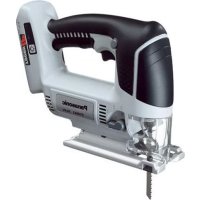



| Product type | Cordless jigsaw |
| Brand | Panasonic |
| Model | EY4541 |
| Rated voltage | 14.4 V DC |
| Battery type | Rechargeable Li-ion (models EY9L40, EY9L41) |
| Battery capacity | 3 Ah (EY9L40) or 3.3 Ah (EY9L41) |
| Stroke length | 20 mm |
| Strokes per minute | 0 – 2400 /min (variable) |
| Max cutting capacity – wood | 65 mm |
| Max cutting capacity – mild steel | 6 mm |
| Max cutting capacity – aluminum | 10 mm |
| Base tilt | 0° to 45° (adjustable) |
| Orbital stroke modes | 4 levels (0 to 3) |
| Integrated light | LED with dedicated switch |
| Indicators | Battery overheat and low battery |
| Total length | 270 mm |
| Weight (with battery EY9L40) | 2.2 kg |
| Weight (with battery EY9L41) | 2.25 kg |
| Maintenance and cleaning | Wipe with a dry cloth; do not use solvents |
| Safety | Switch lock, overheat protection, automatic shutdown in case of overheating |
| Included accessories | Metal blade, wood blade, drywall blade, anti-splinter plate |
Frequently Asked Questions - EY4541 PANASONIC
User questions about EY4541 PANASONIC
0 question about this device. Answer the ones you know or ask your own.
Ask a new question about this device
Download the instructions for your Saw in PDF format for free! Find your manual EY4541 - PANASONIC and take your electronic device back in hand. On this page are published all the documents necessary for the use of your device. EY4541 by PANASONIC.
USER MANUAL EY4541 PANASONIC
Before operating this unit, please read these instructions completely and save this manual for future use.
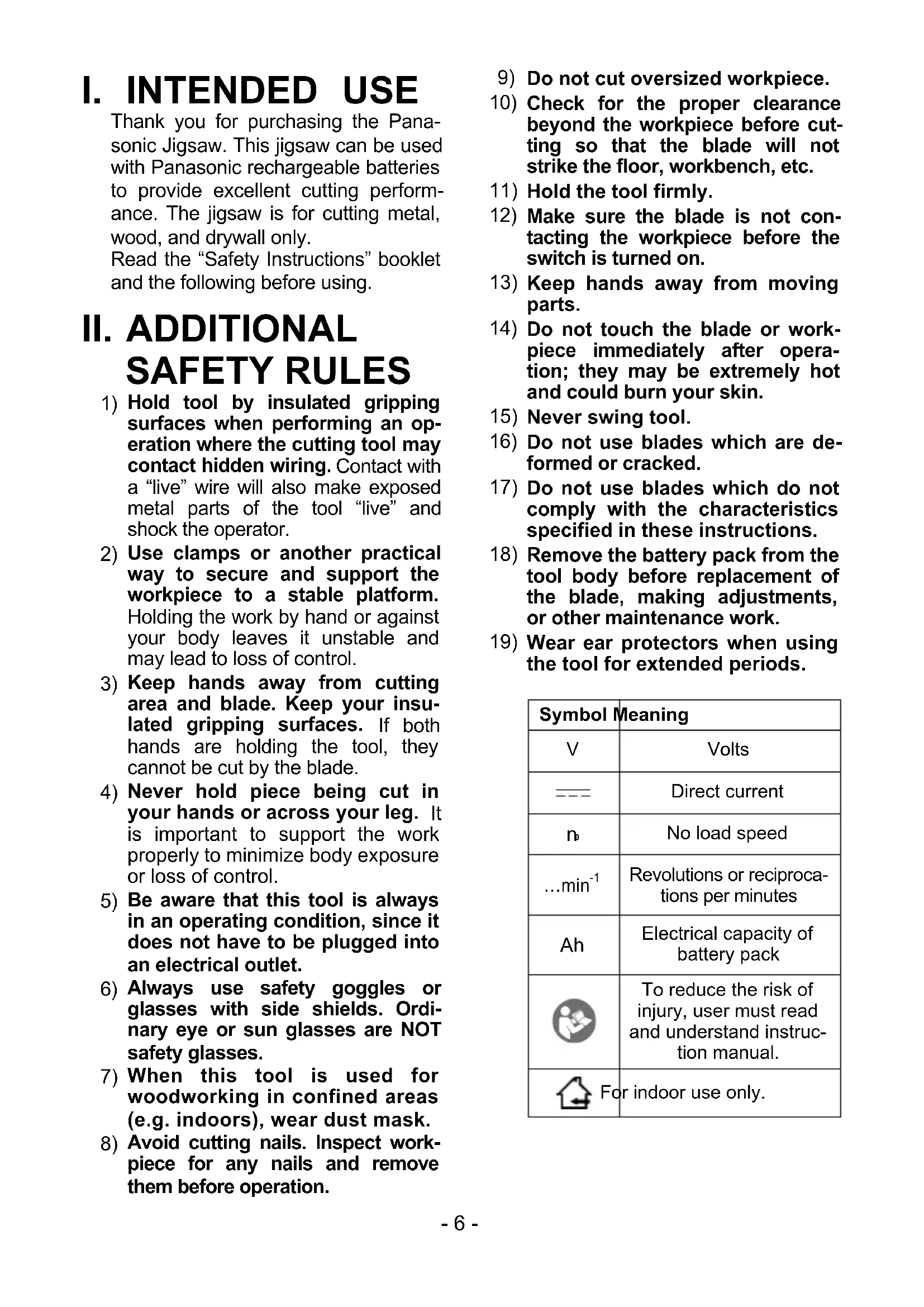
Thank you for purchasing the Panasonic Jigsaw. This jigsaw can be used with Panasonic rechargeable batteries to provide excellent cutting performance. The jigsaw is for cutting metal, wood, and drywall only.
Read the "Safety Instructions" booklet and the following before using.
II. ADDITIONAL SAFETY RULES
1) Hold tool by insulated gripping surfaces when performing an operation where the cutting tool may contact hidden wiring. Contact with a "live" wire will also make exposed metal parts of the tool "live" and shock the operator. 2) Use clamps or another practical way to secure and support the workpiece to a stable platform. Holding the work by hand or against your body leaves it unstable and may lead to loss of control. 3) Keep hands away from cutting area and blade. Keep your insulated gripping surfaces. If both hands are holding the tool, they cannot be cut by the blade. 4) Never hold piece being cut in your hands or across your leg. It is important to support the work properly to minimize body exposure or loss of control. 5) Be aware that this tool is always in an operating condition, since it does not have to be plugged into an electrical outlet. 6) Always use safety goggles or glasses with side shields. Ordinary eye or sun glasses are NOT safety glasses. 7) When this tool is used for woodworking in confined areas (e.g. indoors), wear dust mask. 8) Avoid cutting nails. Inspect workpiece for any nails and remove them before operation.
9) Do not cut oversized workpiece. 10) Check for the proper clearance beyond the workpiece before cutting so that the blade will not strike the floor, workbench, etc. 11) Hold the tool firmly. 12) Make sure the blade is not contacting the workpiece before the switch is turned on. 13) Keep hands away from moving parts. 14) Do not touch the blade or workpiece immediately after operation; they may be extremely hot and could burn your skin. 15) Never swing tool. 16) Do not use blades which are deformed or cracked. 17) Do not use blades which do not comply with the characteristics specified in these instructions. 18) Remove the battery pack from the tool body before replacement of the blade, making adjustments, or other maintenance work. 19) Wear ear protectors when using the tool for extended periods.
| Symbol | Meaning |
| V | Volts |
| --- | Direct current |
| n | No load speed |
| ...min-1 | Revolutions or reciprocations per minutes |
| Ah | Electrical capacity of battery pack |
| To reduce the risk of injury, user must read and understand instruction manual. | |
| For indoor use only. | |
WARNING:
- Do not use other than the Panasonic battery packs that are designed for use with this rechargeable tool.
- Do not dispose of the battery pack in a fire, or expose it to excessive heat.
- Do not drive the likes of nails into the battery pack, subject it to shocks, dismantle it, or attempt to modify it.
- Do not allow metal objects to touch the battery pack terminals.
- Do not carry or store the battery pack in the same container as nails or similar metal objects.
- Do not charge the battery pack in a high-temperature location, such as next to a fire or in direct sunlight. Otherwise, the battery may overheat, catch fire, or explode.
- Never use other than the dedicated charger to charge the battery pack. Otherwise, the battery may leak, overheat, or explode.
- After removing the battery pack from the tool or the charger, always reattach the pack cover. Otherwise, the battery contacts could be shorted, leading to a risk of fire.
III. ASSEMBLY
WARNING:
To reduce the risk of injury, always remove battery pack before changing the blade.
Inspection before use
- Has the correct jigsaw blade been attached for the object to be cut?
- Has the correct stem shape and thickness of the blade been mounted?
- Check if the blade is fixed securely?
- Check if the blade is cracked or broken.
- Check that there are no foreign objects in the object to be cut.
Installing and removing the blade Installation
- Wipe away any cutting dust from the blade and the blade clamp bracket.
- Lift up the blade Attach/Remove lever.
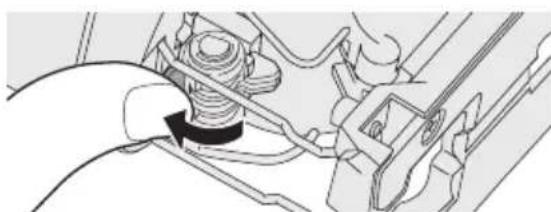
- Insert the blade into the blade clamp bracket and set the back of the blade along the roller guide so that the back of the jigsaw blade slides along the roller guide.
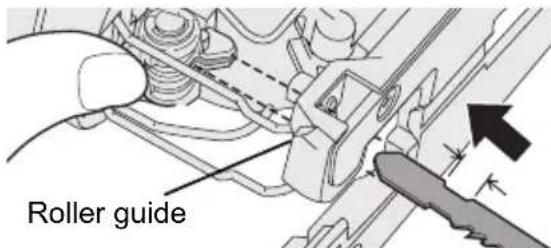
- Release the blade Attach/Remove lever.
- When the blade is secured in place then lever will return to its original position.
- Check that the back of blade is setting in the groove in the roller guide.
WARNING:
If you do not insert the saw blade deep enough, the saw blade may be ejected unexpectedly during operation. This can be extremely dangerous.
Removal
- Lift up the blade Attach/Remove lever.
- Pull out the blade.
Adjusting the base
- Use the hex wrench to loosen the base fixing screw.
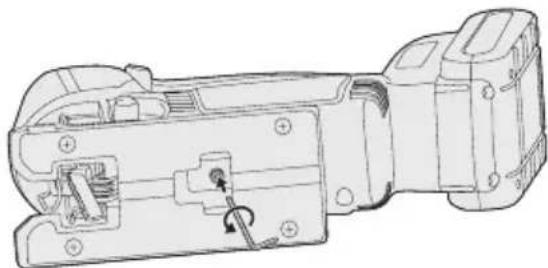
- Move the base along the base adjustment hole to set its position. (See the diagram at right.)
- The base can be adjusted to between 0° and 45° sideways and the forward/back position can also be adjusted. If tilting the base sideways, remove the dust cover first. Refer to the bevel index to determine the angle.
- The rip fence fixing screw should be located on the opposite side to which the tool is beveled.
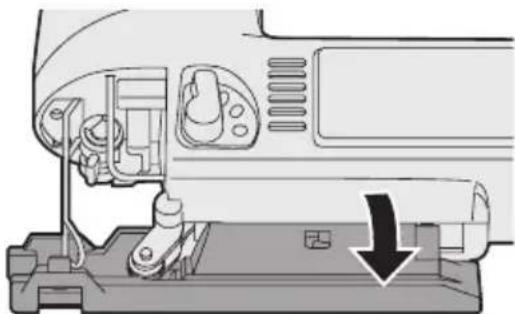
- Use the hex wrench to tighten the base fixing screw.
Position of base and purpose of use
| Base adjustment hole position | Purpose of use |
| Normal right-angled cutting | |
| Cutting at an angle between 0° and 45° | |
| Cutting at an angle of 45° | |
| Cutting close to the end of a wall |
NOTE:
This is only a rough guide. The actual angle of the cut will be affected by factors such as the way the tool is held against the surface.
Adjusting the orbital stroke mode
- Adjust the orbital stroke mode to the object to be cut.
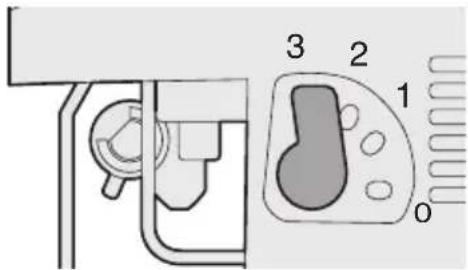
| Lever position | Blade movement | Main applications |
| 0 | Vertical only | • Cutting hard metals such as steel • Smooth cutting of building materials and plywood boards • Cutting around small curves |
| 1 | Low orbital stroke mode | • Cutting softer metals such as aluminum and other non-ferrous metals • Cutting hardwood, plywood boards and plastics |
| 2 | Medium orbital stroke mode | • Cutting fairly soft materials • Cutting wood and composite boards • High-speed cutting of aluminum and soft steel |
| 3 | High orbital stroke mode | • Cutting soft materials • High-speed cutting of materials such as wood, composite boards and plastics |
- If you would like to produce a cleaner finish, set the orbital stroke mode to a lower level.
Anti-splintering plate
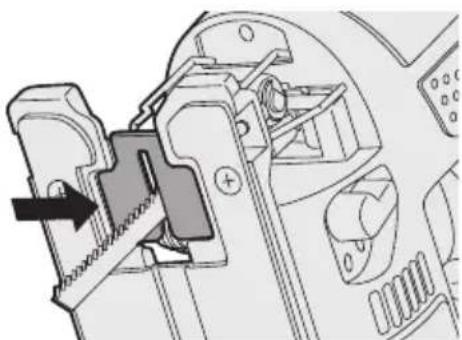
Use the anti-splintering plate to reduce splintering while cutting wood.
Installation
- Set the base at 90 degree position.
- Place the anti-splintering plate on the underside of the base, and gently push it to be installed.
- Install so that the beveled edge of the slot in the middle of the anti-splintering plate is facing toward the jigsaw.
Dust adapter for vacuum cleaner (EY9H009E) (Available as an accessory, not included)
You can use a vacuum cleaner to collect cutting dust while cutting.
Installation
- Attach the hook of the dust collection adapter to the front of the base.
- Snap the rear to install it.
- Attach the hose of the vacuum cleaner.
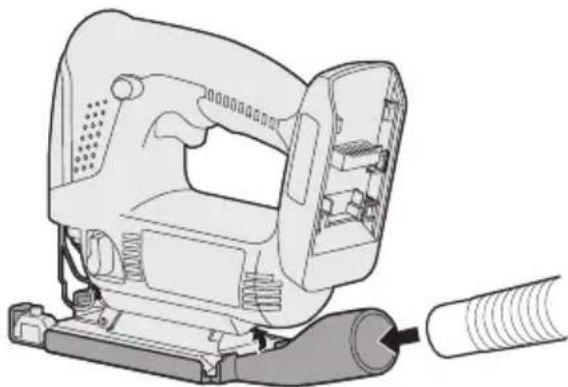
- It is recommended to use a dust adapter for reducing the risk of damaging the surface of the object being cut.
Attaching or Removing Battery Pack
- To connect the battery pack:
Line up the alignment marks and attach the battery pack.
- Slide the battery pack until it locks into position.
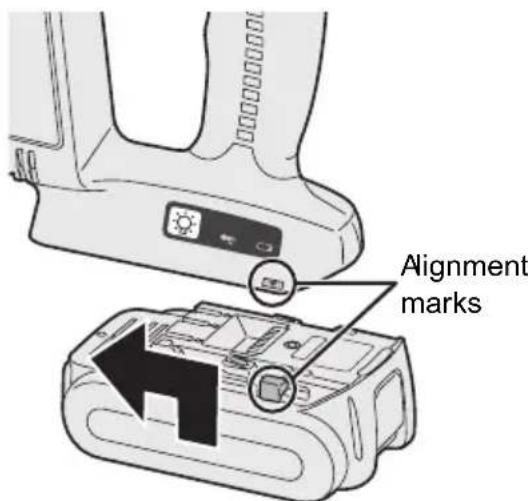
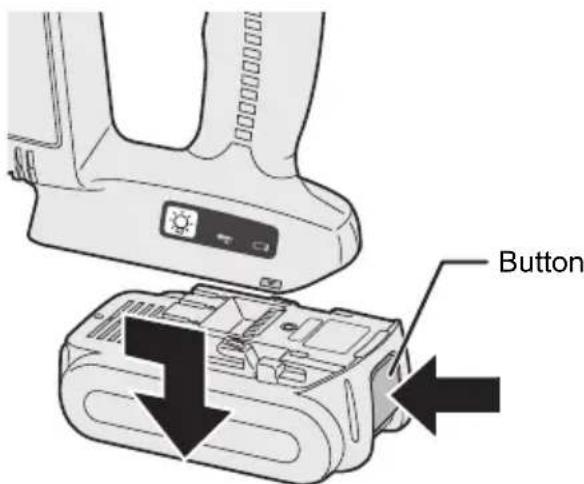
- To remove the battery pack:
Push the button from the front to release the battery pack.
IV. OPERATION
- Push the switch lock lever down, pull the power switch.
The speed increases with the amount of depression of the power switch.
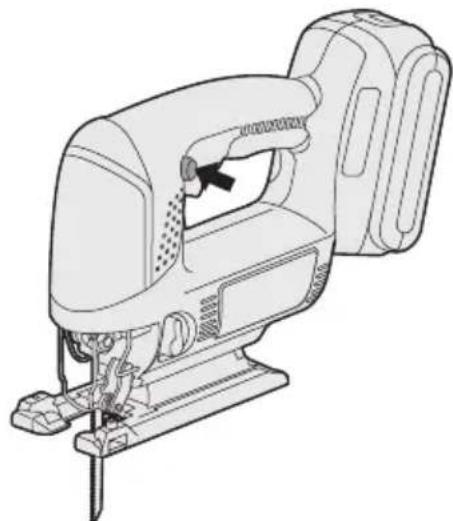
- Once cutting is finished, release the power switch.
- Check that the temperature of the blade has dropped sufficiently, and then remove the blade.
Cutting
NOTE:
- Check that there are no obstacles to cut underneath the workpiece.
- Check that there are no objects such as nails in the material to be cut. If the blade comes into contact with any such objects during cutting, a strong reaction force will be generated and severe injury may occur.
- Do not place your hand on the object in the direction cutting is to take place. If this is not observed, there is a risk of injury.
- Do not touch the jigsaw blade immediately after cutting. If this is not observed, burns may occur.
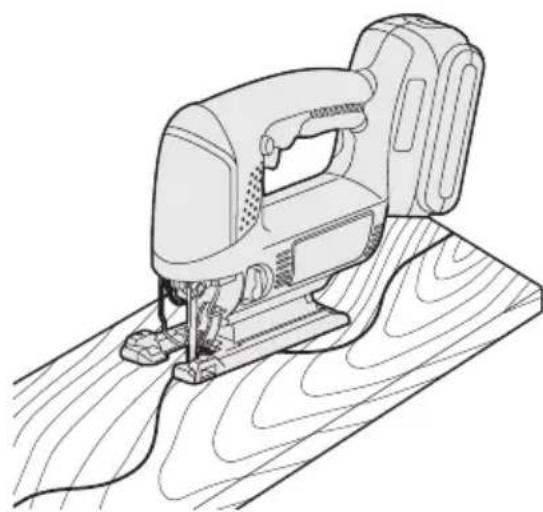
Cutting along marked lines
- Place the object to be cut onto the base, and align the blade with the marked line.
- Do not touch the blade against the object to be cut before pulling the power switch.

- Pull the power switch, wait until the speed has stabilized, and then place the base against the object to be cut and cut along the marked lines.
- When cutting complex shapes such as shapes with many small curves, reduce the cutting speed and the turning speed.
Plunge cutting
- Make a drill hole in the section to be plunge cut in order to let the blade pass through.
- Insert the blade into a hole without touching the workpiece, and then turn on the power switch.
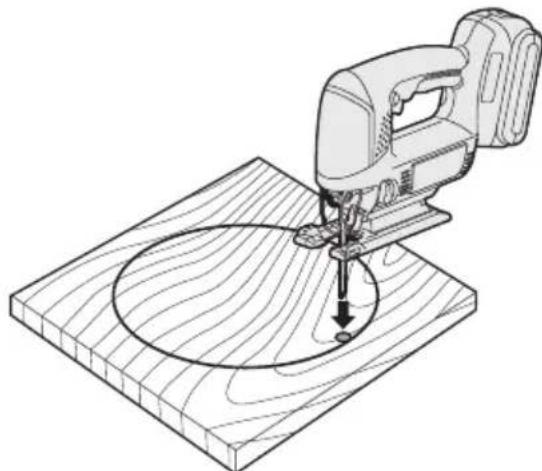
- Cut along the marked line.
Using a rip fence (EY9X011E) (Available as an accessory, not included)
A rip fence can be used for cutting parallel lines and for cutting circles and arcs.
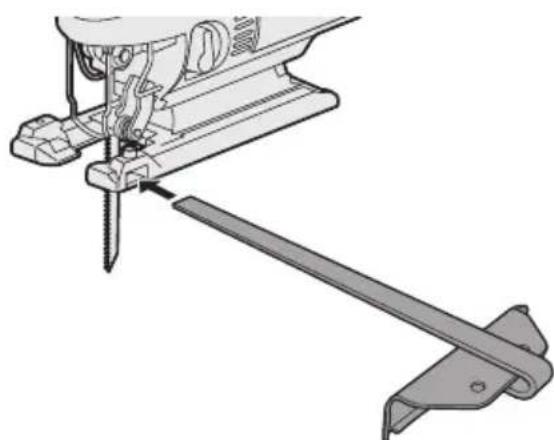
Installing the rip fence
- Loosen the rip fence fixing screw.
- Pass the rip fence through the mount.
- Adjust the cutting position and then tighten the fixing screw.
Cutting at the same width
- Place the base onto the workpiece so that the edge of the rip fence and workpiece are put together.
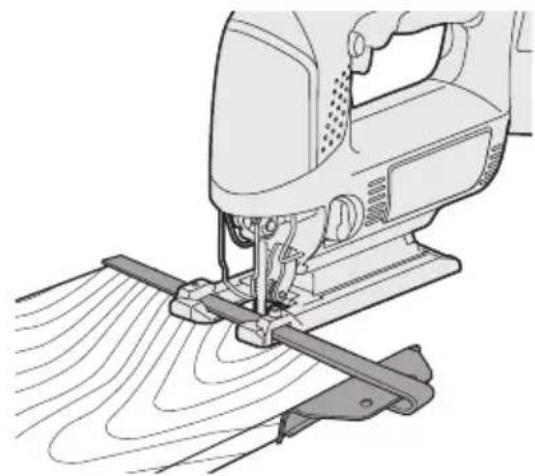
- Without letting the blade touch the workpiece, turn on the power switch.
- Face the rip fence firmly to the workpiece to cut parallel line.
Cutting circles
- If cutting away a section, make a drill hole on workpiece to let the jigsaw blade pass through.
- Align the pin hole of the rip fence with the center of the circle, and then use a nail or screw to hold the object in place.
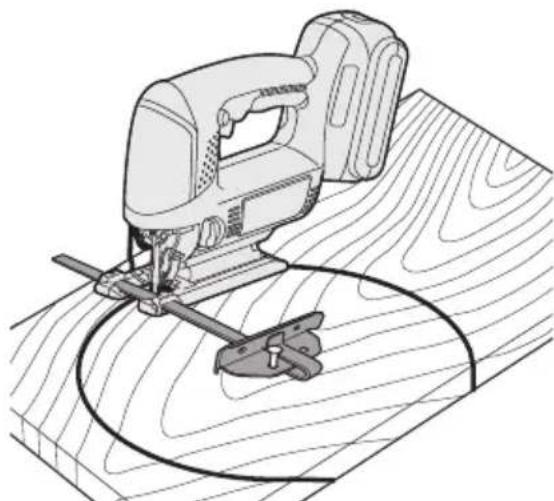
- Without touching the workpiece, turn on the power switch.
- Cut along the marked line.
Control Panel
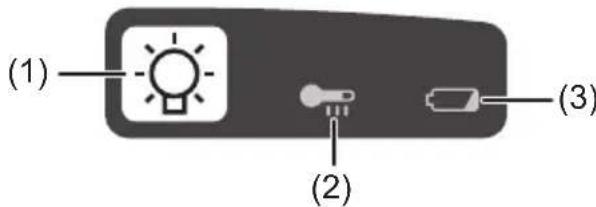
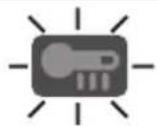
(1) LED light
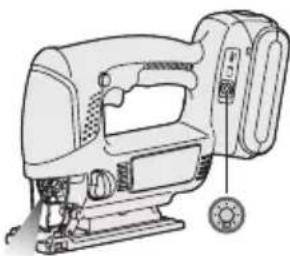
Before using the LED light, always pull the power switch once.
Press the LED light button.
The light illuminates with very low current, and it does not adversely affect the performance of the driver during use or its battery capacity.
CAUTION:
- The built-in LED light is designed to illuminate the small work area temporarily.
- Do not use it as a substitute for a regular flashlight, since it does not have enough brightness.
- The LED light turns off when the tool has not been used for 5 minutes.
Caution: DO NOT STARE INTO BEAM. Use of controls or adjustments or performance of procedures other than those specified herein may result in hazardous radiation exposure.
(2) Overheat warning lamp
Off (normal operation)

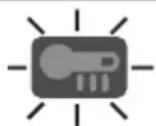
- Flashing: Overheat
- Indicates operation has been halted due to battery overheating.
The overheating protection feature halts operation to protect the battery pack in the event of overheating. The overheat warning lamp on the control panel flashes when this feature is active.
- If the overheating protection feature activates, allow the driver to cool thoroughly (at least 30 minutes). The battery is ready for use when the overheat warning lamp goes out.
- Avoid using the driver in a way that causes the overheating protection feature to activate repeatedly.
(3) Battery low warning lamp

Off (normal operation)

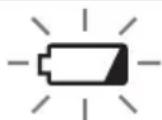
Flashing (No charge) Battery protection feature active
Excessive (complete) discharging of lithium ion batteries shortens their service life dramatically. The tool includes a battery protection feature designed to prevent excessive discharging of the battery pack.
- The battery protection feature activates immediately before the battery loses its charge, causing the battery low warning lamp to flash.
- If you notice the battery low warning lamp flashing, charge the battery pack immediately.
[Battery Pack]
For Appropriate Use of Battery pack
Li-ion Battery pack (EY9L40/ EY9L41)
- For optimum battery life, store the Li-ion battery pack following use without charging it.
- When charging the battery pack, confirm that the terminals on the battery charger are free of foreign substances such as dust and water etc. Clean the terminals before charging the battery pack if any foreign substances are found on the terminals.
The life of the battery pack terminals may be affected by foreign substances such as dust and water etc. during operation.
- When battery pack is not in use, keep it away from other metal objects like: paper clips, coins, keys, nails, screws, or other small metal objects that can make a connection from one terminal to another.
Shorting the battery terminals together may cause sparks, burns or a fire.
- When operating the battery pack, make sure the work place is well ventilated.
- When the battery pack is removed from the main body of the tool, replace the battery pack cover immediately in order to prevent dust or dirt from contaminating the battery terminals and causing a short circuit.
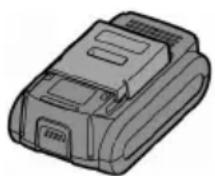
Battery Pack Life
The rechargeable batteries have a limited life. If the operation time becomes extremely short after recharging, replace the battery pack with a new one.
Battery Recycling
ATTENTION:
For environmental protection and recycling of materials, be sure that it is disposed of at an officially assigned location, if there is one in your country.
[Battery Charger]
Charging
Cautions for the Li-ion Battery Pack
- If the temperature of the battery pack falls approximately below -10°C (14°F), charging will automatically stop to prevent degradation of the battery.
Common Cautions for the Li-ion/Ni-MH/Ni-Cd Battery Pack
- The ambient temperature range is between 0°C (32°F) and 40°C (104°F). If the battery pack is used when the battery temperature is below 0°C (32°F), the tool may fail to function properly.
- When charging a cool battery pack (below 0°C (32°F)) in a warm place, leave the battery pack at the place and wait for more than one hour to warm up the battery to the level of the ambient temperature.
- Cool down the charger when charging more than two battery packs consecutively.
- Do not insert your fingers into contact hole, when holding charger or any other occasions.
CAUTION:
To prevent the risk of fire or damage to the battery charger.
- Do not use power source from an engine generator.
- Do not cover vent holes on the charger and the battery pack.
- Unplug the charger when not in use.
Li-ion Battery Pack
NOTE:
Your battery pack is not fully charged at the time of purchase. Be sure to charge the battery before use.
Battery charger (EY0L80)
- Plug the charger into the AC outlet.
NOTE:
Sparks may be produced when the plug is inserted into the AC power supply, but this is not a problem in terms of safety.
- Insert the battery pack firmly into the charger.
- Line up the alignment marks and place the battery onto the dock on the charger.
- Slide forward in the direction of the arrow.
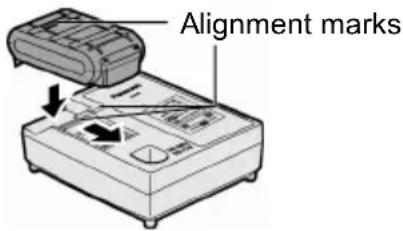
- During charging, the charging lamp will be lit.
When charging is completed, an internal electronic switch will automatically be triggered to prevent overcharging.
- Charging will not start if the battery pack is warm (for example, immediately after heavy-duty operation).
The orange standby lamp will be flashing until the battery cools down.
Charging will then begin automatically.
- The charge lamp (green) will flash slowly once the battery is approximately 80% charged.
- When charging is completed, the charging lamp will start flashing quickly in green color.
- If the temperature of the battery pack is 0°C or less, charging takes longer to fully charge the battery pack than the standard charging time.
Even when the battery is fully charged, it will have approximately 50% of the power of a fully charged battery at normal operating temperature.
- If the power lamp does not light immediately after the charger is plugged in, or if after the standard charging time the charging lamp does not flash quickly in green, consult an authorized service center.
- If a fully charged battery pack is inserted into the charger again, the charging lamp lights up. After several minutes, the charging lamp may flash quickly to indicate the charging is completed.
Ni-MH/Ni-Cd Battery Pack
NOTE:
When you charge the battery pack for the first time, or after prolonged storage, charge it for about 24 hours to bring the battery up to full capacity.
Battery charger (EY0L80)
- Plug the charger into the AC outlet.
NOTE:
Sparks may be produced when the plug is inserted into the AC power supply, but this is not a problem in terms of safety.
- Insert the battery pack firmly into the charger.
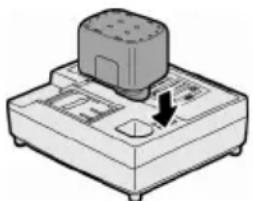
- During charging, the charging lamp will be lit.
When charging is completed, an internal electronic switch will automatically be triggered to prevent overcharging.
- Charging will not start if the battery pack is warm (for example, immediately after heavy-duty operation).
The orange standby lamp will be flashing until the battery cools down. Charging will then begin automatically.
- When charging is completed, the charging lamp will start flashing quickly in green color.
- If the charging lamp does not light immediately after the charger is plugged in, or if after the standard charging time the charging lamp does not flash quickly in green, consult an authorized service center.
- If a fully charged battery pack is inserted into the charger again, the charging lamp lights up. After several minutes, the charging lamp may flash quickly to indicate the charging is completed.
LAMP INDICATIONS

Green Lit
Charger is plugged into the AC outlet.
Ready to charge.

Green Flashing Quickly
Charging is completed. (Full charge.)

Green Flashing
Battery is approximately 80% charged. (Usable charge. Li-ion only.)

Green Lit
Now charging.

Orange Lit
Battery pack is cool.
The battery pack is being charged slowly to reduce the load on the battery. (Li-ion only.)

Orange Flashing
Battery pack is warm. Charging will begin when temperature of battery pack drops.

If the temperature of the battery pack is -10°C or less, the charging status lamp (orange) will also start flashing.
Charging will begin when the temperature of the battery pack goes up (Li-ion only).

Charging Status Lamp
Left: green, right: orange will be displayed.
Both orange and green flashing quickly
Charging is not possible. Clogged with dust or malfunction of the battery pack.
Information for Users on Collection and Disposal of Old Equipment and Used Batteries
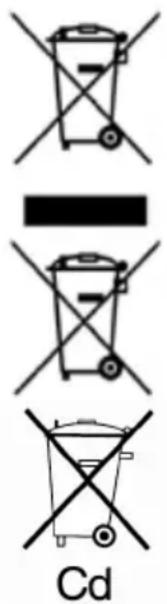
These symbols on the products, packaging, and/or accompanying documents mean that used electrical and electronic products and batteries should not be mixed with general household waste.
For proper treatment, recovery and recycling of old products and used batteries, please take them to applicable collection points, in accordance with your national legislation and the Directives 2002/96/EC and 2006/66/EC.
By disposing of these products and batteries correctly, you will help to save valuable resources and prevent any potential negative effects on human health and the environment which could otherwise arise from inappropriate waste handling.
For more information about collection and recycling of old products and batteries, please contact your local municipality, your waste disposal service or the point of sale where you purchased the items.
Penalties may be applicable for incorrect disposal of this waste, in accordance with national legislation.
For business users in the European Union
If you wish to discard electrical and electronic equipment, please contact your dealer or supplier for further information.
[Information on Disposal in other Countries outside the European Union]
These symbols are only valid in the European Union. If you wish to discard these items, please contact your local authorities or dealer and ask for the correct method of disposal.
Note for the battery symbol (bottom two symbol examples):
This symbol might be used in combination with a chemical symbol. In this case it complies with the requirement set by the Directive for the chemical involved.
V. MAINTENANCE
Use only a dry, soft cloth for wiping the unit. Do not use a damp cloth, thinner, benzine, or other volatile solvents for cleaning.
VI. ACCESSORIES
CAUTION:
- The use of any accessories not specified in this manual may result in fire, electric shock, or personal injury. Use recommended accessories only.
Metal Blade
-EY9SXMJ0E
For cutting metal in general
Wood Blade
-EY9SXWJ0E
For cutting wood in general
Drywall Blade
- EY9SXXJ0E
For cutting drywall in general
Rip Fence (Optional accessory)
- EY9X011E
For convenience of rip cuts and repeated cut of same width.
Dust Adaptor for Vacuum Cleaner (Optional accessory)
-EY9X009E
VII. SPECIFICATIONS
MAIN UNIT
| Model | EY4541 | |
| Motor | 14.4 V DC | |
| Max thickness of mounting blade | 1.3 mm (1/16") | |
| Length of strokes | 20 mm (25/32") | |
| Strokes per minute | 0 - 2400 /min | |
| Maximum cutting capacities | Wood | 65 mm (2-9/16") |
| Mild steel | 6 mm (1/4") | |
| Aluminum | 10 mm (3/8") | |
| Overall length | 270 mm (10-5/8") | |
| Weight (with battery pack: EY9L40) | 2.2 kg (4.8 lbs) | |
| Weight (with battery pack: EY9L41) | 2.25 kg (5 lbs) | |
| Noise, Vibration | See the included sheet | |
BATTERY PACK
| Model EY9L40 | EY9L41 | |
| Storage battery | Li-ion Battery | |
| Battery voltage | 14.4 V DC (3.6 V x 4 cells) | |
| Capacity 3 Ah 3,3 Ah | ||
BATTERY CHARGER
| Model | EY0L80 |
| Rating | See the rating plate on the bottom of the charger. |
| Weight | 0.95 kg (2.1 lbs) |
[Li-ion battery pack]
| Charging time | 3 Ah | 14.4 V 21.6 V | 28.8 V | |
| EY9L40 | EY9L60 | EY9L80 | ||
| Usable: 35 min. | Usable: 45 min. | Usable: 55 min. | ||
| Full: 50 min. | Full: 60 min. | Full: 70 min. |
| Charging time | 3.3 Ah | 14.4 V | ||
| EY9L41 Usable: 45 min. Full: 60 min. |
[Ni-Cd/Ni-MH battery pack]
| Charging time | 7.2 V 9.6 V 12 V 15 | 6 V 18 V 24 V | |||||
| 1.2 Ah | EY9065 | EY9080 | EY9001 | ||||
| EY9066 | EY9086 | EY9006 | |||||
| 20 min. | |||||||
| 1.7 Ah | EY9180 | EY9101 | |||||
| EY9182 | EY9103 | ||||||
| 25 min. | |||||||
| 2 Ah | EY9168 EY9188 | EY9106 | EY9136 | EY9116 | |||
| EY9107 | EY9117 | ||||||
| EY9108 | |||||||
| 30 min. 60 min. | |||||||
| 3 Ah | EY9200 | EY9230 | EY9210 | 90 min. | |||
| 45 min. | |||||||
| 3.5 Ah | EY9201 | EY9231 | EY9251 | ||||
| 55 min. 65 min. | |||||||
NOTE: This chart may include models that are not available in your area. Please refer to the latest general catalogue. NOTE: For the dealer name and address, please see the included warranty card.
ONLY FOR U.K.
VIII. ELECTRICAL PLUG INFORMATION
FOR YOUR SAFETY PLEASE READ THE FOLLOWING TEXT CAREFULLY
This appliance is supplied with a moulded three pin mains plug for your safety and convenience.
A 5 amp fuse is fitted in this plug.
Should the fuse need to be replaced please ensure that the replacement fuse has a rating of 5 amp and that it is approved by ASTA or BSI to BS1362.
Check for the ASTA mark or the BSI mark on the body of the fuse.
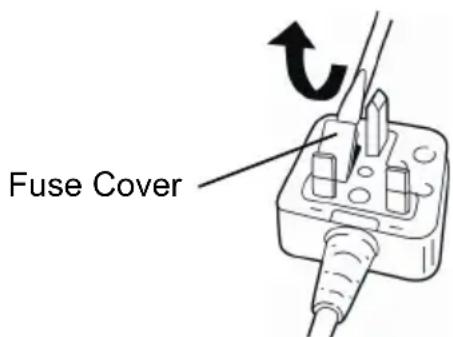
If the plug contains a removable fuse cover you must ensure that it is refitted when the fuse is replaced.
If you lose the fuse cover the plug must not be used until a replacement cover is obtained.
A replacement fuse cover can be purchased from your local Panasonic Dealer.
IF THE FITTED MOULDED PLUG IS UNSUITABLE FOR THE SOCKET OUTLET IN YOUR HOME THEN THE FUSE SHOULD BE REMOVED AND THE PLUG CUT OFF AND DISPOSED OF SAFELY.
THERE IS A DANGER OF SEVERE ELECTRICAL SHOCK IF THE CUT OFF PLUG IS INSERTED INTO ANY 13 AMP SOCKET.
If a new plug is to be fitted please observe the wiring code as shown below.
If in any doubt please consult a qualified electrician.
IMPORTANT:
The wires in this mains lead are coloured in accordance with the following code:
Blue: Neutral
Brown: Live
As the colours of the wire in the mains lead of this appliance may not correspond with the coloured markings identifying the terminals in your plug, proceed as follows.
The wire which is coloured BLUE must be connected to the terminal in the plug which is marked with the letter N or coloured BLACK.
The wire which is coloured BROWN must be connected to the terminal in the plug which is marked with the letter L or coloured RED.
Under no circumstances should either of these wires be connected to the earth terminal of the three pin plug, marked with the letter E or the Earth Symbol.
How to replace the fuse: Open the fuse compartment with a screwdriver and replace the fuse and fuse cover if it is removable.
This apparatus was produced to BS800.
Li-ion battery pack
NOTE:
[Li-ion battery pack]
| Tempo di caricamento | 3 Ah | 14,4 V 21,6 V 28,8 V | ||
| EY9L40 | EY9L60 | EY9L80 | ||
| Utilizzabile: 35 min. | Utilizzabile: 45 min. | Utilizzabile: 55 min. | ||
| Completa: 50 min. | Completa: 60 min. | Completa: 70 min. | ||
| Tempo di caricamento | 3,3 Ah | 14,4 V | ||
| EY9L41 | Utilizzabile: 45 min. | |||
| Completa: 60 min. | ||||
Cut along the marked lines
(2) Overheating warning light
Off (normal operation)

Off (normal operation)
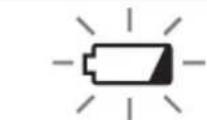
Blinking (No charging) Battery protection feature active
V. MAINTENANCE
Use only a dry, soft cloth to wipe the unit. Do not use a damp cloth, thinner, gasoline, or other liquid solvents for cleaning.
VI. ACCESSORIES

CAUTION:
- Use of accessories not specified in this manual may result in fire, electric shock, or personal injury. Use only recommended equipment.
Metal blade
LAMP MARKINGS
III. ASSEMBLY
CAUTION:
To reduce the risk of injury, the battery pack must be disconnected before changing the blade.
Inspection before work
- Check the correct choice of blade for the workpiece to be processed. -Make sure the blade is suitable for the material.
- Check the secure attachment.
- Check the blade for cracks or breaks. -Check for the absence of foreign objects on the workpiece.
Installation and removal of the blade
Installation
- Protect the saw blade from dust with the clamping jaws. 2. Raise the installation lever/clamping lever.
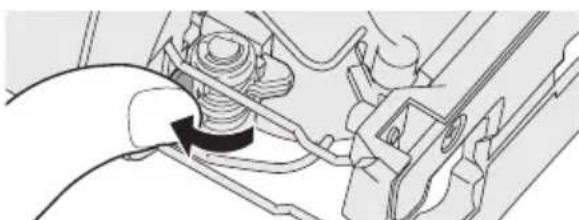
- Insert the blade into the slot and set the opposite side of the blade along the roller guide so that the blade slides along the roller guide.
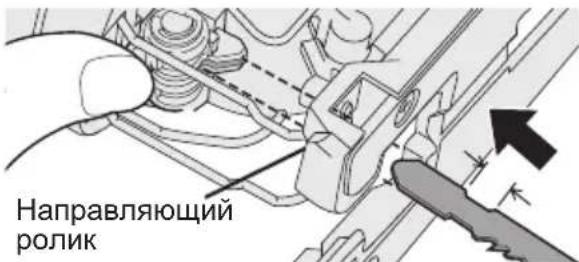
4. Raise the installation lever/clamping lever.
- After fixing the blade, return the lever to its original position.
- Make sure that the opposite side of the blade is exactly in the groove of the guide roller.

CAUTION:
If the blade is not installed deep enough, it may suddenly jump out during operation. This is very dangerous.
Removal
1. Raise the installation lever/clamping lever. 2. Pull out the blade.
Adjusting the support
- Using a hex wrench, loosen the locking screw of the support.
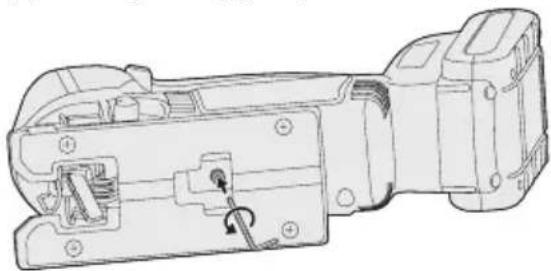
2. Move the supports along the adjustment slot and select the desired position. (See figure on the right.)
The tool can be turned sideways at an angle from 0° to 45° and also moved forward/backward. If you need to tilt, remove the protective cover. -To determine the angle, use the graduated scale. -The locking screw must be on the side opposite to the tilt of the tool.
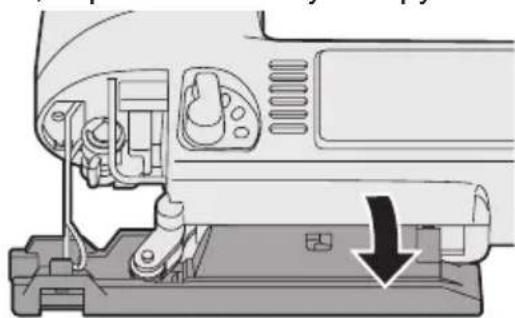
3. To tighten the locking screw, use a hex key.
- Make sure there are no obstacles near the workpiece.
- Make sure there are no metal parts, such as nails, in the workpiece.
If the tool comes into contact with such a part during operation, a sudden impact may occur, which can cause serious injury.
Do not place your hands on the workpiece in the direction of tool movement. Failure to comply with this condition may result in injury. Do not touch the tool immediately after stopping work. Otherwise, you may get burned.
- Turn on the power, wait until the speed stabilizes, set the tool against the marked line, and start cutting.
- Place the base on the workpiece so that the edge of the workpiece aligns with the guide fence.
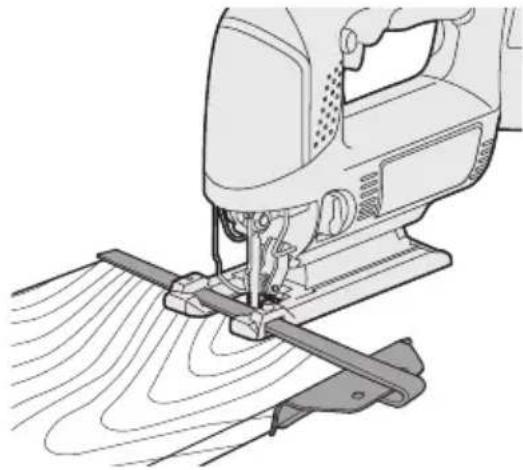
- Do not touch the workpiece with the tool. Turn on the power.
- To cut along straight lines, turn the guide fence toward the workpiece.
Curved cutting
- If the cut goes off the edge, drill a hole in the workpiece first and insert the tool into it.
- Align the hole in the guide fence with the hole in the workpiece and insert a nail or screw to hold the workpiece in place.
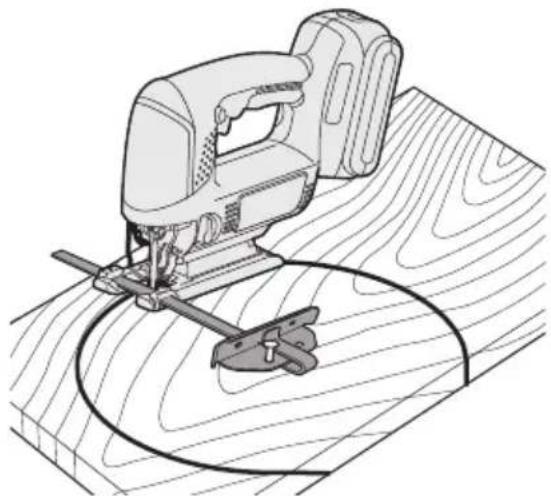
- Do not touch the workpiece. Turn on the power.
- Make the cut along the marked lines.
This tool requires a very low current and does not have a negative effect on tool performance or capacitor capacity.
WARNING:
The built-in LED work light is intended to illuminate a small work area for a short period of time. Do not use it as a constant flashlight, as it does not have sufficient brightness. The LED lamp turns off if the tool is not used for 5 minutes.
Warning: Do not look at the beam. Using controls or performing procedures in a manner other than specified in this manual may result in exposure to hazardous radiation.
(2) Overload protection lamp
Off (normal operation)

Blinks: Overheat Indicates that operation was stopped due to battery overheating.
The overheat protection function stops tool operation to protect the battery pack in case of overheating. If the overheat protection function is activated, the control panel lamp blinks as a warning.
In case of activation of the overheat protection function, allow the tool to cool down for a prolonged period (at least 30 minutes). Batteries are ready for operation after the warning lamp turns off. - Avoid using the tool in a manner that leads to repeated activation of the overheat protection function.
[Battery pack] Intended use of the battery pack
Full lithium-ion battery packs (EY9L40/EY9L41)
- To achieve optimal battery service life, store the full lithium-ion battery pack in the following conditions without charging it. - When charging the battery pack, make sure that no foreign substances such as dust, water, etc. are on the terminals. Clean the terminals before charging the battery pack if foreign substances are found on them.
Such foreign substances as dust and water may affect the service life of the battery pack terminals.
When storing the battery pack, keep it away from contact with metal objects such as paper clips, coins, keys, nails, screws, and other small metal objects that can short-circuit the contacts. Short-circuiting the battery pack contacts may cause sparking and ignition. When working with the battery pack, ensure that the work area is well ventilated. - When removing the battery pack from the main body of the tool, immediately close the cover of the battery pack to prevent the battery terminals from being contaminated with dust and dirt, which may cause a short circuit.
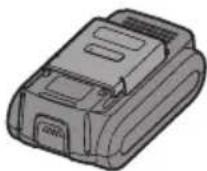
Battery pack service life
Rechargeable batteries have a limited service life. If after charging the operating time becomes noticeably short, replace the battery pack with a new one.
The orange LED will flash until the batteries have cooled down.
Then charging will begin automatically.
- The charging LED (green) will start flashing as soon as the battery charge reaches 80%.
- After the charging cycle is complete, the charging LED will start flashing more frequently with a green light.
- If the temperature of the battery pack is at a level not exceeding 0°C, the charging time of the battery pack will take longer compared to the normal charging time.
Even a fully charged battery pack will have approximately 50% of the capacity of batteries fully charged at normal temperature.
- If the power LED does not turn on after switching on the charging device, or if after the time required for the completion of charging the LED does not start flashing green, contact an authorized service center.
- If a fully charged battery pack is inserted again into the charging device, the charging LED will light up. After a few minutes, the charging LED may start flashing rapidly, indicating that charging is complete.
Nickel-metal hydride / Nickel-cadmium battery pack
NOTE:
For the first charge of the battery pack, or after prolonged storage, for a full charge, charge it for about 24 hours.
Charging device (EY0L80)
- Plug the charger into a wall outlet of alternating current.
NOTE:
When the charger is plugged into an AC power source, sparks may occur, but this is not a problem from a safety point of view.
2. Insert the battery pack into the charger.
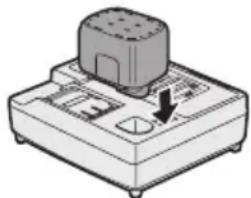
3. During charging, the charge indicator lamp must light up.
After charging is complete, an internal electronic switch will automatically activate, preventing overcharging.
Charging will not start if the battery pack is hot (for example, immediately after working under load). The orange lamp of the cooling mode will blink until the batteries cool down. Then charging will start automatically.
- After charging is complete, the charge indicator lamp will light up with a steady green light.
- If the charge indicator lamp does not light up immediately after switching on the charger, or if the lamp does not go out after the standard charging time, contact an authorized service center.
- If a fully charged battery pack is inserted into the charger again, the charge indicator lamp will light up. After a few minutes, the charge lamp may start to blink rapidly, indicating that charging is complete.
Green steady light
The charger is plugged into a wall outlet of alternating current.

Green indicator light
Charging complete. (Charge indicator.)

Green indicator light
Lithium-ion battery pack
Adapter for the charger (EY9H009E) (for fast charging; not included in the kit)
Before using the light charging function, read the instructions.
Press the light charging button.
Light charging uses a very low current and does not negatively affect the productivity of the tool during operation or the capacity of its battery.
WARNING:
The built-in light charging is intended for temporary lighting of a small work area. Do not use it as a replacement for a permanent flashlight, as it does not have sufficient brightness. The light lamp turns off automatically if the tool is not used for 5 minutes.
WARNING: DO NOT ATTEMPT TO MODIFY. Using the tool for control or adjustment, or performing procedures other than those specified in this manual, may result in injury and unsafe operation.
(2) Warning lamp for interruption
Turned off (normal operation)

Note: The interruption indicates that the work was stopped due to a battery interruption.
The overload protection function stops the tool's operation to protect the battery block in the event of an overload. When the function is activated, the overload warning lamp on the control panel lights up.
- With the overload protection function activated, allow the tool to cool down sufficiently (approximately 30 minutes). The battery will be ready for operation after the warning lamp goes out.
- Avoid using the motor in a way that would cause the warning lamp to turn on repeatedly.
(3) Low battery charge warning lamp

Lights up (normal operation)

Flashes (charging is not occurring) Battery protection function activated
Deep (full) discharge of lithium-ion batteries significantly shortens their service life. This tool is equipped with a battery protection function designed to prevent deep discharge of the battery block.
- The battery protection function activates directly before the battery is about to lose all charge, causing the low battery charge warning lamp to flash. - If you notice that the low battery charge warning lamp is flashing, charge the battery block immediately.
[Battery block]
For proper use of the battery block
Lithium-ion battery block (EY9L40/EY9L41)
Lithium-ion battery block
NOTE:
Your battery block is not fully charged at the time of purchase. Be sure to charge it before use.
Charging plug (EY0L80)
- Insert the battery pack into the AC charger.
NOTE:
Connecting the battery pack to a power source with AC current may cause a spark, but this does not create a safety problem.
- Insert the battery pack fully into the charger.
- Remove the battery pack from the charger after charging is complete.
- Slide it forward in the direction of the arrow.
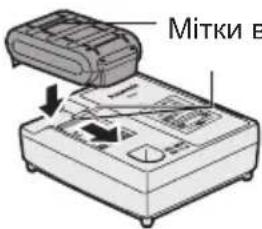
3. During charging, the charging lamp lights up.
When charging is complete, the charger automatically switches to trickle charging to prevent overcharging.
Charging may not start if the battery pack is too hot (for example, immediately after heavy use).
The orange standby lamp will light until the battery cools down.
Charging will then start automatically.
4. The charging lamp (green) will blink when the battery is approximately 80% charged.
5. After charging is complete, the charging lamp will blink with a green light.
6. If the battery pack temperature is 0°C or less, a full charge of the battery pack will take longer than the standard charging time.
Even after a full charge, the battery will have approximately 50% of the capacity of a battery that was fully charged at normal operating temperature.
7. If the lamp does not turn on immediately after plugging in the charger, or if after the standard time the lamp does not start blinking quickly, contact an authorized service center.
8. If a fully charged battery pack is inserted into the charger again, the charging lamp will turn on. After a few minutes, the charging lamp may start blinking quickly, indicating that charging is complete.
Nickel-Metal Hydride / Nickel-Cadmium battery pack
NOTE:
On the first charge of the battery pack, or after prolonged storage, charge it for 24 hours to bring the battery to full charge capacity.
Charger (EY0L80)
- Plug the charger into an AC outlet.
NOTE:
Plugging the plug into the AC outlet may produce sparks, but this does not create a safety problem.
- Fully insert the battery pack into the charger.
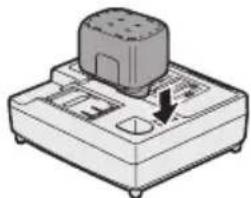
3. During charging, the charging lamp will light up.
After charging is complete, the internal electronics will automatically switch off, preventing overcharging.
Charging is not complete if the battery pack is too hot (for example, immediately after heavy use).
The charging indicator lamp will blink until the battery cools down. The charging will then start automatically.
4. After charging is complete, the lamp will light up with a steady green light.
5. If the lamp does not turn on immediately after connecting the charger, or if after the standard charging time the lamp does not light up steadily, contact an authorized service center.
6. If a fully charged battery block is inserted into the charger again, the charging lamp will turn on. After a few minutes, the charging lamp may start blinking, indicating that the charging is complete.
[Lithium-ion battery block]
| Час заряdkи | 3 Ампер- rogenina | 14,4 B 21,6 B 28,8 B | ||
| ЕY9L40 При甾атный д借贷 вико- рисань: 35xb. | ЕY9L60 При甾атный д借贷 вико- рисань: 45xb. | ЕY9L80 При甾атный д借贷 вико- рисань: 55xb. | ||
| Повни: 50xb. | Повни: 60xb. | Повни: 70xb. | ||
| Час заряdkи | 3,3 Ампер- rogenina | 14,4 B | ||
| ЕY9L41 При甾атный д借贷 вико- рисань: 45xb. | ||||
| Повни: 60xb. | ||||
[Nickel-Metal Hydride/Nickel-Cadmium battery block]
| Час заюки | 7,2 B 9,6 | B 12 B 15,6 | B 18 B 24 B | ||||
| 1,2Amпер-тоюнa | EY9065 | EY9080 | EY9001 | ||||
| EY9066 | EY9086 | EY9006 | |||||
| 20xB. | |||||||
| 1,7Amпер-тоюнa | EY9180 | EY9101 | |||||
| EY9182 | EY9103 | ||||||
| 25xB. | |||||||
| 2Amпер-тоюнa | EY9168 | Y9188 | EY9106 | EY9136 | EY9116 | ||
| EY9107 | EY9117 | ||||||
| EY9108 | |||||||
| 30xB. | 60xB. | ||||||
| 3Amпер-тоюнa | EY9200 | EY9230 | EY9210 | 90xB. | |||
| 45xB. | |||||||
| 3,5Amпер-тоюнa | EY9201 | EY9231 | EY9251 | ||||
| 55xB. | 65xB. | ||||||
EY971045412 H2102 Printed in China
- ADDITIONAL SAFETY RULES
- WARNING
- ASSEMBLY
- INSPECTION BEFORE USE
- INSTALLING AND REMOVING THE BLADE INSTALLATION
- REMOVAL
- ADJUSTING THE BASE
- NOTE
- ADJUSTING THE ORBITAL STROKE MODE
- ANTI-SPLINTERING PLATE
- INSTALLATION
- DUST ADAPTER FOR VACUUM CLEANER (EY9H009E) (AVAILABLE AS AN ACCESSORY, NOT INCLUDED)
- ATTACHING OR REMOVING BATTERY PACK
- OPERATION
- CUTTING
- CUTTING ALONG MARKED LINES
- PLUNGE CUTTING
- USING A RIP FENCE (EY9X011E) (AVAILABLE AS AN ACCESSORY, NOT INCLUDED)
- INSTALLING THE RIP FENCE
- CUTTING AT THE SAME WIDTH
- CUTTING CIRCLES
- CONTROL PANEL
- LED LIGHT
- CAUTION
- OVERHEAT WARNING LAMP
- BATTERY LOW WARNING LAMP
- [BATTERY PACK]
- FOR APPROPRIATE USE OF BATTERY PACK
- LI-ION BATTERY PACK (EY9L40/ EY9L41)
- BATTERY PACK LIFE
- BATTERY RECYCLING
- ATTENTION
- [BATTERY CHARGER]
- CHARGING
- CAUTIONS FOR THE LI-ION BATTERY PACK
- COMMON CAUTIONS FOR THE LI-ION/NI-MH/NI-CD BATTERY PACK
- LI-ION BATTERY PACK
- BATTERY CHARGER (EY0L80)
- NI-MH/NI-CD BATTERY PACK
- LAMP INDICATIONS
- INFORMATION FOR USERS ON COLLECTION AND DISPOSAL OF OLD EQUIPMENT AND USED BATTERIES
- FOR BUSINESS USERS IN THE EUROPEAN UNION
- [INFORMATION ON DISPOSAL IN OTHER COUNTRIES OUTSIDE THE EUROPEAN UNION]
- NOTE FOR THE BATTERY SYMBOL (BOTTOM TWO SYMBOL EXAMPLES)
- MAINTENANCE
- ACCESSORIES
- SPECIFICATIONS
- ELECTRICAL PLUG INFORMATION
- FOR YOUR SAFETY PLEASE READ THE FOLLOWING TEXT CAREFULLY
- IMPORTANT
- [LI-ION BATTERY PACK]
- CUT ALONG THE MARKED LINES
- OVERHEATING WARNING LIGHT
- LAMP MARKINGS
- INSPECTION BEFORE WORK
- INSTALLATION AND REMOVAL OF THE BLADE
- ADJUSTING THE SUPPORT
- CURVED CUTTING
- OVERLOAD PROTECTION LAMP
- [BATTERY PACK] INTENDED USE OF THE BATTERY PACK
- FULL LITHIUM-ION BATTERY PACKS (EY9L40/EY9L41)
- BATTERY PACK SERVICE LIFE
- NICKEL-METAL HYDRIDE / NICKEL-CADMIUM BATTERY PACK
- CHARGING DEVICE (EY0L80)
- ADAPTER FOR THE CHARGER (EY9H009E) (FOR FAST CHARGING; NOT INCLUDED IN THE KIT)
- WARNING LAMP FOR INTERRUPTION
- LOW BATTERY CHARGE WARNING LAMP
- [BATTERY BLOCK]
- FOR PROPER USE OF THE BATTERY BLOCK
- LITHIUM-ION BATTERY BLOCK (EY9L40/EY9L41)
- LITHIUM-ION BATTERY BLOCK
- CHARGING PLUG (EY0L80)
- CHARGER (EY0L80)
Brand : PANASONIC
Model : EY4541
Category : Saw