
Diablo 151 - Telephone TOPCOM - Free user manual and instructions
Find the device manual for free Diablo 151 TOPCOM in PDF.



| Product type | Cordless phone with digital answering machine |
| Brand | Topcom |
| Model | Diablo 151 |
| Handset power supply | 2 NiMH rechargeable batteries (type AAA, not included) |
| Base power supply | Power adapter (included) |
| Answering machine capacity | 11 minutes of recording |
| Number of stored numbers | 10 indirect numbers + 3 direct access |
| Call list | 10 numbers with caller ID |
| Range | Approximately 50 meters indoors, 300 meters outdoors |
| Display | Backlit LCD with charge and reception indicator |
| Ring tones | Polyphonic, 5 melodies for external and internal calls, adjustable volume |
| Main functions | Incoming/outgoing calls, redial, memory, answering machine, paging, keypad lock, mute |
| Compatibility | DTMF (tone) or pulse dialing |
| Maintenance and cleaning | Wipe with a dry, soft cloth. Do not use abrasive products. |
| Security | 3-digit security code for remote access, keypad lock |
| Spare parts and repairability | Replaceable rechargeable batteries (type AAA). Standard power adapter. Repair by an authorized service. |
| General information | Internal voice language: English or German depending on country. Manual available in several languages. |
Frequently Asked Questions - Diablo 151 TOPCOM
User questions about Diablo 151 TOPCOM
0 question about this device. Answer the ones you know or ask your own.
Ask a new question about this device
Download the instructions for your Telephone in PDF format for free! Find your manual Diablo 151 - TOPCOM and take your electronic device back in hand. On this page are published all the documents necessary for the use of your device. Diablo 151 by TOPCOM.
USER MANUAL Diablo 151 TOPCOM
This product is in compliance with the essential requirements and other relevant provisions of the R&TTE directive 1999/5/EC. The Declaration of conformity can be found on:
http://www.topcom.net/support/cedeclarations.php
Dialling options: DTMF (tone) and pulse
Batteries: 2 x 1.2V, 550 mAh AAA type
Max. standby time: approx. 100 hours
Max. talk time: 10 hours
Ambient temperature: +5°C to +45°C
Permitted relative air humidity: 25 to 85%
Power supply base adapter: 220/230V, 50 Hz
Memories: 10 indirect with max. 25 digits
up to 5
5.1.2 Call setup with dial preparation
7.4 Remote command
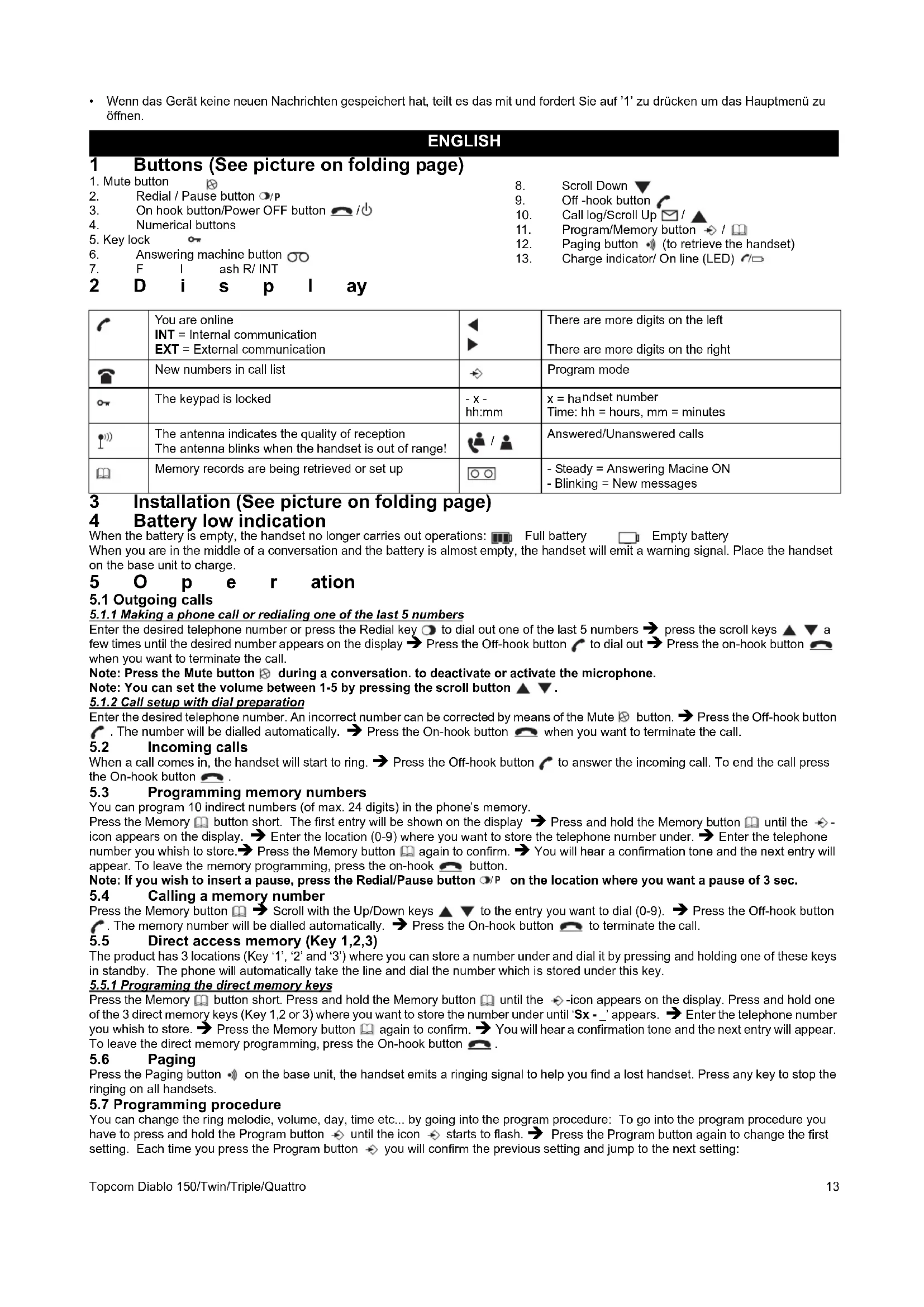
1 Buttons (See picture on folding page)
- Mute button
Redial / Pause button O/P
- On hook button/Power OFF button
- Numerical buttons
5.Key lock
- Answering machine button
7.
F
1
as
R/ INT
2 Display
8.
Scroll Down
Off-hook button
- Call log/Scroll Up
- Program/Memory button
- Paging button (to retrieve the handset)
- Charge indicator/On line (LED)
| √ | You are online INT = Internal communication EXT = External communication | ▲ | There are more digits on the left There are more digits on the right |
| New numbers in call list | ↔ | Program mode | |
| ∞ | The keypad is locked | -x- hh:mm | x = handset number Time: hh = hours, mm = minutes |
| 1) | The antenna indicates the quality of reception The antenna blinks when the handset is out of range! | /▲ | Answered/Unanswered calls |
| Memory records are being retrieved or set up | ○○ | - Steady = Answering Macine ON - Blinking = New messages |
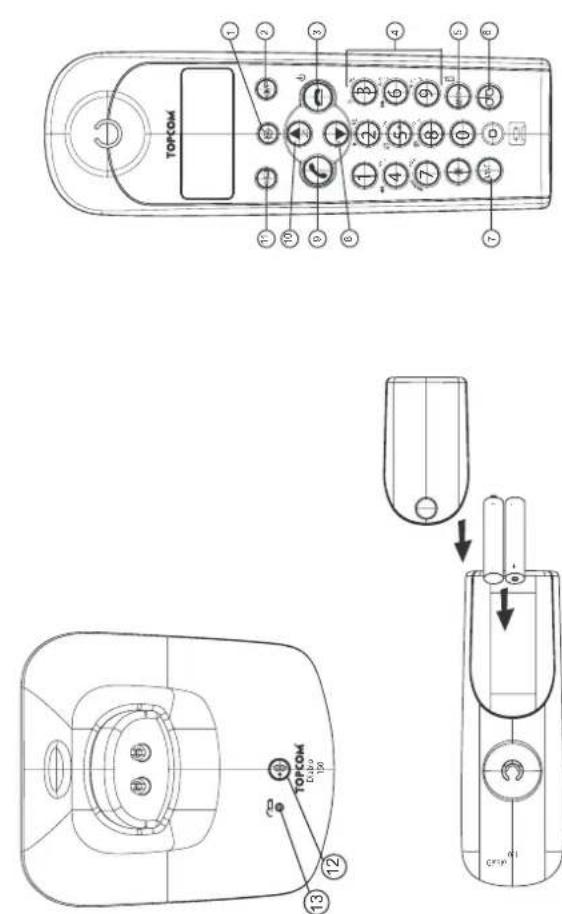
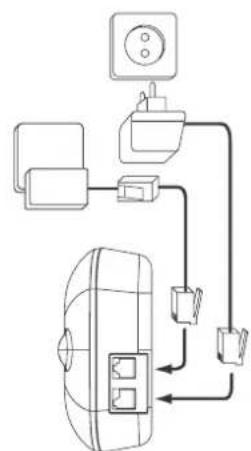
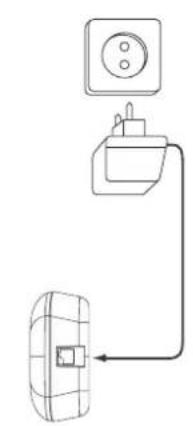
3 Installation (See picture on folding page)
4 Battery low indication
When the battery is empty, the handset no longer carries out operations: Full battery Empty battery When you are in the middle of a conversation and the battery is almost empty, the handset will emit a warning signal. Place the handset on the base unit to charge.
5 Operation
5.1 Outgoing calls
5.1.1 Making a phone call or redialing one of the last 5 numbers
Enter the desired telephone number or press the Redial key to dial out one of the last 5 numbers. Press the scroll keys a few times until the desired number appears on the display. Press the Off-hook button to dial out. Press the on-hook button when you want to terminate the call.
Note: Press the Mute button during a conversation to deactivate or activate the microphone.
Note: You can set the volume between 1-5 by pressing the scroll button ▲▼.
5.1.2 Call setup with dial preparation
Enter the desired telephone number. An incorrect number can be corrected by means of the Mute button. → Press the Off-hook button. The number will be dialled automatically. → Press the On-hook button when you want to terminate the call.
5.2 Incoming calls
When a call comes in, the handset will start to ring. Press the Off-hook button to answer the incoming call. To end the call press the On-hook button.
5.3 Programming memory numbers
You can program 10 indirect numbers (of max. 24 digits) in the phone's memory.
Press the Memory button short. The first entry will be shown on the display → Press and hold the Memory button until the → icon appears on the display. → Enter the location (0-9) where you want to store the telephone number under. → Enter the telephone number you wish to store. → Press the Memory button again to confirm. → You will hear a confirmation tone and the next entry will appear. To leave the memory programming, press the on-hook button.
Note: If you wish to insert a pause, press the Redial/Pause button on the location where you want a pause of 3 sec.
5.4 Calling a memory number
Press the Memory button → Scroll with the Up/Down keys △▽ to the entry you want to dial (0-9). → Press the Off-hook button. The memory number will be dialled automatically. → Press the On-hook button to terminate the call.
5.5 Direct access memory (Key 1,2,3)
The product has 3 locations (Key '1', '2' and '3') where you can store a number under and dial it by pressing and holding one of these keys in standby. The phone will automatically take the line and dial the number which is stored under this key.
5.5.1 Programming the direct memory keys
Press the Memory button short. Press and hold the Memory button until the -icon appears on the display. Press and hold one of the 3 direct memory keys (Key 1,2 or 3) where you want to store the number under until 'Sx-' appears. Enter the telephone number you wish to store. Press the Memory button again to confirm. You will hear a confirmation tone and the next entry will appear. To leave the direct memory programming, press the On-hook button.
5.6 Paging
Press the Paging button on the base unit, the handset emits a ringing signal to help you find a lost handset. Press any key to stop the ringing on all handsets.
5.7 Programming procedure
You can change the ring melody, volume, day, time etc... by going into the program procedure: To go into the program procedure you have to press and hold the Program button ⇔ until the icon ⇔ starts to flash. Press the Program button again to change the first setting. Each time you press the Program button ⇔ you will confirm the previous setting and jump to the next setting:
5.7.1 Handset External/Internal melody and volume
Press and hold the Program button ⇔ until the icon ⇔ starts to flash. Press the Program button again, the external melody is heard and the EXT-icon is flashing. Select the desired melody (1-5) by entering a number (1 - 5). Use the scroll keys △ ∇ to select the desired volume (Off or 1-5) Press again to confirm the setting and to go to internal melody and volume (same as above).
5.7.2 Date time setting
DD-MM HH:MM (DD=day, MM=month, HH=hour and MM=minutes)
Enter the date and time using the number key. The flashing cursor can be moved by the scroll keys △ ∇ . Press again to confirm the setting and to go to the next setting below.
5.7.3 Setting the Dial mode
There are two types of dialling mode: - 1 - DTMF/Tone dialling (the most common) (default) OR - 2 - Pulse dialling (for older installations) Press '1' or '2' and press ⇔ again to confirm the setting and to go to the next setting below.
5.7.4 Setting the Flash time
There are two flash times: -1 - 100ms OR -2 - 250 ms
Press '1' or '2' and press again to confirm the setting and to go to the next setting below.
5.7.5 Base melody and volume
The base ringer is heard. Select the desired melody (1-5) by entering a number (1-5). Use the scroll keys (up/down) to select the desired volume (Off or 1-5). Press the confirm key again to confirm the setting and return to standby.
5.8 Keypad lock
When the keypad is locked, pressing any key will have no effect during standby (except holding the power key). Press and hold the power key. The lock icon appears on the display and the keypad is locked. Press the power key twice again to unlock the keypad.
5.9 Turning handset ON/OFF
Press and hold the power key to turn off. Press for 2 seconds to turn back on.
6 Caller-ID function (Display the telephone number of incoming calls)
This function is only possible if you are subscribed to a telephone operator that provides this service. When you receive a call, the numbers are saved in a call list. This list can hold 10 telephone numbers (each of max. 20 digits). When you've received a new unanswered call, the CLIP symbol will blink on the display.
6.1 Consulting the call list
Press the Call Log button. The last received call is shown on the display. If the list is empty, '-----' is shown on the display. For answered calls the answered icon appears and for unanswered calls the unanswered icon appears. Press the program key to show the other digits (if longer than 12) or to show the date and time. Use the scroll keys (up/down) to scroll to the previous call. When you reach the top or bottom of the list an error tone will be sounded. You can leave the call list by pressing the on-hook button. You can dial out the number by pressing the off-hook button.
7 Answering machine
The Diablo has a built-in digital answering machine with a recording capacity of 11 minutes. The answering machine can be operated from the handset and remotely. It features the possibility of recording two outgoing messages (OGM 1 and OGM 2) (maximum of 3 minutes).
There are 2 possibilities:
- With OGM 1, the caller has the possibility to leave a message.
- With OGM 2, only the outgoing message is given without the caller having the opportunity to leave a message. An internal voice will state various information, such as day and time of the call, as well as settings such as security code, ringer tones, etc. The language of the internal voice depends on the country where the device is sold (English or German).
The maximum recording time for each incoming message is 2 minutes.
7.1 Display
The TAM icon will appear when the answering machine is turned ON. It starts flashing if new messages have been received (regardless of the answering ON/OFF mode). If the answering machine is switched Off, the icon will not appear. The icon will flash fast if the internal memory is full and no new messages can be recorded.
When entering the answering machine mode (see below) the display will show the following if:
If no new messages are received: ' and a flashing -icon.
- If new messages are received the unit will start playing the messages and show ' -NN- -MM-'. NN = total of messages and MM= number is message currently played.
7.2 Entering the Answering control mode
To start operating the answering machine you have to press the answering machine key OO. If you have new messages the messages will be played to the handset. If all new messages are played the new messages can be deleted if Ø is pressed within 8 seconds of the end of the last message.
To leave the answering control mode, press the OO-key again. If no instruction is received for 8 seconds, the unit shall return to idle. Following functions are available under each numerical key:
1' To hear main menu 2' Play all messages 3' Play new messages 4' Skip back during message playback 5' Deleting messages 6' Skip forward during message playback 7 Set answer On or Off 8' Hear the outgoing message menu 9' To set the security code To set the day Set the answering delay To record a memo
7.2.1 Turning Answering Machine On/Off
If the answering machine is On, the OO-Icon appear on the display in standby (or blink when there are new messages) and the machine will automatically pick up the line after a number of rings (7.2.2). To turn it On or Off, press 'T'.
Even if the answering machine is Off, it will automatically pick up after 10 rings to enable remote activation (§ 7.4)
7.2.2 Setting Number of Rings
The number of rings after which the answering machine will answer calls can be set from
2-9 and TS (Toll saver). The standard setting is 6 rings. In Toll saver mode, the machine will answer after 6 rings if there are no new messages, and after 2 rings if there are new messages. If there are no new messages and you call your machine to check your messages remotely (§ 7.4), you can hang up after the 2nd ring. You do not need to pay connection fees and you know that you do not have any new messages.
To check the actual number of rings, press the * key twice. A voice will play back the current number of rings.
Press the * key followed by the # key to set the number of ringing tones. Enter the number of rings you want (2-9) or press 1 for Toll saver.
7.2.3 Day setting
Press '0' followed by * to hear the actual day.
Press '0' followed by '#' to set the day. Enter the day '1= Sunday, 2= Monday...7= Saturday'
If the day is correctly entered, the unit will announce the new setting.
7.2.4 Memory Full
If the memory is full, the answering ON/OFF icon will flash on the display rapidly (0.5 sec. ON/OFF). If the answering machine is turned On and a call comes in, the machine will automatically play OGM 2 (answering machine function without recorded caller message).
ON/OFF). If the answering machine is turned On and a call comes in, the machine will automatically play OGM 2 (answering machine function without recorded caller message).
When listening to the messages, the internal voice will announce that the memory is full and then play back the messages.
Erase some or all the messages after listening to them. The memory is free again.
The security code is a 3-digit code used to operate the machine remotely (§ 7.4). The security code is set to '123' by default. You can hear the current security code by entering '9' followed by the # key.
The security code is a 3-digit code used to operate the machine remotely (§ 7.4). The security code is set to '123' by default. You can hear the current security code by entering '9' followed by the #-key.
To set a new security code, press 9 + 11. Enter the new code (3 digits) after the tone and confirm with the # key.
7.2.6 Recording and selecting an outgoing message
Press '8' to enter the outgoing message menu. The following options are available:
To hear main menu 2' To play current set OGM 3' To record OGM 1 4' To record OGM 2 '5' To select OGM 1 6' To select OGM2 '8' To hear OGM menu again
7.3 Operation
If a call is received and the answering machine is turned ON, the answering machine will automatically answer the call after the set number of rings. If outgoing message 1 has been selected, the message will be played, a beep will be heard and the caller can leave a message (max. 3 minutes). If outgoing message 2 has been selected, after the beep, the line will automatically be disconnected. The caller doesn't have the possibility to leave a message.
Note: If, during pick-up, nothing is said for 8 seconds, the line will be automatically disconnected.
7.3.1 Call screening
This function is convenient if you only want to answer certain calls. During incoming call it is possible to screen the call and hear who is calling. You can hear the outgoing message and the caller who is leaving a message by pressing the Answering machine key....
7.3.2 Recording a Memo
A memo is considered as an incoming message that can be picked up later by the user. The max. recording time for a memo is 3 minutes.
Press the Answering machine key 00 and 1. Start speaking after the tone and press # to stop the recording.
7.3.3 Playback of Incoming Messages and Memos
Press the Answering machine key to enter the Answering mode.
Press to play all the messages and memos.
Press to play only the new messages and memos.
For each message, the internal voice announce the day and time when the message was recorded.
During playback, you can:
Go to the beginning of the current message by pressing once.
Go to the previous message by pressing twice.
Interrupt playback by pressing ▶. Press ▶ again to restart playback.
Go to the next message by pressing
7.3.4 Deleting Messages
a. Deleting one by one during playback
Start message playback as explained above.
During playback of the message to be erased starts, press ∅
The machine will start playing the next message.
b. Deleting all messages
After you have listened to all messages, the internal voice will ask you to delete all the messages.
Press ∅ to confirm. After pressing delete, the internal voice confirms that all the messages have been deleted.
7.4 Remote operation
The answering machine can be operated remotely using a touch-tone phone (DTMF tone selection system).
The remote control is menu operated.
7.4.1 To enter the remote operation
Call your machine. The answering machine picks up the line, you hear the outgoing message and a beep. After the beep, press ** long. The unit will ask to enter the VIP code. - Slowly dial the Security code (default 123). If the Security code is incorrect, the unit will confirm and ask you to re-enter. If the Security code is correct and the unit has new messages, it will start to pronounce the amount of new messages and also play them. When all messages are played, the unit will ask you to press '5' to delete current played messages, or '1' to hear main menu.
If the unit doesn't have any new messages, it will say so and ask you to press '1' for main menu.
5.6 Locating the handset (Paging)
Press the "Paging" button on the base unit, the handset will emit a beep signal, which will help you find it. Press any button on the handset to stop the beeping.
5.7 Programming procedure
You can change the ring melody, volume, date, time, etc. by entering the programming mode: To enter the programming mode, press and hold the "Program" button until the display starts to flash. Press the "Program" button again to change the first setting. Each time you press the "Program" button, you confirm the previous setting and move to the next setting.
Volume/Melody of external calls -> Volume/Melody of internal calls -> Date/time setting -> Dialing mode setting -> Flash time settings -> Volume/Melody of the base unit
5.7.1 Melody/volume of the handset for external/internal calls
Press the "Program" button repeatedly until the display starts to flash. Press the "Program" button again - the melody for external calls appears on the display. Select the desired melody (1-5) by entering the corresponding number (1-5). Use the navigation keys ▲ to select the desired volume (Off (mute) or 1-5). Press the button to confirm the setting and move to the melody and volume for internal calls (the procedure is the same as above).
5.7.2 Setting the date and time
DD-MM HH:MM (DD=Day, MM=Month, HH=Hour, MM=Minutes)
Enter the date and time using the number buttons. The cursor can be moved with the navigation keys. Press the button to confirm the setting and move to the next setting below.
5.7.3 Setting the Dialing Mode
There are two dialing modes: -1 - DTMF/Tone dialing (default setting) -2 - Pulse dialing (for older exchanges)
Press "1" or "2", then press the OK key to confirm the setting and proceed to the next setting.
5.7.4 Setting the Flash Time
There are two options for the "flash" time: -1 - 100 ms -2 - 250 ms
Press "1" or "2", then press the OK key to confirm the setting and proceed to the next setting.
5.7.5 Melody/Volume of the Base Unit
The base unit rings. Select the desired melody (1-5) by entering the corresponding number (1-5). Use the navigation keys to select the desired volume (Off (mute) or 1-5). Then press the OK key to confirm the setting and return to standby mode.
5.8 Locking the Keypad
When the keypad is locked, pressing any button will have no effect during a call.
In standby mode (press and hold the key). Press and hold the key. The display shows that the keypad is locked. Press the key twice to unlock the keypad.
5.9 Turning the Ringer On/Off
Press the long key to turn it off. Press for 2 seconds to turn it back on.
6 Caller ID Function (Displays the phone number of the incoming call)
This function requires a subscription to the caller ID service from your telephone operator. When you receive a call, the number is stored in the "Call list". This list can store up to 10 phone numbers (each up to 20 digits). When you receive a new call, the CLIP symbol appears on the display.
6.1 Checking the list of calls
Press the Call Log button. The last received call is displayed on the screen. If the list is empty, the display shows "No calls". For received calls, the icon appears, and for unanswered calls, the icon appears. Press the programming key ⇒ to view other numbers (if the numbers are more than 12) or to delete
the date and to return to the previous call. When you reach the first unanswered call in the list and cannot go back further, a beep sounds for an error and you can exit the list by pressing the button. You can find numbers by pressing the button to activate the search.
7 Telephone answering machine
This is a built-in digital answering machine with a capacity for recording 11 minutes. The built-in answering machine can be used both from the device and remotely. It offers the possibility to record two outgoing messages (OGM 1 and OGM 2) (maximum of 3 minutes each).
Possibilities:
- With OGM 1, the caller has the option to leave a message
- With OGM 2, only an outgoing message is played, without the caller having the option to leave a message
The device offers various settings for the answering machine, as well as settings such as for security, number of calls... The language of this voice depends on the country in which the device is sold (English or German language).
Maximum recording time for each incoming message = 2 minutes.
7.1 Display
When the telephone answering machine is switched on, the icon 0 appears on the display. It flashes if new messages have been received (regardless of whether the telephone answering machine is switched on or off at the moment). If the telephone answering machine is switched off, the icon does not appear.
The icon flashes quickly if the internal memory is full or if new messages can be recorded. In the operating mode for the telephone answering machine (see below), the display shows the following:
If you have received new messages, the device will beep to indicate the messages. -NN- -MM-. NN = total number of messages, and MM = number of the message being replayed at the moment.
7.2 Entering the answering machine control mode
To turn on the answering machine, you must press the ANSWERING MACHINE key. If you have new messages, they will be replayed automatically. If you have listened to all new messages, you can delete messages by pressing for 8 seconds after the last message.
To exit the answering machine control mode, press the same key. If you do not receive "Instructions" within 8 seconds, the device returns to "Standby" mode.
The following functions are assigned to the keys with
1' Listening to the main menu 2' Listening to all messages 3' Listening to new messages 4' Replaying the previous message during playback 5' Deleting messages 6' Skipping to the next message during playback 7' Turning on/off the answering machine 8' Listening to the outgoing message menu 9' Setting the ring delay 0' Setting the clock *' Setting the time for remote access #' Activating the answering machine #' Recording a memo message
7.2.1 Turning on/off the answering machine
If the answering machine is turned on, the indicator will appear on the display in "Standby" mode (or when new messages are received) and the machine will automatically answer the line after a set number of rings (see 7.2.2). To turn it on or off, press '7'.
If the answering machine is turned off, it will automatically answer the line after a certain number of rings to allow remote access (see 7.4).
7.2.2 Setting the number of rings
The number of rings after which the answering machine "answers" an incoming call can be set from
2-9 and on TS ("Toll saver", function for saving on telephone charges). The standard setting is 6 rings. In "Toll saver" mode, the machine answers after 6 rings if there are new messages, and after 2 rings if there are no new messages. If there are new messages and you are expecting a call, to check messages from a distance (see 7.4), you can hang up after the second ring. You do not need to pay for the connection and you know if there are new messages.
To check the currently set number of rings, press the * key twice. You will hear a voice that announces the currently set number of rings.
Press the * key followed by the # key to set the number of rings. Enter the desired number of rings (2-9) or press '1' for economy mode ("Toll saver").
7.2.3 Setting the day of the week
Press '0' and then '#' to set the device for installation.
Press '0', then '#', to set the day. Enter the day: 1 = Monday, 2 = Tuesday...7 = Sunday
If the days are entered correctly, the device will be free for the next recording.
7.2.4 Playing back a message
If a message is recorded, press the ON/OFF button on the display briefly (0.5 sec. ON/OFF). If the telephone answering machine is turned on and there is an incoming call, the machine will automatically play back message 2 (function for telephone answering machine without recording of incoming messages).
While listening to your messages, press the desired key to select the message you want, and then play back the message for listening.
Remove the plug or press the key to delete the message after listening. The memory is then freed.
7.2.5 Programming the emergency code
The emergency code is a 3-digit code that is used to gain access to the machine from a distance ( § 7.4). By default, the emergency code is set to '123'. You can change the emergency code at any time by entering '9', followed by the '#' key.
To set a new emergency code, press '9' + '#' . Enter the new code (digits) after the audible signal and confirm by pressing the '#' key.
7.2.6 Recording and selecting outgoing messages
Press '8' to enter the menu for outgoing messages. You have the following options:
1' to listen to the main menu 2' to listen to the currently set message 2 3' to record message 1 4' to record message 2 5' to select message 1 6' to select message 2 8' to exit the message menu
7.3 Using the device
If you receive a call and the telephone answering machine is turned on, the telephone answering machine automatically answers the call after the set number of rings. If you have selected outgoing message 1, the message is played, after which an audible signal is heard, and the caller can leave a message (max. 3 minutes). If you have selected outgoing message 2, the call is disconnected automatically after the audible signal. The caller does not have the possibility to leave a message.
If you do not answer the telephone call within 8 seconds, the call is automatically disconnected.
7.3.1 Screening of incoming calls (Call screening)
This function is useful if you want to answer only certain calls. During an incoming call, you can check the call and see who is calling. You can hear the incoming message and decide, leaving a message by pressing the key for the telephone secretary...
7.3.2 Recording a reminder message
Reminder messages are not treated as incoming messages, which can be listened to later by the user.
The maximum recording time for a reminder message is 3 minutes.
Press the key for the telephone secretary as per item. Remember to speak after the beep and press '#' to end the recording.
7.3.3 Listening to incoming messages and reminder messages
Press the key for the telephone secretary to enter the "Telephone Secretary" mode.
Press to listen to all incoming and reminder messages.
Press to listen only to new incoming and reminder messages.
For each message, the date and time of recording are played automatically.
While listening, you can:
Return to the beginning of the current message by pressing the pound key.
Return to the previous message by pressing the pound key twice.
To listen to the messages, press . Press again to stop listening.
To move to the next message, press
7.3.4 Erasing messages
a. Erasing a message while listening
It was explained above how to start listening to the messages.
To erase a message while listening, press .
The machine will start playing the next message.
b. Erasing all messages
After you have listened to all messages, the built-in voice will ask if you want to erase all messages.
Press to confirm. After pressing the erase key, the built-in voice confirms, and all messages are erased.
7.4 Listening from a distance
The answering machine can be listened to from a distance with the help of the tone telephone (DTMF tone selection system). Remote control is done with the help of the menu.
7.4.1 To enter the "remote" mode
- You are on the telephone line. The answering machine answers the line, plays the outgoing message and a sound signal. After the sound signal, press the * key. The device will ask you to enter the VIP code. Enter the security code (by default 123). If the security code is incorrect, the device will beep and will ask you to enter it again. If the security code is correct and there are new messages in the telephone, the device will start to announce the number of new messages, after which it will play them for listening. When all messages have been listened to, the device will remind you to press '5' to erase the listened message or '1' to go to the main menu. If there are no new messages, the device will beep and will ask you to press '1' for the main menu.
Pictograma 00: The internal memory is full, no other messages can be recorded.
4 Charging the battery
When the batteries are low, the handset can no longer perform its functions. Battery charged Battery discharged
If you are in a call and the battery discharges during this time, the handset will emit a warning signal. Place the handset in the base unit to charge the batteries.
5 Functions
5.1 Making calls
5.1.1 Making a call or redialing one of the last 5 numbers
Enter the desired phone number or press the redial key. To select one of the last 5 numbers, press the scroll keys ▲▼ until the desired number appears on the screen. Press the handset key to dial it. To end the call, press the end call key.
Note: During a call, you can switch the microphone off and on again by pressing the key.
Note: You can set the volume level between 1 and 5 using the scroll keys.
5.1.2 Pre-dialing
Enter the desired number. If you make a mistake, you can delete the digit by pressing the off-hook key. Press the handset key. The entered number will be dialed automatically. To end the call, press the end call key.
5.2 Receiving calls
When an incoming call is received, the handset starts ringing. To answer the call, press the handset key. To end the call, press the end call key.
5.33aHncb HmepoB B namrTb
BbMOKeTe 3aHcTaB 10 HnpeMbIX HmepOB (do 24 uΦp) B namrTbeJefoHa.
BbICpo HaxMNTe KnaBnuy namrTa .Ha 3kpaHe BbcBETnTc npBaar 3anncb → HaxMnte u ydepKnBaTe KnaBnuy namrTa , noka Ha 3kpaHe He nOraBnTc 3Hohok → BBeDnTE Homep ryeKe nnamrTa (0-9), B kOTopoJxenaete CoXpAHnTB HOMep n CHOBa HaxMNTe KnaBnuy namrTa → BBeDnTE Homep, KOtOpBn XeNaete COXpAHnTB. → CHOBa HaxMNTe KnaBnuy namrTa n OoTBePXDehnra . Bby ycbluHTe CnHAn NODTBePXDehnna H na 3kpaHe BbcBETnTc cneDyUo7a 3anncb. Dnra BBixOda n3 peXmMa nporpaMMnpOBAHnnaMrtn HaxMNTe KnaBnuy 3abepeHnra pa3rcopa
PnmeaHHe: Ecn Heo6xOIMMO BBeCTn nay3y, To HaxMITE KnaBnuy nobTOPOHa6opa/nay3bI P B MecTe, rDe Heo6xOIMMa 3-ceKynDaHnay3a.
5.4 3BOHOK NO HOMepy n3 namrTn
HaxMMTe KJabuNy lamrTn KJabuWamn npokpyTKn ▲ nepeiDnte K 3aNNCH Homepa, KOtOpBj XeJaTe Ha6paTb (0-9). HaxMMTe KJabuNy ChrTn Tpy6kn . Homep n3 lamrN tydET ha6paH aBTOMaTHueckn. ⅡIra 3aBepWeHn BA Bb3OBA HaxMMTe KJabuNy 3aBepWeHn pa3roBOpa
5.5 PpmaoN doctyn k naamrTn (KnaBn1,2,3)
Imeetc3yueKn(KJabuHn‘1,'2'n3),B KOTOpbIE MoXHO 3aNcAtb Homep n Ha6paTb erO,HaXaB n ydepXNBaO OHy n3 3TNX KJIABuHn n3 peKmuaOxUdAHn. Annapat ABTomatueckn BbIeT Ha NHHIO n Ha6epet Homep, npncBOEHbI dIra 3TOI KJIABuHn.
5.5.1 Ipoaspammuoeuaa Knae u npmao docmnu Ka narnmu
BbICrpo HaxMNTe KnaBnUy namrtn .HaxMNTe N ydepKnbAte KnaBnUy namrtn ,noKa Ha 3kpaHe He BbCBeTtCT3aOHOK . HaxMNTe N ydepKnbAte OndHy n3 Tpex KnaBnU nprrmOro Doctyna K naMrtn (KnaBnU 1,2 nnn 3), noN KOtopoJ keJaete 3anuCaTB Homep, noka Ha 3kpaHe He Noarntc Sx - .BBeDnTe Homep, KOTOpB JKeJaete CoXpaHtB. CHOBA HaxMNTe KnaBnUy namrtn Dnra noDTBepKdEHH. BBy YcNbIwTe CnHaI NOdTBePckDeHH N Ha 3kPaHe BbCBeTtCTCneDyUOaJ 3aINCb. DInra BbIXOda n3 pexkMa nporpammpOBAHnnpaONn PAMrTN HaxMNTe KnaBnUy 3aBepSeHH paStBopa
5.6 POnsck Tpy6kn
HaxMNTe KJIaBnUy NOnCKOBOro Bbl3OBA Ha 6a3OBom MoDyne, n Tpy6ka HauHET m3daBaTb CnHAn, no KOtOpomy Bbl cMOKeTe onpeDenIb ee MeCtoHaxOxKdHeNe. HaxMNTe IIO6byo KJIaBnUy dny PnekpaueHnra CnHana Ha BCex Tpy6kax.
5.7 PpOeCC nporpaMMnpOBaHn
BbMOxTe N3MeHnTb MeIOuHO BbI3OBA, rpoMkoCTb, DaTy, Bpemr n T.D. npn noMoOni nporpaMMnpoBaHnna: IJra HauaIaporpaMMnpoBaHnna HaxMtte u ydepXnBaIte KnaBnU nporpaMMnpoBaHnna ⇔ , noka Ha 3KpaHe He 3amraet 3NaOH CCHOBaHaxMtte KnaBnU nporpaMMnpoBaHnna DnA CmHb IpepBoHacToPkn. KaXdbIM HaxaTneM KlaBnI nporpaMMnpoBaHnna ⇔ BblNoTBePckdaTe npdeBdyuTu HoCTpoNk cNeDyIouee:
PomKocmb/Menodua 6b308a no EheuHne JnupomKocmb/Menodua BHympHeNo 6b308a YcmaHOe daMbIepMeHu YcmaHOBka peKUMa HabOp YcmaHOBka epemHu c6poca (fN3w) FpOMKocmb/Menodua 6a308o2o Modyn
5.7.1 Melody and volume of external call on the handset
Press the programming key ⇔ until the display shows the letter K. Then press the programming key for the melody of the external call until the display shows EXT. Select the desired melody (1-5) by entering the corresponding number (1-5) with the scroll keys, and set the desired volume level (1-5). Press the key again to confirm and move to the melody and volume settings for the internal call (the procedure is the same).
5.7.2 Setting the date and time
DD-MM HH:MM (DD=day, MM=month, HH=hours and MM=minutes)
Enter the date and time using the keys. The cursor position can be moved with the scroll keys △
Press the key again to confirm the settings and move to the next setting line below.
5.7.3 Setting the dialing mode
There are two types of dialing: -1 - DTMF/tone dialing (most common) (by default) and - 2 - pulse dialing (for older exchanges)
Press 1' or 2' and then press the key to confirm and move to the next setting line below.
5.7.4 Setting the flash time (fN3w)
There are two flash time options: -1-100 ms or -2-250 ms
Press 1' or 2' and then press the key to confirm and move to the next setting line below.
5.7.5 Melody and volume of the base module
The base module emits a ring signal. → Select the desired melody (1-5) by entering the corresponding number (1-5). With the scroll keys, set the desired volume level (1-5). Press the key again to confirm the settings and return to standby mode.
5.8 Keyboard lock
Press and hold the button, but do not press any other keys (except holding the button). Press and hold the button. → The screen lights up and the keypad locks. → Press the button again to unlock the keypad.
5.9 Turning the handset on/off
Press and hold the button to turn off the handset. Press and hold the button for 2 seconds to turn it back on.
6 Caller ID function (Displays the number of the incoming call on the screen)
This function works only if your telephone operator provides such a service. The numbers of incoming and outgoing calls are saved in the call list. The list can contain up to 10 telephone numbers (each no more than 20 digits). When you have a new unanswered call, the screen shows a symbol
6.1 Call list overview
Press the call list button. The number of the last received call appears on the screen. If the list is empty, the screen shows ----. Answered calls are marked with a symbol, and missed calls with a symbol. Press the programming button to see the other numbers in the list (if there are more than 12). To view the time of the call, press the scroll buttons to navigate to the previous call. When you reach the beginning or end of the list, the handset will emit a signal. You can close the call list by pressing the end call button. By pressing the handset button, you can dial a number from the list.
7 Answering machine
The Diablo telephone has a built-in answering machine that allows you to record messages up to 11 minutes long.
The answering machine can be controlled directly from the handset or remotely. It allows you to record two outgoing messages (OGM 1 and OGM 2) (max. 3 min. each). There are 2 options:
With OGM 1, the caller can leave a message
With OGM 2, you can record an outgoing message without the possibility for the caller to leave a message
The built-in voice system provides various information: the date and time of the call, as well as the security code setting, the melody of the call... The voice system language depends on the country where the device is sold (English or German).
The maximum recording length for each incoming message = 2 minutes.
7.1 Screen
The answering machine indicator on the screen of the connected handset. When new messages arrive, it starts flashing (regardless of whether the answering machine is on or off). If the answering machine is turned off, the indicator will not be displayed.
The indicator will flash when the internal memory is full and it is impossible to record new messages.
When the answering machine is turned on (see below), the following will be displayed on the screen:
If there are no new messages: the indicator is off.
- If new messages have been received, the device will start playing them, showing -NN- -MM- . NN = total number of messages, and MM = number of the message being played at that moment.
7.2 Turning on the answering machine control mode
To set up the answering machine, you must press the answering machine key. If there are new messages, they will be played through the handset speaker. If all new messages have been played, you can delete them by pressing the key. It will be no later than 8 seconds after the end of playing the last message.
To exit the answering machine control mode, press the key. If no actions are taken within 9 seconds, the device returns to standby mode.
Each key corresponds to the following function:
1' Listen to the voice menu 2' Play all messages 3' Play new messages 4' Rewind back during message playback 5' Delete messages 6' Fast forward during message playback 7' Set answer on/off 8' Listen to the missed messages menu 9' Set security code 0' Set date * Set answer delay # Set voice memo
7.2.1 Turning the answering machine on/off
When the answering machine is on, in standby mode the indicator appears on the screen (or flashes if there are new messages). The answering machine automatically answers a call after a certain number of rings (see 7.2.2 "Setting the number of rings" on page 6). To turn the answering machine on or off, press '7'.
Even if the answering machine is turned off, it will automatically activate after 10 rings if the remote activation function is enabled (see 7.4 "Remote control" on page 6).
7.2.2 Setting the number of rings
The number of rings after which the answering machine answers a call can be set from
2-9 rings (economy mode). The standard response time is 6 rings. In economy mode, the answering machine picks up after 6 rings if there are no new messages, and after 2 rings if there are. If there are no new messages and you are calling your own answering machine for remote checking (see 7.4 "Remote control" on page 6), you can hang up after 2 rings. There is no need to wait for a long time; you already know there are no new messages. To find out the set number of rings, press the * key twice; the system will announce the number of rings.
Press the * key, then # to set the number of rings. Enter the desired number of rings (2-9) or press 1 to enable economy mode.
7.2.3 Setting the day of the week
Press 0, then * to listen to the day of the week.
Press 0, then # to set the day of the week. Enter the day of the week: '1= Sunday, 2= Monday...7= Saturday'. If the day of the week is entered correctly, the device will confirm the new setting.
7.2.4 Memory full
If the memory is full, the screen will quickly flash the answering machine on/off indicator (with an interval of 0.5 seconds). If the answering machine is on and someone calls, message 2 will be played automatically (the answering machine without the possibility to record the caller's message).
When listening to messages, the system will announce that the memory is full, and only after that will it play the messages. Delete all messages after listening; the memory will be free again.
7.2.5 Entering the security code
The security code consists of 4 digits and is intended for remote control of the answering machine (see 7.4 "Remote control" on page 6). By default, the security code is set to '123'. You can listen to the current security code by pressing '9', then #.
To set a new security code, press '9' + #. After the beep, enter the new code (3 digits) and confirm with the # key.
7.2.6 Recording and selecting outgoing messages
Press 8 to enter the outgoing messages menu (OGM). The following functions are available:
1' Listen to the main menu 2' Play the current OGM 3' Record OGM 1 4' Record OGM 2 5' Select OGM 1 6' Select OGM 2 8' Listen to the outgoing messages menu again
7.3 Actions
If the answering machine is set to automatic answering, the answering machine automatically picks up the phone after a certain number of rings. If outgoing message 1 (OGM 1) is selected, after the message is played, the caller can leave a message (max. 3 minutes). If outgoing message 2 (OGM 2) is selected, the connection is terminated after the message. In this case, the caller cannot leave a message.
Note: If the caller remains silent for 8 seconds after the answering machine picks up, the connection is automatically terminated.
To interrupt playback, press ▷. Press ▷ again to resume playback.
To skip to the next message, press
7.3.4 Deleting messages
a. Deleting messages one by one during playback
Start playback of a message as described above.
During playback, press the delete key for the current message.
The answering machine will start playing the next message.
b. Deleting all messages
After listening to all messages, the system asks whether to delete all messages.
Press the confirm key. After pressing the delete key, the system will announce the deletion of all messages.
7.4 Remote control
The answering machine can be controlled remotely using a telephone with tone dialing (DTMF).
Remote control is carried out with the help of.
7.4.1 Ixoda pekum ducmauOHoo ynpaeHeu
- 03BOHnTe Ha CBOB aBTOBTbTuK.
- ABTOBETYHK CHIMET Tpy6ky N Bby yCblIuNTe IcxOJaUee Coo6UeHne n 3BykoBoi CnHaJ.
- NocIK CnHnHa NaXmTe n ydepknBaIe *CnCTema 3anpocnt BBeCTn KOI. He cneuHa6epnte KoD 6e30nacHocTn (no ymoJuaHnIO 123).
- EcN KOD 6e30NaChOCTN BBeH eBepHO, CnCTema NOBTOPO 3aIpocNT erO. EcN KOD 6e30NaChOCTN BBeH eBepHO IN CnCTema ecTb HOBtte COo6uHn, OHa COo6uHT KOINueCTBO HObIX COo6uHn IN BOCpON3BeET IN. PocIe npocnyuBaHnR BcEx COo6uHn, CnCTema nonpocNT Haxatb '5' dIn ydaHnra TeKyuero COo6uHn, INI '1' dIn BxOda B OCHOBHe MeHIO
- EcnB CnCTeme HET HOBbIX COO6UeHn, OHa COo6UHT O6 3Tom n nonpocnt HaxaTB '1'ДЯ BXODA B OCHOBHOE MeHIO.
CESKY
5.5 Pikanappaimet (Nappain1,2,3)
7.2.2 Stille inn antall ring
visit our website www.topcom.net



- 7.4 REMOTE COMMAND
- 1 BUTTONS (SEE PICTURE ON FOLDING PAGE)
- 3 INSTALLATION (SEE PICTURE ON FOLDING PAGE)
- 4 BATTERY LOW INDICATION
- 5 OPERATION
- 5.1 OUTGOING CALLS
- 5.2 INCOMING CALLS
- 5.3 PROGRAMMING MEMORY NUMBERS
- 5.4 CALLING A MEMORY NUMBER
- 5.5 DIRECT ACCESS MEMORY (KEY 1,2,3)
- 5.5.1 PROGRAMMING THE DIRECT MEMORY KEYS
- 5.6 PAGING
- 5.7 PROGRAMMING PROCEDURE
- 5.7.1 HANDSET EXTERNAL/INTERNAL MELODY AND VOLUME
- 5.7.2 DATE TIME SETTING
- 5.7.3 SETTING THE DIAL MODE
- 5.7.4 SETTING THE FLASH TIME
- 5.7.5 BASE MELODY AND VOLUME
- 5.8 KEYPAD LOCK
- 5.9 TURNING HANDSET ON/OFF
- 6 CALLER-ID FUNCTION (DISPLAY THE TELEPHONE NUMBER OF INCOMING CALLS)
- 6.1 CONSULTING THE CALL LIST
- 7 ANSWERING MACHINE
- 7.1 DISPLAY
- 7.2 ENTERING THE ANSWERING CONTROL MODE
- 7.2.1 TURNING ANSWERING MACHINE ON/OFF
- 7.2.2 SETTING NUMBER OF RINGS
- 7.2.3 DAY SETTING
- 7.2.4 MEMORY FULL
- THE SECURITY CODE IS A 3-DIGIT CODE USED TO OPERATE THE MACHINE REMOTELY (§ 7.4). THE SECURITY CODE IS SET TO '123' BY DEFAULT. YOU CAN HEAR THE CURRENT SECURITY CODE BY ENTERING '9' FOLLOWED BY THE # KEY
- 7.2.6 RECORDING AND SELECTING AN OUTGOING MESSAGE
- 7.3 OPERATION
- 7.3.1 CALL SCREENING
- 7.3.2 RECORDING A MEMO
- 7.3.4 DELETING MESSAGES
- DELETING ALL MESSAGES
- 7.4 REMOTE OPERATION
- 7.4.1 TO ENTER THE REMOTE OPERATION
- 5.6 LOCATING THE HANDSET (PAGING)
- 5.7.1 MELODY/VOLUME OF THE HANDSET FOR EXTERNAL/INTERNAL CALLS
- 5.7.2 SETTING THE DATE AND TIME
- 5.7.3 SETTING THE DIALING MODE
- 5.7.5 MELODY/VOLUME OF THE BASE UNIT
- 5.8 LOCKING THE KEYPAD
- 5.9 TURNING THE RINGER ON/OFF
- 6 CALLER ID FUNCTION (DISPLAYS THE PHONE NUMBER OF THE INCOMING CALL)
- 6.1 CHECKING THE LIST OF CALLS
- 7 TELEPHONE ANSWERING MACHINE
- 7.2 ENTERING THE ANSWERING MACHINE CONTROL MODE
- 7.2.1 TURNING ON/OFF THE ANSWERING MACHINE
- 7.2.2 SETTING THE NUMBER OF RINGS
- 7.2.3 SETTING THE DAY OF THE WEEK
- 7.2.4 PLAYING BACK A MESSAGE
- 7.2.5 PROGRAMMING THE EMERGENCY CODE
- 7.2.6 RECORDING AND SELECTING OUTGOING MESSAGES
- 7.3 USING THE DEVICE
- 7.3.1 SCREENING OF INCOMING CALLS (CALL SCREENING)
- 7.3.2 RECORDING A REMINDER MESSAGE
- 7.3.3 LISTENING TO INCOMING MESSAGES AND REMINDER MESSAGES
- 7.3.4 ERASING MESSAGES
- ERASING A MESSAGE WHILE LISTENING
- ERASING ALL MESSAGES
- 7.4 LISTENING FROM A DISTANCE
- 7.4.1 TO ENTER THE "REMOTE" MODE
- 4 CHARGING THE BATTERY
- 5 FUNCTIONS
- 5.1 MAKING CALLS
- 5.8 KEYBOARD LOCK
- 5.9 TURNING THE HANDSET ON/OFF
- 6 CALLER ID FUNCTION (DISPLAYS THE NUMBER OF THE INCOMING CALL ON THE SCREEN)
- 6.1 CALL LIST OVERVIEW
- 7.1 SCREEN
- 7.2 TURNING ON THE ANSWERING MACHINE CONTROL MODE
- 7.2.1 TURNING THE ANSWERING MACHINE ON/OFF
- 7.2.5 ENTERING THE SECURITY CODE
- 7.3 ACTIONS
- DELETING MESSAGES ONE BY ONE DURING PLAYBACK
- 7.4 REMOTE CONTROL
- 7.4.1 IXODA PEKUM DUCMAUOHOO YNPAEHEU
- CESKY
- 5.5 PIKANAPPAIMET (NAPPAIN1,2,3)
- 7.2.2 STILLE INN ANTALL RING
Brand : TOPCOM
Model : Diablo 151
Category : Telephone