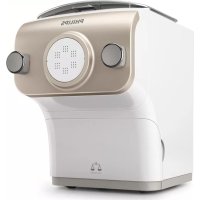
Avance Collection HR2381 - Pasta machine PHILIPS - Free user manual and instructions
Find the device manual for free Avance Collection HR2381 PHILIPS in PDF.


| Product type | Pasta maker |
| Brand | Philips |
| Model | Avance Collection HR2381 |
| Power supply | 220-240 V |
| Maximum flour capacity | 600 g |
| Minimum flour capacity | 200 g |
| Main functions | Pasta preparation with automatic weighing, extrusion, programs for plain pasta, egg pasta, flavored pasta, gluten-free pasta |
| Available programs | Plain pasta/noodles, wheat noodles, egg/flavored pasta, wheat pasta, carrot pasta, tomato pasta, soba, beet pasta |
| Special features | Automatic flour weighing, liquid quantity indicator, countdown timer |
| Included accessories | Shape discs (spaghetti, thick spaghetti, angel hair, fettuccine), mixing spatula, measuring cup, pasta cutter, cleaning brush, disc storage |
| Safety | Safety buttons on the lid, front panel, and disc holder; automatic stop when opened |
| Maintenance and cleaning | Removable parts washable with water; cleaning tool for discs; air drying for some discs |
| Repairability | Online support at www.philips.com/support, consumer service |
| Operating temperature | Room temperature |
Frequently Asked Questions - Avance Collection HR2381 PHILIPS
User questions about Avance Collection HR2381 PHILIPS
0 question about this device. Answer the ones you know or ask your own.
Ask a new question about this device
Download the instructions for your Pasta machine in PDF format for free! Find your manual Avance Collection HR2381 - PHILIPS and take your electronic device back in hand. On this page are published all the documents necessary for the use of your device. Avance Collection HR2381 by PHILIPS.
USER MANUAL Avance Collection HR2381 PHILIPS
100% recycled paper 100% recycled paper

| EN | User manual | 5 | LV | Lietotaja rokargatmata | 68 |
| CS | Uzhvatalska pitrutka 11 | NL | Gebrulsaanwijzing | 74 | |
| VA | Brugorvejledning 17 | NO | Brukerhändbeck | 80 | |
| DL | Bodierungenloistung 23 | PL | Pocretznik uzytkovnika | 86 | |
| FI | Erysipola xygjng. 30 | PT | Manual du utilization | 93 | |
| FS | Manuel de usoule 37 | RO | Manual du utilization | 99 | |
| HI | Käytökoos 43 | SK | Pozdvatalska prinuča | 105 | |
| HR | Mose d'emploi 48 | SV | Anstandhandack | 111 | |
| HJ | Fehneumskilakirkyrgy 55 | TR | Kullanım kivazou | 117 | |
| I | Manuale utileni | 61 |
Introduction
Congratulations on your purchase, and welcome to Philips!
To fully benefit from the support that Philips offers, register your product at www.philips.com/welcome.
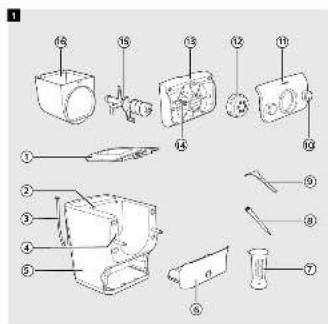
Product overview (Fig. 1)
| 1 | Mixing chamber lid | 9 | Pasta cutter |
| 2 | Safety switch hole of the mixing chamber lid | 10 | Front panel knobs |
| 3 | Power cord | 11 | Front panel |
| 4 | Disc holder safety switch | 12 | Shaping disc |
| 5 | Main unit | 13 | Disc holder |
| 6 | Shaping disc storage | 14 | Disc holder safety switch lever |
| 7 | Water cup | 15 | Mixing paddle |
| 8 | Cleaning brush | 16 | Mixing chamber |
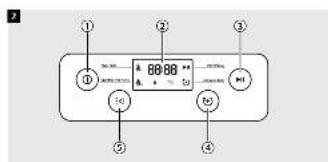
Control panel overview (Fig. 2)
| 1 | On/off button | 4 | Extrusion only button |
| 2 | Display | 5 | Program selection button |
| 3 | Start/pause button |
This appliance allows you to make the pasta you need in the way you want.
- Default pasta making function
1 Choose a program with the Program selection button, and then press the Start/pause button.
Applies when making pasta with the scaling function.
• Extrusion only function
1 Press the Extrusion only button, and then the Start/pause button.
Applies when there is leftover dough in the mixing chamber, and you want some extra extrusion.
- Skip-scaling function
1 Press and hold the Start/pause button for 5 seconds.
Applies when the device jumps into error mode or when you need to skip the scale function and start the mixing process directly.
Disassembling and cleaning before first use
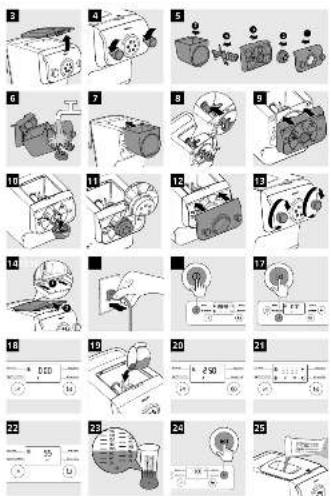
1 Remove the mixing chamber lid. (Fig. 3)
2 Loosen the front panel control knobs. (Fig. 4)
Note: The front panel is heavy. Take extra caution when removing it.
6 ENGLISH
3 Disassemble the front panel, the shaping disc, the shaping disc holder, the mixing paddle, and the mixing chamber in order. (Fig. 5)
4 Clean all detachable parts, and wipe them dry. (Fig. 6)
Assembling
1 Push the mixing chamber into the appliance. (Fig. 7)
2 Point the mixing paddle to the hole in the main unit. Insert the mixing paddle all the way into the main unit. (Fig. 8)
3 Attach the disc holder onto the appliance. (Fig. 9)
4 Put the shaping disc onto the disc holder, and make sure it is firmly fixed on the disc holder. (Fig. 10)
Note: Make sure the inner cavity of the shaping disc and disc holder is properly fitted. (Fig. 11)
5 Attach the front panel to the main unit. (Fig. 12)
Note:
- Make sure the front panel is completely fastened before using the appliance.
- The front panel is heavy. Take extra caution when assembling it.
6 Fasten the front panel control knobs. (Fig. 13)
Note: If the front panel or the shaping disc is not properly assembled, a safety switch will prevent the appliance from working.
7 Close the mixing chamber lid. (Fig. 14)
Note: If the mixing chamber lid is not properly installed, the safety switch will prevent the appliance from working.
Using the Pasta maker
Start preparation
1 Put the plug in the power socket. The pasta maker sound once, and all indicators flash once. (Fig. 15)
Note: Make sure that all the parts are well assembled before plugging in.
2 Press the On/off button to turn on the appliance. (Fig. 16)
3 Select the pasta type with the Program selection button. (Fig. 17)
| Program Tip Optional recipe | ||
| Plain pasta/noodle • Pasta with flour and water only | • Wheat noodle• Durum noodle | |
| Egg or flavoured pasta/ noodle | • Pasta with flour and egg liquid• All kinds of flavored pasta | • Wheat pasta• Durum pasta• Carrot pasta/noodle• Tomato pasta/noodle• Soba• Beet pasta/noodle |
Note: For more recipes, refer to the recipe book.
4 Remove the mixing chamber lid. (Fig. 3)
5 Wait until 0:00 displays on the screen. (Fig. 18)
6 Pour the flour into the chamber. (Fig. 19)
Note
- The appliance automatically weighs and displays the amount of flour. The weight measurement will blink until you are in the right range. (Fig. 20)
- Do not put less than 200g or more than 600g of flour in the chamber.
- Some recipes (for example cookies, gluten free pasta) require you to skip the weighing part. In this case, press the Start/pause button for 5 seconds, and the appliance will start mixing and extruding directly.
7 Close the chamber lid. (Fig. 14)
Note
- If you press a button without closing the lid, the chamber closing sign will appear. (Fig. 21)
- Insert the two hooks into the appliance first, and then push the lid against the main unit.
- The appliance will not start working if the chamber lid is not properly closed. During the pasta making process, if you open the chamber lid, the appliance will stop working. Assemble the lid and press the Start/pause button to start the operation again.
8 When the lid is closed, the needed amount of liquid is displayed. (Fig. 22)
9 Use the supplied water cup to measure the amount of liquid according to the indication on the display. (Fig. 23)
Note
• Make sure to measure the liquid volume at eye level on a flat surface.
- When making the egg mixture, crack the egg into the water cup. Add water up to the required amount, and then whisk the water and egg to combine.
- If preferred, 2 eggs can be used instead of 1, but make sure that the overall amount of liquid suggested is not exceeded.
- For a better accuracy please use a kitchen scale to measure the liquid.
Starting the pasta making program
1 Press the Start/pause button to start mixing, and the mixing time starts to count down. (Fig. 24)
2 After the mixing starts, slowly pour in the liquid along the entire length of the slot in the lid. (Fig. 25)
Note: During dough mixing, do not add other ingredients after you have poured in the liquid. Otherwise, it will affect the result of the pasta texture.
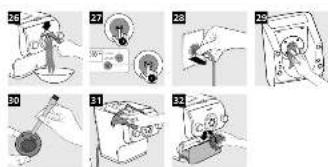
3 After the pasta maker finishes mixing, it will beep once and start extruding pasta after a few seconds. Use the pasta cutter to cut the pasta into the length you need.(Fig. 26)
Note: If the ratio of liquid and flour is not correct, the extrusion will not succeed. Please refer to the recipe book for more recipes.
4 After the pasta making is complete, if you notice some leftover dough inside the chamber, you can press the Extrusion only button first, and then press the Start/pause button for extra extrusion. (Fig. 27)
Note: The cooking time of the pasta varies depending on personal preferences, pasta shapes, and number of servings.
8 ENGLISH
Important!
The pasta recipes provided in the recipe book have been tested for success. If you experiment with or use other pasta recipes, the flour and water/egg ratios will need to be adjusted. The pasta maker will not operate successfully if you do not adjust the new recipe accordingly.
Note
- For good results, it is essential that the dough looks crumbly in the kneading chamber. If the dough looks crumbly, the recipe will work. The recipe will not work if the dough is too wet (looks like well-known dough consistency) or too dry (when the dough looks like flour only).
- Seasonal changes and using ingredients from different regions may affect the flour/water ratio. You may adjust based on the recommended proportion.
- When making gluten free pasta or cookies, do not follow the recommended liquid amount indicated by the appliance.
- When using legume flour or gluten free flour less water is needed than the recommendation. You may use about 10-20ml less for these recipes, but as mentioned above, there are changes depending on the type of flour.
- "Gluten" is a binder which ensures the pasta does not break easily, Gluten free flour does not contain a binder, therefore it needs a thickener to act as a "binder" eg. eggs or Xanthan. Various kinds of gluten free flour perform differently when making pasta. Some flours are not suitable for making pasta such as coconut flour, some flour types work well, such as quinoa and buckwheat.
- When making egg pasta or vegetable pasta, make sure you whisk the egg mixture or vegetable juice evenly with the water before pouring into the chamber through the slot in the lid. When adding ingredients, make sure the ingredient is in a liquid form.
• See the recipe book provided for additional pasta recipe variations.
Cleaning
1 Disconnect the plug from the power outlet. (Fig. 28)
2 Remove the mixing chamber lid. (Fig. 3)
3 Loosen the front panel control knobs. (Fig. 4)
Note: The front panel is heavy. Take extra caution when removing it.
4 Disassemble the front panel, the shaping disc, the shaping disc holder, the mixing paddle, and the mixing chamber in order. (Fig. 5)
5 Use a dry cloth to clean flour residue on the main unit. (Fig. 29)
6 Clean the shaping disc with the supplied cleaning tool to remove the dough residues. After that, you can clean it with water. (Fig. 30)
Note: For the spaghetti, thick spaghetti, angel hair and fettuccine shaping discs, let the discs air-dry 2 to 4 hours. Then use the corresponding cleaning tool to poke out the dough in the holes.
7 Clean all detachable parts, and wipe them dry. (Fig. 6)
8 Use a dry cloth to clean the control panel, and the exterior of the pasta maker. (Fig. 31)
Storage
1 Unplug the appliance and let it cool down.
Note: Make sure all parts are clean and dry before storing.
2 You can store the shaping discs in the storage drawer. (Fig. 32)
Troubleshooting
This chapter summarizes the most common problems you could encounter with the appliance. If you are unable to solve the problem with the information below, visit www.philips.com/support for a list of frequently asked questions or contact the Consumer Care Center in your country.
| Problem Cause Solution | ||
| The indicators do not light up. | The power plug is not connected correctly. | Check whether the power plug is plugged correctly and the outlet is working properly. |
| After pressing the On/off button the appliance sounds but does not work. | The mixing chamber, the shaping disc, or the front panel is assembled incorrectly. | Make sure you follow the user manual to assemble all parts correctly. |
| The safety switch is triggered and the appliance suddenly stopped or suddenly restarts during the processing. | The front panel knob is loose. | Make sure the front panel is securely assembled. |
| Excessive ingredients in the pasta maker. | The maximum amount of flour used for each batch is 600g. If more than 600g is added, reduce the amount of flour before next batch. | |
| During processing, the appliance stops working when you open the lid. | For safety reasons, the appliance always stops working when the lid is opened during processing. | If you need to resume the previous operation, close the lid properly, and press the Start/pause button. |
| During processing, the appliance stops. There is no alarm sound or flashes. | The pasta maker has overheated due to long continuous working time. | Disconnect from the power source, and allow the pasta maker to cool down. To better protect the lifetime of the appliance, the continuous working time should be less than 45 minutes. You can restart using the appliance after 15 minutes of rest. |
| When weighing the flour, the weight shown on the screen changes all the time. | You are touching the appliance or the power cord. | When the appliance is weighing the flour, do not touch the appliance or the power cord. |
| Small amount of water is leaking out from the appliance. | Water is added before the program starts. | Follow the user manual instructions to add water right after the program starts. |
| Unable to make pasta successfully with the liquid calculation function. | The required liquid amount indicated on the display screen does not apply to some recipes (for example cookies, gluten free pasta). | These recipes require you to skip the liquid calculation part. In this case, press the Start/pause button for 5 seconds, and the appliance will start mixing and extruding directly. |
| E1 displays on the screen. | The shaping disc is not attached. | Attach the disc holder to the main unit, attach the shaping disc properly and fix the front panel properly to the device. |
| The lid is not in place or not properly attached. | Attach the lid properly. | |
| The appliance stops during processing, E2 displays on the screen, the indicators are flashing quickly, and the alarm sounds. | The mixing paddle may be blocked by some foreign objects. | Disconnect from the power source, clean the pasta maker, and follow the user manual again to restart the pasta making. |
| The dough may be too dry. | ||
| The wrong program is selected. | ||
| EEE displays on the screen. | The appliance malfunctions. | Contact the service center. |
Úvod


Brand : PHILIPS
Model : Avance Collection HR2381
Category : Pasta machine